Advanced Effects
in Java Desktop
Applications

Kirill Grouchnikov, Senior Software
Engineer, Amdocs
kirillcool@yahoo.com
http://www.pushing-pixels.org
OSCON 2007
Agenda
                                 •Swing pipeline
                                 •Hooking into the pipeline
                                   •RepaintManager
                                   •Playing with opacity
                                   •Glass pane
                                   •Layering in UI delegates
                                 •Rainbow demo
                                 •Q&A


Kirill Grouchnikov, Advanced Effects in Java Desktop Applications
Swing basics
 - UI toolkit for Java applications
 - What is a lightweight component?
     - Very flexible
     - Provides a lot of hooks for custom behavior
     - Not trivial to implement
 - Heavyweight counterparts – AWT and SWT


Kirill Grouchnikov, Advanced Effects in Java Desktop Applications
Swing painting pipeline
 - Three major “participants”
     - JComponent
     - RepaintManager
     - ComponentUI
 - Provide various hooks to customize behavior
 - Vary in flexibility, robustness and ease of use


Kirill Grouchnikov, Advanced Effects in Java Desktop Applications
Swing painting pipeline – part I
      JComponent                         RepaintManager
   repaint()                             addDirtyRegion()
                                           •Coalesce repaints
                                           •Create an event
                                           •Queue event on EDT


  paintImmediately()                     paintDirtyRegions() EDT gets to the
                                                                    queued event
    •Opacity checks
    •Double-buffering
    paint()


Kirill Grouchnikov, Advanced Effects in Java Desktop Applications
Swing painting pipeline – part II
          JComponent                                     ComponentUI
   paint()
       paintComponent()
                                                    update()
                                                       paint()


        paintBorder()
        paintChildren()


Kirill Grouchnikov, Advanced Effects in Java Desktop Applications
Swing pipeline hooks
 - JComponent
     - Override paint or paintComponent
     - Or even repaint or paintImmediately
 - RepaintManager
     - Install a custom implementation (singleton)
 - ComponentUI
     - Provide custom painting for a specific component class


Kirill Grouchnikov, Advanced Effects in Java Desktop Applications
What we can achieve?
 - Translucency
 - Non-rectangular components
 - Layering
 - Image filtering
 - Animation


Kirill Grouchnikov, Advanced Effects in Java Desktop Applications
Agenda
                                 •Swing pipeline
                                 •Hooking into the pipeline
                                   •RepaintManager
                                   •Playing with opacity
                                   •Glass pane
                                   •Layering in UI delegates
                                 •Rainbow demo
                                 •Q&A


Kirill Grouchnikov, Advanced Effects in Java Desktop Applications
Swing painting pipeline hooks
      JComponent                         RepaintManager
   repaint()                             addDirtyRegion()
                                           •Coalesce repaints
                                           •Create an event
                                           •Queue event on EDT


  paintImmediately()                     paintDirtyRegions() EDT gets to the
                                                                    queued event
    •Opacity checks
    •Double-buffering
    paint()


Kirill Grouchnikov, Advanced Effects in Java Desktop Applications
RepaintManager example
 - SwingX project
 - JXPanel that provides translucency
     - setAlpha(float)
     - using RepaintManagerX – see code


Kirill Grouchnikov, Advanced Effects in Java Desktop Applications
There can be only one (singleton)
    class JXPanel {
       public void setAlpha(float alpha) {
          if (alpha > 0f && alpha < 1f) {
            ...
            RepaintManager.setCurrentManager(
                new RepaintManagerX());
          }
        }


Kirill Grouchnikov, Advanced Effects in Java Desktop Applications
Agenda
                                 •Swing pipeline
                                 •Hooking into the pipeline
                                   •RepaintManager
                                   •Playing with opacity
                                   •Glass pane
                                   •Layering in UI delegates
                                 •Rainbow demo
                                 •Q&A


Kirill Grouchnikov, Advanced Effects in Java Desktop Applications
Swing painting pipeline hooks
      JComponent                         RepaintManager
   repaint()                             addDirtyRegion()
                                           •Coalesce repaints
                                           •Create an event
                                           •Queue event on EDT


  paintImmediately()                     paintDirtyRegions() EDT gets to the
                                                                    queued event
    •Opacity checks
    •Double-buffering
    paint()


Kirill Grouchnikov, Advanced Effects in Java Desktop Applications
Opacity basics - setOpaque
   - setOpaque(false) == “draw stuff behind me”
      - Useful for translucent or non-rectangular
        components
   - setOpaque(true) == “I’ll handle it”
      - During repainting of an opaque component
        Swing does not repaint any components behind


Kirill Grouchnikov, Advanced Effects in Java Desktop Applications
Transition effects using opacity
   - UIs changes are immediate
      - Showing / hiding a control
      - Moving a control to new location
      - Tab switch
   - Solution – use transitions (cross fades, fly-in / out)
   - Making controls non-opaque to enable the transition effects


Kirill Grouchnikov, Advanced Effects in Java Desktop Applications
DEMO
 Transition layout demo


Kirill Grouchnikov, Advanced Effects in Java Desktop Applications
Transition layout manager
    TransitionLayoutManager.getInstance().
          track(myTabbedPane, true);
    TransitionLayoutManager.getInstance().
          track(myPanel, true);

    - Play with opacity (set to false during animation cycle)
    - Set translucency (for fades)
    - Custom layout manager (for sliding effects)


Kirill Grouchnikov, Advanced Effects in Java Desktop Applications
Transition scenarios
    - Remains visible and has the same bounds
    - Remains visible and has different bounds
    - Becomes invisible
    - Added or becomes visible
    - Remains invisible


Kirill Grouchnikov, Advanced Effects in Java Desktop Applications
Agenda
                                 •Swing pipeline
                                 •Hooking into the pipeline
                                   •RepaintManager
                                   •Playing with opacity
                                   •Glass pane
                                   •Layering in UI delegates
                                 •Rainbow demo
                                 •Q&A


Kirill Grouchnikov, Advanced Effects in Java Desktop Applications
Swing painting pipeline hooks
          JComponent                                     ComponentUI
   paint()
       paintComponent()
                                                    update()
                                                       paint()


        paintBorder()
        paintChildren()


Kirill Grouchnikov, Advanced Effects in Java Desktop Applications
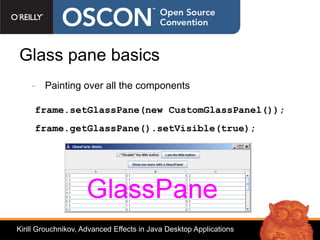
Glass pane basics
    - Painting over all the components

     frame.setGlassPane(new CustomGlassPanel());
     frame.getGlassPane().setVisible(true);


Kirill Grouchnikov, Advanced Effects in Java Desktop Applications
Glass pane
    - Pros
       - Does not affect component's state
    - Cons
       - Global resource (for a frame)
       - Everything is repainted (performance)


Kirill Grouchnikov, Advanced Effects in Java Desktop Applications
JXLayer overview
  - It is a component wrapper like JScrollPane
     - You have access to the wrapped component's state
  - It does not use glassPane from the frame
     - It has its own a transparent panel on the top
  - JXLayer.paint() delegates all painting to the painter
     - A flexible way to modify component's appearance


Kirill Grouchnikov, Advanced Effects in Java Desktop Applications
JXLayer overview
    - Painters API
    - Image filtering
    - Translucency
       - PainterModel.setAlpha(float)
    - Non-rectangular components
       - MouseEvents filtering


Kirill Grouchnikov, Advanced Effects in Java Desktop Applications
Agenda
                                 •Swing pipeline
                                 •Hooking into the pipeline
                                   •RepaintManager
                                   •Playing with opacity
                                   •Glass pane
                                   •Layering in UI delegates
                                 •Rainbow demo
                                 •Q&A


Kirill Grouchnikov, Advanced Effects in Java Desktop Applications
Swing painting pipeline hooks
          JComponent                                     ComponentUI
   paint()
       paintComponent()
                                                    update()
                                                       paint()


        paintBorder()          [*]
        paintChildren() [*]


Kirill Grouchnikov, Advanced Effects in Java Desktop Applications
UI delegates basics
   - UI delegates – classes responsible for painting Swing
     components.
      - JPanel – PanelUI delegate [*]
      - JButton – ButtonUI delegate [*]
      - ... (41 different UI delegates)
   - Provide flexible control over painting different visual layers
     of Swing components


Kirill Grouchnikov, Advanced Effects in Java Desktop Applications
UI delegate flow
          JComponent                                        ButtonUI
   paint()
       paintComponent()
                                                    update()
                                                       paint()

                                                          paintIcon()
                                                          paintText()
                                                          paintFocus()
        paintBorder()
        paintChildren()


Kirill Grouchnikov, Advanced Effects in Java Desktop Applications
Alternatives
 - Repaint manager and glass pane - much higher level
 - UI delegate can
    - Add drop shadow to the button text
    - And get all the rest from the core implementation
 - Opens the field to a wide array of effects
    - Ghost images / springs
    - Ripples
    - ...
Kirill Grouchnikov, Advanced Effects in Java Desktop Applications
DEMO
 Ghost effects


Kirill Grouchnikov, Advanced Effects in Java Desktop Applications
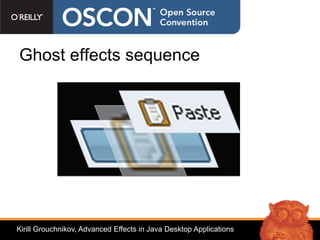
Ghost effects sequence


Kirill Grouchnikov, Advanced Effects in Java Desktop Applications
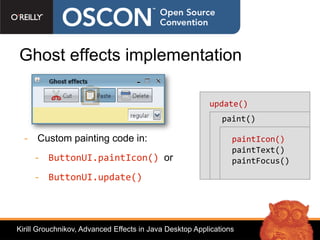
Ghost effects implementation

                                                         update()
                                                             paint()

  - Custom painting code in:                                    paintIcon()
                                                                paintText()
     - ButtonUI.paintIcon() or                                  paintFocus()
     - ButtonUI.update()


Kirill Grouchnikov, Advanced Effects in Java Desktop Applications
Ghost effects eye candy
                  Icon ghosting over multiple components


Kirill Grouchnikov, Advanced Effects in Java Desktop Applications
Ghost effects
    - Pros
        - Minimal changes in the application code.
        - No need for custom painting code
        - Available under multiple look and feels (use
          bytecode injection)
    - Cons
        - Custom paintComponent implementations


Kirill Grouchnikov, Advanced Effects in Java Desktop Applications
Agenda
                                 •Swing pipeline
                                 •Hooking into the pipeline
                                   •RepaintManager
                                   •Playing with opacity
                                   •Glass pane
                                   •Layering in UI delegates
                                 •Rainbow demo
                                 •Q&A


Kirill Grouchnikov, Advanced Effects in Java Desktop Applications
DEMO
    Rainbow demo


         https://rainbow.dev.java.net

        Sources + WebStart link


Kirill Grouchnikov, Advanced Effects in Java Desktop Applications
Links
  - JXLayer project https://swinghelper.dev.java.net/
  - Laf-Widget project http://laf-widget.dev.java.net
  - SwingX project http://swingx.dev.java.net/


  - Old blog http://weblogs.java.net/blog/kirillcool/
  - New blog http://www.pushing-pixels.org


Kirill Grouchnikov, Advanced Effects in Java Desktop Applications
Q&A
    Kirill Grouchnikov
    kirillcool@yahoo.com


Kirill Grouchnikov, Advanced Effects in Java Desktop Applications

Advanced Effects Oscon 2007

  • 1.
    Advanced Effects in JavaDesktop Applications Kirill Grouchnikov, Senior Software Engineer, Amdocs kirillcool@yahoo.com http://www.pushing-pixels.org OSCON 2007
  • 2.
    Agenda •Swing pipeline •Hooking into the pipeline •RepaintManager •Playing with opacity •Glass pane •Layering in UI delegates •Rainbow demo •Q&A Kirill Grouchnikov, Advanced Effects in Java Desktop Applications
  • 3.
    Swing basics -UI toolkit for Java applications - What is a lightweight component? - Very flexible - Provides a lot of hooks for custom behavior - Not trivial to implement - Heavyweight counterparts – AWT and SWT Kirill Grouchnikov, Advanced Effects in Java Desktop Applications
  • 4.
    Swing painting pipeline - Three major “participants” - JComponent - RepaintManager - ComponentUI - Provide various hooks to customize behavior - Vary in flexibility, robustness and ease of use Kirill Grouchnikov, Advanced Effects in Java Desktop Applications
  • 5.
    Swing painting pipeline– part I JComponent RepaintManager repaint() addDirtyRegion() •Coalesce repaints •Create an event •Queue event on EDT paintImmediately() paintDirtyRegions() EDT gets to the queued event •Opacity checks •Double-buffering paint() Kirill Grouchnikov, Advanced Effects in Java Desktop Applications
  • 6.
    Swing painting pipeline– part II JComponent ComponentUI paint() paintComponent() update() paint() paintBorder() paintChildren() Kirill Grouchnikov, Advanced Effects in Java Desktop Applications
  • 7.
    Swing pipeline hooks - JComponent - Override paint or paintComponent - Or even repaint or paintImmediately - RepaintManager - Install a custom implementation (singleton) - ComponentUI - Provide custom painting for a specific component class Kirill Grouchnikov, Advanced Effects in Java Desktop Applications
  • 8.
    What we canachieve? - Translucency - Non-rectangular components - Layering - Image filtering - Animation Kirill Grouchnikov, Advanced Effects in Java Desktop Applications
  • 9.
    Agenda •Swing pipeline •Hooking into the pipeline •RepaintManager •Playing with opacity •Glass pane •Layering in UI delegates •Rainbow demo •Q&A Kirill Grouchnikov, Advanced Effects in Java Desktop Applications
  • 10.
    Swing painting pipelinehooks JComponent RepaintManager repaint() addDirtyRegion() •Coalesce repaints •Create an event •Queue event on EDT paintImmediately() paintDirtyRegions() EDT gets to the queued event •Opacity checks •Double-buffering paint() Kirill Grouchnikov, Advanced Effects in Java Desktop Applications
  • 11.
    RepaintManager example -SwingX project - JXPanel that provides translucency - setAlpha(float) - using RepaintManagerX – see code Kirill Grouchnikov, Advanced Effects in Java Desktop Applications
  • 12.
    There can beonly one (singleton) class JXPanel { public void setAlpha(float alpha) { if (alpha > 0f && alpha < 1f) { ... RepaintManager.setCurrentManager( new RepaintManagerX()); } } Kirill Grouchnikov, Advanced Effects in Java Desktop Applications
  • 13.
    Agenda •Swing pipeline •Hooking into the pipeline •RepaintManager •Playing with opacity •Glass pane •Layering in UI delegates •Rainbow demo •Q&A Kirill Grouchnikov, Advanced Effects in Java Desktop Applications
  • 14.
    Swing painting pipelinehooks JComponent RepaintManager repaint() addDirtyRegion() •Coalesce repaints •Create an event •Queue event on EDT paintImmediately() paintDirtyRegions() EDT gets to the queued event •Opacity checks •Double-buffering paint() Kirill Grouchnikov, Advanced Effects in Java Desktop Applications
  • 15.
    Opacity basics -setOpaque - setOpaque(false) == “draw stuff behind me” - Useful for translucent or non-rectangular components - setOpaque(true) == “I’ll handle it” - During repainting of an opaque component Swing does not repaint any components behind Kirill Grouchnikov, Advanced Effects in Java Desktop Applications
  • 16.
    Transition effects usingopacity - UIs changes are immediate - Showing / hiding a control - Moving a control to new location - Tab switch - Solution – use transitions (cross fades, fly-in / out) - Making controls non-opaque to enable the transition effects Kirill Grouchnikov, Advanced Effects in Java Desktop Applications
  • 17.
    DEMO Transition layoutdemo Kirill Grouchnikov, Advanced Effects in Java Desktop Applications
  • 18.
    Transition layout manager TransitionLayoutManager.getInstance(). track(myTabbedPane, true); TransitionLayoutManager.getInstance(). track(myPanel, true); - Play with opacity (set to false during animation cycle) - Set translucency (for fades) - Custom layout manager (for sliding effects) Kirill Grouchnikov, Advanced Effects in Java Desktop Applications
  • 19.
    Transition scenarios - Remains visible and has the same bounds - Remains visible and has different bounds - Becomes invisible - Added or becomes visible - Remains invisible Kirill Grouchnikov, Advanced Effects in Java Desktop Applications
  • 20.
    Agenda •Swing pipeline •Hooking into the pipeline •RepaintManager •Playing with opacity •Glass pane •Layering in UI delegates •Rainbow demo •Q&A Kirill Grouchnikov, Advanced Effects in Java Desktop Applications
  • 21.
    Swing painting pipelinehooks JComponent ComponentUI paint() paintComponent() update() paint() paintBorder() paintChildren() Kirill Grouchnikov, Advanced Effects in Java Desktop Applications
  • 22.
    Glass pane basics - Painting over all the components frame.setGlassPane(new CustomGlassPanel()); frame.getGlassPane().setVisible(true); Kirill Grouchnikov, Advanced Effects in Java Desktop Applications
  • 23.
    Glass pane - Pros - Does not affect component's state - Cons - Global resource (for a frame) - Everything is repainted (performance) Kirill Grouchnikov, Advanced Effects in Java Desktop Applications
  • 24.
    JXLayer overview - It is a component wrapper like JScrollPane - You have access to the wrapped component's state - It does not use glassPane from the frame - It has its own a transparent panel on the top - JXLayer.paint() delegates all painting to the painter - A flexible way to modify component's appearance Kirill Grouchnikov, Advanced Effects in Java Desktop Applications
  • 25.
    JXLayer overview - Painters API - Image filtering - Translucency - PainterModel.setAlpha(float) - Non-rectangular components - MouseEvents filtering Kirill Grouchnikov, Advanced Effects in Java Desktop Applications
  • 26.
    Agenda •Swing pipeline •Hooking into the pipeline •RepaintManager •Playing with opacity •Glass pane •Layering in UI delegates •Rainbow demo •Q&A Kirill Grouchnikov, Advanced Effects in Java Desktop Applications
  • 27.
    Swing painting pipelinehooks JComponent ComponentUI paint() paintComponent() update() paint() paintBorder() [*] paintChildren() [*] Kirill Grouchnikov, Advanced Effects in Java Desktop Applications
  • 28.
    UI delegates basics - UI delegates – classes responsible for painting Swing components. - JPanel – PanelUI delegate [*] - JButton – ButtonUI delegate [*] - ... (41 different UI delegates) - Provide flexible control over painting different visual layers of Swing components Kirill Grouchnikov, Advanced Effects in Java Desktop Applications
  • 29.
    UI delegate flow JComponent ButtonUI paint() paintComponent() update() paint() paintIcon() paintText() paintFocus() paintBorder() paintChildren() Kirill Grouchnikov, Advanced Effects in Java Desktop Applications
  • 30.
    Alternatives - Repaintmanager and glass pane - much higher level - UI delegate can - Add drop shadow to the button text - And get all the rest from the core implementation - Opens the field to a wide array of effects - Ghost images / springs - Ripples - ... Kirill Grouchnikov, Advanced Effects in Java Desktop Applications
  • 31.
    DEMO Ghost effects KirillGrouchnikov, Advanced Effects in Java Desktop Applications
  • 32.
    Ghost effects sequence KirillGrouchnikov, Advanced Effects in Java Desktop Applications
  • 33.
    Ghost effects implementation update() paint() - Custom painting code in: paintIcon() paintText() - ButtonUI.paintIcon() or paintFocus() - ButtonUI.update() Kirill Grouchnikov, Advanced Effects in Java Desktop Applications
  • 34.
    Ghost effects eyecandy Icon ghosting over multiple components Kirill Grouchnikov, Advanced Effects in Java Desktop Applications
  • 35.
    Ghost effects - Pros - Minimal changes in the application code. - No need for custom painting code - Available under multiple look and feels (use bytecode injection) - Cons - Custom paintComponent implementations Kirill Grouchnikov, Advanced Effects in Java Desktop Applications
  • 36.
    Agenda •Swing pipeline •Hooking into the pipeline •RepaintManager •Playing with opacity •Glass pane •Layering in UI delegates •Rainbow demo •Q&A Kirill Grouchnikov, Advanced Effects in Java Desktop Applications
  • 37.
    DEMO Rainbow demo https://rainbow.dev.java.net Sources + WebStart link Kirill Grouchnikov, Advanced Effects in Java Desktop Applications
  • 38.
    Links -JXLayer project https://swinghelper.dev.java.net/ - Laf-Widget project http://laf-widget.dev.java.net - SwingX project http://swingx.dev.java.net/ - Old blog http://weblogs.java.net/blog/kirillcool/ - New blog http://www.pushing-pixels.org Kirill Grouchnikov, Advanced Effects in Java Desktop Applications
  • 39.
    Q&A Kirill Grouchnikov kirillcool@yahoo.com Kirill Grouchnikov, Advanced Effects in Java Desktop Applications