How to determine the number of subnets and the
                number of hosts per subnet
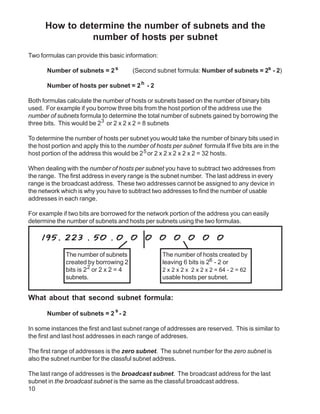
Two formulas can provide this basic information:

       Number of subnets = 2 s           (Second subnet formula: Number of subnets = 2s - 2)

       Number of hosts per subnet = 2 h - 2

Both formulas calculate the number of hosts or subnets based on the number of binary bits
used. For example if you borrow three bits from the host portion of the address use the
number of subnets formula to determine the total number of subnets gained by borrowing the
three bits. This would be 23 or 2 x 2 x 2 = 8 subnets

To determine the number of hosts per subnet you would take the number of binary bits used in
the host portion and apply this to the number of hosts per subnet formula If five bits are in the
host portion of the address this would be 2 5 or 2 x 2 x 2 x 2 x 2 = 32 hosts.

When dealing with the number of hosts per subnet you have to subtract two addresses from
the range. The first address in every range is the subnet number. The last address in every
range is the broadcast address. These two addresses cannot be assigned to any device in
the network which is why you have to subtract two addresses to find the number of usable
addresses in each range.

For example if two bits are borrowed for the network portion of the address you can easily
determine the number of subnets and hosts per subnets using the two formulas.

    195. 223 . 50 . 0                    0   0     0    0    0     0     0

              The number of subnets                The number of hosts created by
              created by borrowing 2               leaving 6 bits is 26 - 2 or
              bits is 2 2 or 2 x 2 = 4             2 x 2 x 2 x 2 x 2 x 2 = 64 - 2 = 62
              subnets.                             usable hosts per subnet.


What about that second subnet formula:
                                 s
       Number of subnets = 2 - 2

In some instances the first and last subnet range of addresses are reserved. This is similar to
the first and last host addresses in each range of addreses.

The first range of addresses is the zero subnet. The subnet number for the zero subnet is
also the subnet number for the classful subnet address.

The last range of addresses is the broadcast subnet. The broadcast address for the last
subnet in the broadcast subnet is the same as the classful broadcast address.
10
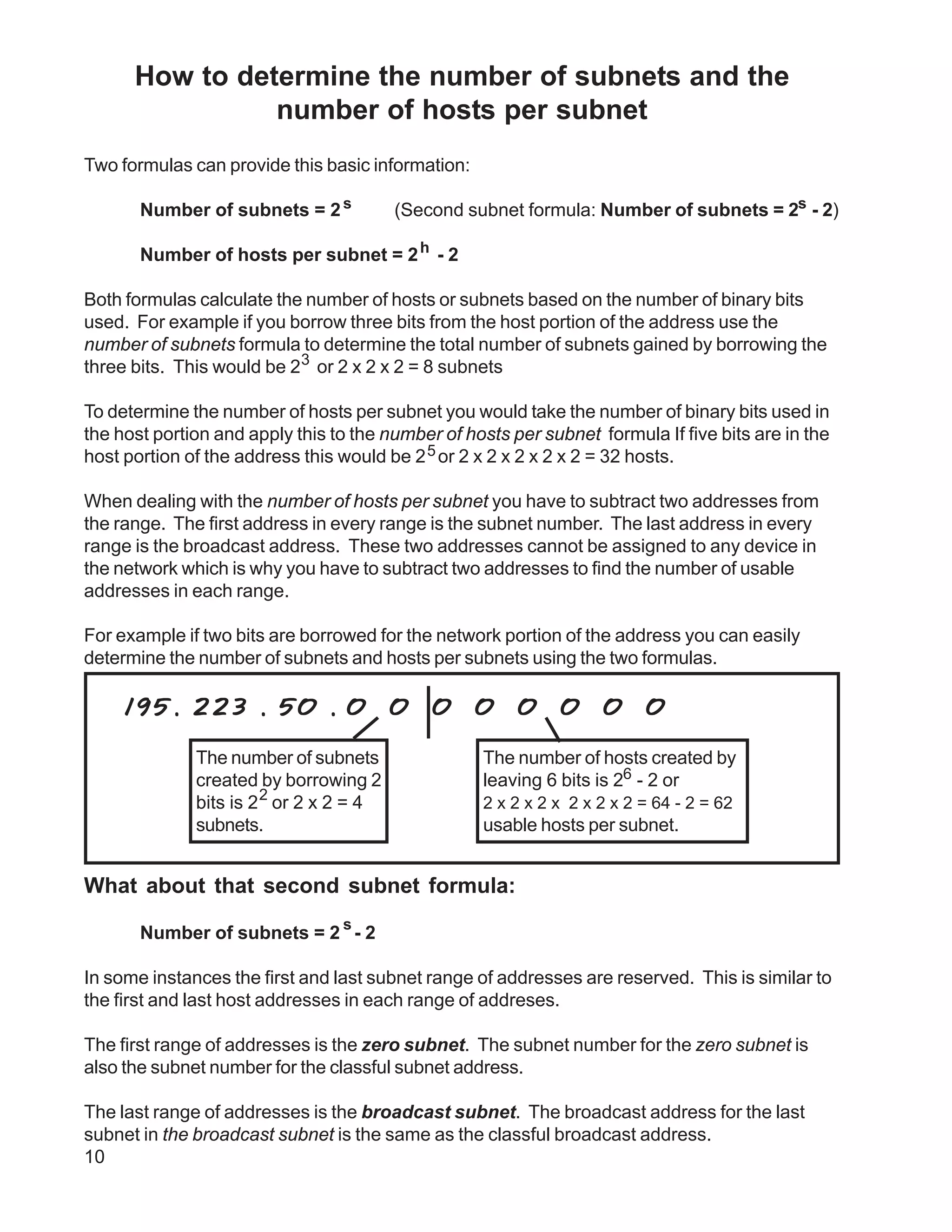
Class C Address unsubnetted:

195. 223 . 50 . 0

195.223.50.0                to   195.223.50.255
                                                                    Notice that the subnet and
                                                                    broadcast addresses match.
Class C Address subnetted (2 bits borrowed):

 195. 223 . 50 . 0                 0    0    0     0       0   0     0

 (Invalid range) (0) 195.223.50.0                              to     195.223.50.63
                 (1) 195.223.50.64                             to     195.223.50.127
                 (2) 195.223.50.128                            to     195.223.50.191
 (Invalid range) (3) 195.223.50.192                            to     195.223.50.255


The primary reason the the zero and broadcast subnets were not used had to do pirmarily with
the broadcast addresses. If you send a broadcast to 195.223.255 are you sending it to all 255
addresses in the classful C address or just the 62 usable addresses in the broadcast range?

The CCNA and CCENT certification exams may have questions which will require you to
determine which formula to use, and whehter or not you can use the first and last subnets. Use
the chart below to help decide.


    When to use which formula to determine the number of subnets
           s                                               s
 Use the 2 - 2 formula and don’t use the        Use the 2 formula and use the zero and
 zero and broadcast ranges if...                broadcast ranges if...

 Classful routing is used                       Classless routing or VLSM is used

 RIP version 1 is used                          RIP version 2, EIGRP, or OSPF is used

 The no ip subnet zero command is               The ip subnet zero command is
 configured on your router                      configured on your router (default setting)

                                                No other clues are given


Bottom line for the CCNA exams; if a question does not give you any clues as to whether or not
to allow these two subnets, assume you can use them.
                                                       s
This workbook has you use the number of subnets = 2 formula.


                                                                                              11
ANDING With
                                    Custom subnet masks

When you take a single network such as 192.100.10.0 and divide it into five smaller networks
(192.100.10.16, 192.100.10.32, 192.100.10.48, 192.100.10.64, 192.100.10.80) the outside
world still sees the network as 192.100.10.0, but the internal computers and routers see five
smaller subnetworks. Each independent of the other. This can only be accomplished by using
a custom subnet mask. A custom subnet mask borrows bits from the host portion of the
address to create a subnetwork address between the network and host portions of an IP
address. In this example each range has 14 usable addresses in it. The computer must still
AND the IP address against the custom subnet mask to see what the network portion is and
which subnetwork it belongs to.

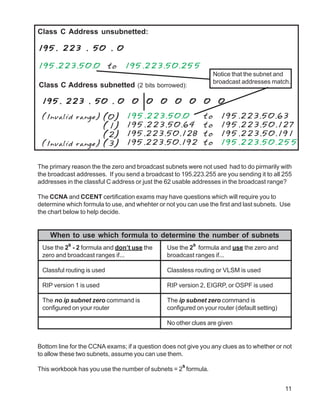
        IP Address:                     192 . 100 . 10 . 0
        Custom Subnet Mask:             255.255.255.240

        Address Ranges:         192.10.10.0 to 192.100.10.15
                                192.100.10.16 to 192.100.10.31
                                192.100.10.32 to 192.100.10.47 (Range in the sample below)
                                192.100.10.48 to 192.100.10.63
                                192.100.10.64 to 192.100.10.79
                                192.100.10.80 to 192.100.10.95
                                192.100.10.96 to 192.100.10.111
                                192.100.10.112 to 192.100.10.127
                                192.100.10.128 to 192.100.10.143
                                192.100.10.144 to 192.100.10.159
                                192.100.10.160 to 192.100.10.175
                                192.100.10.176 to 192.100.10.191
                                192.100.10.192 to 192.100.10.207
                                192.100.10.208 to 192.100.10.223
                                192.100.10.224 to 192.100.10.239
                                192.100.10.240 to 192.100.10.255

                                                                              Sub
                                             Network                        Network Host
       IP Address: 1 1 0 0 0 0 0 0 . 0 1 1 0 0 1 0 0 . 0 0 0 0 1 0 1 0 . 0 0 1 0 0 0 0 1 (192 . 100 . 10 . 33)
Custom Subnet Mask: 1 1 1 1 1 1 1 1 . 0 1 1 1 1 1 1 1 . 1 1 1 1 1 1 1 1 . 1 1 1 1 0 0 0 0 (255 . 255 . 255 . 240)
              AND: 1 1 0 0 0 0 0 0 . 0 1 1 0 0 1 0 0 . 0 0 0 0 1 0 1 0 . 0 0 1 0 0 0 0 0 (192 . 100 . 10 . 32)

                                     Four bits borrowed from the host
                                     portion of the address for the
                                     custom subnet mask.
                                                         The ANDING process of the four borrowed bits
                                                         shows which range of IP addresses this
                                                         particular address will fall into.


In the next set of problems you will determine the necessary information to determine the
correct subnet mask for a variety of IP addresses.
                                                                                                         9
Produced by: Robb Jones
jonesr@careertech.net
Frederick County Career & Technology Center
Cisco Networking Academy
Frederick County Public Schools
Frederick, Maryland, USA

Subnetting Principles

  • 1.
    How to determinethe number of subnets and the number of hosts per subnet Two formulas can provide this basic information: Number of subnets = 2 s (Second subnet formula: Number of subnets = 2s - 2) Number of hosts per subnet = 2 h - 2 Both formulas calculate the number of hosts or subnets based on the number of binary bits used. For example if you borrow three bits from the host portion of the address use the number of subnets formula to determine the total number of subnets gained by borrowing the three bits. This would be 23 or 2 x 2 x 2 = 8 subnets To determine the number of hosts per subnet you would take the number of binary bits used in the host portion and apply this to the number of hosts per subnet formula If five bits are in the host portion of the address this would be 2 5 or 2 x 2 x 2 x 2 x 2 = 32 hosts. When dealing with the number of hosts per subnet you have to subtract two addresses from the range. The first address in every range is the subnet number. The last address in every range is the broadcast address. These two addresses cannot be assigned to any device in the network which is why you have to subtract two addresses to find the number of usable addresses in each range. For example if two bits are borrowed for the network portion of the address you can easily determine the number of subnets and hosts per subnets using the two formulas. 195. 223 . 50 . 0 0 0 0 0 0 0 0 The number of subnets The number of hosts created by created by borrowing 2 leaving 6 bits is 26 - 2 or bits is 2 2 or 2 x 2 = 4 2 x 2 x 2 x 2 x 2 x 2 = 64 - 2 = 62 subnets. usable hosts per subnet. What about that second subnet formula: s Number of subnets = 2 - 2 In some instances the first and last subnet range of addresses are reserved. This is similar to the first and last host addresses in each range of addreses. The first range of addresses is the zero subnet. The subnet number for the zero subnet is also the subnet number for the classful subnet address. The last range of addresses is the broadcast subnet. The broadcast address for the last subnet in the broadcast subnet is the same as the classful broadcast address. 10
  • 2.
    Class C Addressunsubnetted: 195. 223 . 50 . 0 195.223.50.0 to 195.223.50.255 Notice that the subnet and broadcast addresses match. Class C Address subnetted (2 bits borrowed): 195. 223 . 50 . 0 0 0 0 0 0 0 0 (Invalid range) (0) 195.223.50.0 to 195.223.50.63 (1) 195.223.50.64 to 195.223.50.127 (2) 195.223.50.128 to 195.223.50.191 (Invalid range) (3) 195.223.50.192 to 195.223.50.255 The primary reason the the zero and broadcast subnets were not used had to do pirmarily with the broadcast addresses. If you send a broadcast to 195.223.255 are you sending it to all 255 addresses in the classful C address or just the 62 usable addresses in the broadcast range? The CCNA and CCENT certification exams may have questions which will require you to determine which formula to use, and whehter or not you can use the first and last subnets. Use the chart below to help decide. When to use which formula to determine the number of subnets s s Use the 2 - 2 formula and don’t use the Use the 2 formula and use the zero and zero and broadcast ranges if... broadcast ranges if... Classful routing is used Classless routing or VLSM is used RIP version 1 is used RIP version 2, EIGRP, or OSPF is used The no ip subnet zero command is The ip subnet zero command is configured on your router configured on your router (default setting) No other clues are given Bottom line for the CCNA exams; if a question does not give you any clues as to whether or not to allow these two subnets, assume you can use them. s This workbook has you use the number of subnets = 2 formula. 11
  • 3.
    ANDING With Custom subnet masks When you take a single network such as 192.100.10.0 and divide it into five smaller networks (192.100.10.16, 192.100.10.32, 192.100.10.48, 192.100.10.64, 192.100.10.80) the outside world still sees the network as 192.100.10.0, but the internal computers and routers see five smaller subnetworks. Each independent of the other. This can only be accomplished by using a custom subnet mask. A custom subnet mask borrows bits from the host portion of the address to create a subnetwork address between the network and host portions of an IP address. In this example each range has 14 usable addresses in it. The computer must still AND the IP address against the custom subnet mask to see what the network portion is and which subnetwork it belongs to. IP Address: 192 . 100 . 10 . 0 Custom Subnet Mask: 255.255.255.240 Address Ranges: 192.10.10.0 to 192.100.10.15 192.100.10.16 to 192.100.10.31 192.100.10.32 to 192.100.10.47 (Range in the sample below) 192.100.10.48 to 192.100.10.63 192.100.10.64 to 192.100.10.79 192.100.10.80 to 192.100.10.95 192.100.10.96 to 192.100.10.111 192.100.10.112 to 192.100.10.127 192.100.10.128 to 192.100.10.143 192.100.10.144 to 192.100.10.159 192.100.10.160 to 192.100.10.175 192.100.10.176 to 192.100.10.191 192.100.10.192 to 192.100.10.207 192.100.10.208 to 192.100.10.223 192.100.10.224 to 192.100.10.239 192.100.10.240 to 192.100.10.255 Sub Network Network Host IP Address: 1 1 0 0 0 0 0 0 . 0 1 1 0 0 1 0 0 . 0 0 0 0 1 0 1 0 . 0 0 1 0 0 0 0 1 (192 . 100 . 10 . 33) Custom Subnet Mask: 1 1 1 1 1 1 1 1 . 0 1 1 1 1 1 1 1 . 1 1 1 1 1 1 1 1 . 1 1 1 1 0 0 0 0 (255 . 255 . 255 . 240) AND: 1 1 0 0 0 0 0 0 . 0 1 1 0 0 1 0 0 . 0 0 0 0 1 0 1 0 . 0 0 1 0 0 0 0 0 (192 . 100 . 10 . 32) Four bits borrowed from the host portion of the address for the custom subnet mask. The ANDING process of the four borrowed bits shows which range of IP addresses this particular address will fall into. In the next set of problems you will determine the necessary information to determine the correct subnet mask for a variety of IP addresses. 9
  • 4.
    Produced by: RobbJones jonesr@careertech.net Frederick County Career & Technology Center Cisco Networking Academy Frederick County Public Schools Frederick, Maryland, USA