This work is licensed under the Apache 2.0 License
Android Study Jams
Prior Programming Experience Track: Session 2
Navigation
Activity and Fragment Lifecycles
This work is licensed under the Apache 2.0 License
About Me
Roman Jaquez
● Mobile Developer (Flutter, Android, IOS)
● Google Cloud Certified Architect
● GDG Lawrence Lead
● GDG Northeast Mentor
@drcoderz
This work is licensed under the Apache 2.0 License
Learning Objectives
० Learn the essentials of the Kotlin programming language
० Build a variety of Android apps
० Best practices for Android development
० Discover resources to continue learning
This work is licensed under the Apache 2.0 License
० Join the Slack #studyjam2021 channel to share your progress
https://shorturl.at/dpsRV
० The labs are online, take your time
० Create an app to demo and share in the last session
० Win a raffle prize, compete in the demos
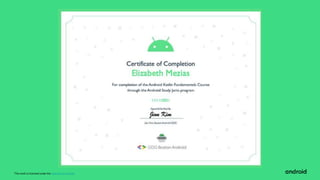
० Earn this certificate of completion
Learn with the Boston Android Group
This work is licensed under the Apache 2.0 License
Codelab 1: Navigation
https://developer.android.com/courses/pathways/kotlin-fundamentals-four
Codelab 2: Activity and Fragment
https://developer.android.com/courses/pathways/kotlin-fundamentals-five
Android Study Jams
Prior Programming Experience
Track
Session 2
This work is licensed under the Apache 2.0 License
Commit to 4 Mondays
SEP 20, Koans - Studio, XML layout
SEP 27, Activity/Fragment basics
OCT 4, LiveData and ViewModel!!
OCT 11, Databases, Design
This work is licensed under the Apache 2.0 License
Logistics
This work is licensed under the Apache 2.0 License
Be excellent to each other. Treat everyone
with respect, everyone deserves to be here.
Consider what you are saying and how it
would feel if it were said to you.
Speak up if you see or hear something. If
someone is making you feel uncomfortable
they may not intend to do that. Politely
letting them know is encouraged.
https://developers.google.com/community-guidelines
This work is licensed under the Apache 2.0 License
The plan
● 90 mins
● Work at your own pace
● Full path? g.co/android/studyjams
● Each session will end with a Door Prize
● Demo at the final session - the best can
win Google Pixel Buds
Tonight’s prize
Google Nest Mini
This work is licensed under the Apache 2.0 License
Use the Slack Team
#studyjam2021
Find us on Twitter
@bostonandroid
Tag @GDG
Share what you’ve learned
with #AndroidStudyJams
This work is licensed under the Apache 2.0 License
QUICK ANDROID TRIVIA
How well do you know Android?
Android 8 (O) is called
ⓘ Start presenting to display the poll results on this slide.
Android 9 (P) is called
ⓘ Start presenting to display the poll results on this slide.
Android 10 (Q) is called
ⓘ Start presenting to display the poll results on this slide.
Android 11 (R) is called
ⓘ Start presenting to display the poll results on this slide.
Android 12 (S) is called
ⓘ Start presenting to display the poll results on this slide.
Android 13 (T) is called
ⓘ Start presenting to display the poll results on this slide.
When did the Android come
out in the US?
ⓘ Start presenting to display the poll results on this slide.
The first iPhone from Apple came
out in June 2007. Who made the
first Android phone?
ⓘ Start presenting to display the poll results on this slide.
This work is licensed under the Apache 2.0 License
Let’s Start!
This work is licensed under the Apache 2.0 License
Android Fragments
A Fragment represents a behavior or a portion of user interface (UI) in an
Activity.
● You can combine multiple fragments in a single activity to build a multi-pane UI
● You can reuse a Fragment in multiple activities.
● A Fragment has its own lifecycle and receives its own input events
● You can add / remove a Fragment while an activity is running
● A Fragment is defined in a Kotlin class
● A Fragment’s UI is defined in an XML layout file
This work is licensed under the Apache 2.0 License
The Navigation component is a library that can manage complex navigation,
transition animation, deep linking, and compile-time checked argument passing
between the screens in your app.
Navigation Components in Android
This work is licensed under the Apache 2.0 License
A navigation host fragment acts as a host for the fragments in a navigation
graph. The navigation host Fragment is usually named NavHostFragment.
● As the user moves between destinations defined in the navigation graph,
the navigation host Fragment swaps fragments in and out as necessary.
● The Fragment also creates and manages the appropriate Fragment back
stack.
NavHostFragment
This work is licensed under the Apache 2.0 License
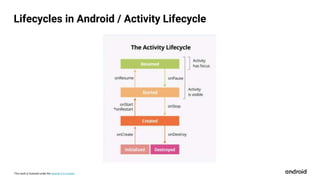
Lifecycles in Android / Activity Lifecycle
This work is licensed under the Apache 2.0 License
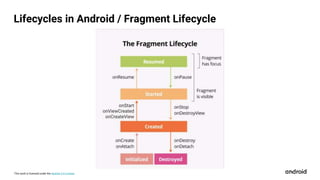
Lifecycles in Android / Fragment Lifecycle
This work is licensed under the Apache 2.0 License
Log is the default Android Logging API.
● Enables you to write short messages that are displayed in the Logcat with
Android Studio
● Use Log.i() to write an informational message. Takes two parameters:
○ tag: the name of the class
○ message: a short string
● Use the Logcat page in Android Studio to view system logs
Logging using Log
This work is licensed under the Apache 2.0 License
Timber is a popular logging library.
● Has several advantages over the built-in Android Log class.
● Generates the log tag for you based on the class name
● Helps you avoid showing logs in a release version of your Android app
● Allows for integration with crash-reporting libraries
● Use Timber.i() to write log messages. Takes only one parameter:
○ message: the message to write
○ tag: (name of the class) is added automatically
Logging using Timber
This work is licensed under the Apache 2.0 License
To help catch errors caused by missing keys or mismatched types when you
pass data from one Fragment to another, use a Gradle plugin called Safe Args.
● For each Fragment in your app, the Safe Args plugin generates a
corresponding NavDirection class. You add the NavDirection class to the
Fragment code, then use the class to pass arguments between the
Fragment and other fragments.
● The NavDirection classes represent navigation from all the app's actions.
Safe Args
This work is licensed under the Apache 2.0 License
● An implicit intent declares an action that your app wants some other app
(such as a camera app or email app) to perform on its behalf.
● If several Android apps could handle an implicit intent, Android shows the
user a chooser.
Implicit Intents
This work is licensed under the Apache 2.0 License
● Explicit Intents specify which application will satisfy the intent, by supplying either the
target app's package name or a fully-qualified component class name
● PendingIntent is a token that you give to a foreign application (e.g. NotificationManager ,
AlarmManager , Home Screen AppWidgetManager , or other 3rd party applications),
which allows the foreign application to use your application's permissions to execute a
predefined piece of code.
● Extras are a form of key — value pairs that give your intent additional information to
complete its action.
a. putExtras() / getExtras()
Other Types of Intents
This work is licensed under the Apache 2.0 License
Prior Programming Experience Track: Session 2
Android Study Jams
This work is licensed under the Apache 2.0 License
Want to learn more?
● Official Android Developers Site: https://developer.android.com/
● Android Samples on GitHub
● Official Android Developers Blog (for announcements)
● Android Developers Medium Blog (for more technical articles)
● Android Developers YouTube channel
● Follow @AndroidDev on Twitter
● Subscribe to the Android Developer Newsletter
● Kotlin Vocabulary series
● Official Kotlin language site
Version 1.0
This work is licensed under the Apache 2.0 License
Thank you!!!

Study Jam Session 2

  • 1.
    This work islicensed under the Apache 2.0 License Android Study Jams Prior Programming Experience Track: Session 2 Navigation Activity and Fragment Lifecycles
  • 2.
    This work islicensed under the Apache 2.0 License About Me Roman Jaquez ● Mobile Developer (Flutter, Android, IOS) ● Google Cloud Certified Architect ● GDG Lawrence Lead ● GDG Northeast Mentor @drcoderz
  • 3.
    This work islicensed under the Apache 2.0 License Learning Objectives ० Learn the essentials of the Kotlin programming language ० Build a variety of Android apps ० Best practices for Android development ० Discover resources to continue learning
  • 4.
    This work islicensed under the Apache 2.0 License ० Join the Slack #studyjam2021 channel to share your progress https://shorturl.at/dpsRV ० The labs are online, take your time ० Create an app to demo and share in the last session ० Win a raffle prize, compete in the demos ० Earn this certificate of completion Learn with the Boston Android Group
  • 5.
    This work islicensed under the Apache 2.0 License
  • 6.
    This work islicensed under the Apache 2.0 License Codelab 1: Navigation https://developer.android.com/courses/pathways/kotlin-fundamentals-four Codelab 2: Activity and Fragment https://developer.android.com/courses/pathways/kotlin-fundamentals-five Android Study Jams Prior Programming Experience Track Session 2
  • 7.
    This work islicensed under the Apache 2.0 License Commit to 4 Mondays SEP 20, Koans - Studio, XML layout SEP 27, Activity/Fragment basics OCT 4, LiveData and ViewModel!! OCT 11, Databases, Design
  • 8.
    This work islicensed under the Apache 2.0 License Logistics
  • 9.
    This work islicensed under the Apache 2.0 License Be excellent to each other. Treat everyone with respect, everyone deserves to be here. Consider what you are saying and how it would feel if it were said to you. Speak up if you see or hear something. If someone is making you feel uncomfortable they may not intend to do that. Politely letting them know is encouraged. https://developers.google.com/community-guidelines
  • 10.
    This work islicensed under the Apache 2.0 License The plan ● 90 mins ● Work at your own pace ● Full path? g.co/android/studyjams ● Each session will end with a Door Prize ● Demo at the final session - the best can win Google Pixel Buds Tonight’s prize Google Nest Mini
  • 11.
    This work islicensed under the Apache 2.0 License Use the Slack Team #studyjam2021 Find us on Twitter @bostonandroid Tag @GDG Share what you’ve learned with #AndroidStudyJams
  • 12.
    This work islicensed under the Apache 2.0 License QUICK ANDROID TRIVIA How well do you know Android?
  • 13.
    Android 8 (O)is called ⓘ Start presenting to display the poll results on this slide.
  • 14.
    Android 9 (P)is called ⓘ Start presenting to display the poll results on this slide.
  • 15.
    Android 10 (Q)is called ⓘ Start presenting to display the poll results on this slide.
  • 16.
    Android 11 (R)is called ⓘ Start presenting to display the poll results on this slide.
  • 17.
    Android 12 (S)is called ⓘ Start presenting to display the poll results on this slide.
  • 18.
    Android 13 (T)is called ⓘ Start presenting to display the poll results on this slide.
  • 19.
    When did theAndroid come out in the US? ⓘ Start presenting to display the poll results on this slide.
  • 20.
    The first iPhonefrom Apple came out in June 2007. Who made the first Android phone? ⓘ Start presenting to display the poll results on this slide.
  • 21.
    This work islicensed under the Apache 2.0 License Let’s Start!
  • 22.
    This work islicensed under the Apache 2.0 License Android Fragments A Fragment represents a behavior or a portion of user interface (UI) in an Activity. ● You can combine multiple fragments in a single activity to build a multi-pane UI ● You can reuse a Fragment in multiple activities. ● A Fragment has its own lifecycle and receives its own input events ● You can add / remove a Fragment while an activity is running ● A Fragment is defined in a Kotlin class ● A Fragment’s UI is defined in an XML layout file
  • 23.
    This work islicensed under the Apache 2.0 License The Navigation component is a library that can manage complex navigation, transition animation, deep linking, and compile-time checked argument passing between the screens in your app. Navigation Components in Android
  • 24.
    This work islicensed under the Apache 2.0 License A navigation host fragment acts as a host for the fragments in a navigation graph. The navigation host Fragment is usually named NavHostFragment. ● As the user moves between destinations defined in the navigation graph, the navigation host Fragment swaps fragments in and out as necessary. ● The Fragment also creates and manages the appropriate Fragment back stack. NavHostFragment
  • 25.
    This work islicensed under the Apache 2.0 License Lifecycles in Android / Activity Lifecycle
  • 26.
    This work islicensed under the Apache 2.0 License Lifecycles in Android / Fragment Lifecycle
  • 27.
    This work islicensed under the Apache 2.0 License Log is the default Android Logging API. ● Enables you to write short messages that are displayed in the Logcat with Android Studio ● Use Log.i() to write an informational message. Takes two parameters: ○ tag: the name of the class ○ message: a short string ● Use the Logcat page in Android Studio to view system logs Logging using Log
  • 28.
    This work islicensed under the Apache 2.0 License Timber is a popular logging library. ● Has several advantages over the built-in Android Log class. ● Generates the log tag for you based on the class name ● Helps you avoid showing logs in a release version of your Android app ● Allows for integration with crash-reporting libraries ● Use Timber.i() to write log messages. Takes only one parameter: ○ message: the message to write ○ tag: (name of the class) is added automatically Logging using Timber
  • 29.
    This work islicensed under the Apache 2.0 License To help catch errors caused by missing keys or mismatched types when you pass data from one Fragment to another, use a Gradle plugin called Safe Args. ● For each Fragment in your app, the Safe Args plugin generates a corresponding NavDirection class. You add the NavDirection class to the Fragment code, then use the class to pass arguments between the Fragment and other fragments. ● The NavDirection classes represent navigation from all the app's actions. Safe Args
  • 30.
    This work islicensed under the Apache 2.0 License ● An implicit intent declares an action that your app wants some other app (such as a camera app or email app) to perform on its behalf. ● If several Android apps could handle an implicit intent, Android shows the user a chooser. Implicit Intents
  • 31.
    This work islicensed under the Apache 2.0 License ● Explicit Intents specify which application will satisfy the intent, by supplying either the target app's package name or a fully-qualified component class name ● PendingIntent is a token that you give to a foreign application (e.g. NotificationManager , AlarmManager , Home Screen AppWidgetManager , or other 3rd party applications), which allows the foreign application to use your application's permissions to execute a predefined piece of code. ● Extras are a form of key — value pairs that give your intent additional information to complete its action. a. putExtras() / getExtras() Other Types of Intents
  • 32.
    This work islicensed under the Apache 2.0 License Prior Programming Experience Track: Session 2 Android Study Jams
  • 33.
    This work islicensed under the Apache 2.0 License Want to learn more? ● Official Android Developers Site: https://developer.android.com/ ● Android Samples on GitHub ● Official Android Developers Blog (for announcements) ● Android Developers Medium Blog (for more technical articles) ● Android Developers YouTube channel ● Follow @AndroidDev on Twitter ● Subscribe to the Android Developer Newsletter ● Kotlin Vocabulary series ● Official Kotlin language site Version 1.0
  • 34.
    This work islicensed under the Apache 2.0 License Thank you!!!

Editor's Notes

  • #3 Let’s talk about what you will learn as part of this track of Android Study Jams. First you will learn the essentials of the Kotlin programming language, the language you’ll use to develop Android apps. Then you will install Android Studio on your computer and build a variety of Android apps in Kotlin by following the codelabs provided in the curriculum. Along the way, you will be learning best practices for Android, including app architecture and UI development. Another goal is to introduce you to the resources for where you can continue to learn Android development on your own.
  • #4 Let’s talk about what you will learn as part of this track of Android Study Jams. First you will learn the essentials of the Kotlin programming language, the language you’ll use to develop Android apps. Then you will install Android Studio on your computer and build a variety of Android apps in Kotlin by following the codelabs provided in the curriculum. Along the way, you will be learning best practices for Android, including app architecture and UI development. Another goal is to introduce you to the resources for where you can continue to learn Android development on your own.
  • #5 Here are some the prerequisites that will be helpful for this first session of the track. As mentioned earlier, we assume that you already have programming experience in an object-oriented programming language. You will also need a computer with internet connection to do the exercises in this session. [Mention WiFi instructions if necessary. Having access to an Android device is a nice-to-have starting in the next session, but not needed for this first session.]
  • #6 Let’s start with a question so I can get to know a little more about you. What is your favorite programming language and why? You can take out a piece of paper and write your answers down. [Give 2-3 minutes to work and when most people have put down their pencils, proceed.] So, what did everyone write down? [Generate a list of people’s answers] Okay let’s keep those qualities in mind throughout today’s session, where you’ll be learning a new programming language: Kotlin!
  • #7 Here are some the prerequisites that will be helpful for this first session of the track. As mentioned earlier, we assume that you already have programming experience in an object-oriented programming language. You will also need a computer with internet connection to do the exercises in this session. [Mention WiFi instructions if necessary. Having access to an Android device is a nice-to-have starting in the next session, but not needed for this first session.]
  • #9 If you want to continue learning, here are some resources.
  • #10 If you want to continue learning, here are some resources.
  • #11 If you want to continue learning, here are some resources.
  • #12 Hope you all enjoyed the game and learning to create your first Android apps! On social media, you can post photos, highlights, or app screenshots from today using #AndroidStudyJams. [Include your own developer community and chapter hashtags (i.e. #developerstudentclubs #dsccmu)]
  • #13 If you want to continue learning, here are some resources.