WEB Courses
1.   Getting them on the schedule
2.   Getting the course shells
3.   Getting students registered
4.   Fun facts
1. Getting WEB Courses on the
               Schedule
1st - Send requests to Robin Crawford using the
spreadsheet sent to you.

•   Include ALL information requested
•   We work almost strictly from the spreadsheet
•   Emails leave more room for error
•   Work with your faculty
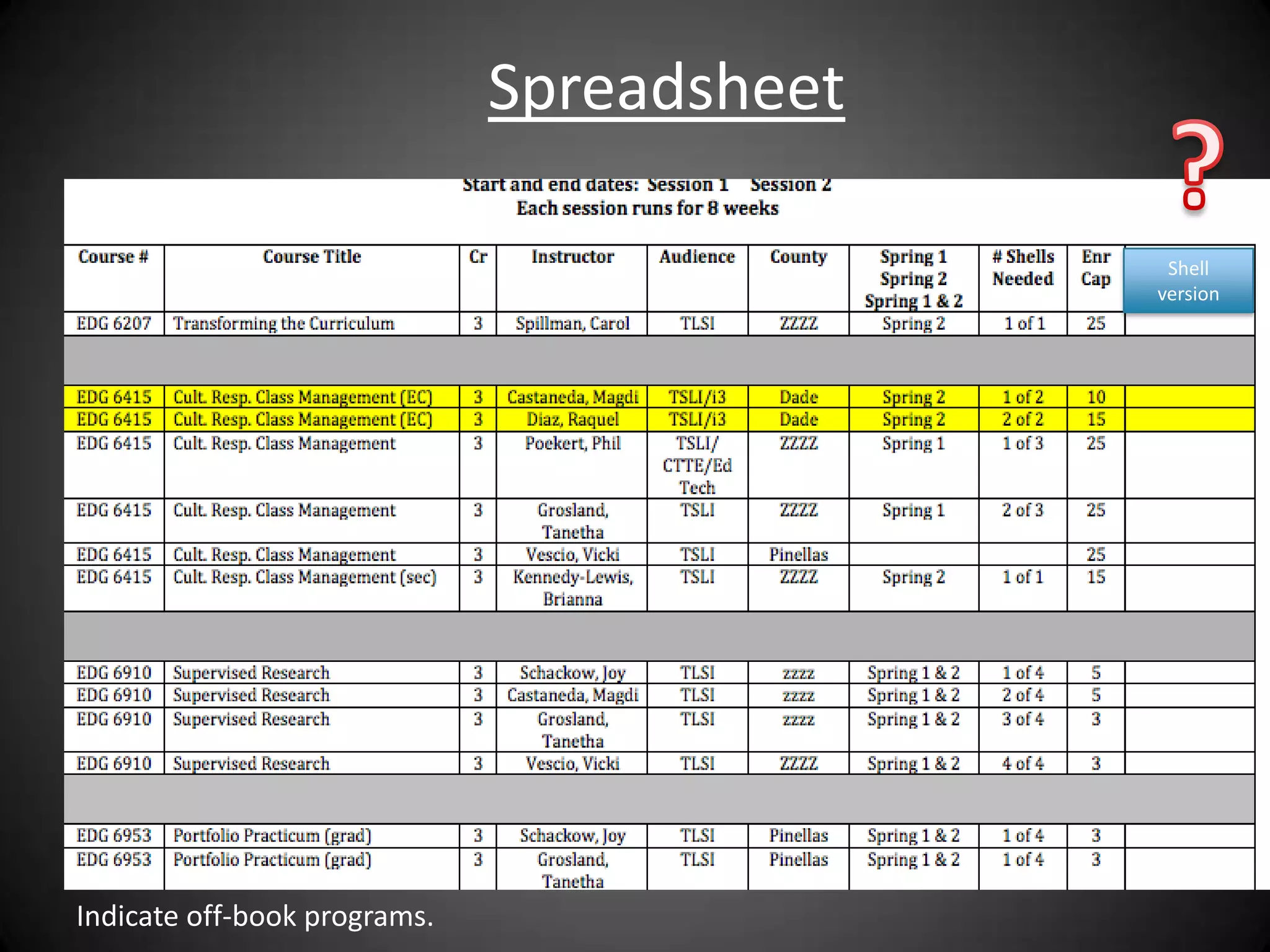
Spreadsheet

                                             Shell
                                            version


Indicate off-book programs.
2nd Robin takes information from
 spreadsheet and enters in ISIS system
• Schedule appears on the ISIS administrator’s
  screen only – students can’t see yet

• ISIS schedule impacts the following:
  – How many students allowed in a course or section
  – How students are charged
  – How students are registered
  – # of credits students will receive for course
3rd - ISIS Schedule Is Sent to You for
          Verification & Changes
• You should look for:
  – Are all the WEB courses I requested there?
  – Are the credits correct?
  – Is the instructor correct?
  – Is it indicated as “D” departmentally controlled?
  – Is enrollment cap correct for each section?
  – Are the number of sections I requested there?
  – Are the right kind of sections listed EOF, EON?
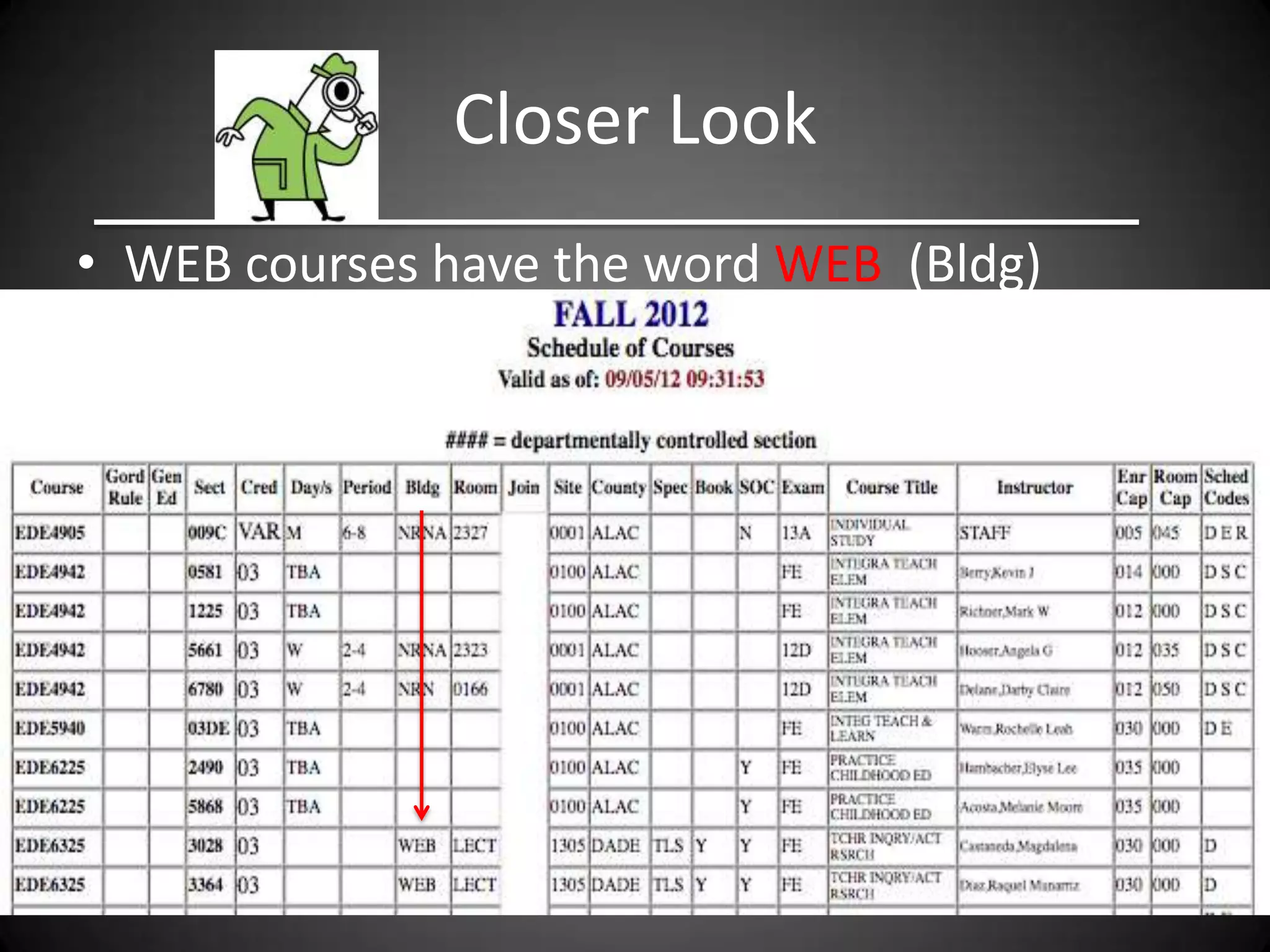
Closer Look
• WEB courses have the word WEB (Bldg)
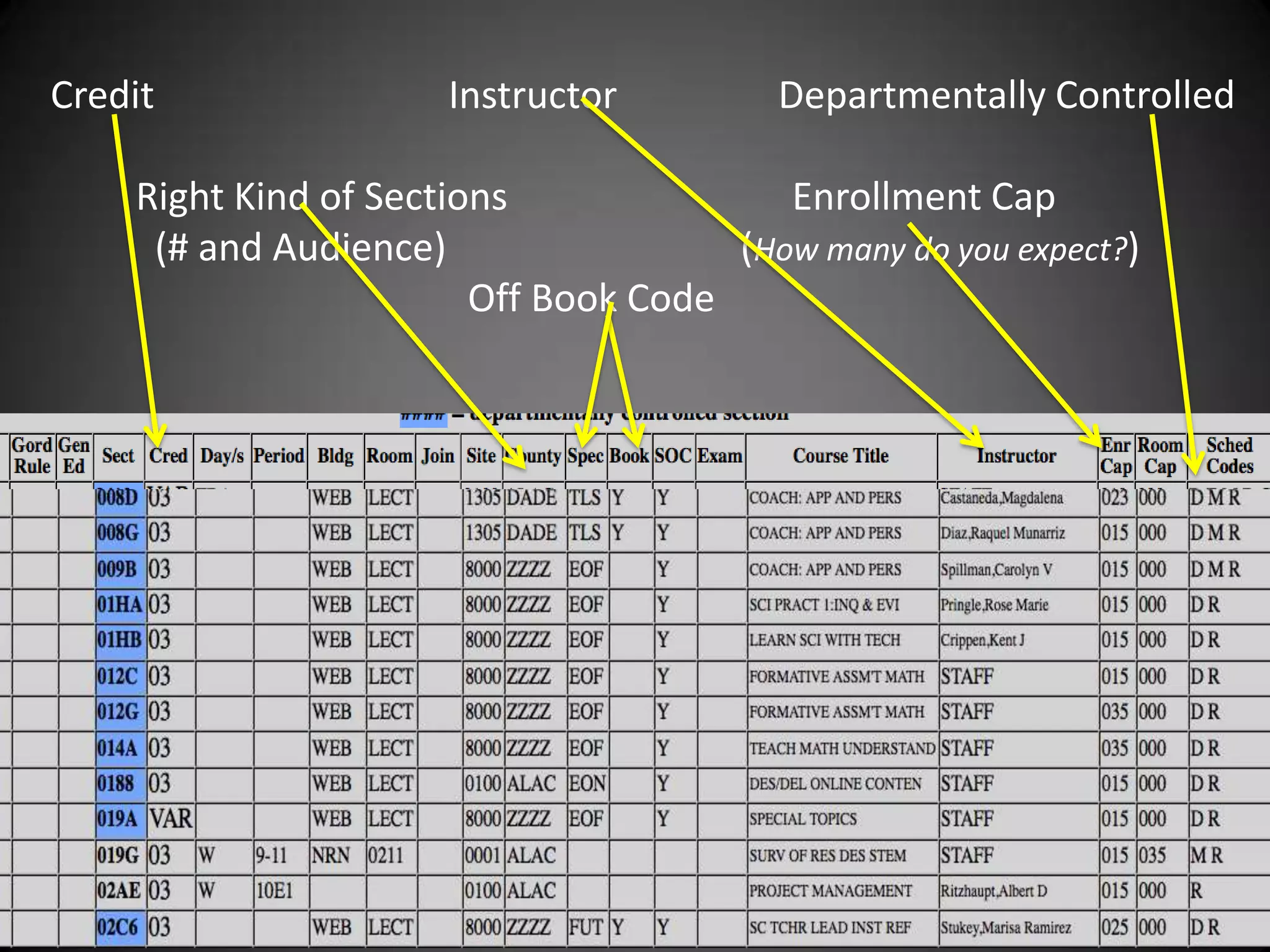
Credit                Instructor         Departmentally Controlled

    Right Kind of Sections               Enrollment Cap
     (# and Audience)                 (How many do you expect?)
                        Off Book Code
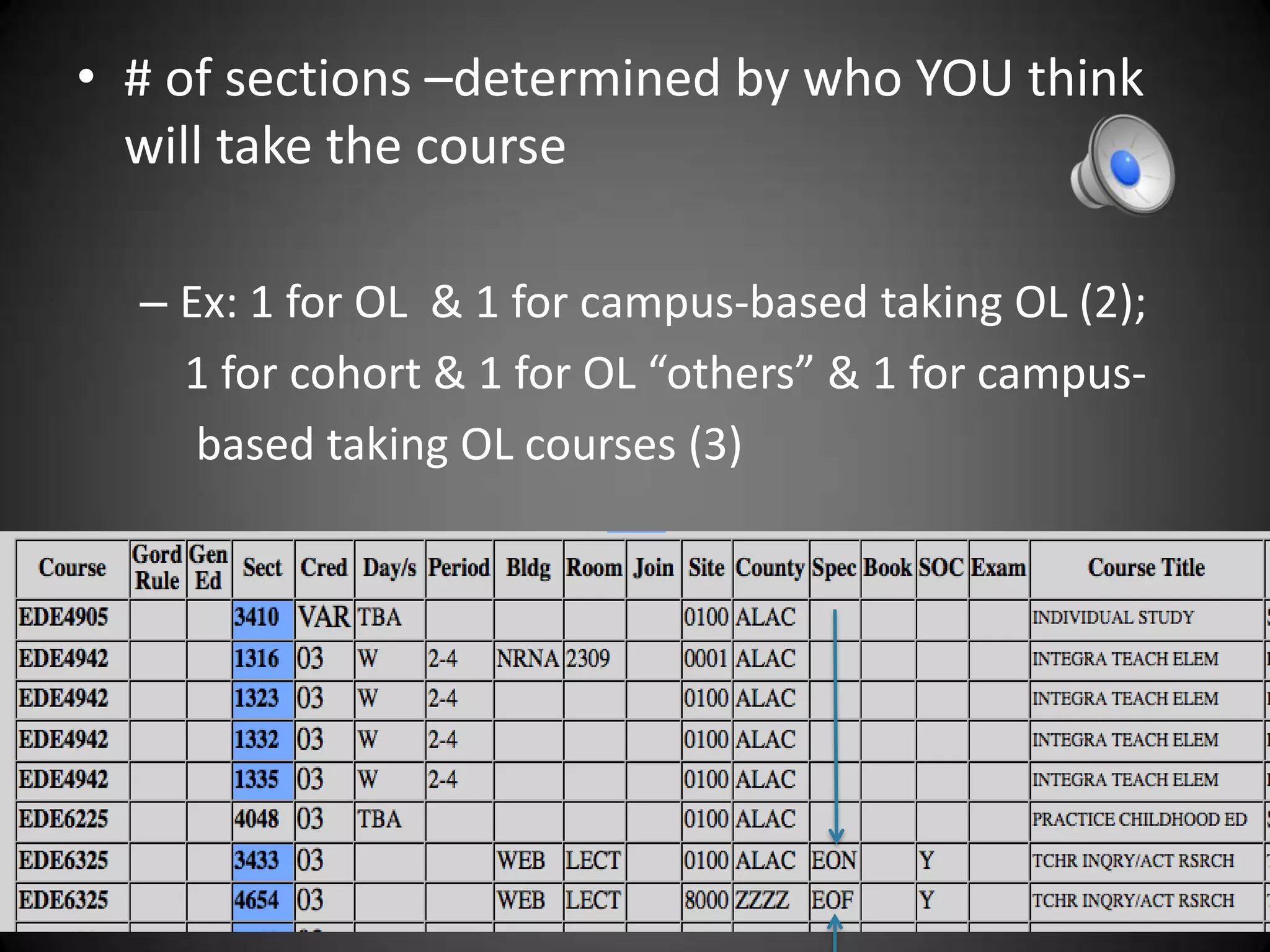
• # of sections –determined by who YOU think
  will take the course

  – Ex: 1 for OL & 1 for campus-based taking OL (2);
    1 for cohort & 1 for OL “others” & 1 for campus-
     based taking OL courses (3)
EOF, EON, Off-Book
• EOF ZZZZ Sections are for online only students
  – Students in online programs who are out-of-state
    MUST be in EOF sections or they are charged out-of-
    state campus-based tuition ----------------------------$$
  – Students who take only online courses in a semester
    are put in EOF sections & charged higher fee than EON
    -----------------------------------------$$
  – EON ALAC Sections are for students taking both online
    and f2f (campus-based students taking online)
  – Off-Book – check column “Book” to see if there is a
    “Y” indicating off-book ------------------------   -$$
Instructor Load and EOF/EON
• Faculty teaching both EOF sections and EON
  sections of the same course are typically given
  1 course credit. Ex: Crippen: EOF and EON – 1
• Faculty teaching two sections of an EOF
  course are typically given 2 credits assuming it
  is two different groups of students or too large
  to have in the same course shell. Really
  should have 2 course shells.
I Can’t Remember This?
• Then….


  – Be REALLY Clear about the   AUDIENCE
  – Tell Us….
     • Who do you want to be able to take
       this course?
     • How do you want them organized?
2. Getting Moodle Shells Restored
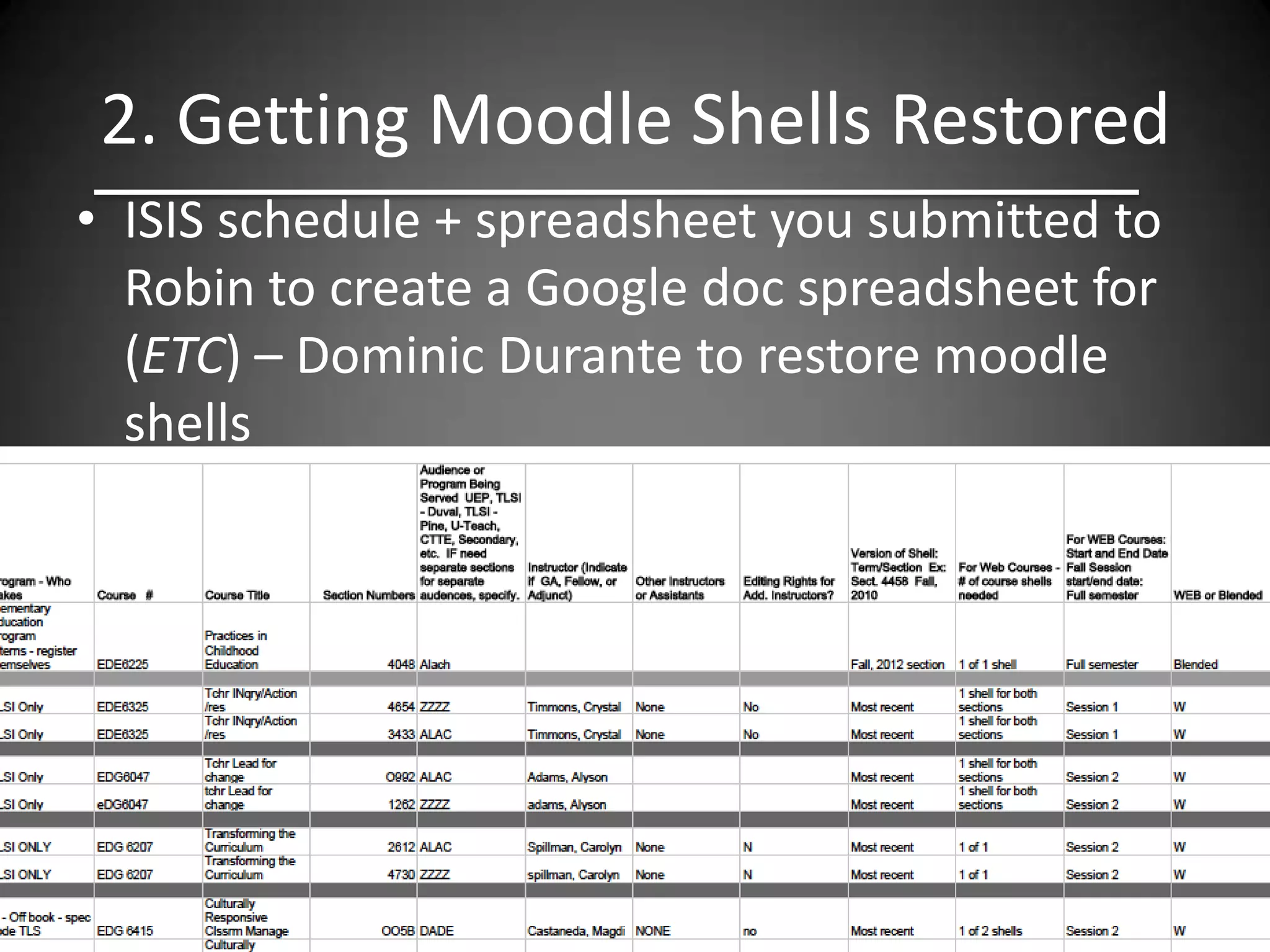
• ISIS schedule + spreadsheet you submitted to
  Robin to create a Google doc spreadsheet for
  (ETC) – Dominic Durante to restore moodle
  shells
The Spreadsheets Determines…

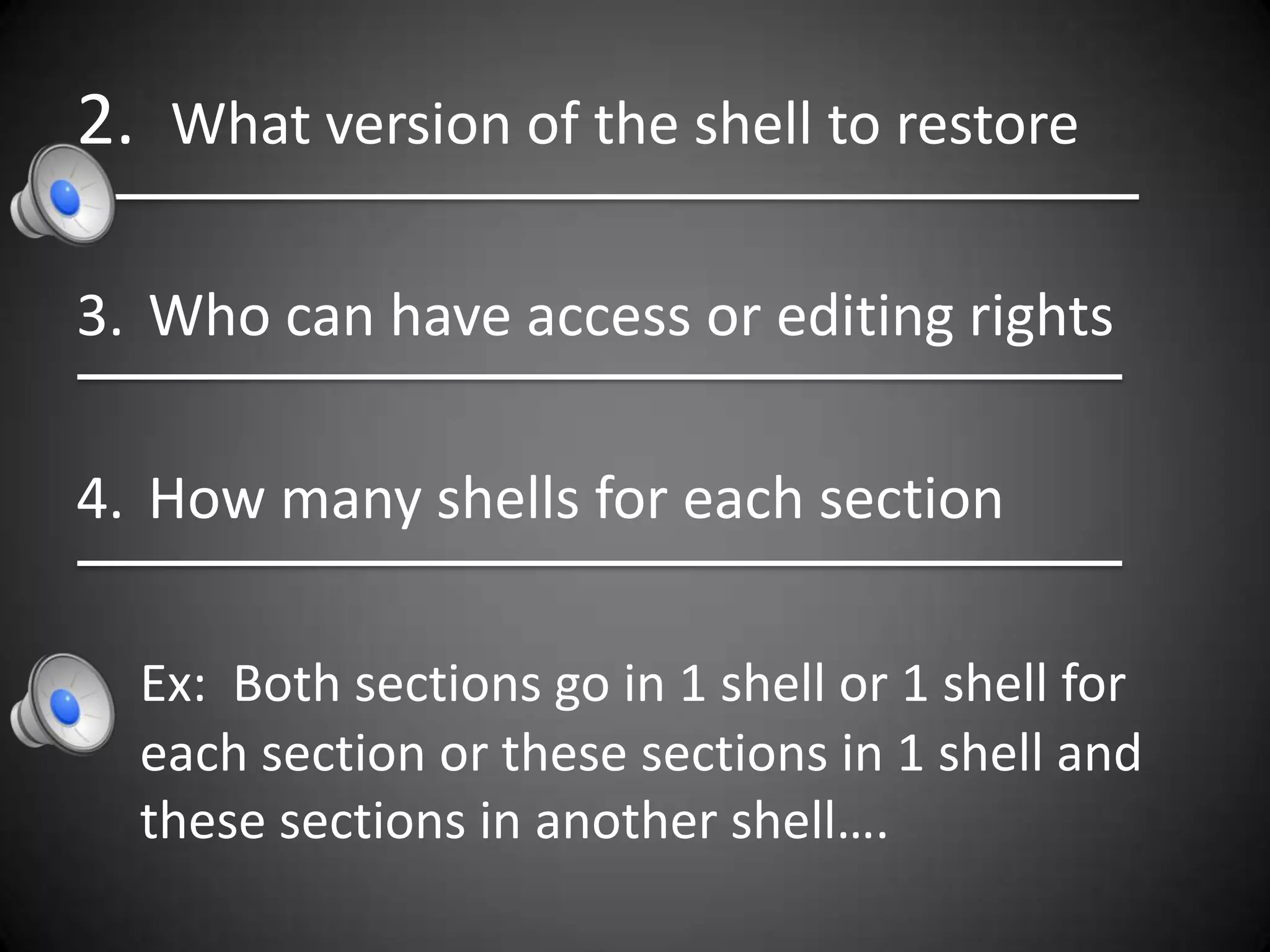
1. When the course will run
Only options are:
   Fall –Full semester or 8 – week session
   Spg – Full semester or Session 1 or Session 2
   Sum – A, B, C, full semester or Session 1 or 2
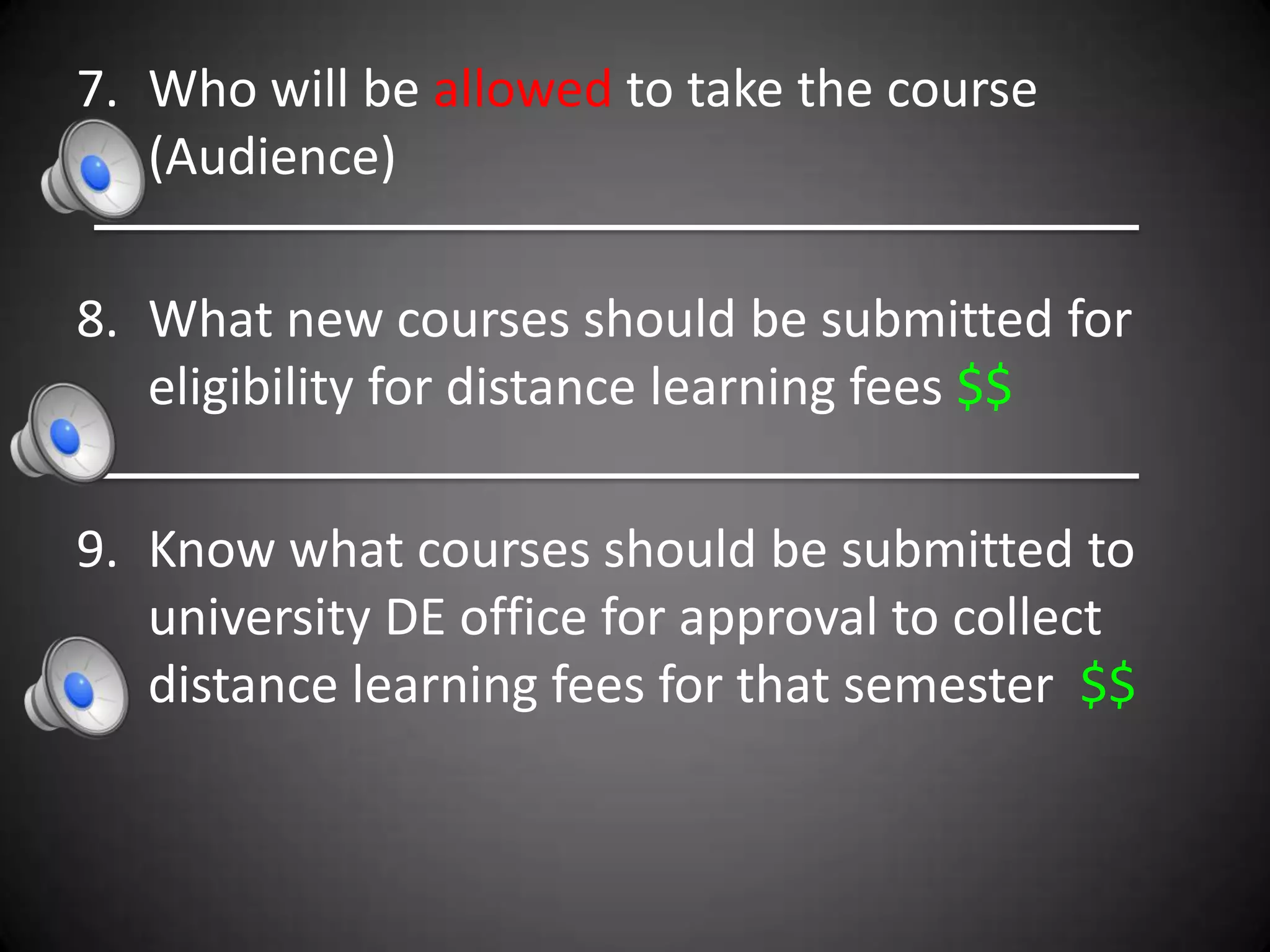
2. What version of the shell to restore

3. Who can have access or editing rights

4. How many shells for each section

  Ex: Both sections go in 1 shell or 1 shell for
  each section or these sections in 1 shell and
  these sections in another shell….
7. Who will be allowed to take the course
   (Audience)

8. What new courses should be submitted for
   eligibility for distance learning fees $$

9. Know what courses should be submitted to
   university DE office for approval to collect
   distance learning fees for that semester $$
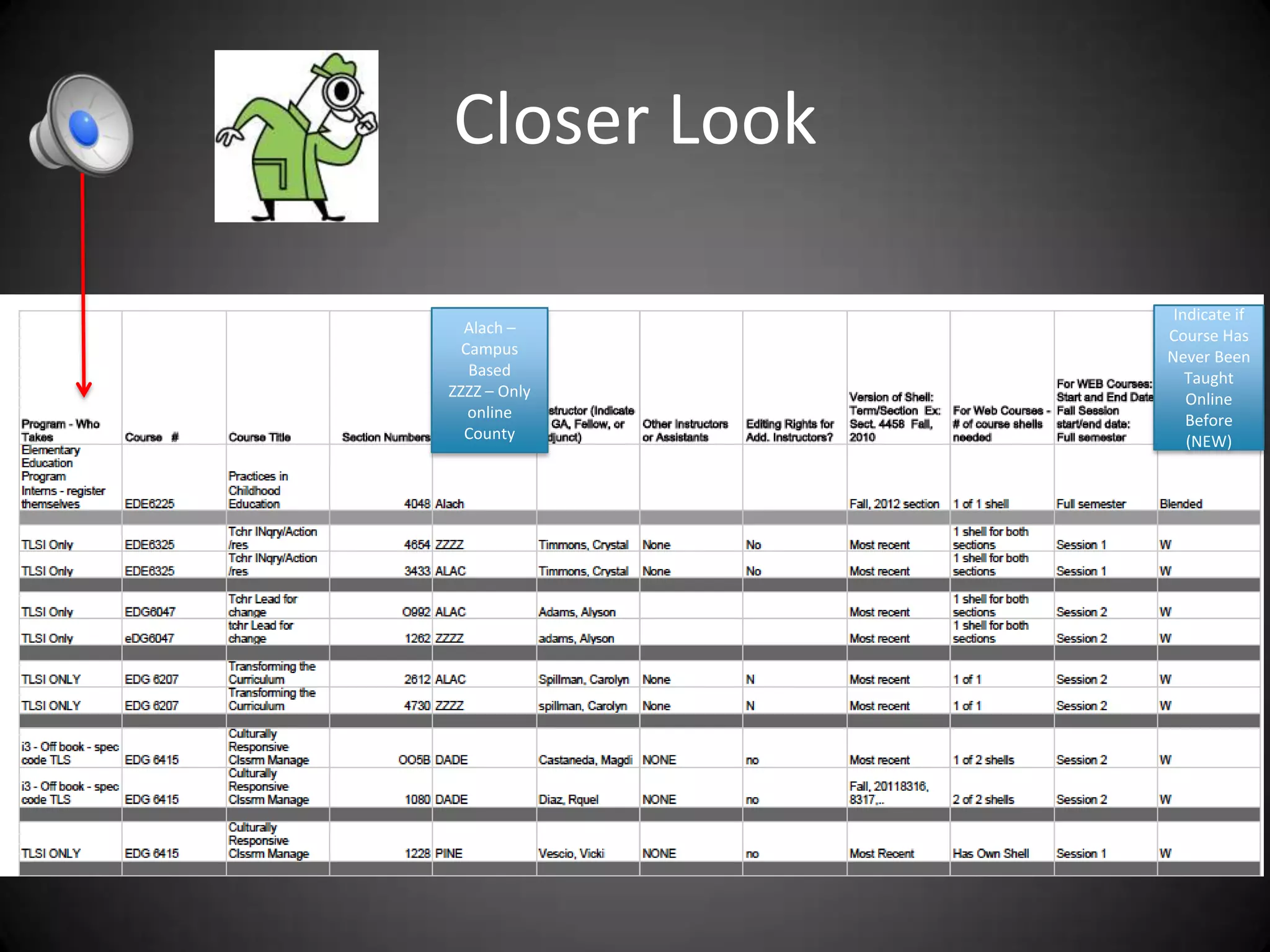
Closer Look

               Indicate if
  Alach –     Course Has
  Campus      Never Been
   Based         Taught
ZZZZ – Only      Online
   online        Before
  County         (NEW)
• I am going to send you a link
  whereby you can make changes
  directly on the google doc
  spreadsheet by September 21st.
Distance Learning Fees for Spring
• Deadline for getting approval to charge DL
  fees for WEB courses is 9/28.


• Sections added after that submission date can
  NOT have a distance learning fee charged
3. Registering Students
• Unless you have someone in your program designated
  to register students, like Tammy in TLSI, all students go
  through the COE Helpdesk to be registered. Here’s
  what they do:
• Send an email to help@coe.ufl.edu. In the email,
  please provide your UFID number, the semester
  session(s), the course number(s), and course title(s).
  Example:
• If you are taking any face-to-face courses (a classroom-
  based course that meet on the UF campus) during the
  same semester, please write “ON CAMPUS” under your
  UFID.
Compare Request to Spreadsheet
• Chris Cook then compares what was
  requested to what is designated on the
  Google doc spreadsheet indicating who is
  allowed to take the course
• She also gets the correct section number for
  the course from the spreadsheet (EOF section,
  EON section, section for cohort, etc.)
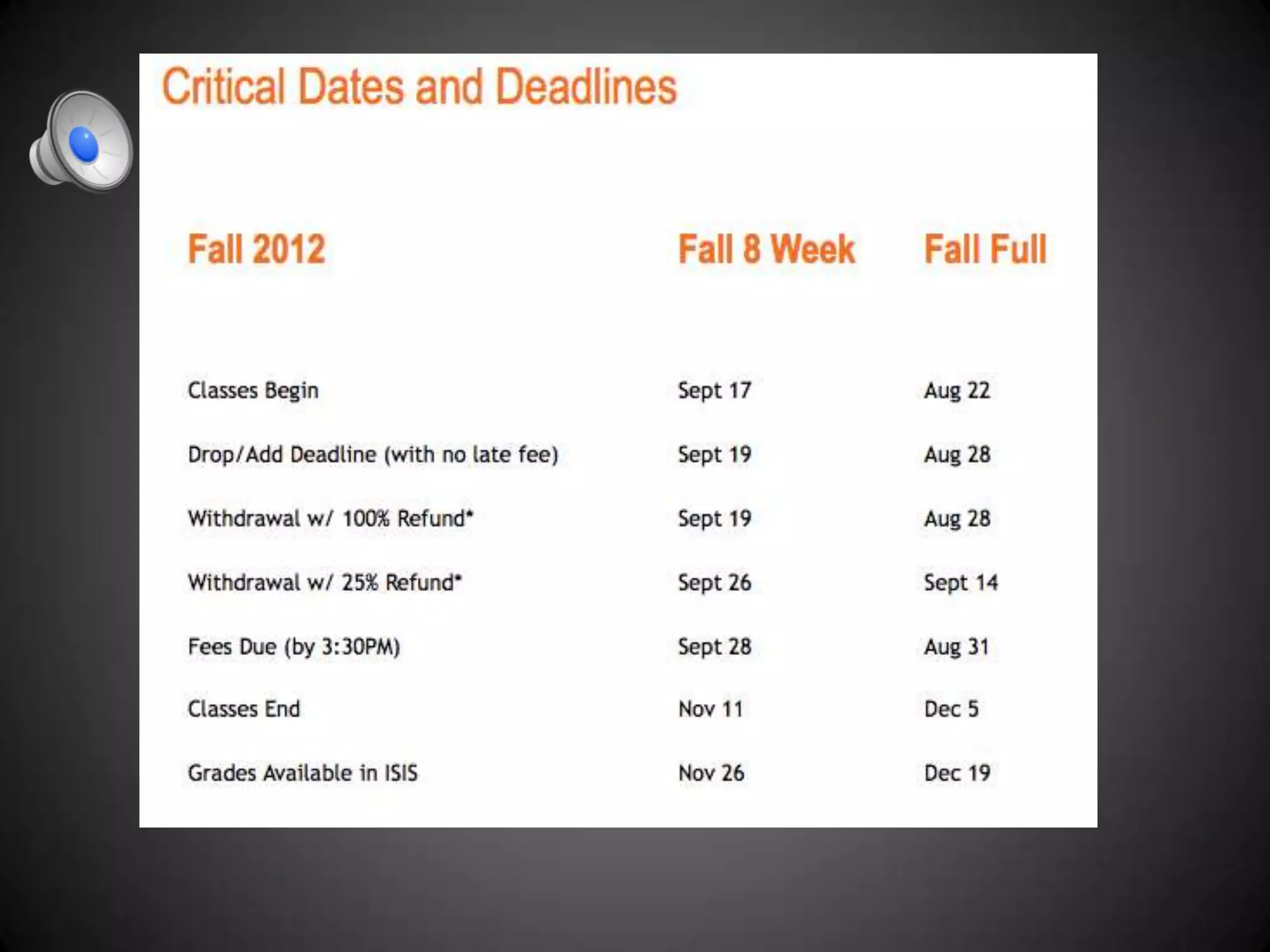
Calendar for WEB Courses
• Calendar for WEB courses is different than for
  f2f courses.
• Deadlines for registration are different
• Deadline for entering grades is different.
  – Rule – a student has to know their grade within a
    certain number of days from when the course
    ended so if you have a session 1 course – deadline
    for entering grades is earlier.
What Went Wrong?
1. Out-of-state online student was charged out-of-
state tuition rate for campus-based students.
• Student was registered in EON ALAC section of a
  course or registered for a non-WEB based section
• Why?
  – Was no other section requested for the schedule.
  – When asked to be registered, did not indicate he was
    DE student so was registered in non WEB based
    course like 7979, 7980, 6905, etc.
How Could It Have Been Prevented?
• Possibly…
  – Making sure online version of courses are on the
    schedule for DE students
  – Making sure student knows to register for the
    WEB-based version of the course (advisement)
  – Person registering, ask student if DE student or if
    they need to be in the WEB based version of the
    course
Students in one section of an online
course were charged DL fees but
students in the other section of the
course were not. What went wrong?
• An additional section of the course was added
  to the schedule “at the 11th hour” and the
  new section was not sent over for approval to
  charge DL fees for that section in time.
Non – cohort student shows up in a
        cohort only course?
• What happened?
  – We made an error and put student in the wrong
    section
  – Google doc spreadsheet didn’t indicate that one
    section was for a specific cohort only
Students are not being allowed to be
        enrolled in a course?
• Google doc spreadsheet indicates that ONLY
  CTTE Ed. Tech cohort 2 can be enrolled in a
  course and no other sections for other
  students were requested
Grades are not entered for a
    session 1 summer course and
   students have to be given all I’s
• Instructor did not realize online courses have
  their own calendar and grades go in before
  the end of the semester
• Instructor thought Summer C course meant
  grades go in at the end of Summer C
Students are asked to evaluate the
  instructor and the course had only
     been in session a short time.
• Online course was entered as a summer A
  instead of a summer C. Google doc
  spreadsheet said Summer A as well not
  Session 1.
• Evaluations for Summer A are June and
  evaluations for session 1, Summer C are mid
  July

Stl web course presentation

  • 1.
    WEB Courses 1. Getting them on the schedule 2. Getting the course shells 3. Getting students registered 4. Fun facts
  • 2.
    1. Getting WEBCourses on the Schedule 1st - Send requests to Robin Crawford using the spreadsheet sent to you. • Include ALL information requested • We work almost strictly from the spreadsheet • Emails leave more room for error • Work with your faculty
  • 3.
    Spreadsheet Shell version Indicate off-book programs.
  • 4.
    2nd Robin takesinformation from spreadsheet and enters in ISIS system • Schedule appears on the ISIS administrator’s screen only – students can’t see yet • ISIS schedule impacts the following: – How many students allowed in a course or section – How students are charged – How students are registered – # of credits students will receive for course
  • 5.
    3rd - ISISSchedule Is Sent to You for Verification & Changes • You should look for: – Are all the WEB courses I requested there? – Are the credits correct? – Is the instructor correct? – Is it indicated as “D” departmentally controlled? – Is enrollment cap correct for each section? – Are the number of sections I requested there? – Are the right kind of sections listed EOF, EON?
  • 6.
    Closer Look • WEBcourses have the word WEB (Bldg)
  • 7.
    Credit Instructor Departmentally Controlled Right Kind of Sections Enrollment Cap (# and Audience) (How many do you expect?) Off Book Code
  • 8.
    • # ofsections –determined by who YOU think will take the course – Ex: 1 for OL & 1 for campus-based taking OL (2); 1 for cohort & 1 for OL “others” & 1 for campus- based taking OL courses (3)
  • 9.
    EOF, EON, Off-Book •EOF ZZZZ Sections are for online only students – Students in online programs who are out-of-state MUST be in EOF sections or they are charged out-of- state campus-based tuition ----------------------------$$ – Students who take only online courses in a semester are put in EOF sections & charged higher fee than EON -----------------------------------------$$ – EON ALAC Sections are for students taking both online and f2f (campus-based students taking online) – Off-Book – check column “Book” to see if there is a “Y” indicating off-book ------------------------ -$$
  • 10.
    Instructor Load andEOF/EON • Faculty teaching both EOF sections and EON sections of the same course are typically given 1 course credit. Ex: Crippen: EOF and EON – 1 • Faculty teaching two sections of an EOF course are typically given 2 credits assuming it is two different groups of students or too large to have in the same course shell. Really should have 2 course shells.
  • 11.
    I Can’t RememberThis? • Then…. – Be REALLY Clear about the AUDIENCE – Tell Us…. • Who do you want to be able to take this course? • How do you want them organized?
  • 12.
    2. Getting MoodleShells Restored • ISIS schedule + spreadsheet you submitted to Robin to create a Google doc spreadsheet for (ETC) – Dominic Durante to restore moodle shells
  • 13.
    The Spreadsheets Determines… 1.When the course will run Only options are: Fall –Full semester or 8 – week session Spg – Full semester or Session 1 or Session 2 Sum – A, B, C, full semester or Session 1 or 2
  • 14.
    2. What versionof the shell to restore 3. Who can have access or editing rights 4. How many shells for each section Ex: Both sections go in 1 shell or 1 shell for each section or these sections in 1 shell and these sections in another shell….
  • 15.
    7. Who willbe allowed to take the course (Audience) 8. What new courses should be submitted for eligibility for distance learning fees $$ 9. Know what courses should be submitted to university DE office for approval to collect distance learning fees for that semester $$
  • 16.
    Closer Look Indicate if Alach – Course Has Campus Never Been Based Taught ZZZZ – Only Online online Before County (NEW)
  • 17.
    • I amgoing to send you a link whereby you can make changes directly on the google doc spreadsheet by September 21st.
  • 18.
    Distance Learning Feesfor Spring • Deadline for getting approval to charge DL fees for WEB courses is 9/28. • Sections added after that submission date can NOT have a distance learning fee charged
  • 19.
    3. Registering Students •Unless you have someone in your program designated to register students, like Tammy in TLSI, all students go through the COE Helpdesk to be registered. Here’s what they do: • Send an email to help@coe.ufl.edu. In the email, please provide your UFID number, the semester session(s), the course number(s), and course title(s). Example: • If you are taking any face-to-face courses (a classroom- based course that meet on the UF campus) during the same semester, please write “ON CAMPUS” under your UFID.
  • 20.
    Compare Request toSpreadsheet • Chris Cook then compares what was requested to what is designated on the Google doc spreadsheet indicating who is allowed to take the course • She also gets the correct section number for the course from the spreadsheet (EOF section, EON section, section for cohort, etc.)
  • 21.
    Calendar for WEBCourses • Calendar for WEB courses is different than for f2f courses. • Deadlines for registration are different • Deadline for entering grades is different. – Rule – a student has to know their grade within a certain number of days from when the course ended so if you have a session 1 course – deadline for entering grades is earlier.
  • 23.
    What Went Wrong? 1.Out-of-state online student was charged out-of- state tuition rate for campus-based students. • Student was registered in EON ALAC section of a course or registered for a non-WEB based section • Why? – Was no other section requested for the schedule. – When asked to be registered, did not indicate he was DE student so was registered in non WEB based course like 7979, 7980, 6905, etc.
  • 24.
    How Could ItHave Been Prevented? • Possibly… – Making sure online version of courses are on the schedule for DE students – Making sure student knows to register for the WEB-based version of the course (advisement) – Person registering, ask student if DE student or if they need to be in the WEB based version of the course
  • 25.
    Students in onesection of an online course were charged DL fees but students in the other section of the course were not. What went wrong? • An additional section of the course was added to the schedule “at the 11th hour” and the new section was not sent over for approval to charge DL fees for that section in time.
  • 26.
    Non – cohortstudent shows up in a cohort only course? • What happened? – We made an error and put student in the wrong section – Google doc spreadsheet didn’t indicate that one section was for a specific cohort only
  • 27.
    Students are notbeing allowed to be enrolled in a course? • Google doc spreadsheet indicates that ONLY CTTE Ed. Tech cohort 2 can be enrolled in a course and no other sections for other students were requested
  • 28.
    Grades are notentered for a session 1 summer course and students have to be given all I’s • Instructor did not realize online courses have their own calendar and grades go in before the end of the semester • Instructor thought Summer C course meant grades go in at the end of Summer C
  • 29.
    Students are askedto evaluate the instructor and the course had only been in session a short time. • Online course was entered as a summer A instead of a summer C. Google doc spreadsheet said Summer A as well not Session 1. • Evaluations for Summer A are June and evaluations for session 1, Summer C are mid July