Steps to Create My NCBI Collection while Searching PubMed/Medline Lin Wu, MLIS, AHIP University of Tennessee Health Science Center
Why I need this? Create your own folder in a remote location Organize your resource list efficiently Expand the list while searching  PubMed/Medline Save citations for future use Access 24/7
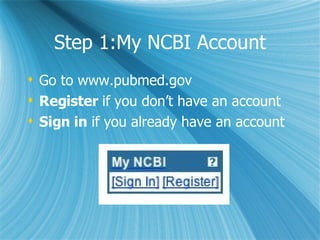
Step 1:My NCBI Account Go to www.pubmed.gov Register  if you don’t have an account Sign in  if you already have an account
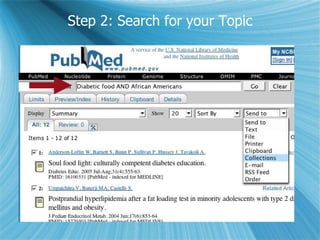
Step 2: Search for your Topic
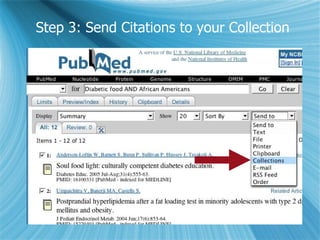
Step 3: Send Citations to your Collection
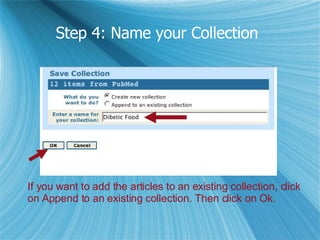
Step 4: Name your Collection   If you want to add the articles to an existing collection, click  on Append to an existing collection. Then click on Ok.
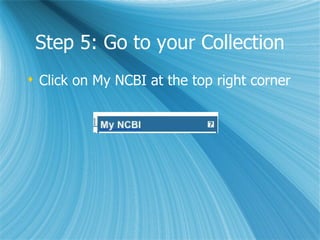
Step 5: Go to your Collection Click on My NCBI at the top right corner
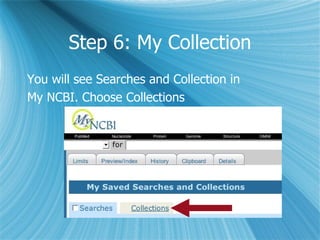
Step 6: My Collection You will see Searches and Collection in  My NCBI. Choose Collections
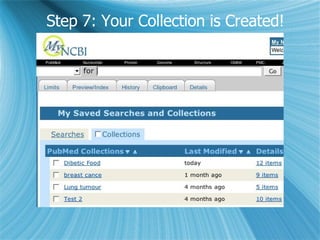
Step 7: Your Collection is Created!
Manage your Collection Click on collection name on the left, you’ll  be on search results page. You can: Print, save, or email your citations Click on item number on the far right, you  Can: Change collection name Delete citations
Tips PubMed Never Tells You If the links in My NCBI collection don’t  function, click on My NCBI once more at  the top right corner. Everything will be  normal!

Steps To Creat My NCBI Collection While Searching PubMed

  • 1.
    Steps to CreateMy NCBI Collection while Searching PubMed/Medline Lin Wu, MLIS, AHIP University of Tennessee Health Science Center
  • 2.
    Why I needthis? Create your own folder in a remote location Organize your resource list efficiently Expand the list while searching PubMed/Medline Save citations for future use Access 24/7
  • 3.
    Step 1:My NCBIAccount Go to www.pubmed.gov Register if you don’t have an account Sign in if you already have an account
  • 4.
    Step 2: Searchfor your Topic
  • 5.
    Step 3: SendCitations to your Collection
  • 6.
    Step 4: Nameyour Collection If you want to add the articles to an existing collection, click on Append to an existing collection. Then click on Ok.
  • 7.
    Step 5: Goto your Collection Click on My NCBI at the top right corner
  • 8.
    Step 6: MyCollection You will see Searches and Collection in My NCBI. Choose Collections
  • 9.
    Step 7: YourCollection is Created!
  • 10.
    Manage your CollectionClick on collection name on the left, you’ll be on search results page. You can: Print, save, or email your citations Click on item number on the far right, you Can: Change collection name Delete citations
  • 11.
    Tips PubMed NeverTells You If the links in My NCBI collection don’t function, click on My NCBI once more at the top right corner. Everything will be normal!