Stencil: The Time for Vanilla
Web Components has Arrived
Gil Fink
sparXys CEO, Working with Taboola
@gilfink / www.gilfink.net
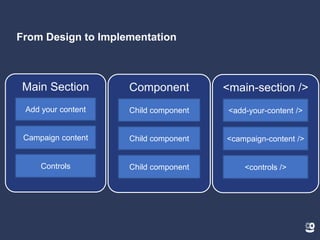
Typical Application Web Page Design
From Design to Implementation
Main Section
Add your content
Campaign content
Controls
Component
Child component
Child component
Child component
<main-section />
<add-your-content />
<campaign-content />
<controls />
How would you build that
page?
Do we really need all these
frameworks/libraries?
What if we could teach the
browser new elements?
This is where our journey
begins
About Me
sparXys CEO and senior consultant
Microsoft MVP in the last 8 years
Pro Single Page Application Development (Apress) co-author
4 Microsoft Official Courses (MOCs) co-author
GDG Rishon and AngularUP co-organizer
Agenda
Web Components APIs in a nutshell
Getting to know Stencil
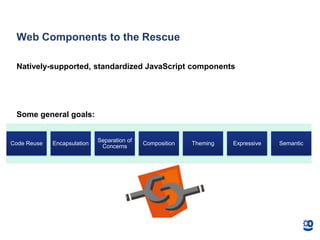
Web Components to the Rescue
Natively-supported, standardized JavaScript components
Some general goals:
Code Reuse Encapsulation
Separation of
Concerns
Composition Theming Expressive Semantic
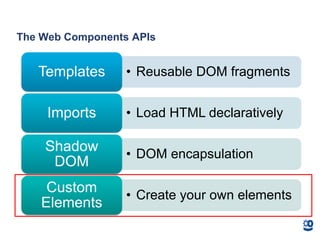
The Web Components APIs
• Reusable DOM fragmentsTemplates
• Load HTML declarativelyImports
• DOM encapsulation
Shadow
DOM
• Create your own elements
Custom
Elements
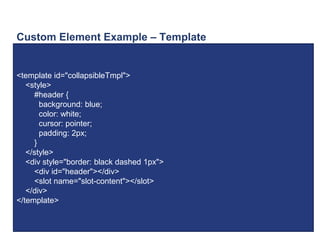
Custom Element Example – Template
<template id="collapsibleTmpl">
<style>
#header {
background: blue;
color: white;
cursor: pointer;
padding: 2px;
}
</style>
<div style="border: black dashed 1px">
<div id="header"></div>
<slot name="slot-content"></slot>
</div>
</template>
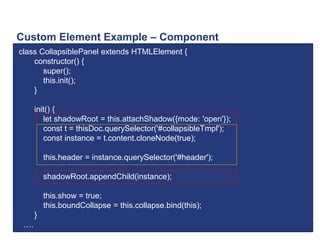
Custom Element Example – Component
class CollapsiblePanel extends HTMLElement {
constructor() {
super();
this.init();
}
init() {
let shadowRoot = this.attachShadow({mode: 'open'});
const t = thisDoc.querySelector('#collapsibleTmpl');
const instance = t.content.cloneNode(true);
this.header = instance.querySelector('#header');
shadowRoot.appendChild(instance);
this.show = true;
this.boundCollapse = this.collapse.bind(this);
}
….
Custom Element Example – Component Cont.
connectedCallback() {
this.header.textContent = this.getAttribute('data-collapse-header');
this.header.addEventListener('click', this.boundCollapse);
this.content = this.querySelector("[slot='slot-content']");
}
disconnectedCallback() {
this.header.removeEventListener('click', this.boundCollapse);
}
collapse() {
this.show = !this.show;
this.content.style.display = this.show ? 'block' : 'none';
}
}
window.customElements.define('demo-collapsible', CollapsiblePanel);
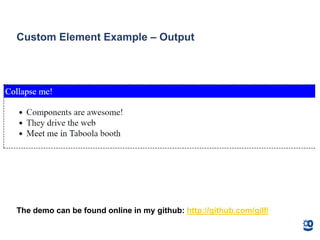
Custom Element Example – Output
The demo can be found online in my github: http://github.com/gilf/
A Problem with Web Development Today
Catholic wedding with frameworks/libraries
• Infrastructure is based on a
framework/library
• Infrastructure isn’t reusable if other
company projects use another
framework/library
Problem with Web Development Today – Cont.
Custom Elements can remove the barrier of framework/library coupling
• Can be used by any framework/library
• Encapsulate their functionality and style
• Suitable to component infrastructure development
But there are problems with
custom components
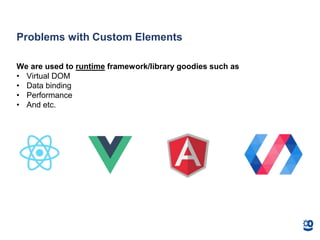
Problems with Custom Elements
We are used to runtime framework/library goodies such as
• Virtual DOM
• Data binding
• Performance
• And etc.
Problems with Custom Elements – Cont.
Verbose syntax
• Too much boilerplate
• We need to craft everything
Problems with Custom Elements – Cont.
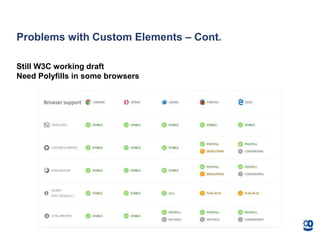
Still W3C working draft
Need Polyfills in some browsers
Is there a better way?
What if I told you that you
can solve the previous
problems in one place?
What is Stencil?
A compiler that generates Custom Elements
Not a framework/library
• Output is 100% standards-compliant web components
Adds powerful framework features to Web Components
• Virtual DOM
• Reactivity
• JSX
• TypeScript
• And etc.
Created and used heavily by Ionic Framework
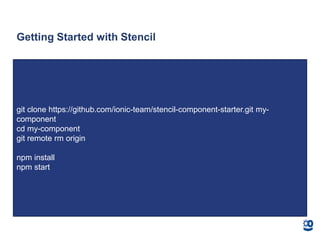
Getting Started with Stencil
git clone https://github.com/ionic-team/stencil-component-starter.git my-
component
cd my-component
git remote rm origin
npm install
npm start
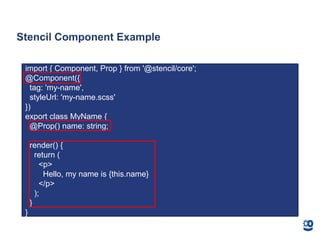
Stencil Component Example
import { Component, Prop } from '@stencil/core';
@Component({
tag: 'my-name',
styleUrl: 'my-name.scss'
})
export class MyName {
@Prop() name: string;
render() {
return (
<p>
Hello, my name is {this.name}
</p>
);
}
}
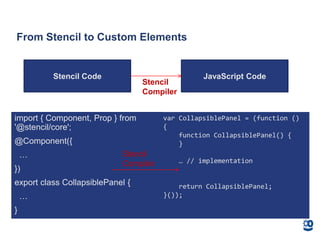
From Stencil to Custom Elements
import { Component, Prop } from
'@stencil/core';
@Component({
…
})
export class CollapsiblePanel {
…
}
Stencil Code JavaScript Code
Stencil
Compiler
var CollapsiblePanel = (function ()
{
function CollapsiblePanel() {
}
… // implementation
return CollapsiblePanel;
}());
Stencil
Compiler
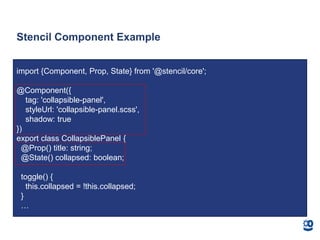
Stencil Component Example
import {Component, Prop, State} from '@stencil/core';
@Component({
tag: 'collapsible-panel',
styleUrl: 'collapsible-panel.scss',
shadow: true
})
export class CollapsiblePanel {
@Prop() title: string;
@State() collapsed: boolean;
toggle() {
this.collapsed = !this.collapsed;
}
…
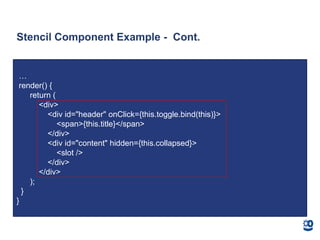
Stencil Component Example - Cont.
…
render() {
return (
<div>
<div id="header" onClick={this.toggle.bind(this)}>
<span>{this.title}</span>
</div>
<div id="content" hidden={this.collapsed}>
<slot />
</div>
</div>
);
}
}
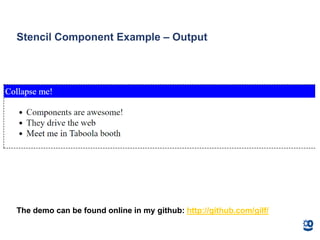
Stencil Component Example – Output
The demo can be found online in my github: http://github.com/gilf/
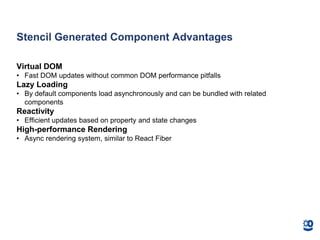
Stencil Generated Component Advantages
Virtual DOM
• Fast DOM updates without common DOM performance pitfalls
Lazy Loading
• By default components load asynchronously and can be bundled with related
components
Reactivity
• Efficient updates based on property and state changes
High-performance Rendering
• Async rendering system, similar to React Fiber
How Stencil Solves the Frameworks Problem?
Stencil works primarily at build time
Any framework/library (such as React or Angular) can consume the
generated component
• As a script tag
• As a node module
• Using the stencil-starter-app
Stencil is suitable for infrastructure components
Summary
Web Components standard is very powerful
• But still in development
Stencil compiler can ease the pain of creating custom components
• Includes many advantages such as JSX, TypeScript and more
• Generates standard-compliant web components
Resources
Stencil website: https://stenciljs.com/
Custom Elements: https://developer.mozilla.org/en-
US/docs/Web/Web_Components/Custom_Elements
•Taboola – http://www.taboola.com – we are hiring!
•My Website – http://www.gilfink.net
•Follow me on Twitter – @gilfink
#UseThePlatform
Thank You!
Ask me questions at Taboola booth ☺

Stencil the time for vanilla web components has arrived

  • 1.
    Stencil: The Timefor Vanilla Web Components has Arrived Gil Fink sparXys CEO, Working with Taboola @gilfink / www.gilfink.net
  • 2.
  • 3.
    From Design toImplementation Main Section Add your content Campaign content Controls Component Child component Child component Child component <main-section /> <add-your-content /> <campaign-content /> <controls />
  • 4.
    How would youbuild that page?
  • 5.
    Do we reallyneed all these frameworks/libraries?
  • 6.
    What if wecould teach the browser new elements?
  • 7.
    This is whereour journey begins
  • 8.
    About Me sparXys CEOand senior consultant Microsoft MVP in the last 8 years Pro Single Page Application Development (Apress) co-author 4 Microsoft Official Courses (MOCs) co-author GDG Rishon and AngularUP co-organizer
  • 9.
    Agenda Web Components APIsin a nutshell Getting to know Stencil
  • 10.
    Web Components tothe Rescue Natively-supported, standardized JavaScript components Some general goals: Code Reuse Encapsulation Separation of Concerns Composition Theming Expressive Semantic
  • 11.
    The Web ComponentsAPIs • Reusable DOM fragmentsTemplates • Load HTML declarativelyImports • DOM encapsulation Shadow DOM • Create your own elements Custom Elements
  • 12.
    Custom Element Example– Template <template id="collapsibleTmpl"> <style> #header { background: blue; color: white; cursor: pointer; padding: 2px; } </style> <div style="border: black dashed 1px"> <div id="header"></div> <slot name="slot-content"></slot> </div> </template>
  • 13.
    Custom Element Example– Component class CollapsiblePanel extends HTMLElement { constructor() { super(); this.init(); } init() { let shadowRoot = this.attachShadow({mode: 'open'}); const t = thisDoc.querySelector('#collapsibleTmpl'); const instance = t.content.cloneNode(true); this.header = instance.querySelector('#header'); shadowRoot.appendChild(instance); this.show = true; this.boundCollapse = this.collapse.bind(this); } ….
  • 14.
    Custom Element Example– Component Cont. connectedCallback() { this.header.textContent = this.getAttribute('data-collapse-header'); this.header.addEventListener('click', this.boundCollapse); this.content = this.querySelector("[slot='slot-content']"); } disconnectedCallback() { this.header.removeEventListener('click', this.boundCollapse); } collapse() { this.show = !this.show; this.content.style.display = this.show ? 'block' : 'none'; } } window.customElements.define('demo-collapsible', CollapsiblePanel);
  • 15.
    Custom Element Example– Output The demo can be found online in my github: http://github.com/gilf/
  • 16.
    A Problem withWeb Development Today Catholic wedding with frameworks/libraries • Infrastructure is based on a framework/library • Infrastructure isn’t reusable if other company projects use another framework/library
  • 17.
    Problem with WebDevelopment Today – Cont. Custom Elements can remove the barrier of framework/library coupling • Can be used by any framework/library • Encapsulate their functionality and style • Suitable to component infrastructure development
  • 18.
    But there areproblems with custom components
  • 19.
    Problems with CustomElements We are used to runtime framework/library goodies such as • Virtual DOM • Data binding • Performance • And etc.
  • 20.
    Problems with CustomElements – Cont. Verbose syntax • Too much boilerplate • We need to craft everything
  • 21.
    Problems with CustomElements – Cont. Still W3C working draft Need Polyfills in some browsers
  • 22.
    Is there abetter way?
  • 23.
    What if Itold you that you can solve the previous problems in one place?
  • 25.
    What is Stencil? Acompiler that generates Custom Elements Not a framework/library • Output is 100% standards-compliant web components Adds powerful framework features to Web Components • Virtual DOM • Reactivity • JSX • TypeScript • And etc. Created and used heavily by Ionic Framework
  • 26.
    Getting Started withStencil git clone https://github.com/ionic-team/stencil-component-starter.git my- component cd my-component git remote rm origin npm install npm start
  • 27.
    Stencil Component Example import{ Component, Prop } from '@stencil/core'; @Component({ tag: 'my-name', styleUrl: 'my-name.scss' }) export class MyName { @Prop() name: string; render() { return ( <p> Hello, my name is {this.name} </p> ); } }
  • 28.
    From Stencil toCustom Elements import { Component, Prop } from '@stencil/core'; @Component({ … }) export class CollapsiblePanel { … } Stencil Code JavaScript Code Stencil Compiler var CollapsiblePanel = (function () { function CollapsiblePanel() { } … // implementation return CollapsiblePanel; }()); Stencil Compiler
  • 30.
    Stencil Component Example import{Component, Prop, State} from '@stencil/core'; @Component({ tag: 'collapsible-panel', styleUrl: 'collapsible-panel.scss', shadow: true }) export class CollapsiblePanel { @Prop() title: string; @State() collapsed: boolean; toggle() { this.collapsed = !this.collapsed; } …
  • 31.
    Stencil Component Example- Cont. … render() { return ( <div> <div id="header" onClick={this.toggle.bind(this)}> <span>{this.title}</span> </div> <div id="content" hidden={this.collapsed}> <slot /> </div> </div> ); } }
  • 32.
    Stencil Component Example– Output The demo can be found online in my github: http://github.com/gilf/
  • 33.
    Stencil Generated ComponentAdvantages Virtual DOM • Fast DOM updates without common DOM performance pitfalls Lazy Loading • By default components load asynchronously and can be bundled with related components Reactivity • Efficient updates based on property and state changes High-performance Rendering • Async rendering system, similar to React Fiber
  • 34.
    How Stencil Solvesthe Frameworks Problem? Stencil works primarily at build time Any framework/library (such as React or Angular) can consume the generated component • As a script tag • As a node module • Using the stencil-starter-app Stencil is suitable for infrastructure components
  • 35.
    Summary Web Components standardis very powerful • But still in development Stencil compiler can ease the pain of creating custom components • Includes many advantages such as JSX, TypeScript and more • Generates standard-compliant web components
  • 36.
    Resources Stencil website: https://stenciljs.com/ CustomElements: https://developer.mozilla.org/en- US/docs/Web/Web_Components/Custom_Elements •Taboola – http://www.taboola.com – we are hiring! •My Website – http://www.gilfink.net •Follow me on Twitter – @gilfink
  • 37.
  • 38.
    Thank You! Ask mequestions at Taboola booth ☺