SSL Certificate 101
           Teerayut Hiruntaraporn
Content
●   Openssl Basic Usage
●   Validate certificate and key
●   Install Certificate and make it work
●   Certificate / CA Type
●   Connect to LDAPs
●   Troubleshooting
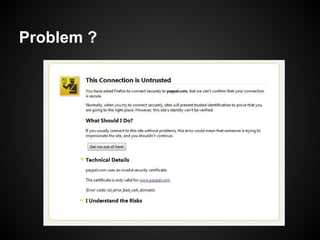
Problem ?
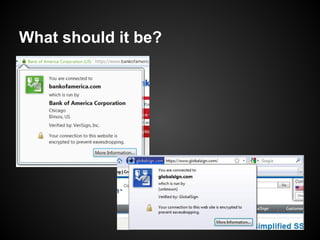
What should it be?
Success Certificate Installation (HTTP)
Server Level
  ○ Install valid certificate and private key.
Trust Level
  ○ Identity match with Certificate's cn field
  ○ In effective date & time
  ○ Can create trusted chain to client's trusted root
    certificate
  ○ Have valid ability


Absolutely Reject
  ○ Certificate was revoked.
Openssl Basic Usage
Create RSA KeyPair
openssl genrsa <bit>

root@debian:/etc/apache2/cert# openssl genrsa -out sample1.key -des3 1024
Generating RSA private key, 1024 bit long modulus
...........++++++
.............................++++++
e is 65537 (0x10001)
Enter pass phrase for sample1.key:
Verifying - Enter pass phrase for sample1.key:
root@debian:/etc/apache2/cert# openssl genrsa -out sample.key 1024
Generating RSA private key, 1024 bit long modulus
............................++++++
..............++++++
e is 65537 (0x10001)
root@debian:/etc/apache2/cert#
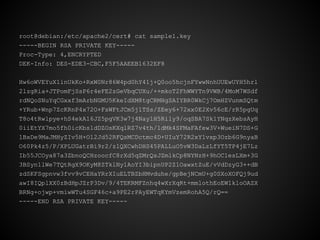
root@debian:/etc/apache2/cert# cat sample1.key
-----BEGIN RSA PRIVATE KEY-----
Proc-Type: 4,ENCRYPTED
DEK-Info: DES-EDE3-CBC,F5F5AAEEB1632EF8

Hw6oWVEYuX1inUkKo+RxW0Nr86W4pd0hY41j+Q0oo5hcjnFYwwNnhUUEwUYH5hrl
2lzgRia+JTPomFjSsP6r4eFE2zGeVbqCUXu/++mkoT2FhWWYTn9VWB/4MoM7WSdf
rdNQoSNuYqCGxxf3mArbNGMU5KkeIdXM8tgCRMHgSAIYBR0WkCj7OmHZVunmSQtm
+YRub+Wnp7ZcKRnP4x72O+FsWFtJCm5j1TSs/ZEey6+72xx0E2Xv56cE/rR5pgUq
T8o4tRwlpye+hS4ekA16JZ5pgVK3w7j4NaylH5Rily9/oqSBA7Sk1YNqzXebsAyH
0iiEtYX7mo5fh0icKbs1dDZOsKXqlRZ7v4th/1dMk4SFMaFAfew3V+WueiN7DS+G
1BxDe9MaJMHyZIv5H+O12Jd52RFQsMCDctmc4D+UIuY72R2xY1vxp3Ozb6G9nyaB
O60Pk4z5/P/XPLUGatrBi9r2/zlQXCwhDHS45PALLuO5vW3DaLzLfYT5TP4jE7Lz
Ib55JCOya87a3ZbnoQCHzoocfC8rXd5qZMrQsJZmlkCp8NYNzH+9hOC1esLXm+3G
3BSyn1lWe7TQtRgX9OKyM8ZTklNy1AoYI3bipnUP2Z1OawxtZuE/vVdDzyG3++dB
zdSKFSgpnvw3fvv9vCEHaYRrXIuELTBZbHMvduhe/gpBejNCmU+g0SXoXOFQj9ud
awI8IQplXX0zBdHpJZrP3Dv/9/4TEKRMFZnhq4wXrXqRt+mmlothEoEW1kloOAZX
BRNg+ojwp+vmiwWTu4SGF46c+a9PE2rPAyEWTqKYmVzemRohA5Q/rQ==
-----END RSA PRIVATE KEY-----
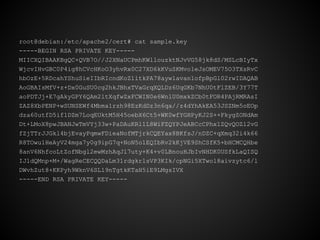
root@debian:/etc/apache2/cert# cat sample.key
-----BEGIN RSA PRIVATE KEY-----
MIICXQIBAAKBgQC+QVB7O//J2XNaUCPmhKWllouzktNJvVG58jk8dS/MSLcBIyTx
WjcvIHvGBC0P4ig8hCVcHKoO3yhvRx0C27XD6kKVuSKMvo1eJsOMEV75O3TXsRvC
hbOzE+5RDcahYShuSieIIbRIcndKoZ1itkPA78ayw1avan1ofpBpGl02rwIDAQAB
AoGBAIsMfV+z+Dx0GuSU0cg2hkJBhxTVaGrqXQLDz6UqGKb7NhU0tFlZEB/3Y77T
aoPDTJj+E7gAkyGPY6QAm2ltXqfwZxFCWIN0e6WnlU0mxkZCb0tFOR4PAjRMRAsI
ZAZ8XbPENP+wSUNSEWf4Mbma1rzh98EzKdDz3n6qa//z4dYhAkEA53JSZNm5oEOp
dza60utfD5if1DZm7LoqEUktM5H45oebX6Ct5+WK0wfYGHPyKJ2S++FkygZONdAm
Dt+LMoX8pwJBANJwTmVYj33w+PaDAuKRl1L8WiFZQYPJeABCcCPhx1ZQvQOZl2vG
fZjTTrJJGkl4bjEvayPqmwFDieaNofMTjrkCQEYax8BKfsJ/nDZC+qXmq32i4k66
R8TOwu1HeAyV24mga7y0g9ipG7q+NoN5o1EQIbRv2kKjVE9ShCSfK5+bHCMCQHbe
8anV6NhfcoLtZofNbgl2ewMzhAqJl7uty+K4+v0LBnouHJbIvNHDK0USfkLaQISQ
IJldQMnp+M+/WagReCECQQDaLm31rdgkrlsVP3KIk/cpNGi5XTwol8aivzytc6/l
DWvhZut8+KKPyh9WknV6SL19nTgtkKTaH5iE9LMgsIVX
-----END RSA PRIVATE KEY-----
Create Certificate Request
openssl req -key <privkey> -nodes -new
root@debian:/etc/apache2/cert# openssl req -key sample.key -nodes -new -out sample.csr
You are about to be asked to enter information that will be incorporated
into your certificate request.
What you are about to enter is what is called a Distinguished Name or a DN.
There are quite a few fields but you can leave some blank
For some fields there will be a default value,
If you enter '.', the field will be left blank.
-----
Country Name (2 letter code) [AU]:TH
State or Province Name (full name) [Some-State]:Bangkok
Locality Name (eg, city) []:
Organization Name (eg, company) [Internet Widgits Pty Ltd]:Throughwave
Organizational Unit Name (eg, section) []:
Common Name (eg, YOUR name) []:debian.throughwave.co.th
Email Address []:


Please enter the following 'extra' attributes
to be sent with your certificate request
A challenge password []:
An optional company name []:
root@debian:/etc/apache2/cert#
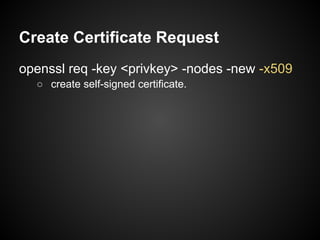
Create Certificate Request
openssl req -key <privkey> -nodes -new -x509
  ○ create self-signed certificate.
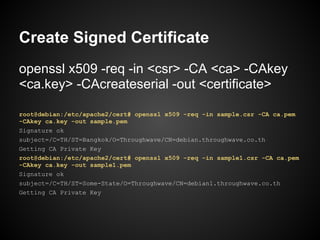
Create Signed Certificate
openssl x509 -req -in <csr> -CA <ca> -CAkey
<ca.key> -CAcreateserial -out <certificate>

root@debian:/etc/apache2/cert# openssl x509 -req -in sample.csr -CA ca.pem
-CAkey ca.key -out sample.pem
Signature ok
subject=/C=TH/ST=Bangkok/O=Throughwave/CN=debian.throughwave.co.th
Getting CA Private Key
root@debian:/etc/apache2/cert# openssl x509 -req -in sample1.csr -CA ca.pem
-CAkey ca.key -out sample1.pem
Signature ok
subject=/C=TH/ST=Some-State/O=Throughwave/CN=debian1.throughwave.co.th
Getting CA Private Key
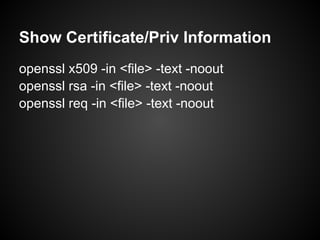
Show Certificate/Priv Information
openssl x509 -in <file> -text -noout
openssl rsa -in <file> -text -noout
openssl req -in <file> -text -noout
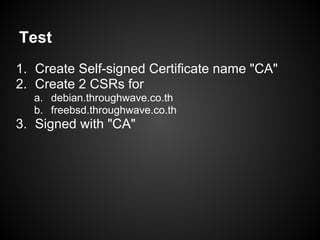
Test
1. Create Self-signed Certificate name "CA"
2. Create 2 CSRs for
  a. debian.throughwave.co.th
  b. freebsd.throughwave.co.th
3. Signed with "CA"
Validate certificate and
          key
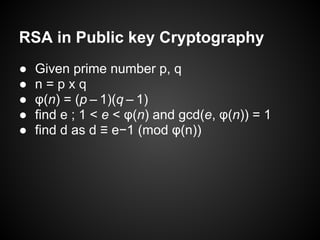
RSA in Public key Cryptography
●   Given prime number p, q
●   n=pxq
●   φ(n) = (p – 1)(q – 1)
●   find e ; 1 < e < φ(n) and gcd(e, φ(n)) = 1
●   find d as d ≡ e−1 (mod φ(n))
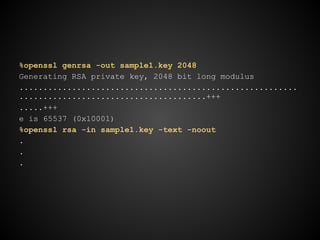
%openssl genrsa -out sample1.key 2048
Generating RSA private key, 2048 bit long modulus
..........................................................
.......................................+++
.....+++
e is 65537 (0x10001)
%openssl rsa -in sample1.key -text -noout
.
.
.
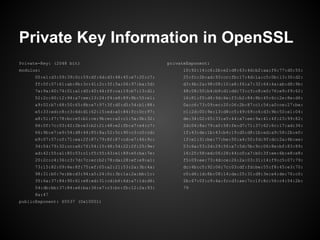
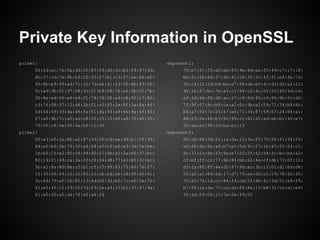
Private Key Information in OpenSSL
Private-Key: (2048 bit)                               privateExponent:
modulus:                                                    10:92:14:c6:2b:e2:d8:63:4d:b2:aa:f6:77:d0:55:
      00:e1:d3:09:39:0c:59:df:6d:d3:48:45:e7:20:c7:         25:fc:2b:ad:93:cc:fb:17:4d:1a:c5:0b:13:30:d2:
      ff:0f:07:61:ab:8b:3c:41:2c:3f:5a:06:97:ba:5d:         d3:4b:2a:98:08:10:a8:f6:a7:32:64:4a:ab:d8:9b:
      7a:9a:60:74:01:a1:d0:40:44:ff:ca:19:b7:13:d1:         48:08:50:b4:b9:d1:dd:73:c3:c8:e0:76:e9:f9:62:
      52:2c:60:12:94:a7:ee:13:24:f4:e8:89:8b:55:e1:         16:81:f0:d4:9d:6e:f3:b2:84:8b:45:6c:2e:8e:d6:
      a9:02:b7:68:50:65:8b:e7:97:3f:d0:d5:54:b1:88:         0a:c6:73:09:ec:20:06:2b:87:c1:54:a0:ce:27:be:
      e5:33:ed:c8:c3:6d:d1:62:15:ed:a0:84:fc:0c:97:         c1:2d:00:9e:13:d8:c5:49:69:c6:d3:9b:50:e1:04:
      a8:51:f7:78:bc:e5:b1:ce:9b:ec:a2:c1:5a:0b:32:         de:34:02:65:33:a5:44:a7:ee:9a:41:4f:23:99:82:
      66:0f:7c:03:42:2b:e3:b2:21:48:e2:fb:a7:e4:c7:         2d:04:8a:79:a0:58:fe:d7:71:37:62:6c:17:ad:36:
      66:9b:e7:e9:54:d8:44:85:8a:52:5c:90:c3:c0:cd:         1f:43:de:1b:43:b4:19:d5:d8:1b:ed:a9:58:2b:e0:
      e9:07:57:cf:71:ea:2f:87:79:8f:87:cd:e7:46:9c:         1f:e1:31:be:77:be:50:a4:50:fd:9f:dc:2a:4b:ee:
      34:54:79:32:cc:a6:7f:54:15:48:54:22:2f:25:9e:         53:6a:53:2d:29:56:a7:5d:5b:9c:06:8e:bf:83:89:
      ad:42:55:a1:80:03:c1:f5:55:43:e1:89:e5:ba:7e:         16:25:58:ed:06:28:44:c0:a7:b0:3f:ee:6b:e8:e8:
      20:2c:c4:36:c3:7d:7c:ec:b2:78:da:28:ef:e9:a1:         f5:09:ee:73:4d:ce:26:2a:03:31:14:f9:c5:07:79:
      73:15:82:09:6e:8f:75:ef:05:a2:21:53:2a:3b:4a:         dc:4b:c5:92:06:7c:03:df:fd:be:55:f8:45:e3:70:
      98:31:b0:7e:bb:d3:94:a5:24:0c:3b:1a:2a:bb:1c:         c0:d6:1d:8b:08:14:da:25:31:d8:3e:e4:de:76:c0:
      35:6a:37:84:90:61:e8:ed:31:cd:b6:6d:a7:1d:d6:         2b:67:0f:c9:4a:fc:d3:ae:7c:1f:8c:56:c4:54:2b:
      54:db:bb:37:84:e6:ba:36:e7:c3:bc:fb:12:2a:93:         79
      8a:47
publicExponent: 65537 (0x10001)
Private Key Information in OpenSSL
prime1:                                               exponent1:
      00:fd:ac:7e:0a:dd:50:83:09:d5:3c:b3:f9:47:3d:         70:b7:f1:f5:df:eb:83:9e:9d:ea:f0:49:c7:17:18:
      8b:27:cd:7e:9b:bf:20:93:27:b1:c3:f7:ee:86:a0:         bb:61:fb:6d:37:5b:41:28:35:3c:4f:f1:e4:4e:7d:
      96:8b:e9:09:a4:71:20:7d:eb:41:63:65:6b:f9:56:         36:c4:21:2d:b9:ba:e7:58:de:e0:4c:d3:d2:a2:22:
      0c:a9:3b:61:97:88:3c:21:b9:f8:76:ef:9b:91:7b:         d4:1b:f7:bc:7e:a3:c1:94:c2:4c:0f:22:40:5d:cd:
      30:8a:ed:09:e8:e4:f1:74:76:28:a4:c8:50:17:82:         ef:1d:6e:f6:d6:ac:57:c4:9d:40:c3:65:9b:5c:d6:
      c3:76:08:07:10:d4:2b:f1:c0:85:2e:8f:3a:8a:44:         7f:9f:07:8c:b9:ca:a1:0c:9b:e1:59:71:78:b8:dc:
      2d:64:59:33:da:46:fa:51:da:54:a9:6e:9a:6f:45:         b6:a7:50:7c:20:67:e0:71:34:87:69:07:24:84:a1:
      f7:a0:9b:7c:a0:ad:c8:02:25:12:ef:a8:7f:a5:3f:         88:f3:2e:48:b3:8f:99:2c:62:22:ad:eb:b2:40:e7:
      79:00:c8:0e:95:4e:bf:11:93                            02:aa:e2:98:03:ba:b1:13
prime2:                                               exponent2:
      00:e3:e5:2a:8b:a2:87:5d:20:cd:ee:9d:b1:0f:99:         00:cb:68:5d:2c:1a:da:15:3e:55:70:58:61:94:59:
      84:af:b6:2b:74:50:a4:04:a0:cf:a6:a3:3d:1e:be:         e2:fb:6e:6e:a4:b7:e1:5d:9c:27:1b:45:f2:24:c1:
      1b:b0:1f:e2:85:5f:94:90:27:4b:41:2a:60:37:bc:         6c:37:2c:8e:63:9a:e7:20:2f:62:54:fc:bc:ba:a2:
      82:19:01:48:ca:3a:03:c9:04:d8:77:e3:b0:3c:bc:         cf:bf:ff:cc:77:6b:86:bb:62:4e:cf:db:73:0f:12:
      5b:a1:8a:8d:8e:c5:b1:cf:c7:99:83:75:86:76:f7:         d3:fa:80:8f:4e:d2:97:9d:ac:3b:12:01:d1:0d:d8:
      15:39:66:f4:c0:3c:85:13:cb:bd:2e:1d:95:42:41:         05:a2:a1:89:6d:17:d7:73:ce:d2:c1:19:78:82:95:
      3c:69:79:af:06:85:13:6d:b0:34:b5:7c:ef:5a:72:         75:95:73:1d:cc:84:f4:cd:5f:8b:fc:3d:51:e9:f9:
      41:e5:45:10:29:20:7d:f9:2a:a4:10:b1:30:67:9a:         b7:65:2a:da:7c:ca:da:85:8e:10:b8:31:5e:d1:e9:
      41:e5:65:a5:d4:7f:af:a4:fd                            f6:4d:09:08:15:7e:0e:49:05
Private Key Information in OpenSSL
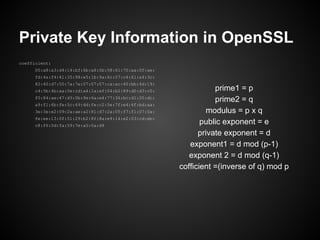
coefficient:
      00:a8:a3:d4:14:bf:6b:a8:0b:58:61:70:aa:0f:ae:
      fd:4a:f4:41:35:98:e5:1b:9a:6c:07:c4:61:a4:3c:
      82:40:d7:50:7a:7e:07:07:07:ca:ac:40:bb:4d:19:
      c4:5b:4b:aa:0e:cd:a4:1a:ef:04:b2:89:d0:d3:c0:              prime1 = p
      f0:84:ae:47:d3:0b:9e:6a:e4:77:36:bc:d1:20:dc:
                                                                 prime2 = q
      a9:f1:6b:fe:5c:69:dd:fe:c2:5e:7f:e4:4f:bd:aa:
      3e:3e:e2:09:2a:ae:a2:81:d7:2a:05:f7:f1:07:0a:            modulus = p x q
      fe:ee:13:0f:51:29:b2:8f:8a:e9:14:e2:03:cd:eb:
      c8:f6:0d:fa:59:7e:a5:0a:d9
                                                             public exponent = e
                                                            private exponent = d
                                                         exponent1 = d mod (p-1)
                                                         exponent 2 = d mod (q-1)
                                                      cofficient =(inverse of q) mod p
%openssl req -key sample1.key -new -x509 -nodes -days 3650 -out sample1.cer
You are about to be asked to enter information that will be incorporated
into your certificate request.
What you are about to enter is what is called a Distinguished Name or a DN.
There are quite a few fields but you can leave some blank
For some fields there will be a default value,
If you enter '.', the field will be left blank.
-----
Country Name (2 letter code) [AU]:TH
State or Province Name (full name) [Some-State]:Bangkok
Locality Name (eg, city) []:
Organization Name (eg, company) [Internet Widgits Pty Ltd]:Throughwave
Organizational Unit Name (eg, section) []:
Common Name (eg, YOUR name) []:bomb
Email Address []:
%openssl x509 -in sample1.cer -text -noout
Private Key vs Public Key
Private Key = [ modulus , private exponent]
Public Key = [ modulus, public exponent]


Valid Key Pair
  Private Key.modulus = Public Key.modulus
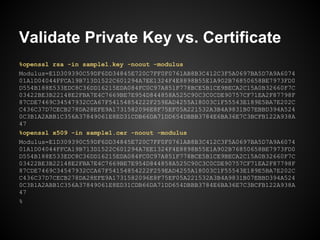
Validate Private Key vs. Certificate
%openssl rsa -in sample1.key -noout -modulus
Modulus=E1D309390C59DF6DD34845E720C7FF0F0761AB8B3C412C3F5A0697BA5D7A9A6074
01A1D04044FFCA19B713D1522C601294A7EE1324F4E8898B55E1A902B76850658BE7973FD0
D554B188E533EDC8C36DD16215EDA084FC0C97A851F778BCE5B1CE9BECA2C15A0B32660F7C
03422BE3B22148E2FBA7E4C7669BE7E954D844858A525C90C3C0CDE90757CF71EA2F87798F
87CDE7469C34547932CCA67F54154854222F259EAD4255A18003C1F55543E189E5BA7E202C
C436C37D7CECB278DA28EFE9A1731582096E8F75EF05A221532A3B4A9831B07EBBD394A524
0C3B1A2ABB1C356A37849061E8ED31CDB66DA71DD654DBBB3784E6BA36E7C3BCFB122A938A
47
%openssl x509 -in sample1.cer -noout -modulus
Modulus=E1D309390C59DF6DD34845E720C7FF0F0761AB8B3C412C3F5A0697BA5D7A9A6074
01A1D04044FFCA19B713D1522C601294A7EE1324F4E8898B55E1A902B76850658BE7973FD0
D554B188E533EDC8C36DD16215EDA084FC0C97A851F778BCE5B1CE9BECA2C15A0B32660F7C
03422BE3B22148E2FBA7E4C7669BE7E954D844858A525C90C3C0CDE90757CF71EA2F87798F
87CDE7469C34547932CCA67F54154854222F259EAD4255A18003C1F55543E189E5BA7E202C
C436C37D7CECB278DA28EFE9A1731582096E8F75EF05A221532A3B4A9831B07EBBD394A524
0C3B1A2ABB1C356A37849061E8ED31CDB66DA71DD654DBBB3784E6BA36E7C3BCFB122A938A
47
%
Install Certificate and
    make it work
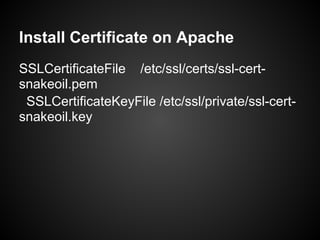
Install Certificate on Apache
SSLCertificateFile /etc/ssl/certs/ssl-cert-
snakeoil.pem
 SSLCertificateKeyFile /etc/ssl/private/ssl-cert-
snakeoil.key
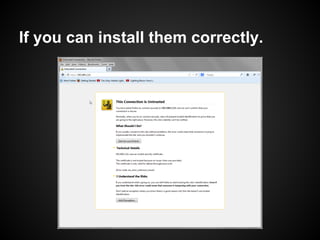
If you can install them correctly.
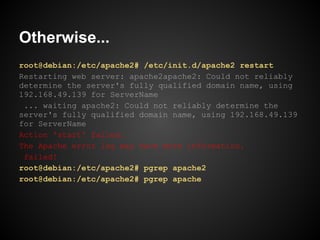
Otherwise...
root@debian:/etc/apache2# /etc/init.d/apache2 restart
Restarting web server: apache2apache2: Could not reliably
determine the server's fully qualified domain name, using
192.168.49.139 for ServerName
 ... waiting apache2: Could not reliably determine the
server's fully qualified domain name, using 192.168.49.139
for ServerName
Action 'start' failed.
The Apache error log may have more information.
 failed!
root@debian:/etc/apache2# pgrep apache2
root@debian:/etc/apache2# pgrep apache
What about installing
certificate with
encrypted key ??
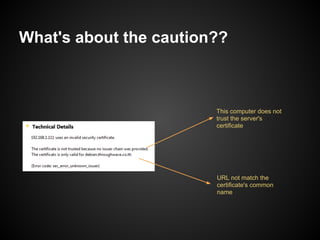
What's about the caution??


                        This computer does not
                        trust the server's
                        certificate


                        URL not match the
                        certificate's common
                        name
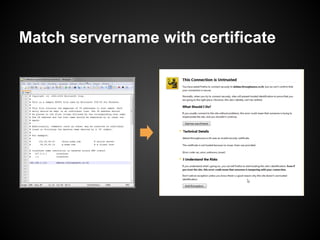
Match servername with certificate
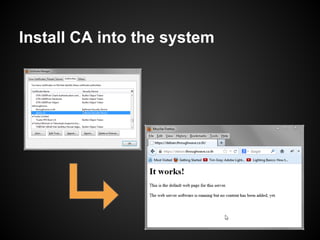
Install CA into the system
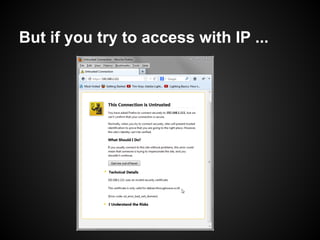
But if you try to access with IP ...
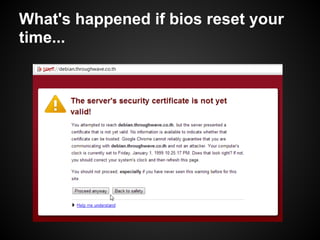
What's happened if bios reset your
time...
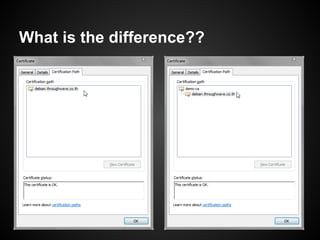
What is the difference??
Certificate and CA Type
How many certificate type from
user's POV
●   Root CA ??
●   Trusted Root CA ??
●   Intermediate CA ??
●   Client Certificate ??
●   Server Certificate ??
Questions ?
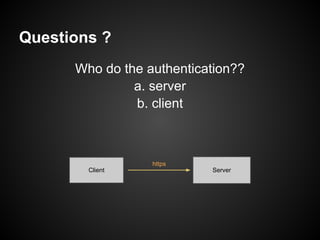
      Who do the authentication??
               a. server
               b. client


                  https
        Client             Server
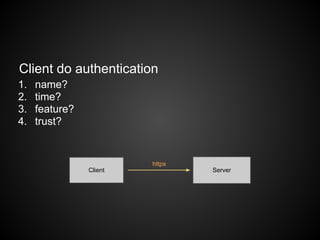
Client do authentication
1.   name?
2.   time?
3.   feature?
4.   trust?


                         https
                Client           Server
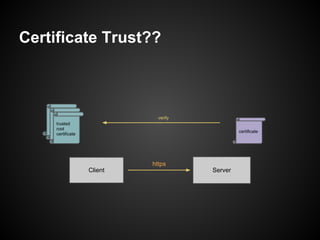
Certificate Trust??


    trusted                      verify
      trusted
    root
        trusted
      root
    certificate
        root
      certificate                                  certificate
        certificate


                               https
                      Client              Server
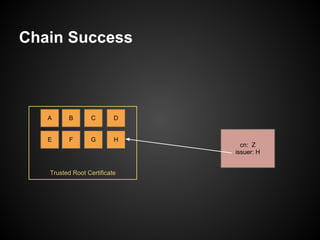
Chain Success


   A     B        C       D


   E      F      G        H
                                cn: Z
                              issuer: H


   Trusted Root Certificate
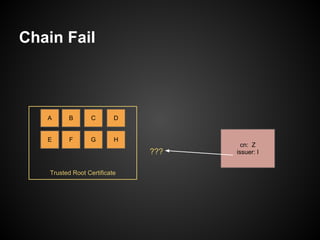
Chain Fail


   A      B        C       D


   E       F      G        H
                                       cn: Z
                               ???   issuer: I


    Trusted Root Certificate
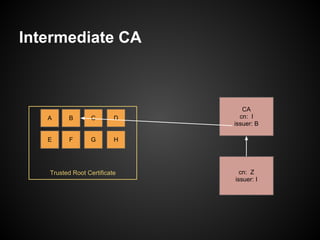
Intermediate CA


                                 CA
   A     B        C       D     cn: I
                              issuer: B

   E      F      G        H


   Trusted Root Certificate     cn: Z
                              issuer: I
Summary from Server POV
● Trusted Root CA
  ○ Unnecessary if you don't do client authentication or
    connect to other ssl servers.
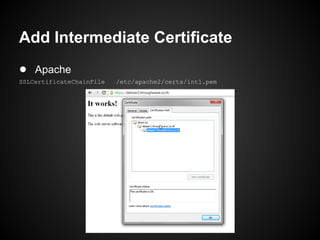
● Intermediate CA
  ○ Should bundle with server certificate
    ■ Each browser have different trust root &
       intermediate CA list.
● Server Certificate
  ○ Require in ssl service.
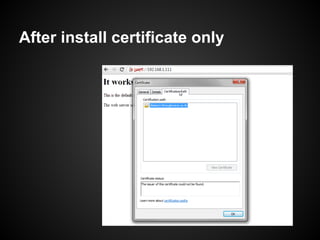
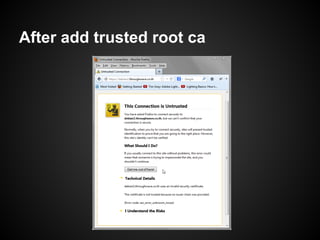
Example of intermediate certificate's
usage
● trusted root ca -> demo-ca
● intermediate ca -> debian1.throughwave.co.
  th
● server cert -> debian2.throughwave.co.th
After install certificate only
After add trusted root ca
Add Intermediate Certificate
● Apache
SSLCertificateChainFile   /etc/apache2/certs/int1.pem
Connect to LDAPs
Caution
● LDAP client for ssl is in 'demand/hard' mode
  ○ Any bad certificate is refused!!
Config LDAPs
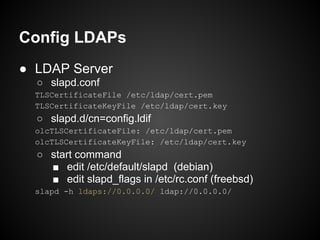
● LDAP Server
  ○ slapd.conf
  TLSCertificateFile /etc/ldap/cert.pem
  TLSCertificateKeyFile /etc/ldap/cert.key
  ○ slapd.d/cn=config.ldif
  olcTLSCertificateFile: /etc/ldap/cert.pem
  olcTLSCertificateKeyFile: /etc/ldap/cert.key
  ○ start command
    ■ edit /etc/default/slapd (debian)
    ■ edit slapd_flags in /etc/rc.conf (freebsd)
  slapd -h ldaps://0.0.0.0/ ldap://0.0.0.0/
Config LDAPs (cond.)
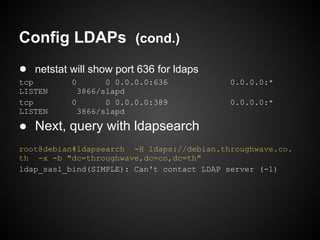
● netstat will show port 636 for ldaps
tcp        0       0 0.0.0.0:636           0.0.0.0:*
LISTEN       3866/slapd
tcp        0       0 0.0.0.0:389           0.0.0.0:*
LISTEN       3866/slapd

● Next, query with ldapsearch
root@debian#ldapsearch -H ldaps://debian.throughwave.co.
th -x -b "dc=throughwave,dc=co,dc=th"
ldap_sasl_bind(SIMPLE): Can't contact LDAP server (-1)
Config LDAPs (cond.)
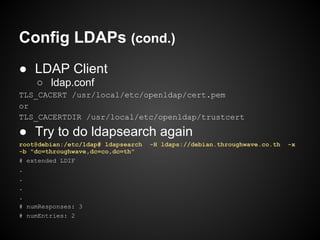
● LDAP Client
    ○ ldap.conf
TLS_CACERT /usr/local/etc/openldap/cert.pem
or
TLS_CACERTDIR /usr/local/etc/openldap/trustcert

● Try to do ldapsearch again
root@debian:/etc/ldap# ldapsearch   -H ldaps://debian.throughwave.co.th   -x
-b "dc=throughwave,dc=co,dc=th"
# extended LDIF
.
.
.
.
# numResponses: 3
# numEntries: 2
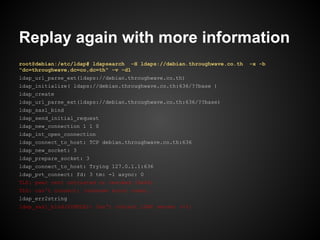
Replay again with more information
root@debian:/etc/ldap# ldapsearch -H ldaps://debian.throughwave.co.th   -x -b
"dc=throughwave,dc=co,dc=th" -v -d1
ldap_url_parse_ext(ldaps://debian.throughwave.co.th)
ldap_initialize( ldaps://debian.throughwave.co.th:636/??base )
ldap_create
ldap_url_parse_ext(ldaps://debian.throughwave.co.th:636/??base)
ldap_sasl_bind
ldap_send_initial_request
ldap_new_connection 1 1 0
ldap_int_open_connection
ldap_connect_to_host: TCP debian.throughwave.co.th:636
ldap_new_socket: 3
ldap_prepare_socket: 3
ldap_connect_to_host: Trying 127.0.1.1:636
ldap_pvt_connect: fd: 3 tm: -1 async: 0
TLS: peer cert untrusted or revoked (0x42)
TLS: can't connect: (unknown error code).
ldap_err2string
ldap_sasl_bind(SIMPLE): Can't contact LDAP server (-1)
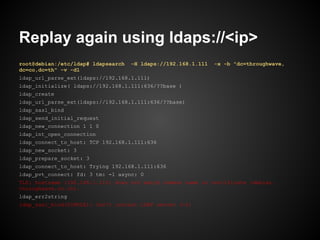
Replay again using ldaps://<ip>
root@debian:/etc/ldap# ldapsearch   -H ldaps://192.168.1.111   -x -b "dc=throughwave,
dc=co,dc=th" -v -d1
ldap_url_parse_ext(ldaps://192.168.1.111)
ldap_initialize( ldaps://192.168.1.111:636/??base )
ldap_create
ldap_url_parse_ext(ldaps://192.168.1.111:636/??base)
ldap_sasl_bind
ldap_send_initial_request
ldap_new_connection 1 1 0
ldap_int_open_connection
ldap_connect_to_host: TCP 192.168.1.111:636
ldap_new_socket: 3
ldap_prepare_socket: 3
ldap_connect_to_host: Trying 192.168.1.111:636
ldap_pvt_connect: fd: 3 tm: -1 async: 0
TLS: hostname (192.168.1.111) does not match common name in certificate (debian.
throughwave.co.th).
ldap_err2string
ldap_sasl_bind(SIMPLE): Can't contact LDAP server (-1)
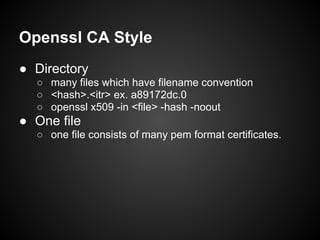
Openssl CA Style
● Directory
  ○ many files which have filename convention
  ○ <hash>.<itr> ex. a89172dc.0
  ○ openssl x509 -in <file> -hash -noout
● One file
  ○ one file consists of many pem format certificates.
Troubleshooting
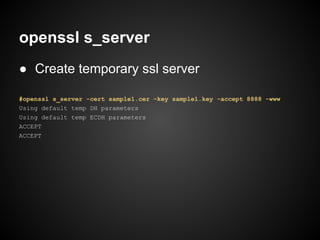
openssl s_server
● Create temporary ssl server

#openssl s_server -cert sample1.cer -key sample1.key -accept 8888 -www
Using default temp DH parameters
Using default temp ECDH parameters
ACCEPT
ACCEPT
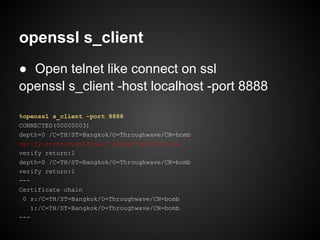
openssl s_client
● Open telnet like connect on ssl
openssl s_client -host localhost -port 8888

%openssl s_client -port 8888
CONNECTED(00000003)
depth=0 /C=TH/ST=Bangkok/O=Throughwave/CN=bomb
verify error:num=18:self signed certificate
verify return:1
depth=0 /C=TH/ST=Bangkok/O=Throughwave/CN=bomb
verify return:1
---
Certificate chain
 0 s:/C=TH/ST=Bangkok/O=Throughwave/CN=bomb
    i:/C=TH/ST=Bangkok/O=Throughwave/CN=bomb
---
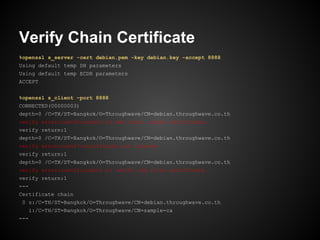
Verify Chain Certificate
%openssl s_server -cert debian.pem -key debian.key -accept 8888
Using default temp DH parameters
Using default temp ECDH parameters
ACCEPT


%openssl s_client -port 8888
CONNECTED(00000003)
depth=0 /C=TH/ST=Bangkok/O=Throughwave/CN=debian.throughwave.co.th
verify error:num=20:unable to get local issuer certificate
verify return:1
depth=0 /C=TH/ST=Bangkok/O=Throughwave/CN=debian.throughwave.co.th
verify error:num=27:certificate not trusted
verify return:1
depth=0 /C=TH/ST=Bangkok/O=Throughwave/CN=debian.throughwave.co.th
verify error:num=21:unable to verify the first certificate
verify return:1
---
Certificate chain
 0 s:/C=TH/ST=Bangkok/O=Throughwave/CN=debian.throughwave.co.th
   i:/C=TH/ST=Bangkok/O=Throughwave/CN=sample-ca
---
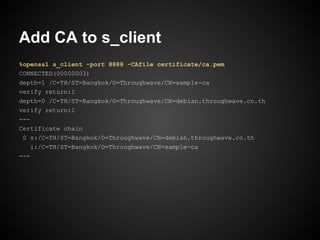
Add CA to s_client
%openssl s_client -port 8888 -CAfile certificate/ca.pem
CONNECTED(00000003)
depth=1 /C=TH/ST=Bangkok/O=Throughwave/CN=sample-ca
verify return:1
depth=0 /C=TH/ST=Bangkok/O=Throughwave/CN=debian.throughwave.co.th
verify return:1
---
Certificate chain
 0 s:/C=TH/ST=Bangkok/O=Throughwave/CN=debian.throughwave.co.th
    i:/C=TH/ST=Bangkok/O=Throughwave/CN=sample-ca
---
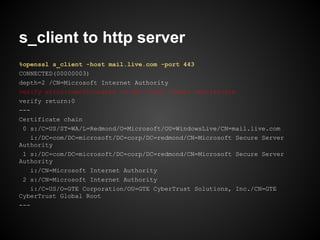
s_client to http server
%openssl s_client -host mail.live.com -port 443
CONNECTED(00000003)
depth=2 /CN=Microsoft Internet Authority
verify error:num=20:unable to get local issuer certificate
verify return:0
---
Certificate chain
 0 s:/C=US/ST=WA/L=Redmond/O=Microsoft/OU=WindowsLive/CN=mail.live.com
    i:/DC=com/DC=microsoft/DC=corp/DC=redmond/CN=Microsoft Secure Server
Authority
 1 s:/DC=com/DC=microsoft/DC=corp/DC=redmond/CN=Microsoft Secure Server
Authority
    i:/CN=Microsoft Internet Authority
 2 s:/CN=Microsoft Internet Authority
    i:/C=US/O=GTE Corporation/OU=GTE CyberTrust Solutions, Inc./CN=GTE
CyberTrust Global Root
---
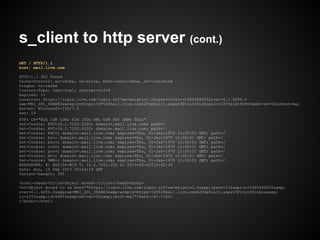
s_client to http server (cont.)
GET / HTTP/1.1
host: mail.live.com

HTTP/1.1 302 Found
Cache-Control: no-cache, no-store, must-revalidate, no-transform
Pragma: no-cache
Content-Type: text/html; charset=utf-8
Expires: -1
Location: https://login.live.com/login.srf?wa=wsignin1.0&rpsnv=11&ct=1360488255&rver=6.1.6206.0
&wp=MBI_SSL_SHARED&wreply=https:%2F%2Fmail.live.com%2Fdefault.aspx%3Frru%3Dinbox&lc=1033&id=64855&mkt=en-US&cbcxt=mai
Server: Microsoft-IIS/7.5
xxn: 19
P3P: CP="BUS CUR CONo FIN IVDo ONL OUR PHY SAMo TELo"
Set-Cookie: KVC=16.2.7203.0205; domain=.mail.live.com; path=/
Set-Cookie: KSC=; domain=.mail.live.com; expires=Thu, 01-Jan-1970 12:00:01 GMT; path=/
Set-Cookie: kr=; domain=.mail.live.com; expires=Thu, 01-Jan-1970 12:00:01 GMT; path=/
Set-Cookie: bsc=; domain=.mail.live.com; expires=Thu, 01-Jan-1970 12:00:01 GMT; path=/
Set-Cookie: rru=; domain=.mail.live.com; expires=Thu, 01-Jan-1970 12:00:01 GMT; path=/
Set-Cookie: prc=; domain=.mail.live.com; expires=Thu, 01-Jan-1970 12:00:01 GMT; path=/
Set-Cookie: mt=; domain=.mail.live.com; expires=Thu, 01-Jan-1970 12:00:01 GMT; path=/
Set-Cookie: DWN=; domain=.mail.live.com; expires=Thu, 01-Jan-1970 12:00:01 GMT; path=/
MSNSERVER: H: BAY156-W19 V: 16.2.7203.205 D: 2013-02-05T15:42:30
Date: Sun, 10 Feb 2013 09:24:14 GMT
Content-Length: 355

<html><head><title>Object moved</title></head><body>
<h2>Object moved to <a href="https://login.live.com/login.srf?wa=wsignin1.0&amp;rpsnv=11&amp;ct=1360488255&amp;
rver=6.1.6206.0&amp;wp=MBI_SSL_SHARED&amp;wreply=https:%2F%2Fmail.live.com%2Fdefault.aspx%3Frru%3Dinbox&amp;
lc=1033&amp;id=64855&amp;mkt=en-US&amp;cbcxt=mai">here</a>.</h2>
</body></html>
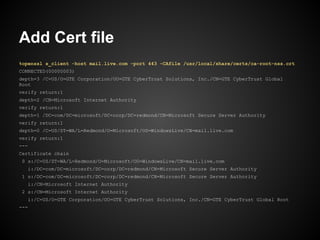
Add Cert file
%openssl s_client -host mail.live.com -port 443 -CAfile /usr/local/share/certs/ca-root-nss.crt
CONNECTED(00000003)
depth=3 /C=US/O=GTE Corporation/OU=GTE CyberTrust Solutions, Inc./CN=GTE CyberTrust Global
Root
verify return:1
depth=2 /CN=Microsoft Internet Authority
verify return:1
depth=1 /DC=com/DC=microsoft/DC=corp/DC=redmond/CN=Microsoft Secure Server Authority
verify return:1
depth=0 /C=US/ST=WA/L=Redmond/O=Microsoft/OU=WindowsLive/CN=mail.live.com
verify return:1
---
Certificate chain
0 s:/C=US/ST=WA/L=Redmond/O=Microsoft/OU=WindowsLive/CN=mail.live.com
  i:/DC=com/DC=microsoft/DC=corp/DC=redmond/CN=Microsoft Secure Server Authority
1 s:/DC=com/DC=microsoft/DC=corp/DC=redmond/CN=Microsoft Secure Server Authority
  i:/CN=Microsoft Internet Authority
2 s:/CN=Microsoft Internet Authority
  i:/C=US/O=GTE Corporation/OU=GTE CyberTrust Solutions, Inc./CN=GTE CyberTrust Global Root
---
Summary
● Basic openssl command
● Invalid cert/priv cause server terminate.
● Good ssl server must pass
   ○ name
   ○ time
   ○ certificate chain to trusted root
● How intermediate certificate fill the gap
  between server certificate and trusted root.
● How to config in Apache/OpenLDAP
● How to troubleshoot ssl connection.

SSLCertificate101

  • 1.
    SSL Certificate 101 Teerayut Hiruntaraporn
  • 2.
    Content ● Openssl Basic Usage ● Validate certificate and key ● Install Certificate and make it work ● Certificate / CA Type ● Connect to LDAPs ● Troubleshooting
  • 3.
  • 4.
  • 5.
    Success Certificate Installation(HTTP) Server Level ○ Install valid certificate and private key. Trust Level ○ Identity match with Certificate's cn field ○ In effective date & time ○ Can create trusted chain to client's trusted root certificate ○ Have valid ability Absolutely Reject ○ Certificate was revoked.
  • 6.
  • 7.
    Create RSA KeyPair opensslgenrsa <bit> root@debian:/etc/apache2/cert# openssl genrsa -out sample1.key -des3 1024 Generating RSA private key, 1024 bit long modulus ...........++++++ .............................++++++ e is 65537 (0x10001) Enter pass phrase for sample1.key: Verifying - Enter pass phrase for sample1.key: root@debian:/etc/apache2/cert# openssl genrsa -out sample.key 1024 Generating RSA private key, 1024 bit long modulus ............................++++++ ..............++++++ e is 65537 (0x10001) root@debian:/etc/apache2/cert#
  • 8.
    root@debian:/etc/apache2/cert# cat sample1.key -----BEGINRSA PRIVATE KEY----- Proc-Type: 4,ENCRYPTED DEK-Info: DES-EDE3-CBC,F5F5AAEEB1632EF8 Hw6oWVEYuX1inUkKo+RxW0Nr86W4pd0hY41j+Q0oo5hcjnFYwwNnhUUEwUYH5hrl 2lzgRia+JTPomFjSsP6r4eFE2zGeVbqCUXu/++mkoT2FhWWYTn9VWB/4MoM7WSdf rdNQoSNuYqCGxxf3mArbNGMU5KkeIdXM8tgCRMHgSAIYBR0WkCj7OmHZVunmSQtm +YRub+Wnp7ZcKRnP4x72O+FsWFtJCm5j1TSs/ZEey6+72xx0E2Xv56cE/rR5pgUq T8o4tRwlpye+hS4ekA16JZ5pgVK3w7j4NaylH5Rily9/oqSBA7Sk1YNqzXebsAyH 0iiEtYX7mo5fh0icKbs1dDZOsKXqlRZ7v4th/1dMk4SFMaFAfew3V+WueiN7DS+G 1BxDe9MaJMHyZIv5H+O12Jd52RFQsMCDctmc4D+UIuY72R2xY1vxp3Ozb6G9nyaB O60Pk4z5/P/XPLUGatrBi9r2/zlQXCwhDHS45PALLuO5vW3DaLzLfYT5TP4jE7Lz Ib55JCOya87a3ZbnoQCHzoocfC8rXd5qZMrQsJZmlkCp8NYNzH+9hOC1esLXm+3G 3BSyn1lWe7TQtRgX9OKyM8ZTklNy1AoYI3bipnUP2Z1OawxtZuE/vVdDzyG3++dB zdSKFSgpnvw3fvv9vCEHaYRrXIuELTBZbHMvduhe/gpBejNCmU+g0SXoXOFQj9ud awI8IQplXX0zBdHpJZrP3Dv/9/4TEKRMFZnhq4wXrXqRt+mmlothEoEW1kloOAZX BRNg+ojwp+vmiwWTu4SGF46c+a9PE2rPAyEWTqKYmVzemRohA5Q/rQ== -----END RSA PRIVATE KEY-----
  • 9.
    root@debian:/etc/apache2/cert# cat sample.key -----BEGINRSA PRIVATE KEY----- MIICXQIBAAKBgQC+QVB7O//J2XNaUCPmhKWllouzktNJvVG58jk8dS/MSLcBIyTx WjcvIHvGBC0P4ig8hCVcHKoO3yhvRx0C27XD6kKVuSKMvo1eJsOMEV75O3TXsRvC hbOzE+5RDcahYShuSieIIbRIcndKoZ1itkPA78ayw1avan1ofpBpGl02rwIDAQAB AoGBAIsMfV+z+Dx0GuSU0cg2hkJBhxTVaGrqXQLDz6UqGKb7NhU0tFlZEB/3Y77T aoPDTJj+E7gAkyGPY6QAm2ltXqfwZxFCWIN0e6WnlU0mxkZCb0tFOR4PAjRMRAsI ZAZ8XbPENP+wSUNSEWf4Mbma1rzh98EzKdDz3n6qa//z4dYhAkEA53JSZNm5oEOp dza60utfD5if1DZm7LoqEUktM5H45oebX6Ct5+WK0wfYGHPyKJ2S++FkygZONdAm Dt+LMoX8pwJBANJwTmVYj33w+PaDAuKRl1L8WiFZQYPJeABCcCPhx1ZQvQOZl2vG fZjTTrJJGkl4bjEvayPqmwFDieaNofMTjrkCQEYax8BKfsJ/nDZC+qXmq32i4k66 R8TOwu1HeAyV24mga7y0g9ipG7q+NoN5o1EQIbRv2kKjVE9ShCSfK5+bHCMCQHbe 8anV6NhfcoLtZofNbgl2ewMzhAqJl7uty+K4+v0LBnouHJbIvNHDK0USfkLaQISQ IJldQMnp+M+/WagReCECQQDaLm31rdgkrlsVP3KIk/cpNGi5XTwol8aivzytc6/l DWvhZut8+KKPyh9WknV6SL19nTgtkKTaH5iE9LMgsIVX -----END RSA PRIVATE KEY-----
  • 10.
    Create Certificate Request opensslreq -key <privkey> -nodes -new root@debian:/etc/apache2/cert# openssl req -key sample.key -nodes -new -out sample.csr You are about to be asked to enter information that will be incorporated into your certificate request. What you are about to enter is what is called a Distinguished Name or a DN. There are quite a few fields but you can leave some blank For some fields there will be a default value, If you enter '.', the field will be left blank. ----- Country Name (2 letter code) [AU]:TH State or Province Name (full name) [Some-State]:Bangkok Locality Name (eg, city) []: Organization Name (eg, company) [Internet Widgits Pty Ltd]:Throughwave Organizational Unit Name (eg, section) []: Common Name (eg, YOUR name) []:debian.throughwave.co.th Email Address []: Please enter the following 'extra' attributes to be sent with your certificate request A challenge password []: An optional company name []: root@debian:/etc/apache2/cert#
  • 11.
    Create Certificate Request opensslreq -key <privkey> -nodes -new -x509 ○ create self-signed certificate.
  • 12.
    Create Signed Certificate opensslx509 -req -in <csr> -CA <ca> -CAkey <ca.key> -CAcreateserial -out <certificate> root@debian:/etc/apache2/cert# openssl x509 -req -in sample.csr -CA ca.pem -CAkey ca.key -out sample.pem Signature ok subject=/C=TH/ST=Bangkok/O=Throughwave/CN=debian.throughwave.co.th Getting CA Private Key root@debian:/etc/apache2/cert# openssl x509 -req -in sample1.csr -CA ca.pem -CAkey ca.key -out sample1.pem Signature ok subject=/C=TH/ST=Some-State/O=Throughwave/CN=debian1.throughwave.co.th Getting CA Private Key
  • 13.
    Show Certificate/Priv Information opensslx509 -in <file> -text -noout openssl rsa -in <file> -text -noout openssl req -in <file> -text -noout
  • 14.
    Test 1. Create Self-signedCertificate name "CA" 2. Create 2 CSRs for a. debian.throughwave.co.th b. freebsd.throughwave.co.th 3. Signed with "CA"
  • 15.
  • 16.
    RSA in Publickey Cryptography ● Given prime number p, q ● n=pxq ● φ(n) = (p – 1)(q – 1) ● find e ; 1 < e < φ(n) and gcd(e, φ(n)) = 1 ● find d as d ≡ e−1 (mod φ(n))
  • 17.
    %openssl genrsa -outsample1.key 2048 Generating RSA private key, 2048 bit long modulus .......................................................... .......................................+++ .....+++ e is 65537 (0x10001) %openssl rsa -in sample1.key -text -noout . . .
  • 18.
    Private Key Informationin OpenSSL Private-Key: (2048 bit) privateExponent: modulus: 10:92:14:c6:2b:e2:d8:63:4d:b2:aa:f6:77:d0:55: 00:e1:d3:09:39:0c:59:df:6d:d3:48:45:e7:20:c7: 25:fc:2b:ad:93:cc:fb:17:4d:1a:c5:0b:13:30:d2: ff:0f:07:61:ab:8b:3c:41:2c:3f:5a:06:97:ba:5d: d3:4b:2a:98:08:10:a8:f6:a7:32:64:4a:ab:d8:9b: 7a:9a:60:74:01:a1:d0:40:44:ff:ca:19:b7:13:d1: 48:08:50:b4:b9:d1:dd:73:c3:c8:e0:76:e9:f9:62: 52:2c:60:12:94:a7:ee:13:24:f4:e8:89:8b:55:e1: 16:81:f0:d4:9d:6e:f3:b2:84:8b:45:6c:2e:8e:d6: a9:02:b7:68:50:65:8b:e7:97:3f:d0:d5:54:b1:88: 0a:c6:73:09:ec:20:06:2b:87:c1:54:a0:ce:27:be: e5:33:ed:c8:c3:6d:d1:62:15:ed:a0:84:fc:0c:97: c1:2d:00:9e:13:d8:c5:49:69:c6:d3:9b:50:e1:04: a8:51:f7:78:bc:e5:b1:ce:9b:ec:a2:c1:5a:0b:32: de:34:02:65:33:a5:44:a7:ee:9a:41:4f:23:99:82: 66:0f:7c:03:42:2b:e3:b2:21:48:e2:fb:a7:e4:c7: 2d:04:8a:79:a0:58:fe:d7:71:37:62:6c:17:ad:36: 66:9b:e7:e9:54:d8:44:85:8a:52:5c:90:c3:c0:cd: 1f:43:de:1b:43:b4:19:d5:d8:1b:ed:a9:58:2b:e0: e9:07:57:cf:71:ea:2f:87:79:8f:87:cd:e7:46:9c: 1f:e1:31:be:77:be:50:a4:50:fd:9f:dc:2a:4b:ee: 34:54:79:32:cc:a6:7f:54:15:48:54:22:2f:25:9e: 53:6a:53:2d:29:56:a7:5d:5b:9c:06:8e:bf:83:89: ad:42:55:a1:80:03:c1:f5:55:43:e1:89:e5:ba:7e: 16:25:58:ed:06:28:44:c0:a7:b0:3f:ee:6b:e8:e8: 20:2c:c4:36:c3:7d:7c:ec:b2:78:da:28:ef:e9:a1: f5:09:ee:73:4d:ce:26:2a:03:31:14:f9:c5:07:79: 73:15:82:09:6e:8f:75:ef:05:a2:21:53:2a:3b:4a: dc:4b:c5:92:06:7c:03:df:fd:be:55:f8:45:e3:70: 98:31:b0:7e:bb:d3:94:a5:24:0c:3b:1a:2a:bb:1c: c0:d6:1d:8b:08:14:da:25:31:d8:3e:e4:de:76:c0: 35:6a:37:84:90:61:e8:ed:31:cd:b6:6d:a7:1d:d6: 2b:67:0f:c9:4a:fc:d3:ae:7c:1f:8c:56:c4:54:2b: 54:db:bb:37:84:e6:ba:36:e7:c3:bc:fb:12:2a:93: 79 8a:47 publicExponent: 65537 (0x10001)
  • 19.
    Private Key Informationin OpenSSL prime1: exponent1: 00:fd:ac:7e:0a:dd:50:83:09:d5:3c:b3:f9:47:3d: 70:b7:f1:f5:df:eb:83:9e:9d:ea:f0:49:c7:17:18: 8b:27:cd:7e:9b:bf:20:93:27:b1:c3:f7:ee:86:a0: bb:61:fb:6d:37:5b:41:28:35:3c:4f:f1:e4:4e:7d: 96:8b:e9:09:a4:71:20:7d:eb:41:63:65:6b:f9:56: 36:c4:21:2d:b9:ba:e7:58:de:e0:4c:d3:d2:a2:22: 0c:a9:3b:61:97:88:3c:21:b9:f8:76:ef:9b:91:7b: d4:1b:f7:bc:7e:a3:c1:94:c2:4c:0f:22:40:5d:cd: 30:8a:ed:09:e8:e4:f1:74:76:28:a4:c8:50:17:82: ef:1d:6e:f6:d6:ac:57:c4:9d:40:c3:65:9b:5c:d6: c3:76:08:07:10:d4:2b:f1:c0:85:2e:8f:3a:8a:44: 7f:9f:07:8c:b9:ca:a1:0c:9b:e1:59:71:78:b8:dc: 2d:64:59:33:da:46:fa:51:da:54:a9:6e:9a:6f:45: b6:a7:50:7c:20:67:e0:71:34:87:69:07:24:84:a1: f7:a0:9b:7c:a0:ad:c8:02:25:12:ef:a8:7f:a5:3f: 88:f3:2e:48:b3:8f:99:2c:62:22:ad:eb:b2:40:e7: 79:00:c8:0e:95:4e:bf:11:93 02:aa:e2:98:03:ba:b1:13 prime2: exponent2: 00:e3:e5:2a:8b:a2:87:5d:20:cd:ee:9d:b1:0f:99: 00:cb:68:5d:2c:1a:da:15:3e:55:70:58:61:94:59: 84:af:b6:2b:74:50:a4:04:a0:cf:a6:a3:3d:1e:be: e2:fb:6e:6e:a4:b7:e1:5d:9c:27:1b:45:f2:24:c1: 1b:b0:1f:e2:85:5f:94:90:27:4b:41:2a:60:37:bc: 6c:37:2c:8e:63:9a:e7:20:2f:62:54:fc:bc:ba:a2: 82:19:01:48:ca:3a:03:c9:04:d8:77:e3:b0:3c:bc: cf:bf:ff:cc:77:6b:86:bb:62:4e:cf:db:73:0f:12: 5b:a1:8a:8d:8e:c5:b1:cf:c7:99:83:75:86:76:f7: d3:fa:80:8f:4e:d2:97:9d:ac:3b:12:01:d1:0d:d8: 15:39:66:f4:c0:3c:85:13:cb:bd:2e:1d:95:42:41: 05:a2:a1:89:6d:17:d7:73:ce:d2:c1:19:78:82:95: 3c:69:79:af:06:85:13:6d:b0:34:b5:7c:ef:5a:72: 75:95:73:1d:cc:84:f4:cd:5f:8b:fc:3d:51:e9:f9: 41:e5:45:10:29:20:7d:f9:2a:a4:10:b1:30:67:9a: b7:65:2a:da:7c:ca:da:85:8e:10:b8:31:5e:d1:e9: 41:e5:65:a5:d4:7f:af:a4:fd f6:4d:09:08:15:7e:0e:49:05
  • 20.
    Private Key Informationin OpenSSL coefficient: 00:a8:a3:d4:14:bf:6b:a8:0b:58:61:70:aa:0f:ae: fd:4a:f4:41:35:98:e5:1b:9a:6c:07:c4:61:a4:3c: 82:40:d7:50:7a:7e:07:07:07:ca:ac:40:bb:4d:19: c4:5b:4b:aa:0e:cd:a4:1a:ef:04:b2:89:d0:d3:c0: prime1 = p f0:84:ae:47:d3:0b:9e:6a:e4:77:36:bc:d1:20:dc: prime2 = q a9:f1:6b:fe:5c:69:dd:fe:c2:5e:7f:e4:4f:bd:aa: 3e:3e:e2:09:2a:ae:a2:81:d7:2a:05:f7:f1:07:0a: modulus = p x q fe:ee:13:0f:51:29:b2:8f:8a:e9:14:e2:03:cd:eb: c8:f6:0d:fa:59:7e:a5:0a:d9 public exponent = e private exponent = d exponent1 = d mod (p-1) exponent 2 = d mod (q-1) cofficient =(inverse of q) mod p
  • 21.
    %openssl req -keysample1.key -new -x509 -nodes -days 3650 -out sample1.cer You are about to be asked to enter information that will be incorporated into your certificate request. What you are about to enter is what is called a Distinguished Name or a DN. There are quite a few fields but you can leave some blank For some fields there will be a default value, If you enter '.', the field will be left blank. ----- Country Name (2 letter code) [AU]:TH State or Province Name (full name) [Some-State]:Bangkok Locality Name (eg, city) []: Organization Name (eg, company) [Internet Widgits Pty Ltd]:Throughwave Organizational Unit Name (eg, section) []: Common Name (eg, YOUR name) []:bomb Email Address []: %openssl x509 -in sample1.cer -text -noout
  • 23.
    Private Key vsPublic Key Private Key = [ modulus , private exponent] Public Key = [ modulus, public exponent] Valid Key Pair Private Key.modulus = Public Key.modulus
  • 24.
    Validate Private Keyvs. Certificate %openssl rsa -in sample1.key -noout -modulus Modulus=E1D309390C59DF6DD34845E720C7FF0F0761AB8B3C412C3F5A0697BA5D7A9A6074 01A1D04044FFCA19B713D1522C601294A7EE1324F4E8898B55E1A902B76850658BE7973FD0 D554B188E533EDC8C36DD16215EDA084FC0C97A851F778BCE5B1CE9BECA2C15A0B32660F7C 03422BE3B22148E2FBA7E4C7669BE7E954D844858A525C90C3C0CDE90757CF71EA2F87798F 87CDE7469C34547932CCA67F54154854222F259EAD4255A18003C1F55543E189E5BA7E202C C436C37D7CECB278DA28EFE9A1731582096E8F75EF05A221532A3B4A9831B07EBBD394A524 0C3B1A2ABB1C356A37849061E8ED31CDB66DA71DD654DBBB3784E6BA36E7C3BCFB122A938A 47 %openssl x509 -in sample1.cer -noout -modulus Modulus=E1D309390C59DF6DD34845E720C7FF0F0761AB8B3C412C3F5A0697BA5D7A9A6074 01A1D04044FFCA19B713D1522C601294A7EE1324F4E8898B55E1A902B76850658BE7973FD0 D554B188E533EDC8C36DD16215EDA084FC0C97A851F778BCE5B1CE9BECA2C15A0B32660F7C 03422BE3B22148E2FBA7E4C7669BE7E954D844858A525C90C3C0CDE90757CF71EA2F87798F 87CDE7469C34547932CCA67F54154854222F259EAD4255A18003C1F55543E189E5BA7E202C C436C37D7CECB278DA28EFE9A1731582096E8F75EF05A221532A3B4A9831B07EBBD394A524 0C3B1A2ABB1C356A37849061E8ED31CDB66DA71DD654DBBB3784E6BA36E7C3BCFB122A938A 47 %
  • 25.
  • 26.
    Install Certificate onApache SSLCertificateFile /etc/ssl/certs/ssl-cert- snakeoil.pem SSLCertificateKeyFile /etc/ssl/private/ssl-cert- snakeoil.key
  • 27.
    If you caninstall them correctly.
  • 28.
    Otherwise... root@debian:/etc/apache2# /etc/init.d/apache2 restart Restartingweb server: apache2apache2: Could not reliably determine the server's fully qualified domain name, using 192.168.49.139 for ServerName ... waiting apache2: Could not reliably determine the server's fully qualified domain name, using 192.168.49.139 for ServerName Action 'start' failed. The Apache error log may have more information. failed! root@debian:/etc/apache2# pgrep apache2 root@debian:/etc/apache2# pgrep apache
  • 29.
    What about installing certificatewith encrypted key ??
  • 30.
    What's about thecaution?? This computer does not trust the server's certificate URL not match the certificate's common name
  • 31.
  • 32.
    Install CA intothe system
  • 33.
    But if youtry to access with IP ...
  • 34.
    What's happened ifbios reset your time...
  • 35.
    What is thedifference??
  • 36.
  • 37.
    How many certificatetype from user's POV ● Root CA ?? ● Trusted Root CA ?? ● Intermediate CA ?? ● Client Certificate ?? ● Server Certificate ??
  • 38.
    Questions ? Who do the authentication?? a. server b. client https Client Server
  • 39.
    Client do authentication 1. name? 2. time? 3. feature? 4. trust? https Client Server
  • 40.
    Certificate Trust?? trusted verify trusted root trusted root certificate root certificate certificate certificate https Client Server
  • 41.
    Chain Success A B C D E F G H cn: Z issuer: H Trusted Root Certificate
  • 42.
    Chain Fail A B C D E F G H cn: Z ??? issuer: I Trusted Root Certificate
  • 43.
    Intermediate CA CA A B C D cn: I issuer: B E F G H Trusted Root Certificate cn: Z issuer: I
  • 44.
    Summary from ServerPOV ● Trusted Root CA ○ Unnecessary if you don't do client authentication or connect to other ssl servers. ● Intermediate CA ○ Should bundle with server certificate ■ Each browser have different trust root & intermediate CA list. ● Server Certificate ○ Require in ssl service.
  • 45.
    Example of intermediatecertificate's usage ● trusted root ca -> demo-ca ● intermediate ca -> debian1.throughwave.co. th ● server cert -> debian2.throughwave.co.th
  • 46.
  • 47.
  • 48.
    Add Intermediate Certificate ●Apache SSLCertificateChainFile /etc/apache2/certs/int1.pem
  • 49.
  • 50.
    Caution ● LDAP clientfor ssl is in 'demand/hard' mode ○ Any bad certificate is refused!!
  • 51.
    Config LDAPs ● LDAPServer ○ slapd.conf TLSCertificateFile /etc/ldap/cert.pem TLSCertificateKeyFile /etc/ldap/cert.key ○ slapd.d/cn=config.ldif olcTLSCertificateFile: /etc/ldap/cert.pem olcTLSCertificateKeyFile: /etc/ldap/cert.key ○ start command ■ edit /etc/default/slapd (debian) ■ edit slapd_flags in /etc/rc.conf (freebsd) slapd -h ldaps://0.0.0.0/ ldap://0.0.0.0/
  • 52.
    Config LDAPs (cond.) ●netstat will show port 636 for ldaps tcp 0 0 0.0.0.0:636 0.0.0.0:* LISTEN 3866/slapd tcp 0 0 0.0.0.0:389 0.0.0.0:* LISTEN 3866/slapd ● Next, query with ldapsearch root@debian#ldapsearch -H ldaps://debian.throughwave.co. th -x -b "dc=throughwave,dc=co,dc=th" ldap_sasl_bind(SIMPLE): Can't contact LDAP server (-1)
  • 53.
    Config LDAPs (cond.) ●LDAP Client ○ ldap.conf TLS_CACERT /usr/local/etc/openldap/cert.pem or TLS_CACERTDIR /usr/local/etc/openldap/trustcert ● Try to do ldapsearch again root@debian:/etc/ldap# ldapsearch -H ldaps://debian.throughwave.co.th -x -b "dc=throughwave,dc=co,dc=th" # extended LDIF . . . . # numResponses: 3 # numEntries: 2
  • 54.
    Replay again withmore information root@debian:/etc/ldap# ldapsearch -H ldaps://debian.throughwave.co.th -x -b "dc=throughwave,dc=co,dc=th" -v -d1 ldap_url_parse_ext(ldaps://debian.throughwave.co.th) ldap_initialize( ldaps://debian.throughwave.co.th:636/??base ) ldap_create ldap_url_parse_ext(ldaps://debian.throughwave.co.th:636/??base) ldap_sasl_bind ldap_send_initial_request ldap_new_connection 1 1 0 ldap_int_open_connection ldap_connect_to_host: TCP debian.throughwave.co.th:636 ldap_new_socket: 3 ldap_prepare_socket: 3 ldap_connect_to_host: Trying 127.0.1.1:636 ldap_pvt_connect: fd: 3 tm: -1 async: 0 TLS: peer cert untrusted or revoked (0x42) TLS: can't connect: (unknown error code). ldap_err2string ldap_sasl_bind(SIMPLE): Can't contact LDAP server (-1)
  • 55.
    Replay again usingldaps://<ip> root@debian:/etc/ldap# ldapsearch -H ldaps://192.168.1.111 -x -b "dc=throughwave, dc=co,dc=th" -v -d1 ldap_url_parse_ext(ldaps://192.168.1.111) ldap_initialize( ldaps://192.168.1.111:636/??base ) ldap_create ldap_url_parse_ext(ldaps://192.168.1.111:636/??base) ldap_sasl_bind ldap_send_initial_request ldap_new_connection 1 1 0 ldap_int_open_connection ldap_connect_to_host: TCP 192.168.1.111:636 ldap_new_socket: 3 ldap_prepare_socket: 3 ldap_connect_to_host: Trying 192.168.1.111:636 ldap_pvt_connect: fd: 3 tm: -1 async: 0 TLS: hostname (192.168.1.111) does not match common name in certificate (debian. throughwave.co.th). ldap_err2string ldap_sasl_bind(SIMPLE): Can't contact LDAP server (-1)
  • 56.
    Openssl CA Style ●Directory ○ many files which have filename convention ○ <hash>.<itr> ex. a89172dc.0 ○ openssl x509 -in <file> -hash -noout ● One file ○ one file consists of many pem format certificates.
  • 57.
  • 58.
    openssl s_server ● Createtemporary ssl server #openssl s_server -cert sample1.cer -key sample1.key -accept 8888 -www Using default temp DH parameters Using default temp ECDH parameters ACCEPT ACCEPT
  • 59.
    openssl s_client ● Opentelnet like connect on ssl openssl s_client -host localhost -port 8888 %openssl s_client -port 8888 CONNECTED(00000003) depth=0 /C=TH/ST=Bangkok/O=Throughwave/CN=bomb verify error:num=18:self signed certificate verify return:1 depth=0 /C=TH/ST=Bangkok/O=Throughwave/CN=bomb verify return:1 --- Certificate chain 0 s:/C=TH/ST=Bangkok/O=Throughwave/CN=bomb i:/C=TH/ST=Bangkok/O=Throughwave/CN=bomb ---
  • 60.
    Verify Chain Certificate %openssls_server -cert debian.pem -key debian.key -accept 8888 Using default temp DH parameters Using default temp ECDH parameters ACCEPT %openssl s_client -port 8888 CONNECTED(00000003) depth=0 /C=TH/ST=Bangkok/O=Throughwave/CN=debian.throughwave.co.th verify error:num=20:unable to get local issuer certificate verify return:1 depth=0 /C=TH/ST=Bangkok/O=Throughwave/CN=debian.throughwave.co.th verify error:num=27:certificate not trusted verify return:1 depth=0 /C=TH/ST=Bangkok/O=Throughwave/CN=debian.throughwave.co.th verify error:num=21:unable to verify the first certificate verify return:1 --- Certificate chain 0 s:/C=TH/ST=Bangkok/O=Throughwave/CN=debian.throughwave.co.th i:/C=TH/ST=Bangkok/O=Throughwave/CN=sample-ca ---
  • 61.
    Add CA tos_client %openssl s_client -port 8888 -CAfile certificate/ca.pem CONNECTED(00000003) depth=1 /C=TH/ST=Bangkok/O=Throughwave/CN=sample-ca verify return:1 depth=0 /C=TH/ST=Bangkok/O=Throughwave/CN=debian.throughwave.co.th verify return:1 --- Certificate chain 0 s:/C=TH/ST=Bangkok/O=Throughwave/CN=debian.throughwave.co.th i:/C=TH/ST=Bangkok/O=Throughwave/CN=sample-ca ---
  • 62.
    s_client to httpserver %openssl s_client -host mail.live.com -port 443 CONNECTED(00000003) depth=2 /CN=Microsoft Internet Authority verify error:num=20:unable to get local issuer certificate verify return:0 --- Certificate chain 0 s:/C=US/ST=WA/L=Redmond/O=Microsoft/OU=WindowsLive/CN=mail.live.com i:/DC=com/DC=microsoft/DC=corp/DC=redmond/CN=Microsoft Secure Server Authority 1 s:/DC=com/DC=microsoft/DC=corp/DC=redmond/CN=Microsoft Secure Server Authority i:/CN=Microsoft Internet Authority 2 s:/CN=Microsoft Internet Authority i:/C=US/O=GTE Corporation/OU=GTE CyberTrust Solutions, Inc./CN=GTE CyberTrust Global Root ---
  • 63.
    s_client to httpserver (cont.) GET / HTTP/1.1 host: mail.live.com HTTP/1.1 302 Found Cache-Control: no-cache, no-store, must-revalidate, no-transform Pragma: no-cache Content-Type: text/html; charset=utf-8 Expires: -1 Location: https://login.live.com/login.srf?wa=wsignin1.0&rpsnv=11&ct=1360488255&rver=6.1.6206.0 &wp=MBI_SSL_SHARED&wreply=https:%2F%2Fmail.live.com%2Fdefault.aspx%3Frru%3Dinbox&lc=1033&id=64855&mkt=en-US&cbcxt=mai Server: Microsoft-IIS/7.5 xxn: 19 P3P: CP="BUS CUR CONo FIN IVDo ONL OUR PHY SAMo TELo" Set-Cookie: KVC=16.2.7203.0205; domain=.mail.live.com; path=/ Set-Cookie: KVC=16.2.7203.0205; domain=.mail.live.com; path=/ Set-Cookie: KSC=; domain=.mail.live.com; expires=Thu, 01-Jan-1970 12:00:01 GMT; path=/ Set-Cookie: kr=; domain=.mail.live.com; expires=Thu, 01-Jan-1970 12:00:01 GMT; path=/ Set-Cookie: bsc=; domain=.mail.live.com; expires=Thu, 01-Jan-1970 12:00:01 GMT; path=/ Set-Cookie: rru=; domain=.mail.live.com; expires=Thu, 01-Jan-1970 12:00:01 GMT; path=/ Set-Cookie: prc=; domain=.mail.live.com; expires=Thu, 01-Jan-1970 12:00:01 GMT; path=/ Set-Cookie: mt=; domain=.mail.live.com; expires=Thu, 01-Jan-1970 12:00:01 GMT; path=/ Set-Cookie: DWN=; domain=.mail.live.com; expires=Thu, 01-Jan-1970 12:00:01 GMT; path=/ MSNSERVER: H: BAY156-W19 V: 16.2.7203.205 D: 2013-02-05T15:42:30 Date: Sun, 10 Feb 2013 09:24:14 GMT Content-Length: 355 <html><head><title>Object moved</title></head><body> <h2>Object moved to <a href="https://login.live.com/login.srf?wa=wsignin1.0&amp;rpsnv=11&amp;ct=1360488255&amp; rver=6.1.6206.0&amp;wp=MBI_SSL_SHARED&amp;wreply=https:%2F%2Fmail.live.com%2Fdefault.aspx%3Frru%3Dinbox&amp; lc=1033&amp;id=64855&amp;mkt=en-US&amp;cbcxt=mai">here</a>.</h2> </body></html>
  • 64.
    Add Cert file %openssls_client -host mail.live.com -port 443 -CAfile /usr/local/share/certs/ca-root-nss.crt CONNECTED(00000003) depth=3 /C=US/O=GTE Corporation/OU=GTE CyberTrust Solutions, Inc./CN=GTE CyberTrust Global Root verify return:1 depth=2 /CN=Microsoft Internet Authority verify return:1 depth=1 /DC=com/DC=microsoft/DC=corp/DC=redmond/CN=Microsoft Secure Server Authority verify return:1 depth=0 /C=US/ST=WA/L=Redmond/O=Microsoft/OU=WindowsLive/CN=mail.live.com verify return:1 --- Certificate chain 0 s:/C=US/ST=WA/L=Redmond/O=Microsoft/OU=WindowsLive/CN=mail.live.com i:/DC=com/DC=microsoft/DC=corp/DC=redmond/CN=Microsoft Secure Server Authority 1 s:/DC=com/DC=microsoft/DC=corp/DC=redmond/CN=Microsoft Secure Server Authority i:/CN=Microsoft Internet Authority 2 s:/CN=Microsoft Internet Authority i:/C=US/O=GTE Corporation/OU=GTE CyberTrust Solutions, Inc./CN=GTE CyberTrust Global Root ---
  • 65.
    Summary ● Basic opensslcommand ● Invalid cert/priv cause server terminate. ● Good ssl server must pass ○ name ○ time ○ certificate chain to trusted root ● How intermediate certificate fill the gap between server certificate and trusted root. ● How to config in Apache/OpenLDAP ● How to troubleshoot ssl connection.