Download to read offline
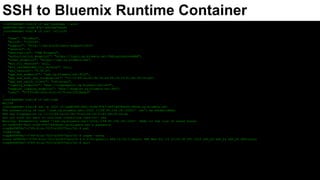
![[root@webdev html]# cf app mywebapp --guid
3ad80085-9e51-4cd6-87b7-b453dd78ea46
[root@webdev html]# cf curl /v2/info
{
"name": "Bluemix",
"build": "235018",
"support": "http://ibm.biz/bluemix-supportinfo",
"version": 0,
"description": "IBM Bluemix",
"authorization_endpoint": "https://login.ng.bluemix.net/UAALoginServerWAR",
"token_endpoint": "https://uaa.ng.bluemix.net",
"min_cli_version": null,
"min_recommended_cli_version": null,
"api_version": "2.54.0",
"app_ssh_endpoint": "ssh.ng.bluemix.net:2222",
"app_ssh_host_key_fingerprint": "c7:1f:89:2a:62:3b:78:a9:08:c9:33:81:fb:39:26:da",
"app_ssh_oauth_client": "ssh-proxy",
"logging_endpoint": "wss://loggregator.ng.bluemix.net:443",
"doppler_logging_endpoint": "wss://doppler.ng.bluemix.net:443",
"user": "07f3910b-c61b-412c-9175-a4152f3da4b3"
}
[root@webdev html]# cf ssh-code
MdjID9
[root@webdev html]# ssh -p 2222 cf:3ad80085-9e51-4cd6-87b7-b453dd78ea46/0@ssh.ng.bluemix.net
The authenticity of host '[ssh.ng.bluemix.net]:2222 ([158.85.156.18]:2222)' can't be established.
RSA key fingerprint is c7:1f:89:2a:62:3b:78:a9:08:c9:33:81:fb:39:26:da.
Are you sure you want to continue connecting (yes/no)? yes
Warning: Permanently added '[ssh.ng.bluemix.net]:2222,[158.85.156.18]:2222' (RSA) to the list of known hosts.
cf:3ad80085-9e51-4cd6-87b7-b45@ssh.ng.bluemix.net's password:
vcap@e898f8a7-0769-41ca-7023-b349375acc7d:~$ pwd
/home/vcap
vcap@e898f8a7-0769-41ca-7023-b349375acc7d:~$ uname -rsvna
Linux e898f8a7-0769-41ca-7023-b349375acc7d 4.4.0-45-generic #66~14.04.1-Ubuntu SMP Wed Oct 19 15:05:38 UTC 2016 x86_64 x86_64 x86_64 GNU/Linux
vcap@e898f8a7-0769-41ca-7023-b349375acc7d:~$ exit
SSH to Bluemix Runtime Container](https://image.slidesharecdn.com/sshtobluemixruntimecontainer-170413192939/85/Ssh-to-Bluemix-runtime-container-2-320.jpg)
![[root@webdev html]# cf ssh-code
8XE4jy
[root@webdev html]# sftp -oPort=2222 cf:3ad80085-9e51-4cd6-87b7-b453dd78ea46/0@ssh.ng.bluemix.net
Connecting to ssh.ng.bluemix.net...
cf:3ad80085-9e51-4cd6-87b7-b45@ssh.ng.bluemix.net's password:
sftp> pwd
Remote working directory: /home/vcap
sftp> ls -lart
/home/vcap/.bash_logout
/home/vcap/.profile
/home/vcap/.bashrc
/home/vcap/staging_info.yml
/home/vcap/logs
/home/vcap/app
/home/vcap/.bash_history
/home/vcap/tmp
sftp> exit
SFTP to Bluemix Runtime Container](https://image.slidesharecdn.com/sshtobluemixruntimecontainer-170413192939/85/Ssh-to-Bluemix-runtime-container-3-320.jpg)

The document outlines the process for connecting to the IBM Bluemix runtime using SSH and SFTP. It details the steps to obtain the endpoint and GUID for the runtime, as well as commands to log in and interact with the remote environment. The document also includes examples of command outputs during the SSH and SFTP sessions.


![[Z cloud] Create Your First Smartmachine In 10min](https://cdn.slidesharecdn.com/ss_thumbnails/createyourfirstsmartmachinein10min-1319614282-phpapp01-111026023340-phpapp01-thumbnail.jpg?width=640&height=640&fit=bounds)


