⼀一拍⼀一产品背后的故事
前端开发过程中的点滴感受
NO.7 2015.05.23 @成都
iOS开发与前端技术
张克军
@kejunz
重构时代
Ajax时代
⼯工具泛滥的时代
移动时代
X 时代
2002. ⺴⽹网⻚页⼯工程师
2003. ⺴⽹网⻚页⼯工程师
2004. ⺴⽹网⻚页⼯工程师
2005. 前端⼯工程师
2006. 前端⼯工程师
2007. 前端⼯工程师
2008. 前端⼯工程师
2009. 前端⼯工程师
2010. 前端⼯工程师
2011. 前端⼯工程师
2012. 前端⼯工程师
2013. 前端⼯工程师
2014. 前端⼯工程师
2015. 前端⼯工程师 / 产品经理 / 设计师 / 创业者 …
我的简历
© https://www.flickr.com/photos/patrickgensel/14914462893/
CSS
W3C
SEO
jQuery
YUI
Dojo…
WPO
AMD CMD
Backbone Ember Angular …
TJ’s Tools Node npm
Browserify Webpack Grunt Gulp …
React
HTML 5 CSS 3 全栈
SVG ES6
张克军
@kejunz
⼀一拍⼀一第⼀一位下单⽤用户: Emma / 摄影师: ⼤大狮视觉
⼀一拍⼀一(ypy.douban.com)是⾖豆瓣旗下⼥女性摄影服务平台,

致⼒力于为⼥女性提供安全、⾼高品质、有爱的摄影服务体验。
2015, 开始找回拍照的意义...
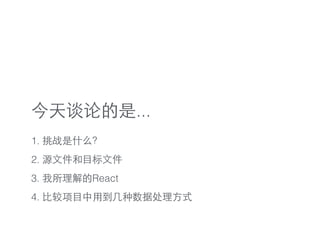
今天谈论的是...
1. 挑战是什么?
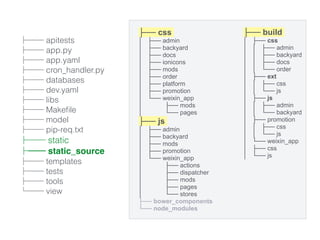
2. 源⽂文件和⺫⽬目标⽂文件
3. 我所理解的React
4. ⽐比较项⺫⽬目中⽤用到⼏几种数据处理⽅方式
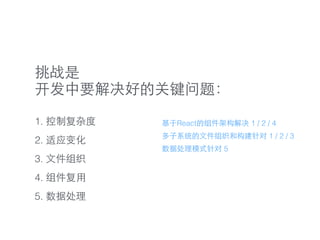
挑战是

开发中要解决好的关键问题:
1. 控制复杂度
2. 适应变化
3. ⽂文件组织
4. 组件复⽤用
5. 数据处理
基于React的组件架构解决 1 / 2 / 4
多⼦子系统的⽂文件组织和构建针对 1 / 2 / 3
数据处理模式针对 5
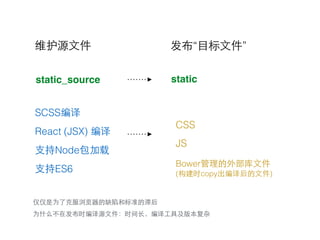
SCSS编译
React (JSX) 编译
⽀支持Node包加载
⽀支持ES6
Bower管理的外部库⽂文件

(构建时copy出编译后的⽂文件)
CSS
JS
发布“⺫⽬目标⽂文件”维护源⽂文件
仅仅是为了克服浏览器的缺陷和标准的滞后
static_source static
为什么不在发布时编译源⽂文件:时间⻓长,编译⼯工具及版本复杂
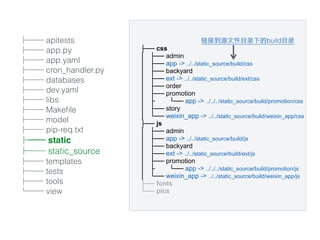
├── apitests
├── app.py
├── app.yaml
├── cron_handler.py
├── databases
├── dev.yaml
├── libs
├── Makefile
├── model
├── pip-req.txt
├── static
├── static_source
├── templates
├── tests
├── tools
└── view
├── css
│ ├── admin
│ ├── app -> ../../static_source/build/css
│ ├── backyard
│ ├── ext -> ../../static_source/build/ext/css
│ ├── order
│ ├── promotion
│ ├ └── app -> ../../../static_source/build/promotion/css
│ ├── story
│ └── weixin_app -> ../../static_source/build/weixin_app/css
├── js
│ ├── admin
│ ├── app -> ../../static_source/build/js
│ ├── backyard
│ ├── ext -> ../../static_source/build/ext/js
│ ├── promotion
│ ├ └── app -> ../../../static_source/build/promotion/js
│ └── weixin_app -> ../../static_source/build/weixin_app/js
├── fonts
└── pics
链接到源⽂文件⺫⽬目录下的build⺫⽬目录
├── css
│ ├── admin
│ ├── backyard
│ ├── docs
│ ├── ionicons
│ ├── mods
│ ├── order
│ ├── platform
│ ├── promotion
│ └── weixin_app
│ ├── mods
│ └── pages
├── js
│ ├── admin
│ ├── backyard
│ ├── mods
│ ├── promotion
│ └── weixin_app
│ ├── actions
│ ├── dispatcher
│ ├── mods
│ ├── pages
│ └── stores
├── bower_components
└── node_modules
├── build
│ ├── css
│ │ ├── admin
│ │ ├── backyard
│ │ ├── docs
│ │ └── order
│ ├── ext
│ │ ├── css
│ │ └── js
│ ├── js
│ │ ├── admin
│ │ └── backyard
│ ├── promotion
│ │ ├── css
│ │ └── js
│ └── weixin_app
│ ├── css
│ └── js
├── apitests
├── app.py
├── app.yaml
├── cron_handler.py
├── databases
├── dev.yaml
├── libs
├── Makefile
├── model
├── pip-req.txt
├── static
├── static_source
├── templates
├── tests
├── tools
└── view
var gulp = require('gulp');
var requireDir = require('require-dir');
requireDir('./gulpfiles', { recurse: true });
gulp.task('all-js', ['mainsite-js', 'admin-js', 'backyard-js', 'wx-js', 'promo-js', 'copy']);
gulp.task('all-css', ['mainsite-css', 'admin-css', 'backyard-css', 'wx-css', 'promo-css'
gulp.task('admin', ['admin-js', 'admin-css', 'copy']);
gulp.task('backyard', ['backyard-js', 'backyard-css', 'copy']);
gulp.task('wx', ['wx-js', 'wx-css', 'copy']);
gulp.task('promotion',['promo-js', 'promo-css', 'copy']);
gulp.task('mainsite', ['mainsite-js', 'mainsite-css', 'copy']);
gulp.task('default', ['mainsite', 'admin', 'backyard', 'wx', 'promotion']);
⼦子系统分开构建:
[23:31:20] Finished 'wx-js' after 1 min
[23:31:20] Starting 'wx'...
[23:31:20] Finished 'wx' after 8.36 μs
[23:31:23] Bundling order_list.js
[23:31:32] Bundling album_detail.js
[23:31:39] Bundling order_modify.js
[23:31:48] Bundling home.js
[23:31:56] Bundling pger_index.js
[23:32:05] Bundling order_detail.js
[23:32:10] Bundling pger_services.js
[23:32:19] Bundling order_list.js
[23:32:24] Bundling settlements.js
[23:32:28] Bundling topic_editor.js
[23:32:30] Bundling services.js
[23:32:40] Bundling topic_list.js
[23:32:44] Finished 'backyard-js' after 2.4 min
[23:32:44] Starting 'backyard'...
[23:32:44] Finished 'backyard' after 88 μs
[23:32:46] Bundling trade_list.js
[23:32:48] Finished 'admin-js' after 2.45 min
[23:32:48] Starting 'admin'...
[23:32:48] Finished 'admin' after 15 μs


watchify
require-dir
功能分散
需求各异
规模⼤大
变化快
什么架构能Hold住这种情况?
有些⽅方案(MV*)只适合做好局部
前端⼯工程师⻓长期被OOP和MVC洗脑
FP(函数式编程)和组件架构其实更适合前端开发
React
facebook.github.io/react, 2013年12⽉月发布

“React is intended to help developers build large applications that use data that
changes over time. Its goal is to be simple, declarative and composable. ”
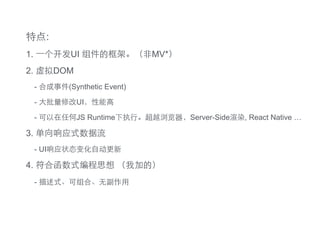
特点:
1. ⼀一个开发UI 组件的框架。(⾮非MV*)
2. 虚拟DOM
- 合成事件(Synthetic Event)
- ⼤大批量修改UI,性能⾼高

- 可以在任何JS Runtime下执⾏行。超越浏览器,Server-Side渲染, React Native …
3. 单向响应式数据流
- UI响应状态变化⾃自动更新
4. 符合函数式编程思想 (我加的)
- 描述式、可组合、⽆无副作⽤用
⽤用React创建组件:
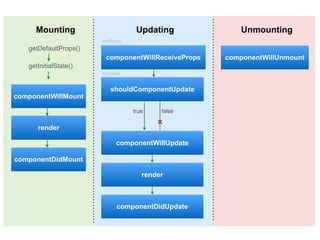
1. 组件⽣生命周期
2. 属性和状态
3. JSX语法⻛风格(忘掉模板,全部是组件对象)
Mounting Updating Unmounting
getDefaultProps()
getInitialState()
componentWillMount
render
componentDidMount
componentWillReceiveProps
shouldComponentUpdate
componentWillUpdate
render
componentDidUpdate
componentWillUnmount
true false
setProps
setState
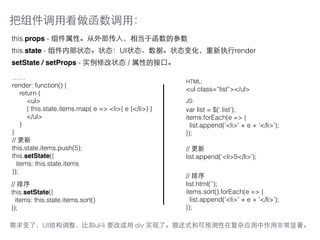
把组件调⽤用看做函数调⽤用:
this.props - 组件属性。从外部传⼊入,相当于函数的参数
this.state - 组件内部状态。状态:UI状态、数据。状态变化,重新执⾏行render
setState / setProps - 实例修改状态 / 属性的接⼞囗。
……
render: function() {
return (
<ul>
{ this.state.items.map( e => <li>{ e }</li>) }
</ul>
)
}
// 更新
this.state.items.push(5);
this.setState({
items: this.state.items
});
HTML:
<ul class=“list”></ul>
JS:
var list = $(‘.list’);
items.forEach(e => {
list.append(‘<li>’ + e + ’</li>’);
});
// 更新
list.append(‘<li>5</li>’);
// 排序
this.setState({
items: this.state.items.sort()
});
// 排序
list.html(‘’);
items.sort().forEach(e => {
list.append(‘<li>’ + e + ’</li>’);
});
需求变了,UI结构调整,⽐比如ul-li 要改成⽤用 div 实现了。描述式和可预测性在复杂应⽤用中作⽤用⾮非常显著。
• • • • • • •
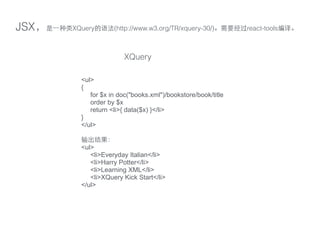
JSX,是⼀一种类XQuery的语法(http://www.w3.org/TR/xquery-30/)。需要经过react-tools编译。
<ul>
{
for $x in doc("books.xml")/bookstore/book/title
order by $x
return <li>{ data($x) }</li>
}
</ul>
输出结果:
<ul>
<li>Everyday Italian</li>
<li>Harry Potter</li>
<li>Learning XML</li>
<li>XQuery Kick Start</li>
</ul>
XQuery
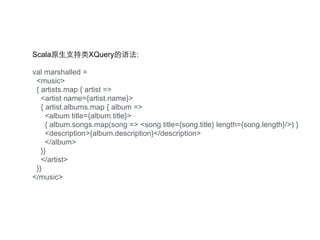
Scala原⽣生⽀支持类XQuery的语法:
val marshalled =
<music>
{ artists.map { artist =>
<artist name={artist.name}>
{ artist.albums.map { album =>
<album title={album.title}>
{ album.songs.map(song => <song title={song.title} length={song.length}/>) }
<description>{album.description}</description>
</album>
}}
</artist>
}}
</music>
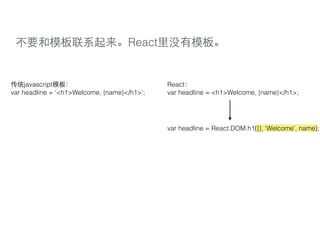
不要和模板联系起来。React⾥里没有模板。
var headline = ‘<h1>Welcome, {name}</h1>’;
传统javascript模板:
var headline = <h1>Welcome, {name}</h1>;
React:
var headline = React.DOM.h1({}, ‘Welcome’, name);
组件就是函数
如:add(add(1,2), 3) // 把1,2,3换成组件
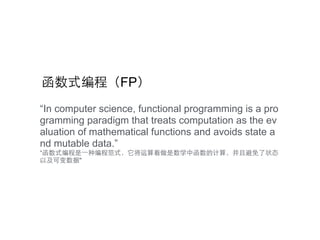
“In computer science, functional programming is a pro
gramming paradigm that treats computation as the ev
aluation of mathematical functions and avoids state a
nd mutable data.”
“函数式编程是⼀一种编程范式,它将运算看做是数学中函数的计算,并且避免了状态
以及可变数据"
函数式编程(FP)
函数式编程(FP)
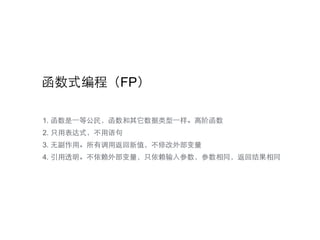
1. 函数是⼀一等公民,函数和其它数据类型⼀一样。⾼高阶函数
2. 只⽤用表达式,不⽤用语句
3. ⽆无副作⽤用。所有调⽤用返回新值,不修改外部变量
4. 引⽤用透明。不依赖外部变量,只依赖输⼊入参数,参数相同,返回结果相同
函数式编程(FP)
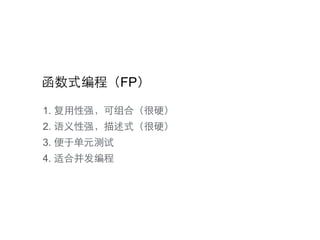
1. 复⽤用性强,可组合(很硬)
2. 语义性强,描述式(很硬)
3. 便于单元测试
4. 适合并发编程
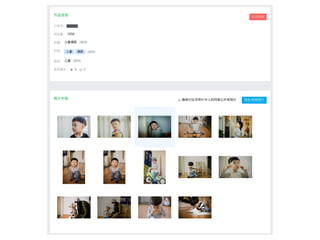
React.render(<EditAlbumBasicInfo data={ albumInfoData } />, $(‘#album-basic-info’)[0]);
React.render(<PhotoList data={ albumPhotoData } />, $(‘#album-photos’)[0]);
<div>
<div className="photo-list">
<ul>
{
data.photos && data.photos.length ? data.photos.map( (photo, i) =>
<PhotoListItem key={i} data={ photo } />
: <li className="blank">(尚未添加照⽚片)</li>
}
</ul>
</div>
{this.state.currentPhoto && <PhotoPreview data={ this.state.currentPhoto } /> }
</div>
组件是引⽤用透明的。不受外部影响,属性相同,返回总是相同的。(完全做到还依赖不可变数据对象)
可以很直观的看到UI全貌
描述式带来的可预性的好处
可维护性很强
复杂的部分被抽象成组件
只关⼼心传⼊入属性和返回结果
复⽤用性很强
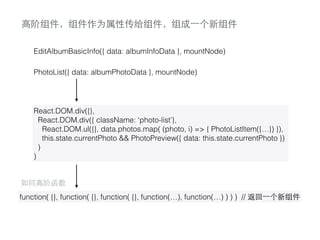
EditAlbumBasicInfo({ data: albumInfoData }, mountNode)
PhotoList({ data: albumPhotoData }, mountNode)
React.DOM.div({},
React.DOM.div({ className: ‘photo-list’},
React.DOM.ul({}, data.photos.map( (photo, i) => { PhotoListItem({…}) }),
this.state.currentPhoto && PhotoPreview({ data: this.state.currentPhoto })
)
)
function( {}, function( {}, function( {}, function(…), function(…) ) ) ) // 返回⼀一个新组件
如同⾼高阶函数
⾼高阶组件,组件作为属性传给组件,组成⼀一个新组件
道⽣生⼀一,⼀一⽣生⼆二,⼆二⽣生三,三⽣生万物
组件设计思路:
数 据 处 理
© http://www.royal-de-luxe.com/en/pictures-wall/#
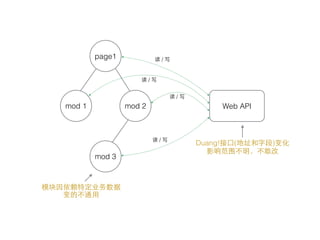
page1
mod 3
mod 2mod 1 Web API
读 / 写
读 / 写
读 / 写
读 / 写
Duang!接⼞囗(地址和字段)变化
影响范围不明,不敢改
模块因依赖特定业务数据
变的不通⽤用
page1
mod 3
mod 2mod 1
Store
读 / 写
Web API
读 / 写
Duang!接⼞囗(地址和字段)变化
影响范围不明,不敢改
Store改⼀一下就好了
模块变得通⽤用
<TagInput value={[…]} onSave={ handler } />
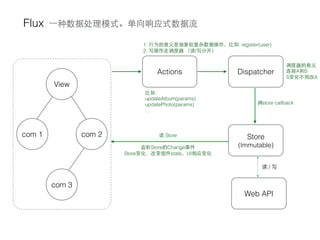
Flux
View
com 3
com 2com 1 Store
(Immutable)
Web API
读 / 写
DispatcherActions
⼀一种数据处理模式。单向响应式数据流
调store callback
⽐比如:
updateAlbum(params)
updatePhoto(params)
…
读 Store
监听Store的Change事件
Store变化,改变组件state,UI相应变化
1. ⾏行为的意义是抽象较复杂数据操作,⽐比如: register(user)
2. 写操作⾛走调度器 (读/写分开)
调度器的意义
连接A和S
S变化不⽤用改A
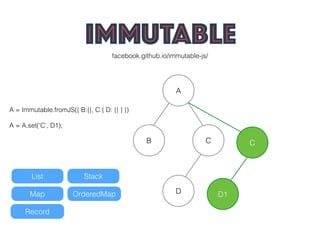
Flux 写操作多时,强烈建议⽤用Immutable的Store
var _store = Immutable.fromJS({
quizs: null,
userChoices: null,
});
js/stores/AppStore.js:
StoreApis[Constants.GET_ALL_QUIZS] = function(params={}) {
if (!params.isforce && _store.get('quizs')) {
return _store.get('quizs').toJS();
}
fetchAllQuizs(params);
};
facebook.github.io/immutable-js/
A
D
CB
A = Immutable.fromJS({ B:{}, C:{ D: {} } })
A = A.set(‘C’, D1);
C
D1
List Stack
Map OrderedMap
Record
<Thanks! />

一拍一产品背后的故事(React实战)