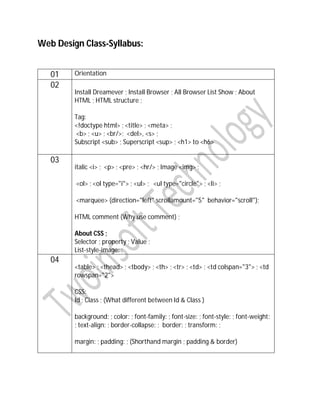
Web Design Class-Syllabus:
01 Orientation
02
Install Dreamever ; Install Browser ; All Browser List Show ; About
HTML ; HTML structure ;
Tag:
<!doctype html> ; <title> ; <meta> ;
<b> ; <u> ; <br/>; <del>, <s> ;
Subscript <sub> ; Superscript <sup> ; <h1> to <h6>
03
italic <i> ; <p> ; <pre> ; <hr/> ; Image <img> ;
<ol> ; <ol type="i"> ; <ul> ; <ul type="circle"> ; <li> ;
<marquee> (direction="left" scrollamount="5" behavior="scroll");
HTML comment (Why use comment) ;
About CSS ;
Selector ; property ; Value ;
List-style-image: ;
04
<table> ; <thead> ; <tbody> ; <th> ; <tr> ; <td> ; <td colspan="3"> ; <td
rowspan="2">
CSS:
Id ; Class ; (What different between Id & Class )
background: ; color: ; font-family: ; font-size: ; font-style: ; font-weight:
; text-align: ; border-collapse: ; border: ; transform: ;
margin: ; padding: ; (Shorthand margin ; padding & border)
05
Repeat table
CSS:
opacity: ;
Selector grouping & nesting ;
CSS comment (Why use comment) ;
Cross Browser Compatibility ;
Vendor prefix ( -moz- ; -webkit- ; -ms- ; -o- ; )
Border-image: ;
06
<header> ; <nav> ; <aside> ; <article> ; <footer> ; <section> ; <div> ;
CSS:
height: ; width: ; max-height: ; min-height: ;
line-height: ; border-radius: ; clear: ; overflow: ; box-shadow: ; text-
shadow: ; float: ; Gradient color;
07 <form> ; <input> ; <button> ; <label> ; <select> ; <option> ;
<optgroup> ;
<textarea> ;
<input type=”button / checkbox / radio / date / time / email / number
/ password / tel / text / url / submit / file / search / reset……etc”
placeholder="" required >
CSS:
input[type="text"]{}
08 Menu ; Dropdown menu
CSS:
hover ;
text-transform: ; text-decoration: ; list-style: ; list-style-image: ;
transition: ; top: ; left: ; position: ;
a:visited ; a:hover ; a:active ;
By
Md Afzal Hossain
Follow me on fb
09 Project start
10 Project continue with new codes
11 Project continue with new codes
12 Project continue with new codes
13 Project continue with new codes
14 Responsive
15 Twitter bootstrap
16 HTML 5 Boilerplate ; font awesome ; Twitter bootstrap
17 Adobe Photoshop
18 Adobe Photoshop repeat
19 PSD to HTML
20 PSD to HTML
21
PSD to HTML ; Uses of custom font & google font;
CSS:
@font-face ;
22 Audio ; Video ; iframe ; facebook like box / button ; facebook share
button ; facebook comment box ;
23 oDesk
24 People per hour ; fiver ; freelancer ;

syllabus

  • 1.
    Web Design Class-Syllabus: 01Orientation 02 Install Dreamever ; Install Browser ; All Browser List Show ; About HTML ; HTML structure ; Tag: <!doctype html> ; <title> ; <meta> ; <b> ; <u> ; <br/>; <del>, <s> ; Subscript <sub> ; Superscript <sup> ; <h1> to <h6> 03 italic <i> ; <p> ; <pre> ; <hr/> ; Image <img> ; <ol> ; <ol type="i"> ; <ul> ; <ul type="circle"> ; <li> ; <marquee> (direction="left" scrollamount="5" behavior="scroll"); HTML comment (Why use comment) ; About CSS ; Selector ; property ; Value ; List-style-image: ; 04 <table> ; <thead> ; <tbody> ; <th> ; <tr> ; <td> ; <td colspan="3"> ; <td rowspan="2"> CSS: Id ; Class ; (What different between Id & Class ) background: ; color: ; font-family: ; font-size: ; font-style: ; font-weight: ; text-align: ; border-collapse: ; border: ; transform: ; margin: ; padding: ; (Shorthand margin ; padding & border)
  • 2.
    05 Repeat table CSS: opacity: ; Selectorgrouping & nesting ; CSS comment (Why use comment) ; Cross Browser Compatibility ; Vendor prefix ( -moz- ; -webkit- ; -ms- ; -o- ; ) Border-image: ; 06 <header> ; <nav> ; <aside> ; <article> ; <footer> ; <section> ; <div> ; CSS: height: ; width: ; max-height: ; min-height: ; line-height: ; border-radius: ; clear: ; overflow: ; box-shadow: ; text- shadow: ; float: ; Gradient color; 07 <form> ; <input> ; <button> ; <label> ; <select> ; <option> ; <optgroup> ; <textarea> ; <input type=”button / checkbox / radio / date / time / email / number / password / tel / text / url / submit / file / search / reset……etc” placeholder="" required > CSS: input[type="text"]{} 08 Menu ; Dropdown menu CSS: hover ; text-transform: ; text-decoration: ; list-style: ; list-style-image: ; transition: ; top: ; left: ; position: ; a:visited ; a:hover ; a:active ;
  • 3.
    By Md Afzal Hossain Followme on fb 09 Project start 10 Project continue with new codes 11 Project continue with new codes 12 Project continue with new codes 13 Project continue with new codes 14 Responsive 15 Twitter bootstrap 16 HTML 5 Boilerplate ; font awesome ; Twitter bootstrap 17 Adobe Photoshop 18 Adobe Photoshop repeat 19 PSD to HTML 20 PSD to HTML 21 PSD to HTML ; Uses of custom font & google font; CSS: @font-face ; 22 Audio ; Video ; iframe ; facebook like box / button ; facebook share button ; facebook comment box ; 23 oDesk 24 People per hour ; fiver ; freelancer ;