Foglight™ for Virtualization 
Enterprise Edition 
Визуализируйте. Анализируйте. Оптимизируйте. 
Дмитрий Крайнов и Влад Самойленко
Управление 
мобильной средой 
 Виртуализация десктопов 
 Инвентаризация и 
управление десктопами и 
мобильными устройствами 
 Переход десктопов на новые 
ОС 
 Безопасный мобильный 
доступ 
Обзор решений Dell Software 
Управление 
информацией 
 Разработка и 
администрирование баз 
данных 
 Репликации и интеграция 
 Аналитика для Big Data 
 Business intelligence 
Дата-центр и 
облако 
 Миграции и консолидации 
 Мониторинг и тюнинг 
приложений и баз данных 
 Управление 
виртуализацией и облаком 
 Управление Windows Server 
Безопасность Защита данных 
 Управление доступом и 
учетными записями 
 Аудит и управление логами 
 Контроль за «супер- 
пользователями» 
 Корпоративный бэкап и 
восстановление 
 Восстановление при 
катастрофе 
 Защита виртуальной среды 
2 Performance Monitoring
Что происходит с Виртуализацией? 
До $9,997 составят потери за час простоя или же 
сниженной продуктивности в работе виртуальной 
инфраструктуры 
50% всех ИТ инфраструктур имеют более одного 
гипервизора 
Низкая плотность ВМ в инфраструктуре увеличивает 
операционные затраты бизнеса. 
Соотношение 1:150 ВМ к администраторам, может 
сэкономить бизнесу до 3000$ за каждую 
следующею ВМ 
Microsoft Exchange и Active Directory самые 
виртуализованные приложения 80%+ 
3 Performance Monitoring
ИТ Инфраструктура – Большие Изменения 
Организация ОС/Сервер 
Вчера Сегодня 
4 Performance Monitoring
ИТ Инфраструктура – Большие Изменения 
Системы Хранения 
Вчера Сегодня 
5 Performance Monitoring
Какие Сложности с Развитием 
Виртуализации? 
Несколько 
серверов в 
одном 
физическом 
хосте 
Приложения 
Несколько ОС 
Делят между собой единые ресурсы – CPU, RAM, HDD 
6 Performance Monitoring
А если что то идет не так 
7 Performance Monitoring
К Кому в Организации Обратиться? 
8 Performance Monitoring
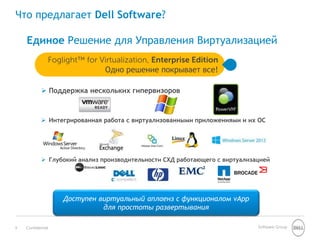
Что предлагает Dell Software? 
Единое Решение для Управления Виртуализацией 
Foglight™ for Virtualization, Enterprise Edition 
Одно решение покрывает все! 
 Поддержка нескольких гипервизоров 
 Интегрированная работа с виртуализованными приложениями и их ОС 
 Глубокий анализ производительности СХД работающего с виртуализацией 
Доступен виртуальный аплаенз с функционалом vApp 
для простоты развертывания 
9 Confidential Software Group
В ИТ Инфраструктурах Нет Прозрачности 
CDN 3rd party 
Data center 
Private 
cloud 
У вас будет возможность отслеживать и улучшать 
производительность не смотря на сложность ИТ 
инфраструктуры 
10 Confidential Software Group
Визуализация: 
Полное понимание 
того что 
происходит в 
инфраструктуре 
11 Performance Monitoring
Мониторинг в реальном времени 
Анализ информации как в реальном времени так и за любой период 
– Единая панель управления для мониторинга всех параметров 
– Легко переходите от мониторинга в реальном времени к 
мониторингу за любой период 
Широкий набор 
параметров 
В реальном 
времени 
За любой период 
12 Performance Monitoring
Единый вид на Всю Инфраструктуру 
Хост 
ВМ 
Гостевая ОС 
БД 
13 Performance Monitoring
Понятная Аналитика Производительности 
– Возможность выявлять конкретные пики когда нагрузка на 
Рассчитайте 
нормальную 
загрузку 
Идентифицируйте 
динамические 
отклонения 
Интеллектуальный 
анализ различий 
Продвинутый Анализ Информации 
гипервизор была выше типичной. 
14 Performance Monitoring
Про-активно Реагируйте на Ситуацию 
Экспертные Рекомендации – Быстро Решайте Проблемы с 
Производительностью 
– Идентифицируйте проблемы для незамедлительного разрешения 
– Про-активно идентифицируйте возможность бедующих проблем 
Предупреждение в 
случае исключений 
+ Экспертные 
рекомендации 
Про-активная 
информация 
15 Performance Monitoring
Настройте Как Вам Надо: Графические 
Дашборды и Гибкая Отчетность 
– Легкий переход от дашборда к самой проблеме 
– Возможность самому настроить все панели и переключаться между 
Углубляйтесь 
Рассматривайте 
детально 
отдельные 
участки 
Легко 
переключайтесь 
между панелями 
ними 
16 Performance Monitoring
Анализируйте: 
Распределение 
загруженности & 
Chargeback… 
17 Performance Monitoring
Анализируйте и Прогнозируйте – 
Распределение Загруженности 
– Просматривайте текущие загруженность и потребление 
Анализ трендов 
Сценарии Развития 
Прогнозирование 
будущей 
загруженности 
Управление Загруженностью 
ресурсов 
– Прогнозируйте рост загруженности на будущее 
– Моделирование различных сценариев 
18 Performance Monitoring
Прозрачность с Анализом Chargeback 
– Создание отдельных групп со своими настройками 
– Разрабатывайте модели отвечающие требованиям бизнеса 
– Следите за затратами основываясь на реальном потреблении 
Отчетность по 
Chargeback 
Создаваемые 
Группы 
Chargeback/Showback 
ресурсов 
Гибкое 
Моделирование 
19 Performance Monitoring
Оптимизация 
20 Performance Monitoring
Оптимизируйте и Снижайте TCO на Дата Центр 
Оптимизация: Улучшайте плотность ВМ и снижайте затраты на 
инфраструктуру 
– Правильно сконфигурируйте CPU и память – получите обратно 
Оптимизируйте CPU 
и Память 
Оптимизируйте СХД 
Ресурсы 
Получите обратно 
потраченные 
ресурсы 
потраченные ресурсы 
21 Performance Monitoring
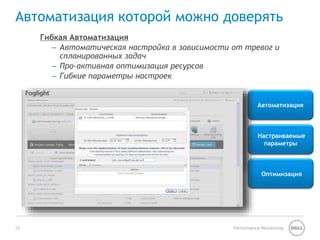
Автоматизация которой можно доверять 
– Автоматическая настройка в зависимости от тревог и 
Автоматизация 
Настраиваемые 
параметры 
Оптимизация 
Гибкая Автоматизация 
спланированных задач 
– Про-активная оптимизация ресурсов 
– Гибкие параметры настроек 
22 Performance Monitoring
А теперь все это 
вместе… И еще… 
23 Performance Monitoring
Мониторинг VDI : VMware View 
– Наблюдение за инфраструктурой, Сессиями Пользователей, vSphere, и 
Понимание 
Инфраструктуры 
Анализ 
пользователей и 
Рабочих станций 
Отчетность по Пулу 
VMware View 
рабочими станциями 
24 Performance Monitoring
Мониторинг vSwitch 
Протокол NetFlow 
для наблюдения за 
трафиком 
Отслеживание 
коммуникаций 
между ВМ 
Работа с сетевой 
топологией 
25 Performance Monitoring
Мониторинг Microsoft Active Directory 
Инфраструктура AD 
Оценка 
работоспособности 
AD в реальном 
времени 
Анализ и 
Отчетность 
Картридж Foglight для Microsoft Active Directory 
Мониторинг леса, доменов и их контроллеров 
26 Performance Monitoring
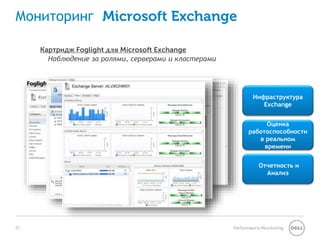
Мониторинг Microsoft Exchange 
Инфраструктура 
Exchange 
Оценка 
работоспособности 
в реальном 
времени 
Отчетность и 
Анализ 
Картридж Foglight для Microsoft Exchange 
Наблюдение за ролями, серверами и кластерами 
27 Performance Monitoring
Мониторинг Систем Хранения Данных 
Картридж Foglight for Storage Management (Доступен как отдельный продукт) 
Мониторинг от VM к Disk Spindle Performance Monitoring и Советы 
Использование 
Анализ 
Типология СХД 
28 Performance Monitoring
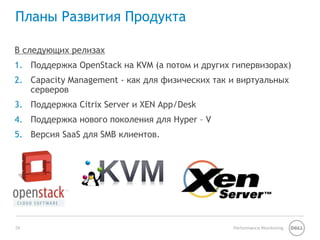
Планы Развития Продукта 
В следующих релизах 
1. Поддержка OpenStack на KVM (а потом и других гипервизорах) 
2. Capacity Management - как для физических так и виртуальных 
серверов 
3. Поддержка Citrix Server и XEN App/Desk 
4. Поддержка нового поколения для Hyper – V 
5. Версия SaaS для SMB клиентов. 
29 Performance Monitoring
Уникальная Масштабируемая Платформа для 
Мониторинга 
- Множество модулей работающих на единой платформе дают максимальные 
возможности для Единого и Целостного мониторинга все ИТ 
Инфраструктуры. 
Мониторинг Баз Данных 
Мониторинг 
Производительности 
Приложений 
IT exec 
dashboards 
Transaction 
monitoring 
Virtualization 
management 
IT ops 
analytics 
Service level 
monitoring 
and triage 
Storage 
monitoring 
User 
experience 
management 
Application 
server 
monitoring 
DB infra 
monitoring 
DB workload 
analysis 
Storage 
performance 
management 
DB 
diagnostics 
DB infra 
monitoring 
Virtualization 
management 
Мониторинг 
Производительности 
Инфраструктуры 
Microsoft 
Exchange 
Monitoring 
Storage 
Monitoring 
Virtualization 
management 
Active 
Directory 
monitoring 
Operating 
System 
Monitoring 
30 Performance Monitoring 
Cloud 
Monitoring 
VDI 
Monitoring 
DB infra 
monitoring 
Service level 
monitoring 
and triage
Наши Клиенты 
Единое решение которому доверяют более 
6,000 компаний по всему миру 
31 Performance Monitoring
Foglight® 
Наблюдение за Производительностью в Комплексной 
ИТ Инфраструктуре 
Повышайте эффективность ИТ для того чтобы улучшить 
предоставление сервиса, решать проблемы быстрее и быть 
проактивным в бизнес задачах. 
32 Performance Monitoring
33 Performance Monitoring

Мониторинг и управление виртуализацией с помощью Dell Foglight™ for Virtualization

  • 1.
    Foglight™ for Virtualization Enterprise Edition Визуализируйте. Анализируйте. Оптимизируйте. Дмитрий Крайнов и Влад Самойленко
  • 2.
    Управление мобильной средой  Виртуализация десктопов  Инвентаризация и управление десктопами и мобильными устройствами  Переход десктопов на новые ОС  Безопасный мобильный доступ Обзор решений Dell Software Управление информацией  Разработка и администрирование баз данных  Репликации и интеграция  Аналитика для Big Data  Business intelligence Дата-центр и облако  Миграции и консолидации  Мониторинг и тюнинг приложений и баз данных  Управление виртуализацией и облаком  Управление Windows Server Безопасность Защита данных  Управление доступом и учетными записями  Аудит и управление логами  Контроль за «супер- пользователями»  Корпоративный бэкап и восстановление  Восстановление при катастрофе  Защита виртуальной среды 2 Performance Monitoring
  • 3.
    Что происходит сВиртуализацией? До $9,997 составят потери за час простоя или же сниженной продуктивности в работе виртуальной инфраструктуры 50% всех ИТ инфраструктур имеют более одного гипервизора Низкая плотность ВМ в инфраструктуре увеличивает операционные затраты бизнеса. Соотношение 1:150 ВМ к администраторам, может сэкономить бизнесу до 3000$ за каждую следующею ВМ Microsoft Exchange и Active Directory самые виртуализованные приложения 80%+ 3 Performance Monitoring
  • 4.
    ИТ Инфраструктура –Большие Изменения Организация ОС/Сервер Вчера Сегодня 4 Performance Monitoring
  • 5.
    ИТ Инфраструктура –Большие Изменения Системы Хранения Вчера Сегодня 5 Performance Monitoring
  • 6.
    Какие Сложности сРазвитием Виртуализации? Несколько серверов в одном физическом хосте Приложения Несколько ОС Делят между собой единые ресурсы – CPU, RAM, HDD 6 Performance Monitoring
  • 7.
    А если чтото идет не так 7 Performance Monitoring
  • 8.
    К Кому вОрганизации Обратиться? 8 Performance Monitoring
  • 9.
    Что предлагает DellSoftware? Единое Решение для Управления Виртуализацией Foglight™ for Virtualization, Enterprise Edition Одно решение покрывает все!  Поддержка нескольких гипервизоров  Интегрированная работа с виртуализованными приложениями и их ОС  Глубокий анализ производительности СХД работающего с виртуализацией Доступен виртуальный аплаенз с функционалом vApp для простоты развертывания 9 Confidential Software Group
  • 10.
    В ИТ ИнфраструктурахНет Прозрачности CDN 3rd party Data center Private cloud У вас будет возможность отслеживать и улучшать производительность не смотря на сложность ИТ инфраструктуры 10 Confidential Software Group
  • 11.
    Визуализация: Полное понимание того что происходит в инфраструктуре 11 Performance Monitoring
  • 12.
    Мониторинг в реальномвремени Анализ информации как в реальном времени так и за любой период – Единая панель управления для мониторинга всех параметров – Легко переходите от мониторинга в реальном времени к мониторингу за любой период Широкий набор параметров В реальном времени За любой период 12 Performance Monitoring
  • 13.
    Единый вид наВсю Инфраструктуру Хост ВМ Гостевая ОС БД 13 Performance Monitoring
  • 14.
    Понятная Аналитика Производительности – Возможность выявлять конкретные пики когда нагрузка на Рассчитайте нормальную загрузку Идентифицируйте динамические отклонения Интеллектуальный анализ различий Продвинутый Анализ Информации гипервизор была выше типичной. 14 Performance Monitoring
  • 15.
    Про-активно Реагируйте наСитуацию Экспертные Рекомендации – Быстро Решайте Проблемы с Производительностью – Идентифицируйте проблемы для незамедлительного разрешения – Про-активно идентифицируйте возможность бедующих проблем Предупреждение в случае исключений + Экспертные рекомендации Про-активная информация 15 Performance Monitoring
  • 16.
    Настройте Как ВамНадо: Графические Дашборды и Гибкая Отчетность – Легкий переход от дашборда к самой проблеме – Возможность самому настроить все панели и переключаться между Углубляйтесь Рассматривайте детально отдельные участки Легко переключайтесь между панелями ними 16 Performance Monitoring
  • 17.
  • 18.
    Анализируйте и Прогнозируйте– Распределение Загруженности – Просматривайте текущие загруженность и потребление Анализ трендов Сценарии Развития Прогнозирование будущей загруженности Управление Загруженностью ресурсов – Прогнозируйте рост загруженности на будущее – Моделирование различных сценариев 18 Performance Monitoring
  • 19.
    Прозрачность с АнализомChargeback – Создание отдельных групп со своими настройками – Разрабатывайте модели отвечающие требованиям бизнеса – Следите за затратами основываясь на реальном потреблении Отчетность по Chargeback Создаваемые Группы Chargeback/Showback ресурсов Гибкое Моделирование 19 Performance Monitoring
  • 20.
  • 21.
    Оптимизируйте и СнижайтеTCO на Дата Центр Оптимизация: Улучшайте плотность ВМ и снижайте затраты на инфраструктуру – Правильно сконфигурируйте CPU и память – получите обратно Оптимизируйте CPU и Память Оптимизируйте СХД Ресурсы Получите обратно потраченные ресурсы потраченные ресурсы 21 Performance Monitoring
  • 22.
    Автоматизация которой можнодоверять – Автоматическая настройка в зависимости от тревог и Автоматизация Настраиваемые параметры Оптимизация Гибкая Автоматизация спланированных задач – Про-активная оптимизация ресурсов – Гибкие параметры настроек 22 Performance Monitoring
  • 23.
    А теперь всеэто вместе… И еще… 23 Performance Monitoring
  • 24.
    Мониторинг VDI :VMware View – Наблюдение за инфраструктурой, Сессиями Пользователей, vSphere, и Понимание Инфраструктуры Анализ пользователей и Рабочих станций Отчетность по Пулу VMware View рабочими станциями 24 Performance Monitoring
  • 25.
    Мониторинг vSwitch ПротоколNetFlow для наблюдения за трафиком Отслеживание коммуникаций между ВМ Работа с сетевой топологией 25 Performance Monitoring
  • 26.
    Мониторинг Microsoft ActiveDirectory Инфраструктура AD Оценка работоспособности AD в реальном времени Анализ и Отчетность Картридж Foglight для Microsoft Active Directory Мониторинг леса, доменов и их контроллеров 26 Performance Monitoring
  • 27.
    Мониторинг Microsoft Exchange Инфраструктура Exchange Оценка работоспособности в реальном времени Отчетность и Анализ Картридж Foglight для Microsoft Exchange Наблюдение за ролями, серверами и кластерами 27 Performance Monitoring
  • 28.
    Мониторинг Систем ХраненияДанных Картридж Foglight for Storage Management (Доступен как отдельный продукт) Мониторинг от VM к Disk Spindle Performance Monitoring и Советы Использование Анализ Типология СХД 28 Performance Monitoring
  • 29.
    Планы Развития Продукта В следующих релизах 1. Поддержка OpenStack на KVM (а потом и других гипервизорах) 2. Capacity Management - как для физических так и виртуальных серверов 3. Поддержка Citrix Server и XEN App/Desk 4. Поддержка нового поколения для Hyper – V 5. Версия SaaS для SMB клиентов. 29 Performance Monitoring
  • 30.
    Уникальная Масштабируемая Платформадля Мониторинга - Множество модулей работающих на единой платформе дают максимальные возможности для Единого и Целостного мониторинга все ИТ Инфраструктуры. Мониторинг Баз Данных Мониторинг Производительности Приложений IT exec dashboards Transaction monitoring Virtualization management IT ops analytics Service level monitoring and triage Storage monitoring User experience management Application server monitoring DB infra monitoring DB workload analysis Storage performance management DB diagnostics DB infra monitoring Virtualization management Мониторинг Производительности Инфраструктуры Microsoft Exchange Monitoring Storage Monitoring Virtualization management Active Directory monitoring Operating System Monitoring 30 Performance Monitoring Cloud Monitoring VDI Monitoring DB infra monitoring Service level monitoring and triage
  • 31.
    Наши Клиенты Единоерешение которому доверяют более 6,000 компаний по всему миру 31 Performance Monitoring
  • 32.
    Foglight® Наблюдение заПроизводительностью в Комплексной ИТ Инфраструктуре Повышайте эффективность ИТ для того чтобы улучшить предоставление сервиса, решать проблемы быстрее и быть проактивным в бизнес задачах. 32 Performance Monitoring
  • 33.

Editor's Notes

  • #2 Today we are going to discuss how Foglight for Virtualization, Enterprise Edition can you transform your IT Operations and infrastructure Management.
  • #3 2
  • #4 Promising lower data center costs, increased resource utilization, high performance and high availability - Virtualization technology has emerged as a major enabler for IT transformation. Virtualization also enables cloud computing. Cloud computing technologies further the transformation, bringing on –demand provisioning and scalability to IT users. Let’s take a look at some key industry statistics: According to IDC - $9,997 per hour is the high-end revenue loss due to down-time/degraded performance Gartner states that 50% of all IT organizations are running more than one hypervisor Low VM density increases Opex costs, thus diminishing Capex savings EMA - Administrator to VM Ratio – the best performers could manage around 150 VMs per administrator, compared to the average of 77 VMs per administrator, and the below average of 18. This means that each additional VM costs the best performers around $452 in additional administration staff costs, for above average performers it adds $881, and for below average performers it adds a disturbing $3770 per VM. However, on average, virtualization itself provides 10% greater administrator efficiency compared to typical physical deployments. Best performers were significantly more likely to use Change and Configuration Management and Capacity Planning tools than below average performers. That is over $3000 dollars in savings if you can optimize your virtual environment. Microsoft Exchange and Active Directory are two of the most virtualized applications at 80%+
  • #10 Foglight for Virtualization, Enterprise Edition is the one solution that covers it all. Multi-hypervisor support Integrated virtual application and OS Platform coverage Deep storage infrastructure performance analysis We go beyond traditional end-to-end performance monitoring to provide insight into everything within your virtual environment – from VM to spindle.
  • #11 As businesses extend data, voice, video and applications to a broader set of users in a distributed workforce, infrastructures are becoming more complex. Quick deployment of new applications, delivering high availability, reliability, security, and performance have become even more critical. IT departments are expected to implement and manage this increasingly complex infrastructure at a reasonable cost - complexity must be simplified. You need insight into performance and the health of your infrastructure across the IT stack…
  • #12 Beyond one-dimensional performance monitoring – get the insight to know what is happening in your virtualized data center, as well as the advice and automation necessary to take action now.
  • #13 A single pane of glass provides enterprise wide virtual environment visualization. From real-time insight to any-point-in time performance and resource analysis. Our enterprise view provides insight into overall performance and health at a glance. You can view all data centers where ever they are located with a single instance, as Foglight for Virtualization, Enterprise edition is scalable to connect to multiple virtual centers, where ever they are located in the world. Easily manage multiple virtual data centers, multiple hypervisors and provide multi-tenant customer-scoped views Get real time granular view into your virtual environment, performance of ESX down to the CPU. Role based views that help administrators do their job better. Our historical view allows administrators to go back to any point in time to troubleshoot spikes or issues that occurred during off work hours.
  • #14 With end to “everything” visualization you can assess thousands of performance metrics and available capacity across the entire IT stack. You get a true holistic view into … Host – CPU, memory, clusters and associated virtual machines. VM Guest OS Application
  • #15 Utilize patent pending analytics to: Detect Baseline Operation Identify Dynamic Thresholds Get Intelligent Deviation Analysis
  • #16 Proactively manage service level agreements through the real-time performance dashboards that allow you to find performance bottlenecks and potential issues across your heterogeneous environment in seconds. Quickly pinpoint the problem and resolve at the click of a button. Prevent future issues with alarms, expert advice, and alerts that help you address issues before they impact applications and end users.
  • #17 Dashboards and reporting are customizable allowing you to drill around, explore objects, and drag and drop information.
  • #18 Efficiently plan, budget design, and make infrastructure decisions with certainty and best use of expensive systems to control CAPEX. Quickly and agilely scale the capacity of the data center up or down as business requirements change at the lowest possible cost. Proactively avoid performance problems due to virtualization load balancing and resource utilization.
  • #19 Intelligent capacity management and planning allows I/O admins to avoid resource contention, eliminate bottlenecks, optimize existing capacity, and control future CAPEX requirements. Easily determine the number of additional VMs that can be safely added to hosts, clusters, and resource pools while accounting for existing workload demands, resource availability and performance, high availability settings in clusters, and VM reservations. Schedule hardware changes and deploy VMs with greater peace of mind by identifying available slots and forecasting exhaustion of resources in VMs, reserving capacity ahead of time, and coordinating scheduling for all deployments. Estimate and plan for future server purchasing requirements with a clear understanding of capital expenditures you’ll need by modeling and predicting hardware Maximize resource utilization with advanced capacity management and CAPEX scenario modeling Effectively manage the growth of your virtual infrastructure by taking the guesswork out of capacity management, planning, VM placement and workload allocation. Intelligent analysis and automation capabilities help you predict future hardware resource requirements, reserve capacity for planned VM deployments, and auto-deploy VMs into reserved slots. Dynamic capacity planning helps you determine how to accommodate future workloads and allows “what-if” scenario modeling to accurately forecast CAPEX requirements. When IT teams rationalize their utilization into capacity, they can see: Current bottleneck (processor, memory, network, disk) to determine what to purchase next Current available capacity by resource (to determine next bottleneck) Expected number of VMs that can be hosted per cluster/host Number of VMs that are currently hosted per cluster/host Remaining capacity and emergency capacity above your normal maximum utilization
  • #20 Simplify the management of the “business” of the data center and improve the return on investment of your existing IT infrastructure with cost transparency and accountability across virtualization operations. Prioritize optimization efforts with insights into the largest contributors to data center costs and most expensive virtual machine workloads. With a clear view of resources consumed and their associated costs, you will be able to chargeback business units, cost centers or external customers with ease.
  • #21 Unlike other operations management software, we know that you know your environment best. We don’t force changes into your system or automate remediation, unless you say so. Our optimization and automation is user controlled. Foglight combines years of best practice expertise into export algorithms, makes recommendations, provides you with options, and let’s you decide what is best for your environment. If you choose to setup situations that allow Foglight to auto-remediate for specific scenarios, you can. Our expert advice plus your virtualization expertise, nets you: Critical insight and advice to increase the efficiency of the virtual environment Optimize the use of expensive servers, hypervisors, and other infrastructure to avoid over provisioning Simplify operations management to reduce OPEX without impacting service
  • #23 Flexible Automation allows you to reduce costs, speed deployments, and simplify complexity. User controlled automation puts you in control and improves your productivety and efficiency. Automate remediation to alarms & common tasks Proactively optimize virtual resources Powerful AND easy to use automation. AND IS better!
  • #24 We touched open the holistic, single pane of glass, end to everything performance management capabilities earlier in the presentation. However, Foglight for Virtualization, Enterprise Edition is part of the Foglight family of products, providing even more insight into how to simplify infrastructure complexity.
  • #25 Ensure end user satisfaction with the ability to effectively manage and trouble-shoot the performance of your VDI environment. Quickly discover and configure your VMware View environment with easy to use wizards and dashboards. In-depth monitoring of all components allow for quick connection server, pools, desktops, ESX servers, or storage problem resolution.
  • #27 As one of the top virtualized applications - Monitoring Active Directory performance is vital to making sure that Active Directory is meeting your business and networking goals. Foglight helps detect, diagnose and resolve performance and availability issues that could affect the active directory. You get clear insights into: AD Infrastructure – quickly understand the relationship between Forests, Domains, Sites, and Domain Controllers. Real-time Health Key Performance Indicators – color coded alerts and detailed metrics help you quickly diagnosis troubled areas. And you get the collaboration tools you need to effectively communicate AD Infrastructure status to key stakeholders.
  • #28 As the second most virtualized application, Foglight also provides you with detailed performance analysis for your Microsoft Exchange application. Quickly understand the Exchange Infrastructure, including the relationships between the exchange components, roles, servers, sites, and clusters. Real Time key performance indicators help you detect, diagnose and resolve performance and availability problems that affect Exchange Customizable analysis and reporting help you collaborate the health of your Exchange Infrastructure to key stakeholders
  • #29 And last but not least, the star of the Vmworld 2013, our Foglight for Storage Management combines information from storage arrays and fabrics with the information available from VMware vCenter to provide unified data analysis from the virtual machine (VM) down to the physical disk spindle.
  • #31 Modular capabilities enable maximum team collaboration based on a common platform and a “single version of the truth”. You can build out your solution as your business grows and requirements change. Today we are going to focus on Infrastructure Performance; however, we also have solutions for deep dive Application and Database Performance Monitoring.
  • #32 Foglight for Virtualization, Enterprise Edition is trusted by almost 6,000 organization across the globe to keep their virtual data center running optimally.
  • #33 Foglight Performance Monitoring simplifies infrastructure complexity to elevate IT effectiveness, improve service delivery, resolve problems faster and proactively meet your business needs.