MS SQL Server 2005
  Lab # 2 :
    SQL: Guide to the Language
   (Components, Data types, Functions)
    Installing

    Practicing Example


           Adavnced Database Programming   1
SQL Basic Objects

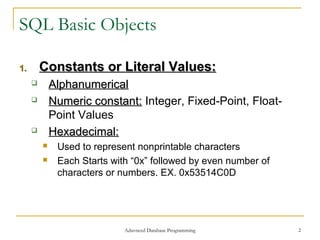
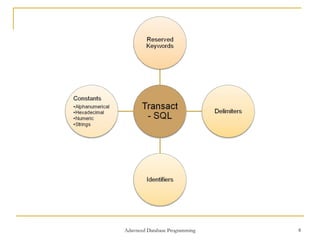
1.       Constants or Literal Values:
            Alphanumerical
            Numeric constant: Integer, Fixed-Point, Float-
             Point Values
            Hexadecimal:
             Used to represent nonprintable characters
             Each Starts with “0x” followed by even number of
              characters or numbers. EX. 0x53514C0D


                             Adavnced Database Programming       2
SQL Basic Objects

1.       Constants or Literal Values:
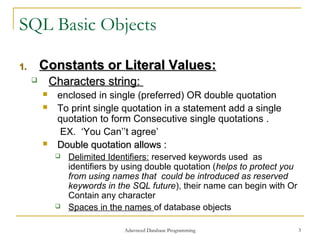
            Characters string:
             enclosed in single (preferred) OR double quotation
             To print single quotation in a statement add a single
              quotation to form Consecutive single quotations .
              EX. ‘You Can’’t agree’
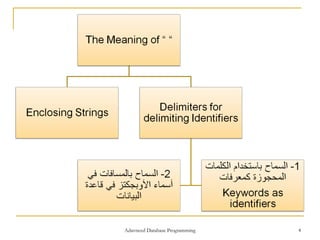
             Double quotation allows :
                 Delimited Identifiers: reserved keywords used as
                  identifiers by using double quotation (helps to protect you
                  from using names that could be introduced as reserved
                  keywords in the SQL future), their name can begin with Or
                  Contain any character
                 Spaces in the names of database objects

                                Adavnced Database Programming                   3
Adavnced Database Programming   4
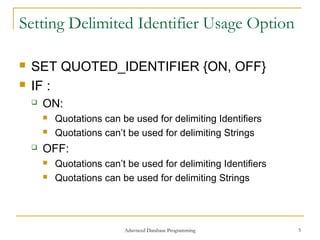
Setting Delimited Identifier Usage Option

   SET QUOTED_IDENTIFIER {ON, OFF}
   IF :
       ON:
           Quotations can be used for delimiting Identifiers
           Quotations can’t be used for delimiting Strings
       OFF:
           Quotations can’t be used for delimiting Identifiers
           Quotations can be used for delimiting Strings


                            Adavnced Database Programming         5
SQL Basic Objects

2.       Delimiters: ’ “ [ ] & ….
3.       Comments:
         /* Several Comment Liens Here */
         -- the Reminder of the Current Line is Comment
2.       Reserved Keywords
         Can’t be used as object names


                        Adavnced Database Programming      6
SQL Basic Objects

5.       Identifiers:
            Used to identify DB Objects such as: tables &
             Indices
            Names can be created with:
              up to 128 characters: containing letters, numerals, _,
              @, #, $
             Each name must start with a letter or one of the
              following characters (_, @, #, $)
             # at the beginning of table or stored procedure name 
              denotes a temporary object
             @ at the beginning of name  denotes a Variable

                             Adavnced Database Programming              7
Adavnced Database Programming   8
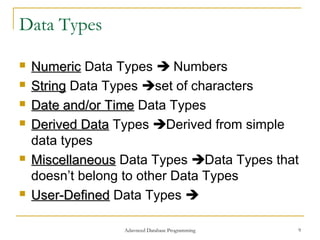
Data Types

   Numeric Data Types  Numbers
   String Data Types set of characters
   Date and/or Time Data Types
   Derived Data Types Derived from simple
    data types
   Miscellaneous Data Types Data Types that
    doesn’t belong to other Data Types
   User-Defined Data Types 

                  Adavnced Database Programming   9
Numeric Data Types (10 Types)
   Data Type                   Explanation
INT              integer(4 Bytes)
SMALLINT         integer(2 Bytes)
TINYINT          Non-Negative Integer (0255)(1 Byte)
BIGINT           integer(8 Bytes)
DECIMAL(p,[s])   P=precison(Total no of digits with S)
                 S=Scale(No. of Decimal Point Digits)
REAL       Floating-Point Values
MONEY-     Decimal(8 Bytes), Rounded to 4 digits
SMALLMONEY after the decimal point - (4 Bytes)
Float[(p)]       P<25(4 Bytes), P>=25(8 Bytes)
                    Adavnced Database Programming   10
String Data Types (6 Types)
   Data Type                 Explanation
CHAR[(n)] OR    String of n Characters, n Maximum
CHARACTER [(n)] value=800, if n is omitted n=1
VARCHAR [(n)]     String of (0<n<=8000) Characters
NCHAR [(n)]       Fixed-length Unicode Char data(each
                  char stored in 2 Byte), MAX=4000
NVARCHAR [(n)]    Varying-length Unicode Char data
                  (each char stored in 2 Byte),
                  MAX=4000
TEXT [(n)]        Fixed Length String up to 2GB(each
                  char stored in 1 Byte)
NTEXT [(n)]       Large character data, MAX Bytes=230
                  (eachDatabase Programming in 2 Byte)
                   Adavnced
                            char stored                11
Binary Data Types (4 Types)
   Data Type                     Explanation
BINARY [(n)]       A bit String of fixed length with exactly
                   n bytes (0<n<=8000)
VARBINARY [(n)] A bit String of Variable length with
                exactly n bytes (0<n<=8000)
IMAGE [(n)]        A bit String of fixed length with
                   Unlimted values (231 Bytes)
                   Can contain(audio/video, modules
Bit                Boolean Data type(True, False, NULL)
TEXT/Image         Contain any image type With Text


                     Adavnced Database Programming       12
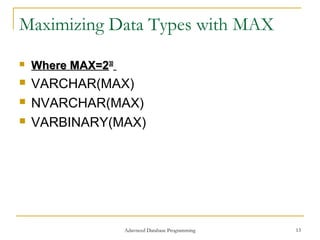
Maximizing Data Types with MAX
   Where MAX=230
   VARCHAR(MAX)
   NVARCHAR(MAX)
   VARBINARY(MAX)


                    Adavnced Database Programming   13
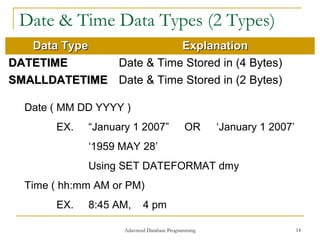
Date & Time Data Types (2 Types)
   Data Type             Explanation
DATETIME      Date & Time Stored in (4 Bytes)
SMALLDATETIME Date & Time Stored in (2 Bytes)

  Date ( MM DD YYYY )
       EX.   “January 1 2007”               OR      ‘January 1 2007’
             ‘1959 MAY 28’
             Using SET DATEFORMAT dmy
  Time ( hh:mm AM or PM)
       EX.   8:45 AM,      4 pm

                    Adavnced Database Programming                      14
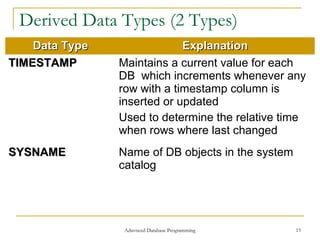
Derived Data Types (2 Types)
    Data Type                Explanation
TIMESTAMP       Maintains a current value for each
                DB which increments whenever any
                row with a timestamp column is
                inserted or updated
                Used to determine the relative time
                when rows where last changed
SYSNAME         Name of DB objects in the system
                catalog


                 Adavnced Database Programming     15
Miscellaneous Data Types

   Cursor: Used in stored procedure
   UNIQUEIDENTIFIER: for Data Replication
   SQL_VARIANT: Store Values of Different Data
    Types
   TABLE:
     Store Rows with several & different values

     SQL Server Restrict its usage in: Local Variable &

      User-Defined Functions
   XML: Store XML Document in a DB
                      Adavnced Database Programming    16
Predicates
   A logical condition being applied to rows in a
    table with Values of : True, False, unknown
    or Not applicable
       All Relational Operators
       BETWEEN Operator
       IN Operator
       LIKE Operator
       NULL Operator
       ALL and ANY Operator
       EXISTS function

                        Adavnced Database Programming   17
Aggregate Functions
   Applied to a group of data values from
    different rows, and returns a SINGLE value
       AVG: Applied on numeric values Only
       MAX,MIN: Applied on numeric, String, Date/Time
        values
       SUM: Applied on numeric values
       COUNT: Counts number of non-null data values
        COUNT
        in a column (only Function not applied to a
        Column, its applied to rows)
       COUNT_BIG: Returns same as COUNT but in
        BIGINT data type
                      Adavnced Database Programming      18
Scalar Functions

   Used to construct Scalar expressions
    (operates on a single or list of values)
       Numeric Functions
       Date Functions
       String Functions
       Text/Image Functions
       System Functions


                      Adavnced Database Programming   19
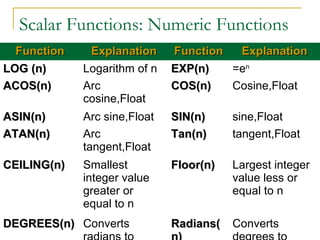
Scalar Functions: Numeric Functions
  Function     Explanation     Function  Explanation
LOG (n)       Logarithm of n   EXP(n)   =en
ACOS(n)       Arc              COS(n)   Cosine,Float
              cosine,Float
ASIN(n)       Arc sine,Float   SIN(n)      sine,Float
ATAN(n)       Arc              Tan(n)      tangent,Float
              tangent,Float
CEILING(n)    Smallest         Floor(n)    Largest integer
              integer value                value less or
              greater or                   equal to n
              equal to n
DEGREES(n) Converts Database Programming
                  Adavnced
                               Radians(    Converts    20
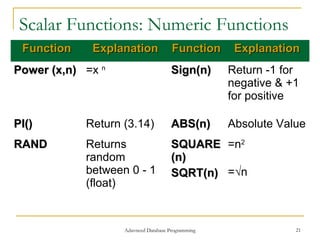
Scalar Functions: Numeric Functions
 Function    Explanation              Function      Explanation
Power (x,n) =x n                      Sign(n)      Return -1 for
                                                   negative & +1
                                                   for positive

PI()        Return (3.14)             ABS(n)       Absolute Value
RAND        Returns                   SQUARE =n2
            random                    (n)
            between 0 - 1             SQRT(n) =√n
            (float)


                   Adavnced Database Programming               21
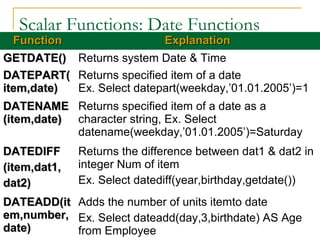
Scalar Functions: Date Functions
  Function                 Explanation
GETDATE() Returns system Date & Time
DATEPART( Returns specified item of a date
item,date) Ex. Select datepart(weekday,’01.01.2005’)=1
DATENAME Returns specified item of a date as a
(item,date) character string, Ex. Select
            datename(weekday,’01.01.2005’)=Saturday
DATEDIFF      Returns the difference between dat1 & dat2 in
(item,dat1,   integer Num of item
dat2)         Ex. Select datediff(year,birthday,getdate())
DATEADD(it Adds the number of units itemto date
em,number, Ex. Select dateadd(day,3,birthdate) AS Age
date)      from Employee Programming
                    Adavnced Database               22
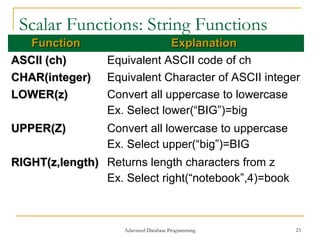
Scalar Functions: String Functions
   Function                   Explanation
ASCII (ch)       Equivalent ASCII code of ch
CHAR(integer)    Equivalent Character of ASCII integer
LOWER(z)         Convert all uppercase to lowercase
                 Ex. Select lower(“BIG”)=big
UPPER(Z)         Convert all lowercase to uppercase
                 Ex. Select upper(“big”)=BIG
RIGHT(z,length) Returns length characters from z
                Ex. Select right(“notebook”,4)=book


                    Adavnced Database Programming     23
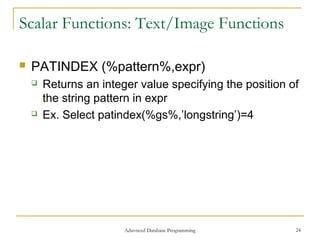
Scalar Functions: Text/Image Functions

   PATINDEX (%pattern%,expr)
       Returns an integer value specifying the position of
        the string pattern in expr
       Ex. Select patindex(%gs%,’longstring’)=4


                        Adavnced Database Programming     24
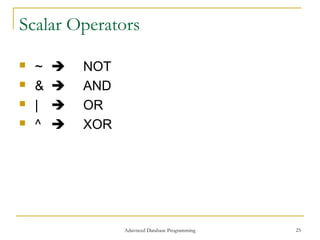
Scalar Operators

   ~      NOT
   &      AND
   |      OR
   ^      XOR


                  Adavnced Database Programming   25
Installing SQL Server 2005 . . .

   Installing Default Server
   Installing Multi other Instances(Named
    Instances)


                   Adavnced Database Programming   26

Sql server lab_2

  • 1.
    MS SQL Server2005 Lab # 2 :  SQL: Guide to the Language (Components, Data types, Functions)  Installing  Practicing Example Adavnced Database Programming 1
  • 2.
    SQL Basic Objects 1. Constants or Literal Values:  Alphanumerical  Numeric constant: Integer, Fixed-Point, Float- Point Values  Hexadecimal:  Used to represent nonprintable characters  Each Starts with “0x” followed by even number of characters or numbers. EX. 0x53514C0D Adavnced Database Programming 2
  • 3.
    SQL Basic Objects 1. Constants or Literal Values:  Characters string:  enclosed in single (preferred) OR double quotation  To print single quotation in a statement add a single quotation to form Consecutive single quotations . EX. ‘You Can’’t agree’  Double quotation allows :  Delimited Identifiers: reserved keywords used as identifiers by using double quotation (helps to protect you from using names that could be introduced as reserved keywords in the SQL future), their name can begin with Or Contain any character  Spaces in the names of database objects Adavnced Database Programming 3
  • 4.
  • 5.
    Setting Delimited IdentifierUsage Option  SET QUOTED_IDENTIFIER {ON, OFF}  IF :  ON:  Quotations can be used for delimiting Identifiers  Quotations can’t be used for delimiting Strings  OFF:  Quotations can’t be used for delimiting Identifiers  Quotations can be used for delimiting Strings Adavnced Database Programming 5
  • 6.
    SQL Basic Objects 2. Delimiters: ’ “ [ ] & …. 3. Comments:  /* Several Comment Liens Here */  -- the Reminder of the Current Line is Comment 2. Reserved Keywords  Can’t be used as object names Adavnced Database Programming 6
  • 7.
    SQL Basic Objects 5. Identifiers:  Used to identify DB Objects such as: tables & Indices  Names can be created with:  up to 128 characters: containing letters, numerals, _, @, #, $  Each name must start with a letter or one of the following characters (_, @, #, $)  # at the beginning of table or stored procedure name  denotes a temporary object  @ at the beginning of name  denotes a Variable Adavnced Database Programming 7
  • 8.
  • 9.
    Data Types  Numeric Data Types  Numbers  String Data Types set of characters  Date and/or Time Data Types  Derived Data Types Derived from simple data types  Miscellaneous Data Types Data Types that doesn’t belong to other Data Types  User-Defined Data Types  Adavnced Database Programming 9
  • 10.
    Numeric Data Types(10 Types) Data Type Explanation INT integer(4 Bytes) SMALLINT integer(2 Bytes) TINYINT Non-Negative Integer (0255)(1 Byte) BIGINT integer(8 Bytes) DECIMAL(p,[s]) P=precison(Total no of digits with S) S=Scale(No. of Decimal Point Digits) REAL Floating-Point Values MONEY- Decimal(8 Bytes), Rounded to 4 digits SMALLMONEY after the decimal point - (4 Bytes) Float[(p)] P<25(4 Bytes), P>=25(8 Bytes) Adavnced Database Programming 10
  • 11.
    String Data Types(6 Types) Data Type Explanation CHAR[(n)] OR String of n Characters, n Maximum CHARACTER [(n)] value=800, if n is omitted n=1 VARCHAR [(n)] String of (0<n<=8000) Characters NCHAR [(n)] Fixed-length Unicode Char data(each char stored in 2 Byte), MAX=4000 NVARCHAR [(n)] Varying-length Unicode Char data (each char stored in 2 Byte), MAX=4000 TEXT [(n)] Fixed Length String up to 2GB(each char stored in 1 Byte) NTEXT [(n)] Large character data, MAX Bytes=230 (eachDatabase Programming in 2 Byte) Adavnced char stored 11
  • 12.
    Binary Data Types(4 Types) Data Type Explanation BINARY [(n)] A bit String of fixed length with exactly n bytes (0<n<=8000) VARBINARY [(n)] A bit String of Variable length with exactly n bytes (0<n<=8000) IMAGE [(n)] A bit String of fixed length with Unlimted values (231 Bytes) Can contain(audio/video, modules Bit Boolean Data type(True, False, NULL) TEXT/Image Contain any image type With Text Adavnced Database Programming 12
  • 13.
    Maximizing Data Typeswith MAX  Where MAX=230  VARCHAR(MAX)  NVARCHAR(MAX)  VARBINARY(MAX) Adavnced Database Programming 13
  • 14.
    Date & TimeData Types (2 Types) Data Type Explanation DATETIME Date & Time Stored in (4 Bytes) SMALLDATETIME Date & Time Stored in (2 Bytes) Date ( MM DD YYYY ) EX. “January 1 2007” OR ‘January 1 2007’ ‘1959 MAY 28’ Using SET DATEFORMAT dmy Time ( hh:mm AM or PM) EX. 8:45 AM, 4 pm Adavnced Database Programming 14
  • 15.
    Derived Data Types(2 Types) Data Type Explanation TIMESTAMP Maintains a current value for each DB which increments whenever any row with a timestamp column is inserted or updated Used to determine the relative time when rows where last changed SYSNAME Name of DB objects in the system catalog Adavnced Database Programming 15
  • 16.
    Miscellaneous Data Types  Cursor: Used in stored procedure  UNIQUEIDENTIFIER: for Data Replication  SQL_VARIANT: Store Values of Different Data Types  TABLE:  Store Rows with several & different values  SQL Server Restrict its usage in: Local Variable & User-Defined Functions  XML: Store XML Document in a DB Adavnced Database Programming 16
  • 17.
    Predicates  A logical condition being applied to rows in a table with Values of : True, False, unknown or Not applicable  All Relational Operators  BETWEEN Operator  IN Operator  LIKE Operator  NULL Operator  ALL and ANY Operator  EXISTS function Adavnced Database Programming 17
  • 18.
    Aggregate Functions  Applied to a group of data values from different rows, and returns a SINGLE value  AVG: Applied on numeric values Only  MAX,MIN: Applied on numeric, String, Date/Time values  SUM: Applied on numeric values  COUNT: Counts number of non-null data values COUNT in a column (only Function not applied to a Column, its applied to rows)  COUNT_BIG: Returns same as COUNT but in BIGINT data type Adavnced Database Programming 18
  • 19.
    Scalar Functions  Used to construct Scalar expressions (operates on a single or list of values)  Numeric Functions  Date Functions  String Functions  Text/Image Functions  System Functions Adavnced Database Programming 19
  • 20.
    Scalar Functions: NumericFunctions Function Explanation Function Explanation LOG (n) Logarithm of n EXP(n) =en ACOS(n) Arc COS(n) Cosine,Float cosine,Float ASIN(n) Arc sine,Float SIN(n) sine,Float ATAN(n) Arc Tan(n) tangent,Float tangent,Float CEILING(n) Smallest Floor(n) Largest integer integer value value less or greater or equal to n equal to n DEGREES(n) Converts Database Programming Adavnced Radians( Converts 20
  • 21.
    Scalar Functions: NumericFunctions Function Explanation Function Explanation Power (x,n) =x n Sign(n) Return -1 for negative & +1 for positive PI() Return (3.14) ABS(n) Absolute Value RAND Returns SQUARE =n2 random (n) between 0 - 1 SQRT(n) =√n (float) Adavnced Database Programming 21
  • 22.
    Scalar Functions: DateFunctions Function Explanation GETDATE() Returns system Date & Time DATEPART( Returns specified item of a date item,date) Ex. Select datepart(weekday,’01.01.2005’)=1 DATENAME Returns specified item of a date as a (item,date) character string, Ex. Select datename(weekday,’01.01.2005’)=Saturday DATEDIFF Returns the difference between dat1 & dat2 in (item,dat1, integer Num of item dat2) Ex. Select datediff(year,birthday,getdate()) DATEADD(it Adds the number of units itemto date em,number, Ex. Select dateadd(day,3,birthdate) AS Age date) from Employee Programming Adavnced Database 22
  • 23.
    Scalar Functions: StringFunctions Function Explanation ASCII (ch) Equivalent ASCII code of ch CHAR(integer) Equivalent Character of ASCII integer LOWER(z) Convert all uppercase to lowercase Ex. Select lower(“BIG”)=big UPPER(Z) Convert all lowercase to uppercase Ex. Select upper(“big”)=BIG RIGHT(z,length) Returns length characters from z Ex. Select right(“notebook”,4)=book Adavnced Database Programming 23
  • 24.
    Scalar Functions: Text/ImageFunctions  PATINDEX (%pattern%,expr)  Returns an integer value specifying the position of the string pattern in expr  Ex. Select patindex(%gs%,’longstring’)=4 Adavnced Database Programming 24
  • 25.
    Scalar Operators  ~  NOT  &  AND  |  OR  ^  XOR Adavnced Database Programming 25
  • 26.
    Installing SQL Server2005 . . .  Installing Default Server  Installing Multi other Instances(Named Instances) Adavnced Database Programming 26