SQL Server 2008 – Spatial


                  Morgan Ellingham
             Spatial Account Manager
                            August 2012
Agenda

•   Introduction to SQL Server - Spatial

•   Case Study – How Tonkin Consulting Uses SQL Server

•   Creation of SQL Server Reporting Services Report

•   Demonstration of Tonkin Smartmap using SQL Server
Microsoft SQL Server - Introduction


                           Just a big dumb database?


•   Integration Services

•   Reporting Services

•   Business Intelligence Development Studio (BIDS)
Microsoft SQL Server - Introduction
•   Technical Benefits – central point of truth for spatial data
Microsoft SQL Server - Introduction
•   Technical Benefits – vendor application and service support
Microsoft SQL Server - Introduction

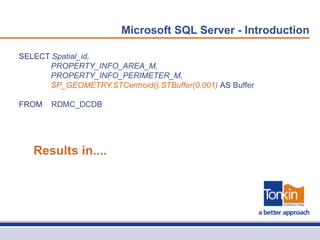
SELECT Spatial_id,
      PROPERTY_INFO_AREA_M,
      PROPERTY_INFO_PERIMETER_M,
      SP_GEOMETRY.STCentroid().STBuffer(0.001) AS Buffer

FROM   RDMC_DCDB


   Results in....
Microsoft SQL Server - Introduction
Microsoft SQL Server – Tonkin Consulting

•   Hosted Services

•   Managed Services

•   Spatial Consulting Services (SCS)

•   Asset Consulting Services (ACS)
Microsoft SQL Server – Tonkin Consulting


•   Kangaroo Island Council               •   Regional Council of Goyder
•   District Council of Yankalilla        •   Light Regional Council
•   Municipal Council of Roxby Downs      •   Wakefield Regional Council
•   District Council of Orroroo           •   City of Holdfast Bay
•   District Council of Ceduna            •   City of Norwood Payneham and St Peters
•   District Council of Elliston          •   City of Prospect
•   City of Port Lincoln                  •   Town of Walkerville
•   Port Augusta City Council             •   City of Campbelltown
•   District Council of Renmark Paringa   •   City of West Torrens
•   District Council of Mallala           •   City of Burnside
•   Berri Barmera Council                 •   Adelaide Hills Council
•   District Council of Loxton Waikerie   •   The Barossa Council


      LOTS OF DATA!
Microsoft SQL Server
Microsoft SQL Server – Tonkin Consulting
SELECT Spatial ID, Spatial ID as 'ID', Conquest Asset ID, Asset Name, Asset Type

FROM v_MapInfo_Elec_LV_Asset_Extract

WHERE Spatial ID in (Exponare.Ids)


  Mapping Database                        Asset Database
Microsoft SQL Server – Tonkin Consulting
Microsoft SQL Server – Reporting Services


  Reporting Services
Microsoft SQL Server – Reporting Services


  Business Intelligence
  Development Studio
Microsoft SQL Server - BIDS
Microsoft SQL Server
•   Benefits

    •   Provides a single point of truth for spatial data

    •   Increased disaster management functionality

    •   Increased data publishing and reporting functionality

    •   Increased scripting and automation functionality

    •   Ensures both a scalable and more future proof data model

    •   Aligns internal GIS methodology with vendor strategy
Microsoft SQL Server
•   Other Benefits

    •   A lot of you already have it

        •   Just need to implement it....

    •   Even if you don’t SQL Server Express is free

    •   Most vendors are supporting it

    •   Aligns with IT policy
Microsoft SQL Server

Tonkin can help

•   We now offer SQL Server Spatial Consultancies

•   Tailored for your specific requirements

•   Can be as simple as one or two days – ‘SQL Server Shell’

•   Full scale implementation
Microsoft SQL Server – Tonkin Smartmap

SQL Server and Spatial

  • 1.
    SQL Server 2008– Spatial Morgan Ellingham Spatial Account Manager August 2012
  • 2.
    Agenda • Introduction to SQL Server - Spatial • Case Study – How Tonkin Consulting Uses SQL Server • Creation of SQL Server Reporting Services Report • Demonstration of Tonkin Smartmap using SQL Server
  • 3.
    Microsoft SQL Server- Introduction
  • 4.
    Microsoft SQL Server- Introduction Just a big dumb database? • Integration Services • Reporting Services • Business Intelligence Development Studio (BIDS)
  • 5.
    Microsoft SQL Server- Introduction • Technical Benefits – central point of truth for spatial data
  • 6.
    Microsoft SQL Server- Introduction • Technical Benefits – vendor application and service support
  • 7.
    Microsoft SQL Server- Introduction
  • 8.
    Microsoft SQL Server- Introduction SELECT Spatial_id, PROPERTY_INFO_AREA_M, PROPERTY_INFO_PERIMETER_M, SP_GEOMETRY.STCentroid().STBuffer(0.001) AS Buffer FROM RDMC_DCDB Results in....
  • 9.
    Microsoft SQL Server- Introduction
  • 10.
    Microsoft SQL Server- Introduction
  • 11.
    Microsoft SQL Server– Tonkin Consulting
  • 12.
    Microsoft SQL Server– Tonkin Consulting • Hosted Services • Managed Services • Spatial Consulting Services (SCS) • Asset Consulting Services (ACS)
  • 13.
    Microsoft SQL Server– Tonkin Consulting • Kangaroo Island Council • Regional Council of Goyder • District Council of Yankalilla • Light Regional Council • Municipal Council of Roxby Downs • Wakefield Regional Council • District Council of Orroroo • City of Holdfast Bay • District Council of Ceduna • City of Norwood Payneham and St Peters • District Council of Elliston • City of Prospect • City of Port Lincoln • Town of Walkerville • Port Augusta City Council • City of Campbelltown • District Council of Renmark Paringa • City of West Torrens • District Council of Mallala • City of Burnside • Berri Barmera Council • Adelaide Hills Council • District Council of Loxton Waikerie • The Barossa Council LOTS OF DATA!
  • 14.
  • 15.
    Microsoft SQL Server– Tonkin Consulting SELECT Spatial ID, Spatial ID as 'ID', Conquest Asset ID, Asset Name, Asset Type FROM v_MapInfo_Elec_LV_Asset_Extract WHERE Spatial ID in (Exponare.Ids) Mapping Database Asset Database
  • 16.
    Microsoft SQL Server– Tonkin Consulting
  • 17.
    Microsoft SQL Server– Tonkin Consulting
  • 18.
    Microsoft SQL Server– Reporting Services Reporting Services
  • 19.
    Microsoft SQL Server– Reporting Services
  • 20.
    Microsoft SQL Server– Reporting Services
  • 21.
    Microsoft SQL Server– Reporting Services
  • 22.
    Microsoft SQL Server– Reporting Services
  • 23.
    Microsoft SQL Server– Reporting Services
  • 24.
    Microsoft SQL Server– Reporting Services
  • 25.
    Microsoft SQL Server– Reporting Services
  • 26.
    Microsoft SQL Server– Reporting Services
  • 27.
    Microsoft SQL Server– Reporting Services
  • 28.
    Microsoft SQL Server– Reporting Services
  • 29.
    Microsoft SQL Server– Reporting Services
  • 30.
    Microsoft SQL Server– Reporting Services Business Intelligence Development Studio
  • 31.
  • 32.
  • 33.
  • 34.
    Microsoft SQL Server • Benefits • Provides a single point of truth for spatial data • Increased disaster management functionality • Increased data publishing and reporting functionality • Increased scripting and automation functionality • Ensures both a scalable and more future proof data model • Aligns internal GIS methodology with vendor strategy
  • 35.
    Microsoft SQL Server • Other Benefits • A lot of you already have it • Just need to implement it.... • Even if you don’t SQL Server Express is free • Most vendors are supporting it • Aligns with IT policy
  • 36.
    Microsoft SQL Server Tonkincan help • We now offer SQL Server Spatial Consultancies • Tailored for your specific requirements • Can be as simple as one or two days – ‘SQL Server Shell’ • Full scale implementation
  • 37.
    Microsoft SQL Server– Tonkin Smartmap

Editor's Notes

  • #2 Hello everyone, today I am going to present on perhaps my favourite piece of technology – Microsoft SQL Server. In my abstract I mention how the Spatial world has largely ignored this technology, or alternatively, has relied on large, expensive, specialised and proprietary GIS databases or convoluted plug-ins to store our points, lines and polygons. Microsoft’s change in approach when they announced support for a spatial data type, as a standard part of their existing suite, dramatically changed the spatial landscape for the better – essentially creating what is one of the most powerful yet untapped tools available to a GIS administrator.Today we are going to show you how you can use it!
  • #3 Firstly we will give an overview of SQL Server, demystifying it for some of you who haven't yet interacted with it or have heard or it but haven't been able to use it. We will go into detailed services functionality and how the whole suite sits together.Then we look at how we use it internally at Tonkin Consulting, how we manage our clients data, integrate it with systems and in turn provide visualization methodologies.We will go through a quick Reporting Services example, showing how you can create dynamic reports for your users to run ad-hoc, without the need to recreate those map layouts…And lastly we will give you a LIVE demonstration of our new SQL Server backed web mapping platform, Tonkin Smartmap. Using a real life scenario for editing a tree auditing database.
  • #4 OK, so straight into it.Microsoft SQL Server…For the IT savvy amongst us you would be aware SQL Server has been around for a long time. It has long been the database of choice for applications to store and maintain their data. But. In 2005 Microsoft made a substantial and powerful addition to its traditional database storage.It added spatial capabilities. So you can now store your points, lines polygons directly in SQL Server as a specific data type. Just like character and integer, there is now Geometry and Geography.This decision has amazing and powerful consequences for the spatial industry, which I don’t think we have yet fully grasped. Hopefully today we will exhibit some of the doors this storage medium opens.
  • #5 But hang on, isn’t SQL Server just a big dumb database?Well, in addition to string your data, there are several extremely powerful services packages that come with SQL Server.Integration Services – from the website - Connect and transform disparatedata sources.Reporting Services – the reporting engineBIDS – this is an amazing tool and criminally under utilized. Here you have a graphical interface which can be used to design a whole series of workflows.
  • #6 One of the biggest problems we see everyday in the Spatial program at Tonkin Consulting is disparate data,creating a mish mash of complicated mess, making data management difficult, reducing user confidence and ultimately eroding at the fabric of the credibility of your GIS.Storing your data in SQL, as a rule, effectively does this.To me, this is a bit easier to manage and get right. It creates a central, single point of truth for spatial data. Import to note, spatial data, I am talking about your points lines and polygons.In addition this doesn’t just document or point to where your data is located and how disparate it is, like most meta data solutions to, storing your data in SQL actually solves the problem.
  • #7 Having all the data in SQL means these guys… Map Pro, Exponare, share point, esri, integraphetc etcetc can all read that data, No proprietary locking of files away or translation or merging or syncing.One spot. One point of truth. Everyone and everything is looking at the same data at the same time from the same place. Zero data lag. Real time access
  • #8 OK so what does it actually look like?Here you go. This is actually SQL Server Express 2012 on my laptop. I have loaded in a generic council property layer and then exposed the spatial data type. You can see here that literally, the spatial data is stored in the database. As well as the attributes.I think once people see this, they begin to understand what we mean by storing spatial data within SQL.
  • #9 What that now means is we can use spatial methodology and query functionality to interact with the data. Here is a really, really simple example of a spatial query.Essentially you can see here we extract the centroid of the properly, and plug it into a buffer function.That query results in….
  • #10 THIS.Here are the buffers we have created with the query. If data gets removed or added, you don’t need to redo the process, it will just do it on the fly.You can then in turn save this query as a SQL Server ”View” to act as a subset or separate dataset.This is the methodology we use to create things like Dogs layers or CRM layers when they are linked to the property. All you need is a property ID, the attributes and then run a centroid query, save it as a view and you have a brand new publishable layer for use within your spatial applications.
  • #11 So in Summary here is the basic structure of SQL Server.Integration Services – from the website - Connect and transform disparate – there is that word again - data sources. Gain a scalable enterprise data integration platform with exceptional extract, transform, and load (ETL) and integration capabilities.This is what we use to get data, push data, load data, extract data etc, it is the engine which drives SQL Server capabilities to interact with other database and applications. For example – many of you are asset services clients of ours as well. This what we use to extract data from conquest and get it into your data environment.Reporting Services - a comprehensive, highly scalable solution that enables real-time decision making across the enterprise by enabling the creation, management and delivery of reports for pixel-perfect printing, interactive web viewing, and ad hoc data exploration – add in a spatial component to that ... The mind boggles.Analysis Services – this is for DBA’s to determine the consistency, quality, and make up of the database.Hopefully you can see that SQL Server is more than just a bucket of data. More than a fancy version of Access. It is a platform for data delivery and services – including spatial.
  • #12 OK so how are Tonkin Consulting using it.Well, we use it every single day. It is a critical piece of infrastructure for the services we provide clients.
  • #13 For those that aren't aware the 4 main services spatial professionals use Tonkin Consulting for would be grouped into these categories:Hosted Services: This is where we hold, maintain, edit, create and manage an organizations entire database and the applications that hang off it. Such as Conquest and Exponare. We are literally that organizations data custodians and experts.The other one is Managed Services: this is where we support, enable and develop solutions and services in collaboration with a client to deliver an outcome to internal users. This could be in the form of a managed web mapping platform or an on site asset management solution.Dovetailing into those two services are Spatial Consulting Services or SCS’s, this is where we provide ad hoc support for map creation, data entry, application development, cartographic production, database consultation, mentoring services, training etcThen there are Asset Consulting Services or ACS’s which are about specific asset management consulting provision.SQL Server is the engine that power all four.
  • #14 As an example here are the clients that use some or all of those services. If you can imagine the data you administer or use on a daily basis, then multiply it by 30 or 40, that is order of magnitude of data Tonkin Consulting need to maintain and administer. It is a big job and it results in lots of data.SQL Server is obviously the critical tool in the management off all that data.
  • #15 What does it look like:On the left you have a snapshot of all the database we have on site or provided through a managed service. There are asset management databases, reporting databases, spatial databases, test databases, production databases, etc etc.On the right is a very small subset of all the integration services packages that get run and scheduled every day. These packages push, pull, extract and load data into dozens and dozens of environments and it is all reasonably seamlessly automated. For example the one up the top Berri Data Extract, that one extract al of Berri asset attributes, joins those attributes to the map object and then pushes the result into the Spatial database, which is in turn read from their enterprise mapping system.We have set up notification systems which send emails when something goes wrong so we can reposed proactively and get it fixed….Hopefully before the client notices.
  • #16 In more detail now, how does that work?Here is a basic SQL Server query which joins Conquest Asset Management attributes, with a spatial map object and present the result as layer in the mapping system. All seamlessly, with no scripts or programming.
  • #17 That in turn looks like this in the mapping application. What you can see here is a electric power meter with the property it services linked via a spider graph. Nice graphic representation and you can tell instantly which properties that meter services, without needing to query or extract attribute information and do an analysis
  • #18 Even further than that is the joined polished result, seen here as Exponare data binds. Both the asset bas information and the feeding transformer information are displayed together, seamlessly.So, using SQL Server has enabled the user to click on a meter or property and instantly see, via a series of joins, queries and data extractions, which electrical meter services it and the associated asset information – all this information is in multiple database and in turn multiple tables.
  • #19 Microsoft SQL Server reporting services. One of the biggest untapped resources available to GIS admins.Immensely powerful and simply not used widely. Yet.Thought I would show you a few screen grabs of how simple it can be and leave it up to your imagination on how you might be able to sue it.
  • #32 BIDS – this is an amazing tool and criminally under utilized. Here you have a graphical interface which can be used to design a whole series of workflows and automated tasks to further enhance some of the previously mentioned services. For example, using the BIDS, you could perform a routine extraction, load it into SQL, create additional columns, populate them with coordinates, create a new view and publish the results into a report. Very, very powerful
  • #35 1.No more wasting time looking for data, the result, increased efficiency and less time processing and managing dataTime2. Increased ability to integrate spatial data in to existing systems, such as Conquest and TechOne CRM, meaning superior productivityIntegration3. Data is secured and backed up, meaning any potential risk around data loss is mitigatedRisk4. Data can now be made available and out into the hands of decision makers, meaning they are empowered and enabledEnablement5.Laborious and time consuming tasks for GIS officers are reduced, resulting in time saved and greater enablement for staff to use the data for decisionmakingEfficiency6. Technology being used is based on proven and reliable systems, meaning as the requirements grow, so can the systemFuture Proof7.Data availability is increased as is based on a real time model, meaning no more data lag and increased user confidenceConfidence8.System is able to be tightly aligned with existing spatial systems, resulting in an increase of usage of GIS within CouncilCriticality
  • #36 The best bit, most of you would already have it. This software would more than likely, be an existing a part of your IT framework. All you need to do is implement it and leverage it’s capabilities within a spatial context.Heck, even if you don’t have it, or if you need a desktop version of it, download SQL Express! Most of the core functionality is there and its free.Most vendors are now supporting it. Including all the big GIS providers like Pitney Bowes. Microsoft's ability to control the various platforms still holds considerable clout. Most devs want their products to work as well as possible with widows still, right?Using SQL Server as your spatial data storage medium will also keep your IT managers happy. More often than not they will have a data storage policy and I would be surprised f SQL Server wasn’t in there. Data redundancy, data loss mitigation, disaster recovery, all that really boring stuff IT manager need to be on top of is answered by storing your spatial data in SQL Server.
  • #37 And here is the ad.WE can now offer you SQL Server consultancies that are specifically designed for your organization and your requirements.They can range in scope from a couple of days to build a SQL Shell and you can then fill it in or it could be a full scale implementation. Up to you.The important thing is, if you are thinking of doing this, fantastic, but do involve us even it is in a simple mentor role, that way we can support if needed and provide some best practice methodology for you to ensure you get the most out of it.Hopefully I have shown you that SQL Server can be immensely powerful, but with that power come some danger, particularly if that server is shared by multiple applications, so please do give Tonkin a call before you dive in.