SQL JOIN
SQL JOIN
A JOIN clause is used to combine rows from two or more tables, based
on a related column between them.
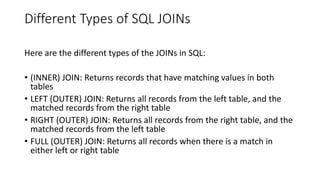
Different Types of SQL JOINs
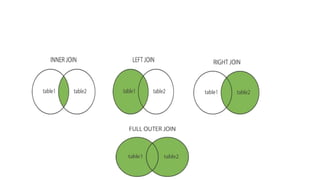
Here are the different types of the JOINs in SQL:
• (INNER) JOIN: Returns records that have matching values in both
tables
• LEFT (OUTER) JOIN: Returns all records from the left table, and the
matched records from the right table
• RIGHT (OUTER) JOIN: Returns all records from the right table, and the
matched records from the left table
• FULL (OUTER) JOIN: Returns all records when there is a match in
either left or right table
SQL INNER JOIN Keyword
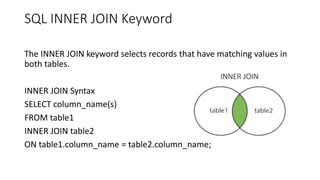
The INNER JOIN keyword selects records that have matching values in
both tables.
INNER JOIN Syntax
SELECT column_name(s)
FROM table1
INNER JOIN table2
ON table1.column_name = table2.column_name;
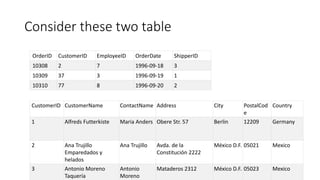
Consider these two table
OrderID CustomerID EmployeeID OrderDate ShipperID
10308 2 7 1996-09-18 3
10309 37 3 1996-09-19 1
10310 77 8 1996-09-20 2
CustomerID CustomerName ContactName Address City PostalCod
e
Country
1 Alfreds Futterkiste Maria Anders Obere Str. 57 Berlin 12209 Germany
2 Ana Trujillo
Emparedados y
helados
Ana Trujillo Avda. de la
Constitución 2222
México D.F. 05021 Mexico
3 Antonio Moreno
Taquería
Antonio
Moreno
Mataderos 2312 México D.F. 05023 Mexico
SQL INNER JOIN Example
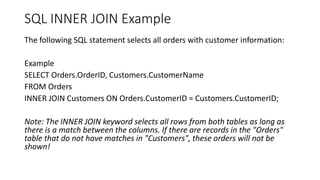
The following SQL statement selects all orders with customer information:
Example
SELECT Orders.OrderID, Customers.CustomerName
FROM Orders
INNER JOIN Customers ON Orders.CustomerID = Customers.CustomerID;
Note: The INNER JOIN keyword selects all rows from both tables as long as
there is a match between the columns. If there are records in the "Orders"
table that do not have matches in "Customers", these orders will not be
shown!
JOIN Three Tables
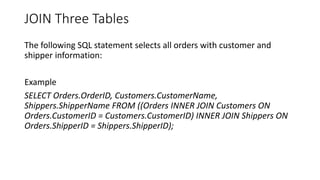
The following SQL statement selects all orders with customer and
shipper information:
Example
SELECT Orders.OrderID, Customers.CustomerName,
Shippers.ShipperName FROM ((Orders INNER JOIN Customers ON
Orders.CustomerID = Customers.CustomerID) INNER JOIN Shippers ON
Orders.ShipperID = Shippers.ShipperID);
SQL LEFT JOIN Keyword
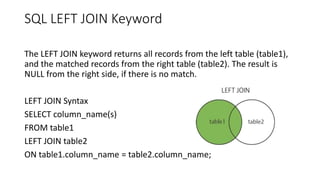
The LEFT JOIN keyword returns all records from the left table (table1),
and the matched records from the right table (table2). The result is
NULL from the right side, if there is no match.
LEFT JOIN Syntax
SELECT column_name(s)
FROM table1
LEFT JOIN table2
ON table1.column_name = table2.column_name;
SQL RIGHT JOIN Keyword
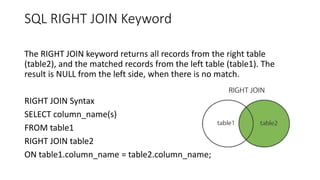
The RIGHT JOIN keyword returns all records from the right table
(table2), and the matched records from the left table (table1). The
result is NULL from the left side, when there is no match.
RIGHT JOIN Syntax
SELECT column_name(s)
FROM table1
RIGHT JOIN table2
ON table1.column_name = table2.column_name;
SQL RIGHT JOIN Example
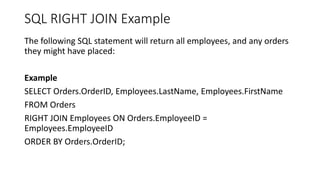
The following SQL statement will return all employees, and any orders
they might have placed:
Example
SELECT Orders.OrderID, Employees.LastName, Employees.FirstName
FROM Orders
RIGHT JOIN Employees ON Orders.EmployeeID =
Employees.EmployeeID
ORDER BY Orders.OrderID;
SQL FULL OUTER JOIN Keyword
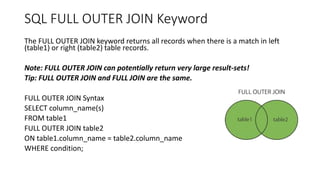
The FULL OUTER JOIN keyword returns all records when there is a match in left
(table1) or right (table2) table records.
Note: FULL OUTER JOIN can potentially return very large result-sets!
Tip: FULL OUTER JOIN and FULL JOIN are the same.
FULL OUTER JOIN Syntax
SELECT column_name(s)
FROM table1
FULL OUTER JOIN table2
ON table1.column_name = table2.column_name
WHERE condition;
SQL FULL OUTER JOIN Example
The following SQL statement selects all customers, and all orders:
SELECT Customers.CustomerName, Orders.OrderID
FROM Customers
FULL OUTER JOIN Orders ON
Customers.CustomerID=Orders.CustomerID
ORDER BY Customers.CustomerName;

SQL JOIN.pptx

  • 1.
  • 2.
    SQL JOIN A JOINclause is used to combine rows from two or more tables, based on a related column between them.
  • 3.
    Different Types ofSQL JOINs Here are the different types of the JOINs in SQL: • (INNER) JOIN: Returns records that have matching values in both tables • LEFT (OUTER) JOIN: Returns all records from the left table, and the matched records from the right table • RIGHT (OUTER) JOIN: Returns all records from the right table, and the matched records from the left table • FULL (OUTER) JOIN: Returns all records when there is a match in either left or right table
  • 5.
    SQL INNER JOINKeyword The INNER JOIN keyword selects records that have matching values in both tables. INNER JOIN Syntax SELECT column_name(s) FROM table1 INNER JOIN table2 ON table1.column_name = table2.column_name;
  • 6.
    Consider these twotable OrderID CustomerID EmployeeID OrderDate ShipperID 10308 2 7 1996-09-18 3 10309 37 3 1996-09-19 1 10310 77 8 1996-09-20 2 CustomerID CustomerName ContactName Address City PostalCod e Country 1 Alfreds Futterkiste Maria Anders Obere Str. 57 Berlin 12209 Germany 2 Ana Trujillo Emparedados y helados Ana Trujillo Avda. de la Constitución 2222 México D.F. 05021 Mexico 3 Antonio Moreno Taquería Antonio Moreno Mataderos 2312 México D.F. 05023 Mexico
  • 7.
    SQL INNER JOINExample The following SQL statement selects all orders with customer information: Example SELECT Orders.OrderID, Customers.CustomerName FROM Orders INNER JOIN Customers ON Orders.CustomerID = Customers.CustomerID; Note: The INNER JOIN keyword selects all rows from both tables as long as there is a match between the columns. If there are records in the "Orders" table that do not have matches in "Customers", these orders will not be shown!
  • 8.
    JOIN Three Tables Thefollowing SQL statement selects all orders with customer and shipper information: Example SELECT Orders.OrderID, Customers.CustomerName, Shippers.ShipperName FROM ((Orders INNER JOIN Customers ON Orders.CustomerID = Customers.CustomerID) INNER JOIN Shippers ON Orders.ShipperID = Shippers.ShipperID);
  • 9.
    SQL LEFT JOINKeyword The LEFT JOIN keyword returns all records from the left table (table1), and the matched records from the right table (table2). The result is NULL from the right side, if there is no match. LEFT JOIN Syntax SELECT column_name(s) FROM table1 LEFT JOIN table2 ON table1.column_name = table2.column_name;
  • 10.
    SQL RIGHT JOINKeyword The RIGHT JOIN keyword returns all records from the right table (table2), and the matched records from the left table (table1). The result is NULL from the left side, when there is no match. RIGHT JOIN Syntax SELECT column_name(s) FROM table1 RIGHT JOIN table2 ON table1.column_name = table2.column_name;
  • 11.
    SQL RIGHT JOINExample The following SQL statement will return all employees, and any orders they might have placed: Example SELECT Orders.OrderID, Employees.LastName, Employees.FirstName FROM Orders RIGHT JOIN Employees ON Orders.EmployeeID = Employees.EmployeeID ORDER BY Orders.OrderID;
  • 12.
    SQL FULL OUTERJOIN Keyword The FULL OUTER JOIN keyword returns all records when there is a match in left (table1) or right (table2) table records. Note: FULL OUTER JOIN can potentially return very large result-sets! Tip: FULL OUTER JOIN and FULL JOIN are the same. FULL OUTER JOIN Syntax SELECT column_name(s) FROM table1 FULL OUTER JOIN table2 ON table1.column_name = table2.column_name WHERE condition;
  • 13.
    SQL FULL OUTERJOIN Example The following SQL statement selects all customers, and all orders: SELECT Customers.CustomerName, Orders.OrderID FROM Customers FULL OUTER JOIN Orders ON Customers.CustomerID=Orders.CustomerID ORDER BY Customers.CustomerName;