Download free for 30 days
Sign in
Upload
Language (EN)
Support
Business
Mobile
Social Media
Marketing
Technology
Art & Photos
Career
Design
Education
Presentations & Public Speaking
Government & Nonprofit
Healthcare
Internet
Law
Leadership & Management
Automotive
Engineering
Software
Recruiting & HR
Retail
Sales
Services
Science
Small Business & Entrepreneurship
Food
Environment
Economy & Finance
Data & Analytics
Investor Relations
Sports
Spiritual
News & Politics
Travel
Self Improvement
Real Estate
Entertainment & Humor
Health & Medicine
Devices & Hardware
Lifestyle
Change Language
Language
English
Español
Português
Français
Deutsche
Cancel
Save
EN
Uploaded by
tvijaykumar5
8 views
ER Model to Relational Model with SQL Statements
DBMS Specialization
Engineering
◦
Read more
0
Save
Share
Embed
Embed presentation
Download
Download to read offline
1
/ 17
2
/ 17
3
/ 17
4
/ 17
5
/ 17
6
/ 17
7
/ 17
8
/ 17
9
/ 17
10
/ 17
11
/ 17
12
/ 17
13
/ 17
14
/ 17
15
/ 17
16
/ 17
17
/ 17
More Related Content
PPTX
Joins (A JOIN clause is used to combine rows from two or more tables, based o...
by
BINJAD1
PPTX
SQL JOIN
by
Ritwik Das
PDF
SQL JOINS
by
PuNeEt KuMaR
PPTX
SQL Join's
by
Muhammad Noman Fazil
PPTX
SQL_Joins_Practical_REERYULOIIPresentation.pptx
by
FIKIRU6
ODT
Sql joins
by
Ashok Kumar
PPTX
MS Sql Server: Joining Databases
by
DataminingTools Inc
PPTX
MS SQLSERVER:Joining Databases
by
sqlserver content
Joins (A JOIN clause is used to combine rows from two or more tables, based o...
by
BINJAD1
SQL JOIN
by
Ritwik Das
SQL JOINS
by
PuNeEt KuMaR
SQL Join's
by
Muhammad Noman Fazil
SQL_Joins_Practical_REERYULOIIPresentation.pptx
by
FIKIRU6
Sql joins
by
Ashok Kumar
MS Sql Server: Joining Databases
by
DataminingTools Inc
MS SQLSERVER:Joining Databases
by
sqlserver content
Similar to ER Model to Relational Model with SQL Statements
PPTX
MS SQL SERVER: Joining Databases
by
sqlserver content
PDF
Advance database system(part 8)
by
Abdullah Khosa
PPTX
MYSQL join
by
Ahmed Farag
PPTX
sqlyyybdbyehduheufhuehfuheuwehfiewifhewihfiehfiwf
by
kailasmanoj
PPTX
sql joinsubdjbrjdbjrjnfkjcnkrnfknrkfkrfkrfkrk
by
kailasmanoj
PPTX
Sql server ___________session_11-12(joins)
by
Ehtisham Ali
PPTX
SQL Joins & Sub Queries class number 697
by
warkadngg
PPTX
SQL Server Learning Drive
by
TechandMate
PPTX
Joins and Views.pptx
by
SangitaKabi
PPTX
Querying_with_T-SQL_-_03 (1).pptx
by
MAHIN33
PPTX
Querying_with_T-SQL_-_03.pptx
by
MAHIN33
PPTX
SQL JOIN.pptx
by
johnwick814916
PPTX
Practical Joins Algorithms in database system
by
AhmadErshad2
PPTX
V19 join method-c
by
Dhirendra Chauhan
PPTX
Structured Query Language (SQL)
by
Hammad Rasheed
PPTX
SQL Basics
by
Hammad Rasheed
PDF
DBMS Nested & Sub Queries Set operations
by
Sreedhar Chowdam
PDF
Sql joins
by
Vivek Singh
PDF
Sql overview-1232931296681161-1
by
sagaroceanic11
PPT
Introduction to-sql
by
BG Java EE Course
MS SQL SERVER: Joining Databases
by
sqlserver content
Advance database system(part 8)
by
Abdullah Khosa
MYSQL join
by
Ahmed Farag
sqlyyybdbyehduheufhuehfuheuwehfiewifhewihfiehfiwf
by
kailasmanoj
sql joinsubdjbrjdbjrjnfkjcnkrnfknrkfkrfkrfkrk
by
kailasmanoj
Sql server ___________session_11-12(joins)
by
Ehtisham Ali
SQL Joins & Sub Queries class number 697
by
warkadngg
SQL Server Learning Drive
by
TechandMate
Joins and Views.pptx
by
SangitaKabi
Querying_with_T-SQL_-_03 (1).pptx
by
MAHIN33
Querying_with_T-SQL_-_03.pptx
by
MAHIN33
SQL JOIN.pptx
by
johnwick814916
Practical Joins Algorithms in database system
by
AhmadErshad2
V19 join method-c
by
Dhirendra Chauhan
Structured Query Language (SQL)
by
Hammad Rasheed
SQL Basics
by
Hammad Rasheed
DBMS Nested & Sub Queries Set operations
by
Sreedhar Chowdam
Sql joins
by
Vivek Singh
Sql overview-1232931296681161-1
by
sagaroceanic11
Introduction to-sql
by
BG Java EE Course
Recently uploaded
PDF
A Newbie’s Journey: Hidden MySQL Pain Points That Vitess Quietly Solves
by
Igor Donchovski
PDF
CME397 SURFACE ENGINEERING UNIT 1 FULL NOTES
by
karthi keyan
PPTX
Fake News Detection System | Plagiarism detection
by
surajkanojiya13
PDF
(en/zhTW)All_Roads_Lead_to_IPC_DannyJiang
by
Danny Jiang
PDF
2025-12-06 Overview of Lifting and Hoisting related Standards by Cranes for Y...
by
Cranes For You B.V.
PPTX
820656155-Unit-III-Univariate-Analysis.pptx
by
kalaimugill
PDF
JVM in the Age of AI: 2026 Edition - Deep Dive
by
Artur Skowroński
PPTX
Lubrication Neglect Causes More Downtime Than AI Ever Will Why Maintenance Fu...
by
MaintWiz Technologies Private Limited
PPTX
UNIT 2 - Electronics Device - EC25C01 - PN Junction Diodes
by
Mathavan N
PDF
10 Tips for Successfully Purchasing Twitter Accounts.pdf
by
marketing
PPTX
AI-Agents-Concepts-Applications-and-Types.pptx
by
palbalaram2018
PPTX
Unit-2: Network Models--OSI Reference Model, TCP/IP Reference Model
by
SuvarnaSharma5
PPTX
Theory to Practice of Unsaturated Soil Mechanics-1.pptx
by
MahmoodKhalid11
PDF
Fire fighting arrangement in public assembly buildings
by
xaliaboyzz
PPTX
Origin of Soil and Grain Size with Introduction and explanation
by
MahmoodKhalid11
PDF
Chip Designer's Code - Linux Terminal Part 6 - Text Viewers
by
Amr Adel
PPTX
What TPM Looks Like When You’re Short-Staffed and Still Make It Work | Lean T...
by
MaintWiz Technologies Private Limited
PPTX
Basin Design Service, LLC Introduction Presentation
by
Hubie Fix
PPTX
Electronics Device - EC25C01 - Semiconductor: Types, Conductivity,
by
Mathavan N
PPTX
Top 3 winning teams announcement - TechSprint
by
bajpaitusharoffon678
A Newbie’s Journey: Hidden MySQL Pain Points That Vitess Quietly Solves
by
Igor Donchovski
CME397 SURFACE ENGINEERING UNIT 1 FULL NOTES
by
karthi keyan
Fake News Detection System | Plagiarism detection
by
surajkanojiya13
(en/zhTW)All_Roads_Lead_to_IPC_DannyJiang
by
Danny Jiang
2025-12-06 Overview of Lifting and Hoisting related Standards by Cranes for Y...
by
Cranes For You B.V.
820656155-Unit-III-Univariate-Analysis.pptx
by
kalaimugill
JVM in the Age of AI: 2026 Edition - Deep Dive
by
Artur Skowroński
Lubrication Neglect Causes More Downtime Than AI Ever Will Why Maintenance Fu...
by
MaintWiz Technologies Private Limited
UNIT 2 - Electronics Device - EC25C01 - PN Junction Diodes
by
Mathavan N
10 Tips for Successfully Purchasing Twitter Accounts.pdf
by
marketing
AI-Agents-Concepts-Applications-and-Types.pptx
by
palbalaram2018
Unit-2: Network Models--OSI Reference Model, TCP/IP Reference Model
by
SuvarnaSharma5
Theory to Practice of Unsaturated Soil Mechanics-1.pptx
by
MahmoodKhalid11
Fire fighting arrangement in public assembly buildings
by
xaliaboyzz
Origin of Soil and Grain Size with Introduction and explanation
by
MahmoodKhalid11
Chip Designer's Code - Linux Terminal Part 6 - Text Viewers
by
Amr Adel
What TPM Looks Like When You’re Short-Staffed and Still Make It Work | Lean T...
by
MaintWiz Technologies Private Limited
Basin Design Service, LLC Introduction Presentation
by
Hubie Fix
Electronics Device - EC25C01 - Semiconductor: Types, Conductivity,
by
Mathavan N
Top 3 winning teams announcement - TechSprint
by
bajpaitusharoffon678
ER Model to Relational Model with SQL Statements
1.
© Yuriy Shamshin
1/17 MySQL DML. SELECT Constructions 3. Summary • 1. HR sample database • 2. SELECT Statement Full Syntax • 3. SELECT - Filtering Data o 3.1. DISTINCT - Remove Duplicates from the result set. o 3.2. LIMIT / OFFSET of returned rows o 3.3. WHERE Clause Constructions § 3.3.1. Comparison operators (=, !=, <>, <, >, <=, >=) § 3.3.2. SQL Triple Logic Overview § 3.3.2.1. IS NULL operator and the NULL concepts § 3.3.2.2. AND operator § 3.3.2.3. OR operator § 3.3.2.4. NOT operator § 3.3.3. BETWEEN operator § 3.3.4. IN operator § 3.3.5. LIKE operator • 4. SELECT - Aliases • 5. SELECT - Sorting Data o 5.1. ORDER BY Clause • 6. SELECT - Grouping Data o 6.1. GROUP BY Clause • 7. SELECT - Filtering Group o 7.1. HAVING Clause • 8. SELECT - Joining Multiple Tables o 8.1. INNER JOIN o 8.2. LEFT [OUTER] JOIN o 8.3. RIGHT [OUTER] JOIN o 8.4. FULL [OUTER] JOIN o 8.5. [CROSS] JOIN o 8.6. Self Joins • 9. SELECT UNION and UNION ALL • 10. SELECT Subqueries
2.
© Yuriy Shamshin
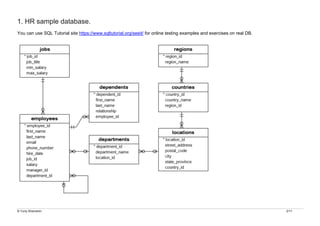
2/17 1. HR sample database. You can use SQL Tutorial site https://www.sqltutorial.org/seeit/ for online testing examples and exercises on real DB.
3.
© Yuriy Shamshin
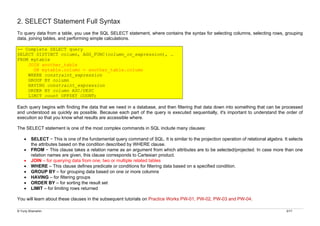
3/17 2. SELECT Statement Full Syntax To query data from a table, you use the SQL SELECT statement, where contains the syntax for selecting columns, selecting rows, grouping data, joining tables, and performing simple calculations. -- Complete SELECT query SELECT DISTINCT column, AGG_FUNC(column_or_expression), … FROM mytable JOIN another_table ON mytable.column = another_table.column WHERE constraint_expression GROUP BY column HAVING constraint_expression ORDER BY column ASC/DESC LIMIT count OFFSET COUNT; Each query begins with finding the data that we need in a database, and then filtering that data down into something that can be processed and understood as quickly as possible. Because each part of the query is executed sequentially, it's important to understand the order of execution so that you know what results are accessible where. The SELECT statement is one of the most complex commands in SQL include many clauses: • SELECT − This is one of the fundamental query command of SQL. It is similar to the projection operation of relational algebra. It selects the attributes based on the condition described by WHERE clause. • FROM − This clause takes a relation name as an argument from which attributes are to be selected/projected. In case more than one relation names are given, this clause corresponds to Cartesian product. • JOIN – for querying data from one, two or multiple related tables • WHERE – This clause defines predicate or conditions for filtering data based on a specified condition. • GROUP BY – for grouping data based on one or more columns • HAVING – for filtering groups • ORDER BY – for sorting the result set • LIMIT – for limiting rows returned You will learn about these clauses in the subsequent tutorials on Practice Works PW-01, PW-02, PW-03 and PW-04.
4.
© Yuriy Shamshin
4/17 8. SELECT - Joining Multiple Tables So far, you have learned how to use the SELECT statement to query data from a single table. However, the SELECT statement is not limited to query data from a single table. The SELECT statement can link multiple tables together. A join is a method of linking data between one (self-join), two, or more tables based on values of the common column between the tables. The process of linking tables is called joining. SQL provides many kinds of joins such as: • INNER JOIN – returns records that have matching values in both (multiple) tables. • LEFT [OUTER] JOIN – returns all records from the left table, and the matched records from the right table. • RIGHT [OUTER] JOIN – returns all records from the right table, and the matched records from the left table • FULL [OUTER] JOIN – returns all records when there is a match in either left or right table. • [CROSS] JOIN – produce a Cartesian product of rows of the joined tables using the cross join operation. • SELF JOIN – join a table to itself using either the inner join or left join clause.
5.
© Yuriy Shamshin
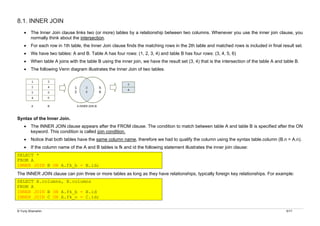
5/17 8.1. INNER JOIN • The Inner Join clause links two (or more) tables by a relationship between two columns. Whenever you use the inner join clause, you normally think about the intersection. • For each row in 1th table, the Inner Join clause finds the matching rows in the 2th table and matched rows is included in final result set. • We have two tables: A and B. Table A has four rows: (1, 2, 3, 4) and table B has four rows: (3, 4, 5, 6) • When table A joins with the table B using the inner join, we have the result set (3, 4) that is the intersection of the table A and table B. • The following Venn diagram illustrates the Inner Join of two tables. Syntax of the Inner Join. • The INNER JOIN clause appears after the FROM clause. The condition to match between table A and table B is specified after the ON keyword. This condition is called join condition. • Notice that both tables have the same column name, therefore we had to qualify the column using the syntax table.column (B.n = A.n). • If the column name of the A and B tables is fk and id the following statement illustrates the inner join clause: SELECT * FROM A INNER JOIN B ON A.fk_b = B.id; The INNER JOIN clause can join three or more tables as long as they have relationships, typically foreign key relationships. For example: SELECT A.columns, B.columns FROM A INNER JOIN B ON A.fk_b = B.id INNER JOIN C ON A.fk_c = С.id;
6.
© Yuriy Shamshin
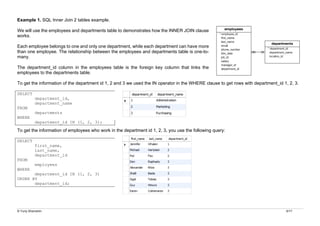
6/17 Example 1. SQL Inner Join 2 tables example. We will use the employees and departments table to demonstrates how the INNER JOIN clause works. Each employee belongs to one and only one department, while each department can have more than one employee. The relationship between the employees and departments table is one-to- many. The department_id column in the employees table is the foreign key column that links the employees to the departments table. To get the information of the department id 1, 2 and 3 we used the IN operator in the WHERE clause to get rows with department_id 1, 2, 3. SELECT department_id, department_name FROM departments WHERE department_id IN (1, 2, 3); To get the information of employees who work in the department id 1, 2, 3, you use the following query: SELECT first_name, last_name, department_id FROM employees WHERE department_id IN (1, 2, 3) ORDER BY department_id;
7.
© Yuriy Shamshin
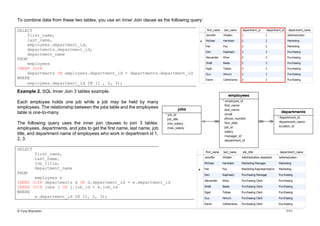
7/17 To combine data from these two tables, you use an Inner Join clause as the following query: SELECT first_name, last_name, employees.department_id, departments.department_id, department_name FROM employees INNER JOIN departments ON employees.department_id = departments.department_id WHERE employees.department_id IN (1 , 2, 3); Example 2. SQL Inner Join 3 tables example. Each employee holds one job while a job may be held by many employees. The relationship between the jobs table and the employees table is one-to-many. The following query uses the inner join clauses to join 3 tables: employees, departments, and jobs to get the first name, last name, job title, and department name of employees who work in department id 1, 2, 3. SELECT first_name, last_name, job_title, department_name FROM employees e INNER JOIN departments d ON d.department_id = e.department_id INNER JOIN jobs j ON j.job_id = e.job_id WHERE e.department_id IN (1, 2, 3);
8.
© Yuriy Shamshin
8/17 8.2. LEFT [OUTER] JOIN • The previous Inner Join clause eliminates the rows that do not match with a row of the other table. • The Left Outer Join, however, returns all rows from the left table whether or not there is a matching row in the right table. • Note that the OUTER keyword is optional. • Because non-matching rows in the right table are filled with the NULL values, you can apply the LEFT JOIN clause to miss-match rows between tables (IS NULL construction). • Suppose we have two tables A and B. The table A has four rows 1, 2, 3 and 4. The table B also has four rows 3, 4, 5, 6. • When we join table A with table B, all the rows in table A (the left table) are included in the result set whether there is a matching row in the table B or not. • The following Venn diagram illustrates the Left Outer Join of two tables. Syntax of the Left Outer Join. • The LEFT JOIN clause appears after the FROM clause. The condition that follows the ON keyword is called the join condition. • Notice that both tables have the same column name, therefore we had to qualify the column using the syntax table.column (B.n = A.n). • In SQL, we use the following syntax to Left Outer Join table A with table B. SELECT A.* FROM A LEFT JOIN B ON B.id = A.fk;
9.
© Yuriy Shamshin
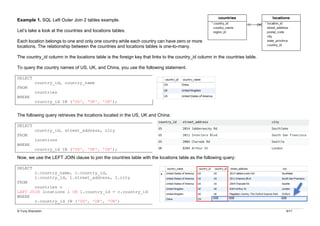
9/17 Example 1. SQL Left Outer Join 2 tables example. Let’s take a look at the countries and locations tables. Each location belongs to one and only one country while each country can have zero or more locations. The relationship between the countries and locations tables is one-to-many. The country_id column in the locations table is the foreign key that links to the country_id column in the countries table. To query the country names of US, UK, and China, you use the following statement. SELECT country_id, country_name FROM countries WHERE country_id IN ('US', 'UK', 'CN'); The following query retrieves the locations located in the US, UK and China: SELECT country_id, street_address, city FROM locations WHERE country_id IN ('US', 'UK', 'CN'); Now, we use the LEFT JOIN clause to join the countries table with the locations table as the following query: SELECT c.country_name, c.country_id, l.country_id, l.street_address, l.city FROM countries c LEFT JOIN locations l ON l.country_id = c.country_id WHERE c.country_id IN ('US', 'UK', 'CN')
10.
© Yuriy Shamshin
10/17 • The condition in the WHERE clause is applied so that the statement only retrieves the data from the US, UK, and China rows. • Because we use the LEFT JOIN clause, all rows that satisfy the condition in the WHERE clause of the countries table are included in the result set. • For each row in the countries table, the LEFT JOIN clause finds the matching rows in the locations table. • If at least one matching row found, the database engine combines the data from columns of the matching rows in both tables. • In case there is no matching row found e.g., with the country_id CN, the row in the countries table is included in the result set and the row in the locations table is filled with NULL values. Because non-matching rows in the right table are filled with the NULL values, you can apply the LEFT JOIN clause to miss-match rows between tables. For example, to find the country that does not have any locations in the locations table, you use the following query: SELECT country_name -- or * FROM countries c LEFT JOIN locations l ON l.country_id = c.country_id WHERE l.location_id IS NULL ORDER BY country_name; 8.3. RIGHT [OUTER] JOIN • The Right Outer Join is symmetrical analog of the Left Outer Join, however, returns all rows from the right table whether or not there is a matching row in the left table. • The following Venn diagram illustrates the Right Outer Join of two tables. Syntax of the Right Outer Join. SELECT A.* FROM A RIGHT JOIN B ON B.id = A.fk;
11.
© Yuriy Shamshin
11/17 8.4. FULL [OUTER] JOIN • In theory, a Full Outer Join is the combination of a left join and a right join. The full outer join includes all rows from the joined tables whether or not the other table has the matching row. • If the rows in the joined tables do not match, the result set of the Full Outer Join contains NULL values for every column of the table that lacks a matching row. • For the matching rows, a single row that has the columns populated from the joined table is included in the result set. • Note that the OUTER keyword is optional. • The following Venn diagram illustrates the Full Outer Join of two tables. Syntax of the Full Outer Join. SELECT column_list FROM A FULL JOIN B ON B.id = A.fk;
12.
© Yuriy Shamshin
12/17 8.5. [CROSS] JOIN • CROSS JOIN - Cartesian product (all possible combos of each table). • The following picture illustrates the Cartesian product of two tables: • Note that the CROSS keyword is optional. • Note that unlike the Inner Join, Left Join, and Full Join, the CROSS JOIN clause does not have a join condition. Syntax of the CROSS JOIN clause SELECT column_list FROM A JOIN B; The following statement is equivalent to the one that uses the Cross Join clause above: SELECT column_list FROM A, B; Example 1. SELECT * FROM table1 as a CROSS JOIN table2 as b; Example 2. If you add a WHERE clause, in case table t1 and t2 has a relationship, the CROSS JOIN works like the INNER JOIN clause as shown in the following query: SELECT * FROM t1 CROSS JOIN t2 WHERE t1.id = t2.id;
13.
© Yuriy Shamshin
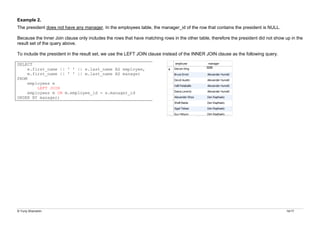
13/17 8.6. Self Joins • We join a table to itself to evaluate the rows with other rows in the same table. • To perform the Self Join, we use either an Inner Join, Left Join or Right Join clause. • Because the same table appears twice in a single query, we have to use the table aliases. • The following statement illustrates how to join a table to itself. SELECT column1, column2, column3, ... FROM table1 A INNER JOIN table1 B ON B.column1 = A.column2; • In this statement joins the table1 to itself using an INNER JOIN clause. • A and B are the table aliases of the table1. • The B.column1 = A.column2 is the join condition. • Besides the INNER JOIN clause, you can use the LEFT JOIN or RIGHT JOIN clause. Example 1. See the following employees table. The manager_id column specifies the manager of an employee. The following statement joins the employees table to itself to query the information of who reports to whom. SELECT e.first_name || ' ' || e.last_name AS employee, m.first_name || ' ' || m.last_name AS manager FROM employees e INNER JOIN employees m ON m.employee_id = e.manager_id ORDER BY manager;
14.
© Yuriy Shamshin
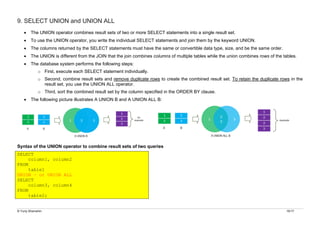
14/17 Example 2. The president does not have any manager. In the employees table, the manager_id of the row that contains the president is NULL. Because the Inner Join clause only includes the rows that have matching rows in the other table, therefore the president did not show up in the result set of the query above. To include the president in the result set, we use the LEFT JOIN clause instead of the INNER JOIN clause as the following query. SELECT e.first_name || ' ' || e.last_name AS employee, m.first_name || ' ' || m.last_name AS manager FROM employees e LEFT JOIN employees m ON m.employee_id = e.manager_id ORDER BY manager;
15.
© Yuriy Shamshin
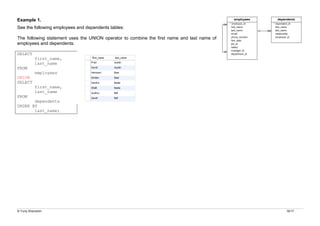
15/17 9. SELECT UNION and UNION ALL • The UNION operator combines result sets of two or more SELECT statements into a single result set. • To use the UNION operator, you write the individual SELECT statements and join them by the keyword UNION. • The columns returned by the SELECT statements must have the same or convertible data type, size, and be the same order. • The UNION is different from the JOIN that the join combines columns of multiple tables while the union combines rows of the tables. • The database system performs the following steps: o First, execute each SELECT statement individually. o Second, combine result sets and remove duplicate rows to create the combined result set. To retain the duplicate rows in the result set, you use the UNION ALL operator. o Third, sort the combined result set by the column specified in the ORDER BY clause. • The following picture illustrates A UNION B and A UNION ALL B: Syntax of the UNION operator to combine result sets of two queries SELECT column1, column2 FROM table1 UNION – or UNION ALL SELECT column3, column4 FROM table2;
16.
© Yuriy Shamshin
16/17 Example 1. See the following employees and dependents tables: The following statement uses the UNION operator to combine the first name and last name of employees and dependents. SELECT first_name, last_name FROM employees UNION SELECT first_name, last_name FROM dependents ORDER BY last_name;
17.
© Yuriy Shamshin
17/17 10. SELECT Subqueries • Subquery – show you how to nest a query inside another query to form a more flexible query for querying data. • Correlated Subquery – introduce you to the correlated subquery which is a subquery that uses values from the outer query. • EXISTS – show you how to check for the existence of the row returned from a subquery. • ALL – illustrate how to query data by comparing values in a column of the table with a set of columns. • ANY – query data if a value in a column of a table matches one of value in a set.
Download
![© Yuriy Shamshin 1/17
MySQL DML. SELECT Constructions 3.
Summary
• 1. HR sample database
• 2. SELECT Statement Full Syntax
• 3. SELECT - Filtering Data
o 3.1. DISTINCT - Remove Duplicates from the result set.
o 3.2. LIMIT / OFFSET of returned rows
o 3.3. WHERE Clause Constructions
§ 3.3.1. Comparison operators (=, !=, <>, <, >, <=, >=)
§ 3.3.2. SQL Triple Logic Overview
§ 3.3.2.1. IS NULL operator and the NULL concepts
§ 3.3.2.2. AND operator
§ 3.3.2.3. OR operator
§ 3.3.2.4. NOT operator
§ 3.3.3. BETWEEN operator
§ 3.3.4. IN operator
§ 3.3.5. LIKE operator
• 4. SELECT - Aliases
• 5. SELECT - Sorting Data
o 5.1. ORDER BY Clause
• 6. SELECT - Grouping Data
o 6.1. GROUP BY Clause
• 7. SELECT - Filtering Group
o 7.1. HAVING Clause
• 8. SELECT - Joining Multiple Tables
o 8.1. INNER JOIN
o 8.2. LEFT [OUTER] JOIN
o 8.3. RIGHT [OUTER] JOIN
o 8.4. FULL [OUTER] JOIN
o 8.5. [CROSS] JOIN
o 8.6. Self Joins
• 9. SELECT UNION and UNION ALL
• 10. SELECT Subqueries](https://image.slidesharecdn.com/17dbsls13ensql-select-3-251209103210-20333d2a/85/ER-Model-to-Relational-Model-with-SQL-Statements-1-320.jpg)
![© Yuriy Shamshin 1/17
MySQL DML. SELECT Constructions 3.
Summary
• 1. HR sample database
• 2. SELECT Statement Full Syntax
• 3. SELECT - Filtering Data
o 3.1. DISTINCT - Remove Duplicates from the result set.
o 3.2. LIMIT / OFFSET of returned rows
o 3.3. WHERE Clause Constructions
§ 3.3.1. Comparison operators (=, !=, <>, <, >, <=, >=)
§ 3.3.2. SQL Triple Logic Overview
§ 3.3.2.1. IS NULL operator and the NULL concepts
§ 3.3.2.2. AND operator
§ 3.3.2.3. OR operator
§ 3.3.2.4. NOT operator
§ 3.3.3. BETWEEN operator
§ 3.3.4. IN operator
§ 3.3.5. LIKE operator
• 4. SELECT - Aliases
• 5. SELECT - Sorting Data
o 5.1. ORDER BY Clause
• 6. SELECT - Grouping Data
o 6.1. GROUP BY Clause
• 7. SELECT - Filtering Group
o 7.1. HAVING Clause
• 8. SELECT - Joining Multiple Tables
o 8.1. INNER JOIN
o 8.2. LEFT [OUTER] JOIN
o 8.3. RIGHT [OUTER] JOIN
o 8.4. FULL [OUTER] JOIN
o 8.5. [CROSS] JOIN
o 8.6. Self Joins
• 9. SELECT UNION and UNION ALL
• 10. SELECT Subqueries](https://image.slidesharecdn.com/17dbsls13ensql-select-3-251209103210-20333d2a/75/ER-Model-to-Relational-Model-with-SQL-Statements-1-2048.jpg)
![© Yuriy Shamshin 4/17
8. SELECT - Joining Multiple Tables
So far, you have learned how to use the SELECT statement to query data from a single table. However, the SELECT statement is not limited
to query data from a single table. The SELECT statement can link multiple tables together.
A join is a method of linking data between one (self-join), two, or more tables based on values of the common column between the tables.
The process of linking tables is called joining. SQL provides many kinds of joins such as:
• INNER JOIN – returns records that have matching values in both (multiple) tables.
• LEFT [OUTER] JOIN – returns all records from the left table, and the matched records from the right table.
• RIGHT [OUTER] JOIN – returns all records from the right table, and the matched records from the left table
• FULL [OUTER] JOIN – returns all records when there is a match in either left or right table.
• [CROSS] JOIN – produce a Cartesian product of rows of the joined tables using the cross join operation.
• SELF JOIN – join a table to itself using either the inner join or left join clause.](https://image.slidesharecdn.com/17dbsls13ensql-select-3-251209103210-20333d2a/85/ER-Model-to-Relational-Model-with-SQL-Statements-4-320.jpg)
![© Yuriy Shamshin 8/17
8.2. LEFT [OUTER] JOIN
• The previous Inner Join clause eliminates the rows that do not match with a row of the other table.
• The Left Outer Join, however, returns all rows from the left table whether or not there is a matching row in the right table.
• Note that the OUTER keyword is optional.
• Because non-matching rows in the right table are filled with the NULL values, you can apply the LEFT JOIN clause to miss-match rows
between tables (IS NULL construction).
• Suppose we have two tables A and B. The table A has four rows 1, 2, 3 and 4. The table B also has four rows 3, 4, 5, 6.
• When we join table A with table B, all the rows in table A (the left table) are included in the result set whether there is a matching row in
the table B or not.
• The following Venn diagram illustrates the Left Outer Join of two tables.
Syntax of the Left Outer Join.
• The LEFT JOIN clause appears after the FROM clause. The condition that follows the ON keyword is called the join condition.
• Notice that both tables have the same column name, therefore we had to qualify the column using the syntax table.column (B.n = A.n).
• In SQL, we use the following syntax to Left Outer Join table A with table B.
SELECT
A.*
FROM
A
LEFT JOIN
B ON B.id = A.fk;](https://image.slidesharecdn.com/17dbsls13ensql-select-3-251209103210-20333d2a/85/ER-Model-to-Relational-Model-with-SQL-Statements-8-320.jpg)
![© Yuriy Shamshin 10/17
• The condition in the WHERE clause is applied so that the statement only retrieves the data from the US, UK, and China rows.
• Because we use the LEFT JOIN clause, all rows that satisfy the condition in the WHERE clause of the countries table are included in
the result set.
• For each row in the countries table, the LEFT JOIN clause finds the matching rows in the locations table.
• If at least one matching row found, the database engine combines the data from columns of the matching rows in both tables.
• In case there is no matching row found e.g., with the country_id CN, the row in the countries table is included in the result set and the
row in the locations table is filled with NULL values.
Because non-matching rows in the right table are filled with the NULL values, you can apply the LEFT JOIN clause to miss-match rows between
tables. For example, to find the country that does not have any locations in the locations table, you use the following query:
SELECT
country_name -- or *
FROM
countries c
LEFT JOIN locations l ON l.country_id = c.country_id
WHERE
l.location_id IS NULL
ORDER BY
country_name;
8.3. RIGHT [OUTER] JOIN
• The Right Outer Join is symmetrical analog of the Left Outer Join, however, returns all rows from the right table whether or not there is
a matching row in the left table.
• The following Venn diagram illustrates the Right Outer Join of two tables.
Syntax of the Right Outer Join.
SELECT A.*
FROM A
RIGHT JOIN
B ON B.id = A.fk;](https://image.slidesharecdn.com/17dbsls13ensql-select-3-251209103210-20333d2a/85/ER-Model-to-Relational-Model-with-SQL-Statements-10-320.jpg)
![© Yuriy Shamshin 11/17
8.4. FULL [OUTER] JOIN
• In theory, a Full Outer Join is the combination of a left join and a right join. The full outer join includes all rows from the joined tables
whether or not the other table has the matching row.
• If the rows in the joined tables do not match, the result set of the Full Outer Join contains NULL values for every column of the table that
lacks a matching row.
• For the matching rows, a single row that has the columns populated from the joined table is included in the result set.
• Note that the OUTER keyword is optional.
• The following Venn diagram illustrates the Full Outer Join of two tables.
Syntax of the Full Outer Join.
SELECT column_list
FROM A
FULL JOIN B ON B.id = A.fk;](https://image.slidesharecdn.com/17dbsls13ensql-select-3-251209103210-20333d2a/85/ER-Model-to-Relational-Model-with-SQL-Statements-11-320.jpg)
![© Yuriy Shamshin 12/17
8.5. [CROSS] JOIN
• CROSS JOIN - Cartesian product (all possible combos of each table).
• The following picture illustrates the Cartesian product of two tables:
• Note that the CROSS keyword is optional.
• Note that unlike the Inner Join, Left Join, and Full Join, the CROSS JOIN clause does not have
a join condition.
Syntax of the CROSS JOIN clause
SELECT column_list
FROM A
JOIN B;
The following statement is equivalent to the one that uses the Cross Join clause above:
SELECT
column_list
FROM
A,
B;
Example 1.
SELECT *
FROM table1 as a CROSS JOIN table2 as b;
Example 2.
If you add a WHERE clause, in case table t1 and t2 has a relationship, the CROSS JOIN works like the INNER JOIN clause as shown in the
following query:
SELECT * FROM t1
CROSS JOIN t2
WHERE t1.id = t2.id;](https://image.slidesharecdn.com/17dbsls13ensql-select-3-251209103210-20333d2a/85/ER-Model-to-Relational-Model-with-SQL-Statements-12-320.jpg)