‘-
1
CDSE Days 2018
SQL
FUNDAMENTALS
‘-
2
• Structured Querying Language – computer language
for relational database management and data
manipulation
• Sequel
• Cannot write complete applications  All about the data
Read
Write
Update
What is SQL?
‘-
3
• Unlike other languages there are multiple variations
• DataBase Management Systems (DBMS)
SQL Server
MySQL
Microsoft SQL Server
Oracle (IBM DB2)
…
SQL Syntax
‘-
4
• A container of organized data that is related
 Tables: a structured list of data
 Columns: single fields in a table
 Rows: a record in a table
Database
‘-
5
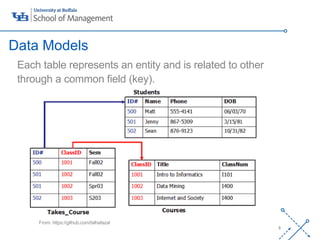
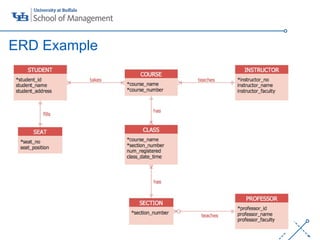
Each table represents an entity and is related to other
through a common field (key).
Data Models
From: https://github.com/talhafazal
‘-
7
ERD Example
‘-
8
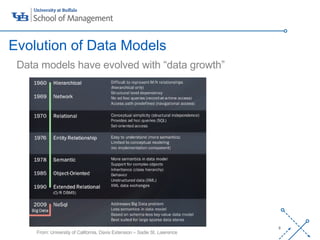
Data models have evolved with “data growth”
Evolution of Data Models
From: University of California, Davis Extension – Sadie St. Lawrence
‘-
10
 Problem Identification
 Data Structure
 Business Rules
• The Data Model is a great starting point
Where to Start?
‘-
11
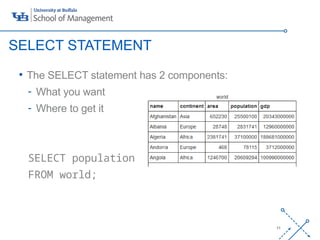
• The SELECT statement has 2 components:
- What you want
- Where to get it
SELECT population
FROM world;
SELECT STATEMENT
‘-
12
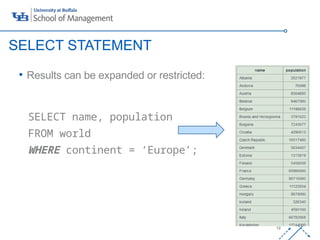
• Results can be expanded or restricted:
SELECT name, population
FROM world
WHERE continent = ‘Europe’;
SELECT STATEMENT
‘-
13
• The CREATE TABLE statement is used to create new
tables in a database.
CREATE TABLE games
(
yr INT NOT NULL PRIMARY
KEY,
city VARCHAR(20) NOT NULL,
);
Creating your own tables
‘-
14
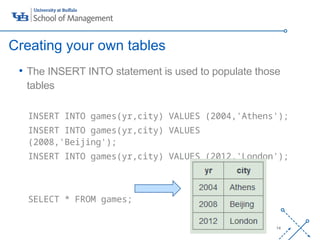
• The INSERT INTO statement is used to populate those
tables
INSERT INTO games(yr,city) VALUES (2004,'Athens');
INSERT INTO games(yr,city) VALUES
(2008,'Beijing');
INSERT INTO games(yr,city) VALUES (2012,'London');
SELECT * FROM games;
Creating your own tables
‘-
15
Adding comments to code is a fundamental element of
good programming practices.
/* SQL Comments are enclosed in */
/* This table is being created as an example */
CREATE TABLE games(
yr INT NOT NULL PRIMARY
KEY,
city VARCHAR(20) NOT NULL,
);
Comments
‘-
16
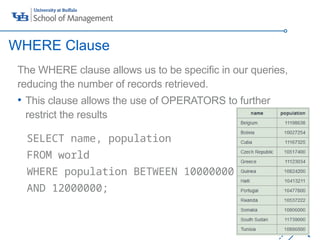
The WHERE clause allows us to be specific in our queries,
reducing the number of records retrieved.
• This clause allows the use of OPERATORS to further
restrict the results
SELECT name, population
FROM world
WHERE population BETWEEN 10000000
AND 12000000;
WHERE Clause
‘-
17
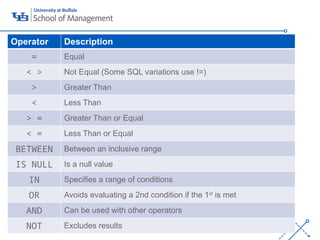
Operator Description
= Equal
< > Not Equal (Some SQL variations use !=)
> Greater Than
< Less Than
> = Greater Than or Equal
< = Less Than or Equal
BETWEEN Between an inclusive range
IS NULL Is a null value
IN Specifies a range of conditions
OR Avoids evaluating a 2nd condition if the 1st
is met
AND Can be used with other operators
NOT Excludes results
‘-
18
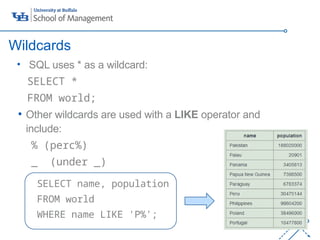
• SQL uses * as a wildcard:
SELECT *
FROM world;
• Other wildcards are used with a LIKE operator and
include:
% (perc%)
_ (under _)
SELECT name, population
FROM world
WHERE name LIKE 'P%';
Wildcards
‘-
19
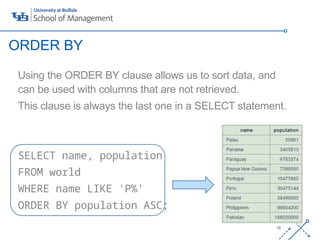
Using the ORDER BY clause allows us to sort data, and
can be used with columns that are not retrieved.
This clause is always the last one in a SELECT statement.
SELECT name, population
FROM world
WHERE name LIKE 'P%'
ORDER BY population ASC;
ORDER BY
‘-
20
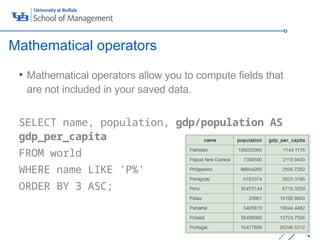
• Mathematical operators allow you to compute fields that
are not included in your saved data.
SELECT name, population, gdp/population AS
gdp_per_capita
FROM world
WHERE name LIKE 'P%'
ORDER BY 3 ASC;
Mathematical operators
‘-
21
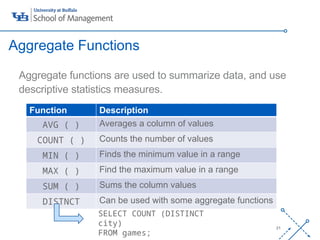
Aggregate functions are used to summarize data, and use
descriptive statistics measures.
Aggregate Functions
Function Description
AVG ( ) Averages a column of values
COUNT ( ) Counts the number of values
MIN ( ) Finds the minimum value in a range
MAX ( ) Find the maximum value in a range
SUM ( ) Sums the column values
DISTNCT Can be used with some aggregate functions
SELECT COUNT (DISTINCT
city)
FROM games;
‘-
22
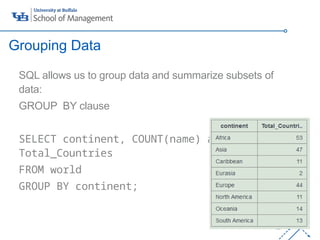
SQL allows us to group data and summarize subsets of
data:
GROUP BY clause
SELECT continent, COUNT(name) as
Total_Countries
FROM world
GROUP BY continent;
Grouping Data
‘-
23
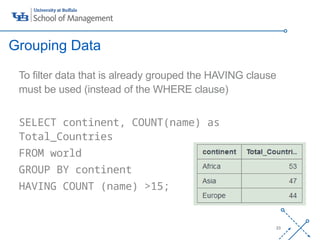
To filter data that is already grouped the HAVING clause
must be used (instead of the WHERE clause)
SELECT continent, COUNT(name) as
Total_Countries
FROM world
GROUP BY continent
HAVING COUNT (name) >15;
Grouping Data
‘-
24
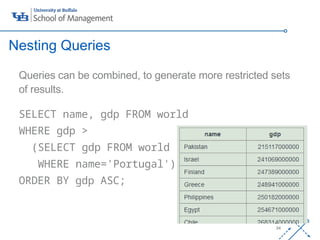
Queries can be combined, to generate more restricted sets
of results.
SELECT name, gdp FROM world
WHERE gdp >
(SELECT gdp FROM world
WHERE name='Portugal')
ORDER BY gdp ASC;
Nesting Queries
‘-
25
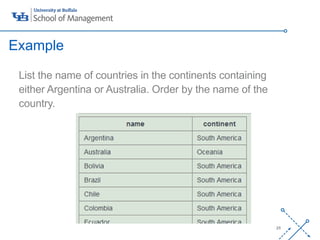
List the name of countries in the continents containing
either Argentina or Australia. Order by the name of the
country.
SELECT name, continent FROM world
WHERE continent IN
(SELECT continent FROM world
WHERE name IN ('Argentina',
'Australia'))
ORDER BY name ASC;
Example
‘-
26
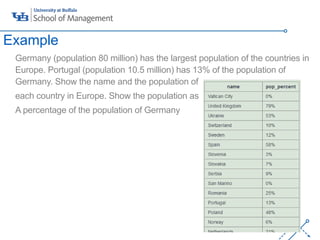
Germany (population 80 million) has the largest population of the countries in
Europe. Portugal (population 10.5 million) has 13% of the population of
Germany. Show the name and the population of
each country in Europe. Show the population as
A percentage of the population of Germany
SELECT name,
CONCAT(ROUND(100*population/(SELECT
population
FROM world
WHERE name = 'Germany')), '%') AS
pop_percent
FROM world
WHERE continent = 'Europe'
Example
‘-
27
• No limit to the number of subqueries that you can have
• Performance is affected with deeply nested statements
• Coding format is important
 Notepad ++
 www.poorsql.com
 commenting
Nesting queries Best Practices
‘-
28
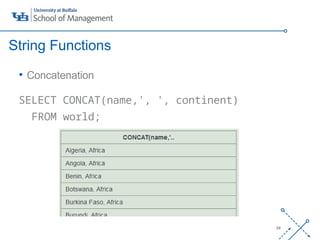
• Concatenation
SELECT CONCAT(name,', ', continent)
FROM world;
String Functions
‘-
29
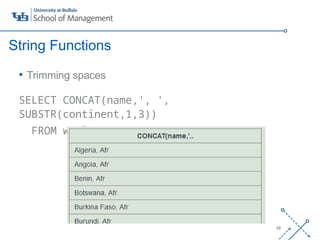
• Trimming spaces
SELECT CONCAT(name,', ',
SUBSTR(continent,1,3))
FROM world;
String Functions
‘-
30
• https://sqlzoo.net
• https://www.w3schools.com/
Resources

SQL FUNDAMENTALS database management system

  • 1.
  • 2.
    ‘- 2 • Structured QueryingLanguage – computer language for relational database management and data manipulation • Sequel • Cannot write complete applications  All about the data Read Write Update What is SQL?
  • 3.
    ‘- 3 • Unlike otherlanguages there are multiple variations • DataBase Management Systems (DBMS) SQL Server MySQL Microsoft SQL Server Oracle (IBM DB2) … SQL Syntax
  • 4.
    ‘- 4 • A containerof organized data that is related  Tables: a structured list of data  Columns: single fields in a table  Rows: a record in a table Database
  • 5.
    ‘- 5 Each table representsan entity and is related to other through a common field (key). Data Models From: https://github.com/talhafazal
  • 6.
  • 7.
    ‘- 8 Data models haveevolved with “data growth” Evolution of Data Models From: University of California, Davis Extension – Sadie St. Lawrence
  • 8.
    ‘- 10  Problem Identification Data Structure  Business Rules • The Data Model is a great starting point Where to Start?
  • 9.
    ‘- 11 • The SELECTstatement has 2 components: - What you want - Where to get it SELECT population FROM world; SELECT STATEMENT
  • 10.
    ‘- 12 • Results canbe expanded or restricted: SELECT name, population FROM world WHERE continent = ‘Europe’; SELECT STATEMENT
  • 11.
    ‘- 13 • The CREATETABLE statement is used to create new tables in a database. CREATE TABLE games ( yr INT NOT NULL PRIMARY KEY, city VARCHAR(20) NOT NULL, ); Creating your own tables
  • 12.
    ‘- 14 • The INSERTINTO statement is used to populate those tables INSERT INTO games(yr,city) VALUES (2004,'Athens'); INSERT INTO games(yr,city) VALUES (2008,'Beijing'); INSERT INTO games(yr,city) VALUES (2012,'London'); SELECT * FROM games; Creating your own tables
  • 13.
    ‘- 15 Adding comments tocode is a fundamental element of good programming practices. /* SQL Comments are enclosed in */ /* This table is being created as an example */ CREATE TABLE games( yr INT NOT NULL PRIMARY KEY, city VARCHAR(20) NOT NULL, ); Comments
  • 14.
    ‘- 16 The WHERE clauseallows us to be specific in our queries, reducing the number of records retrieved. • This clause allows the use of OPERATORS to further restrict the results SELECT name, population FROM world WHERE population BETWEEN 10000000 AND 12000000; WHERE Clause
  • 15.
    ‘- 17 Operator Description = Equal <> Not Equal (Some SQL variations use !=) > Greater Than < Less Than > = Greater Than or Equal < = Less Than or Equal BETWEEN Between an inclusive range IS NULL Is a null value IN Specifies a range of conditions OR Avoids evaluating a 2nd condition if the 1st is met AND Can be used with other operators NOT Excludes results
  • 16.
    ‘- 18 • SQL uses* as a wildcard: SELECT * FROM world; • Other wildcards are used with a LIKE operator and include: % (perc%) _ (under _) SELECT name, population FROM world WHERE name LIKE 'P%'; Wildcards
  • 17.
    ‘- 19 Using the ORDERBY clause allows us to sort data, and can be used with columns that are not retrieved. This clause is always the last one in a SELECT statement. SELECT name, population FROM world WHERE name LIKE 'P%' ORDER BY population ASC; ORDER BY
  • 18.
    ‘- 20 • Mathematical operatorsallow you to compute fields that are not included in your saved data. SELECT name, population, gdp/population AS gdp_per_capita FROM world WHERE name LIKE 'P%' ORDER BY 3 ASC; Mathematical operators
  • 19.
    ‘- 21 Aggregate functions areused to summarize data, and use descriptive statistics measures. Aggregate Functions Function Description AVG ( ) Averages a column of values COUNT ( ) Counts the number of values MIN ( ) Finds the minimum value in a range MAX ( ) Find the maximum value in a range SUM ( ) Sums the column values DISTNCT Can be used with some aggregate functions SELECT COUNT (DISTINCT city) FROM games;
  • 20.
    ‘- 22 SQL allows usto group data and summarize subsets of data: GROUP BY clause SELECT continent, COUNT(name) as Total_Countries FROM world GROUP BY continent; Grouping Data
  • 21.
    ‘- 23 To filter datathat is already grouped the HAVING clause must be used (instead of the WHERE clause) SELECT continent, COUNT(name) as Total_Countries FROM world GROUP BY continent HAVING COUNT (name) >15; Grouping Data
  • 22.
    ‘- 24 Queries can becombined, to generate more restricted sets of results. SELECT name, gdp FROM world WHERE gdp > (SELECT gdp FROM world WHERE name='Portugal') ORDER BY gdp ASC; Nesting Queries
  • 23.
    ‘- 25 List the nameof countries in the continents containing either Argentina or Australia. Order by the name of the country. SELECT name, continent FROM world WHERE continent IN (SELECT continent FROM world WHERE name IN ('Argentina', 'Australia')) ORDER BY name ASC; Example
  • 24.
    ‘- 26 Germany (population 80million) has the largest population of the countries in Europe. Portugal (population 10.5 million) has 13% of the population of Germany. Show the name and the population of each country in Europe. Show the population as A percentage of the population of Germany SELECT name, CONCAT(ROUND(100*population/(SELECT population FROM world WHERE name = 'Germany')), '%') AS pop_percent FROM world WHERE continent = 'Europe' Example
  • 25.
    ‘- 27 • No limitto the number of subqueries that you can have • Performance is affected with deeply nested statements • Coding format is important  Notepad ++  www.poorsql.com  commenting Nesting queries Best Practices
  • 26.
    ‘- 28 • Concatenation SELECT CONCAT(name,',', continent) FROM world; String Functions
  • 27.
    ‘- 29 • Trimming spaces SELECTCONCAT(name,', ', SUBSTR(continent,1,3)) FROM world; String Functions
  • 28.