

Achieve 
Transformational 
Results 
XGILITY 
www.xgility.com 
Sharing Nicely 
With Others 
External Sharing in SharePoint Online 
Request Site Sharing: 
SMO-ExternalSharing@xgility.com
Achieve 
Transformational 
Results 
XGILITY 
www.xgility.com 
Housekeeping… 
• Download EventBoard Mobile and remember to fill out session evaluations… 
• Phasers set to stun, mobile devices set to silent… 
• You must be present to win at the wrap-up… 
App.spsdc.org
Achieve 
Transformational 
Results 
XGILITY 
www.xgility.com 
Thanks to our Sponsors!!!
Achieve 
Transformational 
Results 
XGILITY 
www.xgility.com 
Join us at #SharePint sponsored by K2 at World of Beer of 
Reston in the Towncenter just across the bridge 
Why? To network with fellow SharePoint professionals 
What? SharePint!!! 
When? 6:00 PM 
Where? 
World of Beer Reston 
1888 Explorer Street 
Reston, VA 20190 
Thanks to? 
K2!
Achieve 
Transformational 
Results 
XGILITY 
www.xgility.com 
Customer Focus Technology Focus Core Values We Are Hiring 
Federal 
Associations 
GovCon 
Professional Services 
Mid-Atlantic 
SharePoint 
Office 365 
Azure 
.NET 
Business Intelligence 
Passionate 
Transformational 
Humility 
Experts 
Knowledge Sharing 
Growth 
SharePoint Farm Admin 
Collaboration Specialist
Achieve 
Transformational 
Results 
XGILITY 
www.xgility.com 
Agenda 
• Speaker bios 
• What is an external user? 
• What external users can do 
• Videos: The “old way” and the “new way” 
• Turn sharing on and off 
• Manage external users 
• How to share content 
• Preparing for External Sharing 
• External sharing best practices 
• External sharing in Yammer
Achieve 
Transformational 
Results 
XGILITY 
www.xgility.com 
Speaker Bios 
Dean Virag David Snyder
Achieve 
Transformational 
Results 
XGILITY 
www.xgility.com 
What Is An External User? 
An external user is a 
person who has been 
granted access to your 
SharePoint Online site, 
but is not a licensed user 
within your organization. 
Organization 
Site 
Site Site Site 
Author Vendor Collaboration 
Partner 
Source: https://support.office.com/en-us/article/Manage-external-sharing-for-your-SharePoint-Online-environment-c8a462eb-0723-4b0b-8d0a-70feafe4be85
Achieve 
Transformational 
Results 
XGILITY 
www.xgility.com 
What Is An External User? 
External users are users 
who are not employees, 
contractors, or onsite 
agents for you or your 
affiliates. 
Organization 
Site 
Site Site Site 
Author Vendor Collaboration 
Partner 
Source: https://support.office.com/en-us/article/Manage-external-sharing-for-your-SharePoint-Online-environment-c8a462eb-0723-4b0b-8d0a-70feafe4be85
Achieve 
Transformational 
Results 
XGILITY 
www.xgility.com 
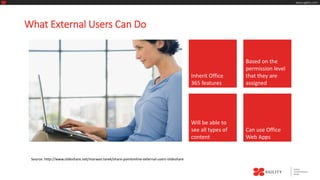
What External Users Can Do 
Inherit Office 
365 features 
Based on the 
permission level 
that they are 
assigned 
Will be able to 
see all types of 
content 
Can use Office 
Web Apps 
Source: http://www.slideshare.net/marwan.tarek/share-pointonline-external-users-slideshare
Achieve 
Transformational 
Results 
Edit 
Own 
Profile 
Aggregate 
Tasks 
XGILITY 
www.xgility.com 
What External Users Can’t Do 
Source: http://www.slideshare.net/marwan.tarek/share-pointonline-external-users-slideshare 
Personal Sites 
(No OneDrive) 
Change 
Own 
Photo 
Company 
News 
Feed 
be a Site Collection 
Administrator Search Everything
Achieve 
Transformational 
Results 
XGILITY 
www.xgility.com 
What External Users Can’t Do 
Source: http://www.slideshare.net/marwan.tarek/share-pointonline-external-users-slideshare 
Access Site 
Mailboxes 
Access PowerBI 
features - 
Power View, 
Power Pivot, 
Quick Explore, 
Use eDiscovery or Timeline Slicer.
Achieve 
Transformational 
Results 
XGILITY 
www.xgility.com 
Video: The Old Way
Achieve 
Transformational 
Results 
XGILITY 
www.xgility.com 
Video: The New Way
Achieve 
Transformational 
Results 
XGILITY 
www.xgility.com 
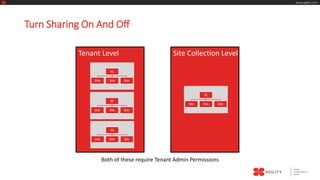
Turn Sharing On And Off 
Tenant Level Site Collection Level 
SC 
Site Site Site 
SC 
Site Site Site 
SC 
Site Site Site 
SC 
Site Site Site 
Both of these require Tenant Admin Permissions
Achieve 
Transformational 
Results 
XGILITY 
www.xgility.com 
Turn Sharing On And Off 
Video Demonstration @ Tenant Level
Achieve 
Transformational 
Results 
XGILITY 
www.xgility.com 
Turn Sharing On And Off
Achieve 
Transformational 
Results 
XGILITY 
www.xgility.com 
Turn Sharing On And Off 
Video Demonstration @ Site Collection Level
Achieve 
Transformational 
Results 
XGILITY 
www.xgility.com 
Turn Sharing On And Off 
Video Demonstration @ Site Collection Level
Achieve 
Transformational 
Results 
XGILITY 
www.xgility.com 
How to Manage External Users 
Important Issues 
• There is no global way to see a list of all the sites to which an external user 
has access. You need to go to the individual sites to determine whether a 
specific user has access to it. 
• There is also no global way to see a list of all documents that have been 
shared externally.
Achieve 
Transformational 
Results 
XGILITY 
www.xgility.com 
How to Manage External Users 
Tenant Admin Video Demonstration 
Identify External Users and Delete
Achieve 
Transformational 
Results 
XGILITY 
www.xgility.com 
How to Manage External Users
Achieve 
Transformational 
Results 
XGILITY 
www.xgility.com 
How to Manage External Users 
Site Owner Video Demonstration 
View | Withdraw |Resend Invitations
Achieve 
Transformational 
Results 
XGILITY 
www.xgility.com 
How to Manage External Users
Achieve 
Transformational 
Results 
XGILITY 
www.xgility.com 
How to Share Content 
Share a Site Send a Link 
to a Document 
Share a Document
Achieve 
Transformational 
Results 
XGILITY 
www.xgility.com 
How to Share Content 
• Sends user an invitation via email 
• Requires user to authenticate using 
Share a Site Send a Link 
to a Document 
Share a Document 
• Existing O365 account 
• Microsoft Account 
(Hotmail, Live.com, outlook.com, Xbox Live) 
• User is added to a SharePoint Security Group
Achieve 
Transformational 
Results 
XGILITY 
www.xgility.com 
How to Share Content 
• Sends user an invitation via email 
• Requires user to authenticate using 
Share a Document Send a Link 
to a Document 
Share a Document 
• Existing O365 account 
• Microsoft Account 
(Hotmail, Live.com, outlook.com, Xbox Live) 
• User is added to a SharePoint Security Group
• Sends user a link to the document. 
• Can create separate links for edit permissions and read only. 
• User can forward link to others. 
Achieve 
Transformational 
Results 
XGILITY 
www.xgility.com 
How to Share Content 
Send a Link 
to a Document 
Send a Link 
to a Document 
Share a Document
Achieve 
Transformational 
Results 
XGILITY 
www.xgility.com 
How to Share Content 
Send a Link 
to a Document 
Share a Document 
Demonstration 
Share a Site | Share a Doc | Link to a Doc
Achieve 
Transformational 
Results 
XGILITY 
www.xgility.com 
Preparing for External Sharing 
• Evaluate current external sharing practices. 
• Evaluate current business practices that could benefit 
from external sharing. 
• Develop sharing solutions that meet both security 
requirements and collaboration needs on a case-by-case 
basis.
Enable sharing at tenant level and/or site collection level? 
Share entire site or just a document? 
Achieve 
Transformational 
Results 
XGILITY 
www.xgility.com 
Preparing for External Sharing 
Who 
Where 
How 
Which users (owners or members) 
can externally share? 
Allow anonymous access or require authentication?
Achieve 
Transformational 
Results 
XGILITY 
www.xgility.com 
External Sharing Best Practices - Tips 
• Follow the Principle of least privilege 
• Be sure you know the identity of external users before you invite them to 
your site. 
• Create separate permission group(s) for just external users
Achieve 
Transformational 
Results 
XGILITY 
www.xgility.com 
External Sharing Best Practices - Tips 
• Create separate permission group(s) for just external users 
• Create separate site collection for external sharing 
• Create a sub-site of your Team site that has unique permissions, and then 
share only that sub-site with external users. 
• Do not use guest links to share documents that are sensitive
Achieve 
Transformational 
Results 
XGILITY 
www.xgility.com 
External Sharing in Yammer 
Myth: Yammer is only for collaboration within your organization. 
Fact: Yammer has many options to include people outside your organization.
Achieve 
Transformational 
Results 
XGILITY 
www.xgility.com 
Yammer and Office 365
Achieve 
Transformational 
Results 
XGILITY 
www.xgility.com 
Yammer and SharePoint
Achieve 
Transformational 
Results 
XGILITY 
www.xgility.com 
External Sharing in Yammer 
Options for collaborating externally on the Home network 
• Add guests to your Home network if you are comfortable with external users being part of 
your organization's social network. To do so, select Admin->User Management->Invite 
Guests. These users can have email addresses from any domain, but their domain will not be 
added to the list of authorized domains. You can review a list of invited guests at any time on 
the Invite Guests page. Note: only Yammer admins may invite guests to the Home network. 
• External sharing is configurable for administrators. Go to Admin -> Network -> 
Configuration. Unchecking this feature means that the Email a File or Email a Note options 
are disabled for all users. Note: this feature is only available in Yammer Enterprise plans.
Achieve 
Transformational 
Results 
XGILITY 
www.xgility.com 
External Sharing in Yammer 
Collaborating on an External network 
External networks are used to enable collaboration between members of the Home Network 
and external parties outside of the organization (e.g., customers, suppliers, partners). 
Think of this as similar to creating a separate site collection for external sharing in SharePoint. 
External users do not see any activity on the Home network.
Achieve 
Transformational 
Results 
XGILITY 
www.xgility.com 
External Sharing in Yammer 
Options for Collaborating on an External network 
• Decide who can create and join External Networks. In Admin->External Networks, admins 
can choose whether all users or only admins can create External networks. You can also 
require Admin approval for members of your Home Network to join other External networks. 
• View External Networks by selecting Networks->Browse External networks. This option can 
be disabled in Admin->External Networks. 
• Configure your External Network. In each external network, you can decide whether 
members or only admins can invite new users in Admin->Configuration. You can also choose 
to add domains whose users do not require invites to join (for example, your company or a 
partner company).
Achieve 
Transformational 
Results 
XGILITY 
www.xgility.com 
Questions? 
• Dean Virag, dvirag@xgility.com 
• David Snyder, dsnyder@xgility.com

Sharing Nicely with Others - External Sharing in SharePoint Online

  • 1.
    Achieve Transformational Results XGILITY www.xgility.com Sharing Nicely With Others External Sharing in SharePoint Online Request Site Sharing: SMO-ExternalSharing@xgility.com
  • 2.
    Achieve Transformational Results XGILITY www.xgility.com Housekeeping… • Download EventBoard Mobile and remember to fill out session evaluations… • Phasers set to stun, mobile devices set to silent… • You must be present to win at the wrap-up… App.spsdc.org
  • 3.
    Achieve Transformational Results XGILITY www.xgility.com Thanks to our Sponsors!!!
  • 4.
    Achieve Transformational Results XGILITY www.xgility.com Join us at #SharePint sponsored by K2 at World of Beer of Reston in the Towncenter just across the bridge Why? To network with fellow SharePoint professionals What? SharePint!!! When? 6:00 PM Where? World of Beer Reston 1888 Explorer Street Reston, VA 20190 Thanks to? K2!
  • 5.
    Achieve Transformational Results XGILITY www.xgility.com Customer Focus Technology Focus Core Values We Are Hiring Federal Associations GovCon Professional Services Mid-Atlantic SharePoint Office 365 Azure .NET Business Intelligence Passionate Transformational Humility Experts Knowledge Sharing Growth SharePoint Farm Admin Collaboration Specialist
  • 6.
    Achieve Transformational Results XGILITY www.xgility.com Agenda • Speaker bios • What is an external user? • What external users can do • Videos: The “old way” and the “new way” • Turn sharing on and off • Manage external users • How to share content • Preparing for External Sharing • External sharing best practices • External sharing in Yammer
  • 7.
    Achieve Transformational Results XGILITY www.xgility.com Speaker Bios Dean Virag David Snyder
  • 8.
    Achieve Transformational Results XGILITY www.xgility.com What Is An External User? An external user is a person who has been granted access to your SharePoint Online site, but is not a licensed user within your organization. Organization Site Site Site Site Author Vendor Collaboration Partner Source: https://support.office.com/en-us/article/Manage-external-sharing-for-your-SharePoint-Online-environment-c8a462eb-0723-4b0b-8d0a-70feafe4be85
  • 9.
    Achieve Transformational Results XGILITY www.xgility.com What Is An External User? External users are users who are not employees, contractors, or onsite agents for you or your affiliates. Organization Site Site Site Site Author Vendor Collaboration Partner Source: https://support.office.com/en-us/article/Manage-external-sharing-for-your-SharePoint-Online-environment-c8a462eb-0723-4b0b-8d0a-70feafe4be85
  • 10.
    Achieve Transformational Results XGILITY www.xgility.com What External Users Can Do Inherit Office 365 features Based on the permission level that they are assigned Will be able to see all types of content Can use Office Web Apps Source: http://www.slideshare.net/marwan.tarek/share-pointonline-external-users-slideshare
  • 11.
    Achieve Transformational Results Edit Own Profile Aggregate Tasks XGILITY www.xgility.com What External Users Can’t Do Source: http://www.slideshare.net/marwan.tarek/share-pointonline-external-users-slideshare Personal Sites (No OneDrive) Change Own Photo Company News Feed be a Site Collection Administrator Search Everything
  • 12.
    Achieve Transformational Results XGILITY www.xgility.com What External Users Can’t Do Source: http://www.slideshare.net/marwan.tarek/share-pointonline-external-users-slideshare Access Site Mailboxes Access PowerBI features - Power View, Power Pivot, Quick Explore, Use eDiscovery or Timeline Slicer.
  • 13.
    Achieve Transformational Results XGILITY www.xgility.com Video: The Old Way
  • 14.
    Achieve Transformational Results XGILITY www.xgility.com Video: The New Way
  • 15.
    Achieve Transformational Results XGILITY www.xgility.com Turn Sharing On And Off Tenant Level Site Collection Level SC Site Site Site SC Site Site Site SC Site Site Site SC Site Site Site Both of these require Tenant Admin Permissions
  • 16.
    Achieve Transformational Results XGILITY www.xgility.com Turn Sharing On And Off Video Demonstration @ Tenant Level
  • 17.
    Achieve Transformational Results XGILITY www.xgility.com Turn Sharing On And Off
  • 18.
    Achieve Transformational Results XGILITY www.xgility.com Turn Sharing On And Off Video Demonstration @ Site Collection Level
  • 19.
    Achieve Transformational Results XGILITY www.xgility.com Turn Sharing On And Off Video Demonstration @ Site Collection Level
  • 20.
    Achieve Transformational Results XGILITY www.xgility.com How to Manage External Users Important Issues • There is no global way to see a list of all the sites to which an external user has access. You need to go to the individual sites to determine whether a specific user has access to it. • There is also no global way to see a list of all documents that have been shared externally.
  • 21.
    Achieve Transformational Results XGILITY www.xgility.com How to Manage External Users Tenant Admin Video Demonstration Identify External Users and Delete
  • 22.
    Achieve Transformational Results XGILITY www.xgility.com How to Manage External Users
  • 23.
    Achieve Transformational Results XGILITY www.xgility.com How to Manage External Users Site Owner Video Demonstration View | Withdraw |Resend Invitations
  • 24.
    Achieve Transformational Results XGILITY www.xgility.com How to Manage External Users
  • 25.
    Achieve Transformational Results XGILITY www.xgility.com How to Share Content Share a Site Send a Link to a Document Share a Document
  • 26.
    Achieve Transformational Results XGILITY www.xgility.com How to Share Content • Sends user an invitation via email • Requires user to authenticate using Share a Site Send a Link to a Document Share a Document • Existing O365 account • Microsoft Account (Hotmail, Live.com, outlook.com, Xbox Live) • User is added to a SharePoint Security Group
  • 27.
    Achieve Transformational Results XGILITY www.xgility.com How to Share Content • Sends user an invitation via email • Requires user to authenticate using Share a Document Send a Link to a Document Share a Document • Existing O365 account • Microsoft Account (Hotmail, Live.com, outlook.com, Xbox Live) • User is added to a SharePoint Security Group
  • 28.
    • Sends usera link to the document. • Can create separate links for edit permissions and read only. • User can forward link to others. Achieve Transformational Results XGILITY www.xgility.com How to Share Content Send a Link to a Document Send a Link to a Document Share a Document
  • 29.
    Achieve Transformational Results XGILITY www.xgility.com How to Share Content Send a Link to a Document Share a Document Demonstration Share a Site | Share a Doc | Link to a Doc
  • 30.
    Achieve Transformational Results XGILITY www.xgility.com Preparing for External Sharing • Evaluate current external sharing practices. • Evaluate current business practices that could benefit from external sharing. • Develop sharing solutions that meet both security requirements and collaboration needs on a case-by-case basis.
  • 31.
    Enable sharing attenant level and/or site collection level? Share entire site or just a document? Achieve Transformational Results XGILITY www.xgility.com Preparing for External Sharing Who Where How Which users (owners or members) can externally share? Allow anonymous access or require authentication?
  • 32.
    Achieve Transformational Results XGILITY www.xgility.com External Sharing Best Practices - Tips • Follow the Principle of least privilege • Be sure you know the identity of external users before you invite them to your site. • Create separate permission group(s) for just external users
  • 33.
    Achieve Transformational Results XGILITY www.xgility.com External Sharing Best Practices - Tips • Create separate permission group(s) for just external users • Create separate site collection for external sharing • Create a sub-site of your Team site that has unique permissions, and then share only that sub-site with external users. • Do not use guest links to share documents that are sensitive
  • 34.
    Achieve Transformational Results XGILITY www.xgility.com External Sharing in Yammer Myth: Yammer is only for collaboration within your organization. Fact: Yammer has many options to include people outside your organization.
  • 35.
    Achieve Transformational Results XGILITY www.xgility.com Yammer and Office 365
  • 36.
    Achieve Transformational Results XGILITY www.xgility.com Yammer and SharePoint
  • 37.
    Achieve Transformational Results XGILITY www.xgility.com External Sharing in Yammer Options for collaborating externally on the Home network • Add guests to your Home network if you are comfortable with external users being part of your organization's social network. To do so, select Admin->User Management->Invite Guests. These users can have email addresses from any domain, but their domain will not be added to the list of authorized domains. You can review a list of invited guests at any time on the Invite Guests page. Note: only Yammer admins may invite guests to the Home network. • External sharing is configurable for administrators. Go to Admin -> Network -> Configuration. Unchecking this feature means that the Email a File or Email a Note options are disabled for all users. Note: this feature is only available in Yammer Enterprise plans.
  • 38.
    Achieve Transformational Results XGILITY www.xgility.com External Sharing in Yammer Collaborating on an External network External networks are used to enable collaboration between members of the Home Network and external parties outside of the organization (e.g., customers, suppliers, partners). Think of this as similar to creating a separate site collection for external sharing in SharePoint. External users do not see any activity on the Home network.
  • 39.
    Achieve Transformational Results XGILITY www.xgility.com External Sharing in Yammer Options for Collaborating on an External network • Decide who can create and join External Networks. In Admin->External Networks, admins can choose whether all users or only admins can create External networks. You can also require Admin approval for members of your Home Network to join other External networks. • View External Networks by selecting Networks->Browse External networks. This option can be disabled in Admin->External Networks. • Configure your External Network. In each external network, you can decide whether members or only admins can invite new users in Admin->Configuration. You can also choose to add domains whose users do not require invites to join (for example, your company or a partner company).
  • 40.
    Achieve Transformational Results XGILITY www.xgility.com Questions? • Dean Virag, dvirag@xgility.com • David Snyder, dsnyder@xgility.com

Editor's Notes

  • #7 Dean: I moved Yammer to the end (and moved slides as well) - David
  • #9 When you share a site with external users, you send them an invitation that they can use to log in to your site. You can send this invitation to any email address. When the recipient accepts the invitation, they log in using either a Microsoft account or an Office 365 user ID. When you share a site, you can select the type of permissions you want that person to have on the site. David talk about Scenarios at ASCD.
  • #10 Essentially, an external user is anyone accessing the site or its content who is not an Active User in the Office 365 Admin module.
  • #17 You need to be a Tenant Administrator to Turn External Sharing on and off at the Tenant level. I have a recording that demonstrates this process.
  • #19 You need to be a Tenant Administrator to Turn External Sharing on and off at the Site Collection level. I have a recording that demonstrates this process.
  • #20 You need to be a Tenant Administrator to Turn External Sharing on and off at the Site Collection level. I have a recording that demonstrates this process.
  • #26 How you Share content depends on what you are sharing. You can share an entire site or just a single document.
  • #30 Share a Document Note: If you don’t select the Require sign-in check box, the email will contain an anonymous guest link to the document. Anonymous guest links could potentially be forwarded or shared with other people, who might also be able to view or edit the content without signing in.
  • #32 Who alone: if no external sharing is allowed anywhere across the tenant. Where alone: every site collection (or none) How: only authentication (sites/docs) or anon (docs)
  • #35 Discuss how Yammer is increasingly integrated with SharePoint and other Office 365 apps. You can use the Yammer App Part to embed Yammer group feeds into team sites. Some users can already add Yammer comments inside Office Online documents which live in SharePoint sites, and have the comments appear in a Yammer group feed.
  • #36 Why are we talking about Yammer? Yammer is increasingly integrated with Office 365 and therefore Sharepoint. The three steps: Yammer App (discuss groups), Yammer in the Office 365 ribbon. Yammer Office Web Apps Integration.
  • #37 Document conversations "ready" in Yammer. Replacing social features/tags and notes in SP. Comment on document in SP doc library right in Yammer and post in the appropriate group (for your team).
  • #38 The "Home" network is Yammer's way of describing the default network which limits access to users with emails in the company's domain. This is the defining characteristic of Yammer and its differentiator from Facebook et al. However, Yammer has opted to allow admins to invite "guests".
  • #39 David will show demo of external network (DemoANA or new one)