
IBM Spectrum Scale
Spectrum Scale Object Store 4.2
Unified File and Object Access
Sandeep Patil, Bill Owen
IBM Spectrum Scale Architecture
John Langlois
IBM Spectrum Scale Offering Manager
© Copyright IBM Corporation 2015 2
People and devices are creating oceans of data.
Data scientists and LoBs want to fish this ocean for insights.
The ocean of data must be efficiently stored, managed,
protected, and made available to the right people at the right
time.
IBM Confidential
© Copyright IBM Corporation 2015 3
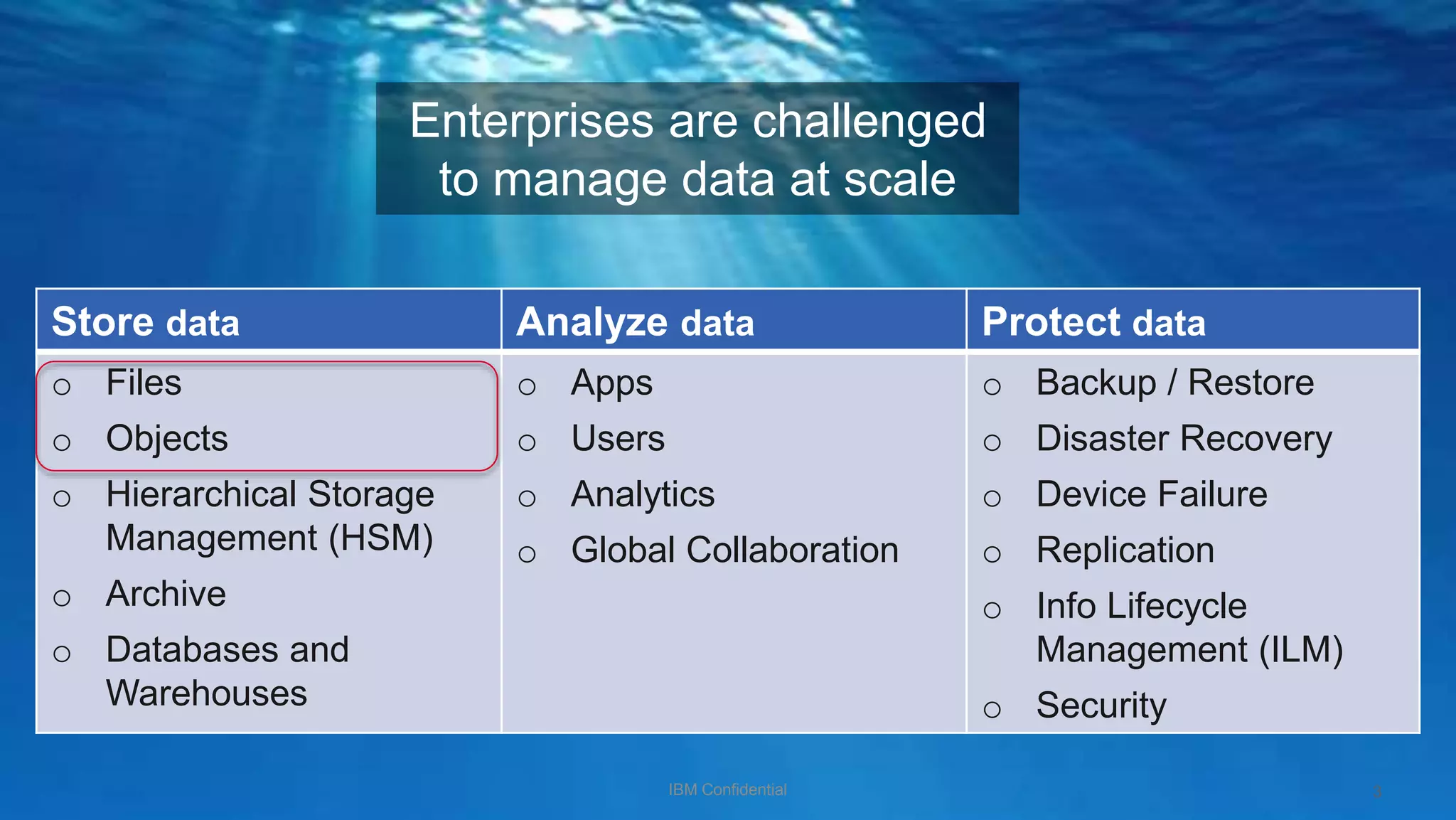
Enterprises are challenged
to manage data at scale
Store data Analyze data Protect data
o Files
o Objects
o Hierarchical Storage
Management (HSM)
o Archive
o Databases and
Warehouses
o Apps
o Users
o Analytics
o Global Collaboration
o Backup / Restore
o Disaster Recovery
o Device Failure
o Replication
o Info Lifecycle
Management (ILM)
o Security
IBM Confidential
© Copyright IBM Corporation 2015
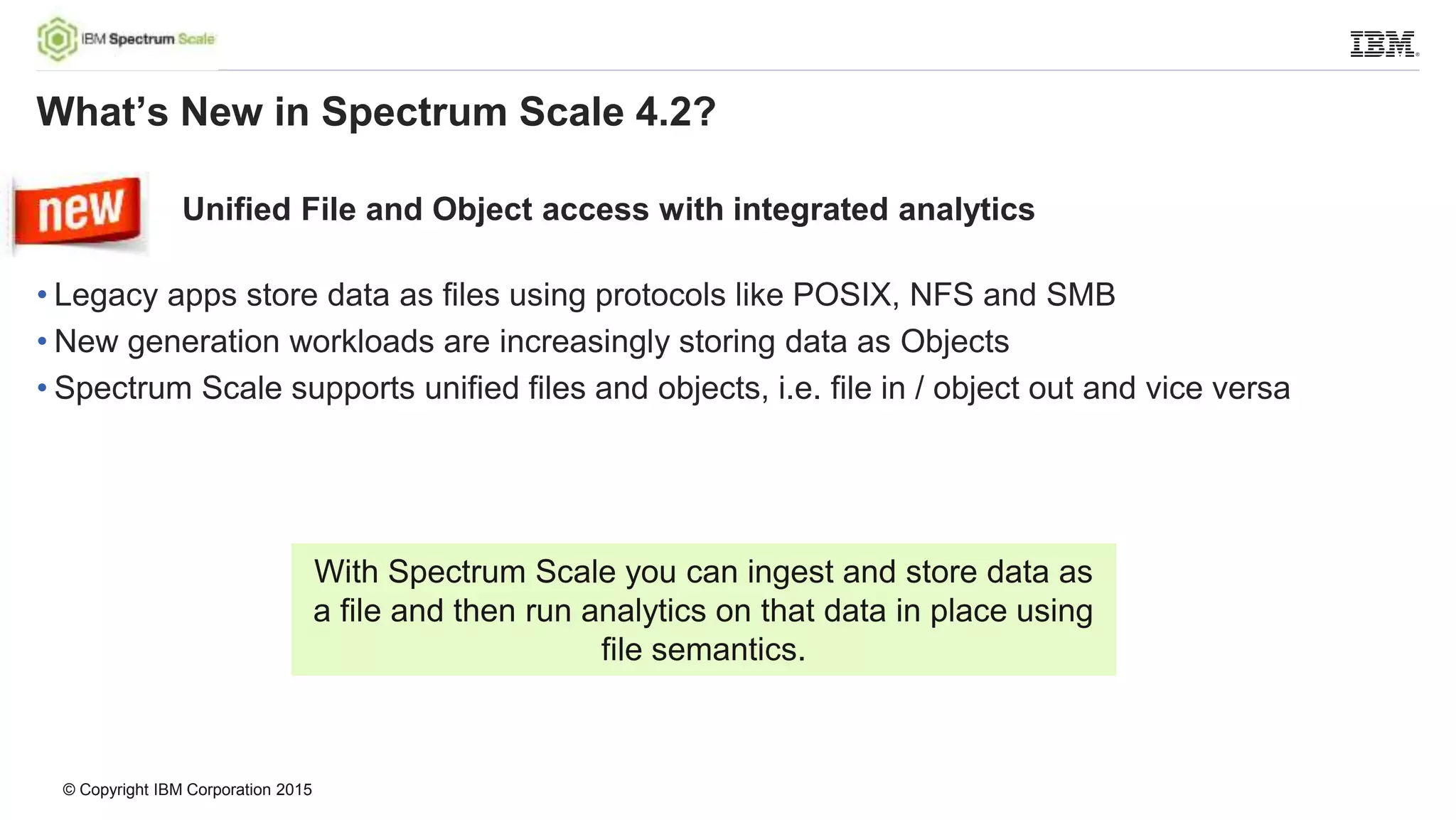
Unified File and Object access with integrated analytics
• Legacy apps store data as files using protocols like POSIX, NFS and SMB
• New generation workloads are increasingly storing data as Objects
• Spectrum Scale supports unified files and objects, i.e. file in / object out and vice versa
What’s New in Spectrum Scale 4.2?
With Spectrum Scale you can ingest and store data as
a file and then run analytics on that data in place using
file semantics.
© Copyright IBM Corporation 2015
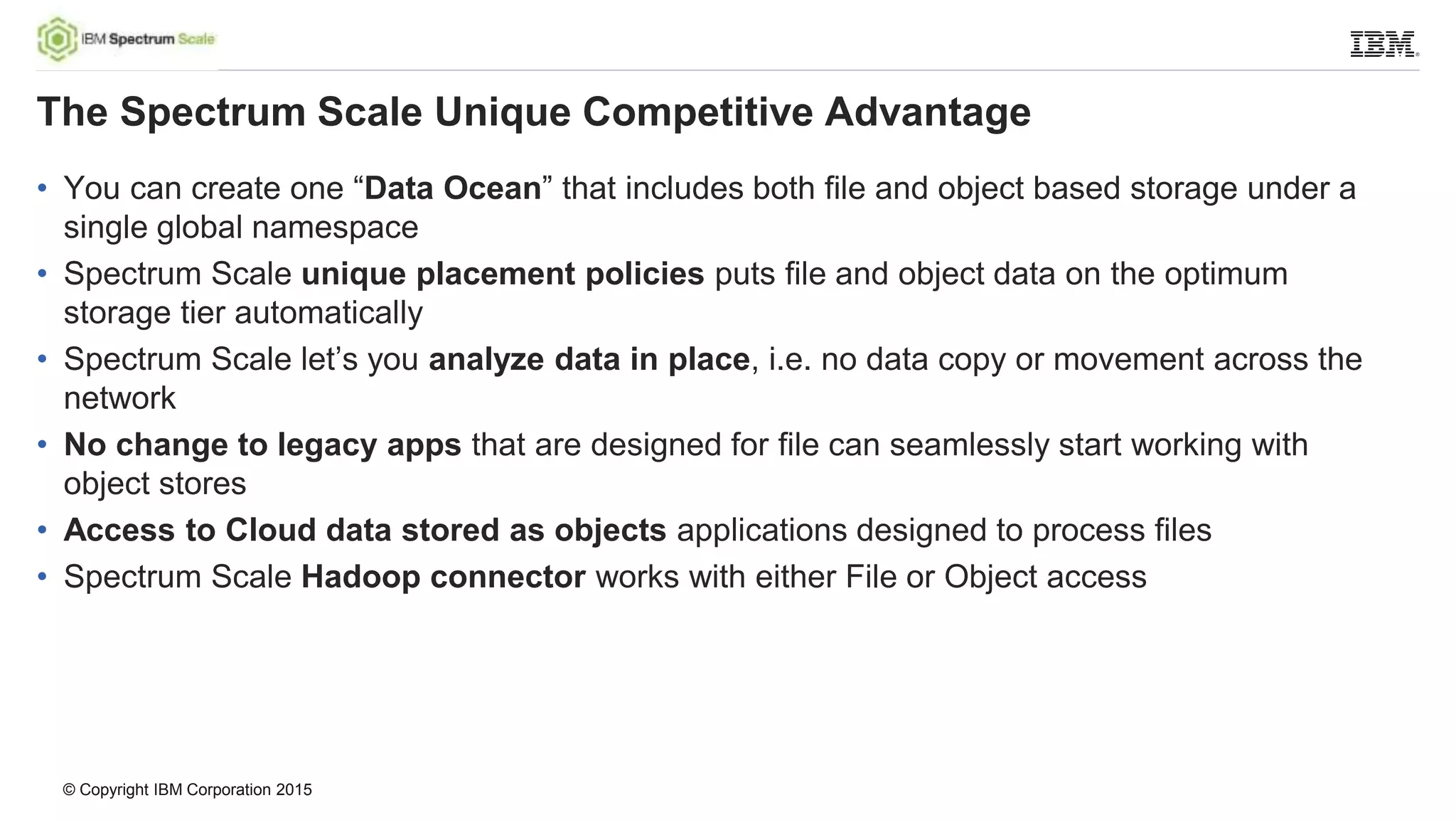
• You can create one “Data Ocean” that includes both file and object based storage under a
single global namespace
• Spectrum Scale unique placement policies puts file and object data on the optimum
storage tier automatically
• Spectrum Scale let’s you analyze data in place, i.e. no data copy or movement across the
network
• No change to legacy apps that are designed for file can seamlessly start working with
object stores
• Access to Cloud data stored as objects applications designed to process files
• Spectrum Scale Hadoop connector works with either File or Object access
The Spectrum Scale Unique Competitive Advantage
© Copyright IBM Corporation 2015
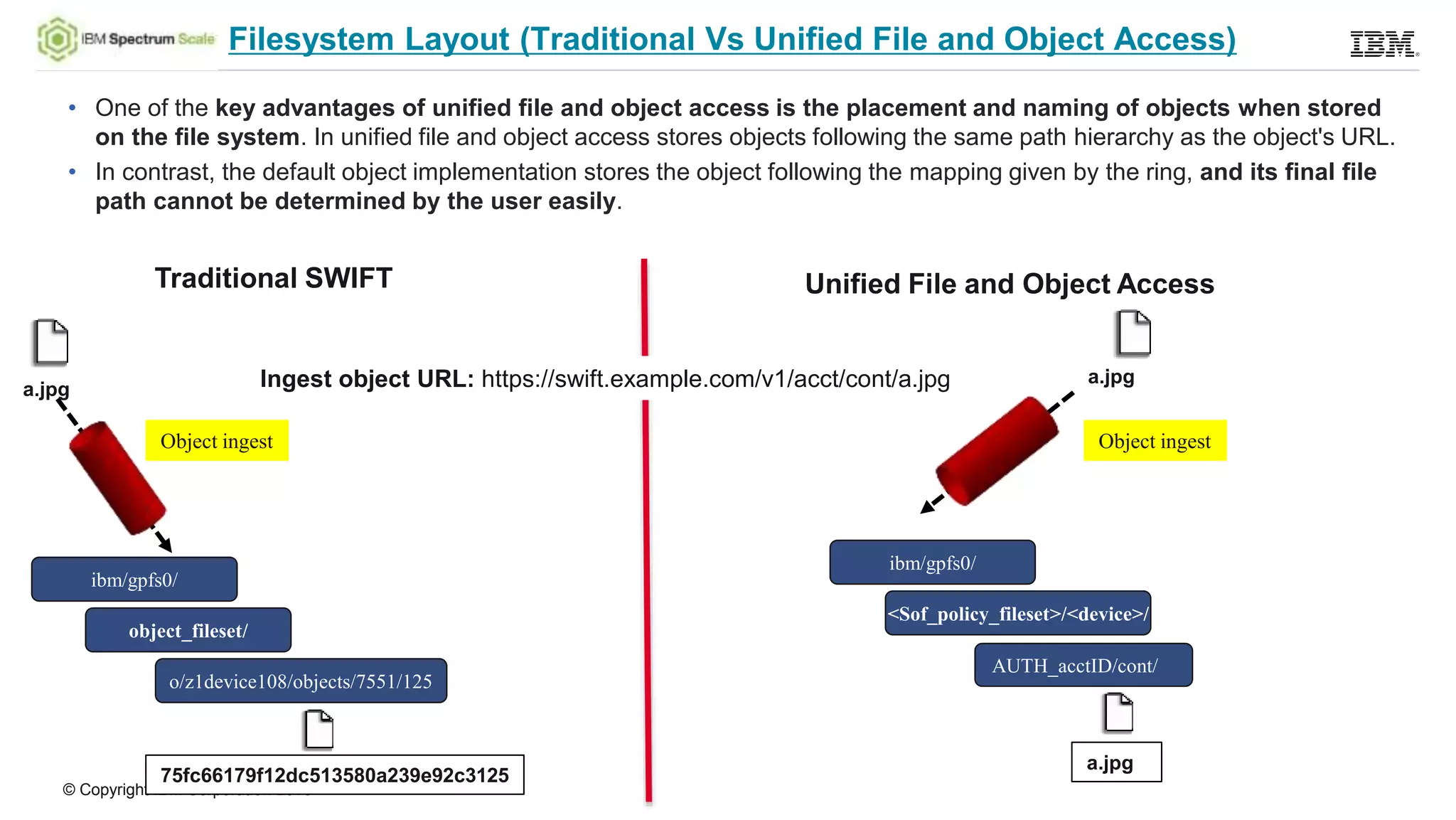
Filesystem Layout (Traditional Vs Unified File and Object Access)
• One of the key advantages of unified file and object access is the placement and naming of objects when stored
on the file system. In unified file and object access stores objects following the same path hierarchy as the object's URL.
• In contrast, the default object implementation stores the object following the mapping given by the ring, and its final file
path cannot be determined by the user easily.
ibm/gpfs0/
Object ingest
object_fileset/
o/z1device108/objects/7551/125
75fc66179f12dc513580a239e92c3125
a.jpg
a.jpg
Object ingest
ibm/gpfs0/
<Sof_policy_fileset>/<device>/
AUTH_acctID/cont/
a.jpg
Traditional SWIFT Unified File and Object Access
Ingest object URL: https://swift.example.com/v1/acct/cont/a.jpg
© Copyright IBM Corporation 2015
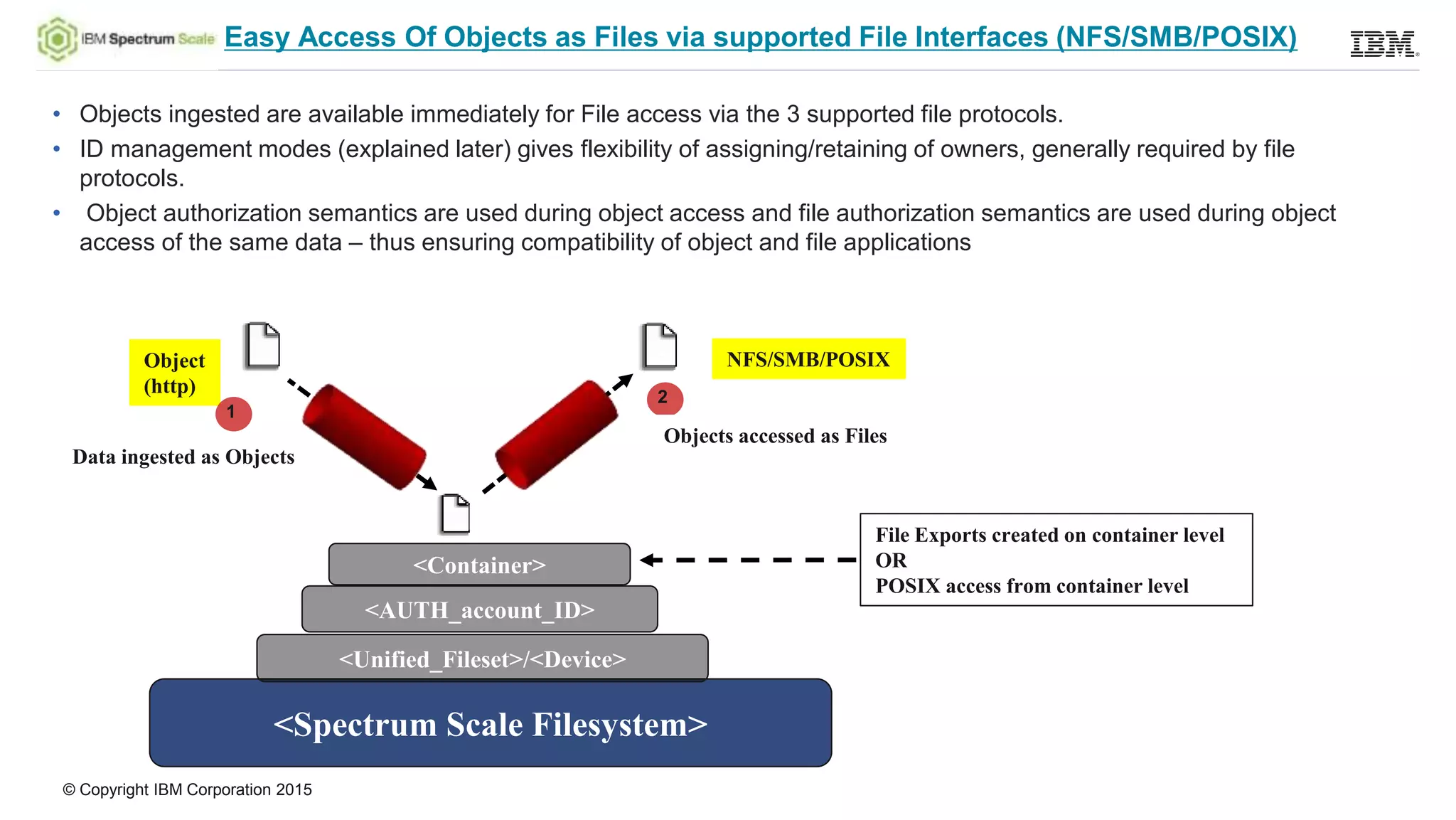
Easy Access Of Objects as Files via supported File Interfaces (NFS/SMB/POSIX)
• Objects ingested are available immediately for File access via the 3 supported file protocols.
• ID management modes (explained later) gives flexibility of assigning/retaining of owners, generally required by file
protocols.
• Object authorization semantics are used during object access and file authorization semantics are used during object
access of the same data – thus ensuring compatibility of object and file applications
<Spectrum Scale Filesystem>
<Unified_Fileset>/<Device>
NFS/SMB/POSIXObject
(http) 2
1
<AUTH_account_ID>
<Container>
File Exports created on container level
OR
POSIX access from container level
Objects accessed as Files
Data ingested as Objects
© Copyright IBM Corporation 2015
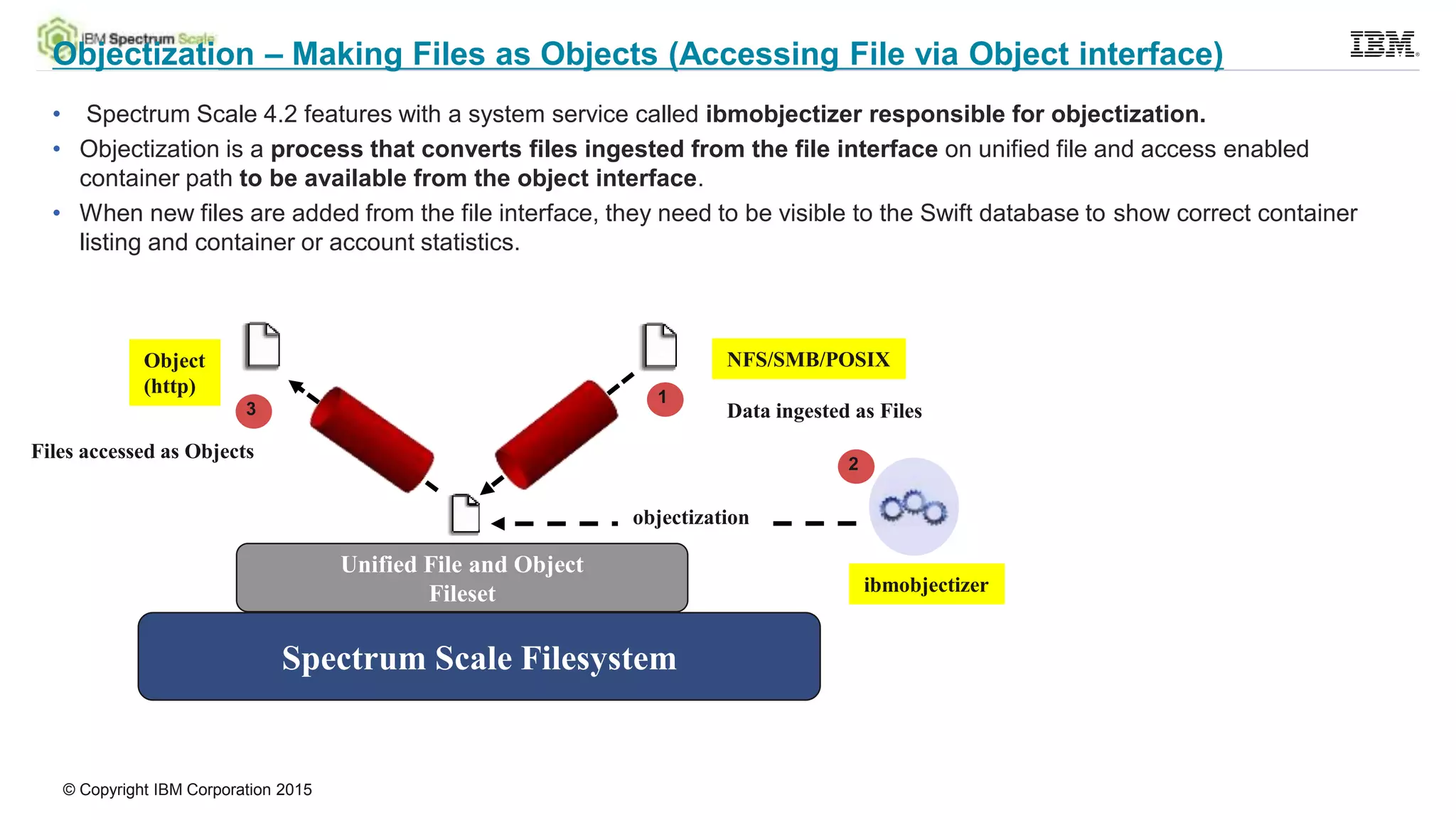
Objectization – Making Files as Objects (Accessing File via Object interface)
• Spectrum Scale 4.2 features with a system service called ibmobjectizer responsible for objectization.
• Objectization is a process that converts files ingested from the file interface on unified file and access enabled
container path to be available from the object interface.
• When new files are added from the file interface, they need to be visible to the Swift database to show correct container
listing and container or account statistics.
Spectrum Scale Filesystem
Unified File and Object
Fileset
NFS/SMB/POSIXObject
(http)
ibmobjectizer
objectization
1
2
3 Data ingested as Files
Files accessed as Objects
© Copyright IBM Corporation 2015
Unified File and Object Access – Policy Integration for Flexibility
This feature is specifically made available as an “object storage policy” as it gives the following
advantages:
• Flexibility for administrator to manage unified file and object access separately
• Allows to coexists with traditional object and other policies
• Create multiple unified file and object access policies which can vary based on underlying
storage
• Since policies are applicable per container , it gives end user the flexibility to create
certain containers with Unified File and Object Access policy and certain without it.
© Copyright IBM Corporation 2015
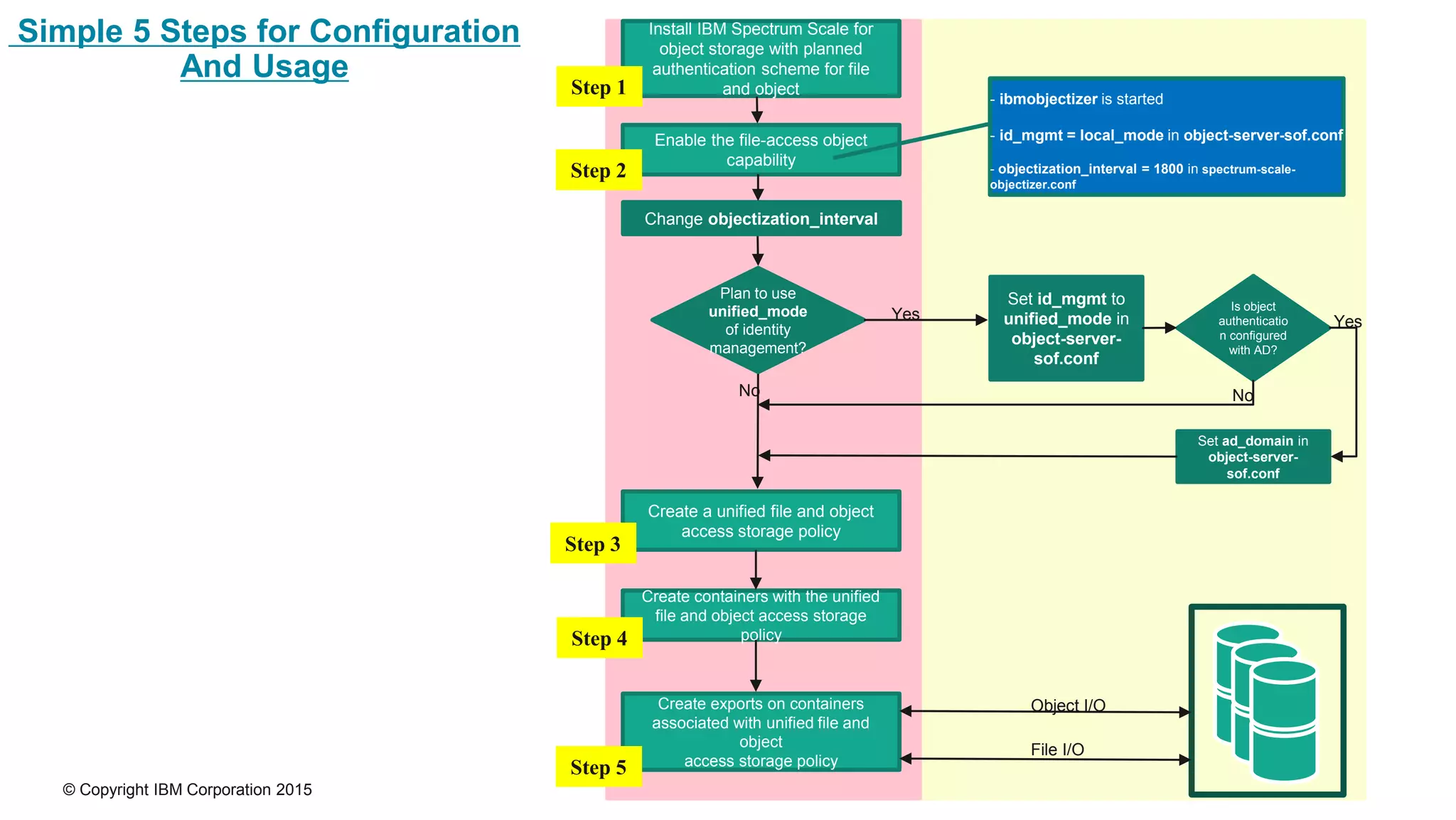
Install IBM Spectrum Scale for
object storage with planned
authentication scheme for file
and object
Create a unified file and object
access storage policy
Create containers with the unified
file and object access storage
policy
Create exports on containers
associated with unified file and
object
access storage policy
Enable the file-access object
capability
- ibmobjectizer is started
- id_mgmt = local_mode in object-server-sof.conf
- objectization_interval = 1800 in spectrum-scale-
objectizer.conf
Plan to use
unified_mode
of identity
management?
Set id_mgmt to
unified_mode in
object-server-
sof.conf
Yes
No
Set ad_domain in
object-server-
sof.conf
Yes
File I/O
Object I/O
Change objectization_interval
Is object
authenticatio
n configured
with AD?
No
Simple 5 Steps for Configuration
And Usage
Step 1
Step 2
Step 3
Step 4
Step 5
© Copyright IBM Corporation 2015
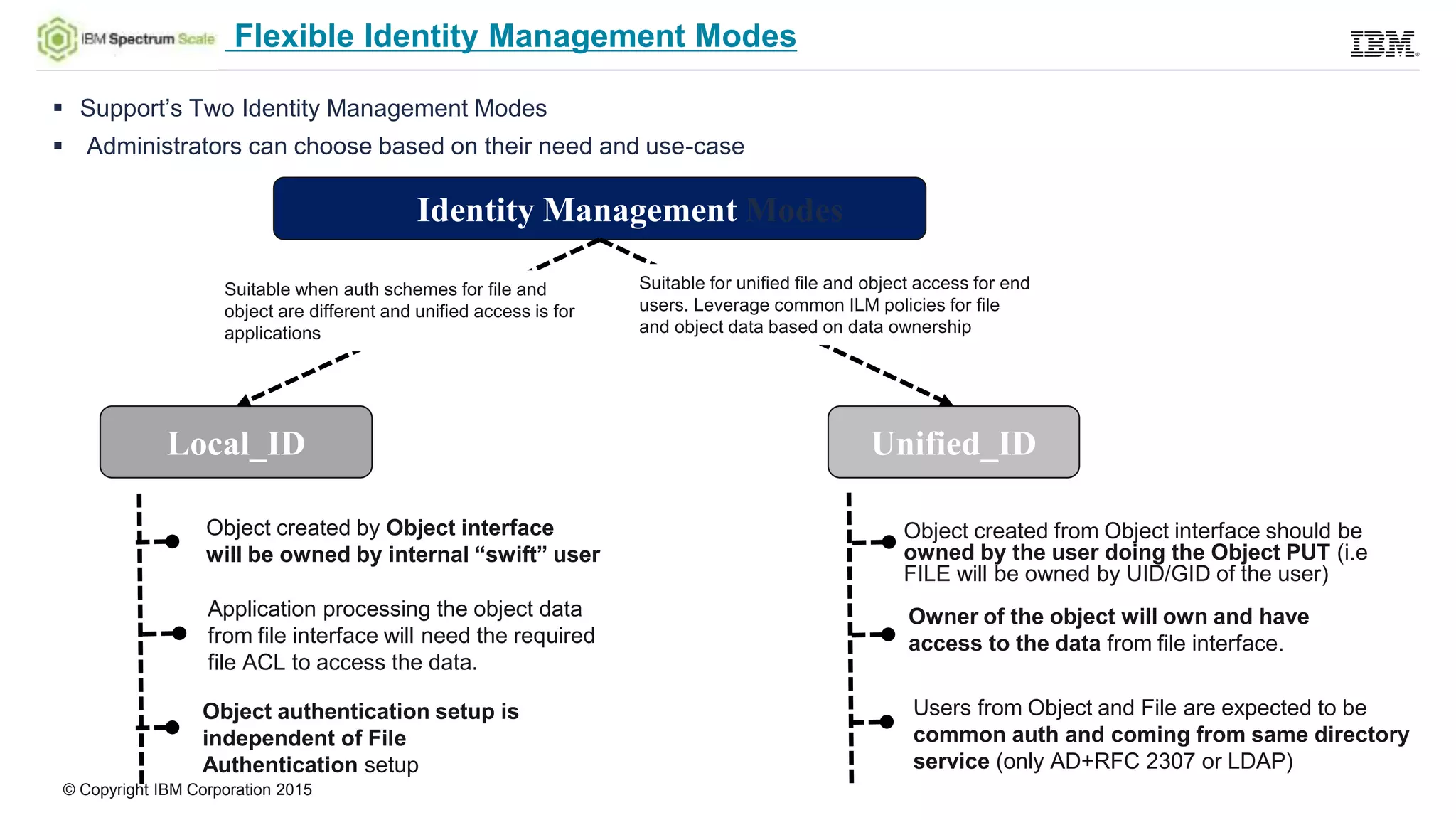
Flexible Identity Management Modes
 Support’s Two Identity Management Modes
 Administrators can choose based on their need and use-case
Local_ID Unified_ID
Identity Management Modes
Object created by Object interface
will be owned by internal “swift” user
Application processing the object data
from file interface will need the required
file ACL to access the data.
Object authentication setup is
independent of File
Authentication setup
Object created from Object interface should be
owned by the user doing the Object PUT (i.e
FILE will be owned by UID/GID of the user)
Users from Object and File are expected to be
common auth and coming from same directory
service (only AD+RFC 2307 or LDAP)
Owner of the object will own and have
access to the data from file interface.
Suitable for unified file and object access for end
users. Leverage common ILM policies for file
and object data based on data ownership
Suitable when auth schemes for file and
object are different and unified access is for
applications
© Copyright IBM Corporation 2015
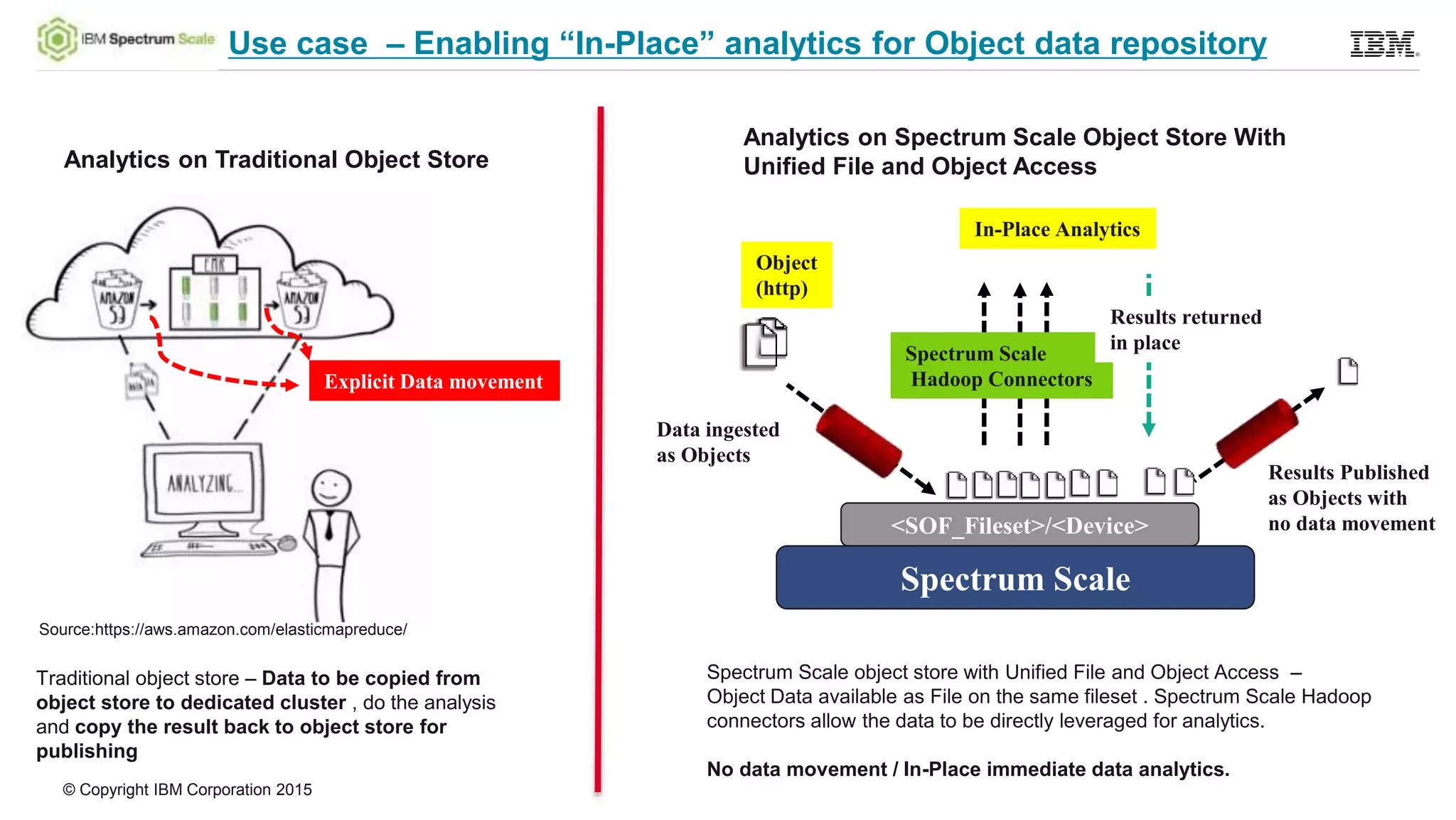
Use case – Enabling “In-Place” analytics for Object data repository
Spectrum Scale
<SOF_Fileset>/<Device>
Object
(http)
Data ingested
as Objects
Spectrum Scale
Hadoop Connectors
In-Place Analytics
Source:https://aws.amazon.com/elasticmapreduce/
Traditional object store – Data to be copied from
object store to dedicated cluster , do the analysis
and copy the result back to object store for
publishing
Spectrum Scale object store with Unified File and Object Access –
Object Data available as File on the same fileset . Spectrum Scale Hadoop
connectors allow the data to be directly leveraged for analytics.
No data movement / In-Place immediate data analytics.
Analytics on Spectrum Scale Object Store With
Unified File and Object AccessAnalytics on Traditional Object Store
Explicit Data movement
Results Published
as Objects with
no data movement
Results returned
in place
Thanks

Spectrum scale-external-unified-file object

  • 1.
    IBM Spectrum Scale SpectrumScale Object Store 4.2 Unified File and Object Access Sandeep Patil, Bill Owen IBM Spectrum Scale Architecture John Langlois IBM Spectrum Scale Offering Manager
  • 2.
    © Copyright IBMCorporation 2015 2 People and devices are creating oceans of data. Data scientists and LoBs want to fish this ocean for insights. The ocean of data must be efficiently stored, managed, protected, and made available to the right people at the right time. IBM Confidential
  • 3.
    © Copyright IBMCorporation 2015 3 Enterprises are challenged to manage data at scale Store data Analyze data Protect data o Files o Objects o Hierarchical Storage Management (HSM) o Archive o Databases and Warehouses o Apps o Users o Analytics o Global Collaboration o Backup / Restore o Disaster Recovery o Device Failure o Replication o Info Lifecycle Management (ILM) o Security IBM Confidential
  • 4.
    © Copyright IBMCorporation 2015 Unified File and Object access with integrated analytics • Legacy apps store data as files using protocols like POSIX, NFS and SMB • New generation workloads are increasingly storing data as Objects • Spectrum Scale supports unified files and objects, i.e. file in / object out and vice versa What’s New in Spectrum Scale 4.2? With Spectrum Scale you can ingest and store data as a file and then run analytics on that data in place using file semantics.
  • 5.
    © Copyright IBMCorporation 2015 • You can create one “Data Ocean” that includes both file and object based storage under a single global namespace • Spectrum Scale unique placement policies puts file and object data on the optimum storage tier automatically • Spectrum Scale let’s you analyze data in place, i.e. no data copy or movement across the network • No change to legacy apps that are designed for file can seamlessly start working with object stores • Access to Cloud data stored as objects applications designed to process files • Spectrum Scale Hadoop connector works with either File or Object access The Spectrum Scale Unique Competitive Advantage
  • 6.
    © Copyright IBMCorporation 2015 Filesystem Layout (Traditional Vs Unified File and Object Access) • One of the key advantages of unified file and object access is the placement and naming of objects when stored on the file system. In unified file and object access stores objects following the same path hierarchy as the object's URL. • In contrast, the default object implementation stores the object following the mapping given by the ring, and its final file path cannot be determined by the user easily. ibm/gpfs0/ Object ingest object_fileset/ o/z1device108/objects/7551/125 75fc66179f12dc513580a239e92c3125 a.jpg a.jpg Object ingest ibm/gpfs0/ <Sof_policy_fileset>/<device>/ AUTH_acctID/cont/ a.jpg Traditional SWIFT Unified File and Object Access Ingest object URL: https://swift.example.com/v1/acct/cont/a.jpg
  • 7.
    © Copyright IBMCorporation 2015 Easy Access Of Objects as Files via supported File Interfaces (NFS/SMB/POSIX) • Objects ingested are available immediately for File access via the 3 supported file protocols. • ID management modes (explained later) gives flexibility of assigning/retaining of owners, generally required by file protocols. • Object authorization semantics are used during object access and file authorization semantics are used during object access of the same data – thus ensuring compatibility of object and file applications <Spectrum Scale Filesystem> <Unified_Fileset>/<Device> NFS/SMB/POSIXObject (http) 2 1 <AUTH_account_ID> <Container> File Exports created on container level OR POSIX access from container level Objects accessed as Files Data ingested as Objects
  • 8.
    © Copyright IBMCorporation 2015 Objectization – Making Files as Objects (Accessing File via Object interface) • Spectrum Scale 4.2 features with a system service called ibmobjectizer responsible for objectization. • Objectization is a process that converts files ingested from the file interface on unified file and access enabled container path to be available from the object interface. • When new files are added from the file interface, they need to be visible to the Swift database to show correct container listing and container or account statistics. Spectrum Scale Filesystem Unified File and Object Fileset NFS/SMB/POSIXObject (http) ibmobjectizer objectization 1 2 3 Data ingested as Files Files accessed as Objects
  • 9.
    © Copyright IBMCorporation 2015 Unified File and Object Access – Policy Integration for Flexibility This feature is specifically made available as an “object storage policy” as it gives the following advantages: • Flexibility for administrator to manage unified file and object access separately • Allows to coexists with traditional object and other policies • Create multiple unified file and object access policies which can vary based on underlying storage • Since policies are applicable per container , it gives end user the flexibility to create certain containers with Unified File and Object Access policy and certain without it.
  • 10.
    © Copyright IBMCorporation 2015 Install IBM Spectrum Scale for object storage with planned authentication scheme for file and object Create a unified file and object access storage policy Create containers with the unified file and object access storage policy Create exports on containers associated with unified file and object access storage policy Enable the file-access object capability - ibmobjectizer is started - id_mgmt = local_mode in object-server-sof.conf - objectization_interval = 1800 in spectrum-scale- objectizer.conf Plan to use unified_mode of identity management? Set id_mgmt to unified_mode in object-server- sof.conf Yes No Set ad_domain in object-server- sof.conf Yes File I/O Object I/O Change objectization_interval Is object authenticatio n configured with AD? No Simple 5 Steps for Configuration And Usage Step 1 Step 2 Step 3 Step 4 Step 5
  • 11.
    © Copyright IBMCorporation 2015 Flexible Identity Management Modes  Support’s Two Identity Management Modes  Administrators can choose based on their need and use-case Local_ID Unified_ID Identity Management Modes Object created by Object interface will be owned by internal “swift” user Application processing the object data from file interface will need the required file ACL to access the data. Object authentication setup is independent of File Authentication setup Object created from Object interface should be owned by the user doing the Object PUT (i.e FILE will be owned by UID/GID of the user) Users from Object and File are expected to be common auth and coming from same directory service (only AD+RFC 2307 or LDAP) Owner of the object will own and have access to the data from file interface. Suitable for unified file and object access for end users. Leverage common ILM policies for file and object data based on data ownership Suitable when auth schemes for file and object are different and unified access is for applications
  • 12.
    © Copyright IBMCorporation 2015 Use case – Enabling “In-Place” analytics for Object data repository Spectrum Scale <SOF_Fileset>/<Device> Object (http) Data ingested as Objects Spectrum Scale Hadoop Connectors In-Place Analytics Source:https://aws.amazon.com/elasticmapreduce/ Traditional object store – Data to be copied from object store to dedicated cluster , do the analysis and copy the result back to object store for publishing Spectrum Scale object store with Unified File and Object Access – Object Data available as File on the same fileset . Spectrum Scale Hadoop connectors allow the data to be directly leveraged for analytics. No data movement / In-Place immediate data analytics. Analytics on Spectrum Scale Object Store With Unified File and Object AccessAnalytics on Traditional Object Store Explicit Data movement Results Published as Objects with no data movement Results returned in place
  • 13.

Editor's Notes

  • #3 + The data must be protected from sharks.
  • #4 Compression and dedup are a solution element not a need http://www-03.ibm.com/systems/storage/spectrum/unleashing-more-value.html