Special Events
Brandon Aaron
  jQuery Core Contributor
Principal Technologist at Nokia


    http://brandonaaron.net/
http://twitter.com/brandonaaron
Why so special?

• Override existing events
• Normalize existing events
• Enhance existing events
• Create new events
• Use just like other events
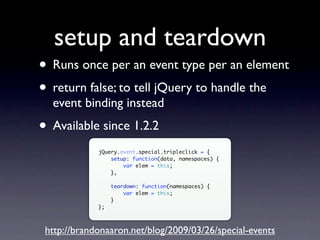
setup and teardown
• Runs once per an event type per an element
• return false; to tell jQuery to handle the
  event binding instead
• Available since 1.2.2
             jQuery.event.special.tripleclick = {
                 setup: function(data, namespaces) {
                     var elem = this;
                 },

                  teardown: function(namespaces) {
                      var elem = this;
                  }
             };


 http://brandonaaron.net/blog/2009/03/26/special-events
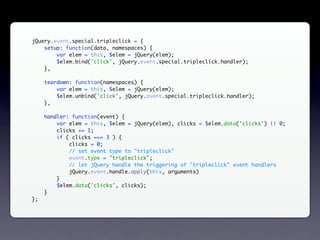
jQuery.event.special.tripleclick = {
    setup: function(data, namespaces) {
        var elem = this, $elem = jQuery(elem);
        $elem.bind('click', jQuery.event.special.tripleclick.handler);
    },

     teardown: function(namespaces) {
         var elem = this, $elem = jQuery(elem);
         $elem.unbind('click', jQuery.event.special.tripleclick.handler);
     },

     handler: function(event) {
         var elem = this, $elem = jQuery(elem), clicks = $elem.data('clicks') || 0;
         clicks += 1;
         if ( clicks === 3 ) {
             clicks = 0;
             // set event type to "tripleclick"
             event.type = "tripleclick";
             // let jQuery handle the triggering of "tripleclick" event handlers
             jQuery.event.handle.apply(this, arguments)
         }
         $elem.data('clicks', clicks);
     }
};
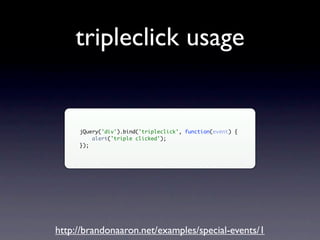
tripleclick usage


     jQuery('div').bind('tripleclick', function(event) {
         alert('triple clicked');
     });


http://brandonaaron.net/examples/special-events/1
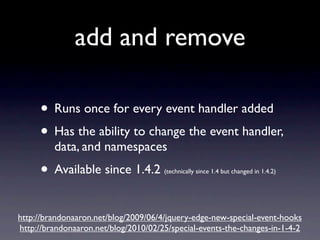
add and remove

     • Runs once for every event handler added
     • Has the ability to change the event handler,
         data, and namespaces
     • Available since 1.4.2          (technically since 1.4 but changed in 1.4.2)


http://brandonaaron.net/blog/2009/06/4/jquery-edge-new-special-event-hooks
http://brandonaaron.net/blog/2010/02/25/special-events-the-changes-in-1-4-2
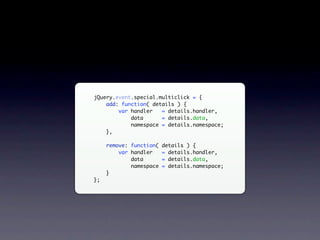
jQuery.event.special.multiclick = {
    add: function( details ) {
        var handler   = details.handler,
            data      = details.data,
            namespace = details.namespace;
    },

     remove: function( details ) {
         var handler   = details.handler,
             data      = details.data,
             namespace = details.namespace;
     }
};
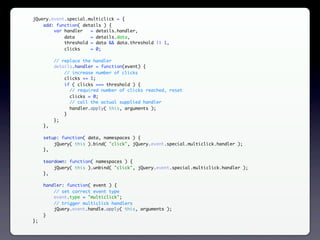
jQuery.event.special.multiclick = {
    add: function( details ) {
        var handler   = details.handler,
            data      = details.data,
            threshold = data && data.threshold || 1,
            clicks    = 0;

          // replace the handler
          details.handler = function(event) {
              // increase number of clicks
              clicks += 1;
              if ( clicks === threshold ) {
                // required number of clicks reached, reset
                clicks = 0;
                // call the actual supplied handler
                handler.apply( this, arguments );
              }
          };
     },

     setup: function( data, namespaces ) {
         jQuery( this ).bind( "click", jQuery.event.special.multiclick.handler );
     },

     teardown: function( namespaces ) {
         jQuery( this ).unbind( "click", jQuery.event.special.multiclick.handler );
     },

     handler: function( event ) {
         // set correct event type
         event.type = "multiclick";
         // trigger multiclick handlers
         jQuery.event.handle.apply( this, arguments );
     }
};
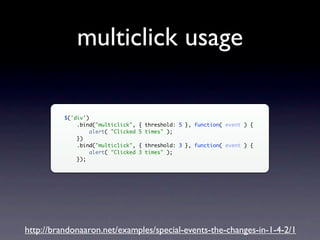
multiclick usage

          $('div')
              .bind("multiclick",    { threshold: 5 }, function( event ) {
                   alert( "Clicked   5 times" );
              })
              .bind("multiclick",    { threshold: 3 }, function( event ) {
                   alert( "Clicked   3 times" );
              });


http://brandonaaron.net/examples/special-events-the-changes-in-1-4-2/1
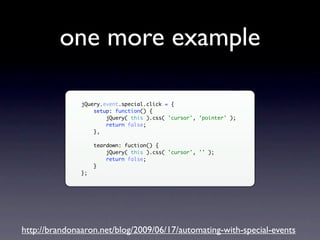
one more example

               jQuery.event.special.click = {
                   setup: function() {
                       jQuery( this ).css( 'cursor', 'pointer' );
                       return false;
                   },

                    teardown: fuction() {
                        jQuery( this ).css( 'cursor', '' );
                        return false;
                    }
               };


http://brandonaaron.net/blog/2009/06/17/automating-with-special-events
links

http://brandonaaron.net/

http://twitter.com/brandonaaron

http://brandonaaron.net/blog/2009/03/26/special-events

http://brandonaaron.net/examples/special-events/1

http://brandonaaron.net/blog/2009/06/4/jquery-edge-new-special-event-hooks

http://brandonaaron.net/blog/2010/02/25/special-events-the-changes-in-1-4-2

http://brandonaaron.net/examples/special-events-the-changes-in-1-4-2/1

Special Events

  • 1.
  • 2.
    Brandon Aaron jQuery Core Contributor Principal Technologist at Nokia http://brandonaaron.net/ http://twitter.com/brandonaaron
  • 3.
    Why so special? •Override existing events • Normalize existing events • Enhance existing events • Create new events • Use just like other events
  • 4.
    setup and teardown •Runs once per an event type per an element • return false; to tell jQuery to handle the event binding instead • Available since 1.2.2 jQuery.event.special.tripleclick = { setup: function(data, namespaces) { var elem = this; }, teardown: function(namespaces) { var elem = this; } }; http://brandonaaron.net/blog/2009/03/26/special-events
  • 5.
    jQuery.event.special.tripleclick = { setup: function(data, namespaces) { var elem = this, $elem = jQuery(elem); $elem.bind('click', jQuery.event.special.tripleclick.handler); }, teardown: function(namespaces) { var elem = this, $elem = jQuery(elem); $elem.unbind('click', jQuery.event.special.tripleclick.handler); }, handler: function(event) { var elem = this, $elem = jQuery(elem), clicks = $elem.data('clicks') || 0; clicks += 1; if ( clicks === 3 ) { clicks = 0; // set event type to "tripleclick" event.type = "tripleclick"; // let jQuery handle the triggering of "tripleclick" event handlers jQuery.event.handle.apply(this, arguments) } $elem.data('clicks', clicks); } };
  • 6.
    tripleclick usage jQuery('div').bind('tripleclick', function(event) { alert('triple clicked'); }); http://brandonaaron.net/examples/special-events/1
  • 7.
    add and remove • Runs once for every event handler added • Has the ability to change the event handler, data, and namespaces • Available since 1.4.2 (technically since 1.4 but changed in 1.4.2) http://brandonaaron.net/blog/2009/06/4/jquery-edge-new-special-event-hooks http://brandonaaron.net/blog/2010/02/25/special-events-the-changes-in-1-4-2
  • 8.
    jQuery.event.special.multiclick = { add: function( details ) { var handler = details.handler, data = details.data, namespace = details.namespace; }, remove: function( details ) { var handler = details.handler, data = details.data, namespace = details.namespace; } };
  • 9.
    jQuery.event.special.multiclick = { add: function( details ) { var handler = details.handler, data = details.data, threshold = data && data.threshold || 1, clicks = 0; // replace the handler details.handler = function(event) { // increase number of clicks clicks += 1; if ( clicks === threshold ) { // required number of clicks reached, reset clicks = 0; // call the actual supplied handler handler.apply( this, arguments ); } }; }, setup: function( data, namespaces ) { jQuery( this ).bind( "click", jQuery.event.special.multiclick.handler ); }, teardown: function( namespaces ) { jQuery( this ).unbind( "click", jQuery.event.special.multiclick.handler ); }, handler: function( event ) { // set correct event type event.type = "multiclick"; // trigger multiclick handlers jQuery.event.handle.apply( this, arguments ); } };
  • 10.
    multiclick usage $('div') .bind("multiclick", { threshold: 5 }, function( event ) { alert( "Clicked 5 times" ); }) .bind("multiclick", { threshold: 3 }, function( event ) { alert( "Clicked 3 times" ); }); http://brandonaaron.net/examples/special-events-the-changes-in-1-4-2/1
  • 11.
    one more example jQuery.event.special.click = { setup: function() { jQuery( this ).css( 'cursor', 'pointer' ); return false; }, teardown: fuction() { jQuery( this ).css( 'cursor', '' ); return false; } }; http://brandonaaron.net/blog/2009/06/17/automating-with-special-events
  • 12.

Editor's Notes

  • #3 Contributing since Aug 2006 Contribute number of plugins like Live Query and bgiframe Maintain a blog to share knowledge Nokia in March as a senior technologist to explore the mobile web Nokia investing significantly in web technologies