









It’s a Solid State World
How Exadata X3 leverages flash memory
Gwen Shapira
Marc Fielding
About Gwen
– Solutions Architect,
Cloudera
– Oracle ACE Director
– Presents, Blogs, Tweets
– @gwenshap

2

© 2013 Pythian
About Marc
• Senior Consultant with Pythian’s
Advanced Technology Group
• 12+ years Oracle production
systems experience starting with
Oracle 7
• Blogger and conference
presenter
pythian.com/news/author/fielding
• Occasionally on twitter: @mfild
3

© 2013 Pythian
Remember your first SSD?
… you’ll never forget it

4

© 2013 Pythian
Sh*t people say about SSDs
Too expensive
Fast for reads
Type of SSD matters
Use SSD in SAN

Don’t use for writes
Use SATA SSD

Used for REDO
Use for random writes

Becomes slower over time

Don’t use for REDO

© 2013 Pythian

Use PCI SSD

Only used in Exadata

Only Sun flash devices are supported
5

Unreliable

Is it same as Flash?
Solid State Disk
=
No moving parts
=
Low-latency random I/O
6

© 2013 Pythian
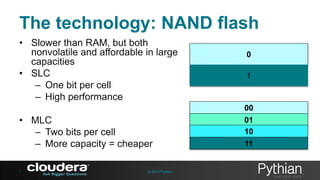
The technology: NAND flash
• Slower than RAM, but both
nonvolatile and affordable in large
capacities
• SLC
– One bit per cell
– High performance

0
1

00

• MLC
– Two bits per cell
– More capacity = cheaper
7

© 2013 Pythian

01
10

11
We will talk about
•
•
•
•
•

8

I/O Performance
Using SSDs for Oracle
How Exadata uses SSDs
SSD devices
Practice: Reading SSD
Vendor Specs

© 2013 Pythian
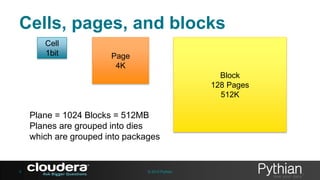
Cells, pages, and blocks
Cell
1bit

Page
4K
Block
128 Pages
512K

Plane = 1024 Blocks = 512MB
Planes are grouped into dies
which are grouped into packages

9

© 2013 Pythian
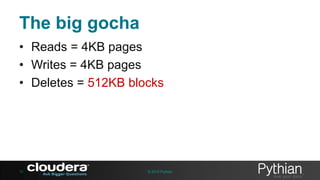
The big gocha
• Reads = 4KB pages
• Writes = 4KB pages
• Deletes = 512KB blocks

10

© 2013 Pythian
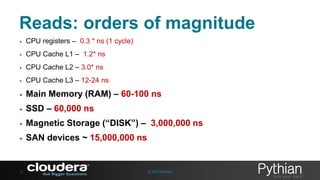
Reads: orders of magnitude
•

CPU registers – 0.3 * ns (1 cycle)

•

CPU Cache L1 – 1.2* ns

•

CPU Cache L2 – 3.0* ns

•

CPU Cache L3 – 12-24 ns

•

Main Memory (RAM) – 60-100 ns

•

SSD – 60,000 ns

•

Magnetic Storage (“DISK”) – 3,000,000 ns

•

SAN devices ~ 15,000,000 ns

12

© 2013 Pythian
Don’t forget throughput
•
•
•
•
•

13

15K RPM SAS HDD – 120-200MB/s
PCIe SSD – 1-2GB/s
But … How many disks do you use?
Network bandwidth?
CPU Bus bandwidth?

© 2013 Pythian
Writes
• Writes on new SSD – 250,000 ns
• Comparable to rotating disk
How much data can you write to a new 250GB
SSD?

14

© 2013 Pythian
Deletes
• Can’t overwrite data without deleting first
• Can only delete blocks of 128*4K pages
• To Overwrite a page:
–
–
–
–

Read 127 pages
Write 127 to a free block
Delete old block
Perform the write we originally requested

• Takes 2ms
• Each cell can only be written 100K times

15

© 2013 Pythian
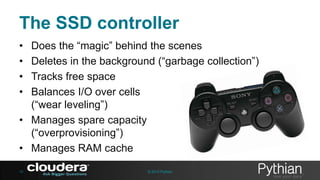
The SSD controller
•
•
•
•

Does the “magic” behind the scenes
Deletes in the background (“garbage collection”)
Tracks free space
Balances I/O over cells
(“wear leveling”)
• Manages spare capacity
(“overprovisioning”)
• Manages RAM cache
16

© 2013 Pythian
The consequences
• Write Amplification
–
–
–
–

How much data is really written when we write 1MB
1 means no overhead
The closer to 1 the better
Less than 1 means the vendor is lying

• Never benchmark a brand-new SSD
– Run benchmarks long enough to run out of
overprovisioned space
17

© 2013 Pythian
We will talk about
•
•
•
•
•

18

I/O Performance
Using SSDs for Oracle
How Exadata uses SSDs
SSD devices
Practice: Reading SSD
Vendor Specs

© 2013 Pythian
22

© 2013 Pythian
Solid-state your whole database?
• SSDs solve I/O latency problems
• But not if db file sequential read is not in your
top 5 wait events
• And not if you haven’t maxed out your RAM for buffer
cache (yet)
• If your CPU utilization is high, solve this first.

23

© 2013 Pythian
SSD mistakes
• SSD in primary but not DR site
– I/O capacity to apply real-time updates
– What if you need a switchover

• Over-managing active segments
– If DBAs didn’t have enough to do already…

• Database smart flash cache

25

© 2013 Pythian
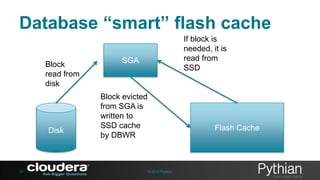
Database “smart” flash cache
Block
read from
disk

Disk

26

If block is
needed, it is
read from
SSD

SGA

Block evicted
from SGA is
written to
SSD cache
by DBWR

Flash Cache

© 2013 Pythian
Database “smart” flash cache
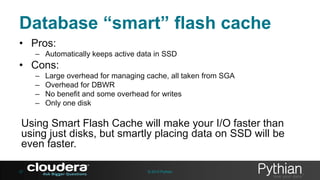
• Pros:
– Automatically keeps active data in SSD

• Cons:
–
–
–
–

Large overhead for managing cache, all taken from SGA
Overhead for DBWR
No benefit and some overhead for writes
Only one disk

Using Smart Flash Cache will make your I/O faster than
using just disks, but smartly placing data on SSD will be
even faster.
27

© 2013 Pythian
We will talk about
•
•
•
•
•

28

I/O Performance
Using SSDs for Oracle
How Exadata uses SSDs
SSD devices
Practice: Reading SSD
Vendor Specs

© 2013 Pythian
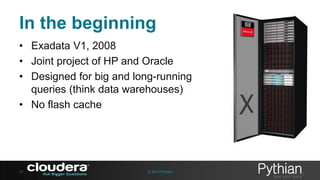
In the beginning
• Exadata V1, 2008
• Joint project of HP and Oracle
• Designed for big and long-running
queries (think data warehouses)
• No flash cache

29

© 2013 Pythian
And then
•
•
•
•

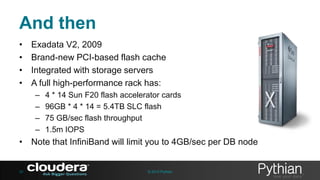
Exadata V2, 2009
Brand-new PCI-based flash cache
Integrated with storage servers
A full high-performance rack has:
–
–
–
–

4 * 14 Sun F20 flash accelerator cards
96GB * 4 * 14 = 5.4TB SLC flash
75 GB/sec flash throughput
1.5m IOPS

• Note that InfiniBand will limit you to 4GB/sec per DB node

30

© 2013 Pythian
Fast-forward to 2012
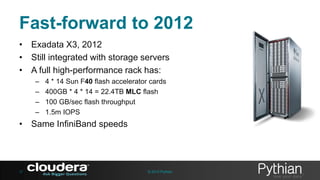
• Exadata X3, 2012
• Still integrated with storage servers
• A full high-performance rack has:
–
–
–
–

4 * 14 Sun F40 flash accelerator cards
400GB * 4 * 14 = 22.4TB MLC flash
100 GB/sec flash throughput
1.5m IOPS

• Same InfiniBand speeds

31

© 2013 Pythian
Just announced
• Flash cache compression
– Fit more data into your flash
– Exadata hardware support TBD
– Only if the data isn’t already compressed (HCC)

32

© 2013 Pythian
Exadata smart flash cache
•
•
•
•

33

Not the database smart flash cache
No victim caching here
Flash memory on storage servers
Can be used for traditional storage too (but you
lose capacity to redundancy)

© 2013 Pythian
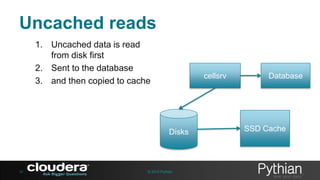
Uncached reads
1. Uncached data is read
from disk first
2. Sent to the database
3. and then copied to cache

cellsrv

Disks

34

© 2013 Pythian

Database

SSD Cache
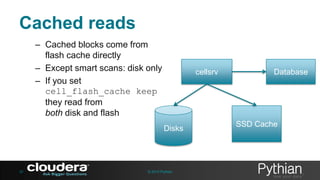
Cached reads
– Cached blocks come from
flash cache directly
– Except smart scans: disk only
– If you set
cell_flash_cache keep
they read from
both disk and flash

cellsrv

Disks

35

© 2013 Pythian

Database

SSD Cache
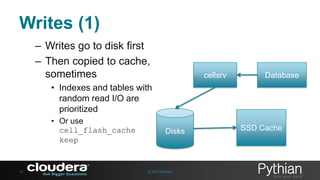
Writes (1)
– Writes go to disk first
– Then copied to cache,
sometimes

cellsrv

Database

• Indexes and tables with
random read I/O are
prioritized
• Or use
cell_flash_cache
keep

36

Disks

© 2013 Pythian

SSD Cache
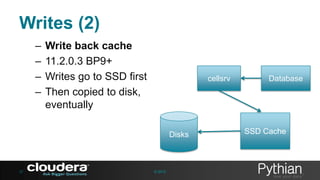
Writes (2)
–
–
–
–

Write back cache
11.2.0.3 BP9+
Writes go to SSD first
Then copied to disk,
eventually

cellsrv

Disks

37

© 2013

Database

SSD Cache
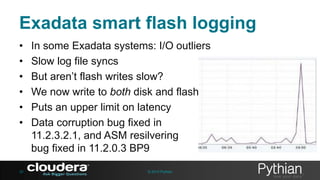
Exadata smart flash logging
•
•
•
•
•
•

38

In some Exadata systems: I/O outliers
Slow log file syncs
But aren’t flash writes slow?
We now write to both disk and flash
Puts an upper limit on latency
Data corruption bug fixed in
11.2.3.2.1, and ASM resilvering
bug fixed in 11.2.0.3 BP9
© 2013 Pythian
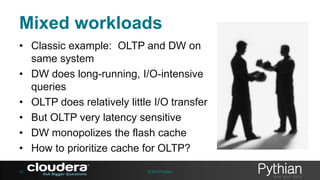
Mixed workloads
• Classic example: OLTP and DW on
same system
• DW does long-running, I/O-intensive
queries
• OLTP does relatively little I/O transfer
• But OLTP very latency sensitive
• DW monopolizes the flash cache
• How to prioritize cache for OLTP?
39

© 2013 Pythian
The workaround
• Control via I/O resource manager
alter iormplan dbplan=((name=dss, level=1, flashcache=off),
(name=other, level=1, flashCache=on));

•
•
•
•
•
40

Disables flash cache entirely for a DB
Very coarse control: on or off
Obvious effect in I/O performance
Use only if you need it
cellcli list flashcachecontent can show what
is in the cache
© 2013 Pythian
We will talk about
•
•
•
•
•

41

I/O Performance
Using SSDs for Oracle
How Exadata uses SSDs
SSD devices
Practice: Reading SSD
Vendor Specs

© 2013 Pythian
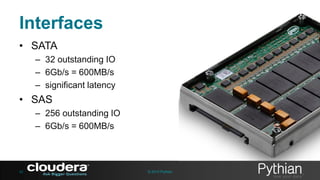
Interfaces
• SATA
– 32 outstanding IO
– 6Gb/s = 600MB/s
– significant latency

• SAS
– 256 outstanding IO
– 6Gb/s = 600MB/s

42

© 2013 Pythian
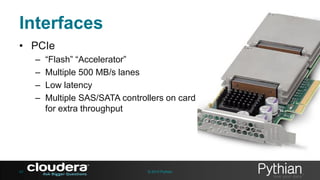
Interfaces
• PCIe
–
–
–
–

43

“Flash” “Accelerator”
Multiple 500 MB/s lanes
Low latency
Multiple SAS/SATA controllers on card
for extra throughput

© 2013 Pythian
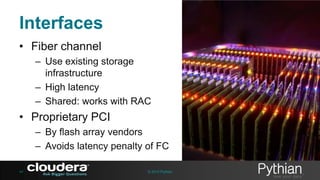
Interfaces
• Fiber channel
– Use existing storage
infrastructure
– High latency
– Shared: works with RAC

• Proprietary PCI
– By flash array vendors
– Avoids latency penalty of FC
44

© 2013 Pythian
We will talk about
•
•
•
•
•

45

I/O Performance
Using SSDs for Oracle
How Exadata uses SSDs
SSD devices
Practice: Reading SSD
Vendor Specs

© 2013 Pythian
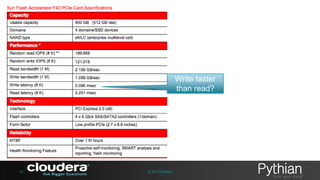
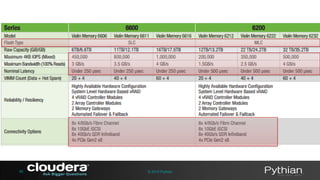
Write faster
than read?

46

© 2013 Pythian
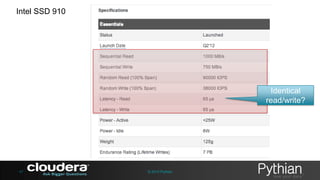
Intel SSD 910

Identical
read/write?

47

© 2013 Pythian
48

© 2013 Pythian
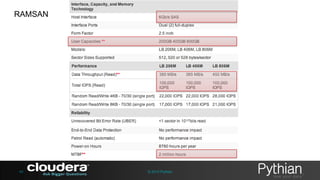
RAMSAN

49

© 2013 Pythian
50

© 2013 Pythian
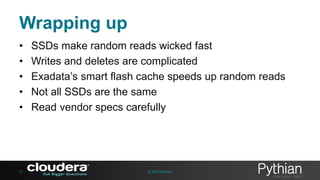
Wrapping up
•
•
•
•
•

51

SSDs make random reads wicked fast
Writes and deletes are complicated
Exadata’s smart flash cache speeds up random reads
Not all SSDs are the same
Read vendor specs carefully

© 2013 Pythian
Thank you and Q&A
gshapira@cloudera.com
@gwenshap
fielding@pythian.com
@mfild

52

© 2013 Pythian

OOW13: It's a solid state-world

  • 1.
    It’s a SolidState World How Exadata X3 leverages flash memory Gwen Shapira Marc Fielding
  • 2.
    About Gwen – SolutionsArchitect, Cloudera – Oracle ACE Director – Presents, Blogs, Tweets – @gwenshap 2 © 2013 Pythian
  • 3.
    About Marc • SeniorConsultant with Pythian’s Advanced Technology Group • 12+ years Oracle production systems experience starting with Oracle 7 • Blogger and conference presenter pythian.com/news/author/fielding • Occasionally on twitter: @mfild 3 © 2013 Pythian
  • 4.
    Remember your firstSSD? … you’ll never forget it 4 © 2013 Pythian
  • 5.
    Sh*t people sayabout SSDs Too expensive Fast for reads Type of SSD matters Use SSD in SAN Don’t use for writes Use SATA SSD Used for REDO Use for random writes Becomes slower over time Don’t use for REDO © 2013 Pythian Use PCI SSD Only used in Exadata Only Sun flash devices are supported 5 Unreliable Is it same as Flash?
  • 6.
    Solid State Disk = Nomoving parts = Low-latency random I/O 6 © 2013 Pythian
  • 7.
    The technology: NANDflash • Slower than RAM, but both nonvolatile and affordable in large capacities • SLC – One bit per cell – High performance 0 1 00 • MLC – Two bits per cell – More capacity = cheaper 7 © 2013 Pythian 01 10 11
  • 8.
    We will talkabout • • • • • 8 I/O Performance Using SSDs for Oracle How Exadata uses SSDs SSD devices Practice: Reading SSD Vendor Specs © 2013 Pythian
  • 9.
    Cells, pages, andblocks Cell 1bit Page 4K Block 128 Pages 512K Plane = 1024 Blocks = 512MB Planes are grouped into dies which are grouped into packages 9 © 2013 Pythian
  • 10.
    The big gocha •Reads = 4KB pages • Writes = 4KB pages • Deletes = 512KB blocks 10 © 2013 Pythian
  • 11.
    Reads: orders ofmagnitude • CPU registers – 0.3 * ns (1 cycle) • CPU Cache L1 – 1.2* ns • CPU Cache L2 – 3.0* ns • CPU Cache L3 – 12-24 ns • Main Memory (RAM) – 60-100 ns • SSD – 60,000 ns • Magnetic Storage (“DISK”) – 3,000,000 ns • SAN devices ~ 15,000,000 ns 12 © 2013 Pythian
  • 12.
    Don’t forget throughput • • • • • 13 15KRPM SAS HDD – 120-200MB/s PCIe SSD – 1-2GB/s But … How many disks do you use? Network bandwidth? CPU Bus bandwidth? © 2013 Pythian
  • 13.
    Writes • Writes onnew SSD – 250,000 ns • Comparable to rotating disk How much data can you write to a new 250GB SSD? 14 © 2013 Pythian
  • 14.
    Deletes • Can’t overwritedata without deleting first • Can only delete blocks of 128*4K pages • To Overwrite a page: – – – – Read 127 pages Write 127 to a free block Delete old block Perform the write we originally requested • Takes 2ms • Each cell can only be written 100K times 15 © 2013 Pythian
  • 15.
    The SSD controller • • • • Doesthe “magic” behind the scenes Deletes in the background (“garbage collection”) Tracks free space Balances I/O over cells (“wear leveling”) • Manages spare capacity (“overprovisioning”) • Manages RAM cache 16 © 2013 Pythian
  • 16.
    The consequences • WriteAmplification – – – – How much data is really written when we write 1MB 1 means no overhead The closer to 1 the better Less than 1 means the vendor is lying • Never benchmark a brand-new SSD – Run benchmarks long enough to run out of overprovisioned space 17 © 2013 Pythian
  • 17.
    We will talkabout • • • • • 18 I/O Performance Using SSDs for Oracle How Exadata uses SSDs SSD devices Practice: Reading SSD Vendor Specs © 2013 Pythian
  • 18.
  • 19.
    Solid-state your wholedatabase? • SSDs solve I/O latency problems • But not if db file sequential read is not in your top 5 wait events • And not if you haven’t maxed out your RAM for buffer cache (yet) • If your CPU utilization is high, solve this first. 23 © 2013 Pythian
  • 20.
    SSD mistakes • SSDin primary but not DR site – I/O capacity to apply real-time updates – What if you need a switchover • Over-managing active segments – If DBAs didn’t have enough to do already… • Database smart flash cache 25 © 2013 Pythian
  • 21.
    Database “smart” flashcache Block read from disk Disk 26 If block is needed, it is read from SSD SGA Block evicted from SGA is written to SSD cache by DBWR Flash Cache © 2013 Pythian
  • 22.
    Database “smart” flashcache • Pros: – Automatically keeps active data in SSD • Cons: – – – – Large overhead for managing cache, all taken from SGA Overhead for DBWR No benefit and some overhead for writes Only one disk Using Smart Flash Cache will make your I/O faster than using just disks, but smartly placing data on SSD will be even faster. 27 © 2013 Pythian
  • 23.
    We will talkabout • • • • • 28 I/O Performance Using SSDs for Oracle How Exadata uses SSDs SSD devices Practice: Reading SSD Vendor Specs © 2013 Pythian
  • 24.
    In the beginning •Exadata V1, 2008 • Joint project of HP and Oracle • Designed for big and long-running queries (think data warehouses) • No flash cache 29 © 2013 Pythian
  • 25.
    And then • • • • Exadata V2,2009 Brand-new PCI-based flash cache Integrated with storage servers A full high-performance rack has: – – – – 4 * 14 Sun F20 flash accelerator cards 96GB * 4 * 14 = 5.4TB SLC flash 75 GB/sec flash throughput 1.5m IOPS • Note that InfiniBand will limit you to 4GB/sec per DB node 30 © 2013 Pythian
  • 26.
    Fast-forward to 2012 •Exadata X3, 2012 • Still integrated with storage servers • A full high-performance rack has: – – – – 4 * 14 Sun F40 flash accelerator cards 400GB * 4 * 14 = 22.4TB MLC flash 100 GB/sec flash throughput 1.5m IOPS • Same InfiniBand speeds 31 © 2013 Pythian
  • 27.
    Just announced • Flashcache compression – Fit more data into your flash – Exadata hardware support TBD – Only if the data isn’t already compressed (HCC) 32 © 2013 Pythian
  • 28.
    Exadata smart flashcache • • • • 33 Not the database smart flash cache No victim caching here Flash memory on storage servers Can be used for traditional storage too (but you lose capacity to redundancy) © 2013 Pythian
  • 29.
    Uncached reads 1. Uncacheddata is read from disk first 2. Sent to the database 3. and then copied to cache cellsrv Disks 34 © 2013 Pythian Database SSD Cache
  • 30.
    Cached reads – Cachedblocks come from flash cache directly – Except smart scans: disk only – If you set cell_flash_cache keep they read from both disk and flash cellsrv Disks 35 © 2013 Pythian Database SSD Cache
  • 31.
    Writes (1) – Writesgo to disk first – Then copied to cache, sometimes cellsrv Database • Indexes and tables with random read I/O are prioritized • Or use cell_flash_cache keep 36 Disks © 2013 Pythian SSD Cache
  • 32.
    Writes (2) – – – – Write backcache 11.2.0.3 BP9+ Writes go to SSD first Then copied to disk, eventually cellsrv Disks 37 © 2013 Database SSD Cache
  • 33.
    Exadata smart flashlogging • • • • • • 38 In some Exadata systems: I/O outliers Slow log file syncs But aren’t flash writes slow? We now write to both disk and flash Puts an upper limit on latency Data corruption bug fixed in 11.2.3.2.1, and ASM resilvering bug fixed in 11.2.0.3 BP9 © 2013 Pythian
  • 34.
    Mixed workloads • Classicexample: OLTP and DW on same system • DW does long-running, I/O-intensive queries • OLTP does relatively little I/O transfer • But OLTP very latency sensitive • DW monopolizes the flash cache • How to prioritize cache for OLTP? 39 © 2013 Pythian
  • 35.
    The workaround • Controlvia I/O resource manager alter iormplan dbplan=((name=dss, level=1, flashcache=off), (name=other, level=1, flashCache=on)); • • • • • 40 Disables flash cache entirely for a DB Very coarse control: on or off Obvious effect in I/O performance Use only if you need it cellcli list flashcachecontent can show what is in the cache © 2013 Pythian
  • 36.
    We will talkabout • • • • • 41 I/O Performance Using SSDs for Oracle How Exadata uses SSDs SSD devices Practice: Reading SSD Vendor Specs © 2013 Pythian
  • 37.
    Interfaces • SATA – 32outstanding IO – 6Gb/s = 600MB/s – significant latency • SAS – 256 outstanding IO – 6Gb/s = 600MB/s 42 © 2013 Pythian
  • 38.
    Interfaces • PCIe – – – – 43 “Flash” “Accelerator” Multiple500 MB/s lanes Low latency Multiple SAS/SATA controllers on card for extra throughput © 2013 Pythian
  • 39.
    Interfaces • Fiber channel –Use existing storage infrastructure – High latency – Shared: works with RAC • Proprietary PCI – By flash array vendors – Avoids latency penalty of FC 44 © 2013 Pythian
  • 40.
    We will talkabout • • • • • 45 I/O Performance Using SSDs for Oracle How Exadata uses SSDs SSD devices Practice: Reading SSD Vendor Specs © 2013 Pythian
  • 41.
  • 42.
  • 43.
  • 44.
  • 45.
  • 46.
    Wrapping up • • • • • 51 SSDs makerandom reads wicked fast Writes and deletes are complicated Exadata’s smart flash cache speeds up random reads Not all SSDs are the same Read vendor specs carefully © 2013 Pythian
  • 47.
    Thank you andQ&A gshapira@cloudera.com @gwenshap fielding@pythian.com @mfild 52 © 2013 Pythian