Software Design
Ahmed Misbah
Agenda (Day 1)
• Introduction to Software Design
o What is Software Design?
o Principles of Software Design
o Software Design Considerations
o Software Design Modeling
o Software Design Checklist
• Object Oriented Concepts and Design
• Evaluating Software Design
Agenda (Day 2)
• Software Design Patterns
• Clean Code
Rules
• Phones silent
• No laptops
• Questions/Discussions at anytime welcome
• 10 minute break every 1 hour
INTRODUCTION TO SOFTWARE
DESIGN
What is Software Design?
“Design is not just what it looks like and feels
like. Design is how it works”
Steve Jobs
Difference between Design and
Architecture
• Architecture is about the what and where
• Design is about the how
Difference between Design and
Architecture
• “There was interesting debate on what is an
architect, the difference between design and
architecture (no one really knows…” Ilan
Kirschenbaum
• “All architecture is design but not all design is
architecture. Architecture represents the
significant design decisions that shape a
system, where significant is measured by cost
of change” Grady Booch
Difference between Design and Coding
• Design is not coding, coding is not design
• Even when detailed procedural designs are
created for program components, the level of
abstraction of the design model is higher than
source code
Principles of Software Design(1/2)
• A set of guidelines that helps us to avoid
having a bad design
• Important characteristics of a bad design that
should be avoided:
o Rigidity
o Fragility
o Immobility
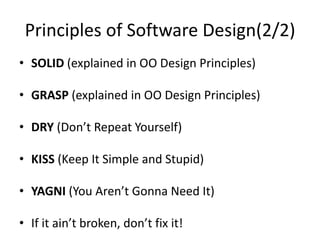
Principles of Software Design(2/2)
• SOLID (explained in OO Design Principles)
• GRASP (explained in OO Design Principles)
• DRY (Don’t Repeat Yourself)
• KISS (Keep It Simple and Stupid)
• YAGNI (You Aren’t Gonna Need It)
• If it ain’t broken, don’t fix it!
Software Design Considerations (1/2)
• Also called Non-Functional Requirements or
Software Quality Attributes
• Also called xabilities or ilities
Software Design Considerations (2/2)
• Compatibility
• Extensibility
• Fault-tolerance
• Maintainability
• Modularity
• Reliability
• Reusability
• Robustness
• Security
• Usability
• Performance
• Portability
• Scalability
• Availability
• Recoverability
• Monitorability
Alarm Clock Example
Analog Digital Led Portable LCD
Compare Ease-of-use, Portability, Readability,
and Sound Level
Software Design Modeling
• Flowcharts
• Unified Modeling Language (UML)
o Structural Diagrams (Class, Deployment,
Component)
o Behavioral Diagrams (e.g. State Machine, Use
case, Sequence)
• Business Process Model and Notation (BPMN)
Software Design Checklist (1/3)
1. Design Goals
o Definitions
o Trade-offs
2. System Decomposition
o Layers/Partitions
o Cohesion/Coupling
3. Concurrency
o Identification of threads
Software Design Checklist (2/3)
4. Hardware/Software Mapping
o Specific Purpose
o Buy or Build Tradeoff
o Connectivity
o Allocation
5. Data Management
o Persistent Objects
o Files
o Databases
o Data structure
Software Design Checklist (3/3)
6. Global Resource Handling
o Access Control
7. Software Control
o Monolithic
o Event-Driven
o Threads
8. Boundary Conditions
o Initialization
o Termination
o Failure
OBJECT ORIENTED CONCEPTS AND
DESIGN
OO Concepts
• Class/Object
• Inheritance
• Encapsulation (Information Hiding)
• Polymorphism
• Abstraction
OO Design Principles - SOLID (1/2)
• Single Responsibility Principle
o A class should have only one reason to change(i.e.
should do only one job)
• Open Close Principle
o Software entities like classes, modules and
functions should be open for extension but closed
for modifications
• Liskov's Substitution Principle
o Derived types must be completely substitutable for
their base types
OO Design Principles - SOLID (2/2)
• Interface Segregation Principle
o Clients should not be forced to depend upon
interfaces that they don't use
• Dependency Inversion Principle
o High-level modules should not depend on low-level
modules. Both should depend on abstractions.
o Abstractions should not depend on details. Details
should depend on abstractions.
OO Design Principles – Cohesion and
Coupling
• Cohesion
o the degree to which the elements of a module belong
together
• Coupling
o is the manner and degree of interdependence
between software modules
• What we want is High Cohesion and Low/Loose
Coupling
OO Design Principles – HAS A and IS A
• has-a is a composition relationship where one
object "belongs to" another object and behaves
according to the rules of ownership
• is-a is a subsumption relationship between
abstractions (e.g. types, classes), where one class
A is a subclass of another class B
• Favor Composition over inheritance
OO Design Principles - GRASP(1/3)
• General Responsibility Assignment Software
Patterns (or Principles)
• Consists of guidelines for assigning responsibility
to classes and objects in object-oriented design
• The different patterns and principles used in
GRASP are: Controller, Creator, Indirection,
Information Expert, High Cohesion, Low
Coupling, Polymorphism, Protected Variations,
and Pure Fabrication
OO Design Principles - GRASP(2/3)
• Controller: A Controller object is a non-user
interface object responsible for receiving or
handling a system event
• Creator: Factory Pattern (GoF)
• High Cohesion
• Indirection: Proxy Pattern (GoF)
• Information Expert: Information Hiding
OO Design Principles - GRASP(3/3)
• Low Coupling
• Polymorphism
• Protected Variations: Open Close Principle
• Pure Fabrication: System (refers to a set of
related software functionalities that can be
reused for different purposes, together with
the policies that should control its usage)
EVALUATING SOFTWARE DESIGN
Before you start evaluating….
Get rid of the ego…..
(i.e. This design is good because I wrote it)
Metrics
• Is it Simple?
– Simple Vs. Familiar
• Is it meeting our Quality Attributes?
• Cost of change?
Techniques
• Peer Reviews
• Frequent Design meetings
• Static Code Analysis
SOFTWARE DESIGN PATTERNS
What is a Design Pattern?
A Design Pattern is the re-usable form of a
solution to a design problem
An Anti-pattern a counterpart term, referring to
a common situation that creates problems
Choosing the right pattern
1. What problem am I trying to solve?
2. Which software design pattern (if any) most
closely solves the same problem, or provides
a logical path towards solving my problem?
3. Do I need the additional abstraction (and
complexity) that the pattern provides, or is it
over-engineering for my particular problem?
4. Can the problem be solved in a simpler, more
efficient way without the pattern?
Catalogs
• Patterns in Enterprise Software
http://martinfowler.com/articles/enterprisePatt
erns.html
• Some examples:
o Gang of Four (GoF)
o Patterns of Enterprise Architecture
o Core J2EE Patterns
o Enterprise Integration Patterns
GoF Patterns
• Creational
• Structural
• Behavioral
Creational – Builder Pattern
Structural - Proxy
Behavioral - Command
Behavioral – Chain-of-Responsibility
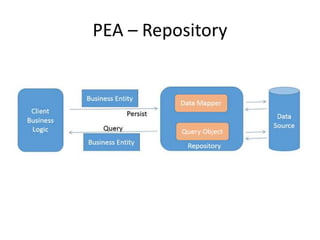
Patterns of Enterprise Architecture
• Domain Logic Patterns
• Data Source Architectural Patterns
• Object-Relational Behavioral Patterns
• Object-Relational Structural Patterns
• Object-Relational Metadata Mapping Patterns
• Web Presentation Patterns
• Distribution Patterns
• Offline Concurrency Patterns
• Session State Patterns
• Base Patterns
PEA – Repository
PEA – Data Transfer Object
• Is an object that carries data between
processes
• Calls between processes may resort to remote
interfaces (i.e. expensive calls)
• One way of reducing the number of calls is to
use an object (the DTO) that aggregates the
data that would have been transferred by the
several calls, but that is served by one call only
PEA – Active Record
PEA – Lazy Load
Exercises!
• https://www.industriallogic.com/xp/refactorin
g/catalog.html
CLEAN CODE
Clean Code
Clean Code
Clean Code
• Clean Code: A Handbook of Agile Software
Craftsmanship
• Collected Java Practices
http://www.javapractices.com/home/HomeActi
on.do
Why do we write bad code?
• Rush + Later = Bad Code
o LeBlanc’s law: “Later Equals Never”
• A working mess is better than nothing
Technical
Debt
Boy Scout Rule
• You may face bad code in:
o Projects written by others
o Projects wrote in a rush
• So there always be a bad code
• The Solution is the Boy Scout Rule:
“Leave the campground cleaner than you found
it ”
Mess = Miss Rules
Mess = Miss Delivery time
Mess = Miss Requirement
Mess = Miss Team Productivity
Golden Rule!
Good code is like a good joke, you don’t need
to explain it.
If you explain a joke, it is no longer funny (i.e.
no longer a joke).
NAMING
Rule #1
• Use Intention-Revealing Names
Meaningful Names
int d; // elapsed time in days Very Bad
int elapsedTimeInDays;
int daysSinceCreation;
int daysSinceModification;
int fileAgeInDays;
Good
Motive:
If a name requires a comment, then the name
does not reveal its intent.
Rule #2
• Avoid Disinformation
Meaningful Names
Variable name Motive
accountList Don’t use this name unless it
is already a List object
XYZControllerForEfficientHandlingOfStrings
XYZControllerForEfficientStorageOfStrings
how long will it take to see
the difference between them
Karakter will never be found when the
programmer searches for
character`
int a = l;
if ( O == l )
a = O1;
else
l = 01;
uppercase ‘O’ or just Zero ?
lower case ‘L’ or just one ?
- liar if you answer it
without changing the code font
Rule #3
• Make Meaningful Distinction
Meaningful Names
public static void copyChars(char a1[]
, char a2[]) {
for (int i = 0; i < a1.length; i++) {
a2[i] = a1[i];
}
}
Bad
public static void copyChars(char[] source
, char[] destination) {
for (int i = 0; i < source.length; i++) {
destination[i] = source[i];
}
}
Good
Motive:
Number-series names are not only disinformative but
they are noninformative at all
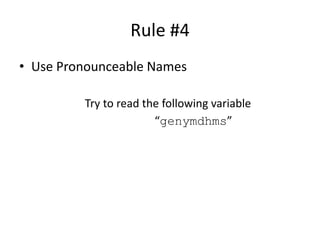
Rule #4
• Use Pronounceable Names
Try to read the following variable
“genymdhms”
Meaningful Names
Rule #5
• Use Searchable Names
– Single-letter names can ONLY be used as local variables inside short
methods.
– The length of a name should correspond to the size of its scope
Meaningful Names
7
e
Very Bad
DAYS_PER_WEEK
week
Good
Motive:
Single-letter names and numeric constants are
not easy to locate across a body of text.
There can be no worse reason for using the name
c than because a and b were already taken.
Rule #6
• Avoid Encodings
– Member Variables
• Prefixing each member variable with ‘m_’
Meaningful Names
Rule #6
• Avoid Encodings
– Interfaces & Implementation
Meaningful Names
Interface IShapeFactory {...}
Class ShapeFactory implements IShapeFactory {...}
Very Bad
Interface ShapeFactory {...}
Class ShapeFactoryImp implements ShapeFactory {...}
Good
Motive:
If I must encode either the interface or the implementation, I
choose the implementation. I don’t want my users knowing that
I’m handing them an interface. I just want them to know that
it’s a ShapeFactory.
Rule #7
• Avoid Mental Mapping
– Like using r instead of url
• So don’t be Smart, but Be Professional
– When to Use Solution Domain Names
• When it is more close to patterns of computer science concepts
– When to Use Problem Domain Names
• When it is more close to business
Meaningful Names
Rule #8
• Don’t Be Cute
– Like using HolyHandGrenade() instead of
DeleteItems() or edenyFelRequest()
instead of dispatchRequest()
• Names based on cultural base or sense of humor will only be
remembered by people who know it
Meaningful Names
Rule #9
• Pick One Word per Concept
– Like using fetch(), retrieve(), and get()
in the same layer
• How on earth should the caller know which method to call ? !!!
Meaningful Names
Rule #10
• Don’t Add Extra-free Context
– In a “Gas Station Deluxe” application, it is a bad
idea to prefix every class with GSD
Meaningful Names
METHODS
Rule #1: Small
• First: methods should be small
• Second: they should be smaller than that
– I’m not kidding
• They should be a Screen-Full
• Or should hardly ever be 20 lines long
• After applying this on the refactored version,
look on the re-refactored one:
Methods
Rule #1: Small
• Again, s-u-r-p-r-i-s-e
Methods
HtmlUtil.java (re-Refactored)
public static String
renderPageWithSetupsAndTeardowns(
PageData pageData, boolean isSuite) throws
Exception {
if (isTestPage(pageData))
includeSetupAndTeardownPages(pageData,
isSuite);
return pageData.getHtml();
}
Rule #2: Do One Thing
• “FUNCTIONS SHOULD DO ONE THING. THEY
SHOULD DO IT WELL. THEY SHOULD DO IT
ONLY.”
• Look at the refactored version, it’s doing 3
things:
– Determining whether the page is a test page.
– If so, including setups and teardowns.
– Rendering the page in HTML.
• Which just violates our rule
Methods
Rule #3:
One Level of Abstraction per Method
• Mixing levels of abstraction within a method is
always confusing
• Readers may not be able to tell whether a
particular expression is an essential concept or
a detail !!!
Methods
Rule #4: Avoid Switch Statements
• First of all it violates the “Do One Thing” rule
• As a work around:
– Bury the switch statement in the basement of an
ABSTRACT FACTORY (GoF pattern)
• Sometimes we can’t get rid of it, but we
should try
Methods
Rule #5: Use Descriptive Names
• As covered in the last section
• Don’t be afraid to make a name long
• Don’t be afraid to spend time choosing a
name
Methods
Rule #6: Minimize Method
Arguments
Methods
• Passing objects is better!
Rule #7: Have No Side Effects
• Try to spot any side effect in the following
Methods
UserValidator.java
public class UserValidator {
private Cryptographer cryptographer;
public boolean checkPassword(String userName, String password) {
User user = UserGateway.findByName(userName);
if (user != User.NULL) {
String codedPhrase = user.getPhraseEncodedByPassword();
String phrase = cryptographer.decrypt(codedPhrase,
password);
if ("Valid Password".equals(phrase)) {
Session.initialize();
return true;
}
}
return false;
}
}
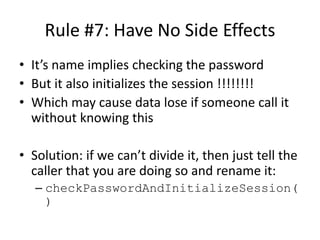
Rule #7: Have No Side Effects
• It’s name implies checking the password
• But it also initializes the session !!!!!!!!
• Which may cause data lose if someone call it
without knowing this
• Solution: if we can’t divide it, then just tell the
caller that you are doing so and rename it:
– checkPasswordAndInitializeSession(
)
Methods
Rule #8: Separate Command from
Query
• Methods should either do something or
answer something
Methods
if (set("username", "unclebob"))... Bad
if (attributeExists("username")) {
setAttribute("username", "unclebob");
...
}
Good
Motive:
Is it asking whether the “username” attribute was previously set to
“unclebob”? Or is it asking whether the “username” attribute was
successfully set to “unclebob”?
Solution:
You can rename it setAndCheckIfExists, but that doesn’t much help the
readability of the if statement.
But the real solution is to separate the command from the query so that
the ambiguity cannot occur.
ERROR HANDLING
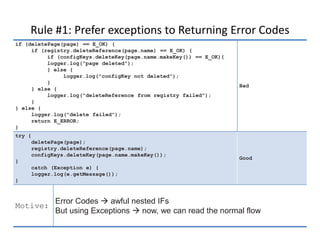
Rule #1: Prefer exceptions to Returning Error Codes
Error Handling
if (deletePage(page) == E_OK) {
if (registry.deleteReference(page.name) == E_OK) {
if (configKeys.deleteKey(page.name.makeKey()) == E_OK){
logger.log("page deleted");
} else {
logger.log("configKey not deleted");
}
} else {
logger.log("deleteReference from registry failed");
}
} else {
logger.log("delete failed");
return E_ERROR;
}
Bad
try {
deletePage(page);
registry.deleteReference(page.name);
configKeys.deleteKey(page.name.makeKey());
}
catch (Exception e) {
logger.log(e.getMessage());
}
Good
Motive:
Error Codes  awful nested IFs
But using Exceptions  now, we can read the normal flow
Rule #2: Extract Try/Catch Blocks
Error Handling
try {
deletePage(page);
registry.deleteReference(page.name);
configKeys.deleteKey(page.name.makeKey());
}
catch (Exception e) {
logger.log(e.getMessage());
}
Not so good
public void delete(Page page) {
try {
deletePageAndAllReferences(page);
}
catch (Exception e) {
logError(e);
}
}
private void deletePageAndAllReferences(Page page) throws Exception {….}
private void logError(Exception e) {….}
Good
Motive:
The delete is all about error processing
deletePageAndAllReferences is all about the processes of
deleting a page,
which provides a nice separation that makes the code easier to
understand and modify.
Rule #3: Use Unchecked Exceptions
• “The debate is over” !!!!!!
• Why not use Checked Exceptions
– Increasing error handling in many parts of our
system
– Breaking or better said destroying Encapsulation
• When to use Checked Exceptions:
– If the caller knows & wants how to handle it
– When dealing with Critical Systems or libraries
Error Handling
Rule #4: Don’t Eat the Exception
Error Handling
try {
callBadMethod();
} catch (Exception ex) { }
bad
try {
callBadMethod();
} catch (Exception ex) {
ex.printStackTrace();
}
Good
Motive:
At least use the printStackTrace method
or you will never know anything about it.
Moreover to do is logging it.
Rule #5: Resist Temptation to write a Single Catchall
• Exception handlers that trap many errors at
once will probably reduce the reliability of
your program
• More probably the an exception will be caught
and the handler will not know about it.
Error Handling
Rule #6: Always use Catchall after handling known ones
• You can’t be sure that the exceptions you
handled is the only ones
• So append them by the default catchall to
protect your system.
Error Handling
Rule #7: Don’t Return NULL
• Look how NULL makes code awful:
• Solution:
– Returning a special case object.
– Wrapping our method with another that throws exception.
UserValidator.java
public void registerItem(Item item) {
if (item != null) {
ItemRegistry registry = peristentStore.getItemRegistry();
if (registry != null) {
Item existing = registry.getItem(item.getID());
if (existing.getBillingPeriod().hasRetailOwner()) {
existing.register(item);
}
}
}
}
Rule #8: Don’t Pass NULL
• If returning null from methods is bad, then
passing null into methods is far worse
• Passing NULL should be handled inside the
method or NullPointerException will
be thrown
• Unless the used API is passing NULL, you
should avoid it whenever possible
Error Handling
More…
• Check out “Smells to Refactorings” Cheatsheet
from Industrial Logic:
https://www.industriallogic.com/blog/smells-to-
refactorings-cheatsheet/
• Code Smells from Source Making:
https://sourcemaking.com/refactoring/smells

Software Design

  • 1.
  • 2.
    Agenda (Day 1) •Introduction to Software Design o What is Software Design? o Principles of Software Design o Software Design Considerations o Software Design Modeling o Software Design Checklist • Object Oriented Concepts and Design • Evaluating Software Design
  • 3.
    Agenda (Day 2) •Software Design Patterns • Clean Code
  • 4.
    Rules • Phones silent •No laptops • Questions/Discussions at anytime welcome • 10 minute break every 1 hour
  • 5.
  • 6.
    What is SoftwareDesign? “Design is not just what it looks like and feels like. Design is how it works” Steve Jobs
  • 7.
    Difference between Designand Architecture • Architecture is about the what and where • Design is about the how
  • 8.
    Difference between Designand Architecture • “There was interesting debate on what is an architect, the difference between design and architecture (no one really knows…” Ilan Kirschenbaum • “All architecture is design but not all design is architecture. Architecture represents the significant design decisions that shape a system, where significant is measured by cost of change” Grady Booch
  • 9.
    Difference between Designand Coding • Design is not coding, coding is not design • Even when detailed procedural designs are created for program components, the level of abstraction of the design model is higher than source code
  • 10.
    Principles of SoftwareDesign(1/2) • A set of guidelines that helps us to avoid having a bad design • Important characteristics of a bad design that should be avoided: o Rigidity o Fragility o Immobility
  • 11.
    Principles of SoftwareDesign(2/2) • SOLID (explained in OO Design Principles) • GRASP (explained in OO Design Principles) • DRY (Don’t Repeat Yourself) • KISS (Keep It Simple and Stupid) • YAGNI (You Aren’t Gonna Need It) • If it ain’t broken, don’t fix it!
  • 12.
    Software Design Considerations(1/2) • Also called Non-Functional Requirements or Software Quality Attributes • Also called xabilities or ilities
  • 13.
    Software Design Considerations(2/2) • Compatibility • Extensibility • Fault-tolerance • Maintainability • Modularity • Reliability • Reusability • Robustness • Security • Usability • Performance • Portability • Scalability • Availability • Recoverability • Monitorability
  • 14.
    Alarm Clock Example AnalogDigital Led Portable LCD Compare Ease-of-use, Portability, Readability, and Sound Level
  • 15.
    Software Design Modeling •Flowcharts • Unified Modeling Language (UML) o Structural Diagrams (Class, Deployment, Component) o Behavioral Diagrams (e.g. State Machine, Use case, Sequence) • Business Process Model and Notation (BPMN)
  • 16.
    Software Design Checklist(1/3) 1. Design Goals o Definitions o Trade-offs 2. System Decomposition o Layers/Partitions o Cohesion/Coupling 3. Concurrency o Identification of threads
  • 17.
    Software Design Checklist(2/3) 4. Hardware/Software Mapping o Specific Purpose o Buy or Build Tradeoff o Connectivity o Allocation 5. Data Management o Persistent Objects o Files o Databases o Data structure
  • 18.
    Software Design Checklist(3/3) 6. Global Resource Handling o Access Control 7. Software Control o Monolithic o Event-Driven o Threads 8. Boundary Conditions o Initialization o Termination o Failure
  • 19.
  • 20.
    OO Concepts • Class/Object •Inheritance • Encapsulation (Information Hiding) • Polymorphism • Abstraction
  • 21.
    OO Design Principles- SOLID (1/2) • Single Responsibility Principle o A class should have only one reason to change(i.e. should do only one job) • Open Close Principle o Software entities like classes, modules and functions should be open for extension but closed for modifications • Liskov's Substitution Principle o Derived types must be completely substitutable for their base types
  • 22.
    OO Design Principles- SOLID (2/2) • Interface Segregation Principle o Clients should not be forced to depend upon interfaces that they don't use • Dependency Inversion Principle o High-level modules should not depend on low-level modules. Both should depend on abstractions. o Abstractions should not depend on details. Details should depend on abstractions.
  • 23.
    OO Design Principles– Cohesion and Coupling • Cohesion o the degree to which the elements of a module belong together • Coupling o is the manner and degree of interdependence between software modules • What we want is High Cohesion and Low/Loose Coupling
  • 24.
    OO Design Principles– HAS A and IS A • has-a is a composition relationship where one object "belongs to" another object and behaves according to the rules of ownership • is-a is a subsumption relationship between abstractions (e.g. types, classes), where one class A is a subclass of another class B • Favor Composition over inheritance
  • 25.
    OO Design Principles- GRASP(1/3) • General Responsibility Assignment Software Patterns (or Principles) • Consists of guidelines for assigning responsibility to classes and objects in object-oriented design • The different patterns and principles used in GRASP are: Controller, Creator, Indirection, Information Expert, High Cohesion, Low Coupling, Polymorphism, Protected Variations, and Pure Fabrication
  • 26.
    OO Design Principles- GRASP(2/3) • Controller: A Controller object is a non-user interface object responsible for receiving or handling a system event • Creator: Factory Pattern (GoF) • High Cohesion • Indirection: Proxy Pattern (GoF) • Information Expert: Information Hiding
  • 27.
    OO Design Principles- GRASP(3/3) • Low Coupling • Polymorphism • Protected Variations: Open Close Principle • Pure Fabrication: System (refers to a set of related software functionalities that can be reused for different purposes, together with the policies that should control its usage)
  • 28.
  • 29.
    Before you startevaluating…. Get rid of the ego….. (i.e. This design is good because I wrote it)
  • 30.
    Metrics • Is itSimple? – Simple Vs. Familiar • Is it meeting our Quality Attributes? • Cost of change?
  • 31.
    Techniques • Peer Reviews •Frequent Design meetings • Static Code Analysis
  • 32.
  • 33.
    What is aDesign Pattern? A Design Pattern is the re-usable form of a solution to a design problem An Anti-pattern a counterpart term, referring to a common situation that creates problems
  • 34.
    Choosing the rightpattern 1. What problem am I trying to solve? 2. Which software design pattern (if any) most closely solves the same problem, or provides a logical path towards solving my problem? 3. Do I need the additional abstraction (and complexity) that the pattern provides, or is it over-engineering for my particular problem? 4. Can the problem be solved in a simpler, more efficient way without the pattern?
  • 35.
    Catalogs • Patterns inEnterprise Software http://martinfowler.com/articles/enterprisePatt erns.html • Some examples: o Gang of Four (GoF) o Patterns of Enterprise Architecture o Core J2EE Patterns o Enterprise Integration Patterns
  • 36.
    GoF Patterns • Creational •Structural • Behavioral
  • 37.
  • 38.
  • 39.
  • 40.
  • 41.
    Patterns of EnterpriseArchitecture • Domain Logic Patterns • Data Source Architectural Patterns • Object-Relational Behavioral Patterns • Object-Relational Structural Patterns • Object-Relational Metadata Mapping Patterns • Web Presentation Patterns • Distribution Patterns • Offline Concurrency Patterns • Session State Patterns • Base Patterns
  • 42.
  • 43.
    PEA – DataTransfer Object • Is an object that carries data between processes • Calls between processes may resort to remote interfaces (i.e. expensive calls) • One way of reducing the number of calls is to use an object (the DTO) that aggregates the data that would have been transferred by the several calls, but that is served by one call only
  • 44.
  • 45.
  • 46.
  • 47.
  • 48.
  • 49.
  • 50.
    Clean Code • CleanCode: A Handbook of Agile Software Craftsmanship • Collected Java Practices http://www.javapractices.com/home/HomeActi on.do
  • 51.
    Why do wewrite bad code? • Rush + Later = Bad Code o LeBlanc’s law: “Later Equals Never” • A working mess is better than nothing Technical Debt
  • 52.
    Boy Scout Rule •You may face bad code in: o Projects written by others o Projects wrote in a rush • So there always be a bad code • The Solution is the Boy Scout Rule: “Leave the campground cleaner than you found it ”
  • 53.
    Mess = MissRules Mess = Miss Delivery time Mess = Miss Requirement Mess = Miss Team Productivity
  • 54.
    Golden Rule! Good codeis like a good joke, you don’t need to explain it. If you explain a joke, it is no longer funny (i.e. no longer a joke).
  • 55.
  • 56.
    Rule #1 • UseIntention-Revealing Names Meaningful Names int d; // elapsed time in days Very Bad int elapsedTimeInDays; int daysSinceCreation; int daysSinceModification; int fileAgeInDays; Good Motive: If a name requires a comment, then the name does not reveal its intent.
  • 57.
    Rule #2 • AvoidDisinformation Meaningful Names Variable name Motive accountList Don’t use this name unless it is already a List object XYZControllerForEfficientHandlingOfStrings XYZControllerForEfficientStorageOfStrings how long will it take to see the difference between them Karakter will never be found when the programmer searches for character` int a = l; if ( O == l ) a = O1; else l = 01; uppercase ‘O’ or just Zero ? lower case ‘L’ or just one ? - liar if you answer it without changing the code font
  • 58.
    Rule #3 • MakeMeaningful Distinction Meaningful Names public static void copyChars(char a1[] , char a2[]) { for (int i = 0; i < a1.length; i++) { a2[i] = a1[i]; } } Bad public static void copyChars(char[] source , char[] destination) { for (int i = 0; i < source.length; i++) { destination[i] = source[i]; } } Good Motive: Number-series names are not only disinformative but they are noninformative at all
  • 59.
    Rule #4 • UsePronounceable Names Try to read the following variable “genymdhms” Meaningful Names
  • 60.
    Rule #5 • UseSearchable Names – Single-letter names can ONLY be used as local variables inside short methods. – The length of a name should correspond to the size of its scope Meaningful Names 7 e Very Bad DAYS_PER_WEEK week Good Motive: Single-letter names and numeric constants are not easy to locate across a body of text. There can be no worse reason for using the name c than because a and b were already taken.
  • 61.
    Rule #6 • AvoidEncodings – Member Variables • Prefixing each member variable with ‘m_’ Meaningful Names
  • 62.
    Rule #6 • AvoidEncodings – Interfaces & Implementation Meaningful Names Interface IShapeFactory {...} Class ShapeFactory implements IShapeFactory {...} Very Bad Interface ShapeFactory {...} Class ShapeFactoryImp implements ShapeFactory {...} Good Motive: If I must encode either the interface or the implementation, I choose the implementation. I don’t want my users knowing that I’m handing them an interface. I just want them to know that it’s a ShapeFactory.
  • 63.
    Rule #7 • AvoidMental Mapping – Like using r instead of url • So don’t be Smart, but Be Professional – When to Use Solution Domain Names • When it is more close to patterns of computer science concepts – When to Use Problem Domain Names • When it is more close to business Meaningful Names
  • 64.
    Rule #8 • Don’tBe Cute – Like using HolyHandGrenade() instead of DeleteItems() or edenyFelRequest() instead of dispatchRequest() • Names based on cultural base or sense of humor will only be remembered by people who know it Meaningful Names
  • 65.
    Rule #9 • PickOne Word per Concept – Like using fetch(), retrieve(), and get() in the same layer • How on earth should the caller know which method to call ? !!! Meaningful Names
  • 66.
    Rule #10 • Don’tAdd Extra-free Context – In a “Gas Station Deluxe” application, it is a bad idea to prefix every class with GSD Meaningful Names
  • 67.
  • 68.
    Rule #1: Small •First: methods should be small • Second: they should be smaller than that – I’m not kidding • They should be a Screen-Full • Or should hardly ever be 20 lines long • After applying this on the refactored version, look on the re-refactored one: Methods
  • 69.
    Rule #1: Small •Again, s-u-r-p-r-i-s-e Methods HtmlUtil.java (re-Refactored) public static String renderPageWithSetupsAndTeardowns( PageData pageData, boolean isSuite) throws Exception { if (isTestPage(pageData)) includeSetupAndTeardownPages(pageData, isSuite); return pageData.getHtml(); }
  • 70.
    Rule #2: DoOne Thing • “FUNCTIONS SHOULD DO ONE THING. THEY SHOULD DO IT WELL. THEY SHOULD DO IT ONLY.” • Look at the refactored version, it’s doing 3 things: – Determining whether the page is a test page. – If so, including setups and teardowns. – Rendering the page in HTML. • Which just violates our rule Methods
  • 71.
    Rule #3: One Levelof Abstraction per Method • Mixing levels of abstraction within a method is always confusing • Readers may not be able to tell whether a particular expression is an essential concept or a detail !!! Methods
  • 72.
    Rule #4: AvoidSwitch Statements • First of all it violates the “Do One Thing” rule • As a work around: – Bury the switch statement in the basement of an ABSTRACT FACTORY (GoF pattern) • Sometimes we can’t get rid of it, but we should try Methods
  • 73.
    Rule #5: UseDescriptive Names • As covered in the last section • Don’t be afraid to make a name long • Don’t be afraid to spend time choosing a name Methods
  • 74.
    Rule #6: MinimizeMethod Arguments Methods • Passing objects is better!
  • 75.
    Rule #7: HaveNo Side Effects • Try to spot any side effect in the following Methods UserValidator.java public class UserValidator { private Cryptographer cryptographer; public boolean checkPassword(String userName, String password) { User user = UserGateway.findByName(userName); if (user != User.NULL) { String codedPhrase = user.getPhraseEncodedByPassword(); String phrase = cryptographer.decrypt(codedPhrase, password); if ("Valid Password".equals(phrase)) { Session.initialize(); return true; } } return false; } }
  • 76.
    Rule #7: HaveNo Side Effects • It’s name implies checking the password • But it also initializes the session !!!!!!!! • Which may cause data lose if someone call it without knowing this • Solution: if we can’t divide it, then just tell the caller that you are doing so and rename it: – checkPasswordAndInitializeSession( ) Methods
  • 77.
    Rule #8: SeparateCommand from Query • Methods should either do something or answer something Methods if (set("username", "unclebob"))... Bad if (attributeExists("username")) { setAttribute("username", "unclebob"); ... } Good Motive: Is it asking whether the “username” attribute was previously set to “unclebob”? Or is it asking whether the “username” attribute was successfully set to “unclebob”? Solution: You can rename it setAndCheckIfExists, but that doesn’t much help the readability of the if statement. But the real solution is to separate the command from the query so that the ambiguity cannot occur.
  • 78.
  • 79.
    Rule #1: Preferexceptions to Returning Error Codes Error Handling if (deletePage(page) == E_OK) { if (registry.deleteReference(page.name) == E_OK) { if (configKeys.deleteKey(page.name.makeKey()) == E_OK){ logger.log("page deleted"); } else { logger.log("configKey not deleted"); } } else { logger.log("deleteReference from registry failed"); } } else { logger.log("delete failed"); return E_ERROR; } Bad try { deletePage(page); registry.deleteReference(page.name); configKeys.deleteKey(page.name.makeKey()); } catch (Exception e) { logger.log(e.getMessage()); } Good Motive: Error Codes  awful nested IFs But using Exceptions  now, we can read the normal flow
  • 80.
    Rule #2: ExtractTry/Catch Blocks Error Handling try { deletePage(page); registry.deleteReference(page.name); configKeys.deleteKey(page.name.makeKey()); } catch (Exception e) { logger.log(e.getMessage()); } Not so good public void delete(Page page) { try { deletePageAndAllReferences(page); } catch (Exception e) { logError(e); } } private void deletePageAndAllReferences(Page page) throws Exception {….} private void logError(Exception e) {….} Good Motive: The delete is all about error processing deletePageAndAllReferences is all about the processes of deleting a page, which provides a nice separation that makes the code easier to understand and modify.
  • 81.
    Rule #3: UseUnchecked Exceptions • “The debate is over” !!!!!! • Why not use Checked Exceptions – Increasing error handling in many parts of our system – Breaking or better said destroying Encapsulation • When to use Checked Exceptions: – If the caller knows & wants how to handle it – When dealing with Critical Systems or libraries Error Handling
  • 82.
    Rule #4: Don’tEat the Exception Error Handling try { callBadMethod(); } catch (Exception ex) { } bad try { callBadMethod(); } catch (Exception ex) { ex.printStackTrace(); } Good Motive: At least use the printStackTrace method or you will never know anything about it. Moreover to do is logging it.
  • 83.
    Rule #5: ResistTemptation to write a Single Catchall • Exception handlers that trap many errors at once will probably reduce the reliability of your program • More probably the an exception will be caught and the handler will not know about it. Error Handling
  • 84.
    Rule #6: Alwaysuse Catchall after handling known ones • You can’t be sure that the exceptions you handled is the only ones • So append them by the default catchall to protect your system. Error Handling
  • 85.
    Rule #7: Don’tReturn NULL • Look how NULL makes code awful: • Solution: – Returning a special case object. – Wrapping our method with another that throws exception. UserValidator.java public void registerItem(Item item) { if (item != null) { ItemRegistry registry = peristentStore.getItemRegistry(); if (registry != null) { Item existing = registry.getItem(item.getID()); if (existing.getBillingPeriod().hasRetailOwner()) { existing.register(item); } } } }
  • 86.
    Rule #8: Don’tPass NULL • If returning null from methods is bad, then passing null into methods is far worse • Passing NULL should be handled inside the method or NullPointerException will be thrown • Unless the used API is passing NULL, you should avoid it whenever possible Error Handling
  • 87.
    More… • Check out“Smells to Refactorings” Cheatsheet from Industrial Logic: https://www.industriallogic.com/blog/smells-to- refactorings-cheatsheet/ • Code Smells from Source Making: https://sourcemaking.com/refactoring/smells