Wiki 101 - Agenda What’s a Wiki? Basic Concept Editing Pages The most important part of using a wiki  WYSIWYG Links Create simple structures on the fly with links and tags Recent Changes The In-box of the wiki Page History All revisions are stored  Tags Make it easy categorize and organize your wiki
Wiki 101 - What’s a wiki? A wiki is simply a collection of web pages that anyone can edit Wikis are used for a variety of reasons: As a knowledgebase, like Wikipedia As a collaboration tool, similar to group email There are two categories of wikis: Fully public workspaces open to the general internet Private wikis, open only to invited members (all Socialtext wikis are by default private)
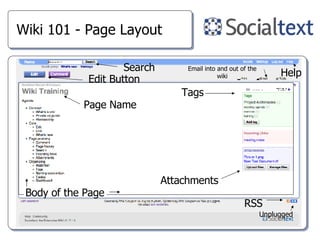
Wiki 101 - Page Layout Edit Button Tags Attachments Search Body of the Page Page Name Help Email into and out of the wiki RSS Unplugged
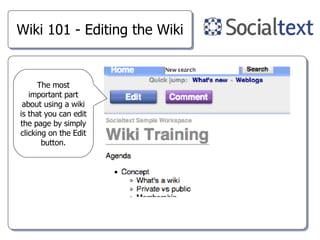
Wiki 101 - Editing the Wiki The most important part about using a wiki is that you can edit the page by simply clicking on the Edit button.
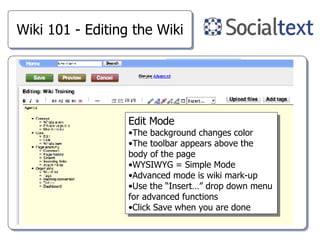
Wiki 101 - Editing the Wiki Edit Mode The background changes color The toolbar appears above the body of the page WYSIWYG = Simple Mode Advanced mode is wiki mark-up Use the “Insert…” drop down menu for advanced functions Click Save when you are done
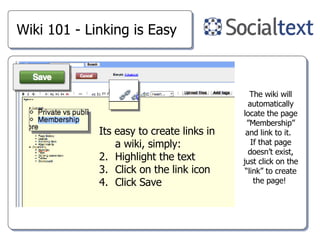
Wiki 101 - Linking is Easy Its easy to create links in a wiki, simply: Highlight the text Click on the link icon Click Save The wiki will automatically locate the page ”Membership” and link to it.  If that page doesn’t exist, just click on the “link” to create the page!
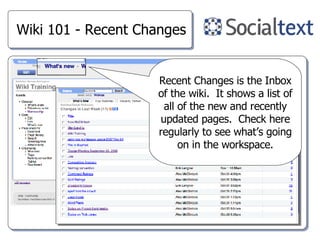
Wiki 101 - Recent Changes Recent Changes is the Inbox of the wiki.  It shows a list of all of the new and recently updated pages.  Check here regularly to see what’s going on in the workspace.
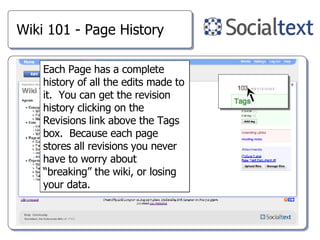
Wiki 101 - Page History Each Page has a complete history of all the edits made to it.  You can get the revision history clicking on the Revisions link above the Tags box.  Because each page stores all revisions you never have to worry about “breaking” the wiki, or losing your data.
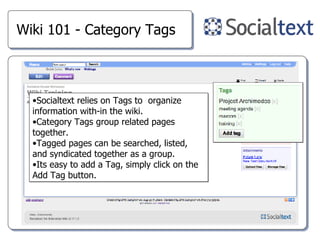
Wiki 101 - Category Tags Socialtext relies on Tags to  organize information with-in the wiki.  Category Tags group related pages together.  Tagged pages can be searched, listed, and syndicated together as a group. Its easy to add a Tag, simply click on the Add Tag button.
Wiki 101 - Q&A

Socialtext Wiki101

  • 1.
    Wiki 101 -Agenda What’s a Wiki? Basic Concept Editing Pages The most important part of using a wiki WYSIWYG Links Create simple structures on the fly with links and tags Recent Changes The In-box of the wiki Page History All revisions are stored Tags Make it easy categorize and organize your wiki
  • 2.
    Wiki 101 -What’s a wiki? A wiki is simply a collection of web pages that anyone can edit Wikis are used for a variety of reasons: As a knowledgebase, like Wikipedia As a collaboration tool, similar to group email There are two categories of wikis: Fully public workspaces open to the general internet Private wikis, open only to invited members (all Socialtext wikis are by default private)
  • 3.
    Wiki 101 -Page Layout Edit Button Tags Attachments Search Body of the Page Page Name Help Email into and out of the wiki RSS Unplugged
  • 4.
    Wiki 101 -Editing the Wiki The most important part about using a wiki is that you can edit the page by simply clicking on the Edit button.
  • 5.
    Wiki 101 -Editing the Wiki Edit Mode The background changes color The toolbar appears above the body of the page WYSIWYG = Simple Mode Advanced mode is wiki mark-up Use the “Insert…” drop down menu for advanced functions Click Save when you are done
  • 6.
    Wiki 101 -Linking is Easy Its easy to create links in a wiki, simply: Highlight the text Click on the link icon Click Save The wiki will automatically locate the page ”Membership” and link to it. If that page doesn’t exist, just click on the “link” to create the page!
  • 7.
    Wiki 101 -Recent Changes Recent Changes is the Inbox of the wiki. It shows a list of all of the new and recently updated pages. Check here regularly to see what’s going on in the workspace.
  • 8.
    Wiki 101 -Page History Each Page has a complete history of all the edits made to it. You can get the revision history clicking on the Revisions link above the Tags box. Because each page stores all revisions you never have to worry about “breaking” the wiki, or losing your data.
  • 9.
    Wiki 101 -Category Tags Socialtext relies on Tags to organize information with-in the wiki. Category Tags group related pages together. Tagged pages can be searched, listed, and syndicated together as a group. Its easy to add a Tag, simply click on the Add Tag button.
  • 10.