SOCIAL MEDIA
INTEGRATION
FOR WEBSITES
Seven ways to engage and capture
website visitors using social media.
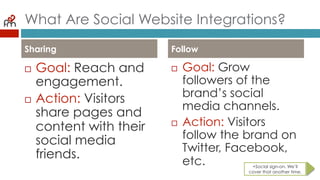
What Are Social Website Integrations?
¨  Goal: Reach and
engagement.
¨  Action: Visitors
share pages and
content with their
social media
friends.
¨  Goal: Grow
followers of the
brand’s social
media channels.
¨  Action: Visitors
follow the brand
on Twitter,
Facebook, etc.
Sharing Follow
+Social sign-on. We’ll
cover that another time.
Sharing Features To Integrate
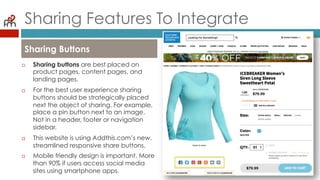
¨  Sharing buttons are best placed on
product pages, content pages, and
landing pages.
¨  For the best user experience sharing
buttons should be strategically placed
next the object of sharing. For example,
place a pin button next to an image.
Not in a header, footer or navigation
sidebar.
¨  This website is using Addthis.com’s new,
streamlined responsive share buttons.
¨  Mobile friendly design is important. More
than 90% if users access social media
sites using smartphone apps.
Sharing Buttons
Sharing Features To Integrate
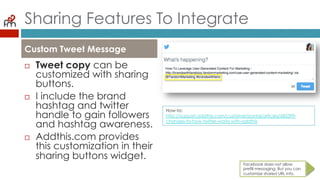
¨  Tweet copy can be
customized with
sharing buttons.
¨  I include the brand
hashtag and twitter
handle to gain
followers and hashtag
awareness.
¨  Addthis.com provides
this customization in
their sharing buttons
widget.
Custom Tweet Message
Facebook does not allow
prefill messaging. But you can
customize shared URL info.
How-to:
http://support.addthis.com/customer/portal/articles/683399-changes-to-
how-twitter-works-with-addthis
Sharing Features To Integrate
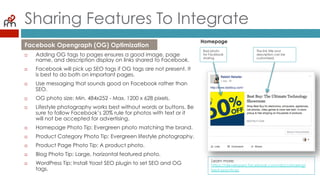
¨  Adding OG tags to pages ensures a good image, page
name, and description display on links shared to Facebook.
¨  Facebook will pick up SEO tags if OG tags are not present. It
is best to do both on important pages.
¨  Use messaging that sounds good on Facebook rather than
SEO.
¨  OG photo size: Min. 484x252 - Max. 1200 x 628 pixels.
¨  Lifestyle photography works best without words or buttons. Be
sure to follow Facebook’s 20% rule for photos with text or it
will not be accepted for advertising.
¨  Homepage Photo Tip: Evergreen photo matching the brand.
¨  Product Category Photo Tip: Evergreen lifestyle photography.
¨  Product Page Photo Tip: A product photo.
¨  Blog Photo Tip: Large, horizontal featured photo.
¨  WordPress Tip: Install Yoast SEO plugin to set SEO and OG
tags.
Facebook Opengraph (OG) Optimization
Homepage
Bad photo
for Facebook
sharing.
The link title and
description can be
customized.
Learn more:
https://developers.facebook.com/docs/sharing/
best-practices
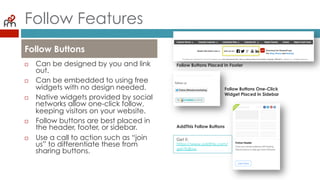
Follow Features
¨  Can be designed by you
and link out.
¨  Can be embedded to
using free widgets with no
design needed.
¨  Native widgets provided
by social networks allow
one-click follow, keeping
visitors on your website.
¨  Follow buttons are best
placed in the header,
footer, or sidebar.
¨  Use a call to action such as
“join us” to differentiate
these from sharing buttons.
Follow Buttons
Follow Buttons Placed In Footer
Follow Buttons One-Click
Widget Placed In Sidebar
AddThis Follow Buttons
Get it:
https://www.addthis.com/
get/follow
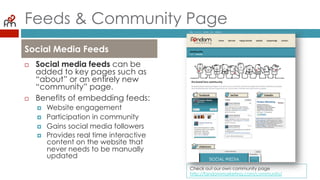
Feeds & Community Page
¨  Social media feeds can be
added to key pages such
as “about” or an entirely
new “community” page.
¨  Benefits of embedding
feeds:
¤  Website engagement
¤  Participation in community
¤  Gains social media followers
¤  Provides real time interactive
content on the website that
never needs to be manually
updated
Social Media Feeds
Check out our own community page
http://fandommarketing.com/community/
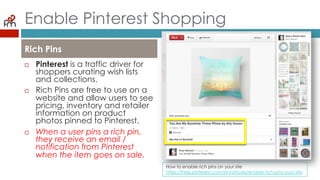
Enable Pinterest Shopping
¨  Pinterest is a traffic driver
for shoppers curating wish
lists and collections.
¨  Rich Pins are free to use on
a website and allow users
to see pricing, inventory
and retailer information on
product photos pinned to
Pinterest.
¨  When a user pins a rich pin,
they receive an email /
notification from Pinterest
when the item goes on
sale.
Rich Pins
How to enable rich pins on your site
https://help.pinterest.com/en/articles/enable-rich-pins-your-site
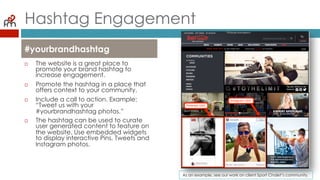
Hashtag Engagement
¨  The website is a great place
to promote your brand
hashtag to increase
engagement.
¨  Promote the hashtag in a
place that offers context to
your community.
¨  Include a call to action.
Example: “Tweet us with your
#yourbrandhashtag photos.”
¨  The hashtag can be used to
curate user generated
content to feature on the
website. Use embedded
widgets to display interactive
Pins, Tweets and Instagram
photos.
#yourbrandhashtag
As an example, see our work on client Sport Chalet’s community.
GROWING BRANDS WITH FANS
¨  CONTACT
¨  MELONIE GALLEGOS
¨  melonie@fandommarketin
g
Want to hire us? Email us at info@fandommarketing.com
Check out what we do at http://fandommarketing.com

Social Media Website Integration

  • 1.
    SOCIAL MEDIA INTEGRATION FOR WEBSITES Sevenways to engage and capture website visitors using social media.
  • 2.
    What Are SocialWebsite Integrations? ¨  Goal: Reach and engagement. ¨  Action: Visitors share pages and content with their social media friends. ¨  Goal: Grow followers of the brand’s social media channels. ¨  Action: Visitors follow the brand on Twitter, Facebook, etc. Sharing Follow +Social sign-on. We’ll cover that another time.
  • 3.
    Sharing Features ToIntegrate ¨  Sharing buttons are best placed on product pages, content pages, and landing pages. ¨  For the best user experience sharing buttons should be strategically placed next the object of sharing. For example, place a pin button next to an image. Not in a header, footer or navigation sidebar. ¨  This website is using Addthis.com’s new, streamlined responsive share buttons. ¨  Mobile friendly design is important. More than 90% if users access social media sites using smartphone apps. Sharing Buttons
  • 4.
    Sharing Features ToIntegrate ¨  Tweet copy can be customized with sharing buttons. ¨  I include the brand hashtag and twitter handle to gain followers and hashtag awareness. ¨  Addthis.com provides this customization in their sharing buttons widget. Custom Tweet Message Facebook does not allow prefill messaging. But you can customize shared URL info. How-to: http://support.addthis.com/customer/portal/articles/683399-changes-to- how-twitter-works-with-addthis
  • 5.
    Sharing Features ToIntegrate ¨  Adding OG tags to pages ensures a good image, page name, and description display on links shared to Facebook. ¨  Facebook will pick up SEO tags if OG tags are not present. It is best to do both on important pages. ¨  Use messaging that sounds good on Facebook rather than SEO. ¨  OG photo size: Min. 484x252 - Max. 1200 x 628 pixels. ¨  Lifestyle photography works best without words or buttons. Be sure to follow Facebook’s 20% rule for photos with text or it will not be accepted for advertising. ¨  Homepage Photo Tip: Evergreen photo matching the brand. ¨  Product Category Photo Tip: Evergreen lifestyle photography. ¨  Product Page Photo Tip: A product photo. ¨  Blog Photo Tip: Large, horizontal featured photo. ¨  WordPress Tip: Install Yoast SEO plugin to set SEO and OG tags. Facebook Opengraph (OG) Optimization Homepage Bad photo for Facebook sharing. The link title and description can be customized. Learn more: https://developers.facebook.com/docs/sharing/ best-practices
  • 6.
    Follow Features ¨  Canbe designed by you and link out. ¨  Can be embedded to using free widgets with no design needed. ¨  Native widgets provided by social networks allow one-click follow, keeping visitors on your website. ¨  Follow buttons are best placed in the header, footer, or sidebar. ¨  Use a call to action such as “join us” to differentiate these from sharing buttons. Follow Buttons Follow Buttons Placed In Footer Follow Buttons One-Click Widget Placed In Sidebar AddThis Follow Buttons Get it: https://www.addthis.com/ get/follow
  • 7.
    Feeds & CommunityPage ¨  Social media feeds can be added to key pages such as “about” or an entirely new “community” page. ¨  Benefits of embedding feeds: ¤  Website engagement ¤  Participation in community ¤  Gains social media followers ¤  Provides real time interactive content on the website that never needs to be manually updated Social Media Feeds Check out our own community page http://fandommarketing.com/community/
  • 8.
    Enable Pinterest Shopping ¨ Pinterest is a traffic driver for shoppers curating wish lists and collections. ¨  Rich Pins are free to use on a website and allow users to see pricing, inventory and retailer information on product photos pinned to Pinterest. ¨  When a user pins a rich pin, they receive an email / notification from Pinterest when the item goes on sale. Rich Pins How to enable rich pins on your site https://help.pinterest.com/en/articles/enable-rich-pins-your-site
  • 9.
    Hashtag Engagement ¨  Thewebsite is a great place to promote your brand hashtag to increase engagement. ¨  Promote the hashtag in a place that offers context to your community. ¨  Include a call to action. Example: “Tweet us with your #yourbrandhashtag photos.” ¨  The hashtag can be used to curate user generated content to feature on the website. Use embedded widgets to display interactive Pins, Tweets and Instagram photos. #yourbrandhashtag As an example, see our work on client Sport Chalet’s community.
  • 10.
    GROWING BRANDS WITHFANS ¨  CONTACT ¨  MELONIE GALLEGOS ¨  melonie@fandommarketin g Want to hire us? Email us at info@fandommarketing.com Check out what we do at http://fandommarketing.com