Social Media: Risks and Benefits


Steve Young
Chief Technology Officer, Judson ISD
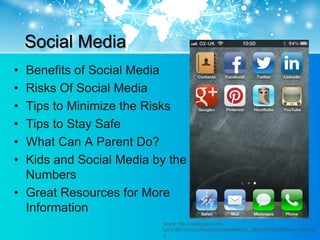
Social Media
Social Media
• Benefits of Social Media
• Risks Of Social Media
• Tips to Minimize the Risks
• Tips to Stay Safe
• What Can A Parent Do?
• Kids and Social Media by the
  Numbers
• Great Resources for More
  Information
                         Source: http://1.bp.blogspot.com/-
                         qJE2cWlsF1o/UCoryMepSLI/AAAAAAAAACE/E_J8hsGr7jM/s1600/iPhone+Social.PN
                         G
Benefits of Social Media

• Increased communication is
  beneficial
• Helps build social relationships
  – Social media does not usually
    replace normal relationships, rather
    it augments them
• Allows people to stay in touch
• Allows people to network
• Helps build communities
  – People can find support amongst
    those with similar interests,
    problems, or issues
Benefits of Social Media

        • Social media can be very
          empowering
        • It is a fantastic way to learn
        • Often teaches collaboration
        • Allows users to create a very positive
          image
        • Increasingly, teachers are leveraging
          student interest in social media tools
          for instructional purposes
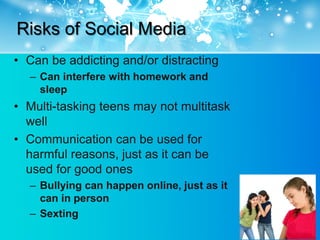
Risks of Social Media
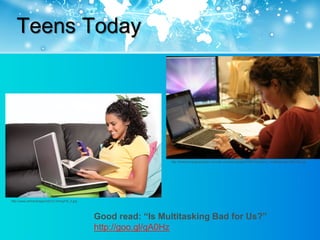
• Can be addicting and/or distracting
  – Can interfere with homework and
    sleep
• Multi-tasking teens may not multitask
  well
• Communication can be used for
  harmful reasons, just as it can be
  used for good ones
  – Bullying can happen online, just as it
    can in person
  – Sexting
Teens Today


                                                                  http://thetechnologicalcitizen.com/wp-content/uploads/2009/10/student_multitasking4-300x200.jpg


http://www.wtrtrendrapport2012.nl/img/H5_2.jpg


                                                 Good read: “Is Multitasking Bad for Us?”
                                                 http://goo.gl/qA0Hz
Risks of Social Media

• Very easy to speak and post, leaving a
  permanent trail of what was said or
  done
  – Can impact college admission, job
    opportunities, and reputation
  – Can result in punishment at school
• Since posts are just made to a
  computer and not to a person,
  sometimes that changes the nature or
  tone of a post
Tips to Minimize the Risks of Online and
Social Media Behavior
• Remember to “Do unto others as you
  would have them do unto you” –
  golden rule works as well on the
  Internet as it does anywhere else
• Never post embarrassing or
  compromising information or photos
• Ask how your parents, teacher, or
  employer might feel about what you
  have shared or posted online
Tips to Stay Safe
• Never post personal information online
• Never share online credentials
• Keep profiles private.
  – Most social networks have privacy settings to adjust
    what is shared publicly
• Do not engage in chat with strangers
• Use Safe Search Settings
• Have children use age appropriate sites
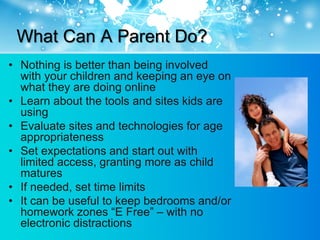
What Can A Parent Do?
• Nothing is better than being involved
  with your children and keeping an eye on
  what they are doing online
• Learn about the tools and sites kids are
  using
• Evaluate sites and technologies for age
  appropriateness
• Set expectations and start out with
  limited access, granting more as child
  matures
• If needed, set time limits
• It can be useful to keep bedrooms and/or
  homework zones “E Free” – with no
  electronic distractions
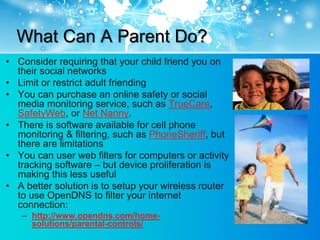
What Can A Parent Do?
• Consider requiring that your child friend you on
  their social networks
• Limit or restrict adult friending
• You can purchase an online safety or social
  media monitoring service, such as TrueCare,
  SafetyWeb, or Net Nanny.
• There is software available for cell phone
  monitoring & filtering, such as PhoneSheriff, but
  there are limitations
• You can user web filters for computers or activity
  tracking software – but device proliferation is
  making this less useful
• A better solution is to setup your wireless router
  to use OpenDNS to filter your internet
  connection:
   – http://www.opendns.com/home-
     solutions/parental-controls/
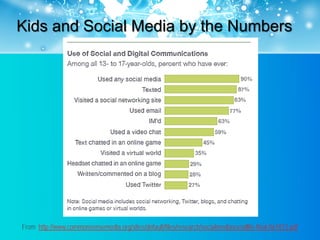
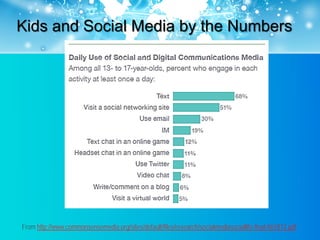
Kids and Social Media by the Numbers


From http://www.commonsensemedia.org/sites/default/files/research/socialmediasociallife-final-061812.pdf
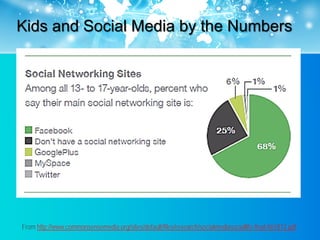
Kids and Social Media by the Numbers


From http://www.commonsensemedia.org/sites/default/files/research/socialmediasociallife-final-061812.pdf
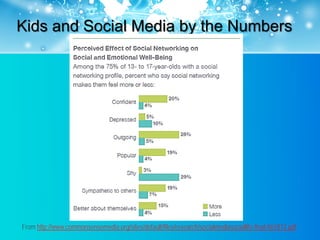
Kids and Social Media by the Numbers


From http://www.commonsensemedia.org/sites/default/files/research/socialmediasociallife-final-061812.pdf
Kids and Social Media by the Numbers


From http://www.commonsensemedia.org/sites/default/files/research/socialmediasociallife-final-061812.pdf
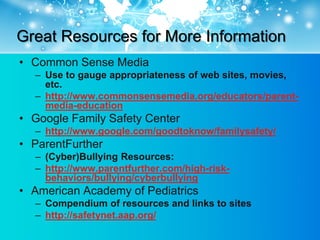
Great Resources for More Information
• Common Sense Media
  – Use to gauge appropriateness of web sites, movies,
    etc.
  – http://www.commonsensemedia.org/educators/parent-
    media-education
• Google Family Safety Center
  – http://www.google.com/goodtoknow/familysafety/
• ParentFurther
  – (Cyber)Bullying Resources:
  – http://www.parentfurther.com/high-risk-
    behaviors/bullying/cyberbullying
• American Academy of Pediatrics
  – Compendium of resources and links to sites
  – http://safetynet.aap.org/
Questions & Discussion


    Source: http://inforrm.files.wordpress.com/2010/10/social-media.jpg
Thanks
• Steve Young
• Chief Technology Officer @ Judson ISD
• syoung@judsonisd.org

Social Media: Risks and Benefits

  • 1.
    Social Media: Risksand Benefits Steve Young Chief Technology Officer, Judson ISD
  • 2.
  • 3.
    Social Media • Benefitsof Social Media • Risks Of Social Media • Tips to Minimize the Risks • Tips to Stay Safe • What Can A Parent Do? • Kids and Social Media by the Numbers • Great Resources for More Information Source: http://1.bp.blogspot.com/- qJE2cWlsF1o/UCoryMepSLI/AAAAAAAAACE/E_J8hsGr7jM/s1600/iPhone+Social.PN G
  • 4.
    Benefits of SocialMedia • Increased communication is beneficial • Helps build social relationships – Social media does not usually replace normal relationships, rather it augments them • Allows people to stay in touch • Allows people to network • Helps build communities – People can find support amongst those with similar interests, problems, or issues
  • 5.
    Benefits of SocialMedia • Social media can be very empowering • It is a fantastic way to learn • Often teaches collaboration • Allows users to create a very positive image • Increasingly, teachers are leveraging student interest in social media tools for instructional purposes
  • 6.
    Risks of SocialMedia • Can be addicting and/or distracting – Can interfere with homework and sleep • Multi-tasking teens may not multitask well • Communication can be used for harmful reasons, just as it can be used for good ones – Bullying can happen online, just as it can in person – Sexting
  • 7.
    Teens Today http://thetechnologicalcitizen.com/wp-content/uploads/2009/10/student_multitasking4-300x200.jpg http://www.wtrtrendrapport2012.nl/img/H5_2.jpg Good read: “Is Multitasking Bad for Us?” http://goo.gl/qA0Hz
  • 8.
    Risks of SocialMedia • Very easy to speak and post, leaving a permanent trail of what was said or done – Can impact college admission, job opportunities, and reputation – Can result in punishment at school • Since posts are just made to a computer and not to a person, sometimes that changes the nature or tone of a post
  • 9.
    Tips to Minimizethe Risks of Online and Social Media Behavior • Remember to “Do unto others as you would have them do unto you” – golden rule works as well on the Internet as it does anywhere else • Never post embarrassing or compromising information or photos • Ask how your parents, teacher, or employer might feel about what you have shared or posted online
  • 10.
    Tips to StaySafe • Never post personal information online • Never share online credentials • Keep profiles private. – Most social networks have privacy settings to adjust what is shared publicly • Do not engage in chat with strangers • Use Safe Search Settings • Have children use age appropriate sites
  • 11.
    What Can AParent Do? • Nothing is better than being involved with your children and keeping an eye on what they are doing online • Learn about the tools and sites kids are using • Evaluate sites and technologies for age appropriateness • Set expectations and start out with limited access, granting more as child matures • If needed, set time limits • It can be useful to keep bedrooms and/or homework zones “E Free” – with no electronic distractions
  • 12.
    What Can AParent Do? • Consider requiring that your child friend you on their social networks • Limit or restrict adult friending • You can purchase an online safety or social media monitoring service, such as TrueCare, SafetyWeb, or Net Nanny. • There is software available for cell phone monitoring & filtering, such as PhoneSheriff, but there are limitations • You can user web filters for computers or activity tracking software – but device proliferation is making this less useful • A better solution is to setup your wireless router to use OpenDNS to filter your internet connection: – http://www.opendns.com/home- solutions/parental-controls/
  • 13.
    Kids and SocialMedia by the Numbers From http://www.commonsensemedia.org/sites/default/files/research/socialmediasociallife-final-061812.pdf
  • 14.
    Kids and SocialMedia by the Numbers From http://www.commonsensemedia.org/sites/default/files/research/socialmediasociallife-final-061812.pdf
  • 15.
    Kids and SocialMedia by the Numbers From http://www.commonsensemedia.org/sites/default/files/research/socialmediasociallife-final-061812.pdf
  • 16.
    Kids and SocialMedia by the Numbers From http://www.commonsensemedia.org/sites/default/files/research/socialmediasociallife-final-061812.pdf
  • 17.
    Great Resources forMore Information • Common Sense Media – Use to gauge appropriateness of web sites, movies, etc. – http://www.commonsensemedia.org/educators/parent- media-education • Google Family Safety Center – http://www.google.com/goodtoknow/familysafety/ • ParentFurther – (Cyber)Bullying Resources: – http://www.parentfurther.com/high-risk- behaviors/bullying/cyberbullying • American Academy of Pediatrics – Compendium of resources and links to sites – http://safetynet.aap.org/
  • 18.
    Questions & Discussion Source: http://inforrm.files.wordpress.com/2010/10/social-media.jpg
  • 19.
    Thanks • Steve Young •Chief Technology Officer @ Judson ISD • syoung@judsonisd.org