Social Media Impact
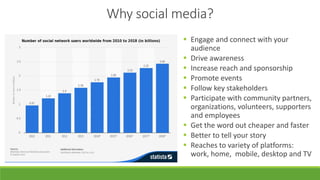
Why social media?
 Engage and connect with your
audience
 Drive awareness
 Increase reach and sponsorship
 Promote events
 Follow key stakeholders
 Participate with community partners,
organizations, volunteers, supporters
and employees
 Get the word out cheaper and faster
 Better to tell your story
 Reaches to variety of platforms:
work, home, mobile, desktop and TV
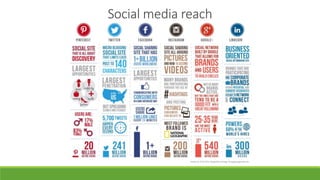
Social media reach
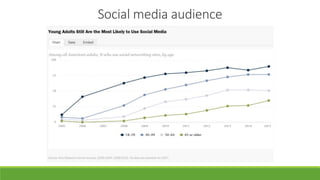
Social media audience
TWH’s social media channels
I. Develop a social media posting guide
II. Research best times and content to post to each platform
III. Planning and Scheduling
I. Monthly
I. Content strategy planning session– Identify what’s coming up, schedule campaigns/events
II. Define Key messages – For campaigns & events
III. Use an editorial calendar – Can be a shared google doc or calendar app that everyone can add too
II. Weekly
I. Batch content creation – Maximize time. Minimize mental gear shifts
II. Using scheduling tools like Hootsuite – Tip: vary timing slightly, avoid looking like your posting by rote
III. Use analytics with your links – Insight and factual reporting, good.
IV. For Twitter, Schedule (or plan to add later) at least one post per day due to platform set up its necessary
III. Every Other Day
I. Post to Facebook – Best frequency, reply to good comments and if not vulgar don’t delete/hide bad ones
IV. Daily
I. Post to Twitter at least once a day – More is better and vary times slightly
II. Check feeds at least 2x per day – If only 2x, then mid-morning & late afternoon
V. Weekends
I. Post on the weekend – People are less busy, equally greater click through rates
Guidelines for Social Media
Helpful social media tips and tricks
Tag partners and locations
Add hashtags (when appropriate)
Add photos and videos
 Anyone can be a photographer, Apps can create compelling photo collages and videos
Invite followers to share pictures and like and follow you at events
Imbed social media feed on your website
Use who to follow/you may know/of interest suggestions to leverage partnerships
Join conversations, encourage them on your own page
Show love to your followers
Provide action your followers can take
Resources
oApps to consider:
o Hootsuite, Animoto, ClipStitch, Bitly, and many others (search will yield a variety of options)
oNon-profits for Facebook: https://nonprofits.fb.com/
oBlog for best times to post on social media: http://blog.hubspot.com/marketing/best-times-
post-pin-tweet-social-media-infographic
oBlogs for how non-profits can use social media: http://www.nptechforgood.com/
o http://bit.ly/1YCi54w
oFree social media analytics: http://pamdyer.us/1P6evhI
o Simply measured: http://simplymeasured.com/free-social-media-tools
o Check out other non-profit’s social media pages and see what they are doing
Social Media Impact

Social Media Impact

  • 1.
  • 2.
    Why social media? Engage and connect with your audience  Drive awareness  Increase reach and sponsorship  Promote events  Follow key stakeholders  Participate with community partners, organizations, volunteers, supporters and employees  Get the word out cheaper and faster  Better to tell your story  Reaches to variety of platforms: work, home, mobile, desktop and TV
  • 5.
  • 6.
  • 7.
  • 8.
    I. Develop asocial media posting guide II. Research best times and content to post to each platform III. Planning and Scheduling I. Monthly I. Content strategy planning session– Identify what’s coming up, schedule campaigns/events II. Define Key messages – For campaigns & events III. Use an editorial calendar – Can be a shared google doc or calendar app that everyone can add too II. Weekly I. Batch content creation – Maximize time. Minimize mental gear shifts II. Using scheduling tools like Hootsuite – Tip: vary timing slightly, avoid looking like your posting by rote III. Use analytics with your links – Insight and factual reporting, good. IV. For Twitter, Schedule (or plan to add later) at least one post per day due to platform set up its necessary III. Every Other Day I. Post to Facebook – Best frequency, reply to good comments and if not vulgar don’t delete/hide bad ones IV. Daily I. Post to Twitter at least once a day – More is better and vary times slightly II. Check feeds at least 2x per day – If only 2x, then mid-morning & late afternoon V. Weekends I. Post on the weekend – People are less busy, equally greater click through rates Guidelines for Social Media
  • 9.
    Helpful social mediatips and tricks Tag partners and locations Add hashtags (when appropriate) Add photos and videos  Anyone can be a photographer, Apps can create compelling photo collages and videos Invite followers to share pictures and like and follow you at events Imbed social media feed on your website Use who to follow/you may know/of interest suggestions to leverage partnerships Join conversations, encourage them on your own page Show love to your followers Provide action your followers can take
  • 10.
    Resources oApps to consider: oHootsuite, Animoto, ClipStitch, Bitly, and many others (search will yield a variety of options) oNon-profits for Facebook: https://nonprofits.fb.com/ oBlog for best times to post on social media: http://blog.hubspot.com/marketing/best-times- post-pin-tweet-social-media-infographic oBlogs for how non-profits can use social media: http://www.nptechforgood.com/ o http://bit.ly/1YCi54w oFree social media analytics: http://pamdyer.us/1P6evhI o Simply measured: http://simplymeasured.com/free-social-media-tools o Check out other non-profit’s social media pages and see what they are doing