SMARTER PRINT WORKFLOWS FOR 
THE CONNECTED ENTERPRISE 
Peter C. Richardson 
Director│Printing Solutions 
Enterprise Business Division 
#digitalbusiness @SamsungBizUSA
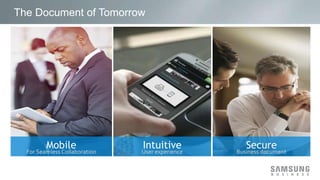
The Document of Tomorrow
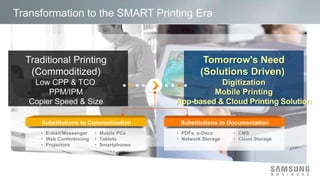
Transformation to the SMART Printing Era 
• PDFs, e-Docs 
• Network Storage 
• CMS 
• Cloud Storage 
• E-mail/Messenger 
• Web Conferencing 
• Projectors 
• Mobile PCs 
• Tablets 
• Smartphones
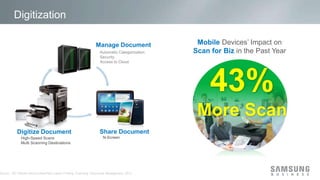
Digitization 
Automatic Categorization 
Security 
Access to Cloud 
Source : IDC Mobile Device Users/Non-Users Printing, Scanning, Document Management, 2012 
Devices’ Impact on 
in the Past Year 
43% 
More Scan
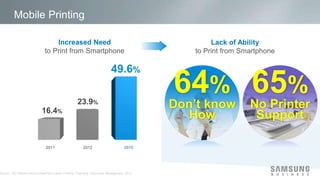
Mobile Printing 
to Print from Smartphone to Print from Smartphone 
2015 
64% 
Don’t know 
How 
65% 
No Printer 
Support 
Source : IDC Mobile Device Users/Non-Users Printing, Scanning, Document Management, 2012
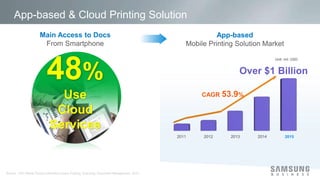
App-based & Cloud Printing Solution 
2015 
From Smartphone Mobile Printing Solution Market 
48% 
Use 
Cloud 
Services 
Source : IDC Mobile Device Users/Non-Users Printing, Scanning, Document Management, 2012
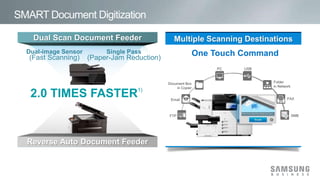
SMART Document Digitization
SMART Mobile Printing 
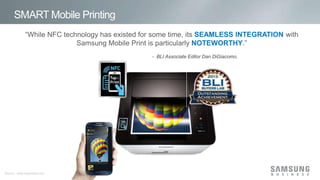
“While NFC technology has existed for some time, its with 
Samsung Mobile Print is particularly .” 
Source : www.buyerslab.com
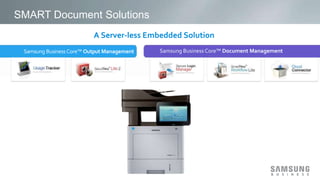
SMART Document Solutions
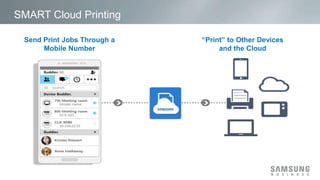
SMART Cloud Printing
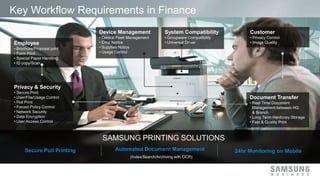
Key Workflow Requirements in Finance
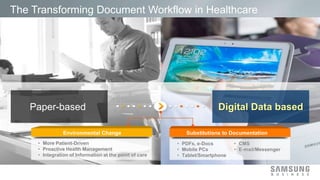
The Transforming Document Workflow in Healthcare 
• PDFs, e-Docs 
• Mobile PCs 
• Tablet/Smartphone 
• CMS 
• E-mail/Messenger 
• More Patient-Driven 
• Proactive Health Management 
• Integration of Information at the point of care
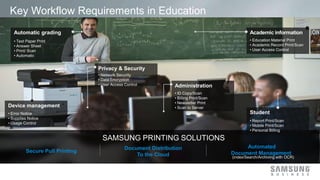
Key Workflow Requirements in Education
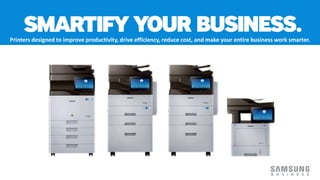
Printers designed to improve productivity, drive efficiency, reduce cost, and make your entire business work smarter. 
14

Smarter Print Workflows for the Connected Enterprise

  • 1.
    SMARTER PRINT WORKFLOWSFOR THE CONNECTED ENTERPRISE Peter C. Richardson Director│Printing Solutions Enterprise Business Division #digitalbusiness @SamsungBizUSA
  • 2.
  • 3.
    Transformation to theSMART Printing Era • PDFs, e-Docs • Network Storage • CMS • Cloud Storage • E-mail/Messenger • Web Conferencing • Projectors • Mobile PCs • Tablets • Smartphones
  • 4.
    Digitization Automatic Categorization Security Access to Cloud Source : IDC Mobile Device Users/Non-Users Printing, Scanning, Document Management, 2012 Devices’ Impact on in the Past Year 43% More Scan
  • 5.
    Mobile Printing toPrint from Smartphone to Print from Smartphone 2015 64% Don’t know How 65% No Printer Support Source : IDC Mobile Device Users/Non-Users Printing, Scanning, Document Management, 2012
  • 6.
    App-based & CloudPrinting Solution 2015 From Smartphone Mobile Printing Solution Market 48% Use Cloud Services Source : IDC Mobile Device Users/Non-Users Printing, Scanning, Document Management, 2012
  • 7.
  • 8.
    SMART Mobile Printing “While NFC technology has existed for some time, its with Samsung Mobile Print is particularly .” Source : www.buyerslab.com
  • 9.
  • 10.
  • 11.
  • 12.
    The Transforming DocumentWorkflow in Healthcare • PDFs, e-Docs • Mobile PCs • Tablet/Smartphone • CMS • E-mail/Messenger • More Patient-Driven • Proactive Health Management • Integration of Information at the point of care
  • 13.
  • 14.
    Printers designed toimprove productivity, drive efficiency, reduce cost, and make your entire business work smarter. 14

Editor's Notes

  • #3 Changing the role of documents to digital information gives 3 opportunities. 1. Mobile for Seamless Collaboration - Digitization Workflow Optimized for the Mobile Office 2. Secure Business Document - Robust security for mobilizing business documents 3. Intuitive User Experience - Android-powered Intuitive and effective UI compatible with mobile devices
  • #4 Today’s office environment is no longer based on the traditional client-server system. Work processes are neither confined to one location, nor within a building. Customers are working with more mobility and agility than ever before. To meet these changes to the customer’s environment, the new printing market is looking for an integrated IT solution that includes monitors, tablets and printers to accelerate digitization of documents based on mobile and cloud printing solutions.
  • #5 Printing technology is accelerating to digitized documents. According to the IDC, Mobile Device Users/Non-Users Printing, Scanning, Document Management in 2012, 43% of smartphone / tablet users cited an increase in scan volumes for businesses in the past year, and only 3% of smartphone users cited an decrease in scan volumes. Samsung printing solutions are leading document digitization with high-speed scanning and multi-scanning destination technology.
  • #6 Mobile printing needs will further grow as a result of a rise in the number of smartphone users and the spread of the Bring Your Own Device (BYOD) trend. According to an IDC report about mobile device users/non-users printing, scanning and document management published in 2012, forecasted that about 50% of smartphone users and 58% of tablet users will use mobile printing in 2015. However, 64% of smartphone user don’t know how to print from their mobile phone and 65% believe their printer doesn’t support this function. In response, Samsung unveiled the world’s very first near-field communication (NFC)-enabled laser printer that ensures easy and convenient mobile printing. In fact, Samsung Smart Printing Solutions has the most competitive smartphone pairing solution.
  • #7 Business opportunities with workforce mobility are increasing. According to an IDC report about mobile device users/non-users printing, scanning and document management published in 2012, it was forecasted that about 48% of smartphone users are using cloud file services to access documents from smartphones. Corresponding with that forecast, an 2012 IDC report said that the mobile printing solution market will have at 53.9% CAGR from 2011 to 2016 and will reach over $1 billion in 2015.
  • #8 The Samsung scanning process reduces the paper jam rate and this time-consuming task dramatically. The new Samsung copier is equipped with a Dual Scan Document Feeder (DSDF) that makes scanning faster and the paper jam rate lower. Also, User can scan and send the result to multiple destination one time using simple commend menu on new touch panel2.
  • #9 As the leader in mobile printing, by providing innovative mobile printing technology, Samsung became the first company in the world to apply NFC technology to a laser printer. The process of output device discovery from mobile print apps can be cumbersome and difficult, requiring the mobile device to be on the same wireless network as a desired printer or MFP, and in some cases requiring manual entry of an output device’s IP address. But with Samsung’s use of NFC technology in its Xpress C410W printer and C460FW color laser MFP, currently in the lab for testing, mobile printing couldn’t be easier. A user just taps a compatible NFC-enabled smartphone on the printer to automatically install Samsung’s free MobilePrint App, if it’s not already installed on the phone, and then connect to the device automatically.
  • #10 Samsung provides an array of end-to-end document workflow solutions for companies of all sizes from small and medium sized businesses (SMB) up to enterprise and large organizations running thousands of devices. Business Core printing solutions are server-less, embedded solutions that provide businesses a compact yet essential suite of offerings in a price range that fits customer’s businesses.