VBA Mamb 2007-2008 IST, MEAMB Autor: P. Pina Revisão: G. Riflet
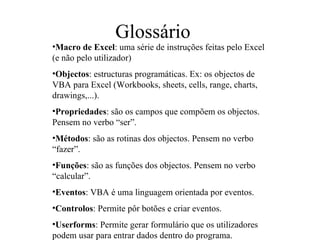
Glossário Macro de Excel : uma série de instruções feitas pelo Excel (e não pelo utilizador) Objectos : estructuras programáticas. Ex: os objectos de VBA para Excel (Workbooks, sheets, cells, range, charts, drawings,...). Propriedades : são os campos que compõem os objectos. Pensem no verbo “ser”. Métodos : são as rotinas dos objectos. Pensem no verbo “fazer”. Funções : são as funções dos objectos. Pensem no verbo “calcular”. Eventos : VBA é uma linguagem orientada por eventos. Controlos : Permite pôr botões e criar eventos. Userforms : Permite gerar formulário que os utilizadores podem usar para entrar dados dentro do programa.
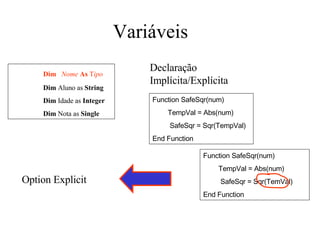
Variáveis  Dim  Nome   As  T ipo Dim  Aluno as  String Dim  Idade as  Integer Dim  Nota as  Single Declaração Implícita/Explícita   Function SafeSqr(num)  TempVal = Abs(num)  SafeSqr = Sqr(TempVal) End Function   Function SafeSqr(num)  TempVal = Abs(num)  SafeSqr = Sqr(TemVal) End Function   Option Explicit
Âmbito das variáveis Projecto Modulo SubRotina Dim Nome as Tipo Private Nome as Tipo Public Nome as Tipo
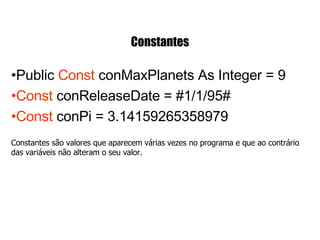
Constantes Public  Const  conMaxPlanets As Integer = 9 Const  conReleaseDate = #1/1/95#     Const  conPi = 3.14159265358979 Constantes são valores que aparecem várias vezes no programa e que ao contrário das variáveis não alteram o seu valor.
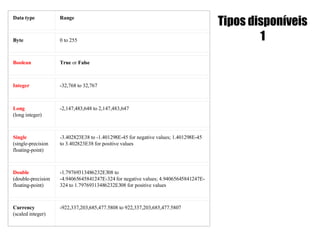
Tipos disponíveis 1 Data type Range Byte 0 to 255 Boolean True  or  False Integer -32,768 to 32,767 Long (long integer) -2,147,483,648 to 2,147,483,647 Single (single-precision floating-point) -3.402823E38 to -1.401298E-45 for negative values; 1.401298E-45 to 3.402823E38 for positive values Double (double-precision floating-point) -1.79769313486232E308 to  -4.94065645841247E-324 for negative values; 4.94065645841247E-324 to 1.79769313486232E308 for positive values Currency (scaled integer) -922,337,203,685,477.5808 to 922,337,203,685,477.5807
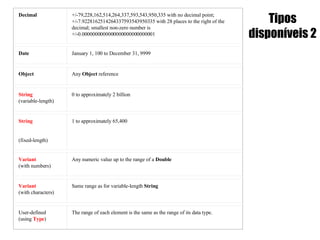
Tipos disponíveis 2 Decimal +/-79,228,162,514,264,337,593,543,950,335 with no decimal point;  +/-7.9228162514264337593543950335 with 28 places to the right of the decimal; smallest non-zero number is  +/-0.0000000000000000000000000001 Date January 1, 100 to December 31, 9999 Object Any  Object  reference String   (variable-length) 0 to approximately 2 billion  String (fixed-length) 1 to approximately 65,400 Variant (with numbers) Any numeric value up to the range of a  Double Variant (with characters) Same range as for variable-length  String User-defined (using  Type ) The range of each element is the same as the range of its data type.
User defined Type Private Type  SystemInfo CPU As Variant Memory As Long VideoColors As Integer  Cost As Currency PurchaseDate As Variant End Type     Dim MySystem As  SystemInfo , YourSystem As  SystemInfo     MySystem.CPU = "486“ YourSystem.PurchaseDate = #1/1/92#   SystemInfo Memory CPU VideoColors Cost PurchaseDate
Arrays Dim  Conta ( 6 ) As Integer Conta ( 0 )  = 12 ; Conta ( 3 )  = 21; Conta ( 5 )  = 3 Dim  Teste ( 3,3 ) As  Boolean Teste(0,1) = True ; Teste (2,0) = True i = 0    i = 1  i = 2  i = 3  i = 4  i = 5  i = 0  i = 1  i = 2  i = 3  i = 4  i = 5  12 0 0 21 0 3 True False False False False False False False True Alocação Dinâmica/Estática Dim Matrix1() As Integer Sub CalcValuesNow () ... ReDim Matrix1(19, 29) End Sub
Introdução aos procedimentos Sub Rotinas Sub   teste   ( File As String ) Open  (File) ReadFirstLine (File) ... End Sub Call  teste  (A) Funções Function   Hypotenuse  (A As Integer, B As  _  Integer)   As  Double   Hypotenuse  = Sqr(A ^ 2 + B ^ 2) End Function     strX =  Hypotenuse (Width, Height)
Passagens de argumentos Sub Main () Dim a As Integer a = 10 Call TestVal(a) Call TestRef(a) End Sub Sub TestVal   (ByVal a As Integer) a = a + 1 End Sub Sub Test Ref  (By Ref  a As Integer) a = a + 1 End Sub a = 11 a = 10 a = 11 a = 11
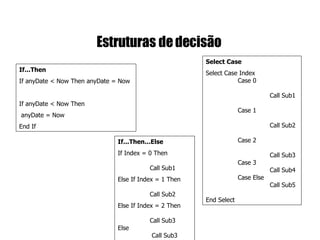
Estruturas de decisão   If...Then If anyDate < Now Then anyDate = Now  If anyDate < Now Then  anyDate = Now End If   If...Then...Else If Index = 0 Then    Call Sub1  Else   If Index = 1 Then  Call Sub2  Else   If Index = 2 Then  Call Sub3  Else   Call Sub3  End If   Select Case Select Case Index  Case 0  Call Sub1  Case 1  Call Sub2  Case 2  Call Sub3  Case 3  Call Sub4  Case Else  Call Sub5   End Select
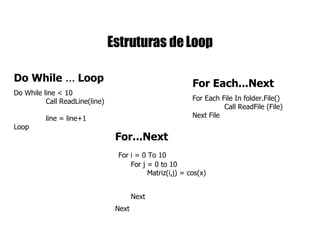
Estruturas de Loop Do While  ...  Loop Do While line < 10  Call ReadLine(line)  line = line+1  Loop   For...Next   For i = 0 To 10   For j = 0 to 10   Matriz(i,j) = cos(x)  Next   Next   For Each...Next For Each File In folder.File()  Call ReadFile (File)   Next File

Slides Vba Mamb

  • 1.
    VBA Mamb 2007-2008IST, MEAMB Autor: P. Pina Revisão: G. Riflet
  • 2.
    Glossário Macro deExcel : uma série de instruções feitas pelo Excel (e não pelo utilizador) Objectos : estructuras programáticas. Ex: os objectos de VBA para Excel (Workbooks, sheets, cells, range, charts, drawings,...). Propriedades : são os campos que compõem os objectos. Pensem no verbo “ser”. Métodos : são as rotinas dos objectos. Pensem no verbo “fazer”. Funções : são as funções dos objectos. Pensem no verbo “calcular”. Eventos : VBA é uma linguagem orientada por eventos. Controlos : Permite pôr botões e criar eventos. Userforms : Permite gerar formulário que os utilizadores podem usar para entrar dados dentro do programa.
  • 3.
    Variáveis Dim Nome As T ipo Dim Aluno as String Dim Idade as Integer Dim Nota as Single Declaração Implícita/Explícita Function SafeSqr(num) TempVal = Abs(num) SafeSqr = Sqr(TempVal) End Function Function SafeSqr(num) TempVal = Abs(num) SafeSqr = Sqr(TemVal) End Function Option Explicit
  • 4.
    Âmbito das variáveisProjecto Modulo SubRotina Dim Nome as Tipo Private Nome as Tipo Public Nome as Tipo
  • 5.
    Constantes Public Const conMaxPlanets As Integer = 9 Const conReleaseDate = #1/1/95#   Const conPi = 3.14159265358979 Constantes são valores que aparecem várias vezes no programa e que ao contrário das variáveis não alteram o seu valor.
  • 6.
    Tipos disponíveis 1Data type Range Byte 0 to 255 Boolean True or False Integer -32,768 to 32,767 Long (long integer) -2,147,483,648 to 2,147,483,647 Single (single-precision floating-point) -3.402823E38 to -1.401298E-45 for negative values; 1.401298E-45 to 3.402823E38 for positive values Double (double-precision floating-point) -1.79769313486232E308 to -4.94065645841247E-324 for negative values; 4.94065645841247E-324 to 1.79769313486232E308 for positive values Currency (scaled integer) -922,337,203,685,477.5808 to 922,337,203,685,477.5807
  • 7.
    Tipos disponíveis 2Decimal +/-79,228,162,514,264,337,593,543,950,335 with no decimal point; +/-7.9228162514264337593543950335 with 28 places to the right of the decimal; smallest non-zero number is +/-0.0000000000000000000000000001 Date January 1, 100 to December 31, 9999 Object Any Object reference String (variable-length) 0 to approximately 2 billion String (fixed-length) 1 to approximately 65,400 Variant (with numbers) Any numeric value up to the range of a Double Variant (with characters) Same range as for variable-length String User-defined (using Type ) The range of each element is the same as the range of its data type.
  • 8.
    User defined TypePrivate Type SystemInfo CPU As Variant Memory As Long VideoColors As Integer Cost As Currency PurchaseDate As Variant End Type   Dim MySystem As SystemInfo , YourSystem As SystemInfo   MySystem.CPU = &quot;486“ YourSystem.PurchaseDate = #1/1/92# SystemInfo Memory CPU VideoColors Cost PurchaseDate
  • 9.
    Arrays Dim Conta ( 6 ) As Integer Conta ( 0 ) = 12 ; Conta ( 3 ) = 21; Conta ( 5 ) = 3 Dim Teste ( 3,3 ) As Boolean Teste(0,1) = True ; Teste (2,0) = True i = 0 i = 1 i = 2 i = 3 i = 4 i = 5 i = 0 i = 1 i = 2 i = 3 i = 4 i = 5 12 0 0 21 0 3 True False False False False False False False True Alocação Dinâmica/Estática Dim Matrix1() As Integer Sub CalcValuesNow () ... ReDim Matrix1(19, 29) End Sub
  • 10.
    Introdução aos procedimentosSub Rotinas Sub teste ( File As String ) Open (File) ReadFirstLine (File) ... End Sub Call teste (A) Funções Function Hypotenuse (A As Integer, B As _ Integer) As Double Hypotenuse = Sqr(A ^ 2 + B ^ 2) End Function   strX = Hypotenuse (Width, Height)
  • 11.
    Passagens de argumentosSub Main () Dim a As Integer a = 10 Call TestVal(a) Call TestRef(a) End Sub Sub TestVal (ByVal a As Integer) a = a + 1 End Sub Sub Test Ref (By Ref a As Integer) a = a + 1 End Sub a = 11 a = 10 a = 11 a = 11
  • 12.
    Estruturas de decisão If...Then If anyDate < Now Then anyDate = Now  If anyDate < Now Then anyDate = Now End If If...Then...Else If Index = 0 Then Call Sub1 Else If Index = 1 Then Call Sub2 Else If Index = 2 Then Call Sub3 Else Call Sub3 End If Select Case Select Case Index Case 0 Call Sub1 Case 1 Call Sub2 Case 2 Call Sub3 Case 3 Call Sub4 Case Else Call Sub5  End Select
  • 13.
    Estruturas de LoopDo While ... Loop Do While line < 10 Call ReadLine(line) line = line+1 Loop For...Next   For i = 0 To 10 For j = 0 to 10 Matriz(i,j) = cos(x) Next Next For Each...Next For Each File In folder.File() Call ReadFile (File) Next File