How Fingerprint Scanners Work
•
    Computerized fingerprint scanners have been a mainstay of
    spy thrillers for decades, but up until recently, they were
    pretty exotic technology in the real world. In the past few
    years, however, scanners have started popping up all over the
    place such as in police stations, high-security buildings and
    even on PC keyboards. You can pick up a personal USB
    fingerprint scanner for less than $100, and just like that, your
    computer's guarded by high-tech biometrics. Instead of, or in
    addition to, a password, you need your distinctive print to
    gain access.
Fingerprint Basics
•
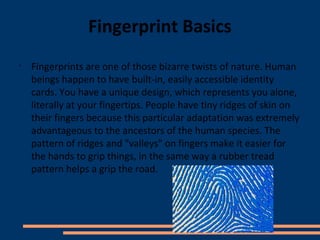
    Fingerprints are one of those bizarre twists of nature. Human
    beings happen to have built-in, easily accessible identity
    cards. You have a unique design, which represents you alone,
    literally at your fingertips. People have tiny ridges of skin on
    their fingers because this particular adaptation was extremely
    advantageous to the ancestors of the human species. The
    pattern of ridges and "valleys" on fingers make it easier for
    the hands to grip things, in the same way a rubber tread
    pattern helps a grip the road.
Optical Scanner
•
    There are a number of different ways to get an image of somebody's
    finger. The most common methods today are optical scanning and
    capacitance scanning. Both types come up with the same sort of image,
    but they go about it in completely different ways.
•
    The heart of an optical scanner is a charge coupled device (CCD). A CCD is
    simply an array of light-sensitive diodes called photosites, which generate
    an electrical signal in response to light photons.
•
    The scanning process starts when you place your finger on a glass plate,
    and a CCD camera takes a picture. The scanner has its own light source,
    typically an array of light-emitting diodes , to illuminate the ridges of the
    finger. The CCD system actually generates an inverted image of the finger,
    with darker areas representing more reflected light and lighter areas
    representing less reflected light .
•
    Before comparing the print to stored data, the scanner processor makes
    sure the CCD has captured a clear image. It checks the average pixel
    darkness, or the overall values in a small sample, and rejects the scan if
    the overall image is too dark or too light. If the image is rejected, the
    scanner adjusts the exposure time to let in more or less light, and then
    tries the scan again.
•
    If the darkness level is adequate, the scanner system goes on to check the
    image definition. The processor looks at several straight lines moving
    horizontally and vertically across the image. If the fingerprint image has
    good definition, a line running perpendicular to the ridges will be made up
    of alternating sections of very dark pixels and very light pixels.
•
    If the processor finds that the image is crisp and properly exposed, it
    proceeds to comparing the captured fingerprint with fingerprints on file.
Capacitance Scanner
                 ●
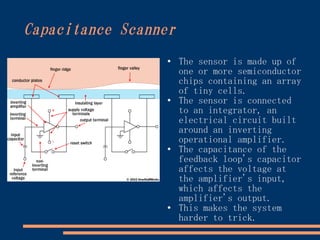
                      The sensor is made up of
                      one or more semiconductor
                      chips containing an array
                      of tiny cells.
                 ●
                      The sensor is connected
                      to an integrator, an
                      electrical circuit built
                      around an inverting
                      operational amplifier.
                 ●
                      The capacitance of the
                      feedback loop's capacitor
                      affects the voltage at
                      the amplifier's input,
                      which affects the
                      amplifier's output.
                 ●    This makes the system
                      harder to trick.
Analysis

●
    In movies and TV shows, automated fingerprint analyzers
    typically overlay various fingerprint images to find a
    match. In actuality, this isn't a particularly
    practical way to compare fingerprints.
●
    Using the entire fingerprint image in comparative
    analysis uses a lot of processing power, and it also
    makes it easier for somebody to steal the print data.
●
    Typically, human and computer investigators concentrate
    on points where ridge lines end or where one ridge
    splits into two (bifurcations). Collectively, these and
    other distinctive features are sometimes called typica.
●   The scanner system software uses highly complex
    algorithms to recognize and analyze these minutiae.
●
     To get a match, the scanner system doesn't have to
    find the entire pattern of minutiae both in the sample
    and in the print on record, it simply has to find a
    sufficient number of minutiae patterns that the two
    prints have in common.
Pros and Cons

●
    There are several ways a   ●
                                   Some scanners have
    security system can            additional pulse and
    verify that somebody is        heat sensors to verify
    an authorized user.            that the finger is
●   You can't forget your          alive, rather than a
    fingerprints like you          mold or dismembered
    can forget a password.         digit, but even these
●   But, as effective as           systems can be fooled by
    they are, they certainly       a gelatin print mold
    aren't infallible, and         over a real finger.
    they do have major         ●
                                   In the future, they'll
    disadvantages. Optical         most likely become an
    scanners can't always          integral part of most
    distinguish between a          peoples' everyday life,
    picture of a finger and        just like keys, ATM
    the finger itself.             cards and passwords are
                                   today.

Slidedayo

  • 1.
    How Fingerprint ScannersWork • Computerized fingerprint scanners have been a mainstay of spy thrillers for decades, but up until recently, they were pretty exotic technology in the real world. In the past few years, however, scanners have started popping up all over the place such as in police stations, high-security buildings and even on PC keyboards. You can pick up a personal USB fingerprint scanner for less than $100, and just like that, your computer's guarded by high-tech biometrics. Instead of, or in addition to, a password, you need your distinctive print to gain access.
  • 2.
    Fingerprint Basics • Fingerprints are one of those bizarre twists of nature. Human beings happen to have built-in, easily accessible identity cards. You have a unique design, which represents you alone, literally at your fingertips. People have tiny ridges of skin on their fingers because this particular adaptation was extremely advantageous to the ancestors of the human species. The pattern of ridges and "valleys" on fingers make it easier for the hands to grip things, in the same way a rubber tread pattern helps a grip the road.
  • 3.
    Optical Scanner • There are a number of different ways to get an image of somebody's finger. The most common methods today are optical scanning and capacitance scanning. Both types come up with the same sort of image, but they go about it in completely different ways. • The heart of an optical scanner is a charge coupled device (CCD). A CCD is simply an array of light-sensitive diodes called photosites, which generate an electrical signal in response to light photons. • The scanning process starts when you place your finger on a glass plate, and a CCD camera takes a picture. The scanner has its own light source, typically an array of light-emitting diodes , to illuminate the ridges of the finger. The CCD system actually generates an inverted image of the finger, with darker areas representing more reflected light and lighter areas representing less reflected light .
  • 4.
    Before comparing the print to stored data, the scanner processor makes sure the CCD has captured a clear image. It checks the average pixel darkness, or the overall values in a small sample, and rejects the scan if the overall image is too dark or too light. If the image is rejected, the scanner adjusts the exposure time to let in more or less light, and then tries the scan again. • If the darkness level is adequate, the scanner system goes on to check the image definition. The processor looks at several straight lines moving horizontally and vertically across the image. If the fingerprint image has good definition, a line running perpendicular to the ridges will be made up of alternating sections of very dark pixels and very light pixels. • If the processor finds that the image is crisp and properly exposed, it proceeds to comparing the captured fingerprint with fingerprints on file.
  • 5.
    Capacitance Scanner ● The sensor is made up of one or more semiconductor chips containing an array of tiny cells. ● The sensor is connected to an integrator, an electrical circuit built around an inverting operational amplifier. ● The capacitance of the feedback loop's capacitor affects the voltage at the amplifier's input, which affects the amplifier's output. ● This makes the system harder to trick.
  • 6.
    Analysis ● In movies and TV shows, automated fingerprint analyzers typically overlay various fingerprint images to find a match. In actuality, this isn't a particularly practical way to compare fingerprints. ● Using the entire fingerprint image in comparative analysis uses a lot of processing power, and it also makes it easier for somebody to steal the print data. ● Typically, human and computer investigators concentrate on points where ridge lines end or where one ridge splits into two (bifurcations). Collectively, these and other distinctive features are sometimes called typica. ● The scanner system software uses highly complex algorithms to recognize and analyze these minutiae. ● To get a match, the scanner system doesn't have to find the entire pattern of minutiae both in the sample and in the print on record, it simply has to find a sufficient number of minutiae patterns that the two prints have in common.
  • 7.
    Pros and Cons ● There are several ways a ● Some scanners have security system can additional pulse and verify that somebody is heat sensors to verify an authorized user. that the finger is ● You can't forget your alive, rather than a fingerprints like you mold or dismembered can forget a password. digit, but even these ● But, as effective as systems can be fooled by they are, they certainly a gelatin print mold aren't infallible, and over a real finger. they do have major ● In the future, they'll disadvantages. Optical most likely become an scanners can't always integral part of most distinguish between a peoples' everyday life, picture of a finger and just like keys, ATM the finger itself. cards and passwords are today.