barcodelive.org
table of content
1 2
What Is Code 128
Barcode Font?
How to Generate
Code 128 Barcode
Font for Excel?
1
Code 128 Barcode Font is a type of barcode font that
allows users to create code 128 barcodes in Excel
WHAT IS CODE 128
BARCODE FONT?
barcodelive.org
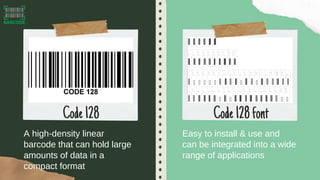
A high-density linear
barcode that can hold large
amounts of data in a
compact format
Easy to install & use and
can be integrated into a wide
range of applications
Code128 Code128font
CODE 128
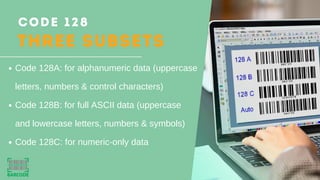
THREE SUBSETS
Code 128A: for alphanumeric data (uppercase
letters, numbers & control characters)
Code 128B: for full ASCII data (uppercase
and lowercase letters, numbers & symbols)
Code 128C: for numeric-only data
barcodelive
2 How to Generate
Code 128 Barcode
Font for Excel?
Download Code 128 Font
and extract the downloaded
folder into the
C:WindowsFonts folder
Turn on the Excel's
Developer module
Step1 Step2
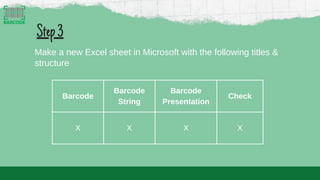
Barcode
Barcode
String
Barcode
Presentation
Check
X X X X
Step3
Make a new Excel sheet in Microsoft with the following titles &
structure
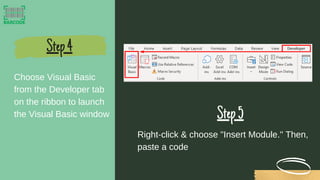
Choose Visual Basic
from the Developer tab
on the ribbon to launch
the Visual Basic window
Step4
Step5
Right-click & choose "Insert Module." Then,
paste a code
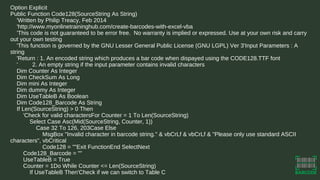
Option Explicit
Public Function Code128(SourceString As String)
'Written by Philip Treacy, Feb 2014
'http://www.myonlinetraininghub.com/create-barcodes-with-excel-vba
'This code is not guaranteed to be error free. No warranty is implied or expressed. Use at your own risk and carry
out your own testing
'This function is governed by the GNU Lesser General Public License (GNU LGPL) Ver 3'Input Parameters : A
string
'Return : 1. An encoded string which produces a bar code when dispayed using the CODE128.TTF font
' 2. An empty string if the input parameter contains invalid characters
Dim Counter As Integer
Dim CheckSum As Long
Dim mini As Integer
Dim dummy As Integer
Dim UseTableB As Boolean
Dim Code128_Barcode As String
If Len(SourceString) > 0 Then
'Check for valid charactersFor Counter = 1 To Len(SourceString)
Select Case Asc(Mid(SourceString, Counter, 1))
Case 32 To 126, 203Case Else
MsgBox "Invalid character in barcode string." & vbCrLf & vbCrLf & "Please only use standard ASCII
characters", vbCritical
Code128 = ""Exit FunctionEnd SelectNext
Code128_Barcode = ""
UseTableB = True
Counter = 1Do While Counter <= Len(SourceString)
If UseTableB Then'Check if we can switch to Table C
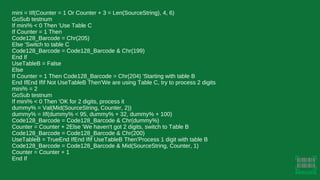
mini = IIf(Counter = 1 Or Counter + 3 = Len(SourceString), 4, 6)
GoSub testnum
If mini% < 0 Then 'Use Table C
If Counter = 1 Then
Code128_Barcode = Chr(205)
Else 'Switch to table C
Code128_Barcode = Code128_Barcode & Chr(199)
End If
UseTableB = False
Else
If Counter = 1 Then Code128_Barcode = Chr(204) 'Starting with table B
End IfEnd IfIf Not UseTableB Then'We are using Table C, try to process 2 digits
mini% = 2
GoSub testnum
If mini% < 0 Then 'OK for 2 digits, process it
dummy% = Val(Mid(SourceString, Counter, 2))
dummy% = IIf(dummy% < 95, dummy% + 32, dummy% + 100)
Code128_Barcode = Code128_Barcode & Chr(dummy%)
Counter = Counter + 2Else 'We haven't got 2 digits, switch to Table B
Code128_Barcode = Code128_Barcode & Chr(200)
UseTableB = TrueEnd IfEnd IfIf UseTableB Then'Process 1 digit with table B
Code128_Barcode = Code128_Barcode & Mid(SourceString, Counter, 1)
Counter = Counter + 1
End If
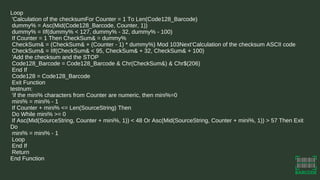
Loop
'Calculation of the checksumFor Counter = 1 To Len(Code128_Barcode)
dummy% = Asc(Mid(Code128_Barcode, Counter, 1))
dummy% = IIf(dummy% < 127, dummy% - 32, dummy% - 100)
If Counter = 1 Then CheckSum& = dummy%
CheckSum& = (CheckSum& + (Counter - 1) * dummy%) Mod 103Next'Calculation of the checksum ASCII code
CheckSum& = IIf(CheckSum& < 95, CheckSum& + 32, CheckSum& + 100)
'Add the checksum and the STOP
Code128_Barcode = Code128_Barcode & Chr(CheckSum&) & Chr$(206)
End If
Code128 = Code128_Barcode
Exit Function
testnum:
'if the mini% characters from Counter are numeric, then mini%=0
mini% = mini% - 1
If Counter + mini% <= Len(SourceString) Then
Do While mini% >= 0
If Asc(Mid(SourceString, Counter + mini%, 1)) < 48 Or Asc(Mid(SourceString, Counter + mini%, 1)) > 57 Then Exit
Do
mini% = mini% - 1
Loop
End If
Return
End Function
Step6
Insert =Code128([@Barcode]) into cell B2 ("Barcode String").
Insert =[@[Barcode String]] into cell C2 ("Barcode
Presentation").
Insert the following code in cell D2 ("Check"):
=IF(ISNUMBER(SEARCH("Â",[@[Barcode
Presentation]],1)),"Error!","")
Reopen your Excel document and add the following formulas:
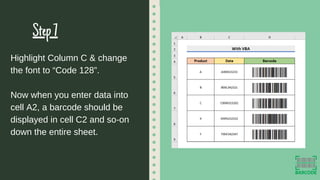
Step7
Highlight Column C & change
the font to “Code 128”.
Now when you enter data into
cell A2, a barcode should be
displayed in cell C2 and so-on
down the entire sheet.
Thank you!
barcodelive.org

Slide_code 128 barcode font for excel (1).pdf

  • 1.
  • 2.
    table of content 12 What Is Code 128 Barcode Font? How to Generate Code 128 Barcode Font for Excel?
  • 3.
    1 Code 128 BarcodeFont is a type of barcode font that allows users to create code 128 barcodes in Excel WHAT IS CODE 128 BARCODE FONT? barcodelive.org
  • 4.
    A high-density linear barcodethat can hold large amounts of data in a compact format Easy to install & use and can be integrated into a wide range of applications Code128 Code128font
  • 5.
    CODE 128 THREE SUBSETS Code128A: for alphanumeric data (uppercase letters, numbers & control characters) Code 128B: for full ASCII data (uppercase and lowercase letters, numbers & symbols) Code 128C: for numeric-only data
  • 6.
    barcodelive 2 How toGenerate Code 128 Barcode Font for Excel?
  • 7.
    Download Code 128Font and extract the downloaded folder into the C:WindowsFonts folder Turn on the Excel's Developer module Step1 Step2
  • 8.
    Barcode Barcode String Barcode Presentation Check X X XX Step3 Make a new Excel sheet in Microsoft with the following titles & structure
  • 9.
    Choose Visual Basic fromthe Developer tab on the ribbon to launch the Visual Basic window Step4 Step5 Right-click & choose "Insert Module." Then, paste a code
  • 10.
    Option Explicit Public FunctionCode128(SourceString As String) 'Written by Philip Treacy, Feb 2014 'http://www.myonlinetraininghub.com/create-barcodes-with-excel-vba 'This code is not guaranteed to be error free. No warranty is implied or expressed. Use at your own risk and carry out your own testing 'This function is governed by the GNU Lesser General Public License (GNU LGPL) Ver 3'Input Parameters : A string 'Return : 1. An encoded string which produces a bar code when dispayed using the CODE128.TTF font ' 2. An empty string if the input parameter contains invalid characters Dim Counter As Integer Dim CheckSum As Long Dim mini As Integer Dim dummy As Integer Dim UseTableB As Boolean Dim Code128_Barcode As String If Len(SourceString) > 0 Then 'Check for valid charactersFor Counter = 1 To Len(SourceString) Select Case Asc(Mid(SourceString, Counter, 1)) Case 32 To 126, 203Case Else MsgBox "Invalid character in barcode string." & vbCrLf & vbCrLf & "Please only use standard ASCII characters", vbCritical Code128 = ""Exit FunctionEnd SelectNext Code128_Barcode = "" UseTableB = True Counter = 1Do While Counter <= Len(SourceString) If UseTableB Then'Check if we can switch to Table C
  • 11.
    mini = IIf(Counter= 1 Or Counter + 3 = Len(SourceString), 4, 6) GoSub testnum If mini% < 0 Then 'Use Table C If Counter = 1 Then Code128_Barcode = Chr(205) Else 'Switch to table C Code128_Barcode = Code128_Barcode & Chr(199) End If UseTableB = False Else If Counter = 1 Then Code128_Barcode = Chr(204) 'Starting with table B End IfEnd IfIf Not UseTableB Then'We are using Table C, try to process 2 digits mini% = 2 GoSub testnum If mini% < 0 Then 'OK for 2 digits, process it dummy% = Val(Mid(SourceString, Counter, 2)) dummy% = IIf(dummy% < 95, dummy% + 32, dummy% + 100) Code128_Barcode = Code128_Barcode & Chr(dummy%) Counter = Counter + 2Else 'We haven't got 2 digits, switch to Table B Code128_Barcode = Code128_Barcode & Chr(200) UseTableB = TrueEnd IfEnd IfIf UseTableB Then'Process 1 digit with table B Code128_Barcode = Code128_Barcode & Mid(SourceString, Counter, 1) Counter = Counter + 1 End If
  • 12.
    Loop 'Calculation of thechecksumFor Counter = 1 To Len(Code128_Barcode) dummy% = Asc(Mid(Code128_Barcode, Counter, 1)) dummy% = IIf(dummy% < 127, dummy% - 32, dummy% - 100) If Counter = 1 Then CheckSum& = dummy% CheckSum& = (CheckSum& + (Counter - 1) * dummy%) Mod 103Next'Calculation of the checksum ASCII code CheckSum& = IIf(CheckSum& < 95, CheckSum& + 32, CheckSum& + 100) 'Add the checksum and the STOP Code128_Barcode = Code128_Barcode & Chr(CheckSum&) & Chr$(206) End If Code128 = Code128_Barcode Exit Function testnum: 'if the mini% characters from Counter are numeric, then mini%=0 mini% = mini% - 1 If Counter + mini% <= Len(SourceString) Then Do While mini% >= 0 If Asc(Mid(SourceString, Counter + mini%, 1)) < 48 Or Asc(Mid(SourceString, Counter + mini%, 1)) > 57 Then Exit Do mini% = mini% - 1 Loop End If Return End Function
  • 13.
    Step6 Insert =Code128([@Barcode]) intocell B2 ("Barcode String"). Insert =[@[Barcode String]] into cell C2 ("Barcode Presentation"). Insert the following code in cell D2 ("Check"): =IF(ISNUMBER(SEARCH("Â",[@[Barcode Presentation]],1)),"Error!","") Reopen your Excel document and add the following formulas:
  • 14.
    Step7 Highlight Column C& change the font to “Code 128”. Now when you enter data into cell A2, a barcode should be displayed in cell C2 and so-on down the entire sheet.
  • 15.