Simplify360 for
Community Managers
Simplify360 is the
SOCIAL BUSINESS INTELLIGENCE PLATFORM
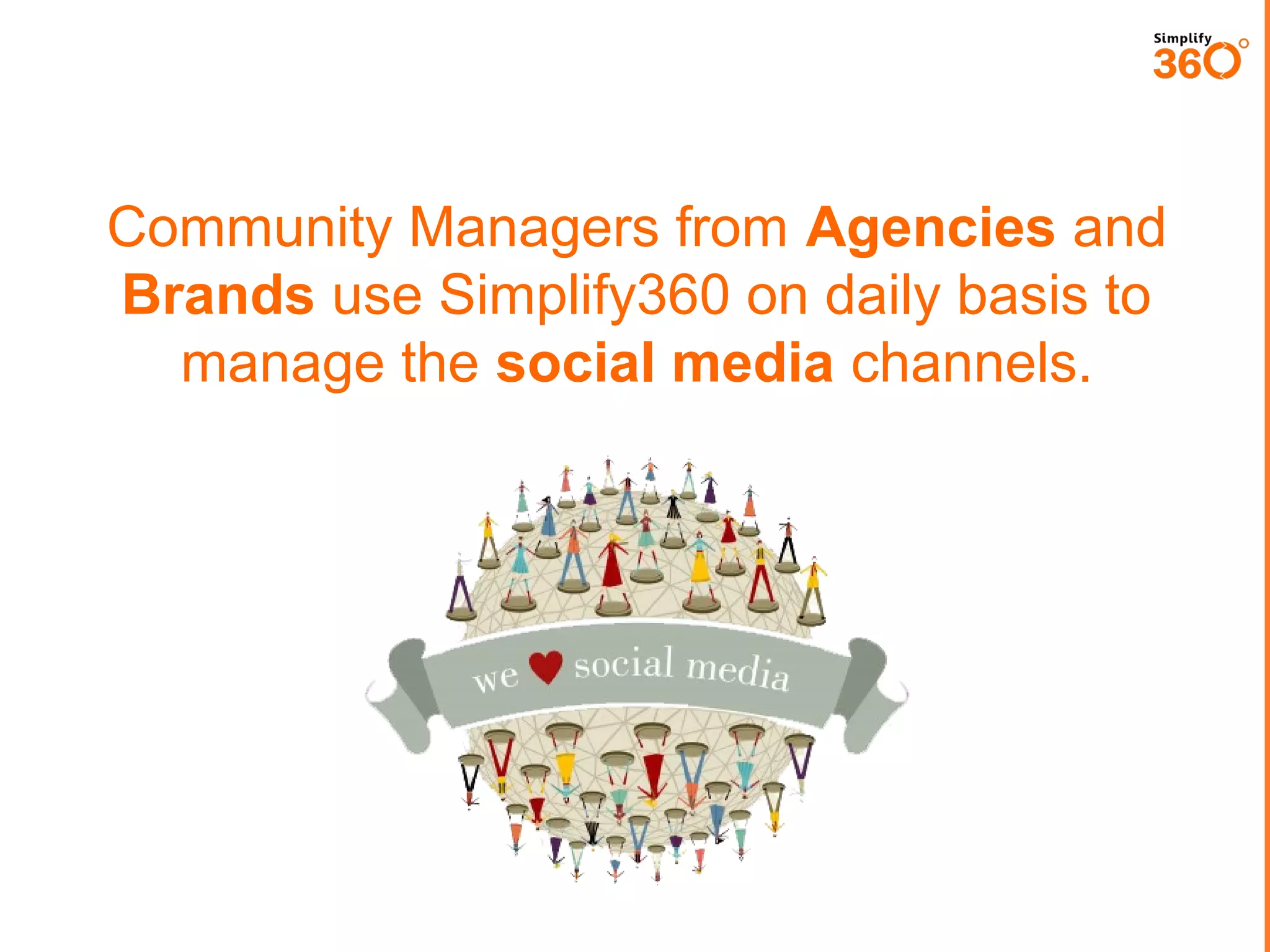
Community Managers from Agencies and
Brands use Simplify360 on daily basis to
manage the social media channels.
What does Simplify360 have
For Community Manager
Functional Area One
Publishing and Engaging in
Social Channels
Simplify360 provides all in one
Social Media Management functionalities.


Social Media Engagement Consoles for streaming messages from
different sources and responding from the console itself.



Social Media Publishing sections for posting and scheduling
messages to multiple social channels and view reports.



Community managers can have better control over out-going
messages with STOP words.



Complete Social Media Analytics reporting for measuring
performance on Facebook, Twitter and LinkedIn.



Community managers can use the system to handle many channels
from one single platform.
Wide variety of ways to publish content
for Community Manager


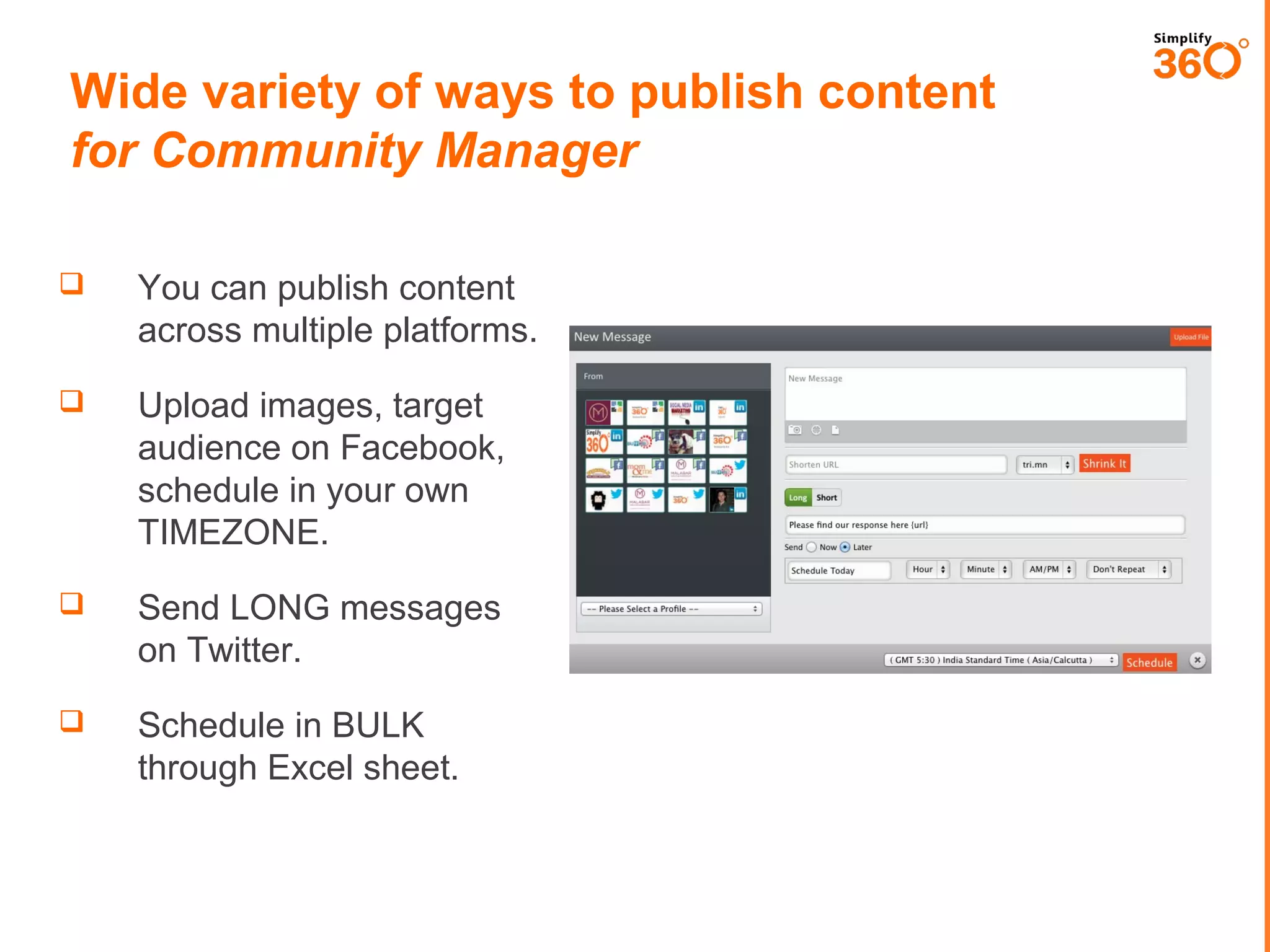
You can publish content
across multiple platforms.



Upload images, target
audience on Facebook,
schedule in your own
TIMEZONE.



Send LONG messages
on Twitter.



Schedule in BULK
through Excel sheet.
Intelligence control over content
for Community Manager



Create response
template for messages
which are frequently sent.



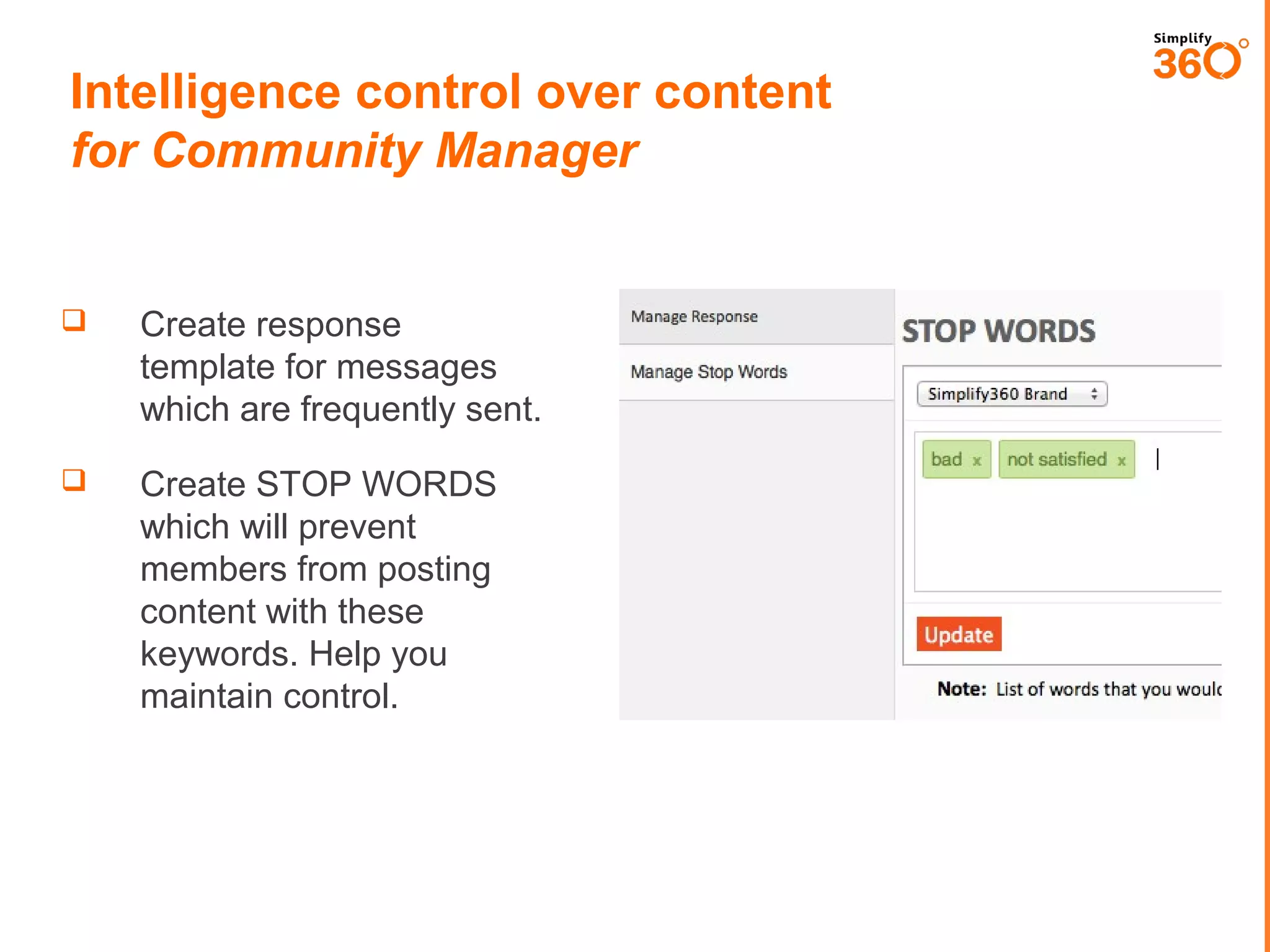
Create STOP WORDS
which will prevent
members from posting
content with these
keywords. Help you
maintain control.
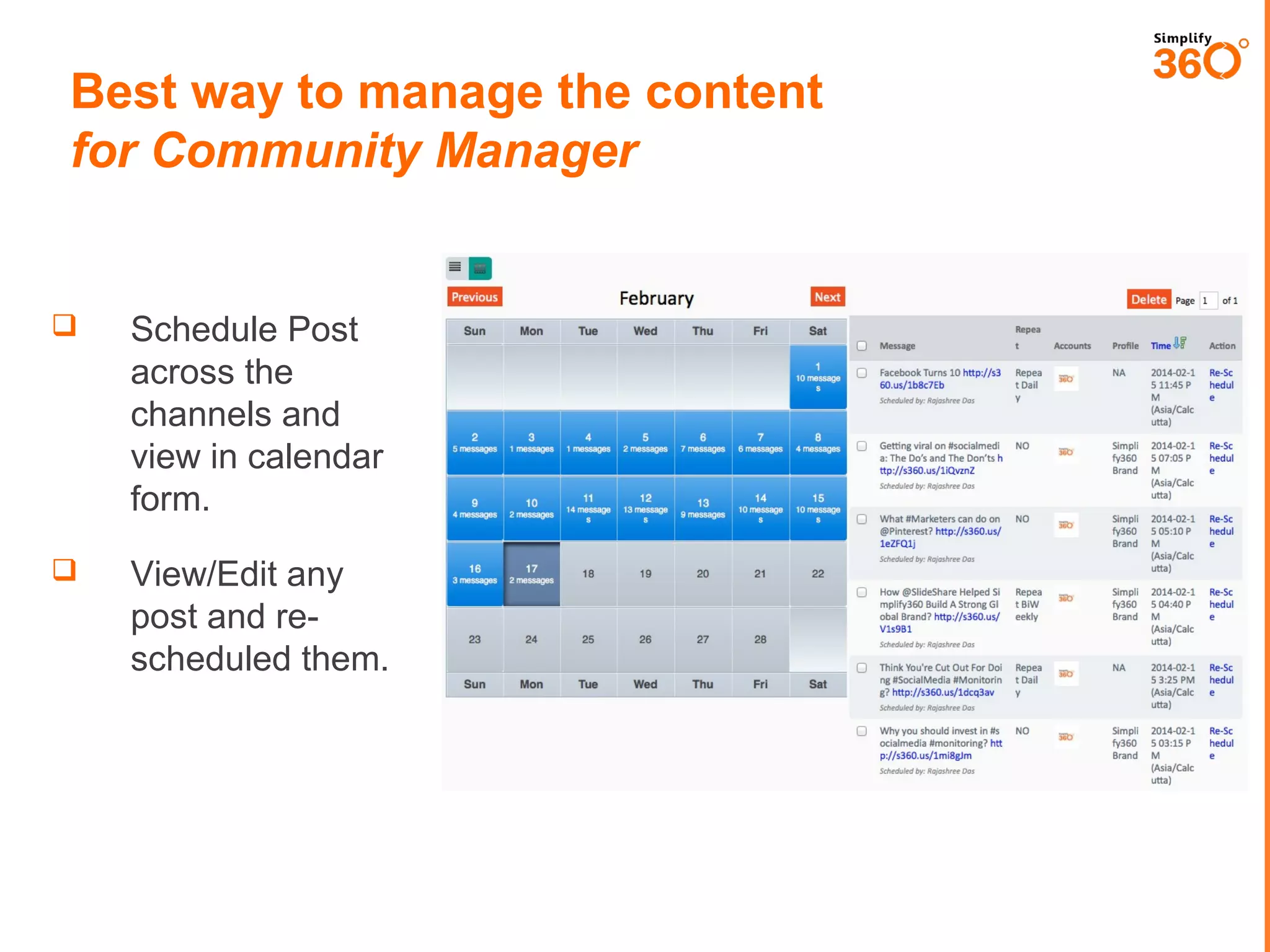
Best way to manage the content
for Community Manager



Schedule Post
across the
channels and
view in calendar
form.



View/Edit any
post and rescheduled them.
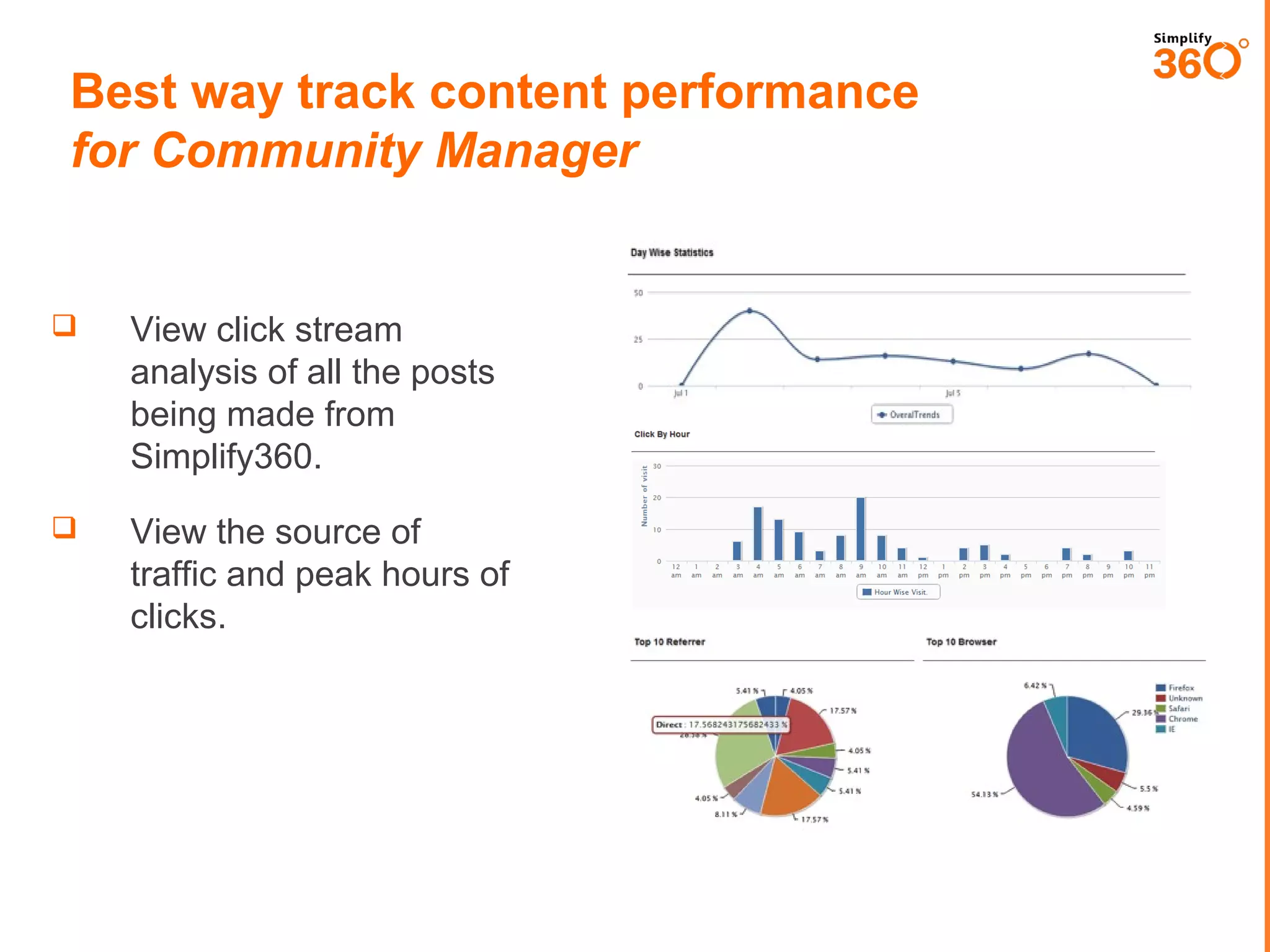
Best way track content performance
for Community Manager



View click stream
analysis of all the posts
being made from
Simplify360.



View the source of traffic
and peak hours of
clicks.
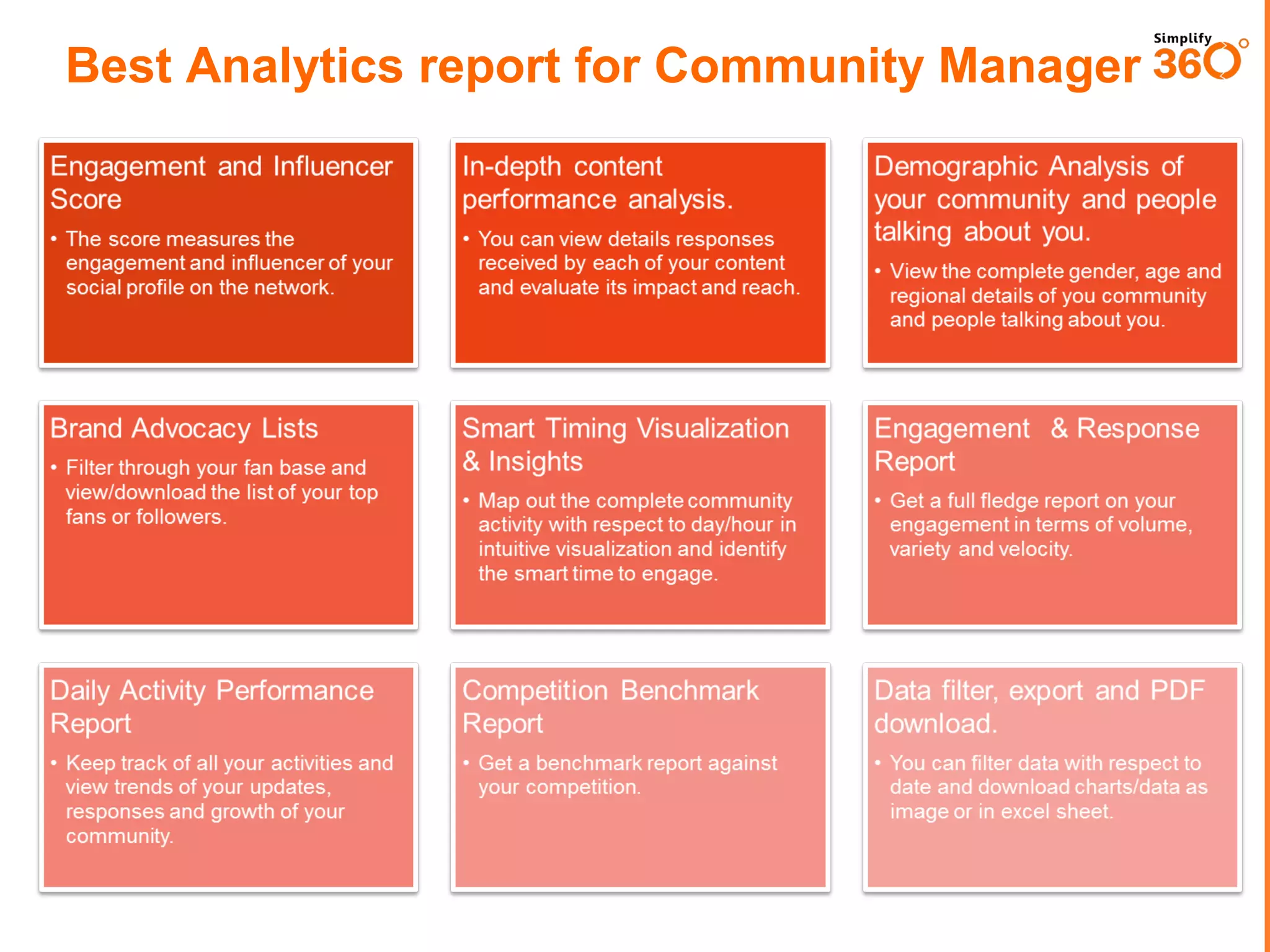
Best Analytics report for Community Manager
Engagement and Influencer
Score

In-depth content
performance analysis.

• The score measures the
engagement and influencer of your
social profile on the network.

• You can view details responses
received by each of your content
and evaluate its impact and reach.

Brand Advocacy Lists

Smart Timing Visualization
& Insights

Engagement & Response
Report

• Map out the complete community
activity with respect to day/hour in
intuitive visualization and identify
the smart time to engage.

• Get a full fledge report on your
engagement in terms of volume,
variety and velocity.

Daily Activity Performance
Report

Competition Benchmark
Report

Data filter, export and PDF
download.

• Keep track of all your activities and
view trends of your updates,
responses and growth of your
community.

• Get a benchmark report against
your competition.

• You can filter data with respect to
date and download charts/data as
image or in excel sheet.

• Filter through your fan base and
view/download the list of your top
fans or followers.

Demographic Analysis of
your community and people
talking about you.
• View the complete gender, age and
regional details of you community
and people talking about you.
Functional Area Two
Monitoring & ORM
How can Simplify360 help in your ORM?
 You

can track complaints about your brands in all the
reviews site and on social networks.

 You

can segment your complaints automatically according to
products types or department wise.

 You

can assign complaints to your team members with
priority options.

 You

can set automated workflow to segment and assign
complaints.

 Agents

can respond to messages from the system itself and
close the case.

 While

closing a case, agent can also add extra notes for
future reference.
GETTING STARTED WITH KEYWORD
TRACKING.
www.simplify360.com
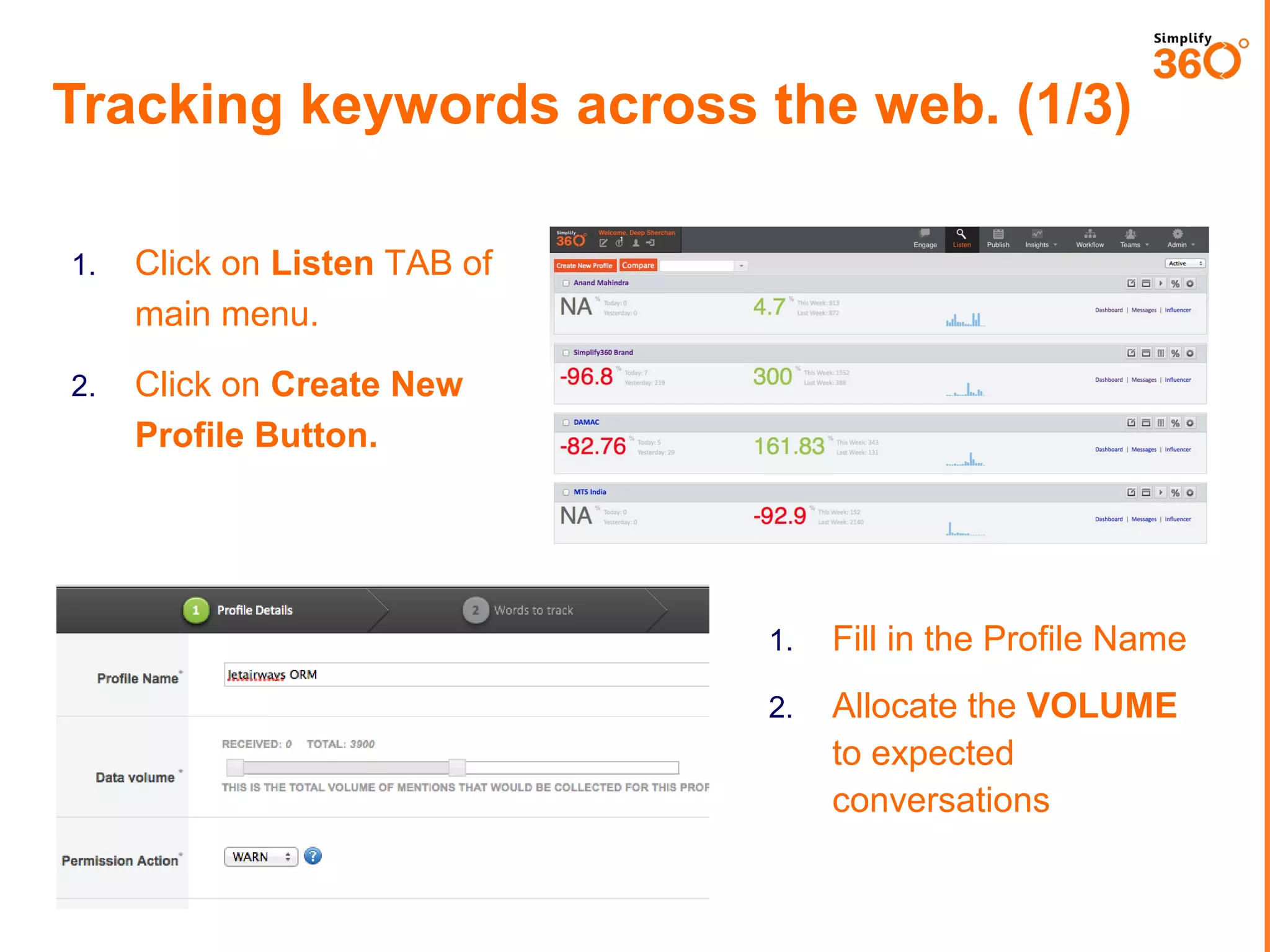
Tracking keywords across the web. (1/3)
1.

Click on Listen TAB of
main menu.

2.

Click on Create New
Profile Button.

1.

Fill in the Profile Name

2.

Allocate the VOLUME
to expected
conversations
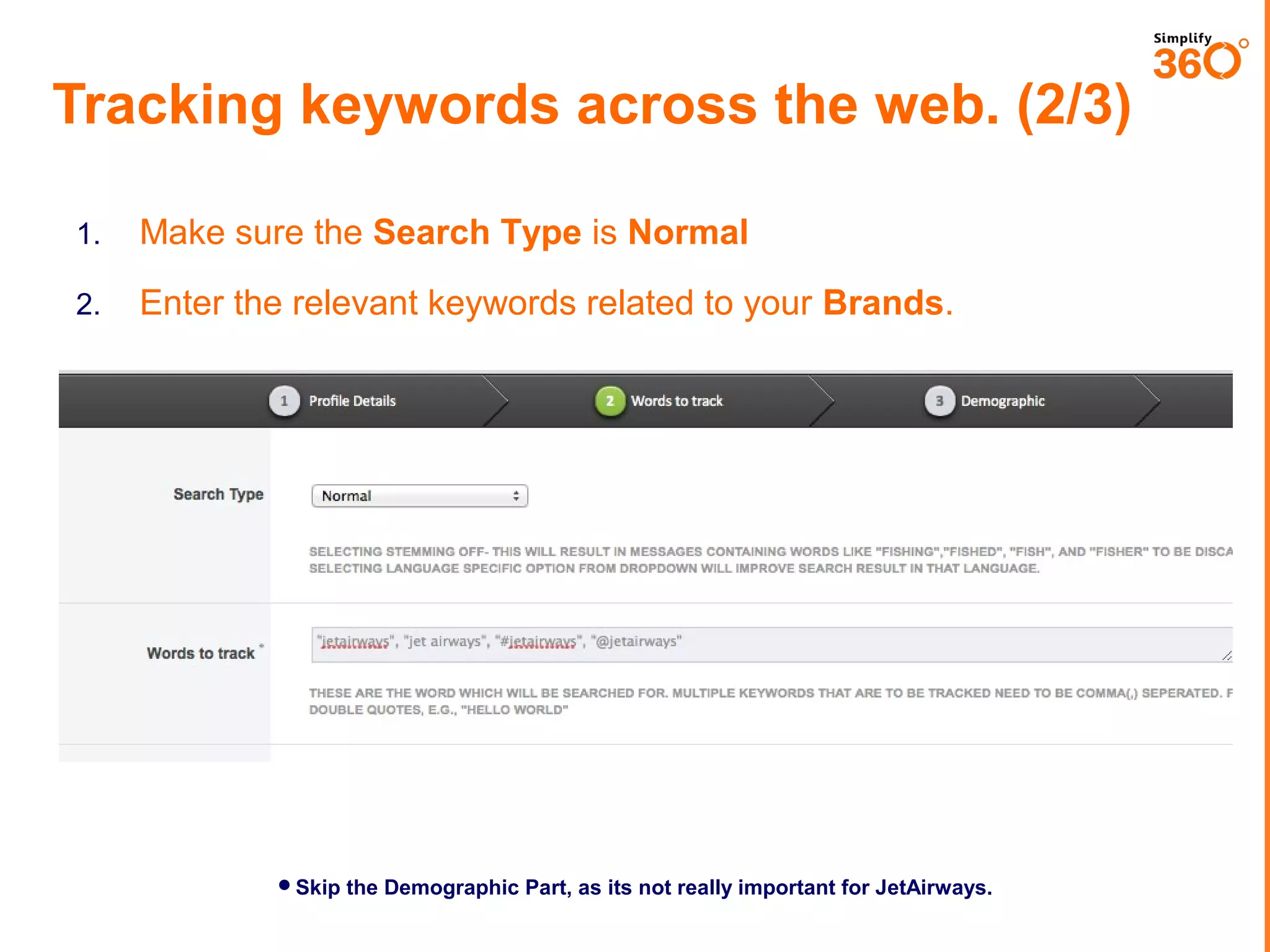
Tracking keywords across the web. (2/3)
1.

Make sure the Search Type is Normal

2.

Enter the relevant keywords related to your Brands.

Skip the Demographic Part, as its not really important for JetAirways.
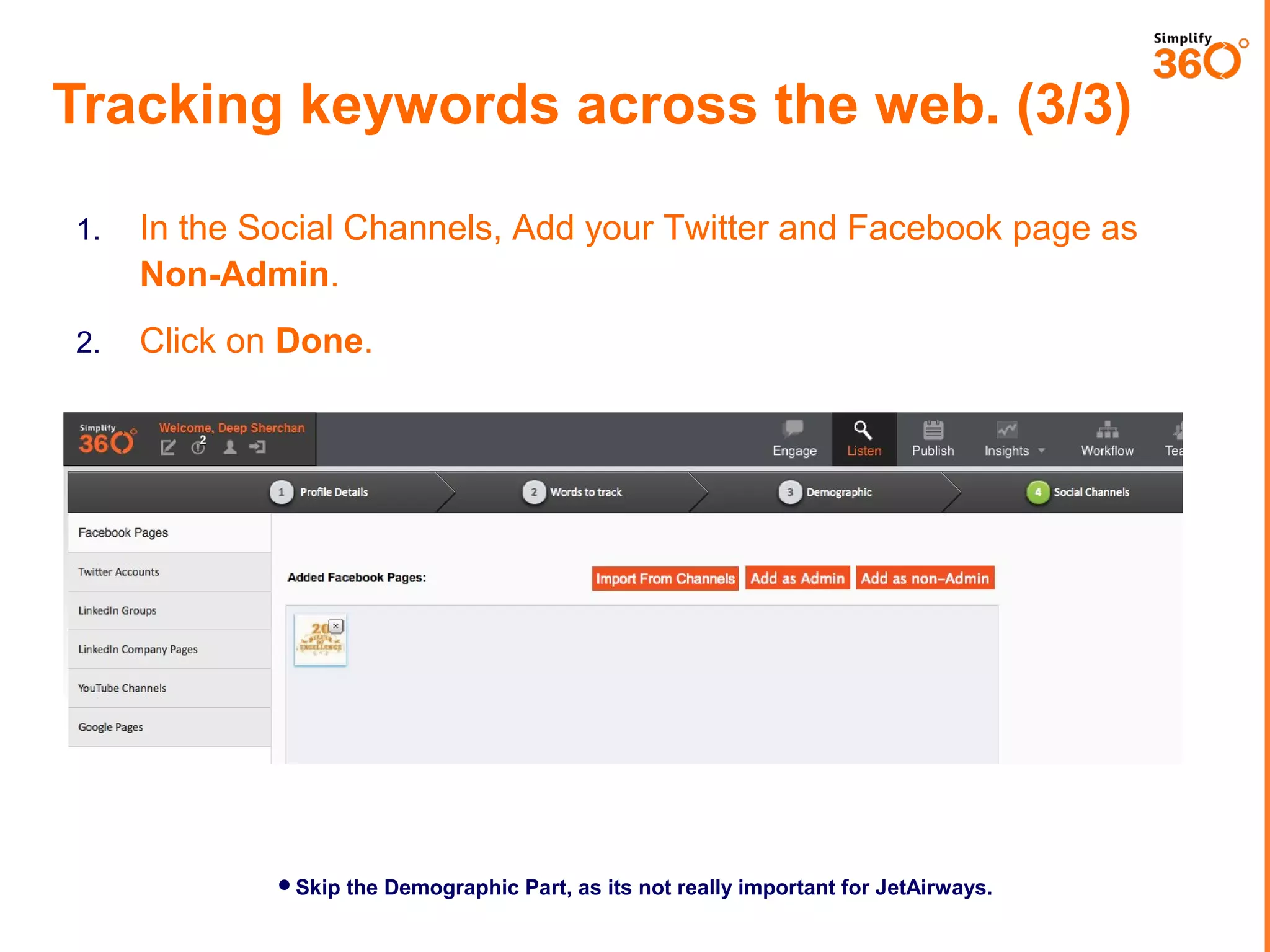
Tracking keywords across the web. (3/3)
1.

In the Social Channels, Add your Twitter and Facebook page as
Non-Admin.

2.

Click on Done.

Skip the Demographic Part, as its not really important for JetAirways.
SEGMENTING YOUR MESSAGES INTO
MULTIPLE SEGMENTS.
www.simplify360.com
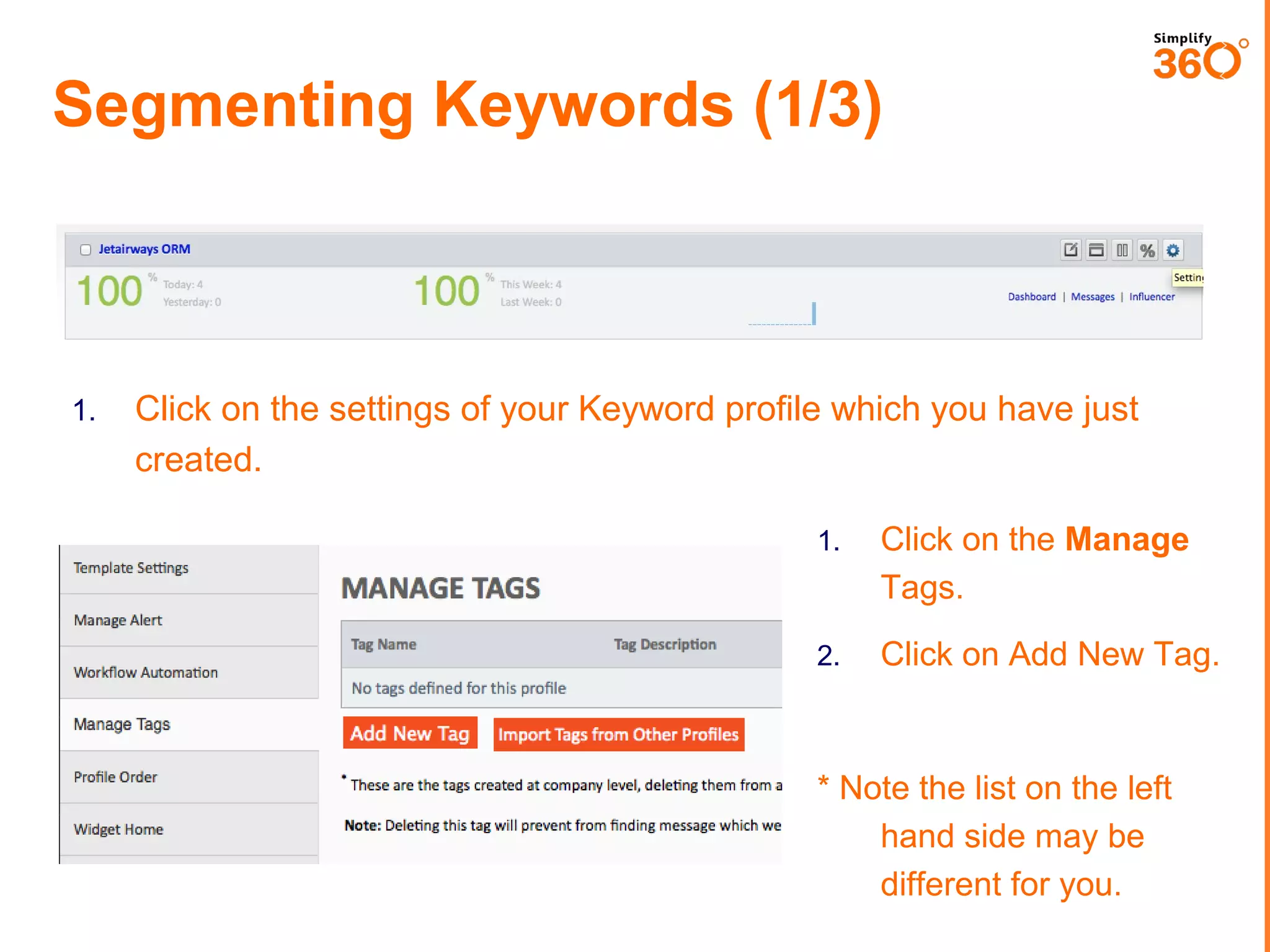
Segmenting Keywords (1/3)

1.

Click on the settings of your Keyword profile which you have just
created.
1.

Click on the Manage
Tags.

2.

Click on Add New Tag.

* Note the list on the left
hand side may be different
for you.
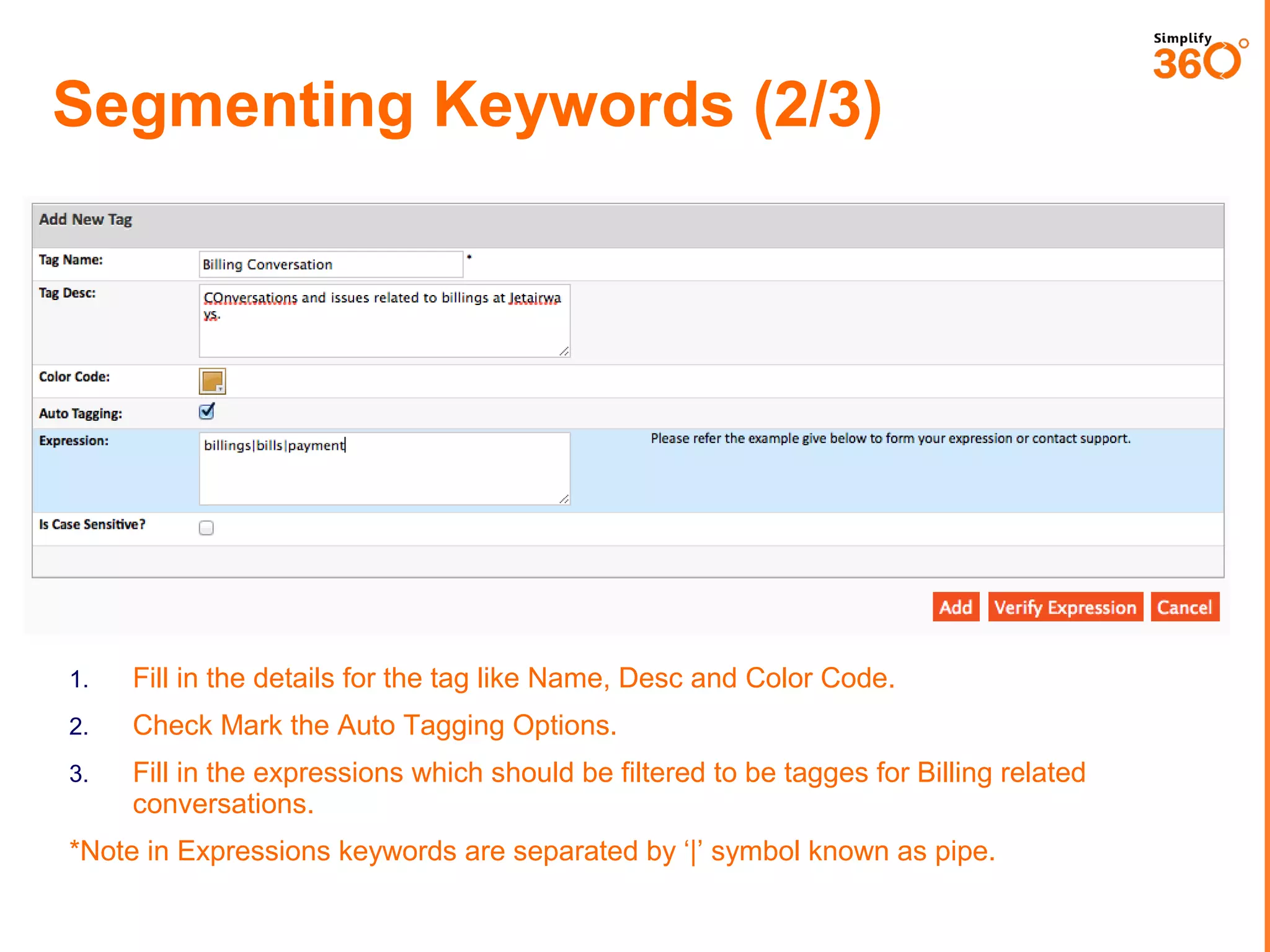
Segmenting Keywords (2/3)

1.

Fill in the details for the tag like Name, Desc and Color Code.

2.

Check Mark the Auto Tagging Options.

3.

Fill in the expressions which should be filtered to be tagges for Billing related
conversations.

*Note in Expressions keywords are separated by ‘|’ symbol known as pipe.
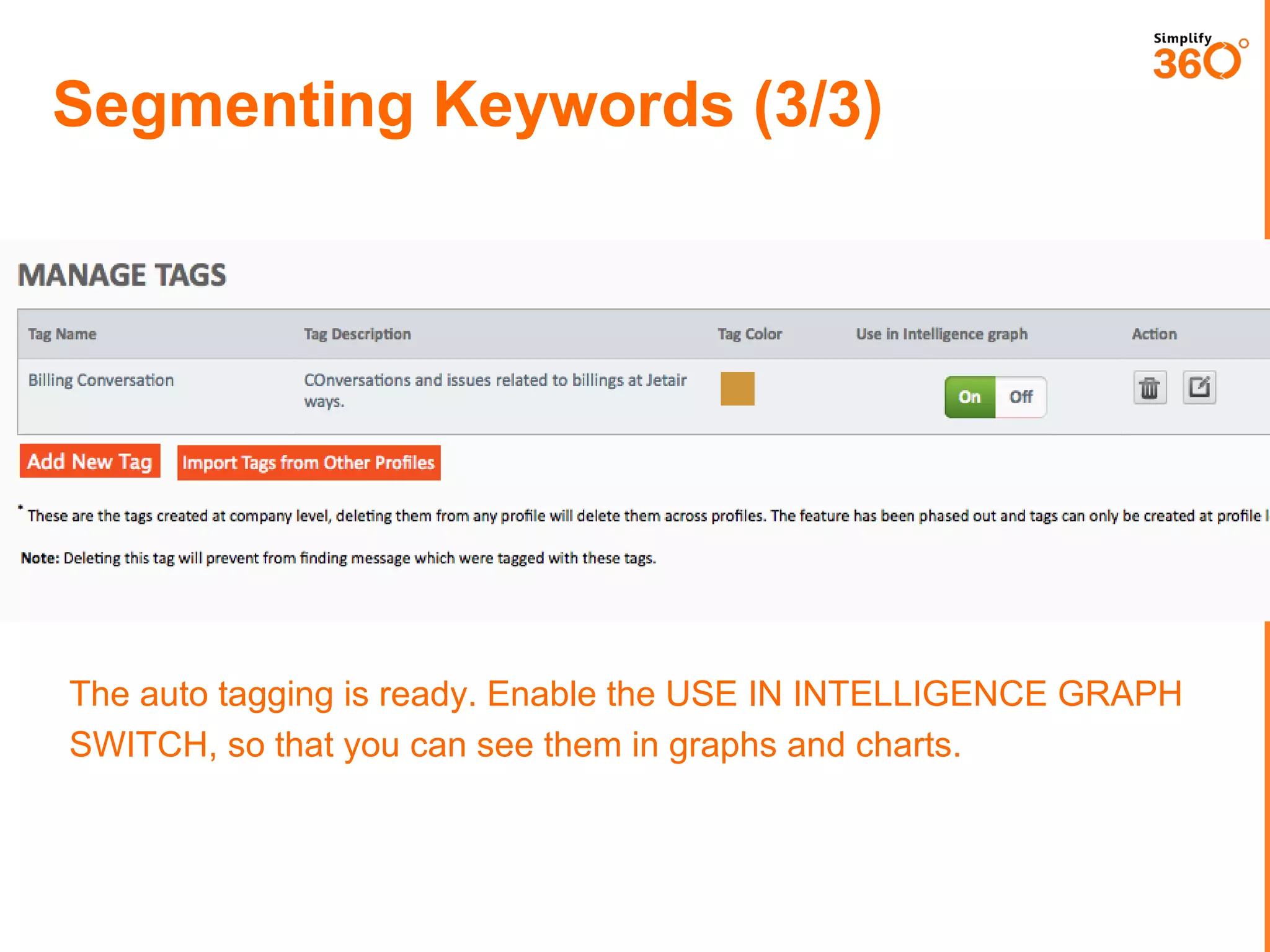
Segmenting Keywords (3/3)

The auto tagging is ready. Enable the USE IN INTELLIGENCE GRAPH
SWITCH, so that you can see them in graphs and charts.
ASSIGNING TASKS TO TEAM
MEMBERS
www.simplify360.com
BEFORE YOU BEGIN HERE,
MAKE SURE TO ADD NEW USERS
AS MEMBER IN YOUR ACCOUNT.
GOTO MANAGE USERS IN ADMIN SECTION FOR SETTING THIS UP.
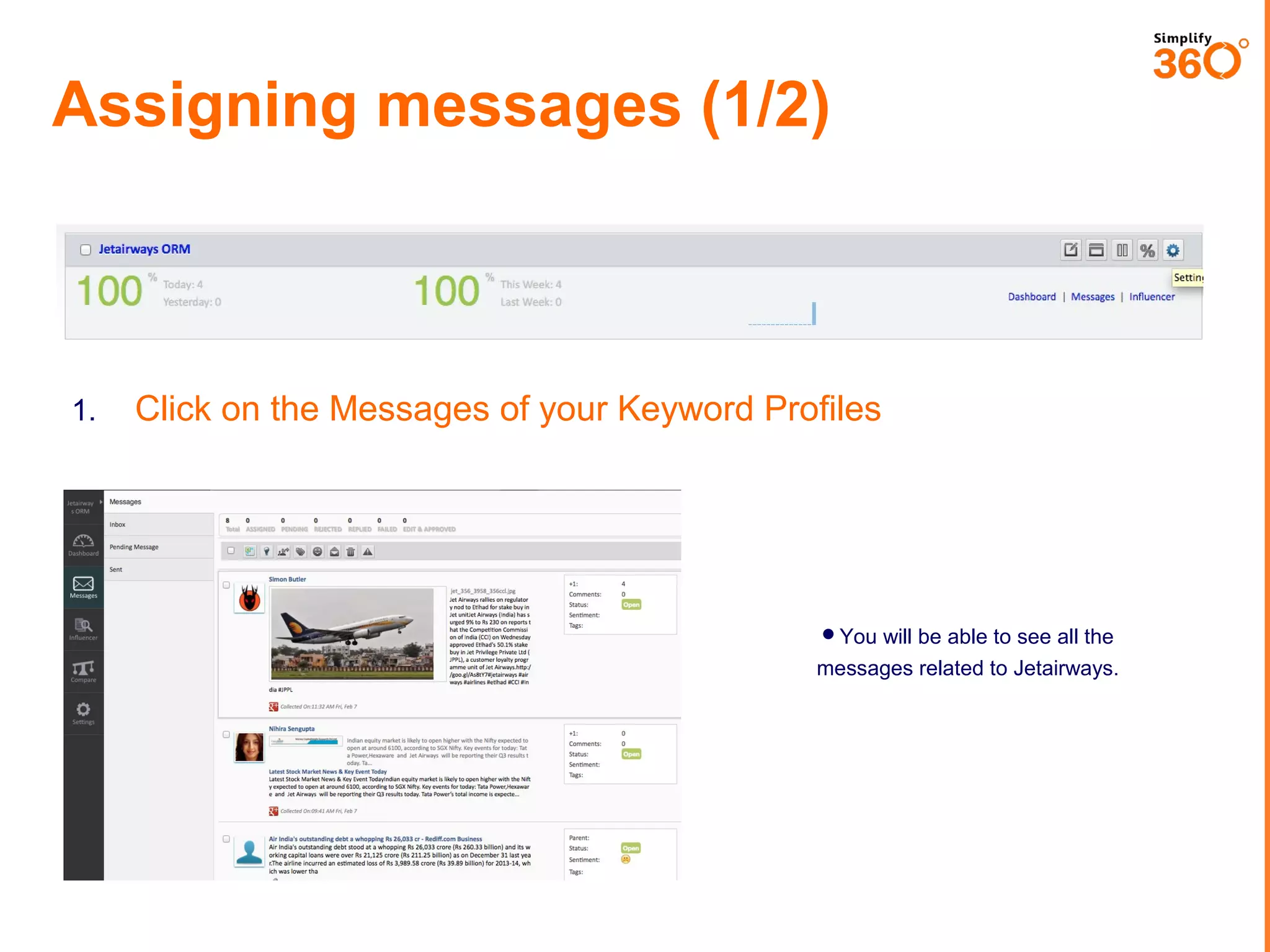
Assigning messages (1/2)

1.

Click on the Messages of your Keyword Profiles

You will be able to see all the

messages related to Jetairways.
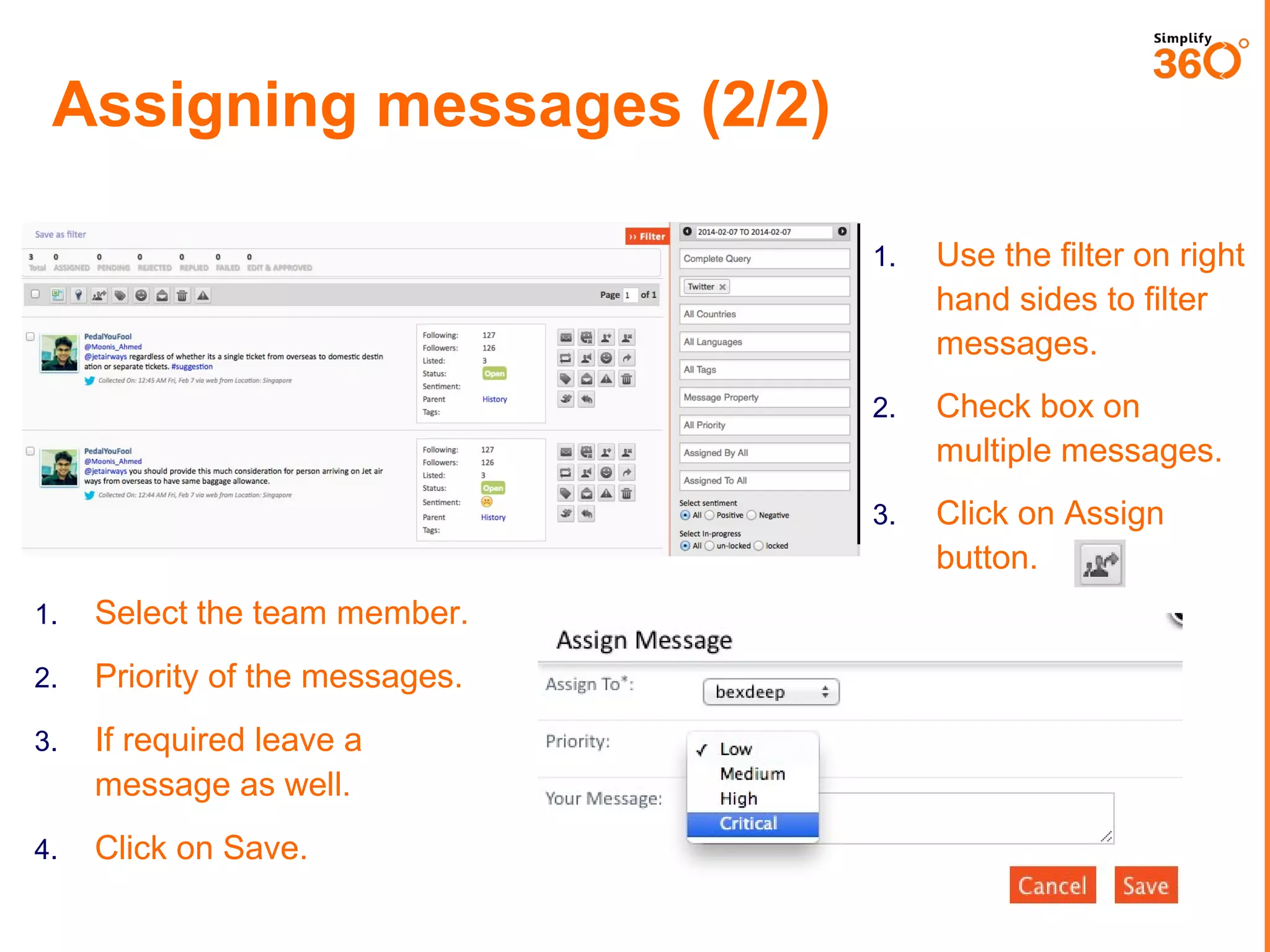
Assigning messages (2/2)
1.

2.

Select the team member.

2.

Priority of the messages.

3.

If required leave a
message as well.

4.

Click on Save.

Check box on
multiple messages.

3.

1.

Use the filter on right
hand sides to filter
messages.

Click on Assign
button.
RESPONDING TO MESSAGES
www.simplify360.com
Responding to Messages (1/2)

1.

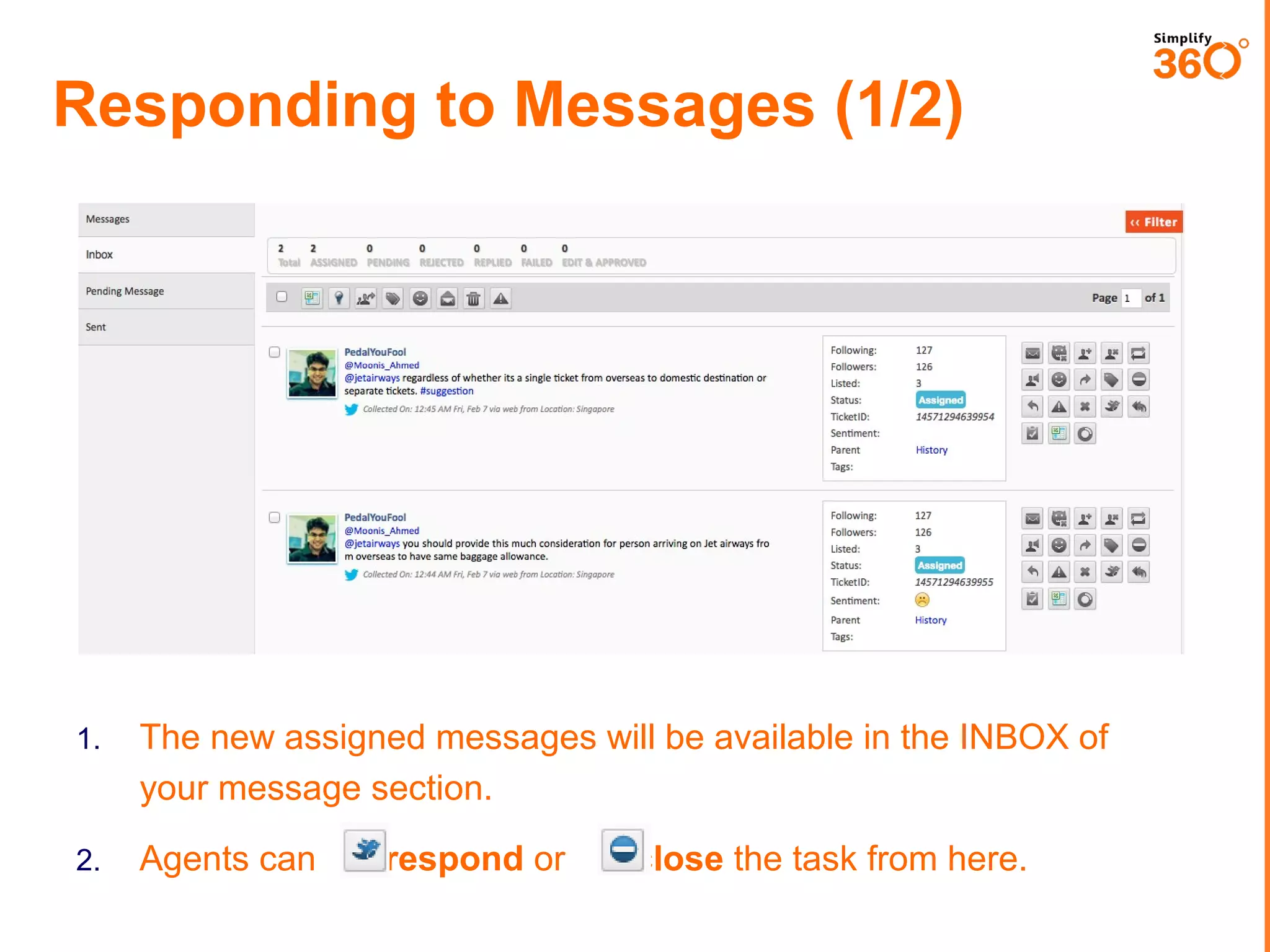
The new assigned messages will be available in the INBOX of
your message section.

2.

Agents can

respond or

close the task from here.
Responding to Messages (2/2)

1.

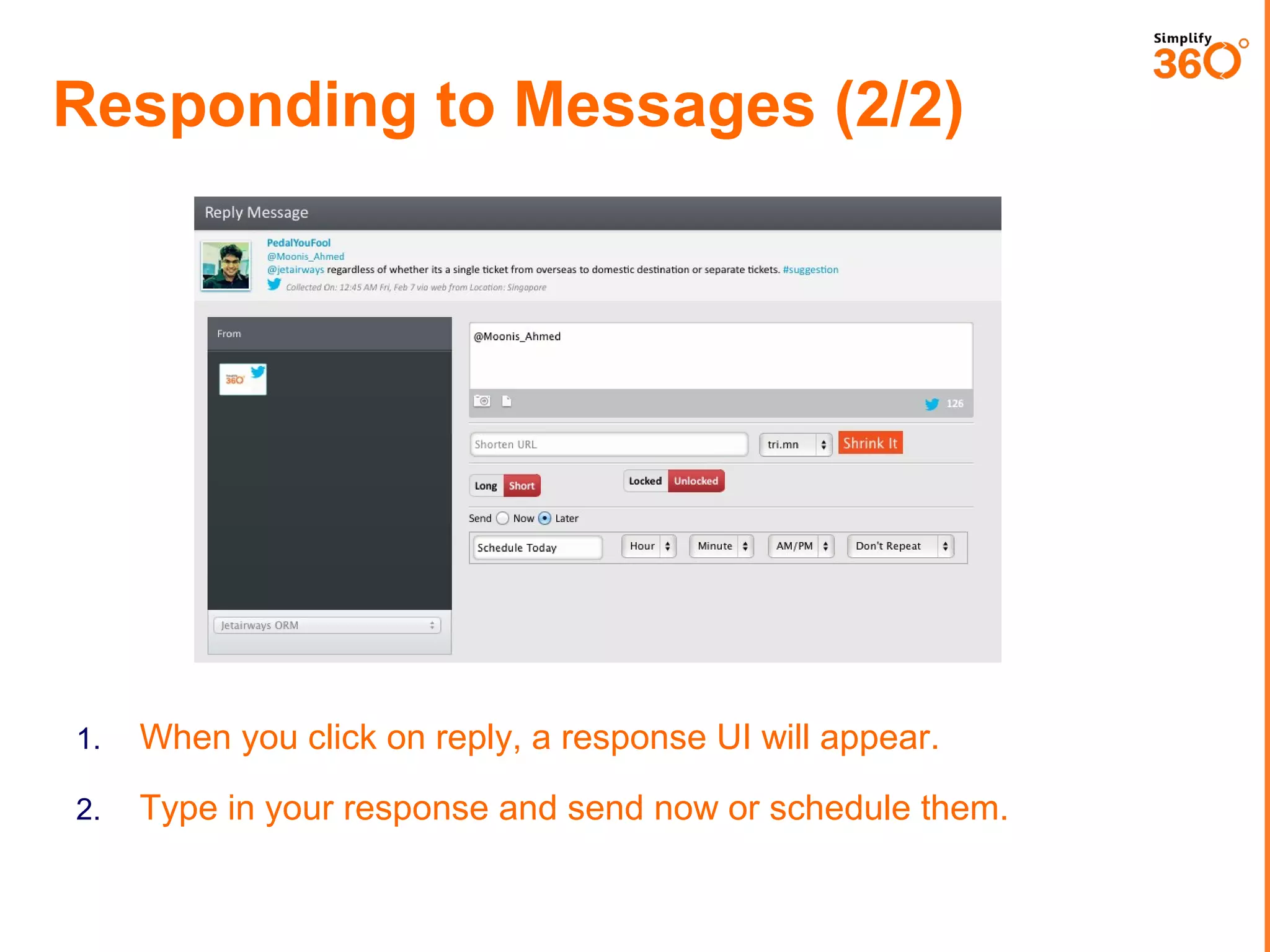
When you click on reply, a response UI will appear.

2.

Type in your response and send now or schedule them.
CLOSING A CASE
www.simplify360.com
Closing a Task

1.

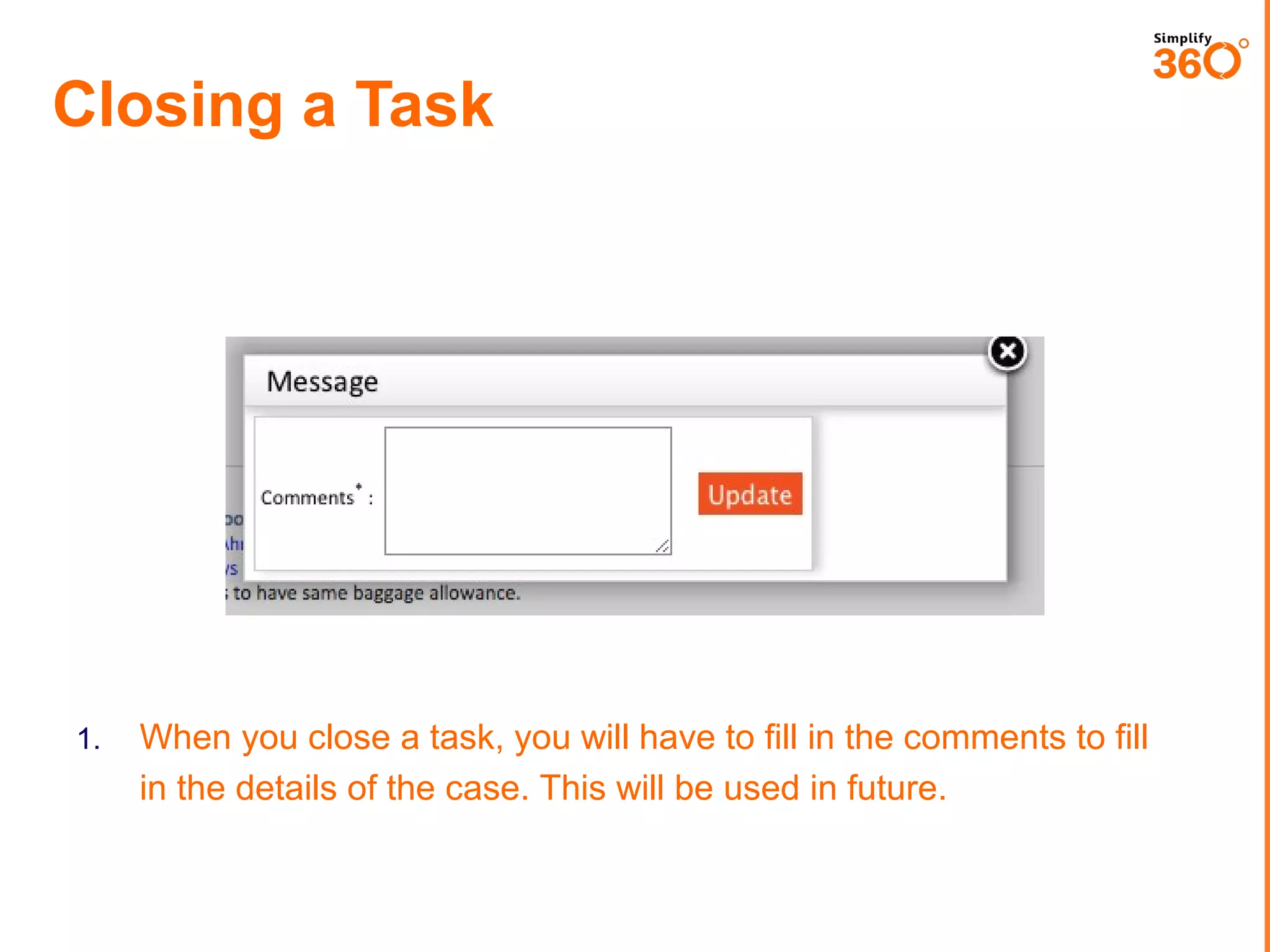
When you close a task, you will have to fill in the comments to fill
in the details of the case. This will be used in future.
Leaders use Simplify360
Global Clients

Resellers / Partners
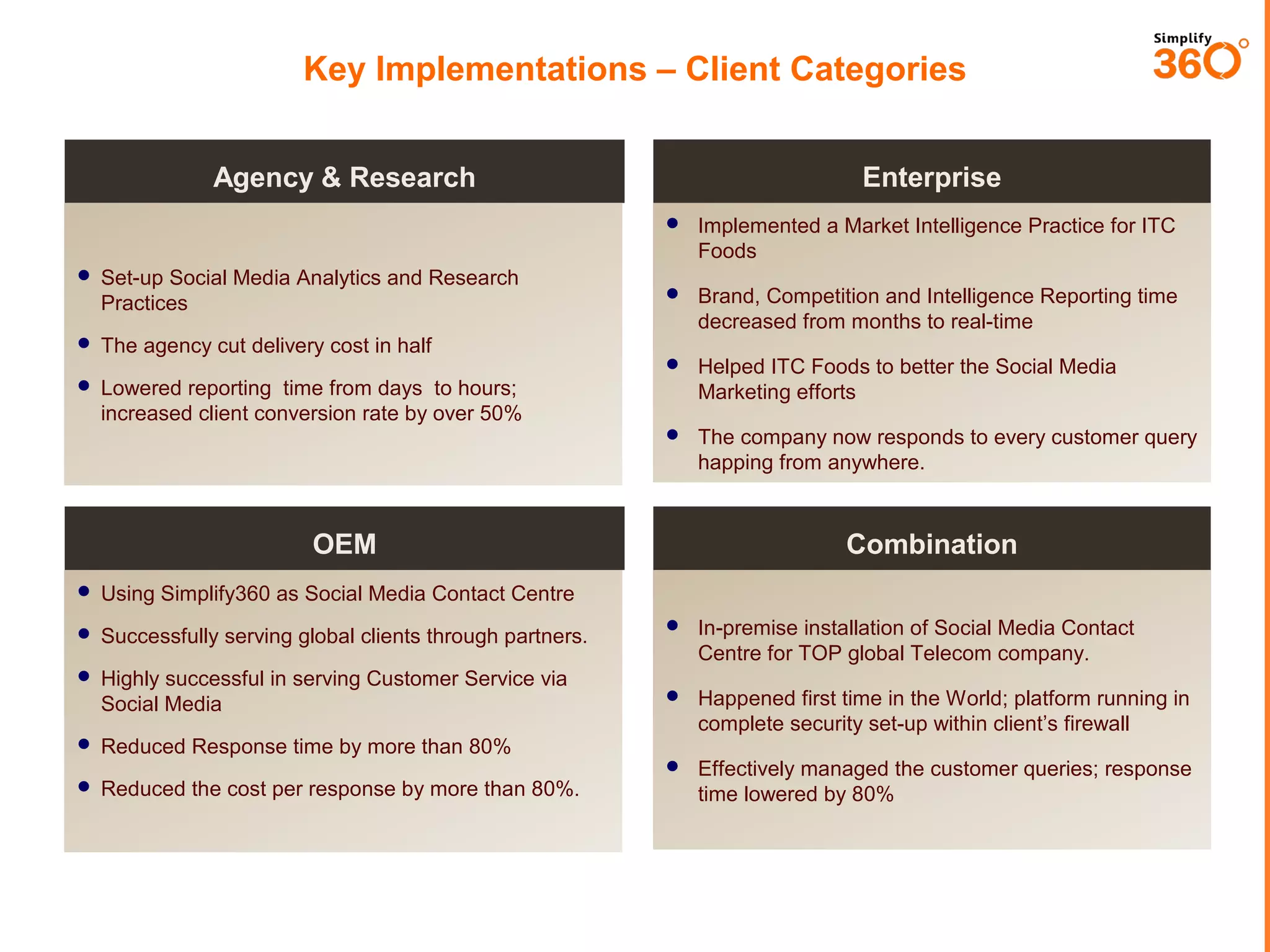
Key Implementations – Client Categories
Enterprise

Agency & Research




Brand, Competition and Intelligence Reporting time
decreased from months to real-time



Helped ITC Foods to better the Social Media
Marketing efforts



 Set-up Social Media Analytics and Research Practices

Implemented a Market Intelligence Practice for ITC
Foods

The company now responds to every customer query
happing from anywhere.

 The agency cut delivery cost in half
 Lowered reporting time from days to hours;

increased client conversion rate by over 50%

OEM

Combination

 Using Simplify360 as Social Media Contact Centre


In-premise installation of Social Media Contact
Centre for TOP global Telecom company.



Happened first time in the World; platform running in
complete security set-up within client’s firewall



 Successfully serving global clients through partners.

Effectively managed the customer queries; response
time lowered by 80%

 Highly successful in serving Customer Service via

Social Media
 Reduced Response time by more than 80%
 Reduced the cost per response by more than 80%.
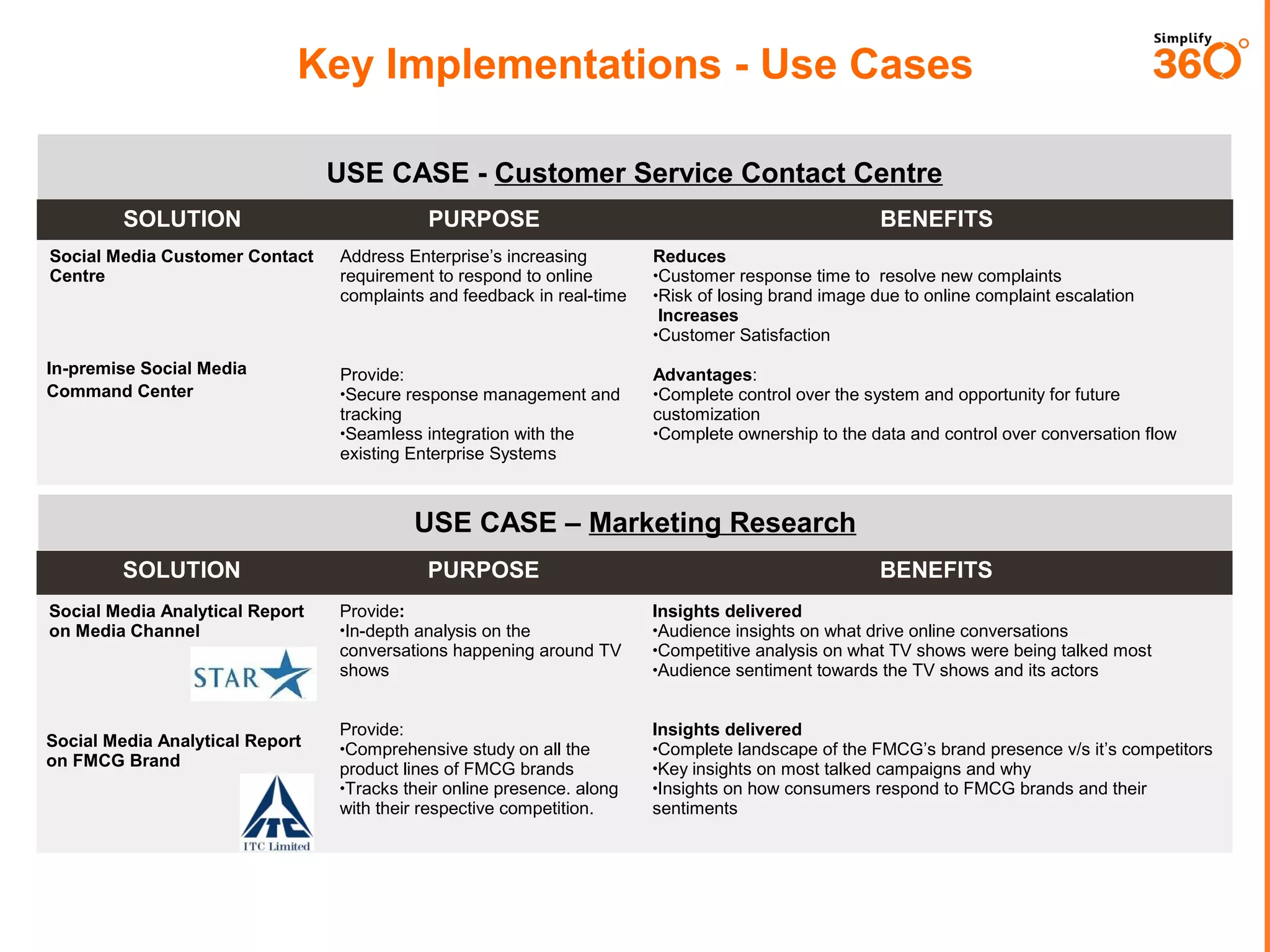
Key Implementations - Use Cases
USE CASE - Customer Service Contact Centre
SOLUTION

PURPOSE

BENEFITS

Social Media Customer Contact
Centre

Address Enterprise’s increasing
requirement to respond to online
complaints and feedback in real-time

Reduces
•Customer response time to resolve new complaints
•Risk of losing brand image due to online complaint escalation
Increases
•Customer Satisfaction

In-premise Social Media
Command Center

Provide:
•Secure response management and
tracking
•Seamless integration with the
existing Enterprise Systems

Advantages:
•Complete control over the system and opportunity for future
customization
•Complete ownership to the data and control over conversation flow

USE CASE – Marketing Research
SOLUTION

PURPOSE

Social Media Analytical Report
on Media Channel

Provide:
•In-depth analysis on the
conversations happening around TV
shows

Insights delivered
•Audience insights on what drive online conversations
•Competitive analysis on what TV shows were being talked most
•Audience sentiment towards the TV shows and its actors

Provide:
•Comprehensive study on all the
product lines of FMCG brands
•Tracks their online presence. along
with their respective competition.

Insights delivered
•Complete landscape of the FMCG’s brand presence v/s it’s competitors
•Key insights on most talked campaigns and why
•Insights on how consumers respond to FMCG brands and their
sentiments

Social Media Analytical Report
on FMCG Brand

BENEFITS
THANK YOU
CONNECT WITH US
Simplify360 for community managers

Simplify360 for community managers

  • 1.
  • 2.
    Simplify360 is the SOCIALBUSINESS INTELLIGENCE PLATFORM
  • 3.
    Community Managers fromAgencies and Brands use Simplify360 on daily basis to manage the social media channels.
  • 4.
    What does Simplify360have For Community Manager
  • 5.
    Functional Area One Publishingand Engaging in Social Channels
  • 6.
    Simplify360 provides allin one Social Media Management functionalities.  Social Media Engagement Consoles for streaming messages from different sources and responding from the console itself.  Social Media Publishing sections for posting and scheduling messages to multiple social channels and view reports.  Community managers can have better control over out-going messages with STOP words.  Complete Social Media Analytics reporting for measuring performance on Facebook, Twitter and LinkedIn.  Community managers can use the system to handle many channels from one single platform.
  • 7.
    Wide variety ofways to publish content for Community Manager  You can publish content across multiple platforms.  Upload images, target audience on Facebook, schedule in your own TIMEZONE.  Send LONG messages on Twitter.  Schedule in BULK through Excel sheet.
  • 8.
    Intelligence control overcontent for Community Manager  Create response template for messages which are frequently sent.  Create STOP WORDS which will prevent members from posting content with these keywords. Help you maintain control.
  • 9.
    Best way tomanage the content for Community Manager  Schedule Post across the channels and view in calendar form.  View/Edit any post and rescheduled them.
  • 10.
    Best way trackcontent performance for Community Manager  View click stream analysis of all the posts being made from Simplify360.  View the source of traffic and peak hours of clicks.
  • 11.
    Best Analytics reportfor Community Manager Engagement and Influencer Score In-depth content performance analysis. • The score measures the engagement and influencer of your social profile on the network. • You can view details responses received by each of your content and evaluate its impact and reach. Brand Advocacy Lists Smart Timing Visualization & Insights Engagement & Response Report • Map out the complete community activity with respect to day/hour in intuitive visualization and identify the smart time to engage. • Get a full fledge report on your engagement in terms of volume, variety and velocity. Daily Activity Performance Report Competition Benchmark Report Data filter, export and PDF download. • Keep track of all your activities and view trends of your updates, responses and growth of your community. • Get a benchmark report against your competition. • You can filter data with respect to date and download charts/data as image or in excel sheet. • Filter through your fan base and view/download the list of your top fans or followers. Demographic Analysis of your community and people talking about you. • View the complete gender, age and regional details of you community and people talking about you.
  • 12.
  • 13.
    How can Simplify360help in your ORM?  You can track complaints about your brands in all the reviews site and on social networks.  You can segment your complaints automatically according to products types or department wise.  You can assign complaints to your team members with priority options.  You can set automated workflow to segment and assign complaints.  Agents can respond to messages from the system itself and close the case.  While closing a case, agent can also add extra notes for future reference.
  • 14.
    GETTING STARTED WITHKEYWORD TRACKING. www.simplify360.com
  • 15.
    Tracking keywords acrossthe web. (1/3) 1. Click on Listen TAB of main menu. 2. Click on Create New Profile Button. 1. Fill in the Profile Name 2. Allocate the VOLUME to expected conversations
  • 16.
    Tracking keywords acrossthe web. (2/3) 1. Make sure the Search Type is Normal 2. Enter the relevant keywords related to your Brands. Skip the Demographic Part, as its not really important for JetAirways.
  • 17.
    Tracking keywords acrossthe web. (3/3) 1. In the Social Channels, Add your Twitter and Facebook page as Non-Admin. 2. Click on Done. Skip the Demographic Part, as its not really important for JetAirways.
  • 18.
    SEGMENTING YOUR MESSAGESINTO MULTIPLE SEGMENTS. www.simplify360.com
  • 19.
    Segmenting Keywords (1/3) 1. Clickon the settings of your Keyword profile which you have just created. 1. Click on the Manage Tags. 2. Click on Add New Tag. * Note the list on the left hand side may be different for you.
  • 20.
    Segmenting Keywords (2/3) 1. Fillin the details for the tag like Name, Desc and Color Code. 2. Check Mark the Auto Tagging Options. 3. Fill in the expressions which should be filtered to be tagges for Billing related conversations. *Note in Expressions keywords are separated by ‘|’ symbol known as pipe.
  • 21.
    Segmenting Keywords (3/3) Theauto tagging is ready. Enable the USE IN INTELLIGENCE GRAPH SWITCH, so that you can see them in graphs and charts.
  • 22.
    ASSIGNING TASKS TOTEAM MEMBERS www.simplify360.com
  • 23.
    BEFORE YOU BEGINHERE, MAKE SURE TO ADD NEW USERS AS MEMBER IN YOUR ACCOUNT. GOTO MANAGE USERS IN ADMIN SECTION FOR SETTING THIS UP.
  • 24.
    Assigning messages (1/2) 1. Clickon the Messages of your Keyword Profiles You will be able to see all the messages related to Jetairways.
  • 25.
    Assigning messages (2/2) 1. 2. Selectthe team member. 2. Priority of the messages. 3. If required leave a message as well. 4. Click on Save. Check box on multiple messages. 3. 1. Use the filter on right hand sides to filter messages. Click on Assign button.
  • 26.
  • 27.
    Responding to Messages(1/2) 1. The new assigned messages will be available in the INBOX of your message section. 2. Agents can respond or close the task from here.
  • 28.
    Responding to Messages(2/2) 1. When you click on reply, a response UI will appear. 2. Type in your response and send now or schedule them.
  • 29.
  • 30.
    Closing a Task 1. Whenyou close a task, you will have to fill in the comments to fill in the details of the case. This will be used in future.
  • 31.
    Leaders use Simplify360 GlobalClients Resellers / Partners
  • 32.
    Key Implementations –Client Categories Enterprise Agency & Research   Brand, Competition and Intelligence Reporting time decreased from months to real-time  Helped ITC Foods to better the Social Media Marketing efforts   Set-up Social Media Analytics and Research Practices Implemented a Market Intelligence Practice for ITC Foods The company now responds to every customer query happing from anywhere.  The agency cut delivery cost in half  Lowered reporting time from days to hours; increased client conversion rate by over 50% OEM Combination  Using Simplify360 as Social Media Contact Centre  In-premise installation of Social Media Contact Centre for TOP global Telecom company.  Happened first time in the World; platform running in complete security set-up within client’s firewall   Successfully serving global clients through partners. Effectively managed the customer queries; response time lowered by 80%  Highly successful in serving Customer Service via Social Media  Reduced Response time by more than 80%  Reduced the cost per response by more than 80%.
  • 33.
    Key Implementations -Use Cases USE CASE - Customer Service Contact Centre SOLUTION PURPOSE BENEFITS Social Media Customer Contact Centre Address Enterprise’s increasing requirement to respond to online complaints and feedback in real-time Reduces •Customer response time to resolve new complaints •Risk of losing brand image due to online complaint escalation Increases •Customer Satisfaction In-premise Social Media Command Center Provide: •Secure response management and tracking •Seamless integration with the existing Enterprise Systems Advantages: •Complete control over the system and opportunity for future customization •Complete ownership to the data and control over conversation flow USE CASE – Marketing Research SOLUTION PURPOSE Social Media Analytical Report on Media Channel Provide: •In-depth analysis on the conversations happening around TV shows Insights delivered •Audience insights on what drive online conversations •Competitive analysis on what TV shows were being talked most •Audience sentiment towards the TV shows and its actors Provide: •Comprehensive study on all the product lines of FMCG brands •Tracks their online presence. along with their respective competition. Insights delivered •Complete landscape of the FMCG’s brand presence v/s it’s competitors •Key insights on most talked campaigns and why •Insights on how consumers respond to FMCG brands and their sentiments Social Media Analytical Report on FMCG Brand BENEFITS
  • 34.