Presented by : 
DIVYA VERMA 
B.Tech (C.S.)
 Introduction 
 Origin 
 Goals of Green Computing 
 Features 
 Growth and Impact of IT environment 
 Problems 
 Solution 
 Global impact 
 Energy efficient computing practices 
 Advantages & Disadvantages 
 Future 
 Conclusion 
 References
• WHAT IS GREEN COMPUTING? 
Green computing is the study and practice of 
environmentally sustainable computing..i.e.. 
using computer resources efficiently. 
• It includes the implementation of energy 
efficient CPUs ,servers and other peripherals 
as well as reduced resource consumption and 
proper disposal of e-waste.
• It can include : 
designing 
manufacturing 
using and disposing 
computers , servers and other associated 
subsystems efficiently and effectively with 
minimal or no impact on environment.
• The term “GREEN COMPUTING ” came 
into existence after the “ENERGY STAR 
PROGRAMME” was launched by the US 
Environmental Protection Agency in 1992. 
• It was a labeling programme that was 
designed to promote and recognize energy 
efficiency in monitors, climate control 
equipments and other technologies.
• Green computing focuses on the triple 
bottom line of economic viability, social 
responsibility and environmental impact. 
• The three main goals are: 
1. Reduce the use of hazardous materials. 
2. Maximize the energy efficiency. 
3. Promote the recyclability, biodegradability 
of defunct products and factory waste.
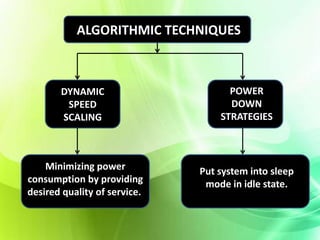
ALGORITHMIC TECHNIQUES 
DYNAMIC 
SPEED 
SCALING 
POWER 
DOWN 
STRATEGIES 
Minimizing power 
consumption by providing 
desired quality of service.. 
Put system into sleep 
mode in idle state.
• Less use of hazardous materials. 
• Energy efficient. 
• Recyclable materials used for manufacturing. 
• End of life recovery 
• Use of renewable and bio-based materials.
• Longer product retrieval. 
• End of life take-back facility. 
• Manufacturer’s certificate. 
• Packaging material. 
• EPEAT ratings.
• An average desktop computer and monitor 
consumes 60 to 300 watts of electricity which is 
why energy consumption and cost reduction 
programs represent a major area of focus and 
opportunity with green IT. 
• A business with a network of 20,000 desktop 
systems running 24X7 drawing 200 watts 
consumes about 300 million kWh of electricity 
annually.
• Manufacturing computers include the use of lead, 
cadmium, mercury and other toxics in general. 
• According to green experts, computers can 
contain 4 to 8 pounds of lead alone. 
• Computers and other electronics made up two 
fifth of all lead in landfills.
Data centers are the main reason behind 
energy consumption. 
• According to Mark Bramfitt, principal 
program manager at PG&E. 
“Data center servers use 50 times the 
energy per square foot as an office does” 
• To keep servers at the right temperature, 
companies mainly rely on air conditioning 
equipments which leads to even more power 
consumption.
• Develop sustainable green computing plans. 
• Recycle and reuse. 
• Purchase products which are environmentally 
green and sound. 
• Minimizing consumption of paper. 
• Conservation of energy 
• Green procurement and asset management. 
• Technology based solutions.
• Google is building a data center on Oregon’s Columbia 
River to tap hydroelectric power. 
• Microsoft is building its data center nearby in Washington 
for the same reason. 
• Financial services company HSBC is building a data center 
near Niagara Falls. 
• Some of the best technology makers are going green. They 
are making green computers and computer based products 
which are readily available and they even provide buy back 
programs to help you dispose off your unwanted computers, 
peripherals and other electronic devices.
These companies are the ones we all know and trust: 
• HEWLETT PACKARD : 
1. In recent years, Hewlett Packard has introduced many 
Energy Star qualified computers onto the market, 
including several that have won high EPEAT ratings. For 
example, the HP Elite Book 2530p notebook computer is 
Energy Star 5.0 qualified and has earned EPEAT gold. 
2. HP is striving to use more recycled materials in its 
products and product packaging. 
3. HP has also instituted buy back and recycling programs 
for all brands of computers, monitors, printers, scanners 
and other computer technology.
• DELL: 
1. Dell has introduced an ultra-green desktop computer 
called the Studio Hybrid. It is the greenest desktop 
computer up to date, the Studio Hybrid is Energy Star 5.0 
qualified, has an 87% efficient power supply and an 
EPEAT gold rating. 
2. The Dell Studio Hybrid can be customized with 
interchangeable sleeves; there's even a sleeve available 
that's made from renewable bamboo. 
3. Dell has increased its investment in renewable energy 
from wind, solar and natural gas capture and has also 
made significant efforts to reduce its greenhouse gas 
emissions.
• APPLE: 
1. Apple has begun to make many of its green computers 
with recyclable materials such as aluminum, 
polycarbonate and glass. 
2. Apple has made efforts to remove toxic substances, such as 
Brominated Fire Retardants (BFRs), Polyvinyl Chloride 
(PVC), arsenic, lead and mercury from its products. Since 
2008, the Apple Mac Book Pro has been free from each of 
these dangerous environmental pollutants. By 2009, all 
Mac notebook and desktop computers had earned an 
EPEAT gold rating.
• LENOVO: 
1. Lenovo uses post-consumer recycled materials such as 
plastic water bottles in the manufacture of its green 
computers. 
2. All Lenovo ThinkPad laptop computers contain 85% 
recyclable materials and have achieved an EPEAT 
rating of either silver or gold. 
3. Through its Eco Take Back program, Lenovo offers 
free recycling of all of its computers and other 
electronic products for small businesses and 
consumers in countries throughout the America, Asia 
and Europe.
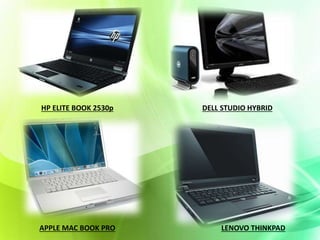
HP ELITE BOOK 2530p DELL STUDIO HYBRID 
APPLE MAC BOOK PRO LENOVO THINKPAD
• Turn off your computer when they are not in use as 
turning off or on will not harm the computer. 
• Look for ways to reduce the amount of time your 
computer is on without adversely affecting your 
productivity. 
• While using the laser printers ,don’t turn your printer on 
until you are ready to print. 
• Unless you require immediate access to E-mails or other 
internet services, break the habit of turning on all your 
computer equipments all day.
• Some other green computing practices include: 
 Reducing paper waste: 
 Print as little as possible. 
 Recycle waste paper as many times as you can. 
 Save E-mail whenever possible and avoid needless 
printing of email messages. 
 Use e-mails instead of faxes to eliminate the number of 
hard copy. 
 While printing documents use the multiple pages per 
sheet option on printer properties.
Reusing and recycling of Hardware devices: 
E-waste management 
Making of unused and old hardware devices or 
computing resources reusable through 
recycling. 
for example-inkjet 
cartridges, batteries and diskettes can 
be recycled for further use.
 Purchasing Recommendations: 
 Buy only Energy Star computers, monitors and printers. Flat 
panel monitors use about half of the electricity of a CRT 
(Cathode-Ray-Tube) display. 
 Buy inkjet printers, not Laser printers. These use 80%-90% 
less energy than laser printers and print quality can be 
excellent. 
 Buy non-petroleum based ink. These printer inks are made 
from renewable resources, require fewer hazardous solvents, 
which translate to fewer air emissions, and in many cases 
produce brighter, cleaner colors. 
 Buy a monitor only as larger as you really need. A 17-inch 
CRT monitor uses 30% more energy than a 15-inch one when 
each is in an active mode.
• Reduced energy usage from green computing 
techniques translates into lower carbon dioxide 
emission. 
• Saving energy and resources saves money. 
• Reduce the risk existing in the laptops such as 
chemical known to cause cancer, nerve damage and 
immune reactions in humans. 
• Conserving resources means less energy is required 
to produce, use, and dispose of products.
• Green computing could actually be quite costly. 
• Some computers that are green may be 
considerably underpowered.
• The use of eco-friendly sustainable components 
will become the norm rather than the exception in 
future. 
• Energy saved on computer hardware and 
computing will equate tonnes of carbon emissions 
saved per year.
It is clear that the mushrooming growth of IT 
industries worldwide is slowly poisoning the 
environment. This grave threat requires 
immediate attention. Societies need to become 
more energy conscious. The need of the hour is for 
both governments and the corporate world to join 
hands to usher in more green computing solutions 
to be able to build a green-globe.
• www.brighthub.com/environment/greencomputing/articles/ 
104850.aspx 
• www.brighthub.com/environment/greencomputing/articles/ 
61813.aspx?cid=parsely_rec 
• “the HP Eco solutions”, 
www.hp.com/hpinfo/globalcitizenship/environment/commit 
ment/our-history.html 
• “Dell Earth”, content.dell.com/us/en/corp/dell-earth.aspx 
• “Apple and the Environment”, 
www.apple.com/environment/ 
• “Social responsibility environment”, 
• " www.lenovo.com/social_responsibility/us/en/environment 
.html

Green computing

  • 1.
    Presented by : DIVYA VERMA B.Tech (C.S.)
  • 2.
     Introduction Origin  Goals of Green Computing  Features  Growth and Impact of IT environment  Problems  Solution  Global impact  Energy efficient computing practices  Advantages & Disadvantages  Future  Conclusion  References
  • 3.
    • WHAT ISGREEN COMPUTING? Green computing is the study and practice of environmentally sustainable computing..i.e.. using computer resources efficiently. • It includes the implementation of energy efficient CPUs ,servers and other peripherals as well as reduced resource consumption and proper disposal of e-waste.
  • 4.
    • It caninclude : designing manufacturing using and disposing computers , servers and other associated subsystems efficiently and effectively with minimal or no impact on environment.
  • 5.
    • The term“GREEN COMPUTING ” came into existence after the “ENERGY STAR PROGRAMME” was launched by the US Environmental Protection Agency in 1992. • It was a labeling programme that was designed to promote and recognize energy efficiency in monitors, climate control equipments and other technologies.
  • 7.
    • Green computingfocuses on the triple bottom line of economic viability, social responsibility and environmental impact. • The three main goals are: 1. Reduce the use of hazardous materials. 2. Maximize the energy efficiency. 3. Promote the recyclability, biodegradability of defunct products and factory waste.
  • 8.
    ALGORITHMIC TECHNIQUES DYNAMIC SPEED SCALING POWER DOWN STRATEGIES Minimizing power consumption by providing desired quality of service.. Put system into sleep mode in idle state.
  • 9.
    • Less useof hazardous materials. • Energy efficient. • Recyclable materials used for manufacturing. • End of life recovery • Use of renewable and bio-based materials.
  • 10.
    • Longer productretrieval. • End of life take-back facility. • Manufacturer’s certificate. • Packaging material. • EPEAT ratings.
  • 11.
    • An averagedesktop computer and monitor consumes 60 to 300 watts of electricity which is why energy consumption and cost reduction programs represent a major area of focus and opportunity with green IT. • A business with a network of 20,000 desktop systems running 24X7 drawing 200 watts consumes about 300 million kWh of electricity annually.
  • 12.
    • Manufacturing computersinclude the use of lead, cadmium, mercury and other toxics in general. • According to green experts, computers can contain 4 to 8 pounds of lead alone. • Computers and other electronics made up two fifth of all lead in landfills.
  • 13.
    Data centers arethe main reason behind energy consumption. • According to Mark Bramfitt, principal program manager at PG&E. “Data center servers use 50 times the energy per square foot as an office does” • To keep servers at the right temperature, companies mainly rely on air conditioning equipments which leads to even more power consumption.
  • 14.
    • Develop sustainablegreen computing plans. • Recycle and reuse. • Purchase products which are environmentally green and sound. • Minimizing consumption of paper. • Conservation of energy • Green procurement and asset management. • Technology based solutions.
  • 15.
    • Google isbuilding a data center on Oregon’s Columbia River to tap hydroelectric power. • Microsoft is building its data center nearby in Washington for the same reason. • Financial services company HSBC is building a data center near Niagara Falls. • Some of the best technology makers are going green. They are making green computers and computer based products which are readily available and they even provide buy back programs to help you dispose off your unwanted computers, peripherals and other electronic devices.
  • 16.
    These companies arethe ones we all know and trust: • HEWLETT PACKARD : 1. In recent years, Hewlett Packard has introduced many Energy Star qualified computers onto the market, including several that have won high EPEAT ratings. For example, the HP Elite Book 2530p notebook computer is Energy Star 5.0 qualified and has earned EPEAT gold. 2. HP is striving to use more recycled materials in its products and product packaging. 3. HP has also instituted buy back and recycling programs for all brands of computers, monitors, printers, scanners and other computer technology.
  • 17.
    • DELL: 1.Dell has introduced an ultra-green desktop computer called the Studio Hybrid. It is the greenest desktop computer up to date, the Studio Hybrid is Energy Star 5.0 qualified, has an 87% efficient power supply and an EPEAT gold rating. 2. The Dell Studio Hybrid can be customized with interchangeable sleeves; there's even a sleeve available that's made from renewable bamboo. 3. Dell has increased its investment in renewable energy from wind, solar and natural gas capture and has also made significant efforts to reduce its greenhouse gas emissions.
  • 18.
    • APPLE: 1.Apple has begun to make many of its green computers with recyclable materials such as aluminum, polycarbonate and glass. 2. Apple has made efforts to remove toxic substances, such as Brominated Fire Retardants (BFRs), Polyvinyl Chloride (PVC), arsenic, lead and mercury from its products. Since 2008, the Apple Mac Book Pro has been free from each of these dangerous environmental pollutants. By 2009, all Mac notebook and desktop computers had earned an EPEAT gold rating.
  • 19.
    • LENOVO: 1.Lenovo uses post-consumer recycled materials such as plastic water bottles in the manufacture of its green computers. 2. All Lenovo ThinkPad laptop computers contain 85% recyclable materials and have achieved an EPEAT rating of either silver or gold. 3. Through its Eco Take Back program, Lenovo offers free recycling of all of its computers and other electronic products for small businesses and consumers in countries throughout the America, Asia and Europe.
  • 20.
    HP ELITE BOOK2530p DELL STUDIO HYBRID APPLE MAC BOOK PRO LENOVO THINKPAD
  • 21.
    • Turn offyour computer when they are not in use as turning off or on will not harm the computer. • Look for ways to reduce the amount of time your computer is on without adversely affecting your productivity. • While using the laser printers ,don’t turn your printer on until you are ready to print. • Unless you require immediate access to E-mails or other internet services, break the habit of turning on all your computer equipments all day.
  • 22.
    • Some othergreen computing practices include:  Reducing paper waste:  Print as little as possible.  Recycle waste paper as many times as you can.  Save E-mail whenever possible and avoid needless printing of email messages.  Use e-mails instead of faxes to eliminate the number of hard copy.  While printing documents use the multiple pages per sheet option on printer properties.
  • 23.
    Reusing and recyclingof Hardware devices: E-waste management Making of unused and old hardware devices or computing resources reusable through recycling. for example-inkjet cartridges, batteries and diskettes can be recycled for further use.
  • 24.
     Purchasing Recommendations:  Buy only Energy Star computers, monitors and printers. Flat panel monitors use about half of the electricity of a CRT (Cathode-Ray-Tube) display.  Buy inkjet printers, not Laser printers. These use 80%-90% less energy than laser printers and print quality can be excellent.  Buy non-petroleum based ink. These printer inks are made from renewable resources, require fewer hazardous solvents, which translate to fewer air emissions, and in many cases produce brighter, cleaner colors.  Buy a monitor only as larger as you really need. A 17-inch CRT monitor uses 30% more energy than a 15-inch one when each is in an active mode.
  • 25.
    • Reduced energyusage from green computing techniques translates into lower carbon dioxide emission. • Saving energy and resources saves money. • Reduce the risk existing in the laptops such as chemical known to cause cancer, nerve damage and immune reactions in humans. • Conserving resources means less energy is required to produce, use, and dispose of products.
  • 26.
    • Green computingcould actually be quite costly. • Some computers that are green may be considerably underpowered.
  • 27.
    • The useof eco-friendly sustainable components will become the norm rather than the exception in future. • Energy saved on computer hardware and computing will equate tonnes of carbon emissions saved per year.
  • 28.
    It is clearthat the mushrooming growth of IT industries worldwide is slowly poisoning the environment. This grave threat requires immediate attention. Societies need to become more energy conscious. The need of the hour is for both governments and the corporate world to join hands to usher in more green computing solutions to be able to build a green-globe.
  • 29.
    • www.brighthub.com/environment/greencomputing/articles/ 104850.aspx • www.brighthub.com/environment/greencomputing/articles/ 61813.aspx?cid=parsely_rec • “the HP Eco solutions”, www.hp.com/hpinfo/globalcitizenship/environment/commit ment/our-history.html • “Dell Earth”, content.dell.com/us/en/corp/dell-earth.aspx • “Apple and the Environment”, www.apple.com/environment/ • “Social responsibility environment”, • " www.lenovo.com/social_responsibility/us/en/environment .html