S E S S I O N 2 0 2 2 - 2 0 2 3
N A M E – SIDFHARTH DHAKED
C L A S S – 9 T H C
R O L L N U M B E R - 4 6
S U B J E C T - - C O M P U T E R
T O P I C – W I N D O W 1 0
S U B M I T T E D T O – K I R T I M A M
Introduction To Window 10
 What is Windows 10?
 Windows 10 is a Microsoft operating system for personal
computers, tablets, embedded devices and internet of things
devices.
 Microsoft released Windows 10 in July 2015 as a follow-up to
Windows 8. Windows 10 has an official end of support date of
October, 2025, with Windows 11 as it's successor.
 Anyone adopting Windows 10 can upgrade legacy machines
directly from Windows 7 or Windows 8 to Windows 10
without re-imaging or performing intrusive and time-
consuming system wipes and upgrade procedures. To
upgrade from a previous version of Windows 10, IT or users
run the Windows 10 OS installer, which transfers any
applications and software on the previous OS, as well as
settings and preferences over to Windows 10.
Windows 10 System Requirments
 The minimum Windows 10 hardware requirements for a
PC or 2-in-1 device are:
 Processor: 1 gigahertz (GHz) or faster processor or
system-on-a-chip (SoC)
RAM: 1 gigabyte (GB) for 32-bit or 2 GB for 64-bit
Hard disk space: 16 GB for 32-bit OS 20 GB for 64-bit OS
Graphics card: DirectX 9 or later with Windows Display
Driver Model 1.0
Display: 800x600
 These requirements are not sufficient to run Windows 11
systems.
Should You Upgrade to Windows 10
 As you can see, Windows 10 is much more similar to
older versions than it is to Windows 8. It's also faster
and more secure, and it will continue to be supported
for Microsoft for several years to come. If your
computer is currently using Windows 7 or Windows
8.1 and meets the system requirements, you can
upgrade to Windows 10 by purchasing it from
Microsoft here. For all of these reasons, we
recommend upgrading your computer to Windows 10
if you can. We'll talk about how to do this in our lesson
on Upgrading to Windows 10.
Features Of Windows 10
 Action Center
 Cortana
 Tablet Mode
 Multiple Desktops And Task View
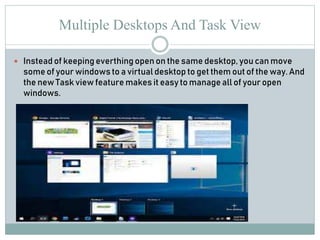
Multiple Desktops And Task View
 Instead of keeping everthing open on the same desktop, you can move
some of your windows to a virtual desktop to get them out of the way. And
the new Task view feature makes it easy to manage all of your open
windows.
Action Center
 The new Action Center is pretty different from
previous versions of Windows. For example, it's been
expanded to let you access frequently used settings,
such as Wi-Fi connectivity and tablet mode. It's also
where you'll see important notifications, so if your
computer receives an update you'll get a notification
about it here.
Cortana
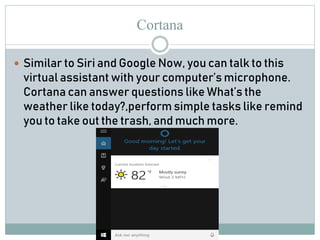
 Similar to Siri and Google Now, you can talk to this
virtual assistant with your computer’s microphone.
Cortana can answer questions like What’s the
weather like today?,perform simple tasks like remind
you to take out the trash, and much more.
Tablet mode
 Unlike Windows 8, Windows 10 makes a clear
distinction between desktops and tablets. If you're
using a keyboard and mouse with Windows 10, you'll
be in desktop mode by default. If your computer also
has a touchscreen, you can go into tablet mode at any
time. Tablet users can also switch back to desktop
mode if they prefer.

siddharth.pptx

  • 1.
    S E SS I O N 2 0 2 2 - 2 0 2 3 N A M E – SIDFHARTH DHAKED C L A S S – 9 T H C R O L L N U M B E R - 4 6 S U B J E C T - - C O M P U T E R T O P I C – W I N D O W 1 0 S U B M I T T E D T O – K I R T I M A M
  • 2.
    Introduction To Window10  What is Windows 10?  Windows 10 is a Microsoft operating system for personal computers, tablets, embedded devices and internet of things devices.  Microsoft released Windows 10 in July 2015 as a follow-up to Windows 8. Windows 10 has an official end of support date of October, 2025, with Windows 11 as it's successor.  Anyone adopting Windows 10 can upgrade legacy machines directly from Windows 7 or Windows 8 to Windows 10 without re-imaging or performing intrusive and time- consuming system wipes and upgrade procedures. To upgrade from a previous version of Windows 10, IT or users run the Windows 10 OS installer, which transfers any applications and software on the previous OS, as well as settings and preferences over to Windows 10.
  • 3.
    Windows 10 SystemRequirments  The minimum Windows 10 hardware requirements for a PC or 2-in-1 device are:  Processor: 1 gigahertz (GHz) or faster processor or system-on-a-chip (SoC) RAM: 1 gigabyte (GB) for 32-bit or 2 GB for 64-bit Hard disk space: 16 GB for 32-bit OS 20 GB for 64-bit OS Graphics card: DirectX 9 or later with Windows Display Driver Model 1.0 Display: 800x600  These requirements are not sufficient to run Windows 11 systems.
  • 4.
    Should You Upgradeto Windows 10  As you can see, Windows 10 is much more similar to older versions than it is to Windows 8. It's also faster and more secure, and it will continue to be supported for Microsoft for several years to come. If your computer is currently using Windows 7 or Windows 8.1 and meets the system requirements, you can upgrade to Windows 10 by purchasing it from Microsoft here. For all of these reasons, we recommend upgrading your computer to Windows 10 if you can. We'll talk about how to do this in our lesson on Upgrading to Windows 10.
  • 5.
    Features Of Windows10  Action Center  Cortana  Tablet Mode  Multiple Desktops And Task View
  • 6.
    Multiple Desktops AndTask View  Instead of keeping everthing open on the same desktop, you can move some of your windows to a virtual desktop to get them out of the way. And the new Task view feature makes it easy to manage all of your open windows.
  • 7.
    Action Center  Thenew Action Center is pretty different from previous versions of Windows. For example, it's been expanded to let you access frequently used settings, such as Wi-Fi connectivity and tablet mode. It's also where you'll see important notifications, so if your computer receives an update you'll get a notification about it here.
  • 8.
    Cortana  Similar toSiri and Google Now, you can talk to this virtual assistant with your computer’s microphone. Cortana can answer questions like What’s the weather like today?,perform simple tasks like remind you to take out the trash, and much more.
  • 9.
    Tablet mode  UnlikeWindows 8, Windows 10 makes a clear distinction between desktops and tablets. If you're using a keyboard and mouse with Windows 10, you'll be in desktop mode by default. If your computer also has a touchscreen, you can go into tablet mode at any time. Tablet users can also switch back to desktop mode if they prefer.