SHIFT LEFT WITH DEVSECOPS
1 4 . 0 6 . 2 0 2 3
.NET USER GROUP BERN
In this session you will learn how to securely provision Azure resources using GitHub
and Terraform.
We will cover best practices for setting up GitHub Actions, deploying resources and
applications, and integrating advanced security measures with SonarCloud for
scanning Terraform files.
Let’s discover industry-leading techniques for secure Azure resource provisioning
with GitHub and Terraform.
1
AGENDA
I nt ro d u c t i o n
G i t H u b A c t i o n s , A z u re &
Te r ra fo r m
G i t H u b A d va n c e d S e c u r i t y &
S o n a r C l o u d
Ke y Ta ke A ways
2
2
INTRODUCTION
3
3
SPEAKERS
Gabino
L uis L azo
4
Marc
Rufer
Raffael
Nussbaume r
4
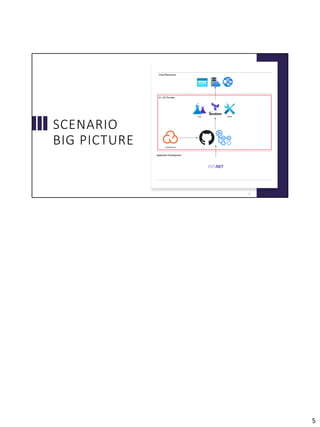
SCENARIO
BIG PICTURE
5
5
GITHUB ACTIONS,
AZURE &
TERRAFORM
6
Set up GitHub Actions Workflow to deploy Azure resources with Terraform in a
secure way.
6
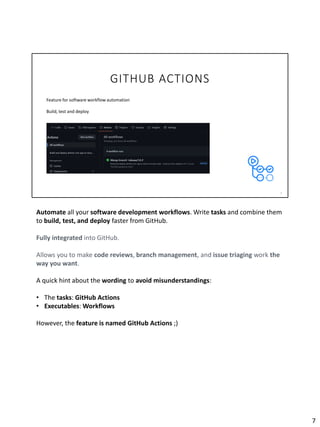
GITHUB ACTIONS
7
Feature for software workflow automation
Build, test and deploy
Automate all your software development workflows. Write tasks and combine them
to build, test, and deploy faster from GitHub.
Fully integrated into GitHub.
Allows you to make code reviews, branch management, and issue triaging work the
way you want.
A quick hint about the wording to avoid misunderstandings:
• The tasks: GitHub Actions
• Executables: Workflows
However, the feature is named GitHub Actions ;)
7
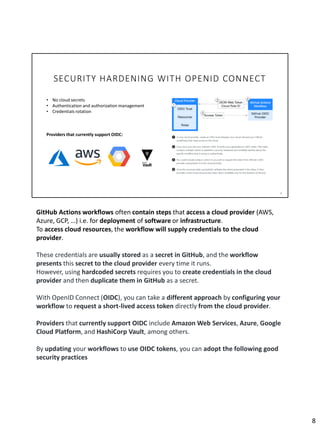
SECURITY HARDENING WITH OPENID CONNECT
8
• No cloud secrets
• Authentication and authorization management
• Credentials rotation
Providers that currently support OIDC:
GitHub Actions workflows often contain steps that access a cloud provider (AWS,
Azure, GCP, …) i.e. for deployment of software or infrastructure.
To access cloud resources, the workflow will supply credentials to the cloud
provider.
These credentials are usually stored as a secret in GitHub, and the workflow
presents this secret to the cloud provider every time it runs.
However, using hardcoded secrets requires you to create credentials in the cloud
provider and then duplicate them in GitHub as a secret.
With OpenID Connect (OIDC), you can take a different approach by configuring your
workflow to request a short-lived access token directly from the cloud provider.
Providers that currently support OIDC include Amazon Web Services, Azure, Google
Cloud Platform, and HashiCorp Vault, among others.
By updating your workflows to use OIDC tokens, you can adopt the following good
security practices
8
• No cloud secrets: You won't need to duplicate your cloud credentials as long-
lived GitHub secrets. Instead, you can configure the OIDC trust on your cloud
provider, and then update your workflows to request a short-lived access token
from the cloud provider through OIDC.
• Authentication and authorization management: You have more granular control
over how workflows can use credentials, using your cloud provider's
authentication (authN) and authorization (authZ) tools to control access to cloud
resources.
• Rotating credentials: With OIDC, your cloud provider issues a short-lived access
token that is only valid for a single job, and then automatically expires.
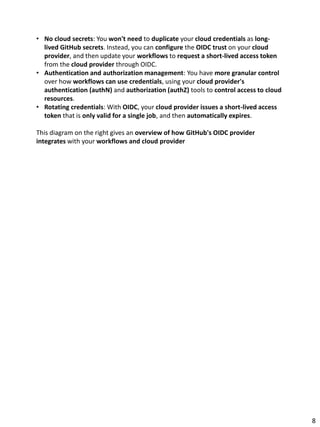
This diagram on the right gives an overview of how GitHub's OIDC provider
integrates with your workflows and cloud provider
8
SECURITY HARDENING WITH OPENID CONNECT
9
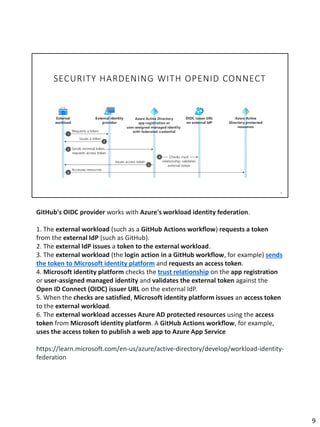
GitHub's OIDC provider works with Azure's workload identity federation.
1. The external workload (such as a GitHub Actions workflow) requests a token
from the external IdP (such as GitHub).
2. The external IdP issues a token to the external workload.
3. The external workload (the login action in a GitHub workflow, for example) sends
the token to Microsoft identity platform and requests an access token.
4. Microsoft identity platform checks the trust relationship on the app registration
or user-assigned managed identity and validates the external token against the
Open ID Connect (OIDC) issuer URL on the external IdP.
5. When the checks are satisfied, Microsoft identity platform issues an access token
to the external workload.
6. The external workload accesses Azure AD protected resources using the access
token from Microsoft identity platform. A GitHub Actions workflow, for example,
uses the access token to publish a web app to Azure App Service
https://learn.microsoft.com/en-us/azure/active-directory/develop/workload-identity-
federation
9
GITHUB ACTIONS SECURITY
10
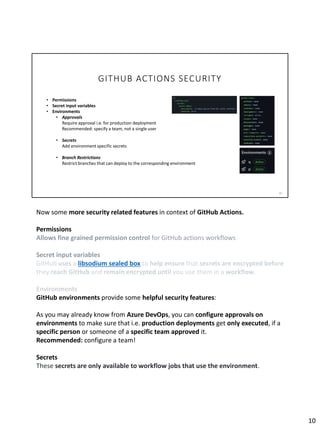
• Permissions
• Secret input variables
• Environments
• Approvals
Require approval i.e. for production deployment
Recommended: specify a team, not a single user
• Secrets
Add environment specific secrets
• Branch Restrictions
Restrict branches that can deploy to the corresponding environment
Now some more security related features in context of GitHub Actions.
Permissions
Allows fine grained permission control for GitHub actions workflows
Secret input variables
GitHub uses a libsodium sealed box to help ensure that secrets are encrypted before
they reach GitHub and remain encrypted until you use them in a workflow.
Environments
GitHub environments provide some helpful security features:
As you may already know from Azure DevOps, you can configure approvals on
environments to make sure that i.e. production deployments get only executed, if a
specific person or someone of a specific team approved it.
Recommended: configure a team!
Secrets
These secrets are only available to workflow jobs that use the environment.
10
Additionally, workflow jobs that use this environment can only access these secrets
after any configured rules (for example, required reviewers) pass
Branch Restrictions
Restrict the branches that are allowed to execute a workflow that uses this
environment.
10
DEMO
11
11
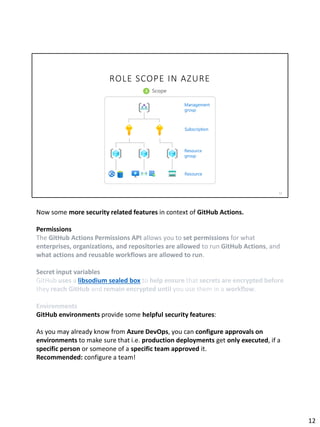
ROLE SCOPE IN AZURE
12
Now some more security related features in context of GitHub Actions.
Permissions
The GitHub Actions Permissions API allows you to set permissions for what
enterprises, organizations, and repositories are allowed to run GitHub Actions, and
what actions and reusable workflows are allowed to run.
Secret input variables
GitHub uses a libsodium sealed box to help ensure that secrets are encrypted before
they reach GitHub and remain encrypted until you use them in a workflow.
Environments
GitHub environments provide some helpful security features:
As you may already know from Azure DevOps, you can configure approvals on
environments to make sure that i.e. production deployments get only executed, if a
specific person or someone of a specific team approved it.
Recommended: configure a team!
12
Secrets
These secrets are only available to workflow jobs that use the environment.
Additionally, workflow jobs that use this environment can only access these secrets
after any configured rules (for example, required reviewers) pass
Branch Restrictions
Restrict the branches that are allowed to execute a workflow that uses this
environment.
12
13
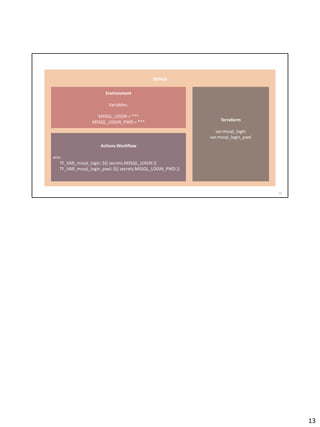
GitHub
Environment
Variables:
MSSQL_LOGIN = ***
MSSQL_LOGIN_PWD = ***
Actions Workflow
env:
TF_VAR_mssql_login: ${{ secrets.MSSQL_LOGIN }}
TF_VAR_mssql_login_pwd: ${{ secrets.MSSQL_LOGIN_PWD }}
Terraform
var.mssql_login
var.mssql_login_pwd
13
GITHUB
ADVANCED
SECURITY &
SONARCLOUD
14
14
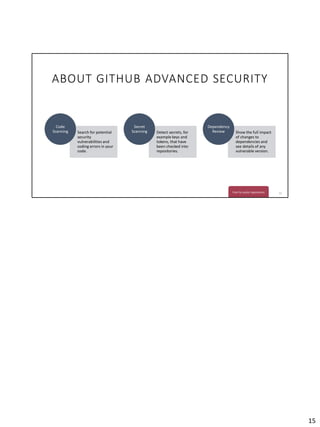
ABOUT GITHUB ADVANCED SECURITY
15
Search for potential
security
vulnerabilities and
coding errors in your
code.
Code
Scanning Detect secrets, for
example keys and
tokens, that have
been checked into
repositories.
Secret
Scanning Show the full impact
of changes to
dependencies and
see details of any
vulnerable version.
Dependency
Review
Free for public repositories
15
DEMO
16
16
KEY TAKE AWAYS
17
17
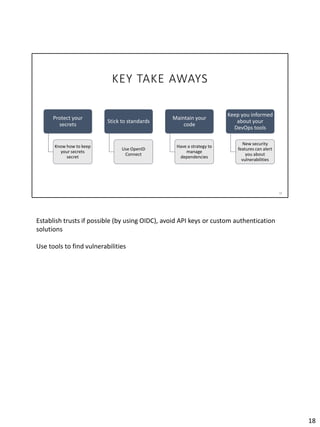
KEY TAKE AWAYS
18
Protect your
secrets
Know how to keep
your secrets
secret
Stick to standards
Use OpenID
Connect
Maintain your
code
Have a strategy to
manage
dependencies
Keep you informed
about your
DevOps tools
New security
features can alert
you about
vulnerabilities
Establish trusts if possible (by using OIDC), avoid API keys or custom authentication
solutions
Use tools to find vulnerabilities
18
THANK YOU
W W W. I S O L U T I O N S .C H
19
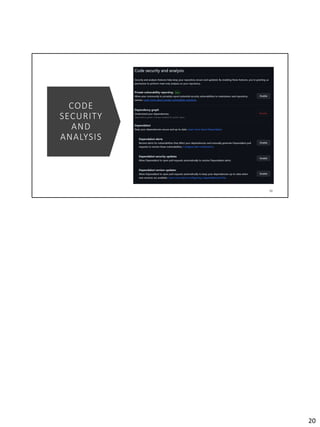
CODE
SECURITY
AND
ANALYSIS
20
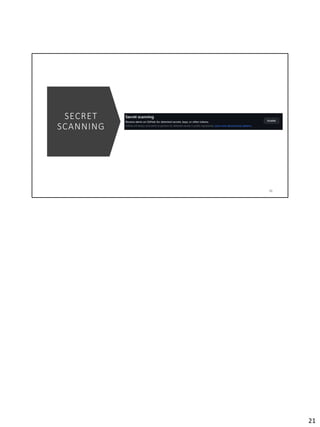
SECRET
SCANNING
21
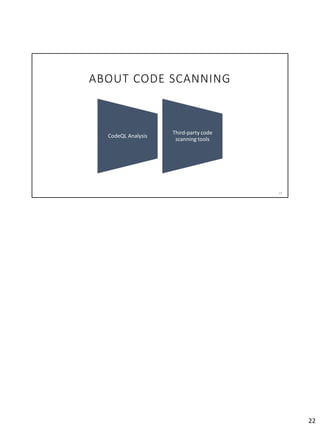
ABOUT CODE SCANNING
22
CodeQL Analysis
Third-party code
scanning tools
22

SHIFT LEFT WITH DEVSECOPS

  • 1.
    SHIFT LEFT WITHDEVSECOPS 1 4 . 0 6 . 2 0 2 3 .NET USER GROUP BERN In this session you will learn how to securely provision Azure resources using GitHub and Terraform. We will cover best practices for setting up GitHub Actions, deploying resources and applications, and integrating advanced security measures with SonarCloud for scanning Terraform files. Let’s discover industry-leading techniques for secure Azure resource provisioning with GitHub and Terraform. 1
  • 2.
    AGENDA I nt rod u c t i o n G i t H u b A c t i o n s , A z u re & Te r ra fo r m G i t H u b A d va n c e d S e c u r i t y & S o n a r C l o u d Ke y Ta ke A ways 2 2
  • 3.
  • 4.
    SPEAKERS Gabino L uis Lazo 4 Marc Rufer Raffael Nussbaume r 4
  • 5.
  • 6.
    GITHUB ACTIONS, AZURE & TERRAFORM 6 Setup GitHub Actions Workflow to deploy Azure resources with Terraform in a secure way. 6
  • 7.
    GITHUB ACTIONS 7 Feature forsoftware workflow automation Build, test and deploy Automate all your software development workflows. Write tasks and combine them to build, test, and deploy faster from GitHub. Fully integrated into GitHub. Allows you to make code reviews, branch management, and issue triaging work the way you want. A quick hint about the wording to avoid misunderstandings: • The tasks: GitHub Actions • Executables: Workflows However, the feature is named GitHub Actions ;) 7
  • 8.
    SECURITY HARDENING WITHOPENID CONNECT 8 • No cloud secrets • Authentication and authorization management • Credentials rotation Providers that currently support OIDC: GitHub Actions workflows often contain steps that access a cloud provider (AWS, Azure, GCP, …) i.e. for deployment of software or infrastructure. To access cloud resources, the workflow will supply credentials to the cloud provider. These credentials are usually stored as a secret in GitHub, and the workflow presents this secret to the cloud provider every time it runs. However, using hardcoded secrets requires you to create credentials in the cloud provider and then duplicate them in GitHub as a secret. With OpenID Connect (OIDC), you can take a different approach by configuring your workflow to request a short-lived access token directly from the cloud provider. Providers that currently support OIDC include Amazon Web Services, Azure, Google Cloud Platform, and HashiCorp Vault, among others. By updating your workflows to use OIDC tokens, you can adopt the following good security practices 8
  • 9.
    • No cloudsecrets: You won't need to duplicate your cloud credentials as long- lived GitHub secrets. Instead, you can configure the OIDC trust on your cloud provider, and then update your workflows to request a short-lived access token from the cloud provider through OIDC. • Authentication and authorization management: You have more granular control over how workflows can use credentials, using your cloud provider's authentication (authN) and authorization (authZ) tools to control access to cloud resources. • Rotating credentials: With OIDC, your cloud provider issues a short-lived access token that is only valid for a single job, and then automatically expires. This diagram on the right gives an overview of how GitHub's OIDC provider integrates with your workflows and cloud provider 8
  • 10.
    SECURITY HARDENING WITHOPENID CONNECT 9 GitHub's OIDC provider works with Azure's workload identity federation. 1. The external workload (such as a GitHub Actions workflow) requests a token from the external IdP (such as GitHub). 2. The external IdP issues a token to the external workload. 3. The external workload (the login action in a GitHub workflow, for example) sends the token to Microsoft identity platform and requests an access token. 4. Microsoft identity platform checks the trust relationship on the app registration or user-assigned managed identity and validates the external token against the Open ID Connect (OIDC) issuer URL on the external IdP. 5. When the checks are satisfied, Microsoft identity platform issues an access token to the external workload. 6. The external workload accesses Azure AD protected resources using the access token from Microsoft identity platform. A GitHub Actions workflow, for example, uses the access token to publish a web app to Azure App Service https://learn.microsoft.com/en-us/azure/active-directory/develop/workload-identity- federation 9
  • 11.
    GITHUB ACTIONS SECURITY 10 •Permissions • Secret input variables • Environments • Approvals Require approval i.e. for production deployment Recommended: specify a team, not a single user • Secrets Add environment specific secrets • Branch Restrictions Restrict branches that can deploy to the corresponding environment Now some more security related features in context of GitHub Actions. Permissions Allows fine grained permission control for GitHub actions workflows Secret input variables GitHub uses a libsodium sealed box to help ensure that secrets are encrypted before they reach GitHub and remain encrypted until you use them in a workflow. Environments GitHub environments provide some helpful security features: As you may already know from Azure DevOps, you can configure approvals on environments to make sure that i.e. production deployments get only executed, if a specific person or someone of a specific team approved it. Recommended: configure a team! Secrets These secrets are only available to workflow jobs that use the environment. 10
  • 12.
    Additionally, workflow jobsthat use this environment can only access these secrets after any configured rules (for example, required reviewers) pass Branch Restrictions Restrict the branches that are allowed to execute a workflow that uses this environment. 10
  • 13.
  • 14.
    ROLE SCOPE INAZURE 12 Now some more security related features in context of GitHub Actions. Permissions The GitHub Actions Permissions API allows you to set permissions for what enterprises, organizations, and repositories are allowed to run GitHub Actions, and what actions and reusable workflows are allowed to run. Secret input variables GitHub uses a libsodium sealed box to help ensure that secrets are encrypted before they reach GitHub and remain encrypted until you use them in a workflow. Environments GitHub environments provide some helpful security features: As you may already know from Azure DevOps, you can configure approvals on environments to make sure that i.e. production deployments get only executed, if a specific person or someone of a specific team approved it. Recommended: configure a team! 12
  • 15.
    Secrets These secrets areonly available to workflow jobs that use the environment. Additionally, workflow jobs that use this environment can only access these secrets after any configured rules (for example, required reviewers) pass Branch Restrictions Restrict the branches that are allowed to execute a workflow that uses this environment. 12
  • 16.
    13 GitHub Environment Variables: MSSQL_LOGIN = *** MSSQL_LOGIN_PWD= *** Actions Workflow env: TF_VAR_mssql_login: ${{ secrets.MSSQL_LOGIN }} TF_VAR_mssql_login_pwd: ${{ secrets.MSSQL_LOGIN_PWD }} Terraform var.mssql_login var.mssql_login_pwd 13
  • 17.
  • 18.
    ABOUT GITHUB ADVANCEDSECURITY 15 Search for potential security vulnerabilities and coding errors in your code. Code Scanning Detect secrets, for example keys and tokens, that have been checked into repositories. Secret Scanning Show the full impact of changes to dependencies and see details of any vulnerable version. Dependency Review Free for public repositories 15
  • 19.
  • 20.
  • 21.
    KEY TAKE AWAYS 18 Protectyour secrets Know how to keep your secrets secret Stick to standards Use OpenID Connect Maintain your code Have a strategy to manage dependencies Keep you informed about your DevOps tools New security features can alert you about vulnerabilities Establish trusts if possible (by using OIDC), avoid API keys or custom authentication solutions Use tools to find vulnerabilities 18
  • 22.
    THANK YOU W WW. I S O L U T I O N S .C H 19
  • 23.
  • 24.
  • 25.
    ABOUT CODE SCANNING 22 CodeQLAnalysis Third-party code scanning tools 22