Making the Most with Micro$oft Using SharePoint Services as a Reference Portal David Dahl, Emerging Technologies Librarian Kay Kazinski, Library Technology Coordinator Albert S. Cook Library , Towson University
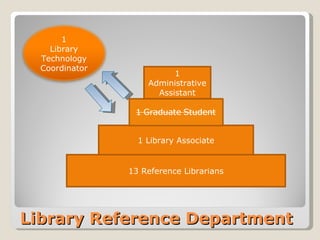
Library Reference Department 13 Reference Librarians 1 Library Associate 1 Administrative Assistant 1 Library Technology Coordinator
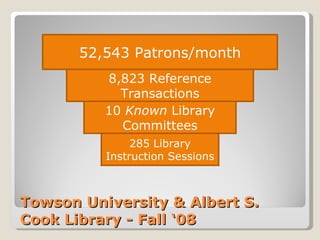
Towson University & Albert S. Cook Library - Fall ‘08 8,823 Reference Transactions 52,543 Patrons/month 10  Known  Library Committees 285 Library Instruction Sessions
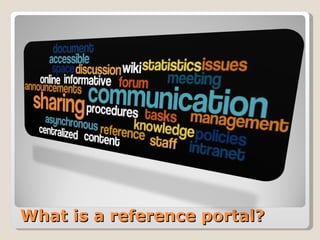
What is a reference portal?
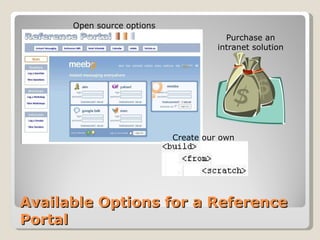
Available Options for a Reference Portal Create our own Purchase an intranet solution Open source options
Choosing SharePoint, or… How SharePoint Chose Us already used by the university hosted on university’s servers scalable for future expansion can use active directory for accounts we own our site customizable for library and reference department’s needs no ‘high level’ IT expertise required good customer service from campus IT campus beginning to offer training
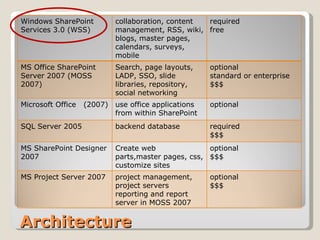
Architecture Windows SharePoint Services 3.0 (WSS) collaboration, content management, RSS, wiki, blogs, master pages, calendars, surveys, mobile  required  free MS Office SharePoint Server 2007 (MOSS 2007) Search, page layouts, LADP, SSO, slide libraries, repository, social networking optional standard or enterprise  $$$ Microsoft Office  (2007) use office applications from within SharePoint  optional SQL Server 2005 backend database  required $$$ MS SharePoint Designer 2007 Create web parts,master pages, css, customize sites optional $$$ MS Project Server 2007 project management, project servers reporting and report server in MOSS 2007 optional $$$
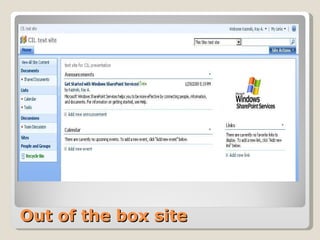
Out of the box site
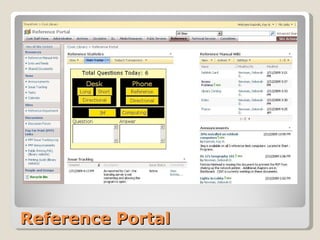
Reference Portal
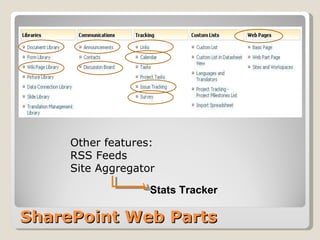
SharePoint Web Parts Other features: RSS Feeds Site Aggregator Stats Tracker
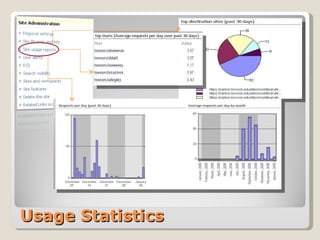
Usage Statistics
Creating the REFFY award
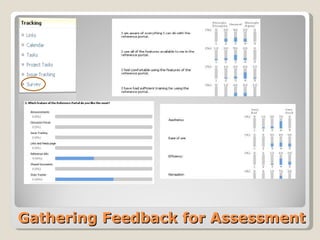
Gathering Feedback for Assessment
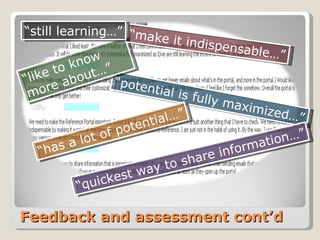
Feedback and assessment cont’d “ potential is fully maximized…” “ like to know more about…” “ has a lot of potential…” “ make it indispensable…” “ quickest way to share information…” “ still learning…”
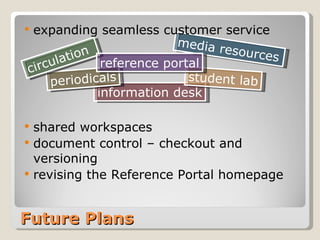
expanding seamless customer service shared workspaces  document control – checkout and versioning revising the Reference Portal homepage Future Plans information desk media resources student lab periodicals circulation reference portal
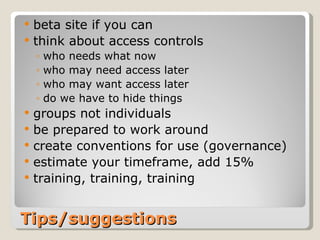
Tips/suggestions beta site if you can think about access controls who needs what now who may need access later who may want access later do we have to hide things groups not individuals be prepared to work around create conventions for use (governance) estimate your timeframe, add 15% training, training, training
Appendix Reference Portal Screenshots
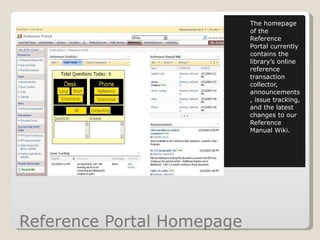
Reference Portal Homepage The homepage of the Reference Portal currently contains the library’s online reference transaction collector, announcements, issue tracking, and the latest changes to our Reference Manual Wiki.
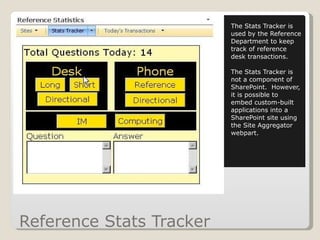
Reference Stats Tracker The Stats Tracker is used by the Reference Department to keep track of reference desk transactions. The Stats Tracker is not a component of SharePoint.  However, it is possible to embed custom-built applications into a SharePoint site using the Site Aggregator webpart.
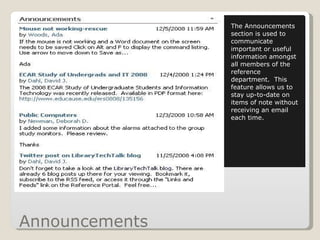
Announcements The Announcements section is used to communicate important or useful information amongst all members of the reference department.  This feature allows us to stay up-to-date on items of note without receiving an email each time.
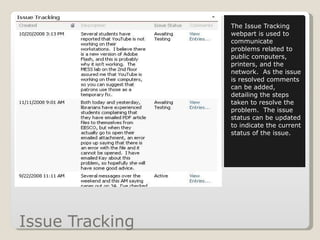
Issue Tracking The Issue Tracking webpart is used to communicate problems related to public computers, printers, and the network.  As the issue is resolved comments can be added, detailing the steps taken to resolve the problem.  The issue status can be updated to indicate the current status of the issue.
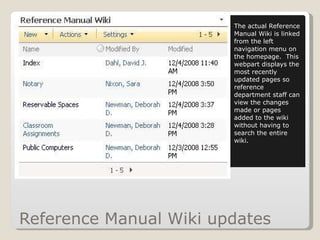
Reference Manual Wiki updates The actual Reference Manual Wiki is linked from the left navigation menu on the homepage.  This webpart displays the most recently updated pages so reference department staff can view the changes made or pages added to the wiki without having to search the entire wiki.
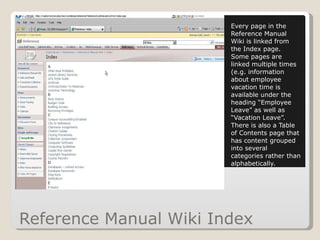
Reference Manual Wiki Index Every page in the Reference Manual Wiki is linked from the Index page.  Some pages are linked multiple times (e.g. information about employee vacation time is available under the heading “Employee Leave” as well as “Vacation Leave”.  There is also a Table of Contents page that has content grouped into several categories rather than alphabetically.
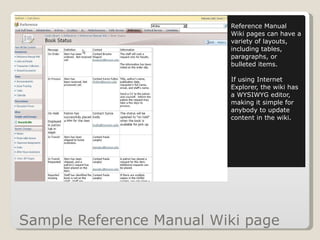
Sample Reference Manual Wiki page Reference Manual Wiki pages can have a variety of layouts, including tables, paragraphs, or bulleted items. If using Internet Explorer, the wiki has a WYSIWYG editor, making it simple for anybody to update content in the wiki.
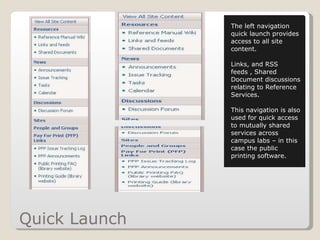
Quick Launch The left navigation quick launch provides access to all site content.  Links, and RSS feeds , Shared Document discussions relating to Reference Services. This navigation is also used for quick access to mutually shared services across campus labs – in this case the public printing software.
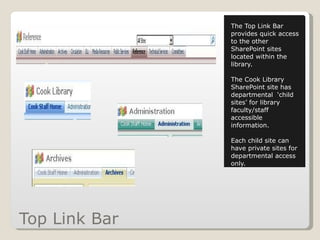
Top Link Bar The Top Link Bar provides quick access to the other SharePoint sites located within the library. The Cook Library SharePoint site has departmental  ‘child sites’ for library faculty/staff accessible information. Each child site can have private sites for departmental access only.
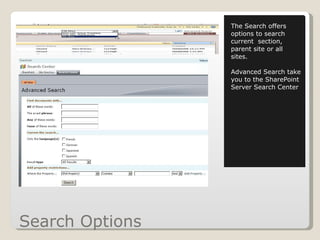
Search Options The Search offers options to search current  section, parent site or all sites. Advanced Search take you to the SharePoint Server Search Center
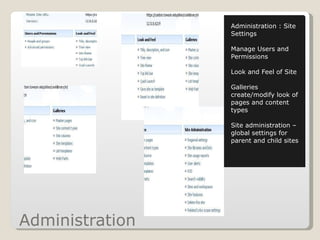
Administration  Administration : Site Settings Manage Users and Permissions Look and Feel of Site Galleries create/modify look of pages and content types Site administration – global settings for parent and child sites
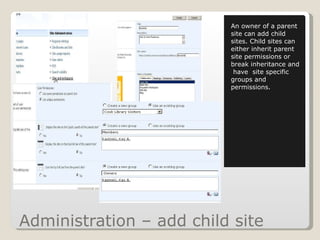
Administration – add child site An owner of a parent site can add child sites. Child sites can either inherit parent site permissions or break inheritance and  have  site specific groups and permissions.
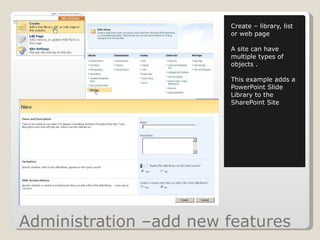
Administration –add new features Create – library, list or web page A site can have multiple types of objects . This example adds a PowerPoint Slide Library to the SharePoint Site
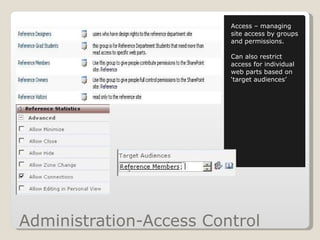
Administration-Access Control Access – managing site access by groups and permissions. Can also restrict access for individual web parts based on ‘target audiences’
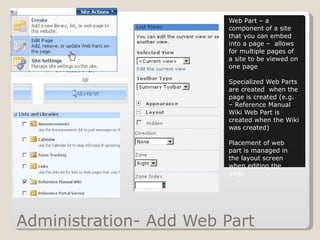
Administration- Add Web Part Web Part – a component of a site that you can embed into a page –  allows for multiple pages of a site to be viewed on one page Specialized Web Parts are created  when the page is created (e.g. – Reference Manual Wiki Web Part is created when the Wiki was created)  Placement of web part is managed in the layout screen when editing the page.
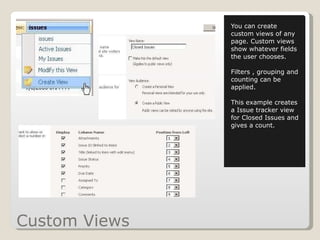
Custom Views You can create custom views of any page. Custom views show whatever fields the user chooses. Filters , grouping and counting can be applied.  This example creates a Issue tracker view for Closed Issues and gives a count.
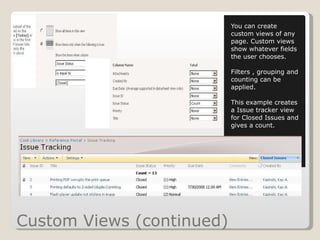
Custom Views (continued) You can create custom views of any page. Custom views show whatever fields the user chooses. Filters , grouping and counting can be applied.  This example creates a Issue tracker view for Closed Issues and gives a count.
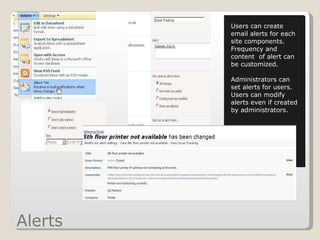
Alerts Users can create email alerts for each  site components. Frequency and content  of alert can be customized. Administrators can set alerts for users.  Users can modify alerts even if created by administrators.

Sharepoint referenceportal

  • 1.
    Making the Mostwith Micro$oft Using SharePoint Services as a Reference Portal David Dahl, Emerging Technologies Librarian Kay Kazinski, Library Technology Coordinator Albert S. Cook Library , Towson University
  • 2.
    Library Reference Department13 Reference Librarians 1 Library Associate 1 Administrative Assistant 1 Library Technology Coordinator
  • 3.
    Towson University &Albert S. Cook Library - Fall ‘08 8,823 Reference Transactions 52,543 Patrons/month 10 Known Library Committees 285 Library Instruction Sessions
  • 4.
    What is areference portal?
  • 5.
    Available Options fora Reference Portal Create our own Purchase an intranet solution Open source options
  • 6.
    Choosing SharePoint, or…How SharePoint Chose Us already used by the university hosted on university’s servers scalable for future expansion can use active directory for accounts we own our site customizable for library and reference department’s needs no ‘high level’ IT expertise required good customer service from campus IT campus beginning to offer training
  • 7.
    Architecture Windows SharePointServices 3.0 (WSS) collaboration, content management, RSS, wiki, blogs, master pages, calendars, surveys, mobile required free MS Office SharePoint Server 2007 (MOSS 2007) Search, page layouts, LADP, SSO, slide libraries, repository, social networking optional standard or enterprise $$$ Microsoft Office (2007) use office applications from within SharePoint optional SQL Server 2005 backend database required $$$ MS SharePoint Designer 2007 Create web parts,master pages, css, customize sites optional $$$ MS Project Server 2007 project management, project servers reporting and report server in MOSS 2007 optional $$$
  • 8.
    Out of thebox site
  • 9.
  • 10.
    SharePoint Web PartsOther features: RSS Feeds Site Aggregator Stats Tracker
  • 11.
  • 12.
  • 13.
  • 14.
    Feedback and assessmentcont’d “ potential is fully maximized…” “ like to know more about…” “ has a lot of potential…” “ make it indispensable…” “ quickest way to share information…” “ still learning…”
  • 15.
    expanding seamless customerservice shared workspaces document control – checkout and versioning revising the Reference Portal homepage Future Plans information desk media resources student lab periodicals circulation reference portal
  • 16.
    Tips/suggestions beta siteif you can think about access controls who needs what now who may need access later who may want access later do we have to hide things groups not individuals be prepared to work around create conventions for use (governance) estimate your timeframe, add 15% training, training, training
  • 17.
  • 18.
    Reference Portal HomepageThe homepage of the Reference Portal currently contains the library’s online reference transaction collector, announcements, issue tracking, and the latest changes to our Reference Manual Wiki.
  • 19.
    Reference Stats TrackerThe Stats Tracker is used by the Reference Department to keep track of reference desk transactions. The Stats Tracker is not a component of SharePoint. However, it is possible to embed custom-built applications into a SharePoint site using the Site Aggregator webpart.
  • 20.
    Announcements The Announcementssection is used to communicate important or useful information amongst all members of the reference department. This feature allows us to stay up-to-date on items of note without receiving an email each time.
  • 21.
    Issue Tracking TheIssue Tracking webpart is used to communicate problems related to public computers, printers, and the network. As the issue is resolved comments can be added, detailing the steps taken to resolve the problem. The issue status can be updated to indicate the current status of the issue.
  • 22.
    Reference Manual Wikiupdates The actual Reference Manual Wiki is linked from the left navigation menu on the homepage. This webpart displays the most recently updated pages so reference department staff can view the changes made or pages added to the wiki without having to search the entire wiki.
  • 23.
    Reference Manual WikiIndex Every page in the Reference Manual Wiki is linked from the Index page. Some pages are linked multiple times (e.g. information about employee vacation time is available under the heading “Employee Leave” as well as “Vacation Leave”. There is also a Table of Contents page that has content grouped into several categories rather than alphabetically.
  • 24.
    Sample Reference ManualWiki page Reference Manual Wiki pages can have a variety of layouts, including tables, paragraphs, or bulleted items. If using Internet Explorer, the wiki has a WYSIWYG editor, making it simple for anybody to update content in the wiki.
  • 25.
    Quick Launch Theleft navigation quick launch provides access to all site content. Links, and RSS feeds , Shared Document discussions relating to Reference Services. This navigation is also used for quick access to mutually shared services across campus labs – in this case the public printing software.
  • 26.
    Top Link BarThe Top Link Bar provides quick access to the other SharePoint sites located within the library. The Cook Library SharePoint site has departmental ‘child sites’ for library faculty/staff accessible information. Each child site can have private sites for departmental access only.
  • 27.
    Search Options TheSearch offers options to search current section, parent site or all sites. Advanced Search take you to the SharePoint Server Search Center
  • 28.
    Administration Administration: Site Settings Manage Users and Permissions Look and Feel of Site Galleries create/modify look of pages and content types Site administration – global settings for parent and child sites
  • 29.
    Administration – addchild site An owner of a parent site can add child sites. Child sites can either inherit parent site permissions or break inheritance and have site specific groups and permissions.
  • 30.
    Administration –add newfeatures Create – library, list or web page A site can have multiple types of objects . This example adds a PowerPoint Slide Library to the SharePoint Site
  • 31.
    Administration-Access Control Access– managing site access by groups and permissions. Can also restrict access for individual web parts based on ‘target audiences’
  • 32.
    Administration- Add WebPart Web Part – a component of a site that you can embed into a page – allows for multiple pages of a site to be viewed on one page Specialized Web Parts are created when the page is created (e.g. – Reference Manual Wiki Web Part is created when the Wiki was created) Placement of web part is managed in the layout screen when editing the page.
  • 33.
    Custom Views Youcan create custom views of any page. Custom views show whatever fields the user chooses. Filters , grouping and counting can be applied. This example creates a Issue tracker view for Closed Issues and gives a count.
  • 34.
    Custom Views (continued)You can create custom views of any page. Custom views show whatever fields the user chooses. Filters , grouping and counting can be applied. This example creates a Issue tracker view for Closed Issues and gives a count.
  • 35.
    Alerts Users cancreate email alerts for each site components. Frequency and content of alert can be customized. Administrators can set alerts for users. Users can modify alerts even if created by administrators.

Editor's Notes

  • #9 Out of the box options
  • #10 Current screenshot
  • #11 Review of Features
  • #12 Usage stats
  • #14 Feedback/assessment – when survey was done
  • #15 Feedback/assessment
  • #16 Future use
  • #17 Tips/suggestions