aOS Luxembourg
4 décembre 2017
SharePoint & JavaScript – Modern Development
Christopher Clément
@ChrisClement_BE
Yannick Plenevaux
@yp_code
aOS Luxembourg
4 décembre 2017
Yannick Plenevaux
SharePoint & Office 365 Consultant
MCSD App Builder
iKe Consulting
@ yannick.plenevaux@gmail.com
@yp_code
https://ypcode.wordpress.com
Christopher Clément
Business Analyst – SharePoint Specialist
MCPD – MCITP – Former MVP
iKe Consulting
@ clem.christopher@gmail.com
@ChrisClement_BE
https://christopherclementen.wordpress.com
aOS Luxembourg
4 décembre 2017
Agenda
• History of SharePoint development
• Why JavaScript ?
• General JavaScript concerns
• SharePoint Framework
• SharePoint & JavaScript concerns
• SharePoint & JavaScript embedding
• JavaScript & Permissions
• Q&A
aOS Luxembourg
4 décembre 2017
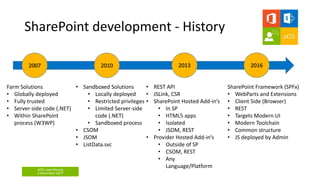
SharePoint development - History
Farm Solutions
• Globally deployed
• Fully trusted
• Server-side code (.NET)
• Within SharePoint
process (W3WP)
2007
• Sandboxed Solutions
• Locally deployed
• Restricted privileges
• Limited Server-side
code (.NET)
• Sandboxed process
• CSOM
• JSOM
• ListData.svc
2010 2013 2016
• REST API
• JSLink, CSR
• SharePoint Hosted Add-in’s
• In SP
• HTML5 apps
• Isolated
• JSOM, REST
• Provider Hosted Add-in’s
• Outside of SP
• CSOM, REST
• Any
Language/Platform
SharePoint Framework (SPFx)
• WebParts and Extensions
• Client Side (Browser)
• REST
• Targets Modern UI
• Modern Toolchain
• Common structure
• JS deployed by Admin
aOS Luxembourg
4 décembre 2017
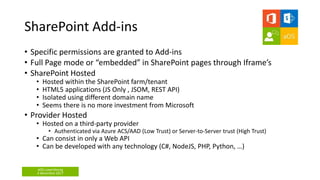
SharePoint Add-ins
• Specific permissions are granted to Add-ins
• Full Page mode or “embedded” in SharePoint pages through Iframe’s
• SharePoint Hosted
• Hosted within the SharePoint farm/tenant
• HTML5 applications (JS Only , JSOM, REST API)
• Isolated using different domain name
• Seems there is no more investment from Microsoft
• Provider Hosted
• Hosted on a third-party provider
• Authenticated via Azure ACS/AAD (Low Trust) or Server-to-Server trust (High Trust)
• Can consist in only a Web API
• Can be developed with any technology (C#, NodeJS, PHP, Python, …)
aOS Luxembourg
4 décembre 2017
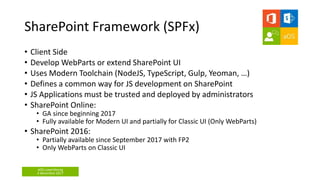
SharePoint Framework (SPFx)
• Client Side
• Develop WebParts or extend SharePoint UI
• Uses Modern Toolchain (NodeJS, TypeScript, Gulp, Yeoman, …)
• Defines a common way for JS development on SharePoint
• JS Applications must be trusted and deployed by administrators
• SharePoint Online:
• GA since beginning 2017
• Fully available for Modern UI and partially for Classic UI (Only WebParts)
• SharePoint 2016:
• Partially available since September 2017 with FP2
• Only WebParts on Classic UI
aOS Luxembourg
4 décembre 2017
What is JavaScript ?
• A scripting language driving the behavior of the browser
• Manipulates the DOM
• Handle user events (click, mouse move, scroll, …)
• JavaScript has NOTHING to do with Java
• Marketing agreement between Netscape and Sun
• First shipped with Netscape browser in 1996
• Normalized through ECMAScript
• Quickly implemented in all major browsers
• Single-threaded
• The same Thread handles UI and business logic
• Event-driven & Asynchronous
• Not initially designed for complex applications
aOS Luxembourg
4 décembre 2017
Why JavaScript ?
• Better UI and UX
• No page reload
• Dynamic input controls
• Real time form validation
• Responsive User Experience
• User friendly
• Is supported by every current browsers
• No need for plugins (Flash and Silverlight are dead… RIP ! )
• There is a browser running JavaScript on every smartphone and tablet
nowadays
aOS Luxembourg
4 décembre 2017
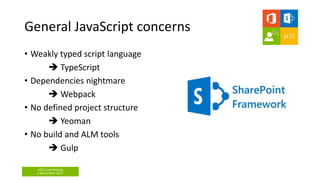
General JavaScript concerns
• Weakly typed script language
 TypeScript
• Dependencies nightmare
 Webpack
• No defined project structure
 Yeoman
• No build and ALM tools
 Gulp
aOS Luxembourg
4 décembre 2017
Other SPFx advantages
• A common framework with base and utility classes
• A development Workbench available locally or hosted on SharePoint
• SharePoint is not required to develop the UX and UI of WebParts
• JavaScript bundle can be hosted anywhere (CDN or SharePoint)
• Native support of Office UI Fabric styling and components
• Native support for localized resources
• Integrated unit testing tooling (Chai/Mocha)
• Integrated CSS scalability tooling (Sass)
• Dynamic, responsive and sexy Property Pane
• Development can be done with any IDE, on any OS
• Can leverage any existing JS Framework
• Every JS developer can easily become a SharePoint developer
aOS Luxembourg
4 décembre 2017
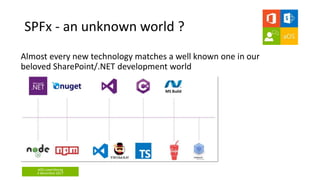
SPFx - an unknown world ?
Almost every new technology matches a well known one in our
beloved SharePoint/.NET development world
aOS Luxembourg
4 décembre 2017
DEMO 1
Develop with SPFx
aOS Luxembourg
4 décembre 2017
SharePoint & JavaScript concerns
• The JS application will interact with SharePoint through REST API (or
JSOM)
 Will have the permissions of the current user.
A JavaScript application will never be able to do, on its own, more than
what the current user is allowed to
BUT
will be able to use the current user permissions to do something
unexpected
aOS Luxembourg
4 décembre 2017
SharePoint & JavaScript concerns
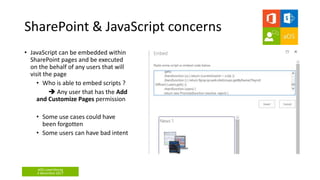
• JavaScript can be embedded within
SharePoint pages and be executed
on the behalf of any users that will
visit the page
• Who is able to embed scripts ?
 Any user that has the Add
and Customize Pages permission
• Some use cases could have
been forgotten
• Some users can have bad intent
aOS Luxembourg
4 décembre 2017
DEMO 2
Malicious Script
aOS Luxembourg
4 décembre 2017
SharePoint & JavaScript embedding
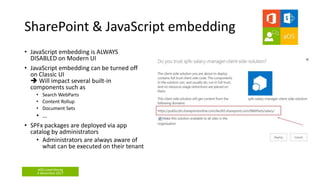
• JavaScript embedding is ALWAYS
DISABLED on Modern UI
• JavaScript embedding can be turned off
on Classic UI
 Will impact several built-in
components such as
• Search WebParts
• Content Rollup
• Document Sets
• …
• SPFx packages are deployed via app
catalog by administrators
• Administrators are always aware of
what can be executed on their tenant
aOS Luxembourg
4 décembre 2017
DEMO 3
Deploy SPFx solutions
aOS Luxembourg
4 décembre 2017
JavaScript & Permissions
• We might need our application to do more than what the user is
allowed to
 we must delegate the job to a trusted third-party
• The third-party is authorized through App-Only permissions
• In the context of SharePoint Online, an Azure Function is a good
option
• SharePoint Online always has an underlying Azure AD, the logged-in user can
easily authenticate against the Azure Function
• Azure Functions limit the maintenance and running costs
• Azure Functions can be written in several languages
• Azure Functions can be replaced by any third party if better suited
aOS Luxembourg
4 décembre 2017
DEMO 4
Delegate to Azure Functions
aOS Luxembourg
4 décembre 2017
Summary
• JavaScript is probably the best choice for responsive and user
friendly UI in browser
• SPFx IS the way to go for modern development in SharePoint
• Add-ins (Provider Hosted) will remain in shapes of APIs or full
external applications interacting with SharePoint
• Azure Functions are a good fit to implement Server-side code
on Serverless architecture (handled authentication with Azure
AD)
• Custom APIs communicating with SharePoint can be hosted on
any platform in any technology (through REST API)
aOS Luxembourg
4 décembre 2017
Questions ?
aOS Luxembourg
4 décembre 2017
Thank you !
aOS Luxembourg
4 décembre 2017
References
• https://support.office.com/en-us/article/Allow-or-prevent-
custom-script-1f2c515f-5d7e-448a-9fd7-835da935584f?ui=en-
US&rs=en-US&ad=US
• https://support.office.com/en-us/article/Security-
considerations-of-allowing-custom-script-b0420ab0-aff2-4bbc-
bf5e-03de9719627c
• https://docs.microsoft.com/en-us/sharepoint/dev/spfx/web-
parts/guidance/connect-to-api-secured-with-aad
• https://aka.ms/sppnp
aOS Luxembourg
4 décembre 2017
Merci à notre sponsor !

SharePoint and javascript – modern development

  • 1.
    aOS Luxembourg 4 décembre2017 SharePoint & JavaScript – Modern Development Christopher Clément @ChrisClement_BE Yannick Plenevaux @yp_code
  • 2.
    aOS Luxembourg 4 décembre2017 Yannick Plenevaux SharePoint & Office 365 Consultant MCSD App Builder iKe Consulting @ yannick.plenevaux@gmail.com @yp_code https://ypcode.wordpress.com Christopher Clément Business Analyst – SharePoint Specialist MCPD – MCITP – Former MVP iKe Consulting @ clem.christopher@gmail.com @ChrisClement_BE https://christopherclementen.wordpress.com
  • 3.
    aOS Luxembourg 4 décembre2017 Agenda • History of SharePoint development • Why JavaScript ? • General JavaScript concerns • SharePoint Framework • SharePoint & JavaScript concerns • SharePoint & JavaScript embedding • JavaScript & Permissions • Q&A
  • 4.
    aOS Luxembourg 4 décembre2017 SharePoint development - History Farm Solutions • Globally deployed • Fully trusted • Server-side code (.NET) • Within SharePoint process (W3WP) 2007 • Sandboxed Solutions • Locally deployed • Restricted privileges • Limited Server-side code (.NET) • Sandboxed process • CSOM • JSOM • ListData.svc 2010 2013 2016 • REST API • JSLink, CSR • SharePoint Hosted Add-in’s • In SP • HTML5 apps • Isolated • JSOM, REST • Provider Hosted Add-in’s • Outside of SP • CSOM, REST • Any Language/Platform SharePoint Framework (SPFx) • WebParts and Extensions • Client Side (Browser) • REST • Targets Modern UI • Modern Toolchain • Common structure • JS deployed by Admin
  • 5.
    aOS Luxembourg 4 décembre2017 SharePoint Add-ins • Specific permissions are granted to Add-ins • Full Page mode or “embedded” in SharePoint pages through Iframe’s • SharePoint Hosted • Hosted within the SharePoint farm/tenant • HTML5 applications (JS Only , JSOM, REST API) • Isolated using different domain name • Seems there is no more investment from Microsoft • Provider Hosted • Hosted on a third-party provider • Authenticated via Azure ACS/AAD (Low Trust) or Server-to-Server trust (High Trust) • Can consist in only a Web API • Can be developed with any technology (C#, NodeJS, PHP, Python, …)
  • 6.
    aOS Luxembourg 4 décembre2017 SharePoint Framework (SPFx) • Client Side • Develop WebParts or extend SharePoint UI • Uses Modern Toolchain (NodeJS, TypeScript, Gulp, Yeoman, …) • Defines a common way for JS development on SharePoint • JS Applications must be trusted and deployed by administrators • SharePoint Online: • GA since beginning 2017 • Fully available for Modern UI and partially for Classic UI (Only WebParts) • SharePoint 2016: • Partially available since September 2017 with FP2 • Only WebParts on Classic UI
  • 7.
    aOS Luxembourg 4 décembre2017 What is JavaScript ? • A scripting language driving the behavior of the browser • Manipulates the DOM • Handle user events (click, mouse move, scroll, …) • JavaScript has NOTHING to do with Java • Marketing agreement between Netscape and Sun • First shipped with Netscape browser in 1996 • Normalized through ECMAScript • Quickly implemented in all major browsers • Single-threaded • The same Thread handles UI and business logic • Event-driven & Asynchronous • Not initially designed for complex applications
  • 8.
    aOS Luxembourg 4 décembre2017 Why JavaScript ? • Better UI and UX • No page reload • Dynamic input controls • Real time form validation • Responsive User Experience • User friendly • Is supported by every current browsers • No need for plugins (Flash and Silverlight are dead… RIP ! ) • There is a browser running JavaScript on every smartphone and tablet nowadays
  • 9.
    aOS Luxembourg 4 décembre2017 General JavaScript concerns • Weakly typed script language  TypeScript • Dependencies nightmare  Webpack • No defined project structure  Yeoman • No build and ALM tools  Gulp
  • 10.
    aOS Luxembourg 4 décembre2017 Other SPFx advantages • A common framework with base and utility classes • A development Workbench available locally or hosted on SharePoint • SharePoint is not required to develop the UX and UI of WebParts • JavaScript bundle can be hosted anywhere (CDN or SharePoint) • Native support of Office UI Fabric styling and components • Native support for localized resources • Integrated unit testing tooling (Chai/Mocha) • Integrated CSS scalability tooling (Sass) • Dynamic, responsive and sexy Property Pane • Development can be done with any IDE, on any OS • Can leverage any existing JS Framework • Every JS developer can easily become a SharePoint developer
  • 11.
    aOS Luxembourg 4 décembre2017 SPFx - an unknown world ? Almost every new technology matches a well known one in our beloved SharePoint/.NET development world
  • 12.
    aOS Luxembourg 4 décembre2017 DEMO 1 Develop with SPFx
  • 13.
    aOS Luxembourg 4 décembre2017 SharePoint & JavaScript concerns • The JS application will interact with SharePoint through REST API (or JSOM)  Will have the permissions of the current user. A JavaScript application will never be able to do, on its own, more than what the current user is allowed to BUT will be able to use the current user permissions to do something unexpected
  • 14.
    aOS Luxembourg 4 décembre2017 SharePoint & JavaScript concerns • JavaScript can be embedded within SharePoint pages and be executed on the behalf of any users that will visit the page • Who is able to embed scripts ?  Any user that has the Add and Customize Pages permission • Some use cases could have been forgotten • Some users can have bad intent
  • 15.
    aOS Luxembourg 4 décembre2017 DEMO 2 Malicious Script
  • 16.
    aOS Luxembourg 4 décembre2017 SharePoint & JavaScript embedding • JavaScript embedding is ALWAYS DISABLED on Modern UI • JavaScript embedding can be turned off on Classic UI  Will impact several built-in components such as • Search WebParts • Content Rollup • Document Sets • … • SPFx packages are deployed via app catalog by administrators • Administrators are always aware of what can be executed on their tenant
  • 17.
    aOS Luxembourg 4 décembre2017 DEMO 3 Deploy SPFx solutions
  • 18.
    aOS Luxembourg 4 décembre2017 JavaScript & Permissions • We might need our application to do more than what the user is allowed to  we must delegate the job to a trusted third-party • The third-party is authorized through App-Only permissions • In the context of SharePoint Online, an Azure Function is a good option • SharePoint Online always has an underlying Azure AD, the logged-in user can easily authenticate against the Azure Function • Azure Functions limit the maintenance and running costs • Azure Functions can be written in several languages • Azure Functions can be replaced by any third party if better suited
  • 19.
    aOS Luxembourg 4 décembre2017 DEMO 4 Delegate to Azure Functions
  • 20.
    aOS Luxembourg 4 décembre2017 Summary • JavaScript is probably the best choice for responsive and user friendly UI in browser • SPFx IS the way to go for modern development in SharePoint • Add-ins (Provider Hosted) will remain in shapes of APIs or full external applications interacting with SharePoint • Azure Functions are a good fit to implement Server-side code on Serverless architecture (handled authentication with Azure AD) • Custom APIs communicating with SharePoint can be hosted on any platform in any technology (through REST API)
  • 21.
  • 22.
  • 23.
    aOS Luxembourg 4 décembre2017 References • https://support.office.com/en-us/article/Allow-or-prevent- custom-script-1f2c515f-5d7e-448a-9fd7-835da935584f?ui=en- US&rs=en-US&ad=US • https://support.office.com/en-us/article/Security- considerations-of-allowing-custom-script-b0420ab0-aff2-4bbc- bf5e-03de9719627c • https://docs.microsoft.com/en-us/sharepoint/dev/spfx/web- parts/guidance/connect-to-api-secured-with-aad • https://aka.ms/sppnp
  • 24.
    aOS Luxembourg 4 décembre2017 Merci à notre sponsor !

Editor's Notes

  • #4 CCL
  • #5 CCL 2007 and before : Farm Solutions 2010 : Sandboxed Solutions, CSOM, JSON, ListData.svc (ancestor of REST API) 2013: REST API, Add-ins (SP HOSTED, PROVIDER HOSTED) 2016: SPFx
  • #6 CCL
  • #7 YPL
  • #8 YPL
  • #9 CCL
  • #10 CCL
  • #11 YPL
  • #12 YPL Node  .NET/IIS/IIS Express
  • #14 CCL
  • #15 CCL
  • #16 Context: A Salaries libraries containing one folder per employee Each folder has broken permissions Read for the employee Contribute for Payroll Officers We have two users Bob Designer (with Design permission on the site) John Payroll (with Edit permission on the site, in the Payroll Officers group) Bob is asked to redesign the content of the Homepage of the site He embeds HTML/CSS He embeds also a malicious script The script will check if the current user is a Payroll Officer If yes, the script will copy all the content of Salaries to a newly created hidden library The url of the new library will be sent to Bob When a Payroll Officer visits the homepage, he executes the malicious script with his permissions
  • #17 CCL
  • #18 YPL (4 min) Show the cdnBasePath in ./config/write-manifests.json gulp bundle --ship gulp package-solution --ship Copy ./temp/deploy content to /sites/aos_classic/SiteAssets/spfx/salary Deploy ./sharepoint/solution/spfx-salary-manager.sppkg to /sites/appcatalog/appcatalog Trust the solution and show the URL Add the WebPart On a Modern Page On a Classic Page
  • #19 CCL
  • #20 Show how to create an Azure Function App (DON’T REALLY CREATE IT) Show how to add a Function Available languages Available templates Show the Azure AD Authentication Mention the CORS support Copy/Paste the code Register the App in SharePoint and grant permissions Configure Client Id/Client Secret in the app settings Copy/Paste the URL Mention the admin consent Configure the WebPart with the URL Click the Add Folder button