SharePoint
2013 Migration
Solutions
or why Microsoft suddenly took
away the in-place upgrade.
•   SharePoint 2013 and what’s new
   •   Assess your current SharePoint environment and plan the architecture of the new
       farm
   •   MOSS 2007 migration and third party solutions
   •   SharePoint 2010 migration and why in-place upgrade is no longer available
   •   Prepare the farm for migration
   •   Migrate supported service applications
   •   Migrate content
   •   Create evaluation sites
   •   Migrate site collections and sites.


The Agenda
•   The Design Manager
   •   Device Channels, display templates, etc.
   •   HTML5, CSS3, all that coolness
   •   Community Sites and Community Portal
   •   The new search experience
   •   Apps and the App Store
   •   But wait… there is more!


What’s new in SharePoint 2013
Which Service Apps are supported for migration?
•   Business Data Connectivity (Server and Foundation)
•   Managed Metadata
•   Performance Point
•   Secure Store
•   User Profile
•   Search Administration


Background: Supported Service Applications
•   Excel Services
•   InfoPath Forms Services
•   Office Web Apps


Considerations for Specific Services
•   Seriously, what happened to the in-place upgrade?


SharePoint 2010 migration and why in-place upgrade is
no longer available
•   AvePoint: DocAve
 •   Axceler: ControlPoint migration software
 •   MetaVis: Migration Suite
 •   Sharegate


MOSS 2007 migration and third party solutions
•   Gather information about the 2010 farm
•   Clean-up
•   Prepare the new SharePoint 2013 farm


Assess and Prepare
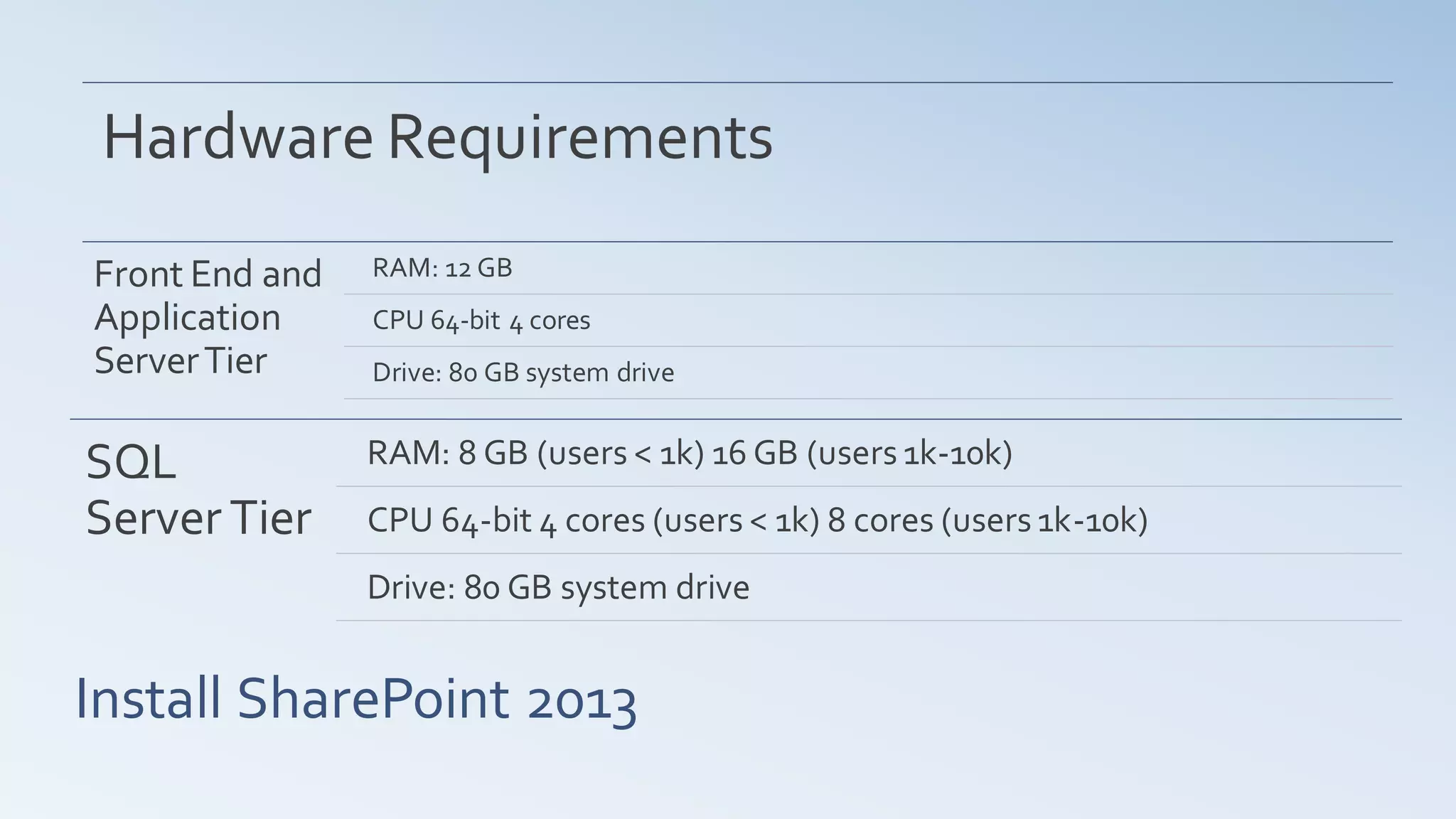
Hardware Requirements
Front End and   RAM: 12 GB
Application     CPU 64-bit 4 cores
Server Tier     Drive: 80 GB system drive


SQL             RAM: 8 GB (users < 1k) 16 GB (users 1k-10k)
Server Tier     CPU 64-bit 4 cores (users < 1k) 8 cores (users 1k-10k)
                Drive: 80 GB system drive


Install SharePoint 2013
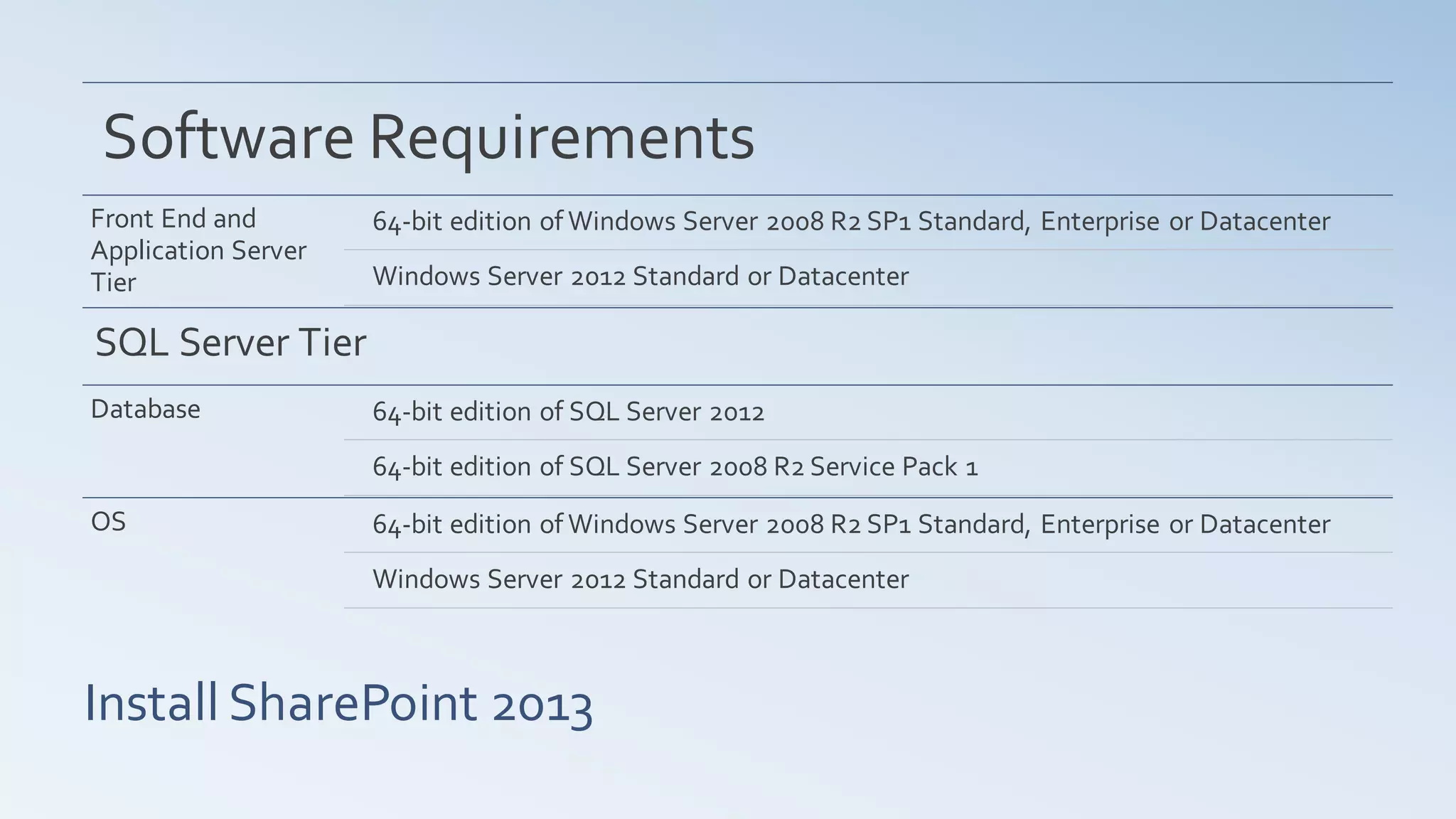
Software Requirements
Front End and        64-bit edition of Windows Server 2008 R2 SP1 Standard, Enterprise or Datacenter
Application Server
Tier                 Windows Server 2012 Standard or Datacenter

SQL Server Tier
Database             64-bit edition of SQL Server 2012
                     64-bit edition of SQL Server 2008 R2 Service Pack 1
OS                   64-bit edition of Windows Server 2008 R2 SP1 Standard, Enterprise or Datacenter
                     Windows Server 2012 Standard or Datacenter


Install SharePoint 2013
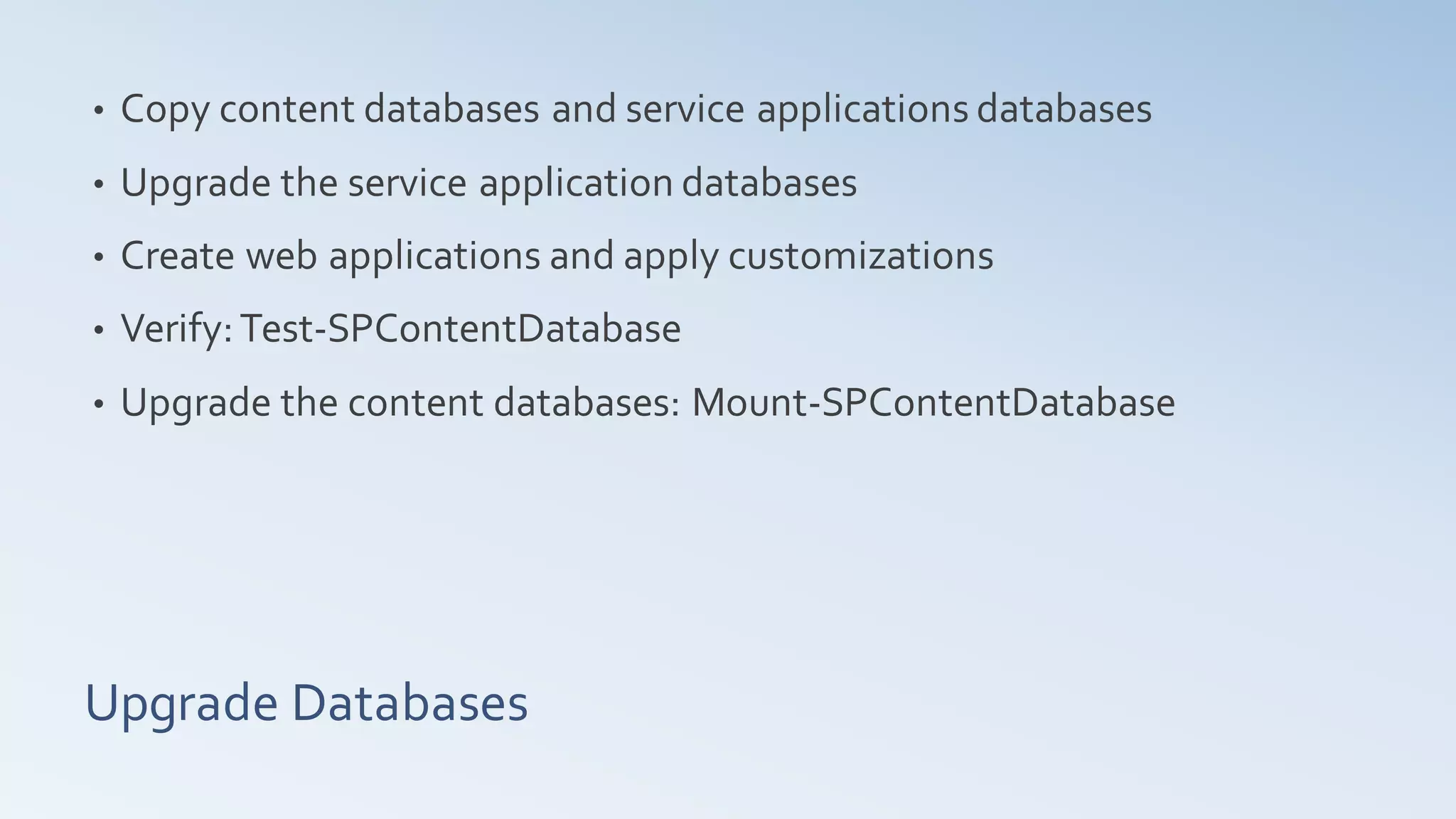
•   Copy content databases and service applications databases
•   Upgrade the service application databases
•   Create web applications and apply customizations
•   Verify: Test-SPContentDatabase
•   Upgrade the content databases: Mount-SPContentDatabase


Upgrade Databases
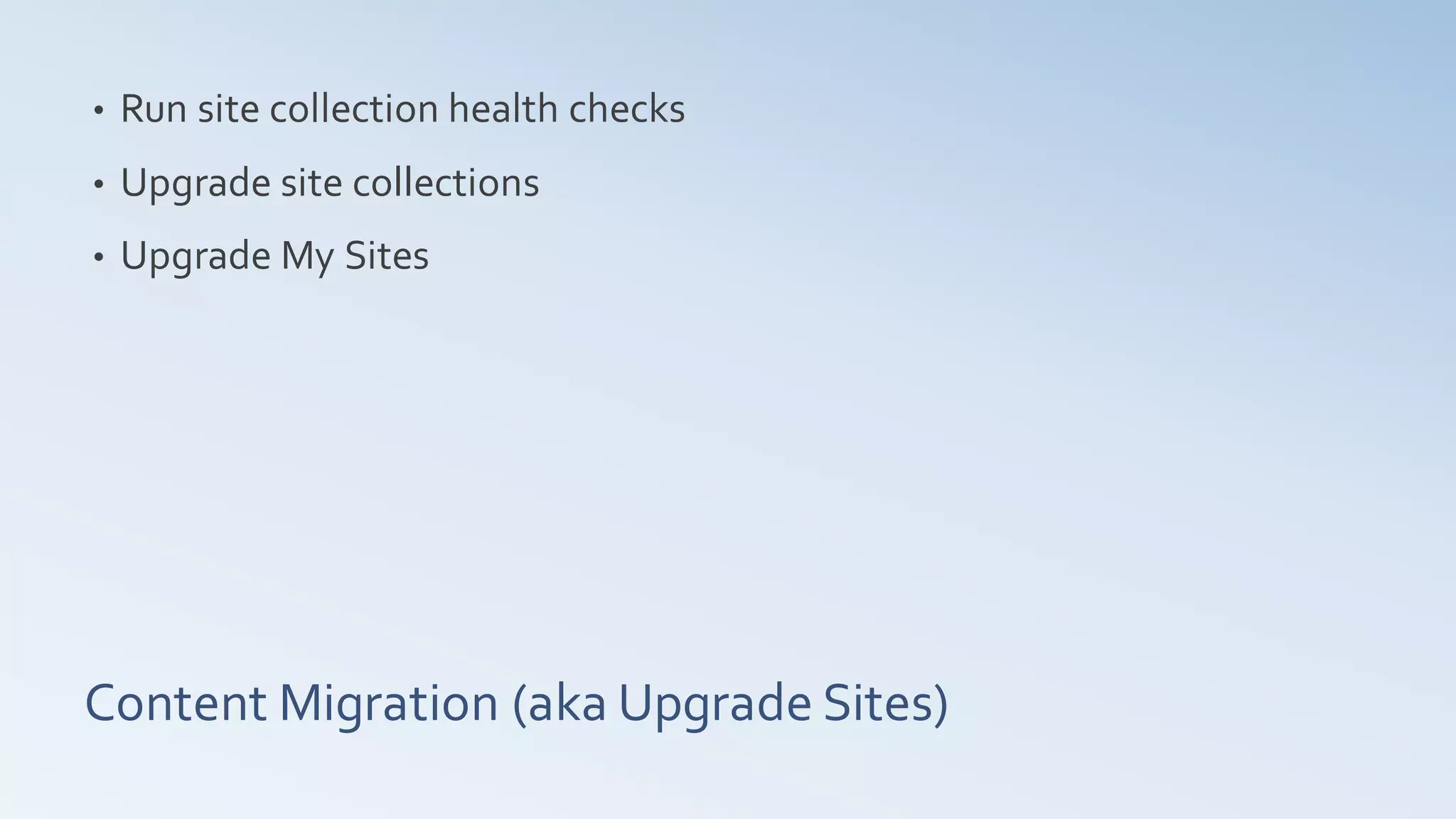
•   Run site collection health checks
•   Upgrade site collections
•   Upgrade My Sites


Content Migration (aka Upgrade Sites)
•   Branding
•   Search
•   Authentication
•   Custom Solutions


What might/will not work?
Thank you for attending!


Q&A

Share point 2013 migration solutions

  • 1.
    SharePoint 2013 Migration Solutions or whyMicrosoft suddenly took away the in-place upgrade.
  • 2.
    SharePoint 2013 and what’s new • Assess your current SharePoint environment and plan the architecture of the new farm • MOSS 2007 migration and third party solutions • SharePoint 2010 migration and why in-place upgrade is no longer available • Prepare the farm for migration • Migrate supported service applications • Migrate content • Create evaluation sites • Migrate site collections and sites. The Agenda
  • 3.
    The Design Manager • Device Channels, display templates, etc. • HTML5, CSS3, all that coolness • Community Sites and Community Portal • The new search experience • Apps and the App Store • But wait… there is more! What’s new in SharePoint 2013
  • 4.
    Which Service Appsare supported for migration? • Business Data Connectivity (Server and Foundation) • Managed Metadata • Performance Point • Secure Store • User Profile • Search Administration Background: Supported Service Applications
  • 5.
    Excel Services • InfoPath Forms Services • Office Web Apps Considerations for Specific Services
  • 6.
    Seriously, what happened to the in-place upgrade? SharePoint 2010 migration and why in-place upgrade is no longer available
  • 7.
    AvePoint: DocAve • Axceler: ControlPoint migration software • MetaVis: Migration Suite • Sharegate MOSS 2007 migration and third party solutions
  • 8.
    Gather information about the 2010 farm • Clean-up • Prepare the new SharePoint 2013 farm Assess and Prepare
  • 9.
    Hardware Requirements Front Endand RAM: 12 GB Application CPU 64-bit 4 cores Server Tier Drive: 80 GB system drive SQL RAM: 8 GB (users < 1k) 16 GB (users 1k-10k) Server Tier CPU 64-bit 4 cores (users < 1k) 8 cores (users 1k-10k) Drive: 80 GB system drive Install SharePoint 2013
  • 10.
    Software Requirements Front Endand 64-bit edition of Windows Server 2008 R2 SP1 Standard, Enterprise or Datacenter Application Server Tier Windows Server 2012 Standard or Datacenter SQL Server Tier Database 64-bit edition of SQL Server 2012 64-bit edition of SQL Server 2008 R2 Service Pack 1 OS 64-bit edition of Windows Server 2008 R2 SP1 Standard, Enterprise or Datacenter Windows Server 2012 Standard or Datacenter Install SharePoint 2013
  • 11.
    Copy content databases and service applications databases • Upgrade the service application databases • Create web applications and apply customizations • Verify: Test-SPContentDatabase • Upgrade the content databases: Mount-SPContentDatabase Upgrade Databases
  • 12.
    Run site collection health checks • Upgrade site collections • Upgrade My Sites Content Migration (aka Upgrade Sites)
  • 13.
    Branding • Search • Authentication • Custom Solutions What might/will not work?
  • 14.
    Thank you forattending! Q&A