





Presented by Steve Stedman and Aaron Buma
Welcome
 Welcome to all those joining us remotely.
 For any questions via Google On Air Broadcasts, we will
address most of these at the end of the training.
 Training provided by Emergency Reporting
 http://EmergencyReporting.com
 Presented by Steve Stedman and Aaron Buma
Live Broadcast
 Using Google On Air Broadcasts
 There is about a 40 to 50 second delay from live to what
you see.
 We are still learning how to properly use Google On Air
Broadcasts. Please be patient.
 Session will be available on my YouTube Channel about
an hour after it the presentation ends.
 http://SteveStedman.com/YouTube
Questions
 We will have time for questions at the end of the session.
 Q&A available via Google On Air Hangout panel. Click the
3x3 grid icon near the top right, then select Q&A to see
what people are asking, or to ask your own question.
 When you ask a question, it shows up for us about 40 to 50
seconds delayed.
Agenda
 Set Operators
 Derived Tables
 Common Table Expressions
Presented by Aaron Buma
Agenda
 UNION Types
 UNION
 UNION ALL
 INTERSECT
 EXCEPT
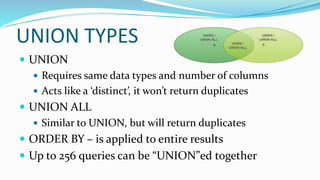
UNION TYPES
 UNION
 Requires same data types and number of columns
 Acts like a ‘distinct’, it won’t return duplicates
 UNION ALL
 Similar to UNION, but will return duplicates
 ORDER BY – is applied to entire results
 Up to 256 queries can be “UNION”ed together
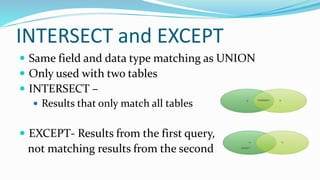
INTERSECT and EXCEPT
 Same field and data type matching as UNION
 Only used with two tables
 INTERSECT –
 Results that only match all tables
 EXCEPT- Results from the first query,
not matching results from the second
Presented by Steve Stedman
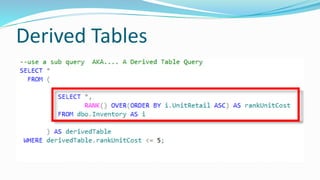
Derived Tables
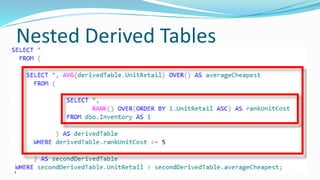
Nested Derived Tables
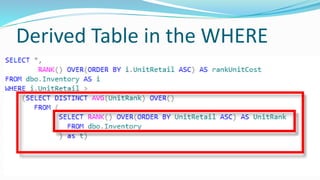
Derived Table in the WHERE
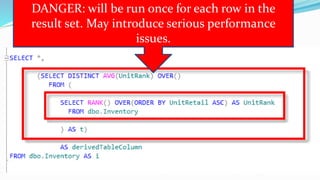
Derived Table In Columns List
DANGER: will be run once for each row in the
result set. May introduce serious performance
issues.
Derived Tables
Demo
Presented by Steve Stedman
CTE Book
 Published May 2013
Today’s topic comes from Chapter 1, 2, 3, 4, 6,
7 and 9
Of
SQL Server Common Table
Expression
CTE – Agenda
 Introduction to Memory Tables and CTEs
 Simple CTE
 CTE Instead of a Derived Table
 Multiple CTE in a Query
 Data Paging
 CTEs in Stored Procedures, Functions and Views
 Introduction To Recursive CTEs
Introduction to Memory Tables and
CTEs
Chapter 1
and 2
 Virtual Tables
 Derived Table
 Sub query
 Views
 Temporary Named Result Set
 Temp Tables
 Table Variables
 Common Table Expressions
Memory Tables SELECT *
FROM (SELECT id,
department,
parent
FROM Departments) as Dept;
CREATE VIEW [dbo].[DeptView]
AS
SELECT id, department, parent
FROM Departments;
GO
SELECT q1.department,
q2.department AS subDept
FROM DeptView q1
INNER JOIN DeptView q2
ON q1.id = q2.parent
WHERE q1.parent IS NULL;
CREATE TABLE #deptTempTable (
id int,
department VARCHAR (200),
parent int
);
DECLARE @deptTableVariable TABLE(
id int,
department VARCHAR (200),
parent int
);
 A type of a virtual table
 Similar to the ease of a temporary table
 Sort of like a derived table
 Like a temporary named result set
 Acts like a temporary view, or a run time view
What is a CTE
Availability of CTEs
 TRANSACT SQL feature that I wish I had
learned about 10 years ago, CTE’s were
introduced in SQL Server 2005
 All versions of SQL Server since SQL 2005
and all variations of SQL Server support
CTEs
 CTEs are available in SQL Azure
Why Use Common Table
Expressions?
 Simplify your query – test one part at a time
 Recursion
 Computer Science: When a function calls itself
 SQL Server: When a query calls itself
 Make derived table queries more readable
 Alternative to a temp table or a table variable
CTE Syntax - WITH
 Queries start with WITH not SELECT
 Can be confusing if you are assuming that any query to
select data would start with a SELECT
 The scope of the CTE is confined to a single query
 A CTE just seems a little weird, until you master the syntax
Simple CTE Syntax
;WITH expression_name [(column_name[,...n])]
AS
(
CTE_query_definition
)
SELECT <column_list>
FROM expression_name;
Simple CTE
Demo
Reminder
 If a CTE is not the first statement in a batch it must be
proceeded with a semicolon
CTEs Instead of Derived Tables
Chapter 3
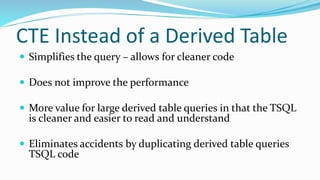
CTE Instead of a Derived Table
 Simplifies the query – allows for cleaner code
 Does not improve the performance
 More value for large derived table queries in that the TSQL
is cleaner and easier to read and understand
 Eliminates accidents by duplicating derived table queries
TSQL code
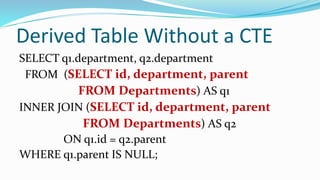
Derived Table Without a CTE
SELECT q1.department, q2.department
FROM (SELECT id, department, parent
FROM Departments) AS q1
INNER JOIN (SELECT id, department, parent
FROM Departments) AS q2
ON q1.id = q2.parent
WHERE q1.parent IS NULL;
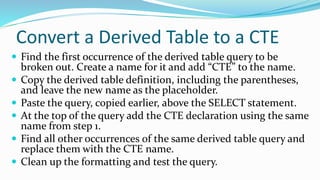
Convert a Derived Table to a CTE
 Find the first occurrence of the derived table query to be
broken out. Create a name for it and add “CTE” to the name.
 Copy the derived table definition, including the parentheses,
and leave the new name as the placeholder.
 Paste the query, copied earlier, above the SELECT statement.
 At the top of the query add the CTE declaration using the same
name from step 1.
 Find all other occurrences of the same derived table query and
replace them with the CTE name.
 Clean up the formatting and test the query.
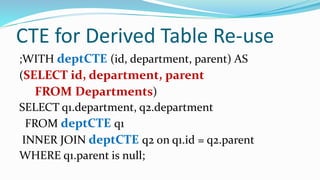
CTE for Derived Table Re-use
;WITH deptCTE (id, department, parent) AS
(SELECT id, department, parent
FROM Departments)
SELECT q1.department, q2.department
FROM deptCTE q1
INNER JOIN deptCTE q2 on q1.id = q2.parent
WHERE q1.parent is null;
Chapter 3
Demo
CTE Instead of a Derived Table
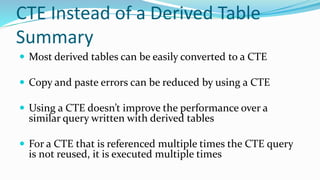
Summary
 Most derived tables can be easily converted to a CTE
 Copy and paste errors can be reduced by using a CTE
 Using a CTE doesn’t improve the performance over a
similar query written with derived tables
 For a CTE that is referenced multiple times the CTE query
is not reused, it is executed multiple times
Multiple CTEs in a Query
Chapter 6
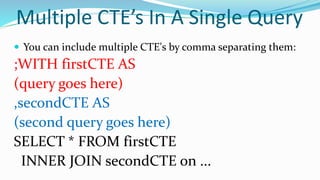
Multiple CTE’s In A Single Query
 You can include multiple CTE's by comma separating them:
;WITH firstCTE AS
(query goes here)
,secondCTE AS
(second query goes here)
SELECT * FROM firstCTE
INNER JOIN secondCTE on ...
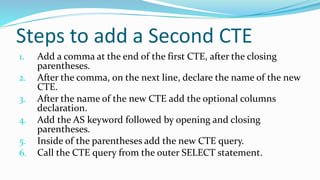
Steps to add a Second CTE
1. Add a comma at the end of the first CTE, after the closing
parentheses.
2. After the comma, on the next line, declare the name of the new
CTE.
3. After the name of the new CTE add the optional columns
declaration.
4. Add the AS keyword followed by opening and closing
parentheses.
5. Inside of the parentheses add the new CTE query.
6. Call the CTE query from the outer SELECT statement.
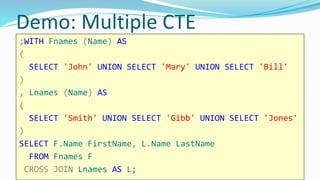
Demo: Multiple CTE
;WITH Fnames (Name) AS
(
SELECT 'John' UNION SELECT 'Mary' UNION SELECT 'Bill'
)
, Lnames (Name) AS
(
SELECT 'Smith' UNION SELECT 'Gibb' UNION SELECT 'Jones'
)
SELECT F.Name FirstName, L.Name LastName
FROM Fnames F
CROSS JOIN Lnames AS L;
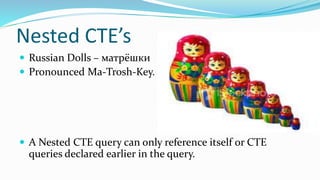
Nested CTE’s
 Russian Dolls – матрёшки
 Pronounced Ma-Trosh-Key.
 A Nested CTE query can only reference itself or CTE
queries declared earlier in the query.
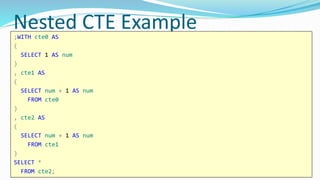
Nested CTE Example;WITH cte0 AS
(
SELECT 1 AS num
)
, cte1 AS
(
SELECT num + 1 AS num
FROM cte0
)
, cte2 AS
(
SELECT num + 1 AS num
FROM cte1
)
SELECT *
FROM cte2;
Chapter 6
Demo
Data Paging With a CTE
Chapter 7
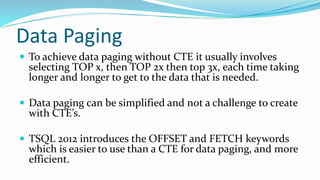
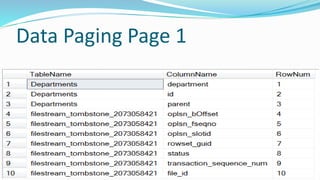
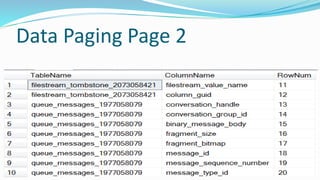
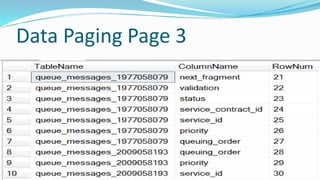
Data Paging
 To achieve data paging without CTE it usually involves
selecting TOP x, then TOP 2x then top 3x, each time taking
longer and longer to get to the data that is needed.
 Data paging can be simplified and not a challenge to create
with CTE’s.
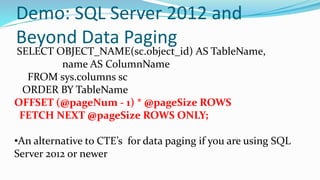
 TSQL 2012 introduces the OFFSET and FETCH keywords
which is easier to use than a CTE for data paging, and more
efficient.
Data Paging Page 1
Data Paging Page 2
Data Paging Page 3
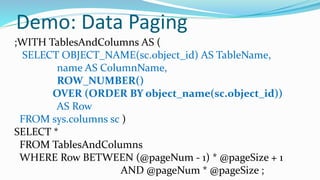
Demo: Data Paging
;WITH TablesAndColumns AS (
SELECT OBJECT_NAME(sc.object_id) AS TableName,
name AS ColumnName,
ROW_NUMBER()
OVER (ORDER BY object_name(sc.object_id))
AS Row
FROM sys.columns sc )
SELECT *
FROM TablesAndColumns
WHERE Row BETWEEN (@pageNum - 1) * @pageSize + 1
AND @pageNum * @pageSize ;
Demo: SQL Server 2012 and
Beyond Data Paging
SELECT OBJECT_NAME(sc.object_id) AS TableName,
name AS ColumnName
FROM sys.columns sc
ORDER BY TableName
OFFSET (@pageNum - 1) * @pageSize ROWS
FETCH NEXT @pageSize ROWS ONLY;
•An alternative to CTE’s for data paging if you are using SQL
Server 2012 or newer
Chapter 7
Demo
CTEs in Stored Procedures,
Functions and Views
Chapter 9
CTEs in Stored Procedures,
Functions and Views
Chapter 9
Demo
Introduction to Recursive CTEs
Chapter 4
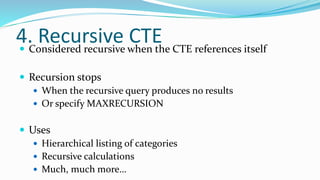
4. Recursive CTE Considered recursive when the CTE references itself
 Recursion stops
 When the recursive query produces no results
 Or specify MAXRECURSION
 Uses
 Hierarchical listing of categories
 Recursive calculations
 Much, much more…
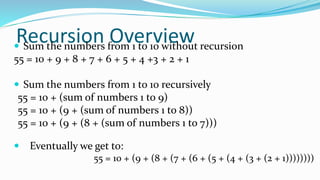
Recursion Overview Sum the numbers from 1 to 10 without recursion
55 = 10 + 9 + 8 + 7 + 6 + 5 + 4 +3 + 2 + 1
 Sum the numbers from 1 to 10 recursively
55 = 10 + (sum of numbers 1 to 9)
55 = 10 + (9 + (sum of numbers 1 to 8))
55 = 10 + (9 + (8 + (sum of numbers 1 to 7)))
 Eventually we get to:
55 = 10 + (9 + (8 + (7 + (6 + (5 + (4 + (3 + (2 + 1))))))))
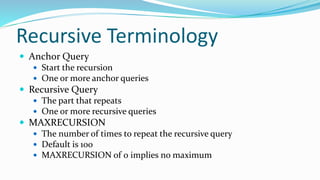
Recursive Terminology
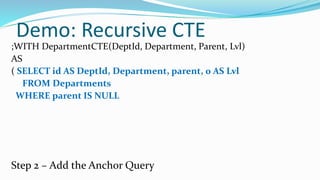
 Anchor Query
 Start the recursion
 One or more anchor queries
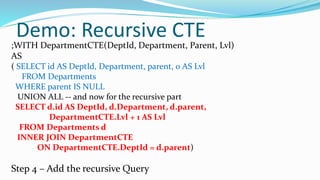
 Recursive Query
 The part that repeats
 One or more recursive queries
 MAXRECURSION
 The number of times to repeat the recursive query
 Default is 100
 MAXRECURSION of 0 implies no maximum
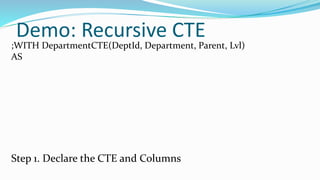
Demo: Recursive CTE
;WITH DepartmentCTE(DeptId, Department, Parent, Lvl)
AS
Step 1. Declare the CTE and Columns
Demo: Recursive CTE
;WITH DepartmentCTE(DeptId, Department, Parent, Lvl)
AS
( SELECT id AS DeptId, Department, parent, 0 AS Lvl
FROM Departments
WHERE parent IS NULL
Step 2 – Add the Anchor Query
Demo: Recursive CTE
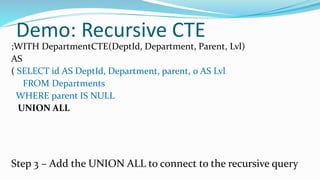
;WITH DepartmentCTE(DeptId, Department, Parent, Lvl)
AS
( SELECT id AS DeptId, Department, parent, 0 AS Lvl
FROM Departments
WHERE parent IS NULL
UNION ALL
Step 3 – Add the UNION ALL to connect to the recursive query
Demo: Recursive CTE
;WITH DepartmentCTE(DeptId, Department, Parent, Lvl)
AS
( SELECT id AS DeptId, Department, parent, 0 AS Lvl
FROM Departments
WHERE parent IS NULL
UNION ALL -- and now for the recursive part
SELECT d.id AS DeptId, d.Department, d.parent,
DepartmentCTE.Lvl + 1 AS Lvl
FROM Departments d
INNER JOIN DepartmentCTE
ON DepartmentCTE.DeptId = d.parent)
Step 4 – Add the recursive Query
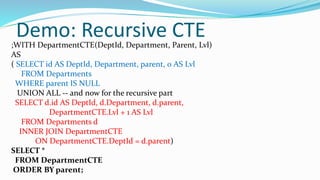
Demo: Recursive CTE;WITH DepartmentCTE(DeptId, Department, Parent, Lvl)
AS
( SELECT id AS DeptId, Department, parent, 0 AS Lvl
FROM Departments
WHERE parent IS NULL
UNION ALL -- and now for the recursive part
SELECT d.id AS DeptId, d.Department, d.parent,
DepartmentCTE.Lvl + 1 AS Lvl
FROM Departments d
INNER JOIN DepartmentCTE
ON DepartmentCTE.DeptId = d.parent)
SELECT *
FROM DepartmentCTE
ORDER BY parent;
Chapter 4
Demo
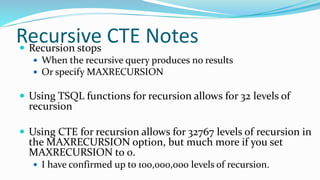
Recursive CTE Notes Recursion stops
 When the recursive query produces no results
 Or specify MAXRECURSION
 Using TSQL functions for recursion allows for 32 levels of
recursion
 Using CTE for recursion allows for 32767 levels of recursion in
the MAXRECURSION option, but much more if you set
MAXRECURSION to 0.
 I have confirmed up to 100,000,000 levels of recursion.
Download the samples and there
are many additional CTE examples
at the end of the file.
Bonus Material
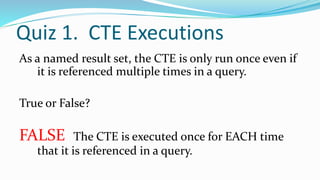
Quiz 1. CTE Executions
As a named result set, the CTE is only run once even if
it is referenced multiple times in a query.
True or False?
FALSE The CTE is executed once for EACH time
that it is referenced in a query.
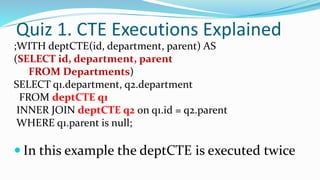
Quiz 1. CTE Executions Explained
;WITH deptCTE(id, department, parent) AS
(SELECT id, department, parent
FROM Departments)
SELECT q1.department, q2.department
FROM deptCTE q1
INNER JOIN deptCTE q2 on q1.id = q2.parent
WHERE q1.parent is null;
 In this example the deptCTE is executed twice
Quiz 2. CTEs are proprietary
CTEs are proprietary to Microsoft SQL Server.
True or False?
FALSE Common Table Expressions are
supported by several major database platforms,
among them PostgreSQL, DB2, Oracle and SQL
Server, defined in SQL-99 spec
Quiz 3. CTE and Hierarchical Queries
CTEs are a great way to create recursive
hierarchical queries.
True or False?
TRUE Recursive hierarchical queries are easy to
write with a CTE. CTE’s save time, are easy to
follow, and work great for hierarchical data.
Quiz 5. Database Versions
SQL Server only supports CTE’s on SQL Server
Enterprise Edition 2008R2 and newer.
True or False?
FALSE Common Table Expressions have
been supported since SQL Server 2005 and
are available in all versions.
Quiz 6. CTEs and Nesting
CTEs can be nested and one CTE can reference
an earlier CTE.
True or False?
TRUE Common Table Expressions can be
nested. Just define multiple CTE’s and
reference an earlier CTE from a later one.
Quiz 7. Indexing CTEs
Indexes can be added to CTEs to boost performance.
True or False?
FALSE A Common Table Expression is a temporary,
"inline" view - you cannot add an index to a CTE.
Quiz 8. VIEW vs CTE
Which performs better, a non-recursive CTE or a
VIEW?
They are the same.
 The big gain is the recursive CTE, which you can’t
achieve with a view.
Quiz 9. CTE’s and Data Paging
CTE’s are a great way to do Data Paging for a result grid.
True or False
It Depends…...
SQL Server 2012 and 2014 have the new OFFSET and
FETCH clause on select statements, which is easier
than CTE’s. For 2005, 2008 and 2008R2 the CTE is the
best option.
Quiz 10. CTE’s and TempDB
CTE’s are similar to Temp Tables or Table Variables in
their use of TempDB?
True or False
FALSE Temp Tables and Table Variables both
use TempDB, CTE’s do not…...
 See my blog posting for all the details on this one.
 http://stevestedman.com/?p=2053
 It is more than we have time to prove today.
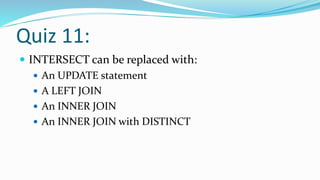
Quiz 11:
 INTERSECT can be replaced with:
 An UPDATE statement
 A LEFT JOIN
 An INNER JOIN
 An INNER JOIN with DISTINCT
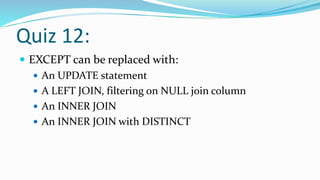
Quiz 12:
 EXCEPT can be replaced with:
 An UPDATE statement
 A LEFT JOIN, filtering on NULL join column
 An INNER JOIN
 An INNER JOIN with DISTINCT
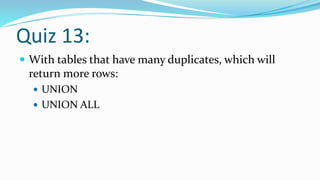
Quiz 13:
 With tables that have many duplicates, which will
return more rows:
 UNION
 UNION ALL
Any Questions?
 Set Operators
 Derived Tables
 Common Table Expressions
For More Information
 Visit http://EmergencyReporting.com to find out more
about Emergency Reporting.
 Aaron on the web
 http://AaronBuma.com
 Twitter: @AaronDBuma
 Steve on the web
 http://SteveStedman.com
 twitter: @SqlEmt
Tune in next week
 Thursday 2/17 at 9:00am (pacific time).
 Topics
 Derived Table Queries (ie Subqueries)
 Correlated Sub Queries
 Sub Query Extensions (ANY, ALL, SOME)
 Exists
 OUTPUT Clause

Set operators - derived tables and CTEs

  • 1.
    Presented by SteveStedman and Aaron Buma
  • 2.
    Welcome  Welcome toall those joining us remotely.  For any questions via Google On Air Broadcasts, we will address most of these at the end of the training.  Training provided by Emergency Reporting  http://EmergencyReporting.com  Presented by Steve Stedman and Aaron Buma
  • 3.
    Live Broadcast  UsingGoogle On Air Broadcasts  There is about a 40 to 50 second delay from live to what you see.  We are still learning how to properly use Google On Air Broadcasts. Please be patient.  Session will be available on my YouTube Channel about an hour after it the presentation ends.  http://SteveStedman.com/YouTube
  • 4.
    Questions  We willhave time for questions at the end of the session.  Q&A available via Google On Air Hangout panel. Click the 3x3 grid icon near the top right, then select Q&A to see what people are asking, or to ask your own question.  When you ask a question, it shows up for us about 40 to 50 seconds delayed.
  • 5.
    Agenda  Set Operators Derived Tables  Common Table Expressions
  • 6.
  • 7.
    Agenda  UNION Types UNION  UNION ALL  INTERSECT  EXCEPT
  • 8.
    UNION TYPES  UNION Requires same data types and number of columns  Acts like a ‘distinct’, it won’t return duplicates  UNION ALL  Similar to UNION, but will return duplicates  ORDER BY – is applied to entire results  Up to 256 queries can be “UNION”ed together
  • 9.
    INTERSECT and EXCEPT Same field and data type matching as UNION  Only used with two tables  INTERSECT –  Results that only match all tables  EXCEPT- Results from the first query, not matching results from the second
  • 10.
  • 11.
  • 12.
  • 13.
  • 14.
    Derived Table InColumns List DANGER: will be run once for each row in the result set. May introduce serious performance issues.
  • 15.
  • 16.
  • 17.
    CTE Book  PublishedMay 2013 Today’s topic comes from Chapter 1, 2, 3, 4, 6, 7 and 9 Of SQL Server Common Table Expression
  • 18.
    CTE – Agenda Introduction to Memory Tables and CTEs  Simple CTE  CTE Instead of a Derived Table  Multiple CTE in a Query  Data Paging  CTEs in Stored Procedures, Functions and Views  Introduction To Recursive CTEs
  • 19.
    Introduction to MemoryTables and CTEs Chapter 1 and 2
  • 20.
     Virtual Tables Derived Table  Sub query  Views  Temporary Named Result Set  Temp Tables  Table Variables  Common Table Expressions Memory Tables SELECT * FROM (SELECT id, department, parent FROM Departments) as Dept; CREATE VIEW [dbo].[DeptView] AS SELECT id, department, parent FROM Departments; GO SELECT q1.department, q2.department AS subDept FROM DeptView q1 INNER JOIN DeptView q2 ON q1.id = q2.parent WHERE q1.parent IS NULL; CREATE TABLE #deptTempTable ( id int, department VARCHAR (200), parent int ); DECLARE @deptTableVariable TABLE( id int, department VARCHAR (200), parent int );
  • 21.
     A typeof a virtual table  Similar to the ease of a temporary table  Sort of like a derived table  Like a temporary named result set  Acts like a temporary view, or a run time view What is a CTE
  • 22.
    Availability of CTEs TRANSACT SQL feature that I wish I had learned about 10 years ago, CTE’s were introduced in SQL Server 2005  All versions of SQL Server since SQL 2005 and all variations of SQL Server support CTEs  CTEs are available in SQL Azure
  • 23.
    Why Use CommonTable Expressions?  Simplify your query – test one part at a time  Recursion  Computer Science: When a function calls itself  SQL Server: When a query calls itself  Make derived table queries more readable  Alternative to a temp table or a table variable
  • 24.
    CTE Syntax -WITH  Queries start with WITH not SELECT  Can be confusing if you are assuming that any query to select data would start with a SELECT  The scope of the CTE is confined to a single query  A CTE just seems a little weird, until you master the syntax
  • 25.
    Simple CTE Syntax ;WITHexpression_name [(column_name[,...n])] AS ( CTE_query_definition ) SELECT <column_list> FROM expression_name;
  • 26.
  • 27.
    Reminder  If aCTE is not the first statement in a batch it must be proceeded with a semicolon
  • 28.
    CTEs Instead ofDerived Tables Chapter 3
  • 29.
    CTE Instead ofa Derived Table  Simplifies the query – allows for cleaner code  Does not improve the performance  More value for large derived table queries in that the TSQL is cleaner and easier to read and understand  Eliminates accidents by duplicating derived table queries TSQL code
  • 30.
    Derived Table Withouta CTE SELECT q1.department, q2.department FROM (SELECT id, department, parent FROM Departments) AS q1 INNER JOIN (SELECT id, department, parent FROM Departments) AS q2 ON q1.id = q2.parent WHERE q1.parent IS NULL;
  • 31.
    Convert a DerivedTable to a CTE  Find the first occurrence of the derived table query to be broken out. Create a name for it and add “CTE” to the name.  Copy the derived table definition, including the parentheses, and leave the new name as the placeholder.  Paste the query, copied earlier, above the SELECT statement.  At the top of the query add the CTE declaration using the same name from step 1.  Find all other occurrences of the same derived table query and replace them with the CTE name.  Clean up the formatting and test the query.
  • 32.
    CTE for DerivedTable Re-use ;WITH deptCTE (id, department, parent) AS (SELECT id, department, parent FROM Departments) SELECT q1.department, q2.department FROM deptCTE q1 INNER JOIN deptCTE q2 on q1.id = q2.parent WHERE q1.parent is null;
  • 33.
  • 34.
    CTE Instead ofa Derived Table Summary  Most derived tables can be easily converted to a CTE  Copy and paste errors can be reduced by using a CTE  Using a CTE doesn’t improve the performance over a similar query written with derived tables  For a CTE that is referenced multiple times the CTE query is not reused, it is executed multiple times
  • 35.
    Multiple CTEs ina Query Chapter 6
  • 36.
    Multiple CTE’s InA Single Query  You can include multiple CTE's by comma separating them: ;WITH firstCTE AS (query goes here) ,secondCTE AS (second query goes here) SELECT * FROM firstCTE INNER JOIN secondCTE on ...
  • 37.
    Steps to adda Second CTE 1. Add a comma at the end of the first CTE, after the closing parentheses. 2. After the comma, on the next line, declare the name of the new CTE. 3. After the name of the new CTE add the optional columns declaration. 4. Add the AS keyword followed by opening and closing parentheses. 5. Inside of the parentheses add the new CTE query. 6. Call the CTE query from the outer SELECT statement.
  • 38.
    Demo: Multiple CTE ;WITHFnames (Name) AS ( SELECT 'John' UNION SELECT 'Mary' UNION SELECT 'Bill' ) , Lnames (Name) AS ( SELECT 'Smith' UNION SELECT 'Gibb' UNION SELECT 'Jones' ) SELECT F.Name FirstName, L.Name LastName FROM Fnames F CROSS JOIN Lnames AS L;
  • 39.
    Nested CTE’s  RussianDolls – матрёшки  Pronounced Ma-Trosh-Key.  A Nested CTE query can only reference itself or CTE queries declared earlier in the query.
  • 40.
    Nested CTE Example;WITHcte0 AS ( SELECT 1 AS num ) , cte1 AS ( SELECT num + 1 AS num FROM cte0 ) , cte2 AS ( SELECT num + 1 AS num FROM cte1 ) SELECT * FROM cte2;
  • 41.
  • 42.
    Data Paging Witha CTE Chapter 7
  • 43.
    Data Paging  Toachieve data paging without CTE it usually involves selecting TOP x, then TOP 2x then top 3x, each time taking longer and longer to get to the data that is needed.  Data paging can be simplified and not a challenge to create with CTE’s.  TSQL 2012 introduces the OFFSET and FETCH keywords which is easier to use than a CTE for data paging, and more efficient.
  • 44.
  • 45.
  • 46.
  • 47.
    Demo: Data Paging ;WITHTablesAndColumns AS ( SELECT OBJECT_NAME(sc.object_id) AS TableName, name AS ColumnName, ROW_NUMBER() OVER (ORDER BY object_name(sc.object_id)) AS Row FROM sys.columns sc ) SELECT * FROM TablesAndColumns WHERE Row BETWEEN (@pageNum - 1) * @pageSize + 1 AND @pageNum * @pageSize ;
  • 48.
    Demo: SQL Server2012 and Beyond Data Paging SELECT OBJECT_NAME(sc.object_id) AS TableName, name AS ColumnName FROM sys.columns sc ORDER BY TableName OFFSET (@pageNum - 1) * @pageSize ROWS FETCH NEXT @pageSize ROWS ONLY; •An alternative to CTE’s for data paging if you are using SQL Server 2012 or newer
  • 49.
  • 50.
    CTEs in StoredProcedures, Functions and Views Chapter 9
  • 51.
    CTEs in StoredProcedures, Functions and Views
  • 52.
  • 53.
  • 54.
    4. Recursive CTEConsidered recursive when the CTE references itself  Recursion stops  When the recursive query produces no results  Or specify MAXRECURSION  Uses  Hierarchical listing of categories  Recursive calculations  Much, much more…
  • 55.
    Recursion Overview Sumthe numbers from 1 to 10 without recursion 55 = 10 + 9 + 8 + 7 + 6 + 5 + 4 +3 + 2 + 1  Sum the numbers from 1 to 10 recursively 55 = 10 + (sum of numbers 1 to 9) 55 = 10 + (9 + (sum of numbers 1 to 8)) 55 = 10 + (9 + (8 + (sum of numbers 1 to 7)))  Eventually we get to: 55 = 10 + (9 + (8 + (7 + (6 + (5 + (4 + (3 + (2 + 1))))))))
  • 56.
    Recursive Terminology  AnchorQuery  Start the recursion  One or more anchor queries  Recursive Query  The part that repeats  One or more recursive queries  MAXRECURSION  The number of times to repeat the recursive query  Default is 100  MAXRECURSION of 0 implies no maximum
  • 57.
    Demo: Recursive CTE ;WITHDepartmentCTE(DeptId, Department, Parent, Lvl) AS Step 1. Declare the CTE and Columns
  • 58.
    Demo: Recursive CTE ;WITHDepartmentCTE(DeptId, Department, Parent, Lvl) AS ( SELECT id AS DeptId, Department, parent, 0 AS Lvl FROM Departments WHERE parent IS NULL Step 2 – Add the Anchor Query
  • 59.
    Demo: Recursive CTE ;WITHDepartmentCTE(DeptId, Department, Parent, Lvl) AS ( SELECT id AS DeptId, Department, parent, 0 AS Lvl FROM Departments WHERE parent IS NULL UNION ALL Step 3 – Add the UNION ALL to connect to the recursive query
  • 60.
    Demo: Recursive CTE ;WITHDepartmentCTE(DeptId, Department, Parent, Lvl) AS ( SELECT id AS DeptId, Department, parent, 0 AS Lvl FROM Departments WHERE parent IS NULL UNION ALL -- and now for the recursive part SELECT d.id AS DeptId, d.Department, d.parent, DepartmentCTE.Lvl + 1 AS Lvl FROM Departments d INNER JOIN DepartmentCTE ON DepartmentCTE.DeptId = d.parent) Step 4 – Add the recursive Query
  • 61.
    Demo: Recursive CTE;WITHDepartmentCTE(DeptId, Department, Parent, Lvl) AS ( SELECT id AS DeptId, Department, parent, 0 AS Lvl FROM Departments WHERE parent IS NULL UNION ALL -- and now for the recursive part SELECT d.id AS DeptId, d.Department, d.parent, DepartmentCTE.Lvl + 1 AS Lvl FROM Departments d INNER JOIN DepartmentCTE ON DepartmentCTE.DeptId = d.parent) SELECT * FROM DepartmentCTE ORDER BY parent;
  • 62.
  • 63.
    Recursive CTE NotesRecursion stops  When the recursive query produces no results  Or specify MAXRECURSION  Using TSQL functions for recursion allows for 32 levels of recursion  Using CTE for recursion allows for 32767 levels of recursion in the MAXRECURSION option, but much more if you set MAXRECURSION to 0.  I have confirmed up to 100,000,000 levels of recursion.
  • 64.
    Download the samplesand there are many additional CTE examples at the end of the file. Bonus Material
  • 65.
    Quiz 1. CTEExecutions As a named result set, the CTE is only run once even if it is referenced multiple times in a query. True or False? FALSE The CTE is executed once for EACH time that it is referenced in a query.
  • 66.
    Quiz 1. CTEExecutions Explained ;WITH deptCTE(id, department, parent) AS (SELECT id, department, parent FROM Departments) SELECT q1.department, q2.department FROM deptCTE q1 INNER JOIN deptCTE q2 on q1.id = q2.parent WHERE q1.parent is null;  In this example the deptCTE is executed twice
  • 67.
    Quiz 2. CTEsare proprietary CTEs are proprietary to Microsoft SQL Server. True or False? FALSE Common Table Expressions are supported by several major database platforms, among them PostgreSQL, DB2, Oracle and SQL Server, defined in SQL-99 spec
  • 68.
    Quiz 3. CTEand Hierarchical Queries CTEs are a great way to create recursive hierarchical queries. True or False? TRUE Recursive hierarchical queries are easy to write with a CTE. CTE’s save time, are easy to follow, and work great for hierarchical data.
  • 69.
    Quiz 5. DatabaseVersions SQL Server only supports CTE’s on SQL Server Enterprise Edition 2008R2 and newer. True or False? FALSE Common Table Expressions have been supported since SQL Server 2005 and are available in all versions.
  • 70.
    Quiz 6. CTEsand Nesting CTEs can be nested and one CTE can reference an earlier CTE. True or False? TRUE Common Table Expressions can be nested. Just define multiple CTE’s and reference an earlier CTE from a later one.
  • 71.
    Quiz 7. IndexingCTEs Indexes can be added to CTEs to boost performance. True or False? FALSE A Common Table Expression is a temporary, "inline" view - you cannot add an index to a CTE.
  • 72.
    Quiz 8. VIEWvs CTE Which performs better, a non-recursive CTE or a VIEW? They are the same.  The big gain is the recursive CTE, which you can’t achieve with a view.
  • 73.
    Quiz 9. CTE’sand Data Paging CTE’s are a great way to do Data Paging for a result grid. True or False It Depends…... SQL Server 2012 and 2014 have the new OFFSET and FETCH clause on select statements, which is easier than CTE’s. For 2005, 2008 and 2008R2 the CTE is the best option.
  • 74.
    Quiz 10. CTE’sand TempDB CTE’s are similar to Temp Tables or Table Variables in their use of TempDB? True or False FALSE Temp Tables and Table Variables both use TempDB, CTE’s do not…...  See my blog posting for all the details on this one.  http://stevestedman.com/?p=2053  It is more than we have time to prove today.
  • 75.
    Quiz 11:  INTERSECTcan be replaced with:  An UPDATE statement  A LEFT JOIN  An INNER JOIN  An INNER JOIN with DISTINCT
  • 76.
    Quiz 12:  EXCEPTcan be replaced with:  An UPDATE statement  A LEFT JOIN, filtering on NULL join column  An INNER JOIN  An INNER JOIN with DISTINCT
  • 77.
    Quiz 13:  Withtables that have many duplicates, which will return more rows:  UNION  UNION ALL
  • 78.
    Any Questions?  SetOperators  Derived Tables  Common Table Expressions
  • 79.
    For More Information Visit http://EmergencyReporting.com to find out more about Emergency Reporting.  Aaron on the web  http://AaronBuma.com  Twitter: @AaronDBuma  Steve on the web  http://SteveStedman.com  twitter: @SqlEmt
  • 80.
    Tune in nextweek  Thursday 2/17 at 9:00am (pacific time).  Topics  Derived Table Queries (ie Subqueries)  Correlated Sub Queries  Sub Query Extensions (ANY, ALL, SOME)  Exists  OUTPUT Clause