Riza Muhammad Nurman 4SC
Click to edit Master title style
SESI 3
on
4SC Q7
SESI 3
on
4SC Q7
FACULTYFACULTY
Riza Muhammad NurmanRiza Muhammad Nurman
Facebook : https://facebook.com/rizamanFacebook : https://facebook.com/rizaman
Twitter : https://twitter.com/rhyzoneTwitter : https://twitter.com/rhyzone
SlideShare : https://slideshare.net/rizamanSlideShare : https://slideshare.net/rizaman
Riza Muhammad Nurman 4SC
Click to edit Master title styleContent
• Membuat Form
– Memasukkan Gambar
– Membuat Tabel
– Menambahkan komponen baru
• Menghubungkan Form
• Simulasi melihat detail baris dari tabel Form
• Simulasi update data pada tabel database
• Simulasi delete data dari tabel database
Riza Muhammad Nurman 4SC
Click to edit Master title styleMemasukkan Gambar
• New Package : images
• Copy semua gambar yang dibutuhkan ke dalam
folder images dari projek program
• ccit_apps  src  images
Paste Here!
Riza Muhammad Nurman 4SC
Click to edit Master title styleMemasukkan Gambar 2
Click here!
Riza Muhammad Nurman 4SC
Click to edit Master title styleMembuat Tabel
• Pallete : Swing Controls : Table
Gunakan
properties model
untuk modifikasi
tabel
Banyaknya kolom
sesuaikan dengan
kebutuhan
Set nilai baris dengan 0
agar tidak ada baris kosong
pada tabel
Riza Muhammad Nurman 4SC
Click to edit Master title styleMenambahkan Komponen Baru : JDateChooser
• Gunakan Palette Manager untuk menambahkan komponen baru: DateChooser.jar
Riza Muhammad Nurman 4SC
Click to edit Master title styleMenghubungkan Form
VFacultyList obj = new VFacultyList();
obj.show();
this.dispose();
VFacultyForm obj = new VFacultyForm();
obj.show();
this.dispose();
Riza Muhammad Nurman 4SC
Click to edit Master title styleMembuat Event
• Klik kanan Jframe pada Navigator  Pilih Properties Events
Frame Navigator
VFacultyList view = new
VFacultyList();
view.show();
Riza Muhammad Nurman 4SC
Click to edit Master title styleMelihat Detail Baris : getRecord()
Gunakan Event pada tabel : mouseClicked()
VFacultyForm obj = new
VFacultyForm(this.getRecord());
obj.show();
this.dispose();
public VFacultyForm(String id) {
initComponents();
btn_save.setEnabled(false);
this.getRecord(id);
}
Riza Muhammad Nurman 4SC
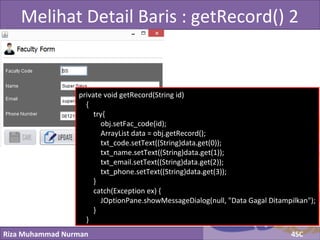
Click to edit Master title styleMelihat Detail Baris : getRecord() 2
private void getRecord(String id)
{
try{
obj.setFac_code(id);
ArrayList data = obj.getRecord();
txt_code.setText((String)data.get(0));
txt_name.setText((String)data.get(1));
txt_email.setText((String)data.get(2));
txt_phone.setText((String)data.get(3));
}
catch(Exception ex) {
JOptionPane.showMessageDialog(null, "Data Gagal Ditampilkan");
}
}
Riza Muhammad Nurman 4SC
Click to edit Master title styleUpdate Data
private void update() {
try {
obj.setFac_code(txt_code.getText().trim());
obj.setFac_name(txt_name.getText().trim());
obj.setFac_email(txt_email.getText().trim());
obj.setFac_phone(txt_phone.getText().trim());
int i = obj.doUpdate();
if(i > 0) {
JOptionPane.showMessageDialog(null, "SUKSES! Data Berhasil Diubah");
this.clear();
}
else {
JOptionPane.showMessageDialog(null, "PERINGATAN! Harap Memasukkan Data Yang Sesuai");
}
}
catch(Exception e)
{
JOptionPane.showMessageDialog(null,"Error: " + e);
}
}
Riza Muhammad Nurman 4SC
Click to edit Master title styleDelete Data
private void delete() {
try {
obj.setFac_code(txt_code.getText());
int i = obj.doDelete();
if(i > 0) {
JOptionPane.showMessageDialog(null, "SUKSES! Data Berhasil Dihapus");
this.clear();
}
else {
JOptionPane.showMessageDialog(null, "PERINGATAN! Harap Memasukkan Data Yang Sesuai");
}
}
catch(Exception e)
{
JOptionPane.showMessageDialog(null,"Error: " + e);
}
}
Riza Muhammad Nurman 4SC
Click to edit Master title style

Sesi 3 4SC

  • 1.
    Riza Muhammad Nurman4SC Click to edit Master title style SESI 3 on 4SC Q7 SESI 3 on 4SC Q7 FACULTYFACULTY Riza Muhammad NurmanRiza Muhammad Nurman Facebook : https://facebook.com/rizamanFacebook : https://facebook.com/rizaman Twitter : https://twitter.com/rhyzoneTwitter : https://twitter.com/rhyzone SlideShare : https://slideshare.net/rizamanSlideShare : https://slideshare.net/rizaman
  • 2.
    Riza Muhammad Nurman4SC Click to edit Master title styleContent • Membuat Form – Memasukkan Gambar – Membuat Tabel – Menambahkan komponen baru • Menghubungkan Form • Simulasi melihat detail baris dari tabel Form • Simulasi update data pada tabel database • Simulasi delete data dari tabel database
  • 3.
    Riza Muhammad Nurman4SC Click to edit Master title styleMemasukkan Gambar • New Package : images • Copy semua gambar yang dibutuhkan ke dalam folder images dari projek program • ccit_apps  src  images Paste Here!
  • 4.
    Riza Muhammad Nurman4SC Click to edit Master title styleMemasukkan Gambar 2 Click here!
  • 5.
    Riza Muhammad Nurman4SC Click to edit Master title styleMembuat Tabel • Pallete : Swing Controls : Table Gunakan properties model untuk modifikasi tabel Banyaknya kolom sesuaikan dengan kebutuhan Set nilai baris dengan 0 agar tidak ada baris kosong pada tabel
  • 6.
    Riza Muhammad Nurman4SC Click to edit Master title styleMenambahkan Komponen Baru : JDateChooser • Gunakan Palette Manager untuk menambahkan komponen baru: DateChooser.jar
  • 7.
    Riza Muhammad Nurman4SC Click to edit Master title styleMenghubungkan Form VFacultyList obj = new VFacultyList(); obj.show(); this.dispose(); VFacultyForm obj = new VFacultyForm(); obj.show(); this.dispose();
  • 8.
    Riza Muhammad Nurman4SC Click to edit Master title styleMembuat Event • Klik kanan Jframe pada Navigator  Pilih Properties Events Frame Navigator VFacultyList view = new VFacultyList(); view.show();
  • 9.
    Riza Muhammad Nurman4SC Click to edit Master title styleMelihat Detail Baris : getRecord() Gunakan Event pada tabel : mouseClicked() VFacultyForm obj = new VFacultyForm(this.getRecord()); obj.show(); this.dispose(); public VFacultyForm(String id) { initComponents(); btn_save.setEnabled(false); this.getRecord(id); }
  • 10.
    Riza Muhammad Nurman4SC Click to edit Master title styleMelihat Detail Baris : getRecord() 2 private void getRecord(String id) { try{ obj.setFac_code(id); ArrayList data = obj.getRecord(); txt_code.setText((String)data.get(0)); txt_name.setText((String)data.get(1)); txt_email.setText((String)data.get(2)); txt_phone.setText((String)data.get(3)); } catch(Exception ex) { JOptionPane.showMessageDialog(null, "Data Gagal Ditampilkan"); } }
  • 11.
    Riza Muhammad Nurman4SC Click to edit Master title styleUpdate Data private void update() { try { obj.setFac_code(txt_code.getText().trim()); obj.setFac_name(txt_name.getText().trim()); obj.setFac_email(txt_email.getText().trim()); obj.setFac_phone(txt_phone.getText().trim()); int i = obj.doUpdate(); if(i > 0) { JOptionPane.showMessageDialog(null, "SUKSES! Data Berhasil Diubah"); this.clear(); } else { JOptionPane.showMessageDialog(null, "PERINGATAN! Harap Memasukkan Data Yang Sesuai"); } } catch(Exception e) { JOptionPane.showMessageDialog(null,"Error: " + e); } }
  • 12.
    Riza Muhammad Nurman4SC Click to edit Master title styleDelete Data private void delete() { try { obj.setFac_code(txt_code.getText()); int i = obj.doDelete(); if(i > 0) { JOptionPane.showMessageDialog(null, "SUKSES! Data Berhasil Dihapus"); this.clear(); } else { JOptionPane.showMessageDialog(null, "PERINGATAN! Harap Memasukkan Data Yang Sesuai"); } } catch(Exception e) { JOptionPane.showMessageDialog(null,"Error: " + e); } }
  • 13.
    Riza Muhammad Nurman4SC Click to edit Master title style