

Click to edit Master title style
Riza Muhammad Nurman ADP
Chapter 5
on
Advanced Programming
FACULTY
Riza Muhammad Nurman
Exploring JavaServer Pages Technology
Click to edit Master title style
Riza Muhammad Nurman ADP
Content
• Understand JSP technology
• Understand JSP lifecycle
Click to edit Master title style
Riza Muhammad Nurman ADP
Understanding JSP Technology
• A typical Web application consists of the presentation logic, which
contains the design and the structure, such as the page layout, of a
Web page
• In addition, it consists of the business logic or the dynamic content,
which involves application of business specific requirements
Click to edit Master title style
Riza Muhammad Nurman ADP
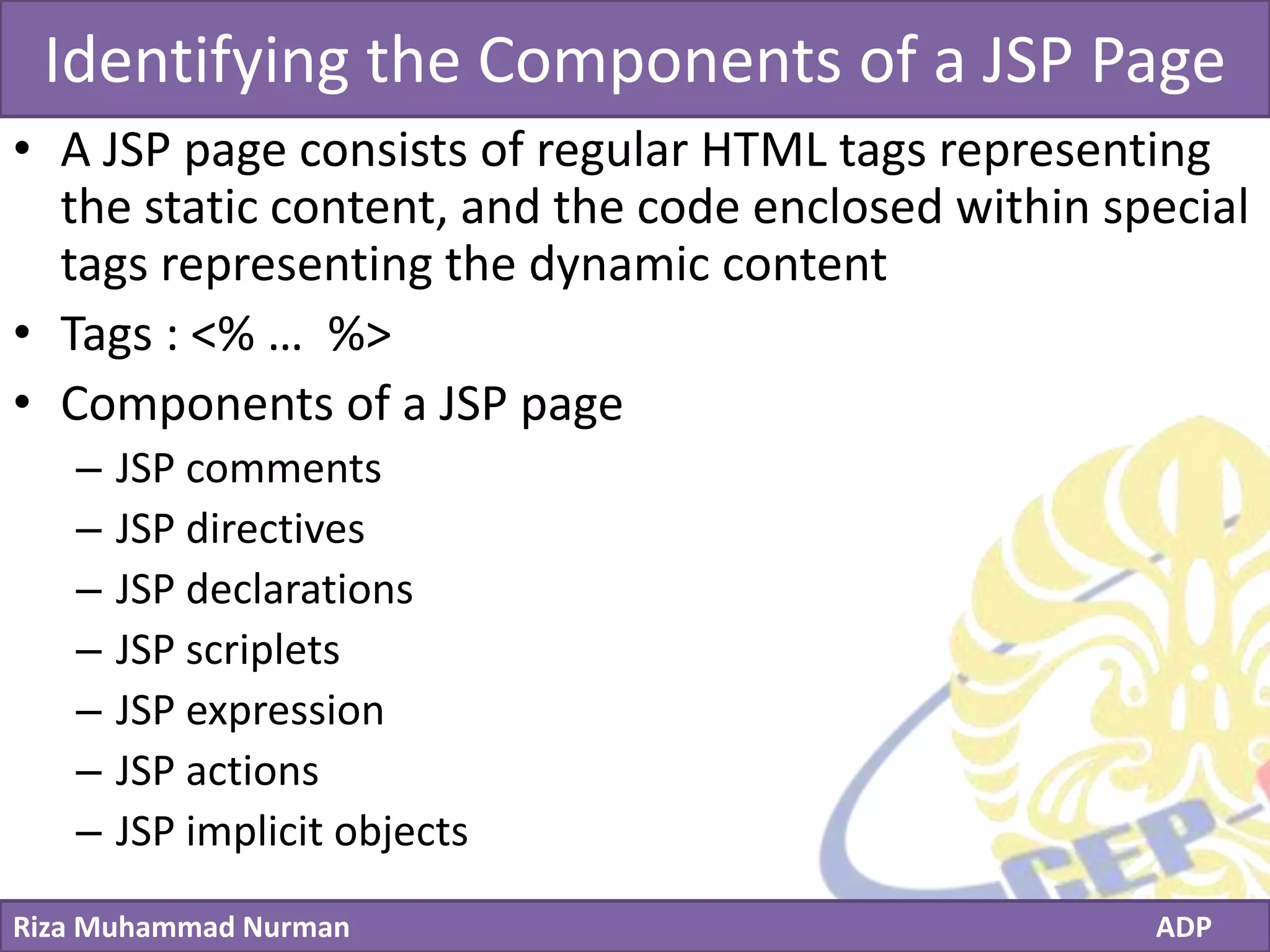
Understanding JSP Technology - 2
out.println(“<label for=‘firstname’ class=‘control-label’>Firstname:</label>”);
out.println(“<div class=‘controls’> “);
out.println(“<input type="text" name=‘firstname’ id=‘firstname’ class=‘input-block-
level’ required=‘’ value=‘’> “);
out.println(“</div>”);
<label for="firstname" class="control-label">Firstname:</label>
<div class="controls">
<input type="text" name="firstname" id="firstname" class="input-block-level"
required="" value="">
</div>
Click to edit Master title style
Riza Muhammad Nurman ADP
Identifying the Components of a JSP Page
• A JSP page consists of regular HTML tags representing
the static content, and the code enclosed within special
tags representing the dynamic content
• Tags : <% … %>
• Components of a JSP page
– JSP comments
– JSP directives
– JSP declarations
– JSP scriplets
– JSP expression
– JSP actions
– JSP implicit objects
Click to edit Master title style
Riza Muhammad Nurman ADP
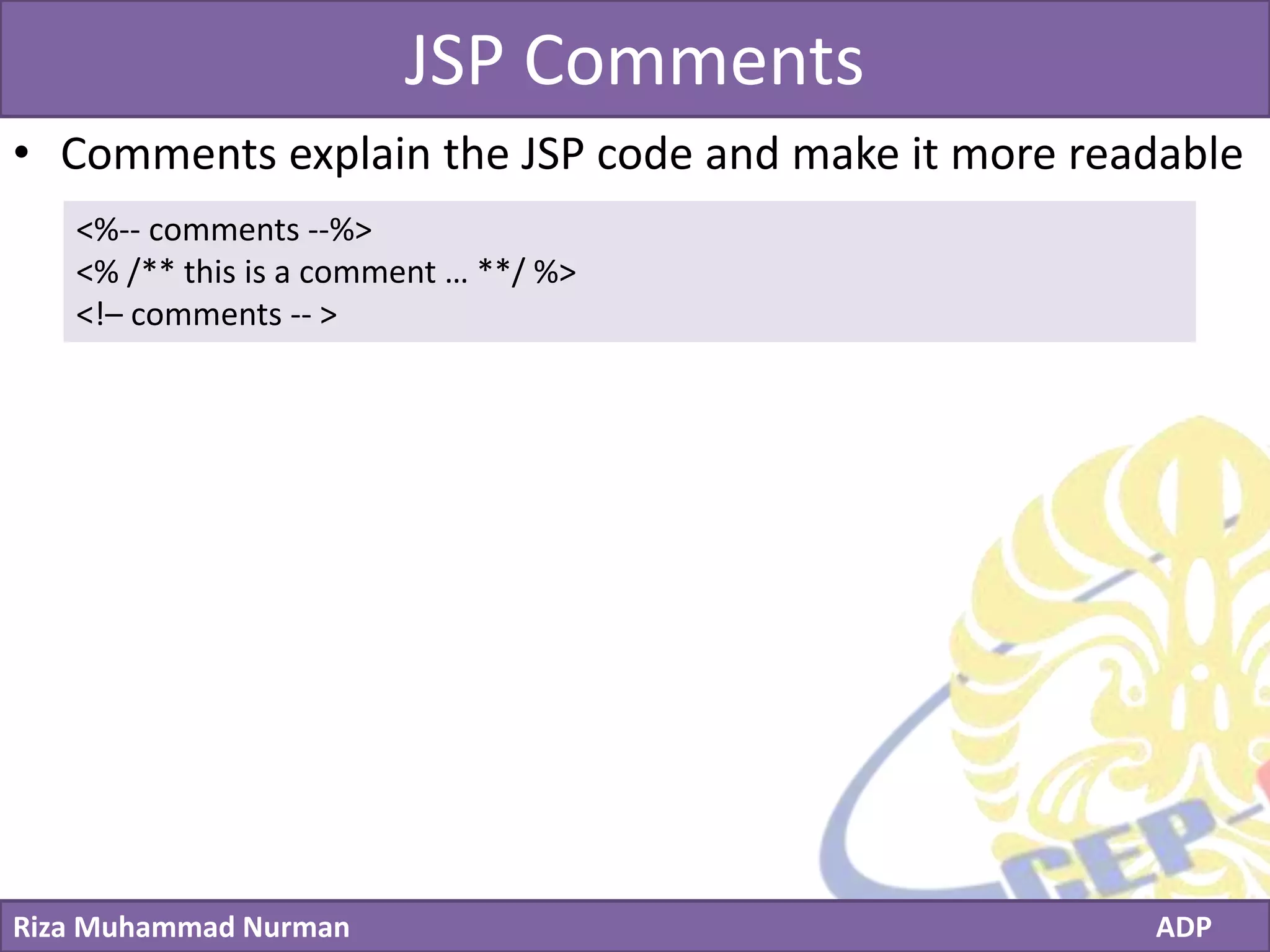
JSP Comments
• Comments explain the JSP code and make it more readable
<%-- comments --%>
<% /** this is a comment … **/ %>
<!– comments -- >
Click to edit Master title style
Riza Muhammad Nurman ADP
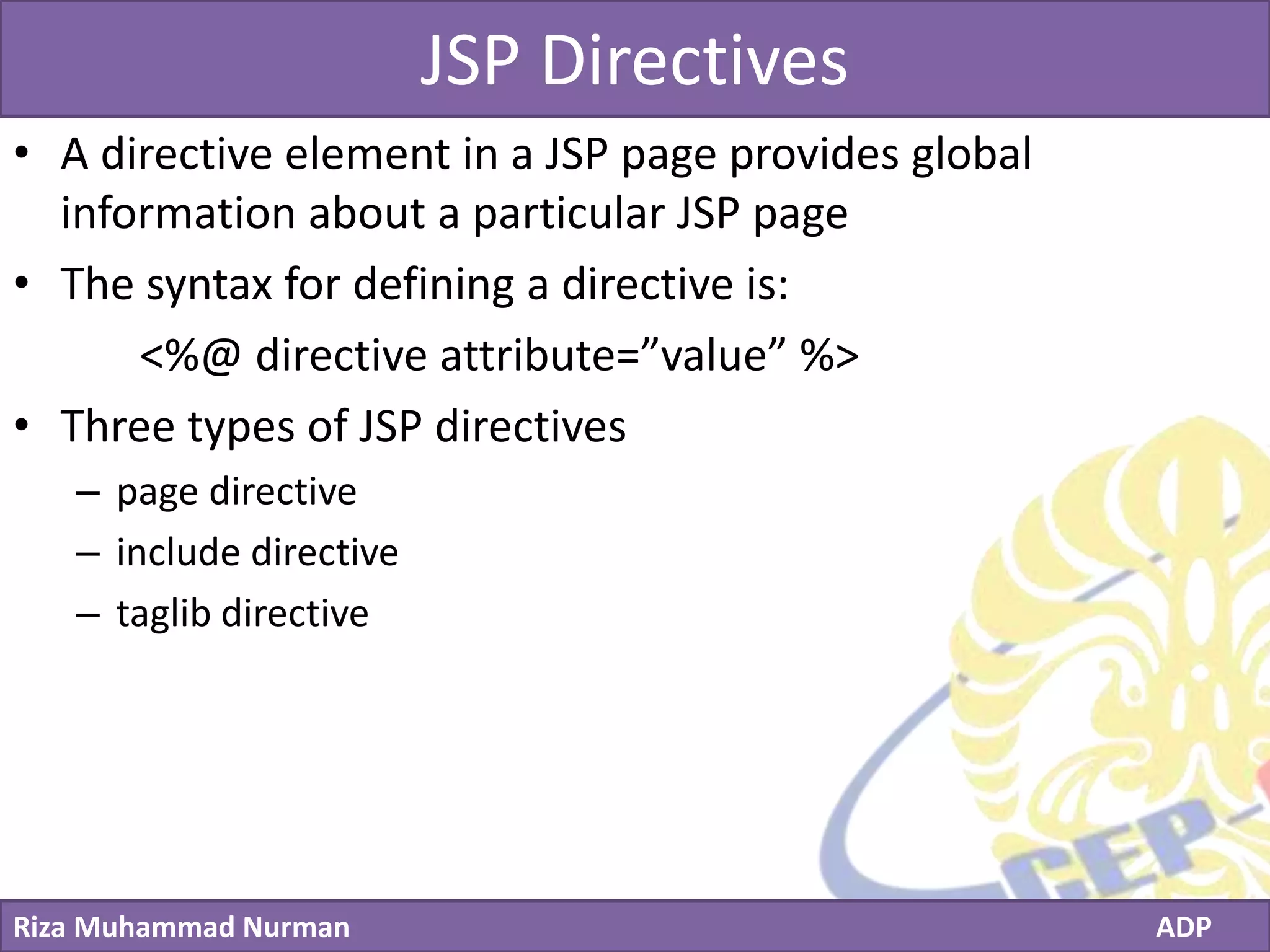
JSP Directives
• A directive element in a JSP page provides global
information about a particular JSP page
• The syntax for defining a directive is:
<%@ directive attribute=”value” %>
• Three types of JSP directives
– page directive
– include directive
– taglib directive
Click to edit Master title style
Riza Muhammad Nurman ADP
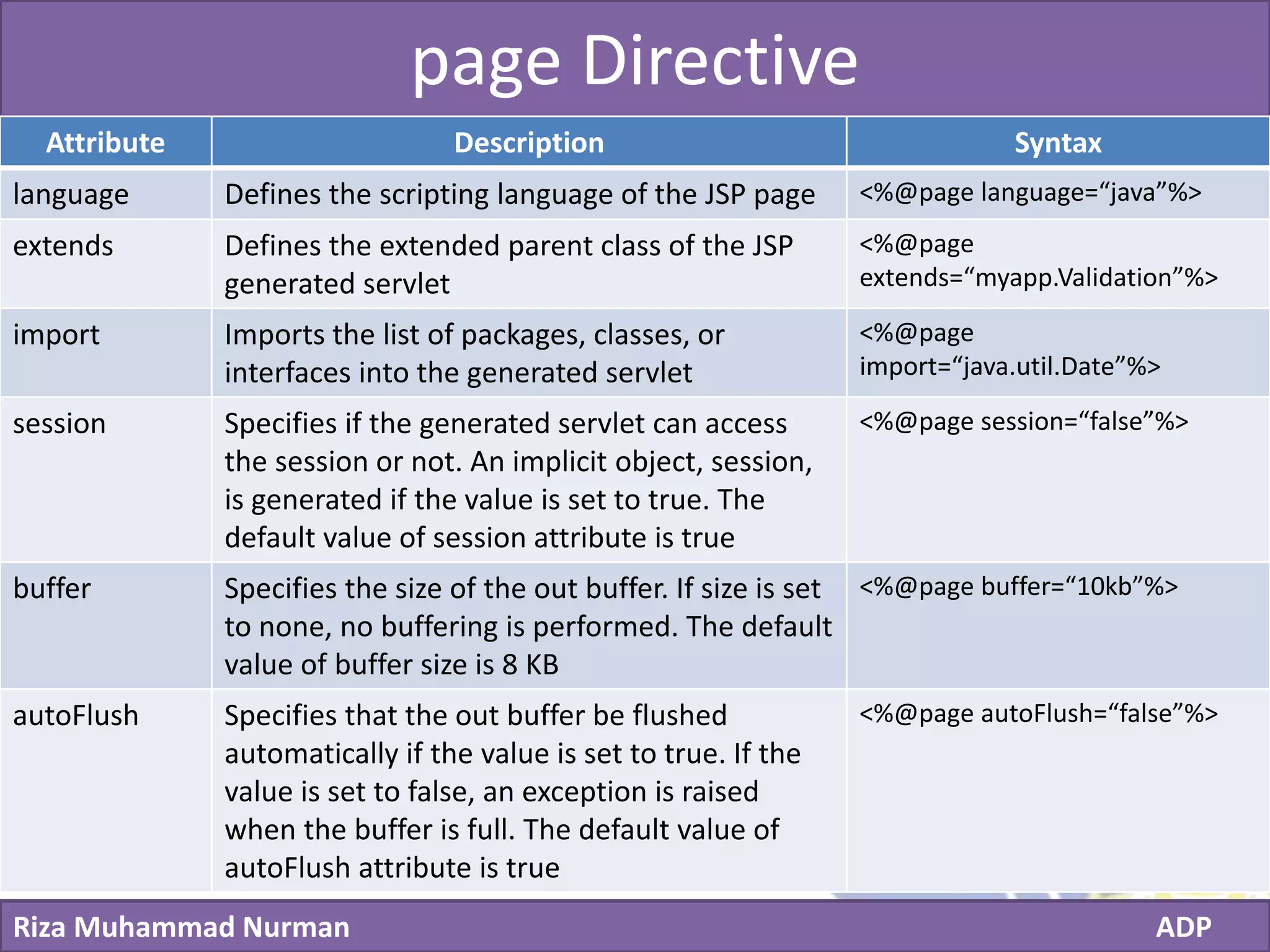
page Directive
Attribute Description Syntax
language Defines the scripting language of the JSP page <%@page language=“java”%>
extends Defines the extended parent class of the JSP
generated servlet
<%@page
extends=“myapp.Validation”%>
import Imports the list of packages, classes, or
interfaces into the generated servlet
<%@page
import=“java.util.Date”%>
session Specifies if the generated servlet can access
the session or not. An implicit object, session,
is generated if the value is set to true. The
default value of session attribute is true
<%@page session=“false”%>
buffer Specifies the size of the out buffer. If size is set
to none, no buffering is performed. The default
value of buffer size is 8 KB
<%@page buffer=“10kb”%>
autoFlush Specifies that the out buffer be flushed
automatically if the value is set to true. If the
value is set to false, an exception is raised
when the buffer is full. The default value of
autoFlush attribute is true
<%@page autoFlush=“false”%>
Click to edit Master title style
Riza Muhammad Nurman ADP
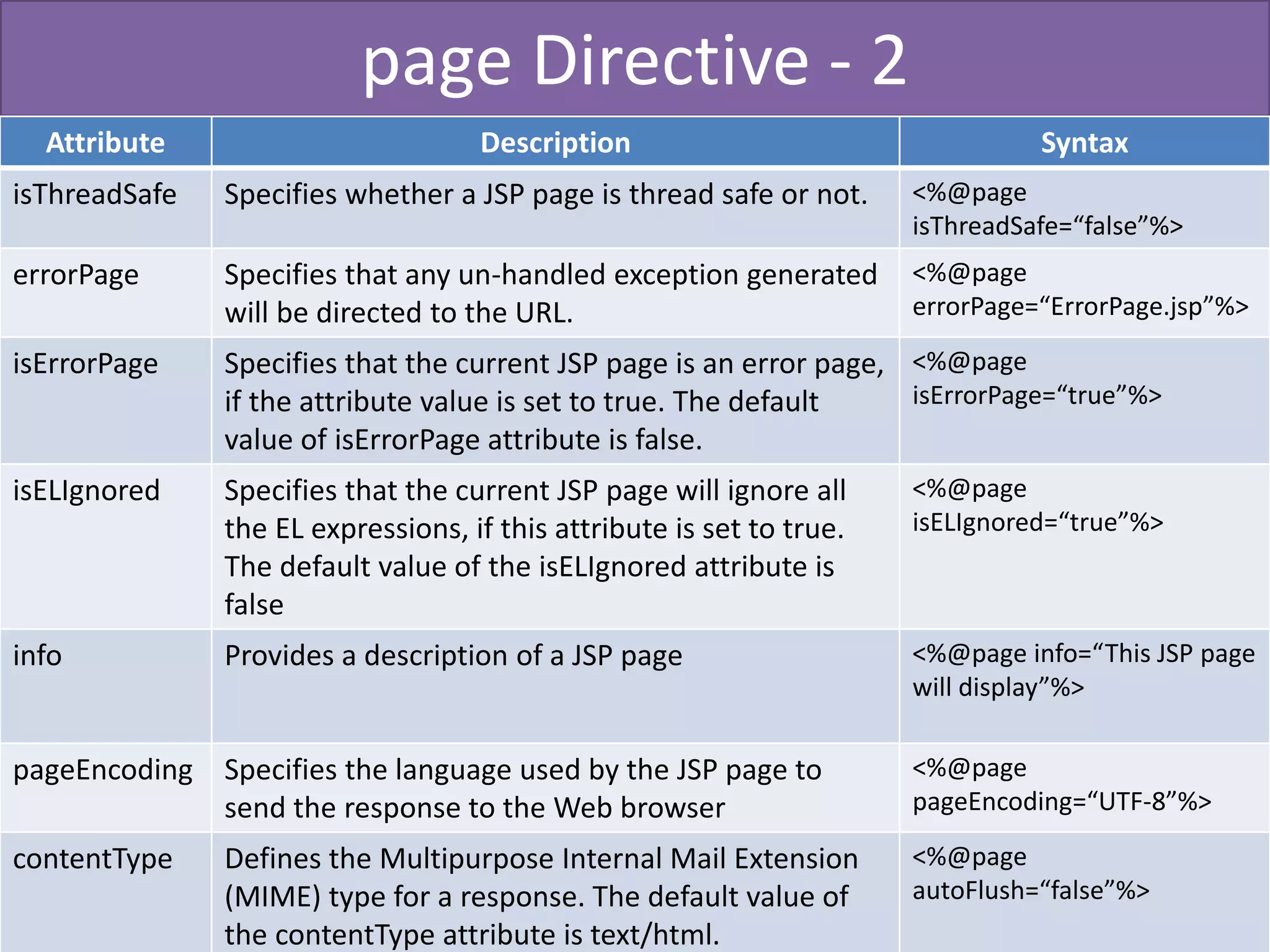
page Directive - 2
Attribute Description Syntax
isThreadSafe Specifies whether a JSP page is thread safe or not. <%@page
isThreadSafe=“false”%>
errorPage Specifies that any un-handled exception generated
will be directed to the URL.
<%@page
errorPage=“ErrorPage.jsp”%>
isErrorPage Specifies that the current JSP page is an error page,
if the attribute value is set to true. The default
value of isErrorPage attribute is false.
<%@page
isErrorPage=“true”%>
isELIgnored Specifies that the current JSP page will ignore all
the EL expressions, if this attribute is set to true.
The default value of the isELIgnored attribute is
false
<%@page
isELIgnored=“true”%>
info Provides a description of a JSP page <%@page info=“This JSP page
will display”%>
pageEncoding Specifies the language used by the JSP page to
send the response to the Web browser
<%@page
pageEncoding=“UTF-8”%>
contentType Defines the Multipurpose Internal Mail Extension
(MIME) type for a response. The default value of
the contentType attribute is text/html.
<%@page
autoFlush=“false”%>
Click to edit Master title style
Riza Muhammad Nurman ADP
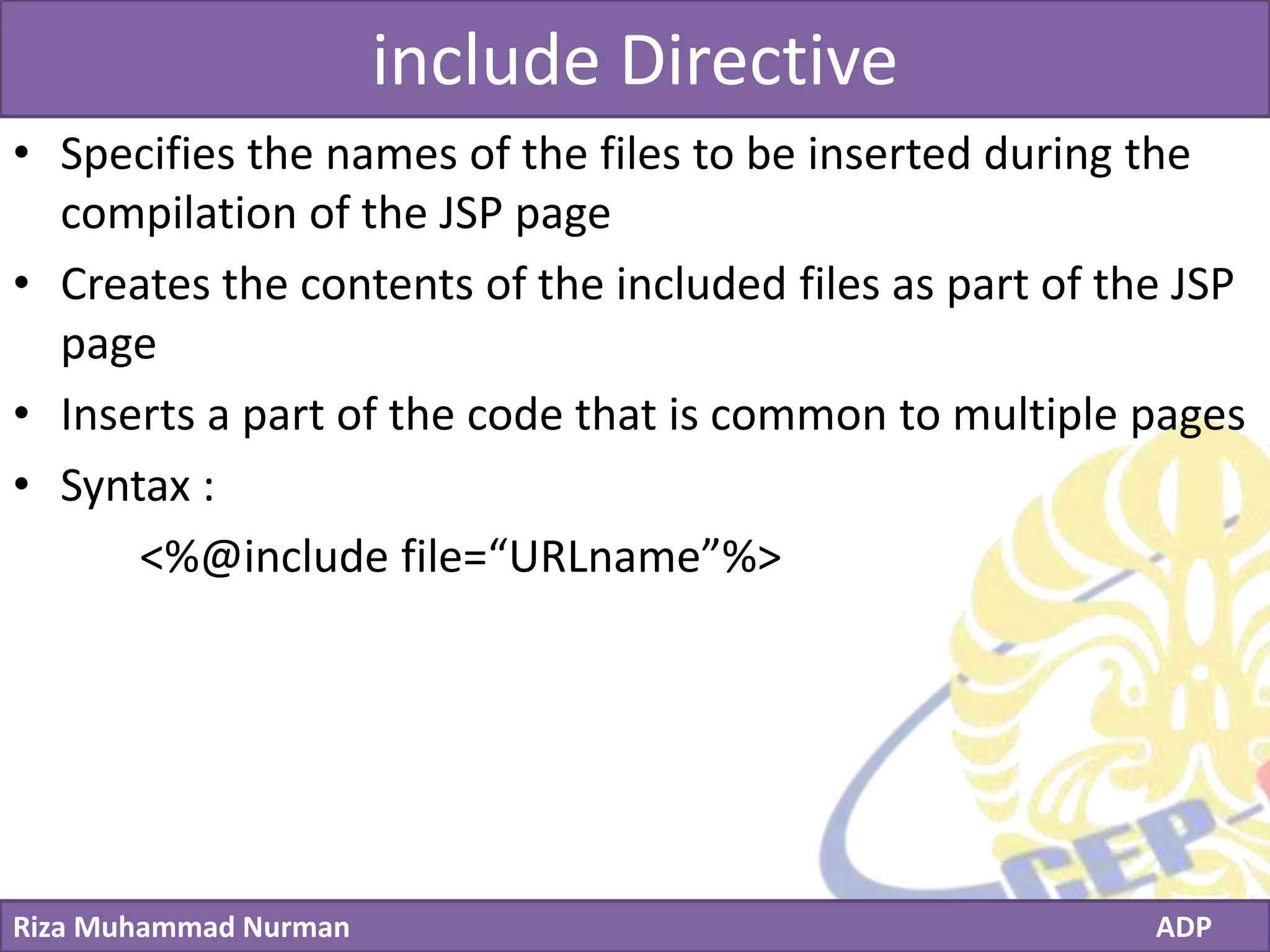
include Directive
• Specifies the names of the files to be inserted during the
compilation of the JSP page
• Creates the contents of the included files as part of the JSP
page
• Inserts a part of the code that is common to multiple pages
• Syntax :
<%@include file=“URLname”%>
Click to edit Master title style
Riza Muhammad Nurman ADP
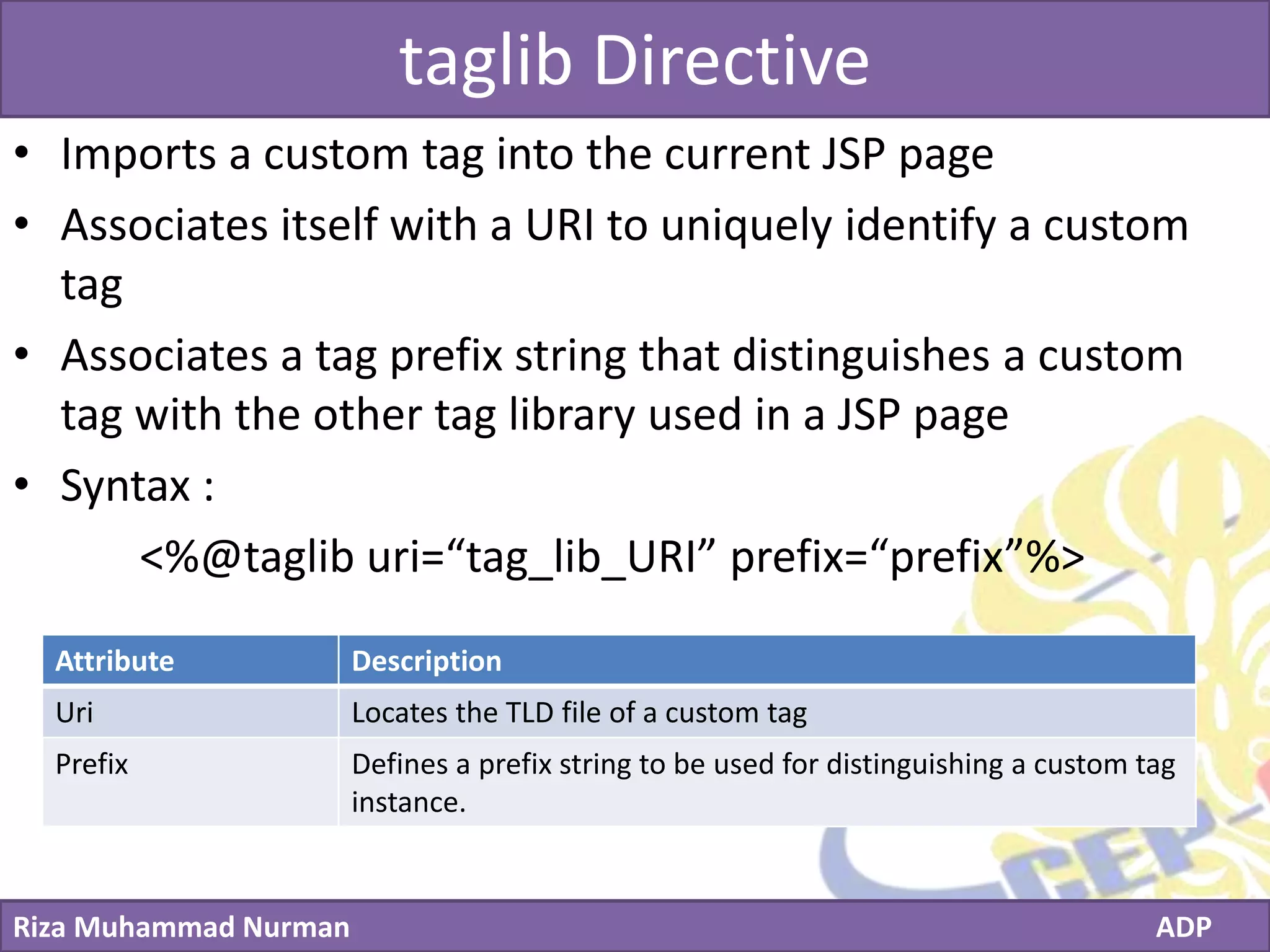
taglib Directive
• Imports a custom tag into the current JSP page
• Associates itself with a URI to uniquely identify a custom
tag
• Associates a tag prefix string that distinguishes a custom
tag with the other tag library used in a JSP page
• Syntax :
<%@taglib uri=“tag_lib_URI” prefix=“prefix”%>
Attribute Description
Uri Locates the TLD file of a custom tag
Prefix Defines a prefix string to be used for distinguishing a custom tag
instance.
Click to edit Master title style
Riza Muhammad Nurman ADP
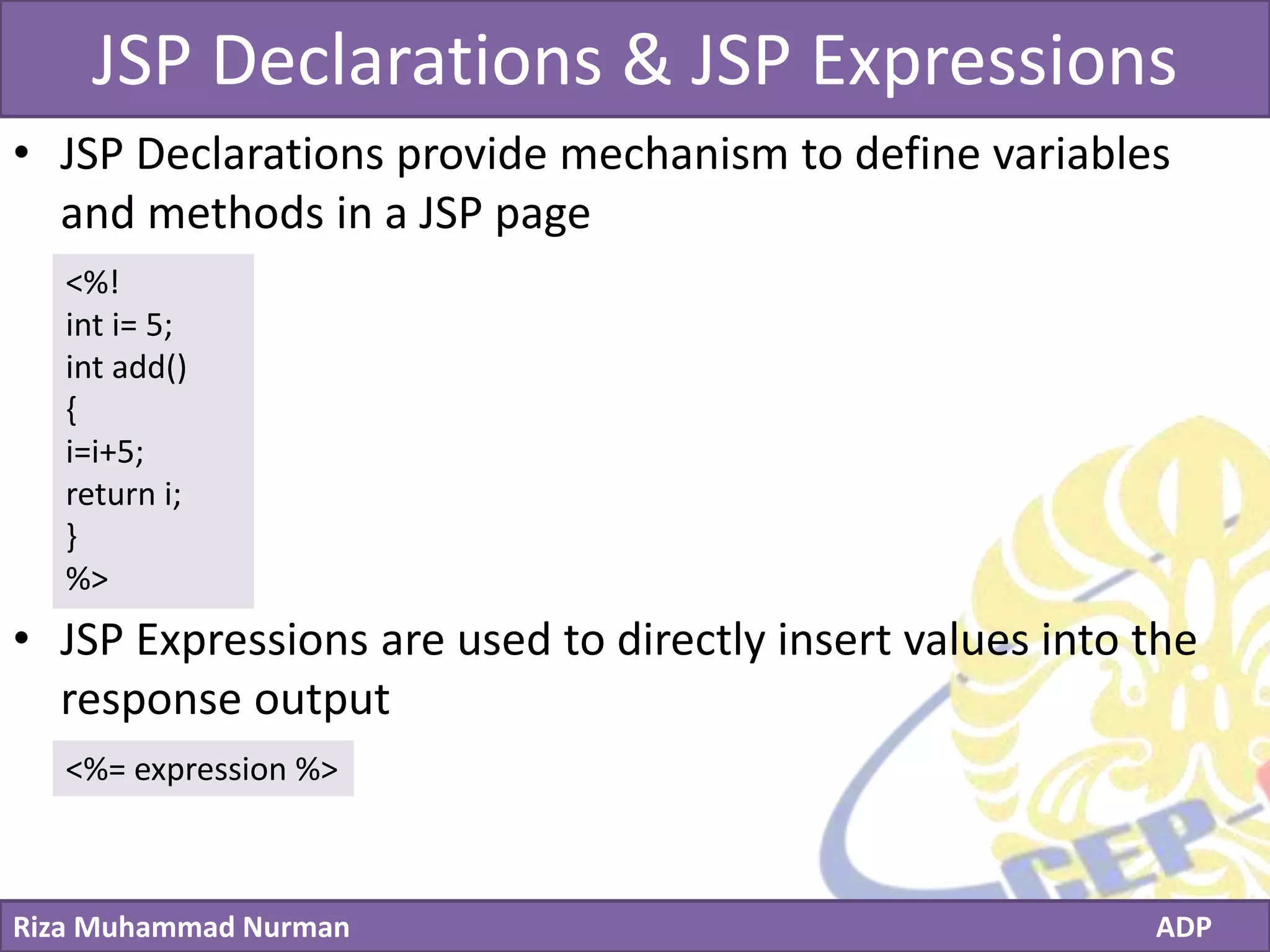
JSP Declarations & JSP Expressions
• JSP Declarations provide mechanism to define variables
and methods in a JSP page
• JSP Expressions are used to directly insert values into the
response output
<%!
int i= 5;
int add()
{
i=i+5;
return i;
}
%>
<%= expression %>
Click to edit Master title style
Riza Muhammad Nurman ADP
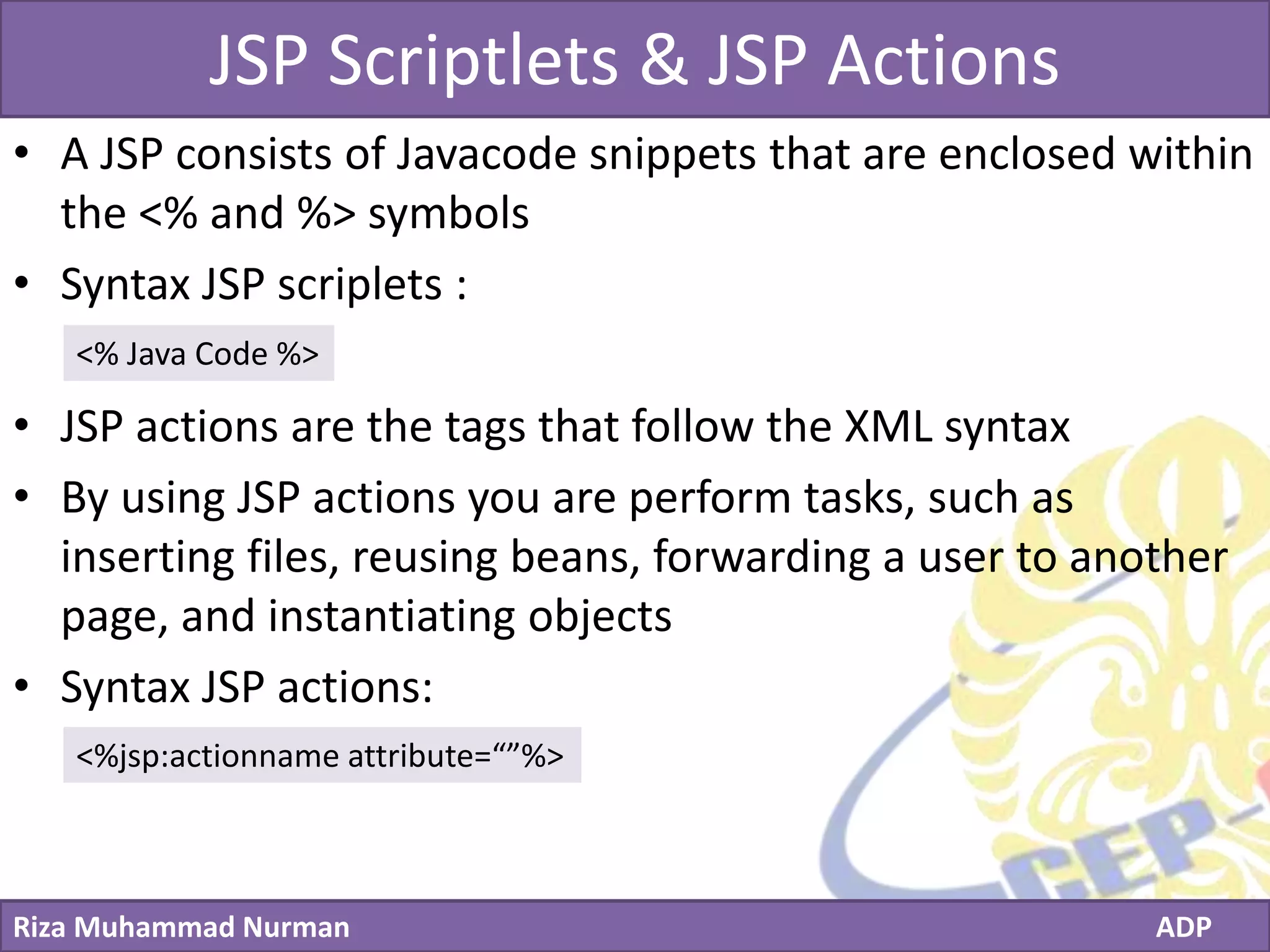
JSP Scriptlets & JSP Actions
• A JSP consists of Javacode snippets that are enclosed within
the <% and %> symbols
• Syntax JSP scriplets :
• JSP actions are the tags that follow the XML syntax
• By using JSP actions you are perform tasks, such as
inserting files, reusing beans, forwarding a user to another
page, and instantiating objects
• Syntax JSP actions:
<% Java Code %>
<%jsp:actionname attribute=“”%>
Click to edit Master title style
Riza Muhammad Nurman ADP
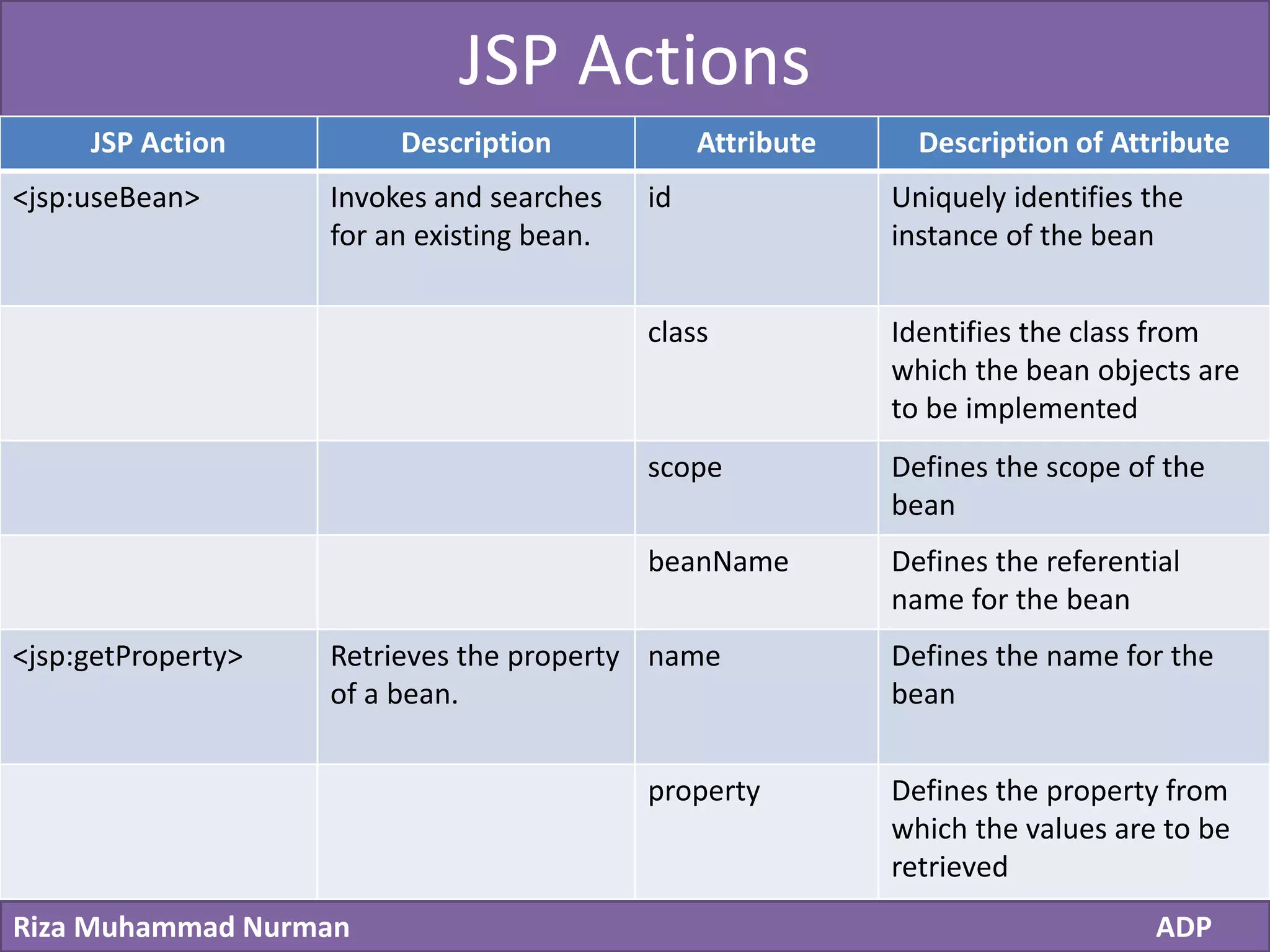
JSP Actions
JSP Action Description Attribute Description of Attribute
<jsp:useBean> Invokes and searches
for an existing bean.
id Uniquely identifies the
instance of the bean
class Identifies the class from
which the bean objects are
to be implemented
scope Defines the scope of the
bean
beanName Defines the referential
name for the bean
<jsp:getProperty> Retrieves the property
of a bean.
name Defines the name for the
bean
property Defines the property from
which the values are to be
retrieved
Click to edit Master title style
Riza Muhammad Nurman ADP
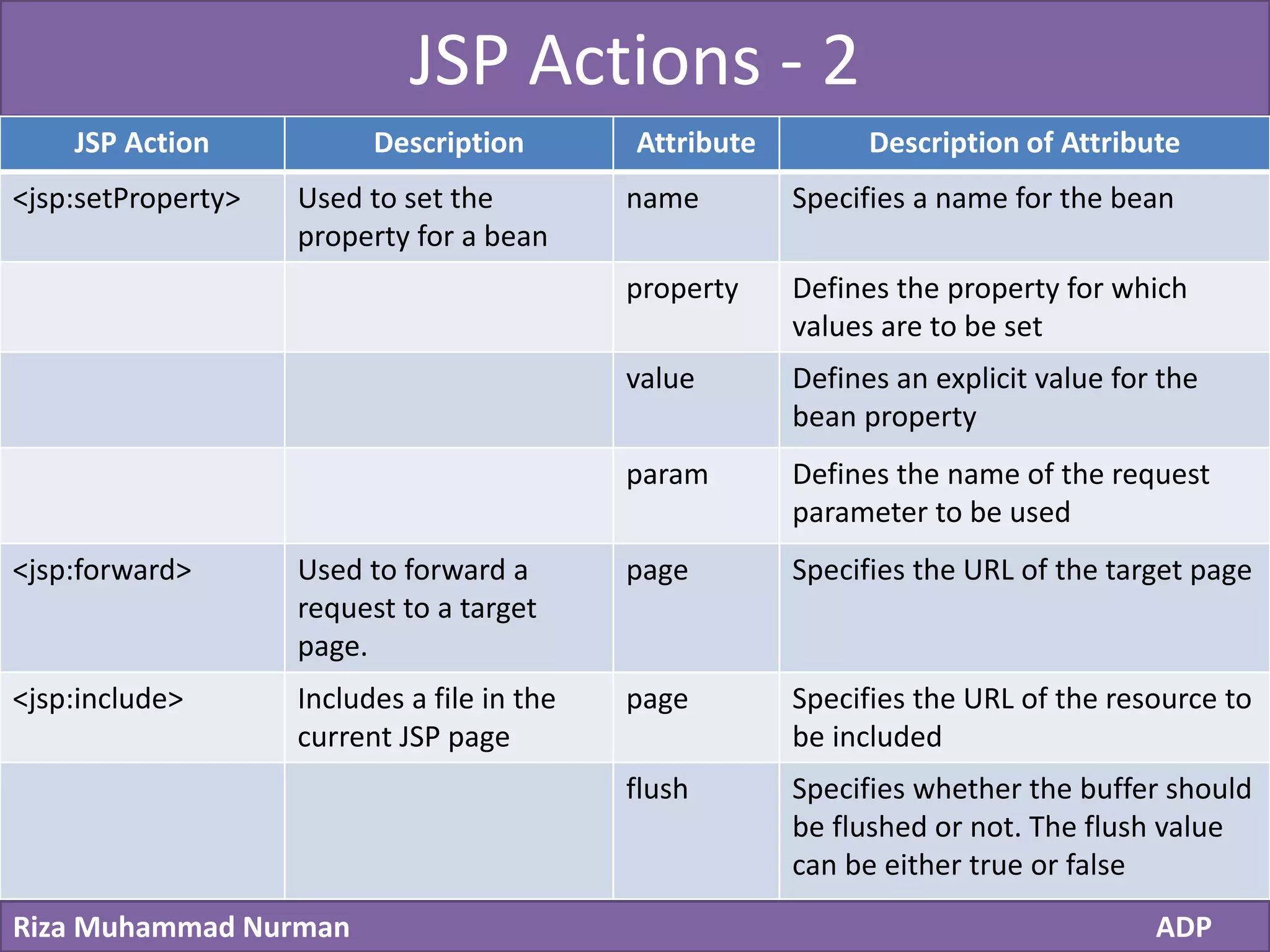
JSP Actions - 2
JSP Action Description Attribute Description of Attribute
<jsp:setProperty> Used to set the
property for a bean
name Specifies a name for the bean
property Defines the property for which
values are to be set
value Defines an explicit value for the
bean property
param Defines the name of the request
parameter to be used
<jsp:forward> Used to forward a
request to a target
page.
page Specifies the URL of the target page
<jsp:include> Includes a file in the
current JSP page
page Specifies the URL of the resource to
be included
flush Specifies whether the buffer should
be flushed or not. The flush value
can be either true or false
Click to edit Master title style
Riza Muhammad Nurman ADP
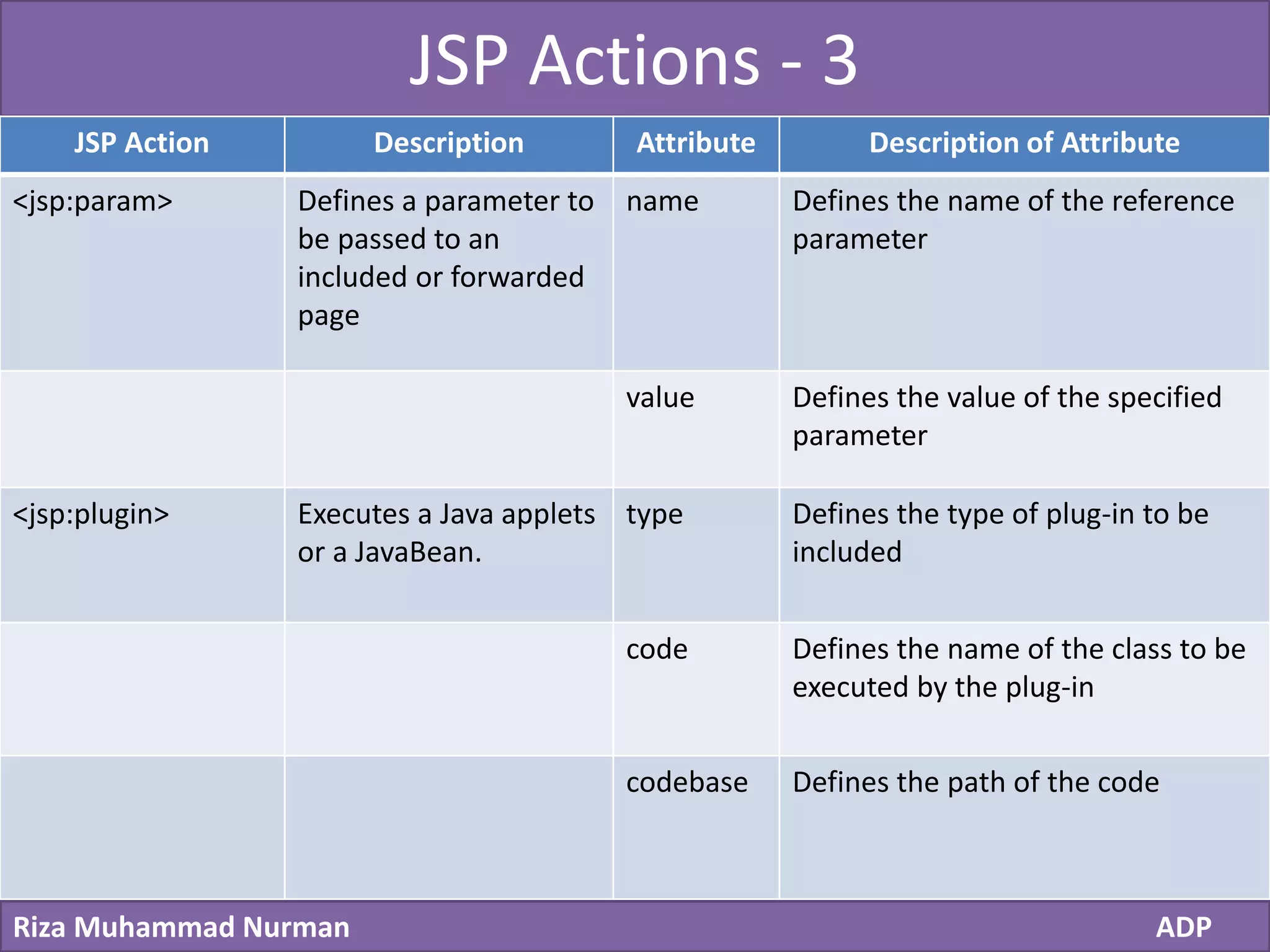
JSP Actions - 3
JSP Action Description Attribute Description of Attribute
<jsp:param> Defines a parameter to
be passed to an
included or forwarded
page
name Defines the name of the reference
parameter
value Defines the value of the specified
parameter
<jsp:plugin> Executes a Java applets
or a JavaBean.
type Defines the type of plug-in to be
included
code Defines the name of the class to be
executed by the plug-in
codebase Defines the path of the code
Click to edit Master title style
Riza Muhammad Nurman ADP
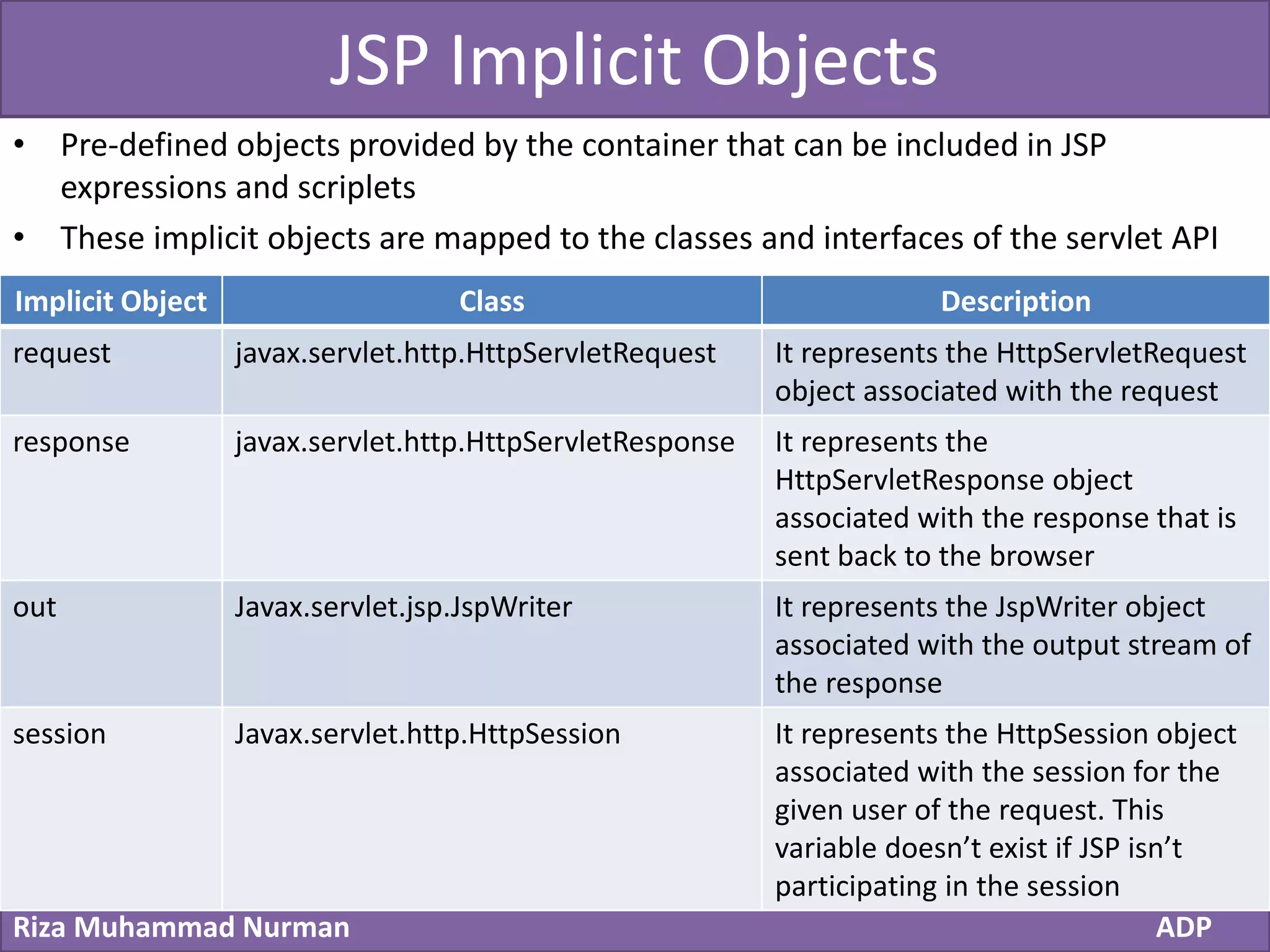
JSP Implicit Objects
• Pre-defined objects provided by the container that can be included in JSP
expressions and scriplets
• These implicit objects are mapped to the classes and interfaces of the servlet API
Implicit Object Class Description
request javax.servlet.http.HttpServletRequest It represents the HttpServletRequest
object associated with the request
response javax.servlet.http.HttpServletResponse It represents the
HttpServletResponse object
associated with the response that is
sent back to the browser
out Javax.servlet.jsp.JspWriter It represents the JspWriter object
associated with the output stream of
the response
session Javax.servlet.http.HttpSession It represents the HttpSession object
associated with the session for the
given user of the request. This
variable doesn’t exist if JSP isn’t
participating in the session
Click to edit Master title style
Riza Muhammad Nurman ADP
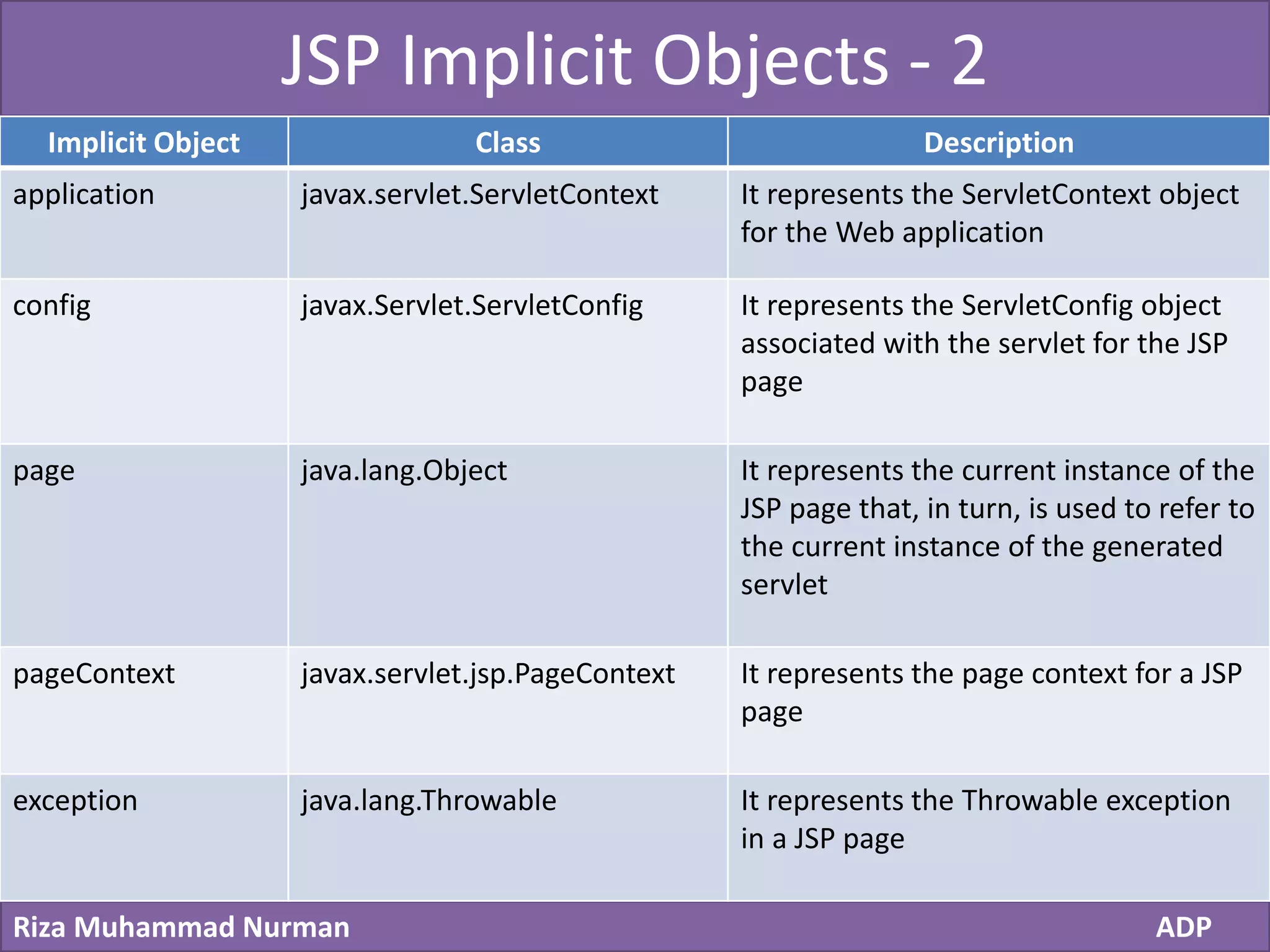
JSP Implicit Objects - 2
Implicit Object Class Description
application javax.servlet.ServletContext It represents the ServletContext object
for the Web application
config javax.Servlet.ServletConfig It represents the ServletConfig object
associated with the servlet for the JSP
page
page java.lang.Object It represents the current instance of the
JSP page that, in turn, is used to refer to
the current instance of the generated
servlet
pageContext javax.servlet.jsp.PageContext It represents the page context for a JSP
page
exception java.lang.Throwable It represents the Throwable exception
in a JSP page
Click to edit Master title style
Riza Muhammad Nurman ADP
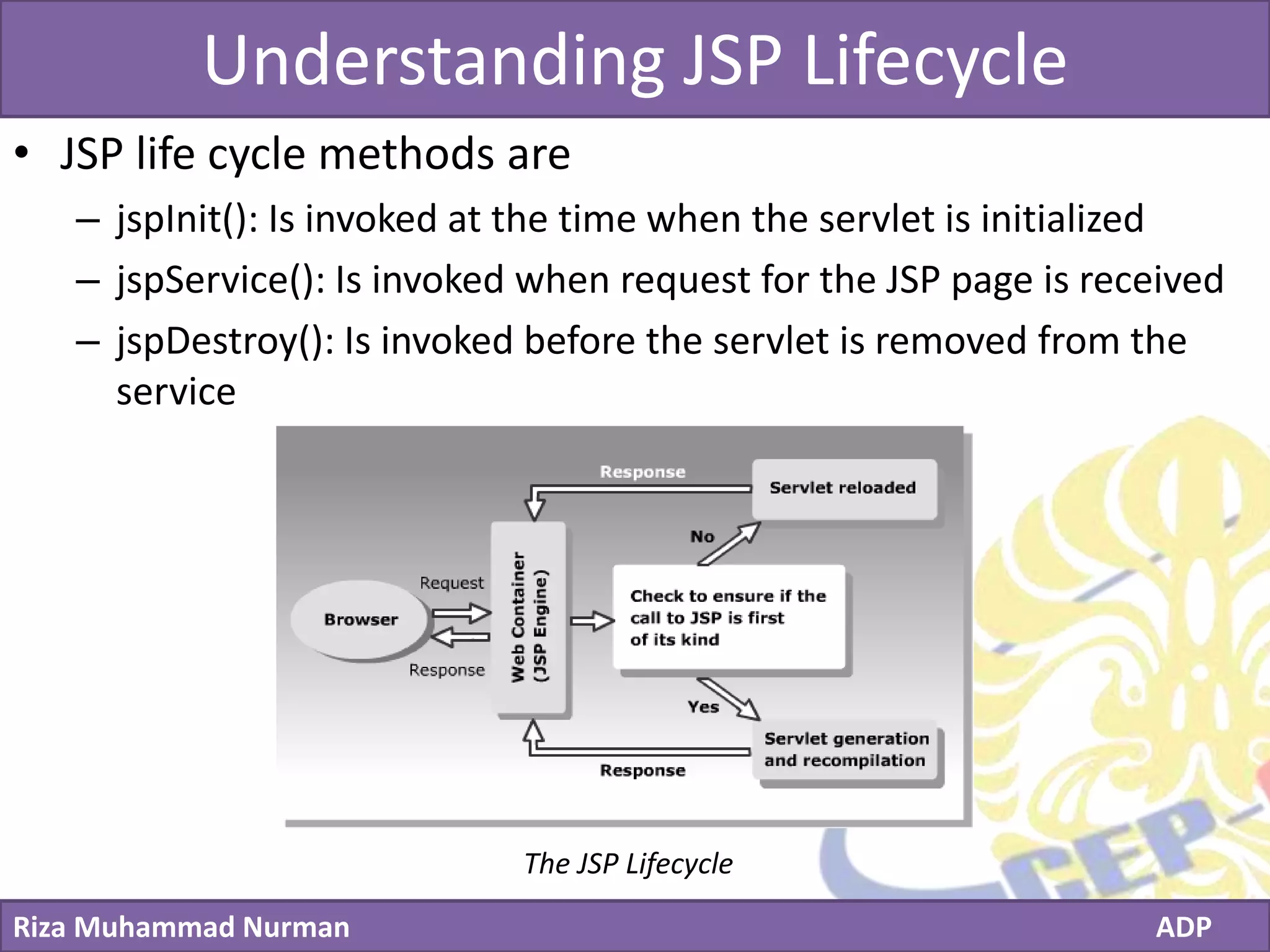
Understanding JSP Lifecycle
• JSP life cycle methods are
– jspInit(): Is invoked at the time when the servlet is initialized
– jspService(): Is invoked when request for the JSP page is received
– jspDestroy(): Is invoked before the servlet is removed from the
service
The JSP Lifecycle
Click to edit Master title style
Riza Muhammad Nurman ADP
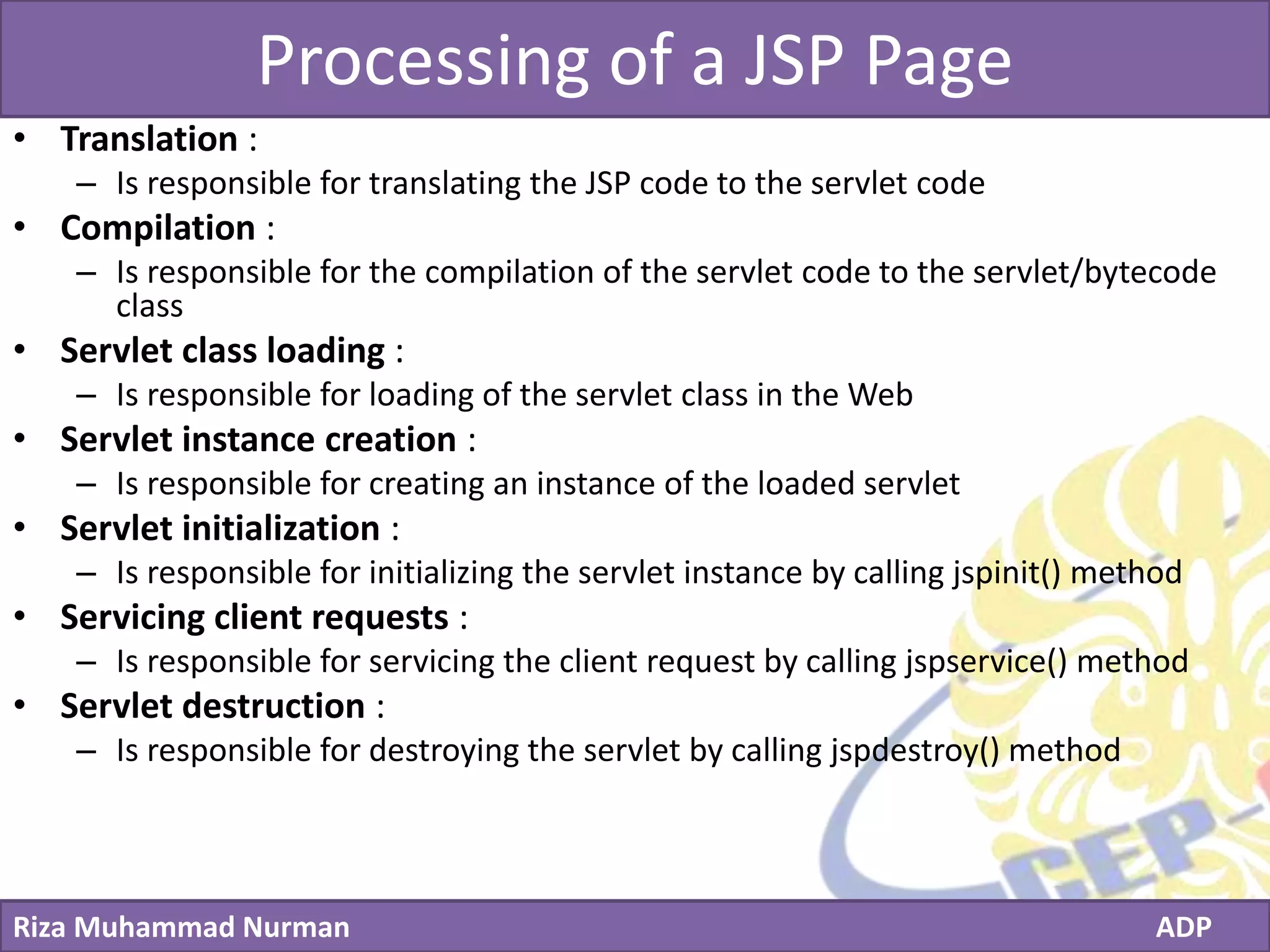
Processing of a JSP Page
• Translation :
– Is responsible for translating the JSP code to the servlet code
• Compilation :
– Is responsible for the compilation of the servlet code to the servlet/bytecode
class
• Servlet class loading :
– Is responsible for loading of the servlet class in the Web
• Servlet instance creation :
– Is responsible for creating an instance of the loaded servlet
• Servlet initialization :
– Is responsible for initializing the servlet instance by calling jspinit() method
• Servicing client requests :
– Is responsible for servicing the client request by calling jspservice() method
• Servlet destruction :
– Is responsible for destroying the servlet by calling jspdestroy() method
Click to edit Master title style
Riza Muhammad Nurman ADP

ADP - Chapter 5 Exploring JavaServer Pages Technology

  • 1.
    Click to editMaster title style Riza Muhammad Nurman ADP Chapter 5 on Advanced Programming FACULTY Riza Muhammad Nurman Exploring JavaServer Pages Technology
  • 2.
    Click to editMaster title style Riza Muhammad Nurman ADP Content • Understand JSP technology • Understand JSP lifecycle
  • 3.
    Click to editMaster title style Riza Muhammad Nurman ADP Understanding JSP Technology • A typical Web application consists of the presentation logic, which contains the design and the structure, such as the page layout, of a Web page • In addition, it consists of the business logic or the dynamic content, which involves application of business specific requirements
  • 4.
    Click to editMaster title style Riza Muhammad Nurman ADP Understanding JSP Technology - 2 out.println(“<label for=‘firstname’ class=‘control-label’>Firstname:</label>”); out.println(“<div class=‘controls’> “); out.println(“<input type="text" name=‘firstname’ id=‘firstname’ class=‘input-block- level’ required=‘’ value=‘’> “); out.println(“</div>”); <label for="firstname" class="control-label">Firstname:</label> <div class="controls"> <input type="text" name="firstname" id="firstname" class="input-block-level" required="" value=""> </div>
  • 5.
    Click to editMaster title style Riza Muhammad Nurman ADP Identifying the Components of a JSP Page • A JSP page consists of regular HTML tags representing the static content, and the code enclosed within special tags representing the dynamic content • Tags : <% … %> • Components of a JSP page – JSP comments – JSP directives – JSP declarations – JSP scriplets – JSP expression – JSP actions – JSP implicit objects
  • 6.
    Click to editMaster title style Riza Muhammad Nurman ADP JSP Comments • Comments explain the JSP code and make it more readable <%-- comments --%> <% /** this is a comment … **/ %> <!– comments -- >
  • 7.
    Click to editMaster title style Riza Muhammad Nurman ADP JSP Directives • A directive element in a JSP page provides global information about a particular JSP page • The syntax for defining a directive is: <%@ directive attribute=”value” %> • Three types of JSP directives – page directive – include directive – taglib directive
  • 8.
    Click to editMaster title style Riza Muhammad Nurman ADP page Directive Attribute Description Syntax language Defines the scripting language of the JSP page <%@page language=“java”%> extends Defines the extended parent class of the JSP generated servlet <%@page extends=“myapp.Validation”%> import Imports the list of packages, classes, or interfaces into the generated servlet <%@page import=“java.util.Date”%> session Specifies if the generated servlet can access the session or not. An implicit object, session, is generated if the value is set to true. The default value of session attribute is true <%@page session=“false”%> buffer Specifies the size of the out buffer. If size is set to none, no buffering is performed. The default value of buffer size is 8 KB <%@page buffer=“10kb”%> autoFlush Specifies that the out buffer be flushed automatically if the value is set to true. If the value is set to false, an exception is raised when the buffer is full. The default value of autoFlush attribute is true <%@page autoFlush=“false”%>
  • 9.
    Click to editMaster title style Riza Muhammad Nurman ADP page Directive - 2 Attribute Description Syntax isThreadSafe Specifies whether a JSP page is thread safe or not. <%@page isThreadSafe=“false”%> errorPage Specifies that any un-handled exception generated will be directed to the URL. <%@page errorPage=“ErrorPage.jsp”%> isErrorPage Specifies that the current JSP page is an error page, if the attribute value is set to true. The default value of isErrorPage attribute is false. <%@page isErrorPage=“true”%> isELIgnored Specifies that the current JSP page will ignore all the EL expressions, if this attribute is set to true. The default value of the isELIgnored attribute is false <%@page isELIgnored=“true”%> info Provides a description of a JSP page <%@page info=“This JSP page will display”%> pageEncoding Specifies the language used by the JSP page to send the response to the Web browser <%@page pageEncoding=“UTF-8”%> contentType Defines the Multipurpose Internal Mail Extension (MIME) type for a response. The default value of the contentType attribute is text/html. <%@page autoFlush=“false”%>
  • 10.
    Click to editMaster title style Riza Muhammad Nurman ADP include Directive • Specifies the names of the files to be inserted during the compilation of the JSP page • Creates the contents of the included files as part of the JSP page • Inserts a part of the code that is common to multiple pages • Syntax : <%@include file=“URLname”%>
  • 11.
    Click to editMaster title style Riza Muhammad Nurman ADP taglib Directive • Imports a custom tag into the current JSP page • Associates itself with a URI to uniquely identify a custom tag • Associates a tag prefix string that distinguishes a custom tag with the other tag library used in a JSP page • Syntax : <%@taglib uri=“tag_lib_URI” prefix=“prefix”%> Attribute Description Uri Locates the TLD file of a custom tag Prefix Defines a prefix string to be used for distinguishing a custom tag instance.
  • 12.
    Click to editMaster title style Riza Muhammad Nurman ADP JSP Declarations & JSP Expressions • JSP Declarations provide mechanism to define variables and methods in a JSP page • JSP Expressions are used to directly insert values into the response output <%! int i= 5; int add() { i=i+5; return i; } %> <%= expression %>
  • 13.
    Click to editMaster title style Riza Muhammad Nurman ADP JSP Scriptlets & JSP Actions • A JSP consists of Javacode snippets that are enclosed within the <% and %> symbols • Syntax JSP scriplets : • JSP actions are the tags that follow the XML syntax • By using JSP actions you are perform tasks, such as inserting files, reusing beans, forwarding a user to another page, and instantiating objects • Syntax JSP actions: <% Java Code %> <%jsp:actionname attribute=“”%>
  • 14.
    Click to editMaster title style Riza Muhammad Nurman ADP JSP Actions JSP Action Description Attribute Description of Attribute <jsp:useBean> Invokes and searches for an existing bean. id Uniquely identifies the instance of the bean class Identifies the class from which the bean objects are to be implemented scope Defines the scope of the bean beanName Defines the referential name for the bean <jsp:getProperty> Retrieves the property of a bean. name Defines the name for the bean property Defines the property from which the values are to be retrieved
  • 15.
    Click to editMaster title style Riza Muhammad Nurman ADP JSP Actions - 2 JSP Action Description Attribute Description of Attribute <jsp:setProperty> Used to set the property for a bean name Specifies a name for the bean property Defines the property for which values are to be set value Defines an explicit value for the bean property param Defines the name of the request parameter to be used <jsp:forward> Used to forward a request to a target page. page Specifies the URL of the target page <jsp:include> Includes a file in the current JSP page page Specifies the URL of the resource to be included flush Specifies whether the buffer should be flushed or not. The flush value can be either true or false
  • 16.
    Click to editMaster title style Riza Muhammad Nurman ADP JSP Actions - 3 JSP Action Description Attribute Description of Attribute <jsp:param> Defines a parameter to be passed to an included or forwarded page name Defines the name of the reference parameter value Defines the value of the specified parameter <jsp:plugin> Executes a Java applets or a JavaBean. type Defines the type of plug-in to be included code Defines the name of the class to be executed by the plug-in codebase Defines the path of the code
  • 17.
    Click to editMaster title style Riza Muhammad Nurman ADP JSP Implicit Objects • Pre-defined objects provided by the container that can be included in JSP expressions and scriplets • These implicit objects are mapped to the classes and interfaces of the servlet API Implicit Object Class Description request javax.servlet.http.HttpServletRequest It represents the HttpServletRequest object associated with the request response javax.servlet.http.HttpServletResponse It represents the HttpServletResponse object associated with the response that is sent back to the browser out Javax.servlet.jsp.JspWriter It represents the JspWriter object associated with the output stream of the response session Javax.servlet.http.HttpSession It represents the HttpSession object associated with the session for the given user of the request. This variable doesn’t exist if JSP isn’t participating in the session
  • 18.
    Click to editMaster title style Riza Muhammad Nurman ADP JSP Implicit Objects - 2 Implicit Object Class Description application javax.servlet.ServletContext It represents the ServletContext object for the Web application config javax.Servlet.ServletConfig It represents the ServletConfig object associated with the servlet for the JSP page page java.lang.Object It represents the current instance of the JSP page that, in turn, is used to refer to the current instance of the generated servlet pageContext javax.servlet.jsp.PageContext It represents the page context for a JSP page exception java.lang.Throwable It represents the Throwable exception in a JSP page
  • 19.
    Click to editMaster title style Riza Muhammad Nurman ADP Understanding JSP Lifecycle • JSP life cycle methods are – jspInit(): Is invoked at the time when the servlet is initialized – jspService(): Is invoked when request for the JSP page is received – jspDestroy(): Is invoked before the servlet is removed from the service The JSP Lifecycle
  • 20.
    Click to editMaster title style Riza Muhammad Nurman ADP Processing of a JSP Page • Translation : – Is responsible for translating the JSP code to the servlet code • Compilation : – Is responsible for the compilation of the servlet code to the servlet/bytecode class • Servlet class loading : – Is responsible for loading of the servlet class in the Web • Servlet instance creation : – Is responsible for creating an instance of the loaded servlet • Servlet initialization : – Is responsible for initializing the servlet instance by calling jspinit() method • Servicing client requests : – Is responsible for servicing the client request by calling jspservice() method • Servlet destruction : – Is responsible for destroying the servlet by calling jspdestroy() method
  • 21.
    Click to editMaster title style Riza Muhammad Nurman ADP