First Annual Conference
September 16, 2015 to September 18, 2015
Chicago, IL.
Note: To Download the complete recording of the webinar
please visit the link in the description bellow
2
Service Management:
Unify and streamline warranty, parts,
support & service processes
Eric Marlan
Sr. Product Manager, m-ize
• Key Challenges
• Manage Your Services
• Integrated Services
• Global Services
• Optimized Services Workflow
• Utilizing Mobile & IoT Technologies
3
Agenda
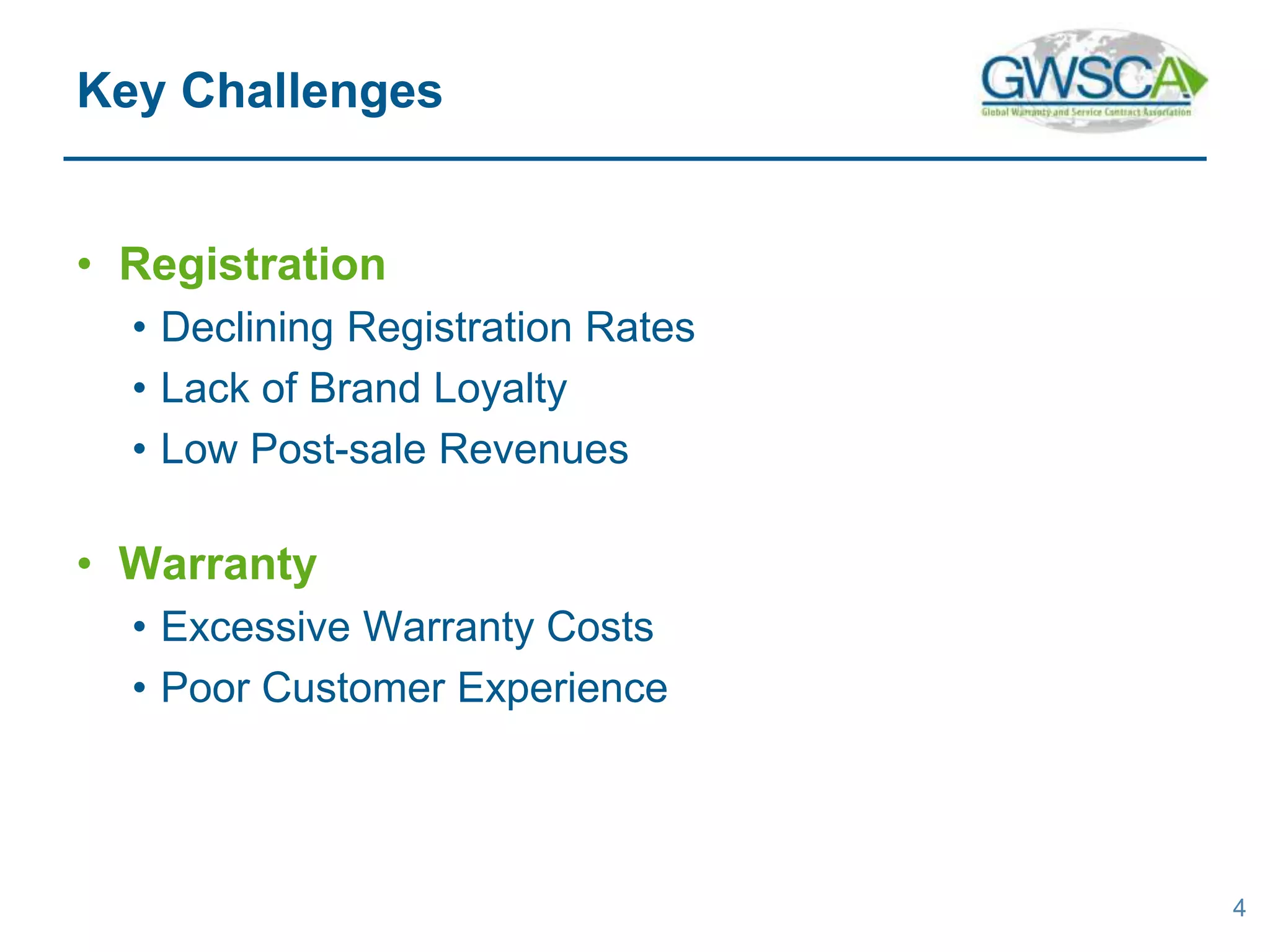
• Registration
• Declining Registration Rates
• Lack of Brand Loyalty
• Low Post-sale Revenues
• Warranty
• Excessive Warranty Costs
• Poor Customer Experience
4
Key Challenges
• Support & Service
• Brands & Customers Disconnected
• Heavy Investments in Contact Centers
• Unable to meet Customer Expectations
• Parts
• Complex, Time-consuming, & Error-prone Processes
5
Key Challenges
• Registration, Warranty, Support, Service, & Parts
• Simplify the Experience
• Connectedness
• Streamline Processes
• Enhance Value
• Shared Data
• Remove Barriers
6
Manage your Services
Note: To Download the complete recording of the webinar
please visit the link in the description bellow
• Simplify
• Create Workflow diagrams
• Bar code/QR scanning to enter data
• Streamline
• Automated forms completion
• Create connectedness by sharing data
• Pulling data from shipped records
• Pull dealer information from shipped record
• Remove barriers
• Remove unnecessary data requirements
7
In this example…
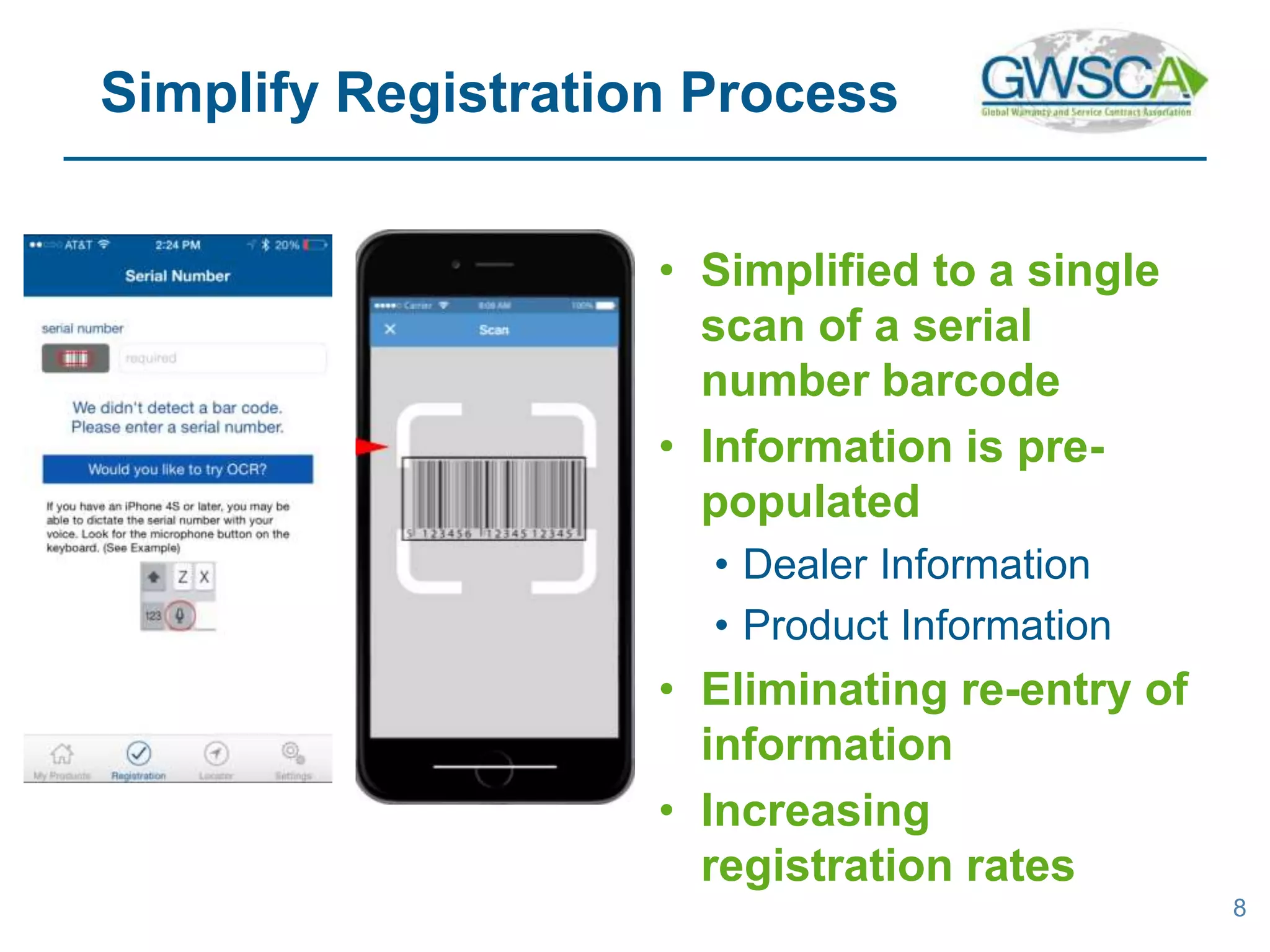
• Simplified to a single
scan of a serial
number barcode
• Information is pre-
populated
• Dealer Information
• Product Information
• Eliminating re-entry of
information
• Increasing
registration rates
8
Simplify Registration Process
• From support & service to extended warranty
• Consolidate systems & processes
• How are the technologies changing the service
management?
• Online connectivity and smart devices
• Customer expectations
• This impacts how the warranty is managed
9
Make It More Integrated
Note: To Download the complete recording of the webinar
please visit the link in the description bellow
10
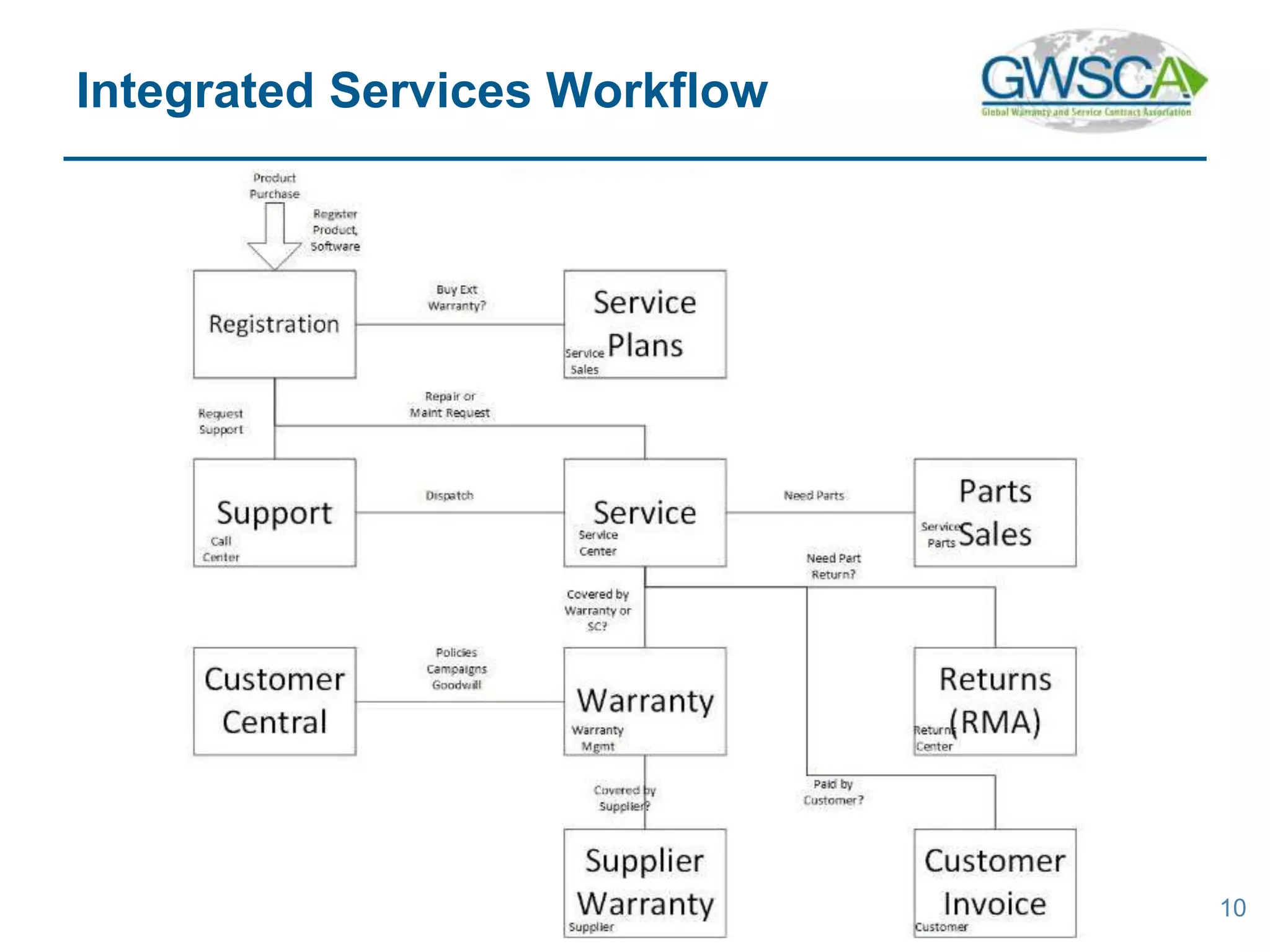
Integrated Services Workflow
• https://www.youtube.com/v/G3qXp8LYclw&featu
re=youtu.be
11
Example: ServiceLive Mobile
Note: To Download the complete recording of the webinar
please visit the link in the description bellow
• Consolidate systems & processes
• Generating a request & calling support
• Passed from support to service to RMA to invoicing
• Using technology to enhance CX
• Online connectivity and smart devices
• Status updates
12
In this example…
• How mobile can capture the right service request
• Ensure accuracy of data
• Capture images to provide clarity
• Provide self-service solutions
• Integrated & connectedness of transactions
• Mobile to initiate a request
• Online to monitor/edit request
• Push notifications & email updates
13
Integrated Technologies
• How can you standardize globally?
• Support for multiple languages
• Support for local policies and business rules
• Adaption to privacies and local laws
• Meets requirements of different regions for warranties
and workflows
14
Global Service
15
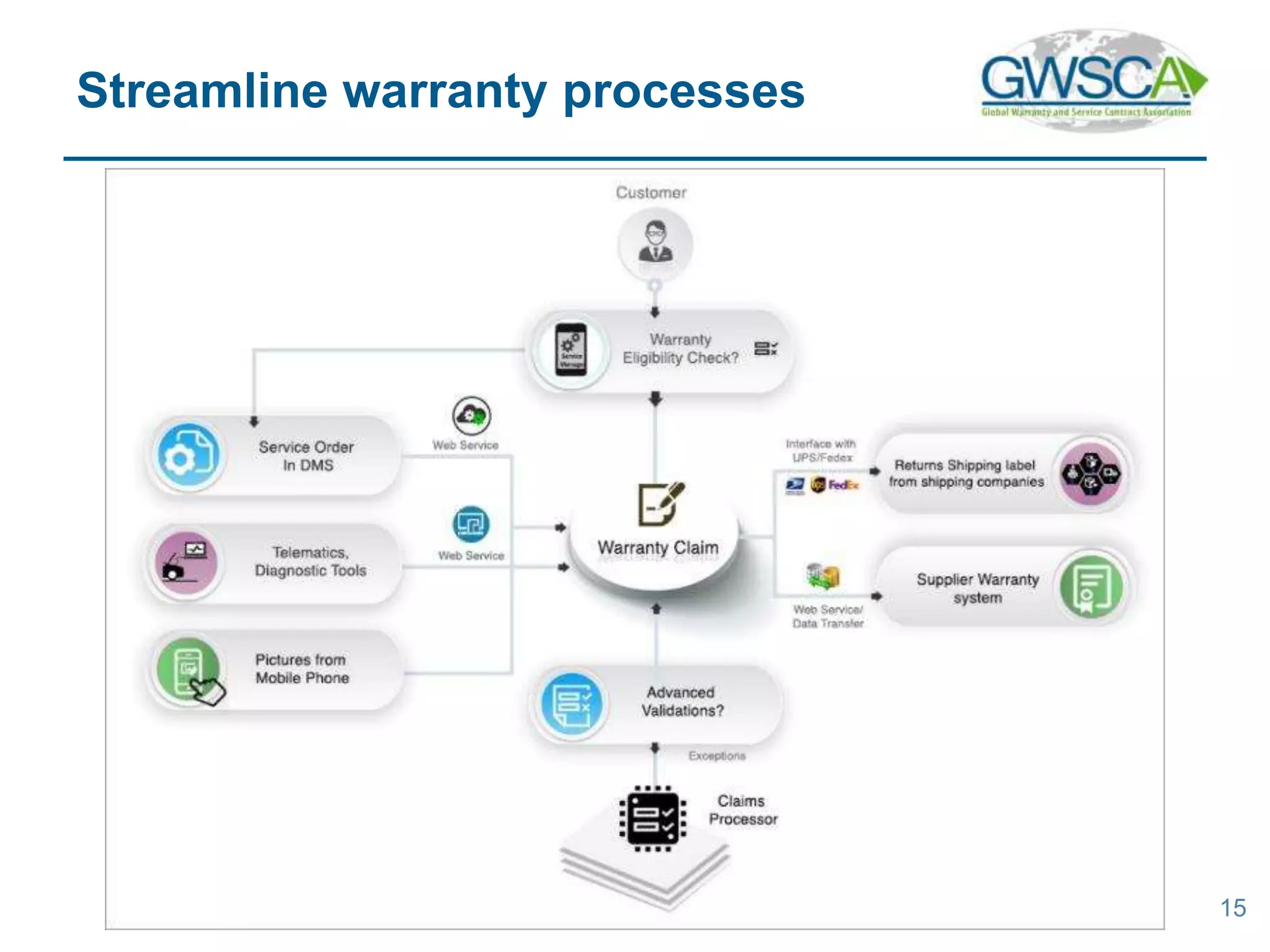
Streamline warranty processes
16
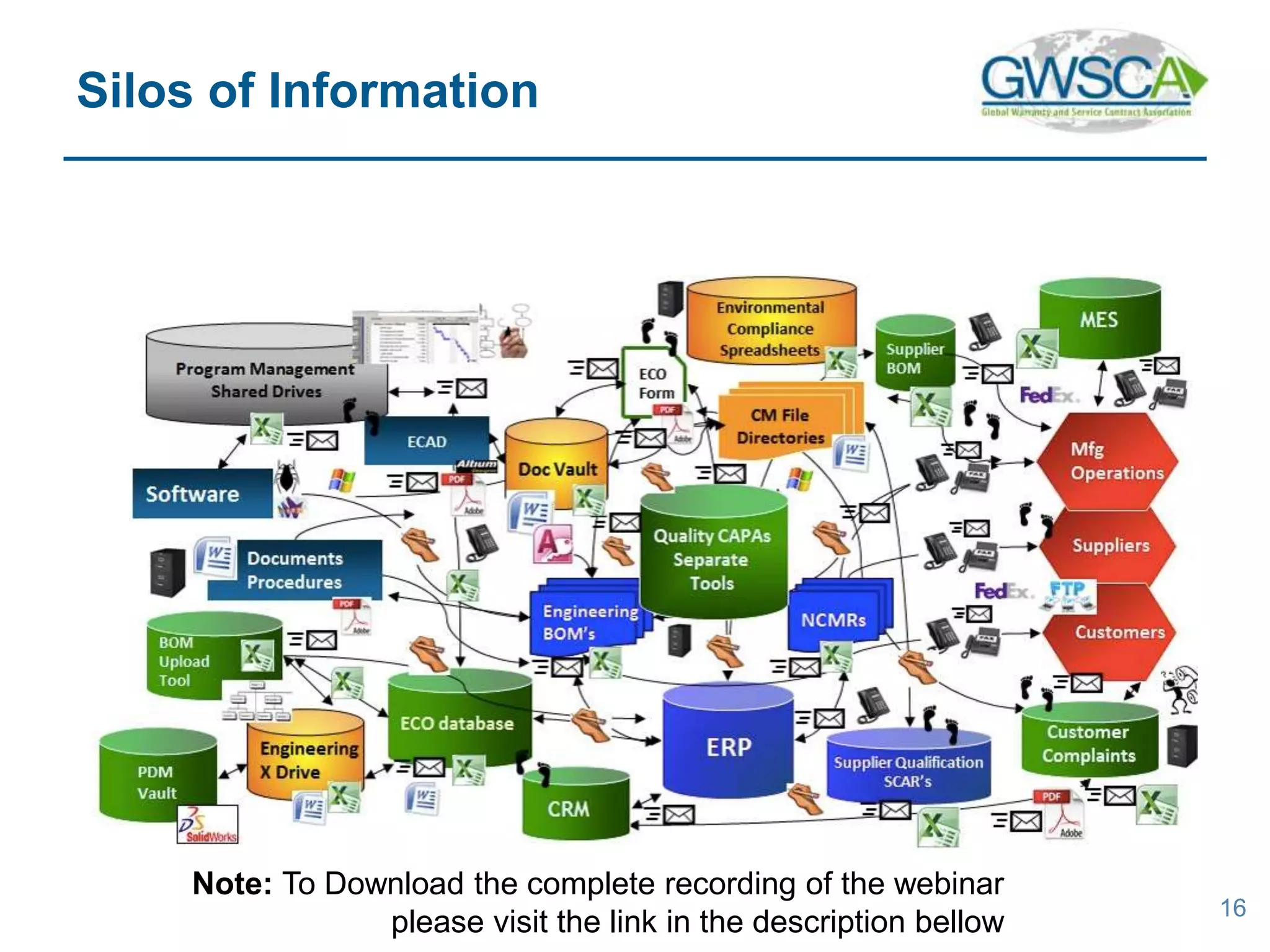
Silos of Information
Note: To Download the complete recording of the webinar
please visit the link in the description bellow
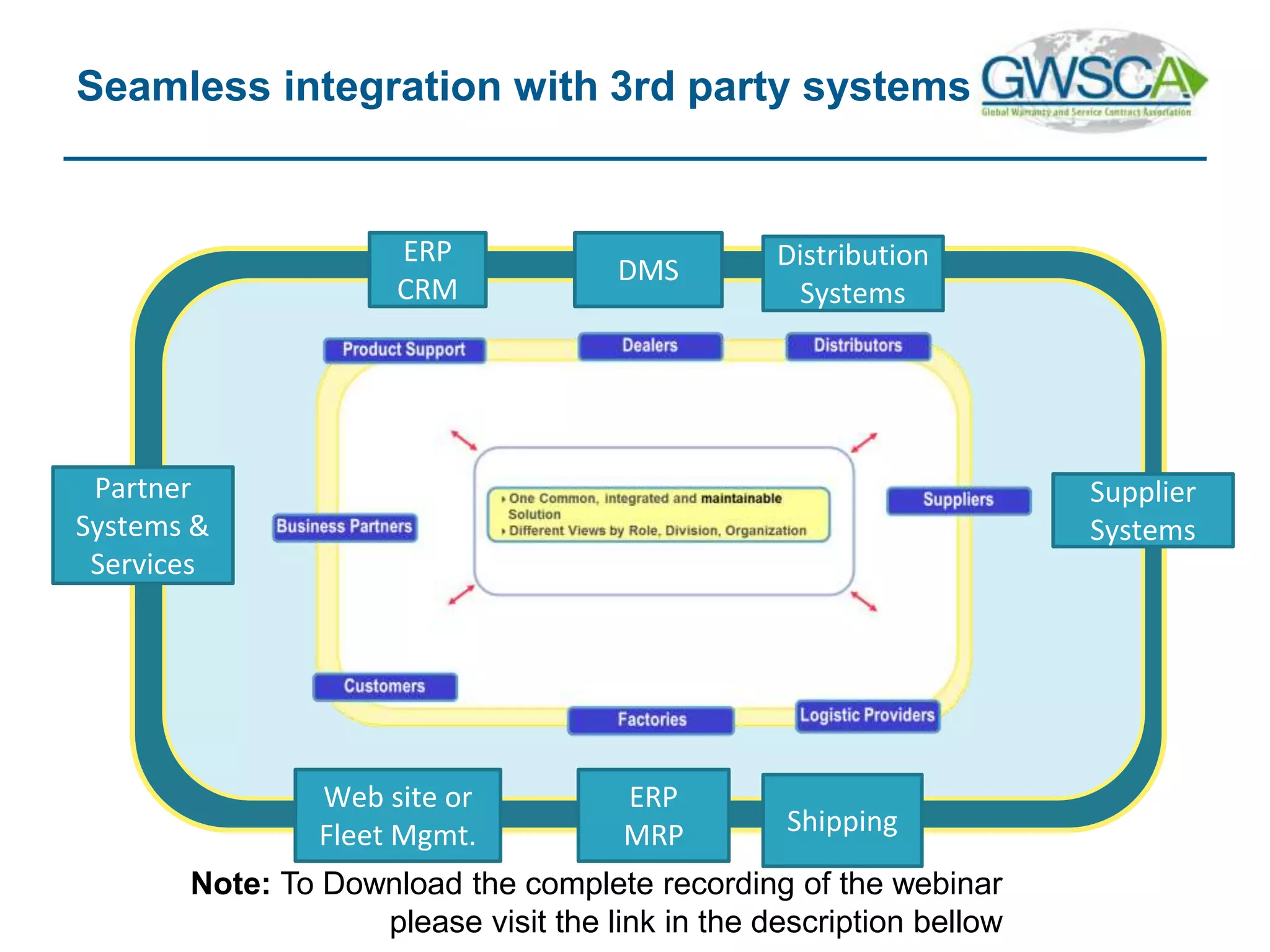
Seamless integration with 3rd party systems
DMS
ERP
CRM
Shipping
ERP
MRP
Supplier
Systems
Web site or
Fleet Mgmt.
Partner
Systems &
Services
Distribution
Systems
Note: To Download the complete recording of the webinar
please visit the link in the description bellow
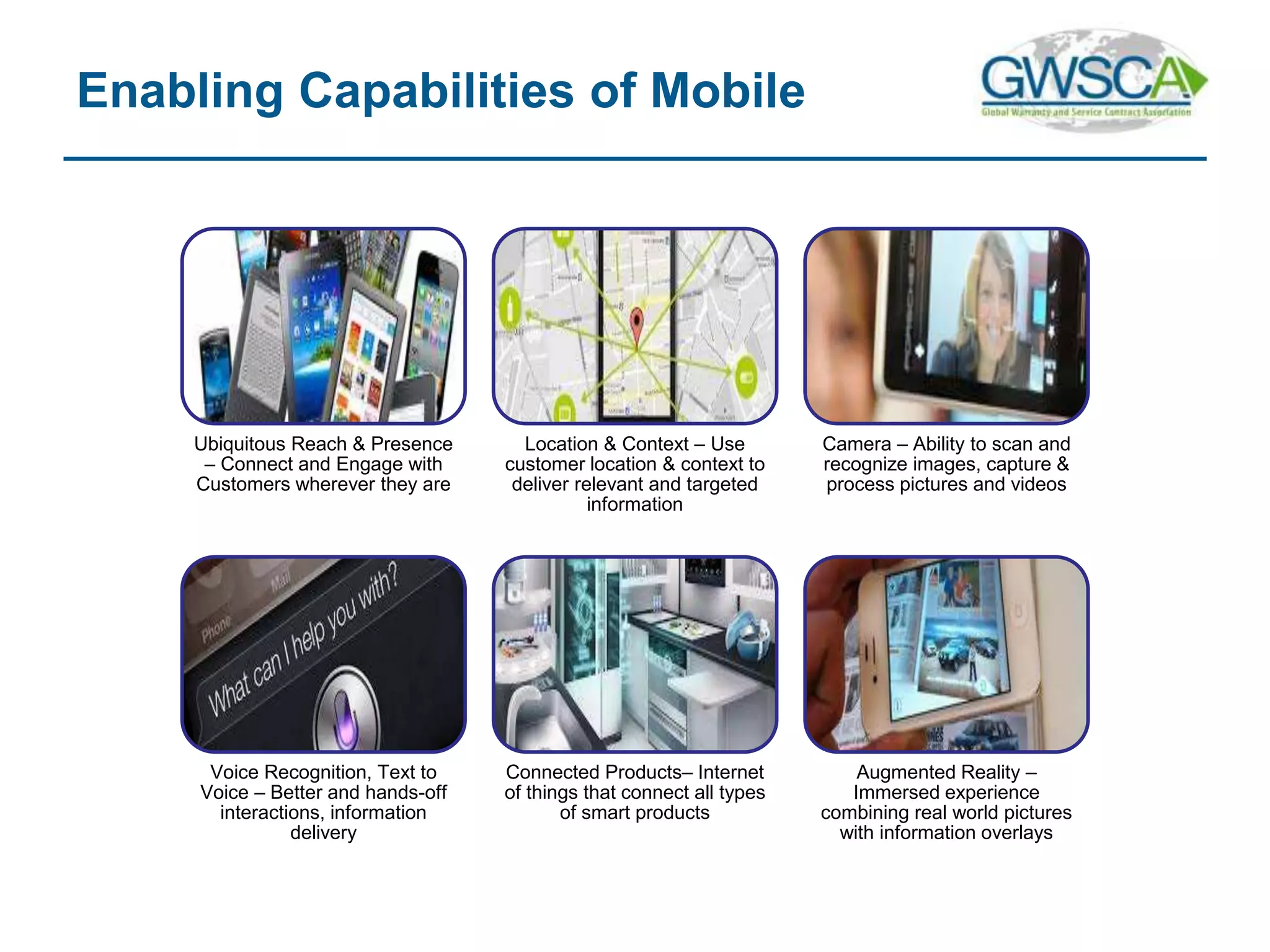
Ubiquitous Reach & Presence
– Connect and Engage with
Customers wherever they are
Location & Context – Use
customer location & context to
deliver relevant and targeted
information
Camera – Ability to scan and
recognize images, capture &
process pictures and videos
Voice Recognition, Text to
Voice – Better and hands-off
interactions, information
delivery
Connected Products– Internet
of things that connect all types
of smart products
Augmented Reality –
Immersed experience
combining real world pictures
with information overlays
Enabling Capabilities of Mobile
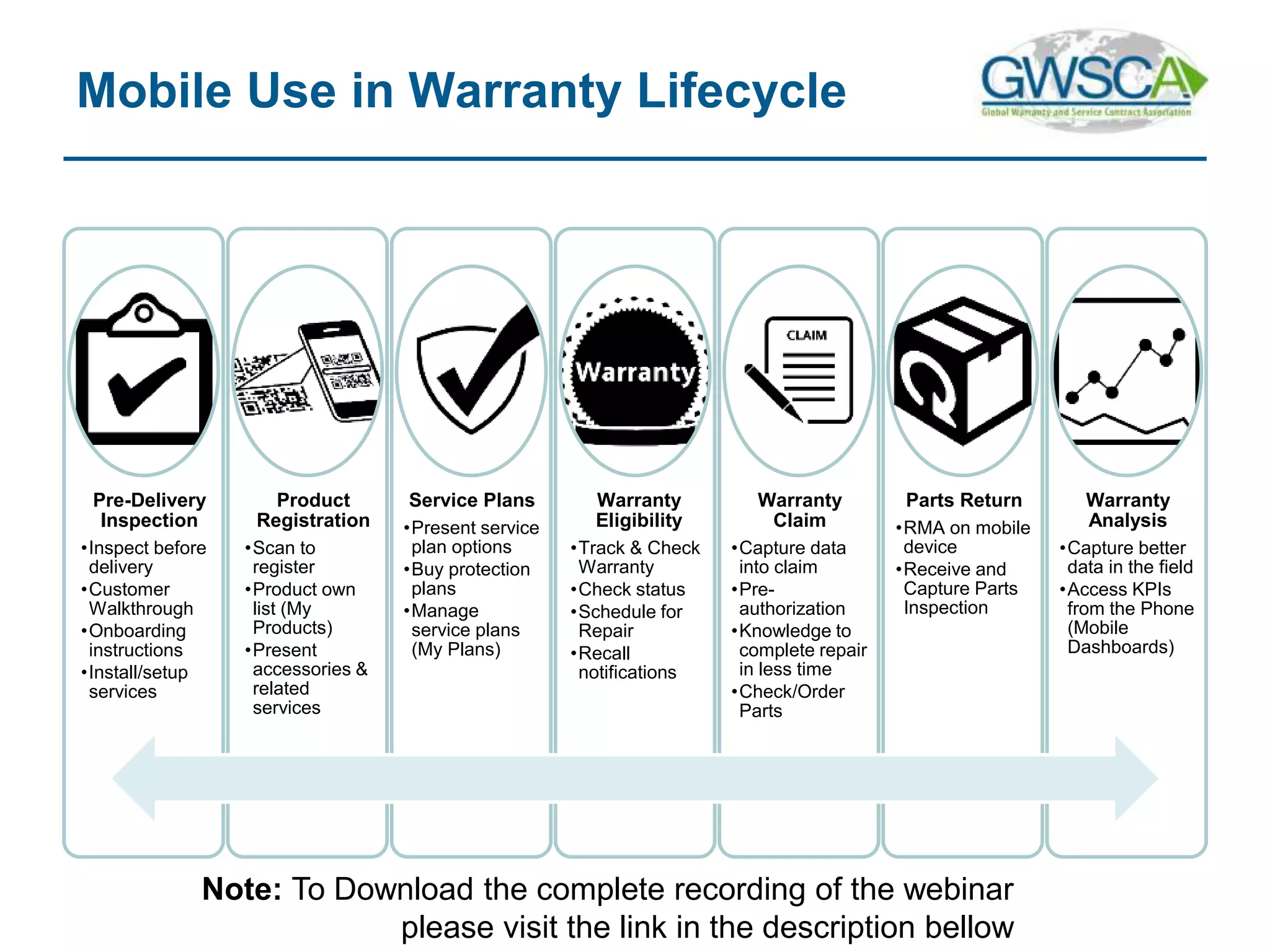
Pre-Delivery
Inspection
•Inspect before
delivery
•Customer
Walkthrough
•Onboarding
instructions
•Install/setup
services
Product
Registration
•Scan to
register
•Product own
list (My
Products)
•Present
accessories &
related
services
Service Plans
•Present service
plan options
•Buy protection
plans
•Manage
service plans
(My Plans)
Warranty
Eligibility
•Track & Check
Warranty
•Check status
•Schedule for
Repair
•Recall
notifications
Warranty
Claim
•Capture data
into claim
•Pre-
authorization
•Knowledge to
complete repair
in less time
•Check/Order
Parts
Parts Return
•RMA on mobile
device
•Receive and
Capture Parts
Inspection
Warranty
Analysis
•Capture better
data in the field
•Access KPIs
from the Phone
(Mobile
Dashboards)
Mobile Use in Warranty Lifecycle
Note: To Download the complete recording of the webinar
please visit the link in the description bellow
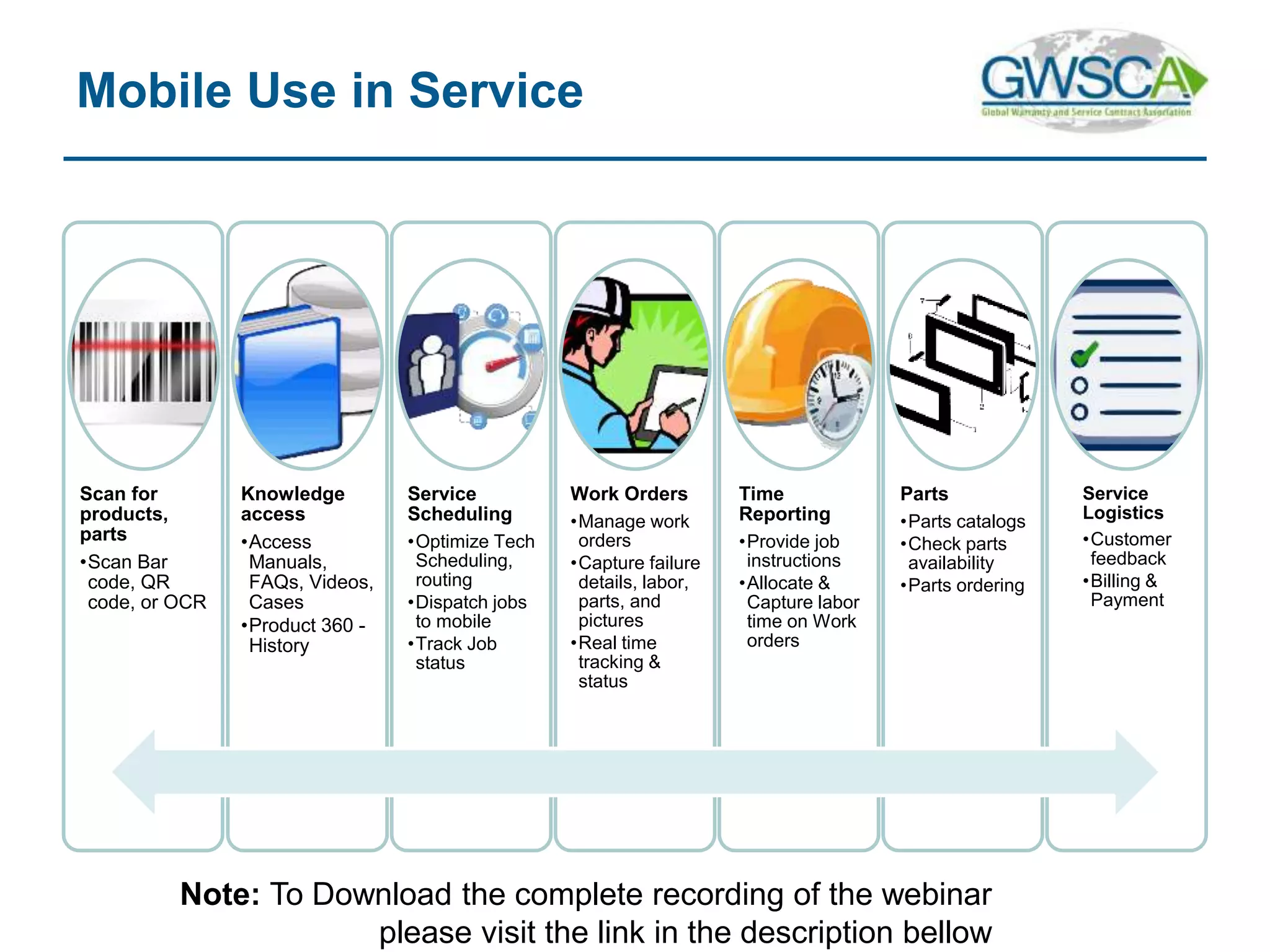
Mobile Use in Service
Scan for
products,
parts
•Scan Bar
code, QR
code, or OCR
Knowledge
access
•Access
Manuals,
FAQs, Videos,
Cases
•Product 360 -
History
Service
Scheduling
•Optimize Tech
Scheduling,
routing
•Dispatch jobs
to mobile
•Track Job
status
Work Orders
•Manage work
orders
•Capture failure
details, labor,
parts, and
pictures
•Real time
tracking &
status
Time
Reporting
•Provide job
instructions
•Allocate &
Capture labor
time on Work
orders
Parts
•Parts catalogs
•Check parts
availability
•Parts ordering
Service
Logistics
•Customer
feedback
•Billing &
Payment
Note: To Download the complete recording of the webinar
please visit the link in the description bellow
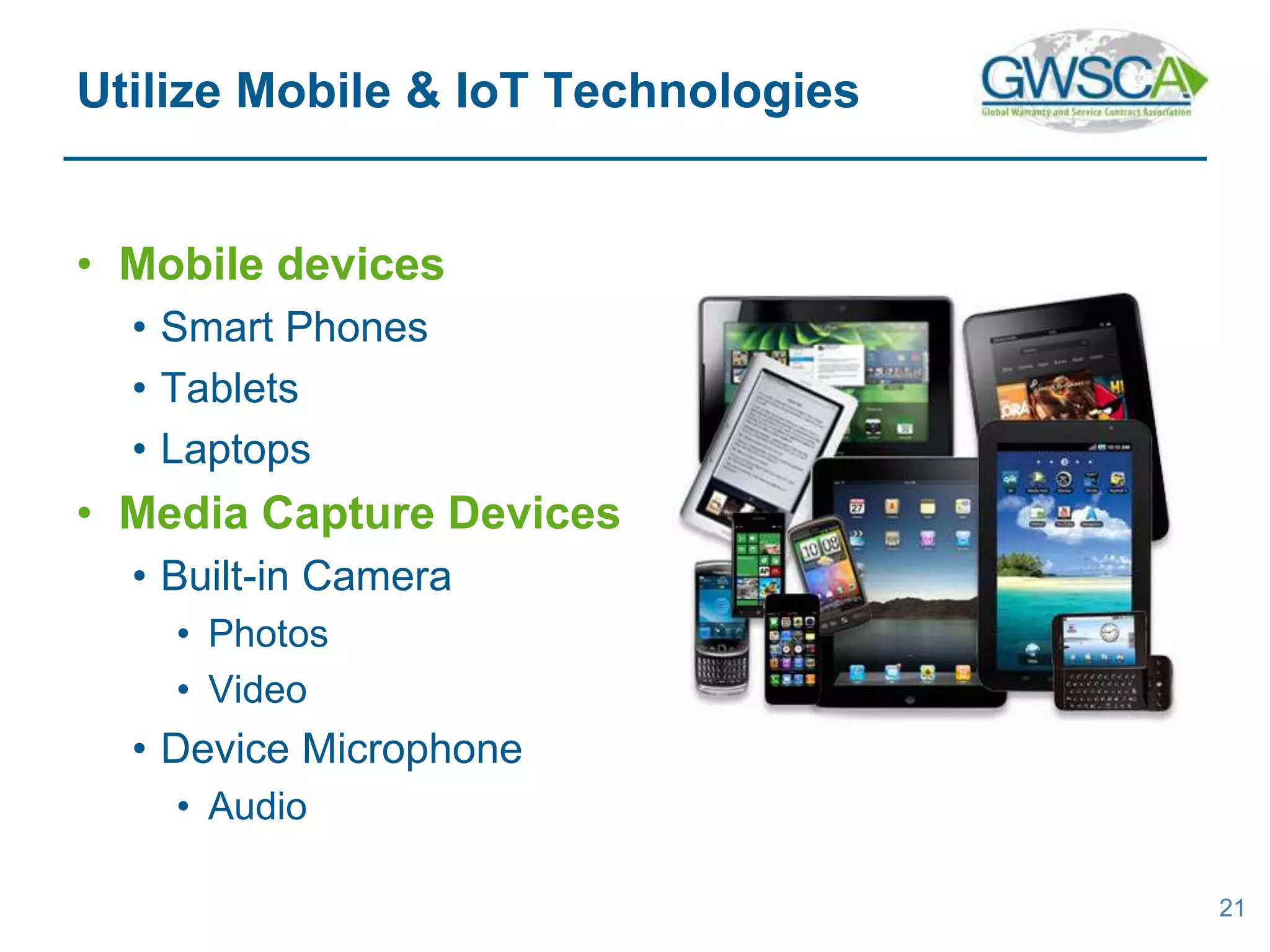
• Mobile devices
• Smart Phones
• Tablets
• Laptops
• Media Capture Devices
• Built-in Camera
• Photos
• Video
• Device Microphone
• Audio
21
Utilize Mobile & IoT Technologies
• OCR & Character Recognition
• Interpret Images as Numbers & Text
• Apps
• Customer Interface to Brand Portal
• Alerts
• Push Notifications
• Email Notifications
22
Utilize Mobile & IoT Technologies
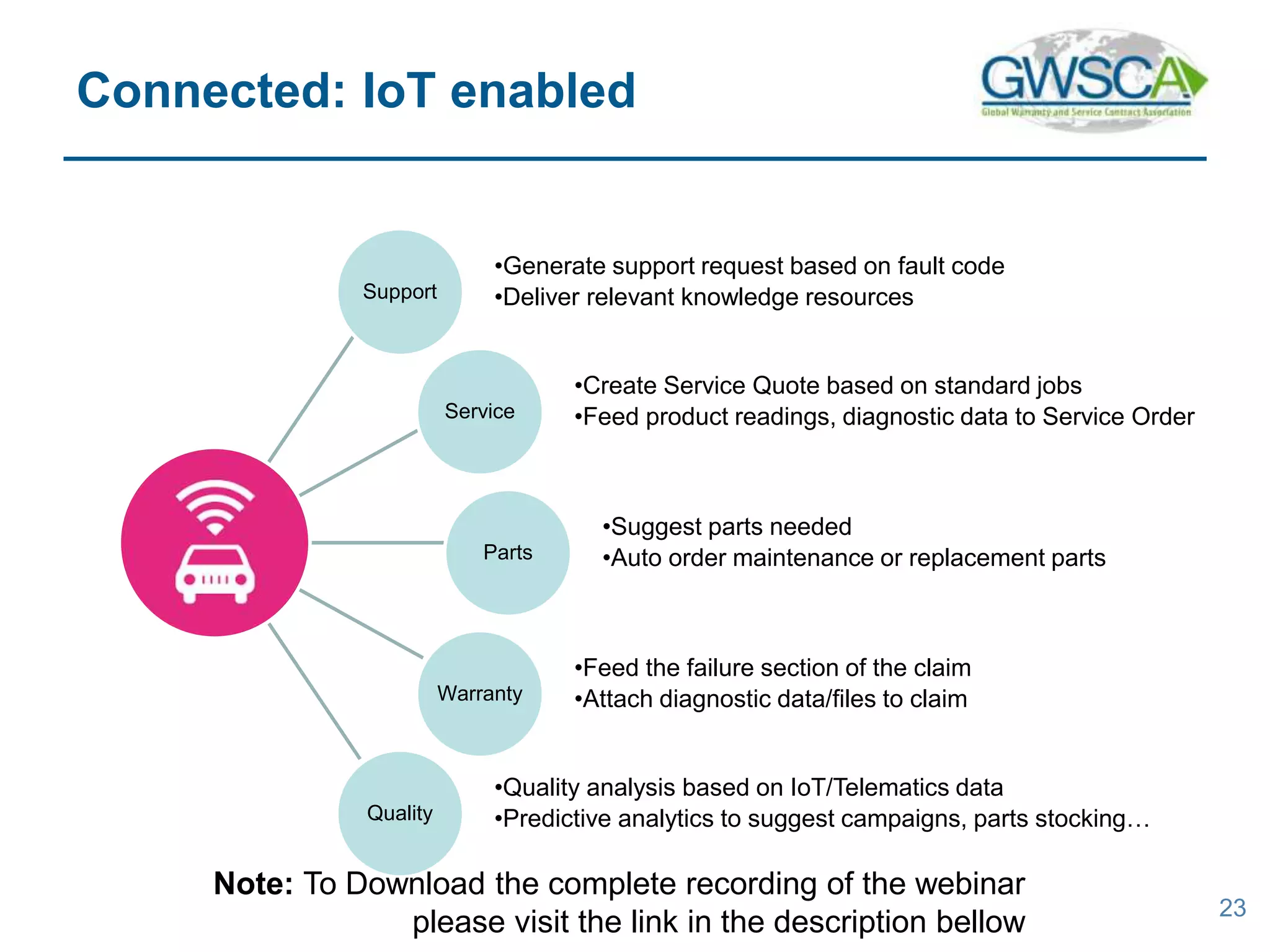
Support
•Generate support request based on fault code
•Deliver relevant knowledge resources
Service
•Create Service Quote based on standard jobs
•Feed product readings, diagnostic data to Service Order
Parts
•Suggest parts needed
•Auto order maintenance or replacement parts
Warranty
•Feed the failure section of the claim
•Attach diagnostic data/files to claim
Quality
•Quality analysis based on IoT/Telematics data
•Predictive analytics to suggest campaigns, parts stocking…
23
Connected: IoT enabled
Note: To Download the complete recording of the webinar
please visit the link in the description bellow
• Key Challenges
• Manage Your Services
• Integrated Services
• Global Services
• Optimized Services Workflow
• Utilizing Mobile & IoT Technologies
24
Summary
Note: To Download the complete recording of the webinar
please visit the link in the description bellow
Eric Marlan
www.m-ize.com
Tel: 813-302-7185
Email: ericmarlan@m-ize.com
Note: To Download the complete recording of the webinar
please visit the link in the description bellow

Service Management: Unify and streamline warranty, parts, support & service processes

  • 1.
    First Annual Conference September16, 2015 to September 18, 2015 Chicago, IL. Note: To Download the complete recording of the webinar please visit the link in the description bellow
  • 2.
    2 Service Management: Unify andstreamline warranty, parts, support & service processes Eric Marlan Sr. Product Manager, m-ize
  • 3.
    • Key Challenges •Manage Your Services • Integrated Services • Global Services • Optimized Services Workflow • Utilizing Mobile & IoT Technologies 3 Agenda
  • 4.
    • Registration • DecliningRegistration Rates • Lack of Brand Loyalty • Low Post-sale Revenues • Warranty • Excessive Warranty Costs • Poor Customer Experience 4 Key Challenges
  • 5.
    • Support &Service • Brands & Customers Disconnected • Heavy Investments in Contact Centers • Unable to meet Customer Expectations • Parts • Complex, Time-consuming, & Error-prone Processes 5 Key Challenges
  • 6.
    • Registration, Warranty,Support, Service, & Parts • Simplify the Experience • Connectedness • Streamline Processes • Enhance Value • Shared Data • Remove Barriers 6 Manage your Services Note: To Download the complete recording of the webinar please visit the link in the description bellow
  • 7.
    • Simplify • CreateWorkflow diagrams • Bar code/QR scanning to enter data • Streamline • Automated forms completion • Create connectedness by sharing data • Pulling data from shipped records • Pull dealer information from shipped record • Remove barriers • Remove unnecessary data requirements 7 In this example…
  • 8.
    • Simplified toa single scan of a serial number barcode • Information is pre- populated • Dealer Information • Product Information • Eliminating re-entry of information • Increasing registration rates 8 Simplify Registration Process
  • 9.
    • From support& service to extended warranty • Consolidate systems & processes • How are the technologies changing the service management? • Online connectivity and smart devices • Customer expectations • This impacts how the warranty is managed 9 Make It More Integrated Note: To Download the complete recording of the webinar please visit the link in the description bellow
  • 10.
  • 11.
    • https://www.youtube.com/v/G3qXp8LYclw&featu re=youtu.be 11 Example: ServiceLiveMobile Note: To Download the complete recording of the webinar please visit the link in the description bellow
  • 12.
    • Consolidate systems& processes • Generating a request & calling support • Passed from support to service to RMA to invoicing • Using technology to enhance CX • Online connectivity and smart devices • Status updates 12 In this example…
  • 13.
    • How mobilecan capture the right service request • Ensure accuracy of data • Capture images to provide clarity • Provide self-service solutions • Integrated & connectedness of transactions • Mobile to initiate a request • Online to monitor/edit request • Push notifications & email updates 13 Integrated Technologies
  • 14.
    • How canyou standardize globally? • Support for multiple languages • Support for local policies and business rules • Adaption to privacies and local laws • Meets requirements of different regions for warranties and workflows 14 Global Service
  • 15.
  • 16.
    16 Silos of Information Note:To Download the complete recording of the webinar please visit the link in the description bellow
  • 17.
    Seamless integration with3rd party systems DMS ERP CRM Shipping ERP MRP Supplier Systems Web site or Fleet Mgmt. Partner Systems & Services Distribution Systems Note: To Download the complete recording of the webinar please visit the link in the description bellow
  • 18.
    Ubiquitous Reach &Presence – Connect and Engage with Customers wherever they are Location & Context – Use customer location & context to deliver relevant and targeted information Camera – Ability to scan and recognize images, capture & process pictures and videos Voice Recognition, Text to Voice – Better and hands-off interactions, information delivery Connected Products– Internet of things that connect all types of smart products Augmented Reality – Immersed experience combining real world pictures with information overlays Enabling Capabilities of Mobile
  • 19.
    Pre-Delivery Inspection •Inspect before delivery •Customer Walkthrough •Onboarding instructions •Install/setup services Product Registration •Scan to register •Productown list (My Products) •Present accessories & related services Service Plans •Present service plan options •Buy protection plans •Manage service plans (My Plans) Warranty Eligibility •Track & Check Warranty •Check status •Schedule for Repair •Recall notifications Warranty Claim •Capture data into claim •Pre- authorization •Knowledge to complete repair in less time •Check/Order Parts Parts Return •RMA on mobile device •Receive and Capture Parts Inspection Warranty Analysis •Capture better data in the field •Access KPIs from the Phone (Mobile Dashboards) Mobile Use in Warranty Lifecycle Note: To Download the complete recording of the webinar please visit the link in the description bellow
  • 20.
    Mobile Use inService Scan for products, parts •Scan Bar code, QR code, or OCR Knowledge access •Access Manuals, FAQs, Videos, Cases •Product 360 - History Service Scheduling •Optimize Tech Scheduling, routing •Dispatch jobs to mobile •Track Job status Work Orders •Manage work orders •Capture failure details, labor, parts, and pictures •Real time tracking & status Time Reporting •Provide job instructions •Allocate & Capture labor time on Work orders Parts •Parts catalogs •Check parts availability •Parts ordering Service Logistics •Customer feedback •Billing & Payment Note: To Download the complete recording of the webinar please visit the link in the description bellow
  • 21.
    • Mobile devices •Smart Phones • Tablets • Laptops • Media Capture Devices • Built-in Camera • Photos • Video • Device Microphone • Audio 21 Utilize Mobile & IoT Technologies
  • 22.
    • OCR &Character Recognition • Interpret Images as Numbers & Text • Apps • Customer Interface to Brand Portal • Alerts • Push Notifications • Email Notifications 22 Utilize Mobile & IoT Technologies
  • 23.
    Support •Generate support requestbased on fault code •Deliver relevant knowledge resources Service •Create Service Quote based on standard jobs •Feed product readings, diagnostic data to Service Order Parts •Suggest parts needed •Auto order maintenance or replacement parts Warranty •Feed the failure section of the claim •Attach diagnostic data/files to claim Quality •Quality analysis based on IoT/Telematics data •Predictive analytics to suggest campaigns, parts stocking… 23 Connected: IoT enabled Note: To Download the complete recording of the webinar please visit the link in the description bellow
  • 24.
    • Key Challenges •Manage Your Services • Integrated Services • Global Services • Optimized Services Workflow • Utilizing Mobile & IoT Technologies 24 Summary Note: To Download the complete recording of the webinar please visit the link in the description bellow
  • 25.
    Eric Marlan www.m-ize.com Tel: 813-302-7185 Email:ericmarlan@m-ize.com Note: To Download the complete recording of the webinar please visit the link in the description bellow