1. It is a computer intended for
use as a server that built in
an upright cabinet that
stands alone.
A. Blade Server
B. Tower Server
C. DNS
D. Rack Server
2. Any process where it is
automatically assigns an IP address
and other informationto each host
on the network hence it can
communicate efficiently with
other endpoints.
A. Active Directory
B. Terminal Server
C. Mail Server
D. DHCP Server
3. It is the Internet's system for
converting alphabetic names
into numeric IP addresses.
A. DNS Server
B. Blade Server
C. Open-Source Server
D. Telnet Server
4. Acts as an intermediary
between the user's computer
and the Internet.
A. Print Server
B. Terminal Server
C. Proxy Server
D. FTP Server
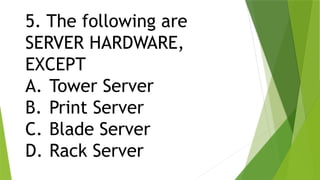
5. The following are
SERVER HARDWARE,
EXCEPT
A. Tower Server
B. Print Server
C. Blade Server
D. Rack Server
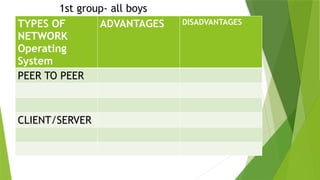
TYPES OF
NETWORK
Operating
System
ADVANTAGES DISADVANTAGES
PEER TO PEER
CLIENT/SERVER
1st group- all boys
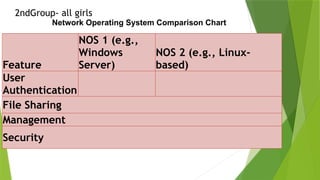
Feature
NOS 1 (e.g.,
Windows
Server)
NOS 2 (e.g., Linux-
based)
User
Authentication
File Sharing
Management
Security
Network Operating System Comparison Chart
2ndGroup- all girls
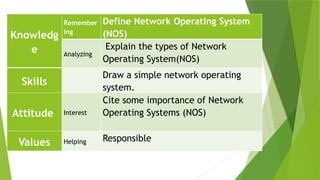
Knowledg
e
Remember
ing
Define Network Operating System
(NOS)
Analyzing
Explain the types of Network
Operating System(NOS)
Skills
Draw a simple network operating
system.
Attitude Interest
Cite some importance of Network
Operating Systems (NOS)
Values Helping Responsible
Can you think of examples
of network resources?
How do you think a NOS
differs from a regular
operating System?
WHAT IS NETWORK OPERATING
SYSTEM (NOS)?
 A computer operating system referred to as
Networking Operating System was designed with
the sole purpose of supporting workstations,
database, application, file and printer access
sharing between multiple computers in a network.
 A network operating system is a specialized
operating system for a network device such as a
router, switch or firewall.
In summary, a regular operating system
primarily serves an individual computer or
device, managing its local resources and
providing a user interface for user
interactions. In contrast, a Network
Operating System focuses on managing
network resources, facilitating
communication and collaboration among
multiple devices, and ensuring network
security and efficiency. Their roles and
functionalities are tailored to their
respective domains of operation.
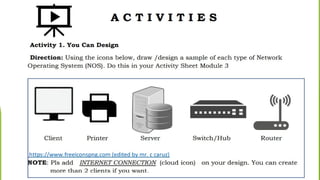
You are planning to open a small
internet café. What type of network
operating system is appropriate for
business? Layout your plan and
explain your answer. Write your
answer in a separate worksheet
provided for this activity.
Quote: "Think twice,
Code once”
THANK
YOU!

Server Configuration and coc3 in computer systems servicing.pptx

  • 2.
    1. It isa computer intended for use as a server that built in an upright cabinet that stands alone. A. Blade Server B. Tower Server C. DNS D. Rack Server
  • 3.
    2. Any processwhere it is automatically assigns an IP address and other informationto each host on the network hence it can communicate efficiently with other endpoints. A. Active Directory B. Terminal Server C. Mail Server D. DHCP Server
  • 4.
    3. It isthe Internet's system for converting alphabetic names into numeric IP addresses. A. DNS Server B. Blade Server C. Open-Source Server D. Telnet Server
  • 5.
    4. Acts asan intermediary between the user's computer and the Internet. A. Print Server B. Terminal Server C. Proxy Server D. FTP Server
  • 6.
    5. The followingare SERVER HARDWARE, EXCEPT A. Tower Server B. Print Server C. Blade Server D. Rack Server
  • 7.
    TYPES OF NETWORK Operating System ADVANTAGES DISADVANTAGES PEERTO PEER CLIENT/SERVER 1st group- all boys
  • 8.
    Feature NOS 1 (e.g., Windows Server) NOS2 (e.g., Linux- based) User Authentication File Sharing Management Security Network Operating System Comparison Chart 2ndGroup- all girls
  • 9.
    Knowledg e Remember ing Define Network OperatingSystem (NOS) Analyzing Explain the types of Network Operating System(NOS) Skills Draw a simple network operating system. Attitude Interest Cite some importance of Network Operating Systems (NOS) Values Helping Responsible
  • 10.
    Can you thinkof examples of network resources? How do you think a NOS differs from a regular operating System?
  • 11.
    WHAT IS NETWORKOPERATING SYSTEM (NOS)?  A computer operating system referred to as Networking Operating System was designed with the sole purpose of supporting workstations, database, application, file and printer access sharing between multiple computers in a network.  A network operating system is a specialized operating system for a network device such as a router, switch or firewall.
  • 13.
    In summary, aregular operating system primarily serves an individual computer or device, managing its local resources and providing a user interface for user interactions. In contrast, a Network Operating System focuses on managing network resources, facilitating communication and collaboration among multiple devices, and ensuring network security and efficiency. Their roles and functionalities are tailored to their respective domains of operation.
  • 15.
    You are planningto open a small internet café. What type of network operating system is appropriate for business? Layout your plan and explain your answer. Write your answer in a separate worksheet provided for this activity.
  • 16.
    Quote: "Think twice, Codeonce” THANK YOU!

Editor's Notes

  • #10 File Shares: Shared folders or drives on a file server that allow users to store and access files over the network. Printers: Network-connected printers that multiple users can access and use for printing documents. Databases: Centralized databases accessible over a network, used for storing and retrieving data for applications. Web Pages: Websites hosted on web servers, accessible to users through web browsers over the internet. Email Services: Email servers that enable users to send, receive, and store email messages. Application Services: Software applications hosted on application servers, accessible to users and clients over the network. Cloud Storage: Online storage services like Dropbox, Google Drive, or Microsoft OneDrive that allow users to store and sync files over the internet.
  • #13 Scope and Purpose: Regular Operating System: A regular operating system, such as Windows, macOS, or Linux, is designed to manage the hardware and software resources of a single computer or device. It provides a user interface, file management, and essential system services for that individual machine. Network Operating System (NOS): A NOS, on the other hand, is specifically designed to manage and coordinate multiple devices and resources within a network. It focuses on tasks like file sharing, user authentication, resource access control, and network services to facilitate communication and resource sharing among connected devices. User Interaction: Regular Operating System: Regular OSs typically provide graphical user interfaces (GUIs) or command-line interfaces (CLIs) for individual users to interact with and control the local machine. They prioritize user experience and user-specific applications. NOS: NOSs often have minimal or no direct user interface as their primary role is to serve the network and its users. Configuration and management of NOSs are usually done by network administrators through remote administration tools. Resource Management: Regular Operating System: Resource management in a regular OS focuses on local hardware components like CPU, memory, storage, and peripherals within a single device. NOS: Resource management in a NOS extends beyond the local machine to encompass network resources such as shared files, printers, databases, and user accounts. NOSs also manage network protocols and services. Networking and Connectivity: Regular Operating System: While regular OSs have networking capabilities to connect to the internet or other networks, their primary purpose is not network management but rather individual device management. NOS: NOSs are designed to handle network-specific tasks like routing, data transfer between networked devices, and ensuring secure and efficient communication among these devices. Security and Access Control: