


Home Linux (Ubuntu) Server Linux
            (SUSE)
  Tyler Largin & Dennis McNeal
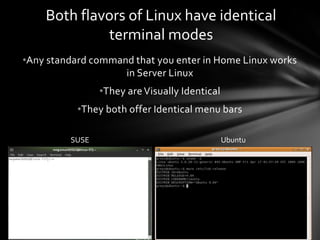
Both flavors of Linux have identical
             terminal modes
•Any standard command that you enter in Home Linux works
                    in Server Linux
                •They are Visually Identical
           •They both offer Identical menu bars

         SUSE                                  Ubuntu
Server Linux offers better Automatic
              detection

 •SUSE will detect that a .jar file requires Java runtime
environment and automatically download the software
                          for it


  •Ubuntu will often force the user to download the
         software to run the file manually
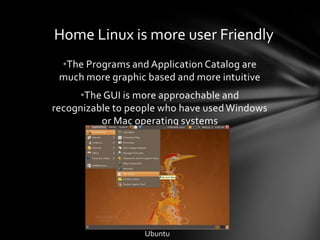
Home Linux is more user Friendly
 •The Programs and Application Catalog are
 much more graphic based and more intuitive
      •The GUI is more approachable and
recognizable to people who have used Windows
          or Mac operating systems


                  Ubuntu
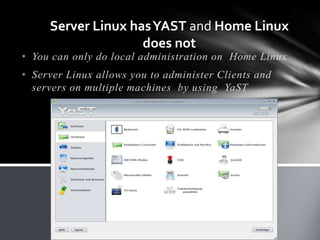
Server Linux has YAST and Home Linux
                    does not
• You can only do local administration on Home Linux
• Server Linux allows you to administer Clients and
  servers on multiple machines by using YaST
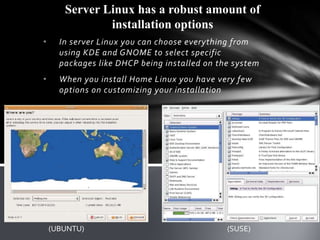
Server Linux has a robust amount of
               installation options
•     In server Linux you can choose everything from
      using KDE and GNOME to select specific
      packages like DHCP being installed on the system
•     When you install Home Linux you have very few
      options on customizing your installation


    (UBUNTU)                                  (SUSE)
Home Linux has a much
     shorter update cycle

• Server Linux releases an update
  every 8 months


• Home Linux releases an update
  every 6 months
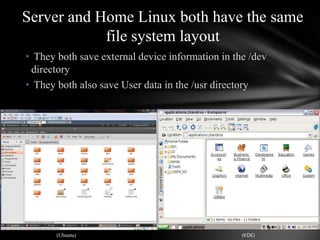
Server and Home Linux both have the same
            file system layout
• They both save external device information in the /dev
 directory
• They both also save User data in the /usr directory


       (Ubuntu)                                   (KDE)
Server and Home Linux use
   different default desktop
         environments.
• SUSE by default uses the KDE
  environment
• UBUNTU by default uses Gnome by
  default
Home Linux and Server Linux are
based off different distributions
 • Ubuntu Linux is based off the Debian
   Linux
 • SUSE Linux is based off of the Slackware
   Linux
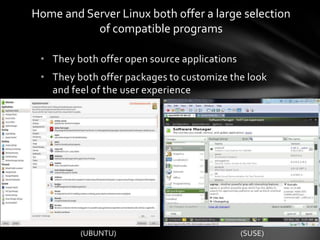
Home and Server Linux both offer a large selection
           of compatible programs

 • They both offer open source applications
 • They both offer packages to customize the look
   and feel of the user experience


         (UBUNTU)                             (SUSE)
Sources


• http://askville.amazon.com/SimilarQuestions.do?req=Windows-XP-
  installed-computer-dual-boot-Ubuntu-Linux-system
• http://www.ubuntugeek.com/the-ubuntu-release-cycle.html
• http://en.opensuse.org/Lifetime
• http://www.youtube.com/watch?v=iuF6CpML3IQ
• http://www.tuxmachines.org/node/21908

Server and home linux

  • 1.
    Home Linux (Ubuntu)Server Linux (SUSE) Tyler Largin & Dennis McNeal
  • 2.
    Both flavors ofLinux have identical terminal modes •Any standard command that you enter in Home Linux works in Server Linux •They are Visually Identical •They both offer Identical menu bars SUSE Ubuntu
  • 3.
    Server Linux offersbetter Automatic detection •SUSE will detect that a .jar file requires Java runtime environment and automatically download the software for it •Ubuntu will often force the user to download the software to run the file manually
  • 4.
    Home Linux ismore user Friendly •The Programs and Application Catalog are much more graphic based and more intuitive •The GUI is more approachable and recognizable to people who have used Windows or Mac operating systems Ubuntu
  • 5.
    Server Linux hasYAST and Home Linux does not • You can only do local administration on Home Linux • Server Linux allows you to administer Clients and servers on multiple machines by using YaST
  • 6.
    Server Linux hasa robust amount of installation options • In server Linux you can choose everything from using KDE and GNOME to select specific packages like DHCP being installed on the system • When you install Home Linux you have very few options on customizing your installation (UBUNTU) (SUSE)
  • 7.
    Home Linux hasa much shorter update cycle • Server Linux releases an update every 8 months • Home Linux releases an update every 6 months
  • 8.
    Server and HomeLinux both have the same file system layout • They both save external device information in the /dev directory • They both also save User data in the /usr directory (Ubuntu) (KDE)
  • 9.
    Server and HomeLinux use different default desktop environments. • SUSE by default uses the KDE environment • UBUNTU by default uses Gnome by default
  • 10.
    Home Linux andServer Linux are based off different distributions • Ubuntu Linux is based off the Debian Linux • SUSE Linux is based off of the Slackware Linux
  • 11.
    Home and ServerLinux both offer a large selection of compatible programs • They both offer open source applications • They both offer packages to customize the look and feel of the user experience (UBUNTU) (SUSE)
  • 12.
    Sources • http://askville.amazon.com/SimilarQuestions.do?req=Windows-XP- installed-computer-dual-boot-Ubuntu-Linux-system • http://www.ubuntugeek.com/the-ubuntu-release-cycle.html • http://en.opensuse.org/Lifetime • http://www.youtube.com/watch?v=iuF6CpML3IQ • http://www.tuxmachines.org/node/21908