© Copyright 2014 TopQuadrant Inc. Slide 1
Semantic Web standards and
the Variety “V” of Big Data
Bob DuCharme
August 20, 2014
© Copyright 2014 TopQuadrant Inc. Slide 2
Three Vs of Big Data
 Volume
 Velocity
 Variety
© Copyright 2014 TopQuadrant Inc. Slide 3
Gartner, September 2013
© Copyright 2014 TopQuadrant Inc. Slide 4
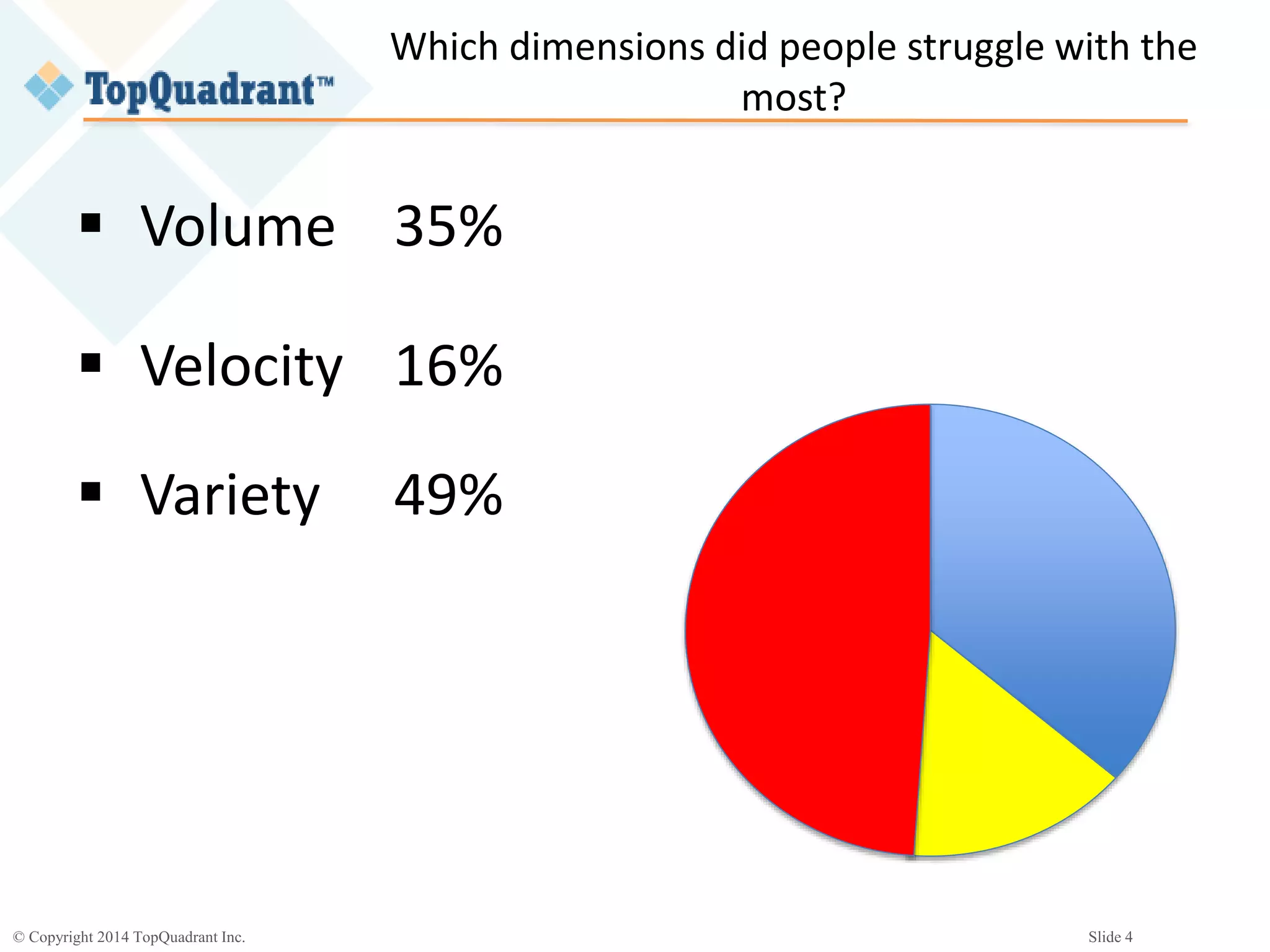
Which dimensions did people struggle with the
most?
 Volume 35%
 Velocity 16%
 Variety 49%
© Copyright 2014 TopQuadrant Inc. Slide 5
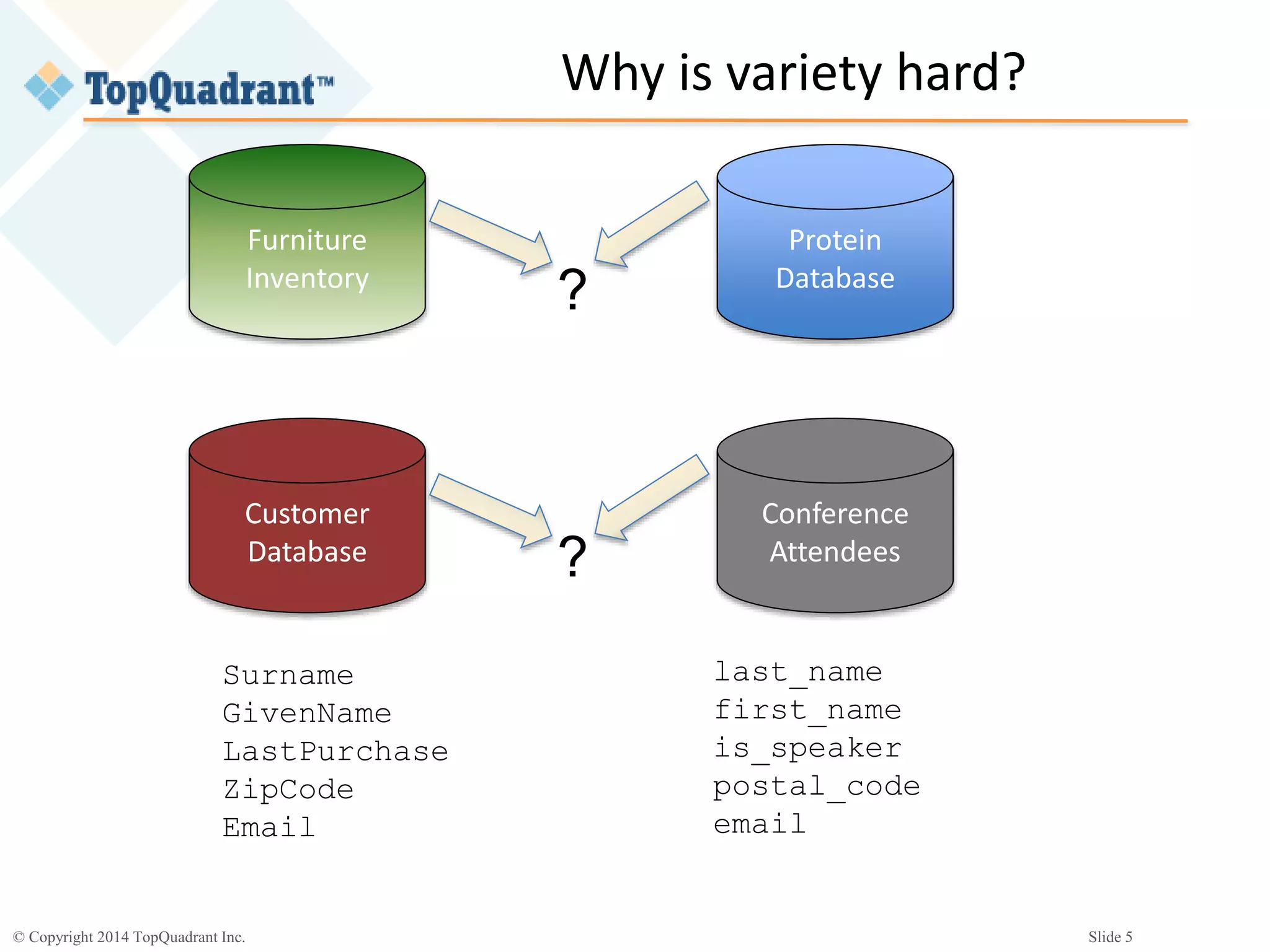
Why is variety hard?
Furniture
Inventory
Protein
Database
?
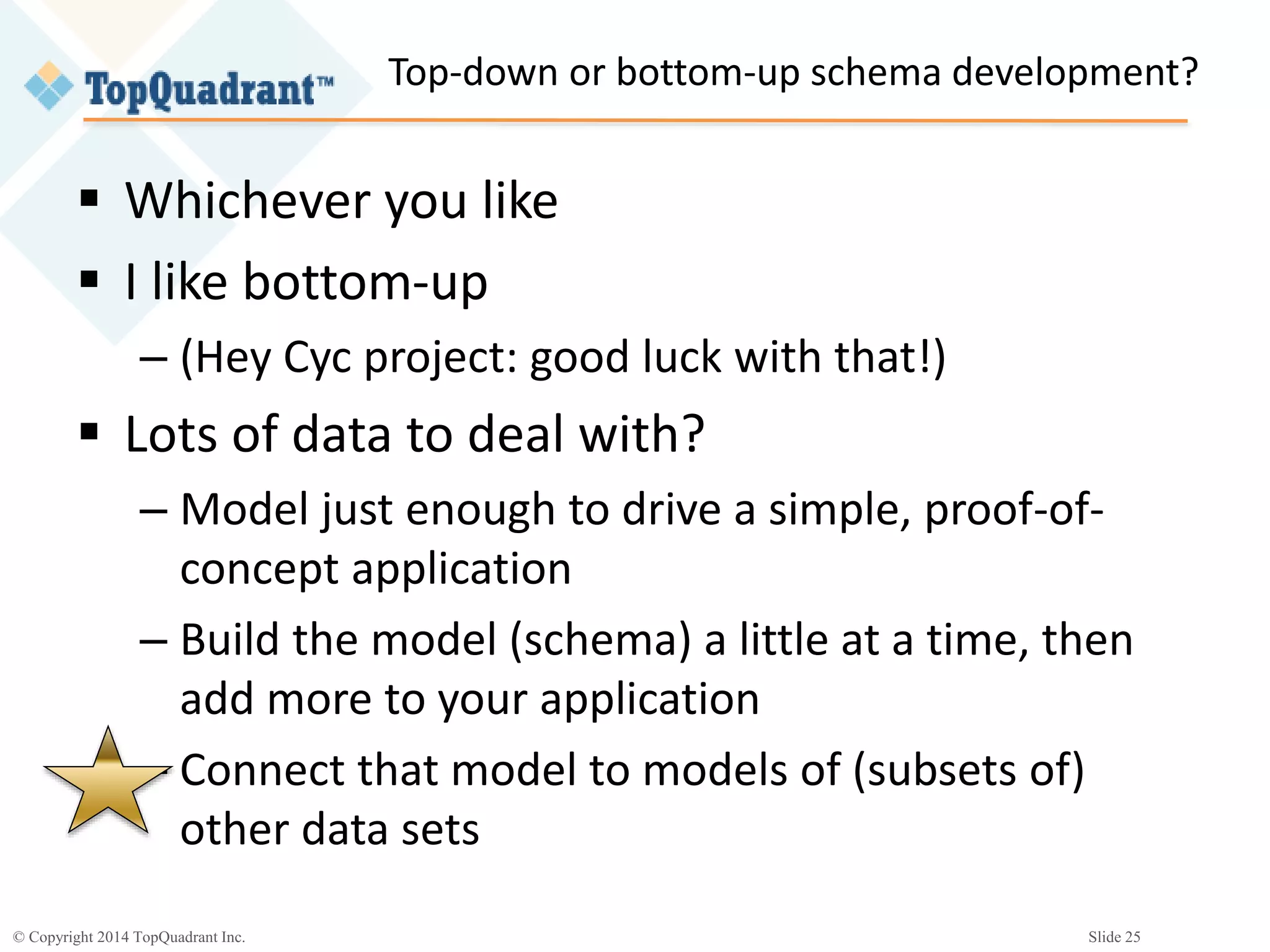
Customer
Database
Conference
Attendees?
Surname
GivenName
LastPurchase
ZipCode
Email
last_name
first_name
is_speaker
postal_code
email
© Copyright 2014 TopQuadrant Inc. Slide 6
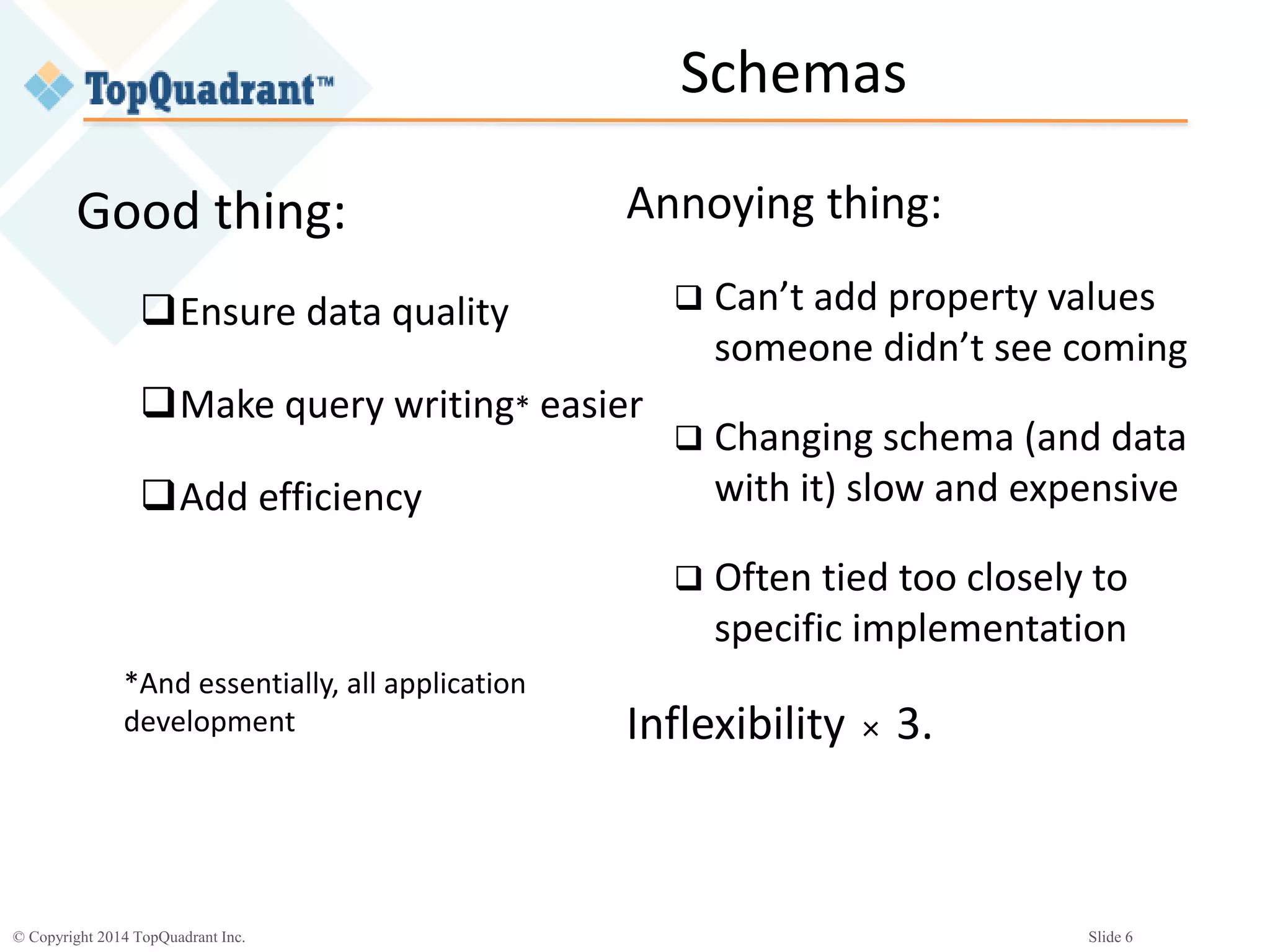
Schemas
Good thing:
Ensure data quality
Make query writing* easier
Add efficiency
*And essentially, all application
development
Annoying thing:
 Can’t add property values
someone didn’t see coming
 Changing schema (and data
with it) slow and expensive
 Often tied too closely to
specific implementation
Inflexibility × 3.
© Copyright 2014 TopQuadrant Inc. Slide 7
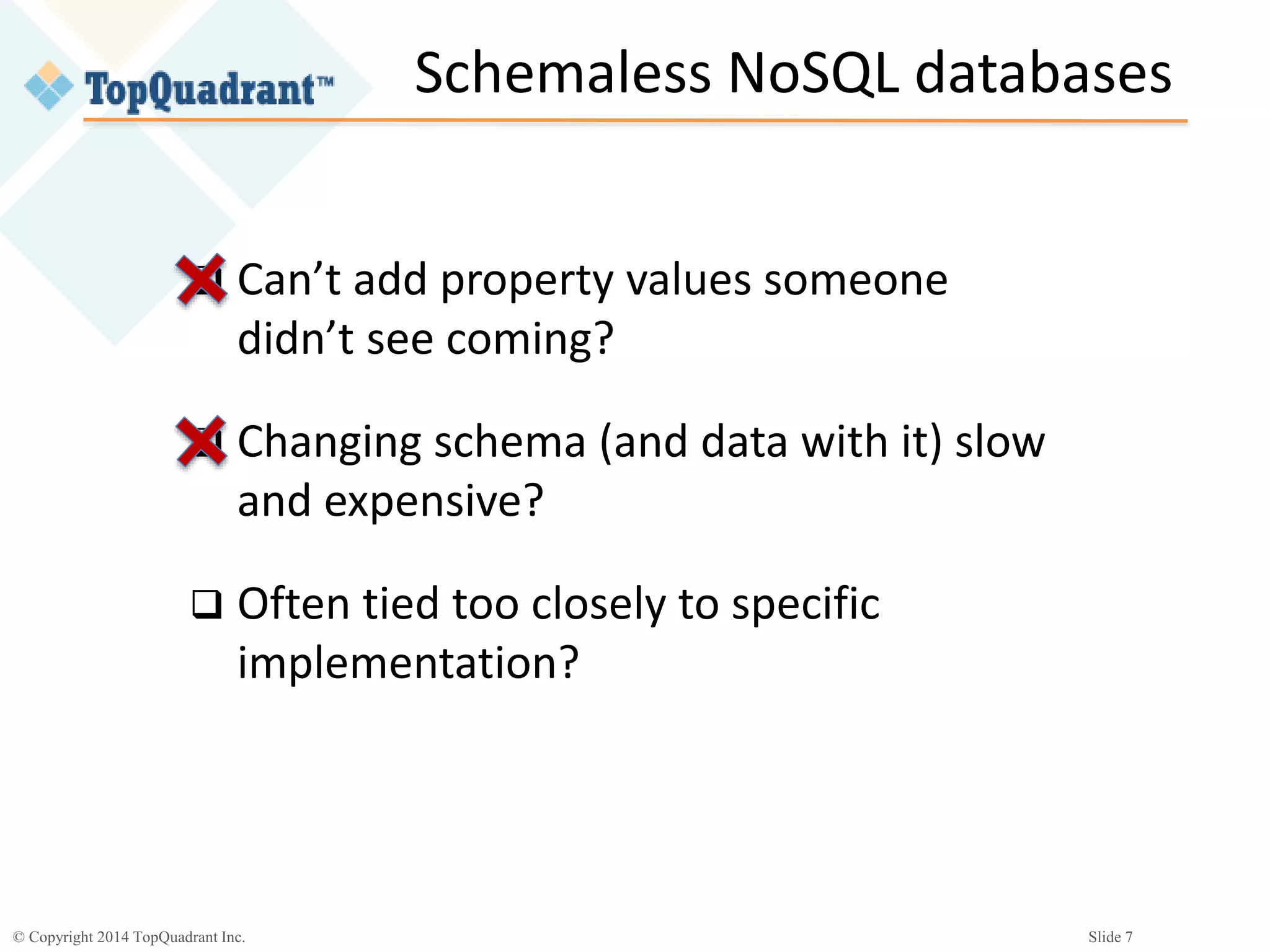
Schemaless NoSQL databases
 Can’t add property values someone
didn’t see coming?
 Changing schema (and data with it) slow
and expensive?
 Often tied too closely to specific
implementation?
© Copyright 2014 TopQuadrant Inc. Slide 8
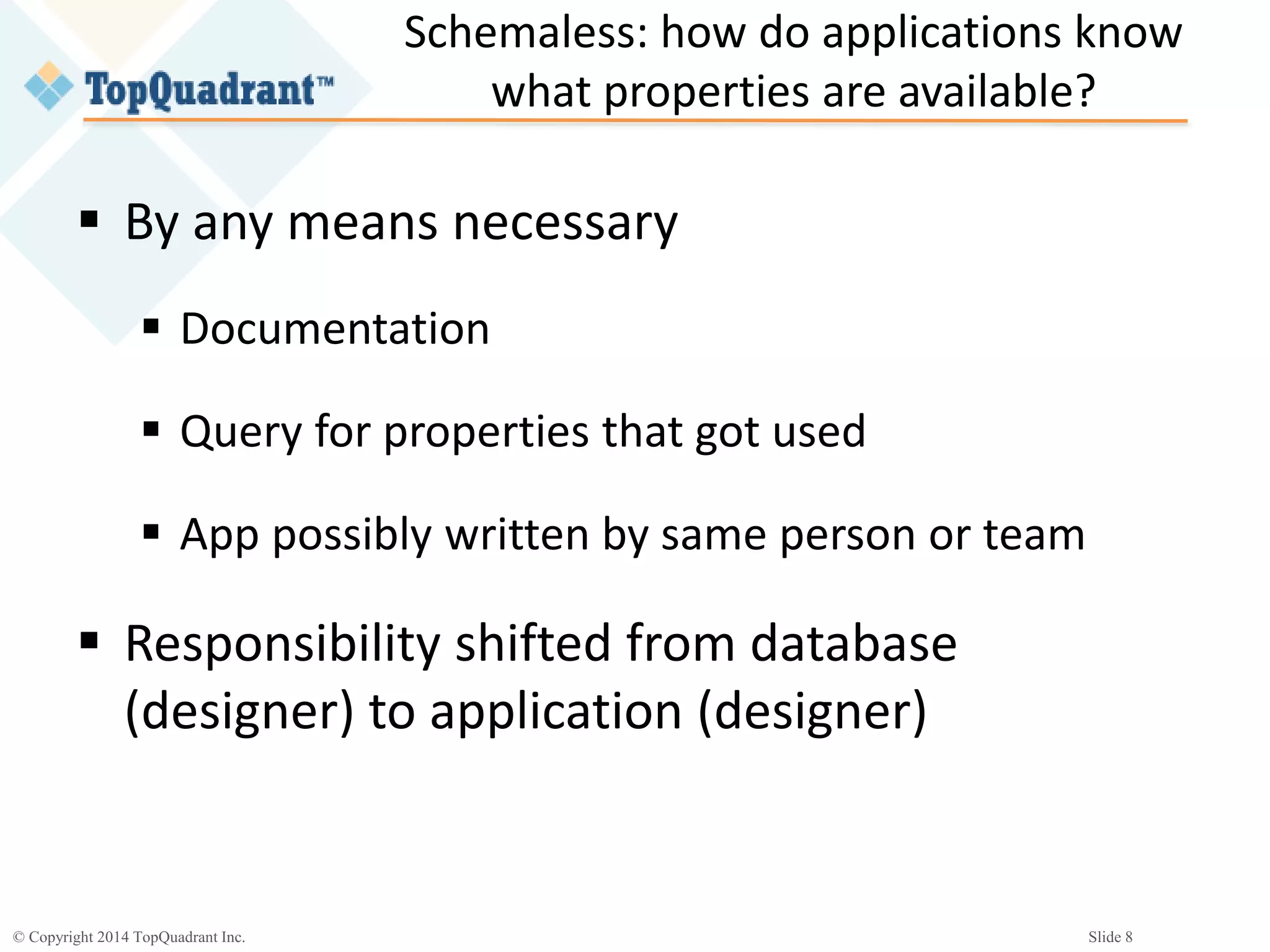
Schemaless: how do applications know
what properties are available?
 By any means necessary
 Documentation
 Query for properties that got used
 App possibly written by same person or team
 Responsibility shifted from database
(designer) to application (designer)
© Copyright 2014 TopQuadrant Inc. Slide 9
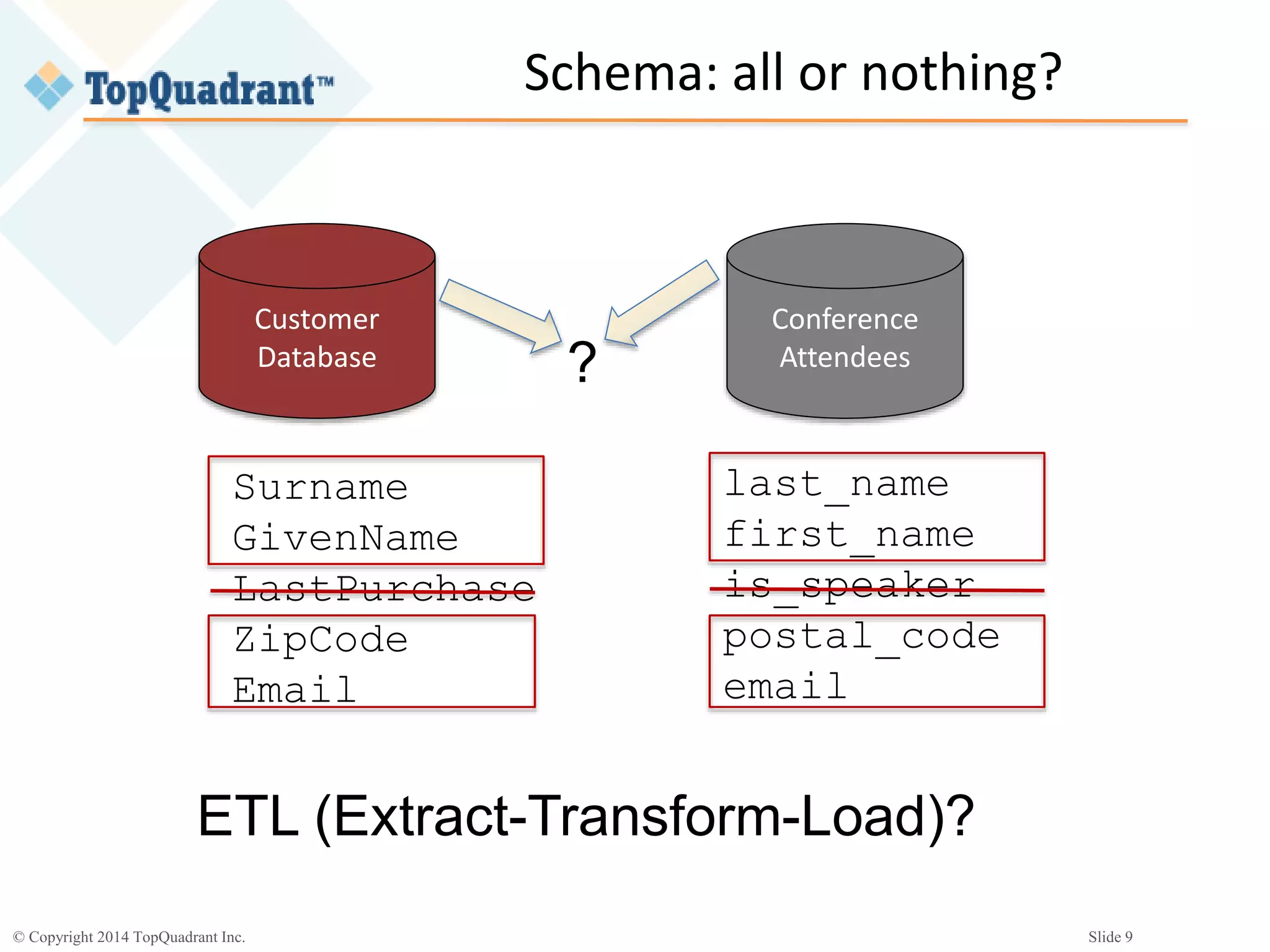
Schema: all or nothing?
Customer
Database
Conference
Attendees?
Surname
GivenName
LastPurchase
ZipCode
Email
last_name
first_name
is_speaker
postal_code
email
ETL (Extract-Transform-Load)?
© Copyright 2014 TopQuadrant Inc. Slide 10
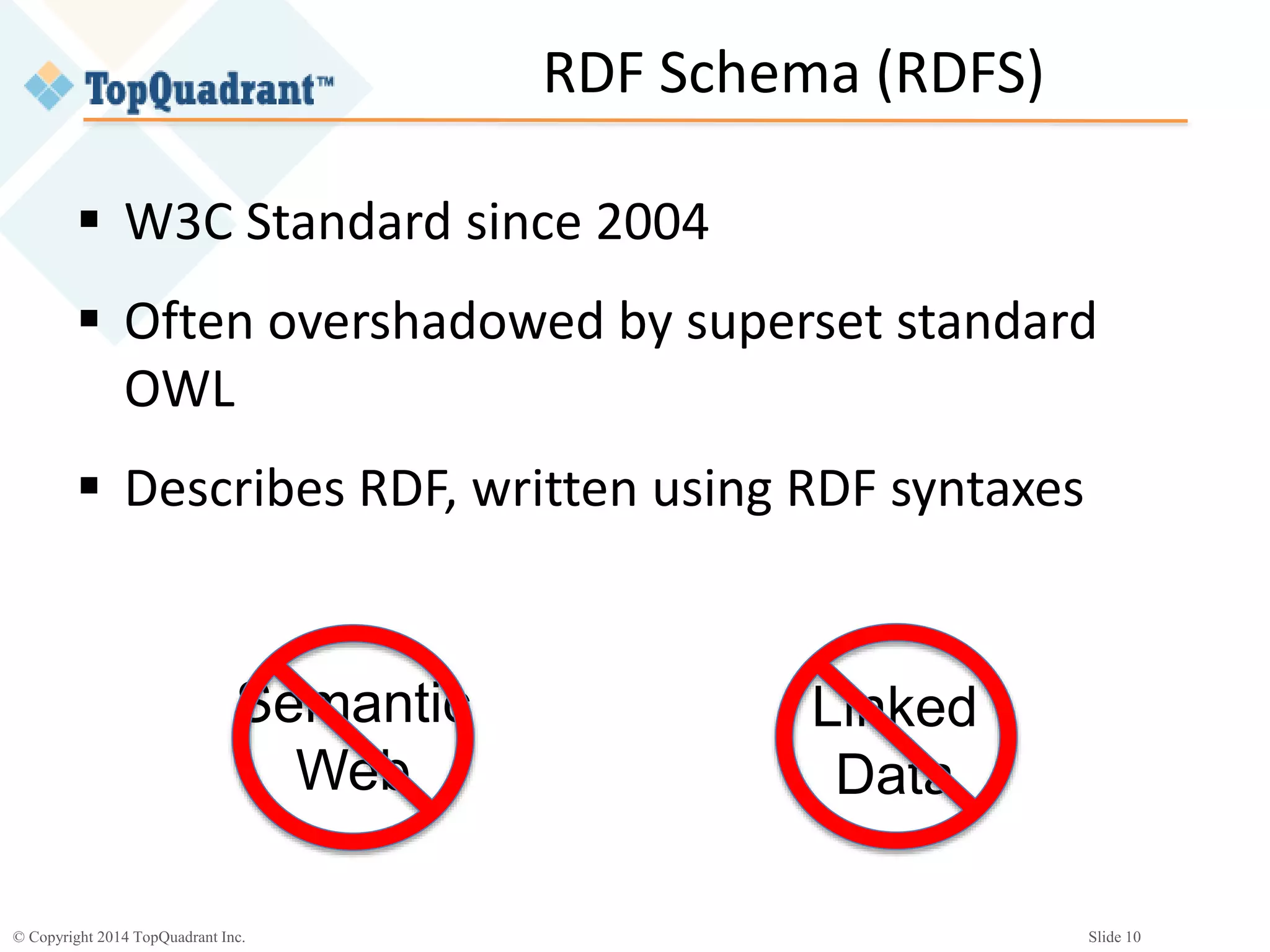
RDF Schema (RDFS)
 W3C Standard since 2004
 Often overshadowed by superset standard
OWL
 Describes RDF, written using RDF syntaxes
Semantic
Web
Linked
Data
© Copyright 2014 TopQuadrant Inc. Slide 11
RDF
 www.w3.org/RDF (second sentence!):
“RDF has features that facilitate data merging even
if the underlying schemas differ, and it specifically
supports the evolution of schemas over time
without requiring all the data consumers to be
changed.”
© Copyright 2014 TopQuadrant Inc. Slide 12
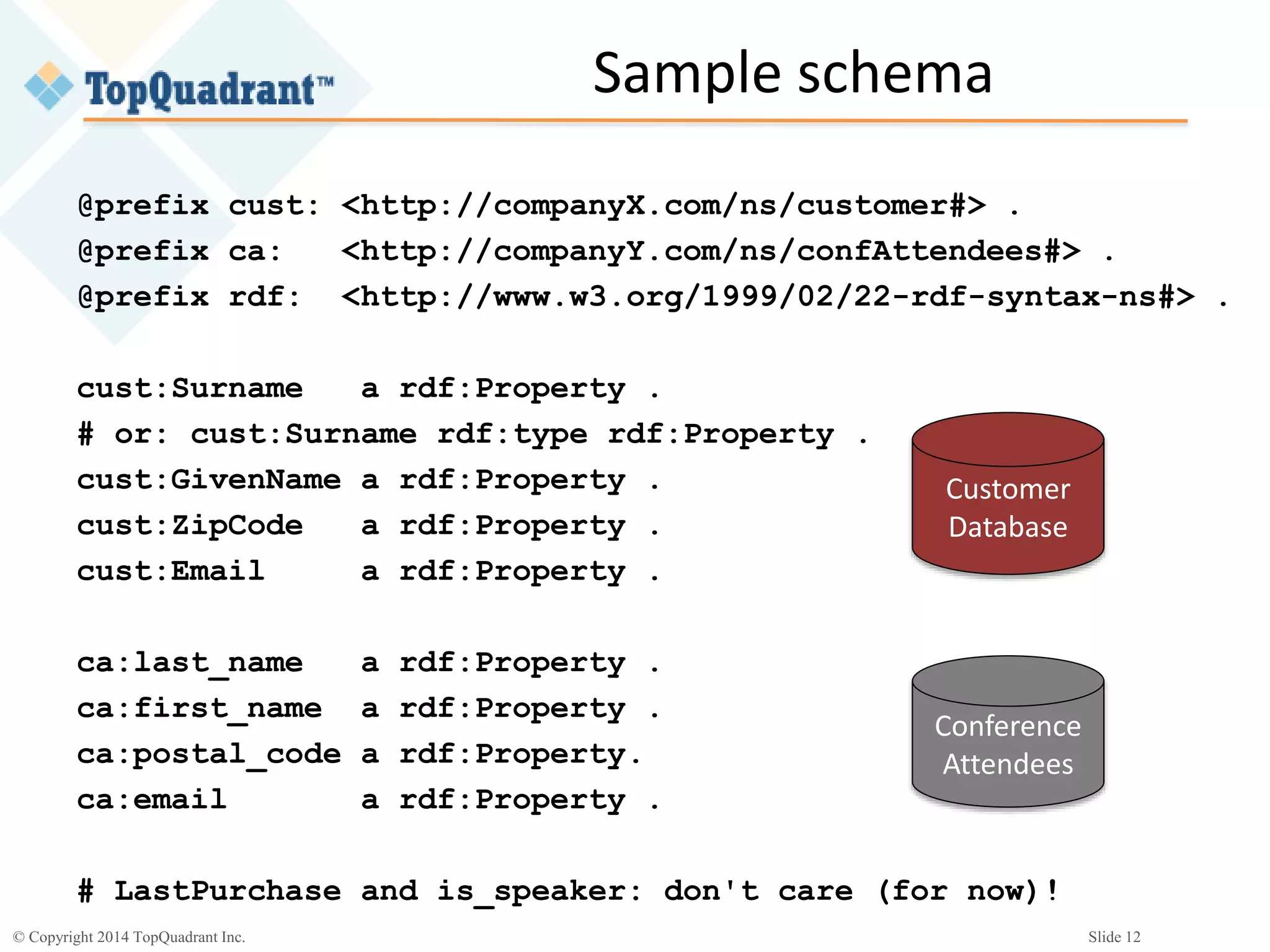
Sample schema
@prefix cust: <http://companyX.com/ns/customer#> .
@prefix ca: <http://companyY.com/ns/confAttendees#> .
@prefix rdf: <http://www.w3.org/1999/02/22-rdf-syntax-ns#> .
cust:Surname a rdf:Property .
# or: cust:Surname rdf:type rdf:Property .
cust:GivenName a rdf:Property .
cust:ZipCode a rdf:Property .
cust:Email a rdf:Property .
ca:last_name a rdf:Property .
ca:first_name a rdf:Property .
ca:postal_code a rdf:Property.
ca:email a rdf:Property .
# LastPurchase and is_speaker: don't care (for now)!
Customer
Database
Conference
Attendees
© Copyright 2014 TopQuadrant Inc. Slide 13
Relating properties
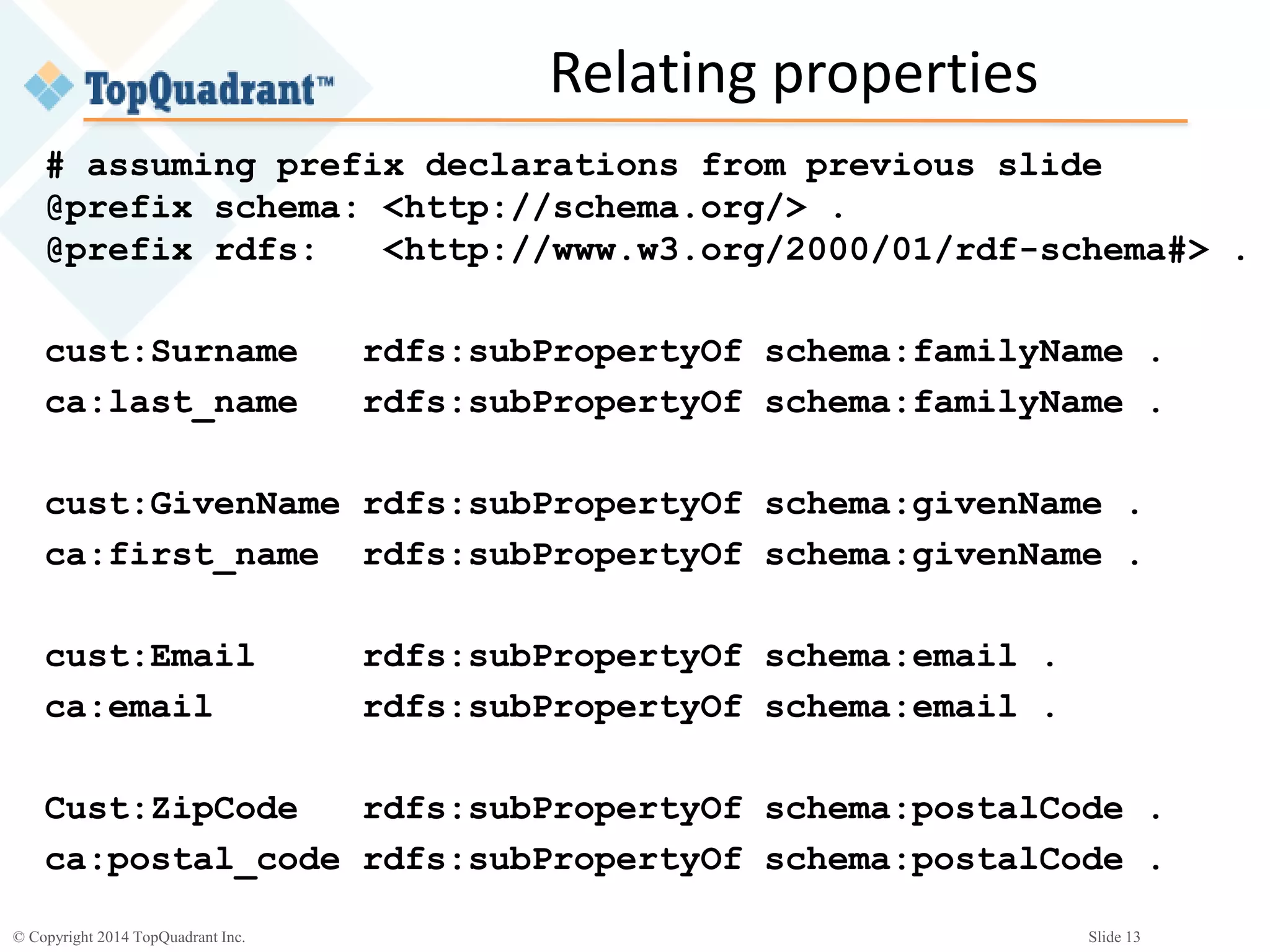
# assuming prefix declarations from previous slide
@prefix schema: <http://schema.org/> .
@prefix rdfs: <http://www.w3.org/2000/01/rdf-schema#> .
cust:Surname rdfs:subPropertyOf schema:familyName .
ca:last_name rdfs:subPropertyOf schema:familyName .
cust:GivenName rdfs:subPropertyOf schema:givenName .
ca:first_name rdfs:subPropertyOf schema:givenName .
cust:Email rdfs:subPropertyOf schema:email .
ca:email rdfs:subPropertyOf schema:email .
Cust:ZipCode rdfs:subPropertyOf schema:postalCode .
ca:postal_code rdfs:subPropertyOf schema:postalCode .
© Copyright 2014 TopQuadrant Inc. Slide 14
Using the combined data
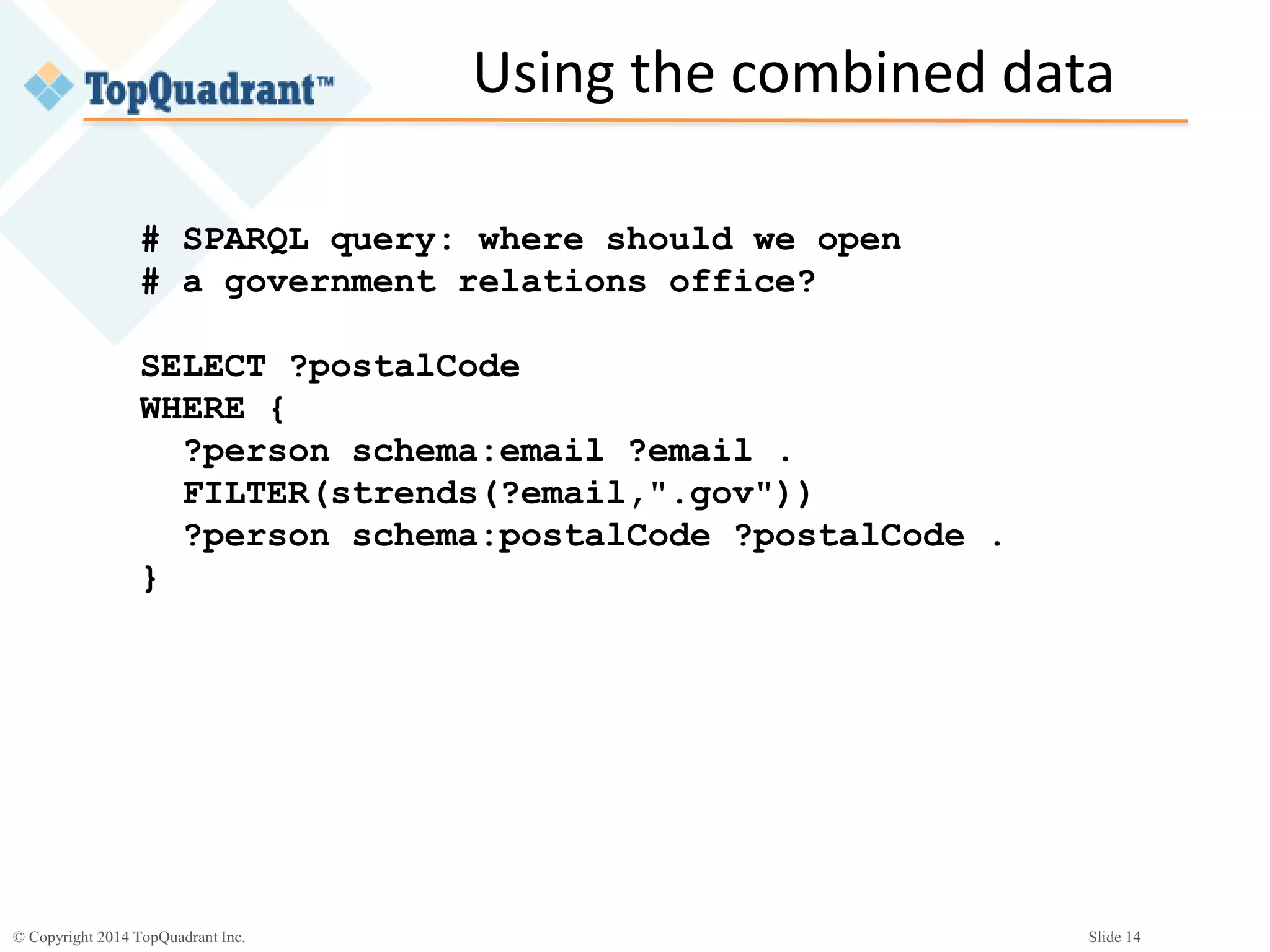
# SPARQL query: where should we open
# a government relations office?
SELECT ?postalCode
WHERE {
?person schema:email ?email .
FILTER(strends(?email,".gov"))
?person schema:postalCode ?postalCode .
}
© Copyright 2014 TopQuadrant Inc. Slide 15
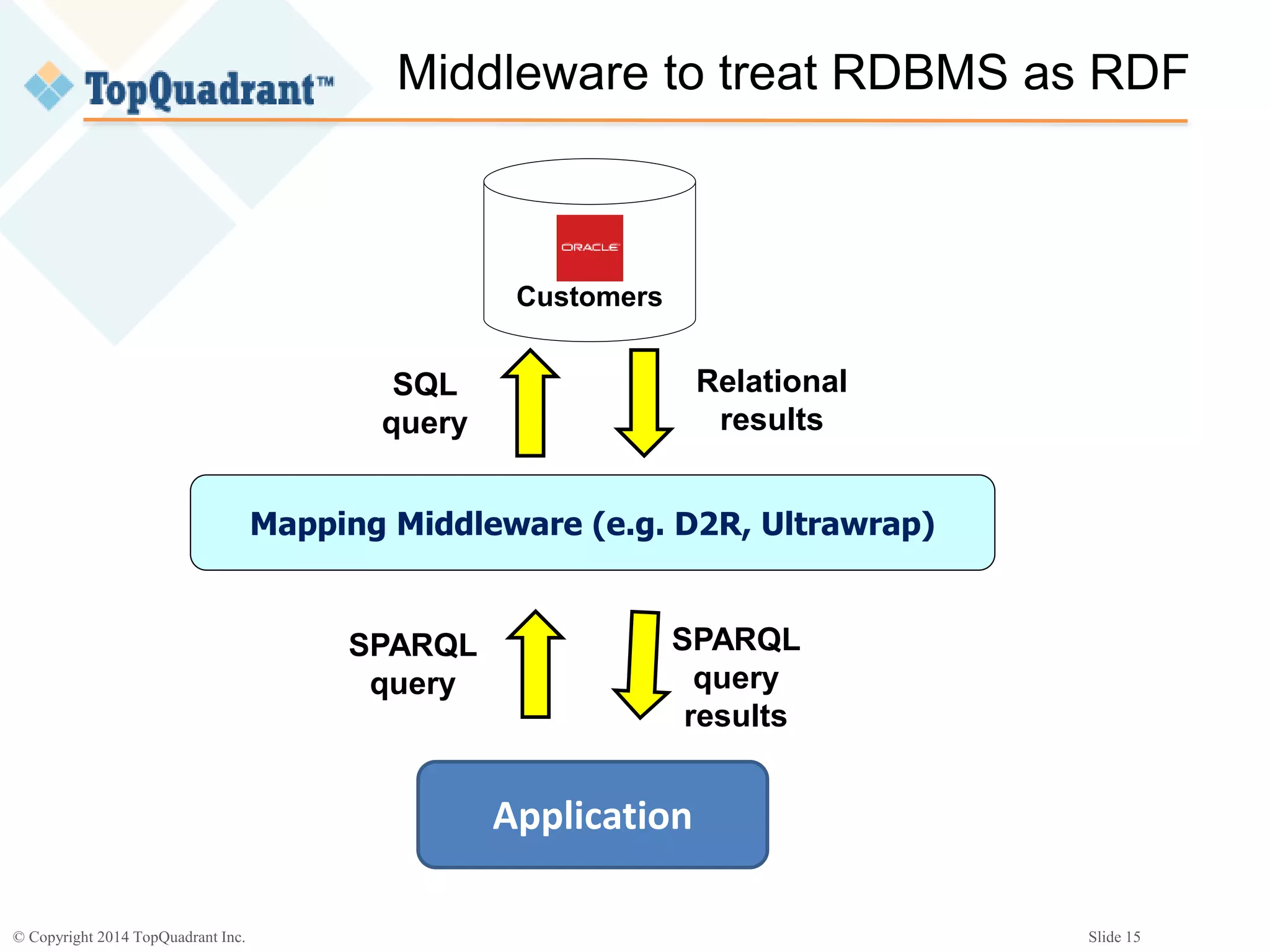
Middleware to treat RDBMS as RDF
Customers
Mapping Middleware (e.g. D2R, Ultrawrap)
Application
SPARQL
query
SQL
query
Relational
results
SPARQL
query
results
© Copyright 2014 TopQuadrant Inc. Slide 16
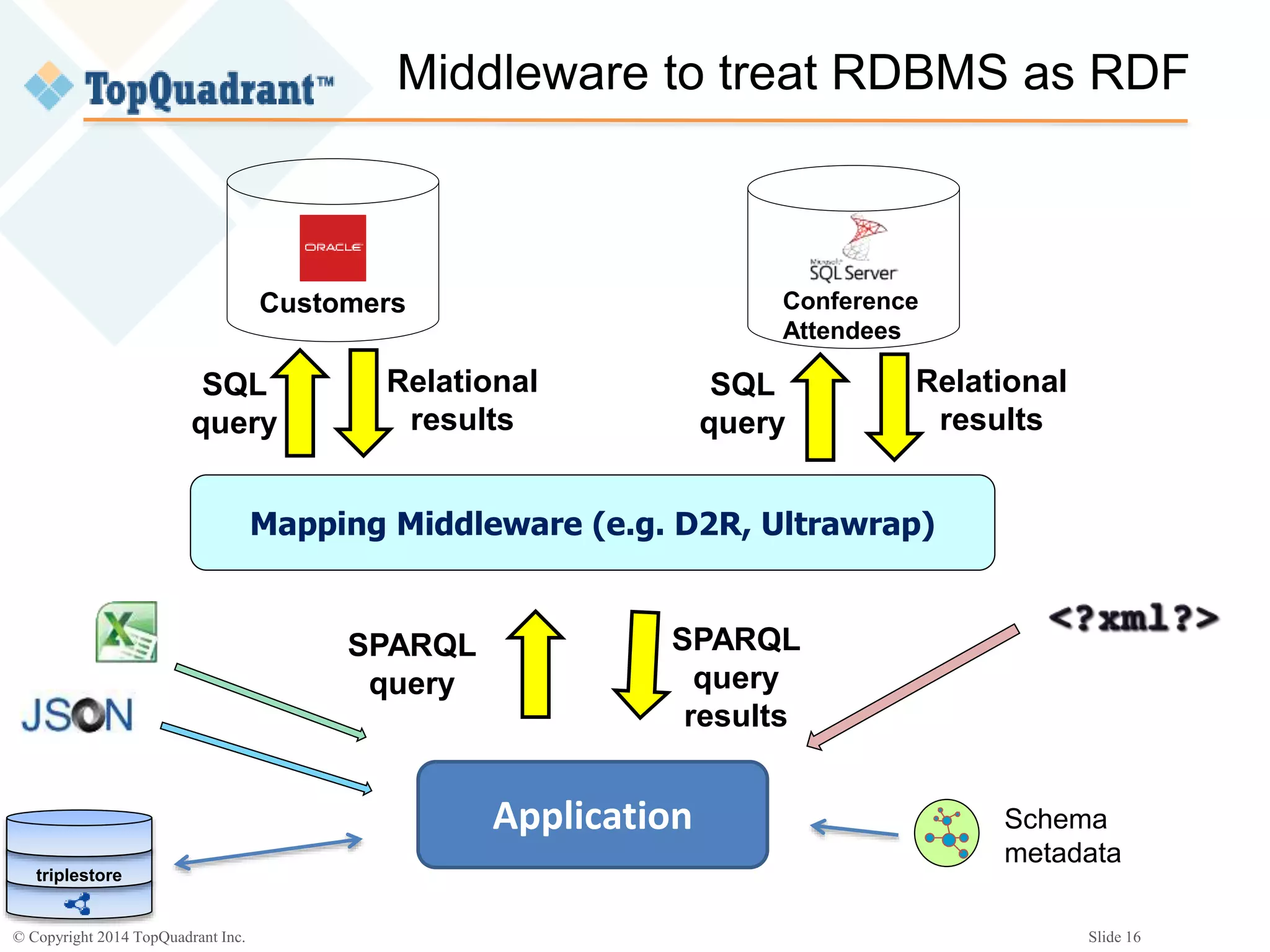
Middleware to treat RDBMS as RDF
Customers
Mapping Middleware (e.g. D2R, Ultrawrap)
Application
SPARQL
query
SQL
query
Relational
results
SPARQL
query
results
Conference
Attendees
SQL
query
Relational
results
Schema
metadata
triplestore
© Copyright 2014 TopQuadrant Inc. Slide 17
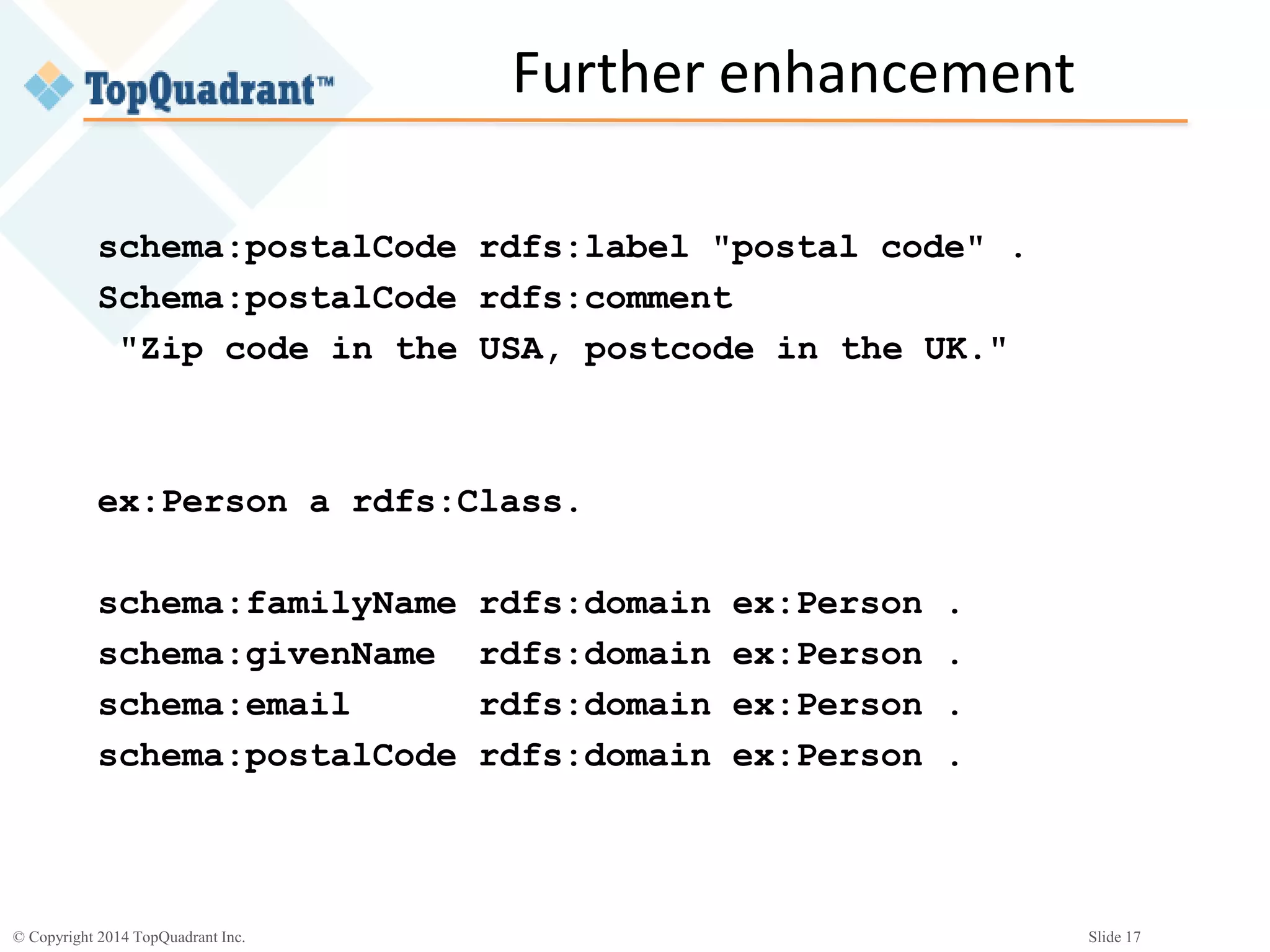
Further enhancement
ex:Person a rdfs:Class.
schema:familyName rdfs:domain ex:Person .
schema:givenName rdfs:domain ex:Person .
schema:email rdfs:domain ex:Person .
schema:postalCode rdfs:domain ex:Person .
schema:postalCode rdfs:label "postal code" .
Schema:postalCode rdfs:comment
"Zip code in the USA, postcode in the UK."
© Copyright 2014 TopQuadrant Inc. Slide 18
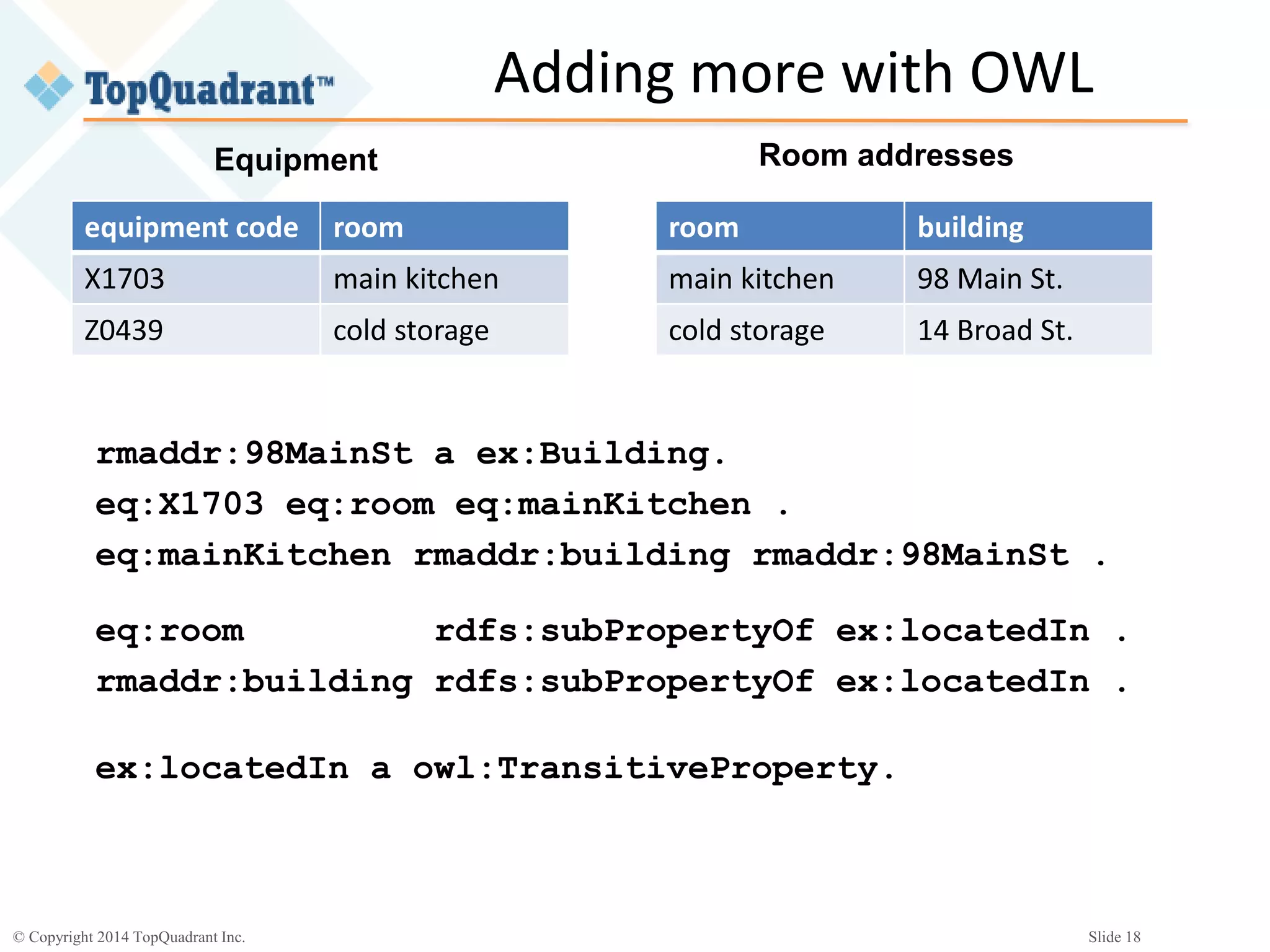
Adding more with OWL
equipment code room
X1703 main kitchen
Z0439 cold storage
room building
main kitchen 98 Main St.
cold storage 14 Broad St.
Equipment Room addresses
eq:room rdfs:subPropertyOf ex:locatedIn .
rmaddr:building rdfs:subPropertyOf ex:locatedIn .
ex:locatedIn a owl:TransitiveProperty.
rmaddr:98MainSt a ex:Building.
eq:X1703 eq:room eq:mainKitchen .
eq:mainKitchen rmaddr:building rmaddr:98MainSt .
© Copyright 2014 TopQuadrant Inc. Slide 19
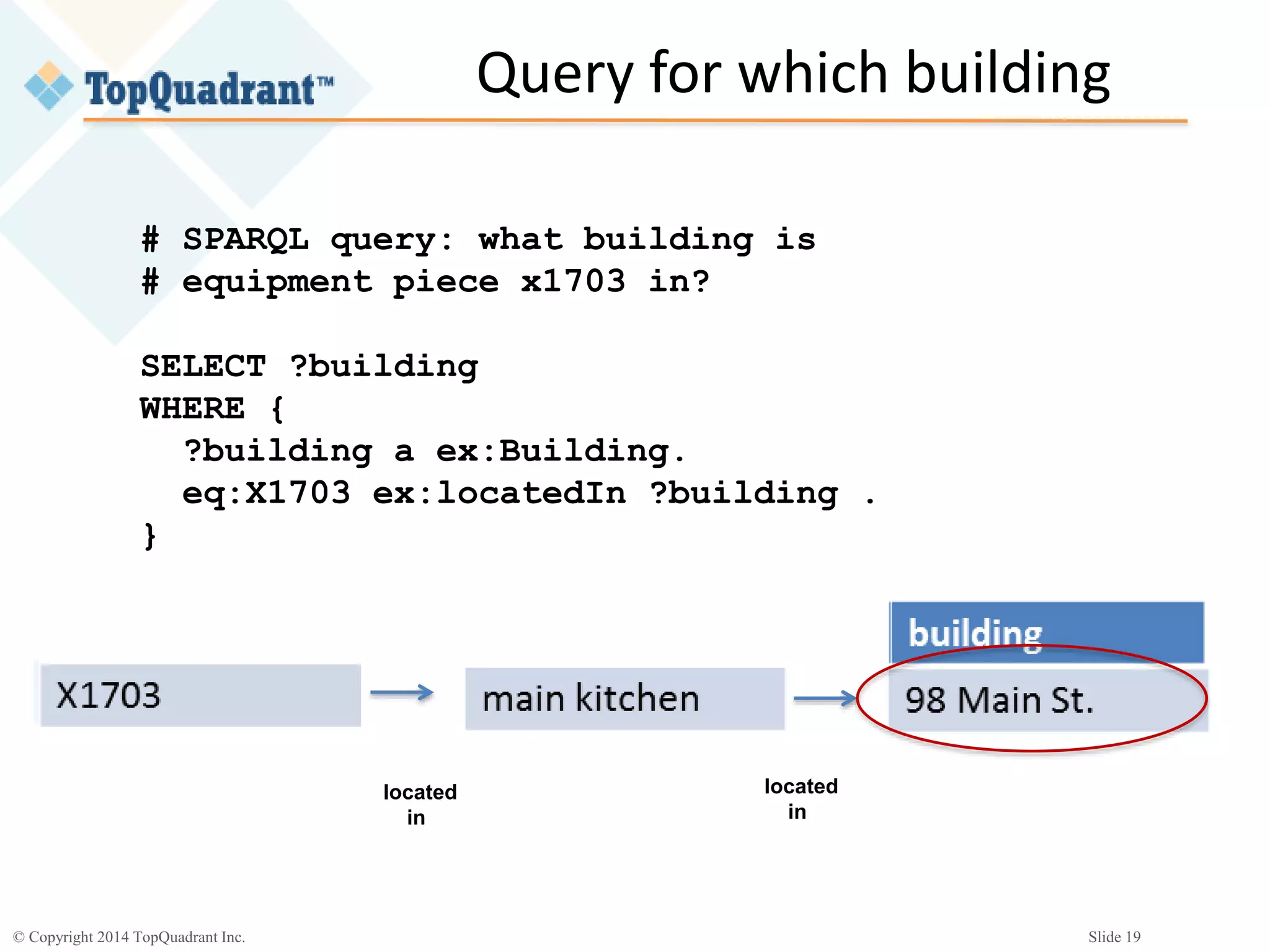
Query for which building
# SPARQL query: what building is
# equipment piece x1703 in?
SELECT ?building
WHERE {
?building a ex:Building.
eq:X1703 ex:locatedIn ?building .
}
located
in
located
in
© Copyright 2014 TopQuadrant Inc. Slide 20
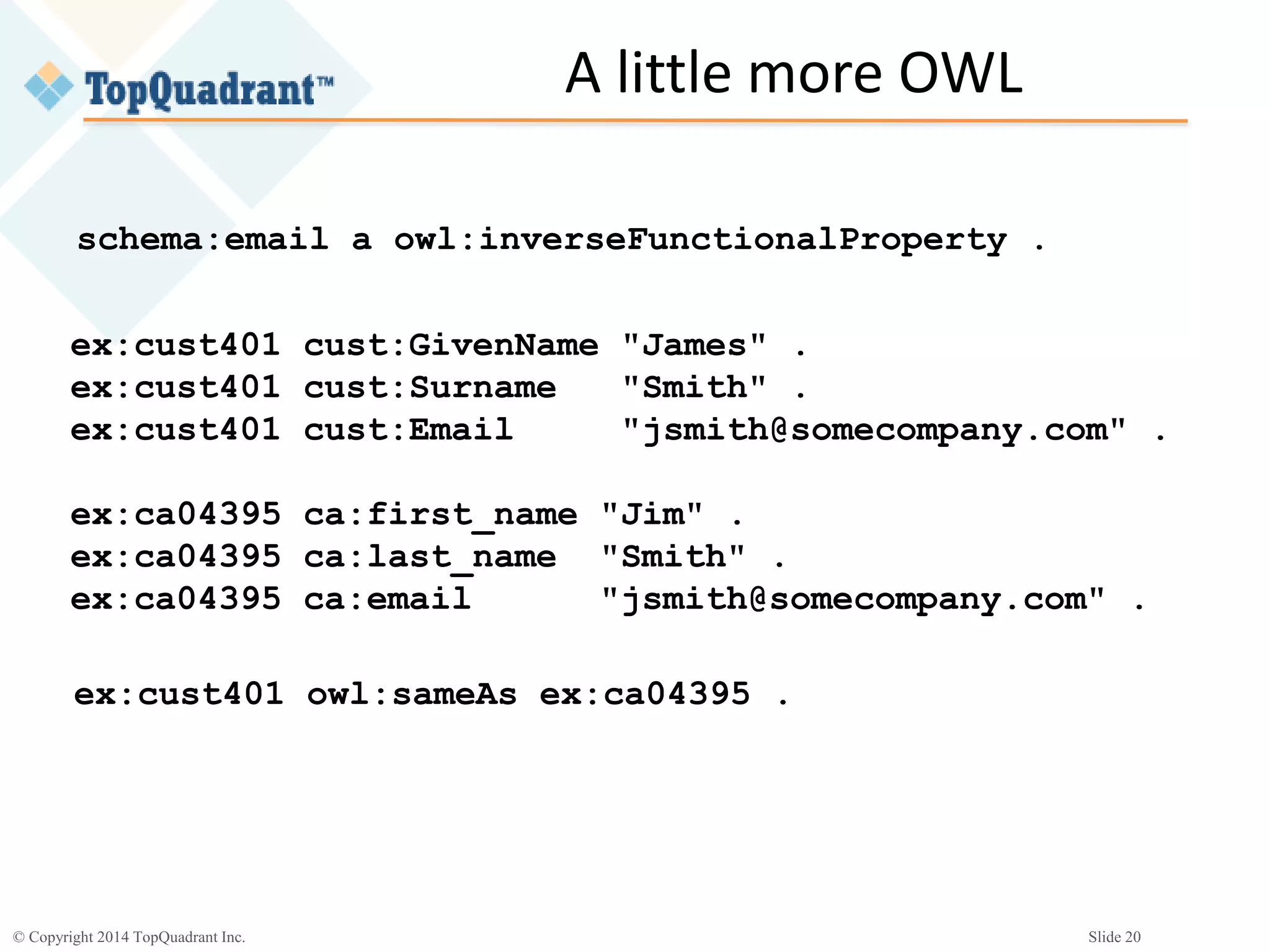
A little more OWL
schema:email a owl:inverseFunctionalProperty .
ex:cust401 cust:GivenName "James" .
ex:cust401 cust:Surname "Smith" .
ex:cust401 cust:Email "jsmith@somecompany.com" .
ex:ca04395 ca:first_name "Jim" .
ex:ca04395 ca:last_name "Smith" .
ex:ca04395 ca:email "jsmith@somecompany.com" .
ex:cust401 owl:sameAs ex:ca04395 .
© Copyright 2014 TopQuadrant Inc. Slide 21
What OWL adds to RDFS
 RDFS gives you properties to describe your
properties, classes, and instances (i.e. your
resources)
 OWL gives you:
• More properties to describe your resources
• Classes that you can use to describe resources
• The ability to define your own classes that you can
use to describe resources
© Copyright 2014 TopQuadrant Inc. Slide 22
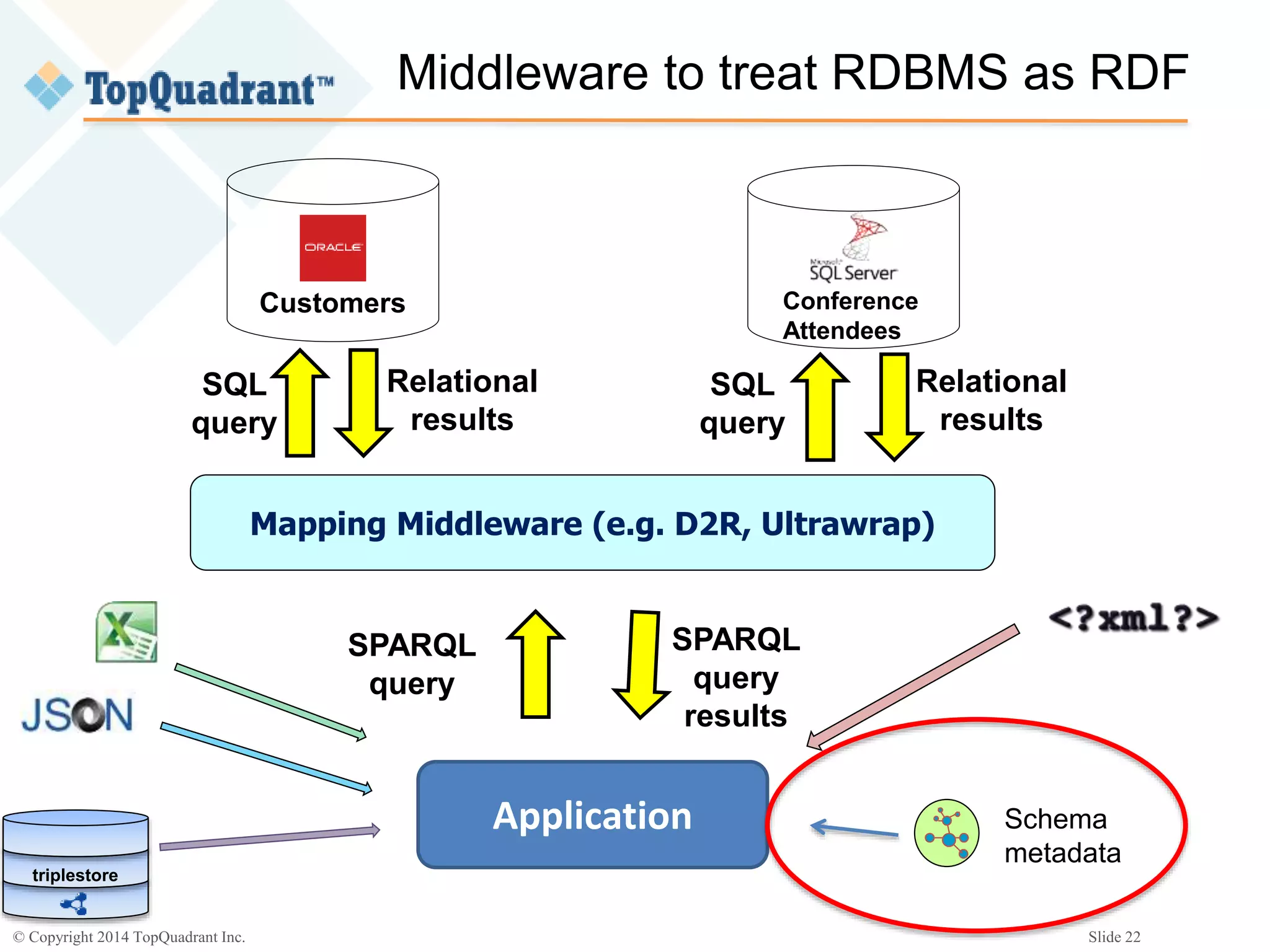
Middleware to treat RDBMS as RDF
Customers
Mapping Middleware (e.g. D2R, Ultrawrap)
Application
SPARQL
query
SQL
query
Relational
results
SPARQL
query
results
Conference
Attendees
SQL
query
Relational
results
Schema
metadata
triplestore
© Copyright 2014 TopQuadrant Inc. Slide 23
Descriptive vs. Proscriptive schemas
 Not rules to follow
– e.g. “Employee must have a first and last name!”
– Other ways to do implement constraints
 Machine-readable guides to what you’ve got
to work with
– Data types
– Relationships to other resources and classes of
resources
 Metadata!
© Copyright 2014 TopQuadrant Inc. Slide 24
Whose schemas?
 Your own schemas can describe what you need from
the data you’re using
 Standardized schemas (e.g. schema.org,
GoodRelations) can tie together your data with data
form other sources
 Tie together your custom schemas with (subsets that
you’re interested in of) standardized schemas
 Tie together (subsets that you’re interested in of)
different data sets from different sources
© Copyright 2014 TopQuadrant Inc. Slide 25
Top-down or bottom-up schema development?
 Whichever you like
 I like bottom-up
– (Hey Cyc project: good luck with that!)
 Lots of data to deal with?
– Model just enough to drive a simple, proof-of-
concept application
– Build the model (schema) a little at a time, then
add more to your application
– Connect that model to models of (subsets of)
other data sets
© Copyright 2014 TopQuadrant Inc. Slide 26
Who is doing this now?
 Pharma
 Oil and gas
 Publishing
© Copyright 2014 TopQuadrant Inc. Slide 27
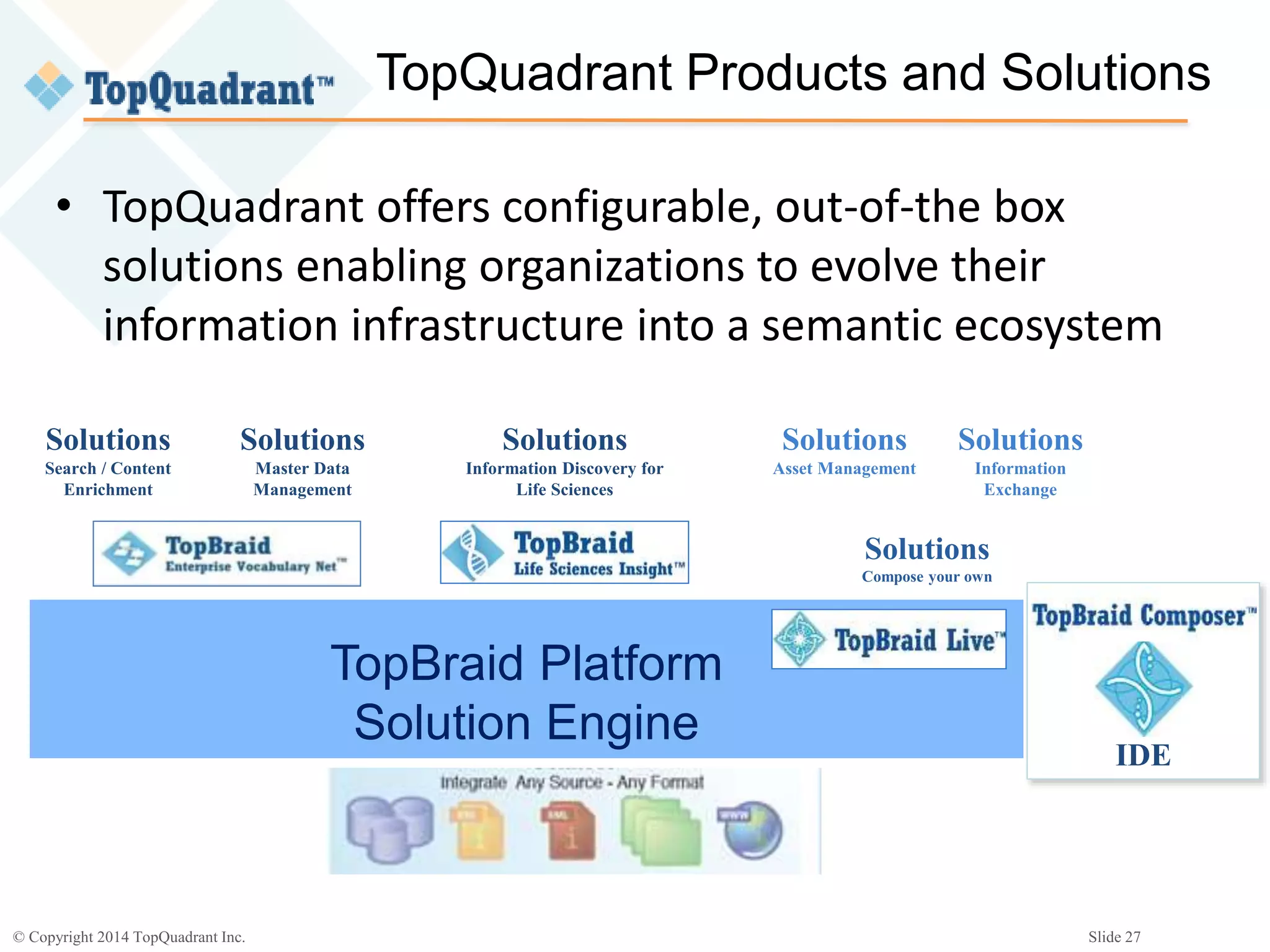
TopQuadrant Products and Solutions
Solutions
Asset Management
Solutions
Search / Content
Enrichment
TopBraid Platform
Solution Engine
IDE
Solutions
Compose your own
Solutions
Master Data
Management
Solutions
Information Discovery for
Life Sciences
Solutions
Information
Exchange
• TopQuadrant offers configurable, out-of-the box
solutions enabling organizations to evolve their
information infrastructure into a semantic ecosystem
© Copyright 2014 TopQuadrant Inc. Slide 28
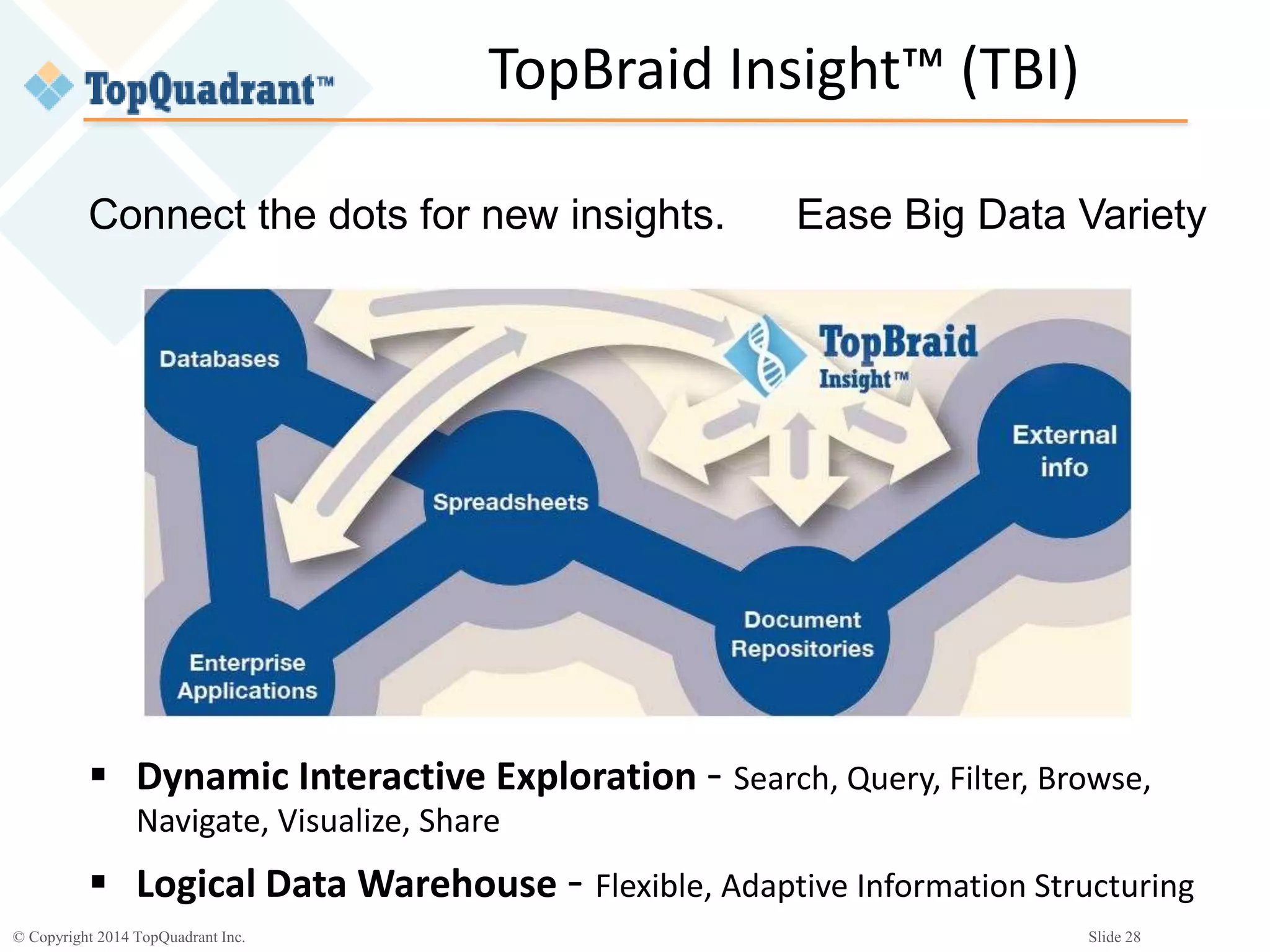
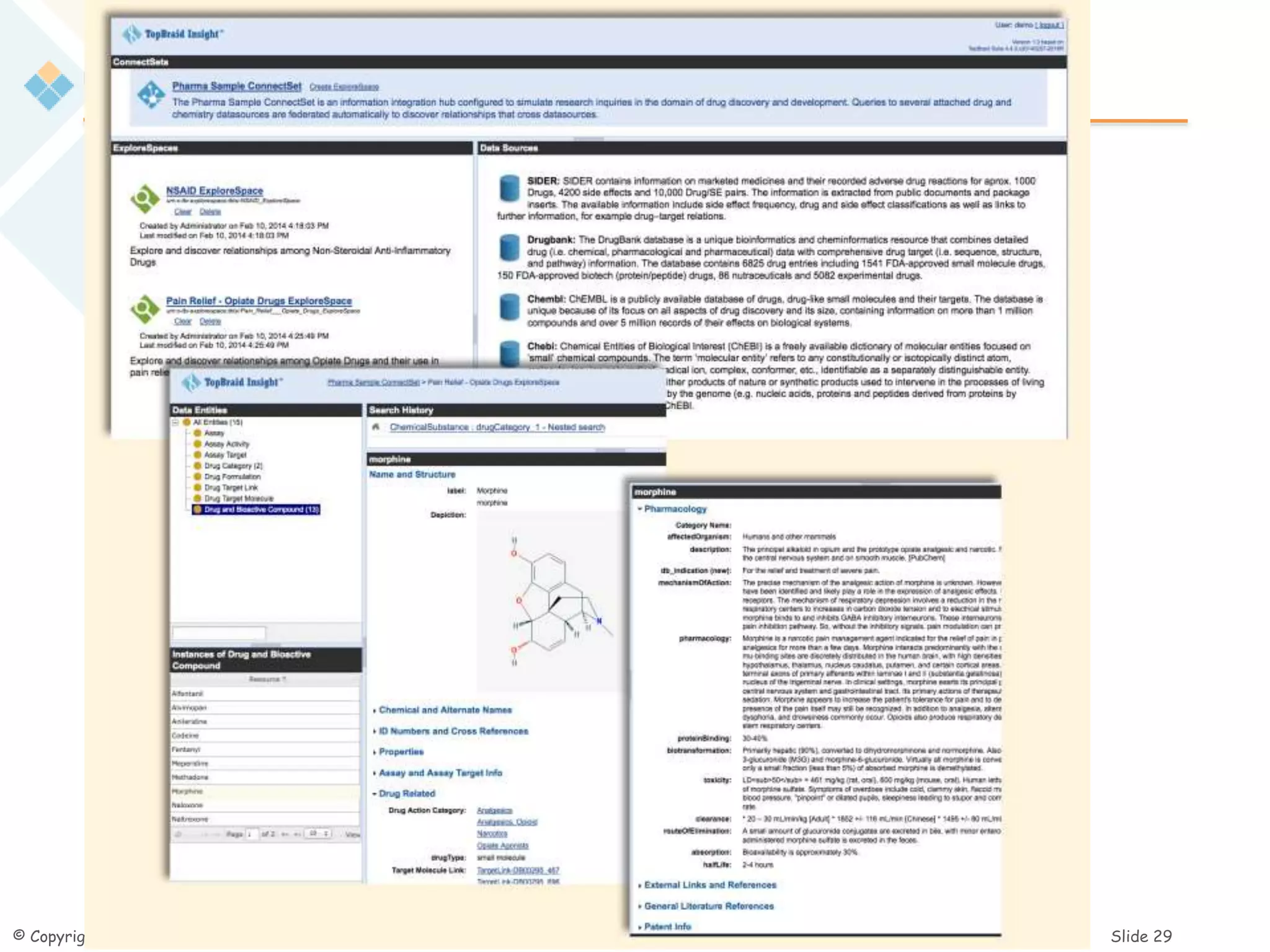
 Dynamic Interactive Exploration - Search, Query, Filter, Browse,
Navigate, Visualize, Share
 Logical Data Warehouse - Flexible, Adaptive Information Structuring
TopBraid Insight™ (TBI)
Connect the dots for new insights. Ease Big Data Variety
© Copyright 2013 TopQuadrant Inc. Slide 29
© Copyright 2014 TopQuadrant Inc. Slide 30
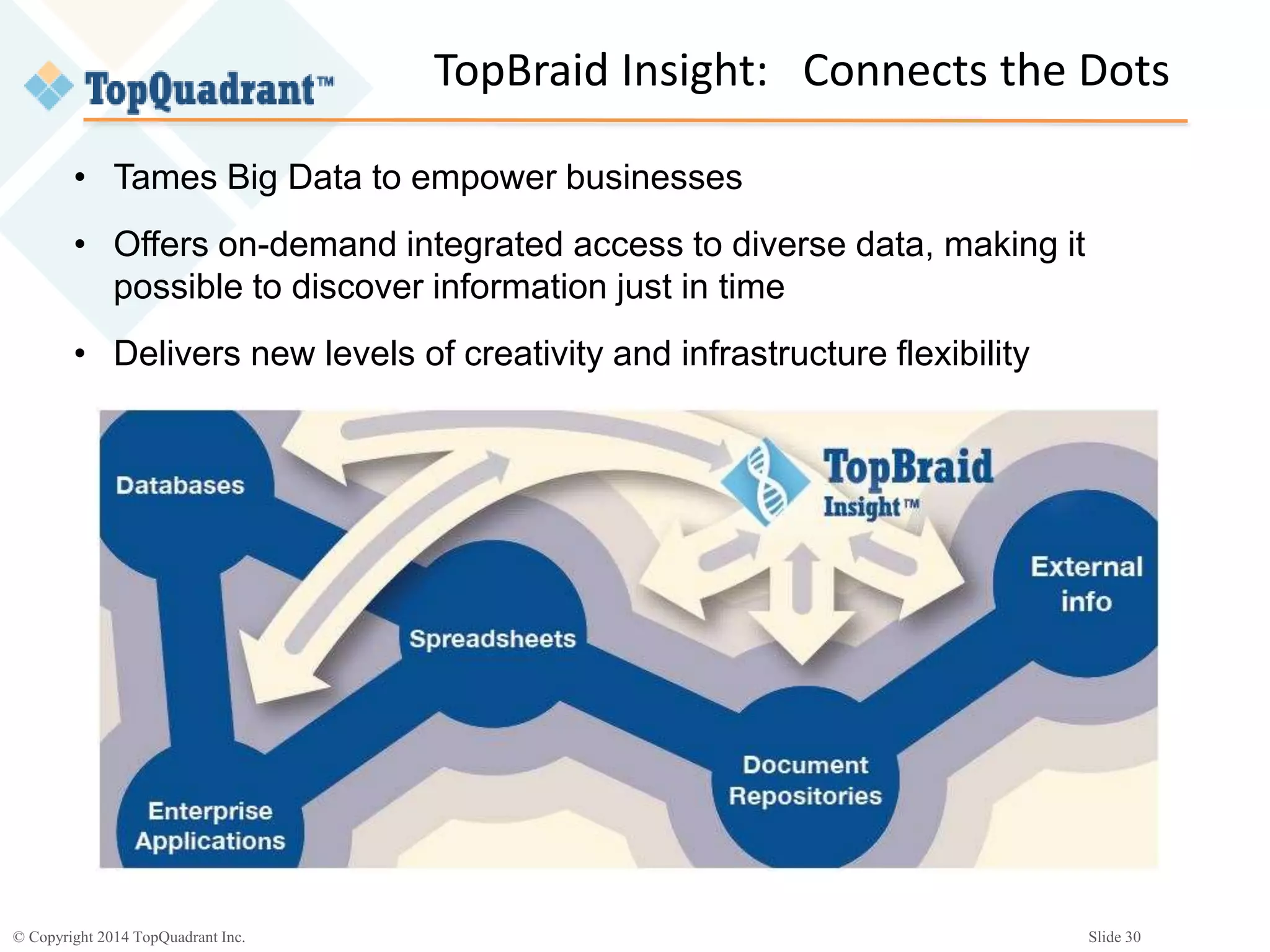
• Tames Big Data to empower businesses
• Offers on-demand integrated access to diverse data, making it
possible to discover information just in time
• Delivers new levels of creativity and infrastructure flexibility
TopBraid Insight: Connects the Dots
© Copyright 2014 TopQuadrant Inc. Slide 31
Photo credits
• Volume: (CC BY-NC 2.0) Fabrizio Monti
https://www.flickr.com/photos/delphaber/3514894189
• Velocity: (CC BY 2.0) Gabriel
https://www.flickr.com/photos/cod_gabriel/1332225362
• Variety: (CC BY-NC-SA 2.0) IRRI Photos
https://www.flickr.com/photos/ricephotos/4753359957
© Copyright 2014 TopQuadrant Inc. Slide 32
“A wonderful harmony is created when we join
together the seemingly unconnected.”
- Heraclitus
Bob DuCharme bducharme@topquadrant.com
Thank you!

Semantic Web Standards and the Variety “V” of Big Data

  • 1.
    © Copyright 2014TopQuadrant Inc. Slide 1 Semantic Web standards and the Variety “V” of Big Data Bob DuCharme August 20, 2014
  • 2.
    © Copyright 2014TopQuadrant Inc. Slide 2 Three Vs of Big Data  Volume  Velocity  Variety
  • 3.
    © Copyright 2014TopQuadrant Inc. Slide 3 Gartner, September 2013
  • 4.
    © Copyright 2014TopQuadrant Inc. Slide 4 Which dimensions did people struggle with the most?  Volume 35%  Velocity 16%  Variety 49%
  • 5.
    © Copyright 2014TopQuadrant Inc. Slide 5 Why is variety hard? Furniture Inventory Protein Database ? Customer Database Conference Attendees? Surname GivenName LastPurchase ZipCode Email last_name first_name is_speaker postal_code email
  • 6.
    © Copyright 2014TopQuadrant Inc. Slide 6 Schemas Good thing: Ensure data quality Make query writing* easier Add efficiency *And essentially, all application development Annoying thing:  Can’t add property values someone didn’t see coming  Changing schema (and data with it) slow and expensive  Often tied too closely to specific implementation Inflexibility × 3.
  • 7.
    © Copyright 2014TopQuadrant Inc. Slide 7 Schemaless NoSQL databases  Can’t add property values someone didn’t see coming?  Changing schema (and data with it) slow and expensive?  Often tied too closely to specific implementation?
  • 8.
    © Copyright 2014TopQuadrant Inc. Slide 8 Schemaless: how do applications know what properties are available?  By any means necessary  Documentation  Query for properties that got used  App possibly written by same person or team  Responsibility shifted from database (designer) to application (designer)
  • 9.
    © Copyright 2014TopQuadrant Inc. Slide 9 Schema: all or nothing? Customer Database Conference Attendees? Surname GivenName LastPurchase ZipCode Email last_name first_name is_speaker postal_code email ETL (Extract-Transform-Load)?
  • 10.
    © Copyright 2014TopQuadrant Inc. Slide 10 RDF Schema (RDFS)  W3C Standard since 2004  Often overshadowed by superset standard OWL  Describes RDF, written using RDF syntaxes Semantic Web Linked Data
  • 11.
    © Copyright 2014TopQuadrant Inc. Slide 11 RDF  www.w3.org/RDF (second sentence!): “RDF has features that facilitate data merging even if the underlying schemas differ, and it specifically supports the evolution of schemas over time without requiring all the data consumers to be changed.”
  • 12.
    © Copyright 2014TopQuadrant Inc. Slide 12 Sample schema @prefix cust: <http://companyX.com/ns/customer#> . @prefix ca: <http://companyY.com/ns/confAttendees#> . @prefix rdf: <http://www.w3.org/1999/02/22-rdf-syntax-ns#> . cust:Surname a rdf:Property . # or: cust:Surname rdf:type rdf:Property . cust:GivenName a rdf:Property . cust:ZipCode a rdf:Property . cust:Email a rdf:Property . ca:last_name a rdf:Property . ca:first_name a rdf:Property . ca:postal_code a rdf:Property. ca:email a rdf:Property . # LastPurchase and is_speaker: don't care (for now)! Customer Database Conference Attendees
  • 13.
    © Copyright 2014TopQuadrant Inc. Slide 13 Relating properties # assuming prefix declarations from previous slide @prefix schema: <http://schema.org/> . @prefix rdfs: <http://www.w3.org/2000/01/rdf-schema#> . cust:Surname rdfs:subPropertyOf schema:familyName . ca:last_name rdfs:subPropertyOf schema:familyName . cust:GivenName rdfs:subPropertyOf schema:givenName . ca:first_name rdfs:subPropertyOf schema:givenName . cust:Email rdfs:subPropertyOf schema:email . ca:email rdfs:subPropertyOf schema:email . Cust:ZipCode rdfs:subPropertyOf schema:postalCode . ca:postal_code rdfs:subPropertyOf schema:postalCode .
  • 14.
    © Copyright 2014TopQuadrant Inc. Slide 14 Using the combined data # SPARQL query: where should we open # a government relations office? SELECT ?postalCode WHERE { ?person schema:email ?email . FILTER(strends(?email,".gov")) ?person schema:postalCode ?postalCode . }
  • 15.
    © Copyright 2014TopQuadrant Inc. Slide 15 Middleware to treat RDBMS as RDF Customers Mapping Middleware (e.g. D2R, Ultrawrap) Application SPARQL query SQL query Relational results SPARQL query results
  • 16.
    © Copyright 2014TopQuadrant Inc. Slide 16 Middleware to treat RDBMS as RDF Customers Mapping Middleware (e.g. D2R, Ultrawrap) Application SPARQL query SQL query Relational results SPARQL query results Conference Attendees SQL query Relational results Schema metadata triplestore
  • 17.
    © Copyright 2014TopQuadrant Inc. Slide 17 Further enhancement ex:Person a rdfs:Class. schema:familyName rdfs:domain ex:Person . schema:givenName rdfs:domain ex:Person . schema:email rdfs:domain ex:Person . schema:postalCode rdfs:domain ex:Person . schema:postalCode rdfs:label "postal code" . Schema:postalCode rdfs:comment "Zip code in the USA, postcode in the UK."
  • 18.
    © Copyright 2014TopQuadrant Inc. Slide 18 Adding more with OWL equipment code room X1703 main kitchen Z0439 cold storage room building main kitchen 98 Main St. cold storage 14 Broad St. Equipment Room addresses eq:room rdfs:subPropertyOf ex:locatedIn . rmaddr:building rdfs:subPropertyOf ex:locatedIn . ex:locatedIn a owl:TransitiveProperty. rmaddr:98MainSt a ex:Building. eq:X1703 eq:room eq:mainKitchen . eq:mainKitchen rmaddr:building rmaddr:98MainSt .
  • 19.
    © Copyright 2014TopQuadrant Inc. Slide 19 Query for which building # SPARQL query: what building is # equipment piece x1703 in? SELECT ?building WHERE { ?building a ex:Building. eq:X1703 ex:locatedIn ?building . } located in located in
  • 20.
    © Copyright 2014TopQuadrant Inc. Slide 20 A little more OWL schema:email a owl:inverseFunctionalProperty . ex:cust401 cust:GivenName "James" . ex:cust401 cust:Surname "Smith" . ex:cust401 cust:Email "jsmith@somecompany.com" . ex:ca04395 ca:first_name "Jim" . ex:ca04395 ca:last_name "Smith" . ex:ca04395 ca:email "jsmith@somecompany.com" . ex:cust401 owl:sameAs ex:ca04395 .
  • 21.
    © Copyright 2014TopQuadrant Inc. Slide 21 What OWL adds to RDFS  RDFS gives you properties to describe your properties, classes, and instances (i.e. your resources)  OWL gives you: • More properties to describe your resources • Classes that you can use to describe resources • The ability to define your own classes that you can use to describe resources
  • 22.
    © Copyright 2014TopQuadrant Inc. Slide 22 Middleware to treat RDBMS as RDF Customers Mapping Middleware (e.g. D2R, Ultrawrap) Application SPARQL query SQL query Relational results SPARQL query results Conference Attendees SQL query Relational results Schema metadata triplestore
  • 23.
    © Copyright 2014TopQuadrant Inc. Slide 23 Descriptive vs. Proscriptive schemas  Not rules to follow – e.g. “Employee must have a first and last name!” – Other ways to do implement constraints  Machine-readable guides to what you’ve got to work with – Data types – Relationships to other resources and classes of resources  Metadata!
  • 24.
    © Copyright 2014TopQuadrant Inc. Slide 24 Whose schemas?  Your own schemas can describe what you need from the data you’re using  Standardized schemas (e.g. schema.org, GoodRelations) can tie together your data with data form other sources  Tie together your custom schemas with (subsets that you’re interested in of) standardized schemas  Tie together (subsets that you’re interested in of) different data sets from different sources
  • 25.
    © Copyright 2014TopQuadrant Inc. Slide 25 Top-down or bottom-up schema development?  Whichever you like  I like bottom-up – (Hey Cyc project: good luck with that!)  Lots of data to deal with? – Model just enough to drive a simple, proof-of- concept application – Build the model (schema) a little at a time, then add more to your application – Connect that model to models of (subsets of) other data sets
  • 26.
    © Copyright 2014TopQuadrant Inc. Slide 26 Who is doing this now?  Pharma  Oil and gas  Publishing
  • 27.
    © Copyright 2014TopQuadrant Inc. Slide 27 TopQuadrant Products and Solutions Solutions Asset Management Solutions Search / Content Enrichment TopBraid Platform Solution Engine IDE Solutions Compose your own Solutions Master Data Management Solutions Information Discovery for Life Sciences Solutions Information Exchange • TopQuadrant offers configurable, out-of-the box solutions enabling organizations to evolve their information infrastructure into a semantic ecosystem
  • 28.
    © Copyright 2014TopQuadrant Inc. Slide 28  Dynamic Interactive Exploration - Search, Query, Filter, Browse, Navigate, Visualize, Share  Logical Data Warehouse - Flexible, Adaptive Information Structuring TopBraid Insight™ (TBI) Connect the dots for new insights. Ease Big Data Variety
  • 29.
    © Copyright 2013TopQuadrant Inc. Slide 29
  • 30.
    © Copyright 2014TopQuadrant Inc. Slide 30 • Tames Big Data to empower businesses • Offers on-demand integrated access to diverse data, making it possible to discover information just in time • Delivers new levels of creativity and infrastructure flexibility TopBraid Insight: Connects the Dots
  • 31.
    © Copyright 2014TopQuadrant Inc. Slide 31 Photo credits • Volume: (CC BY-NC 2.0) Fabrizio Monti https://www.flickr.com/photos/delphaber/3514894189 • Velocity: (CC BY 2.0) Gabriel https://www.flickr.com/photos/cod_gabriel/1332225362 • Variety: (CC BY-NC-SA 2.0) IRRI Photos https://www.flickr.com/photos/ricephotos/4753359957
  • 32.
    © Copyright 2014TopQuadrant Inc. Slide 32 “A wonderful harmony is created when we join together the seemingly unconnected.” - Heraclitus Bob DuCharme bducharme@topquadrant.com Thank you!

Editor's Notes

  • #2 Introduce myself, mention book.
  • #3 I’m going to assume that I don’t have to convince you that there’s a lot more Volume now. I could say “since you got up this morning, more data has been created than all the data created from the time the first cuneiform writing was invented up through some surprisingly recent historical event” but we’ve all be hearing those stories a lot lately. A related issue is Velocity. One of the reasons that there’s a greater volume is that more devices are generating data, and some of them very quickly because it’s cheaper to do so. Sensors to measure how much liquid is going through a pipe or whether a window is open are less expensive to make, so people are making them and having them send data. OPTIONAL: The classic example is a modern smartphone, which besides measuring your geo location can also record things like they angle that you’re holding it, not to mention the things you’re doing on the phone. When I install an app on my phone that doesn’t need permission to read or write any special data, it’s always a pleasant surprise because the default is that so many of them do. Industrial processing and an increasing number of household devices are taking greater advantage of inexpensive devices that can record things and then pass along what they record, and because the computation and transmission is cheap, they can do it a lot, so they do. Variety: people want to learn things by combining different kinds of data and looking for patterns. With big data efforts, people often want to combine two data sets that have only one or two fields in common, and then they can use those two fields as connections to look for interesting patterns, but forging those connections is not typically very easy. I’m going to talk more about this shortly because the Velocity V is really the focus of my talk.
  • #4 The research firm formerly known as “The Gartner Group”
  • #6 These are classic old-fashioned data integration problems, but they’re an issue with big data projects because people want to integrate more databases more often, sometimes just temporarily to see if anything interesting results.
  • #7 1.3. Efficiency of development (see 1.2.) and execution, because you can create indexes based on schemas. 2.1 If I want to add a formerEmployer property to note that someone used to work at one of our customers… 2.3. The SQL standard does specify a way to list a database’s tables, but Oracle and DB2 don’t follow it, and have their own way. http://troels.arvin.dk/db/rdbms/
  • #8 3. Many popular NoSQL database managers offer some schema-like features, like MongoDB’s data models and Neo4J’s constraints, but these are obviously very implementation-specific.
  • #9 1.3 the NoSQL database is typically assembled to play a specific role in a specific database, as opposed to providing a general-purpose database.
  • #10 We’ve seen some advantages of using schemas and some advantages of not using them. The choice has often been this: are you going to have a description of every single database field, or are you going to go with no description of any of them? This is a tiny example to fit on the slide. What if I have 12 databases with a hundred properties each? What if I want the advantages that we saw of schema but I’m only interested a combination of 8 fields from one database, 12 from another, and 2 from another? Do I have to choose between using the 12 entire schemas or no schemas at all? How can I use schemas as metadata to drive my use of the specific subset of data that I’m interested in? ETL? We can move this intelligence into program code, but then it’s code, as opposed to re-usable metadata. But, code is less re-usable than schema metadata, and it also doesn’t age well. It’s a lot easier to picture twenty-year-old data or metadata being useful today than twenty-year-old code. Plus, you’re copying data and changing it (transforming it) along the way, which introduces the possibility of errors, and your have to plan around the likely possibility of the copy becoming out of date.
  • #11 4. Often associated with Semantic Web or Linked Data technologies. I’m happy to talk about those, but I’m not here to talk about them today. I’m here to talk about how RDFS (and if you like, a little OWL and the associated RDF query language SPARQL) can make it easier to flexibly deal with a variety of data.
  • #13 (After describing slide) We haven’t even gotten to the RDFS standard yet, and are just using standard parts of RDF. So far, so what? We’ve listed the properties that we’re interested in, in a machine-readable standardized way. For one thing, I can look at this and it can guide me in the writing of a query, because I see what the available properties are. Even better, a program that’s going to generate a form—for example, a search form for this data—can read this schema and generate just such a form. But let’s look at some more interesting things we can do.
  • #14 There are ways in RDFS to assert that we want to treat surname in one database the same as last name in the other, but it’s even better to relate them to a common one—a standard one if available, and here you can see that I’ve used properties from schema.org, or one that you make up for this purpose. Here we have implemented a simple little bit of data integration to deal with the variety of names in the different data sources. I can search and use the data using these property names (on the right) and it will actually use the data from these property names (on the left).
  • #15 With most NoSQL applications that I know of, “querying” data means writing code in a scripting language. Some of the tools have their own special query languages, but SPARQL is a standard, and a well-implemented one. The SPARQL query is for querying RDF triples, and our original data was not in triples. How can we query it with triples?
  • #16 R2RML
  • #17 (After last build) DON’T BOTHER WITH THIS: To actually act on the schema metadata—that is, to have the application know that it should treat the customer surnames and the conference attendee last names as schema.org family names—requires an inferencing step, there are plenty of commercial and open source tools that can do that. It can even be done with SPARQL queries. The important thing is, it’s all done with documented standards that have implementations and traction.
  • #18 I’m going to take this little data integration schema that I’ve been developing and enhance it even more by just adding a few more statements. Remember, schema:postalCode stands in for a full URI. rdfs:domain statements can be used by an application generating a report or an editing form.
  • #19 So far we’ve seen that RDFS gives us ways to list properties and classes and to say things about them in a machine-readable way so that applications can use that data. OWL lets us say more things. This shows some of the triples that a program like D2R might generate from these tables. There wasn’t a “located in” property in schema.org, so I declared one myself. Read through triples, pointing back at tables. “But if locatedIn encompasses both the room and building properties, and locatedIn is transitive, I can just query on locatedIn values to find out what building that piece of equipment is in…”
  • #20 …with a very simple query. I don’t have to specify any joins or look up foreign keys or anything.
  • #22 2.1. we saw some RDFS ones like domain and range; OWL gives you new ones like sameAs from the previous slide 2.2. For example, transitiveProperty is a class, and I said that locatedIn… 2.3. I could define a class called NewCustomers as the set of all customers whose first purchase was in the last 90 days, then use that class to drive decisions about which customers get which communications from the company. This last category is where OWL can be particularly powerful, but also somewhat intimidating. There’s a lot that you can get out of the first two categories.
  • #23 Returning to this slide to emphasize that while mapping middleware can generate a lot of schema metadata for you, the ability to add more metadata to that, about the fields you’re interested in and only those fields—is very powerful. (build) The metadata lets you tie it all together, or just tied the bits you’re interested in together, using a documented standard with a wide choice of implementations. This is the real key to handling the variety.
  • #25 1. A way to say “That data may have been created for one particular application or another, but here’s what I need it for.” 2. If I describe my products for sale using the GoodRelations schema, I can more easily combine my product data with product data from other companies and automate how I sell it using a website or app 3. One example is the way that an earlier slide said that the surname property from the customer database was a subproperty of the family name property from schema.org… 4. … and that lets me (read bullet) Which is ultimately what my presentation here is about.
  • #26 2. Bottom up was not necessarily an option 15 years ago. You planned a whole system at a high level and then filled in details before you could do any development before you took advantage of the model. 3.1 Does one data source have 25 tables with dozens of columns in each? Pick the ones that you need for you application and model those. You don’t have to start with weeks of planning. You can start prototyping at a small scale and build organically from there.
  • #27 1. Research data, clinical trials, standardized and internal taxonomies, 2. combine sets of production, exploration, and environmental data  3. Looking for new income sources outside of printed books—combining content in different forms from different subsidiaries with different CMSs and other systems and, in the education market that is particulary important to them, lining it up with standards
  • #28 In a talk like this, it’s more traditional to tell you about the company at the beginning of the talk, but I wanted to wait until the end because you have more context. When I joined the company…
  • #29 Because of the nature of this conference, and track, I’ve gone into some more of the geeky details about how the standards work and make this kind of integration possible. TopBraid Insight provides a front end that takes advantage of these capabilities of the standards but keeps the geekier details under the hood so that business users can take advantage of them with an intuitive interface.
  • #31 We have a webinar online
  • #32 Before I finish I wanted to be a good web citizen and credit the pictures I used on my second slide…
  • #33 I’d like to finish with this quote from Heraclitus, who lived in the sixth century BC, because it so nicely sums up how if we connect up things that are seemingly unconnected, we can end up with some great new possibilities.