Simona Pitam
Selenium Tutorial
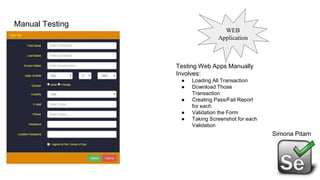
Manual Testing
Simona Pitam
Testing Web Apps Manually
Involves:
● Loading All Transaction
● Download Those
Transaction
● Creating Pass/Fail Report
for each
● Validation the Form
● Taking Screenshot for each
Validation
WEB
Application
Automation Testing Advantages
Simona Pitam
❖ Faster Execution
❖ More Accurate
❖ Lesser Investment in Human Resources
❖ Supports Regression
❖ Frequent Execution
❖ Supports Lights Out Execution
Features of
Automation
Testing
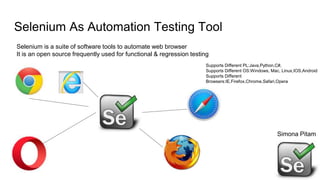
Selenium As Automation Testing Tool
Simona Pitam
Selenium is a suite of software tools to automate web browser
It is an open source frequently used for functional & regression testing
Supports Different PL:Java,Python,C#,
Supports Different OS:Windows, Mac, Linux,IOS,Android
Supports Different
Browsers:IE,Firefox,Chrome,Safari,Opera
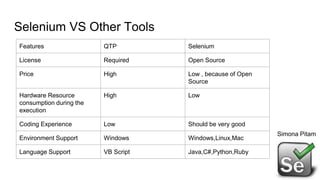
Selenium VS Other Tools
Features QTP Selenium
License Required Open Source
Price High Low , because of Open
Source
Hardware Resource
consumption during the
execution
High Low
Coding Experience Low Should be very good
Environment Support Windows Windows,Linux,Mac
Language Support VB Script Java,C#,Python,Ruby
Simona Pitam
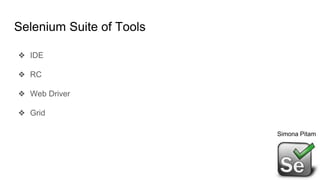
Selenium Suite of Tools
❖ IDE
❖ RC
❖ Web Driver
❖ Grid
Simona Pitam
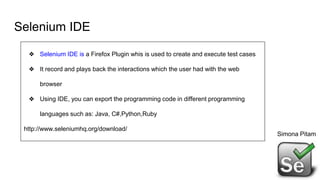
Selenium IDE
Simona Pitam
❖ Selenium IDE is a Firefox Plugin whis is used to create and execute test cases
❖ It record and plays back the interactions which the user had with the web
browser
❖ Using IDE, you can export the programming code in different programming
languages such as: Java, C#,Python,Ruby
http://www.seleniumhq.org/download/
Selenium Ide Install On Chrome
Go to the following link:
https://chrome.google.com/webstore/detail/selenium-
ide/mooikfkahbdckldjjndioackbalphokd
Add it to Chrome & Install
Simona Pitam
Selenium RC
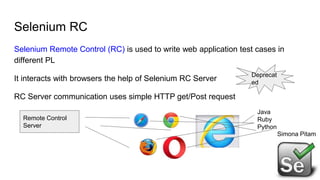
Selenium Remote Control (RC) is used to write web application test cases in
different PL
It interacts with browsers the help of Selenium RC Server
RC Server communication uses simple HTTP get/Post request
Remote Control
Server
Java
Ruby
Python
Deprecat
ed
Simona Pitam
How to Automate Web Process
❖ Web Page contains from HTML Elements
❖ In order to automate web actions you should find web page Elements
❖ We should use some locator technics
❖ We should identify the element and then we can do actions on elements
Simona Pitam
Web Driver
❖ In Selenium we have element identifier & then we can activate elements
❖ Selenium Web Driver is a programming interface to create & execute test
cases
❖ Test Cases are created and executed using Elements/Object Locator/Web
Driver method
❖ Selenium WEbDriver has programming interface not IDE
❖ Selenium IDE supports only IDE;doesn’t have programming interface
Simona Pitam
Web Driver
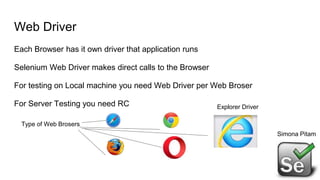
Each Browser has it own driver that application runs
Selenium Web Driver makes direct calls to the Browser
For testing on Local machine you need Web Driver per Web Broser
For Server Testing you need RC
Simona Pitam
Type of Web Brosers
Explorer Driver
Chrome Driver
❖ Download Chrome Driver Exe
❖ Chrome Driver->chromedriver.exe
https://sites.google.com/a/chromium.org/chromedriver/downloads
❖ Internet Explorer -> iedriver.exe
❖ Web Driver is API and not IDE
We should choose the Web Browser in order to run Web Driver
- API - Application Program Interface
Simona Pitam
Selenium Scripts
Go to the following URL
http://www.seleniumhq.org/
Download one of the drivers
In order to run test case we need Web Driver
Simona Pitam
Selenium Web Drivers Features
Selenium Web Drivers Supports
PL: Java,C#,Python,Ruby
Browser:Chrome,Firefox,IE,Safari,Opera
Report Generator can’t be generated
Simona Pitam
Selenium Scripts
Go to the following URL
http://www.seleniumhq.org/
Download one of the drivers
In order to run test case we need Web Driver
Simona Pitam
Selenium Scripts
Go to the following URL
http://www.seleniumhq.org/
Download one of the drivers
In order to run test case we need Web Driver
Simona Pitam
Selenium Grid
❖ Selenium Grid is used to run test scripts at the same time on multiple
machines
❖ Parallel Running can be done
❖ Hub and Nodes using jar files
Simona Pitam
Selenium Scripts
Go to the following URL
http://www.seleniumhq.org/
Download one of the drivers
In order to run test case we need Web Driver
Simona Pitam
Java Env
Download Eclipse
Verify Jdk Folders are created after installation
Download Selenium -standalone-server
Selenium Server
All these contains jar files
Open Eclipse & Start write Scripts
Simona Pitam
Selenium Scripts
Go to the following URL
http://www.seleniumhq.org/
Download one of the drivers
In order to run test case we need Web Driver
Simona Pitam
Selenium Scripts
Go to the following URL
http://www.seleniumhq.org/
Download one of the drivers
In order to run test case we need Web Driver
Simona Pitam
Write Script in Eclipse
❖ Add External jars
❖ Import all selenium jar files
❖ We can create different folder & import our jars
Simona Pitam
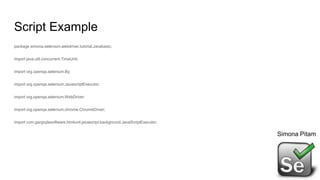
Script Example
package simona.selenium.webdriver.tutorial.Javabasic;
import java.util.concurrent.TimeUnit;
import org.openqa.selenium.By;
import org.openqa.selenium.JavascriptExecutor;
import org.openqa.selenium.WebDriver;
import org.openqa.selenium.chrome.ChromeDriver;
import com.gargoylesoftware.htmlunit.javascript.background.JavaScriptExecutor;
Simona Pitam
Import Jars into Eclipse
Right Click on Java Project Name
Click On Build Path
Choose Configure Build Path
Add External jars (selenium - 3.8.0-standalone.jar,selenium-nodeps-3.8.1-
source.jar,selenium-3.8.1-nodeps.jar)
Simona Pitam
Identification Elements in Selenium
In Selenium we can find the element by function FindElement.by()
Element can be Identified by following:
❖ Id
❖ Name
❖ ClassName
❖ Xpath
❖ Tagname
❖ css Selector
❖ linkText
❖ PartialLinkText

Selenium Tutorial

  • 1.
  • 2.
    Manual Testing Simona Pitam TestingWeb Apps Manually Involves: ● Loading All Transaction ● Download Those Transaction ● Creating Pass/Fail Report for each ● Validation the Form ● Taking Screenshot for each Validation WEB Application
  • 3.
    Automation Testing Advantages SimonaPitam ❖ Faster Execution ❖ More Accurate ❖ Lesser Investment in Human Resources ❖ Supports Regression ❖ Frequent Execution ❖ Supports Lights Out Execution Features of Automation Testing
  • 4.
    Selenium As AutomationTesting Tool Simona Pitam Selenium is a suite of software tools to automate web browser It is an open source frequently used for functional & regression testing Supports Different PL:Java,Python,C#, Supports Different OS:Windows, Mac, Linux,IOS,Android Supports Different Browsers:IE,Firefox,Chrome,Safari,Opera
  • 5.
    Selenium VS OtherTools Features QTP Selenium License Required Open Source Price High Low , because of Open Source Hardware Resource consumption during the execution High Low Coding Experience Low Should be very good Environment Support Windows Windows,Linux,Mac Language Support VB Script Java,C#,Python,Ruby Simona Pitam
  • 6.
    Selenium Suite ofTools ❖ IDE ❖ RC ❖ Web Driver ❖ Grid Simona Pitam
  • 7.
    Selenium IDE Simona Pitam ❖Selenium IDE is a Firefox Plugin whis is used to create and execute test cases ❖ It record and plays back the interactions which the user had with the web browser ❖ Using IDE, you can export the programming code in different programming languages such as: Java, C#,Python,Ruby http://www.seleniumhq.org/download/
  • 8.
    Selenium Ide InstallOn Chrome Go to the following link: https://chrome.google.com/webstore/detail/selenium- ide/mooikfkahbdckldjjndioackbalphokd Add it to Chrome & Install Simona Pitam
  • 9.
    Selenium RC Selenium RemoteControl (RC) is used to write web application test cases in different PL It interacts with browsers the help of Selenium RC Server RC Server communication uses simple HTTP get/Post request Remote Control Server Java Ruby Python Deprecat ed Simona Pitam
  • 10.
    How to AutomateWeb Process ❖ Web Page contains from HTML Elements ❖ In order to automate web actions you should find web page Elements ❖ We should use some locator technics ❖ We should identify the element and then we can do actions on elements Simona Pitam
  • 11.
    Web Driver ❖ InSelenium we have element identifier & then we can activate elements ❖ Selenium Web Driver is a programming interface to create & execute test cases ❖ Test Cases are created and executed using Elements/Object Locator/Web Driver method ❖ Selenium WEbDriver has programming interface not IDE ❖ Selenium IDE supports only IDE;doesn’t have programming interface Simona Pitam
  • 12.
    Web Driver Each Browserhas it own driver that application runs Selenium Web Driver makes direct calls to the Browser For testing on Local machine you need Web Driver per Web Broser For Server Testing you need RC Simona Pitam Type of Web Brosers Explorer Driver
  • 13.
    Chrome Driver ❖ DownloadChrome Driver Exe ❖ Chrome Driver->chromedriver.exe https://sites.google.com/a/chromium.org/chromedriver/downloads ❖ Internet Explorer -> iedriver.exe ❖ Web Driver is API and not IDE We should choose the Web Browser in order to run Web Driver - API - Application Program Interface Simona Pitam
  • 14.
    Selenium Scripts Go tothe following URL http://www.seleniumhq.org/ Download one of the drivers In order to run test case we need Web Driver Simona Pitam
  • 15.
    Selenium Web DriversFeatures Selenium Web Drivers Supports PL: Java,C#,Python,Ruby Browser:Chrome,Firefox,IE,Safari,Opera Report Generator can’t be generated Simona Pitam
  • 16.
    Selenium Scripts Go tothe following URL http://www.seleniumhq.org/ Download one of the drivers In order to run test case we need Web Driver Simona Pitam
  • 17.
    Selenium Scripts Go tothe following URL http://www.seleniumhq.org/ Download one of the drivers In order to run test case we need Web Driver Simona Pitam
  • 18.
    Selenium Grid ❖ SeleniumGrid is used to run test scripts at the same time on multiple machines ❖ Parallel Running can be done ❖ Hub and Nodes using jar files Simona Pitam
  • 19.
    Selenium Scripts Go tothe following URL http://www.seleniumhq.org/ Download one of the drivers In order to run test case we need Web Driver Simona Pitam
  • 20.
    Java Env Download Eclipse VerifyJdk Folders are created after installation Download Selenium -standalone-server Selenium Server All these contains jar files Open Eclipse & Start write Scripts Simona Pitam
  • 21.
    Selenium Scripts Go tothe following URL http://www.seleniumhq.org/ Download one of the drivers In order to run test case we need Web Driver Simona Pitam
  • 22.
    Selenium Scripts Go tothe following URL http://www.seleniumhq.org/ Download one of the drivers In order to run test case we need Web Driver Simona Pitam
  • 23.
    Write Script inEclipse ❖ Add External jars ❖ Import all selenium jar files ❖ We can create different folder & import our jars Simona Pitam
  • 24.
    Script Example package simona.selenium.webdriver.tutorial.Javabasic; importjava.util.concurrent.TimeUnit; import org.openqa.selenium.By; import org.openqa.selenium.JavascriptExecutor; import org.openqa.selenium.WebDriver; import org.openqa.selenium.chrome.ChromeDriver; import com.gargoylesoftware.htmlunit.javascript.background.JavaScriptExecutor; Simona Pitam
  • 25.
    Import Jars intoEclipse Right Click on Java Project Name Click On Build Path Choose Configure Build Path Add External jars (selenium - 3.8.0-standalone.jar,selenium-nodeps-3.8.1- source.jar,selenium-3.8.1-nodeps.jar) Simona Pitam
  • 26.
    Identification Elements inSelenium In Selenium we can find the element by function FindElement.by() Element can be Identified by following: ❖ Id ❖ Name ❖ ClassName ❖ Xpath ❖ Tagname ❖ css Selector ❖ linkText ❖ PartialLinkText