Test Automation
 Test automation is the use of software
To set test preconditions.
To control the execution of tests.
 To compare the actual outcomes to predicted
outcomes.
To report the Execution Status.
 Commonly, test automation involves automating a
manual process already in place that uses a
formalized testing process.
Test Automation Tools
Quick Test Professional By HP
Rational Functional Tester By Rational (IBM Company)
Silk Test By Borland
Test Complete By Automated QA
QA Run (Compuware )
Watir ( Open Source)
Selenium ( Open Source)
Sahi (Open Source)
Selenium
 Selenium is a robust set of tools that supports rapid
development of test automation for web-based
applications.
 Selenium provides a rich set of testing functions
specifically geared to the needs of testing of a web
application.
 Selenium operations are highly flexible, allowing
many options for locating UI elements and
comparing expected test results against actual
application behavior.
Selenium Features
 Supports Cross Browser Testing. The
Selenium tests can be run on multiple
browsers.
 Allows scripting in several languages like
Java, C#, PHP and Python.
 Assertion statements provide an efficient way
of comparing expected and actual results.
 Inbuilt reporting mechanism.
Selenium Components
 Selenium IDE
 Selenium Remote Control
 Selenium Grid
Selenium IDE
 Selenium IDE is an integrated development
environment for Selenium tests.
 It is implemented as a Firefox extension, and allows
you to record, edit, and replay the test in firefox
 Selenium IDE allows you to save tests as HTML,
Java, Ruby scripts, or any other format
 It allows you to automatically add assertions to all the
pages.
 Allows you to add selenese commands as and when
required
Selenium IDE Installation
 Using Firefox, first, download the IDE from the SeleniumHQ
downloads page When downloading from Firefox, you’ll be
presented with the Window A. (See Next Slide)
 Select Install Now. The Firefox Add-ons window pops up, first
showing a progress bar, and when the download is complete,
displays the Window B. (See Next Slide)
 Restart Firefox. After Firefox reboots you will find the Selenium-IDE
listed under the Firefox Tools menu.
Selenium Installation
Selenium IDE - UI
Selenium Options
Recoding a Selenium Test Case
General Selenium Commands
Selenium Script Running
Creating a Test Suite
Test Runner & Running options
Verification Commands
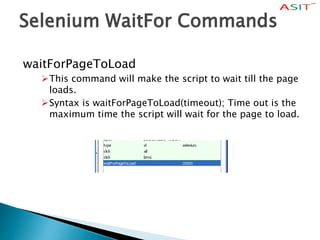
Selenium WaitFor Commands
waitForPageToLoad
This command will make the script to wait till the page
loads.
Syntax is waitForPageToLoad(timeout); Time out is the
maximum time the script will wait for the page to load.
Limitations of Selenium IDE
 Can run the test only on Firefox
 No Programming login (like loops, conditional
statements) can be applied
 Selenium IDE can execute scripts created in Selenese
only.
 It is difficult to use Selenium IDE for checking
complex test cases involving dynamic contents
Selenium RC
 A solution to cross browser testing.
 A server, written in Java and so available on all the
platforms.
 Acts as a proxy for web requests from them.
 Client libraries for many popular languages.
 Bundles Selenium Core and automatically loads into
the browser
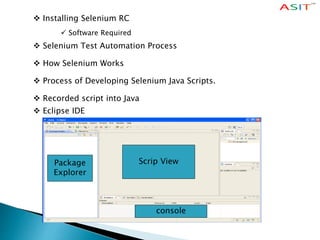
 Installing Selenium RC
 Software Required
 Selenium Test Automation Process
 How Selenium Works
 Process of Developing Selenium Java Scripts.
 Recorded script into Java
 Eclipse IDE
Scrip ViewPackage
Explorer
console
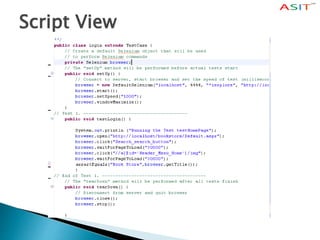
Script View
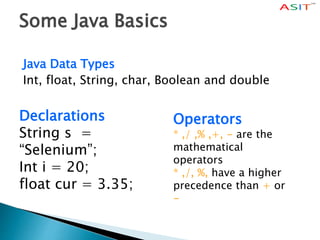
Some Java Basics
Java Data Types
Int, float, String, char, Boolean and double
Declarations
String s =
“Selenium”;
Int i = 20;
float cur = 3.35;
Operators
* ,/ ,% ,+, - are the
mathematical
operators
* ,/, %, have a higher
precedence than + or
-
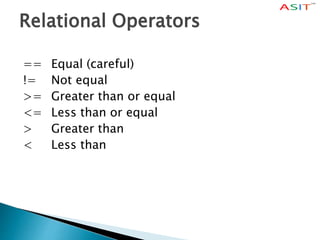
Relational Operators
== Equal (careful)
!= Not equal
>= Greater than or equal
<= Less than or equal
> Greater than
< Less than
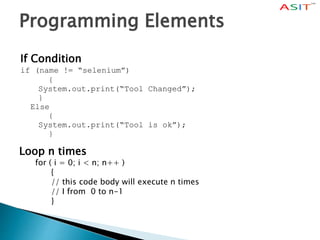
Programming Elements
If Condition
if (name != “selenium”)
{
System.out.print(“Tool Changed”);
}
Else
{
System.out.print(“Tool is ok”);
}
Loop n times
for ( i = 0; i < n; n++ )
{
// this code body will execute n times
// I from 0 to n-1
}
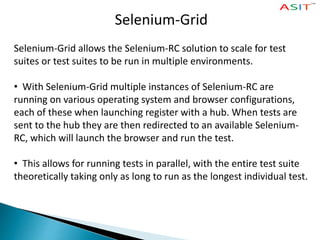
Selenium-Grid
Selenium-Grid allows the Selenium-RC solution to scale for test
suites or test suites to be run in multiple environments.
• With Selenium-Grid multiple instances of Selenium-RC are
running on various operating system and browser configurations,
each of these when launching register with a hub. When tests are
sent to the hub they are then redirected to an available Selenium-
RC, which will launch the browser and run the test.
• This allows for running tests in parallel, with the entire test suite
theoretically taking only as long to run as the longest individual test.
What's good?
 Relatively easy to automate web UI tests
 Record/Replay for regression tests
 RC allows integration with CI and JUnit/FitNesse tests
we provide online and classroom training for
Selenium
For More Details
www.asit.amcsquare.com
Wise Machines India Pvt Ltd
#360, Sri Sai Padma Arcade,
Varthur Main Road,
Ramagondanahalli,
Whitefiled ,Bangalore – 560066.
We also having Branches in Hyderabad & Chennai

Learn SELENIUM at ASIT

  • 2.
    Test Automation  Testautomation is the use of software To set test preconditions. To control the execution of tests.  To compare the actual outcomes to predicted outcomes. To report the Execution Status.  Commonly, test automation involves automating a manual process already in place that uses a formalized testing process.
  • 3.
    Test Automation Tools QuickTest Professional By HP Rational Functional Tester By Rational (IBM Company) Silk Test By Borland Test Complete By Automated QA QA Run (Compuware ) Watir ( Open Source) Selenium ( Open Source) Sahi (Open Source)
  • 4.
    Selenium  Selenium isa robust set of tools that supports rapid development of test automation for web-based applications.  Selenium provides a rich set of testing functions specifically geared to the needs of testing of a web application.  Selenium operations are highly flexible, allowing many options for locating UI elements and comparing expected test results against actual application behavior.
  • 5.
    Selenium Features  SupportsCross Browser Testing. The Selenium tests can be run on multiple browsers.  Allows scripting in several languages like Java, C#, PHP and Python.  Assertion statements provide an efficient way of comparing expected and actual results.  Inbuilt reporting mechanism.
  • 6.
    Selenium Components  SeleniumIDE  Selenium Remote Control  Selenium Grid
  • 7.
    Selenium IDE  SeleniumIDE is an integrated development environment for Selenium tests.  It is implemented as a Firefox extension, and allows you to record, edit, and replay the test in firefox  Selenium IDE allows you to save tests as HTML, Java, Ruby scripts, or any other format  It allows you to automatically add assertions to all the pages.  Allows you to add selenese commands as and when required
  • 8.
    Selenium IDE Installation Using Firefox, first, download the IDE from the SeleniumHQ downloads page When downloading from Firefox, you’ll be presented with the Window A. (See Next Slide)  Select Install Now. The Firefox Add-ons window pops up, first showing a progress bar, and when the download is complete, displays the Window B. (See Next Slide)  Restart Firefox. After Firefox reboots you will find the Selenium-IDE listed under the Firefox Tools menu. Selenium Installation Selenium IDE - UI Selenium Options Recoding a Selenium Test Case General Selenium Commands Selenium Script Running Creating a Test Suite Test Runner & Running options Verification Commands
  • 9.
    Selenium WaitFor Commands waitForPageToLoad Thiscommand will make the script to wait till the page loads. Syntax is waitForPageToLoad(timeout); Time out is the maximum time the script will wait for the page to load.
  • 10.
    Limitations of SeleniumIDE  Can run the test only on Firefox  No Programming login (like loops, conditional statements) can be applied  Selenium IDE can execute scripts created in Selenese only.  It is difficult to use Selenium IDE for checking complex test cases involving dynamic contents
  • 11.
    Selenium RC  Asolution to cross browser testing.  A server, written in Java and so available on all the platforms.  Acts as a proxy for web requests from them.  Client libraries for many popular languages.  Bundles Selenium Core and automatically loads into the browser
  • 12.
     Installing SeleniumRC  Software Required  Selenium Test Automation Process  How Selenium Works  Process of Developing Selenium Java Scripts.  Recorded script into Java  Eclipse IDE Scrip ViewPackage Explorer console
  • 13.
  • 14.
    Some Java Basics JavaData Types Int, float, String, char, Boolean and double Declarations String s = “Selenium”; Int i = 20; float cur = 3.35; Operators * ,/ ,% ,+, - are the mathematical operators * ,/, %, have a higher precedence than + or -
  • 15.
    Relational Operators == Equal(careful) != Not equal >= Greater than or equal <= Less than or equal > Greater than < Less than
  • 16.
    Programming Elements If Condition if(name != “selenium”) { System.out.print(“Tool Changed”); } Else { System.out.print(“Tool is ok”); } Loop n times for ( i = 0; i < n; n++ ) { // this code body will execute n times // I from 0 to n-1 }
  • 17.
    Selenium-Grid Selenium-Grid allows theSelenium-RC solution to scale for test suites or test suites to be run in multiple environments. • With Selenium-Grid multiple instances of Selenium-RC are running on various operating system and browser configurations, each of these when launching register with a hub. When tests are sent to the hub they are then redirected to an available Selenium- RC, which will launch the browser and run the test. • This allows for running tests in parallel, with the entire test suite theoretically taking only as long to run as the longest individual test.
  • 18.
    What's good?  Relativelyeasy to automate web UI tests  Record/Replay for regression tests  RC allows integration with CI and JUnit/FitNesse tests
  • 19.
    we provide onlineand classroom training for Selenium For More Details www.asit.amcsquare.com Wise Machines India Pvt Ltd #360, Sri Sai Padma Arcade, Varthur Main Road, Ramagondanahalli, Whitefiled ,Bangalore – 560066. We also having Branches in Hyderabad & Chennai