Selenium 3 vsSelenium 4:
A Deep Dive into Web
Automation Evolution
This presentation will compare Selenium 3 and 4, highlighting their
differences, improvements, and the impact of these changes on modern
test automation. We'll explore the advancements that make Selenium 4
a powerful tool for web testing.
2.
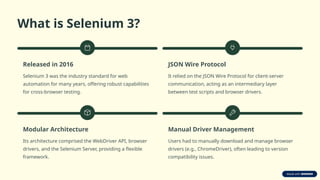
What is Selenium3?
Released in 2016
Selenium 3 was the industry standard for web
automation for many years, offering robust capabilities
for cross-browser testing.
JSON Wire Protocol
It relied on the JSON Wire Protocol for client-server
communication, acting as an intermediary layer
between test scripts and browser drivers.
Modular Architecture
Its architecture comprised the WebDriver API, browser
drivers, and the Selenium Server, providing a flexible
framework.
Manual Driver Management
Users had to manually download and manage browser
drivers (e.g., ChromeDriver), often leading to version
compatibility issues.
3.
What is Selenium4?
Released: Late 2020, with current stable version 4.33.0 (as of May
2025).
W3C WebDriver Standard: Fully adopts the W3C WebDriver
standard, enabling direct browser communication.
Unified API: Offers a cleaner, more structured Selenium API with
intuitive Options classes for various browsers.
Selenium Manager: Features a built-in Selenium Manager that
automates the setup and management of browser drivers.
4.
Architecture Comparison
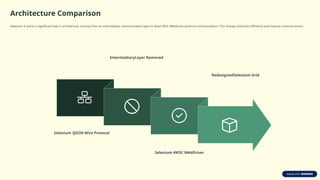
Selenium 4marks a significant leap in architecture, moving from an intermediary communication layer to direct W3C WebDriver protocol communication. This change enhances efficiency and reduces common errors.
Selenium 3JSON Wire Protocol
IntermediaryLayer Removed
Selenium 4W3C WebDriver
RedesignedSelenium Grid
5.
Key Improvements inSelenium 4
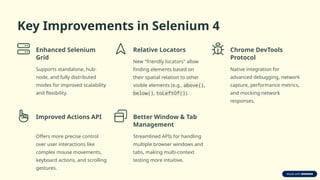
Enhanced Selenium
Grid
Supports standalone, hub-
node, and fully distributed
modes for improved scalability
and flexibility.
Relative Locators
New "friendly locators" allow
finding elements based on
their spatial relation to other
visible elements (e.g., above(),
below(), toLeftOf()).
Chrome DevTools
Protocol
Native integration for
advanced debugging, network
capture, performance metrics,
and mocking network
responses.
Improved Actions API
Offers more precise control
over user interactions like
complex mouse movements,
keyboard actions, and scrolling
gestures.
Better Window & Tab
Management
Streamlined APIs for handling
multiple browser windows and
tabs, making multi-context
testing more intuitive.
6.
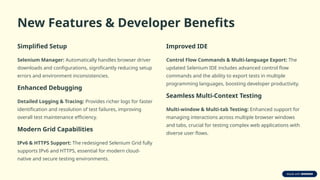
New Features &Developer Benefits
Simplified Setup
Selenium Manager: Automatically handles browser driver
downloads and configurations, significantly reducing setup
errors and environment inconsistencies.
Enhanced Debugging
Detailed Logging & Tracing: Provides richer logs for faster
identification and resolution of test failures, improving
overall test maintenance efficiency.
Modern Grid Capabilities
IPv6 & HTTPS Support: The redesigned Selenium Grid fully
supports IPv6 and HTTPS, essential for modern cloud-
native and secure testing environments.
Improved IDE
Control Flow Commands & Multi-language Export: The
updated Selenium IDE includes advanced control flow
commands and the ability to export tests in multiple
programming languages, boosting developer productivity.
Seamless Multi-Context Testing
Multi-window & Multi-tab Testing: Enhanced support for
managing interactions across multiple browser windows
and tabs, crucial for testing complex web applications with
diverse user flows.
7.
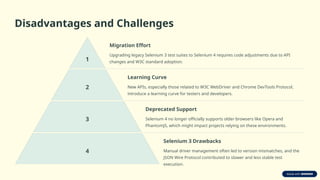
Disadvantages and Challenges
1
MigrationEffort
Upgrading legacy Selenium 3 test suites to Selenium 4 requires code adjustments due to API
changes and W3C standard adoption.
2
Learning Curve
New APIs, especially those related to W3C WebDriver and Chrome DevTools Protocol,
introduce a learning curve for testers and developers.
3
Deprecated Support
Selenium 4 no longer officially supports older browsers like Opera and
PhantomJS, which might impact projects relying on these environments.
4
Selenium 3 Drawbacks
Manual driver management often led to version mismatches, and the
JSON Wire Protocol contributed to slower and less stable test
execution.
8.
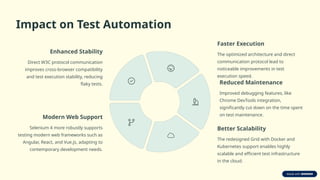
Impact on TestAutomation
Enhanced Stability
Direct W3C protocol communication
improves cross-browser compatibility
and test execution stability, reducing
flaky tests.
Faster Execution
The optimized architecture and direct
communication protocol lead to
noticeable improvements in test
execution speed.
Reduced Maintenance
Improved debugging features, like
Chrome DevTools integration,
significantly cut down on the time spent
on test maintenance.
Better Scalability
The redesigned Grid with Docker and
Kubernetes support enables highly
scalable and efficient test infrastructure
in the cloud.
Modern Web Support
Selenium 4 more robustly supports
testing modern web frameworks such as
Angular, React, and Vue.js, adapting to
contemporary development needs.
9.
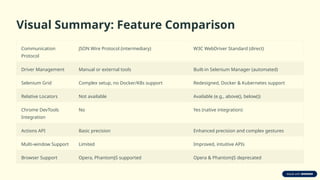
Visual Summary: FeatureComparison
Communication
Protocol
JSON Wire Protocol (intermediary) W3C WebDriver Standard (direct)
Driver Management Manual or external tools Built-in Selenium Manager (automated)
Selenium Grid Complex setup, no Docker/K8s support Redesigned, Docker & Kubernetes support
Relative Locators Not available Available (e.g., above(), below())
Chrome DevTools
Integration
No Yes (native integration)
Actions API Basic precision Enhanced precision and complex gestures
Multi-window Support Limited Improved, intuitive APIs
Browser Support Opera, PhantomJS supported Opera & PhantomJS deprecated
10.
Conclusion: Embracing theFuture of Automation
Selenium 4 represents a significant and necessary upgrade from Selenium 3, aligning web automation with modern web standards and development practices. Its improvements in
architecture, performance, and developer experience make it an indispensable tool for future-proofing test automation suites.
Enhanced Stability Boosted Performance
Developer Productivity
Future-proof Migration
• Selenium 4 offers enhanced stability, performance, and developer productivity.





![Selenium 4 with Simon Stewart [Webinar]](https://cdn.slidesharecdn.com/ss_thumbnails/selenium4browserstackwebinar-190702161824-thumbnail.jpg?width=640&height=640&fit=bounds)


