Implementing Effective
User Authentication
and Authorization in
Web Apps: A Simple
Guide
What is User Authentication?
Authentication is like the lock on
your front door.It’s the process of
verifying a person's identity
before allowing them access to
your app. The most common way
to do this is by asking for a
username and password. If the
username and password match
what you have on file, the person
is allowed in.
What is User Authorization?
Once someone is inside
your app, authorization
determines what they can
and can’t do. Think of it like
different levels of access in a
building. Some people can
only enter the lobby, while
others can go into every
room.
Why is it Important?
• It protects your app from
unauthorized access.
• It ensures that personal and
sensitive information is kept
secure.
Why is it Important?
• It controls who can view,
edit, or delete
information in your app.
• It helps prevent
accidental or malicious
changes to your data.
1.sername and Password:
⚬ This is the most common method.Users provide a password to confirm who they are.
⚬ Tip: Encourage users to create strong passwords that are hard to guess.
2.Multi-Factor Authentication (MFA):
⚬ It boosts security by adding a second step, such as a code sent to the user's phone
⚬ Benefit: Even if someone knows the password, they can’t log in without the second
factor.
3.Single Sign-On (SSO):
⚬ Allows users to log in using accounts from services like Google or Facebook.
⚬ Benefit: Users don’t have to remember multiple passwords, and it’s more secure for
you.
Common Ways to Authenticate Users
1.Role-Based Access Control (RBAC):
• Assigns different levels of access based on roles like "User," "Editor," or "Admin."
• Example: A "User" might only be able to view content, while an "Admin" can add or
delete content.
1.Permissions:
• You can set specific permissions for each role, controlling exactly what actions they can
perform.
How to Authorize Users
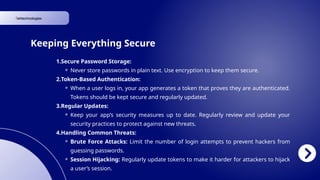
1.Secure Password Storage:
⚬ Never store passwords in plain text. Use encryption to keep them secure.
2.Token-Based Authentication:
⚬ When a user logs in, your app generates a token that proves they are authenticated.
Tokens should be kept secure and regularly updated.
3.Regular Updates:
⚬ Keep your app’s security measures up to date. Regularly review and update your
security practices to protect against new threats.
4.Handling Common Threats:
⚬ Brute Force Attacks: Limit the number of login attempts to prevent hackers from
guessing passwords.
⚬ Session Hijacking: Regularly update tokens to make it harder for attackers to hijack
a user’s session.
Keeping Everything Secure
Contact Us
www.ishtechnologies.com.au
8/300, Queens Street,
Brisbane, QLD - 4000
Phone Number
1300 474 832
Website
Address

Securing Your Web App: An Introduction to User Authentication and Authorization

  • 1.
    Implementing Effective User Authentication andAuthorization in Web Apps: A Simple Guide
  • 2.
    What is UserAuthentication? Authentication is like the lock on your front door.It’s the process of verifying a person's identity before allowing them access to your app. The most common way to do this is by asking for a username and password. If the username and password match what you have on file, the person is allowed in. What is User Authorization? Once someone is inside your app, authorization determines what they can and can’t do. Think of it like different levels of access in a building. Some people can only enter the lobby, while others can go into every room. Why is it Important? • It protects your app from unauthorized access. • It ensures that personal and sensitive information is kept secure. Why is it Important? • It controls who can view, edit, or delete information in your app. • It helps prevent accidental or malicious changes to your data.
  • 3.
    1.sername and Password: ⚬This is the most common method.Users provide a password to confirm who they are. ⚬ Tip: Encourage users to create strong passwords that are hard to guess. 2.Multi-Factor Authentication (MFA): ⚬ It boosts security by adding a second step, such as a code sent to the user's phone ⚬ Benefit: Even if someone knows the password, they can’t log in without the second factor. 3.Single Sign-On (SSO): ⚬ Allows users to log in using accounts from services like Google or Facebook. ⚬ Benefit: Users don’t have to remember multiple passwords, and it’s more secure for you. Common Ways to Authenticate Users
  • 4.
    1.Role-Based Access Control(RBAC): • Assigns different levels of access based on roles like "User," "Editor," or "Admin." • Example: A "User" might only be able to view content, while an "Admin" can add or delete content. 1.Permissions: • You can set specific permissions for each role, controlling exactly what actions they can perform. How to Authorize Users
  • 5.
    1.Secure Password Storage: ⚬Never store passwords in plain text. Use encryption to keep them secure. 2.Token-Based Authentication: ⚬ When a user logs in, your app generates a token that proves they are authenticated. Tokens should be kept secure and regularly updated. 3.Regular Updates: ⚬ Keep your app’s security measures up to date. Regularly review and update your security practices to protect against new threats. 4.Handling Common Threats: ⚬ Brute Force Attacks: Limit the number of login attempts to prevent hackers from guessing passwords. ⚬ Session Hijacking: Regularly update tokens to make it harder for attackers to hijack a user’s session. Keeping Everything Secure
  • 6.
    Contact Us www.ishtechnologies.com.au 8/300, QueensStreet, Brisbane, QLD - 4000 Phone Number 1300 474 832 Website Address