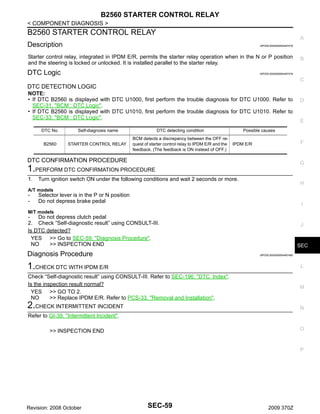
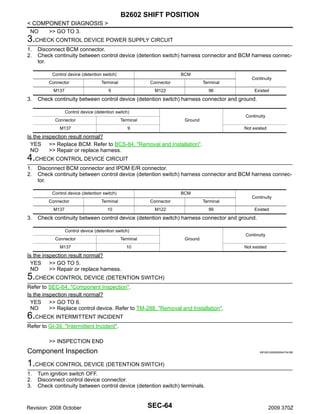
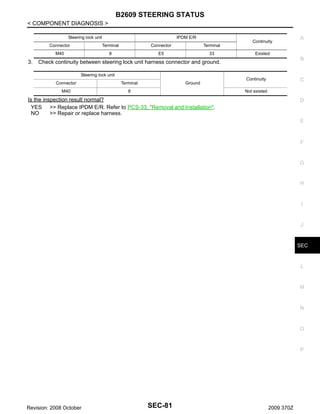
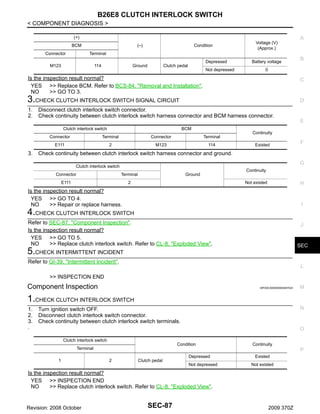
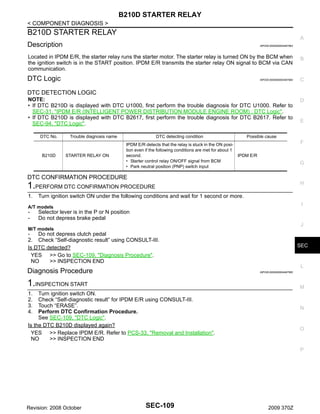
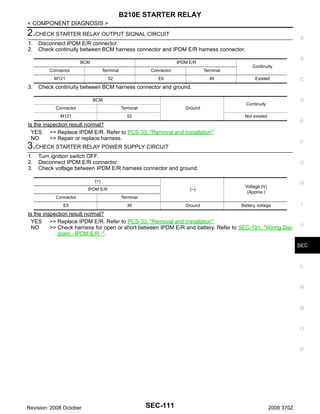
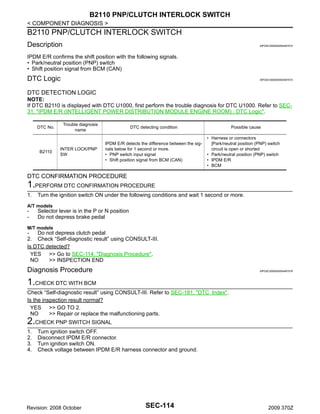
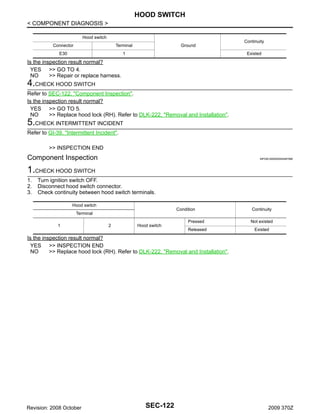
BODY EXTERIOR, DOORS, ROOF & VEHICLE SECURITY

SECTION

SEC

SECURITY CONTROL SYSTEM

A

B

C

D

E

CONTENTS
BASIC INSPECTION ................................... 5
.
DIAGNOSIS AND REPAIR WORK FLOW ........ 5
.
Work Flow ................................................................ 5
.

INSPECTION AND ADJUSTMENT .................... 8
.
ECM RECOMMUNICATING FUNCTION ................... 8
.
ECM RECOMMUNICATING FUNCTION : Description .................................................................... 8
.
ECM RECOMMUNICATING FUNCTION : Special
Repair Requirement ................................................. 8
.

FUNCTION DIAGNOSIS .............................. 9
.
INTELLIGENT KEY SYSTEM/ENGINE
START FUNCTION ............................................ 9
.
System Diagram ....................................................... 9
.
System Description .................................................. 9
.
Component Parts Location ..................................... 12
.
Component Description .......................................... 14
.

NISSAN VEHICLE IMMOBILIZER SYSTEMNATS .................................................................15
.
System Diagram ..................................................... 15
.
System Description ................................................ 15
.
Component Parts Location ..................................... 17
.
Component Description ......................................... 19
.

VEHICLE SECURITY SYSTEM ........................20
.

INTELLIGENT KEY : CONSULT-III Function
(BCM - INTELLIGENT KEY) ...................................25
.
THEFT ALM ..............................................................28
.
THEFT ALM : CONSULT-III Function (BCM THEFT) ...................................................................29
.
IMMU .........................................................................29
.
IMMU : CONSULT-III Function (BCM - IMMU) .......30
.

COMPONENT DIAGNOSIS ........................ 31
.

BCM ..........................................................................31
.
BCM : Description ...................................................31
.
BCM : DTC Logic ....................................................31
.
BCM : Diagnosis Procedure ...................................31
.

U1010 CONTROL UNIT (CAN) ......................... 33

DIAGNOSIS SYSTEM (BCM) ...........................24
.

P1610 LOCK MODE ......................................... 34

Revision: 2008 October

H

I

J

SEC
IPDM E/R (INTELLIGENT POWER DISTRIBUTION MODULE ENGINE ROOM) .............................31
.
IPDM E/R (INTELLIGENT POWER DISTRIBUTION MODULE ENGINE ROOM) : Description .....31
.
IPDM E/R (INTELLIGENT POWER DISTRIBUTION MODULE ENGINE ROOM) : DTC Logic ......31
.
IPDM E/R (INTELLIGENT POWER DISTRIBUTION MODULE ENGINE ROOM) : Diagnosis Procedure .....................................................................31
.

BCM ..........................................................................33
.
BCM : DTC Logic ....................................................33
.
BCM : Diagnosis Procedure ...................................33
.
BCM : Special Repair Requirement ........................33
.

INTELLIGENT KEY .................................................. 25
.

G

U1000 CAN COMM CIRCUIT ........................... 31

System Diagram ..................................................... 20
.
System Description ................................................ 20
.
Component Parts Location ..................................... 22
.
Component Description .......................................... 23
.

COMMON ITEM ........................................................ 24
.
COMMON ITEM : CONSULT-III Function (BCM COMMON ITEM) .................................................... 24
.

F

Description ..............................................................34
.
DTC Logic ...............................................................34
.
Diagnosis Procedure ..............................................34
.

P1611 ID DISCORD, IMMU-ECM ..................... 35
Description ..............................................................35
.

SEC-1

2009 370Z

L

M

N

O

P
DTC Logic .............................................................. 35
.
Diagnosis Procedure ............................................. 35
.

Diagnosis Procedure .............................................. 56
.
Component Inspection ........................................... 57
.

P1612 CHAIN OF ECM-IMMU .......................... 37
.

B2557 VEHICLE SPEED .................................. 58
.

Description ............................................................. 37
.
DTC Logic .............................................................. 37
.
Diagnosis Procedure ............................................. 37
.

Description ............................................................. 58
.
DTC Logic .............................................................. 58
.
Diagnosis Procedure .............................................. 58
.

P1614 CHAIN OF IMMU-KEY .......................... 38
.

B2560 STARTER CONTROL RELAY .............. 59
.

Description ............................................................. 38
.
DTC Logic .............................................................. 38
.
Diagnosis Procedure ............................................. 38
.

Description ............................................................. 59
.
DTC Logic .............................................................. 59
.
Diagnosis Procedure .............................................. 59
.

P1615 DIFFRENCE OF KEY ............................ 41
.

B2601 SHIFT POSITION .................................. 60
.

Description ............................................................. 41
.
DTC Logic .............................................................. 41
.
Diagnosis Procedure ............................................. 41
.

Description ............................................................. 60
.
DTC Logic .............................................................. 60
.
Diagnosis Procedure .............................................. 60
.
Component Inspection ........................................... 62
.

B2190 NATS ANTENNA AMP. ........................ 42
.
Description ............................................................. 42
.
DTC Logic .............................................................. 42
.
Diagnosis Procedure ............................................. 42
.

B2191 DIFFERENCE OF KEY ......................... 45
.
Description ............................................................. 45
.
DTC Logic .............................................................. 45
.
Diagnosis Procedure ............................................. 45
.

B2192 ID DISCORD, IMMU-ECM ..................... 46
.
Description ............................................................. 46
.
DTC Logic .............................................................. 46
.
Diagnosis Procedure ............................................. 46
.

B2193 CHAIN OF ECM-IMMU .......................... 48
.
Description ............................................................. 48
.
DTC Logic .............................................................. 48
.
Diagnosis Procedure ............................................. 48
.

B2195 ANTI-SCANNING .................................. 49
.
Description ............................................................. 49
.
DTC Logic .............................................................. 49
.
Diagnosis Procedure ............................................. 49
.

B2013 ID DISCORD, IMMU-STRG ................... 50
.
Description ............................................................. 50
.
DTC Logic .............................................................. 50
.
Diagnosis Procedure ............................................. 50
.

B2014 CHAIN OF STRG-IMMU ........................ 51
.
Description ............................................................. 51
.
DTC Logic .............................................................. 51
.
Diagnosis Procedure ............................................. 51
.

B2555 STOP LAMP .......................................... 54
.
Description ............................................................. 54
.
DTC Logic .............................................................. 54
.
Diagnosis Procedure ............................................. 54
.
Component Inspection ........................................... 55
.

B2556 PUSH-BUTTON IGNITION SWITCH .... 56
.
Description ............................................................. 56
.
DTC Logic .............................................................. 56
.

Revision: 2008 October

B2602 SHIFT POSITION .................................. 63
.
Description ............................................................. 63
.
DTC Logic .............................................................. 63
.
Diagnosis Procedure .............................................. 63
.
Component Inspection ........................................... 64
.

B2603 SHIFT POSITION STATUS ................... 66
.
Description ............................................................. 66
.
DTC Logic .............................................................. 66
.
Diagnosis Procedure .............................................. 66
.

B2604 PNP SWITCH ........................................ 69
.
Description ............................................................. 69
.
DTC Logic .............................................................. 69
.
Diagnosis Procedure .............................................. 69
.

B2605 PNP SWITCH ........................................ 71
.
Description ............................................................. 71
.
DTC Logic .............................................................. 71
.
Diagnosis Procedure .............................................. 71
.

B2606 STEERING LOCK RELAY .................... 73
.
Description ............................................................. 73
.
DTC Logic .............................................................. 73
.
Diagnosis Procedure .............................................. 73
.

B2607 STEERING LOCK RELAY .................... 74
.
Description ............................................................. 74
.
DTC Logic .............................................................. 74
.
Diagnosis Procedure .............................................. 74
.

B2608 STARTER RELAY ................................ 76
.
Description ............................................................. 76
.
DTC Logic .............................................................. 76
.
Diagnosis Procedure .............................................. 76
.

B2609 STEERING STATUS ............................. 78
.
Description ............................................................. 78
.
DTC Logic .............................................................. 78
.
Diagnosis Procedure .............................................. 78
.

B260B STEERING LOCK UNIT ....................... 82
.
Description ............................................................. 82
.

SEC-2

2009 370Z
DTC Logic .............................................................. 82
.
Diagnosis Procedure .............................................. 82
.

DTC Logic ............................................................. 100
.
Diagnosis Procedure ............................................ 100
.

B260C STEERING LOCK UNIT ........................83
.

B2109 STEERING LOCK RELAY .................. 102

Description ............................................................. 83
.
DTC Logic .............................................................. 83
.
Diagnosis Procedure .............................................. 83
.

Description ............................................................ 102
.
DTC Logic ............................................................. 102
.
Diagnosis Procedure ............................................ 102
.

B

B260D STEERING LOCK UNIT ........................84
.

B210A STEERING LOCK CONDITION
SWITCH ........................................................... 103

C

Description ............................................................ 103
.
DTC Logic ............................................................. 103
.
Diagnosis Procedure ............................................ 103
.

D

Description ............................................................. 84
.
DTC Logic .............................................................. 84
.
Diagnosis Procedure .............................................. 84
.

B260F ENGINE STATUS ..................................85
.
Description ............................................................. 85
.
DTC Logic .............................................................. 85
.
Diagnosis Procedure .............................................. 85
.

A

B210B STARTER CONTROL RELAY ............ 107
Description ............................................................ 107
.
DTC Logic ............................................................. 107
.
Diagnosis Procedure ............................................ 107
.

E

Description ............................................................. 86
.
DTC Logic .............................................................. 86
.
Diagnosis Procedure .............................................. 86
.
Component Inspection ........................................... 87
.

B210C STARTER CONTROL RELAY ............ 108

F

B26E9 STEERING STATUS .............................88
.

B210D STARTER RELAY .............................. 109

Description ............................................................. 88
.
DTC Logic .............................................................. 88
.
Diagnosis Procedure .............................................. 88
.

Description ............................................................ 109
.
DTC Logic ............................................................. 109
.
Diagnosis Procedure ............................................ 109
.

H

B26EA KEY REGISTRATION ...........................89
.

B210E STARTER RELAY ............................... 110

I

Description ............................................................. 89
.
DTC Logic .............................................................. 89
.
Diagnosis Procedure .............................................. 89
.

Description ............................................................ 110
.
DTC Logic ............................................................. 110
.
Diagnosis Procedure ............................................ 110
.

J

B2612 STEERING STATUS ..............................90
.

B210F PNP/CLUTCH INTERLOCK SWITCH . 112

Description ............................................................. 90
.
DTC Logic .............................................................. 90
.
Diagnosis Procedure .............................................. 90
.

Description ............................................................ 112
.
DTC Logic ............................................................. 112
.
Diagnosis Procedure ............................................ 112
.

B2617 STARTER RELAY CIRCUIT ..................94
.

B2110 PNP/CLUTCH INTERLOCK SWITCH . 114

Description ............................................................. 94
.
DTC Logic .............................................................. 94
.
Diagnosis Procedure .............................................. 94
.

Description ............................................................ 114
.
DTC Logic ............................................................. 114
.
Diagnosis Procedure ............................................ 114
.

B2619 BCM .......................................................96
.

POWER SUPPLY AND GROUND CIRCUIT .. 116

Description ............................................................. 96
.
DTC Logic .............................................................. 96
.
Diagnosis Procedure .............................................. 96
.

BCM ........................................................................ 116
.
BCM : Diagnosis Procedure ................................. 116
.

B26E8 CLUTCH INTERLOCK SWITCH ...........86
.

B261E VEHICLE TYPE .....................................97
.
Description ............................................................. 97
.
DTC Logic .............................................................. 97
.
Diagnosis Procedure .............................................. 97
.

B261F ASCD CLUTCH SWITCH ......................98
.
Description ............................................................. 98
.
DTC Logic .............................................................. 98
.
Diagnosis Procedure .............................................. 98
.
Component Inspection ........................................... 99
.

B2108 STEERING LOCK RELAY ................... 100
.
Description ........................................................... 100
.

Revision: 2008 October

Description ............................................................ 108
.
DTC Logic ............................................................. 108
.
Diagnosis Procedure ............................................ 108
.

IPDM E/R (INTELLIGENT POWER DISTRIBUTION MODULE ENGINE ROOM) ........................... 116
.
IPDM E/R (INTELLIGENT POWER DISTRIBUTION MODULE ENGINE ROOM) : Diagnosis Procedure ................................................................... 116
.

KEY SLOT ....................................................... 118
Description ............................................................ 118
.
Component Function Check ............................... 118
.
Diagnosis Procedure ............................................ 118
.

KEY SLOT INDICATOR .................................. 119
Description ............................................................ 119
.

SEC-3

2009 370Z

G

SEC

L

M

N

O

P
Component Function Check ...............................119
.
Diagnosis Procedure ............................................119
.

HOOD SWITCH .............................................. 121
.

Diagnosis Procedure ............................................ 197
.

STEERING DOES NOT LOCK ........................ 198
.
Description ........................................................... 198
.
Diagnosis Procedure ............................................ 198
.

Description ............................................................121
.
Component Function Check ...............................121
.
Diagnosis Procedure ...........................................121
.
Component Inspection ..........................................122
.

SECURITY INDICATOR LAMP DOES NOT
TURN ON OR BLINK ...................................... 199
.

SECURITY INDICATOR LAMP ...................... 123
.

Description ........................................................... 199
.
Diagnosis Procedure ............................................ 199
.

Description ............................................................123
.
Component Function Check ...............................123
.
Diagnosis Procedure ............................................123
.

VEHICLE SECURITY SYSTEM CANNOT BE
SET .................................................................. 200
.

KEY WARNING LAMP ................................... 125
.
Description ............................................................125
.
Component Function Check ...............................125
.
Diagnosis Procedure ............................................125
.

INTELLIGENT KEY SYSTEM/ENGINE
START FUNCTION ......................................... 126
.
Wiring Diagram - INTELLIGENT KEY SYSTEM/
ENGINE START FUNCTION - .............................126
.

NISSAN VEHICLE IMMOBILIZER SYSTEMNATS ............................................................... 135
.
Wiring Diagram - NISSAN VEHICLE IMMOBILIZER SYSTEM - .......................................................135
.

VEHICLE SECURITY SYSTEM ...................... 143
.

INTELLIGENT KEY ................................................ 200
.
INTELLIGENT KEY : Description ......................... 200
.
INTELLIGENT KEY : Diagnosis Procedure ......... 200
.
DOOR REQUEST SWITCH .................................... 200
.
DOOR REQUEST SWITCH : Description ............ 200
.
DOOR REQUEST SWITCH : Diagnosis Procedure ...................................................................... 200
.

VEHICLE SECURITY ALARM DOES NOT
ACTIVATE ....................................................... 202
.
Description ........................................................... 202
.
Diagnosis Procedure ............................................ 202
.

INTELLIGENT KEY INSERT INFORMATION
DOES NOT OPERATE .................................... 203
.

Wiring Diagram - VEHICLE SECURITY SYSTEM
- ............................................................................143
.

Description ........................................................... 203
.
Diagnosis Procedure ............................................ 203
.

ECU DIAGNOSIS ...................................... 149
.

PRECAUTION ........................................... 205

BCM (BODY CONTROL MODULE) ............... 149
.

PRECAUTIONS ............................................... 205
.

Reference Value ...................................................149
.
Wiring Diagram - BCM - .......................................172
.
Fail-safe ................................................................177
.
DTC Inspection Priority Chart ............................180
.
DTC Index ............................................................181
.

IPDM E/R (INTELLIGENT POWER DISTRIBUTION MODULE ENGINE ROOM) .............. 184
.
Reference Value ...................................................184
.
Wiring Diagram - IPDM E/R - ................................191
.
Fail-safe ................................................................194
.
DTC Index ............................................................196
.

SYMPTOM DIAGNOSIS ........................... 197
.
ENGINE DOES NOT START WHEN INTELLIGENT KEY IS INSIDE OF VEHICLE .............. 197
.

Precaution for Supplemental Restraint System
(SRS) "AIR BAG" and "SEAT BELT PRE-TENSIONER" .............................................................. 205
.
Precaution Necessary for Steering Wheel Rotation after Battery Disconnect ................................ 205
.
Precautions For Xenon Headlamp Service .......... 206
.
Precaution for Procedure without Cowl Top Cover. 206

ON-VEHICLE REPAIR .............................. 207
KEY SLOT ....................................................... 207
.
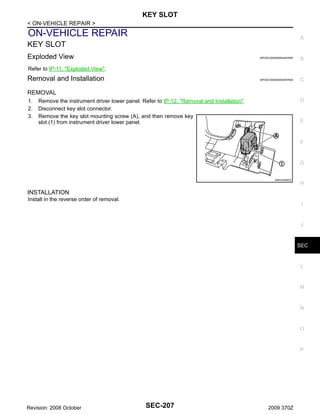
Exploded View ..................................................... 207
.
Removal and Installation ...................................... 207
.

PUSH BUTTON IGNITION SWITCH ............... 208
.
Exploded View ..................................................... 208
.
Removal and Installation ...................................... 208
.

Description ............................................................197
.

Revision: 2008 October

SEC-4

2009 370Z
DIAGNOSIS AND REPAIR WORK FLOW
< BASIC INSPECTION >

BASIC INSPECTION

A

DIAGNOSIS AND REPAIR WORK FLOW
Work Flow

INFOID:0000000004497405

B

OVERALL SEQUENCE
C

D

E

F

G

H

I

J

SEC

L

M

N

O

P

JMKIA3449GB

DETAILED FLOW
Revision: 2008 October

SEC-5

2009 370Z
DIAGNOSIS AND REPAIR WORK FLOW
< BASIC INSPECTION >

1.GET INFORMATION ABOUT SYMPTOM
Get detailed information from the customer about the symptom (the condition and the environment when the
incident/malfunction occurrs).
>> GO TO 2.

2.CHECK DTC
1. Check BCM and IPDM E/R for DTC.
2. Perform the following procedure if DTC is detected.
Record DTC and freeze frame data (Print them out using CONSULT-III.)
Erase DTC.
Study the relationship between the cause detected by DTC and the symptom described by the customer.
3. Check related service bulletins for information.
Are any symptoms described and any DTC detected?
Symptom is described, DTC is detected>>GO TO 3.
Symptom is described, DTC is not detected>>GO TO 4.
Symptom is not described, DTC is detected>>GO TO 5.

3.CONFIRM THE SYMPTOM
Confirm the symptom described by the customer.
Connect CONSULT-III to the vehicle in the “DATA MONITOR” mode and check real time diagnosis results.
Verify relation between the symptom and the condition when the symptom is detected.
>> GO TO 5.

4.CONFIRM THE SYMPTOM
Confirm the symptom described by the customer.
Connect CONSULT-III to the vehicle in the “DATA MONITOR ” mode and check real time diagnosis results.
Verify relation between the symptom and the condition when the symptom is detected.
>> GO TO 6.

5.PERFORM DTC CONFIRMATION PROCEDURE
Perform DTC Confirmation Procedure for the detected DTC, and then check that DTC is detected again.
At this time, always connect CONSULT-III to the vehicle, and check diagnostic results in real time.
If two or more DTCs are detected, refer to SEC-180, "DTC Inspection Priority Chart" (BCM) or SEC-196,
"DTC Index" (IPDM E/R), and determine trouble diagnosis order.
Is DTC detected?
YES >> GO TO 7.
NO
>> Refer to GI-39, "Intermittent Incident".

6.DETECT MALFUNCTIONING SYSTEM BY SYMPTOM DIAGNOSIS
Detect malfunctioning system according to SYMPTOM DIAGNOSIS based on the confirmed symptom in step
4, and determine the trouble diagnosis order based on possible causes and symptom.
>> GO TO 7.

7.DETECT MALFUNCTIONING PART BY DIAGNOSTIC PROCEDURE
Inspect according to Diagnostic Procedure of the system.
NOTE:
The Diagnostic Procedure is described based on open and short circuit inspection.
Is malfunctioning part detected?
YES >> GO TO 8.
NO
>> Check voltage of related BCM terminals using CONSULT-III.

8.REPAIR OR REPLACE THE MALFUNCTIONING PART
1.

Repair or replace the malfunctioning part.

Revision: 2008 October

SEC-6

2009 370Z
DIAGNOSIS AND REPAIR WORK FLOW
< BASIC INSPECTION >
2. Reconnect parts or connectors disconnected during Diagnostic Procedure again after repair and replacement.
3. Check DTC. If DTC is detected, erase it.
>> GO TO 9.

A

B

9.FINAL CHECK
When DTC is detected in step 2, perform DTC Confirmation Procedure or Component Function Check again,
and then check that the malfunction is repaired securely.
When symptom is described by the customer, refer to confirmed symptom in step 3 or 4, and check that the
symptom is not detected.
Does the symptom reappear?
YES (DTC is detected)>>GO TO 7.
YES (Symptom remains)>>GO TO 6.
NO
>> INSPECTION END

C

D

E

F

G

H

I

J

SEC

L

M

N

O

P

Revision: 2008 October

SEC-7

2009 370Z
INSPECTION AND ADJUSTMENT
< BASIC INSPECTION >

INSPECTION AND ADJUSTMENT
ECM RECOMMUNICATING FUNCTION
ECM RECOMMUNICATING FUNCTION : Description

INFOID:0000000004497406

Performing the following procedure can automatically activate recommunication of ECM and BCM, but only
when the ECM is replaced with a new one*.
*: New one means a virgin ECM that is never energized on-board.
(In this step, initialization procedure by CONSULT-III is not necessary)
NOTE:
• When registering new Key IDs or replacing the ECM that is not brand new, refer to CONSULT-III Operation Manual NATS-IVIS/NVIS.
• If multiple keys are attached to the key holder, separate them before beginning work.
• Distinguish keys with unregistered key IDs from those with registered IDs.

ECM RECOMMUNICATING FUNCTION : Special Repair Requirement

INFOID:0000000004497407

1.PERFORM ECM RECOMMUNICATING FUNCTION
1.
2.

Install ECM.
Insert the registered Intelligent Key* into key slot, turn ignition switch to “ON”.
*: To perform this step, use the key that is used before performing ECM replacement.
3. Maintain ignition switch in the “ON” position for 5 seconds or more.
4. Turn ignition switch to “OFF”.
5. Start engine.
Can engine be started?
YES >> Procedure is complete.
NO
>> Initialize control unit. Refer to CONSULT-III Operation Manual NATS-IVIS/NVIS.

Revision: 2008 October

SEC-8

2009 370Z
INTELLIGENT KEY SYSTEM/ENGINE START FUNCTION
< FUNCTION DIAGNOSIS >

FUNCTION DIAGNOSIS

A

INTELLIGENT KEY SYSTEM/ENGINE START FUNCTION
System Diagram

INFOID:0000000004497408

B

C

D

E

F

G

H

I

J

SEC

L
JMKIA3450GB

System Description

INFOID:0000000004497409

M

SYSTEM DESCRIPTION
• The engine start function of Intelligent Key system is a system that makes it possible to start and stop the
engine without removing the key. It verifies an electronic ID using two-way communication when pressing
the push-button ignition switch while carrying the Intelligent Key, which operates based on the results of
electronic ID verification of Intelligent Key using two-way communication between the Intelligent Key and the
vehicle.
NOTE:
The driver should carry the Intelligent Key at all times.
• Intelligent Key has 2 IDs [Intelligent Key and NVIS (NATS)]. It can perform the door lock/unlock operation
and the push-button ignition switch operation when the registered Intelligent Key is carried.
• When the Intelligent Key battery is discharged, it can be used as emergency back-up by inserting the Intelligent Key to the key slot. At that time, perform the NVIS (NATS) ID verification. If it is used when the Intelligent Key is carried, perform the Intelligent Key ID verification.
• If the ID is successfully verified, when push-button ignition switch is pressed, steering lock is released and
the engine can be started.
Revision: 2008 October

SEC-9

2009 370Z

N

O

P
INTELLIGENT KEY SYSTEM/ENGINE START FUNCTION
< FUNCTION DIAGNOSIS >
• Up to 4 Intelligent Keys can be registered (Including the standard Intelligent Key) upon request from the customer.
NOTE:
Refer to DLK-15, "INTELLIGENT KEY SYSTEM : System Description" for any functions other than engine
start function of Intelligent Key system.

PRECAUTIONS FOR INTELLIGENT KEY SYSTEM
In the Intelligent Key system, the transponder [the chip for NVIS (NATS) ID verification] is integrated
into the Intelligent Key. (For the conventional models, it is integrated into the mechanical key.) Therefore, the mechanical key cannot perform ID verification, and thus it cannot start the engine. Instead,
NVIS (NATS) ID verification can be performed by inserting the Intelligent Key to the key slot, and then
it can start the engine.

OPERATION WHEN INTELLIGENT KEY IS CARRIED
1.

When the push-button ignition switch is pressed, the BCM activates the inside key antenna and transmits
the request signal to the Intelligent Key.
2. The Intelligent Key receives the request signal and transmits the Intelligent Key ID signal to the BCM via
the remote keyless entry receiver.
3. The Intelligent Key receives the Intelligent Key ID signal and verifies it with the registered ID.
4. BCM transmits the steering lock unlock signal to steering lock unit and IPDM E/R if the verification results
are OK.
5. IPDM E/R turns the steering lock relay ON and supplies power supply to the steering lock unit.
6. The steering lock releases.
7. BCM transmits the power supply stop signal to IPDM E/R when detecting that the steering lock is in the
unlock condition.
8. IPDM E/R turns the steering lock relay OFF and stops power supply to the steering lock unit.
9. BCM turns ACC relay ON and transmits the ignition power supply ON signal to IPDM E/R.
10. IPDM E/R turns the ignition relay ON and starts the ignition power supply.
11. BCM detects that the selector lever position and brake pedal operating condition (A/T models), or shift
lever position and clutch pedal operation condition (M/T models).
12. BCM transmits the starter request signal via CAN communication to IPDM E/R and turns the starter relay
in IPDM E/R ON if BCM judges that the engine start condition is satisfied.
13. IPDM E/R turns the starter control relay ON when receiving the starter request signal.
14. Power supply is supplied through the starter relay and the starter control relay to operate the starter motor
and start cranking.
CAUTION:
If a malfunction is detected in the Intelligent Key system, the “KEY” warning lamp in the combination meter illuminates. At that time, the engine cannot be started.
15. When BCM receives feedback signal from ECM indicating that the engine is started, the BCM transmits a
stop signal to IPDM E/R and stops cranking by turning OFF the starter motor relay. (If engine start is
unsuccessful, cranking stops automatically within 5 seconds.)
CAUTION:
When the Intelligent Key is carried outside of the vehicle (inside key antenna detection area) while
the power supply is in the ACC or ON position, even if the engine start condition* is satisfied, the
engine cannot be started.
*: For the engine start condition, refer to “PUSH-BUTTON IGNITION SWITCH OPERATION PROCEDURE”.

OPERATION RANGE
Engine can be started when Intelligent Key is inside the vehicle. However, sometimes engine may not start
when Intelligent Key is on instrument panel or in glove box.

OPERATION WHEN KEY SLOT IS USED
When the Intelligent Key battery is discharged, it performs NVIS (NATS) ID verification between the integrated
transponder and BCM by inserting the Intelligent Key into the key slot, and then the engine can be started.
For details relating to starting the engine using key slot, refer to SEC-15, "System Description".

BATTERY SAVER SYSTEM
When all the following conditions are met for 60 minutes, the battery saver system cuts off the power supply to
prevent battery discharge.
Revision: 2008 October

SEC-10

2009 370Z
INTELLIGENT KEY SYSTEM/ENGINE START FUNCTION
< FUNCTION DIAGNOSIS >
• The ignition switch is in the ACC position
• All doors are closed
• Selector lever is in the P position

A

Reset Condition of Battery Saver System
A/T models
In order to prevent the battery from discharging, the battery saver system cuts off the power supply when all
doors are closed, the selector lever is in the P position, and the ignition switch is left in the ACC position for 60
minutes. If any of the following conditions are met the battery saver system is released and the steering
changes automatically to the lock position from the OFF position.
• Opening any door
• Operating door lock using door request switch
• Operating door lock using Intelligent Key
Press push-button ignition switch and ignition switch changes to the ACC position from the OFF position.
M/T models
If any of the above conditions are met, the battery saver system is released but the steering is not locked.
In this case, the steering operation OFF to LOCK is prohibited.

B

C

D

E

STEERING LOCK OPERATION
Steering is locked by steering lock unit when ignition switch is in the OFF position, selector lever is in the P
position, and any of the following conditions are met.
• Opening door
• Closing door
• Door is locked using door request switch
• Door is locked using Intelligent Key

POWER SUPPLY POSITION CHANGE TABLE BY PUSH-BUTTON IGNITION SWITCH OPERATION

F

G

H

The power supply position changing operation can be performed with the following operations.
NOTE:
I
• When an Intelligent Key is within the detection area of inside key antenna and when it is inserted to the key
slot, it is equivalent to the operations below.
• When starting the engine, the BCM monitors under the engine start conditions,
A/T models
J
- Brake pedal operating condition
- Selector lever position
- Vehicle speed
SEC
M/T models
- Clutch pedal operating condition
- Vehicle speed
L
Vehicle speed: less than 4 km/h (2.5 MPH)
Engine start/stop condition
A/T models

Power supply position

M/T models

Push-button ignition
switch operation frequency

Selector lever

Brake pedal operation
condition

Clutch pedal operation
condition

LOCK → ACC

—

Not depressed

Not depressed

1

LOCK → ACC → ON

—

Not depressed

Not depressed

2

LOCK → ACC → ON →
OFF

—

Not depressed

Not depressed

3

P or N position

Depressed

Depressed

1

—

—

—

1

M

LOCK → START
ACC → START
ON → START
Engine is running → OFF

N

O

P

Vehicle speed: 4 km/h (2.5 MPH) or more

Revision: 2008 October

SEC-11

2009 370Z
INTELLIGENT KEY SYSTEM/ENGINE START FUNCTION
< FUNCTION DIAGNOSIS >
Engine start/stop condition
A/T models

Power supply position

M/T models

Push-button ignition
switch operation frequency

Selector lever

Brake pedal operation
condition

Clutch pedal operation
condition

—

—

—

Emergency stop operation

N position

Not depressed

Depressed

1

Engine is running → ACC
Engine stall return operation
while driving
Emergency stop operation

• Press and hold the push-button ignition switch for 2 seconds or more.
• Press the push-button ignition switch 3 times or more within 1.5 seconds.

Component Parts Location

INFOID:0000000004497410

JMKIA3453ZZ

Revision: 2008 October

SEC-12

2009 370Z
INTELLIGENT KEY SYSTEM/ENGINE START FUNCTION
< FUNCTION DIAGNOSIS >
1.

Combination meter M53, M54

2.

Push-button ignition switch M50

3.

Remote keyless entry receiver M104
Refer to DLK-16, "INTELLIGENT
KEY SYSTEM :
Component Parts Location".

A

4.

BCM M118, M119, M121, M122,
M123
Refer to BCS-8, "Component Parts
Location".

5.

IPDM E/R E5, E6, E7, E9
Refer to PCS-5, "Component Parts
Location".

6.

Hood switch

B

7.

Horn (low) E69, E70

8.

Clutch interlock switch E111
(for M/T models)

9.

Stop lamp switch E110

10. ABS actuator and electric unit (con- 11. Key slot M22
trol unit) E41
Refer to BRC-11, "Component Parts
Location".
A.

Built in hood lock RH

B.

C

12. Driver side door switch B16

D

View with instrument driver lower
cover removed

E

F

G

H

I

J

SEC

L

M

N

O

JMKIA3454ZZ

1.

Inside key antenna (console) M257

2.

Inside key antenna (luggage room)
B222

3.

Back door switch B66

4.

TCM F301

5.

ECM M107

6.

Control device (detention switch)
M137

A.

Built in control device

Revision: 2008 October

SEC-13

2009 370Z

P
INTELLIGENT KEY SYSTEM/ENGINE START FUNCTION
< FUNCTION DIAGNOSIS >

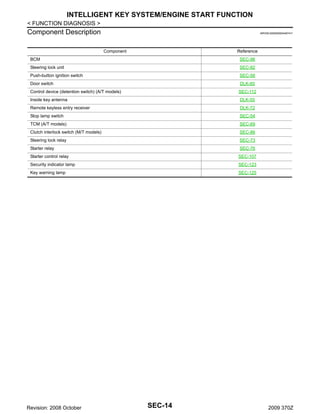
Component Description

INFOID:0000000004497411

Component

Reference

BCM

SEC-96

Steering lock unit

SEC-82

Push-button ignition switch

SEC-56

Door switch

DLK-60

Control device (detention switch) (A/T models)

SEC-112

Inside key antenna

DLK-55

Remote keyless entry receiver

DLK-72

Stop lamp switch

SEC-54

TCM (A/T models)

SEC-69

Clutch interlock switch (M/T models)

SEC-86

Steering lock relay

SEC-73

Starter relay

SEC-76

Starter control relay

SEC-107

Security indicator lamp

SEC-123

Key warning lamp

SEC-125

Revision: 2008 October

SEC-14

2009 370Z
NISSAN VEHICLE IMMOBILIZER SYSTEM-NATS
< FUNCTION DIAGNOSIS >

NISSAN VEHICLE IMMOBILIZER SYSTEM-NATS
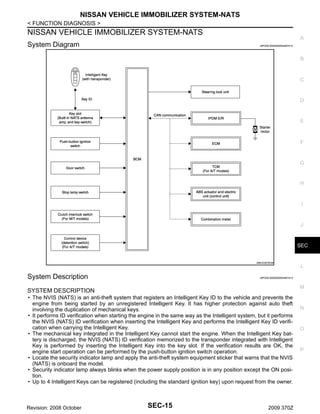
System Diagram

A
INFOID:0000000004497412

B

C

D

E

F

G

H

I

J

SEC

JMKIA3678GB

System Description

INFOID:0000000004497413

M

SYSTEM DESCRIPTION
• The NVIS (NATS) is an anti-theft system that registers an Intelligent Key ID to the vehicle and prevents the
engine from being started by an unregistered Intelligent Key. It has higher protection against auto theft
involving the duplication of mechanical keys.
• It performs ID verification when starting the engine in the same way as the Intelligent system, but it performs
the NVIS (NATS) ID verification when inserting the Intelligent Key and performs the Intelligent Key ID verification when carrying the Intelligent Key.
• The mechanical key integrated in the Intelligent Key cannot start the engine. When the Intelligent Key battery is discharged, the NVIS (NATS) ID verification memorized to the transponder integrated with Intelligent
Key is performed by inserting the Intelligent Key into the key slot. If the verification results are OK, the
engine start operation can be performed by the push-button ignition switch operation.
• Locate the security indicator lamp and apply the anti-theft system equipment sticker that warns that the NVIS
(NATS) is onboard the model.
• Security indicator lamp always blinks when the power supply position is in any position except the ON position.
• Up to 4 Intelligent Keys can be registered (including the standard ignition key) upon request from the owner.

Revision: 2008 October

L

SEC-15

2009 370Z

N

O

P
NISSAN VEHICLE IMMOBILIZER SYSTEM-NATS
< FUNCTION DIAGNOSIS >
• Specified registration is required when replacing ECM, BCM, or Intelligent Key. For the registrations procedures for NVIS (NATS) and Intelligent Key when installing the BCM, refer to CONSULT-III Operation Manual
NATS-IVIS/NVIS.
• Possible symptom of NVIS (NATS) malfunction is “Engine cannot start”. The engine can be started with the
Intelligent Key system and NVIS (NATS). Identify the possible causes according to “Work Flow”. Refer to
SEC-5, "Work Flow".
• If ECM other than genuine part is installed, the engine cannot be started. For ECM replacement procedure,
refer to EC-16, "ADDITIONAL SERVICE WHEN REPLACING CONTROL UNIT (ECM) : Special Repair
Requirement".

PRECAUTIONS FOR KEY REGISTRATION
• The key registration is a procedure that erases the current NVIS (NATS) ID once, and then reregisters a new
ID operation. Therefore a registered Intelligent Key is necessary for this procedure. Before starting the registration operation collect all registered Intelligent Keys from the customer.
• When registering the Intelligent Key, perform only one procedure to simultaneously register both ID (NVIS
“NATS” ID and Intelligent Key ID).
The NVIS (NATS) ID registration is the procedure that registers the ID stored into the transponder (integrated in Intelligent Key) to BCM.
The Intelligent key ID registration is the procedure that registers the ID to BCM.
• When performing the Intelligent Key system registration only, the engine cannot be started by inserting the
key into the key slot. When performing the NVIS (NATS) registration only, the engine cannot be started by
the operation when carrying the key. The registrations of both systems should be performed.

SECURITY INDICATOR LAMP
• Warns that the vehicle is equipped with NVIS (NATS).
• Security indicator lamp always blinks when the ignition switch is in any position except the ON position.
NOTE:
Because security indicator lamp is highly efficient, the battery is barely affected.

POWER SUPPLY POSITION CHANGE TABLE BY PUSH-BUTTON IGNITION SWITCH OPERATION
The power supply position changing operation can be performed with the following operations.
NOTE:
• When an Intelligent Key is within the detection area of inside key antenna and when it is inserted to the key
slot, it is equivalent to the operations below.
• When starting the engine, the BCM monitors under the engine start conditions,
A/T models
- Brake pedal operating condition
- Selector lever position
- Vehicle speed
M/T models
- Clutch pedal operating condition
- Vehicle speed
Vehicle speed: less than 4 km/h (2.5 MPH)
Engine start/stop condition
A/T models

Power supply position

M/T models

Push-button ignition
switch operation frequency

Selector lever

Brake pedal operation
condition

Clutch pedal operation
condition

LOCK → ACC

—

Not depressed

Not depressed

1

LOCK → ACC → ON

—

Not depressed

Not depressed

2

LOCK → ACC → ON →
OFF

—

Not depressed

Not depressed

3

P or N position

Depressed

Depressed

1

—

—

—

1

LOCK → START
ACC → START
ON → START
Engine is running → OFF

Vehicle speed: 4 km/h (2.5 MPH) or more

Revision: 2008 October

SEC-16

2009 370Z
NISSAN VEHICLE IMMOBILIZER SYSTEM-NATS
< FUNCTION DIAGNOSIS >
Engine start/stop condition
A/T models

Power supply position

A
M/T models

Push-button ignition
switch operation frequency

Selector lever

Brake pedal operation
condition

Clutch pedal operation
condition

—

—

—

Emergency stop operation

N position

Not depressed

Depressed

1

Engine is running → ACC
Engine stall return operation
while driving

B

C

Emergency stop operation

D

• Press and hold the push-button ignition switch for 2 seconds or more.
• Press the push-button ignition switch 3 times or more within 1.5 seconds.

Component Parts Location

INFOID:0000000004497414

E

F

G

H

I

J

SEC

L

M

N

O

JMKIA3453ZZ

Revision: 2008 October

SEC-17

2009 370Z

P
NISSAN VEHICLE IMMOBILIZER SYSTEM-NATS
< FUNCTION DIAGNOSIS >
1.

Combination meter M53, M54

2.

Push-button ignition switch M50

3.

Remote keyless entry receiver M104
Refer to DLK-16, "INTELLIGENT
KEY SYSTEM :
Component Parts Location".

4.

BCM M118, M119, M121, M122,
M123
Refer to BCS-8, "Component Parts
Location".

5.

IPDM E/R E5, E6, E7, E9
Refer to PCS-5, "Component Parts
Location".

6.

Hood switch

7.

Horn (low) E69, E70

8.

Clutch interlock switch E111
(for M/T models)

9.

Stop lamp switch E110

10. ABS actuator and electric unit (con- 11. Key slot M22
trol unit) E41
Refer to BRC-11, "Component Parts
Location".
A.

Built in hood lock RH

B.

12. Driver side door switch B16

View with instrument driver lower
cover removed

JMKIA3454ZZ

1.

Inside key antenna (console) M257

2.

Inside key antenna (luggage room)
B222

3.

Back door switch B66

4.

TCM F301

5.

ECM M107

6.

Control device (detention switch)
M137

A.

Built in control device

Revision: 2008 October

SEC-18

2009 370Z
NISSAN VEHICLE IMMOBILIZER SYSTEM-NATS
< FUNCTION DIAGNOSIS >

Component Description

INFOID:0000000004497415

A
Component

Reference

BCM
Steering lock unit

SEC-82

Push-button ignition switch

SEC-56

Door switch

DLK-60

key slot

SEC-118

Control device (detention switch) (A/T models)

SEC-112

Stop lamp switch

SEC-54

TCM (A/T models)

SEC-69

Clutch interlock switch (M/T models)

SEC-86

Steering lock relay

SEC-73

Starter relay

SEC-76

Starter control relay

SEC-107

Security indicator lamp

B

SEC-96

SEC-123

C

D

E

F

G

H

I

J

SEC

L

M

N

O

P

Revision: 2008 October

SEC-19

2009 370Z
VEHICLE SECURITY SYSTEM
< FUNCTION DIAGNOSIS >

VEHICLE SECURITY SYSTEM
System Diagram

INFOID:0000000004497899

JMKIA3452GB

System Description

INFOID:0000000004497900

OPERATION FLOW

JMKIA2505GB

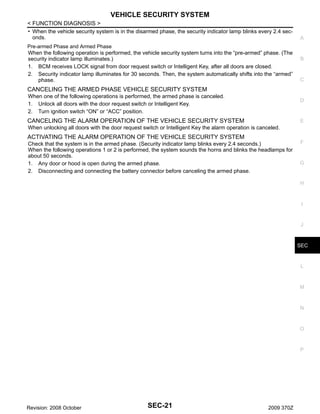
SETTING THE VEHICLE SECURITY SYSTEM
Initial Condition
• Ignition switch is in the OFF position.
Disarmed Phase
• When any door or back door is open, the vehicle security system is set in the disarmed phase on the
assumption that the owner is inside or near the vehicle.

Revision: 2008 October

SEC-20

2009 370Z
VEHICLE SECURITY SYSTEM
< FUNCTION DIAGNOSIS >
• When the vehicle security system is in the disarmed phase, the security indicator lamp blinks every 2.4 seconds.
Pre-armed Phase and Armed Phase
When the following operation is performed, the vehicle security system turns into the “pre-armed” phase. (The
security indicator lamp illuminates.)
1. BCM receives LOCK signal from door request switch or Intelligent Key, after all doors are closed.
2. Security indicator lamp illuminates for 30 seconds. Then, the system automatically shifts into the “armed”
phase.

A

B

C

CANCELING THE ARMED PHASE VEHICLE SECURITY SYSTEM
When one of the following operations is performed, the armed phase is canceled.
1. Unlock all doors with the door request switch or Intelligent Key.
2. Turn ignition switch “ON” or “ACC” position.

D

CANCELING THE ALARM OPERATION OF THE VEHICLE SECURITY SYSTEM

E

When unlocking all doors with the door request switch or Intelligent Key the alarm operation is canceled.

ACTIVATING THE ALARM OPERATION OF THE VEHICLE SECURITY SYSTEM
Check that the system is in the armed phase. (Security indicator lamp blinks every 2.4 seconds.)
When the following operations 1 or 2 is performed, the system sounds the horns and blinks the headlamps for
about 50 seconds.
1. Any door or hood is open during the armed phase.
2. Disconnecting and connecting the battery connector before canceling the armed phase.

F

G

H

I

J

SEC

L

M

N

O

P

Revision: 2008 October

SEC-21

2009 370Z
VEHICLE SECURITY SYSTEM
< FUNCTION DIAGNOSIS >

Component Parts Location

INFOID:0000000004535387

JMKIA3453ZZ

1.

Combination meter M53, M54

2.

Push-button ignition switch M50

3.

Remote keyless entry receiver M104
Refer to DLK-30, "REMOTE KEYLESS ENTRY FUNCTION :
Component Parts Location".

4.

BCM M118, M119, M121, M122,
M123
Refer to BCS-8, "Component Parts
Location".

5.

IPDM E/R E5, E6, E7, E9
Refer to PCS-5, "Component Parts
Location".

6.

Hood switch

7.

Horn (low) E69, E70

8.

Clutch interlock switch E111
(for M/T models)

9.

Stop lamp switch E110

10. ABS actuator and electric unit (con- 11. Key slot M22
trol unit) E41
Refer to BRC-11, "Component Parts
Location".
A.

Built in hood lock RH

Revision: 2008 October

B.

12. Driver side door switch B16

View with instrument driver lower
cover removed

SEC-22

2009 370Z
VEHICLE SECURITY SYSTEM
< FUNCTION DIAGNOSIS >
A

B

C

D

E

F

G

H

I

J

JMKIA3454ZZ

1.

Inside key antenna (console) M257

2.

Inside key antenna (luggage room)
B222

3.

Back door switch B66

4.

TCM F301

5.

ECM M107

6.

Control device (detention switch)
M137

A.

Built in control device

SEC

L

M

Component Description

INFOID:0000000004497902

N
Component

Reference

BCM

SEC-96

Security indicator lamp

SEC-123

Door switch

DLK-60

Back door switch

O

DLK-60

Hood switch

Revision: 2008 October

P

SEC-121

SEC-23

2009 370Z
DIAGNOSIS SYSTEM (BCM)
< FUNCTION DIAGNOSIS >

DIAGNOSIS SYSTEM (BCM)
COMMON ITEM
COMMON ITEM : CONSULT-III Function (BCM - COMMON ITEM)

INFOID:0000000004497420

APPLICATION ITEM
CONSULT-III performs the following functions via CAN communication with BCM.
Diagnosis mode

Function Description

Work Support

Changes the setting for each system function.

Self Diagnostic Result

Displays the diagnosis results judged by BCM.

CAN Diag Support Monitor

Monitors the reception status of CAN communication viewed from BCM. Refer to CONSULT-III operation manual.

Data Monitor

The BCM input/output signals are displayed.

Active Test

The signals used to activate each device are forcibly supplied from BCM.

Ecu Identification

The BCM part number is displayed.

Configuration

• Read and save the vehicle specification.
• Write the vehicle specification when replacing BCM.

SYSTEM APPLICATION
BCM can perform the following functions for each system.
NOTE:
It can perform the diagnosis modes except the following for all sub system selection items.
×: Applicable item

System

Sub system selection item

Diagnosis mode
Work Support

Data Monitor

Active Test

×

×

×

Door lock

DOOR LOCK

Rear window defogger

REAR DEFOGGER

×

×

Warning chime

BUZZER

×

×

Interior room lamp timer

INT LAMP

×

×

×

Exterior lamp

HEAD LAMP

×

×

×

Wiper and washer

WIPER

×

×

×

Turn signal and hazard warning lamps

FLASHER

×

×

×

×

×

×

—

AIR CONDITONER*

• Intelligent Key system
• Engine start system

INTELLIGENT KEY

Combination switch

COMB SW

Body control system

BCM

IVIS - NATS

IMMU

Interior room lamp battery saver

BATTERY SAVER

Back door open

TRUNK

Vehicle security system

THEFT ALM

×
×
×

×

×

×

×

×

×
×

×

×

—

RETAINED PWR*

×

Signal buffer system

SIGNAL BUFFER

×

×

TPMS

TPMS (AIR PRESSURE MONITOR)

×

×

×

NOTE:
*: This item is displayed, but is not used.

FREEZE FRAME DATA (FFD)
The BCM records the following vehicle condition at the time a particular DTC is detected, and displays on
CONSULT-III.
Revision: 2008 October

SEC-24

2009 370Z
DIAGNOSIS SYSTEM (BCM)
< FUNCTION DIAGNOSIS >
CONSULT screen item

Indication/Unit

Description

A

Vehicle Speed

km/h

Vehicle speed of the moment a particular DTC is detected

Odo/Trip Meter

km

Total mileage (Odometer value) of the moment a particular DTC is detected

SLEEP>LOCK

While turning BCM status from low power consumption mode to
normal mode (Power supply position is “LOCK”)

SLEEP>OFF

While turning BCM status from low power consumption mode to
normal mode (Power supply position is “OFF”.)

LOCK>ACC

While turning power supply position from “LOCK” to “ACC”

ACC>ON

While turning power supply position from “ACC” to “IGN”

RUN>ACC

While turning power supply position from “RUN” to “ACC” (Vehicle
is stopping and selector lever is except P position.)

CRANK>RUN

While turning power supply position from “CRANKING” to “RUN”
(From cranking up the engine to run it)

RUN>URGENT

While turning power supply position from “RUN“ to “ACC” (Emergency stop operation)

ACC>OFF

While turning power supply position from “ACC” to “OFF”

OFF>LOCK
Vehicle Condition

C

D

E

F

While turning power supply position from “OFF” to “LOCK”
Power position status of
the moment a particular
DTC is detected

OFF>ACC
ON>CRANK

While turning power supply position from “OFF” to “ACC”

G

While turning power supply position from “IGN” to “CRANKING”

OFF>SLEEP

While turning BCM status from normal mode (Power supply position is “OFF”.) to low power consumption mode

LOCK>SLEEP

While turning BCM status from normal mode (Power supply position is “LOCK”.) to low power consumption mode

LOCK

Power supply position is “LOCK” (Ignition switch OFF with steering is locked.)

OFF

Power supply position is “OFF” (Ignition switch OFF with steering
is unlocked.)

ACC

Power supply position is “ACC” (Ignition switch ACC)

ON

Power supply position is “IGN” (Ignition switch ON with engine
stopped)

ENGINE RUN

Power supply position is “RUN” (Ignition switch ON with engine
running)

CRANKING

IGN Counter

B

Power supply position is “CRANKING” (At engine cranking)

0 - 39

The number of times that ignition switch is turned ON after DTC is detected
• The number is 0 when a malfunction is detected now.
• The number increases like 1 → 2 → 3...38 → 39 after returning to the normal condition
whenever ignition switch OFF → ON.
• The number is fixed to 39 until the self-diagnosis results are erased if it is over 39.

INTELLIGENT KEY

I

J

SEC

L

M

N

INTELLIGENT KEY : CONSULT-III Function (BCM - INTELLIGENT KEY)

INFOID:0000000004714592

O

WORK SUPPORT
Monitor item

Description

CONFIRM KEY FOB ID

AUTO LOCK SET

P

It can be checked whether Intelligent Key ID code is registered or not in this mode.
Auto door lock time can be changed in this mode.
• MODE 1: 1 minute
• MODE 2: 5 minutes
• MODE 3: 30 seconds
• MODE 4: 2 minutes

Revision: 2008 October

H

SEC-25

2009 370Z
DIAGNOSIS SYSTEM (BCM)
< FUNCTION DIAGNOSIS >
Monitor item

Description

LOCK/UNLOCK BY I-KEY

Door lock/unlock function by door request switch (driver side, passenger side and back door)
mode can be changed to operate (ON) or not operate (OFF) in this mode.

ENGINE START BY I-KEY

Engine start function mode can be changed to operate (ON) or not operate (OFF) with this
mode.

TRUNK/GLASS HATCH OPEN

Buzzer reminder function mode by back door request switch can be changed to operate (ON)
or not operate (OFF) with this mode.

PANIC ALARM SET

Panic alarm button pressing time on Intelligent Key remote control button can be selected from
the following with this mode.
• MODE 1: 0.5 sec.
• MODE 2: Non-operation
• MODE 3: 1.5 sec.

TAKE OUT FROM WIN WARN

NOTE:
This item is displayed, but cannot be monitored.

PW DOWN SET

Unlock button pressing time on Intelligent Key button can be selected from the following with
this mode.
• MODE 1: 3 sec.
• MODE 2: Non-operation
• MODE 3: 5 sec.

TRUNK OPEN DELAY

NOTE:
This item is displayed, but cannot be supported.

LO- BATT OF KEY FOB WARN

Intelligent Key low battery warning mode can be changed to operate (ON) or not operate
(OFF) with this mode.

ANTI KEY LOCK IN FUNCTI

Key reminder function mode can be changed to operate (ON) or not operate (OFF) with this
mode.

HAZARD ANSWER BACK

Hazard reminder function mode can be selected from the following with this mode.
• LOCK ONLY: Door lock operation only
• UNLOCK ONLY: Door unlock operation only
• LOCK/UNLOCK: Lock/unlock operation
• OFF: Non-operation

ANS BACK I-KEY LOCK

Buzzer reminder function (lock operation) mode by door request switch (driver side and passenger side) can be selected from the following with this mode.
• Horn chirp: Sound horn
• Buzzer: Sound Intelligent Key warning buzzer
• OFF: Non-operation

ANS BACK I-KEY UNLOCK

Buzzer reminder function (unlock operation) mode by door request switch can be changed to
operate (ON) or not operate (OFF) with this mode.

SHORT CRANKING OUTPUT

Starter motor can be forcibly activated.

INSIDE ANT DIAGNOSIS

This function allows inside key antenna self-diagnosis.

HORN WITH KEYLESS LOCK

Horn reminder function mode by Intelligent Key button can be changed to operate (ON) or not
operate (OFF) with this mode.

SELF-DIAG RESULT
Refer to DLK-155, "DTC Index".

DATA MONITOR
Monitor Item

Condition

REQ SW -DR

Indicates [ON/OFF] condition of door request switch (driver side).

REQ SW -AS

Indicates [ON/OFF] condition of door request switch (passenger side).

REQ SW -BD/TR

Indicates [ON/OFF] condition of back door request switch.

PUSH SW

Indicates [ON/OFF] condition of push-button ignition switch.

IGN RLY2 -F/B

Indicates [ON/OFF] condition of ignition relay 2.

ACC RLY-F/B

NOTE:
This item is displayed, but cannot be monitored.

Revision: 2008 October

SEC-26

2009 370Z
DIAGNOSIS SYSTEM (BCM)
< FUNCTION DIAGNOSIS >
Monitor Item

Condition

CLUCH SW*1
BRAKE SW 1

Indicates [ON/OFF]*2 condition of brake switch power supply.

BRAKE SW 2

Indicates [ON/OFF] condition of brake switch.

DETE/CANCL SW

Indicates [ON/OFF] condition of P position.

SFT PN/N SW

Indicates [ON/OFF] condition of P or N position.

S/L -LOCK

Indicates [ON/OFF] condition of steering lock unit (LOCK).

S/L -UNLOCK

Indicates [ON/OFF] condition of steering lock unit (UNLOCK).

S/L RELAY -F/B

Indicates [ON/OFF] condition of steering lock relay.

UNLK SEN -DR

Indicates [ON/OFF] condition of driver door UNLOCK status.

PUSH SW -IPDM

Indicates [ON/OFF] condition of push-button ignition switch.

IGN RLY1 -F/B

Indicates [ON/OFF] condition of ignition relay 1.

DETE SW -IPDM

A

Indicates [ON/OFF] condition of clutch switch.

Indicates [ON/OFF] condition of P position.

B

C

D

E

SFT PN -IPDM

Indicates [ON/OFF] condition of P or N position.

SFT P -MET

Indicates [ON/OFF] condition of P position.

SFT N -MET

Indicates [ON/OFF] condition of N position.

ENGINE STATE

Indicates [STOP/STALL/CRANK/RUN] condition of engine states.

S/L LOCK-IPDM

Indicates [ON/OFF] condition of steering lock unit (LOCK).

S/L UNLK-IPDM

Indicates [ON/OFF] condition of steering lock unit (UNLOCK).

S/L RELAY-REQ

Indicates [ON/OFF] condition of steering lock relay.

VEH SPEED 1

Display the vehicle speed signal received from combination meter by numerical value [km/h].

VEH SPEED 2

Display the vehicle speed signal received from ABS or VDC or TCM by numerical value [km/h].

DOOR STAT-DR

Indicates [LOCK/READY/UNLOCK] condition of driver side door status.

DOOR STAT-AS

Indicates [LOCK/READY/UNLOCK] condition of passenger side door status.

ID OK FLAG

Indicates [SET/RESET] condition of key ID.

PRMT ENG STRT

Indicates [SET/RESET] condition of engine start possibility.

PRMT RKE STRT

NOTE:
This item is displayed, but cannot be monitored.

KEY SW -SLOT

Indicates [ON/OFF] condition of key slot.

TRNK/HAT MNTR

NOTE:
This item is displayed, but cannot be monitored.

RKE-LOCK

Indicates [ON/OFF] condition of LOCK signal from Intelligent Key.

RKE-UNLOCK

Indicates [ON/OFF] condition of UNLOCK signal from Intelligent Key.

RKE-TR/BD

NOTE:
This item is displayed, but cannot be monitored.

RKE-PANIC

Indicates [ON/OFF] condition of PANIC button of Intelligent Key.

RKE-P/W OPEN

Indicates [ON/OFF] condition of P/W DOWN signal from Intelligent Key.

RKE-MODE CHG

Indicates [ON/OFF] condition of MODE CHANGE signal from Intelligent Key.

RKE OPE COUN1

When remote keyless entry receiver receives the signal transmitted while operating on Intelligent Key, the numerical value start changing.

RKE OPE COUN2

NOTE:
This item is displayed, but cannot be monitored.

F

G

H

J

SEC

L

M

N

O

P

*1: It is displayed but does not operate on M/T models.
*2: OFF is displayed when brake pedal is depressed while brake switch power supply is OFF.

ACTIVE TEST

Revision: 2008 October

SEC-27

I

2009 370Z
DIAGNOSIS SYSTEM (BCM)
< FUNCTION DIAGNOSIS >
Test item

Description

BATTERY SAVER

This test is able to check interior room lamp operation.
The interior room lamp is activated after “ON” on CONSULT-III screen is touched.

PW REMOTO DOWN SET

This test is able to check power window down operation.
The power window down is activated after “ON” on CONSULT-III screen is touched.

OUTSIDE BUZZER

This test is able to check Intelligent Key warning buzzer operation.
The Intelligent Key warning buzzer is activated after “ON” on CONSULT-III screen is touched.

INSIDE BUZZER

This test is able to check warning chime in combination meter operation.
• Take away warning chime sounds when “TAKE OUT” on CONSULT-III screen is touched.
• Key warning chime sounds when “KEY” on CONSULT-III screen is touched.
• OFF position warning chime sounds when “KNOB” on CONSULT-III screen is touched.

INDICATOR

This test is able to check warning lamp operation.
• “KEY” Warning lamp illuminates when “KEY ON” on CONSULT-III screen is touched.
• “KEY” Warning lamp blinks when “KEY IND” on CONSULT-III screen is touched.

INT LAMP

This test is able to check interior room lamp operation.
The interior room lamp is activated after “ON” on CONSULT-III screen is touched.

LCD

This test is able to check meter display information
• Engine start information displays when “BP N” on CONSULT-III screen is touched.
• Engine start information displays when “BP I” on CONSULT-III screen is touched.
• Key ID warning displays when “ID NG” on CONSULT-III screen is touched.
• Steering lock information displays when “ROTAT” on CONSULT-III screen is touched.
• P position warning displays when “SFT P” on CONSULT-III screen is touched.
• Intelligent Key insert information displays when “INSRT” on CONSULT-III screen is touched.
• Intelligent Key low battery warning displays when “BATT” on CONSULT-III screen is
touched.
• Take away through window warning displays when “NO KY” on CONSULT-III screen is
touched.
• Take away warning display when “OUTKEY” on CONSULT-III screen is touched.
• OFF position warning display when “LK WN” on CONSULT-III screen is touched.

TRUNK/GLASS HATCH

NOTE:
This item is displayed, but cannot be tested.

FLASHER

This test is able to check hazard warning lamp operation.
The hazard warning lamps are activated after “LH/RH/OFF” on CONSULT-III screen is
touched.

HORN

This test is able to check horn operation.
The horn is activated after “ON” on CONSULT-III screen is touched.

P RANGE

This test is able to check control device power supply
Control device power is supplied when “ON” on CONSULT-III screen is touched.

ENGINE SW ILLUMI

This test is able to check push-ignition switch illumination operation.
Push-ignition switch illumination illuminates when “ON” on CONSULT-III screen is touched.

LOCK INDICATOR

This test is able to check LOCK indicator in push-ignition switch operation.
LOCK indicator in push-ignition switch illuminates when “ON” on CONSULT-III screen is
touched.

ACC INDICATOR

This test is able to check ACC indicator in push-ignition switch operation.
ACC indicator in push-ignition switch illuminates when “ON” on CONSULT-III screen is
touched.

IGNITION ON IND

This test is able to check ON indicator in push-ignition switch operation.
ON indicator in push-ignition switch illuminates when “ON” on CONSULT-III screen is touched.

KEY SLOT ILLUMI

This test is able to check key slot illumination operation.
Key slot illumination blinks when “ON” on CONSULT-III screen is touched.

TRUNK/BACK DOOR

This test is able to check back door opener actuator open operation.
This actuator opens when “OPEN” on CONSULT-III screen is touched.

THEFT ALM

Revision: 2008 October

SEC-28

2009 370Z
DIAGNOSIS SYSTEM (BCM)
< FUNCTION DIAGNOSIS >

THEFT ALM : CONSULT-III Function (BCM - THEFT)

INFOID:0000000004497422

A

DATA MONITOR
Monitored Item

B

Description

REQ SW -DR

Indicates [ON/OFF] condition of door request switch (driver side).

REQ SW -AS

Indicates [ON/OFF] condition of door request switch (passenger side).

REQ SW -RR

NOTE:
This is displayed even when it is not equipped.

REQ SW -RL

NOTE:
This is displayed even when it is not equipped.

REQ SW -BD/TR

Indicates [ON/OFF] condition of back door request switch.

PUSH SW

Indicates [ON/OFF] condition of push-button ignition switch

UNLK SEN -DR

Indicates [ON/OFF] condition of driver door UNLOCK status.

KEY SW -SLOT

Indicates [ON/OFF] condition of key slot.

DOOR SW-DR

Indicates [ON/OFF] condition of driver side door switch.

DOOR SW-AS

Indicates [ON/OFF] condition of passenger side door switch.

DOOR SW-RR

NOTE:
This is displayed even when it is not equipped.

DOOR SW-RL

NOTE:
This is displayed even when it is not equipped.

DOOR SW-BK

Indicates [ON/OFF] condition of back door switch.

C

D

E

F

G

H

CDL LOCK SW

Indicates [ON/OFF] condition of lock signal from door lock/unlock switch LH and RH.

CDL UNLOCK SW

Indicates [ON/OFF] condition of unlock signal from door lock/unlock switch LH and RH.

TR/BD OPEN SW

Indicates [ON/OFF] condition of back door opener switch.

TRNK/HAT MNTR

Indicates [ON/OFF] condition of back door.

RKE-LOCK

Indicates [ON/OFF] condition of LOCK signal from Intelligent Key.

RKE-UNLOCK

Indicates [ON/OFF] condition of UNLOCK signal from Intelligent Key.

RKE-TR/BD

NOTE:
This is displayed even when it is not equipped.

I

J

SEC

WORK SUPPORT
L
Test Item

Description

SECURITY ALARM SET

This mode is able to confirm and change security alarm ON-OFF setting.

THEFT ALM TRG

The switch which triggered vehicle security alarm is recorded.
This mode is able to confirm and erase the record of vehicle security alarm.
The trigger data can be erased by touching “CLEAR” on CONSULT-III screen.

M

N

ACTIVE TEST
Test Item

Description

THEFT IND

This test is able to check security indicator lamp operation. The lamp is turned on when “ON” on
CONSULT-III screen is touched.

VEHICLE SECURITY HORN

This test is able to check vehicle security horn operation. The horns are activated for 0.5 seconds
after “ON” on CONSULT-III screen is touched.

HEADLAMP(HI)

This test is able to check vehicle security lamp operation. The headlamps are activated for 0.5 seconds after “ON” on CONSULT-III screen is touched.

FLASHER

This test is able to check vehicle security hazard lamp operation. The hazard lamps are activated
after “ON” on CONSULT-III screen is touched.

IMMU
Revision: 2008 October

SEC-29

2009 370Z

O

P
DIAGNOSIS SYSTEM (BCM)
< FUNCTION DIAGNOSIS >

IMMU : CONSULT-III Function (BCM - IMMU)

INFOID:0000000004497423

DATA MONITOR
Monitor item

Content

CONFRM ID ALL
CONFIRM ID4
CONFIRM ID3

Indicates [YET] at all time.
Switches to [DONE] when a registered Intelligent Key is inserted into the key slot.

CONFIRM ID2
CONFIRM ID1
TP 4
TP 3

Indicates the number of IDs that are registered.

TP 2
TP 1
PUSH SW

Indicates [ON/OFF] condition of push-button ignition switch.

KEY SW -SLOT

Indicates [ON/OFF] condition of key slot.

ACTIVE TEST
Test item
THEFT IND

Revision: 2008 October

Description
This test is able to check security indicator lamp operation.
The lamp is turned on when “ON” on CONSULT-III screen touched.

SEC-30

2009 370Z
U1000 CAN COMM CIRCUIT
< COMPONENT DIAGNOSIS >

COMPONENT DIAGNOSIS

A

U1000 CAN COMM CIRCUIT
BCM

B

BCM : Description

INFOID:0000000004497425

CAN (Controller Area Network) is a serial communication line for real time applications. It is an on-vehicle multiplex communication line with high data communication speed and excellent error detection ability. Modern
vehicle is equipped with many electronic control unit, and each control unit shares information and links with
other control units during operation (not independent). In CAN communication, control units are connected
with 2 communication lines (CAN H-line, CAN L-line) allowing a high rate of information transmission with less
wiring. Each control unit transmits/receives data but selectively reads required data only.
CAN Communication Signal Chart. Refer to LAN-23, "CAN Communication Signal Chart".

C

BCM : DTC Logic

E
INFOID:0000000004497426

DTC DETECTION LOGIC
DTC

U1000

F

CONSULT-III display
description

DTC Detection Condition

CAN COMM CIRCUIT

When BCM cannot communicate CAN communication signal continuously for 2 seconds
or more.

Possible cause

G
CAN communication system

H

BCM : Diagnosis Procedure

INFOID:0000000004497427

1.PERFORM SELF DIAGNOSTIC

I

1. Turn ignition switch ON and wait for 2 seconds or more.
2. Check “Self Diagnostic Result”.
Is DTC “U1000” displayed?
YES >> Refer to LAN-14, "Trouble Diagnosis Flow Chart".
NO
>> Refer to GI-39, "Intermittent Incident".

J

IPDM E/R (INTELLIGENT POWER DISTRIBUTION MODULE ENGINE ROOM)
IPDM E/R (INTELLIGENT POWER DISTRIBUTION MODULE ENGINE ROOM) : Description

INFOID:0000000004497428

CAN (Controller Area Network) is a serial communication line for real time applications. It is an on-vehicle multiplex communication line with high data communication speed and excellent error detection ability. Modern
vehicle is equipped with many electronic control unit, and each control unit shares information and links with
other control units during operation (not independent). In CAN communication, control units are connected
with 2 communication lines (CAN-H line, CAN-L line) allowing a high rate of information transmission with less
wiring. Each control unit transmits/receives data but selectively reads required data only.
CAN Communication Signal Chart. Refer to LAN-23, "CAN Communication Signal Chart".

IPDM E/R (INTELLIGENT POWER DISTRIBUTION MODULE ENGINE ROOM) : DTC
Logic

INFOID:0000000004497429

DTC DETECTION LOGIC
DTC

U1000

CONSULT-III display
description
CAN COMM CIRCUIT

SEC

L

M

N

O

P
DTC Detection Condition
When IPDM E/R cannot communicate CAN
communication signal continuously for 2
seconds or more

Possible cause

CAN communication system

IPDM E/R (INTELLIGENT POWER DISTRIBUTION MODULE ENGINE ROOM) : DiRevision: 2008 October

D

SEC-31

2009 370Z
U1000 CAN COMM CIRCUIT
< COMPONENT DIAGNOSIS >

agnosis Procedure

INFOID:0000000004497430

1.PERFORM SELF DIAGNOSTIC
1. Turn the ignition switch ON and wait for 2 seconds or more.
2. Check “Self Diagnostic Result” of IPDM E/R.
Is “CAN COMM CIRCUIT” displayed?
YES >> Refer to LAN-14, "Trouble Diagnosis Flow Chart".
NO
>> Refer to GI-39, "Intermittent Incident".

Revision: 2008 October

SEC-32

2009 370Z
U1010 CONTROL UNIT (CAN)
< COMPONENT DIAGNOSIS >

U1010 CONTROL UNIT (CAN)

A

BCM
BCM : DTC Logic

INFOID:0000000004497431

B

DTC DETECTION LOGIC
DTC

CONSULT-III display description

DTC Detection Condition

U1010

CONTROL UNIT (CAN)

BCM detected internal CAN communication circuit malfunction.

Possible cause

C

BCM

D

BCM : Diagnosis Procedure

INFOID:0000000004497432

1.REPLACE BCM

E

When DTC “U1010” is detected, replace BCM.
F

>> Replace BCM. Refer to BCS-84, "Exploded View".

BCM : Special Repair Requirement

INFOID:0000000004497433

G

1.REQUIRED WORK WHEN REPLACING BCM
Initialize control unit. Refer to CONSULT-III operation manual NATS-IVIS/NVIS.

H

>> Work end.
I

J

SEC

L

M

N

O

P

Revision: 2008 October

SEC-33

2009 370Z
P1610 LOCK MODE
< COMPONENT DIAGNOSIS >

P1610 LOCK MODE
Description

INFOID:0000000004497434

When the starting operation is carried more than five times consecutively under the following conditions, NATS
shifts to the mode that prevents the engine from being started.
• Unregistered Intelligent Key is used.
• BCM or ECM is malfunctioning.

DTC Logic

INFOID:0000000004497435

DTC DETECTION LOGIC
DTC No.

P1610

Trouble diagnosis
name

LOCK MODE

DTC detecting condition

Possible cause

When the starting operation is carried out
five or more times consecutively under the
following conditions.
• Unregistered Intelligent Key
• BCM or ECM is malfunctioning

—

DTC CONFIRMATION PROCEDURE

1.PERFORM DTC CONFIRMATION PROCEDURE
1. Turn ignition switch ON.
2. Check “Self-diagnostic result” using CONSULT-III.
Is DTC detected?
YES >> Go to SEC-34, "Diagnosis Procedure".
NO
>> INSPECTION END

Diagnosis Procedure

INFOID:0000000004497436

1.CHECK ENGINE START FUNCTION
1.
2.
3.
4.
5.
6.
7.

Perform the check for DTC except DTC P1610.
Use CONSULT-III to erase DTC after fixing.
Turn ignition switch OFF.
Turn ignition switch ON when registered Intelligent Key is inserted into key slot and wait for 5 seconds.
Turn the ignition switch OFF and wait 5 seconds.
Repeat steps 4 and 5 twice (a total of 3 times).
Check that engine can start when registered Intelligent Key is inserted into key slot.
>> INSPECTION END

Revision: 2008 October

SEC-34

2009 370Z
P1611 ID DISCORD, IMMU-ECM
< COMPONENT DIAGNOSIS >

P1611 ID DISCORD, IMMU-ECM

A

Description

INFOID:0000000004497437

BCM performs the ID verification with ECM that allows the engine to start. Start the engine if the ID is successfully verified. ECM prevents the engine from starting if the ID is not registered. BCM starts the communication
with ECM if ignition switch is turned ON.

B

DTC Logic

INFOID:0000000004497438

C

NOTE:
• If DTC P1611 is displayed with DTC U1000, first perform the trouble diagnosis for DTC U1000. Refer to
SEC-31, "BCM : DTC Logic".
• If DTC P1611 is displayed with DTC U1010, first perform the trouble diagnosis for DTC U1010. Refer to
SEC-33, "BCM : DTC Logic".

D

DTC DETECTION LOGIC

DTC No.
P1611

Trouble diagnosis
name

DTC detecting condition

ID DISCORD, IMMUECM

The ID verification results between BCM and ECM
are NG. Registration is necessary.

Possible cause

E

F

• BCM
• ECM

G

DTC CONFIRMATION PROCEDURE

1.PERFORM DTC CONFIRMATION PROCEDURE
1.

H

Turn ignition switch ON under the following conditions.

A/T models

-

Selector lever is in the P or N position
Do not depress brake pedal

I

M/T models

Do not depress clutch pedal
2. Check “Self-diagnostic result” using CONSULT-III.
Is DTC detected?
YES >> Go to SEC-35, "Diagnosis Procedure".
NO
>> INSPECTION END

Diagnosis Procedure

J

SEC
INFOID:0000000004497439

L

1.PERFORM INITIALIZATION
Perform initialization using CONSULT-III. Reregister all Intelligent Keys.
For initialization and registration of Intelligent Key, refer to “CONSULT-III Operation Manual NATS-IVIS/NVIS”.
Can the system be initialized and can the engine be started with reregistered Intelligent Key?
YES >> INSPECTION END
NO
>> GO TO 2.

M

N

2.REPLACE BCM
1.
2.

Replace BCM. Refer to BCS-84, "Removal and Installation".
Perform initialization using CONSULT-III.
For initialization, refer to “CONSULT-III Operation Manual NATS-IVIS/NVIS”.
Can the system be initialized and can the engine be started with reregistered Intelligent Key?
YES >> INSPECTION END
NO
>> GO TO 3.

O

P

3.REPLACE ECM
1.
2.

Replace ECM. Refer to EC-16, "ADDITIONAL SERVICE WHEN REPLACING CONTROL UNIT (ECM) :
Description".
Perform initialization using CONSULT-III.

Revision: 2008 October

SEC-35

2009 370Z
P1611 ID DISCORD, IMMU-ECM
< COMPONENT DIAGNOSIS >
For initialization, refer to “CONSULT-III Operation Manual NATS-IVIS/NVIS”.
Can the system be initialized and can the engine be started with reregistered Intelligent Key?
YES >> INSPECTION END
NO
>> GO TO 4.

4.CHECK INTERMITTENT INCIDENT
Refer to GI-39, "Intermittent Incident".
>> INSPECTION END

Revision: 2008 October

SEC-36

2009 370Z
P1612 CHAIN OF ECM-IMMU
< COMPONENT DIAGNOSIS >

P1612 CHAIN OF ECM-IMMU

A

Description

INFOID:0000000004497440

BCM performs ID verification with ECM that allows the engine to start. Start the engine if the ID is successfully
verified. ECM prevents the engine from starting if the ID is not registered. BCM starts the communication with
ECM if ignition switch is turned ON.

B

DTC Logic

INFOID:0000000004497441

C

NOTE:
• If DTC P1612 is displayed with DTC U1000, first perform the trouble diagnosis for DTC U1000. Refer to
SEC-31, "BCM : DTC Logic".
• If DTC P1612 is displayed with DTC U1010, first perform the trouble diagnosis for DTC U1010. Refer to
SEC-33, "BCM : DTC Logic".

D

DTC DETECTION LOGIC

Trouble diagnosis
name

DTC No.

P1612

CHAIN OF ECM-IMMU

DTC detecting condition

Possible cause

E

F

• Harness or connectors
(The CAN communication line is open or
shorted)
Inactive communication between ECM and BCM
• BCM
• ECM

DTC CONFIRMATION PROCEDURE

G

H

1.PERFORM DTC CONFIRMATION PROCEDURE
1.

Turn ignition switch ON under the following conditions.

I

A/T models

-

Selector lever is in the P or N position
Do not depress brake pedal

J

M/T models

Do not depress clutch pedal
2. Check “Self-diagnostic result” using CONSULT-III.
Is DTC detected?
YES >> Go to SEC-37, "Diagnosis Procedure".
NO
>> INSPECTION END

Diagnosis Procedure

SEC

L
INFOID:0000000004497442

1.REPLACE BCM

M

1.
2.

Replace BCM. Refer to BCS-84, "Removal and Installation".
Perform initialization using CONSULT-III.
For initialization, refer to “CONSULT-III Operation Manual NATS-IVIS/NVIS”.
Does the engine start?
YES >> INSPECTION END
NO
>> GO TO 2.

N

O

2.REPLACE ECM
Replace ECM. Refer to EC-16, "ADDITIONAL SERVICE WHEN REPLACING CONTROL UNIT (ECM) :
Description".
>> INSPECTION END

Revision: 2008 October

SEC-37

2009 370Z

P
P1614 CHAIN OF IMMU-KEY
< COMPONENT DIAGNOSIS >

P1614 CHAIN OF IMMU-KEY
Description

INFOID:0000000004497443

Performs ID verification through BCM and Intelligent Key when push-button ignition switch is pressed.
Prohibits the release of steering lock or start of engine when an unregistered ID of Intelligent Key is used.

DTC Logic

INFOID:0000000004497444

DTC DETECTION LOGIC
DTC No.

P1614

Trouble diagnosis
name

CHAIN OF IMMUKEY

DTC detecting condition

Possible cause

Inactive communication between key slot and
BCM.

• Harness or connectors
(The key slot circuit is open or
shorted)
• Key slot
• BCM

DTC CONFIRMATION PROCEDURE

1.PERFORM DTC CONFIRMATION PROCEDURE 1
1. Insert Intelligent Key into the key slot.
2. Check “Self-diagnostic result” using CONSULT-III.
Is DTC detected?
YES >> Go to SEC-38, "Diagnosis Procedure".
NO
>> GO TO 2.

2.PERFORM DTC CONFIRMATION PROCEDURE 2
1. Press the push-button ignition switch.
2. Check “Self-diagnostic result” using CONSULT-III.
Is DTC detected?
YES >> Go to SEC-38, "Diagnosis Procedure".
NO
>> INSPECTION END

Diagnosis Procedure

INFOID:0000000004497445

1. INSPECTION START
Perform inspection in accordance with procedure that confirms DTC.
Which procedure confirms DTC?
DTC confirmation procedure 1>>GO TO 2.
DTC confirmation procedure 2>>GO TO 4.

2.CHECK KEY SLOT INPUT SIGNAL
1.
2.
3.

Turn ignition switch OFF.
Disconnect key slot connector.
Check voltage between key slot harness connector and ground.
(+)
(–)

Connector

2

Battery voltage

Terminal

M22

Voltage (V)
(Approx.)

Ground

Key slot

Is the inspection result normal?
YES >> Replace key slot. Refer to SEC-207, "Removal and Installation".
NO
>> GO TO 3.

3.CHECK KEY SLOT CIRCUIT
Revision: 2008 October

SEC-38

2009 370Z
P1614 CHAIN OF IMMU-KEY
< COMPONENT DIAGNOSIS >
1. Disconnect BCM connector.
2. Check continuity between key slot harness connector and BCM harness connector.
Key slot

BCM

Connector

Connector

Terminal

M22

3.

Terminal
2

M122

80

A
Continuity
Existed

Check continuity between key slot harness connector and ground.

C

Key slot
Connector

Terminal

M22

B

Continuity

Ground

2

D

Not existed

Is the inspection result normal?
YES >> Replace BCM. Refer to BCS-84, "Removal and Installation".
NO
>> Repair or replace harness.

E

4.CHECK PUSH-BUTTON IGNITION SWITCH OPERATION
F

Press push-button ignition switch and check if it turns ON.
Does ignition switch turn to ON?
YES >> GO TO 5.
NO
>> GO TO 7.

G

5.CHECK KEY SLOT COMMUNICATION SIGNAL
1.
2.
3.

H

Turn ignition switch OFF.
Disconnect key slot connector.
Check voltage between key slot harness connector and ground.

I

(+)
(–)

Connector

Battery voltage

J

Terminal

M22

Voltage (V)
(Approx.)

Ground

Key slot

3

Is the inspection result normal?
YES >> Replace key slot. Refer to SEC-207, "Removal and Installation".
NO
>> GO TO 6.

SEC

6.CHECK KEY SLOT COMMUNICATION SIGNAL CIRCUIT
1.
2.

L

Disconnect BCM connector.
Check continuity between key slot harness connector and BCM harness connector.
M
Key slot

BCM

Connector

Connector

Terminal

M22

3.

Terminal
3

M122

81

Continuity
Existed

Check continuity between key slot harness connector and ground.
Key slot
Connector

Terminal

M22

3

Ground

O

Continuity
Not existed

P

Is the inspection result normal?
YES >> Replace BCM. Refer to BCS-84, "Removal and Installation".
NO
>> Repair or replace harness.

7.CHECK KEY SLOT GROUND CIRCUIT
1.
2.

N

Turn ignition switch OFF.
Disconnect key slot connector.

Revision: 2008 October

SEC-39

2009 370Z
P1614 CHAIN OF IMMU-KEY
< COMPONENT DIAGNOSIS >
3. Check continuity between key slot harness connector and ground.
Key slot
Connector

Terminal

M22

Ground

7

Continuity
Existed

Is the inspection result normal?
YES >> GO TO 8.
NO
>> Repair or replace harness.

8.CHECK INTERMITTENT INCIDENT
Refer to GI-39, "Intermittent Incident".
>> INSPECTION END

Revision: 2008 October

SEC-40

2009 370Z
P1615 DIFFRENCE OF KEY
< COMPONENT DIAGNOSIS >

P1615 DIFFRENCE OF KEY

A

Description

INFOID:0000000004497446

Performs ID verification through BCM and Intelligent Key when push-button ignition switch is pressed.
Prohibits the release of steering lock or start of engine when an unregistered ID of Intelligent Key is used.

DTC Logic

B

INFOID:0000000004497447

C

DTC DETECTION LOGIC
DTC No.
P1615

Trouble diagnosis name
DIFFERENCE OF KEY

DTC detecting condition
The ID verification results between BCM and Intelligent
Key are NG. Registration is necessary.

Possible cause

D

Intelligent Key

E

DTC CONFIRMATION PROCEDURE

1.PERFORM DTC CONFIRMATION PROCEDURE
F

1. Press the push-button ignition switch.
2. Check “Self-diagnostic result” using CONSULT-III.
Is DTC detected?
YES >> Go to SEC-41, "Diagnosis Procedure".
NO
>> INSPECTION END

Diagnosis Procedure

G

INFOID:0000000004497448

H

1.PERFORM INITIALIZATION
Perform initialization using CONSULT-III. Reregister all Intelligent Keys.
For initialization and registration of Intelligent Key, refer to “CONSULT-III Operation Manual NATS-IVIS/NVIS”.
Can the system be initialized and can the engine be started with reregistered Intelligent Key?
YES >> INSPECTION END
NO
>> GO TO 2.

I

J

2.REPLACE INTELLIGENT KEY
1.
2.

Replace Intelligent Key.
Perform initialization using CONSULT-III.
For initialization and registration of Intelligent Key, refer to “CONSULT-III Operation Manual NATS-IVIS/
NVIS”.
Can the system be initialized and can the engine be started with reregistered Intelligent Key?
YES >> INSPECTION END
NO
>> GO TO 3.

SEC

L

M

3.CHECK INTERMITTENT INCIDENT
Refer to GI-39, "Intermittent Incident".

N

>> INSPECTION END
O

P

Revision: 2008 October

SEC-41

2009 370Z
B2190 NATS ANTENNA AMP.
< COMPONENT DIAGNOSIS >

B2190 NATS ANTENNA AMP.
Description

INFOID:0000000004497449

Performs ID verification through BCM and Intelligent Key when push-button ignition switch is pressed.
Prohibits the release of steering lock or start of engine when an unregistered ID of Intelligent Key is used.

DTC Logic

INFOID:0000000004497450

DTC DETECTION LOGIC
DTC No.

B2190

Trouble diagnosis
name

NATS ANTENNA
AMP

DTC detecting condition

Possible cause

Inactive communication between key slot and
BCM.

• Harness or connectors
(The key slot circuit is open or
shorted)
• Key slot
• BCM

DTC CONFIRMATION PROCEDURE

1.PERFORM DTC CONFIRMATION PROCEDURE 1
1. Insert Intelligent Key into the key slot.
2. Check “Self-diagnostic result” using CONSULT-III.
Is DTC detected?
YES >> Go to SEC-42, "Diagnosis Procedure".
NO
>> GO TO 2.

2.PERFORM DTC CONFIRMATION PROCEDURE 2
1. Press the push-button ignition switch.
2. Check “Self-diagnostic result” using CONSULT-III.
Is DTC detected?
YES >> Go to SEC-42, "Diagnosis Procedure".
NO
>> INSPECTION END

Diagnosis Procedure

INFOID:0000000004497451

1. INSPECTION START
Perform inspection in accordance with the appropriate confirmation procedure DTC.
Which procedure confirms DTC?
DTC confirmation procedure 1>>GO TO 2.
DTC confirmation procedure 2>>GO TO 4.

2.CHECK KEY SLOT INPUT SIGNAL
1.
2.
3.

Turn ignition switch OFF.
Disconnect key slot connector.
Check voltage between key slot harness connector and ground.
(+)
(–)

Connector

2

Battery voltage

Terminal

M22

Voltage (V)
(Approx.)

Ground

Key slot

Is the inspection result normal?
YES >> Replace key slot. Refer to SEC-207, "Removal and Installation".
NO
>> GO TO 3.

3.CHECK KEY SLOT CIRCUIT
Revision: 2008 October

SEC-42

2009 370Z
B2190 NATS ANTENNA AMP.
< COMPONENT DIAGNOSIS >
1. Disconnect BCM connector.
2. Check continuity between key slot harness connector and BCM harness connector.
Key slot

BCM

Connector

Connector

Terminal

M22

3.

Terminal
2

M122

80

A
Continuity
Existed

Check continuity between key slot harness connector and ground.

C

Key slot
Connector

Terminal

M22

B

Continuity

Ground

2

D

Not existed

Is the inspection result normal?
YES >> Replace BCM. Refer to BCS-84, "Removal and Installation".
NO
>> Repair or replace harness.

E

4.CHECK PUSH-BUTTON IGNITION SWITCH OPERATION
F

Press push-button ignition switch and check if it turns ON.
Does ignition switch turn to ON?
YES >> GO TO 5.
NO
>> GO TO 7.

G

5.CHECK KEY SLOT COMMUNICATION SIGNAL
1.
2.
3.

H

Turn ignition switch OFF.
Disconnect key slot connector.
Check voltage between key slot harness connector and ground.

I

(+)
(–)

Connector

Battery voltage

J

Terminal

M22

Voltage (V)
(Approx.)

Ground

Key slot

3

Is the inspection result normal?
YES >> Replace key slot. Refer to SEC-207, "Removal and Installation".
NO
>> GO TO 6.

SEC

6.CHECK KEY SLOT COMMUNICATION SIGNAL CIRCUIT
1.
2.

L

Disconnect BCM connector.
Check continuity between key slot harness connector and BCM harness connector.
M
Key slot

BCM

Connector

Connector

Terminal

M22

3.

Terminal
3

M122

81

Continuity
Existed

Check continuity between key slot harness connector and ground.
Key slot
Connector

Terminal

M22

3

Ground

O

Continuity
Not existed

P

Is the inspection result normal?
YES >> Replace BCM. Refer to BCS-84, "Removal and Installation".
NO
>> Repair or replace harness.

7.CHECK KEY SLOT GROUND CIRCUIT
1.
2.

N

Turn ignition switch OFF.
Disconnect key slot connector.

Revision: 2008 October

SEC-43

2009 370Z
B2190 NATS ANTENNA AMP.
< COMPONENT DIAGNOSIS >
3. Check continuity between key slot harness connector and ground.
Key slot
Connector

Terminal

M22

Ground

7

Continuity
Existed

Is the inspection result normal?
YES >> GO TO 8.
NO
>> Repair or replace harness.

8.CHECK INTERMITTENT INCIDENT
Refer to GI-39, "Intermittent Incident".
>> INSPECTION END

Revision: 2008 October

SEC-44

2009 370Z
B2191 DIFFERENCE OF KEY
< COMPONENT DIAGNOSIS >

B2191 DIFFERENCE OF KEY

A

Description

INFOID:0000000004497452

Performs ID verification through BCM and Intelligent Key when push-button ignition switch is pressed.
Prohibits the release of steering lock or start of engine when an unregistered ID of Intelligent Key is used.

DTC Logic

B

INFOID:0000000004497453

C

DTC DETECTION LOGIC
DTC No.
B2191

Trouble diagnosis name
DIFFERENCE OF KEY

DTC detecting condition
The ID verification results between BCM and Intelligent
Key are NG. Registration is necessary.

Possible cause

D

Intelligent Key

E

DTC CONFIRMATION PROCEDURE

1.PERFORM DTC CONFIRMATION PROCEDURE
F

1. Press the push-button ignition switch.
2. Check “Self-diagnostic result” using CONSULT-III.
Is DTC detected?
YES >> Go to SEC-45, "Diagnosis Procedure".
NO
>> INSPECTION END

Diagnosis Procedure

G

INFOID:0000000004497454

H

1.PERFORM INITIALIZATION
Perform initialization using CONSULT-III. Reregister all Intelligent Keys.
For initialization and registration of Intelligent Key, refer to “CONSULT-III Operation Manual NATS-IVIS/NVIS”.
Can the system be initialized and can the engine be started with reregistered Intelligent Key?
YES >> INSPECTION END
NO
>> GO TO 2.

I

J

2.REPLACE INTELLIGENT KEY
1.
2.

Replace Intelligent Key.
Perform initialization using CONSULT-III.
For initialization and registration of Intelligent Key, refer to “CONSULT-III Operation Manual NATS-IVIS/
NVIS”.
Can the system be initialized and can the engine be started with reregistered Intelligent Key?
YES >> INSPECTION END
NO
>> GO TO 3.

SEC

L

M

3.CHECK INTERMITTENT INCIDENT
Refer to GI-39, "Intermittent Incident".

N

>> INSPECTION END
O

P

Revision: 2008 October

SEC-45

2009 370Z
B2192 ID DISCORD, IMMU-ECM
< COMPONENT DIAGNOSIS >

B2192 ID DISCORD, IMMU-ECM
Description

INFOID:0000000004497455

BCM performs ID verification with ECM that allows the engine to start. Start the engine if the ID is successfully
verified. ECM prevents the engine from starting if the ID is not registered. BCM starts the communication with
ECM if ignition switch is turned ON.

DTC Logic

INFOID:0000000004497456

DTC DETECTION LOGIC
NOTE:
• If DTC B2192 is displayed with DTC U1000, first perform the trouble diagnosis for DTC U1000. Refer to
SEC-31, "BCM : DTC Logic".
• If DTC B2192 is displayed with DTC U1010, first perform the trouble diagnosis for DTC U1010. Refer to
SEC-33, "BCM : DTC Logic".
DTC No.
B2192

Trouble diagnosis name
ID DISCORD, IMMU-ECM

DTC detecting condition
The ID verification results between BCM and ECM
are NG. Registration is necessary.

Possible cause
• BCM
• ECM

DTC CONFIRMATION PROCEDURE

1.PERFORM DTC CONFIRMATION PROCEDURE
1.

Turn ignition switch ON under the following conditions.

A/T models

-

Selector lever is in the P or N position
Do not depress brake pedal

M/T models

Do not depress clutch pedal
2. Check “Self-diagnostic result” using CONSULT-III.
Is DTC detected?
YES >> Go to SEC-46, "Diagnosis Procedure".
NO
>> INSPECTION END

Diagnosis Procedure

INFOID:0000000004497457

1.PERFORM INITIALIZATION
Perform initialization using CONSULT-III. Reregister all Intelligent Keys.
For initialization and registration of Intelligent Key, refer to “CONSULT-III Operation Manual NATS-IVIS/NVIS”.
Can the system be initialized and can the engine be started with reregistered Intelligent Key?
YES >> INSPECTION END
NO
>> GO TO 2.

2.REPLACE BCM
1.
2.

Replace BCM. Refer to BCS-84, "Removal and Installation".
Perform initialization using CONSULT-III.
For initialization, refer to “CONSULT-III Operation Manual NATS-IVIS/NVIS”.
Can the system be initialized and can the engine be started with reregistered Intelligent Key?
YES >> INSPECTION END
NO
>> GO TO 3.

3.REPLACE ECM
1.
2.

Replace ECM. Refer to EC-16, "ADDITIONAL SERVICE WHEN REPLACING CONTROL UNIT (ECM) :
Description".
Perform initialization using CONSULT-III.
For initialization, refer to “CONSULT-III Operation Manual NATS-IVIS/NVIS”.

Revision: 2008 October

SEC-46

2009 370Z
B2192 ID DISCORD, IMMU-ECM
< COMPONENT DIAGNOSIS >
Can the system be initialized and can the engine be started with reregistered Intelligent Key?
YES >> INSPECTION END
NO
>> GO TO 4.

A

4.CHECK INTERMITTENT INCIDENT

B

Refer to GI-39, "Intermittent Incident".
>> INSPECTION END

C

D

E

F

G

H

I

J

SEC

L

M

N

O

P

Revision: 2008 October

SEC-47

2009 370Z
B2193 CHAIN OF ECM-IMMU
< COMPONENT DIAGNOSIS >

B2193 CHAIN OF ECM-IMMU
Description

INFOID:0000000004497458

BCM performs the ID verification with ECM that allows the engine to start. Start the engine if the ID is successfully verified. ECM prevents the engine from starting if the ID is not registered. BCM starts the communication
with ECM if ignition switch is turned ON.

DTC Logic

INFOID:0000000004497459

DTC DETECTION LOGIC
NOTE:
• If DTC B2193 is displayed with DTC U1000, first perform the trouble diagnosis for DTC U1000. Refer to
SEC-31, "BCM : DTC Logic".
• If DTC B2193 is displayed with DTC U1010, first perform the trouble diagnosis for DTC U1010. Refer to
SEC-33, "BCM : DTC Logic".
DTC No.

B2193

Trouble diagnosis name

CHAIN OF ECM-IMMU

DTC detecting condition

Inactive communication between ECM and BCM

Possible cause
• Harness or connectors
(The CAN communication line
is open or shorted)
• BCM
• ECM

DTC CONFIRMATION PROCEDURE

1.PERFORM DTC CONFIRMATION PROCEDURE
1.

Turn ignition switch ON under the following conditions.

A/T models

-

Selector lever is in the P or N position
Do not depress brake pedal

M/T models

Do not depress clutch pedal
2. Check “Self-diagnostic result” using CONSULT-III.
Is DTC detected?
YES >> Go to SEC-48, "Diagnosis Procedure".
NO
>> INSPECTION END

Diagnosis Procedure

INFOID:0000000004497460

1.REPLACE BCM
Replace BCM. Refer to BCS-84, "Removal and Installation".
Perform initialization using CONSULT-III.
For initialization, refer to “CONSULT-III Operation Manual NATS-IVIS/NVIS”.
Does the engine start?
YES >> INSPECTION END
NO
>> GO TO 2.

1.
2.

2.REPLACE ECM
Replace ECM. Refer to EC-16, "ADDITIONAL SERVICE WHEN REPLACING CONTROL UNIT (ECM) :
Description".
>> INSPECTION END

Revision: 2008 October

SEC-48

2009 370Z
B2195 ANTI-SCANNING
< COMPONENT DIAGNOSIS >

B2195 ANTI-SCANNING

A

Description

INFOID:0000000004553748

When ignition switch is turned ON, BCM performs ID verification with ECM. If ID verification that is out of the
specified specification is detected, BCM prohibits further ID verification and engine cranking.

DTC Logic

B

INFOID:0000000004553749

C

DTC DETECTION LOGIC
DTC No.
B2195

Trouble diagnosis
name
ANTI-SCANNING

DTC detecting condition
ID verification between BCM and ECM that is out of
the specified specification is detected

D

Possible cause
ID verification request out of the
specified specification

E

DTC CONFIRMATION PROCEDURE

1.PERFORM DTC CONFIRMATION PROCEDURE
1.

F

Turn ignition switch ON under the following conditions.

A/T models

-

G

Selector lever is in the P or N position
Do not depress brake pedal

M/T models

H

Do not depress clutch pedal
2. Check “Self-diagnostic result” using CONSULT-III.
Is DTC detected?
YES >> Refer to SEC-49, "Diagnosis Procedure".
NO
>> INSPECTION END.

Diagnosis Procedure

I

INFOID:0000000004553750

J

1.CHECK SELF-DIAGNOSTIC RESULT-1
SEC

1. Perform “Self-diagnostic result” of BCM using CONSULT-III.
2. Erase DTC.
3. Perform DTC Confirmation Procedure. Refer to SEC-49, "DTC Logic".
Is DTC 2195 detected?
YES >> GO TO 2.
NO
>> INSPECTION END

L

2.CHECK EQUIPMENT OF THE VEHICLE

M

Check that unspecified accessory part related to engine start is not installed.
Is unspecified accessory part related to engine start installed?
YES >> GO TO 3.
NO
>> Replace BCM. Refer to BCS-84, "Removal and Installation".

N

3.CHECK SELF-DIAGNOSTIC RESULT-2

O

1.

Obtain the customers approval to remove unspecified accessory part related to engine start, and then
remove it.
2. Perform “Self-diagnostic result” of BCM using CONSULT-III.
3. Erase DTC.
4. Perform DTC Confirmation Procedure. Refer to SEC-49, "DTC Logic".
Is DTC 2195 detected?
YES >> Replace BCM. Refer to BCS-84, "Removal and Installation".
NO
>> INSPECTION END

Revision: 2008 October

SEC-49

2009 370Z

P
B2013 ID DISCORD, IMMU-STRG
< COMPONENT DIAGNOSIS >

B2013 ID DISCORD, IMMU-STRG
Description

INFOID:0000000004497461

BCM performs the ID verification with the steering lock unit and releases the steering lock if both BCM and
steering lock unit ID are same. BCM starts the communication with the steering lock unit when Intelligent Key
is carried into the passenger compartment and the push-button ignition switch is pressed.

DTC Logic

INFOID:0000000004497462

DTC DETECTION LOGIC
DTC No.
B2013

Trouble diagnosis name
ID DISCORD, IMMU-STRG

DTC detecting condition
The ID verification results between BCM and steering
lock unit are NG. Registration is necessary.

Possible cause
Steering lock unit

DTC CONFIRMATION PROCEDURE

1.PERFORM DTC CONFIRMATION PROCEDURE
1. Lock steering.
2. Press the push-button ignition switch.
3. Check “Self-diagnostic result” using CONSULT-III.
Is DTC detected?
YES >> Go to SEC-50, "Diagnosis Procedure".
NO
>> INSPECTION END

Diagnosis Procedure

INFOID:0000000004497463

1.PERFORM INITIALIZATION
Perform initialization using CONSULT-III.
For initialization, refer to “CONSULT-III Operation Manual NATS-IVIS/NVIS”.
Does steering lock operate?
YES >> INSPECTION END
NO
>> GO TO 2.

2.REPLACE STEERING LOCK UNIT
1.
2.

Replace steering lock unit.
Perform initialization using CONSULT-III.
For initialization, refer to “CONSULT-III Operation Manual NATS-IVIS/NVIS”.
Does steering lock operate?
YES >> INSPECTION END
NO
>> GO TO 3.

3.CHECK INTERMITTENT INCIDENT
Refer to GI-39, "Intermittent Incident".
>> INSPECTION END

Revision: 2008 October

SEC-50

2009 370Z
B2014 CHAIN OF STRG-IMMU
< COMPONENT DIAGNOSIS >

B2014 CHAIN OF STRG-IMMU

A

Description

INFOID:0000000004497464

BCM performs the ID verification with the steering lock unit to release the steering. BCM starts the communication with the steering lock unit when Intelligent Key is carried into the passenger compartment and the pushbutton ignition switch is pressed.

B

DTC Logic

C

INFOID:0000000004497465

DTC DETECTION LOGIC
D
Trouble diagnosis
name

DTC No.

DTC detecting condition

Inactive communication between steering
lock unit and BCM.

CHAIN OF STRGIMMU

B2014

Possible cause
• Harness or connectors
(Steering lock unit circuit is open or shorted)
• Steering lock unit
• BCM

E

F

DTC CONFIRMATION PROCEDURE

1.PERFORM DTC CONFIRMATION PROCEDURE

G

1. Lock steering.
2. Press the push-button ignition switch.
3. Check “Self-diagnostic result” using CONSULT-III.
Is DTC detected?
YES >> Go to SEC-51, "Diagnosis Procedure".
NO
>> INSPECTION END

H

I

Diagnosis Procedure

INFOID:0000000004497466

J

1.CHECK STEERING LOCK UNIT POWER SUPPLY
1.
2.
3.

Turn ignition switch OFF.
Disconnect steering lock unit connector.
Check voltage between steering lock unit harness connector and ground.

SEC

(+)
Steering lock unit

(–)

Connector

7

L

OFF or ACC

Battery voltage

M

ON

0

Terminal

M40

Voltage (V)
(Approx.)

Condition

Ground

Ignition switch

Is the inspection result normal?
YES >> GO TO 3.
NO
>> GO TO 2.

N

2.CHECK STEERING LOCK UNIT POWER SUPPLY CIRCUIT
1.
2.

O

Disconnect BCM connector.
Check continuity between steering lock unit harness connector and BCM harness connector.
Steering lock unit

P

BCM

Connector

Connector

Terminal

M40

3.

Terminal
7

M122

106

Continuity
Existed

Check continuity between steering lock unit harness connector and ground.

Revision: 2008 October

SEC-51

2009 370Z
B2014 CHAIN OF STRG-IMMU
< COMPONENT DIAGNOSIS >
Steering lock unit
Connector

Terminal

M40

Continuity

Ground

7

Not existed

Is the inspection result normal?
YES >> Replace BCM. Refer to BCS-84, "Removal and Installation".
NO
>> Repair or replace harness.

3.CHECK STEERING LOCK UNIT GROUND CIRCUIT
Check continuity between steering lock unit and ground.
Steering lock unit
Connector

Continuity

Terminal

Ground

5

M40

Existed

6

Is the inspection result normal?
YES >> GO TO 4.
NO
>> Repair or replace harness.

4.CHECK STEERING LOCK UNIT COMMUNICATION SIGNAL
1.
2.

Connect steering lock unit connector and BCM connector.
Read voltage signal between steering lock unit harness connector and ground.
(+)
Steering lock unit
Connector

(–)

Voltage (V)
(Approx.)

Condition

Terminal
Lock status

Battery voltage

Lock or unlock
M40

2

Ground

Steering lock unit
JMKIA0066GB

For 15 seconds after
unlock
15 seconds or later
after unlock.

Steering is locked
Steering is unlocked

Battery voltage
0

: Opening the door when ignition switch is ON to OFF.
: Ignition switch is OFF to ACC.

Is the inspection result normal?
YES >> Replace steering lock unit.
NO
>> GO TO 5.

5.CHECK STEERING LOCK UNIT COMMUNICATION CIRCUIT
1.
2.

Disconnect steering lock unit and BCM connector.
Check continuity between steering lock unit harness connector and BCM harness connector.
Steering lock unit

BCM

Connector

Terminal

Connector

Terminal

M40

2

M122

111

Revision: 2008 October

SEC-52

Continuity
Existed

2009 370Z
B2014 CHAIN OF STRG-IMMU
< COMPONENT DIAGNOSIS >
3. Check continuity between steering lock unit harness connector and ground.
A
Steering lock unit
Connector

Terminal

M40

Ground

2

Continuity

B

Not existed

Is the inspection result normal?
YES >> Replace BCM. Refer to BCS-84, "Removal and Installation".
NO
>> Repair or replace harness.

C

D

E

F

G

H

I

J

SEC

L

M

N

O

P

Revision: 2008 October

SEC-53

2009 370Z
B2555 STOP LAMP
< COMPONENT DIAGNOSIS >

B2555 STOP LAMP
Description

INFOID:0000000004497467

BCM detects the stop lamp status and confirms the stop lamp switch ON/OFF status. BCM confirms the
engine start condition according to the stop lamp switch ON/OFF status.

DTC Logic

INFOID:0000000004497468

DTC DETECTION LOGIC
DTC No.

B2555

Trouble diagnosis name

Possible cause

BCM makes a comparison between the
upper voltage and lower voltage of stop
lamp switch. It judges from their values to
detect the malfunctioning circuit.

STOP LAMP

DTC detecting condition

• Harness or connectors
(stop lamp switch circuit is open or shorted)
• Stop lamp switch
• Fuse

DTC CONFIRMATION PROCEDURE

1.PERFORM DTC CONFIRMATION PROCEDURE
1. Depress the brake pedal and wait 1 second or more.
2. Check “Self-diagnostic result” using CONSULT-III.
Is DTC detected?
YES >> Go to SEC-54, "Diagnosis Procedure".
NO
>> INSPECTION END

Diagnosis Procedure

INFOID:0000000004497469

1.CHECK STOP LAMP SWITCH INPUT SIGNAL
1.
2.
3.

Turn ignition switch OFF.
Disconnect BCM connector.
Check voltage between BCM harness connector and ground.
(+)
(–)

Connector

116

Battery voltage

Terminal

M123

Voltage (V)
(Approx.)

Ground

BCM

Is the inspection normal?
YES >> GO TO 2.
NO-1 >> Check 10 A fuse [No. 7, located in the fuse block (J/B)].
NO-2 >> Check harness for open or short between BCM and fuse.

2.CHECK STOP LAMP SWITCH POWER SUPPLY CIRCUIT
1.
2.

Disconnect stop lamp switch connector.
Check voltage between stop lamp harness connector and ground.
(+)
(–)

Connector

1

Battery voltage

Terminal

E110

Voltage (V)
(Approx.)

Ground

Stop lamp switch

Is the inspection result normal?
YES >> GO TO 3.
NO
>> Check harness for open or short to stop lamp switch.

3.CHECK STOP LAMP SWITCH CIRCUIT
Revision: 2008 October

SEC-54

2009 370Z
B2555 STOP LAMP
< COMPONENT DIAGNOSIS >
1. Check continuity between stop lamp switch harness connector and BCM harness connector.
A
Stop lamp switch

BCM

Connector

Connector

Terminal

E110

2.

Terminal
2

M123

118

Continuity
Existed

B

Check continuity between stop lamp switch harness connector and ground.
C

Stop lamp switch
Connector

Terminal

E110

Continuity

Ground

2

Not existed

D

Is the inspection result normal?
YES >> GO TO 4.
NO
>> Repair or replace harness.

E

4.CHECK STOP LAMP SWITCH
Refer to SEC-55, "Component Inspection".
Is the inspection result normal?
YES >> GO TO 5.
NO
>> Replace stop lamp switch. Refer to BR-18, "Exploded View".

F

G

5.CHECK INTERMITTENT INCIDENT
Refer to GI-39, "Intermittent Incident".

H

>> INSPECTION END

Component Inspection

INFOID:0000000004497470

I

1.CHECK STOP LAMP SWITCH
1.
2.
3.

J

Turn ignition switch OFF.
Disconnect stop lamp switch connector.
Check continuity between stop lamp switch terminals.

SEC

Stop lamp switch

Condition

Terminal
1

2

Brake pedal

Continuity
Not depressed

Not existed

Depressed

L

Existed

Is the inspection result normal?
YES >> INSPECTION END
NO
>> Replace stop lamp switch. Refer to BR-18, "Exploded View".

M

N

O

P

Revision: 2008 October

SEC-55

2009 370Z
B2556 PUSH-BUTTON IGNITION SWITCH
< COMPONENT DIAGNOSIS >

B2556 PUSH-BUTTON IGNITION SWITCH
Description

INFOID:0000000004497471

The switch changes the power supply position. BCM maintains the power supply position status. BCM
changes the power supply position with the operation of the push-button ignition switch.

DTC Logic

INFOID:0000000004497472

DTC DETECTION LOGIC
DTC No.

Trouble diagnosis
name

B2556

PUSH-BUTTON IGNITION SWITCH

DTC detecting condition

Possible cause
• Harness or connectors
(Push-button ignition switch circuit is shorted.)
• Push-button ignition switch
• BCM

BCM detects the push-button ignition
switch stuck at ON for 100 seconds or
more.

DTC CONFIRMATION PROCEDURE

1.PERFORM DTC CONFIRMATION PROCEDURE
1. Start the engine and wait 100 seconds or more.
2. Check “Self-diagnostic result” using CONSULT-III.
Is DTC detected?
YES >> Go to SEC-56, "Diagnosis Procedure".
NO
>> INSPECTION END

Diagnosis Procedure

INFOID:0000000004497473

1.CHECK PUSH-BUTTON IGNITION SWITCH INPUT SIGNAL
1.
2.
3.

Turn ignition switch OFF.
Disconnect push-button ignition switch connector.
Check voltage between push-button ignition switch harness connector and ground.
(+)
(–)

Connector

4

Battery voltage

Terminal

M50

Voltage (V)
(Approx.)

Ground

Push-button ignition switch

Is the inspection result normal?
YES >> GO TO 3.
NO
>> GO TO 2.

2.CHECK PUSH-BUTTON IGNITION SWITCH CIRCUIT
1.
2.

Disconnect BCM connector and IPDM E/R connector.
Check continuity between push-button ignition switch harness connector and BCM harness connector.
Push-button ignition switch

BCM

Connector

Connector

Terminal

M50

3.

Terminal
4

M122

89

Continuity
Existed

Check continuity between push-button ignition switch harness connector and ground.
Push-button ignition switch
Connector

Terminal

M50

Ground

4

Continuity
Not existed

Is the inspection result normal?
Revision: 2008 October

SEC-56

2009 370Z
B2556 PUSH-BUTTON IGNITION SWITCH
< COMPONENT DIAGNOSIS >
YES >> Replace BCM. Refer to BCS-84, "Removal and Installation".
NO
>> Repair or replace harness.

A

3.CHECK PUSH-BUTTON IGNITION SWITCH GROUND CIRCUIT
Check continuity between push-button ignition switch harness connector and ground.
Push-button ignition switch
Connector

Terminal

M50

Ground

1

B
Continuity

C
Existed

Is the inspection result normal?
YES >> GO TO 4.
NO
>> Repair or replace harness.

D

4.CHECK PUSH-BUTTON IGNITION SWITCH

E

Refer to SEC-57, "Component Inspection".
Is the inspection result normal?
YES >> GO TO 5.
NO
>> Replace push-button ignition switch. Refer to SEC-208, "Removal and Installation".

F

5.CHECK INTERMITTENT INCIDENT
G

Refer to GI-39, "Intermittent Incident".
>> INSPECTION END

H

Component Inspection

INFOID:0000000004497474

1.CHECK PUSH-BUTTON IGNITION SWITCH

I

1.
2.
3.

J

Turn ignition switch OFF.
Disconnect push-button ignition switch connector.
Check continuity between push-button ignition switch terminals.
Push-button ignition switch

Condition

Terminal
1

Continuity

SEC
4

Push-button ignition
switch

Pressed

Existed

Not pressed

Not existed

L

Is the inspection result normal?
YES >> INSPECTION END
NO
>> Replace push-button ignition switch. Refer to SEC-208, "Removal and Installation".

M

N

O

P

Revision: 2008 October

SEC-57

2009 370Z
B2557 VEHICLE SPEED
< COMPONENT DIAGNOSIS >

B2557 VEHICLE SPEED
Description

INFOID:0000000004497475

BCM receives 2 vehicle speed signals via CAN communication. 1 signal is transmitted by the “unified meter
and A/C amp.”. Another signal is transmitted by “ABS actuator and electric unit (control unit.)”. BCM compares
both signals to detect the vehicle speed.

DTC Logic

INFOID:0000000004497476

DTC DETECTION LOGIC
NOTE:
• If DTC B2557 is displayed with DTC U1000, first perform the trouble diagnosis for DTC U1000. Refer to
SEC-31, "BCM : DTC Logic".
• If DTC B2557 is displayed with DTC U1010, first perform the trouble diagnosis for DTC U1010. Refer to
SEC-33, "BCM : DTC Logic".
DTC No.

B2557

Self-diagnosis name

VEHICLE SPEED

DTC detecting condition

Possible causes

BCM detects the following difference between the vehicle
speed signal from “unified meter and A/C amp.” and the one
from “ABS actuator and electric unit” for 10 seconds continuously.
• One is 10 km/h (6.2 MPH) or more and the other is 4 km/
h (2.5 MPH) or less

• Wheel sensor
• Unified meter and A/C amp.
• ABS actuator and electric
unit (control unit)

DTC CONFIRMATION PROCEDURE

1.PERFORM DTC CONFIRMATION PROCEDURE
1. Drive the vehicle at the vehicle speed of 10 km/h (6.2 MPH) or more and wait 10 seconds or more.
2. Check “Self-diagnostic result” using CONSULT-III.
Is DTC detected?
YES >> Go to SEC-58, "Diagnosis Procedure".
NO
>> INSPECTION END

Diagnosis Procedure

INFOID:0000000004497477

1.CHECK DTC WITH “ABS ACTUATOR AND ELECTRIC UNIT (CONTROL UNIT)”
Check “Self-diagnostic result” using CONSULT-III. Refer to BRC-81, "DTC Index".
Is the inspection result normal?
YES >> GO TO 2.
NO
>> Repair or replace the malfunctioning parts.

2.CHECK DTC WITH “COMBINATION METER”
Check “Self-diagnostic result” using CONSULT-III. Refer to MWI-71, "DTC Index".
Is the inspection result normal?
YES >> GO TO 3.
NO
>> Repair or replace the malfunctioning parts.

3.CHECK INTERMITTENT INCIDENT
Refer to GI-39, "Intermittent Incident".
>> INSPECTION END

Revision: 2008 October

SEC-58

2009 370Z
B2560 STARTER CONTROL RELAY
< COMPONENT DIAGNOSIS >

B2560 STARTER CONTROL RELAY

A

Description

INFOID:0000000004497478

Starter control relay, integrated in IPDM E/R, permits the starter relay operation when in the N or P position
and the steering is locked or unlocked. It is installed parallel to the starter relay.

DTC Logic

B

INFOID:0000000004497479

C

DTC DETECTION LOGIC
NOTE:
• If DTC B2560 is displayed with DTC U1000, first perform the trouble diagnosis for DTC U1000. Refer to
SEC-31, "BCM : DTC Logic".
• If DTC B2560 is displayed with DTC U1010, first perform the trouble diagnosis for DTC U1010. Refer to
SEC-33, "BCM : DTC Logic".
DTC No.
B2560

Self-diagnosis name

DTC detecting condition

STARTER CONTROL RELAY

BCM detects a discrepancy between the OFF request of starter control relay to IPDM E/R and the
feedback. (The feedback is ON instead of OFF.)

E

Possible causes

F

IPDM E/R

DTC CONFIRMATION PROCEDURE

G

1.PERFORM DTC CONFIRMATION PROCEDURE
1.

D

Turn ignition switch ON under the following conditions and wait 2 seconds or more.

H

A/T models

-

Selector lever is in the P or N position
Do not depress brake pedal

I

M/T models

Do not depress clutch pedal
2. Check “Self-diagnostic result” using CONSULT-III.
Is DTC detected?
YES >> Go to SEC-59, "Diagnosis Procedure".
NO
>> INSPECTION END

Diagnosis Procedure

J

SEC
INFOID:0000000004497480

1.CHECK DTC WITH IPDM E/R

L

Check “Self-diagnostic result” using CONSULT-III. Refer to SEC-196, "DTC Index".
Is the inspection result normal?
YES >> GO TO 2.
NO
>> Replace IPDM E/R. Refer to PCS-33, "Removal and Installation".

M

2.CHECK INTERMITTENT INCIDENT

N

Refer to GI-39, "Intermittent Incident".
O

>> INSPECTION END

P

Revision: 2008 October

SEC-59

2009 370Z
B2601 SHIFT POSITION
< COMPONENT DIAGNOSIS >

B2601 SHIFT POSITION
Description

INFOID:0000000004497481

BCM confirms the shift position with the following 4 signals.
• Selector lever
• Park/neutral position switch
• P position signal from IPDM E/R (CAN)
• P position signal from TCM (CAN)

DTC Logic

INFOID:0000000004497482

DTC DETECTION LOGIC
NOTE:
• If DTC B2601 is displayed with DTC U1000, first perform the trouble diagnosis for DTC U1000. Refer to
SEC-31, "BCM : DTC Logic".
• If DTC B2601 is displayed with DTC U1010, first perform the trouble diagnosis for DTC U1010. Refer to
SEC-33, "BCM : DTC Logic".
DTC No.

B2601

Trouble diagnosis
name

SHIFT POSITION

DTC detecting condition

Possible cause

BCM detects when a difference between the shift
P input signal and the shift position signal received from IPDM E/R via CAN communication
continues for 2 seconds or more.

• Harness or connectors
(Control device circuit is open or
shorted)
• Control device (detention switch)

DTC CONFIRMATION PROCEDURE

1.PERFORM DTC CONFIRMATION PROCEDURE
1. Turn ignition switch ON under the following conditions and wait 2 seconds or more.
Selector lever is in the P or N position
Do not depress brake pedal
2. Check “Self-diagnostic result” using CONSULT-III.
Is DTC detected?
YES >> Go to SEC-60, "Diagnosis Procedure".
NO
>> INSPECTION END

Diagnosis Procedure

INFOID:0000000004497483

1.CHECK CONTROL DEVICE POWER SUPPLY
1.
2.
3.

Turn ignition switch OFF.
Disconnect control device (detention switch) connector.
Check voltage between control device (detention switch) harness connector and ground.
(+)
(–)

Connector

9

Battery voltage

Terminal

M137

Voltage (V)
(Approx.)

Ground

Control device (detention switch)

Is the inspection result normal?
YES >> GO TO 3.
NO
>> GO TO 2.

2.CHECK CONTROL DEVICE POWER SUPPLY CIRCUIT
1.
2.

Disconnect BCM connector.
Check continuity between control device (detention switch) harness connector and BCM harness connector.

Revision: 2008 October

SEC-60

2009 370Z
B2601 SHIFT POSITION
< COMPONENT DIAGNOSIS >
Control device (detention switch)

BCM

Connector

Connector

Terminal

M137

3.

Terminal
9

M122

96

Continuity
Existed

B

Check continuity between control device (detention switch) harness connector and ground.
Control device (detention switch)
Connector

Terminal

M137

Continuity

Ground

9

A

C

Not existed

Is the inspection result normal?
YES >> Replace BCM. Refer to BCS-84, "Removal and Installation".
NO
>> Repair or replace harness.

D

3.CHECK CONTROL DEVICE CIRCUIT (BCM)

E

1.
2.

Disconnect BCM connector and IPDM E/R connector.
Check continuity between control device (detention switch) harness connector and BCM harness connector.
Control device (detention switch)

BCM

Connector

Connector

Terminal

M137

3.

Terminal
10

M122

99

Continuity

Connector

Terminal

M137

G

Existed

Check continuity between control device (detention switch) harness connector and ground.
Control device (detention switch)

F

H

Continuity

Ground

10

I
Not existed

Is the inspection result normal?
YES >> GO TO 4.
NO
>> Repair or replace harness.

J

4.CHECK CONTROL DEVICE CIRCUIT (IPDM E/R)
Check continuity between control device (detention switch) harness connector and IPDM E/R harness connector.
Control device (detention switch)

SEC

L

IPDM E/R

Connector

Terminal

Connector

Terminal

M137

10

E6

43

Continuity
Existed

Is the inspection result normal?
YES >> GO TO 5.
NO
>> Repair or replace harness.

M

N

5.CHECK CONTROL DEVICE (DETENTION SWITCH)
Refer to SEC-62, "Component Inspection".
Is the inspection result normal?
YES >> GO TO 6.
NO
>> Replace control device. Refer to TM-288, "Removal and Installation".

O

P

6.CHECK INTERMITTENT INCIDENT
Refer to GI-39, "Intermittent Incident".
>> INSPECTION END

Revision: 2008 October

SEC-61

2009 370Z
B2601 SHIFT POSITION
< COMPONENT DIAGNOSIS >

Component Inspection

INFOID:0000000004497484

1.CHECK CONTROL DEVICE (DETENTION SWITCH)
1.
2.
3.

Turn ignition switch OFF.
Disconnect control device connector.
Check continuity between control device (detention switch) terminals.
Control device (detention switch)

Condition

Terminal
9

10

Selector lever

Continuity
P position

Not existed

Other than above

Existed

Is the inspection result normal?
YES >> INSPECTION END
NO
>> Replace control device. Refer to TM-288, "Removal and Installation".

Revision: 2008 October

SEC-62

2009 370Z
B2602 SHIFT POSITION
< COMPONENT DIAGNOSIS >

B2602 SHIFT POSITION

A

Description

INFOID:0000000004497485

BCM confirms the shift position with the following 4 signals.
• Selector lever
• Park/neutral position switch
• P position signal from IPDM E/R (CAN)
• P position signal from TCM (CAN)

B

C

DTC Logic

INFOID:0000000004497486

D

DTC DETECTION LOGIC
NOTE:
• If DTC B2602 is displayed with DTC U1000, first perform the trouble diagnosis for DTC U1000. Refer to
SEC-31, "BCM : DTC Logic".
• If DTC B2602 is displayed with DTC U1010, first perform the trouble diagnosis for DTC U1010. Refer to
SEC-33, "BCM : DTC Logic".

E

F
DTC No.

B2602

Trouble diagnosis
name

SHIFT POSITION

DTC detecting condition

Possible cause

BCM detects the following status for 10 seconds.
• Shift position is in the P position
• Vehicle speed is 4 km/h (2.5 MPH) or more
• Ignition switch is in the ON position

• Harness or connectors
(Control device circuit is open or
shorted)
• Control device (detention switch)
• ABS actuator and electric unit
(control unit)

DTC CONFIRMATION PROCEDURE

G

H

I

1.PERFORM DTC CONFIRMATION PROCEDURE
1. Start the engine under the following conditions and wait 10 seconds or more.
Selector lever is in the P or N position
Do not depress brake pedal
2. Check “Self-diagnostic result” using CONSULT-III.
Is DTC detected?
YES >> Go to SEC-63, "Diagnosis Procedure".
NO
>> INSPECTION END

J

SEC

Diagnosis Procedure

INFOID:0000000004497487

1.CHECK DTC WITH “ABS ACTUATOR AND ELECTRIC UNIT”

L

M

Check “Self-diagnostic result” using CONSULT-III. Refer to BRC-81, "DTC Index".
Is the inspection result normal?
YES >> GO TO 2.
NO
>> Repair or replace the malfunctioning parts.

N

2.CHECK CONTROL DEVICE POWER SUPPLY
1.
2.
3.

O

Turn ignition switch OFF.
Disconnect control device (detention switch) connector.
Check voltage between control device (detention switch) harness connector and ground.

P
(+)
(–)

Connector

9

Battery voltage

Terminal

M137

Voltage (V)
(Approx.)

Ground

Control device (detention switch)

Is the inspection result normal?
YES >> GO TO 4.
Revision: 2008 October

SEC-63

2009 370Z
B2602 SHIFT POSITION
< COMPONENT DIAGNOSIS >
NO
>> GO TO 3.

3.CHECK CONTROL DEVICE POWER SUPPLY CIRCUIT
1.
2.

Disconnect BCM connector.
Check continuity between control device (detention switch) harness connector and BCM harness connector.
Control device (detention switch)

BCM

Connector

Connector

Terminal

M137

3.

Terminal
9

M122

96

Continuity
Existed

Check continuity between control device (detention switch) harness connector and ground.
Control device (detention switch)
Connector

Terminal

M137

Continuity

Ground

9

Not existed

Is the inspection result normal?
YES >> Replace BCM. Refer to BCS-84, "Removal and Installation".
NO
>> Repair or replace harness.

4.CHECK CONTROL DEVICE CIRCUIT
1.
2.

Disconnect BCM connector and IPDM E/R connector.
Check continuity between control device (detention switch) harness connector and BCM harness connector.
Control device (detention switch)

BCM

Connector

Connector

Terminal

M137

3.

Terminal
10

M122

99

Continuity
Existed

Check continuity between control device (detention switch) harness connector and ground.
Control device (detention switch)
Connector

Terminal

M137

Ground

10

Continuity
Not existed

Is the inspection result normal?
YES >> GO TO 5.
NO
>> Repair or replace harness.

5.CHECK CONTROL DEVICE (DETENTION SWITCH)
Refer to SEC-64, "Component Inspection".
Is the inspection result normal?
YES >> GO TO 6.
NO
>> Replace control device. Refer to TM-288, "Removal and Installation".

6.CHECK INTERMITTENT INCIDENT
Refer to GI-39, "Intermittent Incident".
>> INSPECTION END

Component Inspection

INFOID:0000000004734186

1.CHECK CONTROL DEVICE (DETENTION SWITCH)
1.
2.
3.

Turn ignition switch OFF.
Disconnect control device connector.
Check continuity between control device (detention switch) terminals.

Revision: 2008 October

SEC-64

2009 370Z
B2602 SHIFT POSITION
< COMPONENT DIAGNOSIS >
Control device (detention switch)

Condition

Terminal
9

10

Selector lever

Continuity
P position

Not existed

Other than above

Existed

A

Is the inspection result normal?
YES >> INSPECTION END
NO
>> Replace control device. Refer to TM-288, "Removal and Installation".

B

C

D

E

F

G

H

I

J

SEC

L

M

N

O

P

Revision: 2008 October

SEC-65

2009 370Z
B2603 SHIFT POSITION STATUS
< COMPONENT DIAGNOSIS >

B2603 SHIFT POSITION STATUS
Description

INFOID:0000000004497488

BCM confirms the shift position with the following 4 signals.
• Selector lever
• Park/neutral position switch
• P position signal from IPDM E/R (CAN)
• P position signal from TCM (CAN)

DTC Logic

INFOID:0000000004497489

DTC DETECTION LOGIC
NOTE:
• If DTC B2603 is displayed with DTC U1000, first perform the trouble diagnosis for DTC U1000. Refer to
SEC-31, "BCM : DTC Logic".
• If DTC B2603 is displayed with DTC U1010, first perform the trouble diagnosis for DTC U1010. Refer to
SEC-33, "BCM : DTC Logic".
• If DTC B2603 is displayed with DTC B2601, first perform the trouble diagnosis for DTC B2601. Refer to
SEC-60, "DTC Logic".
DTC No.

B2603

Self-diagnosis name

SHIFT POSITION
STATUS

DTC detecting condition

Possible causes

BCM detects the following status for 500 ms or
more when shift is in the P position, and ignition
switch is in the ON position.
• Park/neutral position (PNP) switch: approx. 0 V
• Control device (detention switch): approx. 0 V

• Harness or connector
(Control device circuit is open or shorted)
• Harness or connectors
(TCM circuit is open or shorted)
• Control device (detention switch)
• TCM

DTC CONFIRMATION PROCEDURE

1.PERFORM DTC CONFIRMATION PROCEDURE
1. Start the engine under the following conditions and wait 1 second or more.
Selector lever is in the P or N position
Do not depress brake pedal
2. Check “Self-diagnostic result” using CONSULT-III.
Is DTC detected?
YES >> Go to SEC-66, "Diagnosis Procedure".
NO
>> INSPECTION END

Diagnosis Procedure

INFOID:0000000004497490

1.CHECK DTC WITH TCM
Check “Self-diagnostic result” using CONSULT-III.
Are any DTC detected?
YES >> Refer to TM-270, "DTC Index".
NO
>> GO TO 2.

2.CHECK PNP SWITCH CIRCUIT 1
1.
2.
3.

Turn ignition switch OFF.
Disconnect A/T assembly connector and BCM connector.
Check continuity between A/T assembly harness connector and BCM harness connector.
A/T assembly

BCM

Connector

Connector

Terminal

F51

4.

Terminal
9

M123

140

Continuity
Existed

Check continuity between A/T assembly harness connector and ground.

Revision: 2008 October

SEC-66

2009 370Z
B2603 SHIFT POSITION STATUS
< COMPONENT DIAGNOSIS >
A/T assembly
Connector

Terminal

F51

A

Continuity

Ground

9

Not existed

B

Is the inspection result normal?
YES >> GO TO 3.
NO
>> Repair or replace harness.

C

3.CHECK PNP SWITCH CIRCUIT 2
1.
2.

Disconnect TCM connector.
Check continuity between TCM harness connector and A/T assembly harness connector.
TCM

A/T assembly

Connector

Connector

9

F51

Continuity

Terminal

F301

3.

Terminal

D

9

E

Existed

Check continuity between TCM harness connector and ground.
F
TCM
Connector

Terminal

F301

Continuity

Ground

9

G

Not existed

Is the inspection result normal?
YES >> GO TO 4.
NO
>> Repair or replace harness.

H

4.CHECK CONTROL DEVICE POWER SUPPLY
1.
2.

I

Disconnect control device (detention switch) connector.
Check voltage between control device (detention switch) harness connector and ground.

J

(+)
(–)

Ground

Control device (detention switch)
Connector

9

Battery voltage

Terminal

M137

Voltage (V)
(Approx.)

Is the inspection result normal?
YES >> GO TO 6.
NO
>> GO TO 5.

SEC

L

5.CHECK CONTROL DEVICE POWER SUPPLY CIRCUIT
1.
2.

Disconnect BCM connector.
Check continuity between control device (detention switch) harness connector and BCM harness connector.

M

N
Control device (detention switch)

BCM

Connector

Connector

Terminal

M137

3.

Terminal
9

M122

96

Continuity
Existed

O

Check continuity between control device (detention switch) harness connector and ground.
P

Control device (detention switch)
Connector

Terminal

M137

9

Ground

Continuity
Not existed

Is the inspection result normal?
YES >> Replace BCM. Refer to BCS-84, "Removal and Installation".
NO
>> Repair or replace harness.
Revision: 2008 October

SEC-67

2009 370Z
B2603 SHIFT POSITION STATUS
< COMPONENT DIAGNOSIS >

6.CHECK CONTROL DEVICE CIRCUIT
1.
2.

Disconnect BCM connector and IPDM E/R connector.
Check continuity between control device (detention switch) harness connector and BCM harness connector.
Control device (detention switch)

BCM

Connector

Connector

Terminal

M137

3.

Terminal
10

M122

99

Continuity
Existed

Check continuity between control device (detention switch) harness connector and ground.
Control device (detention switch)
Connector

Terminal

M137

Ground

10

Continuity
Not existed

Is the inspection result normal?
YES >> GO TO 7.
NO
>> Repair or replace harness.

7.CHECK CONTROL DEVICE (DETENTION SWITCH)
Refer to SEC-62, "Component Inspection".
Is the inspection result normal?
YES >> GO TO 8.
NO
>> Replace control device. Refer to TM-288, "Removal and Installation".

8.CHECK INTERMITTENT INCIDENT
Refer to GI-39, "Intermittent Incident".
>> INSPECTION END

Revision: 2008 October

SEC-68

2009 370Z
B2604 PNP SWITCH
< COMPONENT DIAGNOSIS >

B2604 PNP SWITCH

A

Description

INFOID:0000000004497491

BCM confirms the shift position with the following 4 signals.
• Selector lever
• Park/neutral position switch
• P position signal from IPDM E/R (CAN)
• P position signal from TCM (CAN)

B

C

DTC Logic

INFOID:0000000004497492

D

DTC DETECTION LOGIC
NOTE:
• If DTC B2604 is displayed with DTC U1000, first perform the trouble diagnosis for DTC U1000. Refer to
SEC-31, "BCM : DTC Logic".
• If DTC B2604 is displayed with DTC U1010, first perform the trouble diagnosis for DTC U1010. Refer to
SEC-33, "BCM : DTC Logic".

E

F
Trouble diagnosis
name

DTC No.

B2604

PNP SWITCH

DTC detecting condition

Possible cause

BCM detects the following status for 500 ms or
more when the ignition switch is in the ON position.
• N position input signal exists. Shift position signal
from TCM does not exist.
• N position input signal does not exist. Shift position signal from TCM exists.

G
• Harness or connectors
(TCM circuit is open or shorted)
• TCM

DTC CONFIRMATION PROCEDURE

H

I

1.PERFORM DTC CONFIRMATION PROCEDURE
1. Start the engine under the following conditions and wait 1 second or more.
Selector lever is in the P or N position
Do not depress brake pedal
2. Check “Self-diagnostic result” using CONSULT-III.
Is DTC detected?
YES >> Go to SEC-69, "Diagnosis Procedure".
NO
>> INSPECTION END

J

SEC

Diagnosis Procedure

INFOID:0000000004497493

1.CHECK DTC WITH TCM

L

M

Check “Self-diagnostic result” using CONSULT-III.
Are any DTC detected?
YES >> Refer to TM-270, "DTC Index".
NO
>> GO TO 2.

N

2.CHECK PNP SWITCH CIRCUIT 1
1.
2.
3.

O

Turn ignition switch OFF.
Disconnect A/T assembly connector and BCM connector.
Check continuity between A/T assembly harness connector and BCM harness connector.

P
A/T assembly

BCM

Connector

Connector

Terminal

F51

4.

Terminal
9

M123

140

Continuity
Existed

Check continuity between A/T assembly harness connector and ground.

Revision: 2008 October

SEC-69

2009 370Z
B2604 PNP SWITCH
< COMPONENT DIAGNOSIS >
A/T assembly
Connector

Terminal

F51

Continuity

Ground

9

Not existed

Is the inspection result normal?
YES >> GO TO 3.
NO
>> Repair or replace harness.

3.CHECK PNP SWITCH CIRCUIT 2
1.
2.

Disconnect TCM connector.
Check continuity between TCM harness connector and A/T assembly harness connector.
TCM

A/T assembly

Connector

Connector

Terminal

F301

3.

Terminal
9

F51

9

Continuity
Existed

Check continuity between TCM harness connector and ground.
TCM
Connector

Terminal

F301

Ground

9

Continuity
Not existed

Is the inspection result normal?
YES >> GO TO 4.
NO
>> Repair or replace harness.

4.CHECK INTERMITTENT INCIDENT
Refer to GI-39, "Intermittent Incident".
>> INSPECTION END

Revision: 2008 October

SEC-70

2009 370Z
B2605 PNP SWITCH
< COMPONENT DIAGNOSIS >

B2605 PNP SWITCH

A

Description

INFOID:0000000004497494

BCM confirms the shift position with the following 4 signals.
• Selector lever
• Park/neutral position switch
• P position signal from IPDM E/R (CAN)
• P position signal from TCM (CAN)

B

C

DTC Logic

INFOID:0000000004497495

D

DTC DETECTION LOGIC
NOTE:
• If DTC B2605 is displayed with DTC U1000, first perform the trouble diagnosis for DTC U1000. Refer to
SEC-31, "BCM : DTC Logic".
• If DTC B2605 is displayed with DTC U1010, first perform the trouble diagnosis for DTC U1010. Refer to
SEC-33, "BCM : DTC Logic".

E

F
Trouble diagnosis
name

DTC No.

B2605

DTC detecting condition

Possible cause

BCM detects the following status for 500 ms or
more when the ignition switch is in the ON position
• N position input signal exists. Shift position signal
from IPDM E/R does not exist.
• N position input signal does not exist. Shift position signal from IPDM E/R exists.

PNP SWITCH

G
• Harness or connectors
(TCM circuit is open or shorted)
• TCM
• IPDM E/R

DTC CONFIRMATION PROCEDURE

H

I

1.PERFORM DTC CONFIRMATION PROCEDURE
1. Turn ignition switch ON under the following conditions and wait 1 second or more.
Selector lever is in the P or N position
Do not depress brake pedal
2. Check “Self-diagnostic result” using CONSULT-III.
Is DTC detected?
YES >> Go to SEC-71, "Diagnosis Procedure".
NO
>> INSPECTION END

J

SEC

Diagnosis Procedure

INFOID:0000000004497496

1.CHECK DTC WITH IPDM E/R

L

M

Check “Self-diagnostic result” using CONSULT-III. Refer to SEC-196, "DTC Index".
Is the inspection result normal?
YES >> GO TO 2.
NO
>> Repair or replace the malfunctioning parts.

N

2.CHECK PNP SWITCH CIRCUIT 1
1.
2.
3.

O

Turn ignition switch OFF.
Disconnect A/T assembly connector and BCM connector.
Check continuity between A/T assembly harness connector and BCM harness connector.

P
A/T assembly

BCM

Connector

Connector

Terminal

F51

4.

Terminal
9

M123

140

Continuity
Existed

Check continuity between A/T assembly harness connector and ground.

Revision: 2008 October

SEC-71

2009 370Z
B2605 PNP SWITCH
< COMPONENT DIAGNOSIS >
A/T assembly
Connector

Terminal

F51

Continuity

Ground

9

Not existed

Is the inspection result normal?
YES >> GO TO 3.
NO
>> Repair or replace harness.

3.CHECK PNP SWITCH CIRCUIT 2
1.
2.

Disconnect TCM connector.
Check continuity between TCM harness connector and A/T assembly harness connector.
TCM

A/T assembly

Connector

Connector

Terminal

F301

3.

Terminal
9

F51

9

Continuity
Existed

Check continuity between TCM harness connector and ground.
TCM
Connector

Terminal

F301

Ground

9

Continuity
Not existed

Is the inspection result normal?
YES >> GO TO 4.
NO
>> Repair or replace harness.

4.CHECK INTERMITTENT INCIDENT
Refer to GI-39, "Intermittent Incident".
>> INSPECTION END

Revision: 2008 October

SEC-72

2009 370Z
B2606 STEERING LOCK RELAY
< COMPONENT DIAGNOSIS >

B2606 STEERING LOCK RELAY

A

Description

INFOID:0000000004497497

The steering lock relay ON signal is transmitted to IPDM E/R by BCM via CAN communication.
IPDM E/R turns the steering lock relay ON and transmits the release of the steering to BCM.

DTC Logic

B
INFOID:0000000004497498

C

DTC DETECTION LOGIC
NOTE:
• If DTC B2606 is displayed with DTC U1000, first perform the trouble diagnosis for DTC U1000. Refer to
SEC-31, "BCM : DTC Logic".
• If DTC B2606 is displayed with DTC U1010, first perform the trouble diagnosis for DTC U1010. Refer to
SEC-33, "BCM : DTC Logic".
DTC No.

B2606

Trouble diagnosis
name

STEERING LOCK
RELAY

DTC detecting condition
BCM detects that there is a discrepancy between
the following statuses.
• Steering lock unit ON signal transmitted by IPDM
E/R
• The steering lock unit status feedback

D

E

Possible cause

F
Steering lock relay (In IPDM E/R)

G

DTC CONFIRMATION PROCEDURE
H

1.PERFORM DTC CONFIRMATION PROCEDURE
1.

Turn ignition switch ON under the following conditions.
I

A/T models

-

Selector lever is in the P or N position
Do not depress brake pedal
J

M/T models

Do not depress clutch pedal
2. Check “Self-diagnostic result” using CONSULT-III.
Is DTC detected?
YES >> Go to SEC-73, "Diagnosis Procedure".
NO
>> INSPECTION END

SEC

L

Diagnosis Procedure

INFOID:0000000004497499

1.CHECK DTC WITH IPDM E/R

M

Check “Self-diagnostic result” using CONSULT-III. Refer to SEC-196, "DTC Index".
Is the inspection result normal?
YES >> GO TO 2.
NO
>> Replace IPDM E/R. Refer to PCS-33, "Removal and Installation".

N

2.CHECK INTERMITTENT INCIDENT
O

Refer to GI-39, "Intermittent Incident".
>> INSPECTION END

Revision: 2008 October

P

SEC-73

2009 370Z
B2607 STEERING LOCK RELAY
< COMPONENT DIAGNOSIS >

B2607 STEERING LOCK RELAY
Description

INFOID:0000000004497500

BCM requests to IPDM E/R to supply power to steering lock unit. After receiving the power, the steering lock
unit transmits an ON signal to BCM.

DTC Logic

INFOID:0000000004497501

DTC DETECTION LOGIC
NOTE:
• If DTC B2607 is displayed with DTC U1000, first perform the trouble diagnosis for DTC U1000. Refer to
SEC-31, "BCM : DTC Logic".
• If DTC B2607 is displayed with DTC U1010, first perform the trouble diagnosis for DTC U1010. Refer to
SEC-33, "BCM : DTC Logic".
Trouble diagnosis
name

DTC No.

STEERING LOCK
RELAY

B2607

DTC detecting condition

Possible cause

BCM detects that there is a difference between the
following statuses.
• Steering lock unit ON signal transmitted by IPDM
E/R
• The steering lock unit status feedback

• Harness or connectors (Steering
lock unit power supply circuit is
open or shorted)
• Steering lock relay (In IPDM E/R)

DTC CONFIRMATION PROCEDURE

1.PERFORM DTC CONFIRMATION PROCEDURE
1.

Turn ignition switch ON under the following conditions.

A/T models

-

Selector lever is in the P or N position
Do not depress brake pedal

M/T models

Do not depress clutch pedal
2. Check “Self-diagnostic result” using CONSULT-III.
Is DTC detected?
YES >> Go to SEC-74, "Diagnosis Procedure".
NO
>> INSPECTION END

Diagnosis Procedure

INFOID:0000000004497502

1.CHECK DTC WITH IPDM E/R
Check “Self-diagnostic result” using CONSULT-III. Refer to SEC-196, "DTC Index".
Is the inspection result normal?
YES >> GO TO 2.
NO
>> Repair or replace the malfunctioning parts.

2.CHECK STEERING LOCK UNIT POWER SUPPLY CIRCUIT
1.
2.
3.

Turn ignition switch OFF.
Disconnect steering lock unit connector.
Check voltage between steering lock unit harness connector and ground.
(+)
Steering lock unit

(–)

Connector

1

Voltage (V)
(Approx.)

Terminal

M40

Condition

Ground

Press push-button ignition switch when
steering lock is in lock condition.

Battery voltage

Is the inspection result normal?
Revision: 2008 October

SEC-74

2009 370Z
B2607 STEERING LOCK RELAY
< COMPONENT DIAGNOSIS >
YES >> GO TO 4.
NO
>> GO TO 3.

A

3.CHECK STEERING LOCK UNIT CIRCUIT
1.
2.

Disconnect IPDM E/R connector.
Check continuity between steering lock unit harness connector and IPDM E/R harness connector.
Steering lock unit

IPDM E/R

Connector

Connector

Terminal

M40

3.

Terminal
1

E5

11

Continuity

Connector

Terminal

M40

Ground

1

C

Existed

Check continuity between steering lock unit harness connector and ground.
Steering lock unit

B

D
Continuity

E
Not existed

Is the inspection result normal?
YES >> Replace IPDM E/R. Refer to PCS-33, "Removal and Installation".
NO
>> Repair or replace harness.

F

4.CHECK INTERMITTENT INCIDENT

G

Refer to GI-39, "Intermittent Incident".
H

>> INSPECTION END

I

J

SEC

L

M

N

O

P

Revision: 2008 October

SEC-75

2009 370Z
B2608 STARTER RELAY
< COMPONENT DIAGNOSIS >

B2608 STARTER RELAY
Description

INFOID:0000000004497503

Located in IPDM E/R, the starter relay runs the starter motor. The starter relay is turned ON by the BCM when
the ignition switch is in the START position. IPDM E/R transmits the starter relay ON signal to BCM via CAN
communication.

DTC Logic

INFOID:0000000004497504

DTC DETECTION LOGIC
NOTE:
• If DTC B2608 is displayed with DTC U1000, first perform the trouble diagnosis for DTC U1000. Refer to
SEC-31, "BCM : DTC Logic".
• If DTC B2608 is displayed with DTC U1010, first perform the trouble diagnosis for DTC U1010. Refer to
SEC-33, "BCM : DTC Logic".
• If DTC B2608 is displayed with DTC B210D for IPDM E/R, first perform the trouble diagnosis for DTC
B210D. Refer to SEC-109, "DTC Logic".
Trouble diagnosis
name

DTC No.

B2608

STARTER RELAY

DTC detecting condition

Possible cause

BCM receives starter relay ON signal (CAN) from
IPDM E/R even if BCM turns the starter relay OFF.

• Harness or connectors
(Starter relay circuit is open or
shorted.)
• IPDM E/R

DTC CONFIRMATION PROCEDURE

1.PERFORM DTC CONFIRMATION PROCEDURE
1.

Turn ignition switch ON under the following conditions.

A/T models

-

Selector lever is in the P or N position
Do not depress brake pedal

M/T models

Do not depress clutch pedal
2. Check “Self-diagnostic result” using CONSULT-III.
Is DTC detected?
YES >> Go to SEC-76, "Diagnosis Procedure".
NO
>> INSPECTION END

Diagnosis Procedure

INFOID:0000000004497505

1.CHECK BCM POWER SUPPLY CIRCUIT
1.
2.

Turn ignition switch ON.
Check voltage between BCM harness connector and ground.
(+)
BCM
Connector

(–)

Condition

Voltage (V)
(Approx.)

Terminal
Selector lever
(A/T models)
52

12

Other than above

0

Clutch pedal
(M/T models)

M121

N or P position

Depressed

Ground

Not depressed

Battery voltage
0

Is the measurement value within the specification?
YES >> GO TO 3.
NO
>> GO TO 2.
Revision: 2008 October

SEC-76

2009 370Z
B2608 STARTER RELAY
< COMPONENT DIAGNOSIS >

2.CHECK STARTER RELAY CIRCUIT
1.
2.
3.

A

Turn ignition switch OFF.
Disconnect BCM connector and IPDM E/R connector.
Check continuity between IPDM E/R harness connector and BCM harness connector.
IPDM E/R

BCM

Connector

Connector

Terminal

E6

4.

Terminal
46

M121

52

B
Continuity

C
Existed

Check continuity between IPDM E/R harness connector and ground.
D
IPDM E/R
Connector

Terminal

E6

Ground

46

Continuity

E

Not existed

Is the inspection result normal?
YES >> Replace IPDM E/R. Refer to PCS-33, "Removal and Installation".
NO
>> Repair or replace harness.

F

3.CHECK INTERMITTENT INCIDENT
Refer to GI-39, "Intermittent Incident".

G

>> INSPECTION END
H

I

J

SEC

L

M

N

O

P

Revision: 2008 October

SEC-77

2009 370Z
B2609 STEERING STATUS
< COMPONENT DIAGNOSIS >

B2609 STEERING STATUS
Description

INFOID:0000000004497506

There are 2 switches in the steering lock unit (steering lock/unlock switch 1 and 2). BCM compares the 2
switch conditions to judge the present steering status.

DTC Logic

INFOID:0000000004497507

DTC DETECTION LOGIC
NOTE:
• If DTC B2609 is displayed with DTC U1000, first perform the trouble diagnosis for DTC U1000. Refer to
SEC-31, "BCM : DTC Logic".
• If DTC B2609 is displayed with DTC U1010, first perform the trouble diagnosis for DTC U1010. Refer to
SEC-33, "BCM : DTC Logic".
DTC No.

B2609

Trouble diagnosis
name

STEERING STATUS

DTC detecting condition

BCM detects the malfunction of steering lock unit
switches for 1 second.

Possible cause
• Harness or connectors
[Steering lock unit circuit (BCM
side) is open or shorted]
• Harness or connectors
[Steering lock unit circuit (IPDM E/
R side) is open or shorted]
• Steering lock unit
• IPDM E/R

DTC CONFIRMATION PROCEDURE

1.PERFORM DTC CONFIRMATION PROCEDURE-1
1.

Turn ignition switch ON under the following conditions.

A/T models

-

Selector lever is in the P or N position
Do not depress brake pedal

M/T models

Do not depress clutch pedal
2. Check “Self-diagnostic result” using CONSULT-III.
Is DTC detected?
YES >> Go to SEC-78, "Diagnosis Procedure".
NO
>> GO TO 2.

2.PERFORM DTC CONFIRMATION PROCEDURE-2
1. Turn ignition switch ON.
2. Turn ignition switch OFF.
3. Press driver side door switch and wait 1second or more.
4. Check “Self-diagnostic result” using CONSULT-III.
Is DTC detected?
YES >> Go to SEC-78, "Diagnosis Procedure".
NO
>> INSPECTION END

Diagnosis Procedure

INFOID:0000000004497508

1.INSPECTION START
Perform inspection in accordance with procedure that confirms DTC.
Which procedure confirms DTC?
DTC confirmation procedure 1>>GO TO 2.
DTC confirmation procedure 2>>GO TO 6.
Revision: 2008 October

SEC-78

2009 370Z
B2609 STEERING STATUS
< COMPONENT DIAGNOSIS >

2.CHECK BCM OUTPUT SIGNAL-1
1.
2.
3.

A

Turn ignition switch OFF.
Disconnect steering lock unit connector and IPDM E/R connector.
Check voltage between steering lock unit harness connector and ground.

B

(+)
(–)

Connector

3

Battery voltage

C

Terminal

M40

Voltage (V)
(Approx.)

Ground

Steering lock unit

Is the inspection result normal?
YES >> GO TO 4.
NO
>> GO TO 3.

D

3.CHECK STEERING LOCK UNIT CIRCUIT-1

E

1.
2.

Disconnect BCM connector.
Check continuity between steering lock unit harness connector and BCM harness connector.
Steering lock unit

BCM

Connector

Connector

Terminal

M40

3.

Terminal
3

M122

97

F

Continuity

G
Existed

Check continuity between steering lock unit harness connector and ground.
H
Steering lock unit
Connector

Terminal

M40

Continuity

Ground

3

I

Not existed

Is the inspection result normal?
YES >> Replace BCM. Refer to BCS-84, "Removal and Installation".
NO
>> Repair or replace harness.

J

4.CHECK IPDM E/R OUTPUT SIGNAL-1
1.
2.
3.

Connect IPDM E/R connector.
Disconnect BCM connector.
Check voltage between steering lock unit harness connector and ground.

SEC

L

(+)
(–)

Connector

3

Battery voltage

Terminal

M40

Voltage (V)
(Approx.)

Ground

Steering lock unit

M

Is the inspection result normal?
YES >> Replace steering lock unit.
NO
>> GO TO 5.

N

5.CHECK STEERING LOCK UNIT CIRCUIT-2
1.
2.

O

Disconnect IPDM E/R connector.
Check continuity between steering lock unit harness connector and IPDM E/R harness connector.
Steering lock unit

P

IPDM E/R

Connector

Connector

Terminal

M40

3.

Terminal
3

E5

32

Continuity
Existed

Check continuity between steering lock unit harness connector and ground.

Revision: 2008 October

SEC-79

2009 370Z
B2609 STEERING STATUS
< COMPONENT DIAGNOSIS >
Steering lock unit
Connector

Terminal

M40

Continuity

Ground

3

Not existed

Is the inspection result normal?
YES >> Replace IPDM E/R. Refer to PCS-33, "Removal and Installation".
NO
>> Repair or replace harness.

6.CHECK BCM OUTPUT SIGNAL-2
1.
2.
3.

Turn ignition switch OFF.
Disconnect steering lock unit connector and IPDM E/R connector.
Check voltage between steering lock unit harness connector and ground.
(+)
(–)

Connector

8

Battery voltage

Terminal

M40

Voltage (V)
(Approx.)

Ground

Steering lock unit

Is the inspection result normal?
YES >> GO TO 8.
NO
>> GO TO 7.

7.CHECK STEERING LOCK UNIT CIRCUIT-3
1.
2.

Disconnect BCM connector.
Check continuity between steering lock unit harness connector and BCM harness connector.
Steering lock unit

BCM

Connector

Connector

Terminal

M40

3.

Terminal
8

M122

98

Continuity
Existed

Check continuity between steering lock unit harness connector and ground.
Steering lock unit
Connector

Terminal

M40

Ground

8

Continuity
Not existed

Is the inspection result normal?
YES >> Replace BCM. Refer to BCS-84, "Removal and Installation".
NO
>> Repair or replace harness.

8.CHECK IPDM E/R OUTPUT SIGNAL-2
1.
2.
3.

Connect IPDM E/R connector.
Disconnect BCM connector.
Check voltage between steering lock unit harness connector and ground.
(+)
(–)

Connector

8

Battery voltage

Terminal

M40

Voltage (V)
(Approx.)

Ground

Steering lock unit

Is the inspection result normal?
YES >> Replace steering lock unit.
NO
>> GO TO 9.

9.CHECK STEERING LOCK UNIT CIRCUIT-4
1.
2.

Disconnect IPDM E/R connector.
Check continuity between steering lock unit harness connector and IPDM E/R harness connector.

Revision: 2008 October

SEC-80

2009 370Z
B2609 STEERING STATUS
< COMPONENT DIAGNOSIS >
Steering lock unit

IPDM E/R

Connector

Connector

Terminal

M40

3.

Terminal
8

E5

33

Continuity
Existed

B

Check continuity between steering lock unit harness connector and ground.
Steering lock unit
Connector

Terminal

M40

Ground

8

A

Continuity

C

Not existed

Is the inspection result normal?
YES >> Replace IPDM E/R. Refer to PCS-33, "Removal and Installation".
NO
>> Repair or replace harness.

D

E

F

G

H

I

J

SEC

L

M

N

O

P

Revision: 2008 October

SEC-81

2009 370Z
B260B STEERING LOCK UNIT
< COMPONENT DIAGNOSIS >

B260B STEERING LOCK UNIT
Description

INFOID:0000000004497509

The steering lock unit performs the check by itself according to the steering status.

DTC Logic

INFOID:0000000004497510

DTC DETECTION LOGIC
DTC No.
B260B

Trouble diagnosis name
STEERING LOCK UNIT

DTC detecting condition
BCM detects malfunctioning of steering lock unit before steering unlocking.

Possible cause
Steering lock unit

DTC CONFIRMATION PROCEDURE

1.PERFORM DTC CONFIRMATION PROCEDURE
1. Press the push-button ignition switch, when steering is locked.
2. Check “Self-diagnostic result” using CONSULT-III.
Is DTC detected?
YES >> Go to SEC-82, "Diagnosis Procedure".
NO
>> INSPECTION END

Diagnosis Procedure

INFOID:0000000004497511

1.INSPECTION START
1.
2.
3.
4.

Turn ignition switch ON.
Check “Self-diagnostic result” using CONSULT-III.
Touch “ERASE”.
Perform DTC Confirmation Procedure.
See SEC-82, "DTC Logic".
Is the DTC B260B displayed again?
YES >> Replace steering lock unit.
NO
>> INSPECTION END

Revision: 2008 October

SEC-82

2009 370Z
B260C STEERING LOCK UNIT
< COMPONENT DIAGNOSIS >

B260C STEERING LOCK UNIT

A

Description

INFOID:0000000004497512

The steering lock unit performs the check by itself according to the steering status.

DTC Logic

B
INFOID:0000000004497513

C

DTC DETECTION LOGIC
DTC No.
B260C

Trouble diagnosis name
STEERING LOCK UNIT

DTC detecting condition
BCM detects malfunctioning of steering lock unit before steering locking.

Possible cause

D
Steering lock unit

DTC CONFIRMATION PROCEDURE

E

1.PERFORM DTC CONFIRMATION PROCEDURE
1. Turn ignition switch ON.
2. Turn ignition switch OFF.
3. Press driver side door switch.
4. Check “Self-diagnostic result” using CONSULT-III.
Is DTC detected?
YES >> Go to SEC-83, "Diagnosis Procedure".
NO
>> INSPECTION END

F

G

H

Diagnosis Procedure

INFOID:0000000004497514

1.INSPECTION START

I

1.
2.
3.
4.

Turn ignition switch ON.
Check “Self-diagnostic result” using CONSULT-III.
Touch “ERASE”.
Perform DTC Confirmation Procedure.
See SEC-83, "DTC Logic".
Is the DTC B260C displayed again?
YES >> Replace steering lock unit.
NO
>> INSPECTION END

J

SEC

L

M

N

O

P

Revision: 2008 October

SEC-83

2009 370Z
B260D STEERING LOCK UNIT
< COMPONENT DIAGNOSIS >

B260D STEERING LOCK UNIT
Description

INFOID:0000000004497515

The steering lock unit performs the check by itself according to the steering lock status (before lock, after lock
and unlock).

DTC Logic

INFOID:0000000004497516

DTC DETECTION LOGIC
DTC No.
B260D

Trouble diagnosis name
STEERING LOCK UNIT

DTC detecting condition
BCM detects malfunctioning of steering lock unit after
steering locking.

Possible cause
Steering lock unit

DTC CONFIRMATION PROCEDURE

1.PERFORM DTC CONFIRMATION PROCEDURE
1. Turn ignition switch ON.
2. Turn ignition switch OFF.
3. Press driver side door switch.
4. Check “Self-diagnostic result” using CONSULT-III.
Is DTC detected?
YES >> Go to SEC-84, "Diagnosis Procedure".
NO
>> INSPECTION END

Diagnosis Procedure

INFOID:0000000004497517

1.INSPECTION START
1.
2.
3.
4.

Turn ignition switch ON.
Check “Self-diagnostic result” using CONSULT-III.
Touch “ERASE”.
Perform DTC Confirmation Procedure.
See SEC-84, "DTC Logic".
Is the DTC B260D displayed again?
YES >> Replace steering lock unit.
NO
>> INSPECTION END

Revision: 2008 October

SEC-84

2009 370Z
B260F ENGINE STATUS
< COMPONENT DIAGNOSIS >

B260F ENGINE STATUS

A

Description

INFOID:0000000004497518

BCM receives the engine status signal from ECM via CAN communication.

B

DTC Logic

INFOID:0000000004497519

DTC DETECTION LOGIC

C

NOTE:
• If DTC B260F is displayed with DTC U1000, first perform the trouble diagnosis for DTC U1000. Refer to
SEC-31, "BCM : DTC Logic".
• If DTC B260F is displayed with DTC U1010, first perform the trouble diagnosis for DTC U1010. Refer to
SEC-33, "BCM : DTC Logic".

D

DTC No.
B260F

Trouble diagnosis name
INTERRUPTION OF ENGINE
STATUS SIGNAL

DTC detecting condition
BCM has not yet received the engine status signal
from ECM when ignition switch is in the ON position.

Possible cause

E

ECM

F

DTC CONFIRMATION PROCEDURE

1.PERFORM DTC CONFIRMATION PROCEDURE
1.

G

Turn ignition switch ON under the following conditions.

A/T models

-

H

Selector lever is in the P or N position
Do not depress brake pedal

M/T models

I

Do not depress clutch pedal
2. Check “Self-diagnostic result” using CONSULT-III.
Is DTC detected?
YES >> Go to SEC-85, "Diagnosis Procedure".
NO
>> INSPECTION END

Diagnosis Procedure

J

INFOID:0000000004497520

SEC

1.INSPECTION START
1.
2.
3.
4.

Turn ignition switch ON.
Check “Self-diagnostic result” using CONSULT-III.
Touch “ERASE”.
Perform DTC Confirmation Procedure.
See SEC-85, "DTC Logic".
Is the DTC B260F displayed again?
YES >> GO TO 2.
NO
>> GO TO 3.

L

M

N

2.REPLACE ECM
Replace ECM. Refer to EC-16, "ADDITIONAL SERVICE WHEN REPLACING CONTROL UNIT (ECM) :
Description".
>> INSPECTION END

P

3.CHECK INTERMITTENT INCIDENT
Refer to GI-39, "Intermittent Incident".
>> INSPECTION END

Revision: 2008 October

O

SEC-85

2009 370Z
B26E8 CLUTCH INTERLOCK SWITCH
< COMPONENT DIAGNOSIS >

B26E8 CLUTCH INTERLOCK SWITCH
Description

INFOID:0000000004497521

When clutch interlock switch turns ON, BCM detects that clutch pedal is being depressed and permits to start
the engine.

DTC Logic

INFOID:0000000004497522

NOTE:
If DTC B26E8 is displayed with DTC B210F, first perform the trouble diagnosis for DTC B210F. Refer to SEC112, "DTC Logic".

DTC DETECTION LOGIC
DTC No.

B26E8

Trouble diagnosis name
CLUTCH INTERLOCK
SWITCH

DTC detection condition

Possible cause

Detects that ASCD cancel switch is in the ON
position for 2 seconds or more while ignition
switch and clutch interlock switch are ON.

• Clutch interlock switch
• Harness or connector
(Clutch interlock switch circuit
open or shorted)

DTC CONFIRMATION PROCEDURE

1.PERFORM DTC CONFIRMATION PROCEDURE
1. Turn ignition switch ON under the following condition.
Shift lever is in the neutral position.
Depress clutch pedal.
2. Check “Self-diagnostic result” using CONSULT-III.
Is DTC detected?
YES >> Go to SEC-86, "Diagnosis Procedure".
NO
>> INSPECTION END

Diagnosis Procedure

INFOID:0000000004497523

1.CHECK CLUTCH INTERLOCK SWITCH POWER SUPPLY
1.
2.
3.

Turn ignition switch OFF.
Disconnect clutch interlock switch connector.
Check voltage between clutch interlock switch harness connector and ground.
(+)
(–)

Voltage (V)
(Approx.)

Ground

Battery voltage

Clutch interlock switch
Connector

Terminal

E111

1

Is the inspection result normal?
YES >> GO TO 2.
NO-1 >> Check 10 A fuse [No. 9, located in the fuse block (J/B)]
NO-2 >> Check harness for open or short between clutch interlock switch and fuse.

2.CHECK CLUTCH INTERLOCK SWITCH SIGNAL
1.
2.
3.

Connect clutch interlock switch connector.
Disconnect BCM connector.
Check voltage between BCM harness connector and ground.

Revision: 2008 October

SEC-86

2009 370Z
B26E8 CLUTCH INTERLOCK SWITCH
< COMPONENT DIAGNOSIS >
(+)

A

BCM
Connector

(–)

Condition

Voltage (V)
(Approx.)

Terminal

M123

114

Ground

Depressed

Clutch pedal

Not depressed

Battery voltage
0

Is the inspection result normal?
YES >> Replace BCM. Refer to BCS-84, "Removal and Installation".
NO
>> GO TO 3.

C

3.CHECK CLUTCH INTERLOCK SWITCH SIGNAL CIRCUIT
1.
2.

B

D

Disconnect clutch interlock switch connector.
Check continuity between clutch interlock switch harness connector and BCM harness connector.
E
Clutch interlock switch

BCM

Connector

Connector

Terminal

E111

3.

Terminal
2

M123

114

Continuity
Existed

F

Check continuity between clutch interlock switch harness connector and ground.
G

Clutch interlock switch
Connector

Terminal

E111

Ground

2

Continuity
Not existed

H

Is the inspection result normal?
YES >> GO TO 4.
NO
>> Repair or replace harness.

I

4.CHECK CLUTCH INTERLOCK SWITCH
Refer to SEC-87, "Component Inspection".
Is the inspection result normal?
YES >> GO TO 5.
NO
>> Replace clutch interlock switch. Refer to CL-8, "Exploded View".

J

SEC

5.CHECK INTERMITTENT INCIDENT
Refer to GI-39, "Intermittent Incident".

L

>> INSPECTION END

Component Inspection

INFOID:0000000004497524

M

1.CHECK CLUTCH INTERLOCK SWITCH
1.
2.
3.
.

N

Turn ignition switch OFF.
Disconnect clutch interlock switch connector.
Check continuity between clutch interlock switch terminals.

O
Clutch interlock switch

Condition

Terminal
1

Continuity

P
2

Clutch pedal

Depressed
Not depressed

Existed
Not existed

Is the inspection result normal?
YES >> INSPECTION END
NO
>> Replace clutch interlock switch. Refer to CL-8, "Exploded View".

Revision: 2008 October

SEC-87

2009 370Z
B26E9 STEERING STATUS
< COMPONENT DIAGNOSIS >

B26E9 STEERING STATUS
Description

INFOID:0000000004497525

There are 2 switches in the steering lock unit (steering lock/unlock switch 1 and 2). BCM compares the 2
switch conditions to judge the present steering status.

DTC Logic

INFOID:0000000004497526

DTC DETECTION LOGIC
NOTE:
If DTC B26E9 is displayed with DTC B2609, first perform the trouble diagnosis for DTC B2609. Refer to SEC78, "DTC Logic".
DTC No.

B26E9

Trouble diagnosis
name
S/L STATUS

DTC detecting condition
BCM requests lock to steering lock unit, then steering lock unit transmits a recognition signal to BCM,
but steering lock unit remains unlocked.

Possible cause

Steering lock unit

DTC CONFIRMATION PROCEDURE

1.PERFORM DTC CONFIRMATION PROCEDURE
1. Turn ignition switch ON.
2. Turn ignition switch OFF.
3. Press driver side door switch and wait 1 second or more.
4. Turn ignition switch ON.
5. Check “Self-diagnostic result” using CONSULT-III.
Is DTC detected?
YES >> Refer to SEC-88, "Diagnosis Procedure".
NO
>> INSPECTION END

Diagnosis Procedure

INFOID:0000000004497527

1.INSPECTION START
1.
2.
3.
4.

Turn ignition switch ON.
Check “Self-diagnostic result” using CONSULT-III.
Touch “ERASE”.
Perform DTC Confirmation Procedure.
Refer to SEC-88, "DTC Logic".
Is the DTC B26E9 displayed again?
YES >> GO TO 2.
NO
>> GO TO 3.

2.REPLACE STEERING LOCK UNIT
1. Replace steering lock unit.
2. Perform DTC confirmation procedure. Refer to SEC-88, "DTC Logic".
Is the DTC B26E9 displayed again?
YES >> GO TO 3.
NO
>> INSPECTION END

3.CHECK INTERMITTENT INCIDENT
Refer to GI-39, "Intermittent Incident".
>> INSPECTION END

Revision: 2008 October

SEC-88

2009 370Z
B26EA KEY REGISTRATION
< COMPONENT DIAGNOSIS >

B26EA KEY REGISTRATION

A

Description

INFOID:0000000004497528

When the registered Intelligent Key is carried, the door lock/unlock operation and the push-button ignition
switch operation become possible.

DTC Logic

B

INFOID:0000000004497529

C

DTC DETECTION LOGIC
DTC No.

B26EA

Trouble diagnosis
name
KEY REGISTRATION

DTC detecting condition

Intelligent Key is not registered successfully.

D

Possible cause
• Improper registration operation
• Intelligent Key
• BCM

E

DTC CONFIRMATION PROCEDURE
F

1.PERFORM DTC CONFIRMATION PROCEDURE
1.

Perform initialization using CONSULT-III. Reregister all Intelligent Keys.
For initialization and registration of Intelligent Key, refer to “CONSULT-III Operation Manual NATS-IVIS/
NVIS”.
2. Check “Self-diagnostic result” using CONSULT-III.
Is DTC detected?
YES >> Go to SEC-89, "Diagnosis Procedure"
NO
>> INSPECTION END

Diagnosis Procedure

INFOID:0000000004497530

G

H

I

1.PERFORM INITIALIZATION
J
Perform initialization using CONSULT-III. Reregister all Intelligent Keys.
For initialization and registration of Intelligent Key, refer to “CONSULT-III Operation Manual NATS-IVIS/
NVIS”.
2. Check “Self-diagnostic result” using CONSULT-III.
SEC
Is DTC detected?
YES >> GO TO 2.
NO
>> INSPECTION END
L
REPLACE INTELLIGENT KEY

1.

2.
1.
2.

Replace Intelligent Key. Reregister all Intelligent Keys
Perform initialization using CONSULT-III. For initialization, refer to “CONSULT-III Operation Manual
NATS-IVIS/NVIS”.
3. Check “Self-diagnostic result” using CONSULT-III.
Is DTC detected?
YES >> Replace BCM. Refer to BCS-84, "Removal and Installation".
NO
>> INSPECTION END

M

N

O

P

Revision: 2008 October

SEC-89

2009 370Z
B2612 STEERING STATUS
< COMPONENT DIAGNOSIS >

B2612 STEERING STATUS
Description

INFOID:0000000004497531

There are 2 switches in the steering unit. IPDM E/R compares the 2 switch conditions to judge the present
steering status and transmits the result to BCM via CAN communication.

DTC Logic

INFOID:0000000004497532

DTC DETECTION LOGIC
NOTE:
• If DTC B2612 is displayed with DTC U1000, first perform the trouble diagnosis for DTC U1000. Refer to
SEC-31, "BCM : DTC Logic".
• If DTC B2612 is displayed with DTC U1010, first perform the trouble diagnosis for DTC U1010. Refer to
SEC-33, "BCM : DTC Logic".
DTC No.

B2612

Self-diagnosis name

STEERING STATUS

DTC detecting condition

Possible causes

BCM detects the difference between
the following status for 1 second
• Steering lock or unlock
• Feedback of steering lock status from
IPDM E/R (CAN)

• Harness or connectors
[Steering lock unit circuit (BCM side) is
open or shorted]
• Harness or connectors
[Steering lock unit circuit (IPDM E/R side)
is open or shorted]
• Steering lock unit
• IPDM E/R

DTC CONFIRMATION PROCEDURE

1.PERFORM DTC CONFIRMATION PROCEDURE-1
1.

Turn ignition switch ON under the following conditions.

A/T models

-

Selector lever is in the P or N position
Do not depress brake pedal

M/T models

Do not depress clutch pedal
2. Check “Self-diagnostic result” using CONSULT-III.
Is DTC detected?
YES >> Go to SEC-90, "Diagnosis Procedure".
NO
>> GO TO 2.

2.PERFORM DTC CONFIRMATION PROCEDURE-2
1. Turn ignition switch ON.
2. Turn ignition switch OFF.
3. Press door switch.
4. Check “Self-diagnostic result” using CONSULT-III.
Is DTC detected?
YES >> Go to SEC-90, "Diagnosis Procedure".
NO
>> INSPECTION END

Diagnosis Procedure

INFOID:0000000004497533

1.INSPECTION START
Perform inspection in accordance with procedure that confirms DTC.
Which procedure confirms DTC?
DTC confirmation procedure 1>>GO TO 2.
DTC confirmation procedure 2>>GO TO 6.

2.CHECK BCM OUTPUT SIGNAL-1
Revision: 2008 October

SEC-90

2009 370Z
B2612 STEERING STATUS
< COMPONENT DIAGNOSIS >
1. Turn ignition switch OFF.
2. Disconnect steering lock unit connector and IPDM E/R connector.
3. Check voltage between steering lock unit harness connector and ground.

A

(+)

B

(–)

Connector

3

Battery voltage

Terminal

M40

Voltage (V)
(Approx.)

Ground

Steering lock unit

Is the inspection result normal?
YES >> GO TO 4.
NO
>> GO TO 3.

C

D

3.CHECK STEERING LOCK UNIT CIRCUIT-1
1.
2.

Disconnect BCM connector.
Check continuity between steering lock unit harness connector and BCM harness connector.
Steering lock unit

BCM

Connector

Connector

Terminal

M40

3.

Terminal
3

M122

97

E

Continuity
Existed

G

Check continuity between steering lock unit harness connector and ground.
Steering lock unit
Connector

Terminal

M40

Continuity

Ground

3

H

Not existed

Is the inspection result normal?
YES >> Replace BCM. Refer to BCS-84, "Removal and Installation".
NO
>> Repair or replace harness.

I

4.CHECK IPDM E/R OUTPUT SIGNAL-1
1.
2.
3.

F

J

Connect IPDM E/R connector.
Disconnect BCM connector.
Check voltage between steering lock unit harness connector and ground.

SEC

(+)
(–)

Connector

3

Battery voltage

L

Terminal

M40

Voltage (V)
(Approx.)

Ground

Steering lock unit

Is the inspection result normal?
YES >> Replace steering lock unit.
NO
>> GO TO 5.

N

5.CHECK STEERING LOCK UNIT CIRCUIT-2
1.
2.

Disconnect IPDM E/R connector.
Check continuity between steering lock unit harness connector and IPDM E/R harness connector.
Steering lock unit

IPDM E/R

Connector

Terminal

Connector

Terminal

M40

3.

3

E5

32

Continuity
Existed

Check continuity between steering lock unit harness connector and ground.
Steering lock unit
Connector

Terminal

M40

3

Revision: 2008 October

M

Ground

Continuity
Not existed

SEC-91

2009 370Z

O

P
B2612 STEERING STATUS
< COMPONENT DIAGNOSIS >
Is the inspection result normal?
YES >> Replace IPDM E/R. Refer to PCS-33, "Removal and Installation".
NO
>> Repair or replace harness.

6.CHECK BCM OUTPUT SIGNAL-2
1.
2.
3.

Turn ignition switch OFF.
Disconnect steering lock unit connector and IPDM E/R connector.
Check voltage between steering lock unit harness connector and ground.
(+)
(–)

Connector

8

Battery voltage

Terminal

M40

Voltage (V)
(Approx.)

Ground

Steering lock unit

Is the inspection result normal?
YES >> GO TO 8.
NO
>> GO TO 7.

7.CHECK STEERING LOCK UNIT CIRCUIT-3
1.
2.

Disconnect BCM connector.
Check continuity between steering lock unit harness connector and BCM harness connector.
Steering lock unit

BCM

Connector

Connector

Terminal

M40

3.

Terminal
8

M122

98

Continuity
Existed

Check continuity between steering lock unit harness connector and ground.
Steering lock unit
Connector

Terminal

M40

Continuity

Ground

8

Not existed

Is the inspection result normal?
YES >> Replace BCM. Refer to BCS-84, "Removal and Installation".
NO
>> Repair or replace harness.

8.CHECK IPDM E/R OUTPUT SIGNAL-2
1.
2.
3.

Connect IPDM E/R connector.
Disconnect BCM connector.
Check voltage between steering lock unit harness connector and ground.
(+)
(–)

Connector

8

Battery voltage

Terminal

M40

Voltage (V)
(Approx.)

Ground

Steering lock unit

Is the inspection result normal?
YES >> Replace steering lock unit.
NO
>> GO TO 9.

9.CHECK STEERING LOCK UNIT CIRCUIT-4
1.
2.

Disconnect IPDM E/R connector.
Check continuity between steering lock unit harness connector and IPDM E/R harness connector.
Steering lock unit

IPDM E/R

Connector

Terminal

Connector

Terminal

M40

8

E5

33

Revision: 2008 October

SEC-92

Continuity
Existed

2009 370Z
B2612 STEERING STATUS
< COMPONENT DIAGNOSIS >
3. Check continuity between steering lock unit harness connector and ground.
A
Steering lock unit
Connector

Terminal

M40

Ground

8

Continuity

B

Not existed

Is the inspection result normal?
YES >> Replace IPDM E/R. Refer to PCS-33, "Removal and Installation".
NO
>> Repair or replace harness.

C

D

E

F

G

H

I

J

SEC

L

M

N

O

P

Revision: 2008 October

SEC-93

2009 370Z
B2617 STARTER RELAY CIRCUIT
< COMPONENT DIAGNOSIS >

B2617 STARTER RELAY CIRCUIT
Description

INFOID:0000000004497534

Located in IPDM E/R, the starter relay runs the starter motor. The starter relay is turned ON by the BCM when
the ignition switch is in the START position. IPDM E/R transmits the starter relay ON signal to BCM via CAN
communication.

DTC Logic

INFOID:0000000004497535

DTC DETECTION LOGIC
NOTE:
• If DTC B2617 is displayed with DTC U1000, first perform the trouble diagnosis for DTC U1000. Refer to
SEC-31, "BCM : DTC Logic".
• If DTC B2617 is displayed with DTC U1010, first perform the trouble diagnosis for DTC U1010. Refer to
SEC-33, "BCM : DTC Logic".
• If DTC B2617 is displayed with DTC B210E for IPDM E/R, first perform the trouble diagnosis for DTC
B210E. Refer to SEC-110, "DTC Logic".
DTC No.

Trouble diagnosis
name

DTC detecting condition

Possible cause

B2617

STARTER RELAY
CIRCUIT

An immediate operation of starter relay is requested by BCM, but there is no response for more than
1 second.

• Harness or connectors
(Starter relay circuit is open or shorted.)
• IPDM E/R

DTC CONFIRMATION PROCEDURE

1.PERFORM DTC CONFIRMATION PROCEDURE
1.

Turn ignition switch ON under the following conditions and wait 1 second or more.

A/T models

-

Selector lever is in the P or N position
Do not depress brake pedal

M/T models

Do not depress clutch pedal
2. Check “Self-diagnostic result” using CONSULT-III.
Is DTC detected?
YES >> Go to SEC-94, "Diagnosis Procedure".
NO
>> INSPECTION END

Diagnosis Procedure

INFOID:0000000004497536

1.CHECK STARTER RELAY
1.
2.

Turn ignition switch ON.
Check voltage between BCM harness connector and ground.
(+)
BCM
Connector

(–)
Terminal
Selector lever
(A/T models)

M121

Voltage (V)
(Approx.)

Condition

52

Ground
Clutch pedal
(M/T models)

N or P position

12

Other than above

0

Depressed

Battery voltage

Not depressed

0

Is the measurement value within the specification.
YES >> GO TO 3.
NO
>> GO TO 2.
Revision: 2008 October

SEC-94

2009 370Z
B2617 STARTER RELAY CIRCUIT
< COMPONENT DIAGNOSIS >

2.CHECK STARTER RELAY CIRCUIT
1.
2.
3.

A

Turn ignition switch OFF.
Disconnect BCM connector and IPDM E/R connector.
Check continuity between IPDM E/R harness connector and BCM harness connector.
IPDM E/R

BCM

Connector

Connector

Terminal

E6

4.

Terminal
46

M121

52

B
Continuity

C
Existed

Check continuity between IPDM E/R harness connector and ground.
D
IPDM E/R
Connector

Terminal

E6

Ground

46

Continuity

E

Not existed

Is the inspection result normal?
YES >> Replace IPDM E/R. Refer to PCS-33, "Removal and Installation".
NO
>> Repair or replace harness.

F

3.CHECK INTERMITTENT INCIDENT
Refer to GI-39, "Intermittent Incident".

G

>> INSPECTION END
H

I

J

SEC

L

M

N

O

P

Revision: 2008 October

SEC-95

2009 370Z
B2619 BCM
< COMPONENT DIAGNOSIS >

B2619 BCM
Description

INFOID:0000000004497537

BCM requests IPDM E/R to supply power to steering lock unit. After receiving the power, the steering lock unit
transmits an ON signal to BCM.

DTC Logic

INFOID:0000000004497538

DTC DETECTION LOGIC
DTC No.

Trouble diagnosis name

DTC detecting condition

B2619

BCM

BCM detects a discrepancy between the power supplied to the
steering lock unit and the feedback for one second or more.

Possible cause
BCM

DTC CONFIRMATION PROCEDURE

1.PERFORM DTC CONFIRMATION PROCEDURE
1.

Turn ignition switch ON under the following conditions and wait 1 second or more.

A/T models

-

Selector lever is in the P or N position
Do not depress brake pedal

M/T models

Do not depress clutch pedal
2. Check “Self-diagnostic result” using CONSULT-III.
Is DTC detected?
YES >> Go to SEC-96, "Diagnosis Procedure".
NO
>> INSPECTION END

Diagnosis Procedure

INFOID:0000000004497539

1.INSPECTION START
1.
2.
3.
4.

Turn ignition switch ON.
Check “Self-diagnostic result” using CONSULT-III.
Touch “ERASE”.
Perform DTC Confirmation Procedure.
See SEC-96, "DTC Logic".
Is the DTC B2619 displayed again?
YES >> Replace BCM. Refer to BCS-84, "Removal and Installation".
NO
>> INSPECTION END

Revision: 2008 October

SEC-96

2009 370Z
B261E VEHICLE TYPE
< COMPONENT DIAGNOSIS >

B261E VEHICLE TYPE

A

Description

INFOID:0000000004497545

There are two types of vehicles.
• HEV
• Conventional

B

DTC Logic

INFOID:0000000004497546

C

NOTE:
• If DTC B261E is displayed with DTC U1000, first perform the trouble diagnosis for DTC U1000. Refer to
SEC-31, "BCM : DTC Logic".
• If DTC B261E is displayed with DTC U1010, first perform the trouble diagnosis for DTC U1010. Refer to
SEC-33, "BCM : DTC Logic".

D

DTC DETECTION LOGIC

DTC No.
B261E

Trouble diagnosis name

DTC detecting condition

VEHICLE TYPE

Difference of BCM configuration.

E

Possible cause

F

BCM

DTC CONFIRMATION PROCEDURE

1.PERFORM DTC CONFIRMATION PROCEDURE
1.

G

Turn ignition switch ON under the following conditions.
H

A/T models

-

Selector lever is in the P or N position
Do not depress brake pedal
I

M/T models

Do not depress clutch pedal
2. Check “Self-diagnostic result” using CONSULT-III.
Is DTC detected?
YES >> Go to SEC-97, "Diagnosis Procedure".
NO
>> INSPECTION END

J

SEC

Diagnosis Procedure

INFOID:0000000004497547

1.INSPECTION START

L

1.
2.
3.
4.

Turn ignition switch ON.
Check “Self-diagnostic result” using CONSULT-III.
Touch “ERASE”.
Perform DTC Confirmation Procedure.
See SEC-97, "DTC Logic".
Is the 1st trip DTC B261E displayed again?
YES >> Replace BCM. Refer to BCS-84, "Removal and Installation".
NO
>> INSPECTION END

M

N

O

P

Revision: 2008 October

SEC-97

2009 370Z
B261F ASCD CLUTCH SWITCH
< COMPONENT DIAGNOSIS >

B261F ASCD CLUTCH SWITCH
Description

INFOID:0000000004553753

BCM judges that clutch pedal is operated by clutch interlock switch and clutch pedal position switch operation.

DTC Logic

INFOID:0000000004553754

DTC DETECTION LOGIC
DTC No.

Trouble diagnosis name

Possible cause

ASCD CNCL/CLTH SW

B261F

DTC detection condition
When ignition switch is ON and vehicle speed
is 40 km/h, BCM detects that clutch pedal position switch is ON for 10 seconds or more.

• Harness or connector
(ASCD clutch switch circuit open
or shorted)
• Clutch pedal position switch
• BCM

DTC CONFIRMATION PROCEDURE

1.PERFORM DTC CONFIRMATION PROCEDURE
1. Drive the vehicle at the vehicle speed of 40 km/h (24.8 MPH) or more wait 10 seconds or more.
2. Check “Self-diagnostic result” using CONSULT-III.
Is DTC detected?
YES >> Go to SEC-98, "Diagnosis Procedure".
NO
>> INSPECTION END

Diagnosis Procedure

INFOID:0000000004553755

1.CHECK CLUTCH PEDAL POSITION SWITCH POWER SUPPLY
1.
2.
3.
4.

Turn ignition switch OFF.
Disconnect clutch pedal position switch connector.
Turn ignition switch ON.
Check voltage between clutch pedal position switch harness connector and ground.
(+)
(–)

Voltage (V)
(Approx.)

Ground

Battery voltage

Clutch pedal position switch
Connector

Terminal

E108

1

Is the inspection result normal?
YES >> GO TO 2.
NO-1 >> Check 10 A fuse [No. 3, located in the fuse block (J/B)]
NO-2 >> Check harness for open or short between clutch pedal position switch and fuse.

2.CHECK CLUTCH PEDAL POSITION SWITCH SIGNAL
1.
2.
3.
4.
5.

Turn ignition switch OFF.
Connect clutch pedal position switch connector.
Disconnect BCM connector.
Turn ignition switch ON.
Check voltage between BCM harness connector and ground.
(+)
BCM

(–)

Connector

99

Voltage (V)
(Approx.)

Terminal

M122

Condition

Ground

Clutch pedal

Depressed
Not depressed

0
Battery voltage

Is the inspection result normal?
Revision: 2008 October

SEC-98

2009 370Z
B261F ASCD CLUTCH SWITCH
< COMPONENT DIAGNOSIS >
YES >> Replace BCM. Refer to BCS-84, "Removal and Installation".
NO
>> GO TO 3.

A

3.CHECK CLUTCH PEDAL POSITION SWITCH SIGNAL CIRCUIT
1.
2.
3.

Turn ignition switch OFF.
Disconnect clutch pedal position switch connector.
Check continuity between clutch pedal position switch harness connector and BCM harness connector.
Clutch pedal position switch

C

BCM

Connector

Terminal

Connector

2

M122

Continuity

Terminal

E108

4.

99

Existed

Check continuity between clutch pedal position switch harness connector and ground.
Clutch pedal position switch
Connector

Terminal

E108

B

Ground

2

D

E

Continuity
Not existed

Is the inspection result normal?
YES >> GO TO 4.
NO
>> Repair or replace harness.

F

4.CHECK CLUTCH PEDAL POSITION SWITCH

G

Refer to SEC-99, "Component Inspection".
Is the inspection result normal?
YES >> GO TO 5.
NO
>> Replace clutch pedal position switch. Refer to CL-8, "Exploded View".

H

5.CHECK INTERMITTENT INCIDENT

I

Refer to GI-39, "Intermittent Incident".
J

>> INSPECTION END

Component Inspection

INFOID:0000000004553756

SEC

1.CHECK CLUTCH PEDAL POSITION SWITCH
1.
2.
3.
.

Turn ignition switch OFF.
Disconnect clutch pedal position switch connector.
Check continuity between clutch pedal position switch terminals.

L

M
Clutch pedal position switch

Condition

Terminal
1

2

Clutch pedal

Depressed
Not depressed

Continuity
Not existed

N

Existed

Is the inspection result normal?
YES >> INSPECTION END
NO
>> Replace clutch pedal position switch. Refer to CL-8, "Exploded View".

O

P

Revision: 2008 October

SEC-99

2009 370Z
B2108 STEERING LOCK RELAY
< COMPONENT DIAGNOSIS >

B2108 STEERING LOCK RELAY
Description

INFOID:0000000004497548

The steering lock relay ON signal is transmitted to IPDM E/R by BCM via CAN communication.
IPDM E/R turns the steering lock relay ON and transmits the release of the steering to BCM.

DTC Logic

INFOID:0000000004497549

DTC DETECTION LOGIC
NOTE:
If DTC B2108 is displayed with DTC U1000, first perform the trouble diagnosis for DTC U1000. Refer to SEC31, "IPDM E/R (INTELLIGENT POWER DISTRIBUTION MODULE ENGINE ROOM) : DTC Logic".
DTC No.
B2108

Trouble diagnosis name
STRG LCK RELAY ON

DTC detecting condition

Possible cause

IPDM E/R detects that the relay is stuck in the ON
position for about 1 second even if the IPDM E/R receives steering lock relay ON/OFF signal from BCM.

IPDM E/R

DTC CONFIRMATION PROCEDURE

1.PERFORM DTC CONFIRMATION PROCEDURE
1.

Turn ignition switch ON under the following conditions and wait 1 second or more.

A/T models

-

Selector lever is in the P or N position
Do not depress brake pedal

M/T models

Do not depress clutch pedal
2. Check “Self-diagnostic result” using CONSULT-III.
Is DTC detected?
YES >> Go to SEC-100, "Diagnosis Procedure".
NO
>> INSPECTION END

Diagnosis Procedure

INFOID:0000000004497550

1.CHECK STEERING LOCK RELAY
Check voltage between IPDM E/R harness connector and ground.
(+)
IPDM E/R
Connector

(–)

Condition

Voltage (V)
(Approx.)

Terminal
Ignition switch
OFF

E5

11

Ground

A few seconds after
opening the driver door

Battery voltage

Ignition switch
LOCK

Press the push-button
ignition switch

Battery voltage

Ignition switch ACC or ON

0

Is the inspection normal?
YES >> GO TO 2.
NO
>> Replace IPDM E/R. Refer to PCS-33, "Removal and Installation".

2.CHECK STEERING LOCK RELAY CIRCUIT
1.
2.
3.

Turn ignition switch OFF.
Disconnect IPDM E/R connector and steering lock unit connector.
Check continuity IPDM E/R harness connector and steering lock unit harness connector.

Revision: 2008 October

SEC-100

2009 370Z
B2108 STEERING LOCK RELAY
< COMPONENT DIAGNOSIS >
IPDM E/R

Steering lock unit

Connector

Connector

Terminal

E5

4.

Terminal
11

M40

1

Continuity
Existed

B

Check continuity IPDM E/R harness connector and ground.
IPDM E/R
Connector

Terminal

E5

11

A

Ground

Continuity

C

Not existed

Is the inspection result normal?
YES >> GO TO 3.
NO
>> Repair or replace harness.

D

3.CHECK INTERMITTENT INCIDENT

E

Refer to GI-39, "Intermittent Incident".
F

>> INSPECTION END

G

H

I

J

SEC

L

M

N

O

P

Revision: 2008 October

SEC-101

2009 370Z
B2109 STEERING LOCK RELAY
< COMPONENT DIAGNOSIS >

B2109 STEERING LOCK RELAY
Description

INFOID:0000000004497551

The steering lock relay ON signal is transmitted to IPDM E/R by BCM via CAN communication.
IPDM E/R turns the steering lock relay ON and transmits the release of the steering to BCM.

DTC Logic

INFOID:0000000004497552

DTC DETECTION LOGIC
NOTE:
• If DTC B2109 is displayed with DTC U1000, first perform the trouble diagnosis for DTC U1000. Refer to
SEC-31, "IPDM E/R (INTELLIGENT POWER DISTRIBUTION MODULE ENGINE ROOM) : DTC Logic".
• When IPDM E/R power supply voltage is low (Approx. 7 - 8 V for about 1 second), the DTC B2109 may be
detected.
DTC No.

B2109

Trouble diagnosis
name
STRG LCK RELAY
OFF

DTC detecting condition

Possible cause

IPDM E/R detects that the relay is stuck in the OFF
position for about 1 second even if the IPDM E/R
receives steering lock relay ON/OFF signal from
BCM.

• Harness or connector (Power supply circuit)
• IPDM E/R
• Battery

DTC CONFIRMATION PROCEDURE

1.PERFORM DTC CONFIRMATION PROCEDURE
1.

Turn ignition switch ON under the following conditions and wait 1 second or more.

A/T models

-

Selector lever is in the P or N position
Do not depress brake pedal

M/T models

Do not depress clutch pedal
2. Check “Self-diagnostic result” using CONSULT-III.
Is DTC detected?
YES >> Go to SEC-102, "Diagnosis Procedure".
NO
>> INSPECTION END

Diagnosis Procedure

INFOID:0000000004497553

1.CHECK POWER SUPPLY CIRCUIT
Check IPDM E/R power supply circuit. Refer to SEC-116, "IPDM E/R (INTELLIGENT POWER DISTRIBUTION MODULE ENGINE ROOM) : Diagnosis Procedure".
Is the circuit normal?
YES >> GO TO 2.
NO
>> Repair or replace the malfunctioning part.

2.CHECK FUSE
1. Turn ignition switch OFF.
2. Check 10A fuse (No. 48, located in IPDM E/R).
Is the inspection normal?
YES >> Replace IPDM E/R. Refer to PCS-33, "Removal and Installation".
NO
>> Replace the blown fuse after repairing the affected circuit if a fuse is blown.

Revision: 2008 October

SEC-102

2009 370Z
B210A STEERING LOCK CONDITION SWITCH
< COMPONENT DIAGNOSIS >

B210A STEERING LOCK CONDITION SWITCH

A

Description

INFOID:0000000004497554

There are 2 switches in the steering unit. IPDM E/R compares the 2 switch conditions to judge the present
steering status and transmits the result to BCM via CAN communication.

DTC Logic

B

INFOID:0000000004497555

C

DTC DETECTION LOGIC
NOTE:
If DTC B210A is displayed with DTC U1000, first perform the trouble diagnosis for DTC U1000. Refer to SEC31, "IPDM E/R (INTELLIGENT POWER DISTRIBUTION MODULE ENGINE ROOM) : DTC Logic".
DTC No.

B210A

Trouble diagnosis
name

STRG LCK STATE
SW

E

DTC detecting condition

Possible cause

IPDM E/R detects the difference between steering
condition switches 1 and 2 for 1 second.

• Harness or connectors
[Steering lock unit circuit (BCM
side) is open or shorted]
• Harness or connectors
[Steering lock unit circuit (IPDM E/
R side) is open or shorted]
• Steering lock unit
• IPDM E/R

DTC CONFIRMATION PROCEDURE

F

G

H

1.PERFORM DTC CONFIRMATION PROCEDURE-1
1.

D

Turn ignition switch ON under the following conditions and wait 1 second or more.

I

A/T models

-

Selector lever is in the P or N position
Do not depress brake pedal

J

M/T models

Do not depress clutch pedal
2. Check “Self-diagnostic result” using CONSULT-III.
Is DTC detected?
YES >> Go to SEC-103, "Diagnosis Procedure".
NO
>> GO TO 2.

SEC

L

2.PERFORM DTC CONFIRMATION PROCEDURE-2
1. Turn ignition switch ON.
2. Turn ignition switch OFF.
3. Press driver side door switch and wait 1 second or more.
4. Check “Self-diagnostic result” using CONSULT-III.
Is DTC detected?
YES >> Go to SEC-103, "Diagnosis Procedure".
NO
>> INSPECTION END

M

N

O

Diagnosis Procedure

INFOID:0000000004497556

1.INSPECTION START

P

Perform inspection in accordance with procedure that confirms DTC.
Which procedure confirms DTC?
DTC confirmation procedure 1>>GO TO 2.
DTC confirmation procedure 2>>GO TO 6.

2.CHECK BCM OUTPUT SIGNAL-1
1.

Turn ignition switch OFF.

Revision: 2008 October

SEC-103

2009 370Z
B210A STEERING LOCK CONDITION SWITCH
< COMPONENT DIAGNOSIS >
2. Disconnect steering lock unit connector and IPDM E/R connector.
3. Check voltage between steering lock unit harness connector and ground.
(+)
(–)

Connector

3

Battery voltage

Terminal

M40

Voltage (V)
(Approx.)

Ground

Steering lock unit

Is the inspection result normal?
YES >> GO TO 4.
NO
>> GO TO 3.

3.CHECK STEERING LOCK UNIT CIRCUIT-1
1.
2.

Disconnect BCM connector.
Check continuity between steering lock unit harness connector and BCM harness connector.
Steering lock unit

BCM

Connector

Connector

Terminal

M40

3.

Terminal
3

M122

97

Continuity
Existed

Check continuity between steering lock unit harness connector and ground.
Steering lock unit
Connector

Terminal

M40

Continuity

Ground

3

Not existed

Is the inspection result normal?
YES >> Replace BCM. Refer to BCS-84, "Removal and Installation".
NO
>> Repair or replace harness.

4.CHECK IPDM E/R OUTPUT SIGNAL-1
1.
2.
3.

Connect IPDM E/R connector.
Disconnect BCM connector.
Check voltage between steering lock unit harness connector and ground.
(+)
(–)

Connector

3

Battery voltage

Terminal

M40

Voltage (V)
(Approx.)

Ground

Steering lock unit

Is the inspection result normal?
YES >> Replace steering lock unit.
NO
>> GO TO 5.

5.CHECK STEERING LOCK UNIT CIRCUIT-2
1.
2.

Disconnect IPDM E/R connector.
Check continuity between steering lock unit harness connector and IPDM E/R harness connector.
Steering lock unit

IPDM E/R

Connector

Connector

Terminal

M40

3.

Terminal
3

E5

32

Continuity
Existed

Check continuity between steering lock unit harness connector and ground.
Steering lock unit
Connector

Terminal

M40

3

Revision: 2008 October

Ground

Continuity
Not existed

SEC-104

2009 370Z
B210A STEERING LOCK CONDITION SWITCH
< COMPONENT DIAGNOSIS >
Is the inspection result normal?
YES >> Replace IPDM E/R. Refer to PCS-33, "Removal and Installation".
NO
>> Repair or replace harness.

A

6.CHECK BCM OUTPUT SIGNAL-2
1.
2.
3.

B

Turn ignition switch OFF.
Disconnect steering lock unit connector and IPDM E/R connector.
Check voltage between steering lock unit harness connector and ground.

C

(+)
(–)

Connector

8

Battery voltage

D

Terminal

M40

Voltage (V)
(Approx.)

Ground

Steering lock unit

Is the inspection result normal?
YES >> GO TO 8.
NO
>> GO TO 7.

E

7.CHECK STEERING LOCK UNIT CIRCUIT-3

F

1.
2.

Disconnect BCM connector.
Check continuity between steering lock unit harness connector and BCM harness connector.
Steering lock unit

BCM

Connector

Connector

Terminal

M40

3.

Terminal
8

M122

98

G

Continuity
Existed

H

Check continuity between steering lock unit harness connector and ground.
I
Steering lock unit
Connector

Terminal

M40

Continuity

Ground

8

J

Not existed

Is the inspection result normal?
YES >> Replace BCM. Refer to BCS-84, "Removal and Installation".
NO
>> Repair or replace harness.

SEC

8.CHECK IPDM E/R OUTPUT SIGNAL-2
1.
2.
3.

Connect IPDM E/R connector.
Disconnect BCM connector.
Check voltage between steering lock unit harness connector and ground.

L

M

(+)
(–)

Ground

Steering lock unit
Connector

8

Battery voltage

Terminal

M40

Voltage (V)
(Approx.)

N

Is the inspection result normal?
YES >> Replace steering lock unit.
NO
>> GO TO 9.

O

9.CHECK STEERING LOCK UNIT CIRCUIT-4
1.
2.

Disconnect IPDM E/R connector.
Check continuity between steering lock unit harness connector and IPDM E/R harness connector.
Steering lock unit

IPDM E/R

Connector

Terminal

Connector

Terminal

M40

8

E5

33

Revision: 2008 October

SEC-105

Continuity
Existed

2009 370Z

P
B210A STEERING LOCK CONDITION SWITCH
< COMPONENT DIAGNOSIS >
3. Check continuity between steering lock unit harness connector and ground.
Steering lock unit
Connector

Terminal

M40

Ground

8

Continuity
Not existed

Is the inspection result normal?
YES >> Replace IPDM E/R. Refer to PCS-33, "Removal and Installation".
NO
>> Repair or replace harness.

Revision: 2008 October

SEC-106

2009 370Z
B210B STARTER CONTROL RELAY
< COMPONENT DIAGNOSIS >

B210B STARTER CONTROL RELAY

A

Description

INFOID:0000000004497557

Starter control relay, integrated in IPDM E/R, permits the starter relay operation when in the N or P position
and the steering is locked or unlocked. It is installed parallel to the starter relay.

DTC Logic

B

INFOID:0000000004497558

C

DTC DETECTION LOGIC
NOTE:
If DTC B210B is displayed with DTC U1000, first perform the trouble diagnosis for DTC U1000. Refer to SEC31, "IPDM E/R (INTELLIGENT POWER DISTRIBUTION MODULE ENGINE ROOM) : DTC Logic".
DTC No.

B210B

Trouble diagnosis name

START CONT RLY ON

DTC detecting condition
IPDM E/R detects that the relay is stuck in the ON
position even if the following conditions are met for
about 1 second.
• Starter control relay ON/OFF signal from BCM
• Park neutral position (PNP) switch input signal

Possible cause

E

IPDM E/R

F

DTC CONFIRMATION PROCEDURE

G

1.PERFORM DTC CONFIRMATION PROCEDURE
1.

D

Turn the power supply position to start under the following conditions and wait 1 second or more.
H

A/T models

-

Selector lever is in the P or N position
Do not depress brake pedal

I

M/T models

Do not depress clutch pedal
2. Check “Self-diagnostic result” using CONSULT-III.
Is DTC detected?
YES >> Go to SEC-107, "Diagnosis Procedure".
NO
>> INSPECTION END

Diagnosis Procedure

J

SEC
INFOID:0000000004497559

1.INSPECTION START

L

1.
2.
3.
4.

M

Turn ignition switch ON.
Check “Self-diagnostic result” for IPDM E/R using CONSULT-III.
Touch “ERASE”.
Perform DTC Confirmation Procedure.
See SEC-107, "DTC Logic".
Is the DTC B210B displayed again?
YES >> Replace IPDM E/R. Refer PCS-33, "Removal and Installation".
NO
>> INSPECTION END

N

O

P

Revision: 2008 October

SEC-107

2009 370Z
B210C STARTER CONTROL RELAY
< COMPONENT DIAGNOSIS >

B210C STARTER CONTROL RELAY
Description

INFOID:0000000004497560

Starter control relay, integrated in IPDM E/R, permits the starter relay operation when in the N or P position
and the steering is locked or unlocked. It is installed parallel to the starter relay.

DTC Logic

INFOID:0000000004497561

DTC DETECTION LOGIC
NOTE:
• If DTC B210C is displayed with DTC U1000, first perform the trouble diagnosis for DTC U1000. Refer to
SEC-31, "IPDM E/R (INTELLIGENT POWER DISTRIBUTION MODULE ENGINE ROOM) : DTC Logic".
• When IPDM E/R power supply voltage is low (Approx. 7 - 8 V for about 1 second), the DTC B210C may be
detected.
DTC No.

B210C

Trouble diagnosis name

START CONT RLY OFF

DTC detecting condition
IPDM E/R detects that the relay is stuck in the OFF position even if the following conditions are met for about 1
second.
• Starter control relay ON/OFF signal from BCM
• Park neutral position (PNP) switch input signal

Possible cause

• IPDM E/R
• Battery

DTC CONFIRMATION PROCEDURE

1.PERFORM DTC CONFIRMATION PROCEDURE
1.

Turn the power supply position to start under the following conditions and wait 1 second or more.

A/T models

-

Selector lever is in the P or N position
Do not depress brake pedal

M/T models

Do not depress clutch pedal
2. Check “Self-diagnostic result” using CONSULT-III.
Is DTC detected?
YES >> Go to SEC-108, "Diagnosis Procedure".
NO
>> INSPECTION END

Diagnosis Procedure

INFOID:0000000004497562

1.INSPECTION START
1.
2.
3.
4.

Turn ignition switch ON.
Check “Self-diagnostic result” for IPDM E/R using CONSULT-III.
Touch “ERASE”.
Perform DTC Confirmation Procedure.
See SEC-108, "DTC Logic".
Is the DTC B210C displayed again?
YES >> Replace IPDM E/R. Refer to PCS-33, "Removal and Installation".
NO
>> INSPECTION END

Revision: 2008 October

SEC-108

2009 370Z
B210D STARTER RELAY
< COMPONENT DIAGNOSIS >

B210D STARTER RELAY

A

Description

INFOID:0000000004497563

Located in IPDM E/R, the starter relay runs the starter motor. The starter relay is turned ON by the BCM when
the ignition switch is in the START position. IPDM E/R transmits the starter relay ON signal to BCM via CAN
communication.

B

DTC Logic

INFOID:0000000004497564

C

NOTE:
• If DTC B210D is displayed with DTC U1000, first perform the trouble diagnosis for DTC U1000. Refer to
SEC-31, "IPDM E/R (INTELLIGENT POWER DISTRIBUTION MODULE ENGINE ROOM) : DTC Logic".
• If DTC B210D is displayed with DTC B2617, first perform the trouble diagnosis for DTC B2617. Refer to
SEC-94, "DTC Logic".

D

DTC DETECTION LOGIC

DTC No.

B210D

Trouble diagnosis name

STARTER RELAY ON

DTC detecting condition
IPDM E/R detects that the relay is stuck in the ON position even if the following conditions are met for about 1
second.
• Starter control relay ON/OFF signal from BCM
• Park neutral position (PNP) switch input

E

Possible cause

F
IPDM E/R

G

DTC CONFIRMATION PROCEDURE
H

1.PERFORM DTC CONFIRMATION PROCEDURE
1.

Turn ignition switch ON under the following conditions and wait for 1 second or more.
I

A/T models

-

Selector lever is in the P or N position
Do not depress brake pedal
J

M/T models

Do not depress clutch pedal
2. Check “Self-diagnostic result” using CONSULT-III.
Is DTC detected?
YES >> Go to SEC-109, "Diagnosis Procedure".
NO
>> INSPECTION END

SEC

L

Diagnosis Procedure

INFOID:0000000004497565

1.INSPECTION START

M

1.
2.
3.
4.

Turn ignition switch ON.
Check “Self-diagnostic result” for IPDM E/R using CONSULT-III.
Touch “ERASE”.
Perform DTC Confirmation Procedure.
See SEC-109, "DTC Logic".
Is the DTC B210D displayed again?
YES >> Replace IPDM E/R. Refer to PCS-33, "Removal and Installation".
NO
>> INSPECTION END

N

O

P

Revision: 2008 October

SEC-109

2009 370Z
B210E STARTER RELAY
< COMPONENT DIAGNOSIS >

B210E STARTER RELAY
Description

INFOID:0000000004497566

Located in IPDM E/R, the starter relay runs the starter motor. The starter relay is turned ON by the BCM when
the ignition switch is in the START position. IPDM E/R transmits the starter relay ON signal to BCM via CAN
communication.

DTC Logic

INFOID:0000000004497567

DTC DETECTION LOGIC
NOTE:
• If DTC B210E is displayed with DTC U1000, first perform the trouble diagnosis for DTC U1000. Refer to
SEC-31, "IPDM E/R (INTELLIGENT POWER DISTRIBUTION MODULE ENGINE ROOM) : DTC Logic".
• If DTC B210E is displayed with DTC B2110 for IPDM E/R, first perform the trouble diagnosis for DTC B2110.
Refer to SEC-114, "DTC Logic".
• When IPDM E/R power supply voltage is low (Approx. 7 - 8 V for about 1 second), the DTC B210F may be
detected.
DTC No.

B210E

Trouble diagnosis name

STARTER RELAY OFF

DTC detecting condition
IPDM E/R detects that the relay is stuck in the OFF position even if
the following conditions are met for about 1 second.
• Starter control relay ON/OFF signal from BCM
• Park neutral position (PNP) switch input

Possible cause
• IPDM E/R
• Battery

DTC CONFIRMATION PROCEDURE

1.PERFORM DTC CONFIRMATION PROCEDURE
1.

Turn ignition switch ON under the following conditions and wait 1 second or more.

A/T models

-

Selector lever is in the P or N position
Do not depress brake pedal

M/T models

Do not depress clutch pedal
2. Check “Self-diagnostic result” using CONSULT-III.
Is DTC detected?
YES >> Go to SEC-110, "Diagnosis Procedure".
NO
>> INSPECTION END

Diagnosis Procedure

INFOID:0000000004497568

1.CHECK STARTER RELAY OUTPUT SIGNAL
1.
2.
3.

Turn ignition switch OFF.
Disconnect BCM connector.
Check voltage between BCM harness connector and ground.
(+)
BCM
Connector

(–)
Terminal

Selector lever
(A/T models)
M121

Voltage (V)
(Approx.)

Condition

52

Ground
Clutch pedal
(M/T models)

P or N position

12

Other than above

0

Depressed

Battery voltage

Not depressed

0

Is the inspection result normal?
YES >> GO TO 3.
NO
>> GO TO 2.
Revision: 2008 October

SEC-110

2009 370Z
B210E STARTER RELAY
< COMPONENT DIAGNOSIS >

2.CHECK STARTER RELAY OUTPUT SIGNAL CIRCUIT
1.
2.

A

Disconnect IPDM E/R connector.
Check continuity between BCM harness connector and IPDM E/R harness connector.
BCM

B

IPDM E/R

Connector

Connector

Terminal

M121

3.

Terminal
52

E6

46

Continuity
Existed

Check continuity between BCM harness connector and ground.
BCM
Connector

Terminal

M121

Ground

52

D

Continuity
Not existed

E

Is the inspection result normal?
YES >> Replace IPDM E/R. Refer to PCS-33, "Removal and Installation".
NO
>> Repair or replace harness.

F

3.CHECK STARTER RELAY POWER SUPPLY CIRCUIT
1.
2.
3.

C

Turn ignition switch OFF.
Disconnect IPDM E/R connector.
Check voltage between IPDM E/R harness connector and ground.

G

(+)

H

(–)

Connector

36

Battery voltage

Terminal

E5

Voltage (V)
(Approx.)

Ground

IPDM E/R

Is the inspection result normal?
YES >> Replace IPDM E/R. Refer to PCS-33, "Removal and Installation".
NO
>> Check harness for open or short between IPDM E/R and battery. Refer to SEC-191, "Wiring Diagram - IPDM E/R -".

I

J

SEC

L

M

N

O

P

Revision: 2008 October

SEC-111

2009 370Z
B210F PNP/CLUTCH INTERLOCK SWITCH
< COMPONENT DIAGNOSIS >

B210F PNP/CLUTCH INTERLOCK SWITCH
Description

INFOID:0000000004497569

IPDM E/R confirms the shift position with the following signals.
• Park/neutral position (PNP) switch
• Shift position signal from BCM (CAN)

DTC Logic

INFOID:0000000004497570

DTC DETECTION LOGIC
NOTE:
If DTC B210F is displayed with DTC U1000, first perform the trouble diagnosis for DTC U1000. Refer to SEC31, "IPDM E/R (INTELLIGENT POWER DISTRIBUTION MODULE ENGINE ROOM) : DTC Logic"
DTC No.

B210F

Trouble diagnosis name

INTER LOCK/PNP SW
ON

DTC detecting condition

Possible cause

IPDM E/R detects the difference between the signals below for 1 second or more.
• PNP switch input signal
• Shift position signal from BCM (CAN)

• Harness or connectors
[Park/neutral position (PNP) switch
circuit is open or shorted]
• Park/neutral position (PNP) switch
• IPDM E/R
• BCM

DTC CONFIRMATION PROCEDURE

1.PERFORM DTC CONFIRMATION PROCEDURE
1. Turn ignition switch ON under the following conditions and wait 1 second or more.
Selector lever is in the P or N position
Do not depress brake pedal
2. Check “Self-diagnostic result” using CONSULT-III.
Is DTC detected?
YES >> Go to SEC-112, "Diagnosis Procedure".
NO
>> INSPECTION END

Diagnosis Procedure

INFOID:0000000004497572

1.CHECK DTC WITH BCM
Check “Self-diagnostic result” using CONSULT-III. Refer to SEC-181, "DTC Index".
Is the inspection result normal?
YES >> GO TO 2.
NO
>> Repair or replace the malfunctioning parts.

2.CHECK PNP SWITCH SIGNAL
1.
2.
3.
4.

Turn ignition switch OFF.
Disconnect IPDM E/R connector.
Turn ignition switch ON.
Check voltage between IPDM E/R harness connector and ground.
(+)
IPDM E/R
Connector

(–)
Terminal
Selector lever
(A/T models)

E5

Voltage (V)
(Approx.)

Condition

30

Ground
Clutch pedal
(M/T models)

N or P position

Battery voltage

Other than above

0

Depressed

Battery voltage

Not depressed

0

Is the inspection result normal?
YES >> Replace IPDM E/R. Refer to PCS-33, "Removal and Installation".
Revision: 2008 October

SEC-112

2009 370Z
B210F PNP/CLUTCH INTERLOCK SWITCH
< COMPONENT DIAGNOSIS >
NO
>> GO TO 3.

3.CHECK PNP SWITCH SIGNAL CIRCUIT
1.
2.

A

Disconnect BCM connector.
Check continuity between IPDM E/R harness connector and BCM harness connector.
IPDM E/R

BCM

Connector

Connector

Terminal

E5

3.

Terminal
30

M123

140

B
Continuity

C
Existed

Check continuity between IPDM E/R harness connector and ground.
D
IPDM E/R
Connector

Terminal

E5

Ground

30

Continuity

E

Not existed

Is the inspection result normal?
YES >> Replace BCM. Refer to BCS-84, "Removal and Installation".
NO
>> Repair or replace harness.

F

G

H

I

J

SEC

L

M

N

O

P

Revision: 2008 October

SEC-113

2009 370Z
B2110 PNP/CLUTCH INTERLOCK SWITCH
< COMPONENT DIAGNOSIS >

B2110 PNP/CLUTCH INTERLOCK SWITCH
Description

INFOID:0000000004497573

IPDM E/R confirms the shift position with the following signals.
• Park/neutral position (PNP) switch
• Shift position signal from BCM (CAN)

DTC Logic

INFOID:0000000004497574

DTC DETECTION LOGIC
NOTE:
If DTC B2110 is displayed with DTC U1000, first perform the trouble diagnosis for DTC U1000. Refer to SEC31, "IPDM E/R (INTELLIGENT POWER DISTRIBUTION MODULE ENGINE ROOM) : DTC Logic".
DTC No.

B2110

Trouble diagnosis
name

INTER LOCK/PNP
SW

DTC detecting condition

IPDM E/R detects the difference between the signals below for 1 second or more.
• PNP switch input signal
• Shift position signal from BCM (CAN)

Possible cause
• Harness or connectors
[Park/neutral position (PNP) switch
circuit is open or shorted
• Park/neutral position (PNP) switch
• IPDM E/R
• BCM

DTC CONFIRMATION PROCEDURE

1.PERFORM DTC CONFIRMATION PROCEDURE
1.

Turn the ignition switch ON under the following conditions and wait 1 second or more.

A/T models

-

Selector lever is in the P or N position
Do not depress brake pedal

M/T models

Do not depress clutch pedal
2. Check “Self-diagnostic result” using CONSULT-III.
Is DTC detected?
YES >> Go to SEC-114, "Diagnosis Procedure".
NO
>> INSPECTION END

Diagnosis Procedure

INFOID:0000000004497576

1.CHECK DTC WITH BCM
Check “Self-diagnostic result” using CONSULT-III. Refer to SEC-181, "DTC Index".
Is the inspection result normal?
YES >> GO TO 2.
NO
>> Repair or replace the malfunctioning parts.

2.CHECK PNP SWITCH SIGNAL
1.
2.
3.
4.

Turn ignition switch OFF.
Disconnect IPDM E/R connector.
Turn ignition switch ON.
Check voltage between IPDM E/R harness connector and ground.

Revision: 2008 October

SEC-114

2009 370Z
B2110 PNP/CLUTCH INTERLOCK SWITCH
< COMPONENT DIAGNOSIS >
(+)

A

IPDM E/R
Connector

(–)

Voltage (V)
(Approx.)

Condition

Terminal
N or P position

Selector lever
(A/T models)
E5

30

Battery voltage

Other than above

Battery voltage

Not depressed

Clutch pedal
(M/T models)

0

Depressed

Ground

0

Is the inspection result normal?
YES >> Replace IPDM E/R. Refer to PCS-33, "Removal and Installation".
NO
>> GO TO 3.

E

Disconnect BCM connector.
Check continuity between IPDM E/R harness connector and BCM harness connector.
IPDM E/R

F

BCM

Connector

Terminal

Connector

Terminal

E5

3.

C

D

3.CHECK PNP SWITCH SIGNAL CIRCUIT
1.
2.

B

30

M123

140

Continuity
Existed

G

Check continuity between IPDM E/R harness connector and ground.
IPDM E/R
Connector

Terminal

E5

Ground

30

H

Continuity
Not existed

I

Is the inspection result normal?
YES >> Replace BCM. Refer to BCS-84, "Removal and Installation".
NO
>> Repair or replace harness.

J

SEC

L

M

N

O

P

Revision: 2008 October

SEC-115

2009 370Z
POWER SUPPLY AND GROUND CIRCUIT
< COMPONENT DIAGNOSIS >

POWER SUPPLY AND GROUND CIRCUIT
BCM
BCM : Diagnosis Procedure

INFOID:0000000004536260

1.CHECK FUSE AND FUSIBLE LINK
Check that the following fuse and fusible link are not blown.
Signal name

Fuse and fusible link No.
K

Battery power supply

10

Is the fuse fusing?
YES >> Replace the blown fuse or fusible link after repairing the affected circuit if a fuse or fusible link is
blown.
NO
>> GO TO 2.

2.CHECK POWER SUPPLY CIRCUIT
1.
2.
3.

Turn ignition switch OFF.
Disconnect BCM connectors.
Check voltage between BCM harness connector and ground.
Terminals
(+)

(−)

BCM
Connector

Terminal

M118

1

M119

11

Voltage
(Approx.)

Ground
Battery voltage

Is the measurement value normal?
YES >> GO TO 3.
NO
>> Repair harness or connector.

3.CHECK GROUND CIRCUIT
Check continuity between BCM harness connector and ground.
BCM
Connector

Terminal

M119

Ground

13

Continuity
Existed

Does continuity exist?
YES >> INSPECTION END
NO
>> Repair harness or connector.

IPDM E/R (INTELLIGENT POWER DISTRIBUTION MODULE ENGINE ROOM)
IPDM E/R (INTELLIGENT POWER DISTRIBUTION MODULE ENGINE ROOM) : Diagnosis Procedure

INFOID:0000000004536330

1.CHECK FUSES AND FUSIBLE LINK
Check that the following IPDM E/R fuses or fusible links are not blown.

Revision: 2008 October

SEC-116

2009 370Z
POWER SUPPLY AND GROUND CIRCUIT
< COMPONENT DIAGNOSIS >
Signal name

Fuses and fusible link No.

A

C
Battery power supply

50

B

51

Is the fuse fusing?
YES >> Replace the blown fuse or fusible link after repairing the affected circuit if a fuse or fusible link is
blown.
NO
>> GO TO 2.

C

2.CHECK POWER SUPPLY CIRCUIT

D

1.
2.
3.

E

Turn the ignition switch OFF.
Disconnect IPDM E/R connector.
Check voltage between IPDM E/R harness connector and the ground.
Terminals
(+)

(−)

IPDM E/R
Connector

Terminal

E4

1

Ground

F

Voltage
(Approx.)

G

Battery voltage

Is the measurement value normal?
YES >> GO TO 3.
NO
>> Repair the harness or connector.

H

3.CHECK GROUND CIRCUIT
I

Check continuity between IPDM E/R harness connectors and the ground.
IPDM E/R
Connector

Terminal

E5

12

E6

J

Continuity

41

Ground
Existed

SEC

Does continuity exist?
YES >> INSPECTION END
NO
>> Repair the harness or connector.

L

M

N

O

P

Revision: 2008 October

SEC-117

2009 370Z
KEY SLOT
< COMPONENT DIAGNOSIS >

KEY SLOT
Description

INFOID:0000000004497580

When the Intelligent Key battery is discharged, it performs the NVIS (NATS) ID verification between the integrated transponder and BCM by inserting the Intelligent Key into the key slot, and then the engine can be
started.

Component Function Check

INFOID:0000000004497581

1.CHECK FUNCTION
1.
2.

Remove Intelligent Key battery from Intelligent Key.
Change power supply position when Intelligent Key insert into key slot and then press push-button ignition
switch.
Is the inspection result normal?
YES >> Key slot function is normal.
NO
>> Go to SEC-118, "Diagnosis Procedure".

Diagnosis Procedure

INFOID:0000000004497582

1.CHECK KEY SLOT POWER SUPPLY CIRCUIT
1.
2.
3.

Turn ignition switch OFF.
Disconnect key slot connector.
Check voltage between key slot harness connector and ground.
(+)
(–)

Voltage (V)
(Approx.)

Ground

Battery voltage

Key slot
Connector

Terminal
1

M22

5

Is the inspection result normal?
YES >> GO TO 2.
NO-1 >> Check 10 A fuse [No. 6 and 9 located in the fuse block (J/B)].
NO-2 >> Check harness for open or short between key slot and fuse.

2.CHECK KEY SLOT GROUND CIRCUIT
Check continuity between key slot harness connector and ground.
Key slot
Connector

Terminal

M22

Ground

7

Continuity
Existed

Is the inspection result normal?
YES >> Replace key slot. Refer to SEC-207, "Removal and Installation".
NO
>> Repair or replace harness.

Revision: 2008 October

SEC-118

2009 370Z
KEY SLOT INDICATOR
< COMPONENT DIAGNOSIS >

KEY SLOT INDICATOR

A

Description

INFOID:0000000004497583

Blinks when Intelligent Key insertion is required.

B

Component Function Check

INFOID:0000000004497584

1.CHECK FUNCTION

C

Check key slot illumination (“KEY SLOT ILLUMI”) Active Test mode.
D

Is the inspection result normal?
YES >> Key slot function is normal.
NO
>> Refer to SEC-119, "Diagnosis Procedure".

E

Diagnosis Procedure

INFOID:0000000004497585

1.CHECK KEY SLOT INDICATOR OUTPUT SIGNAL

F

Check voltage between key slot harness connector and ground.
Key slot
(+)
Connector

Condition

Key slot
illumination

Voltage (V)
(Approx.)

Insert Intelligent Key into
key slot

OFF

Remove Intelligent Key
from key slot

ON

0

G

Battery voltage

(–)
Terminal

M22

6

Ground

H

I

Is the inspection result normal?
YES >> GO TO 5.
NO
>> GO TO 2.

J

2.CHECK KEY SLOT POWER SUPPLY CIRCUIT
1.
2.
3.

Turn ignition switch OFF.
Disconnect key slot connector.
Check voltage between key slot harness connector and ground.

SEC

L

Key slot
(+)
Connector

(–)

Voltage (V)
(Approx.)

Terminal

M

1

M22

Ground

5

Battery voltage

N

Is the inspection result normal?
YES >> GO TO 3.
NO-1 >> Check 10 A fuse [No. 6 and 9 located in the fuse block (J/B)].
NO-2 >> Check harness for open or short between key slot and fuse.

O

3.CHECK KEY SLOT GROUND CIRCUIT
Check continuity between key slot harness connector and ground.
Key slot
Connector

Terminal

M22

Ground

7

P
Continuity
Existed

Is the inspection result normal?
YES >> GO TO 4.
Revision: 2008 October

SEC-119

2009 370Z
KEY SLOT INDICATOR
< COMPONENT DIAGNOSIS >
NO
>> Repair or replace key slot ground circuit.

4.CHECK KEY SLOT CIRCUIT
1.
2.
3.

Turn ignition switch OFF.
Disconnect BCM connector.
Check continuity between BCM harness connector and key slot harness connector.
BCM

Key slot

Connector

Connector

Terminal

M122

4.

Terminal
92

M22

6

Continuity
Existed

Check continuity between BCM harness connector and ground.
BCM
Connector

Terminal

M122

Ground

92

Continuity
Not existed

Is the inspection result normal?
YES >> Replace key slot. Refer to SEC-207, "Removal and Installation".
NO
>> Repair or replace harness.

5.CHECK INTERMITTENT INCIDENT
Refer to GI-39, "Intermittent Incident".
>> INSPECTION END

Revision: 2008 October

SEC-120

2009 370Z
HOOD SWITCH
< COMPONENT DIAGNOSIS >

HOOD SWITCH

A

Description

INFOID:0000000004497586

Hood switch is built into hood lock (RH) and connected to IPDM E/R which detects the open/close condition of
hood.

Component Function Check

INFOID:0000000004497587

C

1.CHECK FUNCTION
1.
2.

B

Select “HOOD SW” in the “Data Monitor” mode using CONSULT-III.
Check the hood switch signal under the following condition.
Test item

D

Condition

HOOD SW

Status
Open

E

ON

Close

Hood

OFF

Is the indication normal?
YES >> Hood switch is normal.
NO
>> Go to SEC-121, "Diagnosis Procedure".

F

Diagnosis Procedure

INFOID:0000000004497588

G

1.CHECK HOOD SWITCH SIGNAL
1.
2.
3.

H

Turn ignition switch OFF.
Disconnect hood switch connector.
Check voltage between hood switch harness connector and ground.

I
(+)
Hood switch

Voltage (V)
(Approx.)

(–)

Connector
E30

2

J

Terminal
Ground

Battery voltage

Is the inspection result normal?
YES >> GO TO 3.
NO
>> GO TO 2.

SEC

2.CHECK HOOD SWITCH CIRCUIT
1.
2.

L

Disconnect IPDM E/R connector.
Check continuity between IPDM E/R harness connector and hood switch harness connector.
M
IPDM E/R

Hood switch

Connector

Connector

Terminal

E9

3.

Terminal
104

E30

2

Continuity

N

Existed

Check continuity between IPDM E/R harness connector and ground.
O

IPDM E/R
Connector

Terminal

E9

Ground

104

Continuity
Not existed

P

Is the inspection result normal?
YES >> Replace IPDM E/R. Refer to PCS-33, "Removal and Installation".
NO
>> Repair or replace harness.

3.CHECK HOOD SWITCH GROUND CIRCUIT
Check continuity between hood switch harness connector and ground.

Revision: 2008 October

SEC-121

2009 370Z
HOOD SWITCH
< COMPONENT DIAGNOSIS >
Hood switch
Connector

Terminal

E30

Ground

1

Continuity
Existed

Is the inspection result normal?
YES >> GO TO 4.
NO
>> Repair or replace harness.

4.CHECK HOOD SWITCH
Refer to SEC-122, "Component Inspection".
Is the inspection result normal?
YES >> GO TO 5.
NO
>> Replace hood lock (RH). Refer to DLK-222, "Removal and Installation".

5.CHECK INTERMITTENT INCIDENT
Refer to GI-39, "Intermittent Incident".
>> INSPECTION END

Component Inspection

INFOID:0000000004497589

1.CHECK HOOD SWITCH
1.
2.
3.

Turn ignition switch OFF.
Disconnect hood switch connector.
Check continuity between hood switch terminals.
Hood switch

Condition

Terminal
1

2

Hood switch

Continuity

Pressed

Not existed

Released

Existed

Is the inspection result normal?
YES >> INSPECTION END
NO
>> Replace hood lock (RH). Refer to DLK-222, "Removal and Installation".

Revision: 2008 October

SEC-122

2009 370Z
SECURITY INDICATOR LAMP
< COMPONENT DIAGNOSIS >

SECURITY INDICATOR LAMP

A

Description

INFOID:0000000004497590

• Security indicator lamp is located on combination meter.
• NVIS (Nissan Vehicle Immobilizer System) and vehicle security system conditions are indicated by blink or
illumination of security indicator lamp.

B

Component Function Check

C

INFOID:0000000004497591

1.CHECK FUNCTION
1.
2.

D

Perform “THEFT IND” in the “ACTIVE TEST” mode using CONSULT-III.
Check security indicator lamp operation.
Test item

Description
ON

THEFT IND

Security indicator lamp

OFF

E
Illuminates
Does not illuminate

F

Is the inspection result normal?
YES >> INSPECTION END
NO
>> Go to SEC-123, "Diagnosis Procedure".

G

Diagnosis Procedure

INFOID:0000000004497592

1.CHECK SECURITY INDICATOR LAMP POWER SUPPLY CIRCUIT

H

1.
2.
3.

I

Turn ignition switch OFF.
Disconnect combination meter connector.
Check voltage between combination meter harness connector and ground.
(+)
(–)

Voltage (V)
(Approx.)

Ground

Battery voltage

Combination meter
Connector
M53

1

J

Terminal

SEC

Is the inspection result normal?
YES >> GO TO 2.
NO-1 >> Check 10 A fuse [No. 11, located in the fuse block (J/B)].
NO-2 >> Check harness for open or short between combination meter and fuse.

L

2.CHECK SECURITY INDICATOR LAMP SIGNAL
1.
2.
3.

Connect combination meter connector.
Disconnect BCM connector.
Check voltage between BCM harness connector and ground.

M

N

(+)
(–)

Connector

141

Battery voltage

Terminal

M123

Voltage (V)
(Approx.)

Ground

BCM

O

Is the inspection result normal?
YES >> Replace BCM. Refer to BCS-84, "Removal and Installation".
NO
>> GO TO 3.

P

3.CHECK COMBINATION METER CIRCUIT
1.
2.

Disconnect combination meter connector.
Check continuity between combination meter harness connector and BCM harness connector.

Revision: 2008 October

SEC-123

2009 370Z
SECURITY INDICATOR LAMP
< COMPONENT DIAGNOSIS >
Combination meter

BCM

Connector

Connector

Terminal

M54

3.

Terminal
28

M123

141

Continuity
Existed

Check continuity between combination meter harness connector and ground.
Combination meter
Connector

Terminal

M54

Ground

28

Continuity
Not existed

Is the inspection result normal?
YES >> Replace combination meter. Refer to MWI-94, "Removal and Installation".
NO
>> Repair or replace harness.

Revision: 2008 October

SEC-124

2009 370Z
KEY WARNING LAMP
< COMPONENT DIAGNOSIS >

KEY WARNING LAMP

A

Description

INFOID:0000000004497593

Performs operation method guide and warning together with buzzer.

B

Component Function Check

INFOID:0000000004497594

1.CHECK FUNCTION

C

Check the operation with “INDICATOR” in “Active Test” mode using CONSULT-III.
Test item
INDICATOR

D

Condition
KEY ON

Key warning lamp illuminates

KEY IND

Key warning lamp blinks

E

Is the inspection result normal?
YES >> Key warning lamp in combination meter is normal.
NO
>> Refer to SEC-125, "Diagnosis Procedure".

Diagnosis Procedure

F
INFOID:0000000004497595

1.CHECK KEY WARNING LAMP

G

Refer to MWI-32, "Diagnosis Description".
Is the inspection result normal?
YES >> GO TO 2.
NO
>> Repair or replace malfunctioning parts.

H

2.CHECK INTERMITTENT INCIDENT

I

Refer to GI-39, "Intermittent Incident".
J

>> INSPECTION END

SEC

L

M

N

O

P

Revision: 2008 October

SEC-125

2009 370Z
INTELLIGENT KEY SYSTEM/ENGINE START FUNCTION
< COMPONENT DIAGNOSIS >

INTELLIGENT KEY SYSTEM/ENGINE START FUNCTION
Wiring Diagram - INTELLIGENT KEY SYSTEM/ENGINE START FUNCTION INFOID:0000000004497609

JCKWA2012GB

Revision: 2008 October

SEC-126

2009 370Z
INTELLIGENT KEY SYSTEM/ENGINE START FUNCTION
< COMPONENT DIAGNOSIS >
A

B

C

D

E

F

G

H

I

J

SEC

L

M

N

O
JCKWA2013GB

P

Revision: 2008 October

SEC-127

2009 370Z
INTELLIGENT KEY SYSTEM/ENGINE START FUNCTION
< COMPONENT DIAGNOSIS >

JCKWA2014GB

Revision: 2008 October

SEC-128

2009 370Z
INTELLIGENT KEY SYSTEM/ENGINE START FUNCTION
< COMPONENT DIAGNOSIS >
A

B

C

D

E

F

G

H

I

J

SEC

L

M

N

O
JCKWA2015GB

P

Revision: 2008 October

SEC-129

2009 370Z
INTELLIGENT KEY SYSTEM/ENGINE START FUNCTION
< COMPONENT DIAGNOSIS >

JCKWA2016GB

Revision: 2008 October

SEC-130

2009 370Z
INTELLIGENT KEY SYSTEM/ENGINE START FUNCTION
< COMPONENT DIAGNOSIS >
A

B

C

D

E

F

G

H

I

J

SEC

L

M

N

O
JCKWA2017GB

P

Revision: 2008 October

SEC-131

2009 370Z
INTELLIGENT KEY SYSTEM/ENGINE START FUNCTION
< COMPONENT DIAGNOSIS >

JCKWA2018GB

Revision: 2008 October

SEC-132

2009 370Z
INTELLIGENT KEY SYSTEM/ENGINE START FUNCTION
< COMPONENT DIAGNOSIS >
A

B

C

D

E

F

G

H

I

J

SEC

L

M

N

O
JCKWA2019GB

P

Revision: 2008 October

SEC-133

2009 370Z
INTELLIGENT KEY SYSTEM/ENGINE START FUNCTION
< COMPONENT DIAGNOSIS >

JCKWA2020GB

Revision: 2008 October

SEC-134

2009 370Z
NISSAN VEHICLE IMMOBILIZER SYSTEM-NATS
< COMPONENT DIAGNOSIS >

NISSAN VEHICLE IMMOBILIZER SYSTEM-NATS
Wiring Diagram - NISSAN VEHICLE IMMOBILIZER SYSTEM -

A
INFOID:0000000004497611

B

C

D

E

F

G

H

I

J

SEC

L

M

N

O

P
JCKWA2027GB

Revision: 2008 October

SEC-135

2009 370Z
NISSAN VEHICLE IMMOBILIZER SYSTEM-NATS
< COMPONENT DIAGNOSIS >

JCKWA2028GB

Revision: 2008 October

SEC-136

2009 370Z
NISSAN VEHICLE IMMOBILIZER SYSTEM-NATS
< COMPONENT DIAGNOSIS >
A

B

C

D

E

F

G

H

I

J

SEC

L

M

N

O
JCKWA2029GB

P

Revision: 2008 October

SEC-137

2009 370Z
NISSAN VEHICLE IMMOBILIZER SYSTEM-NATS
< COMPONENT DIAGNOSIS >

JCKWA2030GB

Revision: 2008 October

SEC-138

2009 370Z
NISSAN VEHICLE IMMOBILIZER SYSTEM-NATS
< COMPONENT DIAGNOSIS >
A

B

C

D

E

F

G

H

I

J

SEC

L

M

N

O
JCKWA2031GB

P

Revision: 2008 October

SEC-139

2009 370Z
NISSAN VEHICLE IMMOBILIZER SYSTEM-NATS
< COMPONENT DIAGNOSIS >

JCKWA2032GB

Revision: 2008 October

SEC-140

2009 370Z
NISSAN VEHICLE IMMOBILIZER SYSTEM-NATS
< COMPONENT DIAGNOSIS >
A

B

C

D

E

F

G

H

I

J

SEC

L

M

N

O
JCKWA2033GB

P

Revision: 2008 October

SEC-141

2009 370Z
NISSAN VEHICLE IMMOBILIZER SYSTEM-NATS
< COMPONENT DIAGNOSIS >

JCKWA2034GB

Revision: 2008 October

SEC-142

2009 370Z
VEHICLE SECURITY SYSTEM
< COMPONENT DIAGNOSIS >

VEHICLE SECURITY SYSTEM

A

Wiring Diagram - VEHICLE SECURITY SYSTEM -

INFOID:0000000004497613

B

C

D

E

F

G

H

I

J

SEC

L

M

N

O

P
JCKWA2021GB

Revision: 2008 October

SEC-143

2009 370Z
VEHICLE SECURITY SYSTEM
< COMPONENT DIAGNOSIS >

JCKWA2022GB

Revision: 2008 October

SEC-144

2009 370Z
VEHICLE SECURITY SYSTEM
< COMPONENT DIAGNOSIS >
A

B

C

D

E

F

G

H

I

J

SEC

L

M

N

O
JCKWA2023GB

P

Revision: 2008 October

SEC-145

2009 370Z
VEHICLE SECURITY SYSTEM
< COMPONENT DIAGNOSIS >

JCKWA2024GB

Revision: 2008 October

SEC-146

2009 370Z
VEHICLE SECURITY SYSTEM
< COMPONENT DIAGNOSIS >
A

B

C

D

E

F

G

H

I

J

SEC

L

M

N

O
JCKWA2025GB

P

Revision: 2008 October

SEC-147

2009 370Z
VEHICLE SECURITY SYSTEM
< COMPONENT DIAGNOSIS >

JCKWA2026GB

Revision: 2008 October

SEC-148

2009 370Z
BCM (BODY CONTROL MODULE)
< ECU DIAGNOSIS >

ECU DIAGNOSIS

A

BCM (BODY CONTROL MODULE)
Reference Value

INFOID:0000000004704750

B

VALUES ON THE DIAGNOSIS TOOL
C

CONSULT-III MONITOR ITEM

Monitor Item
FR WIPER HI

FR WIPER LOW

FR WASHER SW

FR WIPER INT

FR WIPER STOP
INT VOLUME
TURN SIGNAL R

TURN SIGNAL L

TAIL LAMP SW

HI BEAM SW

HEAD LAMP SW 1

HEAD LAMP SW 2

PASSING SW

AUTO LIGHT SW
FR FOG SW
RR FOG SW

DOOR SW-DR

DOOR SW-AS
DOOR SW-RR

Revision: 2008 October

Condition

Value/Status

Other than front wiper switch HI

Off

Front wiper switch HI

On

Other than front wiper switch LO

Off

Front wiper switch LO

On

Front washer switch OFF

Off

Front washer switch ON

On

Other than front wiper switch INT

Off

Front wiper switch INT

On

Front wiper is not in STOP position

Off

Front wiper is in STOP position

On

Wiper intermittent dial is in a dial position 1 - 7

Wiper intermittent dial
position

Other than turn signal switch RH

Off

Turn signal switch LH

Off

Lighting switch 1ST or 2ND

Off

Lighting switch HI

On

Other than lighting switch 2ND

Off

Lighting switch 2ND

On

Other than lighting switch 2ND

Off

Lighting switch 2ND

On

Other than lighting switch PASS

Off

Lighting switch PASS

On

Other than lighting switch AUTO

Off

Lighting switch AUTO

On

NOTE:
The item is indicated, but not monitored.

Off

Rear fog lamp switch OFF

Off

Rear fog lamp switch ON

On

Driver door closed

Off

Driver door opened

On

H

On

Other than lighting switch HI

G

On

Other than lighting switch 1ST and 2ND

F

On

Other than turn signal switch LH

E

Off

Turn signal switch RH

D

Passenger door closed

Off

Passenger door opened

On

NOTE:
The item is indicated, but not monitored.

Off

SEC-149

2009 370Z

I

J

SEC

L

M

N

O

P
BCM (BODY CONTROL MODULE)
< ECU DIAGNOSIS >
Monitor Item

Condition

Value/Status

NOTE:
The item is indicated, but not monitored.

Off

Back door closed

Off

Back door opened

On

Other than door lock and unlock switch LOCK

Off

Door lock and unlock switch LOCK

On

Other than door lock and unlock switch UNLOCK

Off

Door lock and unlock switch UNLOCK

On

Other than driver door key cylinder LOCK position

Off

Driver door key cylinder LOCK position

On

Other than driver door key cylinder UNLOCK position

Off

Driver door key cylinder UNLOCK position

On

NOTE:
The item is indicated, but not monitored.

Off

Hazard switch is OFF

Off

Hazard switch is ON

On

Rear window defogger switch OFF

Off

Rear window defogger switch ON

On

H/L WASH SW

NOTE:
The item is indicated, but not monitored.

Off

TR CANCEL SW

NOTE:
The item is indicated, but not monitored.

Off

Back door opener switch OFF

Off

While the back door opener switch is turned ON

On

NOTE:
The item is indicated, but not monitored.

Off

LOCK button of the Intelligent Key is not pressed

Off

LOCK button of the Intelligent Key is pressed

On

UNLOCK button of the Intelligent Key is not pressed

Off

UNLOCK button of the Intelligent Key is pressed

On

NOTE:
The item is indicated, but not monitored.

Off

PANIC button of the Intelligent Key is not pressed

Off

PANIC button of the Intelligent Key is pressed

On

UNLOCK button of the Intelligent Key is not pressed

Off

UNLOCK button of the Intelligent Key is pressed and held

On

LOCK/UNLOCK button of the Intelligent Key is not pressed and held simultaneously

Off

LOCK/UNLOCK button of the Intelligent Key is pressed and held simultaneously

On

DOOR SW-RL
DOOR SW-BK

CDL LOCK SW

CDL UNLOCK SW

KEY CYL LK-SW

KEY CYL UN-SW
KEY CYL SW-TR
HAZARD SW
REAR DEF SW
NOTE:
At models with NAVI this item
is not monitored.

TR/BD OPEN SW
TRNK/HAT MNTR
RKE-LOCK

RKE-UNLOCK
RKE-TR/BD
RKE-PANIC

RKE-P/W OPEN

RKE-MODE CHG

OPTICAL SENSOR

REQ SW -DR

REQ SW -AS

Revision: 2008 October

Bright outside of the vehicle

Close to 5 V

Dark outside of the vehicle

Close to 0 V

Driver door request switch is not pressed

Off

Driver door request switch is pressed

On

Passenger door request switch is not pressed

Off

Passenger door request switch is pressed

On

SEC-150

2009 370Z
BCM (BODY CONTROL MODULE)
< ECU DIAGNOSIS >
Monitor Item

Condition

Value/Status

A

REQ SW -RR

NOTE:
The item is indicated, but not monitored.

Off

REQ SW -RL

NOTE:
The item is indicated, but not monitored.

Off

Back door request switch is not pressed

Off

Back door request switch is pressed

On

Push-button ignition switch (push switch) is not pressed

Off

Push-button ignition switch (push switch) is pressed

On

Ignition switch in OFF or ACC position

Off

Ignition switch in ON position

On

NOTE:
The item is indicated, but not monitored.

Off

The clutch pedal is not depressed

Off

The clutch pedal is depressed

On

Stop lamp switch 1 signal circuit is open

Off

Stop lamp switch 1 signal circuit is normal

On

The brake pedal is not depressed

Off

The brake pedal is depressed

On

• Selector lever in P position (A/T models)
• The clutch pedal is depressed (M/T models without SynchroRev Match
mode)

Off

REQ SW -BD/TR

PUSH SW

IGN RLY2 -F/B
ACC RLY -F/B
CLUCH SW
NOTE:
At A/T models this item is not
monitored.
BRAKE SW 1

BRAKE SW 2

DETE/CANCL SW
NOTE:
At M/T models with SynchroRev Match mode this item is not
monitored.

SFT PN/N SW
NOTE:
At M/T models without SynchroRev Match mode this item
is not monitored.

S/L -LOCK

S/L -UNLOCK

S/L RELAY-F/B

UNLK SEN -DR

PUSH SW -IPDM

IGN RLY1 -F/B

DETE SW -IPDM

Revision: 2008 October

B

C

D

E

F

G

H

I

• Selector lever in any position other than P (A/T models)
• The clutch pedal is not depressed (M/T models without SynchroRev
Match mode)

On

• Selector lever in any position other than P and N (A/T models)
• Control lever in any position other than neutral position (M/T models with
SynchroRev Match mode)

Off

• Selector lever in P or N position (A/T models)
• Control lever in neutral position (M/T models with SynchroRev Match
mode)

On

Steering is unlocked

Off

Steering is locked

On

Steering is locked

Off

Steering is unlocked

On

Ignition switch in OFF or ACC position

Off

Ignition switch in ON position

On

Driver door is unlocked

Off

Driver door is locked

On

Push-button ignition switch (push-switch) is not pressed

Off

Push-button ignition switch (push-switch) is pressed

On

Ignition switch in OFF or ACC position

Off

Ignition switch in ON position

On

Selector lever in any position other than P

Off

Selector lever in P position

On

SEC-151

J

SEC

2009 370Z

L

M

N

O

P
BCM (BODY CONTROL MODULE)
< ECU DIAGNOSIS >
Monitor Item

SFT PN -IPDM

SFT P -MET

SFT N -MET

Condition

Value/Status

• Selector lever in any position other than P and N (A/T models)
• The clutch pedal is not depressed (M/T models)

Off

• Selector lever in P or N position (A/T models)
• The clutch pedal is depressed (M/T models)

On

Selector lever in any position other than P

Off

Selector lever in P position

On

Selector lever in any position other than N

Off

Selector lever in N position

On

Engine stopped
ENGINE STATE

Stop

While the engine stalls

Stall

At engine cranking

Crank

Engine running
S/L LOCK-IPDM

S/L UNLK-IPDM

S/L RELAY-REQ

Run

Steering is unlocked

Off

Steering is locked

On

Steering is locked

Off

Steering is unlocked

On

Steering lock system is not the LOCK condition and the changing condition
from LOCK to UNLOCK

Off

Steering lock system are not the LOCK condition or the changing condition
from LOCK to UNLOCK

On

VEH SPEED 1

While driving

Equivalent to speedometer reading

VEH SPEED 2

While driving

Equivalent to speedometer reading

Driver door is locked
DOOR STAT-DR

LOCK

Wait with selective UNLOCK operation (60 seconds)
Driver door is unlocked

UNLOCK

Passenger door is locked
DOOR STAT-AS

LOCK

Wait with selective UNLOCK operation (60 seconds)
Passenger door is unlocked

ID OK FLAG

PRMT ENG STRT
PRMT RKE STRT

READY

Steering is locked

READY
UNLOCK
Reset

Steering is unlocked

Set

The engine start is prohibited

Reset

The engine start is permitted

Set

NOTE:
The item is indicated, but not monitored.

Reset

The Intelligent Key is not inserted into key slot

Off

The Intelligent Key is inserted into key slot

On

RKE OPE COUN1

During the operation of the Intelligent Key

Operation frequency of
the Intelligent Key

RKE OPE COUN2

NOTE:
The item is indicated, but not monitored.

—

The key ID that the key slot receives is not recognized by any key ID registered to BCM.

Yet

The key ID that the key slot receives is recognized by any key ID registered
to BCM.

Done

KEY SW -SLOT

CONFRM ID ALL

Revision: 2008 October

SEC-152

2009 370Z
BCM (BODY CONTROL MODULE)
< ECU DIAGNOSIS >
Monitor Item

CONFIRM ID4

CONFIRM ID3

CONFIRM ID2

CONFIRM ID1

TP 4

TP 3

TP 2

TP 1

Condition

Value/Status

The key ID that the key slot receives is not recognized by the fourth key ID
registered to BCM.

Yet

The key ID that the key slot receives is recognized by the fourth key ID registered to BCM.

Done

A

The key ID that the key slot receives is not recognized by the third key ID
registered to BCM.

Yet

The key ID that the key slot receives is recognized by the third key ID registered to BCM.

Done

The key ID that the key slot receives is not recognized by the second key ID
registered to BCM.

Yet

The key ID that the key slot receives is recognized by the second key ID registered to BCM.

Done

The key ID that the key slot receives is not recognized by the first key ID registered to BCM.

Yet

The key ID that the key slot receives is recognized by the first key ID registered to BCM.

Done

B

The ID of fourth Intelligent Key is not registered to BCM
The ID of fourth Intelligent Key is registered to BCM
The ID of third Intelligent Key is not registered to BCM
The ID of third Intelligent Key is registered to BCM
The ID of second Intelligent Key is not registered to BCM

C

D

E

F

Yet
Done
Yet

G

Done
Yet

The ID of second Intelligent Key is registered to BCM
The ID of first Intelligent Key is not registered to BCM

H

Done
Yet

The ID of first Intelligent Key is registered to BCM

Done

AIR PRESS FL

Ignition switch ON (Only when the signal from the transmitter is received)

Air pressure of front LH
tire

AIR PRESS FR

Ignition switch ON (Only when the signal from the transmitter is received)

Air pressure of front RH
tire

AIR PRESS RR

Ignition switch ON (Only when the signal from the transmitter is received)

Air pressure of rear RH
tire

AIR PRESS RL

Ignition switch ON (Only when the signal from the transmitter is received)

I

Air pressure of rear LH
tire

ID REGST FL1

ID REGST FR1

ID REGST RR1

ID REGST RL1

WARNING LAMP

BUZZER

Revision: 2008 October

ID of front LH tire transmitter is registered
ID of front LH tire transmitter is not registered
ID of front RH tire transmitter is registered
ID of front RH tire transmitter is not registered
ID of rear RH tire transmitter is registered
ID of rear RH tire transmitter is not registered
ID of rear LH tire transmitter is registered

Done

J

SEC

L

Yet
Done

M

Yet
Done
Yet

N

Done

ID of rear LH tire transmitter is not registered

Yet

Tire pressure indicator OFF

Off

Tire pressure indicator ON

On

Tire pressure warning alarm is not sounding

Off

Tire pressure warning alarm is sounding

On

SEC-153

2009 370Z

O

P
BCM (BODY CONTROL MODULE)
< ECU DIAGNOSIS >
TERMINAL LAYOUT

JPMIA0062ZZ

PHYSICAL VALUES

Revision: 2008 October

SEC-154

2009 370Z
BCM (BODY CONTROL MODULE)
< ECU DIAGNOSIS >
Terminal No.
(Wire color)

Description
Condition

A

Value
(Approx.)

Signal name

Input/
Output

Ground

Battery power supply

Input

Ignition switch OFF

Battery voltage

Ground

P/W power supply
(BAT)

Output

Ignition switch OFF

12 V

Ground

P/W power supply
(RAP)

Output

Ignition switch ON

12 V

Interior room lamp battery saver is activated.
(Cuts the interior room lamp power supply)

0V

D

Interior room lamp battery saver is not activated.
(Outputs the interior room lamp power supply)

12 V

E

UNLOCK (Actuator is activated)

12 V

F

Other than UNLOCK (Actuator is not activated)

0V

LOCK
(Actuator is activated)

12 V

Other than LOCK
(Actuator is not activated)

0V

UNLOCK
(Actuator is activated)

12 V

Other than UNLOCK
(Actuator is not activated)

0V

+

–

1
(W)
2
(W)
3
(Y)

4
(R)

5
(G)

8
(V)

Ground

Ground

Ground

Interior room lamp
power supply

Passenger door UNLOCK

All doors, fuel lid
LOCK

9
(G)

Ground

11
(BR)

Ground

Battery power supply

13
(B)

Ground

Ground

Driver door, fuel lid
UNLOCK

Output

Output

Output

Output

Passenger
door

All doors, fuel
lid

Driver door,
fuel lid

14
(R)

Ground

C

G

H

I

Input

Ignition switch OFF

Battery voltage

—

Ignition switch ON

0V

OFF

Push-button ignition
switch illumination
ground

B

SEC

0V
NOTE:
When the illumination brightening/dimming level is in the neutral
position.

Output

Tail lamp

J

ON

L

M

N
JSNIA0010GB

15
(Y)

Ground

ACC indicator lamp

Output

Ignition switch

OFF (LOCK indicator is
not illuminated)
ACC

Battery voltage

O
0V

P

Revision: 2008 October

SEC-155

2009 370Z
BCM (BODY CONTROL MODULE)
< ECU DIAGNOSIS >
Terminal No.
(Wire color)
+

–

Description
Signal name

Condition

Input/
Output

Turn signal switch OFF

17
(W)

Ground

Turn signal RH (Front
and side)

Output

Ignition switch
ON

Value
(Approx.)
0V

Turn signal switch RH

PKID0926E

6.5 V
Turn signal switch OFF

18
(O)

Ground

Turn signal LH (Front
and side)

Output

Ignition switch
ON

0V

Turn signal switch LH

PKID0926E

6.5 V

20
(V)

Ground

Ground

Room lamp timer
control

Turn signal RH (Rear)

Output

Output

Interior room
lamp

Ignition switch
ON

OFF

12 V

ON

0V

Turn signal switch OFF

19
(V)

0V

Turn signal switch RH

PKID0926E

6.5 V

24*1
(O)

25
(LG)

Ground

Ground

Ground

Back door open

Rear fog lamp

Turn signal LH (Rear)

Output

Output

Output

Back door

Rear fog lamp

Ignition switch
ON

12 V

Other than OPEN
(Back door opener actuator is not activated)

0V

OFF

0V

ON

12 V

Turn signal switch OFF

23
(L)

OPEN
(Back door opener actuator is activated)

0V

Turn signal switch LH

PKID0926E

6.5 V
30
(R)

Ground

Luggage room lamp

Revision: 2008 October

Output

Luggage room
lamp

ON

0V

OFF

12 V

SEC-156

2009 370Z
BCM (BODY CONTROL MODULE)
< ECU DIAGNOSIS >
Terminal No.
(Wire color)
+

–

Description
Signal name

Condition

Input/
Output

Value
(Approx.)

A

B
When Intelligent Key is in
the passenger compartment

C

JMKIA0062GB

34
(G)

Ground

Luggage room antenna (−)

Output

Ignition switch
OFF

D

E
When Intelligent Key is not
in the passenger compartment

F
JMKIA0063GB

G

H

When Intelligent Key is in
the passenger compartment
JMKIA0062GB

35
(R)

Ground

Luggage room antenna (+)

Output

I

Ignition switch
OFF

J
When Intelligent Key is not
in the passenger compartment

SEC
JMKIA0063GB

L

M
When Intelligent Key is in
the antenna detection
area

38
(B)

Ground

Rear bumper antenna (−)

Output

When the back
door request
switch is operated with ignition switch
OFF

N
JMKIA0062GB

O

When Intelligent Key is not
in the antenna detection
area

P

JMKIA0063GB

Revision: 2008 October

SEC-157

2009 370Z
BCM (BODY CONTROL MODULE)
< ECU DIAGNOSIS >
Terminal No.
(Wire color)
+

–

Description
Signal name

Condition

Input/
Output

Value
(Approx.)

When Intelligent Key is in
the antenna detection
area

39
(W)

Ground

Rear bumper antenna (+)

Output

When the back
door request
switch is operated with ignition switch
OFF

JMKIA0062GB

When Intelligent Key is not
in the antenna detection
area
JMKIA0063GB

Ground

Ignition relay (IPDM
E/R) control

Output

Ignition switch

Ignition switch
ON (A/T models)
52
(SB)

Ground

Starter relay control

Output
Ignition switch
ON (M/T models)

61
(W)

Ground

Back door request
switch

Input

Back door request switch

OFF or ACC

12 V

ON

0V

When selector lever is in P
or N position

12 V

When selector lever is not
in P or N position

0V

When the clutch pedal is
depressed

Battery voltage

When the clutch pedal is
not depressed

0V

ON (Pressed)

47
(V)

0V

OFF (Not pressed)

JPMIA0016GB

1.0 V
64
(G)

Ground

Intelligent Key warning buzzer

66
(R)

Ground

Back door switch

Output

Input

Intelligent Key Sounding
warning buzzer Not sounding

Back door
switch

0V
12 V

OFF (Door close)

JPMIA0011GB

11.8 V
ON (Door open)

Revision: 2008 October

SEC-158

0V

2009 370Z
BCM (BODY CONTROL MODULE)
< ECU DIAGNOSIS >
Terminal No.
(Wire color)

Description

67
(GR)

–

Ground

Back door opener
switch

Condition

Input/
Output

Input

Back door
opener switch

Value
(Approx.)

Pressed

+

Signal name

0V

A

B

C
Not pressed

D
JPMIA0011GB

11.8 V

E
When Intelligent Key is in
the passenger compartment

F

JMKIA0062GB

72
(L)

Ground

Room antenna (−)
(Center console)

Output

Ignition switch
OFF

G

H
When Intelligent Key is not
in the passenger compartment

I
JMKIA0063GB

J

SEC

When Intelligent Key is in
the passenger compartment

L
JMKIA0062GB

73
(P)

Ground

Room antenna (+)
(Center console)

Output

Ignition switch
OFF

M
When Intelligent Key is not
in the passenger compartment

N

JMKIA0063GB

O

P

Revision: 2008 October

SEC-159

2009 370Z
BCM (BODY CONTROL MODULE)
< ECU DIAGNOSIS >
Terminal No.
(Wire color)
+

–

Description
Signal name

Condition

Input/
Output

Value
(Approx.)

When Intelligent Key is in
the antenna detection
area

74
(SB)

Ground

Passenger door antenna (−)

Output

When the passenger door request switch is
operated with
ignition switch
OFF

JMKIA0062GB

When Intelligent Key is not
in the antenna detection
area
JMKIA0063GB

When Intelligent Key is in
the antenna detection
area

75
(BR)

Ground

Passenger door antenna (+)

Output

When the passenger door request switch is
operated with
ignition switch
OFF

JMKIA0062GB

When Intelligent Key is not
in the antenna detection
area
JMKIA0063GB

When Intelligent Key is in
the antenna detection
area

76
(V)

Ground

Driver door antenna
(−)

Output

When the driver door request
switch is operated with ignition switch
OFF

JMKIA0062GB

When Intelligent Key is not
in the antenna detection
area
JMKIA0063GB

Revision: 2008 October

SEC-160

2009 370Z
BCM (BODY CONTROL MODULE)
< ECU DIAGNOSIS >
Terminal No.
(Wire color)
+

–

Description
Signal name

Condition

Input/
Output

Value
(Approx.)

A

B
When Intelligent Key is in
the antenna detection
area

77
(LG)

Ground

Driver door antenna
(+)

Output

C

When the driver door request
switch is operated with ignition switch
OFF

JMKIA0062GB

D

E
When Intelligent Key is not
in the antenna detection
area

F
JMKIA0063GB

G

During waiting

Ignition switch is pressed
while inserting the Intelligent Key into the key slot.

Just after pressing ignition
switch. Pointer of tester should
move.

Input/
Output

Ignition switch is pressed
while inserting the Intelligent Key into the key slot.

Just after pressing ignition
switch. Pointer of tester should
move.

H

During waiting

Output

Ignition switch

OFF or ACC

0V

I

ON

12 V

Ground

NATS antenna amp
(Built in key slot)

Input/
Output

81
(W)

Ground

NATS antenna amp
(Built in key slot)

82
(R)

Ground

Ignition relay [Fuse
block (J/B)] control

80
(GR)

J

During waiting

SEC
JMKIA0064GB

83
(GR)

Ground

Remote keyless entry
receiver communication

L

Input/
Output

M
When operating either button on the Intelligent Key

N
JMKIA0065GB

O

P

Revision: 2008 October

SEC-161

2009 370Z
BCM (BODY CONTROL MODULE)
< ECU DIAGNOSIS >
Terminal No.
(Wire color)
+

–

Description
Signal name

Condition

Input/
Output

Value
(Approx.)

All switches OFF
(Wiper intermittent dial 4)

JPMIA0041GB

1.4 V

87
(BR)

Ground

Combination switch
INPUT 5

Input

Combination
switch

Rear fog lamp switch ON
(Wiper intermittent dial 4)

JPMIA0038GB

1.3 V

Any of the conditions below with all switches OFF
• Wiper intermittent dial 1
• Wiper intermittent dial 2
• Wiper intermittent dial 6
• Wiper intermittent dial 7
JPMIA0040GB

1.3 V

Revision: 2008 October

SEC-162

2009 370Z
BCM (BODY CONTROL MODULE)
< ECU DIAGNOSIS >
Terminal No.
(Wire color)
+

–

Description
Signal name

Condition

Input/
Output

Value
(Approx.)

A

B
All switches OFF
(Wiper intermittent dial 4)

C

JPMIA0041GB

1.4 V

D

E
Lighting switch HI
(Wiper intermittent dial 4)

F
JPMIA0036GB

88
(V)

Ground

Combination switch
INPUT 3

Input

1.3 V

Combination
switch

G

H

Lighting switch 2ND
(Wiper intermittent dial 4)

JPMIA0037GB

I

1.3 V

J
Any of the conditions below with all switches OFF
• Wiper intermittent dial 1
• Wiper intermittent dial 2
• Wiper intermittent dial 3

SEC
JPMIA0040GB

L

1.3 V
89
(BR)

Ground

90
(P)

Ground

91
(L)

Ground

Push-button ignition
switch (Push switch)

Input

Push-button ignition switch
(push switch)

Pressed
Not pressed

0V
Battery voltage

CAN-L

Input/
Output

—

—

CAN-H

Input/
Output

—

—

M

OFF

N

0V

O

92
(LG)

Ground

Key slot illumination

Output

Key slot illumination

P

Blinking

JPMIA0015GB

6.5 V
ON

Revision: 2008 October

SEC-163

12 V

2009 370Z
BCM (BODY CONTROL MODULE)
< ECU DIAGNOSIS >
Terminal No.
(Wire color)
+

–

Description
Signal name

Condition

Input/
Output

93
(V)

Ground

95
(O)

Ground

ACC relay control

Output

96*2
(Y)

Ground

Control device (Detention switch) power
supply

Output

97
(L)

Ground

Steering lock condition No. 1

Input

OFF (LOCK indicator is
not illuminated)

ON indicator lamp

Output

Ignition switch

Value
(Approx.)
Battery voltage

ON

98
(P)

Ground

Steering lock condition No. 2

(R)*2

Ground

4

(BR)*

Clutch pedal position
switch (M/T models
without SynchroRev
Match mode)

OFF

0V

ACC or ON

12 V

—

Steering lock

Steering lock

Selector lever
Input
Clutch pedal
position switch

LOCK status

0V

UNLOCK status

12 V

LOCK status

12 V

UNLOCK status

0V
0V

Any position other than P

12 V

OFF (Clutch pedal is depressed)

0V

ON (Clutch pedal is not
depressed)

Battery voltage

ON (Pressed)

100
(GR)

Ground

Passenger door request switch

12 V

P position

Input

Selector lever P position switch (A/T models)

99*3

Ignition switch

0V

Input

Passenger
door request
switch

0V

OFF (Not pressed)

JPMIA0016GB

1.0 V
ON (Pressed)

101
(Y)

Ground

Driver door request
switch

Input

Driver door request switch

0V

OFF (Not pressed)

JPMIA0016GB

1.0 V
OFF or ACC

0V

ON

12 V

102
(O)

Ground

Blower fan motor relay control

Output

Ignition switch

103
(LG)

Ground

Remote keyless entry
receiver power supply

Output

Ignition switch OFF

106
(W)

Ground

Steering lock unit
power supply

Output

Ignition switch

Revision: 2008 October

12 V

OFF or ACC

12 V

ON

0V

SEC-164

2009 370Z
BCM (BODY CONTROL MODULE)
< ECU DIAGNOSIS >
Terminal No.
(Wire color)
+

–

Description
Signal name

Condition

Input/
Output

Value
(Approx.)

A

B

All switches OFF

C

JPMIA0041GB

1.4 V

D

E
Turn signal switch LH

F
JPMIA0037GB

1.3 V

G

107
(LG)

Ground

Combination switch
INPUT 1

Input

Combination
switch
(Wiper intermittent dial 4)

H
Turn signal switch RH

JPMIA0036GB

I

1.3 V

J

Front wiper switch LO

SEC
JPMIA0038GB

L

1.3 V

M
Front washer switch ON

N
JPMIA0039GB

1.3 V

O

P

Revision: 2008 October

SEC-165

2009 370Z
BCM (BODY CONTROL MODULE)
< ECU DIAGNOSIS >
Terminal No.
(Wire color)
+

–

Description
Signal name

Condition

Input/
Output

Value
(Approx.)

All switches OFF
(Wiper intermittent dial 4)

JPMIA0041GB

1.4 V

Lighting switch AUTO
(Wiper intermittent dial 4)

JPMIA0038GB

108
(R)

Ground

Combination switch
INPUT 4

Input

1.3 V

Combination
switch

Lighting switch 1ST
(Wiper intermittent dial 4)

JPMIA0036GB

1.3 V

Any of the conditions below with all switches OFF
• Wiper intermittent dial 1
• Wiper intermittent dial 5
• Wiper intermittent dial 6
JPMIA0039GB

1.3 V

Revision: 2008 October

SEC-166

2009 370Z
BCM (BODY CONTROL MODULE)
< ECU DIAGNOSIS >
Terminal No.
(Wire color)
+

–

Description
Signal name

Condition

Input/
Output

Value
(Approx.)

A

B

All switches OFF

C

JPMIA0041GB

1.4 V

D

E
Lighting switch PASS

F
JPMIA0037GB

1.3 V

G

109
(Y)

Ground

Combination switch
INPUT 2

Input

Combination
switch
(Wiper intermittent dial 4)

H
Lighting switch 2ND

JPMIA0036GB

I

1.3 V

J

Front wiper switch INT

SEC
JPMIA0038GB

L

1.3 V

M
Front wiper switch HI

N
JPMIA0040GB

1.3 V
ON

O

0V

P
110
(P)

Ground

Hazard switch

Input

Hazard switch

OFF

JPMIA0012GB

1.1 V

Revision: 2008 October

SEC-167

2009 370Z
BCM (BODY CONTROL MODULE)
< ECU DIAGNOSIS >
Terminal No.
(Wire color)
+

–

Description
Signal name

Condition

Input/
Output

LOCK status

Value
(Approx.)
12 V

LOCK or UNLOCK
111
(Y)

Ground

Steering lock unit
communication

Input/
Output

Steering lock
JMKIA0066GB

For 15 seconds after UNLOCK
15 seconds or later after
UNLOCK
113
(O)

Ground

114*5
(R)

Ground

116
(SB)

Ground

118
(P)

119
(SB)

Ground

Ground

Optical sensor

Input

Clutch interlock
switch

Input

Stop lamp switch 1

Ignition switch
ON

0V

When bright outside of the
vehicle

Close to 5 V

When dark outside of the
vehicle

Close to 0 V

OFF (Clutch pedal is not
depressed)

0V

ON (Clutch pedal is depressed)

Battery voltage

Input

Stop lamp switch 2

Driver side door lock
assembly (Unlock
sensor)

Input

Input

Clutch interlock
switch

12 V

—

Stop lamp
switch

Driver door

Battery voltage

OFF (Brake pedal is not
depressed)

0V

ON (Brake pedal is depressed)

Battery voltage

LOCK status
(Unlock sensor switch
OFF)
JPMIA0012GB

1.1 V
UNLOCK status
(Unlock switch sensor
ON)
121
(R)

Ground

123
(W)

Ground

Key slot switch

IGN feedback

Revision: 2008 October

Input

Input

0V

When the Intelligent Key is inserted into key
slot

12 V

When the Intelligent Key is not inserted into
key slot

0V

Ignition switch

OFF or ACC
ON

SEC-168

0V
Battery voltage

2009 370Z
BCM (BODY CONTROL MODULE)
< ECU DIAGNOSIS >
Terminal No.
(Wire color)
+

–

Description
Signal name

Condition

Input/
Output

Value
(Approx.)

A

B

124
(LG)

Ground

Passenger door
switch

Input

Passenger
door switch

OFF (Door close)

C

JPMIA0011GB

11.8 V
ON (Door open)

D

0V

E

130*6
(L)

Ground

Rear window defogger switch

Input

Ignition switch
ON

Rear window defogger
switch OFF

F

JPMIA0012GB

1.1 V
Rear window defogger
switch ON

G

0V

H

I
132
(Y)

Ground

Power window switch
communication

Input/
Output

Ignition switch ON

J
JPMIA0013GB

10.2 V
Ignition switch OFF or ACC
ON (Tail lamps OFF)

12 V

SEC

9.5 V
NOTE:
The pulse width of this wave is
varied by the illumination brightening/dimming level.

133
(G)

Ground

Push-button ignition
switch illumination

Output

Push-button ignition switch illumination

L

M

ON (Tail lamps ON)

N
JPMIA0159GB

OFF
134
(GR)

Ground

LOCK indicator lamp

Output

137
(P)

Ground

Receiver and sensor
ground

Input

138
(V)

Ground

Receiver and sensor
power supply

Output

Revision: 2008 October

LOCK indicator
lamp

0V

OFF

Battery voltage

ON

0V

Ignition switch ON
Ignition switch

OFF
ACC or ON

SEC-169

O

P

0V
0V
5.0 V

2009 370Z
BCM (BODY CONTROL MODULE)
< ECU DIAGNOSIS >
Terminal No.
(Wire color)
+

–

Description
Signal name

Condition

Input/
Output

Value
(Approx.)

Standby state

139
(L)

Ground

Tire pressure receiver communication

Input/
Output

Ignition switch
ON

OCC3881D

When receiving the signal
from the transmitter

OCC3880D

140*7
(G)

141
(Y)

Ground

Ground

Park/neutral position
switch (M/T models
with SynchroRev
Match mode)

Security indicator

Selector lever
Input
Ignition switch
ON

Output

Security indicator

P or N position

12 V

Except P and N positions

0V

Control lever in neutral position

Battery voltage

Control lever in any position other than neutral

0V

ON

Selector lever P/N
position (A/T models)

0V

Blinking

JPMIA0014GB

11.3 V
OFF

12 V

All switches OFF

0V

Lighting switch 1ST

142
(O)

Ground

Combination switch
OUTPUT 5

Output

Combination
switch
(Wiper intermittent dial 4)

Lighting switch HI
Lighting switch 2ND

Turn signal switch RH
JPMIA0031GB

10.7 V
All switches OFF
(Wiper intermittent dial 4)

0V

Front wiper switch HI
(Wiper intermittent dial 4)
143
(P)

Ground

Combination switch
OUTPUT 1

Revision: 2008 October

Output

Combination
switch

Any of the conditions below with all switches OFF
• Wiper intermittent dial 1
• Wiper intermittent dial 2
• Wiper intermittent dial 3
• Wiper intermittent dial 6
• Wiper intermittent dial 7

SEC-170

JPMIA0032GB

10.7 V

2009 370Z
BCM (BODY CONTROL MODULE)
< ECU DIAGNOSIS >
Terminal No.
(Wire color)
+

–

Description
Signal name

Condition

Input/
Output

All switches OFF
(Wiper intermittent dial 4)

Value
(Approx.)

A

0V

B

Front washer switch ON
(Wiper intermittent dial 4)
144
(G)

Ground

Combination switch
OUTPUT 2

Output

Combination
switch

C
Any of the conditions below with all switches OFF
• Wiper intermittent dial 1
• Wiper intermittent dial 5
• Wiper intermittent dial 6

D
JPMIA0033GB

10.7 V
All switches OFF

E

0V

Front wiper switch INT

145
(L)

Ground

Combination switch
OUTPUT 3

Output

Combination
switch
(Wiper intermittent dial 4)

Front wiper switch LO

F

Lighting switch AUTO

G

Rear fog lamp switch ON
JPMIA0034GB

10.7 V
All switches OFF

H

0V

Lighting switch 2ND

146
(SB)

Ground

Combination switch
OUTPUT 4

Output

Combination
switch
(Wiper intermittent dial 4)

Lighting switch PASS

I

Turn signal switch LH

J
JPMIA0035GB

10.7 V
149
(W)

Ground

Tire pressure warning
check switch

Input

—

SEC

12 V

L

150
(GR)

Ground

Driver door switch

Input

Driver door
switch

M

OFF (Door close)

JPMIA0011GB

11.8 V
ON (Door open)
151
(G)

Ground

Rear window defogger relay control

Output

Rear window
defogger

0V

Active

0V

N

Not activated

O

Battery voltage

• *1: For Canada

P

• *2: A/T models
• *3: Except M/T models with SynchroRev Match mode
• *4: M/T models without SynchroRev Match mode
• *5: M/T models
• *6: Without NAVI
• *7: Except M/T models without SynchroRev Match mode

Revision: 2008 October

SEC-171

2009 370Z
BCM (BODY CONTROL MODULE)
< ECU DIAGNOSIS >

Wiring Diagram - BCM -

INFOID:0000000004704751

JCMWA3235GB

Revision: 2008 October

SEC-172

2009 370Z
BCM (BODY CONTROL MODULE)
< ECU DIAGNOSIS >
A

B

C

D

E

F

G

H

I

J

SEC

L

M

N

O
JCMWA3236GB

P

Revision: 2008 October

SEC-173

2009 370Z
BCM (BODY CONTROL MODULE)
< ECU DIAGNOSIS >

JCMWA3237GB

Revision: 2008 October

SEC-174

2009 370Z
BCM (BODY CONTROL MODULE)
< ECU DIAGNOSIS >
A

B

C

D

E

F

G

H

I

J

SEC

L

M

N

O
JCMWA3238GB

P

Revision: 2008 October

SEC-175

2009 370Z
BCM (BODY CONTROL MODULE)
< ECU DIAGNOSIS >

JCMWA3239GB

Revision: 2008 October

SEC-176

2009 370Z
BCM (BODY CONTROL MODULE)
< ECU DIAGNOSIS >
A

B

C

D

E

F

G

H

I

J

SEC

L

M

N

O
JCMWA3240GB

P

Fail-safe

INFOID:0000000004704752

FAIL-SAFE CONTROL BY DTC
BCM performs fail-safe control when any DTC are detected.

Revision: 2008 October

SEC-177

2009 370Z
BCM (BODY CONTROL MODULE)
< ECU DIAGNOSIS >
Display contents of CONSULT

Fail-safe

Cancellation

B2013: ID DISCORD BCM-S/L

Inhibit engine cranking

Erase DTC

B2014: CHAIN OF S/L-BCM

Inhibit engine cranking

Erase DTC

B2190: NATS ANTENNA AMP

Inhibit engine cranking

Erase DTC

B2191: DIFFERENCE OF KEY

Inhibit engine cranking

Erase DTC

B2192: ID DISCORD BCM-ECM

Inhibit engine cranking

Erase DTC

B2193: CHAIN OF BCM-ECM

Inhibit engine cranking

Erase DTC

B2195: ANTI SCANNING

Inhibit engine cranking

Ignition switch ON → OFF

B2557: VEHICLE SPEED

Inhibit steering lock

When normal vehicle speed signals are received from ABS actuator and electric unit (control unit) for 500 ms

B2560: STARTER CONT RELAY

Inhibit engine cranking

500 ms after the following CAN signal communication status becomes consistent
• Starter control relay signal
• Starter relay status signal

Inhibit steering lock

500 ms after the following signal reception status becomes consistent
• Selector lever P position switch signal
• P range signal (CAN)

Inhibit steering lock

5 seconds after the following BCM recognition conditions are fulfilled
• Ignition switch is in the ON position
• Selector lever P position switch signal: Except P position (battery
voltage)
• Vehicle speed: 4 km/h (2.5 MPH) or more

Inhibit steering lock

500 ms after the following BCM recognition conditions are fulfilled
• Ignition switch is in the ON position
• Selector lever P position switch signal: Except P position (battery
voltage)
• Selector lever P/N position signal: Except P and N positions (0 V)

Inhibit steering lock

500 ms after any of the following BCM recognition conditions are
fulfilled
• Status 1
- Ignition switch is in the ON position
- Selector lever P/N position signal: P and N position (battery voltage)
- P range signal or N range signal (CAN): ON
• Status 2
- Ignition switch is in the ON position
- Selector lever P/N position signal: Except P and N positions (0 V)
- P range signal and N range signal (CAN): OFF

Inhibit steering lock

500 ms after any of the following BCM recognition conditions are
fulfilled
• Status 1
- Ignition switch is in the ON position
- Selector lever P/N position signal: Except P and N positions (0 V)
- Interlock/PNP switch signal (CAN): OFF
• Status 2
- Ignition switch is in the ON position
- Selector lever P/N position signal: P or N position (battery voltage)
- PNP switch signal (CAN): ON

Inhibit engine cranking

500 ms after the following CAN signal communication status becomes consistent
• Steering lock relay signal (Request signal)
• Steering lock relay signal (Condition signal)

B2601: SHIFT POSITION

B2602: SHIFT POSITION

B2603: SHIFT POSI STATUS

B2604: PNP SW

B2605: PNP SW

B2606: S/L RELAY

Revision: 2008 October

SEC-178

2009 370Z
BCM (BODY CONTROL MODULE)
< ECU DIAGNOSIS >
Display contents of CONSULT

B2607: S/L RELAY

B2608: STARTER RELAY

Fail-safe

Cancellation

Inhibit engine cranking

Inhibit engine cranking

500 ms after the following CAN signal communication status has
becomes consistent
• Steering lock relay signal (Request signal)
• Steering lock relay signal (Condition signal)
500 ms after the following signal communication status becomes
consistent
• Starter motor relay control signal
• Starter relay status signal (CAN)

A

B

C

• Inhibit engine cranking
• Inhibit steering lock

When the following steering lock conditions agree
• BCM steering lock control status
• Steering lock condition No. 1 signal status
• Steering lock condition No. 2 signal status

D

B260A: IGNITION RELAY

Inhibit engine cranking

500 ms after the following conditions are fulfilled
• IGN relay (IPDM E/R) control signal: OFF (Battery voltage)
• Ignition ON signal (CAN to IPDM E/R): OFF (Request signal)
• Ignition ON signal (CAN from IPDM E/R): OFF (Condition signal)

E

B260F: ENG STATE SIG LOST

Maintains the power supply
position attained at the time
of DTC detection

When any of the following conditions are fulfilled
• Power position changes to ACC
• Receives engine status signal (CAN)

• Inhibit engine cranking
• Inhibit steering lock

When any of the following conditions are fulfilled
• Steering lock unit status signal (CAN) is received normally
• The BCM steering lock control status matches the steering lock
status recognized by the steering lock unit status signal (CAN
from IPDM E/R)

B2617: STARTER RELAY CIRC

Inhibit engine cranking

1 second after the starter motor relay control inside BCM becomes
normal

B2618: BCM

Inhibit engine cranking

1 second after the ignition relay (IPDM E/R) control inside BCM becomes normal

B2619: BCM

Inhibit engine cranking

1 second after the steering lock unit power supply output control inside BCM becomes normal

B261E: VEHICLE TYPE

Inhibit engine cranking

BCM initialization

Inhibit engine cranking

When any of the following BCM recognition conditions are fulfilled
• Status 1
- Clutch switch signal (CAN from ECM): ON
- Clutch interlock switch signal: OFF (0 V)
• Status 2
- Clutch switch signal (CAN from ECM): OFF
- Clutch interlock switch signal: ON (Battery voltage)

B2609: S/L STATUS

B2612: S/L STATUS

B26E8: CLUTCH SW

B26E9: S/L STATUS

• Inhibit engine cranking
• Inhibit steering lock

F

When BCM transmits the LOCK request signal to steering lock unit,
and receives LOCK response signal from steering lock unit, the following conditions are fulfilled
• Steering condition No. 1 signal: LOCK (0 V)
• Steering condition No. 2 signal: LOCK (Battery voltage)

G

H

I

J

SEC

L

M

HIGH FLASHER OPERATION

N

BCM detects the turn signal lamp circuit status by the current value.
BCM increases the turn signal lamp blinking speed if the bulb or harness open is detected with the turn signal
lamp operating.
NOTE:
The blinking speed is normal while activating the hazard warning lamp.

O

FAIL-SAFE CONTROL BY RAIN SENSOR MALFUNCTION

P

• BCM judges the rain sensor serial link error by the rain sensor serial link condition and detects the rain sensor malfunction by rain sensor malfunction signal.
• When BCM detects the rain sensor serial link error or the rain sensor malfunction while front wiper AUTO
operation, BCM operates a fail-safe control.
NOTE:
If rain sensor malfunction is detected when ignition switch is turned OFF ⇒ ON and front wiper switch is INT
position, BCM operates a fail-safe control.
Revision: 2008 October

SEC-179

2009 370Z
BCM (BODY CONTROL MODULE)
< ECU DIAGNOSIS >

DTC Inspection Priority Chart

INFOID:0000000004704753

If some DTCs are displayed at the same time, perform inspections one by one based on the following priority
chart.
Priority

DTC

1

B2562: LOW VOLTAGE

2

• U1000: CAN COMM CIRCUIT
• U1010: CONTROL UNIT (CAN)

3

•
•
•
•
•

B2190: NATS ANTENNA AMP
B2191: DIFFERENCE OF KEY
B2192: ID DISCORD BCM-ECM
B2193: CHAIN OF BCM-ECM
B2195: ANTI SCANNING

4

•
•
•
•
•
•
•
•
•
•
•
•
•
•
•
•
•
•
•
•
•
•
•
•
•
•
•
•
•
•
•
•
•
•
•

B2013: ID DISCORD BCM-S/L
B2014: CHAIN OF S/L-BCM
B2553: IGNITION RELAY
B2555: STOP LAMP
B2556: PUSH-BTN IGN SW
B2557: VEHICLE SPEED
B2560: STARTER CONT RELAY
B2601: SHIFT POSITION
B2602: SHIFT POSITION
B2603: SHIFT POSI STATUS
B2604: PNP SW
B2605: PNP SW
B2606: S/L RELAY
B2607: S/L RELAY
B2608: STARTER RELAY
B2609: S/L STATUS
B260A: IGNITION RELAY
B260B: STEERING LOCK UNIT
B260C: STEERING LOCK UNIT
B260D: STEERING LOCK UNIT
B260F: ENG STATE SIG LOST
B2612: S/L STATUS
B2614: ACC RELAY CIRC
B2615: BLOWER RELAY CIRC
B2616: IGN RELAY CIRC
B2617: STARTER RELAY CIRC
B2618: BCM
B2619: BCM
B261A: PUSH-BTN IGN SW
B261E: VEHICLE TYPE
B26E8: CLUTCH SW
B26E9: S/L STATUS
B26EA: KEY REGISTRATION
C1729: VHCL SPEED SIG ERR
U0415: VEHICLE SPEED SIG

Revision: 2008 October

SEC-180

2009 370Z
BCM (BODY CONTROL MODULE)
< ECU DIAGNOSIS >
Priority

5

6

DTC
•
•
•
•
•
•
•
•
•
•
•
•
•
•
•
•
•
•
•
•
•
•
•
•
•

A

C1704: LOW PRESSURE FL
C1705: LOW PRESSURE FR
C1706: LOW PRESSURE RR
C1707: LOW PRESSURE RL
C1708: [NO DATA] FL
C1709: [NO DATA] FR
C1710: [NO DATA] RR
C1711: [NO DATA] RL
C1712: [CHECKSUM ERR] FL
C1713: [CHECKSUM ERR] FR
C1714: [CHECKSUM ERR] RR
C1715: [CHECKSUM ERR] RL
C1716: [PRESSDATA ERR] FL
C1717: [PRESSDATA ERR] FR
C1718: [PRESSDATA ERR] RR
C1719: [PRESSDATA ERR] RL
C1720: [CODE ERR] FL
C1721: [CODE ERR] FR
C1722: [CODE ERR] RR
C1723: [CODE ERR] RL
C1724: [BATT VOLT LOW] FL
C1725: [BATT VOLT LOW] FR
C1726: [BATT VOLT LOW] RR
C1727: [BATT VOLT LOW] RL
C1734: CONTROL UNIT

B

C

D

E

F

G

• B2621: INSIDE ANTENNA
• B2622: INSIDE ANTENNA
• B2623: INSIDE ANTENNA

H

DTC Index

INFOID:0000000004704754

I

NOTE:
The details of time display are as follows.
J
• CRNT: A malfunction is detected now.
• PAST: A malfunction was detected in the past.
IGN counter is displayed on Freeze Frame Data. For details of Freeze Frame Data, refer to BCS-17, "COMSEC
MON ITEM : CONSULT-III Function (BCM - COMMON ITEM)".

Fail-safe

Freeze Frame Data
•Vehicle Speed
•Odo/Trip Meter
•Vehicle condition

Intelligent Key
warning lamp ON

Tire pressure
monitor warning
lamp ON

Reference page

L

No DTC is detected.
further testing
may be required.

—

—

—

—

—

M

U1000: CAN COMM CIRCUIT

—

—

—

—

BCS-38

U1010: CONTROL UNIT (CAN)

—

—

—

—

BCS-39

U0415: VEHICLE SPEED SIG

—

—

—

—

BCS-40

B2013: ID DISCORD BCM-S/L

×

×

—

—

SEC-50

B2014: CHAIN OF S/L-BCM

×

×

—

—

SEC-51

B2190: NATS ANTENNA AMP

×

—

—

—

SEC-42

B2191: DIFFERENCE OF KEY

×

—

—

—

SEC-45

B2192: ID DISCORD BCM-ECM

×

—

—

—

SEC-46

B2193: CHAIN OF BCM-ECM

×

—

—

—

SEC-48

B2195: ANTI SCANNING

×

—

—

—

SEC-49

B2553: IGNITION RELAY

—

×

—

—

PCS-48

B2555: STOP LAMP

—

×

—

—

SEC-54

CONSULT display

Revision: 2008 October

SEC-181

2009 370Z

N

O

P
BCM (BODY CONTROL MODULE)
< ECU DIAGNOSIS >
Fail-safe

Freeze Frame Data
•Vehicle Speed
•Odo/Trip Meter
•Vehicle condition

Intelligent Key
warning lamp ON

Tire pressure
monitor warning
lamp ON

Reference page

B2556: PUSH-BTN IGN SW

—

×

×

—

SEC-56

B2557: VEHICLE SPEED

×

×

×

—

SEC-58

CONSULT display

B2560: STARTER CONT RELAY

×

×

×

—

SEC-59

B2562: LOW VOLTAGE

—

×

—

—

BCS-41

B2601: SHIFT POSITION

×

×

×

—

SEC-60

B2602: SHIFT POSITION

×

×

×

—

SEC-63

B2603: SHIFT POSI STATUS

×

×

×

—

SEC-66

B2604: PNP SW

×

×

×

—

SEC-69

B2605: PNP SW

×

×

×

—

SEC-71

B2606: S/L RELAY

×

×

×

—

SEC-73

B2607: S/L RELAY

×

×

×

—

SEC-74

B2608: STARTER RELAY

×

×

×

—

SEC-76

B2609: S/L STATUS

×

×

×

—

SEC-78

B260A: IGNITION RELAY

×

×

×

—

PCS-50

B260B: STEERING LOCK UNIT

—

×

×

—

SEC-82

B260C: STEERING LOCK UNIT

—

×

×

—

SEC-83

B260D: STEERING LOCK UNIT

—

×

×

—

SEC-84

B260F: ENG STATE SIG LOST

×

×

×

—

SEC-85

B2612: S/L STATUS

×

×

×

—

SEC-90

B2614: ACC RELAY CIRC

—

×

×

—

PCS-52

B2615: BLOWER RELAY CIRC

—

×

×

—

PCS-55

B2616: IGN RELAY CIRC

—

×

×

—

PCS-58

B2617: STARTER RELAY CIRC

×

×

×

—

SEC-94

B2618: BCM

×

×

×

—

PCS-61

B2619: BCM

×

×

×

—

SEC-96

B261A: PUSH-BTN IGN SW

—

×

×

—

PCS-62

—

SEC-97

B261E: VEHICLE TYPE

×

×

× (Turn ON for 15
seconds)

B2622: INSIDE ANTENNA

—

×

—

—

DLK-55

B2623: INSIDE ANTENNA

—

×

—

—

DLK-57

B26E8: CLUTCH SW

×

×

×

—

SEC-86

B26E9: S/L STATUS

×

×

× (Turn ON for 15
seconds)

—

SEC-88

B26EA: KEY REGISTRATION

—

×

× (Turn ON for 15
seconds)

—

SEC-89

C1704: LOW PRESSURE FL

—

—

—

×

C1705: LOW PRESSURE FR

—

—

—

×

C1706: LOW PRESSURE RR

—

—

—

×

C1707: LOW PRESSURE RL

—

—

—

×

C1708: [NO DATA] FL

—

—

—

×

C1709: [NO DATA] FR

—

—

—

×

C1710: [NO DATA] RR

—

—

—

×

C1711: [NO DATA] RL

—

—

—

×

Revision: 2008 October

SEC-182

WT-15

WT-17

2009 370Z
BCM (BODY CONTROL MODULE)
< ECU DIAGNOSIS >
Fail-safe

Freeze Frame Data
•Vehicle Speed
•Odo/Trip Meter
•Vehicle condition

Intelligent Key
warning lamp ON

Tire pressure
monitor warning
lamp ON

C1712: [CHECKSUM ERR] FL

—

—

—

×

C1713: [CHECKSUM ERR] FR

—

—

—

×

C1714: [CHECKSUM ERR] RR

—

—

—

×

C1715: [CHECKSUM ERR] RL

—

—

—

×

C1716: [PRESSDATA ERR] FL

—

—

—

×

C1717: [PRESSDATA ERR] FR

—

—

—

×

C1718: [PRESSDATA ERR] RR

—

—

—

×

C1719: [PRESSDATA ERR] RL

—

—

—

×

C1720: [CODE ERR] FL

—

—

—

×

C1721: [CODE ERR] FR

—

—

—

×

C1722: [CODE ERR] RR

—

—

—

×

C1723: [CODE ERR] RL

—

—

—

×

C1724: [BATT VOLT LOW] FL

—

—

—

×

C1725: [BATT VOLT LOW] FR

—

—

—

×

C1726: [BATT VOLT LOW] RR

—

—

—

×

C1727: [BATT VOLT LOW] RL

—

—

—

×

C1729: VHCL SPEED SIG ERR

—

—

—

×

WT-31

C1734: CONTROL UNIT

—

—

—

×

WT-33

CONSULT display

Reference page

A

B
WT-20

C

WT-23

D

E
WT-25

F

WT-28

G

H

I

J

SEC

L

M

N

O

P

Revision: 2008 October

SEC-183

2009 370Z
IPDM E/R (INTELLIGENT POWER DISTRIBUTION MODULE ENGINE ROOM)
< ECU DIAGNOSIS >

IPDM E/R (INTELLIGENT POWER DISTRIBUTION MODULE ENGINE
ROOM)
Reference Value

INFOID:0000000004704755

VALUES ON THE DIAGNOSIS TOOL
CONSULT-III MONITOR ITEM

Monitor Item
RAD FAN REQ

Condition
Changes depending on engine coolant temperature, air conditioner operation status, vehicle speed, etc.

Engine idle speed

Value/Status
0 - 100 %

A/C switch OFF
AC COMP REQ

A/C switch ON
(Compressor is operating)

Engine running

Off
On

HL LO REQ

Lighting switch OFF

Off

Lighting switch 1ST, 2ND, HI or AUTO (Light is illuminated)

On

Lighting switch OFF

TAIL&CLR REQ

Off

Lighting switch 2ND HI or AUTO (Light is illuminated)
Daytime running light system is operated (With daytime running light system)

HL HI REQ
FR FOG REQ

On

Lighting switch OFF

Off

Lighting switch HI

On

NOTE:
The item is indicated, but not monitored.

Off

Front wiper switch OFF
Front wiper switch INT
Front wiper switch LO

Ignition switch ON

1LOW
Low

Front wiper switch HI

FR WIP REQ

Stop

Hi

Front wiper stop position
WIP AUTO STOP

Ignition switch ON

WIP PROT

Ignition switch ON

Any position other than front wiper
stop position
Front wiper operates normally

IGN RLY1 -REQ

IGN RLY

PUSH SW

Front wiper stops at fail-safe operation

STOP P
ACT P
Off
BLOCK

Ignition switch OFF or ACC

Off

Ignition switch ON

On

Ignition switch OFF or ACC

Off

Ignition switch ON

On

Release the push-button ignition switch

Off

Press the push-button ignition switch

On

Ignition switch ON

Selector lever in any position other
than P or N (A/T models)

Off

Release clutch pedal (M/T models)

INTER/NP SW
Ignition switch ON

Selector lever in P or N position
(A/T models)

On

Depress clutch pedal (M/T models)
ST RLY CONT

IHBT RLY -REQ

Revision: 2008 October

Ignition switch ON

Off

At engine cranking

On

Ignition switch ON

Off

At engine cranking

On

SEC-184

2009 370Z
IPDM E/R (INTELLIGENT POWER DISTRIBUTION MODULE ENGINE ROOM)
< ECU DIAGNOSIS >
Monitor Item

Condition

Value/Status

Ignition switch ON
At engine cranking
ST/INHI RLY

Off
INHI ON → ST ON

The status of starter relay or starter control relay cannot be recognized by the
battery voltage malfunction, etc. when the starter relay is ON and the starter
control relay is OFF
• Press the selector button with selector lever in P position
• Selector lever in any position other
than P

Ignition switch ON
DETENT SW

UNKWN

C

D
On

None of the conditions below are present

Off

• Open the driver door after the ignition switch is turned OFF (for a few seconds)
• Press the push-button ignition switch when the steering lock is activated
• Depress the clutch pedal when the steering lock is activated

On

Steering lock is activated
S/L STATE

OIL P SW

LOCK

Steering lock is deactivated

UNLOCK
UNKWN

Daytime running light system is not operated

HL WASHER REQ

THFT HRN REQ

HORN CHIRP
CRNRNG LMP REQ

G

Off

H
Daytime running light system is operated

On

Ignition switch OFF, ACC or engine running

Open

Ignition switch ON

I

Close

Close the hood

Off

Open the hood

On

NOTE:
The item is indicated, but not monitored.

Off

Not operation

HOOD SW

E

F

[DTC: B210A] is detected
DTRL REQ
NOTE:
This item is monitored only on
the vehicle with the daytime
running light system.

B

Off

Release the selector button with selector lever in P position
NOTE:
Fixed On for M/T models

S/L RLY -REQ

A

Off

• Panic alarm is activated
• Horn is activated with VEHICLE SECURITY (THEFT WARNING) SYSTEM

On

Not operating

On

NOTE:
The item is indicated, but not monitored.

SEC

L

Off

Door locking with Intelligent Key (horn chirp mode)

J

Off

M

N

O

P

Revision: 2008 October

SEC-185

2009 370Z
IPDM E/R (INTELLIGENT POWER DISTRIBUTION MODULE ENGINE ROOM)
< ECU DIAGNOSIS >
TERMINAL LAYOUT

JSMIA0001ZZ

PHYSICAL VALUES
Terminal No.
(Wire color)

Description
Signal name

Condition

Input/
Output

Value
(Approx.)

+

−

1
(W)

Ground

Battery power supply

Input

Ignition switch OFF

Battery voltage

2
(L)

Ground

Battery power supply

Input

Ignition switch OFF

Battery voltage

4
(V)

Ground

Front wiper LO

Output

Ignition switch
ON

Front wiper switch OFF

5
(L)

Ground

Front wiper HI

Output

Ignition switch
ON

Front wiper switch OFF

Ground

Daytime running light
relay

6*1
(R)

Input

Illuminations*1

Front wiper switch LO

Front wiper switch HI

Ignition switch OFF

0V
Battery voltage
0V
Battery voltage
Battery voltage

11
(BR)

Ground

Tail, license plate lamps

Lighting switch OFF
Output

& illuminations*2

Ground

Steering lock unit power
supply

Output

0V

Ignition switch
ON

Lighting switch 1ST

Battery voltage

Ignition switch
OFF

7
(R)

A few seconds after
opening the driver door

Battery voltage

Ignition switch
LOCK

Press the push-button
ignition switch

Battery voltage

Ignition switch ACC or ON
12
(B/W)

Ground

Ground

Revision: 2008 October

—

0V

Ignition switch ON

0V

SEC-186

2009 370Z
IPDM E/R (INTELLIGENT POWER DISTRIBUTION MODULE ENGINE ROOM)
< ECU DIAGNOSIS >
Terminal No.
(Wire color)
+

13
(Y)

−

Ground

Description
Signal name

Fuel pump power supply

Value
(Approx.)

A

Approximately 1 second or more after turning the ignition switch ON
Output

16
(LG)

Ground

19
(W)

Ground

Ignition relay power
supply

25
(G)

Ground

Ignition relay power
supply

27
(Y)

Ground

Ignition relay monitor

Input

28
(L)

Ground

Push-button ignition
switch

Input

Front wiper auto stop

Condition

0V

B

• Approximately 1 second after turning the
ignition switch ON
• Engine running

Battery voltage

Input/
Output

Input

Output

Output

Ignition switch
ON

Ground

Starter relay control

Front wiper stop position

0V

Any position other than
front wiper stop position

Battery voltage

Ignition switch OFF
Ignition switch ON

Battery voltage

Ignition switch OFF

0V

Ignition switch ON

Battery voltage

Ignition switch OFF or ACC

Battery voltage

D

0V

Ignition switch ON

Release the push-button ignition switch

M/T models

F

0V
Battery voltage

Selector lever in any position other than P or N
(Ignition switch ON)

0V

Selector lever P or N (Ignition switch ON)

Input

E

0V

Press the push-button ignition switch

A/T models
30
(GR)

C

Battery voltage

Release the clutch pedal

0V

Depress the clutch pedal

G

Battery voltage

Steering lock is activated

H

I

0V

32
(L)

Ground

Steering lock unit condition-1

Input

33
(P)

Ground

Steering lock unit condition-2

Input

36
(G)

Ground

Battery power supply

Input

39
(P)

—

CAN-L

Input/
Output

—

—

40
(L)

—

CAN-H

Input/
Output

—

—

41
(B/W)

Ground

Ground

—

42
(Y)

Ground

Cooling fan relay control

Input

J

Steering lock is deactivated

Battery voltage

Steering lock is activated

Battery voltage

Steering lock is deactivated
Ignition switch OFF

SEC

0V
Battery voltage

L

Ignition switch ON

0V

Ignition switch OFF or ACC

M

0V

Ignition switch ON

N

0.7 V

43
(SB)

Ground

Control device
(Detention switch)

Input

44
(W)

Ground

Horn relay control

Input

45
(G)

Ground

Anti theft horn relay
control

Input

Revision: 2008 October

Ignition switch
ON

Battery voltage

Release the selector
button (selector lever P)

*3

• Press the selector button (selector lever P)
• Selector lever in any
position other than P

0V

The horn is deactivated
The horn is activated
The horn is deactivated
The horn is activated

SEC-187

O

P

Battery voltage
0V
Battery voltage
0V

2009 370Z
IPDM E/R (INTELLIGENT POWER DISTRIBUTION MODULE ENGINE ROOM)
< ECU DIAGNOSIS >
Terminal No.
(Wire color)
+

−

Description
Signal name

Condition

Input/
Output

A/T models
46
(V)

Ground

Starter relay control

Selector lever in any position other than P or N
(Ignition switch ON)
Selector lever P or N
(Ignition switch ON)

Input

M/T models

49
(O)

51
(Y)

53
(W)

54
(V)

Ground

Ground

Ground

Ground

Ground

A/C relay power supply

ECM relay power supply

Ignition relay power
supply

ECM relay power supply

Throttle control motor
relay power supply

Output

Output

Output

Depress the clutch pedal

Battery voltage

A/C switch ON
(A/C compressor is operating)

• Ignition switch ON
• Ignition switch OFF
(For a few seconds after turning ignition
switch OFF)

Ground

ECM power supply

Output

56
(LG)

Ground

Ignition relay power
supply

Output

57
(G)

Ground

Ignition relay power
supply

Output

58*3
(P)

Ground

Ignition relay power
supply

Output

Battery voltage

0V

Battery voltage

0V

Ignition switch ON

Battery voltage

• Ignition switch ON
• Ignition switch OFF
(For a few seconds after turning ignition
switch OFF)
Ignition switch OFF
(More than a few seconds after turning ignition switch OFF)

Output

0V

Ignition switch OFF

Ignition switch OFF
(More than a few seconds after turning ignition switch OFF)
Output

Battery voltage
0V

Ignition switch OFF
(More than a few seconds after turning ignition switch OFF)

55
(SB)

69
(BR)

Engine running

0V

Release the clutch pedal

A/C switch OFF
48
(L)

Value
(Approx.)

0V

Battery voltage

0V

• Ignition switch ON
• Ignition switch OFF
(For a few seconds after turning ignition
switch OFF)

Battery voltage

Ignition switch OFF

Battery voltage

ECM relay control

Revision: 2008 October

Output

0V

Ignition switch ON

Battery voltage

Ignition switch OFF

0V

Ignition switch ON

Battery voltage

Ignition switch OFF

0V

Ignition switch ON

Battery voltage

Ignition switch OFF
(More than a few seconds after turning ignition switch OFF)
Ground

Ignition switch OFF

Battery voltage

• Ignition switch ON
• Ignition switch OFF
(For a few seconds after turning ignition
switch OFF)

SEC-188

0 - 1.5 V

2009 370Z
IPDM E/R (INTELLIGENT POWER DISTRIBUTION MODULE ENGINE ROOM)
< ECU DIAGNOSIS >
Terminal No.
(Wire color)
+

70
(O)

−

Ground

Description
Signal name

Throttle control motor
relay control

Condition

Input/
Output

Output

Ignition switch ON → OFF

Value
(Approx.)

A

0 -1.0 V
↓
Battery voltage
↓
0V

Ignition switch ON
73*4
(GR)

Ground

Ignition relay power
supply

Output

74
(G)

Ground

Ignition relay power
supply

Output

75
(SB)

Ground

Oil pressure switch

Input

0V

Ignition switch ON

Battery voltage

Ignition switch OFF

0V

Ignition switch ON

Battery voltage

C

0 - 1.0 V

Ignition switch OFF

B

Ignition switch
ON

Engine stopped

0V

Engine running

D

E

Battery voltage

F

G

Ignition switch ON

JPMIA0001GB

H

6.3 V

I
76
(Y)

Ground

Power generation command signal

Output

40% is set on “ACTIVE TEST”, “ALTERNATOR DUTY” of “ENGINE”

J
JPMIA0002GB

3.8 V

SEC

L
80% is set on “ACTIVE TEST”, “ALTERNATOR DUTY” of “ENGINE”

M
JPMIA0003GB

1.4 V

77
(R)

80
(W)
83
(R)

Ground

Ground

Fuel pump relay control

Starter motor

Headlamp LO (RH)

0 - 1.0 V

Approximately 1 second or more after turning the ignition switch ON

Ground

• Approximately 1 second after turning the
ignition switch ON
• Engine running

Battery voltage

Output

At engine cranking

Battery voltage

Output

Ignition switch
ON

Output

Lighting switch OFF

Revision: 2008 October

SEC-189

O

P

0V

Lighting switch 2ND

Daytime running light system activated*1

N

Battery voltage

2009 370Z
IPDM E/R (INTELLIGENT POWER DISTRIBUTION MODULE ENGINE ROOM)
< ECU DIAGNOSIS >
Terminal No.
(Wire color)
+
84
(P)

Description
Signal name

−

Ground

Headlamp LO (LH)

Condition

Input/
Output

Output

Ignition switch
ON

Lighting switch OFF

Ground

Washer pump power
supply

Output

Ignition switch ON

89
(BR)

Ground

Headlamp HI (RH)

Output

Ignition switch
ON

0V

Lighting switch 2ND

Daytime running light system activated*1
88
(G)

Value
(Approx.)

Battery voltage

Battery voltage
Lighting switch OFF
• Lighting switch HI
• Lighting switch PASS
Lighting switch OFF

0V
Battery voltage
0V

90
(LG)

Ground

Headlamp HI (LH)

Output

Ignition switch
ON

91*2
(P)

Ground

Parking lamp (RH)

Output

Ignition switch
ON

Lighting switch OFF

0V

Lighting switch 1ST

Battery voltage

92*2
(O)

Ground

Parking lamp (LH)

Output

Ignition switch
ON

Lighting switch OFF

0V

Lighting switch 1ST

Battery voltage

97
(V)

Ground

Cooling fan control

Output

Engine idling

104
(LG)

Ground

Hood switch

105*1
(SB)

Ground

Daytime running light
relay control

Input

Output

• Lighting switch HI
• Lighting switch PASS

Battery voltage

0-5V

Close the hood

Battery voltage

Open the hood

0V

• Parking lamp
• Side maker
lamp
• License plate
lamp
• Tail lamp

Turned OFF

Battery voltage

Turned ON

0V

*1: With daytime running light system
*2: Without daytime running light system
*3: A/T models only
*4: M/T models only

Revision: 2008 October

SEC-190

2009 370Z
IPDM E/R (INTELLIGENT POWER DISTRIBUTION MODULE ENGINE ROOM)
< ECU DIAGNOSIS >

Wiring Diagram - IPDM E/R -

INFOID:0000000004704756

A

B

C

D

E

F

G

H

I

J

SEC

L

M

N

O

JCMWA3244GB

Revision: 2008 October

SEC-191

2009 370Z

P
IPDM E/R (INTELLIGENT POWER DISTRIBUTION MODULE ENGINE ROOM)
< ECU DIAGNOSIS >

JCMWA3245GB

Revision: 2008 October

SEC-192

2009 370Z
IPDM E/R (INTELLIGENT POWER DISTRIBUTION MODULE ENGINE ROOM)
< ECU DIAGNOSIS >
A

B

C

D

E

F

G

H

I

J

SEC

L

M

N

O
JCMWA3246GB

P

Revision: 2008 October

SEC-193

2009 370Z
IPDM E/R (INTELLIGENT POWER DISTRIBUTION MODULE ENGINE ROOM)
< ECU DIAGNOSIS >

JCMWA3247GB

Fail-safe

INFOID:0000000004704757

CAN COMMUNICATION CONTROL
When CAN communication with ECM and BCM is impossible, IPDM E/R performs fail-safe control. After CAN
communication recovers normally, it also returns to normal control.
If No CAN Communication Is Available With ECM

Revision: 2008 October

SEC-194

2009 370Z
IPDM E/R (INTELLIGENT POWER DISTRIBUTION MODULE ENGINE ROOM)
< ECU DIAGNOSIS >
Control part

Fail-safe operation

A

Cooling fan

• Outputs the pulse duty signal (PWM signal) 100% when the ignition switch is turned
ON
• Outputs the pulse duty signal (PWM signal) 0% when the ignition switch is turned OFF

A/C compressor

A/C relay OFF

Alternator

Outputs the power generation command signal (PWM signal) 0%

C

If No CAN Communication Is Available With BCM
Control part

Fail-safe operation

•
•
•
•
•

D

• Turns ON the headlamp low relay when the ignition switch is turned ON
• Turns OFF the headlamp low relay when the ignition switch is turned OFF
• Headlamp high relay OFF

Headlamp
Parking lamps
Side maker lamp
License plate lamps
Illuminations
Tail lamps

B

• Turns ON the tail lamp relay and the daytime running light relay* when the ignition
switch is turned ON

E

• Turns OFF the tail lamp relay and the daytime running light relay* when the ignition
switch is turned OFF

F

Front wiper

• The status just before activation of fail-safe control is maintained until the ignition
switch is turned OFF while the front wiper is operating at LO or HI speed.
• The wiper is operated at LO speed until the ignition switch is turned OFF if the failsafe control is activated while the front wiper is set in the AUTO mode and the front
wiper motor is operating.

G

Horn

Horn relay OFF

H

Ignition relay

The status just before activation of fail-safe is maintained.

Starter motor

Starter control relay OFF

Steering lock unit

Steering lock relay OFF

I

*: With daytime running light system

J
• IPDM E/R monitors the voltage at the contact circuit and excitation coil circuit of the ignition relay inside it.
• IPDM E/R judges the ignition relay error if the voltage differs between the contact circuit and the excitation
coil circuit.
SEC
• If the ignition relay cannot turn OFF due to contact seizure, it activates the tail lamp relay and the daytime
running light relay* for 10 minutes to alert the user to the ignition relay malfunction when the ignition switch is
turned OFF.
L

IGNITION RELAY MALFUNCTION DETECTION FUNCTION

Voltage judgment
Ignition relay contact side

Ignition relay excitation coil
side

IPDM E/R judgment

Operation

ON

ON

Ignition relay ON normal

—

OFF

OFF

Ignition relay OFF normal

—

ON

OFF

OFF

ON

Ignition relay ON stuck

Ignition relay OFF stuck

M

N

• Detects DTC “B2098: IGN RELAY ON”
• Turns ON the tail lamp relay and the
daytime running light relay* for 10 minutes
Detects DTC “B2099: IGN RELAY OFF”

*: With daytime running light system

P

FRONT WIPER CONTROL
IPDM E/R detects front wiper stop position by a front wiper stop position signal.
When a front wiper stop position signal is in the conditions listed below, IPDM E/R stops power supply to wiper
after repeating a front wiper 10 seconds activation and 20 seconds stop five times.

Revision: 2008 October

O

SEC-195

2009 370Z
IPDM E/R (INTELLIGENT POWER DISTRIBUTION MODULE ENGINE ROOM)
< ECU DIAGNOSIS >
Ignition switch

Front wiper switch

Front wiper stop position signal

OFF

The front wiper stop position signal (stop
position) cannot be input for 10 seconds.

ON

The front wiper stop position signal does
not change for 10 seconds.

ON

NOTE:
This operation status can be confirmed on the IPDM E/R “Data Monitor” that displays “BLOCK” for the item
“WIP PROT” while the wiper is stopped.

STARTER MOTOR PROTECTION FUNCTION
IPDM E/R turns OFF the starter control relay to protect the starter motor when the starter control relay remains
active for 90 seconds.

DTC Index

INFOID:0000000004704758

NOTE:
• The details of time display are as follows.
- CRNT: A malfunction is detected now.
- PAST: A malfunction was detected in the past.
• IGN counter is displayed on FFD (Freeze Frame data).
- The number is 0 when is detected now.
- The number increases like 1 → 2 ··· 38 → 39 after returning to the normal condition whenever IGN OFF →
ON.
- The number is fixed to 39 until the self-diagnosis results are erased if it is over 39.
×: Applicable

CONSULT display

Fail-safe

Refer to

No DTC is detected.
further testing
may be required.

—

—

U1000: CAN COMM CIRCUIT

×

PCS-15

B2098: IGN RELAY ON

×

PCS-16

B2099: IGN RELAY OFF

—

PCS-17

B2108: STRG LCK RELAY ON

—

SEC-100

B2109: STRG LCK RELAY OFF

—

SEC-102

B210A: STRG LCK STATE SW

—

SEC-103

B210B: START CONT RLY ON

—

SEC-107

B210C: START CONT RLY OFF

—

SEC-108

B210D: STARTER RELAY ON

—

SEC-109

B210E: STARTER RELAY OFF

—

SEC-110

B210F: INTRLCK/PNP SW ON

—

SEC-112

B2110: INTRLCK/PNP SW OFF

—

SEC-114

Revision: 2008 October

SEC-196

2009 370Z
ENGINE DOES NOT START WHEN INTELLIGENT KEY IS INSIDE OF VEHICLE
< SYMPTOM DIAGNOSIS >

SYMPTOM DIAGNOSIS

A

ENGINE DOES NOT START WHEN INTELLIGENT KEY IS INSIDE OF VEHICLE
Description

B

INFOID:0000000004497625

Engine does not start when push-button ignition switch is pressed while carrying Intelligent Key.
NOTE:
• Check that vehicle is under the condition shown in “Conditions of vehicle” before starting diagnosis, and
check each symptom.
• The engine start function, door lock function, power distribution system, and NATS-IVIS/NVIS in the Intelligent Key system are closely related to each other regarding control. The vehicle security function can operate only when the door lock and power distribution system are operating normally.

C

Conditions of Vehicle (Operating Conditions)

E

• “ENGINE START BY I-KEY” in “WORK SUPPORT” is ON when setting on CONSULT-III.
• Intelligent Key is not inserted in key slot.
• One or more of Intelligent Keys with registered Intelligent Key ID is in the vehicle.

Diagnosis Procedure

D

F
INFOID:0000000004497626

1.PERFORM WORK SUPPORT

G

Perform “INSIDE ANT DIAGNOSIS” on Work Support in “INTELLIGENT KEY”.
Refer to SEC-25, "INTELLIGENT KEY : CONSULT-III Function (BCM - INTELLIGENT KEY)".

H

>> GO TO 2.

2.PERFORM SELF-DIAGNOSTIC RESULT

I

Perform Self-Diagnostic Result in “BCM”, and check whether or not DTC of inside key antenna is detected.
Is DTC detected?
YES >> Refer to DLK-55, "DTC Logic" (console) or DLK-57, "DTC Logic" (luggage room).
NO
>> GO TO 3.

J

3.CHECK PUSH-BUTTON IGNITION SWITCH

SEC

Check push-button ignition switch.
Refer to PCS-65, "Component Function Check".
Is the operation normal?
YES >> GO TO 4.
NO
>> Repair or replace malfunctioning parts.

L

4.CONFIRM THE OPERATION

M

Confirm the operation again.
Is the inspection normal?
YES >> Check intermittent incident. Refer to GI-39, "Intermittent Incident".
NO
>> GO TO 1.

N

O

P

Revision: 2008 October

SEC-197

2009 370Z
STEERING DOES NOT LOCK
< SYMPTOM DIAGNOSIS >

STEERING DOES NOT LOCK
Description

INFOID:0000000004497627

Steering does not lock when door is open while ignition switch is OFF.
NOTE:
Before performing the diagnosis, check “Work Flow”. Refer to SEC-5, "Work Flow".

Diagnosis Procedure

INFOID:0000000004497628

1.CHECK DOOR SWITCH
Check door switch.
Refer to DLK-60, "Component Function Check".
Is the inspection normal?
YES >> GO TO 2.
NO
>> Repair or replace malfunctioning parts.

2.CONFIRM THE OPERATION
Confirm the operation again.
Is the inspection normal?
YES >> Check intermittent incident. Refer to GI-39, "Intermittent Incident".
NO
>> GO TO 1.

Revision: 2008 October

SEC-198

2009 370Z
SECURITY INDICATOR LAMP DOES NOT TURN ON OR BLINK
< SYMPTOM DIAGNOSIS >

SECURITY INDICATOR LAMP DOES NOT TURN ON OR BLINK
Description

A
INFOID:0000000004497629

Security indicator lamp does not blink when ignition switch is in a position other than ON
NOTE:
• Before performing the diagnosis, check “Work Flow”. Refer to SEC-5, "Work Flow".
• Check that vehicle is under the condition shown in “Conditions of vehicle” before starting diagnosis, and
check each symptom.

Conditions of Vehicle (Operating Conditions)

B

C

D

• Intelligent Key is not inserted in key slot.
• Ignition switch is not in the ON position.

Diagnosis Procedure

INFOID:0000000004497630

E

1.CHECK SECURITY INDICATOR LAMP
Check security indicator lamp.
Refer to SEC-123, "Component Function Check".
Is the inspection result normal?
YES >> GO TO 2.
NO
>> Repair or replace the malfunctioning parts.

F

G

2.CONFIRM THE OPERATION
H

Confirm the operation again.
Is the result normal?
YES >> Check intermittent incident. Refer to GI-39, "Intermittent Incident".
NO
>> GO TO 1.

I

J

SEC

L

M

N

O

P

Revision: 2008 October

SEC-199

2009 370Z
VEHICLE SECURITY SYSTEM CANNOT BE SET
< SYMPTOM DIAGNOSIS >

VEHICLE SECURITY SYSTEM CANNOT BE SET
INTELLIGENT KEY
INTELLIGENT KEY : Description

INFOID:0000000004497631

Armed phase is not activated when door is locked using Intelligent Key.
NOTE:
Check that vehicle is under the condition shown in “Conditions of vehicle” before starting diagnosis, and check
each symptom.

CONDITION OF VEHICLE (OPERATING CONDITION)
Confirm the setting of “SECURITY ALARM SET” in “WORK SUPPORT” in “THEFT ALM” using CONSULT-III.

INTELLIGENT KEY : Diagnosis Procedure

INFOID:0000000004497632

1.CHECK INTELLIGENT KEY SYSTEM (REMOTE KEYLESS ENTRY FUNCTION)
Lock/unlock door with Intelligent Key.
Refer to DLK-28, "REMOTE KEYLESS ENTRY FUNCTION : System Description".
Is the inspection result normal?
YES >> GO TO 2.
NO
>> Check Intelligent Key system (remote keyless entry function). Refer to DLK-164, "Diagnosis Procedure".

2.CHECK HOOD SWITCH
Check hood switch.
Refer to SEC-121, "Component Function Check".
Is the inspection result normal?
YES >> GO TO 3.
NO
>> Repair or replace the malfunctioning parts.

3.CONFIRM THE OPERATION
Confirm the operation again.
Is the result normal?
YES >> Check intermittent incident. Refer to GI-39, "Intermittent Incident".
NO
>> GO TO 1.

DOOR REQUEST SWITCH
DOOR REQUEST SWITCH : Description

INFOID:0000000004497633

Armed phase is not activated when door is locked using door request switch.
NOTE:
Check that vehicle is under the condition shown in “Conditions of vehicle” before starting diagnosis, and check
each symptom.

CONDITION OF VEHICLE (OPERATING CONDITION)
Confirm the setting of “SECURITY ALARM SET” in “WORK SUPPORT” in “THEFT ALM” using CONSULT-III.

DOOR REQUEST SWITCH : Diagnosis Procedure

INFOID:0000000004497634

1.CHECK INTELLIGENT KEY SYSTEM (DOOR LOCK FUNCTION)
Lock/unlock door with door request switch.
Refer to DLK-19, "DOOR LOCK FUNCTION : System Description".
Is the inspection result normal?
YES >> GO TO 2.
NO
>> Check Intelligent Key system (door lock function). Refer to DLK-161, "ALL DOOR : Diagnosis Procedure".

2.CHECK HOOD SWITCH
Revision: 2008 October

SEC-200

2009 370Z
VEHICLE SECURITY SYSTEM CANNOT BE SET
< SYMPTOM DIAGNOSIS >
Check hood switch.
Refer to SEC-121, "Component Function Check".
Is the inspection result normal?
YES >> GO TO 3.
NO
>> Repair or replace the malfunctioning parts.

A

B

3.CONFIRM THE OPERATION
Confirm the operation again.
Is the result normal?
YES >> Check intermittent incident. Refer to GI-39, "Intermittent Incident".
NO
>> GO TO 1.

C

D

E

F

G

H

I

J

SEC

L

M

N

O

P

Revision: 2008 October

SEC-201

2009 370Z
VEHICLE SECURITY ALARM DOES NOT ACTIVATE
< SYMPTOM DIAGNOSIS >

VEHICLE SECURITY ALARM DOES NOT ACTIVATE
Description

INFOID:0000000004497635

Alarm does not operate when alarm operating condition is satisfied.
NOTE:
Check that vehicle is under the condition shown in “Conditions of vehicle” before starting diagnosis, and check
each symptom.

CONDITIONS OF VEHICLE (OPERATING CONDITIONS)
“SECURITY ALARM SET” in “WORK SUPPORT” of “THEFT ALM” is ON when setting on CONSULT-III.

Diagnosis Procedure

INFOID:0000000004497636

1.CHECK DOOR SWITCH
Check door switch.
Refer to DLK-60, "Component Function Check".
Is the inspection result normal?
YES >> GO TO 2.
NO
>> Replace the malfunctioning door switch

2.CHECK HOOD SWITCH
Check hood switch.
Refer to SEC-121, "Component Function Check".
Is the inspection result normal?
YES >> GO TO 3.
NO
>> Repair or replace the malfunctioning parts.

3.CHECK HEADLAMP
Check headlamp.
Refer to EXL-39, "Component Function Check".
Is the inspection result normal?
YES >> GO TO 4.
NO
>> Repair or replace the malfunctioning parts.

4.CHECK HORN
Check horn.
Refer to HRN-2, "Wiring Diagram - HORN -".
Is the inspection result normal?
YES >> GO TO 5.
NO
>> Repair or replace the malfunctioning parts.

5.CONFIRM THE OPERATION
Confirm the operation again.
Is the result normal?
YES >> Check intermittent incident. Refer to GI-39, "Intermittent Incident".
NO
>> GO TO 1.

Revision: 2008 October

SEC-202

2009 370Z
INTELLIGENT KEY INSERT INFORMATION DOES NOT OPERATE
< SYMPTOM DIAGNOSIS >

INTELLIGENT KEY INSERT INFORMATION DOES NOT OPERATE
Description

A

INFOID:0000000004553720

Intelligent Key insert information does not operate when push-button ignition switch is operated while Intelligent Key is not inside vehicle.
NOTE:
Warning functions operating condition is extremely complicated. During operation confirmation reconfirm the
list above twice in order to ensure proper operation. Refer to DLK-36, "WARNING FUNCTION : System
Description".

Diagnosis Procedure

INFOID:0000000004553721

B

C

D

1.CHECK POWER POSITION
Check if ignition switch position is changing or not.
Does ignition switch position change?
YES >> GO TO 3.
NO
>> GO TO 2.

E

F

2.CHECK PUSH-BUTTON IGNITION SWITCH
Check push-button ignition switch.
Refer to DLK-97, "Component Function Check".
Is the inspection result normal?
YES >> Check BCM for DTC. Refer to SEC-181, "DTC Index".
NO
>> Repair or replace the malfunctioning parts.

G

H

3.CHECK DOOR SWITCH
Check door switch.
Refer to DLK-60, "Component Function Check".
Is the inspection result normal?
YES >> GO TO 4.
NO
>> Repair or replace the malfunctioning parts.

I

J

4.CHECK KEY SLOT
SEC

Check key slot.
Refer to SEC-118, "Component Function Check".
Is the inspection result normal?
YES >> GO TO 5.
NO
>> Repair or replace the malfunctioning parts.

L

5.CHECK COMBINATION METER DISPLAY

M

Check combination meter display.
Refer to DLK-96, "Component Function Check".
Is the inspection result normal?
YES >> GO TO 6.
NO
>> Repair or replace the malfunctioning parts.

N

6.CHECK KEY SLOT INDICATOR

O

Check key slot indicator.
Refer to SEC-119, "Component Function Check".
Is the inspection result normal?
YES >> GO TO 7.
NO
>> Repair or replace the malfunctioning parts.

P

7.CONFIRM THE OPERATION
Confirm the operation again.
Is the result normal?
Revision: 2008 October

SEC-203

2009 370Z
INTELLIGENT KEY INSERT INFORMATION DOES NOT OPERATE
< SYMPTOM DIAGNOSIS >
YES >> Check intermittent incident. Refer to GI-39, "Intermittent Incident".
NO
>> GO TO 1.

Revision: 2008 October

SEC-204

2009 370Z
PRECAUTIONS
< PRECAUTION >

PRECAUTION

A

PRECAUTIONS
Precaution for Supplemental Restraint System (SRS) "AIR BAG" and "SEAT BELT
PRE-TENSIONER"

B

INFOID:0000000004721182

The Supplemental Restraint System such as “AIR BAG” and “SEAT BELT PRE-TENSIONER”, used along
with a front seat belt, helps to reduce the risk or severity of injury to the driver and front passenger for certain
types of collision. This system includes seat belt switch inputs and dual stage front air bag modules. The SRS
system uses the seat belt switches to determine the front air bag deployment, and may only deploy one front
air bag, depending on the severity of a collision and whether the front occupants are belted or unbelted.
Information necessary to service the system safely is included in the “SRS AIRBAG” and “SEAT BELT” of this
Service Manual.
WARNING:
• To avoid rendering the SRS inoperative, which could increase the risk of personal injury or death in
the event of a collision which would result in air bag inflation, all maintenance must be performed by
an authorized NISSAN/INFINITI dealer.
• Improper maintenance, including incorrect removal and installation of the SRS, can lead to personal
injury caused by unintentional activation of the system. For removal of Spiral Cable and Air Bag
Module, see the “SRS AIRBAG”.
• Never use electrical test equipment on any circuit related to the SRS unless instructed to in this Service Manual. SRS wiring harnesses can be identified by yellow and/or orange harnesses or harness
connectors.

C

D

E

F

G

PRECAUTIONS WHEN USING POWER TOOLS (AIR OR ELECTRIC) AND HAMMERS

H

When working near the Airbag Diagnosis Sensor Unit or other Airbag System sensors while ignition switch is
ON or engine is running, never use air or electric power tools or strike near the sensor(s) with a hammer.
Heavy vibration may activate the sensor(s), deploy the airbag(s), possibly cause serious injury.
When using air or electric power tools or hammers, always turn OFF ignition switch, disconnect the battery,
and wait 3 minutes or more before performing any service.

I

Precaution Necessary for Steering Wheel Rotation after Battery Disconnect

J

INFOID:0000000004721181

NOTE:
• Before removing and installing any control units, first turn the push-button ignition switch to the LOCK posi- SEC
tion, then disconnect both battery cables.
• After finishing work, confirm that all control unit connectors are connected properly, then re-connect both
battery cables.
L
• Always use CONSULT-III to perform self-diagnosis as a part of each function inspection after finishing work.
If a DTC is detected, perform trouble diagnosis according to self-diagnosis results.
This vehicle is equipped with a push-button ignition switch and a steering lock unit.
M
If the battery is disconnected or discharged, the steering wheel will lock and cannot be turned.
If turning the steering wheel is required with the battery disconnected or discharged, follow the procedure
below before starting the repair operation.
N

OPERATION PROCEDURE
1.

2.
3.
4.
5.

6.

Connect both battery cables.
NOTE:
Supply power using jumper cables if battery is discharged.
Turn the push-button ignition switch to ACC position.
(At this time, the steering lock will be released.)
Disconnect both battery cables. The steering lock will remain released with both battery cables disconnected and the steering wheel can be turned.
Perform the necessary repair operation.
When the repair work is completed, re-connect both battery cables. With the brake pedal released, turn
the push-button ignition switch from ACC position to ON position, then to LOCK position. (The steering
wheel will lock when the push-button ignition switch is turned to LOCK position.)
Perform self-diagnosis check of all control units using CONSULT-III.

Revision: 2008 October

SEC-205

2009 370Z

O

P
PRECAUTIONS
< PRECAUTION >

Precautions For Xenon Headlamp Service

INFOID:0000000004721177

WARNING:
Comply with the following warnings to prevent any serious accident.
• Disconnect the battery cable (negative terminal) or the power supply fuse before installing, removing, or touching the xenon headlamp (bulb included). The xenon headlamp contains high-voltage
generated parts.
• Never work with wet hands.
• Check the xenon headlamp ON-OFF status after assembling it to the vehicle. Never turn the xenon
headlamp ON in other conditions. Connect the power supply to the vehicle-side connector.
(Turning it ON outside the lamp case may cause fire or visual impairments.)
• Never touch the bulb glass immediately after turning it OFF. It is extremely hot.
CAUTION:
Comply with the following cautions to prevent any error and malfunction.
• Install the xenon bulb securely. (Insufficient bulb socket installation may melt the bulb, the connector, the housing, etc. by high-voltage leakage or corona discharge.)
• Never perform HID circuit inspection with a tester.
• Never touch the xenon bulb glass with hands. Never put oil and grease on it.
• Dispose of the used xenon bulb after packing it in thick vinyl without breaking it.
• Never wipe out dirt and contamination with organic solvent (thinner, gasoline, etc.).

Precaution for Procedure without Cowl Top Cover

INFOID:0000000004721172

When performing the procedure after removing cowl top cover, cover
the lower end of windshield with urethane, etc.

PIIB3706J

Revision: 2008 October

SEC-206

2009 370Z
KEY SLOT
< ON-VEHICLE REPAIR >

ON-VEHICLE REPAIR

A

KEY SLOT
Exploded View

INFOID:0000000004497648

B

INFOID:0000000004497649

C

Refer to IP-11, "Exploded View".

Removal and Installation
REMOVAL
1.
2.
3.

D

Remove the instrument driver lower panel. Refer to IP-12, "Removal and Installation".
Disconnect key slot connector.
Remove the key slot mounting screw (A), and then remove key
slot (1) from instrument driver lower panel.

E

F

G

JMKIA3469ZZ

H

INSTALLATION
Install in the reverse order of removal.
I

J

SEC

L

M

N

O

P

Revision: 2008 October

SEC-207

2009 370Z
PUSH BUTTON IGNITION SWITCH
< ON-VEHICLE REPAIR >

PUSH BUTTON IGNITION SWITCH
Exploded View

INFOID:0000000004506784

Refer to IP-11, "Exploded View".

Removal and Installation

INFOID:0000000004506785

REMOVAL
Disconnect the push-button ignition switch (1) fixing pawl using a
remover tool (A), and then remove push-button ignition switch.
CAUTION:
Always apply a protective tape (B) on instrument panel for protection.
: Pawl

JMMIA0036ZZ

INSTALLATION
Install in the reverse order of removal.

Revision: 2008 October

SEC-208

2009 370Z

Sec

  • 1.
    BODY EXTERIOR, DOORS,ROOF & VEHICLE SECURITY SECTION SEC SECURITY CONTROL SYSTEM A B C D E CONTENTS BASIC INSPECTION ................................... 5 . DIAGNOSIS AND REPAIR WORK FLOW ........ 5 . Work Flow ................................................................ 5 . INSPECTION AND ADJUSTMENT .................... 8 . ECM RECOMMUNICATING FUNCTION ................... 8 . ECM RECOMMUNICATING FUNCTION : Description .................................................................... 8 . ECM RECOMMUNICATING FUNCTION : Special Repair Requirement ................................................. 8 . FUNCTION DIAGNOSIS .............................. 9 . INTELLIGENT KEY SYSTEM/ENGINE START FUNCTION ............................................ 9 . System Diagram ....................................................... 9 . System Description .................................................. 9 . Component Parts Location ..................................... 12 . Component Description .......................................... 14 . NISSAN VEHICLE IMMOBILIZER SYSTEMNATS .................................................................15 . System Diagram ..................................................... 15 . System Description ................................................ 15 . Component Parts Location ..................................... 17 . Component Description ......................................... 19 . VEHICLE SECURITY SYSTEM ........................20 . INTELLIGENT KEY : CONSULT-III Function (BCM - INTELLIGENT KEY) ...................................25 . THEFT ALM ..............................................................28 . THEFT ALM : CONSULT-III Function (BCM THEFT) ...................................................................29 . IMMU .........................................................................29 . IMMU : CONSULT-III Function (BCM - IMMU) .......30 . COMPONENT DIAGNOSIS ........................ 31 . BCM ..........................................................................31 . BCM : Description ...................................................31 . BCM : DTC Logic ....................................................31 . BCM : Diagnosis Procedure ...................................31 . U1010 CONTROL UNIT (CAN) ......................... 33 DIAGNOSIS SYSTEM (BCM) ...........................24 . P1610 LOCK MODE ......................................... 34 Revision: 2008 October H I J SEC IPDM E/R (INTELLIGENT POWER DISTRIBUTION MODULE ENGINE ROOM) .............................31 . IPDM E/R (INTELLIGENT POWER DISTRIBUTION MODULE ENGINE ROOM) : Description .....31 . IPDM E/R (INTELLIGENT POWER DISTRIBUTION MODULE ENGINE ROOM) : DTC Logic ......31 . IPDM E/R (INTELLIGENT POWER DISTRIBUTION MODULE ENGINE ROOM) : Diagnosis Procedure .....................................................................31 . BCM ..........................................................................33 . BCM : DTC Logic ....................................................33 . BCM : Diagnosis Procedure ...................................33 . BCM : Special Repair Requirement ........................33 . INTELLIGENT KEY .................................................. 25 . G U1000 CAN COMM CIRCUIT ........................... 31 System Diagram ..................................................... 20 . System Description ................................................ 20 . Component Parts Location ..................................... 22 . Component Description .......................................... 23 . COMMON ITEM ........................................................ 24 . COMMON ITEM : CONSULT-III Function (BCM COMMON ITEM) .................................................... 24 . F Description ..............................................................34 . DTC Logic ...............................................................34 . Diagnosis Procedure ..............................................34 . P1611 ID DISCORD, IMMU-ECM ..................... 35 Description ..............................................................35 . SEC-1 2009 370Z L M N O P
  • 2.
    DTC Logic ..............................................................35 . Diagnosis Procedure ............................................. 35 . Diagnosis Procedure .............................................. 56 . Component Inspection ........................................... 57 . P1612 CHAIN OF ECM-IMMU .......................... 37 . B2557 VEHICLE SPEED .................................. 58 . Description ............................................................. 37 . DTC Logic .............................................................. 37 . Diagnosis Procedure ............................................. 37 . Description ............................................................. 58 . DTC Logic .............................................................. 58 . Diagnosis Procedure .............................................. 58 . P1614 CHAIN OF IMMU-KEY .......................... 38 . B2560 STARTER CONTROL RELAY .............. 59 . Description ............................................................. 38 . DTC Logic .............................................................. 38 . Diagnosis Procedure ............................................. 38 . Description ............................................................. 59 . DTC Logic .............................................................. 59 . Diagnosis Procedure .............................................. 59 . P1615 DIFFRENCE OF KEY ............................ 41 . B2601 SHIFT POSITION .................................. 60 . Description ............................................................. 41 . DTC Logic .............................................................. 41 . Diagnosis Procedure ............................................. 41 . Description ............................................................. 60 . DTC Logic .............................................................. 60 . Diagnosis Procedure .............................................. 60 . Component Inspection ........................................... 62 . B2190 NATS ANTENNA AMP. ........................ 42 . Description ............................................................. 42 . DTC Logic .............................................................. 42 . Diagnosis Procedure ............................................. 42 . B2191 DIFFERENCE OF KEY ......................... 45 . Description ............................................................. 45 . DTC Logic .............................................................. 45 . Diagnosis Procedure ............................................. 45 . B2192 ID DISCORD, IMMU-ECM ..................... 46 . Description ............................................................. 46 . DTC Logic .............................................................. 46 . Diagnosis Procedure ............................................. 46 . B2193 CHAIN OF ECM-IMMU .......................... 48 . Description ............................................................. 48 . DTC Logic .............................................................. 48 . Diagnosis Procedure ............................................. 48 . B2195 ANTI-SCANNING .................................. 49 . Description ............................................................. 49 . DTC Logic .............................................................. 49 . Diagnosis Procedure ............................................. 49 . B2013 ID DISCORD, IMMU-STRG ................... 50 . Description ............................................................. 50 . DTC Logic .............................................................. 50 . Diagnosis Procedure ............................................. 50 . B2014 CHAIN OF STRG-IMMU ........................ 51 . Description ............................................................. 51 . DTC Logic .............................................................. 51 . Diagnosis Procedure ............................................. 51 . B2555 STOP LAMP .......................................... 54 . Description ............................................................. 54 . DTC Logic .............................................................. 54 . Diagnosis Procedure ............................................. 54 . Component Inspection ........................................... 55 . B2556 PUSH-BUTTON IGNITION SWITCH .... 56 . Description ............................................................. 56 . DTC Logic .............................................................. 56 . Revision: 2008 October B2602 SHIFT POSITION .................................. 63 . Description ............................................................. 63 . DTC Logic .............................................................. 63 . Diagnosis Procedure .............................................. 63 . Component Inspection ........................................... 64 . B2603 SHIFT POSITION STATUS ................... 66 . Description ............................................................. 66 . DTC Logic .............................................................. 66 . Diagnosis Procedure .............................................. 66 . B2604 PNP SWITCH ........................................ 69 . Description ............................................................. 69 . DTC Logic .............................................................. 69 . Diagnosis Procedure .............................................. 69 . B2605 PNP SWITCH ........................................ 71 . Description ............................................................. 71 . DTC Logic .............................................................. 71 . Diagnosis Procedure .............................................. 71 . B2606 STEERING LOCK RELAY .................... 73 . Description ............................................................. 73 . DTC Logic .............................................................. 73 . Diagnosis Procedure .............................................. 73 . B2607 STEERING LOCK RELAY .................... 74 . Description ............................................................. 74 . DTC Logic .............................................................. 74 . Diagnosis Procedure .............................................. 74 . B2608 STARTER RELAY ................................ 76 . Description ............................................................. 76 . DTC Logic .............................................................. 76 . Diagnosis Procedure .............................................. 76 . B2609 STEERING STATUS ............................. 78 . Description ............................................................. 78 . DTC Logic .............................................................. 78 . Diagnosis Procedure .............................................. 78 . B260B STEERING LOCK UNIT ....................... 82 . Description ............................................................. 82 . SEC-2 2009 370Z
  • 3.
    DTC Logic ..............................................................82 . Diagnosis Procedure .............................................. 82 . DTC Logic ............................................................. 100 . Diagnosis Procedure ............................................ 100 . B260C STEERING LOCK UNIT ........................83 . B2109 STEERING LOCK RELAY .................. 102 Description ............................................................. 83 . DTC Logic .............................................................. 83 . Diagnosis Procedure .............................................. 83 . Description ............................................................ 102 . DTC Logic ............................................................. 102 . Diagnosis Procedure ............................................ 102 . B B260D STEERING LOCK UNIT ........................84 . B210A STEERING LOCK CONDITION SWITCH ........................................................... 103 C Description ............................................................ 103 . DTC Logic ............................................................. 103 . Diagnosis Procedure ............................................ 103 . D Description ............................................................. 84 . DTC Logic .............................................................. 84 . Diagnosis Procedure .............................................. 84 . B260F ENGINE STATUS ..................................85 . Description ............................................................. 85 . DTC Logic .............................................................. 85 . Diagnosis Procedure .............................................. 85 . A B210B STARTER CONTROL RELAY ............ 107 Description ............................................................ 107 . DTC Logic ............................................................. 107 . Diagnosis Procedure ............................................ 107 . E Description ............................................................. 86 . DTC Logic .............................................................. 86 . Diagnosis Procedure .............................................. 86 . Component Inspection ........................................... 87 . B210C STARTER CONTROL RELAY ............ 108 F B26E9 STEERING STATUS .............................88 . B210D STARTER RELAY .............................. 109 Description ............................................................. 88 . DTC Logic .............................................................. 88 . Diagnosis Procedure .............................................. 88 . Description ............................................................ 109 . DTC Logic ............................................................. 109 . Diagnosis Procedure ............................................ 109 . H B26EA KEY REGISTRATION ...........................89 . B210E STARTER RELAY ............................... 110 I Description ............................................................. 89 . DTC Logic .............................................................. 89 . Diagnosis Procedure .............................................. 89 . Description ............................................................ 110 . DTC Logic ............................................................. 110 . Diagnosis Procedure ............................................ 110 . J B2612 STEERING STATUS ..............................90 . B210F PNP/CLUTCH INTERLOCK SWITCH . 112 Description ............................................................. 90 . DTC Logic .............................................................. 90 . Diagnosis Procedure .............................................. 90 . Description ............................................................ 112 . DTC Logic ............................................................. 112 . Diagnosis Procedure ............................................ 112 . B2617 STARTER RELAY CIRCUIT ..................94 . B2110 PNP/CLUTCH INTERLOCK SWITCH . 114 Description ............................................................. 94 . DTC Logic .............................................................. 94 . Diagnosis Procedure .............................................. 94 . Description ............................................................ 114 . DTC Logic ............................................................. 114 . Diagnosis Procedure ............................................ 114 . B2619 BCM .......................................................96 . POWER SUPPLY AND GROUND CIRCUIT .. 116 Description ............................................................. 96 . DTC Logic .............................................................. 96 . Diagnosis Procedure .............................................. 96 . BCM ........................................................................ 116 . BCM : Diagnosis Procedure ................................. 116 . B26E8 CLUTCH INTERLOCK SWITCH ...........86 . B261E VEHICLE TYPE .....................................97 . Description ............................................................. 97 . DTC Logic .............................................................. 97 . Diagnosis Procedure .............................................. 97 . B261F ASCD CLUTCH SWITCH ......................98 . Description ............................................................. 98 . DTC Logic .............................................................. 98 . Diagnosis Procedure .............................................. 98 . Component Inspection ........................................... 99 . B2108 STEERING LOCK RELAY ................... 100 . Description ........................................................... 100 . Revision: 2008 October Description ............................................................ 108 . DTC Logic ............................................................. 108 . Diagnosis Procedure ............................................ 108 . IPDM E/R (INTELLIGENT POWER DISTRIBUTION MODULE ENGINE ROOM) ........................... 116 . IPDM E/R (INTELLIGENT POWER DISTRIBUTION MODULE ENGINE ROOM) : Diagnosis Procedure ................................................................... 116 . KEY SLOT ....................................................... 118 Description ............................................................ 118 . Component Function Check ............................... 118 . Diagnosis Procedure ............................................ 118 . KEY SLOT INDICATOR .................................. 119 Description ............................................................ 119 . SEC-3 2009 370Z G SEC L M N O P
  • 4.
    Component Function Check...............................119 . Diagnosis Procedure ............................................119 . HOOD SWITCH .............................................. 121 . Diagnosis Procedure ............................................ 197 . STEERING DOES NOT LOCK ........................ 198 . Description ........................................................... 198 . Diagnosis Procedure ............................................ 198 . Description ............................................................121 . Component Function Check ...............................121 . Diagnosis Procedure ...........................................121 . Component Inspection ..........................................122 . SECURITY INDICATOR LAMP DOES NOT TURN ON OR BLINK ...................................... 199 . SECURITY INDICATOR LAMP ...................... 123 . Description ........................................................... 199 . Diagnosis Procedure ............................................ 199 . Description ............................................................123 . Component Function Check ...............................123 . Diagnosis Procedure ............................................123 . VEHICLE SECURITY SYSTEM CANNOT BE SET .................................................................. 200 . KEY WARNING LAMP ................................... 125 . Description ............................................................125 . Component Function Check ...............................125 . Diagnosis Procedure ............................................125 . INTELLIGENT KEY SYSTEM/ENGINE START FUNCTION ......................................... 126 . Wiring Diagram - INTELLIGENT KEY SYSTEM/ ENGINE START FUNCTION - .............................126 . NISSAN VEHICLE IMMOBILIZER SYSTEMNATS ............................................................... 135 . Wiring Diagram - NISSAN VEHICLE IMMOBILIZER SYSTEM - .......................................................135 . VEHICLE SECURITY SYSTEM ...................... 143 . INTELLIGENT KEY ................................................ 200 . INTELLIGENT KEY : Description ......................... 200 . INTELLIGENT KEY : Diagnosis Procedure ......... 200 . DOOR REQUEST SWITCH .................................... 200 . DOOR REQUEST SWITCH : Description ............ 200 . DOOR REQUEST SWITCH : Diagnosis Procedure ...................................................................... 200 . VEHICLE SECURITY ALARM DOES NOT ACTIVATE ....................................................... 202 . Description ........................................................... 202 . Diagnosis Procedure ............................................ 202 . INTELLIGENT KEY INSERT INFORMATION DOES NOT OPERATE .................................... 203 . Wiring Diagram - VEHICLE SECURITY SYSTEM - ............................................................................143 . Description ........................................................... 203 . Diagnosis Procedure ............................................ 203 . ECU DIAGNOSIS ...................................... 149 . PRECAUTION ........................................... 205 BCM (BODY CONTROL MODULE) ............... 149 . PRECAUTIONS ............................................... 205 . Reference Value ...................................................149 . Wiring Diagram - BCM - .......................................172 . Fail-safe ................................................................177 . DTC Inspection Priority Chart ............................180 . DTC Index ............................................................181 . IPDM E/R (INTELLIGENT POWER DISTRIBUTION MODULE ENGINE ROOM) .............. 184 . Reference Value ...................................................184 . Wiring Diagram - IPDM E/R - ................................191 . Fail-safe ................................................................194 . DTC Index ............................................................196 . SYMPTOM DIAGNOSIS ........................... 197 . ENGINE DOES NOT START WHEN INTELLIGENT KEY IS INSIDE OF VEHICLE .............. 197 . Precaution for Supplemental Restraint System (SRS) "AIR BAG" and "SEAT BELT PRE-TENSIONER" .............................................................. 205 . Precaution Necessary for Steering Wheel Rotation after Battery Disconnect ................................ 205 . Precautions For Xenon Headlamp Service .......... 206 . Precaution for Procedure without Cowl Top Cover. 206 ON-VEHICLE REPAIR .............................. 207 KEY SLOT ....................................................... 207 . Exploded View ..................................................... 207 . Removal and Installation ...................................... 207 . PUSH BUTTON IGNITION SWITCH ............... 208 . Exploded View ..................................................... 208 . Removal and Installation ...................................... 208 . Description ............................................................197 . Revision: 2008 October SEC-4 2009 370Z
  • 5.
    DIAGNOSIS AND REPAIRWORK FLOW < BASIC INSPECTION > BASIC INSPECTION A DIAGNOSIS AND REPAIR WORK FLOW Work Flow INFOID:0000000004497405 B OVERALL SEQUENCE C D E F G H I J SEC L M N O P JMKIA3449GB DETAILED FLOW Revision: 2008 October SEC-5 2009 370Z
  • 6.
    DIAGNOSIS AND REPAIRWORK FLOW < BASIC INSPECTION > 1.GET INFORMATION ABOUT SYMPTOM Get detailed information from the customer about the symptom (the condition and the environment when the incident/malfunction occurrs). >> GO TO 2. 2.CHECK DTC 1. Check BCM and IPDM E/R for DTC. 2. Perform the following procedure if DTC is detected. Record DTC and freeze frame data (Print them out using CONSULT-III.) Erase DTC. Study the relationship between the cause detected by DTC and the symptom described by the customer. 3. Check related service bulletins for information. Are any symptoms described and any DTC detected? Symptom is described, DTC is detected>>GO TO 3. Symptom is described, DTC is not detected>>GO TO 4. Symptom is not described, DTC is detected>>GO TO 5. 3.CONFIRM THE SYMPTOM Confirm the symptom described by the customer. Connect CONSULT-III to the vehicle in the “DATA MONITOR” mode and check real time diagnosis results. Verify relation between the symptom and the condition when the symptom is detected. >> GO TO 5. 4.CONFIRM THE SYMPTOM Confirm the symptom described by the customer. Connect CONSULT-III to the vehicle in the “DATA MONITOR ” mode and check real time diagnosis results. Verify relation between the symptom and the condition when the symptom is detected. >> GO TO 6. 5.PERFORM DTC CONFIRMATION PROCEDURE Perform DTC Confirmation Procedure for the detected DTC, and then check that DTC is detected again. At this time, always connect CONSULT-III to the vehicle, and check diagnostic results in real time. If two or more DTCs are detected, refer to SEC-180, "DTC Inspection Priority Chart" (BCM) or SEC-196, "DTC Index" (IPDM E/R), and determine trouble diagnosis order. Is DTC detected? YES >> GO TO 7. NO >> Refer to GI-39, "Intermittent Incident". 6.DETECT MALFUNCTIONING SYSTEM BY SYMPTOM DIAGNOSIS Detect malfunctioning system according to SYMPTOM DIAGNOSIS based on the confirmed symptom in step 4, and determine the trouble diagnosis order based on possible causes and symptom. >> GO TO 7. 7.DETECT MALFUNCTIONING PART BY DIAGNOSTIC PROCEDURE Inspect according to Diagnostic Procedure of the system. NOTE: The Diagnostic Procedure is described based on open and short circuit inspection. Is malfunctioning part detected? YES >> GO TO 8. NO >> Check voltage of related BCM terminals using CONSULT-III. 8.REPAIR OR REPLACE THE MALFUNCTIONING PART 1. Repair or replace the malfunctioning part. Revision: 2008 October SEC-6 2009 370Z
  • 7.
    DIAGNOSIS AND REPAIRWORK FLOW < BASIC INSPECTION > 2. Reconnect parts or connectors disconnected during Diagnostic Procedure again after repair and replacement. 3. Check DTC. If DTC is detected, erase it. >> GO TO 9. A B 9.FINAL CHECK When DTC is detected in step 2, perform DTC Confirmation Procedure or Component Function Check again, and then check that the malfunction is repaired securely. When symptom is described by the customer, refer to confirmed symptom in step 3 or 4, and check that the symptom is not detected. Does the symptom reappear? YES (DTC is detected)>>GO TO 7. YES (Symptom remains)>>GO TO 6. NO >> INSPECTION END C D E F G H I J SEC L M N O P Revision: 2008 October SEC-7 2009 370Z
  • 8.
    INSPECTION AND ADJUSTMENT <BASIC INSPECTION > INSPECTION AND ADJUSTMENT ECM RECOMMUNICATING FUNCTION ECM RECOMMUNICATING FUNCTION : Description INFOID:0000000004497406 Performing the following procedure can automatically activate recommunication of ECM and BCM, but only when the ECM is replaced with a new one*. *: New one means a virgin ECM that is never energized on-board. (In this step, initialization procedure by CONSULT-III is not necessary) NOTE: • When registering new Key IDs or replacing the ECM that is not brand new, refer to CONSULT-III Operation Manual NATS-IVIS/NVIS. • If multiple keys are attached to the key holder, separate them before beginning work. • Distinguish keys with unregistered key IDs from those with registered IDs. ECM RECOMMUNICATING FUNCTION : Special Repair Requirement INFOID:0000000004497407 1.PERFORM ECM RECOMMUNICATING FUNCTION 1. 2. Install ECM. Insert the registered Intelligent Key* into key slot, turn ignition switch to “ON”. *: To perform this step, use the key that is used before performing ECM replacement. 3. Maintain ignition switch in the “ON” position for 5 seconds or more. 4. Turn ignition switch to “OFF”. 5. Start engine. Can engine be started? YES >> Procedure is complete. NO >> Initialize control unit. Refer to CONSULT-III Operation Manual NATS-IVIS/NVIS. Revision: 2008 October SEC-8 2009 370Z
  • 9.
    INTELLIGENT KEY SYSTEM/ENGINESTART FUNCTION < FUNCTION DIAGNOSIS > FUNCTION DIAGNOSIS A INTELLIGENT KEY SYSTEM/ENGINE START FUNCTION System Diagram INFOID:0000000004497408 B C D E F G H I J SEC L JMKIA3450GB System Description INFOID:0000000004497409 M SYSTEM DESCRIPTION • The engine start function of Intelligent Key system is a system that makes it possible to start and stop the engine without removing the key. It verifies an electronic ID using two-way communication when pressing the push-button ignition switch while carrying the Intelligent Key, which operates based on the results of electronic ID verification of Intelligent Key using two-way communication between the Intelligent Key and the vehicle. NOTE: The driver should carry the Intelligent Key at all times. • Intelligent Key has 2 IDs [Intelligent Key and NVIS (NATS)]. It can perform the door lock/unlock operation and the push-button ignition switch operation when the registered Intelligent Key is carried. • When the Intelligent Key battery is discharged, it can be used as emergency back-up by inserting the Intelligent Key to the key slot. At that time, perform the NVIS (NATS) ID verification. If it is used when the Intelligent Key is carried, perform the Intelligent Key ID verification. • If the ID is successfully verified, when push-button ignition switch is pressed, steering lock is released and the engine can be started. Revision: 2008 October SEC-9 2009 370Z N O P
  • 10.
    INTELLIGENT KEY SYSTEM/ENGINESTART FUNCTION < FUNCTION DIAGNOSIS > • Up to 4 Intelligent Keys can be registered (Including the standard Intelligent Key) upon request from the customer. NOTE: Refer to DLK-15, "INTELLIGENT KEY SYSTEM : System Description" for any functions other than engine start function of Intelligent Key system. PRECAUTIONS FOR INTELLIGENT KEY SYSTEM In the Intelligent Key system, the transponder [the chip for NVIS (NATS) ID verification] is integrated into the Intelligent Key. (For the conventional models, it is integrated into the mechanical key.) Therefore, the mechanical key cannot perform ID verification, and thus it cannot start the engine. Instead, NVIS (NATS) ID verification can be performed by inserting the Intelligent Key to the key slot, and then it can start the engine. OPERATION WHEN INTELLIGENT KEY IS CARRIED 1. When the push-button ignition switch is pressed, the BCM activates the inside key antenna and transmits the request signal to the Intelligent Key. 2. The Intelligent Key receives the request signal and transmits the Intelligent Key ID signal to the BCM via the remote keyless entry receiver. 3. The Intelligent Key receives the Intelligent Key ID signal and verifies it with the registered ID. 4. BCM transmits the steering lock unlock signal to steering lock unit and IPDM E/R if the verification results are OK. 5. IPDM E/R turns the steering lock relay ON and supplies power supply to the steering lock unit. 6. The steering lock releases. 7. BCM transmits the power supply stop signal to IPDM E/R when detecting that the steering lock is in the unlock condition. 8. IPDM E/R turns the steering lock relay OFF and stops power supply to the steering lock unit. 9. BCM turns ACC relay ON and transmits the ignition power supply ON signal to IPDM E/R. 10. IPDM E/R turns the ignition relay ON and starts the ignition power supply. 11. BCM detects that the selector lever position and brake pedal operating condition (A/T models), or shift lever position and clutch pedal operation condition (M/T models). 12. BCM transmits the starter request signal via CAN communication to IPDM E/R and turns the starter relay in IPDM E/R ON if BCM judges that the engine start condition is satisfied. 13. IPDM E/R turns the starter control relay ON when receiving the starter request signal. 14. Power supply is supplied through the starter relay and the starter control relay to operate the starter motor and start cranking. CAUTION: If a malfunction is detected in the Intelligent Key system, the “KEY” warning lamp in the combination meter illuminates. At that time, the engine cannot be started. 15. When BCM receives feedback signal from ECM indicating that the engine is started, the BCM transmits a stop signal to IPDM E/R and stops cranking by turning OFF the starter motor relay. (If engine start is unsuccessful, cranking stops automatically within 5 seconds.) CAUTION: When the Intelligent Key is carried outside of the vehicle (inside key antenna detection area) while the power supply is in the ACC or ON position, even if the engine start condition* is satisfied, the engine cannot be started. *: For the engine start condition, refer to “PUSH-BUTTON IGNITION SWITCH OPERATION PROCEDURE”. OPERATION RANGE Engine can be started when Intelligent Key is inside the vehicle. However, sometimes engine may not start when Intelligent Key is on instrument panel or in glove box. OPERATION WHEN KEY SLOT IS USED When the Intelligent Key battery is discharged, it performs NVIS (NATS) ID verification between the integrated transponder and BCM by inserting the Intelligent Key into the key slot, and then the engine can be started. For details relating to starting the engine using key slot, refer to SEC-15, "System Description". BATTERY SAVER SYSTEM When all the following conditions are met for 60 minutes, the battery saver system cuts off the power supply to prevent battery discharge. Revision: 2008 October SEC-10 2009 370Z
  • 11.
    INTELLIGENT KEY SYSTEM/ENGINESTART FUNCTION < FUNCTION DIAGNOSIS > • The ignition switch is in the ACC position • All doors are closed • Selector lever is in the P position A Reset Condition of Battery Saver System A/T models In order to prevent the battery from discharging, the battery saver system cuts off the power supply when all doors are closed, the selector lever is in the P position, and the ignition switch is left in the ACC position for 60 minutes. If any of the following conditions are met the battery saver system is released and the steering changes automatically to the lock position from the OFF position. • Opening any door • Operating door lock using door request switch • Operating door lock using Intelligent Key Press push-button ignition switch and ignition switch changes to the ACC position from the OFF position. M/T models If any of the above conditions are met, the battery saver system is released but the steering is not locked. In this case, the steering operation OFF to LOCK is prohibited. B C D E STEERING LOCK OPERATION Steering is locked by steering lock unit when ignition switch is in the OFF position, selector lever is in the P position, and any of the following conditions are met. • Opening door • Closing door • Door is locked using door request switch • Door is locked using Intelligent Key POWER SUPPLY POSITION CHANGE TABLE BY PUSH-BUTTON IGNITION SWITCH OPERATION F G H The power supply position changing operation can be performed with the following operations. NOTE: I • When an Intelligent Key is within the detection area of inside key antenna and when it is inserted to the key slot, it is equivalent to the operations below. • When starting the engine, the BCM monitors under the engine start conditions, A/T models J - Brake pedal operating condition - Selector lever position - Vehicle speed SEC M/T models - Clutch pedal operating condition - Vehicle speed L Vehicle speed: less than 4 km/h (2.5 MPH) Engine start/stop condition A/T models Power supply position M/T models Push-button ignition switch operation frequency Selector lever Brake pedal operation condition Clutch pedal operation condition LOCK → ACC — Not depressed Not depressed 1 LOCK → ACC → ON — Not depressed Not depressed 2 LOCK → ACC → ON → OFF — Not depressed Not depressed 3 P or N position Depressed Depressed 1 — — — 1 M LOCK → START ACC → START ON → START Engine is running → OFF N O P Vehicle speed: 4 km/h (2.5 MPH) or more Revision: 2008 October SEC-11 2009 370Z
  • 12.
    INTELLIGENT KEY SYSTEM/ENGINESTART FUNCTION < FUNCTION DIAGNOSIS > Engine start/stop condition A/T models Power supply position M/T models Push-button ignition switch operation frequency Selector lever Brake pedal operation condition Clutch pedal operation condition — — — Emergency stop operation N position Not depressed Depressed 1 Engine is running → ACC Engine stall return operation while driving Emergency stop operation • Press and hold the push-button ignition switch for 2 seconds or more. • Press the push-button ignition switch 3 times or more within 1.5 seconds. Component Parts Location INFOID:0000000004497410 JMKIA3453ZZ Revision: 2008 October SEC-12 2009 370Z
  • 13.
    INTELLIGENT KEY SYSTEM/ENGINESTART FUNCTION < FUNCTION DIAGNOSIS > 1. Combination meter M53, M54 2. Push-button ignition switch M50 3. Remote keyless entry receiver M104 Refer to DLK-16, "INTELLIGENT KEY SYSTEM : Component Parts Location". A 4. BCM M118, M119, M121, M122, M123 Refer to BCS-8, "Component Parts Location". 5. IPDM E/R E5, E6, E7, E9 Refer to PCS-5, "Component Parts Location". 6. Hood switch B 7. Horn (low) E69, E70 8. Clutch interlock switch E111 (for M/T models) 9. Stop lamp switch E110 10. ABS actuator and electric unit (con- 11. Key slot M22 trol unit) E41 Refer to BRC-11, "Component Parts Location". A. Built in hood lock RH B. C 12. Driver side door switch B16 D View with instrument driver lower cover removed E F G H I J SEC L M N O JMKIA3454ZZ 1. Inside key antenna (console) M257 2. Inside key antenna (luggage room) B222 3. Back door switch B66 4. TCM F301 5. ECM M107 6. Control device (detention switch) M137 A. Built in control device Revision: 2008 October SEC-13 2009 370Z P
  • 14.
    INTELLIGENT KEY SYSTEM/ENGINESTART FUNCTION < FUNCTION DIAGNOSIS > Component Description INFOID:0000000004497411 Component Reference BCM SEC-96 Steering lock unit SEC-82 Push-button ignition switch SEC-56 Door switch DLK-60 Control device (detention switch) (A/T models) SEC-112 Inside key antenna DLK-55 Remote keyless entry receiver DLK-72 Stop lamp switch SEC-54 TCM (A/T models) SEC-69 Clutch interlock switch (M/T models) SEC-86 Steering lock relay SEC-73 Starter relay SEC-76 Starter control relay SEC-107 Security indicator lamp SEC-123 Key warning lamp SEC-125 Revision: 2008 October SEC-14 2009 370Z
  • 15.
    NISSAN VEHICLE IMMOBILIZERSYSTEM-NATS < FUNCTION DIAGNOSIS > NISSAN VEHICLE IMMOBILIZER SYSTEM-NATS System Diagram A INFOID:0000000004497412 B C D E F G H I J SEC JMKIA3678GB System Description INFOID:0000000004497413 M SYSTEM DESCRIPTION • The NVIS (NATS) is an anti-theft system that registers an Intelligent Key ID to the vehicle and prevents the engine from being started by an unregistered Intelligent Key. It has higher protection against auto theft involving the duplication of mechanical keys. • It performs ID verification when starting the engine in the same way as the Intelligent system, but it performs the NVIS (NATS) ID verification when inserting the Intelligent Key and performs the Intelligent Key ID verification when carrying the Intelligent Key. • The mechanical key integrated in the Intelligent Key cannot start the engine. When the Intelligent Key battery is discharged, the NVIS (NATS) ID verification memorized to the transponder integrated with Intelligent Key is performed by inserting the Intelligent Key into the key slot. If the verification results are OK, the engine start operation can be performed by the push-button ignition switch operation. • Locate the security indicator lamp and apply the anti-theft system equipment sticker that warns that the NVIS (NATS) is onboard the model. • Security indicator lamp always blinks when the power supply position is in any position except the ON position. • Up to 4 Intelligent Keys can be registered (including the standard ignition key) upon request from the owner. Revision: 2008 October L SEC-15 2009 370Z N O P
  • 16.
    NISSAN VEHICLE IMMOBILIZERSYSTEM-NATS < FUNCTION DIAGNOSIS > • Specified registration is required when replacing ECM, BCM, or Intelligent Key. For the registrations procedures for NVIS (NATS) and Intelligent Key when installing the BCM, refer to CONSULT-III Operation Manual NATS-IVIS/NVIS. • Possible symptom of NVIS (NATS) malfunction is “Engine cannot start”. The engine can be started with the Intelligent Key system and NVIS (NATS). Identify the possible causes according to “Work Flow”. Refer to SEC-5, "Work Flow". • If ECM other than genuine part is installed, the engine cannot be started. For ECM replacement procedure, refer to EC-16, "ADDITIONAL SERVICE WHEN REPLACING CONTROL UNIT (ECM) : Special Repair Requirement". PRECAUTIONS FOR KEY REGISTRATION • The key registration is a procedure that erases the current NVIS (NATS) ID once, and then reregisters a new ID operation. Therefore a registered Intelligent Key is necessary for this procedure. Before starting the registration operation collect all registered Intelligent Keys from the customer. • When registering the Intelligent Key, perform only one procedure to simultaneously register both ID (NVIS “NATS” ID and Intelligent Key ID). The NVIS (NATS) ID registration is the procedure that registers the ID stored into the transponder (integrated in Intelligent Key) to BCM. The Intelligent key ID registration is the procedure that registers the ID to BCM. • When performing the Intelligent Key system registration only, the engine cannot be started by inserting the key into the key slot. When performing the NVIS (NATS) registration only, the engine cannot be started by the operation when carrying the key. The registrations of both systems should be performed. SECURITY INDICATOR LAMP • Warns that the vehicle is equipped with NVIS (NATS). • Security indicator lamp always blinks when the ignition switch is in any position except the ON position. NOTE: Because security indicator lamp is highly efficient, the battery is barely affected. POWER SUPPLY POSITION CHANGE TABLE BY PUSH-BUTTON IGNITION SWITCH OPERATION The power supply position changing operation can be performed with the following operations. NOTE: • When an Intelligent Key is within the detection area of inside key antenna and when it is inserted to the key slot, it is equivalent to the operations below. • When starting the engine, the BCM monitors under the engine start conditions, A/T models - Brake pedal operating condition - Selector lever position - Vehicle speed M/T models - Clutch pedal operating condition - Vehicle speed Vehicle speed: less than 4 km/h (2.5 MPH) Engine start/stop condition A/T models Power supply position M/T models Push-button ignition switch operation frequency Selector lever Brake pedal operation condition Clutch pedal operation condition LOCK → ACC — Not depressed Not depressed 1 LOCK → ACC → ON — Not depressed Not depressed 2 LOCK → ACC → ON → OFF — Not depressed Not depressed 3 P or N position Depressed Depressed 1 — — — 1 LOCK → START ACC → START ON → START Engine is running → OFF Vehicle speed: 4 km/h (2.5 MPH) or more Revision: 2008 October SEC-16 2009 370Z
  • 17.
    NISSAN VEHICLE IMMOBILIZERSYSTEM-NATS < FUNCTION DIAGNOSIS > Engine start/stop condition A/T models Power supply position A M/T models Push-button ignition switch operation frequency Selector lever Brake pedal operation condition Clutch pedal operation condition — — — Emergency stop operation N position Not depressed Depressed 1 Engine is running → ACC Engine stall return operation while driving B C Emergency stop operation D • Press and hold the push-button ignition switch for 2 seconds or more. • Press the push-button ignition switch 3 times or more within 1.5 seconds. Component Parts Location INFOID:0000000004497414 E F G H I J SEC L M N O JMKIA3453ZZ Revision: 2008 October SEC-17 2009 370Z P
  • 18.
    NISSAN VEHICLE IMMOBILIZERSYSTEM-NATS < FUNCTION DIAGNOSIS > 1. Combination meter M53, M54 2. Push-button ignition switch M50 3. Remote keyless entry receiver M104 Refer to DLK-16, "INTELLIGENT KEY SYSTEM : Component Parts Location". 4. BCM M118, M119, M121, M122, M123 Refer to BCS-8, "Component Parts Location". 5. IPDM E/R E5, E6, E7, E9 Refer to PCS-5, "Component Parts Location". 6. Hood switch 7. Horn (low) E69, E70 8. Clutch interlock switch E111 (for M/T models) 9. Stop lamp switch E110 10. ABS actuator and electric unit (con- 11. Key slot M22 trol unit) E41 Refer to BRC-11, "Component Parts Location". A. Built in hood lock RH B. 12. Driver side door switch B16 View with instrument driver lower cover removed JMKIA3454ZZ 1. Inside key antenna (console) M257 2. Inside key antenna (luggage room) B222 3. Back door switch B66 4. TCM F301 5. ECM M107 6. Control device (detention switch) M137 A. Built in control device Revision: 2008 October SEC-18 2009 370Z
  • 19.
    NISSAN VEHICLE IMMOBILIZERSYSTEM-NATS < FUNCTION DIAGNOSIS > Component Description INFOID:0000000004497415 A Component Reference BCM Steering lock unit SEC-82 Push-button ignition switch SEC-56 Door switch DLK-60 key slot SEC-118 Control device (detention switch) (A/T models) SEC-112 Stop lamp switch SEC-54 TCM (A/T models) SEC-69 Clutch interlock switch (M/T models) SEC-86 Steering lock relay SEC-73 Starter relay SEC-76 Starter control relay SEC-107 Security indicator lamp B SEC-96 SEC-123 C D E F G H I J SEC L M N O P Revision: 2008 October SEC-19 2009 370Z
  • 20.
    VEHICLE SECURITY SYSTEM <FUNCTION DIAGNOSIS > VEHICLE SECURITY SYSTEM System Diagram INFOID:0000000004497899 JMKIA3452GB System Description INFOID:0000000004497900 OPERATION FLOW JMKIA2505GB SETTING THE VEHICLE SECURITY SYSTEM Initial Condition • Ignition switch is in the OFF position. Disarmed Phase • When any door or back door is open, the vehicle security system is set in the disarmed phase on the assumption that the owner is inside or near the vehicle. Revision: 2008 October SEC-20 2009 370Z
  • 21.
    VEHICLE SECURITY SYSTEM <FUNCTION DIAGNOSIS > • When the vehicle security system is in the disarmed phase, the security indicator lamp blinks every 2.4 seconds. Pre-armed Phase and Armed Phase When the following operation is performed, the vehicle security system turns into the “pre-armed” phase. (The security indicator lamp illuminates.) 1. BCM receives LOCK signal from door request switch or Intelligent Key, after all doors are closed. 2. Security indicator lamp illuminates for 30 seconds. Then, the system automatically shifts into the “armed” phase. A B C CANCELING THE ARMED PHASE VEHICLE SECURITY SYSTEM When one of the following operations is performed, the armed phase is canceled. 1. Unlock all doors with the door request switch or Intelligent Key. 2. Turn ignition switch “ON” or “ACC” position. D CANCELING THE ALARM OPERATION OF THE VEHICLE SECURITY SYSTEM E When unlocking all doors with the door request switch or Intelligent Key the alarm operation is canceled. ACTIVATING THE ALARM OPERATION OF THE VEHICLE SECURITY SYSTEM Check that the system is in the armed phase. (Security indicator lamp blinks every 2.4 seconds.) When the following operations 1 or 2 is performed, the system sounds the horns and blinks the headlamps for about 50 seconds. 1. Any door or hood is open during the armed phase. 2. Disconnecting and connecting the battery connector before canceling the armed phase. F G H I J SEC L M N O P Revision: 2008 October SEC-21 2009 370Z
  • 22.
    VEHICLE SECURITY SYSTEM <FUNCTION DIAGNOSIS > Component Parts Location INFOID:0000000004535387 JMKIA3453ZZ 1. Combination meter M53, M54 2. Push-button ignition switch M50 3. Remote keyless entry receiver M104 Refer to DLK-30, "REMOTE KEYLESS ENTRY FUNCTION : Component Parts Location". 4. BCM M118, M119, M121, M122, M123 Refer to BCS-8, "Component Parts Location". 5. IPDM E/R E5, E6, E7, E9 Refer to PCS-5, "Component Parts Location". 6. Hood switch 7. Horn (low) E69, E70 8. Clutch interlock switch E111 (for M/T models) 9. Stop lamp switch E110 10. ABS actuator and electric unit (con- 11. Key slot M22 trol unit) E41 Refer to BRC-11, "Component Parts Location". A. Built in hood lock RH Revision: 2008 October B. 12. Driver side door switch B16 View with instrument driver lower cover removed SEC-22 2009 370Z
  • 23.
    VEHICLE SECURITY SYSTEM <FUNCTION DIAGNOSIS > A B C D E F G H I J JMKIA3454ZZ 1. Inside key antenna (console) M257 2. Inside key antenna (luggage room) B222 3. Back door switch B66 4. TCM F301 5. ECM M107 6. Control device (detention switch) M137 A. Built in control device SEC L M Component Description INFOID:0000000004497902 N Component Reference BCM SEC-96 Security indicator lamp SEC-123 Door switch DLK-60 Back door switch O DLK-60 Hood switch Revision: 2008 October P SEC-121 SEC-23 2009 370Z
  • 24.
    DIAGNOSIS SYSTEM (BCM) <FUNCTION DIAGNOSIS > DIAGNOSIS SYSTEM (BCM) COMMON ITEM COMMON ITEM : CONSULT-III Function (BCM - COMMON ITEM) INFOID:0000000004497420 APPLICATION ITEM CONSULT-III performs the following functions via CAN communication with BCM. Diagnosis mode Function Description Work Support Changes the setting for each system function. Self Diagnostic Result Displays the diagnosis results judged by BCM. CAN Diag Support Monitor Monitors the reception status of CAN communication viewed from BCM. Refer to CONSULT-III operation manual. Data Monitor The BCM input/output signals are displayed. Active Test The signals used to activate each device are forcibly supplied from BCM. Ecu Identification The BCM part number is displayed. Configuration • Read and save the vehicle specification. • Write the vehicle specification when replacing BCM. SYSTEM APPLICATION BCM can perform the following functions for each system. NOTE: It can perform the diagnosis modes except the following for all sub system selection items. ×: Applicable item System Sub system selection item Diagnosis mode Work Support Data Monitor Active Test × × × Door lock DOOR LOCK Rear window defogger REAR DEFOGGER × × Warning chime BUZZER × × Interior room lamp timer INT LAMP × × × Exterior lamp HEAD LAMP × × × Wiper and washer WIPER × × × Turn signal and hazard warning lamps FLASHER × × × × × × — AIR CONDITONER* • Intelligent Key system • Engine start system INTELLIGENT KEY Combination switch COMB SW Body control system BCM IVIS - NATS IMMU Interior room lamp battery saver BATTERY SAVER Back door open TRUNK Vehicle security system THEFT ALM × × × × × × × × × × × × — RETAINED PWR* × Signal buffer system SIGNAL BUFFER × × TPMS TPMS (AIR PRESSURE MONITOR) × × × NOTE: *: This item is displayed, but is not used. FREEZE FRAME DATA (FFD) The BCM records the following vehicle condition at the time a particular DTC is detected, and displays on CONSULT-III. Revision: 2008 October SEC-24 2009 370Z
  • 25.
    DIAGNOSIS SYSTEM (BCM) <FUNCTION DIAGNOSIS > CONSULT screen item Indication/Unit Description A Vehicle Speed km/h Vehicle speed of the moment a particular DTC is detected Odo/Trip Meter km Total mileage (Odometer value) of the moment a particular DTC is detected SLEEP>LOCK While turning BCM status from low power consumption mode to normal mode (Power supply position is “LOCK”) SLEEP>OFF While turning BCM status from low power consumption mode to normal mode (Power supply position is “OFF”.) LOCK>ACC While turning power supply position from “LOCK” to “ACC” ACC>ON While turning power supply position from “ACC” to “IGN” RUN>ACC While turning power supply position from “RUN” to “ACC” (Vehicle is stopping and selector lever is except P position.) CRANK>RUN While turning power supply position from “CRANKING” to “RUN” (From cranking up the engine to run it) RUN>URGENT While turning power supply position from “RUN“ to “ACC” (Emergency stop operation) ACC>OFF While turning power supply position from “ACC” to “OFF” OFF>LOCK Vehicle Condition C D E F While turning power supply position from “OFF” to “LOCK” Power position status of the moment a particular DTC is detected OFF>ACC ON>CRANK While turning power supply position from “OFF” to “ACC” G While turning power supply position from “IGN” to “CRANKING” OFF>SLEEP While turning BCM status from normal mode (Power supply position is “OFF”.) to low power consumption mode LOCK>SLEEP While turning BCM status from normal mode (Power supply position is “LOCK”.) to low power consumption mode LOCK Power supply position is “LOCK” (Ignition switch OFF with steering is locked.) OFF Power supply position is “OFF” (Ignition switch OFF with steering is unlocked.) ACC Power supply position is “ACC” (Ignition switch ACC) ON Power supply position is “IGN” (Ignition switch ON with engine stopped) ENGINE RUN Power supply position is “RUN” (Ignition switch ON with engine running) CRANKING IGN Counter B Power supply position is “CRANKING” (At engine cranking) 0 - 39 The number of times that ignition switch is turned ON after DTC is detected • The number is 0 when a malfunction is detected now. • The number increases like 1 → 2 → 3...38 → 39 after returning to the normal condition whenever ignition switch OFF → ON. • The number is fixed to 39 until the self-diagnosis results are erased if it is over 39. INTELLIGENT KEY I J SEC L M N INTELLIGENT KEY : CONSULT-III Function (BCM - INTELLIGENT KEY) INFOID:0000000004714592 O WORK SUPPORT Monitor item Description CONFIRM KEY FOB ID AUTO LOCK SET P It can be checked whether Intelligent Key ID code is registered or not in this mode. Auto door lock time can be changed in this mode. • MODE 1: 1 minute • MODE 2: 5 minutes • MODE 3: 30 seconds • MODE 4: 2 minutes Revision: 2008 October H SEC-25 2009 370Z
  • 26.
    DIAGNOSIS SYSTEM (BCM) <FUNCTION DIAGNOSIS > Monitor item Description LOCK/UNLOCK BY I-KEY Door lock/unlock function by door request switch (driver side, passenger side and back door) mode can be changed to operate (ON) or not operate (OFF) in this mode. ENGINE START BY I-KEY Engine start function mode can be changed to operate (ON) or not operate (OFF) with this mode. TRUNK/GLASS HATCH OPEN Buzzer reminder function mode by back door request switch can be changed to operate (ON) or not operate (OFF) with this mode. PANIC ALARM SET Panic alarm button pressing time on Intelligent Key remote control button can be selected from the following with this mode. • MODE 1: 0.5 sec. • MODE 2: Non-operation • MODE 3: 1.5 sec. TAKE OUT FROM WIN WARN NOTE: This item is displayed, but cannot be monitored. PW DOWN SET Unlock button pressing time on Intelligent Key button can be selected from the following with this mode. • MODE 1: 3 sec. • MODE 2: Non-operation • MODE 3: 5 sec. TRUNK OPEN DELAY NOTE: This item is displayed, but cannot be supported. LO- BATT OF KEY FOB WARN Intelligent Key low battery warning mode can be changed to operate (ON) or not operate (OFF) with this mode. ANTI KEY LOCK IN FUNCTI Key reminder function mode can be changed to operate (ON) or not operate (OFF) with this mode. HAZARD ANSWER BACK Hazard reminder function mode can be selected from the following with this mode. • LOCK ONLY: Door lock operation only • UNLOCK ONLY: Door unlock operation only • LOCK/UNLOCK: Lock/unlock operation • OFF: Non-operation ANS BACK I-KEY LOCK Buzzer reminder function (lock operation) mode by door request switch (driver side and passenger side) can be selected from the following with this mode. • Horn chirp: Sound horn • Buzzer: Sound Intelligent Key warning buzzer • OFF: Non-operation ANS BACK I-KEY UNLOCK Buzzer reminder function (unlock operation) mode by door request switch can be changed to operate (ON) or not operate (OFF) with this mode. SHORT CRANKING OUTPUT Starter motor can be forcibly activated. INSIDE ANT DIAGNOSIS This function allows inside key antenna self-diagnosis. HORN WITH KEYLESS LOCK Horn reminder function mode by Intelligent Key button can be changed to operate (ON) or not operate (OFF) with this mode. SELF-DIAG RESULT Refer to DLK-155, "DTC Index". DATA MONITOR Monitor Item Condition REQ SW -DR Indicates [ON/OFF] condition of door request switch (driver side). REQ SW -AS Indicates [ON/OFF] condition of door request switch (passenger side). REQ SW -BD/TR Indicates [ON/OFF] condition of back door request switch. PUSH SW Indicates [ON/OFF] condition of push-button ignition switch. IGN RLY2 -F/B Indicates [ON/OFF] condition of ignition relay 2. ACC RLY-F/B NOTE: This item is displayed, but cannot be monitored. Revision: 2008 October SEC-26 2009 370Z
  • 27.
    DIAGNOSIS SYSTEM (BCM) <FUNCTION DIAGNOSIS > Monitor Item Condition CLUCH SW*1 BRAKE SW 1 Indicates [ON/OFF]*2 condition of brake switch power supply. BRAKE SW 2 Indicates [ON/OFF] condition of brake switch. DETE/CANCL SW Indicates [ON/OFF] condition of P position. SFT PN/N SW Indicates [ON/OFF] condition of P or N position. S/L -LOCK Indicates [ON/OFF] condition of steering lock unit (LOCK). S/L -UNLOCK Indicates [ON/OFF] condition of steering lock unit (UNLOCK). S/L RELAY -F/B Indicates [ON/OFF] condition of steering lock relay. UNLK SEN -DR Indicates [ON/OFF] condition of driver door UNLOCK status. PUSH SW -IPDM Indicates [ON/OFF] condition of push-button ignition switch. IGN RLY1 -F/B Indicates [ON/OFF] condition of ignition relay 1. DETE SW -IPDM A Indicates [ON/OFF] condition of clutch switch. Indicates [ON/OFF] condition of P position. B C D E SFT PN -IPDM Indicates [ON/OFF] condition of P or N position. SFT P -MET Indicates [ON/OFF] condition of P position. SFT N -MET Indicates [ON/OFF] condition of N position. ENGINE STATE Indicates [STOP/STALL/CRANK/RUN] condition of engine states. S/L LOCK-IPDM Indicates [ON/OFF] condition of steering lock unit (LOCK). S/L UNLK-IPDM Indicates [ON/OFF] condition of steering lock unit (UNLOCK). S/L RELAY-REQ Indicates [ON/OFF] condition of steering lock relay. VEH SPEED 1 Display the vehicle speed signal received from combination meter by numerical value [km/h]. VEH SPEED 2 Display the vehicle speed signal received from ABS or VDC or TCM by numerical value [km/h]. DOOR STAT-DR Indicates [LOCK/READY/UNLOCK] condition of driver side door status. DOOR STAT-AS Indicates [LOCK/READY/UNLOCK] condition of passenger side door status. ID OK FLAG Indicates [SET/RESET] condition of key ID. PRMT ENG STRT Indicates [SET/RESET] condition of engine start possibility. PRMT RKE STRT NOTE: This item is displayed, but cannot be monitored. KEY SW -SLOT Indicates [ON/OFF] condition of key slot. TRNK/HAT MNTR NOTE: This item is displayed, but cannot be monitored. RKE-LOCK Indicates [ON/OFF] condition of LOCK signal from Intelligent Key. RKE-UNLOCK Indicates [ON/OFF] condition of UNLOCK signal from Intelligent Key. RKE-TR/BD NOTE: This item is displayed, but cannot be monitored. RKE-PANIC Indicates [ON/OFF] condition of PANIC button of Intelligent Key. RKE-P/W OPEN Indicates [ON/OFF] condition of P/W DOWN signal from Intelligent Key. RKE-MODE CHG Indicates [ON/OFF] condition of MODE CHANGE signal from Intelligent Key. RKE OPE COUN1 When remote keyless entry receiver receives the signal transmitted while operating on Intelligent Key, the numerical value start changing. RKE OPE COUN2 NOTE: This item is displayed, but cannot be monitored. F G H J SEC L M N O P *1: It is displayed but does not operate on M/T models. *2: OFF is displayed when brake pedal is depressed while brake switch power supply is OFF. ACTIVE TEST Revision: 2008 October SEC-27 I 2009 370Z
  • 28.
    DIAGNOSIS SYSTEM (BCM) <FUNCTION DIAGNOSIS > Test item Description BATTERY SAVER This test is able to check interior room lamp operation. The interior room lamp is activated after “ON” on CONSULT-III screen is touched. PW REMOTO DOWN SET This test is able to check power window down operation. The power window down is activated after “ON” on CONSULT-III screen is touched. OUTSIDE BUZZER This test is able to check Intelligent Key warning buzzer operation. The Intelligent Key warning buzzer is activated after “ON” on CONSULT-III screen is touched. INSIDE BUZZER This test is able to check warning chime in combination meter operation. • Take away warning chime sounds when “TAKE OUT” on CONSULT-III screen is touched. • Key warning chime sounds when “KEY” on CONSULT-III screen is touched. • OFF position warning chime sounds when “KNOB” on CONSULT-III screen is touched. INDICATOR This test is able to check warning lamp operation. • “KEY” Warning lamp illuminates when “KEY ON” on CONSULT-III screen is touched. • “KEY” Warning lamp blinks when “KEY IND” on CONSULT-III screen is touched. INT LAMP This test is able to check interior room lamp operation. The interior room lamp is activated after “ON” on CONSULT-III screen is touched. LCD This test is able to check meter display information • Engine start information displays when “BP N” on CONSULT-III screen is touched. • Engine start information displays when “BP I” on CONSULT-III screen is touched. • Key ID warning displays when “ID NG” on CONSULT-III screen is touched. • Steering lock information displays when “ROTAT” on CONSULT-III screen is touched. • P position warning displays when “SFT P” on CONSULT-III screen is touched. • Intelligent Key insert information displays when “INSRT” on CONSULT-III screen is touched. • Intelligent Key low battery warning displays when “BATT” on CONSULT-III screen is touched. • Take away through window warning displays when “NO KY” on CONSULT-III screen is touched. • Take away warning display when “OUTKEY” on CONSULT-III screen is touched. • OFF position warning display when “LK WN” on CONSULT-III screen is touched. TRUNK/GLASS HATCH NOTE: This item is displayed, but cannot be tested. FLASHER This test is able to check hazard warning lamp operation. The hazard warning lamps are activated after “LH/RH/OFF” on CONSULT-III screen is touched. HORN This test is able to check horn operation. The horn is activated after “ON” on CONSULT-III screen is touched. P RANGE This test is able to check control device power supply Control device power is supplied when “ON” on CONSULT-III screen is touched. ENGINE SW ILLUMI This test is able to check push-ignition switch illumination operation. Push-ignition switch illumination illuminates when “ON” on CONSULT-III screen is touched. LOCK INDICATOR This test is able to check LOCK indicator in push-ignition switch operation. LOCK indicator in push-ignition switch illuminates when “ON” on CONSULT-III screen is touched. ACC INDICATOR This test is able to check ACC indicator in push-ignition switch operation. ACC indicator in push-ignition switch illuminates when “ON” on CONSULT-III screen is touched. IGNITION ON IND This test is able to check ON indicator in push-ignition switch operation. ON indicator in push-ignition switch illuminates when “ON” on CONSULT-III screen is touched. KEY SLOT ILLUMI This test is able to check key slot illumination operation. Key slot illumination blinks when “ON” on CONSULT-III screen is touched. TRUNK/BACK DOOR This test is able to check back door opener actuator open operation. This actuator opens when “OPEN” on CONSULT-III screen is touched. THEFT ALM Revision: 2008 October SEC-28 2009 370Z
  • 29.
    DIAGNOSIS SYSTEM (BCM) <FUNCTION DIAGNOSIS > THEFT ALM : CONSULT-III Function (BCM - THEFT) INFOID:0000000004497422 A DATA MONITOR Monitored Item B Description REQ SW -DR Indicates [ON/OFF] condition of door request switch (driver side). REQ SW -AS Indicates [ON/OFF] condition of door request switch (passenger side). REQ SW -RR NOTE: This is displayed even when it is not equipped. REQ SW -RL NOTE: This is displayed even when it is not equipped. REQ SW -BD/TR Indicates [ON/OFF] condition of back door request switch. PUSH SW Indicates [ON/OFF] condition of push-button ignition switch UNLK SEN -DR Indicates [ON/OFF] condition of driver door UNLOCK status. KEY SW -SLOT Indicates [ON/OFF] condition of key slot. DOOR SW-DR Indicates [ON/OFF] condition of driver side door switch. DOOR SW-AS Indicates [ON/OFF] condition of passenger side door switch. DOOR SW-RR NOTE: This is displayed even when it is not equipped. DOOR SW-RL NOTE: This is displayed even when it is not equipped. DOOR SW-BK Indicates [ON/OFF] condition of back door switch. C D E F G H CDL LOCK SW Indicates [ON/OFF] condition of lock signal from door lock/unlock switch LH and RH. CDL UNLOCK SW Indicates [ON/OFF] condition of unlock signal from door lock/unlock switch LH and RH. TR/BD OPEN SW Indicates [ON/OFF] condition of back door opener switch. TRNK/HAT MNTR Indicates [ON/OFF] condition of back door. RKE-LOCK Indicates [ON/OFF] condition of LOCK signal from Intelligent Key. RKE-UNLOCK Indicates [ON/OFF] condition of UNLOCK signal from Intelligent Key. RKE-TR/BD NOTE: This is displayed even when it is not equipped. I J SEC WORK SUPPORT L Test Item Description SECURITY ALARM SET This mode is able to confirm and change security alarm ON-OFF setting. THEFT ALM TRG The switch which triggered vehicle security alarm is recorded. This mode is able to confirm and erase the record of vehicle security alarm. The trigger data can be erased by touching “CLEAR” on CONSULT-III screen. M N ACTIVE TEST Test Item Description THEFT IND This test is able to check security indicator lamp operation. The lamp is turned on when “ON” on CONSULT-III screen is touched. VEHICLE SECURITY HORN This test is able to check vehicle security horn operation. The horns are activated for 0.5 seconds after “ON” on CONSULT-III screen is touched. HEADLAMP(HI) This test is able to check vehicle security lamp operation. The headlamps are activated for 0.5 seconds after “ON” on CONSULT-III screen is touched. FLASHER This test is able to check vehicle security hazard lamp operation. The hazard lamps are activated after “ON” on CONSULT-III screen is touched. IMMU Revision: 2008 October SEC-29 2009 370Z O P
  • 30.
    DIAGNOSIS SYSTEM (BCM) <FUNCTION DIAGNOSIS > IMMU : CONSULT-III Function (BCM - IMMU) INFOID:0000000004497423 DATA MONITOR Monitor item Content CONFRM ID ALL CONFIRM ID4 CONFIRM ID3 Indicates [YET] at all time. Switches to [DONE] when a registered Intelligent Key is inserted into the key slot. CONFIRM ID2 CONFIRM ID1 TP 4 TP 3 Indicates the number of IDs that are registered. TP 2 TP 1 PUSH SW Indicates [ON/OFF] condition of push-button ignition switch. KEY SW -SLOT Indicates [ON/OFF] condition of key slot. ACTIVE TEST Test item THEFT IND Revision: 2008 October Description This test is able to check security indicator lamp operation. The lamp is turned on when “ON” on CONSULT-III screen touched. SEC-30 2009 370Z
  • 31.
    U1000 CAN COMMCIRCUIT < COMPONENT DIAGNOSIS > COMPONENT DIAGNOSIS A U1000 CAN COMM CIRCUIT BCM B BCM : Description INFOID:0000000004497425 CAN (Controller Area Network) is a serial communication line for real time applications. It is an on-vehicle multiplex communication line with high data communication speed and excellent error detection ability. Modern vehicle is equipped with many electronic control unit, and each control unit shares information and links with other control units during operation (not independent). In CAN communication, control units are connected with 2 communication lines (CAN H-line, CAN L-line) allowing a high rate of information transmission with less wiring. Each control unit transmits/receives data but selectively reads required data only. CAN Communication Signal Chart. Refer to LAN-23, "CAN Communication Signal Chart". C BCM : DTC Logic E INFOID:0000000004497426 DTC DETECTION LOGIC DTC U1000 F CONSULT-III display description DTC Detection Condition CAN COMM CIRCUIT When BCM cannot communicate CAN communication signal continuously for 2 seconds or more. Possible cause G CAN communication system H BCM : Diagnosis Procedure INFOID:0000000004497427 1.PERFORM SELF DIAGNOSTIC I 1. Turn ignition switch ON and wait for 2 seconds or more. 2. Check “Self Diagnostic Result”. Is DTC “U1000” displayed? YES >> Refer to LAN-14, "Trouble Diagnosis Flow Chart". NO >> Refer to GI-39, "Intermittent Incident". J IPDM E/R (INTELLIGENT POWER DISTRIBUTION MODULE ENGINE ROOM) IPDM E/R (INTELLIGENT POWER DISTRIBUTION MODULE ENGINE ROOM) : Description INFOID:0000000004497428 CAN (Controller Area Network) is a serial communication line for real time applications. It is an on-vehicle multiplex communication line with high data communication speed and excellent error detection ability. Modern vehicle is equipped with many electronic control unit, and each control unit shares information and links with other control units during operation (not independent). In CAN communication, control units are connected with 2 communication lines (CAN-H line, CAN-L line) allowing a high rate of information transmission with less wiring. Each control unit transmits/receives data but selectively reads required data only. CAN Communication Signal Chart. Refer to LAN-23, "CAN Communication Signal Chart". IPDM E/R (INTELLIGENT POWER DISTRIBUTION MODULE ENGINE ROOM) : DTC Logic INFOID:0000000004497429 DTC DETECTION LOGIC DTC U1000 CONSULT-III display description CAN COMM CIRCUIT SEC L M N O P DTC Detection Condition When IPDM E/R cannot communicate CAN communication signal continuously for 2 seconds or more Possible cause CAN communication system IPDM E/R (INTELLIGENT POWER DISTRIBUTION MODULE ENGINE ROOM) : DiRevision: 2008 October D SEC-31 2009 370Z
  • 32.
    U1000 CAN COMMCIRCUIT < COMPONENT DIAGNOSIS > agnosis Procedure INFOID:0000000004497430 1.PERFORM SELF DIAGNOSTIC 1. Turn the ignition switch ON and wait for 2 seconds or more. 2. Check “Self Diagnostic Result” of IPDM E/R. Is “CAN COMM CIRCUIT” displayed? YES >> Refer to LAN-14, "Trouble Diagnosis Flow Chart". NO >> Refer to GI-39, "Intermittent Incident". Revision: 2008 October SEC-32 2009 370Z
  • 33.
    U1010 CONTROL UNIT(CAN) < COMPONENT DIAGNOSIS > U1010 CONTROL UNIT (CAN) A BCM BCM : DTC Logic INFOID:0000000004497431 B DTC DETECTION LOGIC DTC CONSULT-III display description DTC Detection Condition U1010 CONTROL UNIT (CAN) BCM detected internal CAN communication circuit malfunction. Possible cause C BCM D BCM : Diagnosis Procedure INFOID:0000000004497432 1.REPLACE BCM E When DTC “U1010” is detected, replace BCM. F >> Replace BCM. Refer to BCS-84, "Exploded View". BCM : Special Repair Requirement INFOID:0000000004497433 G 1.REQUIRED WORK WHEN REPLACING BCM Initialize control unit. Refer to CONSULT-III operation manual NATS-IVIS/NVIS. H >> Work end. I J SEC L M N O P Revision: 2008 October SEC-33 2009 370Z
  • 34.
    P1610 LOCK MODE <COMPONENT DIAGNOSIS > P1610 LOCK MODE Description INFOID:0000000004497434 When the starting operation is carried more than five times consecutively under the following conditions, NATS shifts to the mode that prevents the engine from being started. • Unregistered Intelligent Key is used. • BCM or ECM is malfunctioning. DTC Logic INFOID:0000000004497435 DTC DETECTION LOGIC DTC No. P1610 Trouble diagnosis name LOCK MODE DTC detecting condition Possible cause When the starting operation is carried out five or more times consecutively under the following conditions. • Unregistered Intelligent Key • BCM or ECM is malfunctioning — DTC CONFIRMATION PROCEDURE 1.PERFORM DTC CONFIRMATION PROCEDURE 1. Turn ignition switch ON. 2. Check “Self-diagnostic result” using CONSULT-III. Is DTC detected? YES >> Go to SEC-34, "Diagnosis Procedure". NO >> INSPECTION END Diagnosis Procedure INFOID:0000000004497436 1.CHECK ENGINE START FUNCTION 1. 2. 3. 4. 5. 6. 7. Perform the check for DTC except DTC P1610. Use CONSULT-III to erase DTC after fixing. Turn ignition switch OFF. Turn ignition switch ON when registered Intelligent Key is inserted into key slot and wait for 5 seconds. Turn the ignition switch OFF and wait 5 seconds. Repeat steps 4 and 5 twice (a total of 3 times). Check that engine can start when registered Intelligent Key is inserted into key slot. >> INSPECTION END Revision: 2008 October SEC-34 2009 370Z
  • 35.
    P1611 ID DISCORD,IMMU-ECM < COMPONENT DIAGNOSIS > P1611 ID DISCORD, IMMU-ECM A Description INFOID:0000000004497437 BCM performs the ID verification with ECM that allows the engine to start. Start the engine if the ID is successfully verified. ECM prevents the engine from starting if the ID is not registered. BCM starts the communication with ECM if ignition switch is turned ON. B DTC Logic INFOID:0000000004497438 C NOTE: • If DTC P1611 is displayed with DTC U1000, first perform the trouble diagnosis for DTC U1000. Refer to SEC-31, "BCM : DTC Logic". • If DTC P1611 is displayed with DTC U1010, first perform the trouble diagnosis for DTC U1010. Refer to SEC-33, "BCM : DTC Logic". D DTC DETECTION LOGIC DTC No. P1611 Trouble diagnosis name DTC detecting condition ID DISCORD, IMMUECM The ID verification results between BCM and ECM are NG. Registration is necessary. Possible cause E F • BCM • ECM G DTC CONFIRMATION PROCEDURE 1.PERFORM DTC CONFIRMATION PROCEDURE 1. H Turn ignition switch ON under the following conditions. A/T models - Selector lever is in the P or N position Do not depress brake pedal I M/T models Do not depress clutch pedal 2. Check “Self-diagnostic result” using CONSULT-III. Is DTC detected? YES >> Go to SEC-35, "Diagnosis Procedure". NO >> INSPECTION END Diagnosis Procedure J SEC INFOID:0000000004497439 L 1.PERFORM INITIALIZATION Perform initialization using CONSULT-III. Reregister all Intelligent Keys. For initialization and registration of Intelligent Key, refer to “CONSULT-III Operation Manual NATS-IVIS/NVIS”. Can the system be initialized and can the engine be started with reregistered Intelligent Key? YES >> INSPECTION END NO >> GO TO 2. M N 2.REPLACE BCM 1. 2. Replace BCM. Refer to BCS-84, "Removal and Installation". Perform initialization using CONSULT-III. For initialization, refer to “CONSULT-III Operation Manual NATS-IVIS/NVIS”. Can the system be initialized and can the engine be started with reregistered Intelligent Key? YES >> INSPECTION END NO >> GO TO 3. O P 3.REPLACE ECM 1. 2. Replace ECM. Refer to EC-16, "ADDITIONAL SERVICE WHEN REPLACING CONTROL UNIT (ECM) : Description". Perform initialization using CONSULT-III. Revision: 2008 October SEC-35 2009 370Z
  • 36.
    P1611 ID DISCORD,IMMU-ECM < COMPONENT DIAGNOSIS > For initialization, refer to “CONSULT-III Operation Manual NATS-IVIS/NVIS”. Can the system be initialized and can the engine be started with reregistered Intelligent Key? YES >> INSPECTION END NO >> GO TO 4. 4.CHECK INTERMITTENT INCIDENT Refer to GI-39, "Intermittent Incident". >> INSPECTION END Revision: 2008 October SEC-36 2009 370Z
  • 37.
    P1612 CHAIN OFECM-IMMU < COMPONENT DIAGNOSIS > P1612 CHAIN OF ECM-IMMU A Description INFOID:0000000004497440 BCM performs ID verification with ECM that allows the engine to start. Start the engine if the ID is successfully verified. ECM prevents the engine from starting if the ID is not registered. BCM starts the communication with ECM if ignition switch is turned ON. B DTC Logic INFOID:0000000004497441 C NOTE: • If DTC P1612 is displayed with DTC U1000, first perform the trouble diagnosis for DTC U1000. Refer to SEC-31, "BCM : DTC Logic". • If DTC P1612 is displayed with DTC U1010, first perform the trouble diagnosis for DTC U1010. Refer to SEC-33, "BCM : DTC Logic". D DTC DETECTION LOGIC Trouble diagnosis name DTC No. P1612 CHAIN OF ECM-IMMU DTC detecting condition Possible cause E F • Harness or connectors (The CAN communication line is open or shorted) Inactive communication between ECM and BCM • BCM • ECM DTC CONFIRMATION PROCEDURE G H 1.PERFORM DTC CONFIRMATION PROCEDURE 1. Turn ignition switch ON under the following conditions. I A/T models - Selector lever is in the P or N position Do not depress brake pedal J M/T models Do not depress clutch pedal 2. Check “Self-diagnostic result” using CONSULT-III. Is DTC detected? YES >> Go to SEC-37, "Diagnosis Procedure". NO >> INSPECTION END Diagnosis Procedure SEC L INFOID:0000000004497442 1.REPLACE BCM M 1. 2. Replace BCM. Refer to BCS-84, "Removal and Installation". Perform initialization using CONSULT-III. For initialization, refer to “CONSULT-III Operation Manual NATS-IVIS/NVIS”. Does the engine start? YES >> INSPECTION END NO >> GO TO 2. N O 2.REPLACE ECM Replace ECM. Refer to EC-16, "ADDITIONAL SERVICE WHEN REPLACING CONTROL UNIT (ECM) : Description". >> INSPECTION END Revision: 2008 October SEC-37 2009 370Z P
  • 38.
    P1614 CHAIN OFIMMU-KEY < COMPONENT DIAGNOSIS > P1614 CHAIN OF IMMU-KEY Description INFOID:0000000004497443 Performs ID verification through BCM and Intelligent Key when push-button ignition switch is pressed. Prohibits the release of steering lock or start of engine when an unregistered ID of Intelligent Key is used. DTC Logic INFOID:0000000004497444 DTC DETECTION LOGIC DTC No. P1614 Trouble diagnosis name CHAIN OF IMMUKEY DTC detecting condition Possible cause Inactive communication between key slot and BCM. • Harness or connectors (The key slot circuit is open or shorted) • Key slot • BCM DTC CONFIRMATION PROCEDURE 1.PERFORM DTC CONFIRMATION PROCEDURE 1 1. Insert Intelligent Key into the key slot. 2. Check “Self-diagnostic result” using CONSULT-III. Is DTC detected? YES >> Go to SEC-38, "Diagnosis Procedure". NO >> GO TO 2. 2.PERFORM DTC CONFIRMATION PROCEDURE 2 1. Press the push-button ignition switch. 2. Check “Self-diagnostic result” using CONSULT-III. Is DTC detected? YES >> Go to SEC-38, "Diagnosis Procedure". NO >> INSPECTION END Diagnosis Procedure INFOID:0000000004497445 1. INSPECTION START Perform inspection in accordance with procedure that confirms DTC. Which procedure confirms DTC? DTC confirmation procedure 1>>GO TO 2. DTC confirmation procedure 2>>GO TO 4. 2.CHECK KEY SLOT INPUT SIGNAL 1. 2. 3. Turn ignition switch OFF. Disconnect key slot connector. Check voltage between key slot harness connector and ground. (+) (–) Connector 2 Battery voltage Terminal M22 Voltage (V) (Approx.) Ground Key slot Is the inspection result normal? YES >> Replace key slot. Refer to SEC-207, "Removal and Installation". NO >> GO TO 3. 3.CHECK KEY SLOT CIRCUIT Revision: 2008 October SEC-38 2009 370Z
  • 39.
    P1614 CHAIN OFIMMU-KEY < COMPONENT DIAGNOSIS > 1. Disconnect BCM connector. 2. Check continuity between key slot harness connector and BCM harness connector. Key slot BCM Connector Connector Terminal M22 3. Terminal 2 M122 80 A Continuity Existed Check continuity between key slot harness connector and ground. C Key slot Connector Terminal M22 B Continuity Ground 2 D Not existed Is the inspection result normal? YES >> Replace BCM. Refer to BCS-84, "Removal and Installation". NO >> Repair or replace harness. E 4.CHECK PUSH-BUTTON IGNITION SWITCH OPERATION F Press push-button ignition switch and check if it turns ON. Does ignition switch turn to ON? YES >> GO TO 5. NO >> GO TO 7. G 5.CHECK KEY SLOT COMMUNICATION SIGNAL 1. 2. 3. H Turn ignition switch OFF. Disconnect key slot connector. Check voltage between key slot harness connector and ground. I (+) (–) Connector Battery voltage J Terminal M22 Voltage (V) (Approx.) Ground Key slot 3 Is the inspection result normal? YES >> Replace key slot. Refer to SEC-207, "Removal and Installation". NO >> GO TO 6. SEC 6.CHECK KEY SLOT COMMUNICATION SIGNAL CIRCUIT 1. 2. L Disconnect BCM connector. Check continuity between key slot harness connector and BCM harness connector. M Key slot BCM Connector Connector Terminal M22 3. Terminal 3 M122 81 Continuity Existed Check continuity between key slot harness connector and ground. Key slot Connector Terminal M22 3 Ground O Continuity Not existed P Is the inspection result normal? YES >> Replace BCM. Refer to BCS-84, "Removal and Installation". NO >> Repair or replace harness. 7.CHECK KEY SLOT GROUND CIRCUIT 1. 2. N Turn ignition switch OFF. Disconnect key slot connector. Revision: 2008 October SEC-39 2009 370Z
  • 40.
    P1614 CHAIN OFIMMU-KEY < COMPONENT DIAGNOSIS > 3. Check continuity between key slot harness connector and ground. Key slot Connector Terminal M22 Ground 7 Continuity Existed Is the inspection result normal? YES >> GO TO 8. NO >> Repair or replace harness. 8.CHECK INTERMITTENT INCIDENT Refer to GI-39, "Intermittent Incident". >> INSPECTION END Revision: 2008 October SEC-40 2009 370Z
  • 41.
    P1615 DIFFRENCE OFKEY < COMPONENT DIAGNOSIS > P1615 DIFFRENCE OF KEY A Description INFOID:0000000004497446 Performs ID verification through BCM and Intelligent Key when push-button ignition switch is pressed. Prohibits the release of steering lock or start of engine when an unregistered ID of Intelligent Key is used. DTC Logic B INFOID:0000000004497447 C DTC DETECTION LOGIC DTC No. P1615 Trouble diagnosis name DIFFERENCE OF KEY DTC detecting condition The ID verification results between BCM and Intelligent Key are NG. Registration is necessary. Possible cause D Intelligent Key E DTC CONFIRMATION PROCEDURE 1.PERFORM DTC CONFIRMATION PROCEDURE F 1. Press the push-button ignition switch. 2. Check “Self-diagnostic result” using CONSULT-III. Is DTC detected? YES >> Go to SEC-41, "Diagnosis Procedure". NO >> INSPECTION END Diagnosis Procedure G INFOID:0000000004497448 H 1.PERFORM INITIALIZATION Perform initialization using CONSULT-III. Reregister all Intelligent Keys. For initialization and registration of Intelligent Key, refer to “CONSULT-III Operation Manual NATS-IVIS/NVIS”. Can the system be initialized and can the engine be started with reregistered Intelligent Key? YES >> INSPECTION END NO >> GO TO 2. I J 2.REPLACE INTELLIGENT KEY 1. 2. Replace Intelligent Key. Perform initialization using CONSULT-III. For initialization and registration of Intelligent Key, refer to “CONSULT-III Operation Manual NATS-IVIS/ NVIS”. Can the system be initialized and can the engine be started with reregistered Intelligent Key? YES >> INSPECTION END NO >> GO TO 3. SEC L M 3.CHECK INTERMITTENT INCIDENT Refer to GI-39, "Intermittent Incident". N >> INSPECTION END O P Revision: 2008 October SEC-41 2009 370Z
  • 42.
    B2190 NATS ANTENNAAMP. < COMPONENT DIAGNOSIS > B2190 NATS ANTENNA AMP. Description INFOID:0000000004497449 Performs ID verification through BCM and Intelligent Key when push-button ignition switch is pressed. Prohibits the release of steering lock or start of engine when an unregistered ID of Intelligent Key is used. DTC Logic INFOID:0000000004497450 DTC DETECTION LOGIC DTC No. B2190 Trouble diagnosis name NATS ANTENNA AMP DTC detecting condition Possible cause Inactive communication between key slot and BCM. • Harness or connectors (The key slot circuit is open or shorted) • Key slot • BCM DTC CONFIRMATION PROCEDURE 1.PERFORM DTC CONFIRMATION PROCEDURE 1 1. Insert Intelligent Key into the key slot. 2. Check “Self-diagnostic result” using CONSULT-III. Is DTC detected? YES >> Go to SEC-42, "Diagnosis Procedure". NO >> GO TO 2. 2.PERFORM DTC CONFIRMATION PROCEDURE 2 1. Press the push-button ignition switch. 2. Check “Self-diagnostic result” using CONSULT-III. Is DTC detected? YES >> Go to SEC-42, "Diagnosis Procedure". NO >> INSPECTION END Diagnosis Procedure INFOID:0000000004497451 1. INSPECTION START Perform inspection in accordance with the appropriate confirmation procedure DTC. Which procedure confirms DTC? DTC confirmation procedure 1>>GO TO 2. DTC confirmation procedure 2>>GO TO 4. 2.CHECK KEY SLOT INPUT SIGNAL 1. 2. 3. Turn ignition switch OFF. Disconnect key slot connector. Check voltage between key slot harness connector and ground. (+) (–) Connector 2 Battery voltage Terminal M22 Voltage (V) (Approx.) Ground Key slot Is the inspection result normal? YES >> Replace key slot. Refer to SEC-207, "Removal and Installation". NO >> GO TO 3. 3.CHECK KEY SLOT CIRCUIT Revision: 2008 October SEC-42 2009 370Z
  • 43.
    B2190 NATS ANTENNAAMP. < COMPONENT DIAGNOSIS > 1. Disconnect BCM connector. 2. Check continuity between key slot harness connector and BCM harness connector. Key slot BCM Connector Connector Terminal M22 3. Terminal 2 M122 80 A Continuity Existed Check continuity between key slot harness connector and ground. C Key slot Connector Terminal M22 B Continuity Ground 2 D Not existed Is the inspection result normal? YES >> Replace BCM. Refer to BCS-84, "Removal and Installation". NO >> Repair or replace harness. E 4.CHECK PUSH-BUTTON IGNITION SWITCH OPERATION F Press push-button ignition switch and check if it turns ON. Does ignition switch turn to ON? YES >> GO TO 5. NO >> GO TO 7. G 5.CHECK KEY SLOT COMMUNICATION SIGNAL 1. 2. 3. H Turn ignition switch OFF. Disconnect key slot connector. Check voltage between key slot harness connector and ground. I (+) (–) Connector Battery voltage J Terminal M22 Voltage (V) (Approx.) Ground Key slot 3 Is the inspection result normal? YES >> Replace key slot. Refer to SEC-207, "Removal and Installation". NO >> GO TO 6. SEC 6.CHECK KEY SLOT COMMUNICATION SIGNAL CIRCUIT 1. 2. L Disconnect BCM connector. Check continuity between key slot harness connector and BCM harness connector. M Key slot BCM Connector Connector Terminal M22 3. Terminal 3 M122 81 Continuity Existed Check continuity between key slot harness connector and ground. Key slot Connector Terminal M22 3 Ground O Continuity Not existed P Is the inspection result normal? YES >> Replace BCM. Refer to BCS-84, "Removal and Installation". NO >> Repair or replace harness. 7.CHECK KEY SLOT GROUND CIRCUIT 1. 2. N Turn ignition switch OFF. Disconnect key slot connector. Revision: 2008 October SEC-43 2009 370Z
  • 44.
    B2190 NATS ANTENNAAMP. < COMPONENT DIAGNOSIS > 3. Check continuity between key slot harness connector and ground. Key slot Connector Terminal M22 Ground 7 Continuity Existed Is the inspection result normal? YES >> GO TO 8. NO >> Repair or replace harness. 8.CHECK INTERMITTENT INCIDENT Refer to GI-39, "Intermittent Incident". >> INSPECTION END Revision: 2008 October SEC-44 2009 370Z
  • 45.
    B2191 DIFFERENCE OFKEY < COMPONENT DIAGNOSIS > B2191 DIFFERENCE OF KEY A Description INFOID:0000000004497452 Performs ID verification through BCM and Intelligent Key when push-button ignition switch is pressed. Prohibits the release of steering lock or start of engine when an unregistered ID of Intelligent Key is used. DTC Logic B INFOID:0000000004497453 C DTC DETECTION LOGIC DTC No. B2191 Trouble diagnosis name DIFFERENCE OF KEY DTC detecting condition The ID verification results between BCM and Intelligent Key are NG. Registration is necessary. Possible cause D Intelligent Key E DTC CONFIRMATION PROCEDURE 1.PERFORM DTC CONFIRMATION PROCEDURE F 1. Press the push-button ignition switch. 2. Check “Self-diagnostic result” using CONSULT-III. Is DTC detected? YES >> Go to SEC-45, "Diagnosis Procedure". NO >> INSPECTION END Diagnosis Procedure G INFOID:0000000004497454 H 1.PERFORM INITIALIZATION Perform initialization using CONSULT-III. Reregister all Intelligent Keys. For initialization and registration of Intelligent Key, refer to “CONSULT-III Operation Manual NATS-IVIS/NVIS”. Can the system be initialized and can the engine be started with reregistered Intelligent Key? YES >> INSPECTION END NO >> GO TO 2. I J 2.REPLACE INTELLIGENT KEY 1. 2. Replace Intelligent Key. Perform initialization using CONSULT-III. For initialization and registration of Intelligent Key, refer to “CONSULT-III Operation Manual NATS-IVIS/ NVIS”. Can the system be initialized and can the engine be started with reregistered Intelligent Key? YES >> INSPECTION END NO >> GO TO 3. SEC L M 3.CHECK INTERMITTENT INCIDENT Refer to GI-39, "Intermittent Incident". N >> INSPECTION END O P Revision: 2008 October SEC-45 2009 370Z
  • 46.
    B2192 ID DISCORD,IMMU-ECM < COMPONENT DIAGNOSIS > B2192 ID DISCORD, IMMU-ECM Description INFOID:0000000004497455 BCM performs ID verification with ECM that allows the engine to start. Start the engine if the ID is successfully verified. ECM prevents the engine from starting if the ID is not registered. BCM starts the communication with ECM if ignition switch is turned ON. DTC Logic INFOID:0000000004497456 DTC DETECTION LOGIC NOTE: • If DTC B2192 is displayed with DTC U1000, first perform the trouble diagnosis for DTC U1000. Refer to SEC-31, "BCM : DTC Logic". • If DTC B2192 is displayed with DTC U1010, first perform the trouble diagnosis for DTC U1010. Refer to SEC-33, "BCM : DTC Logic". DTC No. B2192 Trouble diagnosis name ID DISCORD, IMMU-ECM DTC detecting condition The ID verification results between BCM and ECM are NG. Registration is necessary. Possible cause • BCM • ECM DTC CONFIRMATION PROCEDURE 1.PERFORM DTC CONFIRMATION PROCEDURE 1. Turn ignition switch ON under the following conditions. A/T models - Selector lever is in the P or N position Do not depress brake pedal M/T models Do not depress clutch pedal 2. Check “Self-diagnostic result” using CONSULT-III. Is DTC detected? YES >> Go to SEC-46, "Diagnosis Procedure". NO >> INSPECTION END Diagnosis Procedure INFOID:0000000004497457 1.PERFORM INITIALIZATION Perform initialization using CONSULT-III. Reregister all Intelligent Keys. For initialization and registration of Intelligent Key, refer to “CONSULT-III Operation Manual NATS-IVIS/NVIS”. Can the system be initialized and can the engine be started with reregistered Intelligent Key? YES >> INSPECTION END NO >> GO TO 2. 2.REPLACE BCM 1. 2. Replace BCM. Refer to BCS-84, "Removal and Installation". Perform initialization using CONSULT-III. For initialization, refer to “CONSULT-III Operation Manual NATS-IVIS/NVIS”. Can the system be initialized and can the engine be started with reregistered Intelligent Key? YES >> INSPECTION END NO >> GO TO 3. 3.REPLACE ECM 1. 2. Replace ECM. Refer to EC-16, "ADDITIONAL SERVICE WHEN REPLACING CONTROL UNIT (ECM) : Description". Perform initialization using CONSULT-III. For initialization, refer to “CONSULT-III Operation Manual NATS-IVIS/NVIS”. Revision: 2008 October SEC-46 2009 370Z
  • 47.
    B2192 ID DISCORD,IMMU-ECM < COMPONENT DIAGNOSIS > Can the system be initialized and can the engine be started with reregistered Intelligent Key? YES >> INSPECTION END NO >> GO TO 4. A 4.CHECK INTERMITTENT INCIDENT B Refer to GI-39, "Intermittent Incident". >> INSPECTION END C D E F G H I J SEC L M N O P Revision: 2008 October SEC-47 2009 370Z
  • 48.
    B2193 CHAIN OFECM-IMMU < COMPONENT DIAGNOSIS > B2193 CHAIN OF ECM-IMMU Description INFOID:0000000004497458 BCM performs the ID verification with ECM that allows the engine to start. Start the engine if the ID is successfully verified. ECM prevents the engine from starting if the ID is not registered. BCM starts the communication with ECM if ignition switch is turned ON. DTC Logic INFOID:0000000004497459 DTC DETECTION LOGIC NOTE: • If DTC B2193 is displayed with DTC U1000, first perform the trouble diagnosis for DTC U1000. Refer to SEC-31, "BCM : DTC Logic". • If DTC B2193 is displayed with DTC U1010, first perform the trouble diagnosis for DTC U1010. Refer to SEC-33, "BCM : DTC Logic". DTC No. B2193 Trouble diagnosis name CHAIN OF ECM-IMMU DTC detecting condition Inactive communication between ECM and BCM Possible cause • Harness or connectors (The CAN communication line is open or shorted) • BCM • ECM DTC CONFIRMATION PROCEDURE 1.PERFORM DTC CONFIRMATION PROCEDURE 1. Turn ignition switch ON under the following conditions. A/T models - Selector lever is in the P or N position Do not depress brake pedal M/T models Do not depress clutch pedal 2. Check “Self-diagnostic result” using CONSULT-III. Is DTC detected? YES >> Go to SEC-48, "Diagnosis Procedure". NO >> INSPECTION END Diagnosis Procedure INFOID:0000000004497460 1.REPLACE BCM Replace BCM. Refer to BCS-84, "Removal and Installation". Perform initialization using CONSULT-III. For initialization, refer to “CONSULT-III Operation Manual NATS-IVIS/NVIS”. Does the engine start? YES >> INSPECTION END NO >> GO TO 2. 1. 2. 2.REPLACE ECM Replace ECM. Refer to EC-16, "ADDITIONAL SERVICE WHEN REPLACING CONTROL UNIT (ECM) : Description". >> INSPECTION END Revision: 2008 October SEC-48 2009 370Z
  • 49.
    B2195 ANTI-SCANNING < COMPONENTDIAGNOSIS > B2195 ANTI-SCANNING A Description INFOID:0000000004553748 When ignition switch is turned ON, BCM performs ID verification with ECM. If ID verification that is out of the specified specification is detected, BCM prohibits further ID verification and engine cranking. DTC Logic B INFOID:0000000004553749 C DTC DETECTION LOGIC DTC No. B2195 Trouble diagnosis name ANTI-SCANNING DTC detecting condition ID verification between BCM and ECM that is out of the specified specification is detected D Possible cause ID verification request out of the specified specification E DTC CONFIRMATION PROCEDURE 1.PERFORM DTC CONFIRMATION PROCEDURE 1. F Turn ignition switch ON under the following conditions. A/T models - G Selector lever is in the P or N position Do not depress brake pedal M/T models H Do not depress clutch pedal 2. Check “Self-diagnostic result” using CONSULT-III. Is DTC detected? YES >> Refer to SEC-49, "Diagnosis Procedure". NO >> INSPECTION END. Diagnosis Procedure I INFOID:0000000004553750 J 1.CHECK SELF-DIAGNOSTIC RESULT-1 SEC 1. Perform “Self-diagnostic result” of BCM using CONSULT-III. 2. Erase DTC. 3. Perform DTC Confirmation Procedure. Refer to SEC-49, "DTC Logic". Is DTC 2195 detected? YES >> GO TO 2. NO >> INSPECTION END L 2.CHECK EQUIPMENT OF THE VEHICLE M Check that unspecified accessory part related to engine start is not installed. Is unspecified accessory part related to engine start installed? YES >> GO TO 3. NO >> Replace BCM. Refer to BCS-84, "Removal and Installation". N 3.CHECK SELF-DIAGNOSTIC RESULT-2 O 1. Obtain the customers approval to remove unspecified accessory part related to engine start, and then remove it. 2. Perform “Self-diagnostic result” of BCM using CONSULT-III. 3. Erase DTC. 4. Perform DTC Confirmation Procedure. Refer to SEC-49, "DTC Logic". Is DTC 2195 detected? YES >> Replace BCM. Refer to BCS-84, "Removal and Installation". NO >> INSPECTION END Revision: 2008 October SEC-49 2009 370Z P
  • 50.
    B2013 ID DISCORD,IMMU-STRG < COMPONENT DIAGNOSIS > B2013 ID DISCORD, IMMU-STRG Description INFOID:0000000004497461 BCM performs the ID verification with the steering lock unit and releases the steering lock if both BCM and steering lock unit ID are same. BCM starts the communication with the steering lock unit when Intelligent Key is carried into the passenger compartment and the push-button ignition switch is pressed. DTC Logic INFOID:0000000004497462 DTC DETECTION LOGIC DTC No. B2013 Trouble diagnosis name ID DISCORD, IMMU-STRG DTC detecting condition The ID verification results between BCM and steering lock unit are NG. Registration is necessary. Possible cause Steering lock unit DTC CONFIRMATION PROCEDURE 1.PERFORM DTC CONFIRMATION PROCEDURE 1. Lock steering. 2. Press the push-button ignition switch. 3. Check “Self-diagnostic result” using CONSULT-III. Is DTC detected? YES >> Go to SEC-50, "Diagnosis Procedure". NO >> INSPECTION END Diagnosis Procedure INFOID:0000000004497463 1.PERFORM INITIALIZATION Perform initialization using CONSULT-III. For initialization, refer to “CONSULT-III Operation Manual NATS-IVIS/NVIS”. Does steering lock operate? YES >> INSPECTION END NO >> GO TO 2. 2.REPLACE STEERING LOCK UNIT 1. 2. Replace steering lock unit. Perform initialization using CONSULT-III. For initialization, refer to “CONSULT-III Operation Manual NATS-IVIS/NVIS”. Does steering lock operate? YES >> INSPECTION END NO >> GO TO 3. 3.CHECK INTERMITTENT INCIDENT Refer to GI-39, "Intermittent Incident". >> INSPECTION END Revision: 2008 October SEC-50 2009 370Z
  • 51.
    B2014 CHAIN OFSTRG-IMMU < COMPONENT DIAGNOSIS > B2014 CHAIN OF STRG-IMMU A Description INFOID:0000000004497464 BCM performs the ID verification with the steering lock unit to release the steering. BCM starts the communication with the steering lock unit when Intelligent Key is carried into the passenger compartment and the pushbutton ignition switch is pressed. B DTC Logic C INFOID:0000000004497465 DTC DETECTION LOGIC D Trouble diagnosis name DTC No. DTC detecting condition Inactive communication between steering lock unit and BCM. CHAIN OF STRGIMMU B2014 Possible cause • Harness or connectors (Steering lock unit circuit is open or shorted) • Steering lock unit • BCM E F DTC CONFIRMATION PROCEDURE 1.PERFORM DTC CONFIRMATION PROCEDURE G 1. Lock steering. 2. Press the push-button ignition switch. 3. Check “Self-diagnostic result” using CONSULT-III. Is DTC detected? YES >> Go to SEC-51, "Diagnosis Procedure". NO >> INSPECTION END H I Diagnosis Procedure INFOID:0000000004497466 J 1.CHECK STEERING LOCK UNIT POWER SUPPLY 1. 2. 3. Turn ignition switch OFF. Disconnect steering lock unit connector. Check voltage between steering lock unit harness connector and ground. SEC (+) Steering lock unit (–) Connector 7 L OFF or ACC Battery voltage M ON 0 Terminal M40 Voltage (V) (Approx.) Condition Ground Ignition switch Is the inspection result normal? YES >> GO TO 3. NO >> GO TO 2. N 2.CHECK STEERING LOCK UNIT POWER SUPPLY CIRCUIT 1. 2. O Disconnect BCM connector. Check continuity between steering lock unit harness connector and BCM harness connector. Steering lock unit P BCM Connector Connector Terminal M40 3. Terminal 7 M122 106 Continuity Existed Check continuity between steering lock unit harness connector and ground. Revision: 2008 October SEC-51 2009 370Z
  • 52.
    B2014 CHAIN OFSTRG-IMMU < COMPONENT DIAGNOSIS > Steering lock unit Connector Terminal M40 Continuity Ground 7 Not existed Is the inspection result normal? YES >> Replace BCM. Refer to BCS-84, "Removal and Installation". NO >> Repair or replace harness. 3.CHECK STEERING LOCK UNIT GROUND CIRCUIT Check continuity between steering lock unit and ground. Steering lock unit Connector Continuity Terminal Ground 5 M40 Existed 6 Is the inspection result normal? YES >> GO TO 4. NO >> Repair or replace harness. 4.CHECK STEERING LOCK UNIT COMMUNICATION SIGNAL 1. 2. Connect steering lock unit connector and BCM connector. Read voltage signal between steering lock unit harness connector and ground. (+) Steering lock unit Connector (–) Voltage (V) (Approx.) Condition Terminal Lock status Battery voltage Lock or unlock M40 2 Ground Steering lock unit JMKIA0066GB For 15 seconds after unlock 15 seconds or later after unlock. Steering is locked Steering is unlocked Battery voltage 0 : Opening the door when ignition switch is ON to OFF. : Ignition switch is OFF to ACC. Is the inspection result normal? YES >> Replace steering lock unit. NO >> GO TO 5. 5.CHECK STEERING LOCK UNIT COMMUNICATION CIRCUIT 1. 2. Disconnect steering lock unit and BCM connector. Check continuity between steering lock unit harness connector and BCM harness connector. Steering lock unit BCM Connector Terminal Connector Terminal M40 2 M122 111 Revision: 2008 October SEC-52 Continuity Existed 2009 370Z
  • 53.
    B2014 CHAIN OFSTRG-IMMU < COMPONENT DIAGNOSIS > 3. Check continuity between steering lock unit harness connector and ground. A Steering lock unit Connector Terminal M40 Ground 2 Continuity B Not existed Is the inspection result normal? YES >> Replace BCM. Refer to BCS-84, "Removal and Installation". NO >> Repair or replace harness. C D E F G H I J SEC L M N O P Revision: 2008 October SEC-53 2009 370Z
  • 54.
    B2555 STOP LAMP <COMPONENT DIAGNOSIS > B2555 STOP LAMP Description INFOID:0000000004497467 BCM detects the stop lamp status and confirms the stop lamp switch ON/OFF status. BCM confirms the engine start condition according to the stop lamp switch ON/OFF status. DTC Logic INFOID:0000000004497468 DTC DETECTION LOGIC DTC No. B2555 Trouble diagnosis name Possible cause BCM makes a comparison between the upper voltage and lower voltage of stop lamp switch. It judges from their values to detect the malfunctioning circuit. STOP LAMP DTC detecting condition • Harness or connectors (stop lamp switch circuit is open or shorted) • Stop lamp switch • Fuse DTC CONFIRMATION PROCEDURE 1.PERFORM DTC CONFIRMATION PROCEDURE 1. Depress the brake pedal and wait 1 second or more. 2. Check “Self-diagnostic result” using CONSULT-III. Is DTC detected? YES >> Go to SEC-54, "Diagnosis Procedure". NO >> INSPECTION END Diagnosis Procedure INFOID:0000000004497469 1.CHECK STOP LAMP SWITCH INPUT SIGNAL 1. 2. 3. Turn ignition switch OFF. Disconnect BCM connector. Check voltage between BCM harness connector and ground. (+) (–) Connector 116 Battery voltage Terminal M123 Voltage (V) (Approx.) Ground BCM Is the inspection normal? YES >> GO TO 2. NO-1 >> Check 10 A fuse [No. 7, located in the fuse block (J/B)]. NO-2 >> Check harness for open or short between BCM and fuse. 2.CHECK STOP LAMP SWITCH POWER SUPPLY CIRCUIT 1. 2. Disconnect stop lamp switch connector. Check voltage between stop lamp harness connector and ground. (+) (–) Connector 1 Battery voltage Terminal E110 Voltage (V) (Approx.) Ground Stop lamp switch Is the inspection result normal? YES >> GO TO 3. NO >> Check harness for open or short to stop lamp switch. 3.CHECK STOP LAMP SWITCH CIRCUIT Revision: 2008 October SEC-54 2009 370Z
  • 55.
    B2555 STOP LAMP <COMPONENT DIAGNOSIS > 1. Check continuity between stop lamp switch harness connector and BCM harness connector. A Stop lamp switch BCM Connector Connector Terminal E110 2. Terminal 2 M123 118 Continuity Existed B Check continuity between stop lamp switch harness connector and ground. C Stop lamp switch Connector Terminal E110 Continuity Ground 2 Not existed D Is the inspection result normal? YES >> GO TO 4. NO >> Repair or replace harness. E 4.CHECK STOP LAMP SWITCH Refer to SEC-55, "Component Inspection". Is the inspection result normal? YES >> GO TO 5. NO >> Replace stop lamp switch. Refer to BR-18, "Exploded View". F G 5.CHECK INTERMITTENT INCIDENT Refer to GI-39, "Intermittent Incident". H >> INSPECTION END Component Inspection INFOID:0000000004497470 I 1.CHECK STOP LAMP SWITCH 1. 2. 3. J Turn ignition switch OFF. Disconnect stop lamp switch connector. Check continuity between stop lamp switch terminals. SEC Stop lamp switch Condition Terminal 1 2 Brake pedal Continuity Not depressed Not existed Depressed L Existed Is the inspection result normal? YES >> INSPECTION END NO >> Replace stop lamp switch. Refer to BR-18, "Exploded View". M N O P Revision: 2008 October SEC-55 2009 370Z
  • 56.
    B2556 PUSH-BUTTON IGNITIONSWITCH < COMPONENT DIAGNOSIS > B2556 PUSH-BUTTON IGNITION SWITCH Description INFOID:0000000004497471 The switch changes the power supply position. BCM maintains the power supply position status. BCM changes the power supply position with the operation of the push-button ignition switch. DTC Logic INFOID:0000000004497472 DTC DETECTION LOGIC DTC No. Trouble diagnosis name B2556 PUSH-BUTTON IGNITION SWITCH DTC detecting condition Possible cause • Harness or connectors (Push-button ignition switch circuit is shorted.) • Push-button ignition switch • BCM BCM detects the push-button ignition switch stuck at ON for 100 seconds or more. DTC CONFIRMATION PROCEDURE 1.PERFORM DTC CONFIRMATION PROCEDURE 1. Start the engine and wait 100 seconds or more. 2. Check “Self-diagnostic result” using CONSULT-III. Is DTC detected? YES >> Go to SEC-56, "Diagnosis Procedure". NO >> INSPECTION END Diagnosis Procedure INFOID:0000000004497473 1.CHECK PUSH-BUTTON IGNITION SWITCH INPUT SIGNAL 1. 2. 3. Turn ignition switch OFF. Disconnect push-button ignition switch connector. Check voltage between push-button ignition switch harness connector and ground. (+) (–) Connector 4 Battery voltage Terminal M50 Voltage (V) (Approx.) Ground Push-button ignition switch Is the inspection result normal? YES >> GO TO 3. NO >> GO TO 2. 2.CHECK PUSH-BUTTON IGNITION SWITCH CIRCUIT 1. 2. Disconnect BCM connector and IPDM E/R connector. Check continuity between push-button ignition switch harness connector and BCM harness connector. Push-button ignition switch BCM Connector Connector Terminal M50 3. Terminal 4 M122 89 Continuity Existed Check continuity between push-button ignition switch harness connector and ground. Push-button ignition switch Connector Terminal M50 Ground 4 Continuity Not existed Is the inspection result normal? Revision: 2008 October SEC-56 2009 370Z
  • 57.
    B2556 PUSH-BUTTON IGNITIONSWITCH < COMPONENT DIAGNOSIS > YES >> Replace BCM. Refer to BCS-84, "Removal and Installation". NO >> Repair or replace harness. A 3.CHECK PUSH-BUTTON IGNITION SWITCH GROUND CIRCUIT Check continuity between push-button ignition switch harness connector and ground. Push-button ignition switch Connector Terminal M50 Ground 1 B Continuity C Existed Is the inspection result normal? YES >> GO TO 4. NO >> Repair or replace harness. D 4.CHECK PUSH-BUTTON IGNITION SWITCH E Refer to SEC-57, "Component Inspection". Is the inspection result normal? YES >> GO TO 5. NO >> Replace push-button ignition switch. Refer to SEC-208, "Removal and Installation". F 5.CHECK INTERMITTENT INCIDENT G Refer to GI-39, "Intermittent Incident". >> INSPECTION END H Component Inspection INFOID:0000000004497474 1.CHECK PUSH-BUTTON IGNITION SWITCH I 1. 2. 3. J Turn ignition switch OFF. Disconnect push-button ignition switch connector. Check continuity between push-button ignition switch terminals. Push-button ignition switch Condition Terminal 1 Continuity SEC 4 Push-button ignition switch Pressed Existed Not pressed Not existed L Is the inspection result normal? YES >> INSPECTION END NO >> Replace push-button ignition switch. Refer to SEC-208, "Removal and Installation". M N O P Revision: 2008 October SEC-57 2009 370Z
  • 58.
    B2557 VEHICLE SPEED <COMPONENT DIAGNOSIS > B2557 VEHICLE SPEED Description INFOID:0000000004497475 BCM receives 2 vehicle speed signals via CAN communication. 1 signal is transmitted by the “unified meter and A/C amp.”. Another signal is transmitted by “ABS actuator and electric unit (control unit.)”. BCM compares both signals to detect the vehicle speed. DTC Logic INFOID:0000000004497476 DTC DETECTION LOGIC NOTE: • If DTC B2557 is displayed with DTC U1000, first perform the trouble diagnosis for DTC U1000. Refer to SEC-31, "BCM : DTC Logic". • If DTC B2557 is displayed with DTC U1010, first perform the trouble diagnosis for DTC U1010. Refer to SEC-33, "BCM : DTC Logic". DTC No. B2557 Self-diagnosis name VEHICLE SPEED DTC detecting condition Possible causes BCM detects the following difference between the vehicle speed signal from “unified meter and A/C amp.” and the one from “ABS actuator and electric unit” for 10 seconds continuously. • One is 10 km/h (6.2 MPH) or more and the other is 4 km/ h (2.5 MPH) or less • Wheel sensor • Unified meter and A/C amp. • ABS actuator and electric unit (control unit) DTC CONFIRMATION PROCEDURE 1.PERFORM DTC CONFIRMATION PROCEDURE 1. Drive the vehicle at the vehicle speed of 10 km/h (6.2 MPH) or more and wait 10 seconds or more. 2. Check “Self-diagnostic result” using CONSULT-III. Is DTC detected? YES >> Go to SEC-58, "Diagnosis Procedure". NO >> INSPECTION END Diagnosis Procedure INFOID:0000000004497477 1.CHECK DTC WITH “ABS ACTUATOR AND ELECTRIC UNIT (CONTROL UNIT)” Check “Self-diagnostic result” using CONSULT-III. Refer to BRC-81, "DTC Index". Is the inspection result normal? YES >> GO TO 2. NO >> Repair or replace the malfunctioning parts. 2.CHECK DTC WITH “COMBINATION METER” Check “Self-diagnostic result” using CONSULT-III. Refer to MWI-71, "DTC Index". Is the inspection result normal? YES >> GO TO 3. NO >> Repair or replace the malfunctioning parts. 3.CHECK INTERMITTENT INCIDENT Refer to GI-39, "Intermittent Incident". >> INSPECTION END Revision: 2008 October SEC-58 2009 370Z
  • 59.
    B2560 STARTER CONTROLRELAY < COMPONENT DIAGNOSIS > B2560 STARTER CONTROL RELAY A Description INFOID:0000000004497478 Starter control relay, integrated in IPDM E/R, permits the starter relay operation when in the N or P position and the steering is locked or unlocked. It is installed parallel to the starter relay. DTC Logic B INFOID:0000000004497479 C DTC DETECTION LOGIC NOTE: • If DTC B2560 is displayed with DTC U1000, first perform the trouble diagnosis for DTC U1000. Refer to SEC-31, "BCM : DTC Logic". • If DTC B2560 is displayed with DTC U1010, first perform the trouble diagnosis for DTC U1010. Refer to SEC-33, "BCM : DTC Logic". DTC No. B2560 Self-diagnosis name DTC detecting condition STARTER CONTROL RELAY BCM detects a discrepancy between the OFF request of starter control relay to IPDM E/R and the feedback. (The feedback is ON instead of OFF.) E Possible causes F IPDM E/R DTC CONFIRMATION PROCEDURE G 1.PERFORM DTC CONFIRMATION PROCEDURE 1. D Turn ignition switch ON under the following conditions and wait 2 seconds or more. H A/T models - Selector lever is in the P or N position Do not depress brake pedal I M/T models Do not depress clutch pedal 2. Check “Self-diagnostic result” using CONSULT-III. Is DTC detected? YES >> Go to SEC-59, "Diagnosis Procedure". NO >> INSPECTION END Diagnosis Procedure J SEC INFOID:0000000004497480 1.CHECK DTC WITH IPDM E/R L Check “Self-diagnostic result” using CONSULT-III. Refer to SEC-196, "DTC Index". Is the inspection result normal? YES >> GO TO 2. NO >> Replace IPDM E/R. Refer to PCS-33, "Removal and Installation". M 2.CHECK INTERMITTENT INCIDENT N Refer to GI-39, "Intermittent Incident". O >> INSPECTION END P Revision: 2008 October SEC-59 2009 370Z
  • 60.
    B2601 SHIFT POSITION <COMPONENT DIAGNOSIS > B2601 SHIFT POSITION Description INFOID:0000000004497481 BCM confirms the shift position with the following 4 signals. • Selector lever • Park/neutral position switch • P position signal from IPDM E/R (CAN) • P position signal from TCM (CAN) DTC Logic INFOID:0000000004497482 DTC DETECTION LOGIC NOTE: • If DTC B2601 is displayed with DTC U1000, first perform the trouble diagnosis for DTC U1000. Refer to SEC-31, "BCM : DTC Logic". • If DTC B2601 is displayed with DTC U1010, first perform the trouble diagnosis for DTC U1010. Refer to SEC-33, "BCM : DTC Logic". DTC No. B2601 Trouble diagnosis name SHIFT POSITION DTC detecting condition Possible cause BCM detects when a difference between the shift P input signal and the shift position signal received from IPDM E/R via CAN communication continues for 2 seconds or more. • Harness or connectors (Control device circuit is open or shorted) • Control device (detention switch) DTC CONFIRMATION PROCEDURE 1.PERFORM DTC CONFIRMATION PROCEDURE 1. Turn ignition switch ON under the following conditions and wait 2 seconds or more. Selector lever is in the P or N position Do not depress brake pedal 2. Check “Self-diagnostic result” using CONSULT-III. Is DTC detected? YES >> Go to SEC-60, "Diagnosis Procedure". NO >> INSPECTION END Diagnosis Procedure INFOID:0000000004497483 1.CHECK CONTROL DEVICE POWER SUPPLY 1. 2. 3. Turn ignition switch OFF. Disconnect control device (detention switch) connector. Check voltage between control device (detention switch) harness connector and ground. (+) (–) Connector 9 Battery voltage Terminal M137 Voltage (V) (Approx.) Ground Control device (detention switch) Is the inspection result normal? YES >> GO TO 3. NO >> GO TO 2. 2.CHECK CONTROL DEVICE POWER SUPPLY CIRCUIT 1. 2. Disconnect BCM connector. Check continuity between control device (detention switch) harness connector and BCM harness connector. Revision: 2008 October SEC-60 2009 370Z
  • 61.
    B2601 SHIFT POSITION <COMPONENT DIAGNOSIS > Control device (detention switch) BCM Connector Connector Terminal M137 3. Terminal 9 M122 96 Continuity Existed B Check continuity between control device (detention switch) harness connector and ground. Control device (detention switch) Connector Terminal M137 Continuity Ground 9 A C Not existed Is the inspection result normal? YES >> Replace BCM. Refer to BCS-84, "Removal and Installation". NO >> Repair or replace harness. D 3.CHECK CONTROL DEVICE CIRCUIT (BCM) E 1. 2. Disconnect BCM connector and IPDM E/R connector. Check continuity between control device (detention switch) harness connector and BCM harness connector. Control device (detention switch) BCM Connector Connector Terminal M137 3. Terminal 10 M122 99 Continuity Connector Terminal M137 G Existed Check continuity between control device (detention switch) harness connector and ground. Control device (detention switch) F H Continuity Ground 10 I Not existed Is the inspection result normal? YES >> GO TO 4. NO >> Repair or replace harness. J 4.CHECK CONTROL DEVICE CIRCUIT (IPDM E/R) Check continuity between control device (detention switch) harness connector and IPDM E/R harness connector. Control device (detention switch) SEC L IPDM E/R Connector Terminal Connector Terminal M137 10 E6 43 Continuity Existed Is the inspection result normal? YES >> GO TO 5. NO >> Repair or replace harness. M N 5.CHECK CONTROL DEVICE (DETENTION SWITCH) Refer to SEC-62, "Component Inspection". Is the inspection result normal? YES >> GO TO 6. NO >> Replace control device. Refer to TM-288, "Removal and Installation". O P 6.CHECK INTERMITTENT INCIDENT Refer to GI-39, "Intermittent Incident". >> INSPECTION END Revision: 2008 October SEC-61 2009 370Z
  • 62.
    B2601 SHIFT POSITION <COMPONENT DIAGNOSIS > Component Inspection INFOID:0000000004497484 1.CHECK CONTROL DEVICE (DETENTION SWITCH) 1. 2. 3. Turn ignition switch OFF. Disconnect control device connector. Check continuity between control device (detention switch) terminals. Control device (detention switch) Condition Terminal 9 10 Selector lever Continuity P position Not existed Other than above Existed Is the inspection result normal? YES >> INSPECTION END NO >> Replace control device. Refer to TM-288, "Removal and Installation". Revision: 2008 October SEC-62 2009 370Z
  • 63.
    B2602 SHIFT POSITION <COMPONENT DIAGNOSIS > B2602 SHIFT POSITION A Description INFOID:0000000004497485 BCM confirms the shift position with the following 4 signals. • Selector lever • Park/neutral position switch • P position signal from IPDM E/R (CAN) • P position signal from TCM (CAN) B C DTC Logic INFOID:0000000004497486 D DTC DETECTION LOGIC NOTE: • If DTC B2602 is displayed with DTC U1000, first perform the trouble diagnosis for DTC U1000. Refer to SEC-31, "BCM : DTC Logic". • If DTC B2602 is displayed with DTC U1010, first perform the trouble diagnosis for DTC U1010. Refer to SEC-33, "BCM : DTC Logic". E F DTC No. B2602 Trouble diagnosis name SHIFT POSITION DTC detecting condition Possible cause BCM detects the following status for 10 seconds. • Shift position is in the P position • Vehicle speed is 4 km/h (2.5 MPH) or more • Ignition switch is in the ON position • Harness or connectors (Control device circuit is open or shorted) • Control device (detention switch) • ABS actuator and electric unit (control unit) DTC CONFIRMATION PROCEDURE G H I 1.PERFORM DTC CONFIRMATION PROCEDURE 1. Start the engine under the following conditions and wait 10 seconds or more. Selector lever is in the P or N position Do not depress brake pedal 2. Check “Self-diagnostic result” using CONSULT-III. Is DTC detected? YES >> Go to SEC-63, "Diagnosis Procedure". NO >> INSPECTION END J SEC Diagnosis Procedure INFOID:0000000004497487 1.CHECK DTC WITH “ABS ACTUATOR AND ELECTRIC UNIT” L M Check “Self-diagnostic result” using CONSULT-III. Refer to BRC-81, "DTC Index". Is the inspection result normal? YES >> GO TO 2. NO >> Repair or replace the malfunctioning parts. N 2.CHECK CONTROL DEVICE POWER SUPPLY 1. 2. 3. O Turn ignition switch OFF. Disconnect control device (detention switch) connector. Check voltage between control device (detention switch) harness connector and ground. P (+) (–) Connector 9 Battery voltage Terminal M137 Voltage (V) (Approx.) Ground Control device (detention switch) Is the inspection result normal? YES >> GO TO 4. Revision: 2008 October SEC-63 2009 370Z
  • 64.
    B2602 SHIFT POSITION <COMPONENT DIAGNOSIS > NO >> GO TO 3. 3.CHECK CONTROL DEVICE POWER SUPPLY CIRCUIT 1. 2. Disconnect BCM connector. Check continuity between control device (detention switch) harness connector and BCM harness connector. Control device (detention switch) BCM Connector Connector Terminal M137 3. Terminal 9 M122 96 Continuity Existed Check continuity between control device (detention switch) harness connector and ground. Control device (detention switch) Connector Terminal M137 Continuity Ground 9 Not existed Is the inspection result normal? YES >> Replace BCM. Refer to BCS-84, "Removal and Installation". NO >> Repair or replace harness. 4.CHECK CONTROL DEVICE CIRCUIT 1. 2. Disconnect BCM connector and IPDM E/R connector. Check continuity between control device (detention switch) harness connector and BCM harness connector. Control device (detention switch) BCM Connector Connector Terminal M137 3. Terminal 10 M122 99 Continuity Existed Check continuity between control device (detention switch) harness connector and ground. Control device (detention switch) Connector Terminal M137 Ground 10 Continuity Not existed Is the inspection result normal? YES >> GO TO 5. NO >> Repair or replace harness. 5.CHECK CONTROL DEVICE (DETENTION SWITCH) Refer to SEC-64, "Component Inspection". Is the inspection result normal? YES >> GO TO 6. NO >> Replace control device. Refer to TM-288, "Removal and Installation". 6.CHECK INTERMITTENT INCIDENT Refer to GI-39, "Intermittent Incident". >> INSPECTION END Component Inspection INFOID:0000000004734186 1.CHECK CONTROL DEVICE (DETENTION SWITCH) 1. 2. 3. Turn ignition switch OFF. Disconnect control device connector. Check continuity between control device (detention switch) terminals. Revision: 2008 October SEC-64 2009 370Z
  • 65.
    B2602 SHIFT POSITION <COMPONENT DIAGNOSIS > Control device (detention switch) Condition Terminal 9 10 Selector lever Continuity P position Not existed Other than above Existed A Is the inspection result normal? YES >> INSPECTION END NO >> Replace control device. Refer to TM-288, "Removal and Installation". B C D E F G H I J SEC L M N O P Revision: 2008 October SEC-65 2009 370Z
  • 66.
    B2603 SHIFT POSITIONSTATUS < COMPONENT DIAGNOSIS > B2603 SHIFT POSITION STATUS Description INFOID:0000000004497488 BCM confirms the shift position with the following 4 signals. • Selector lever • Park/neutral position switch • P position signal from IPDM E/R (CAN) • P position signal from TCM (CAN) DTC Logic INFOID:0000000004497489 DTC DETECTION LOGIC NOTE: • If DTC B2603 is displayed with DTC U1000, first perform the trouble diagnosis for DTC U1000. Refer to SEC-31, "BCM : DTC Logic". • If DTC B2603 is displayed with DTC U1010, first perform the trouble diagnosis for DTC U1010. Refer to SEC-33, "BCM : DTC Logic". • If DTC B2603 is displayed with DTC B2601, first perform the trouble diagnosis for DTC B2601. Refer to SEC-60, "DTC Logic". DTC No. B2603 Self-diagnosis name SHIFT POSITION STATUS DTC detecting condition Possible causes BCM detects the following status for 500 ms or more when shift is in the P position, and ignition switch is in the ON position. • Park/neutral position (PNP) switch: approx. 0 V • Control device (detention switch): approx. 0 V • Harness or connector (Control device circuit is open or shorted) • Harness or connectors (TCM circuit is open or shorted) • Control device (detention switch) • TCM DTC CONFIRMATION PROCEDURE 1.PERFORM DTC CONFIRMATION PROCEDURE 1. Start the engine under the following conditions and wait 1 second or more. Selector lever is in the P or N position Do not depress brake pedal 2. Check “Self-diagnostic result” using CONSULT-III. Is DTC detected? YES >> Go to SEC-66, "Diagnosis Procedure". NO >> INSPECTION END Diagnosis Procedure INFOID:0000000004497490 1.CHECK DTC WITH TCM Check “Self-diagnostic result” using CONSULT-III. Are any DTC detected? YES >> Refer to TM-270, "DTC Index". NO >> GO TO 2. 2.CHECK PNP SWITCH CIRCUIT 1 1. 2. 3. Turn ignition switch OFF. Disconnect A/T assembly connector and BCM connector. Check continuity between A/T assembly harness connector and BCM harness connector. A/T assembly BCM Connector Connector Terminal F51 4. Terminal 9 M123 140 Continuity Existed Check continuity between A/T assembly harness connector and ground. Revision: 2008 October SEC-66 2009 370Z
  • 67.
    B2603 SHIFT POSITIONSTATUS < COMPONENT DIAGNOSIS > A/T assembly Connector Terminal F51 A Continuity Ground 9 Not existed B Is the inspection result normal? YES >> GO TO 3. NO >> Repair or replace harness. C 3.CHECK PNP SWITCH CIRCUIT 2 1. 2. Disconnect TCM connector. Check continuity between TCM harness connector and A/T assembly harness connector. TCM A/T assembly Connector Connector 9 F51 Continuity Terminal F301 3. Terminal D 9 E Existed Check continuity between TCM harness connector and ground. F TCM Connector Terminal F301 Continuity Ground 9 G Not existed Is the inspection result normal? YES >> GO TO 4. NO >> Repair or replace harness. H 4.CHECK CONTROL DEVICE POWER SUPPLY 1. 2. I Disconnect control device (detention switch) connector. Check voltage between control device (detention switch) harness connector and ground. J (+) (–) Ground Control device (detention switch) Connector 9 Battery voltage Terminal M137 Voltage (V) (Approx.) Is the inspection result normal? YES >> GO TO 6. NO >> GO TO 5. SEC L 5.CHECK CONTROL DEVICE POWER SUPPLY CIRCUIT 1. 2. Disconnect BCM connector. Check continuity between control device (detention switch) harness connector and BCM harness connector. M N Control device (detention switch) BCM Connector Connector Terminal M137 3. Terminal 9 M122 96 Continuity Existed O Check continuity between control device (detention switch) harness connector and ground. P Control device (detention switch) Connector Terminal M137 9 Ground Continuity Not existed Is the inspection result normal? YES >> Replace BCM. Refer to BCS-84, "Removal and Installation". NO >> Repair or replace harness. Revision: 2008 October SEC-67 2009 370Z
  • 68.
    B2603 SHIFT POSITIONSTATUS < COMPONENT DIAGNOSIS > 6.CHECK CONTROL DEVICE CIRCUIT 1. 2. Disconnect BCM connector and IPDM E/R connector. Check continuity between control device (detention switch) harness connector and BCM harness connector. Control device (detention switch) BCM Connector Connector Terminal M137 3. Terminal 10 M122 99 Continuity Existed Check continuity between control device (detention switch) harness connector and ground. Control device (detention switch) Connector Terminal M137 Ground 10 Continuity Not existed Is the inspection result normal? YES >> GO TO 7. NO >> Repair or replace harness. 7.CHECK CONTROL DEVICE (DETENTION SWITCH) Refer to SEC-62, "Component Inspection". Is the inspection result normal? YES >> GO TO 8. NO >> Replace control device. Refer to TM-288, "Removal and Installation". 8.CHECK INTERMITTENT INCIDENT Refer to GI-39, "Intermittent Incident". >> INSPECTION END Revision: 2008 October SEC-68 2009 370Z
  • 69.
    B2604 PNP SWITCH <COMPONENT DIAGNOSIS > B2604 PNP SWITCH A Description INFOID:0000000004497491 BCM confirms the shift position with the following 4 signals. • Selector lever • Park/neutral position switch • P position signal from IPDM E/R (CAN) • P position signal from TCM (CAN) B C DTC Logic INFOID:0000000004497492 D DTC DETECTION LOGIC NOTE: • If DTC B2604 is displayed with DTC U1000, first perform the trouble diagnosis for DTC U1000. Refer to SEC-31, "BCM : DTC Logic". • If DTC B2604 is displayed with DTC U1010, first perform the trouble diagnosis for DTC U1010. Refer to SEC-33, "BCM : DTC Logic". E F Trouble diagnosis name DTC No. B2604 PNP SWITCH DTC detecting condition Possible cause BCM detects the following status for 500 ms or more when the ignition switch is in the ON position. • N position input signal exists. Shift position signal from TCM does not exist. • N position input signal does not exist. Shift position signal from TCM exists. G • Harness or connectors (TCM circuit is open or shorted) • TCM DTC CONFIRMATION PROCEDURE H I 1.PERFORM DTC CONFIRMATION PROCEDURE 1. Start the engine under the following conditions and wait 1 second or more. Selector lever is in the P or N position Do not depress brake pedal 2. Check “Self-diagnostic result” using CONSULT-III. Is DTC detected? YES >> Go to SEC-69, "Diagnosis Procedure". NO >> INSPECTION END J SEC Diagnosis Procedure INFOID:0000000004497493 1.CHECK DTC WITH TCM L M Check “Self-diagnostic result” using CONSULT-III. Are any DTC detected? YES >> Refer to TM-270, "DTC Index". NO >> GO TO 2. N 2.CHECK PNP SWITCH CIRCUIT 1 1. 2. 3. O Turn ignition switch OFF. Disconnect A/T assembly connector and BCM connector. Check continuity between A/T assembly harness connector and BCM harness connector. P A/T assembly BCM Connector Connector Terminal F51 4. Terminal 9 M123 140 Continuity Existed Check continuity between A/T assembly harness connector and ground. Revision: 2008 October SEC-69 2009 370Z
  • 70.
    B2604 PNP SWITCH <COMPONENT DIAGNOSIS > A/T assembly Connector Terminal F51 Continuity Ground 9 Not existed Is the inspection result normal? YES >> GO TO 3. NO >> Repair or replace harness. 3.CHECK PNP SWITCH CIRCUIT 2 1. 2. Disconnect TCM connector. Check continuity between TCM harness connector and A/T assembly harness connector. TCM A/T assembly Connector Connector Terminal F301 3. Terminal 9 F51 9 Continuity Existed Check continuity between TCM harness connector and ground. TCM Connector Terminal F301 Ground 9 Continuity Not existed Is the inspection result normal? YES >> GO TO 4. NO >> Repair or replace harness. 4.CHECK INTERMITTENT INCIDENT Refer to GI-39, "Intermittent Incident". >> INSPECTION END Revision: 2008 October SEC-70 2009 370Z
  • 71.
    B2605 PNP SWITCH <COMPONENT DIAGNOSIS > B2605 PNP SWITCH A Description INFOID:0000000004497494 BCM confirms the shift position with the following 4 signals. • Selector lever • Park/neutral position switch • P position signal from IPDM E/R (CAN) • P position signal from TCM (CAN) B C DTC Logic INFOID:0000000004497495 D DTC DETECTION LOGIC NOTE: • If DTC B2605 is displayed with DTC U1000, first perform the trouble diagnosis for DTC U1000. Refer to SEC-31, "BCM : DTC Logic". • If DTC B2605 is displayed with DTC U1010, first perform the trouble diagnosis for DTC U1010. Refer to SEC-33, "BCM : DTC Logic". E F Trouble diagnosis name DTC No. B2605 DTC detecting condition Possible cause BCM detects the following status for 500 ms or more when the ignition switch is in the ON position • N position input signal exists. Shift position signal from IPDM E/R does not exist. • N position input signal does not exist. Shift position signal from IPDM E/R exists. PNP SWITCH G • Harness or connectors (TCM circuit is open or shorted) • TCM • IPDM E/R DTC CONFIRMATION PROCEDURE H I 1.PERFORM DTC CONFIRMATION PROCEDURE 1. Turn ignition switch ON under the following conditions and wait 1 second or more. Selector lever is in the P or N position Do not depress brake pedal 2. Check “Self-diagnostic result” using CONSULT-III. Is DTC detected? YES >> Go to SEC-71, "Diagnosis Procedure". NO >> INSPECTION END J SEC Diagnosis Procedure INFOID:0000000004497496 1.CHECK DTC WITH IPDM E/R L M Check “Self-diagnostic result” using CONSULT-III. Refer to SEC-196, "DTC Index". Is the inspection result normal? YES >> GO TO 2. NO >> Repair or replace the malfunctioning parts. N 2.CHECK PNP SWITCH CIRCUIT 1 1. 2. 3. O Turn ignition switch OFF. Disconnect A/T assembly connector and BCM connector. Check continuity between A/T assembly harness connector and BCM harness connector. P A/T assembly BCM Connector Connector Terminal F51 4. Terminal 9 M123 140 Continuity Existed Check continuity between A/T assembly harness connector and ground. Revision: 2008 October SEC-71 2009 370Z
  • 72.
    B2605 PNP SWITCH <COMPONENT DIAGNOSIS > A/T assembly Connector Terminal F51 Continuity Ground 9 Not existed Is the inspection result normal? YES >> GO TO 3. NO >> Repair or replace harness. 3.CHECK PNP SWITCH CIRCUIT 2 1. 2. Disconnect TCM connector. Check continuity between TCM harness connector and A/T assembly harness connector. TCM A/T assembly Connector Connector Terminal F301 3. Terminal 9 F51 9 Continuity Existed Check continuity between TCM harness connector and ground. TCM Connector Terminal F301 Ground 9 Continuity Not existed Is the inspection result normal? YES >> GO TO 4. NO >> Repair or replace harness. 4.CHECK INTERMITTENT INCIDENT Refer to GI-39, "Intermittent Incident". >> INSPECTION END Revision: 2008 October SEC-72 2009 370Z
  • 73.
    B2606 STEERING LOCKRELAY < COMPONENT DIAGNOSIS > B2606 STEERING LOCK RELAY A Description INFOID:0000000004497497 The steering lock relay ON signal is transmitted to IPDM E/R by BCM via CAN communication. IPDM E/R turns the steering lock relay ON and transmits the release of the steering to BCM. DTC Logic B INFOID:0000000004497498 C DTC DETECTION LOGIC NOTE: • If DTC B2606 is displayed with DTC U1000, first perform the trouble diagnosis for DTC U1000. Refer to SEC-31, "BCM : DTC Logic". • If DTC B2606 is displayed with DTC U1010, first perform the trouble diagnosis for DTC U1010. Refer to SEC-33, "BCM : DTC Logic". DTC No. B2606 Trouble diagnosis name STEERING LOCK RELAY DTC detecting condition BCM detects that there is a discrepancy between the following statuses. • Steering lock unit ON signal transmitted by IPDM E/R • The steering lock unit status feedback D E Possible cause F Steering lock relay (In IPDM E/R) G DTC CONFIRMATION PROCEDURE H 1.PERFORM DTC CONFIRMATION PROCEDURE 1. Turn ignition switch ON under the following conditions. I A/T models - Selector lever is in the P or N position Do not depress brake pedal J M/T models Do not depress clutch pedal 2. Check “Self-diagnostic result” using CONSULT-III. Is DTC detected? YES >> Go to SEC-73, "Diagnosis Procedure". NO >> INSPECTION END SEC L Diagnosis Procedure INFOID:0000000004497499 1.CHECK DTC WITH IPDM E/R M Check “Self-diagnostic result” using CONSULT-III. Refer to SEC-196, "DTC Index". Is the inspection result normal? YES >> GO TO 2. NO >> Replace IPDM E/R. Refer to PCS-33, "Removal and Installation". N 2.CHECK INTERMITTENT INCIDENT O Refer to GI-39, "Intermittent Incident". >> INSPECTION END Revision: 2008 October P SEC-73 2009 370Z
  • 74.
    B2607 STEERING LOCKRELAY < COMPONENT DIAGNOSIS > B2607 STEERING LOCK RELAY Description INFOID:0000000004497500 BCM requests to IPDM E/R to supply power to steering lock unit. After receiving the power, the steering lock unit transmits an ON signal to BCM. DTC Logic INFOID:0000000004497501 DTC DETECTION LOGIC NOTE: • If DTC B2607 is displayed with DTC U1000, first perform the trouble diagnosis for DTC U1000. Refer to SEC-31, "BCM : DTC Logic". • If DTC B2607 is displayed with DTC U1010, first perform the trouble diagnosis for DTC U1010. Refer to SEC-33, "BCM : DTC Logic". Trouble diagnosis name DTC No. STEERING LOCK RELAY B2607 DTC detecting condition Possible cause BCM detects that there is a difference between the following statuses. • Steering lock unit ON signal transmitted by IPDM E/R • The steering lock unit status feedback • Harness or connectors (Steering lock unit power supply circuit is open or shorted) • Steering lock relay (In IPDM E/R) DTC CONFIRMATION PROCEDURE 1.PERFORM DTC CONFIRMATION PROCEDURE 1. Turn ignition switch ON under the following conditions. A/T models - Selector lever is in the P or N position Do not depress brake pedal M/T models Do not depress clutch pedal 2. Check “Self-diagnostic result” using CONSULT-III. Is DTC detected? YES >> Go to SEC-74, "Diagnosis Procedure". NO >> INSPECTION END Diagnosis Procedure INFOID:0000000004497502 1.CHECK DTC WITH IPDM E/R Check “Self-diagnostic result” using CONSULT-III. Refer to SEC-196, "DTC Index". Is the inspection result normal? YES >> GO TO 2. NO >> Repair or replace the malfunctioning parts. 2.CHECK STEERING LOCK UNIT POWER SUPPLY CIRCUIT 1. 2. 3. Turn ignition switch OFF. Disconnect steering lock unit connector. Check voltage between steering lock unit harness connector and ground. (+) Steering lock unit (–) Connector 1 Voltage (V) (Approx.) Terminal M40 Condition Ground Press push-button ignition switch when steering lock is in lock condition. Battery voltage Is the inspection result normal? Revision: 2008 October SEC-74 2009 370Z
  • 75.
    B2607 STEERING LOCKRELAY < COMPONENT DIAGNOSIS > YES >> GO TO 4. NO >> GO TO 3. A 3.CHECK STEERING LOCK UNIT CIRCUIT 1. 2. Disconnect IPDM E/R connector. Check continuity between steering lock unit harness connector and IPDM E/R harness connector. Steering lock unit IPDM E/R Connector Connector Terminal M40 3. Terminal 1 E5 11 Continuity Connector Terminal M40 Ground 1 C Existed Check continuity between steering lock unit harness connector and ground. Steering lock unit B D Continuity E Not existed Is the inspection result normal? YES >> Replace IPDM E/R. Refer to PCS-33, "Removal and Installation". NO >> Repair or replace harness. F 4.CHECK INTERMITTENT INCIDENT G Refer to GI-39, "Intermittent Incident". H >> INSPECTION END I J SEC L M N O P Revision: 2008 October SEC-75 2009 370Z
  • 76.
    B2608 STARTER RELAY <COMPONENT DIAGNOSIS > B2608 STARTER RELAY Description INFOID:0000000004497503 Located in IPDM E/R, the starter relay runs the starter motor. The starter relay is turned ON by the BCM when the ignition switch is in the START position. IPDM E/R transmits the starter relay ON signal to BCM via CAN communication. DTC Logic INFOID:0000000004497504 DTC DETECTION LOGIC NOTE: • If DTC B2608 is displayed with DTC U1000, first perform the trouble diagnosis for DTC U1000. Refer to SEC-31, "BCM : DTC Logic". • If DTC B2608 is displayed with DTC U1010, first perform the trouble diagnosis for DTC U1010. Refer to SEC-33, "BCM : DTC Logic". • If DTC B2608 is displayed with DTC B210D for IPDM E/R, first perform the trouble diagnosis for DTC B210D. Refer to SEC-109, "DTC Logic". Trouble diagnosis name DTC No. B2608 STARTER RELAY DTC detecting condition Possible cause BCM receives starter relay ON signal (CAN) from IPDM E/R even if BCM turns the starter relay OFF. • Harness or connectors (Starter relay circuit is open or shorted.) • IPDM E/R DTC CONFIRMATION PROCEDURE 1.PERFORM DTC CONFIRMATION PROCEDURE 1. Turn ignition switch ON under the following conditions. A/T models - Selector lever is in the P or N position Do not depress brake pedal M/T models Do not depress clutch pedal 2. Check “Self-diagnostic result” using CONSULT-III. Is DTC detected? YES >> Go to SEC-76, "Diagnosis Procedure". NO >> INSPECTION END Diagnosis Procedure INFOID:0000000004497505 1.CHECK BCM POWER SUPPLY CIRCUIT 1. 2. Turn ignition switch ON. Check voltage between BCM harness connector and ground. (+) BCM Connector (–) Condition Voltage (V) (Approx.) Terminal Selector lever (A/T models) 52 12 Other than above 0 Clutch pedal (M/T models) M121 N or P position Depressed Ground Not depressed Battery voltage 0 Is the measurement value within the specification? YES >> GO TO 3. NO >> GO TO 2. Revision: 2008 October SEC-76 2009 370Z
  • 77.
    B2608 STARTER RELAY <COMPONENT DIAGNOSIS > 2.CHECK STARTER RELAY CIRCUIT 1. 2. 3. A Turn ignition switch OFF. Disconnect BCM connector and IPDM E/R connector. Check continuity between IPDM E/R harness connector and BCM harness connector. IPDM E/R BCM Connector Connector Terminal E6 4. Terminal 46 M121 52 B Continuity C Existed Check continuity between IPDM E/R harness connector and ground. D IPDM E/R Connector Terminal E6 Ground 46 Continuity E Not existed Is the inspection result normal? YES >> Replace IPDM E/R. Refer to PCS-33, "Removal and Installation". NO >> Repair or replace harness. F 3.CHECK INTERMITTENT INCIDENT Refer to GI-39, "Intermittent Incident". G >> INSPECTION END H I J SEC L M N O P Revision: 2008 October SEC-77 2009 370Z
  • 78.
    B2609 STEERING STATUS <COMPONENT DIAGNOSIS > B2609 STEERING STATUS Description INFOID:0000000004497506 There are 2 switches in the steering lock unit (steering lock/unlock switch 1 and 2). BCM compares the 2 switch conditions to judge the present steering status. DTC Logic INFOID:0000000004497507 DTC DETECTION LOGIC NOTE: • If DTC B2609 is displayed with DTC U1000, first perform the trouble diagnosis for DTC U1000. Refer to SEC-31, "BCM : DTC Logic". • If DTC B2609 is displayed with DTC U1010, first perform the trouble diagnosis for DTC U1010. Refer to SEC-33, "BCM : DTC Logic". DTC No. B2609 Trouble diagnosis name STEERING STATUS DTC detecting condition BCM detects the malfunction of steering lock unit switches for 1 second. Possible cause • Harness or connectors [Steering lock unit circuit (BCM side) is open or shorted] • Harness or connectors [Steering lock unit circuit (IPDM E/ R side) is open or shorted] • Steering lock unit • IPDM E/R DTC CONFIRMATION PROCEDURE 1.PERFORM DTC CONFIRMATION PROCEDURE-1 1. Turn ignition switch ON under the following conditions. A/T models - Selector lever is in the P or N position Do not depress brake pedal M/T models Do not depress clutch pedal 2. Check “Self-diagnostic result” using CONSULT-III. Is DTC detected? YES >> Go to SEC-78, "Diagnosis Procedure". NO >> GO TO 2. 2.PERFORM DTC CONFIRMATION PROCEDURE-2 1. Turn ignition switch ON. 2. Turn ignition switch OFF. 3. Press driver side door switch and wait 1second or more. 4. Check “Self-diagnostic result” using CONSULT-III. Is DTC detected? YES >> Go to SEC-78, "Diagnosis Procedure". NO >> INSPECTION END Diagnosis Procedure INFOID:0000000004497508 1.INSPECTION START Perform inspection in accordance with procedure that confirms DTC. Which procedure confirms DTC? DTC confirmation procedure 1>>GO TO 2. DTC confirmation procedure 2>>GO TO 6. Revision: 2008 October SEC-78 2009 370Z
  • 79.
    B2609 STEERING STATUS <COMPONENT DIAGNOSIS > 2.CHECK BCM OUTPUT SIGNAL-1 1. 2. 3. A Turn ignition switch OFF. Disconnect steering lock unit connector and IPDM E/R connector. Check voltage between steering lock unit harness connector and ground. B (+) (–) Connector 3 Battery voltage C Terminal M40 Voltage (V) (Approx.) Ground Steering lock unit Is the inspection result normal? YES >> GO TO 4. NO >> GO TO 3. D 3.CHECK STEERING LOCK UNIT CIRCUIT-1 E 1. 2. Disconnect BCM connector. Check continuity between steering lock unit harness connector and BCM harness connector. Steering lock unit BCM Connector Connector Terminal M40 3. Terminal 3 M122 97 F Continuity G Existed Check continuity between steering lock unit harness connector and ground. H Steering lock unit Connector Terminal M40 Continuity Ground 3 I Not existed Is the inspection result normal? YES >> Replace BCM. Refer to BCS-84, "Removal and Installation". NO >> Repair or replace harness. J 4.CHECK IPDM E/R OUTPUT SIGNAL-1 1. 2. 3. Connect IPDM E/R connector. Disconnect BCM connector. Check voltage between steering lock unit harness connector and ground. SEC L (+) (–) Connector 3 Battery voltage Terminal M40 Voltage (V) (Approx.) Ground Steering lock unit M Is the inspection result normal? YES >> Replace steering lock unit. NO >> GO TO 5. N 5.CHECK STEERING LOCK UNIT CIRCUIT-2 1. 2. O Disconnect IPDM E/R connector. Check continuity between steering lock unit harness connector and IPDM E/R harness connector. Steering lock unit P IPDM E/R Connector Connector Terminal M40 3. Terminal 3 E5 32 Continuity Existed Check continuity between steering lock unit harness connector and ground. Revision: 2008 October SEC-79 2009 370Z
  • 80.
    B2609 STEERING STATUS <COMPONENT DIAGNOSIS > Steering lock unit Connector Terminal M40 Continuity Ground 3 Not existed Is the inspection result normal? YES >> Replace IPDM E/R. Refer to PCS-33, "Removal and Installation". NO >> Repair or replace harness. 6.CHECK BCM OUTPUT SIGNAL-2 1. 2. 3. Turn ignition switch OFF. Disconnect steering lock unit connector and IPDM E/R connector. Check voltage between steering lock unit harness connector and ground. (+) (–) Connector 8 Battery voltage Terminal M40 Voltage (V) (Approx.) Ground Steering lock unit Is the inspection result normal? YES >> GO TO 8. NO >> GO TO 7. 7.CHECK STEERING LOCK UNIT CIRCUIT-3 1. 2. Disconnect BCM connector. Check continuity between steering lock unit harness connector and BCM harness connector. Steering lock unit BCM Connector Connector Terminal M40 3. Terminal 8 M122 98 Continuity Existed Check continuity between steering lock unit harness connector and ground. Steering lock unit Connector Terminal M40 Ground 8 Continuity Not existed Is the inspection result normal? YES >> Replace BCM. Refer to BCS-84, "Removal and Installation". NO >> Repair or replace harness. 8.CHECK IPDM E/R OUTPUT SIGNAL-2 1. 2. 3. Connect IPDM E/R connector. Disconnect BCM connector. Check voltage between steering lock unit harness connector and ground. (+) (–) Connector 8 Battery voltage Terminal M40 Voltage (V) (Approx.) Ground Steering lock unit Is the inspection result normal? YES >> Replace steering lock unit. NO >> GO TO 9. 9.CHECK STEERING LOCK UNIT CIRCUIT-4 1. 2. Disconnect IPDM E/R connector. Check continuity between steering lock unit harness connector and IPDM E/R harness connector. Revision: 2008 October SEC-80 2009 370Z
  • 81.
    B2609 STEERING STATUS <COMPONENT DIAGNOSIS > Steering lock unit IPDM E/R Connector Connector Terminal M40 3. Terminal 8 E5 33 Continuity Existed B Check continuity between steering lock unit harness connector and ground. Steering lock unit Connector Terminal M40 Ground 8 A Continuity C Not existed Is the inspection result normal? YES >> Replace IPDM E/R. Refer to PCS-33, "Removal and Installation". NO >> Repair or replace harness. D E F G H I J SEC L M N O P Revision: 2008 October SEC-81 2009 370Z
  • 82.
    B260B STEERING LOCKUNIT < COMPONENT DIAGNOSIS > B260B STEERING LOCK UNIT Description INFOID:0000000004497509 The steering lock unit performs the check by itself according to the steering status. DTC Logic INFOID:0000000004497510 DTC DETECTION LOGIC DTC No. B260B Trouble diagnosis name STEERING LOCK UNIT DTC detecting condition BCM detects malfunctioning of steering lock unit before steering unlocking. Possible cause Steering lock unit DTC CONFIRMATION PROCEDURE 1.PERFORM DTC CONFIRMATION PROCEDURE 1. Press the push-button ignition switch, when steering is locked. 2. Check “Self-diagnostic result” using CONSULT-III. Is DTC detected? YES >> Go to SEC-82, "Diagnosis Procedure". NO >> INSPECTION END Diagnosis Procedure INFOID:0000000004497511 1.INSPECTION START 1. 2. 3. 4. Turn ignition switch ON. Check “Self-diagnostic result” using CONSULT-III. Touch “ERASE”. Perform DTC Confirmation Procedure. See SEC-82, "DTC Logic". Is the DTC B260B displayed again? YES >> Replace steering lock unit. NO >> INSPECTION END Revision: 2008 October SEC-82 2009 370Z
  • 83.
    B260C STEERING LOCKUNIT < COMPONENT DIAGNOSIS > B260C STEERING LOCK UNIT A Description INFOID:0000000004497512 The steering lock unit performs the check by itself according to the steering status. DTC Logic B INFOID:0000000004497513 C DTC DETECTION LOGIC DTC No. B260C Trouble diagnosis name STEERING LOCK UNIT DTC detecting condition BCM detects malfunctioning of steering lock unit before steering locking. Possible cause D Steering lock unit DTC CONFIRMATION PROCEDURE E 1.PERFORM DTC CONFIRMATION PROCEDURE 1. Turn ignition switch ON. 2. Turn ignition switch OFF. 3. Press driver side door switch. 4. Check “Self-diagnostic result” using CONSULT-III. Is DTC detected? YES >> Go to SEC-83, "Diagnosis Procedure". NO >> INSPECTION END F G H Diagnosis Procedure INFOID:0000000004497514 1.INSPECTION START I 1. 2. 3. 4. Turn ignition switch ON. Check “Self-diagnostic result” using CONSULT-III. Touch “ERASE”. Perform DTC Confirmation Procedure. See SEC-83, "DTC Logic". Is the DTC B260C displayed again? YES >> Replace steering lock unit. NO >> INSPECTION END J SEC L M N O P Revision: 2008 October SEC-83 2009 370Z
  • 84.
    B260D STEERING LOCKUNIT < COMPONENT DIAGNOSIS > B260D STEERING LOCK UNIT Description INFOID:0000000004497515 The steering lock unit performs the check by itself according to the steering lock status (before lock, after lock and unlock). DTC Logic INFOID:0000000004497516 DTC DETECTION LOGIC DTC No. B260D Trouble diagnosis name STEERING LOCK UNIT DTC detecting condition BCM detects malfunctioning of steering lock unit after steering locking. Possible cause Steering lock unit DTC CONFIRMATION PROCEDURE 1.PERFORM DTC CONFIRMATION PROCEDURE 1. Turn ignition switch ON. 2. Turn ignition switch OFF. 3. Press driver side door switch. 4. Check “Self-diagnostic result” using CONSULT-III. Is DTC detected? YES >> Go to SEC-84, "Diagnosis Procedure". NO >> INSPECTION END Diagnosis Procedure INFOID:0000000004497517 1.INSPECTION START 1. 2. 3. 4. Turn ignition switch ON. Check “Self-diagnostic result” using CONSULT-III. Touch “ERASE”. Perform DTC Confirmation Procedure. See SEC-84, "DTC Logic". Is the DTC B260D displayed again? YES >> Replace steering lock unit. NO >> INSPECTION END Revision: 2008 October SEC-84 2009 370Z
  • 85.
    B260F ENGINE STATUS <COMPONENT DIAGNOSIS > B260F ENGINE STATUS A Description INFOID:0000000004497518 BCM receives the engine status signal from ECM via CAN communication. B DTC Logic INFOID:0000000004497519 DTC DETECTION LOGIC C NOTE: • If DTC B260F is displayed with DTC U1000, first perform the trouble diagnosis for DTC U1000. Refer to SEC-31, "BCM : DTC Logic". • If DTC B260F is displayed with DTC U1010, first perform the trouble diagnosis for DTC U1010. Refer to SEC-33, "BCM : DTC Logic". D DTC No. B260F Trouble diagnosis name INTERRUPTION OF ENGINE STATUS SIGNAL DTC detecting condition BCM has not yet received the engine status signal from ECM when ignition switch is in the ON position. Possible cause E ECM F DTC CONFIRMATION PROCEDURE 1.PERFORM DTC CONFIRMATION PROCEDURE 1. G Turn ignition switch ON under the following conditions. A/T models - H Selector lever is in the P or N position Do not depress brake pedal M/T models I Do not depress clutch pedal 2. Check “Self-diagnostic result” using CONSULT-III. Is DTC detected? YES >> Go to SEC-85, "Diagnosis Procedure". NO >> INSPECTION END Diagnosis Procedure J INFOID:0000000004497520 SEC 1.INSPECTION START 1. 2. 3. 4. Turn ignition switch ON. Check “Self-diagnostic result” using CONSULT-III. Touch “ERASE”. Perform DTC Confirmation Procedure. See SEC-85, "DTC Logic". Is the DTC B260F displayed again? YES >> GO TO 2. NO >> GO TO 3. L M N 2.REPLACE ECM Replace ECM. Refer to EC-16, "ADDITIONAL SERVICE WHEN REPLACING CONTROL UNIT (ECM) : Description". >> INSPECTION END P 3.CHECK INTERMITTENT INCIDENT Refer to GI-39, "Intermittent Incident". >> INSPECTION END Revision: 2008 October O SEC-85 2009 370Z
  • 86.
    B26E8 CLUTCH INTERLOCKSWITCH < COMPONENT DIAGNOSIS > B26E8 CLUTCH INTERLOCK SWITCH Description INFOID:0000000004497521 When clutch interlock switch turns ON, BCM detects that clutch pedal is being depressed and permits to start the engine. DTC Logic INFOID:0000000004497522 NOTE: If DTC B26E8 is displayed with DTC B210F, first perform the trouble diagnosis for DTC B210F. Refer to SEC112, "DTC Logic". DTC DETECTION LOGIC DTC No. B26E8 Trouble diagnosis name CLUTCH INTERLOCK SWITCH DTC detection condition Possible cause Detects that ASCD cancel switch is in the ON position for 2 seconds or more while ignition switch and clutch interlock switch are ON. • Clutch interlock switch • Harness or connector (Clutch interlock switch circuit open or shorted) DTC CONFIRMATION PROCEDURE 1.PERFORM DTC CONFIRMATION PROCEDURE 1. Turn ignition switch ON under the following condition. Shift lever is in the neutral position. Depress clutch pedal. 2. Check “Self-diagnostic result” using CONSULT-III. Is DTC detected? YES >> Go to SEC-86, "Diagnosis Procedure". NO >> INSPECTION END Diagnosis Procedure INFOID:0000000004497523 1.CHECK CLUTCH INTERLOCK SWITCH POWER SUPPLY 1. 2. 3. Turn ignition switch OFF. Disconnect clutch interlock switch connector. Check voltage between clutch interlock switch harness connector and ground. (+) (–) Voltage (V) (Approx.) Ground Battery voltage Clutch interlock switch Connector Terminal E111 1 Is the inspection result normal? YES >> GO TO 2. NO-1 >> Check 10 A fuse [No. 9, located in the fuse block (J/B)] NO-2 >> Check harness for open or short between clutch interlock switch and fuse. 2.CHECK CLUTCH INTERLOCK SWITCH SIGNAL 1. 2. 3. Connect clutch interlock switch connector. Disconnect BCM connector. Check voltage between BCM harness connector and ground. Revision: 2008 October SEC-86 2009 370Z
  • 87.
    B26E8 CLUTCH INTERLOCKSWITCH < COMPONENT DIAGNOSIS > (+) A BCM Connector (–) Condition Voltage (V) (Approx.) Terminal M123 114 Ground Depressed Clutch pedal Not depressed Battery voltage 0 Is the inspection result normal? YES >> Replace BCM. Refer to BCS-84, "Removal and Installation". NO >> GO TO 3. C 3.CHECK CLUTCH INTERLOCK SWITCH SIGNAL CIRCUIT 1. 2. B D Disconnect clutch interlock switch connector. Check continuity between clutch interlock switch harness connector and BCM harness connector. E Clutch interlock switch BCM Connector Connector Terminal E111 3. Terminal 2 M123 114 Continuity Existed F Check continuity between clutch interlock switch harness connector and ground. G Clutch interlock switch Connector Terminal E111 Ground 2 Continuity Not existed H Is the inspection result normal? YES >> GO TO 4. NO >> Repair or replace harness. I 4.CHECK CLUTCH INTERLOCK SWITCH Refer to SEC-87, "Component Inspection". Is the inspection result normal? YES >> GO TO 5. NO >> Replace clutch interlock switch. Refer to CL-8, "Exploded View". J SEC 5.CHECK INTERMITTENT INCIDENT Refer to GI-39, "Intermittent Incident". L >> INSPECTION END Component Inspection INFOID:0000000004497524 M 1.CHECK CLUTCH INTERLOCK SWITCH 1. 2. 3. . N Turn ignition switch OFF. Disconnect clutch interlock switch connector. Check continuity between clutch interlock switch terminals. O Clutch interlock switch Condition Terminal 1 Continuity P 2 Clutch pedal Depressed Not depressed Existed Not existed Is the inspection result normal? YES >> INSPECTION END NO >> Replace clutch interlock switch. Refer to CL-8, "Exploded View". Revision: 2008 October SEC-87 2009 370Z
  • 88.
    B26E9 STEERING STATUS <COMPONENT DIAGNOSIS > B26E9 STEERING STATUS Description INFOID:0000000004497525 There are 2 switches in the steering lock unit (steering lock/unlock switch 1 and 2). BCM compares the 2 switch conditions to judge the present steering status. DTC Logic INFOID:0000000004497526 DTC DETECTION LOGIC NOTE: If DTC B26E9 is displayed with DTC B2609, first perform the trouble diagnosis for DTC B2609. Refer to SEC78, "DTC Logic". DTC No. B26E9 Trouble diagnosis name S/L STATUS DTC detecting condition BCM requests lock to steering lock unit, then steering lock unit transmits a recognition signal to BCM, but steering lock unit remains unlocked. Possible cause Steering lock unit DTC CONFIRMATION PROCEDURE 1.PERFORM DTC CONFIRMATION PROCEDURE 1. Turn ignition switch ON. 2. Turn ignition switch OFF. 3. Press driver side door switch and wait 1 second or more. 4. Turn ignition switch ON. 5. Check “Self-diagnostic result” using CONSULT-III. Is DTC detected? YES >> Refer to SEC-88, "Diagnosis Procedure". NO >> INSPECTION END Diagnosis Procedure INFOID:0000000004497527 1.INSPECTION START 1. 2. 3. 4. Turn ignition switch ON. Check “Self-diagnostic result” using CONSULT-III. Touch “ERASE”. Perform DTC Confirmation Procedure. Refer to SEC-88, "DTC Logic". Is the DTC B26E9 displayed again? YES >> GO TO 2. NO >> GO TO 3. 2.REPLACE STEERING LOCK UNIT 1. Replace steering lock unit. 2. Perform DTC confirmation procedure. Refer to SEC-88, "DTC Logic". Is the DTC B26E9 displayed again? YES >> GO TO 3. NO >> INSPECTION END 3.CHECK INTERMITTENT INCIDENT Refer to GI-39, "Intermittent Incident". >> INSPECTION END Revision: 2008 October SEC-88 2009 370Z
  • 89.
    B26EA KEY REGISTRATION <COMPONENT DIAGNOSIS > B26EA KEY REGISTRATION A Description INFOID:0000000004497528 When the registered Intelligent Key is carried, the door lock/unlock operation and the push-button ignition switch operation become possible. DTC Logic B INFOID:0000000004497529 C DTC DETECTION LOGIC DTC No. B26EA Trouble diagnosis name KEY REGISTRATION DTC detecting condition Intelligent Key is not registered successfully. D Possible cause • Improper registration operation • Intelligent Key • BCM E DTC CONFIRMATION PROCEDURE F 1.PERFORM DTC CONFIRMATION PROCEDURE 1. Perform initialization using CONSULT-III. Reregister all Intelligent Keys. For initialization and registration of Intelligent Key, refer to “CONSULT-III Operation Manual NATS-IVIS/ NVIS”. 2. Check “Self-diagnostic result” using CONSULT-III. Is DTC detected? YES >> Go to SEC-89, "Diagnosis Procedure" NO >> INSPECTION END Diagnosis Procedure INFOID:0000000004497530 G H I 1.PERFORM INITIALIZATION J Perform initialization using CONSULT-III. Reregister all Intelligent Keys. For initialization and registration of Intelligent Key, refer to “CONSULT-III Operation Manual NATS-IVIS/ NVIS”. 2. Check “Self-diagnostic result” using CONSULT-III. SEC Is DTC detected? YES >> GO TO 2. NO >> INSPECTION END L REPLACE INTELLIGENT KEY 1. 2. 1. 2. Replace Intelligent Key. Reregister all Intelligent Keys Perform initialization using CONSULT-III. For initialization, refer to “CONSULT-III Operation Manual NATS-IVIS/NVIS”. 3. Check “Self-diagnostic result” using CONSULT-III. Is DTC detected? YES >> Replace BCM. Refer to BCS-84, "Removal and Installation". NO >> INSPECTION END M N O P Revision: 2008 October SEC-89 2009 370Z
  • 90.
    B2612 STEERING STATUS <COMPONENT DIAGNOSIS > B2612 STEERING STATUS Description INFOID:0000000004497531 There are 2 switches in the steering unit. IPDM E/R compares the 2 switch conditions to judge the present steering status and transmits the result to BCM via CAN communication. DTC Logic INFOID:0000000004497532 DTC DETECTION LOGIC NOTE: • If DTC B2612 is displayed with DTC U1000, first perform the trouble diagnosis for DTC U1000. Refer to SEC-31, "BCM : DTC Logic". • If DTC B2612 is displayed with DTC U1010, first perform the trouble diagnosis for DTC U1010. Refer to SEC-33, "BCM : DTC Logic". DTC No. B2612 Self-diagnosis name STEERING STATUS DTC detecting condition Possible causes BCM detects the difference between the following status for 1 second • Steering lock or unlock • Feedback of steering lock status from IPDM E/R (CAN) • Harness or connectors [Steering lock unit circuit (BCM side) is open or shorted] • Harness or connectors [Steering lock unit circuit (IPDM E/R side) is open or shorted] • Steering lock unit • IPDM E/R DTC CONFIRMATION PROCEDURE 1.PERFORM DTC CONFIRMATION PROCEDURE-1 1. Turn ignition switch ON under the following conditions. A/T models - Selector lever is in the P or N position Do not depress brake pedal M/T models Do not depress clutch pedal 2. Check “Self-diagnostic result” using CONSULT-III. Is DTC detected? YES >> Go to SEC-90, "Diagnosis Procedure". NO >> GO TO 2. 2.PERFORM DTC CONFIRMATION PROCEDURE-2 1. Turn ignition switch ON. 2. Turn ignition switch OFF. 3. Press door switch. 4. Check “Self-diagnostic result” using CONSULT-III. Is DTC detected? YES >> Go to SEC-90, "Diagnosis Procedure". NO >> INSPECTION END Diagnosis Procedure INFOID:0000000004497533 1.INSPECTION START Perform inspection in accordance with procedure that confirms DTC. Which procedure confirms DTC? DTC confirmation procedure 1>>GO TO 2. DTC confirmation procedure 2>>GO TO 6. 2.CHECK BCM OUTPUT SIGNAL-1 Revision: 2008 October SEC-90 2009 370Z
  • 91.
    B2612 STEERING STATUS <COMPONENT DIAGNOSIS > 1. Turn ignition switch OFF. 2. Disconnect steering lock unit connector and IPDM E/R connector. 3. Check voltage between steering lock unit harness connector and ground. A (+) B (–) Connector 3 Battery voltage Terminal M40 Voltage (V) (Approx.) Ground Steering lock unit Is the inspection result normal? YES >> GO TO 4. NO >> GO TO 3. C D 3.CHECK STEERING LOCK UNIT CIRCUIT-1 1. 2. Disconnect BCM connector. Check continuity between steering lock unit harness connector and BCM harness connector. Steering lock unit BCM Connector Connector Terminal M40 3. Terminal 3 M122 97 E Continuity Existed G Check continuity between steering lock unit harness connector and ground. Steering lock unit Connector Terminal M40 Continuity Ground 3 H Not existed Is the inspection result normal? YES >> Replace BCM. Refer to BCS-84, "Removal and Installation". NO >> Repair or replace harness. I 4.CHECK IPDM E/R OUTPUT SIGNAL-1 1. 2. 3. F J Connect IPDM E/R connector. Disconnect BCM connector. Check voltage between steering lock unit harness connector and ground. SEC (+) (–) Connector 3 Battery voltage L Terminal M40 Voltage (V) (Approx.) Ground Steering lock unit Is the inspection result normal? YES >> Replace steering lock unit. NO >> GO TO 5. N 5.CHECK STEERING LOCK UNIT CIRCUIT-2 1. 2. Disconnect IPDM E/R connector. Check continuity between steering lock unit harness connector and IPDM E/R harness connector. Steering lock unit IPDM E/R Connector Terminal Connector Terminal M40 3. 3 E5 32 Continuity Existed Check continuity between steering lock unit harness connector and ground. Steering lock unit Connector Terminal M40 3 Revision: 2008 October M Ground Continuity Not existed SEC-91 2009 370Z O P
  • 92.
    B2612 STEERING STATUS <COMPONENT DIAGNOSIS > Is the inspection result normal? YES >> Replace IPDM E/R. Refer to PCS-33, "Removal and Installation". NO >> Repair or replace harness. 6.CHECK BCM OUTPUT SIGNAL-2 1. 2. 3. Turn ignition switch OFF. Disconnect steering lock unit connector and IPDM E/R connector. Check voltage between steering lock unit harness connector and ground. (+) (–) Connector 8 Battery voltage Terminal M40 Voltage (V) (Approx.) Ground Steering lock unit Is the inspection result normal? YES >> GO TO 8. NO >> GO TO 7. 7.CHECK STEERING LOCK UNIT CIRCUIT-3 1. 2. Disconnect BCM connector. Check continuity between steering lock unit harness connector and BCM harness connector. Steering lock unit BCM Connector Connector Terminal M40 3. Terminal 8 M122 98 Continuity Existed Check continuity between steering lock unit harness connector and ground. Steering lock unit Connector Terminal M40 Continuity Ground 8 Not existed Is the inspection result normal? YES >> Replace BCM. Refer to BCS-84, "Removal and Installation". NO >> Repair or replace harness. 8.CHECK IPDM E/R OUTPUT SIGNAL-2 1. 2. 3. Connect IPDM E/R connector. Disconnect BCM connector. Check voltage between steering lock unit harness connector and ground. (+) (–) Connector 8 Battery voltage Terminal M40 Voltage (V) (Approx.) Ground Steering lock unit Is the inspection result normal? YES >> Replace steering lock unit. NO >> GO TO 9. 9.CHECK STEERING LOCK UNIT CIRCUIT-4 1. 2. Disconnect IPDM E/R connector. Check continuity between steering lock unit harness connector and IPDM E/R harness connector. Steering lock unit IPDM E/R Connector Terminal Connector Terminal M40 8 E5 33 Revision: 2008 October SEC-92 Continuity Existed 2009 370Z
  • 93.
    B2612 STEERING STATUS <COMPONENT DIAGNOSIS > 3. Check continuity between steering lock unit harness connector and ground. A Steering lock unit Connector Terminal M40 Ground 8 Continuity B Not existed Is the inspection result normal? YES >> Replace IPDM E/R. Refer to PCS-33, "Removal and Installation". NO >> Repair or replace harness. C D E F G H I J SEC L M N O P Revision: 2008 October SEC-93 2009 370Z
  • 94.
    B2617 STARTER RELAYCIRCUIT < COMPONENT DIAGNOSIS > B2617 STARTER RELAY CIRCUIT Description INFOID:0000000004497534 Located in IPDM E/R, the starter relay runs the starter motor. The starter relay is turned ON by the BCM when the ignition switch is in the START position. IPDM E/R transmits the starter relay ON signal to BCM via CAN communication. DTC Logic INFOID:0000000004497535 DTC DETECTION LOGIC NOTE: • If DTC B2617 is displayed with DTC U1000, first perform the trouble diagnosis for DTC U1000. Refer to SEC-31, "BCM : DTC Logic". • If DTC B2617 is displayed with DTC U1010, first perform the trouble diagnosis for DTC U1010. Refer to SEC-33, "BCM : DTC Logic". • If DTC B2617 is displayed with DTC B210E for IPDM E/R, first perform the trouble diagnosis for DTC B210E. Refer to SEC-110, "DTC Logic". DTC No. Trouble diagnosis name DTC detecting condition Possible cause B2617 STARTER RELAY CIRCUIT An immediate operation of starter relay is requested by BCM, but there is no response for more than 1 second. • Harness or connectors (Starter relay circuit is open or shorted.) • IPDM E/R DTC CONFIRMATION PROCEDURE 1.PERFORM DTC CONFIRMATION PROCEDURE 1. Turn ignition switch ON under the following conditions and wait 1 second or more. A/T models - Selector lever is in the P or N position Do not depress brake pedal M/T models Do not depress clutch pedal 2. Check “Self-diagnostic result” using CONSULT-III. Is DTC detected? YES >> Go to SEC-94, "Diagnosis Procedure". NO >> INSPECTION END Diagnosis Procedure INFOID:0000000004497536 1.CHECK STARTER RELAY 1. 2. Turn ignition switch ON. Check voltage between BCM harness connector and ground. (+) BCM Connector (–) Terminal Selector lever (A/T models) M121 Voltage (V) (Approx.) Condition 52 Ground Clutch pedal (M/T models) N or P position 12 Other than above 0 Depressed Battery voltage Not depressed 0 Is the measurement value within the specification. YES >> GO TO 3. NO >> GO TO 2. Revision: 2008 October SEC-94 2009 370Z
  • 95.
    B2617 STARTER RELAYCIRCUIT < COMPONENT DIAGNOSIS > 2.CHECK STARTER RELAY CIRCUIT 1. 2. 3. A Turn ignition switch OFF. Disconnect BCM connector and IPDM E/R connector. Check continuity between IPDM E/R harness connector and BCM harness connector. IPDM E/R BCM Connector Connector Terminal E6 4. Terminal 46 M121 52 B Continuity C Existed Check continuity between IPDM E/R harness connector and ground. D IPDM E/R Connector Terminal E6 Ground 46 Continuity E Not existed Is the inspection result normal? YES >> Replace IPDM E/R. Refer to PCS-33, "Removal and Installation". NO >> Repair or replace harness. F 3.CHECK INTERMITTENT INCIDENT Refer to GI-39, "Intermittent Incident". G >> INSPECTION END H I J SEC L M N O P Revision: 2008 October SEC-95 2009 370Z
  • 96.
    B2619 BCM < COMPONENTDIAGNOSIS > B2619 BCM Description INFOID:0000000004497537 BCM requests IPDM E/R to supply power to steering lock unit. After receiving the power, the steering lock unit transmits an ON signal to BCM. DTC Logic INFOID:0000000004497538 DTC DETECTION LOGIC DTC No. Trouble diagnosis name DTC detecting condition B2619 BCM BCM detects a discrepancy between the power supplied to the steering lock unit and the feedback for one second or more. Possible cause BCM DTC CONFIRMATION PROCEDURE 1.PERFORM DTC CONFIRMATION PROCEDURE 1. Turn ignition switch ON under the following conditions and wait 1 second or more. A/T models - Selector lever is in the P or N position Do not depress brake pedal M/T models Do not depress clutch pedal 2. Check “Self-diagnostic result” using CONSULT-III. Is DTC detected? YES >> Go to SEC-96, "Diagnosis Procedure". NO >> INSPECTION END Diagnosis Procedure INFOID:0000000004497539 1.INSPECTION START 1. 2. 3. 4. Turn ignition switch ON. Check “Self-diagnostic result” using CONSULT-III. Touch “ERASE”. Perform DTC Confirmation Procedure. See SEC-96, "DTC Logic". Is the DTC B2619 displayed again? YES >> Replace BCM. Refer to BCS-84, "Removal and Installation". NO >> INSPECTION END Revision: 2008 October SEC-96 2009 370Z
  • 97.
    B261E VEHICLE TYPE <COMPONENT DIAGNOSIS > B261E VEHICLE TYPE A Description INFOID:0000000004497545 There are two types of vehicles. • HEV • Conventional B DTC Logic INFOID:0000000004497546 C NOTE: • If DTC B261E is displayed with DTC U1000, first perform the trouble diagnosis for DTC U1000. Refer to SEC-31, "BCM : DTC Logic". • If DTC B261E is displayed with DTC U1010, first perform the trouble diagnosis for DTC U1010. Refer to SEC-33, "BCM : DTC Logic". D DTC DETECTION LOGIC DTC No. B261E Trouble diagnosis name DTC detecting condition VEHICLE TYPE Difference of BCM configuration. E Possible cause F BCM DTC CONFIRMATION PROCEDURE 1.PERFORM DTC CONFIRMATION PROCEDURE 1. G Turn ignition switch ON under the following conditions. H A/T models - Selector lever is in the P or N position Do not depress brake pedal I M/T models Do not depress clutch pedal 2. Check “Self-diagnostic result” using CONSULT-III. Is DTC detected? YES >> Go to SEC-97, "Diagnosis Procedure". NO >> INSPECTION END J SEC Diagnosis Procedure INFOID:0000000004497547 1.INSPECTION START L 1. 2. 3. 4. Turn ignition switch ON. Check “Self-diagnostic result” using CONSULT-III. Touch “ERASE”. Perform DTC Confirmation Procedure. See SEC-97, "DTC Logic". Is the 1st trip DTC B261E displayed again? YES >> Replace BCM. Refer to BCS-84, "Removal and Installation". NO >> INSPECTION END M N O P Revision: 2008 October SEC-97 2009 370Z
  • 98.
    B261F ASCD CLUTCHSWITCH < COMPONENT DIAGNOSIS > B261F ASCD CLUTCH SWITCH Description INFOID:0000000004553753 BCM judges that clutch pedal is operated by clutch interlock switch and clutch pedal position switch operation. DTC Logic INFOID:0000000004553754 DTC DETECTION LOGIC DTC No. Trouble diagnosis name Possible cause ASCD CNCL/CLTH SW B261F DTC detection condition When ignition switch is ON and vehicle speed is 40 km/h, BCM detects that clutch pedal position switch is ON for 10 seconds or more. • Harness or connector (ASCD clutch switch circuit open or shorted) • Clutch pedal position switch • BCM DTC CONFIRMATION PROCEDURE 1.PERFORM DTC CONFIRMATION PROCEDURE 1. Drive the vehicle at the vehicle speed of 40 km/h (24.8 MPH) or more wait 10 seconds or more. 2. Check “Self-diagnostic result” using CONSULT-III. Is DTC detected? YES >> Go to SEC-98, "Diagnosis Procedure". NO >> INSPECTION END Diagnosis Procedure INFOID:0000000004553755 1.CHECK CLUTCH PEDAL POSITION SWITCH POWER SUPPLY 1. 2. 3. 4. Turn ignition switch OFF. Disconnect clutch pedal position switch connector. Turn ignition switch ON. Check voltage between clutch pedal position switch harness connector and ground. (+) (–) Voltage (V) (Approx.) Ground Battery voltage Clutch pedal position switch Connector Terminal E108 1 Is the inspection result normal? YES >> GO TO 2. NO-1 >> Check 10 A fuse [No. 3, located in the fuse block (J/B)] NO-2 >> Check harness for open or short between clutch pedal position switch and fuse. 2.CHECK CLUTCH PEDAL POSITION SWITCH SIGNAL 1. 2. 3. 4. 5. Turn ignition switch OFF. Connect clutch pedal position switch connector. Disconnect BCM connector. Turn ignition switch ON. Check voltage between BCM harness connector and ground. (+) BCM (–) Connector 99 Voltage (V) (Approx.) Terminal M122 Condition Ground Clutch pedal Depressed Not depressed 0 Battery voltage Is the inspection result normal? Revision: 2008 October SEC-98 2009 370Z
  • 99.
    B261F ASCD CLUTCHSWITCH < COMPONENT DIAGNOSIS > YES >> Replace BCM. Refer to BCS-84, "Removal and Installation". NO >> GO TO 3. A 3.CHECK CLUTCH PEDAL POSITION SWITCH SIGNAL CIRCUIT 1. 2. 3. Turn ignition switch OFF. Disconnect clutch pedal position switch connector. Check continuity between clutch pedal position switch harness connector and BCM harness connector. Clutch pedal position switch C BCM Connector Terminal Connector 2 M122 Continuity Terminal E108 4. 99 Existed Check continuity between clutch pedal position switch harness connector and ground. Clutch pedal position switch Connector Terminal E108 B Ground 2 D E Continuity Not existed Is the inspection result normal? YES >> GO TO 4. NO >> Repair or replace harness. F 4.CHECK CLUTCH PEDAL POSITION SWITCH G Refer to SEC-99, "Component Inspection". Is the inspection result normal? YES >> GO TO 5. NO >> Replace clutch pedal position switch. Refer to CL-8, "Exploded View". H 5.CHECK INTERMITTENT INCIDENT I Refer to GI-39, "Intermittent Incident". J >> INSPECTION END Component Inspection INFOID:0000000004553756 SEC 1.CHECK CLUTCH PEDAL POSITION SWITCH 1. 2. 3. . Turn ignition switch OFF. Disconnect clutch pedal position switch connector. Check continuity between clutch pedal position switch terminals. L M Clutch pedal position switch Condition Terminal 1 2 Clutch pedal Depressed Not depressed Continuity Not existed N Existed Is the inspection result normal? YES >> INSPECTION END NO >> Replace clutch pedal position switch. Refer to CL-8, "Exploded View". O P Revision: 2008 October SEC-99 2009 370Z
  • 100.
    B2108 STEERING LOCKRELAY < COMPONENT DIAGNOSIS > B2108 STEERING LOCK RELAY Description INFOID:0000000004497548 The steering lock relay ON signal is transmitted to IPDM E/R by BCM via CAN communication. IPDM E/R turns the steering lock relay ON and transmits the release of the steering to BCM. DTC Logic INFOID:0000000004497549 DTC DETECTION LOGIC NOTE: If DTC B2108 is displayed with DTC U1000, first perform the trouble diagnosis for DTC U1000. Refer to SEC31, "IPDM E/R (INTELLIGENT POWER DISTRIBUTION MODULE ENGINE ROOM) : DTC Logic". DTC No. B2108 Trouble diagnosis name STRG LCK RELAY ON DTC detecting condition Possible cause IPDM E/R detects that the relay is stuck in the ON position for about 1 second even if the IPDM E/R receives steering lock relay ON/OFF signal from BCM. IPDM E/R DTC CONFIRMATION PROCEDURE 1.PERFORM DTC CONFIRMATION PROCEDURE 1. Turn ignition switch ON under the following conditions and wait 1 second or more. A/T models - Selector lever is in the P or N position Do not depress brake pedal M/T models Do not depress clutch pedal 2. Check “Self-diagnostic result” using CONSULT-III. Is DTC detected? YES >> Go to SEC-100, "Diagnosis Procedure". NO >> INSPECTION END Diagnosis Procedure INFOID:0000000004497550 1.CHECK STEERING LOCK RELAY Check voltage between IPDM E/R harness connector and ground. (+) IPDM E/R Connector (–) Condition Voltage (V) (Approx.) Terminal Ignition switch OFF E5 11 Ground A few seconds after opening the driver door Battery voltage Ignition switch LOCK Press the push-button ignition switch Battery voltage Ignition switch ACC or ON 0 Is the inspection normal? YES >> GO TO 2. NO >> Replace IPDM E/R. Refer to PCS-33, "Removal and Installation". 2.CHECK STEERING LOCK RELAY CIRCUIT 1. 2. 3. Turn ignition switch OFF. Disconnect IPDM E/R connector and steering lock unit connector. Check continuity IPDM E/R harness connector and steering lock unit harness connector. Revision: 2008 October SEC-100 2009 370Z
  • 101.
    B2108 STEERING LOCKRELAY < COMPONENT DIAGNOSIS > IPDM E/R Steering lock unit Connector Connector Terminal E5 4. Terminal 11 M40 1 Continuity Existed B Check continuity IPDM E/R harness connector and ground. IPDM E/R Connector Terminal E5 11 A Ground Continuity C Not existed Is the inspection result normal? YES >> GO TO 3. NO >> Repair or replace harness. D 3.CHECK INTERMITTENT INCIDENT E Refer to GI-39, "Intermittent Incident". F >> INSPECTION END G H I J SEC L M N O P Revision: 2008 October SEC-101 2009 370Z
  • 102.
    B2109 STEERING LOCKRELAY < COMPONENT DIAGNOSIS > B2109 STEERING LOCK RELAY Description INFOID:0000000004497551 The steering lock relay ON signal is transmitted to IPDM E/R by BCM via CAN communication. IPDM E/R turns the steering lock relay ON and transmits the release of the steering to BCM. DTC Logic INFOID:0000000004497552 DTC DETECTION LOGIC NOTE: • If DTC B2109 is displayed with DTC U1000, first perform the trouble diagnosis for DTC U1000. Refer to SEC-31, "IPDM E/R (INTELLIGENT POWER DISTRIBUTION MODULE ENGINE ROOM) : DTC Logic". • When IPDM E/R power supply voltage is low (Approx. 7 - 8 V for about 1 second), the DTC B2109 may be detected. DTC No. B2109 Trouble diagnosis name STRG LCK RELAY OFF DTC detecting condition Possible cause IPDM E/R detects that the relay is stuck in the OFF position for about 1 second even if the IPDM E/R receives steering lock relay ON/OFF signal from BCM. • Harness or connector (Power supply circuit) • IPDM E/R • Battery DTC CONFIRMATION PROCEDURE 1.PERFORM DTC CONFIRMATION PROCEDURE 1. Turn ignition switch ON under the following conditions and wait 1 second or more. A/T models - Selector lever is in the P or N position Do not depress brake pedal M/T models Do not depress clutch pedal 2. Check “Self-diagnostic result” using CONSULT-III. Is DTC detected? YES >> Go to SEC-102, "Diagnosis Procedure". NO >> INSPECTION END Diagnosis Procedure INFOID:0000000004497553 1.CHECK POWER SUPPLY CIRCUIT Check IPDM E/R power supply circuit. Refer to SEC-116, "IPDM E/R (INTELLIGENT POWER DISTRIBUTION MODULE ENGINE ROOM) : Diagnosis Procedure". Is the circuit normal? YES >> GO TO 2. NO >> Repair or replace the malfunctioning part. 2.CHECK FUSE 1. Turn ignition switch OFF. 2. Check 10A fuse (No. 48, located in IPDM E/R). Is the inspection normal? YES >> Replace IPDM E/R. Refer to PCS-33, "Removal and Installation". NO >> Replace the blown fuse after repairing the affected circuit if a fuse is blown. Revision: 2008 October SEC-102 2009 370Z
  • 103.
    B210A STEERING LOCKCONDITION SWITCH < COMPONENT DIAGNOSIS > B210A STEERING LOCK CONDITION SWITCH A Description INFOID:0000000004497554 There are 2 switches in the steering unit. IPDM E/R compares the 2 switch conditions to judge the present steering status and transmits the result to BCM via CAN communication. DTC Logic B INFOID:0000000004497555 C DTC DETECTION LOGIC NOTE: If DTC B210A is displayed with DTC U1000, first perform the trouble diagnosis for DTC U1000. Refer to SEC31, "IPDM E/R (INTELLIGENT POWER DISTRIBUTION MODULE ENGINE ROOM) : DTC Logic". DTC No. B210A Trouble diagnosis name STRG LCK STATE SW E DTC detecting condition Possible cause IPDM E/R detects the difference between steering condition switches 1 and 2 for 1 second. • Harness or connectors [Steering lock unit circuit (BCM side) is open or shorted] • Harness or connectors [Steering lock unit circuit (IPDM E/ R side) is open or shorted] • Steering lock unit • IPDM E/R DTC CONFIRMATION PROCEDURE F G H 1.PERFORM DTC CONFIRMATION PROCEDURE-1 1. D Turn ignition switch ON under the following conditions and wait 1 second or more. I A/T models - Selector lever is in the P or N position Do not depress brake pedal J M/T models Do not depress clutch pedal 2. Check “Self-diagnostic result” using CONSULT-III. Is DTC detected? YES >> Go to SEC-103, "Diagnosis Procedure". NO >> GO TO 2. SEC L 2.PERFORM DTC CONFIRMATION PROCEDURE-2 1. Turn ignition switch ON. 2. Turn ignition switch OFF. 3. Press driver side door switch and wait 1 second or more. 4. Check “Self-diagnostic result” using CONSULT-III. Is DTC detected? YES >> Go to SEC-103, "Diagnosis Procedure". NO >> INSPECTION END M N O Diagnosis Procedure INFOID:0000000004497556 1.INSPECTION START P Perform inspection in accordance with procedure that confirms DTC. Which procedure confirms DTC? DTC confirmation procedure 1>>GO TO 2. DTC confirmation procedure 2>>GO TO 6. 2.CHECK BCM OUTPUT SIGNAL-1 1. Turn ignition switch OFF. Revision: 2008 October SEC-103 2009 370Z
  • 104.
    B210A STEERING LOCKCONDITION SWITCH < COMPONENT DIAGNOSIS > 2. Disconnect steering lock unit connector and IPDM E/R connector. 3. Check voltage between steering lock unit harness connector and ground. (+) (–) Connector 3 Battery voltage Terminal M40 Voltage (V) (Approx.) Ground Steering lock unit Is the inspection result normal? YES >> GO TO 4. NO >> GO TO 3. 3.CHECK STEERING LOCK UNIT CIRCUIT-1 1. 2. Disconnect BCM connector. Check continuity between steering lock unit harness connector and BCM harness connector. Steering lock unit BCM Connector Connector Terminal M40 3. Terminal 3 M122 97 Continuity Existed Check continuity between steering lock unit harness connector and ground. Steering lock unit Connector Terminal M40 Continuity Ground 3 Not existed Is the inspection result normal? YES >> Replace BCM. Refer to BCS-84, "Removal and Installation". NO >> Repair or replace harness. 4.CHECK IPDM E/R OUTPUT SIGNAL-1 1. 2. 3. Connect IPDM E/R connector. Disconnect BCM connector. Check voltage between steering lock unit harness connector and ground. (+) (–) Connector 3 Battery voltage Terminal M40 Voltage (V) (Approx.) Ground Steering lock unit Is the inspection result normal? YES >> Replace steering lock unit. NO >> GO TO 5. 5.CHECK STEERING LOCK UNIT CIRCUIT-2 1. 2. Disconnect IPDM E/R connector. Check continuity between steering lock unit harness connector and IPDM E/R harness connector. Steering lock unit IPDM E/R Connector Connector Terminal M40 3. Terminal 3 E5 32 Continuity Existed Check continuity between steering lock unit harness connector and ground. Steering lock unit Connector Terminal M40 3 Revision: 2008 October Ground Continuity Not existed SEC-104 2009 370Z
  • 105.
    B210A STEERING LOCKCONDITION SWITCH < COMPONENT DIAGNOSIS > Is the inspection result normal? YES >> Replace IPDM E/R. Refer to PCS-33, "Removal and Installation". NO >> Repair or replace harness. A 6.CHECK BCM OUTPUT SIGNAL-2 1. 2. 3. B Turn ignition switch OFF. Disconnect steering lock unit connector and IPDM E/R connector. Check voltage between steering lock unit harness connector and ground. C (+) (–) Connector 8 Battery voltage D Terminal M40 Voltage (V) (Approx.) Ground Steering lock unit Is the inspection result normal? YES >> GO TO 8. NO >> GO TO 7. E 7.CHECK STEERING LOCK UNIT CIRCUIT-3 F 1. 2. Disconnect BCM connector. Check continuity between steering lock unit harness connector and BCM harness connector. Steering lock unit BCM Connector Connector Terminal M40 3. Terminal 8 M122 98 G Continuity Existed H Check continuity between steering lock unit harness connector and ground. I Steering lock unit Connector Terminal M40 Continuity Ground 8 J Not existed Is the inspection result normal? YES >> Replace BCM. Refer to BCS-84, "Removal and Installation". NO >> Repair or replace harness. SEC 8.CHECK IPDM E/R OUTPUT SIGNAL-2 1. 2. 3. Connect IPDM E/R connector. Disconnect BCM connector. Check voltage between steering lock unit harness connector and ground. L M (+) (–) Ground Steering lock unit Connector 8 Battery voltage Terminal M40 Voltage (V) (Approx.) N Is the inspection result normal? YES >> Replace steering lock unit. NO >> GO TO 9. O 9.CHECK STEERING LOCK UNIT CIRCUIT-4 1. 2. Disconnect IPDM E/R connector. Check continuity between steering lock unit harness connector and IPDM E/R harness connector. Steering lock unit IPDM E/R Connector Terminal Connector Terminal M40 8 E5 33 Revision: 2008 October SEC-105 Continuity Existed 2009 370Z P
  • 106.
    B210A STEERING LOCKCONDITION SWITCH < COMPONENT DIAGNOSIS > 3. Check continuity between steering lock unit harness connector and ground. Steering lock unit Connector Terminal M40 Ground 8 Continuity Not existed Is the inspection result normal? YES >> Replace IPDM E/R. Refer to PCS-33, "Removal and Installation". NO >> Repair or replace harness. Revision: 2008 October SEC-106 2009 370Z
  • 107.
    B210B STARTER CONTROLRELAY < COMPONENT DIAGNOSIS > B210B STARTER CONTROL RELAY A Description INFOID:0000000004497557 Starter control relay, integrated in IPDM E/R, permits the starter relay operation when in the N or P position and the steering is locked or unlocked. It is installed parallel to the starter relay. DTC Logic B INFOID:0000000004497558 C DTC DETECTION LOGIC NOTE: If DTC B210B is displayed with DTC U1000, first perform the trouble diagnosis for DTC U1000. Refer to SEC31, "IPDM E/R (INTELLIGENT POWER DISTRIBUTION MODULE ENGINE ROOM) : DTC Logic". DTC No. B210B Trouble diagnosis name START CONT RLY ON DTC detecting condition IPDM E/R detects that the relay is stuck in the ON position even if the following conditions are met for about 1 second. • Starter control relay ON/OFF signal from BCM • Park neutral position (PNP) switch input signal Possible cause E IPDM E/R F DTC CONFIRMATION PROCEDURE G 1.PERFORM DTC CONFIRMATION PROCEDURE 1. D Turn the power supply position to start under the following conditions and wait 1 second or more. H A/T models - Selector lever is in the P or N position Do not depress brake pedal I M/T models Do not depress clutch pedal 2. Check “Self-diagnostic result” using CONSULT-III. Is DTC detected? YES >> Go to SEC-107, "Diagnosis Procedure". NO >> INSPECTION END Diagnosis Procedure J SEC INFOID:0000000004497559 1.INSPECTION START L 1. 2. 3. 4. M Turn ignition switch ON. Check “Self-diagnostic result” for IPDM E/R using CONSULT-III. Touch “ERASE”. Perform DTC Confirmation Procedure. See SEC-107, "DTC Logic". Is the DTC B210B displayed again? YES >> Replace IPDM E/R. Refer PCS-33, "Removal and Installation". NO >> INSPECTION END N O P Revision: 2008 October SEC-107 2009 370Z
  • 108.
    B210C STARTER CONTROLRELAY < COMPONENT DIAGNOSIS > B210C STARTER CONTROL RELAY Description INFOID:0000000004497560 Starter control relay, integrated in IPDM E/R, permits the starter relay operation when in the N or P position and the steering is locked or unlocked. It is installed parallel to the starter relay. DTC Logic INFOID:0000000004497561 DTC DETECTION LOGIC NOTE: • If DTC B210C is displayed with DTC U1000, first perform the trouble diagnosis for DTC U1000. Refer to SEC-31, "IPDM E/R (INTELLIGENT POWER DISTRIBUTION MODULE ENGINE ROOM) : DTC Logic". • When IPDM E/R power supply voltage is low (Approx. 7 - 8 V for about 1 second), the DTC B210C may be detected. DTC No. B210C Trouble diagnosis name START CONT RLY OFF DTC detecting condition IPDM E/R detects that the relay is stuck in the OFF position even if the following conditions are met for about 1 second. • Starter control relay ON/OFF signal from BCM • Park neutral position (PNP) switch input signal Possible cause • IPDM E/R • Battery DTC CONFIRMATION PROCEDURE 1.PERFORM DTC CONFIRMATION PROCEDURE 1. Turn the power supply position to start under the following conditions and wait 1 second or more. A/T models - Selector lever is in the P or N position Do not depress brake pedal M/T models Do not depress clutch pedal 2. Check “Self-diagnostic result” using CONSULT-III. Is DTC detected? YES >> Go to SEC-108, "Diagnosis Procedure". NO >> INSPECTION END Diagnosis Procedure INFOID:0000000004497562 1.INSPECTION START 1. 2. 3. 4. Turn ignition switch ON. Check “Self-diagnostic result” for IPDM E/R using CONSULT-III. Touch “ERASE”. Perform DTC Confirmation Procedure. See SEC-108, "DTC Logic". Is the DTC B210C displayed again? YES >> Replace IPDM E/R. Refer to PCS-33, "Removal and Installation". NO >> INSPECTION END Revision: 2008 October SEC-108 2009 370Z
  • 109.
    B210D STARTER RELAY <COMPONENT DIAGNOSIS > B210D STARTER RELAY A Description INFOID:0000000004497563 Located in IPDM E/R, the starter relay runs the starter motor. The starter relay is turned ON by the BCM when the ignition switch is in the START position. IPDM E/R transmits the starter relay ON signal to BCM via CAN communication. B DTC Logic INFOID:0000000004497564 C NOTE: • If DTC B210D is displayed with DTC U1000, first perform the trouble diagnosis for DTC U1000. Refer to SEC-31, "IPDM E/R (INTELLIGENT POWER DISTRIBUTION MODULE ENGINE ROOM) : DTC Logic". • If DTC B210D is displayed with DTC B2617, first perform the trouble diagnosis for DTC B2617. Refer to SEC-94, "DTC Logic". D DTC DETECTION LOGIC DTC No. B210D Trouble diagnosis name STARTER RELAY ON DTC detecting condition IPDM E/R detects that the relay is stuck in the ON position even if the following conditions are met for about 1 second. • Starter control relay ON/OFF signal from BCM • Park neutral position (PNP) switch input E Possible cause F IPDM E/R G DTC CONFIRMATION PROCEDURE H 1.PERFORM DTC CONFIRMATION PROCEDURE 1. Turn ignition switch ON under the following conditions and wait for 1 second or more. I A/T models - Selector lever is in the P or N position Do not depress brake pedal J M/T models Do not depress clutch pedal 2. Check “Self-diagnostic result” using CONSULT-III. Is DTC detected? YES >> Go to SEC-109, "Diagnosis Procedure". NO >> INSPECTION END SEC L Diagnosis Procedure INFOID:0000000004497565 1.INSPECTION START M 1. 2. 3. 4. Turn ignition switch ON. Check “Self-diagnostic result” for IPDM E/R using CONSULT-III. Touch “ERASE”. Perform DTC Confirmation Procedure. See SEC-109, "DTC Logic". Is the DTC B210D displayed again? YES >> Replace IPDM E/R. Refer to PCS-33, "Removal and Installation". NO >> INSPECTION END N O P Revision: 2008 October SEC-109 2009 370Z
  • 110.
    B210E STARTER RELAY <COMPONENT DIAGNOSIS > B210E STARTER RELAY Description INFOID:0000000004497566 Located in IPDM E/R, the starter relay runs the starter motor. The starter relay is turned ON by the BCM when the ignition switch is in the START position. IPDM E/R transmits the starter relay ON signal to BCM via CAN communication. DTC Logic INFOID:0000000004497567 DTC DETECTION LOGIC NOTE: • If DTC B210E is displayed with DTC U1000, first perform the trouble diagnosis for DTC U1000. Refer to SEC-31, "IPDM E/R (INTELLIGENT POWER DISTRIBUTION MODULE ENGINE ROOM) : DTC Logic". • If DTC B210E is displayed with DTC B2110 for IPDM E/R, first perform the trouble diagnosis for DTC B2110. Refer to SEC-114, "DTC Logic". • When IPDM E/R power supply voltage is low (Approx. 7 - 8 V for about 1 second), the DTC B210F may be detected. DTC No. B210E Trouble diagnosis name STARTER RELAY OFF DTC detecting condition IPDM E/R detects that the relay is stuck in the OFF position even if the following conditions are met for about 1 second. • Starter control relay ON/OFF signal from BCM • Park neutral position (PNP) switch input Possible cause • IPDM E/R • Battery DTC CONFIRMATION PROCEDURE 1.PERFORM DTC CONFIRMATION PROCEDURE 1. Turn ignition switch ON under the following conditions and wait 1 second or more. A/T models - Selector lever is in the P or N position Do not depress brake pedal M/T models Do not depress clutch pedal 2. Check “Self-diagnostic result” using CONSULT-III. Is DTC detected? YES >> Go to SEC-110, "Diagnosis Procedure". NO >> INSPECTION END Diagnosis Procedure INFOID:0000000004497568 1.CHECK STARTER RELAY OUTPUT SIGNAL 1. 2. 3. Turn ignition switch OFF. Disconnect BCM connector. Check voltage between BCM harness connector and ground. (+) BCM Connector (–) Terminal Selector lever (A/T models) M121 Voltage (V) (Approx.) Condition 52 Ground Clutch pedal (M/T models) P or N position 12 Other than above 0 Depressed Battery voltage Not depressed 0 Is the inspection result normal? YES >> GO TO 3. NO >> GO TO 2. Revision: 2008 October SEC-110 2009 370Z
  • 111.
    B210E STARTER RELAY <COMPONENT DIAGNOSIS > 2.CHECK STARTER RELAY OUTPUT SIGNAL CIRCUIT 1. 2. A Disconnect IPDM E/R connector. Check continuity between BCM harness connector and IPDM E/R harness connector. BCM B IPDM E/R Connector Connector Terminal M121 3. Terminal 52 E6 46 Continuity Existed Check continuity between BCM harness connector and ground. BCM Connector Terminal M121 Ground 52 D Continuity Not existed E Is the inspection result normal? YES >> Replace IPDM E/R. Refer to PCS-33, "Removal and Installation". NO >> Repair or replace harness. F 3.CHECK STARTER RELAY POWER SUPPLY CIRCUIT 1. 2. 3. C Turn ignition switch OFF. Disconnect IPDM E/R connector. Check voltage between IPDM E/R harness connector and ground. G (+) H (–) Connector 36 Battery voltage Terminal E5 Voltage (V) (Approx.) Ground IPDM E/R Is the inspection result normal? YES >> Replace IPDM E/R. Refer to PCS-33, "Removal and Installation". NO >> Check harness for open or short between IPDM E/R and battery. Refer to SEC-191, "Wiring Diagram - IPDM E/R -". I J SEC L M N O P Revision: 2008 October SEC-111 2009 370Z
  • 112.
    B210F PNP/CLUTCH INTERLOCKSWITCH < COMPONENT DIAGNOSIS > B210F PNP/CLUTCH INTERLOCK SWITCH Description INFOID:0000000004497569 IPDM E/R confirms the shift position with the following signals. • Park/neutral position (PNP) switch • Shift position signal from BCM (CAN) DTC Logic INFOID:0000000004497570 DTC DETECTION LOGIC NOTE: If DTC B210F is displayed with DTC U1000, first perform the trouble diagnosis for DTC U1000. Refer to SEC31, "IPDM E/R (INTELLIGENT POWER DISTRIBUTION MODULE ENGINE ROOM) : DTC Logic" DTC No. B210F Trouble diagnosis name INTER LOCK/PNP SW ON DTC detecting condition Possible cause IPDM E/R detects the difference between the signals below for 1 second or more. • PNP switch input signal • Shift position signal from BCM (CAN) • Harness or connectors [Park/neutral position (PNP) switch circuit is open or shorted] • Park/neutral position (PNP) switch • IPDM E/R • BCM DTC CONFIRMATION PROCEDURE 1.PERFORM DTC CONFIRMATION PROCEDURE 1. Turn ignition switch ON under the following conditions and wait 1 second or more. Selector lever is in the P or N position Do not depress brake pedal 2. Check “Self-diagnostic result” using CONSULT-III. Is DTC detected? YES >> Go to SEC-112, "Diagnosis Procedure". NO >> INSPECTION END Diagnosis Procedure INFOID:0000000004497572 1.CHECK DTC WITH BCM Check “Self-diagnostic result” using CONSULT-III. Refer to SEC-181, "DTC Index". Is the inspection result normal? YES >> GO TO 2. NO >> Repair or replace the malfunctioning parts. 2.CHECK PNP SWITCH SIGNAL 1. 2. 3. 4. Turn ignition switch OFF. Disconnect IPDM E/R connector. Turn ignition switch ON. Check voltage between IPDM E/R harness connector and ground. (+) IPDM E/R Connector (–) Terminal Selector lever (A/T models) E5 Voltage (V) (Approx.) Condition 30 Ground Clutch pedal (M/T models) N or P position Battery voltage Other than above 0 Depressed Battery voltage Not depressed 0 Is the inspection result normal? YES >> Replace IPDM E/R. Refer to PCS-33, "Removal and Installation". Revision: 2008 October SEC-112 2009 370Z
  • 113.
    B210F PNP/CLUTCH INTERLOCKSWITCH < COMPONENT DIAGNOSIS > NO >> GO TO 3. 3.CHECK PNP SWITCH SIGNAL CIRCUIT 1. 2. A Disconnect BCM connector. Check continuity between IPDM E/R harness connector and BCM harness connector. IPDM E/R BCM Connector Connector Terminal E5 3. Terminal 30 M123 140 B Continuity C Existed Check continuity between IPDM E/R harness connector and ground. D IPDM E/R Connector Terminal E5 Ground 30 Continuity E Not existed Is the inspection result normal? YES >> Replace BCM. Refer to BCS-84, "Removal and Installation". NO >> Repair or replace harness. F G H I J SEC L M N O P Revision: 2008 October SEC-113 2009 370Z
  • 114.
    B2110 PNP/CLUTCH INTERLOCKSWITCH < COMPONENT DIAGNOSIS > B2110 PNP/CLUTCH INTERLOCK SWITCH Description INFOID:0000000004497573 IPDM E/R confirms the shift position with the following signals. • Park/neutral position (PNP) switch • Shift position signal from BCM (CAN) DTC Logic INFOID:0000000004497574 DTC DETECTION LOGIC NOTE: If DTC B2110 is displayed with DTC U1000, first perform the trouble diagnosis for DTC U1000. Refer to SEC31, "IPDM E/R (INTELLIGENT POWER DISTRIBUTION MODULE ENGINE ROOM) : DTC Logic". DTC No. B2110 Trouble diagnosis name INTER LOCK/PNP SW DTC detecting condition IPDM E/R detects the difference between the signals below for 1 second or more. • PNP switch input signal • Shift position signal from BCM (CAN) Possible cause • Harness or connectors [Park/neutral position (PNP) switch circuit is open or shorted • Park/neutral position (PNP) switch • IPDM E/R • BCM DTC CONFIRMATION PROCEDURE 1.PERFORM DTC CONFIRMATION PROCEDURE 1. Turn the ignition switch ON under the following conditions and wait 1 second or more. A/T models - Selector lever is in the P or N position Do not depress brake pedal M/T models Do not depress clutch pedal 2. Check “Self-diagnostic result” using CONSULT-III. Is DTC detected? YES >> Go to SEC-114, "Diagnosis Procedure". NO >> INSPECTION END Diagnosis Procedure INFOID:0000000004497576 1.CHECK DTC WITH BCM Check “Self-diagnostic result” using CONSULT-III. Refer to SEC-181, "DTC Index". Is the inspection result normal? YES >> GO TO 2. NO >> Repair or replace the malfunctioning parts. 2.CHECK PNP SWITCH SIGNAL 1. 2. 3. 4. Turn ignition switch OFF. Disconnect IPDM E/R connector. Turn ignition switch ON. Check voltage between IPDM E/R harness connector and ground. Revision: 2008 October SEC-114 2009 370Z
  • 115.
    B2110 PNP/CLUTCH INTERLOCKSWITCH < COMPONENT DIAGNOSIS > (+) A IPDM E/R Connector (–) Voltage (V) (Approx.) Condition Terminal N or P position Selector lever (A/T models) E5 30 Battery voltage Other than above Battery voltage Not depressed Clutch pedal (M/T models) 0 Depressed Ground 0 Is the inspection result normal? YES >> Replace IPDM E/R. Refer to PCS-33, "Removal and Installation". NO >> GO TO 3. E Disconnect BCM connector. Check continuity between IPDM E/R harness connector and BCM harness connector. IPDM E/R F BCM Connector Terminal Connector Terminal E5 3. C D 3.CHECK PNP SWITCH SIGNAL CIRCUIT 1. 2. B 30 M123 140 Continuity Existed G Check continuity between IPDM E/R harness connector and ground. IPDM E/R Connector Terminal E5 Ground 30 H Continuity Not existed I Is the inspection result normal? YES >> Replace BCM. Refer to BCS-84, "Removal and Installation". NO >> Repair or replace harness. J SEC L M N O P Revision: 2008 October SEC-115 2009 370Z
  • 116.
    POWER SUPPLY ANDGROUND CIRCUIT < COMPONENT DIAGNOSIS > POWER SUPPLY AND GROUND CIRCUIT BCM BCM : Diagnosis Procedure INFOID:0000000004536260 1.CHECK FUSE AND FUSIBLE LINK Check that the following fuse and fusible link are not blown. Signal name Fuse and fusible link No. K Battery power supply 10 Is the fuse fusing? YES >> Replace the blown fuse or fusible link after repairing the affected circuit if a fuse or fusible link is blown. NO >> GO TO 2. 2.CHECK POWER SUPPLY CIRCUIT 1. 2. 3. Turn ignition switch OFF. Disconnect BCM connectors. Check voltage between BCM harness connector and ground. Terminals (+) (−) BCM Connector Terminal M118 1 M119 11 Voltage (Approx.) Ground Battery voltage Is the measurement value normal? YES >> GO TO 3. NO >> Repair harness or connector. 3.CHECK GROUND CIRCUIT Check continuity between BCM harness connector and ground. BCM Connector Terminal M119 Ground 13 Continuity Existed Does continuity exist? YES >> INSPECTION END NO >> Repair harness or connector. IPDM E/R (INTELLIGENT POWER DISTRIBUTION MODULE ENGINE ROOM) IPDM E/R (INTELLIGENT POWER DISTRIBUTION MODULE ENGINE ROOM) : Diagnosis Procedure INFOID:0000000004536330 1.CHECK FUSES AND FUSIBLE LINK Check that the following IPDM E/R fuses or fusible links are not blown. Revision: 2008 October SEC-116 2009 370Z
  • 117.
    POWER SUPPLY ANDGROUND CIRCUIT < COMPONENT DIAGNOSIS > Signal name Fuses and fusible link No. A C Battery power supply 50 B 51 Is the fuse fusing? YES >> Replace the blown fuse or fusible link after repairing the affected circuit if a fuse or fusible link is blown. NO >> GO TO 2. C 2.CHECK POWER SUPPLY CIRCUIT D 1. 2. 3. E Turn the ignition switch OFF. Disconnect IPDM E/R connector. Check voltage between IPDM E/R harness connector and the ground. Terminals (+) (−) IPDM E/R Connector Terminal E4 1 Ground F Voltage (Approx.) G Battery voltage Is the measurement value normal? YES >> GO TO 3. NO >> Repair the harness or connector. H 3.CHECK GROUND CIRCUIT I Check continuity between IPDM E/R harness connectors and the ground. IPDM E/R Connector Terminal E5 12 E6 J Continuity 41 Ground Existed SEC Does continuity exist? YES >> INSPECTION END NO >> Repair the harness or connector. L M N O P Revision: 2008 October SEC-117 2009 370Z
  • 118.
    KEY SLOT < COMPONENTDIAGNOSIS > KEY SLOT Description INFOID:0000000004497580 When the Intelligent Key battery is discharged, it performs the NVIS (NATS) ID verification between the integrated transponder and BCM by inserting the Intelligent Key into the key slot, and then the engine can be started. Component Function Check INFOID:0000000004497581 1.CHECK FUNCTION 1. 2. Remove Intelligent Key battery from Intelligent Key. Change power supply position when Intelligent Key insert into key slot and then press push-button ignition switch. Is the inspection result normal? YES >> Key slot function is normal. NO >> Go to SEC-118, "Diagnosis Procedure". Diagnosis Procedure INFOID:0000000004497582 1.CHECK KEY SLOT POWER SUPPLY CIRCUIT 1. 2. 3. Turn ignition switch OFF. Disconnect key slot connector. Check voltage between key slot harness connector and ground. (+) (–) Voltage (V) (Approx.) Ground Battery voltage Key slot Connector Terminal 1 M22 5 Is the inspection result normal? YES >> GO TO 2. NO-1 >> Check 10 A fuse [No. 6 and 9 located in the fuse block (J/B)]. NO-2 >> Check harness for open or short between key slot and fuse. 2.CHECK KEY SLOT GROUND CIRCUIT Check continuity between key slot harness connector and ground. Key slot Connector Terminal M22 Ground 7 Continuity Existed Is the inspection result normal? YES >> Replace key slot. Refer to SEC-207, "Removal and Installation". NO >> Repair or replace harness. Revision: 2008 October SEC-118 2009 370Z
  • 119.
    KEY SLOT INDICATOR <COMPONENT DIAGNOSIS > KEY SLOT INDICATOR A Description INFOID:0000000004497583 Blinks when Intelligent Key insertion is required. B Component Function Check INFOID:0000000004497584 1.CHECK FUNCTION C Check key slot illumination (“KEY SLOT ILLUMI”) Active Test mode. D Is the inspection result normal? YES >> Key slot function is normal. NO >> Refer to SEC-119, "Diagnosis Procedure". E Diagnosis Procedure INFOID:0000000004497585 1.CHECK KEY SLOT INDICATOR OUTPUT SIGNAL F Check voltage between key slot harness connector and ground. Key slot (+) Connector Condition Key slot illumination Voltage (V) (Approx.) Insert Intelligent Key into key slot OFF Remove Intelligent Key from key slot ON 0 G Battery voltage (–) Terminal M22 6 Ground H I Is the inspection result normal? YES >> GO TO 5. NO >> GO TO 2. J 2.CHECK KEY SLOT POWER SUPPLY CIRCUIT 1. 2. 3. Turn ignition switch OFF. Disconnect key slot connector. Check voltage between key slot harness connector and ground. SEC L Key slot (+) Connector (–) Voltage (V) (Approx.) Terminal M 1 M22 Ground 5 Battery voltage N Is the inspection result normal? YES >> GO TO 3. NO-1 >> Check 10 A fuse [No. 6 and 9 located in the fuse block (J/B)]. NO-2 >> Check harness for open or short between key slot and fuse. O 3.CHECK KEY SLOT GROUND CIRCUIT Check continuity between key slot harness connector and ground. Key slot Connector Terminal M22 Ground 7 P Continuity Existed Is the inspection result normal? YES >> GO TO 4. Revision: 2008 October SEC-119 2009 370Z
  • 120.
    KEY SLOT INDICATOR <COMPONENT DIAGNOSIS > NO >> Repair or replace key slot ground circuit. 4.CHECK KEY SLOT CIRCUIT 1. 2. 3. Turn ignition switch OFF. Disconnect BCM connector. Check continuity between BCM harness connector and key slot harness connector. BCM Key slot Connector Connector Terminal M122 4. Terminal 92 M22 6 Continuity Existed Check continuity between BCM harness connector and ground. BCM Connector Terminal M122 Ground 92 Continuity Not existed Is the inspection result normal? YES >> Replace key slot. Refer to SEC-207, "Removal and Installation". NO >> Repair or replace harness. 5.CHECK INTERMITTENT INCIDENT Refer to GI-39, "Intermittent Incident". >> INSPECTION END Revision: 2008 October SEC-120 2009 370Z
  • 121.
    HOOD SWITCH < COMPONENTDIAGNOSIS > HOOD SWITCH A Description INFOID:0000000004497586 Hood switch is built into hood lock (RH) and connected to IPDM E/R which detects the open/close condition of hood. Component Function Check INFOID:0000000004497587 C 1.CHECK FUNCTION 1. 2. B Select “HOOD SW” in the “Data Monitor” mode using CONSULT-III. Check the hood switch signal under the following condition. Test item D Condition HOOD SW Status Open E ON Close Hood OFF Is the indication normal? YES >> Hood switch is normal. NO >> Go to SEC-121, "Diagnosis Procedure". F Diagnosis Procedure INFOID:0000000004497588 G 1.CHECK HOOD SWITCH SIGNAL 1. 2. 3. H Turn ignition switch OFF. Disconnect hood switch connector. Check voltage between hood switch harness connector and ground. I (+) Hood switch Voltage (V) (Approx.) (–) Connector E30 2 J Terminal Ground Battery voltage Is the inspection result normal? YES >> GO TO 3. NO >> GO TO 2. SEC 2.CHECK HOOD SWITCH CIRCUIT 1. 2. L Disconnect IPDM E/R connector. Check continuity between IPDM E/R harness connector and hood switch harness connector. M IPDM E/R Hood switch Connector Connector Terminal E9 3. Terminal 104 E30 2 Continuity N Existed Check continuity between IPDM E/R harness connector and ground. O IPDM E/R Connector Terminal E9 Ground 104 Continuity Not existed P Is the inspection result normal? YES >> Replace IPDM E/R. Refer to PCS-33, "Removal and Installation". NO >> Repair or replace harness. 3.CHECK HOOD SWITCH GROUND CIRCUIT Check continuity between hood switch harness connector and ground. Revision: 2008 October SEC-121 2009 370Z
  • 122.
    HOOD SWITCH < COMPONENTDIAGNOSIS > Hood switch Connector Terminal E30 Ground 1 Continuity Existed Is the inspection result normal? YES >> GO TO 4. NO >> Repair or replace harness. 4.CHECK HOOD SWITCH Refer to SEC-122, "Component Inspection". Is the inspection result normal? YES >> GO TO 5. NO >> Replace hood lock (RH). Refer to DLK-222, "Removal and Installation". 5.CHECK INTERMITTENT INCIDENT Refer to GI-39, "Intermittent Incident". >> INSPECTION END Component Inspection INFOID:0000000004497589 1.CHECK HOOD SWITCH 1. 2. 3. Turn ignition switch OFF. Disconnect hood switch connector. Check continuity between hood switch terminals. Hood switch Condition Terminal 1 2 Hood switch Continuity Pressed Not existed Released Existed Is the inspection result normal? YES >> INSPECTION END NO >> Replace hood lock (RH). Refer to DLK-222, "Removal and Installation". Revision: 2008 October SEC-122 2009 370Z
  • 123.
    SECURITY INDICATOR LAMP <COMPONENT DIAGNOSIS > SECURITY INDICATOR LAMP A Description INFOID:0000000004497590 • Security indicator lamp is located on combination meter. • NVIS (Nissan Vehicle Immobilizer System) and vehicle security system conditions are indicated by blink or illumination of security indicator lamp. B Component Function Check C INFOID:0000000004497591 1.CHECK FUNCTION 1. 2. D Perform “THEFT IND” in the “ACTIVE TEST” mode using CONSULT-III. Check security indicator lamp operation. Test item Description ON THEFT IND Security indicator lamp OFF E Illuminates Does not illuminate F Is the inspection result normal? YES >> INSPECTION END NO >> Go to SEC-123, "Diagnosis Procedure". G Diagnosis Procedure INFOID:0000000004497592 1.CHECK SECURITY INDICATOR LAMP POWER SUPPLY CIRCUIT H 1. 2. 3. I Turn ignition switch OFF. Disconnect combination meter connector. Check voltage between combination meter harness connector and ground. (+) (–) Voltage (V) (Approx.) Ground Battery voltage Combination meter Connector M53 1 J Terminal SEC Is the inspection result normal? YES >> GO TO 2. NO-1 >> Check 10 A fuse [No. 11, located in the fuse block (J/B)]. NO-2 >> Check harness for open or short between combination meter and fuse. L 2.CHECK SECURITY INDICATOR LAMP SIGNAL 1. 2. 3. Connect combination meter connector. Disconnect BCM connector. Check voltage between BCM harness connector and ground. M N (+) (–) Connector 141 Battery voltage Terminal M123 Voltage (V) (Approx.) Ground BCM O Is the inspection result normal? YES >> Replace BCM. Refer to BCS-84, "Removal and Installation". NO >> GO TO 3. P 3.CHECK COMBINATION METER CIRCUIT 1. 2. Disconnect combination meter connector. Check continuity between combination meter harness connector and BCM harness connector. Revision: 2008 October SEC-123 2009 370Z
  • 124.
    SECURITY INDICATOR LAMP <COMPONENT DIAGNOSIS > Combination meter BCM Connector Connector Terminal M54 3. Terminal 28 M123 141 Continuity Existed Check continuity between combination meter harness connector and ground. Combination meter Connector Terminal M54 Ground 28 Continuity Not existed Is the inspection result normal? YES >> Replace combination meter. Refer to MWI-94, "Removal and Installation". NO >> Repair or replace harness. Revision: 2008 October SEC-124 2009 370Z
  • 125.
    KEY WARNING LAMP <COMPONENT DIAGNOSIS > KEY WARNING LAMP A Description INFOID:0000000004497593 Performs operation method guide and warning together with buzzer. B Component Function Check INFOID:0000000004497594 1.CHECK FUNCTION C Check the operation with “INDICATOR” in “Active Test” mode using CONSULT-III. Test item INDICATOR D Condition KEY ON Key warning lamp illuminates KEY IND Key warning lamp blinks E Is the inspection result normal? YES >> Key warning lamp in combination meter is normal. NO >> Refer to SEC-125, "Diagnosis Procedure". Diagnosis Procedure F INFOID:0000000004497595 1.CHECK KEY WARNING LAMP G Refer to MWI-32, "Diagnosis Description". Is the inspection result normal? YES >> GO TO 2. NO >> Repair or replace malfunctioning parts. H 2.CHECK INTERMITTENT INCIDENT I Refer to GI-39, "Intermittent Incident". J >> INSPECTION END SEC L M N O P Revision: 2008 October SEC-125 2009 370Z
  • 126.
    INTELLIGENT KEY SYSTEM/ENGINESTART FUNCTION < COMPONENT DIAGNOSIS > INTELLIGENT KEY SYSTEM/ENGINE START FUNCTION Wiring Diagram - INTELLIGENT KEY SYSTEM/ENGINE START FUNCTION INFOID:0000000004497609 JCKWA2012GB Revision: 2008 October SEC-126 2009 370Z
  • 127.
    INTELLIGENT KEY SYSTEM/ENGINESTART FUNCTION < COMPONENT DIAGNOSIS > A B C D E F G H I J SEC L M N O JCKWA2013GB P Revision: 2008 October SEC-127 2009 370Z
  • 128.
    INTELLIGENT KEY SYSTEM/ENGINESTART FUNCTION < COMPONENT DIAGNOSIS > JCKWA2014GB Revision: 2008 October SEC-128 2009 370Z
  • 129.
    INTELLIGENT KEY SYSTEM/ENGINESTART FUNCTION < COMPONENT DIAGNOSIS > A B C D E F G H I J SEC L M N O JCKWA2015GB P Revision: 2008 October SEC-129 2009 370Z
  • 130.
    INTELLIGENT KEY SYSTEM/ENGINESTART FUNCTION < COMPONENT DIAGNOSIS > JCKWA2016GB Revision: 2008 October SEC-130 2009 370Z
  • 131.
    INTELLIGENT KEY SYSTEM/ENGINESTART FUNCTION < COMPONENT DIAGNOSIS > A B C D E F G H I J SEC L M N O JCKWA2017GB P Revision: 2008 October SEC-131 2009 370Z
  • 132.
    INTELLIGENT KEY SYSTEM/ENGINESTART FUNCTION < COMPONENT DIAGNOSIS > JCKWA2018GB Revision: 2008 October SEC-132 2009 370Z
  • 133.
    INTELLIGENT KEY SYSTEM/ENGINESTART FUNCTION < COMPONENT DIAGNOSIS > A B C D E F G H I J SEC L M N O JCKWA2019GB P Revision: 2008 October SEC-133 2009 370Z
  • 134.
    INTELLIGENT KEY SYSTEM/ENGINESTART FUNCTION < COMPONENT DIAGNOSIS > JCKWA2020GB Revision: 2008 October SEC-134 2009 370Z
  • 135.
    NISSAN VEHICLE IMMOBILIZERSYSTEM-NATS < COMPONENT DIAGNOSIS > NISSAN VEHICLE IMMOBILIZER SYSTEM-NATS Wiring Diagram - NISSAN VEHICLE IMMOBILIZER SYSTEM - A INFOID:0000000004497611 B C D E F G H I J SEC L M N O P JCKWA2027GB Revision: 2008 October SEC-135 2009 370Z
  • 136.
    NISSAN VEHICLE IMMOBILIZERSYSTEM-NATS < COMPONENT DIAGNOSIS > JCKWA2028GB Revision: 2008 October SEC-136 2009 370Z
  • 137.
    NISSAN VEHICLE IMMOBILIZERSYSTEM-NATS < COMPONENT DIAGNOSIS > A B C D E F G H I J SEC L M N O JCKWA2029GB P Revision: 2008 October SEC-137 2009 370Z
  • 138.
    NISSAN VEHICLE IMMOBILIZERSYSTEM-NATS < COMPONENT DIAGNOSIS > JCKWA2030GB Revision: 2008 October SEC-138 2009 370Z
  • 139.
    NISSAN VEHICLE IMMOBILIZERSYSTEM-NATS < COMPONENT DIAGNOSIS > A B C D E F G H I J SEC L M N O JCKWA2031GB P Revision: 2008 October SEC-139 2009 370Z
  • 140.
    NISSAN VEHICLE IMMOBILIZERSYSTEM-NATS < COMPONENT DIAGNOSIS > JCKWA2032GB Revision: 2008 October SEC-140 2009 370Z
  • 141.
    NISSAN VEHICLE IMMOBILIZERSYSTEM-NATS < COMPONENT DIAGNOSIS > A B C D E F G H I J SEC L M N O JCKWA2033GB P Revision: 2008 October SEC-141 2009 370Z
  • 142.
    NISSAN VEHICLE IMMOBILIZERSYSTEM-NATS < COMPONENT DIAGNOSIS > JCKWA2034GB Revision: 2008 October SEC-142 2009 370Z
  • 143.
    VEHICLE SECURITY SYSTEM <COMPONENT DIAGNOSIS > VEHICLE SECURITY SYSTEM A Wiring Diagram - VEHICLE SECURITY SYSTEM - INFOID:0000000004497613 B C D E F G H I J SEC L M N O P JCKWA2021GB Revision: 2008 October SEC-143 2009 370Z
  • 144.
    VEHICLE SECURITY SYSTEM <COMPONENT DIAGNOSIS > JCKWA2022GB Revision: 2008 October SEC-144 2009 370Z
  • 145.
    VEHICLE SECURITY SYSTEM <COMPONENT DIAGNOSIS > A B C D E F G H I J SEC L M N O JCKWA2023GB P Revision: 2008 October SEC-145 2009 370Z
  • 146.
    VEHICLE SECURITY SYSTEM <COMPONENT DIAGNOSIS > JCKWA2024GB Revision: 2008 October SEC-146 2009 370Z
  • 147.
    VEHICLE SECURITY SYSTEM <COMPONENT DIAGNOSIS > A B C D E F G H I J SEC L M N O JCKWA2025GB P Revision: 2008 October SEC-147 2009 370Z
  • 148.
    VEHICLE SECURITY SYSTEM <COMPONENT DIAGNOSIS > JCKWA2026GB Revision: 2008 October SEC-148 2009 370Z
  • 149.
    BCM (BODY CONTROLMODULE) < ECU DIAGNOSIS > ECU DIAGNOSIS A BCM (BODY CONTROL MODULE) Reference Value INFOID:0000000004704750 B VALUES ON THE DIAGNOSIS TOOL C CONSULT-III MONITOR ITEM Monitor Item FR WIPER HI FR WIPER LOW FR WASHER SW FR WIPER INT FR WIPER STOP INT VOLUME TURN SIGNAL R TURN SIGNAL L TAIL LAMP SW HI BEAM SW HEAD LAMP SW 1 HEAD LAMP SW 2 PASSING SW AUTO LIGHT SW FR FOG SW RR FOG SW DOOR SW-DR DOOR SW-AS DOOR SW-RR Revision: 2008 October Condition Value/Status Other than front wiper switch HI Off Front wiper switch HI On Other than front wiper switch LO Off Front wiper switch LO On Front washer switch OFF Off Front washer switch ON On Other than front wiper switch INT Off Front wiper switch INT On Front wiper is not in STOP position Off Front wiper is in STOP position On Wiper intermittent dial is in a dial position 1 - 7 Wiper intermittent dial position Other than turn signal switch RH Off Turn signal switch LH Off Lighting switch 1ST or 2ND Off Lighting switch HI On Other than lighting switch 2ND Off Lighting switch 2ND On Other than lighting switch 2ND Off Lighting switch 2ND On Other than lighting switch PASS Off Lighting switch PASS On Other than lighting switch AUTO Off Lighting switch AUTO On NOTE: The item is indicated, but not monitored. Off Rear fog lamp switch OFF Off Rear fog lamp switch ON On Driver door closed Off Driver door opened On H On Other than lighting switch HI G On Other than lighting switch 1ST and 2ND F On Other than turn signal switch LH E Off Turn signal switch RH D Passenger door closed Off Passenger door opened On NOTE: The item is indicated, but not monitored. Off SEC-149 2009 370Z I J SEC L M N O P
  • 150.
    BCM (BODY CONTROLMODULE) < ECU DIAGNOSIS > Monitor Item Condition Value/Status NOTE: The item is indicated, but not monitored. Off Back door closed Off Back door opened On Other than door lock and unlock switch LOCK Off Door lock and unlock switch LOCK On Other than door lock and unlock switch UNLOCK Off Door lock and unlock switch UNLOCK On Other than driver door key cylinder LOCK position Off Driver door key cylinder LOCK position On Other than driver door key cylinder UNLOCK position Off Driver door key cylinder UNLOCK position On NOTE: The item is indicated, but not monitored. Off Hazard switch is OFF Off Hazard switch is ON On Rear window defogger switch OFF Off Rear window defogger switch ON On H/L WASH SW NOTE: The item is indicated, but not monitored. Off TR CANCEL SW NOTE: The item is indicated, but not monitored. Off Back door opener switch OFF Off While the back door opener switch is turned ON On NOTE: The item is indicated, but not monitored. Off LOCK button of the Intelligent Key is not pressed Off LOCK button of the Intelligent Key is pressed On UNLOCK button of the Intelligent Key is not pressed Off UNLOCK button of the Intelligent Key is pressed On NOTE: The item is indicated, but not monitored. Off PANIC button of the Intelligent Key is not pressed Off PANIC button of the Intelligent Key is pressed On UNLOCK button of the Intelligent Key is not pressed Off UNLOCK button of the Intelligent Key is pressed and held On LOCK/UNLOCK button of the Intelligent Key is not pressed and held simultaneously Off LOCK/UNLOCK button of the Intelligent Key is pressed and held simultaneously On DOOR SW-RL DOOR SW-BK CDL LOCK SW CDL UNLOCK SW KEY CYL LK-SW KEY CYL UN-SW KEY CYL SW-TR HAZARD SW REAR DEF SW NOTE: At models with NAVI this item is not monitored. TR/BD OPEN SW TRNK/HAT MNTR RKE-LOCK RKE-UNLOCK RKE-TR/BD RKE-PANIC RKE-P/W OPEN RKE-MODE CHG OPTICAL SENSOR REQ SW -DR REQ SW -AS Revision: 2008 October Bright outside of the vehicle Close to 5 V Dark outside of the vehicle Close to 0 V Driver door request switch is not pressed Off Driver door request switch is pressed On Passenger door request switch is not pressed Off Passenger door request switch is pressed On SEC-150 2009 370Z
  • 151.
    BCM (BODY CONTROLMODULE) < ECU DIAGNOSIS > Monitor Item Condition Value/Status A REQ SW -RR NOTE: The item is indicated, but not monitored. Off REQ SW -RL NOTE: The item is indicated, but not monitored. Off Back door request switch is not pressed Off Back door request switch is pressed On Push-button ignition switch (push switch) is not pressed Off Push-button ignition switch (push switch) is pressed On Ignition switch in OFF or ACC position Off Ignition switch in ON position On NOTE: The item is indicated, but not monitored. Off The clutch pedal is not depressed Off The clutch pedal is depressed On Stop lamp switch 1 signal circuit is open Off Stop lamp switch 1 signal circuit is normal On The brake pedal is not depressed Off The brake pedal is depressed On • Selector lever in P position (A/T models) • The clutch pedal is depressed (M/T models without SynchroRev Match mode) Off REQ SW -BD/TR PUSH SW IGN RLY2 -F/B ACC RLY -F/B CLUCH SW NOTE: At A/T models this item is not monitored. BRAKE SW 1 BRAKE SW 2 DETE/CANCL SW NOTE: At M/T models with SynchroRev Match mode this item is not monitored. SFT PN/N SW NOTE: At M/T models without SynchroRev Match mode this item is not monitored. S/L -LOCK S/L -UNLOCK S/L RELAY-F/B UNLK SEN -DR PUSH SW -IPDM IGN RLY1 -F/B DETE SW -IPDM Revision: 2008 October B C D E F G H I • Selector lever in any position other than P (A/T models) • The clutch pedal is not depressed (M/T models without SynchroRev Match mode) On • Selector lever in any position other than P and N (A/T models) • Control lever in any position other than neutral position (M/T models with SynchroRev Match mode) Off • Selector lever in P or N position (A/T models) • Control lever in neutral position (M/T models with SynchroRev Match mode) On Steering is unlocked Off Steering is locked On Steering is locked Off Steering is unlocked On Ignition switch in OFF or ACC position Off Ignition switch in ON position On Driver door is unlocked Off Driver door is locked On Push-button ignition switch (push-switch) is not pressed Off Push-button ignition switch (push-switch) is pressed On Ignition switch in OFF or ACC position Off Ignition switch in ON position On Selector lever in any position other than P Off Selector lever in P position On SEC-151 J SEC 2009 370Z L M N O P
  • 152.
    BCM (BODY CONTROLMODULE) < ECU DIAGNOSIS > Monitor Item SFT PN -IPDM SFT P -MET SFT N -MET Condition Value/Status • Selector lever in any position other than P and N (A/T models) • The clutch pedal is not depressed (M/T models) Off • Selector lever in P or N position (A/T models) • The clutch pedal is depressed (M/T models) On Selector lever in any position other than P Off Selector lever in P position On Selector lever in any position other than N Off Selector lever in N position On Engine stopped ENGINE STATE Stop While the engine stalls Stall At engine cranking Crank Engine running S/L LOCK-IPDM S/L UNLK-IPDM S/L RELAY-REQ Run Steering is unlocked Off Steering is locked On Steering is locked Off Steering is unlocked On Steering lock system is not the LOCK condition and the changing condition from LOCK to UNLOCK Off Steering lock system are not the LOCK condition or the changing condition from LOCK to UNLOCK On VEH SPEED 1 While driving Equivalent to speedometer reading VEH SPEED 2 While driving Equivalent to speedometer reading Driver door is locked DOOR STAT-DR LOCK Wait with selective UNLOCK operation (60 seconds) Driver door is unlocked UNLOCK Passenger door is locked DOOR STAT-AS LOCK Wait with selective UNLOCK operation (60 seconds) Passenger door is unlocked ID OK FLAG PRMT ENG STRT PRMT RKE STRT READY Steering is locked READY UNLOCK Reset Steering is unlocked Set The engine start is prohibited Reset The engine start is permitted Set NOTE: The item is indicated, but not monitored. Reset The Intelligent Key is not inserted into key slot Off The Intelligent Key is inserted into key slot On RKE OPE COUN1 During the operation of the Intelligent Key Operation frequency of the Intelligent Key RKE OPE COUN2 NOTE: The item is indicated, but not monitored. — The key ID that the key slot receives is not recognized by any key ID registered to BCM. Yet The key ID that the key slot receives is recognized by any key ID registered to BCM. Done KEY SW -SLOT CONFRM ID ALL Revision: 2008 October SEC-152 2009 370Z
  • 153.
    BCM (BODY CONTROLMODULE) < ECU DIAGNOSIS > Monitor Item CONFIRM ID4 CONFIRM ID3 CONFIRM ID2 CONFIRM ID1 TP 4 TP 3 TP 2 TP 1 Condition Value/Status The key ID that the key slot receives is not recognized by the fourth key ID registered to BCM. Yet The key ID that the key slot receives is recognized by the fourth key ID registered to BCM. Done A The key ID that the key slot receives is not recognized by the third key ID registered to BCM. Yet The key ID that the key slot receives is recognized by the third key ID registered to BCM. Done The key ID that the key slot receives is not recognized by the second key ID registered to BCM. Yet The key ID that the key slot receives is recognized by the second key ID registered to BCM. Done The key ID that the key slot receives is not recognized by the first key ID registered to BCM. Yet The key ID that the key slot receives is recognized by the first key ID registered to BCM. Done B The ID of fourth Intelligent Key is not registered to BCM The ID of fourth Intelligent Key is registered to BCM The ID of third Intelligent Key is not registered to BCM The ID of third Intelligent Key is registered to BCM The ID of second Intelligent Key is not registered to BCM C D E F Yet Done Yet G Done Yet The ID of second Intelligent Key is registered to BCM The ID of first Intelligent Key is not registered to BCM H Done Yet The ID of first Intelligent Key is registered to BCM Done AIR PRESS FL Ignition switch ON (Only when the signal from the transmitter is received) Air pressure of front LH tire AIR PRESS FR Ignition switch ON (Only when the signal from the transmitter is received) Air pressure of front RH tire AIR PRESS RR Ignition switch ON (Only when the signal from the transmitter is received) Air pressure of rear RH tire AIR PRESS RL Ignition switch ON (Only when the signal from the transmitter is received) I Air pressure of rear LH tire ID REGST FL1 ID REGST FR1 ID REGST RR1 ID REGST RL1 WARNING LAMP BUZZER Revision: 2008 October ID of front LH tire transmitter is registered ID of front LH tire transmitter is not registered ID of front RH tire transmitter is registered ID of front RH tire transmitter is not registered ID of rear RH tire transmitter is registered ID of rear RH tire transmitter is not registered ID of rear LH tire transmitter is registered Done J SEC L Yet Done M Yet Done Yet N Done ID of rear LH tire transmitter is not registered Yet Tire pressure indicator OFF Off Tire pressure indicator ON On Tire pressure warning alarm is not sounding Off Tire pressure warning alarm is sounding On SEC-153 2009 370Z O P
  • 154.
    BCM (BODY CONTROLMODULE) < ECU DIAGNOSIS > TERMINAL LAYOUT JPMIA0062ZZ PHYSICAL VALUES Revision: 2008 October SEC-154 2009 370Z
  • 155.
    BCM (BODY CONTROLMODULE) < ECU DIAGNOSIS > Terminal No. (Wire color) Description Condition A Value (Approx.) Signal name Input/ Output Ground Battery power supply Input Ignition switch OFF Battery voltage Ground P/W power supply (BAT) Output Ignition switch OFF 12 V Ground P/W power supply (RAP) Output Ignition switch ON 12 V Interior room lamp battery saver is activated. (Cuts the interior room lamp power supply) 0V D Interior room lamp battery saver is not activated. (Outputs the interior room lamp power supply) 12 V E UNLOCK (Actuator is activated) 12 V F Other than UNLOCK (Actuator is not activated) 0V LOCK (Actuator is activated) 12 V Other than LOCK (Actuator is not activated) 0V UNLOCK (Actuator is activated) 12 V Other than UNLOCK (Actuator is not activated) 0V + – 1 (W) 2 (W) 3 (Y) 4 (R) 5 (G) 8 (V) Ground Ground Ground Interior room lamp power supply Passenger door UNLOCK All doors, fuel lid LOCK 9 (G) Ground 11 (BR) Ground Battery power supply 13 (B) Ground Ground Driver door, fuel lid UNLOCK Output Output Output Output Passenger door All doors, fuel lid Driver door, fuel lid 14 (R) Ground C G H I Input Ignition switch OFF Battery voltage — Ignition switch ON 0V OFF Push-button ignition switch illumination ground B SEC 0V NOTE: When the illumination brightening/dimming level is in the neutral position. Output Tail lamp J ON L M N JSNIA0010GB 15 (Y) Ground ACC indicator lamp Output Ignition switch OFF (LOCK indicator is not illuminated) ACC Battery voltage O 0V P Revision: 2008 October SEC-155 2009 370Z
  • 156.
    BCM (BODY CONTROLMODULE) < ECU DIAGNOSIS > Terminal No. (Wire color) + – Description Signal name Condition Input/ Output Turn signal switch OFF 17 (W) Ground Turn signal RH (Front and side) Output Ignition switch ON Value (Approx.) 0V Turn signal switch RH PKID0926E 6.5 V Turn signal switch OFF 18 (O) Ground Turn signal LH (Front and side) Output Ignition switch ON 0V Turn signal switch LH PKID0926E 6.5 V 20 (V) Ground Ground Room lamp timer control Turn signal RH (Rear) Output Output Interior room lamp Ignition switch ON OFF 12 V ON 0V Turn signal switch OFF 19 (V) 0V Turn signal switch RH PKID0926E 6.5 V 24*1 (O) 25 (LG) Ground Ground Ground Back door open Rear fog lamp Turn signal LH (Rear) Output Output Output Back door Rear fog lamp Ignition switch ON 12 V Other than OPEN (Back door opener actuator is not activated) 0V OFF 0V ON 12 V Turn signal switch OFF 23 (L) OPEN (Back door opener actuator is activated) 0V Turn signal switch LH PKID0926E 6.5 V 30 (R) Ground Luggage room lamp Revision: 2008 October Output Luggage room lamp ON 0V OFF 12 V SEC-156 2009 370Z
  • 157.
    BCM (BODY CONTROLMODULE) < ECU DIAGNOSIS > Terminal No. (Wire color) + – Description Signal name Condition Input/ Output Value (Approx.) A B When Intelligent Key is in the passenger compartment C JMKIA0062GB 34 (G) Ground Luggage room antenna (−) Output Ignition switch OFF D E When Intelligent Key is not in the passenger compartment F JMKIA0063GB G H When Intelligent Key is in the passenger compartment JMKIA0062GB 35 (R) Ground Luggage room antenna (+) Output I Ignition switch OFF J When Intelligent Key is not in the passenger compartment SEC JMKIA0063GB L M When Intelligent Key is in the antenna detection area 38 (B) Ground Rear bumper antenna (−) Output When the back door request switch is operated with ignition switch OFF N JMKIA0062GB O When Intelligent Key is not in the antenna detection area P JMKIA0063GB Revision: 2008 October SEC-157 2009 370Z
  • 158.
    BCM (BODY CONTROLMODULE) < ECU DIAGNOSIS > Terminal No. (Wire color) + – Description Signal name Condition Input/ Output Value (Approx.) When Intelligent Key is in the antenna detection area 39 (W) Ground Rear bumper antenna (+) Output When the back door request switch is operated with ignition switch OFF JMKIA0062GB When Intelligent Key is not in the antenna detection area JMKIA0063GB Ground Ignition relay (IPDM E/R) control Output Ignition switch Ignition switch ON (A/T models) 52 (SB) Ground Starter relay control Output Ignition switch ON (M/T models) 61 (W) Ground Back door request switch Input Back door request switch OFF or ACC 12 V ON 0V When selector lever is in P or N position 12 V When selector lever is not in P or N position 0V When the clutch pedal is depressed Battery voltage When the clutch pedal is not depressed 0V ON (Pressed) 47 (V) 0V OFF (Not pressed) JPMIA0016GB 1.0 V 64 (G) Ground Intelligent Key warning buzzer 66 (R) Ground Back door switch Output Input Intelligent Key Sounding warning buzzer Not sounding Back door switch 0V 12 V OFF (Door close) JPMIA0011GB 11.8 V ON (Door open) Revision: 2008 October SEC-158 0V 2009 370Z
  • 159.
    BCM (BODY CONTROLMODULE) < ECU DIAGNOSIS > Terminal No. (Wire color) Description 67 (GR) – Ground Back door opener switch Condition Input/ Output Input Back door opener switch Value (Approx.) Pressed + Signal name 0V A B C Not pressed D JPMIA0011GB 11.8 V E When Intelligent Key is in the passenger compartment F JMKIA0062GB 72 (L) Ground Room antenna (−) (Center console) Output Ignition switch OFF G H When Intelligent Key is not in the passenger compartment I JMKIA0063GB J SEC When Intelligent Key is in the passenger compartment L JMKIA0062GB 73 (P) Ground Room antenna (+) (Center console) Output Ignition switch OFF M When Intelligent Key is not in the passenger compartment N JMKIA0063GB O P Revision: 2008 October SEC-159 2009 370Z
  • 160.
    BCM (BODY CONTROLMODULE) < ECU DIAGNOSIS > Terminal No. (Wire color) + – Description Signal name Condition Input/ Output Value (Approx.) When Intelligent Key is in the antenna detection area 74 (SB) Ground Passenger door antenna (−) Output When the passenger door request switch is operated with ignition switch OFF JMKIA0062GB When Intelligent Key is not in the antenna detection area JMKIA0063GB When Intelligent Key is in the antenna detection area 75 (BR) Ground Passenger door antenna (+) Output When the passenger door request switch is operated with ignition switch OFF JMKIA0062GB When Intelligent Key is not in the antenna detection area JMKIA0063GB When Intelligent Key is in the antenna detection area 76 (V) Ground Driver door antenna (−) Output When the driver door request switch is operated with ignition switch OFF JMKIA0062GB When Intelligent Key is not in the antenna detection area JMKIA0063GB Revision: 2008 October SEC-160 2009 370Z
  • 161.
    BCM (BODY CONTROLMODULE) < ECU DIAGNOSIS > Terminal No. (Wire color) + – Description Signal name Condition Input/ Output Value (Approx.) A B When Intelligent Key is in the antenna detection area 77 (LG) Ground Driver door antenna (+) Output C When the driver door request switch is operated with ignition switch OFF JMKIA0062GB D E When Intelligent Key is not in the antenna detection area F JMKIA0063GB G During waiting Ignition switch is pressed while inserting the Intelligent Key into the key slot. Just after pressing ignition switch. Pointer of tester should move. Input/ Output Ignition switch is pressed while inserting the Intelligent Key into the key slot. Just after pressing ignition switch. Pointer of tester should move. H During waiting Output Ignition switch OFF or ACC 0V I ON 12 V Ground NATS antenna amp (Built in key slot) Input/ Output 81 (W) Ground NATS antenna amp (Built in key slot) 82 (R) Ground Ignition relay [Fuse block (J/B)] control 80 (GR) J During waiting SEC JMKIA0064GB 83 (GR) Ground Remote keyless entry receiver communication L Input/ Output M When operating either button on the Intelligent Key N JMKIA0065GB O P Revision: 2008 October SEC-161 2009 370Z
  • 162.
    BCM (BODY CONTROLMODULE) < ECU DIAGNOSIS > Terminal No. (Wire color) + – Description Signal name Condition Input/ Output Value (Approx.) All switches OFF (Wiper intermittent dial 4) JPMIA0041GB 1.4 V 87 (BR) Ground Combination switch INPUT 5 Input Combination switch Rear fog lamp switch ON (Wiper intermittent dial 4) JPMIA0038GB 1.3 V Any of the conditions below with all switches OFF • Wiper intermittent dial 1 • Wiper intermittent dial 2 • Wiper intermittent dial 6 • Wiper intermittent dial 7 JPMIA0040GB 1.3 V Revision: 2008 October SEC-162 2009 370Z
  • 163.
    BCM (BODY CONTROLMODULE) < ECU DIAGNOSIS > Terminal No. (Wire color) + – Description Signal name Condition Input/ Output Value (Approx.) A B All switches OFF (Wiper intermittent dial 4) C JPMIA0041GB 1.4 V D E Lighting switch HI (Wiper intermittent dial 4) F JPMIA0036GB 88 (V) Ground Combination switch INPUT 3 Input 1.3 V Combination switch G H Lighting switch 2ND (Wiper intermittent dial 4) JPMIA0037GB I 1.3 V J Any of the conditions below with all switches OFF • Wiper intermittent dial 1 • Wiper intermittent dial 2 • Wiper intermittent dial 3 SEC JPMIA0040GB L 1.3 V 89 (BR) Ground 90 (P) Ground 91 (L) Ground Push-button ignition switch (Push switch) Input Push-button ignition switch (push switch) Pressed Not pressed 0V Battery voltage CAN-L Input/ Output — — CAN-H Input/ Output — — M OFF N 0V O 92 (LG) Ground Key slot illumination Output Key slot illumination P Blinking JPMIA0015GB 6.5 V ON Revision: 2008 October SEC-163 12 V 2009 370Z
  • 164.
    BCM (BODY CONTROLMODULE) < ECU DIAGNOSIS > Terminal No. (Wire color) + – Description Signal name Condition Input/ Output 93 (V) Ground 95 (O) Ground ACC relay control Output 96*2 (Y) Ground Control device (Detention switch) power supply Output 97 (L) Ground Steering lock condition No. 1 Input OFF (LOCK indicator is not illuminated) ON indicator lamp Output Ignition switch Value (Approx.) Battery voltage ON 98 (P) Ground Steering lock condition No. 2 (R)*2 Ground 4 (BR)* Clutch pedal position switch (M/T models without SynchroRev Match mode) OFF 0V ACC or ON 12 V — Steering lock Steering lock Selector lever Input Clutch pedal position switch LOCK status 0V UNLOCK status 12 V LOCK status 12 V UNLOCK status 0V 0V Any position other than P 12 V OFF (Clutch pedal is depressed) 0V ON (Clutch pedal is not depressed) Battery voltage ON (Pressed) 100 (GR) Ground Passenger door request switch 12 V P position Input Selector lever P position switch (A/T models) 99*3 Ignition switch 0V Input Passenger door request switch 0V OFF (Not pressed) JPMIA0016GB 1.0 V ON (Pressed) 101 (Y) Ground Driver door request switch Input Driver door request switch 0V OFF (Not pressed) JPMIA0016GB 1.0 V OFF or ACC 0V ON 12 V 102 (O) Ground Blower fan motor relay control Output Ignition switch 103 (LG) Ground Remote keyless entry receiver power supply Output Ignition switch OFF 106 (W) Ground Steering lock unit power supply Output Ignition switch Revision: 2008 October 12 V OFF or ACC 12 V ON 0V SEC-164 2009 370Z
  • 165.
    BCM (BODY CONTROLMODULE) < ECU DIAGNOSIS > Terminal No. (Wire color) + – Description Signal name Condition Input/ Output Value (Approx.) A B All switches OFF C JPMIA0041GB 1.4 V D E Turn signal switch LH F JPMIA0037GB 1.3 V G 107 (LG) Ground Combination switch INPUT 1 Input Combination switch (Wiper intermittent dial 4) H Turn signal switch RH JPMIA0036GB I 1.3 V J Front wiper switch LO SEC JPMIA0038GB L 1.3 V M Front washer switch ON N JPMIA0039GB 1.3 V O P Revision: 2008 October SEC-165 2009 370Z
  • 166.
    BCM (BODY CONTROLMODULE) < ECU DIAGNOSIS > Terminal No. (Wire color) + – Description Signal name Condition Input/ Output Value (Approx.) All switches OFF (Wiper intermittent dial 4) JPMIA0041GB 1.4 V Lighting switch AUTO (Wiper intermittent dial 4) JPMIA0038GB 108 (R) Ground Combination switch INPUT 4 Input 1.3 V Combination switch Lighting switch 1ST (Wiper intermittent dial 4) JPMIA0036GB 1.3 V Any of the conditions below with all switches OFF • Wiper intermittent dial 1 • Wiper intermittent dial 5 • Wiper intermittent dial 6 JPMIA0039GB 1.3 V Revision: 2008 October SEC-166 2009 370Z
  • 167.
    BCM (BODY CONTROLMODULE) < ECU DIAGNOSIS > Terminal No. (Wire color) + – Description Signal name Condition Input/ Output Value (Approx.) A B All switches OFF C JPMIA0041GB 1.4 V D E Lighting switch PASS F JPMIA0037GB 1.3 V G 109 (Y) Ground Combination switch INPUT 2 Input Combination switch (Wiper intermittent dial 4) H Lighting switch 2ND JPMIA0036GB I 1.3 V J Front wiper switch INT SEC JPMIA0038GB L 1.3 V M Front wiper switch HI N JPMIA0040GB 1.3 V ON O 0V P 110 (P) Ground Hazard switch Input Hazard switch OFF JPMIA0012GB 1.1 V Revision: 2008 October SEC-167 2009 370Z
  • 168.
    BCM (BODY CONTROLMODULE) < ECU DIAGNOSIS > Terminal No. (Wire color) + – Description Signal name Condition Input/ Output LOCK status Value (Approx.) 12 V LOCK or UNLOCK 111 (Y) Ground Steering lock unit communication Input/ Output Steering lock JMKIA0066GB For 15 seconds after UNLOCK 15 seconds or later after UNLOCK 113 (O) Ground 114*5 (R) Ground 116 (SB) Ground 118 (P) 119 (SB) Ground Ground Optical sensor Input Clutch interlock switch Input Stop lamp switch 1 Ignition switch ON 0V When bright outside of the vehicle Close to 5 V When dark outside of the vehicle Close to 0 V OFF (Clutch pedal is not depressed) 0V ON (Clutch pedal is depressed) Battery voltage Input Stop lamp switch 2 Driver side door lock assembly (Unlock sensor) Input Input Clutch interlock switch 12 V — Stop lamp switch Driver door Battery voltage OFF (Brake pedal is not depressed) 0V ON (Brake pedal is depressed) Battery voltage LOCK status (Unlock sensor switch OFF) JPMIA0012GB 1.1 V UNLOCK status (Unlock switch sensor ON) 121 (R) Ground 123 (W) Ground Key slot switch IGN feedback Revision: 2008 October Input Input 0V When the Intelligent Key is inserted into key slot 12 V When the Intelligent Key is not inserted into key slot 0V Ignition switch OFF or ACC ON SEC-168 0V Battery voltage 2009 370Z
  • 169.
    BCM (BODY CONTROLMODULE) < ECU DIAGNOSIS > Terminal No. (Wire color) + – Description Signal name Condition Input/ Output Value (Approx.) A B 124 (LG) Ground Passenger door switch Input Passenger door switch OFF (Door close) C JPMIA0011GB 11.8 V ON (Door open) D 0V E 130*6 (L) Ground Rear window defogger switch Input Ignition switch ON Rear window defogger switch OFF F JPMIA0012GB 1.1 V Rear window defogger switch ON G 0V H I 132 (Y) Ground Power window switch communication Input/ Output Ignition switch ON J JPMIA0013GB 10.2 V Ignition switch OFF or ACC ON (Tail lamps OFF) 12 V SEC 9.5 V NOTE: The pulse width of this wave is varied by the illumination brightening/dimming level. 133 (G) Ground Push-button ignition switch illumination Output Push-button ignition switch illumination L M ON (Tail lamps ON) N JPMIA0159GB OFF 134 (GR) Ground LOCK indicator lamp Output 137 (P) Ground Receiver and sensor ground Input 138 (V) Ground Receiver and sensor power supply Output Revision: 2008 October LOCK indicator lamp 0V OFF Battery voltage ON 0V Ignition switch ON Ignition switch OFF ACC or ON SEC-169 O P 0V 0V 5.0 V 2009 370Z
  • 170.
    BCM (BODY CONTROLMODULE) < ECU DIAGNOSIS > Terminal No. (Wire color) + – Description Signal name Condition Input/ Output Value (Approx.) Standby state 139 (L) Ground Tire pressure receiver communication Input/ Output Ignition switch ON OCC3881D When receiving the signal from the transmitter OCC3880D 140*7 (G) 141 (Y) Ground Ground Park/neutral position switch (M/T models with SynchroRev Match mode) Security indicator Selector lever Input Ignition switch ON Output Security indicator P or N position 12 V Except P and N positions 0V Control lever in neutral position Battery voltage Control lever in any position other than neutral 0V ON Selector lever P/N position (A/T models) 0V Blinking JPMIA0014GB 11.3 V OFF 12 V All switches OFF 0V Lighting switch 1ST 142 (O) Ground Combination switch OUTPUT 5 Output Combination switch (Wiper intermittent dial 4) Lighting switch HI Lighting switch 2ND Turn signal switch RH JPMIA0031GB 10.7 V All switches OFF (Wiper intermittent dial 4) 0V Front wiper switch HI (Wiper intermittent dial 4) 143 (P) Ground Combination switch OUTPUT 1 Revision: 2008 October Output Combination switch Any of the conditions below with all switches OFF • Wiper intermittent dial 1 • Wiper intermittent dial 2 • Wiper intermittent dial 3 • Wiper intermittent dial 6 • Wiper intermittent dial 7 SEC-170 JPMIA0032GB 10.7 V 2009 370Z
  • 171.
    BCM (BODY CONTROLMODULE) < ECU DIAGNOSIS > Terminal No. (Wire color) + – Description Signal name Condition Input/ Output All switches OFF (Wiper intermittent dial 4) Value (Approx.) A 0V B Front washer switch ON (Wiper intermittent dial 4) 144 (G) Ground Combination switch OUTPUT 2 Output Combination switch C Any of the conditions below with all switches OFF • Wiper intermittent dial 1 • Wiper intermittent dial 5 • Wiper intermittent dial 6 D JPMIA0033GB 10.7 V All switches OFF E 0V Front wiper switch INT 145 (L) Ground Combination switch OUTPUT 3 Output Combination switch (Wiper intermittent dial 4) Front wiper switch LO F Lighting switch AUTO G Rear fog lamp switch ON JPMIA0034GB 10.7 V All switches OFF H 0V Lighting switch 2ND 146 (SB) Ground Combination switch OUTPUT 4 Output Combination switch (Wiper intermittent dial 4) Lighting switch PASS I Turn signal switch LH J JPMIA0035GB 10.7 V 149 (W) Ground Tire pressure warning check switch Input — SEC 12 V L 150 (GR) Ground Driver door switch Input Driver door switch M OFF (Door close) JPMIA0011GB 11.8 V ON (Door open) 151 (G) Ground Rear window defogger relay control Output Rear window defogger 0V Active 0V N Not activated O Battery voltage • *1: For Canada P • *2: A/T models • *3: Except M/T models with SynchroRev Match mode • *4: M/T models without SynchroRev Match mode • *5: M/T models • *6: Without NAVI • *7: Except M/T models without SynchroRev Match mode Revision: 2008 October SEC-171 2009 370Z
  • 172.
    BCM (BODY CONTROLMODULE) < ECU DIAGNOSIS > Wiring Diagram - BCM - INFOID:0000000004704751 JCMWA3235GB Revision: 2008 October SEC-172 2009 370Z
  • 173.
    BCM (BODY CONTROLMODULE) < ECU DIAGNOSIS > A B C D E F G H I J SEC L M N O JCMWA3236GB P Revision: 2008 October SEC-173 2009 370Z
  • 174.
    BCM (BODY CONTROLMODULE) < ECU DIAGNOSIS > JCMWA3237GB Revision: 2008 October SEC-174 2009 370Z
  • 175.
    BCM (BODY CONTROLMODULE) < ECU DIAGNOSIS > A B C D E F G H I J SEC L M N O JCMWA3238GB P Revision: 2008 October SEC-175 2009 370Z
  • 176.
    BCM (BODY CONTROLMODULE) < ECU DIAGNOSIS > JCMWA3239GB Revision: 2008 October SEC-176 2009 370Z
  • 177.
    BCM (BODY CONTROLMODULE) < ECU DIAGNOSIS > A B C D E F G H I J SEC L M N O JCMWA3240GB P Fail-safe INFOID:0000000004704752 FAIL-SAFE CONTROL BY DTC BCM performs fail-safe control when any DTC are detected. Revision: 2008 October SEC-177 2009 370Z
  • 178.
    BCM (BODY CONTROLMODULE) < ECU DIAGNOSIS > Display contents of CONSULT Fail-safe Cancellation B2013: ID DISCORD BCM-S/L Inhibit engine cranking Erase DTC B2014: CHAIN OF S/L-BCM Inhibit engine cranking Erase DTC B2190: NATS ANTENNA AMP Inhibit engine cranking Erase DTC B2191: DIFFERENCE OF KEY Inhibit engine cranking Erase DTC B2192: ID DISCORD BCM-ECM Inhibit engine cranking Erase DTC B2193: CHAIN OF BCM-ECM Inhibit engine cranking Erase DTC B2195: ANTI SCANNING Inhibit engine cranking Ignition switch ON → OFF B2557: VEHICLE SPEED Inhibit steering lock When normal vehicle speed signals are received from ABS actuator and electric unit (control unit) for 500 ms B2560: STARTER CONT RELAY Inhibit engine cranking 500 ms after the following CAN signal communication status becomes consistent • Starter control relay signal • Starter relay status signal Inhibit steering lock 500 ms after the following signal reception status becomes consistent • Selector lever P position switch signal • P range signal (CAN) Inhibit steering lock 5 seconds after the following BCM recognition conditions are fulfilled • Ignition switch is in the ON position • Selector lever P position switch signal: Except P position (battery voltage) • Vehicle speed: 4 km/h (2.5 MPH) or more Inhibit steering lock 500 ms after the following BCM recognition conditions are fulfilled • Ignition switch is in the ON position • Selector lever P position switch signal: Except P position (battery voltage) • Selector lever P/N position signal: Except P and N positions (0 V) Inhibit steering lock 500 ms after any of the following BCM recognition conditions are fulfilled • Status 1 - Ignition switch is in the ON position - Selector lever P/N position signal: P and N position (battery voltage) - P range signal or N range signal (CAN): ON • Status 2 - Ignition switch is in the ON position - Selector lever P/N position signal: Except P and N positions (0 V) - P range signal and N range signal (CAN): OFF Inhibit steering lock 500 ms after any of the following BCM recognition conditions are fulfilled • Status 1 - Ignition switch is in the ON position - Selector lever P/N position signal: Except P and N positions (0 V) - Interlock/PNP switch signal (CAN): OFF • Status 2 - Ignition switch is in the ON position - Selector lever P/N position signal: P or N position (battery voltage) - PNP switch signal (CAN): ON Inhibit engine cranking 500 ms after the following CAN signal communication status becomes consistent • Steering lock relay signal (Request signal) • Steering lock relay signal (Condition signal) B2601: SHIFT POSITION B2602: SHIFT POSITION B2603: SHIFT POSI STATUS B2604: PNP SW B2605: PNP SW B2606: S/L RELAY Revision: 2008 October SEC-178 2009 370Z
  • 179.
    BCM (BODY CONTROLMODULE) < ECU DIAGNOSIS > Display contents of CONSULT B2607: S/L RELAY B2608: STARTER RELAY Fail-safe Cancellation Inhibit engine cranking Inhibit engine cranking 500 ms after the following CAN signal communication status has becomes consistent • Steering lock relay signal (Request signal) • Steering lock relay signal (Condition signal) 500 ms after the following signal communication status becomes consistent • Starter motor relay control signal • Starter relay status signal (CAN) A B C • Inhibit engine cranking • Inhibit steering lock When the following steering lock conditions agree • BCM steering lock control status • Steering lock condition No. 1 signal status • Steering lock condition No. 2 signal status D B260A: IGNITION RELAY Inhibit engine cranking 500 ms after the following conditions are fulfilled • IGN relay (IPDM E/R) control signal: OFF (Battery voltage) • Ignition ON signal (CAN to IPDM E/R): OFF (Request signal) • Ignition ON signal (CAN from IPDM E/R): OFF (Condition signal) E B260F: ENG STATE SIG LOST Maintains the power supply position attained at the time of DTC detection When any of the following conditions are fulfilled • Power position changes to ACC • Receives engine status signal (CAN) • Inhibit engine cranking • Inhibit steering lock When any of the following conditions are fulfilled • Steering lock unit status signal (CAN) is received normally • The BCM steering lock control status matches the steering lock status recognized by the steering lock unit status signal (CAN from IPDM E/R) B2617: STARTER RELAY CIRC Inhibit engine cranking 1 second after the starter motor relay control inside BCM becomes normal B2618: BCM Inhibit engine cranking 1 second after the ignition relay (IPDM E/R) control inside BCM becomes normal B2619: BCM Inhibit engine cranking 1 second after the steering lock unit power supply output control inside BCM becomes normal B261E: VEHICLE TYPE Inhibit engine cranking BCM initialization Inhibit engine cranking When any of the following BCM recognition conditions are fulfilled • Status 1 - Clutch switch signal (CAN from ECM): ON - Clutch interlock switch signal: OFF (0 V) • Status 2 - Clutch switch signal (CAN from ECM): OFF - Clutch interlock switch signal: ON (Battery voltage) B2609: S/L STATUS B2612: S/L STATUS B26E8: CLUTCH SW B26E9: S/L STATUS • Inhibit engine cranking • Inhibit steering lock F When BCM transmits the LOCK request signal to steering lock unit, and receives LOCK response signal from steering lock unit, the following conditions are fulfilled • Steering condition No. 1 signal: LOCK (0 V) • Steering condition No. 2 signal: LOCK (Battery voltage) G H I J SEC L M HIGH FLASHER OPERATION N BCM detects the turn signal lamp circuit status by the current value. BCM increases the turn signal lamp blinking speed if the bulb or harness open is detected with the turn signal lamp operating. NOTE: The blinking speed is normal while activating the hazard warning lamp. O FAIL-SAFE CONTROL BY RAIN SENSOR MALFUNCTION P • BCM judges the rain sensor serial link error by the rain sensor serial link condition and detects the rain sensor malfunction by rain sensor malfunction signal. • When BCM detects the rain sensor serial link error or the rain sensor malfunction while front wiper AUTO operation, BCM operates a fail-safe control. NOTE: If rain sensor malfunction is detected when ignition switch is turned OFF ⇒ ON and front wiper switch is INT position, BCM operates a fail-safe control. Revision: 2008 October SEC-179 2009 370Z
  • 180.
    BCM (BODY CONTROLMODULE) < ECU DIAGNOSIS > DTC Inspection Priority Chart INFOID:0000000004704753 If some DTCs are displayed at the same time, perform inspections one by one based on the following priority chart. Priority DTC 1 B2562: LOW VOLTAGE 2 • U1000: CAN COMM CIRCUIT • U1010: CONTROL UNIT (CAN) 3 • • • • • B2190: NATS ANTENNA AMP B2191: DIFFERENCE OF KEY B2192: ID DISCORD BCM-ECM B2193: CHAIN OF BCM-ECM B2195: ANTI SCANNING 4 • • • • • • • • • • • • • • • • • • • • • • • • • • • • • • • • • • • B2013: ID DISCORD BCM-S/L B2014: CHAIN OF S/L-BCM B2553: IGNITION RELAY B2555: STOP LAMP B2556: PUSH-BTN IGN SW B2557: VEHICLE SPEED B2560: STARTER CONT RELAY B2601: SHIFT POSITION B2602: SHIFT POSITION B2603: SHIFT POSI STATUS B2604: PNP SW B2605: PNP SW B2606: S/L RELAY B2607: S/L RELAY B2608: STARTER RELAY B2609: S/L STATUS B260A: IGNITION RELAY B260B: STEERING LOCK UNIT B260C: STEERING LOCK UNIT B260D: STEERING LOCK UNIT B260F: ENG STATE SIG LOST B2612: S/L STATUS B2614: ACC RELAY CIRC B2615: BLOWER RELAY CIRC B2616: IGN RELAY CIRC B2617: STARTER RELAY CIRC B2618: BCM B2619: BCM B261A: PUSH-BTN IGN SW B261E: VEHICLE TYPE B26E8: CLUTCH SW B26E9: S/L STATUS B26EA: KEY REGISTRATION C1729: VHCL SPEED SIG ERR U0415: VEHICLE SPEED SIG Revision: 2008 October SEC-180 2009 370Z
  • 181.
    BCM (BODY CONTROLMODULE) < ECU DIAGNOSIS > Priority 5 6 DTC • • • • • • • • • • • • • • • • • • • • • • • • • A C1704: LOW PRESSURE FL C1705: LOW PRESSURE FR C1706: LOW PRESSURE RR C1707: LOW PRESSURE RL C1708: [NO DATA] FL C1709: [NO DATA] FR C1710: [NO DATA] RR C1711: [NO DATA] RL C1712: [CHECKSUM ERR] FL C1713: [CHECKSUM ERR] FR C1714: [CHECKSUM ERR] RR C1715: [CHECKSUM ERR] RL C1716: [PRESSDATA ERR] FL C1717: [PRESSDATA ERR] FR C1718: [PRESSDATA ERR] RR C1719: [PRESSDATA ERR] RL C1720: [CODE ERR] FL C1721: [CODE ERR] FR C1722: [CODE ERR] RR C1723: [CODE ERR] RL C1724: [BATT VOLT LOW] FL C1725: [BATT VOLT LOW] FR C1726: [BATT VOLT LOW] RR C1727: [BATT VOLT LOW] RL C1734: CONTROL UNIT B C D E F G • B2621: INSIDE ANTENNA • B2622: INSIDE ANTENNA • B2623: INSIDE ANTENNA H DTC Index INFOID:0000000004704754 I NOTE: The details of time display are as follows. J • CRNT: A malfunction is detected now. • PAST: A malfunction was detected in the past. IGN counter is displayed on Freeze Frame Data. For details of Freeze Frame Data, refer to BCS-17, "COMSEC MON ITEM : CONSULT-III Function (BCM - COMMON ITEM)". Fail-safe Freeze Frame Data •Vehicle Speed •Odo/Trip Meter •Vehicle condition Intelligent Key warning lamp ON Tire pressure monitor warning lamp ON Reference page L No DTC is detected. further testing may be required. — — — — — M U1000: CAN COMM CIRCUIT — — — — BCS-38 U1010: CONTROL UNIT (CAN) — — — — BCS-39 U0415: VEHICLE SPEED SIG — — — — BCS-40 B2013: ID DISCORD BCM-S/L × × — — SEC-50 B2014: CHAIN OF S/L-BCM × × — — SEC-51 B2190: NATS ANTENNA AMP × — — — SEC-42 B2191: DIFFERENCE OF KEY × — — — SEC-45 B2192: ID DISCORD BCM-ECM × — — — SEC-46 B2193: CHAIN OF BCM-ECM × — — — SEC-48 B2195: ANTI SCANNING × — — — SEC-49 B2553: IGNITION RELAY — × — — PCS-48 B2555: STOP LAMP — × — — SEC-54 CONSULT display Revision: 2008 October SEC-181 2009 370Z N O P
  • 182.
    BCM (BODY CONTROLMODULE) < ECU DIAGNOSIS > Fail-safe Freeze Frame Data •Vehicle Speed •Odo/Trip Meter •Vehicle condition Intelligent Key warning lamp ON Tire pressure monitor warning lamp ON Reference page B2556: PUSH-BTN IGN SW — × × — SEC-56 B2557: VEHICLE SPEED × × × — SEC-58 CONSULT display B2560: STARTER CONT RELAY × × × — SEC-59 B2562: LOW VOLTAGE — × — — BCS-41 B2601: SHIFT POSITION × × × — SEC-60 B2602: SHIFT POSITION × × × — SEC-63 B2603: SHIFT POSI STATUS × × × — SEC-66 B2604: PNP SW × × × — SEC-69 B2605: PNP SW × × × — SEC-71 B2606: S/L RELAY × × × — SEC-73 B2607: S/L RELAY × × × — SEC-74 B2608: STARTER RELAY × × × — SEC-76 B2609: S/L STATUS × × × — SEC-78 B260A: IGNITION RELAY × × × — PCS-50 B260B: STEERING LOCK UNIT — × × — SEC-82 B260C: STEERING LOCK UNIT — × × — SEC-83 B260D: STEERING LOCK UNIT — × × — SEC-84 B260F: ENG STATE SIG LOST × × × — SEC-85 B2612: S/L STATUS × × × — SEC-90 B2614: ACC RELAY CIRC — × × — PCS-52 B2615: BLOWER RELAY CIRC — × × — PCS-55 B2616: IGN RELAY CIRC — × × — PCS-58 B2617: STARTER RELAY CIRC × × × — SEC-94 B2618: BCM × × × — PCS-61 B2619: BCM × × × — SEC-96 B261A: PUSH-BTN IGN SW — × × — PCS-62 — SEC-97 B261E: VEHICLE TYPE × × × (Turn ON for 15 seconds) B2622: INSIDE ANTENNA — × — — DLK-55 B2623: INSIDE ANTENNA — × — — DLK-57 B26E8: CLUTCH SW × × × — SEC-86 B26E9: S/L STATUS × × × (Turn ON for 15 seconds) — SEC-88 B26EA: KEY REGISTRATION — × × (Turn ON for 15 seconds) — SEC-89 C1704: LOW PRESSURE FL — — — × C1705: LOW PRESSURE FR — — — × C1706: LOW PRESSURE RR — — — × C1707: LOW PRESSURE RL — — — × C1708: [NO DATA] FL — — — × C1709: [NO DATA] FR — — — × C1710: [NO DATA] RR — — — × C1711: [NO DATA] RL — — — × Revision: 2008 October SEC-182 WT-15 WT-17 2009 370Z
  • 183.
    BCM (BODY CONTROLMODULE) < ECU DIAGNOSIS > Fail-safe Freeze Frame Data •Vehicle Speed •Odo/Trip Meter •Vehicle condition Intelligent Key warning lamp ON Tire pressure monitor warning lamp ON C1712: [CHECKSUM ERR] FL — — — × C1713: [CHECKSUM ERR] FR — — — × C1714: [CHECKSUM ERR] RR — — — × C1715: [CHECKSUM ERR] RL — — — × C1716: [PRESSDATA ERR] FL — — — × C1717: [PRESSDATA ERR] FR — — — × C1718: [PRESSDATA ERR] RR — — — × C1719: [PRESSDATA ERR] RL — — — × C1720: [CODE ERR] FL — — — × C1721: [CODE ERR] FR — — — × C1722: [CODE ERR] RR — — — × C1723: [CODE ERR] RL — — — × C1724: [BATT VOLT LOW] FL — — — × C1725: [BATT VOLT LOW] FR — — — × C1726: [BATT VOLT LOW] RR — — — × C1727: [BATT VOLT LOW] RL — — — × C1729: VHCL SPEED SIG ERR — — — × WT-31 C1734: CONTROL UNIT — — — × WT-33 CONSULT display Reference page A B WT-20 C WT-23 D E WT-25 F WT-28 G H I J SEC L M N O P Revision: 2008 October SEC-183 2009 370Z
  • 184.
    IPDM E/R (INTELLIGENTPOWER DISTRIBUTION MODULE ENGINE ROOM) < ECU DIAGNOSIS > IPDM E/R (INTELLIGENT POWER DISTRIBUTION MODULE ENGINE ROOM) Reference Value INFOID:0000000004704755 VALUES ON THE DIAGNOSIS TOOL CONSULT-III MONITOR ITEM Monitor Item RAD FAN REQ Condition Changes depending on engine coolant temperature, air conditioner operation status, vehicle speed, etc. Engine idle speed Value/Status 0 - 100 % A/C switch OFF AC COMP REQ A/C switch ON (Compressor is operating) Engine running Off On HL LO REQ Lighting switch OFF Off Lighting switch 1ST, 2ND, HI or AUTO (Light is illuminated) On Lighting switch OFF TAIL&CLR REQ Off Lighting switch 2ND HI or AUTO (Light is illuminated) Daytime running light system is operated (With daytime running light system) HL HI REQ FR FOG REQ On Lighting switch OFF Off Lighting switch HI On NOTE: The item is indicated, but not monitored. Off Front wiper switch OFF Front wiper switch INT Front wiper switch LO Ignition switch ON 1LOW Low Front wiper switch HI FR WIP REQ Stop Hi Front wiper stop position WIP AUTO STOP Ignition switch ON WIP PROT Ignition switch ON Any position other than front wiper stop position Front wiper operates normally IGN RLY1 -REQ IGN RLY PUSH SW Front wiper stops at fail-safe operation STOP P ACT P Off BLOCK Ignition switch OFF or ACC Off Ignition switch ON On Ignition switch OFF or ACC Off Ignition switch ON On Release the push-button ignition switch Off Press the push-button ignition switch On Ignition switch ON Selector lever in any position other than P or N (A/T models) Off Release clutch pedal (M/T models) INTER/NP SW Ignition switch ON Selector lever in P or N position (A/T models) On Depress clutch pedal (M/T models) ST RLY CONT IHBT RLY -REQ Revision: 2008 October Ignition switch ON Off At engine cranking On Ignition switch ON Off At engine cranking On SEC-184 2009 370Z
  • 185.
    IPDM E/R (INTELLIGENTPOWER DISTRIBUTION MODULE ENGINE ROOM) < ECU DIAGNOSIS > Monitor Item Condition Value/Status Ignition switch ON At engine cranking ST/INHI RLY Off INHI ON → ST ON The status of starter relay or starter control relay cannot be recognized by the battery voltage malfunction, etc. when the starter relay is ON and the starter control relay is OFF • Press the selector button with selector lever in P position • Selector lever in any position other than P Ignition switch ON DETENT SW UNKWN C D On None of the conditions below are present Off • Open the driver door after the ignition switch is turned OFF (for a few seconds) • Press the push-button ignition switch when the steering lock is activated • Depress the clutch pedal when the steering lock is activated On Steering lock is activated S/L STATE OIL P SW LOCK Steering lock is deactivated UNLOCK UNKWN Daytime running light system is not operated HL WASHER REQ THFT HRN REQ HORN CHIRP CRNRNG LMP REQ G Off H Daytime running light system is operated On Ignition switch OFF, ACC or engine running Open Ignition switch ON I Close Close the hood Off Open the hood On NOTE: The item is indicated, but not monitored. Off Not operation HOOD SW E F [DTC: B210A] is detected DTRL REQ NOTE: This item is monitored only on the vehicle with the daytime running light system. B Off Release the selector button with selector lever in P position NOTE: Fixed On for M/T models S/L RLY -REQ A Off • Panic alarm is activated • Horn is activated with VEHICLE SECURITY (THEFT WARNING) SYSTEM On Not operating On NOTE: The item is indicated, but not monitored. SEC L Off Door locking with Intelligent Key (horn chirp mode) J Off M N O P Revision: 2008 October SEC-185 2009 370Z
  • 186.
    IPDM E/R (INTELLIGENTPOWER DISTRIBUTION MODULE ENGINE ROOM) < ECU DIAGNOSIS > TERMINAL LAYOUT JSMIA0001ZZ PHYSICAL VALUES Terminal No. (Wire color) Description Signal name Condition Input/ Output Value (Approx.) + − 1 (W) Ground Battery power supply Input Ignition switch OFF Battery voltage 2 (L) Ground Battery power supply Input Ignition switch OFF Battery voltage 4 (V) Ground Front wiper LO Output Ignition switch ON Front wiper switch OFF 5 (L) Ground Front wiper HI Output Ignition switch ON Front wiper switch OFF Ground Daytime running light relay 6*1 (R) Input Illuminations*1 Front wiper switch LO Front wiper switch HI Ignition switch OFF 0V Battery voltage 0V Battery voltage Battery voltage 11 (BR) Ground Tail, license plate lamps Lighting switch OFF Output & illuminations*2 Ground Steering lock unit power supply Output 0V Ignition switch ON Lighting switch 1ST Battery voltage Ignition switch OFF 7 (R) A few seconds after opening the driver door Battery voltage Ignition switch LOCK Press the push-button ignition switch Battery voltage Ignition switch ACC or ON 12 (B/W) Ground Ground Revision: 2008 October — 0V Ignition switch ON 0V SEC-186 2009 370Z
  • 187.
    IPDM E/R (INTELLIGENTPOWER DISTRIBUTION MODULE ENGINE ROOM) < ECU DIAGNOSIS > Terminal No. (Wire color) + 13 (Y) − Ground Description Signal name Fuel pump power supply Value (Approx.) A Approximately 1 second or more after turning the ignition switch ON Output 16 (LG) Ground 19 (W) Ground Ignition relay power supply 25 (G) Ground Ignition relay power supply 27 (Y) Ground Ignition relay monitor Input 28 (L) Ground Push-button ignition switch Input Front wiper auto stop Condition 0V B • Approximately 1 second after turning the ignition switch ON • Engine running Battery voltage Input/ Output Input Output Output Ignition switch ON Ground Starter relay control Front wiper stop position 0V Any position other than front wiper stop position Battery voltage Ignition switch OFF Ignition switch ON Battery voltage Ignition switch OFF 0V Ignition switch ON Battery voltage Ignition switch OFF or ACC Battery voltage D 0V Ignition switch ON Release the push-button ignition switch M/T models F 0V Battery voltage Selector lever in any position other than P or N (Ignition switch ON) 0V Selector lever P or N (Ignition switch ON) Input E 0V Press the push-button ignition switch A/T models 30 (GR) C Battery voltage Release the clutch pedal 0V Depress the clutch pedal G Battery voltage Steering lock is activated H I 0V 32 (L) Ground Steering lock unit condition-1 Input 33 (P) Ground Steering lock unit condition-2 Input 36 (G) Ground Battery power supply Input 39 (P) — CAN-L Input/ Output — — 40 (L) — CAN-H Input/ Output — — 41 (B/W) Ground Ground — 42 (Y) Ground Cooling fan relay control Input J Steering lock is deactivated Battery voltage Steering lock is activated Battery voltage Steering lock is deactivated Ignition switch OFF SEC 0V Battery voltage L Ignition switch ON 0V Ignition switch OFF or ACC M 0V Ignition switch ON N 0.7 V 43 (SB) Ground Control device (Detention switch) Input 44 (W) Ground Horn relay control Input 45 (G) Ground Anti theft horn relay control Input Revision: 2008 October Ignition switch ON Battery voltage Release the selector button (selector lever P) *3 • Press the selector button (selector lever P) • Selector lever in any position other than P 0V The horn is deactivated The horn is activated The horn is deactivated The horn is activated SEC-187 O P Battery voltage 0V Battery voltage 0V 2009 370Z
  • 188.
    IPDM E/R (INTELLIGENTPOWER DISTRIBUTION MODULE ENGINE ROOM) < ECU DIAGNOSIS > Terminal No. (Wire color) + − Description Signal name Condition Input/ Output A/T models 46 (V) Ground Starter relay control Selector lever in any position other than P or N (Ignition switch ON) Selector lever P or N (Ignition switch ON) Input M/T models 49 (O) 51 (Y) 53 (W) 54 (V) Ground Ground Ground Ground Ground A/C relay power supply ECM relay power supply Ignition relay power supply ECM relay power supply Throttle control motor relay power supply Output Output Output Depress the clutch pedal Battery voltage A/C switch ON (A/C compressor is operating) • Ignition switch ON • Ignition switch OFF (For a few seconds after turning ignition switch OFF) Ground ECM power supply Output 56 (LG) Ground Ignition relay power supply Output 57 (G) Ground Ignition relay power supply Output 58*3 (P) Ground Ignition relay power supply Output Battery voltage 0V Battery voltage 0V Ignition switch ON Battery voltage • Ignition switch ON • Ignition switch OFF (For a few seconds after turning ignition switch OFF) Ignition switch OFF (More than a few seconds after turning ignition switch OFF) Output 0V Ignition switch OFF Ignition switch OFF (More than a few seconds after turning ignition switch OFF) Output Battery voltage 0V Ignition switch OFF (More than a few seconds after turning ignition switch OFF) 55 (SB) 69 (BR) Engine running 0V Release the clutch pedal A/C switch OFF 48 (L) Value (Approx.) 0V Battery voltage 0V • Ignition switch ON • Ignition switch OFF (For a few seconds after turning ignition switch OFF) Battery voltage Ignition switch OFF Battery voltage ECM relay control Revision: 2008 October Output 0V Ignition switch ON Battery voltage Ignition switch OFF 0V Ignition switch ON Battery voltage Ignition switch OFF 0V Ignition switch ON Battery voltage Ignition switch OFF (More than a few seconds after turning ignition switch OFF) Ground Ignition switch OFF Battery voltage • Ignition switch ON • Ignition switch OFF (For a few seconds after turning ignition switch OFF) SEC-188 0 - 1.5 V 2009 370Z
  • 189.
    IPDM E/R (INTELLIGENTPOWER DISTRIBUTION MODULE ENGINE ROOM) < ECU DIAGNOSIS > Terminal No. (Wire color) + 70 (O) − Ground Description Signal name Throttle control motor relay control Condition Input/ Output Output Ignition switch ON → OFF Value (Approx.) A 0 -1.0 V ↓ Battery voltage ↓ 0V Ignition switch ON 73*4 (GR) Ground Ignition relay power supply Output 74 (G) Ground Ignition relay power supply Output 75 (SB) Ground Oil pressure switch Input 0V Ignition switch ON Battery voltage Ignition switch OFF 0V Ignition switch ON Battery voltage C 0 - 1.0 V Ignition switch OFF B Ignition switch ON Engine stopped 0V Engine running D E Battery voltage F G Ignition switch ON JPMIA0001GB H 6.3 V I 76 (Y) Ground Power generation command signal Output 40% is set on “ACTIVE TEST”, “ALTERNATOR DUTY” of “ENGINE” J JPMIA0002GB 3.8 V SEC L 80% is set on “ACTIVE TEST”, “ALTERNATOR DUTY” of “ENGINE” M JPMIA0003GB 1.4 V 77 (R) 80 (W) 83 (R) Ground Ground Fuel pump relay control Starter motor Headlamp LO (RH) 0 - 1.0 V Approximately 1 second or more after turning the ignition switch ON Ground • Approximately 1 second after turning the ignition switch ON • Engine running Battery voltage Output At engine cranking Battery voltage Output Ignition switch ON Output Lighting switch OFF Revision: 2008 October SEC-189 O P 0V Lighting switch 2ND Daytime running light system activated*1 N Battery voltage 2009 370Z
  • 190.
    IPDM E/R (INTELLIGENTPOWER DISTRIBUTION MODULE ENGINE ROOM) < ECU DIAGNOSIS > Terminal No. (Wire color) + 84 (P) Description Signal name − Ground Headlamp LO (LH) Condition Input/ Output Output Ignition switch ON Lighting switch OFF Ground Washer pump power supply Output Ignition switch ON 89 (BR) Ground Headlamp HI (RH) Output Ignition switch ON 0V Lighting switch 2ND Daytime running light system activated*1 88 (G) Value (Approx.) Battery voltage Battery voltage Lighting switch OFF • Lighting switch HI • Lighting switch PASS Lighting switch OFF 0V Battery voltage 0V 90 (LG) Ground Headlamp HI (LH) Output Ignition switch ON 91*2 (P) Ground Parking lamp (RH) Output Ignition switch ON Lighting switch OFF 0V Lighting switch 1ST Battery voltage 92*2 (O) Ground Parking lamp (LH) Output Ignition switch ON Lighting switch OFF 0V Lighting switch 1ST Battery voltage 97 (V) Ground Cooling fan control Output Engine idling 104 (LG) Ground Hood switch 105*1 (SB) Ground Daytime running light relay control Input Output • Lighting switch HI • Lighting switch PASS Battery voltage 0-5V Close the hood Battery voltage Open the hood 0V • Parking lamp • Side maker lamp • License plate lamp • Tail lamp Turned OFF Battery voltage Turned ON 0V *1: With daytime running light system *2: Without daytime running light system *3: A/T models only *4: M/T models only Revision: 2008 October SEC-190 2009 370Z
  • 191.
    IPDM E/R (INTELLIGENTPOWER DISTRIBUTION MODULE ENGINE ROOM) < ECU DIAGNOSIS > Wiring Diagram - IPDM E/R - INFOID:0000000004704756 A B C D E F G H I J SEC L M N O JCMWA3244GB Revision: 2008 October SEC-191 2009 370Z P
  • 192.
    IPDM E/R (INTELLIGENTPOWER DISTRIBUTION MODULE ENGINE ROOM) < ECU DIAGNOSIS > JCMWA3245GB Revision: 2008 October SEC-192 2009 370Z
  • 193.
    IPDM E/R (INTELLIGENTPOWER DISTRIBUTION MODULE ENGINE ROOM) < ECU DIAGNOSIS > A B C D E F G H I J SEC L M N O JCMWA3246GB P Revision: 2008 October SEC-193 2009 370Z
  • 194.
    IPDM E/R (INTELLIGENTPOWER DISTRIBUTION MODULE ENGINE ROOM) < ECU DIAGNOSIS > JCMWA3247GB Fail-safe INFOID:0000000004704757 CAN COMMUNICATION CONTROL When CAN communication with ECM and BCM is impossible, IPDM E/R performs fail-safe control. After CAN communication recovers normally, it also returns to normal control. If No CAN Communication Is Available With ECM Revision: 2008 October SEC-194 2009 370Z
  • 195.
    IPDM E/R (INTELLIGENTPOWER DISTRIBUTION MODULE ENGINE ROOM) < ECU DIAGNOSIS > Control part Fail-safe operation A Cooling fan • Outputs the pulse duty signal (PWM signal) 100% when the ignition switch is turned ON • Outputs the pulse duty signal (PWM signal) 0% when the ignition switch is turned OFF A/C compressor A/C relay OFF Alternator Outputs the power generation command signal (PWM signal) 0% C If No CAN Communication Is Available With BCM Control part Fail-safe operation • • • • • D • Turns ON the headlamp low relay when the ignition switch is turned ON • Turns OFF the headlamp low relay when the ignition switch is turned OFF • Headlamp high relay OFF Headlamp Parking lamps Side maker lamp License plate lamps Illuminations Tail lamps B • Turns ON the tail lamp relay and the daytime running light relay* when the ignition switch is turned ON E • Turns OFF the tail lamp relay and the daytime running light relay* when the ignition switch is turned OFF F Front wiper • The status just before activation of fail-safe control is maintained until the ignition switch is turned OFF while the front wiper is operating at LO or HI speed. • The wiper is operated at LO speed until the ignition switch is turned OFF if the failsafe control is activated while the front wiper is set in the AUTO mode and the front wiper motor is operating. G Horn Horn relay OFF H Ignition relay The status just before activation of fail-safe is maintained. Starter motor Starter control relay OFF Steering lock unit Steering lock relay OFF I *: With daytime running light system J • IPDM E/R monitors the voltage at the contact circuit and excitation coil circuit of the ignition relay inside it. • IPDM E/R judges the ignition relay error if the voltage differs between the contact circuit and the excitation coil circuit. SEC • If the ignition relay cannot turn OFF due to contact seizure, it activates the tail lamp relay and the daytime running light relay* for 10 minutes to alert the user to the ignition relay malfunction when the ignition switch is turned OFF. L IGNITION RELAY MALFUNCTION DETECTION FUNCTION Voltage judgment Ignition relay contact side Ignition relay excitation coil side IPDM E/R judgment Operation ON ON Ignition relay ON normal — OFF OFF Ignition relay OFF normal — ON OFF OFF ON Ignition relay ON stuck Ignition relay OFF stuck M N • Detects DTC “B2098: IGN RELAY ON” • Turns ON the tail lamp relay and the daytime running light relay* for 10 minutes Detects DTC “B2099: IGN RELAY OFF” *: With daytime running light system P FRONT WIPER CONTROL IPDM E/R detects front wiper stop position by a front wiper stop position signal. When a front wiper stop position signal is in the conditions listed below, IPDM E/R stops power supply to wiper after repeating a front wiper 10 seconds activation and 20 seconds stop five times. Revision: 2008 October O SEC-195 2009 370Z
  • 196.
    IPDM E/R (INTELLIGENTPOWER DISTRIBUTION MODULE ENGINE ROOM) < ECU DIAGNOSIS > Ignition switch Front wiper switch Front wiper stop position signal OFF The front wiper stop position signal (stop position) cannot be input for 10 seconds. ON The front wiper stop position signal does not change for 10 seconds. ON NOTE: This operation status can be confirmed on the IPDM E/R “Data Monitor” that displays “BLOCK” for the item “WIP PROT” while the wiper is stopped. STARTER MOTOR PROTECTION FUNCTION IPDM E/R turns OFF the starter control relay to protect the starter motor when the starter control relay remains active for 90 seconds. DTC Index INFOID:0000000004704758 NOTE: • The details of time display are as follows. - CRNT: A malfunction is detected now. - PAST: A malfunction was detected in the past. • IGN counter is displayed on FFD (Freeze Frame data). - The number is 0 when is detected now. - The number increases like 1 → 2 ··· 38 → 39 after returning to the normal condition whenever IGN OFF → ON. - The number is fixed to 39 until the self-diagnosis results are erased if it is over 39. ×: Applicable CONSULT display Fail-safe Refer to No DTC is detected. further testing may be required. — — U1000: CAN COMM CIRCUIT × PCS-15 B2098: IGN RELAY ON × PCS-16 B2099: IGN RELAY OFF — PCS-17 B2108: STRG LCK RELAY ON — SEC-100 B2109: STRG LCK RELAY OFF — SEC-102 B210A: STRG LCK STATE SW — SEC-103 B210B: START CONT RLY ON — SEC-107 B210C: START CONT RLY OFF — SEC-108 B210D: STARTER RELAY ON — SEC-109 B210E: STARTER RELAY OFF — SEC-110 B210F: INTRLCK/PNP SW ON — SEC-112 B2110: INTRLCK/PNP SW OFF — SEC-114 Revision: 2008 October SEC-196 2009 370Z
  • 197.
    ENGINE DOES NOTSTART WHEN INTELLIGENT KEY IS INSIDE OF VEHICLE < SYMPTOM DIAGNOSIS > SYMPTOM DIAGNOSIS A ENGINE DOES NOT START WHEN INTELLIGENT KEY IS INSIDE OF VEHICLE Description B INFOID:0000000004497625 Engine does not start when push-button ignition switch is pressed while carrying Intelligent Key. NOTE: • Check that vehicle is under the condition shown in “Conditions of vehicle” before starting diagnosis, and check each symptom. • The engine start function, door lock function, power distribution system, and NATS-IVIS/NVIS in the Intelligent Key system are closely related to each other regarding control. The vehicle security function can operate only when the door lock and power distribution system are operating normally. C Conditions of Vehicle (Operating Conditions) E • “ENGINE START BY I-KEY” in “WORK SUPPORT” is ON when setting on CONSULT-III. • Intelligent Key is not inserted in key slot. • One or more of Intelligent Keys with registered Intelligent Key ID is in the vehicle. Diagnosis Procedure D F INFOID:0000000004497626 1.PERFORM WORK SUPPORT G Perform “INSIDE ANT DIAGNOSIS” on Work Support in “INTELLIGENT KEY”. Refer to SEC-25, "INTELLIGENT KEY : CONSULT-III Function (BCM - INTELLIGENT KEY)". H >> GO TO 2. 2.PERFORM SELF-DIAGNOSTIC RESULT I Perform Self-Diagnostic Result in “BCM”, and check whether or not DTC of inside key antenna is detected. Is DTC detected? YES >> Refer to DLK-55, "DTC Logic" (console) or DLK-57, "DTC Logic" (luggage room). NO >> GO TO 3. J 3.CHECK PUSH-BUTTON IGNITION SWITCH SEC Check push-button ignition switch. Refer to PCS-65, "Component Function Check". Is the operation normal? YES >> GO TO 4. NO >> Repair or replace malfunctioning parts. L 4.CONFIRM THE OPERATION M Confirm the operation again. Is the inspection normal? YES >> Check intermittent incident. Refer to GI-39, "Intermittent Incident". NO >> GO TO 1. N O P Revision: 2008 October SEC-197 2009 370Z
  • 198.
    STEERING DOES NOTLOCK < SYMPTOM DIAGNOSIS > STEERING DOES NOT LOCK Description INFOID:0000000004497627 Steering does not lock when door is open while ignition switch is OFF. NOTE: Before performing the diagnosis, check “Work Flow”. Refer to SEC-5, "Work Flow". Diagnosis Procedure INFOID:0000000004497628 1.CHECK DOOR SWITCH Check door switch. Refer to DLK-60, "Component Function Check". Is the inspection normal? YES >> GO TO 2. NO >> Repair or replace malfunctioning parts. 2.CONFIRM THE OPERATION Confirm the operation again. Is the inspection normal? YES >> Check intermittent incident. Refer to GI-39, "Intermittent Incident". NO >> GO TO 1. Revision: 2008 October SEC-198 2009 370Z
  • 199.
    SECURITY INDICATOR LAMPDOES NOT TURN ON OR BLINK < SYMPTOM DIAGNOSIS > SECURITY INDICATOR LAMP DOES NOT TURN ON OR BLINK Description A INFOID:0000000004497629 Security indicator lamp does not blink when ignition switch is in a position other than ON NOTE: • Before performing the diagnosis, check “Work Flow”. Refer to SEC-5, "Work Flow". • Check that vehicle is under the condition shown in “Conditions of vehicle” before starting diagnosis, and check each symptom. Conditions of Vehicle (Operating Conditions) B C D • Intelligent Key is not inserted in key slot. • Ignition switch is not in the ON position. Diagnosis Procedure INFOID:0000000004497630 E 1.CHECK SECURITY INDICATOR LAMP Check security indicator lamp. Refer to SEC-123, "Component Function Check". Is the inspection result normal? YES >> GO TO 2. NO >> Repair or replace the malfunctioning parts. F G 2.CONFIRM THE OPERATION H Confirm the operation again. Is the result normal? YES >> Check intermittent incident. Refer to GI-39, "Intermittent Incident". NO >> GO TO 1. I J SEC L M N O P Revision: 2008 October SEC-199 2009 370Z
  • 200.
    VEHICLE SECURITY SYSTEMCANNOT BE SET < SYMPTOM DIAGNOSIS > VEHICLE SECURITY SYSTEM CANNOT BE SET INTELLIGENT KEY INTELLIGENT KEY : Description INFOID:0000000004497631 Armed phase is not activated when door is locked using Intelligent Key. NOTE: Check that vehicle is under the condition shown in “Conditions of vehicle” before starting diagnosis, and check each symptom. CONDITION OF VEHICLE (OPERATING CONDITION) Confirm the setting of “SECURITY ALARM SET” in “WORK SUPPORT” in “THEFT ALM” using CONSULT-III. INTELLIGENT KEY : Diagnosis Procedure INFOID:0000000004497632 1.CHECK INTELLIGENT KEY SYSTEM (REMOTE KEYLESS ENTRY FUNCTION) Lock/unlock door with Intelligent Key. Refer to DLK-28, "REMOTE KEYLESS ENTRY FUNCTION : System Description". Is the inspection result normal? YES >> GO TO 2. NO >> Check Intelligent Key system (remote keyless entry function). Refer to DLK-164, "Diagnosis Procedure". 2.CHECK HOOD SWITCH Check hood switch. Refer to SEC-121, "Component Function Check". Is the inspection result normal? YES >> GO TO 3. NO >> Repair or replace the malfunctioning parts. 3.CONFIRM THE OPERATION Confirm the operation again. Is the result normal? YES >> Check intermittent incident. Refer to GI-39, "Intermittent Incident". NO >> GO TO 1. DOOR REQUEST SWITCH DOOR REQUEST SWITCH : Description INFOID:0000000004497633 Armed phase is not activated when door is locked using door request switch. NOTE: Check that vehicle is under the condition shown in “Conditions of vehicle” before starting diagnosis, and check each symptom. CONDITION OF VEHICLE (OPERATING CONDITION) Confirm the setting of “SECURITY ALARM SET” in “WORK SUPPORT” in “THEFT ALM” using CONSULT-III. DOOR REQUEST SWITCH : Diagnosis Procedure INFOID:0000000004497634 1.CHECK INTELLIGENT KEY SYSTEM (DOOR LOCK FUNCTION) Lock/unlock door with door request switch. Refer to DLK-19, "DOOR LOCK FUNCTION : System Description". Is the inspection result normal? YES >> GO TO 2. NO >> Check Intelligent Key system (door lock function). Refer to DLK-161, "ALL DOOR : Diagnosis Procedure". 2.CHECK HOOD SWITCH Revision: 2008 October SEC-200 2009 370Z
  • 201.
    VEHICLE SECURITY SYSTEMCANNOT BE SET < SYMPTOM DIAGNOSIS > Check hood switch. Refer to SEC-121, "Component Function Check". Is the inspection result normal? YES >> GO TO 3. NO >> Repair or replace the malfunctioning parts. A B 3.CONFIRM THE OPERATION Confirm the operation again. Is the result normal? YES >> Check intermittent incident. Refer to GI-39, "Intermittent Incident". NO >> GO TO 1. C D E F G H I J SEC L M N O P Revision: 2008 October SEC-201 2009 370Z
  • 202.
    VEHICLE SECURITY ALARMDOES NOT ACTIVATE < SYMPTOM DIAGNOSIS > VEHICLE SECURITY ALARM DOES NOT ACTIVATE Description INFOID:0000000004497635 Alarm does not operate when alarm operating condition is satisfied. NOTE: Check that vehicle is under the condition shown in “Conditions of vehicle” before starting diagnosis, and check each symptom. CONDITIONS OF VEHICLE (OPERATING CONDITIONS) “SECURITY ALARM SET” in “WORK SUPPORT” of “THEFT ALM” is ON when setting on CONSULT-III. Diagnosis Procedure INFOID:0000000004497636 1.CHECK DOOR SWITCH Check door switch. Refer to DLK-60, "Component Function Check". Is the inspection result normal? YES >> GO TO 2. NO >> Replace the malfunctioning door switch 2.CHECK HOOD SWITCH Check hood switch. Refer to SEC-121, "Component Function Check". Is the inspection result normal? YES >> GO TO 3. NO >> Repair or replace the malfunctioning parts. 3.CHECK HEADLAMP Check headlamp. Refer to EXL-39, "Component Function Check". Is the inspection result normal? YES >> GO TO 4. NO >> Repair or replace the malfunctioning parts. 4.CHECK HORN Check horn. Refer to HRN-2, "Wiring Diagram - HORN -". Is the inspection result normal? YES >> GO TO 5. NO >> Repair or replace the malfunctioning parts. 5.CONFIRM THE OPERATION Confirm the operation again. Is the result normal? YES >> Check intermittent incident. Refer to GI-39, "Intermittent Incident". NO >> GO TO 1. Revision: 2008 October SEC-202 2009 370Z
  • 203.
    INTELLIGENT KEY INSERTINFORMATION DOES NOT OPERATE < SYMPTOM DIAGNOSIS > INTELLIGENT KEY INSERT INFORMATION DOES NOT OPERATE Description A INFOID:0000000004553720 Intelligent Key insert information does not operate when push-button ignition switch is operated while Intelligent Key is not inside vehicle. NOTE: Warning functions operating condition is extremely complicated. During operation confirmation reconfirm the list above twice in order to ensure proper operation. Refer to DLK-36, "WARNING FUNCTION : System Description". Diagnosis Procedure INFOID:0000000004553721 B C D 1.CHECK POWER POSITION Check if ignition switch position is changing or not. Does ignition switch position change? YES >> GO TO 3. NO >> GO TO 2. E F 2.CHECK PUSH-BUTTON IGNITION SWITCH Check push-button ignition switch. Refer to DLK-97, "Component Function Check". Is the inspection result normal? YES >> Check BCM for DTC. Refer to SEC-181, "DTC Index". NO >> Repair or replace the malfunctioning parts. G H 3.CHECK DOOR SWITCH Check door switch. Refer to DLK-60, "Component Function Check". Is the inspection result normal? YES >> GO TO 4. NO >> Repair or replace the malfunctioning parts. I J 4.CHECK KEY SLOT SEC Check key slot. Refer to SEC-118, "Component Function Check". Is the inspection result normal? YES >> GO TO 5. NO >> Repair or replace the malfunctioning parts. L 5.CHECK COMBINATION METER DISPLAY M Check combination meter display. Refer to DLK-96, "Component Function Check". Is the inspection result normal? YES >> GO TO 6. NO >> Repair or replace the malfunctioning parts. N 6.CHECK KEY SLOT INDICATOR O Check key slot indicator. Refer to SEC-119, "Component Function Check". Is the inspection result normal? YES >> GO TO 7. NO >> Repair or replace the malfunctioning parts. P 7.CONFIRM THE OPERATION Confirm the operation again. Is the result normal? Revision: 2008 October SEC-203 2009 370Z
  • 204.
    INTELLIGENT KEY INSERTINFORMATION DOES NOT OPERATE < SYMPTOM DIAGNOSIS > YES >> Check intermittent incident. Refer to GI-39, "Intermittent Incident". NO >> GO TO 1. Revision: 2008 October SEC-204 2009 370Z
  • 205.
    PRECAUTIONS < PRECAUTION > PRECAUTION A PRECAUTIONS Precautionfor Supplemental Restraint System (SRS) "AIR BAG" and "SEAT BELT PRE-TENSIONER" B INFOID:0000000004721182 The Supplemental Restraint System such as “AIR BAG” and “SEAT BELT PRE-TENSIONER”, used along with a front seat belt, helps to reduce the risk or severity of injury to the driver and front passenger for certain types of collision. This system includes seat belt switch inputs and dual stage front air bag modules. The SRS system uses the seat belt switches to determine the front air bag deployment, and may only deploy one front air bag, depending on the severity of a collision and whether the front occupants are belted or unbelted. Information necessary to service the system safely is included in the “SRS AIRBAG” and “SEAT BELT” of this Service Manual. WARNING: • To avoid rendering the SRS inoperative, which could increase the risk of personal injury or death in the event of a collision which would result in air bag inflation, all maintenance must be performed by an authorized NISSAN/INFINITI dealer. • Improper maintenance, including incorrect removal and installation of the SRS, can lead to personal injury caused by unintentional activation of the system. For removal of Spiral Cable and Air Bag Module, see the “SRS AIRBAG”. • Never use electrical test equipment on any circuit related to the SRS unless instructed to in this Service Manual. SRS wiring harnesses can be identified by yellow and/or orange harnesses or harness connectors. C D E F G PRECAUTIONS WHEN USING POWER TOOLS (AIR OR ELECTRIC) AND HAMMERS H When working near the Airbag Diagnosis Sensor Unit or other Airbag System sensors while ignition switch is ON or engine is running, never use air or electric power tools or strike near the sensor(s) with a hammer. Heavy vibration may activate the sensor(s), deploy the airbag(s), possibly cause serious injury. When using air or electric power tools or hammers, always turn OFF ignition switch, disconnect the battery, and wait 3 minutes or more before performing any service. I Precaution Necessary for Steering Wheel Rotation after Battery Disconnect J INFOID:0000000004721181 NOTE: • Before removing and installing any control units, first turn the push-button ignition switch to the LOCK posi- SEC tion, then disconnect both battery cables. • After finishing work, confirm that all control unit connectors are connected properly, then re-connect both battery cables. L • Always use CONSULT-III to perform self-diagnosis as a part of each function inspection after finishing work. If a DTC is detected, perform trouble diagnosis according to self-diagnosis results. This vehicle is equipped with a push-button ignition switch and a steering lock unit. M If the battery is disconnected or discharged, the steering wheel will lock and cannot be turned. If turning the steering wheel is required with the battery disconnected or discharged, follow the procedure below before starting the repair operation. N OPERATION PROCEDURE 1. 2. 3. 4. 5. 6. Connect both battery cables. NOTE: Supply power using jumper cables if battery is discharged. Turn the push-button ignition switch to ACC position. (At this time, the steering lock will be released.) Disconnect both battery cables. The steering lock will remain released with both battery cables disconnected and the steering wheel can be turned. Perform the necessary repair operation. When the repair work is completed, re-connect both battery cables. With the brake pedal released, turn the push-button ignition switch from ACC position to ON position, then to LOCK position. (The steering wheel will lock when the push-button ignition switch is turned to LOCK position.) Perform self-diagnosis check of all control units using CONSULT-III. Revision: 2008 October SEC-205 2009 370Z O P
  • 206.
    PRECAUTIONS < PRECAUTION > PrecautionsFor Xenon Headlamp Service INFOID:0000000004721177 WARNING: Comply with the following warnings to prevent any serious accident. • Disconnect the battery cable (negative terminal) or the power supply fuse before installing, removing, or touching the xenon headlamp (bulb included). The xenon headlamp contains high-voltage generated parts. • Never work with wet hands. • Check the xenon headlamp ON-OFF status after assembling it to the vehicle. Never turn the xenon headlamp ON in other conditions. Connect the power supply to the vehicle-side connector. (Turning it ON outside the lamp case may cause fire or visual impairments.) • Never touch the bulb glass immediately after turning it OFF. It is extremely hot. CAUTION: Comply with the following cautions to prevent any error and malfunction. • Install the xenon bulb securely. (Insufficient bulb socket installation may melt the bulb, the connector, the housing, etc. by high-voltage leakage or corona discharge.) • Never perform HID circuit inspection with a tester. • Never touch the xenon bulb glass with hands. Never put oil and grease on it. • Dispose of the used xenon bulb after packing it in thick vinyl without breaking it. • Never wipe out dirt and contamination with organic solvent (thinner, gasoline, etc.). Precaution for Procedure without Cowl Top Cover INFOID:0000000004721172 When performing the procedure after removing cowl top cover, cover the lower end of windshield with urethane, etc. PIIB3706J Revision: 2008 October SEC-206 2009 370Z
  • 207.
    KEY SLOT < ON-VEHICLEREPAIR > ON-VEHICLE REPAIR A KEY SLOT Exploded View INFOID:0000000004497648 B INFOID:0000000004497649 C Refer to IP-11, "Exploded View". Removal and Installation REMOVAL 1. 2. 3. D Remove the instrument driver lower panel. Refer to IP-12, "Removal and Installation". Disconnect key slot connector. Remove the key slot mounting screw (A), and then remove key slot (1) from instrument driver lower panel. E F G JMKIA3469ZZ H INSTALLATION Install in the reverse order of removal. I J SEC L M N O P Revision: 2008 October SEC-207 2009 370Z
  • 208.
    PUSH BUTTON IGNITIONSWITCH < ON-VEHICLE REPAIR > PUSH BUTTON IGNITION SWITCH Exploded View INFOID:0000000004506784 Refer to IP-11, "Exploded View". Removal and Installation INFOID:0000000004506785 REMOVAL Disconnect the push-button ignition switch (1) fixing pawl using a remover tool (A), and then remove push-button ignition switch. CAUTION: Always apply a protective tape (B) on instrument panel for protection. : Pawl JMMIA0036ZZ INSTALLATION Install in the reverse order of removal. Revision: 2008 October SEC-208 2009 370Z