Screw Missing Detection
Using Camera and LabVIEW
Under Supervision: Under Guidence:
Mr. Aamir Babu Mr. Arpit Aggrawal
Engg. Manager Test Engineer
Designed By:
Mr. Swetansh Mani Shrivastava
Date: September, 02, 2016
Objective:
 Designing a system i.e. Combination of software
and Hardware which is able to overlook our
product, is there any part missing, NG, damage,
improperly installed etc.
 System should be able to warn the operator for
any mistake and update data of mistake over
server as well.
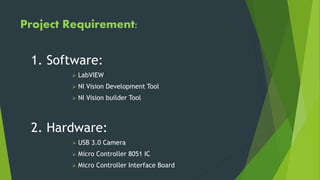
Project Requirement:
1. Software:
 LabVIEW
 NI Vision Development Tool
 NI Vision builder Tool
2. Hardware:
 USB 3.0 Camera
 Micro Controller 8051 IC
 Micro Controller Interface Board
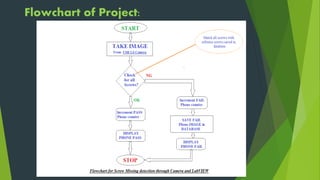
Flowchart of Project:
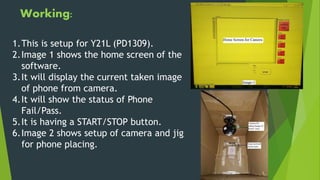
Working:
1.This is setup for Y21L (PD1309).
2.Image 1 shows the home screen of the
software.
3.It will display the current taken image
of phone from camera.
4.It will show the status of Phone
Fail/Pass.
5.It is having a START/STOP button.
6.Image 2 shows setup of camera and jig
for phone placing.
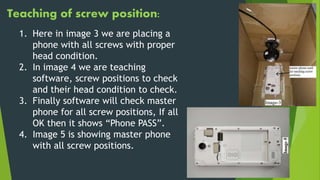
Teaching of screw position:
1. Here in image 3 we are placing a
phone with all screws with proper
head condition.
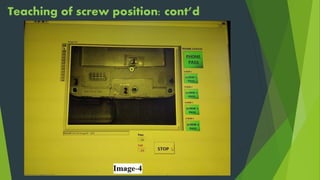
2. In image 4 we are teaching
software, screw positions to check
and their head condition to check.
3. Finally software will check master
phone for all screw positions, If all
OK then it shows “Phone PASS”.
4. Image 5 is showing master phone
with all screw positions.
Teaching of screw position: cont’d
Testing of Phone 1:
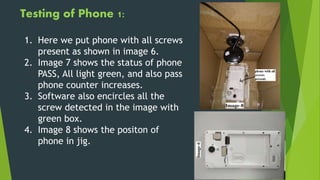
1. Here we put phone with all screws
present as shown in image 6.
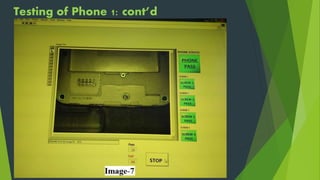
2. Image 7 shows the status of phone
PASS, All light green, and also pass
phone counter increases.
3. Software also encircles all the
screw detected in the image with
green box.
4. Image 8 shows the positon of
phone in jig.
Testing of Phone 1: cont’d
Testing of Phone 2:
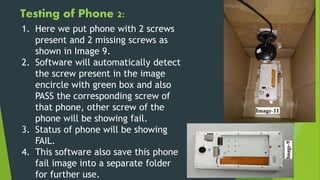
1. Here we put phone with 2 screws
present and 2 missing screws as
shown in Image 9.
2. Software will automatically detect
the screw present in the image
encircle with green box and also
PASS the corresponding screw of
that phone, other screw of the
phone will be showing fail.
3. Status of phone will be showing
FAIL.
4. This software also save this phone
fail image into a separate folder
for further use.
Testing of Phone 2: cont’d
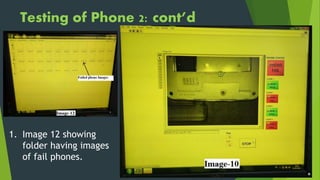
1. Image 12 showing
folder having images
of fail phones.
Testing of Phone 3:
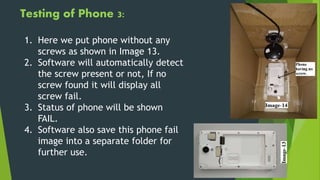
1. Here we put phone without any
screws as shown in Image 13.
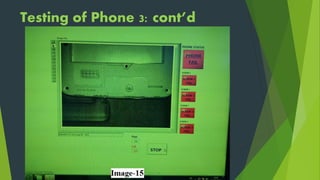
2. Software will automatically detect
the screw present or not, If no
screw found it will display all
screw fail.
3. Status of phone will be shown
FAIL.
4. Software also save this phone fail
image into a separate folder for
further use.
Testing of Phone 3: cont’d
This software can
be use in assembly
area before packing
phone to check all
the cushions, RF
wire, Miler tape,
BTB connectors
present and
properly arranged.
This software can
be used in packing
area to check MRP
printed label for
any mismatch or
damage.
This software can be
use any of that place
where we want to
double assure about
the quality of that
process.
Future
Scope:
 Working on creating operator ID for Login, to save record of screw
miss by that operator.
 Software should have LINE ID so that data will be save line wise
and model wise also.
 Each Image folder must be updated over server after certain
interval of time.
 Software should create a text file with line no, Date, Model No
and time, to save fail phone date like which screw miss, which
screw dent at when time. This file should be updated to server
over certain interval of time.
 Missed screw should be encircled with red box.
 Software should have exe file and have a teaching option from
where we can teach PC about screw position.
Further Upgradation: Going ON
THANK
YOU

Screw Missing Detetction

  • 1.
    Screw Missing Detection UsingCamera and LabVIEW Under Supervision: Under Guidence: Mr. Aamir Babu Mr. Arpit Aggrawal Engg. Manager Test Engineer Designed By: Mr. Swetansh Mani Shrivastava Date: September, 02, 2016
  • 2.
    Objective:  Designing asystem i.e. Combination of software and Hardware which is able to overlook our product, is there any part missing, NG, damage, improperly installed etc.  System should be able to warn the operator for any mistake and update data of mistake over server as well.
  • 3.
    Project Requirement: 1. Software: LabVIEW  NI Vision Development Tool  NI Vision builder Tool 2. Hardware:  USB 3.0 Camera  Micro Controller 8051 IC  Micro Controller Interface Board
  • 4.
  • 5.
    Working: 1.This is setupfor Y21L (PD1309). 2.Image 1 shows the home screen of the software. 3.It will display the current taken image of phone from camera. 4.It will show the status of Phone Fail/Pass. 5.It is having a START/STOP button. 6.Image 2 shows setup of camera and jig for phone placing.
  • 6.
    Teaching of screwposition: 1. Here in image 3 we are placing a phone with all screws with proper head condition. 2. In image 4 we are teaching software, screw positions to check and their head condition to check. 3. Finally software will check master phone for all screw positions, If all OK then it shows “Phone PASS”. 4. Image 5 is showing master phone with all screw positions.
  • 7.
    Teaching of screwposition: cont’d
  • 8.
    Testing of Phone1: 1. Here we put phone with all screws present as shown in image 6. 2. Image 7 shows the status of phone PASS, All light green, and also pass phone counter increases. 3. Software also encircles all the screw detected in the image with green box. 4. Image 8 shows the positon of phone in jig.
  • 9.
    Testing of Phone1: cont’d
  • 10.
    Testing of Phone2: 1. Here we put phone with 2 screws present and 2 missing screws as shown in Image 9. 2. Software will automatically detect the screw present in the image encircle with green box and also PASS the corresponding screw of that phone, other screw of the phone will be showing fail. 3. Status of phone will be showing FAIL. 4. This software also save this phone fail image into a separate folder for further use.
  • 11.
    Testing of Phone2: cont’d 1. Image 12 showing folder having images of fail phones.
  • 12.
    Testing of Phone3: 1. Here we put phone without any screws as shown in Image 13. 2. Software will automatically detect the screw present or not, If no screw found it will display all screw fail. 3. Status of phone will be shown FAIL. 4. Software also save this phone fail image into a separate folder for further use.
  • 13.
    Testing of Phone3: cont’d
  • 14.
    This software can beuse in assembly area before packing phone to check all the cushions, RF wire, Miler tape, BTB connectors present and properly arranged. This software can be used in packing area to check MRP printed label for any mismatch or damage. This software can be use any of that place where we want to double assure about the quality of that process. Future Scope:
  • 15.
     Working oncreating operator ID for Login, to save record of screw miss by that operator.  Software should have LINE ID so that data will be save line wise and model wise also.  Each Image folder must be updated over server after certain interval of time.  Software should create a text file with line no, Date, Model No and time, to save fail phone date like which screw miss, which screw dent at when time. This file should be updated to server over certain interval of time.  Missed screw should be encircled with red box.  Software should have exe file and have a teaching option from where we can teach PC about screw position. Further Upgradation: Going ON
  • 16.