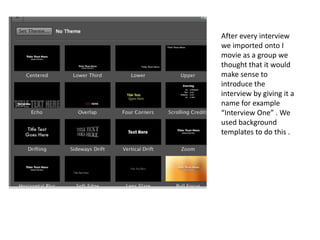
After every interview
we imported onto I
movie as a group we
thought that it would
make sense to
introduce the
interview by giving it a
name for example
“Interview One” . We
used background
templates to do this .
Here is a print screen of how we imported
our recordings from photo booth to IMovie,
As a group we have been able to organise
and arrange where we would like to put our
recordings .
Here is our final production , all
the recoding's have been put in
place and have been played back
to check if there are any errors .
Here is a print screen of how we dragged our
recordings into iMovie in order for us to
organise . To put the recordings on IMovie
you must highlight the recording from the
start to the end then drag it up to the
timeline and position where you would like it
to be.

Screenshots ananlsysis

  • 1.
    After every interview weimported onto I movie as a group we thought that it would make sense to introduce the interview by giving it a name for example “Interview One” . We used background templates to do this .
  • 2.
    Here is aprint screen of how we imported our recordings from photo booth to IMovie, As a group we have been able to organise and arrange where we would like to put our recordings .
  • 3.
    Here is ourfinal production , all the recoding's have been put in place and have been played back to check if there are any errors .
  • 4.
    Here is aprint screen of how we dragged our recordings into iMovie in order for us to organise . To put the recordings on IMovie you must highlight the recording from the start to the end then drag it up to the timeline and position where you would like it to be.